Welcome to the HPX documentation!
If you’re new to HPX you can get started with the Quick start guide. Don’t forget to read the Terminology section to learn about the most important concepts in HPX. The Examples give you a feel for how it is to write real HPX applications and the Manual contains detailed information about everything from building HPX to debugging it. There are links to blog posts and videos about HPX in Additional material.
If you can’t find what you’re looking for in the documentation, please:
open an issue on GitHub;
contact us on IRC, the HPX channel on the C++ Slack, or on our mailing list; or
read or ask questions tagged with HPX on StackOverflow.
See Citing HPX for details on how to cite HPX in publications. See HPX users for a list of institutions and projects using HPX.
What is HPX?
HPX is a C++ Standard Library for Concurrency and Parallelism. It implements all of the corresponding facilities as defined by the C++ Standard. Additionally, in HPX we implement functionalities proposed as part of the ongoing C++ standardization process. We also extend the C++ Standard APIs to the distributed case. HPX is developed by the STE||AR group (see People).
The goal of HPX is to create a high quality, freely available, open source implementation of a new programming model for conventional systems, such as classic Linux based Beowulf clusters or multi-socket highly parallel SMP nodes. At the same time, we want to have a very modular and well designed runtime system architecture which would allow us to port our implementation onto new computer system architectures. We want to use real-world applications to drive the development of the runtime system, coining out required functionalities and converging onto a stable API which will provide a smooth migration path for developers.
The API exposed by HPX is not only modeled after the interfaces defined by the C++11/14/17/20 ISO standard. It also adheres to the programming guidelines used by the Boost collection of C++ libraries. We aim to improve the scalability of today’s applications and to expose new levels of parallelism which are necessary to take advantage of the exascale systems of the future.
What’s so special about HPX?
HPX exposes a uniform, standards-oriented API for ease of programming parallel and distributed applications.
It enables programmers to write fully asynchronous code using hundreds of millions of threads.
HPX provides unified syntax and semantics for local and remote operations.
HPX makes concurrency manageable with dataflow and future based synchronization.
It implements a rich set of runtime services supporting a broad range of use cases.
HPX exposes a uniform, flexible, and extendable performance counter framework which can enable runtime adaptivity
It is designed to solve problems conventionally considered to be scaling-impaired.
HPX has been designed and developed for systems of any scale, from hand-held devices to very large scale systems.
It is the first fully functional implementation of the ParalleX execution model.
HPX is published under a liberal open-source license and has an open, active, and thriving developer community.
Why HPX?
Current advances in high performance computing (HPC) continue to suffer from the issues plaguing parallel computation. These issues include, but are not limited to, ease of programming, inability to handle dynamically changing workloads, scalability, and efficient utilization of system resources. Emerging technological trends such as multi-core processors further highlight limitations of existing parallel computation models. To mitigate the aforementioned problems, it is necessary to rethink the approach to parallelization models. ParalleX contains mechanisms such as multi-threading, parcels, global name space support, percolation and local control objects (LCO). By design, ParalleX overcomes limitations of current models of parallelism by alleviating contention, latency, overhead and starvation. With ParalleX, it is further possible to increase performance by at least an order of magnitude on challenging parallel algorithms, e.g., dynamic directed graph algorithms and adaptive mesh refinement methods for astrophysics. An additional benefit of ParalleX is fine-grained control of power usage, enabling reductions in power consumption.
ParalleX—a new execution model for future architectures
ParalleX is a new parallel execution model that offers an alternative to the conventional computation models, such as message passing. ParalleX distinguishes itself by:
Split-phase transaction model
Message-driven
Distributed shared memory (not cache coherent)
Multi-threaded
Futures synchronization
Synchronization for anonymous producer-consumer scenarios
Percolation (pre-staging of task data)
The ParalleX model is intrinsically latency hiding, delivering an abundance of variable-grained parallelism within a hierarchical namespace environment. The goal of this innovative strategy is to enable future systems delivering very high efficiency, increased scalability and ease of programming. ParalleX can contribute to significant improvements in the design of all levels of computing systems and their usage from application algorithms and their programming languages to system architecture and hardware design together with their supporting compilers and operating system software.
What is HPX?
High Performance ParalleX (HPX) is the first runtime system implementation of the ParalleX execution model. The HPX runtime software package is a modular, feature-complete, and performance-oriented representation of the ParalleX execution model targeted at conventional parallel computing architectures, such as SMP nodes and commodity clusters. It is academically developed and freely available under an open source license. We provide HPX to the community for experimentation and application to achieve high efficiency and scalability for dynamic adaptive and irregular computational problems. HPX is a C++ library that supports a set of critical mechanisms for dynamic adaptive resource management and lightweight task scheduling within the context of a global address space. It is solidly based on many years of experience in writing highly parallel applications for HPC systems.
The two-decade success of the communicating sequential processes (CSP) execution model and its message passing interface (MPI) programming model have been seriously eroded by challenges of power, processor core complexity, multi-core sockets, and heterogeneous structures of GPUs. Both efficiency and scalability for some current (strong scaled) applications and future Exascale applications demand new techniques to expose new sources of algorithm parallelism and exploit unused resources through adaptive use of runtime information.
The ParalleX execution model replaces CSP to provide a new computing paradigm embodying the governing principles for organizing and conducting highly efficient scalable computations greatly exceeding the capabilities of today’s problems. HPX is the first practical, reliable, and performance-oriented runtime system incorporating the principal concepts of the ParalleX model publicly provided in open source release form.
HPX is designed by the STE||AR Group (Systems Technology, Emergent Parallelism, and Algorithm Research) at Louisiana State University (LSU)’s Center for Computation and Technology (CCT) to enable developers to exploit the full processing power of many-core systems with an unprecedented degree of parallelism. STE||AR is a research group focusing on system software solutions and scientific application development for hybrid and many-core hardware architectures.
What makes our systems slow?
Estimates say that we currently run our computers at well below 100% efficiency. The theoretical peak performance (usually measured in FLOPS—floating point operations per second) is much higher than any practical peak performance reached by any application. This is particularly true for highly parallel hardware. The more hardware parallelism we provide to an application, the better the application must scale in order to efficiently use all the resources of the machine. Roughly speaking, we distinguish two forms of scalability: strong scaling (see Amdahl’s Law) and weak scaling (see Gustafson’s Law). Strong scaling is defined as how the solution time varies with the number of processors for a fixed total problem size. It gives an estimate of how much faster we can solve a particular problem by throwing more resources at it. Weak scaling is defined as how the solution time varies with the number of processors for a fixed problem size per processor. In other words, it defines how much more data can we process by using more hardware resources.
In order to utilize as much hardware parallelism as possible an application must exhibit excellent strong and weak scaling characteristics, which requires a high percentage of work executed in parallel, i.e., using multiple threads of execution. Optimally, if you execute an application on a hardware resource with N processors it either runs N times faster or it can handle N times more data. Both cases imply 100% of the work is executed on all available processors in parallel. However, this is just a theoretical limit. Unfortunately, there are more things that limit scalability, mostly inherent to the hardware architectures and the programming models we use. We break these limitations into four fundamental factors that make our systems SLOW:
Starvation occurs when there is insufficient concurrent work available to maintain high utilization of all resources.
Latencies are imposed by the time-distance delay intrinsic to accessing remote resources and services.
Overhead is work required for the management of parallel actions and resources on the critical execution path, which is not necessary in a sequential variant.
Waiting for contention resolution is the delay due to the lack of availability of oversubscribed shared resources.
Each of those four factors manifests itself in multiple and different ways; each of the hardware architectures and programming models expose specific forms. However, the interesting part is that all of them are limiting the scalability of applications no matter what part of the hardware jungle we look at. Hand-helds, PCs, supercomputers, or the cloud, all suffer from the reign of the 4 horsemen: Starvation, Latency, Overhead, and Contention. This realization is very important as it allows us to derive the criteria for solutions to the scalability problem from first principles, and it allows us to focus our analysis on very concrete patterns and measurable metrics. Moreover, any derived results will be applicable to a wide variety of targets.
Technology demands new response
Today’s computer systems are designed based on the initial ideas of John von Neumann, as published back in 1945, and later extended by the Harvard architecture. These ideas form the foundation, the execution model, of computer systems we use currently. However, a new response is required in the light of the demands created by today’s technology.
So, what are the overarching objectives for designing systems allowing for applications to scale as they should? In our opinion, the main objectives are:
Performance: as previously mentioned, scalability and efficiency are the main criteria people are interested in.
Fault tolerance: the low expected mean time between failures (MTBF) of future systems requires embracing faults, not trying to avoid them.
Power: minimizing energy consumption is a must as it is one of the major cost factors today, and will continue to rise in the future.
Generality: any system should be usable for a broad set of use cases.
Programmability: for programmer this is a very important objective, ensuring long term platform stability and portability.
What needs to be done to meet those objectives, to make applications scale better on tomorrow’s architectures? Well, the answer is almost obvious: we need to devise a new execution model—a set of governing principles for the holistic design of future systems—targeted at minimizing the effect of the outlined SLOW factors. Everything we create for future systems, every design decision we make, every criteria we apply, have to be validated against this single, uniform metric. This includes changes in the hardware architecture we prevalently use today, and it certainly involves new ways of writing software, starting from the operating system, runtime system, compilers, and at the application level. However, the key point is that all those layers have to be co-designed; they are interdependent and cannot be seen as separate facets. The systems we have today have been evolving for over 50 years now. All layers function in a certain way, relying on the other layers to do so. But we do not have the time to wait another 50 years for a new coherent system to evolve. The new paradigms are needed now—therefore, co-design is the key.
Governing principles applied while developing HPX
As it turn out, we do not have to start from scratch. Not everything has to be invented and designed anew. Many of the ideas needed to combat the 4 horsemen already exist, many for more than 30 years. All it takes is to gather them into a coherent approach. We’ll highlight some of the derived principles we think to be crucial for defeating SLOW. Some of those are focused on high-performance computing, others are more general.
Focus on latency hiding instead of latency avoidance
It is impossible to design a system exposing zero latencies. In an effort to come as close as possible to this goal many optimizations are mainly targeted towards minimizing latencies. Examples for this can be seen everywhere, such as low latency network technologies like InfiniBand, caching memory hierarchies in all modern processors, the constant optimization of existing MPI implementations to reduce related latencies, or the data transfer latencies intrinsic to the way we use GPGPUs today. It is important to note that existing latencies are often tightly related to some resource having to wait for the operation to be completed. At the same time it would be perfectly fine to do some other, unrelated work in the meantime, allowing the system to hide the latencies by filling the idle-time with useful work. Modern systems already employ similar techniques (pipelined instruction execution in the processor cores, asynchronous input/output operations, and many more). What we propose is to go beyond anything we know today and to make latency hiding an intrinsic concept of the operation of the whole system stack.
Embrace fine-grained parallelism instead of heavyweight threads
If we plan to hide latencies even for very short operations, such as fetching the contents of a memory cell from main memory (if it is not already cached), we need to have very lightweight threads with extremely short context switching times, optimally executable within one cycle. Granted, for mainstream architectures, this is not possible today (even if we already have special machines supporting this mode of operation, such as the Cray XMT). For conventional systems, however, the smaller the overhead of a context switch and the finer the granularity of the threading system, the better will be the overall system utilization and its efficiency. For today’s architectures we already see a flurry of libraries providing exactly this type of functionality: non-pre-emptive, task-queue based parallelization solutions, such as Intel Threading Building Blocks (TBB), Microsoft Parallel Patterns Library (PPL), Cilk++, and many others. The possibility to suspend a current task if some preconditions for its execution are not met (such as waiting for I/O or the result of a different task), seamlessly switching to any other task which can continue, and to reschedule the initial task after the required result has been calculated, which makes the implementation of latency hiding almost trivial.
Rediscover constraint-based synchronization to replace global barriers
The code we write today is riddled with implicit (and explicit) global barriers. By “global barriers,” we mean the synchronization of the control flow between several (very often all) threads (when using OpenMP) or processes (MPI). For instance, an implicit global barrier is inserted after each loop parallelized using OpenMP as the system synchronizes the threads used to execute the different iterations in parallel. In MPI each of the communication steps imposes an explicit barrier onto the execution flow as (often all) nodes have to be synchronized. Each of those barriers is like the eye of a needle the overall execution is forced to be squeezed through. Even minimal fluctuations in the execution times of the parallel threads (jobs) causes them to wait. Additionally, it is often only one of the executing threads that performs the actual reduce operation, which further impedes parallelism. A closer analysis of a couple of key algorithms used in science applications reveals that these global barriers are not always necessary. In many cases it is sufficient to synchronize a small subset of the threads. Any operation should proceed whenever the preconditions for its execution are met, and only those. Usually there is no need to wait for iterations of a loop to finish before you can continue calculating other things; all you need is to complete the iterations that produce the required results for the next operation. Good bye global barriers, hello constraint based synchronization! People have been trying to build this type of computing (and even computers) since the 1970s. The theory behind what they did is based on ideas around static and dynamic dataflow. There are certain attempts today to get back to those ideas and to incorporate them with modern architectures. For instance, a lot of work is being done in the area of constructing dataflow-oriented execution trees. Our results show that employing dataflow techniques in combination with the other ideas, as outlined herein, considerably improves scalability for many problems.
Adaptive locality control instead of static data distribution
While this principle seems to be a given for single desktop or laptop computers (the operating system is your friend), it is everything but ubiquitous on modern supercomputers, which are usually built from a large number of separate nodes (i.e., Beowulf clusters), tightly interconnected by a high-bandwidth, low-latency network. Today’s prevalent programming model for those is MPI, which does not directly help with proper data distribution, leaving it to the programmer to decompose the data to all of the nodes the application is running on. There are a couple of specialized languages and programming environments based on PGAS (Partitioned Global Address Space) designed to overcome this limitation, such as Chapel, X10, UPC, or Fortress. However, all systems based on PGAS rely on static data distribution. This works fine as long as this static data distribution does not result in heterogeneous workload distributions or other resource utilization imbalances. In a distributed system these imbalances can be mitigated by migrating part of the application data to different localities (nodes). The only framework supporting (limited) migration today is Charm++. The first attempts towards solving related problem go back decades as well, a good example is the Linda coordination language. Nevertheless, none of the other mentioned systems support data migration today, which forces the users to either rely on static data distribution and live with the related performance hits or to implement everything themselves, which is very tedious and difficult. We believe that the only viable way to flexibly support dynamic and adaptive locality control is to provide a global, uniform address space to the applications, even on distributed systems.
Prefer moving work to the data over moving data to the work
For the best performance it seems obvious to minimize the amount of bytes transferred from one part of the system to another. This is true on all levels. At the lowest level we try to take advantage of processor memory caches, thus, minimizing memory latencies. Similarly, we try to amortize the data transfer time to and from GPGPUs as much as possible. At high levels we try to minimize data transfer between different nodes of a cluster or between different virtual machines on the cloud. Our experience (well, it’s almost common wisdom) shows that the amount of bytes necessary to encode a certain operation is very often much smaller than the amount of bytes encoding the data the operation is performed upon. Nevertheless, we still often transfer the data to a particular place where we execute the operation just to bring the data back to where it came from afterwards. As an example let’s look at the way we usually write our applications for clusters using MPI. This programming model is all about data transfer between nodes. MPI is the prevalent programming model for clusters, and it is fairly straightforward to understand and to use. Therefore, we often write applications in a way that accommodates this model, centered around data transfer. These applications usually work well for smaller problem sizes and for regular data structures. The larger the amount of data we have to churn and the more irregular the problem domain becomes, the worse the overall machine utilization and the (strong) scaling characteristics become. While it is not impossible to implement more dynamic, data driven, and asynchronous applications using MPI, it is somewhat difficult to do so. At the same time, if we look at applications that prefer to execute the code close to the locality where the data was placed, i.e., utilizing active messages (for instance based on Charm++), we see better asynchrony, simpler application codes, and improved scaling.
Favor message driven computation over message passing
Today’s prevalently used programming model on parallel (multi-node) systems is MPI. It is based on message passing, as the name implies, which means that the receiver has to be aware of a message about to come in. Both codes, the sender and the receiver, have to synchronize in order to perform the communication step. Even the newer, asynchronous interfaces require explicitly coding the algorithms around the required communication scheme. As a result, everything but the most trivial MPI applications spends a considerable amount of time waiting for incoming messages, thus, causing starvation and latencies to impede full resource utilization. The more complex and more dynamic the data structures and algorithms become, the larger the adverse effects. The community discovered message-driven and data-driven methods of implementing algorithms a long time ago, and systems such as Charm++ have already integrated active messages demonstrating the validity of the concept. Message-driven computation allows for sending messages without requiring the receiver to actively wait for them. Any incoming message is handled asynchronously and triggers the encoded action by passing along arguments and—possibly—continuations. HPX combines this scheme with work-queue based scheduling as described above, which allows the system to almost completely overlap any communication with useful work, thereby minimizing latencies.
Quick start
This section is intended to get you to the point of running a basic HPX program as quickly as possible. To that end we skip many details but instead give you hints and links to more details along the way.
We assume that you are on a Unix system with access to reasonably recent
packages. You should have cmake and make available for the build system
(pkg-config is also supported, see Using HPX with pkg-config).
Getting HPX
Download a tarball of the latest release from HPX Downloads and
unpack it or clone the repository directly using git:
git clone https://github.com/STEllAR-GROUP/hpx.git
It is also recommended that you check out the latest stable tag:
git checkout 1.7.1
HPX dependencies
The minimum dependencies needed to use HPX are Boost and Portable Hardware Locality (HWLOC). If these
are not available through your system package manager, see
Installing Boost and Installing Hwloc for instructions on how
to build them yourself. In addition to Boost and Portable Hardware Locality (HWLOC), it is recommended
that you don’t use the system allocator, but instead use either tcmalloc
from google-perftools (default) or jemalloc for better performance. If you
would like to try HPX without a custom allocator at this point, you can
configure HPX to use the system allocator in the next step.
A full list of required and optional dependencies, including recommended versions, is available at Prerequisites.
Building HPX
Once you have the source code and the dependencies, set up a separate build directory and configure the project. Assuming all your dependencies are in paths known to CMake, the following gets you started:
# In the HPX source directory
mkdir build && cd build
cmake -DCMAKE_INSTALL_PREFIX=/install/path ..
make install
This will build the core HPX libraries and examples, and install them to your
chosen location. If you want to install HPX to system folders, simply leave out
the CMAKE_INSTALL_PREFIX option. This may take a while. To speed up the
process, launch more jobs by passing the -jN option to make.
Tip
Do not set only -j (i.e. -j without an explicit number of jobs)
unless you have a lot of memory available on your machine.
Tip
If you want to change CMake variables for your build, it is usually a good
idea to start with a clean build directory to avoid configuration problems.
It is especially important that you use a clean build directory when changing
between Release and Debug modes.
If your dependencies are in custom locations, you may need to tell CMake where to find them by passing one or more of the following options to CMake:
-DBOOST_ROOT=/path/to/boost
-DHWLOC_ROOT=/path/to/hwloc
-DTCMALLOC_ROOT=/path/to/tcmalloc
-DJEMALLOC_ROOT=/path/to/jemalloc
If you want to try HPX without using a custom allocator pass
-DHPX_WITH_MALLOC=system to CMake.
Important
If you are building HPX for a system with more than 64 processing units,
you must change the CMake variables HPX_WITH_MORE_THAN_64_THREADS (to
On) and HPX_WITH_MAX_CPU_COUNT (to a value at least as big as the
number of (virtual) cores on your system).
To build the tests, run make tests. To run the tests, run either make test
or use ctest for more control over which tests to run. You can run single
tests for example with ctest --output-on-failure -R
tests.unit.parallel.algorithms.for_loop or a whole group of tests with ctest
--output-on-failure -R tests.unit.
If you did not run make install earlier, do so now or build the
hello_world_1 example by running:
make hello_world_1
HPX executables end up in the bin directory in your build directory. You
can now run hello_world_1 and should see the following output:
./bin/hello_world_1
Hello World!
You’ve just run an example which prints Hello World! from the HPX runtime.
The source for the example is in examples/quickstart/hello_world_1.cpp. The
hello_world_distributed example (also available in the
examples/quickstart directory) is a distributed hello world program, which is
described in Remote execution with actions: Hello world. It provides a gentle introduction to
the distributed aspects of HPX.
Tip
Most build targets in HPX have two names: a simple name and
a hierarchical name corresponding to what type of example or
test the target is. If you are developing HPX it is often helpful to run
make help to get a list of available targets. For example, make help |
grep hello_world outputs the following:
... examples.quickstart.hello_world_2
... hello_world_2
... examples.quickstart.hello_world_1
... hello_world_1
... examples.quickstart.hello_world_distributed
... hello_world_distributed
It is also possible to build, for instance, all quickstart examples using make
examples.quickstart.
Installing and building HPX via vcpkg
You can download and install HPX using the vcpkg <https://github.com/Microsoft/vcpkg> dependency manager:
git clone https://github.com/Microsoft/vcpkg.git
cd vcpkg
./bootstrap-vcpkg.sh
./vcpkg integrate install
vcpkg install hpx
The HPX port in vcpkg is kept up to date by Microsoft team members and community contributors. If the version is out of date, please create an issue or pull request <https://github.com/Microsoft/vcpkg> on the vcpkg repository.
Hello, World!
The following CMakeLists.txt is a minimal example of what you need in order to
build an executable using CMake and HPX:
cmake_minimum_required(VERSION 3.17)
project(my_hpx_project CXX)
find_package(HPX REQUIRED)
add_executable(my_hpx_program main.cpp)
target_link_libraries(my_hpx_program HPX::hpx HPX::wrap_main HPX::iostreams_component)
Note
You will most likely have more than one main.cpp file in your project.
See the section on Using HPX with CMake-based projects for more details on how to use
add_hpx_executable.
Note
HPX::wrap_main is required if you are implicitly using main() as the
runtime entry point. See Re-use the main() function as the main HPX entry point for more information.
Note
HPX::iostreams_component is optional for a minimal project but lets us
use the HPX equivalent of std::cout, i.e., the HPX The HPX I/O-streams component
functionality in our application.
Create a new project directory and a CMakeLists.txt with the contents above.
Also create a main.cpp with the contents below.
// Including 'hpx/hpx_main.hpp' instead of the usual 'hpx/hpx_init.hpp' enables
// to use the plain C-main below as the direct main HPX entry point.
#include <hpx/hpx_main.hpp>
#include <hpx/iostream.hpp>
int main()
{
// Say hello to the world!
hpx::cout << "Hello World!\n" << hpx::flush;
return 0;
}
Then, in your project directory run the following:
mkdir build && cd build
cmake -DCMAKE_PREFIX_PATH=/path/to/hpx/installation ..
make all
./my_hpx_program
The program looks almost like a regular C++ hello world with the exception of
the two includes and hpx::cout. When you include hpx_main.hpp some
things will be done behind the scenes to make sure that main actually gets
launched on the HPX runtime. So while it looks almost the same you can now use
futures, async, parallel algorithms and more which make use of the HPX
runtime with lightweight threads. hpx::cout is a replacement for
std::cout to make sure printing never blocks a lightweight thread. You can
read more about hpx::cout in The HPX I/O-streams component. If you rebuild and run your
program now, you should see the familiar Hello World!:
./my_hpx_program
Hello World!
Note
You do not have to let HPX take over your main function like in the
example. You can instead keep your normal main function, and define a
separate hpx_main function which acts as the entry point to the HPX
runtime. In that case you start the HPX runtime explicitly by calling
hpx::init:
// Copyright (c) 2007-2012 Hartmut Kaiser
//
// SPDX-License-Identifier: BSL-1.0
// Distributed under the Boost Software License, Version 1.0. (See accompanying
// file LICENSE_1_0.txt or copy at http://www.boost.org/LICENSE_1_0.txt)
///////////////////////////////////////////////////////////////////////////////
// The purpose of this example is to initialize the HPX runtime explicitly and
// execute a HPX-thread printing "Hello World!" once. That's all.
//[hello_world_2_getting_started
#include <hpx/hpx_init.hpp>
#include <hpx/iostream.hpp>
int hpx_main(int, char**)
{
// Say hello to the world!
hpx::cout << "Hello World!\n" << hpx::flush;
return hpx::finalize();
}
int main(int argc, char* argv[])
{
return hpx::init(argc, argv);
}
//]
You can also use hpx::start and hpx::stop for a
non-blocking alternative, or use hpx::resume and
hpx::suspend if you need to combine HPX with other runtimes.
See Starting the HPX runtime for more details on how to initialize and run the HPX runtime.
Caution
When including hpx_main.hpp the user-defined main gets renamed and
the real main function is defined by HPX. This means that the
user-defined main must include a return statement, unlike the real
main. If you do not include the return statement, you may end up with
confusing compile time errors mentioning user_main or even runtime
errors.
Writing task-based applications
So far we haven’t done anything that can’t be done using the C++ standard library. In this section we will give a short overview of what you can do with HPX on a single node. The essence is to avoid global synchronization and break up your application into small, composable tasks whose dependencies control the flow of your application. Remember, however, that HPX allows you to write distributed applications similarly to how you would write applications for a single node (see Why HPX? and Writing distributed HPX applications).
If you are already familiar with async and futures from the C++ standard
library, the same functionality is available in HPX.
The following terminology is essential when talking about task-based C++ programs:
lightweight thread: Essential for good performance with task-based programs. Lightweight refers to smaller stacks and faster context switching compared to OS threads. Smaller overheads allow the program to be broken up into smaller tasks, which in turns helps the runtime fully utilize all processing units.
async: The most basic way of launching tasks asynchronously. Returns afuture<T>.future<T>: Represents a value of typeTthat will be ready in the future. The value can be retrieved withget(blocking) and one can check if the value is ready withis_ready(non-blocking).shared_future<T>: Same asfuture<T>but can be copied (similar tostd::unique_ptrvsstd::shared_ptr).continuation: A function that is to be run after a previous task has run (represented by a future).
thenis a method offuture<T>that takes a function to run next. Used to build up dataflow DAGs (directed acyclic graphs).shared_futures help you split up nodes in the DAG and functions likewhen_allhelp you join nodes in the DAG.
The following example is a collection of the most commonly used functionality in HPX:
#include <hpx/hpx_main.hpp>
#include <hpx/include/lcos.hpp>
#include <hpx/include/parallel_generate.hpp>
#include <hpx/include/parallel_sort.hpp>
#include <hpx/iostream.hpp>
#include <random>
#include <vector>
void final_task(
hpx::future<hpx::tuple<hpx::future<double>, hpx::future<void>>>)
{
hpx::cout << "in final_task" << hpx::endl;
}
// Avoid ABI incompatibilities between C++11/C++17 as std::rand has exception
// specification in libstdc++.
int rand_wrapper()
{
return std::rand();
}
int main(int, char**)
{
// A function can be launched asynchronously. The program will not block
// here until the result is available.
hpx::future<int> f = hpx::async([]() { return 42; });
hpx::cout << "Just launched a task!" << hpx::endl;
// Use get to retrieve the value from the future. This will block this task
// until the future is ready, but the HPX runtime will schedule other tasks
// if there are tasks available.
hpx::cout << "f contains " << f.get() << hpx::endl;
// Let's launch another task.
hpx::future<double> g = hpx::async([]() { return 3.14; });
// Tasks can be chained using the then method. The continuation takes the
// future as an argument.
hpx::future<double> result = g.then([](hpx::future<double>&& gg) {
// This function will be called once g is ready. gg is g moved
// into the continuation.
return gg.get() * 42.0 * 42.0;
});
// You can check if a future is ready with the is_ready method.
hpx::cout << "Result is ready? " << result.is_ready() << hpx::endl;
// You can launch other work in the meantime. Let's sort a vector.
std::vector<int> v(1000000);
// We fill the vector synchronously and sequentially.
hpx::generate(hpx::execution::seq, std::begin(v), std::end(v),
&rand_wrapper);
// We can launch the sort in parallel and asynchronously.
hpx::future<void> done_sorting = hpx::parallel::sort(
hpx::execution::par( // In parallel.
hpx::execution::task), // Asynchronously.
std::begin(v), std::end(v));
// We launch the final task when the vector has been sorted and result is
// ready using when_all.
auto all = hpx::when_all(result, done_sorting).then(&final_task);
// We can wait for all to be ready.
all.wait();
// all must be ready at this point because we waited for it to be ready.
hpx::cout << (all.is_ready() ? "all is ready!" : "all is not ready...")
<< hpx::endl;
return hpx::finalize();
}
Try copying the contents to your main.cpp file and look at the output. It can
be a good idea to go through the program step by step with a debugger. You can
also try changing the types or adding new arguments to functions to make sure
you can get the types to match. The type of the then method can be especially
tricky to get right (the continuation needs to take the future as an argument).
Note
HPX programs accept command line arguments. The most important one is
--hpx:threads=N to set the number of OS threads used by
HPX. HPX uses one thread per core by default. Play around with the
example above and see what difference the number of threads makes on the
sort function. See Launching and configuring HPX applications for more details on
how and what options you can pass to HPX.
Tip
The example above used the construction hpx::when_all(...).then(...). For
convenience and performance it is a good idea to replace uses of
hpx::when_all(...).then(...) with dataflow. See
Dataflow: Interest calculator for more details on dataflow.
Tip
If possible, try to use the provided parallel algorithms instead of writing your own implementation. This can save you time and the resulting program is often faster.
Next steps
If you haven’t done so already, reading the Terminology section will help you get familiar with the terms used in HPX.
The Examples section contains small, self-contained walkthroughs of example HPX programs. The Local to remote: 1D stencil example is a thorough, realistic example starting from a single node implementation and going stepwise to a distributed implementation.
The Manual contains detailed information on writing, building and running HPX applications.
Terminology
This section gives definitions for some of the terms used throughout the HPX documentation and source code.
- Locality
A locality in HPX describes a synchronous domain of execution, or the domain of bounded upper response time. This normally is just a single node in a cluster or a NUMA domain in a SMP machine.
- Active Global Address Space
- AGAS
HPX incorporates a global address space. Any executing thread can access any object within the domain of the parallel application with the caveat that it must have appropriate access privileges. The model does not assume that global addresses are cache coherent; all loads and stores will deal directly with the site of the target object. All global addresses within a Synchronous Domain are assumed to be cache coherent for those processor cores that incorporate transparent caches. The Active Global Address Space used by HPX differs from research PGAS models. Partitioned Global Address Space is passive in their means of address translation. Copy semantics, distributed compound operations, and affinity relationships are some of the global functionality supported by AGAS.
- Process
The concept of the “process” in HPX is extended beyond that of either sequential execution or communicating sequential processes. While the notion of process suggests action (as do “function” or “subroutine”) it has a further responsibility of context, that is, the logical container of program state. It is this aspect of operation that process is employed in HPX. Furthermore, referring to “parallel processes” in HPX designates the presence of parallelism within the context of a given process, as well as the coarse grained parallelism achieved through concurrency of multiple processes of an executing user job. HPX processes provide a hierarchical name space within the framework of the active global address space and support multiple means of internal state access from external sources.
- Parcel
The Parcel is a component in HPX that communicates data, invokes an action at a distance, and distributes flow-control through the migration of continuations. Parcels bridge the gap of asynchrony between synchronous domains while maintaining symmetry of semantics between local and global execution. Parcels enable message-driven computation and may be seen as a form of “active messages”. Other important forms of message-driven computation predating active messages include dataflow tokens, the J-machine’s support for remote method instantiation, and at the coarse grained variations of Unix remote procedure calls, among others. This enables work to be moved to the data as well as performing the more common action of bringing data to the work. A parcel can cause actions to occur remotely and asynchronously, among which are the creation of threads at different system nodes or synchronous domains.
- Local Control Object
- Lightweight Control Object
- LCO
A local control object (sometimes called a lightweight control object) is a general term for the synchronization mechanisms used in HPX. Any object implementing a certain concept can be seen as an LCO. This concepts encapsulates the ability to be triggered by one or more events which when taking the object into a predefined state will cause a thread to be executed. This could either create a new thread or resume an existing thread.
The LCO is a family of synchronization functions potentially representing many classes of synchronization constructs, each with many possible variations and multiple instances. The LCO is sufficiently general that it can subsume the functionality of conventional synchronization primitives such as spinlocks, mutexes, semaphores, and global barriers. However due to the rich concept an LCO can represent powerful synchronization and control functionality not widely employed, such as dataflow and futures (among others), which open up enormous opportunities for rich diversity of distributed control and operation.
See Using LCOs for more details on how to use LCOs in HPX.
- Action
An action is a function that can be invoked remotely. In HPX a plain function can be made into an action using a macro. See Applying actions for details on how to use actions in HPX.
- Component
A component is a C++ object which can be accessed remotely. A component can also contain member functions which can be invoked remotely. These are referred to as component actions. See Writing components for details on how to use components in HPX.
Examples
The following sections analyze some examples to help you get familiar with the HPX style of programming. We start off with simple examples that utilize basic HPX elements and then begin to expose the reader to the more complex and powerful HPX concepts.
Asynchronous execution with hpx::async: Fibonacci
The Fibonacci sequence is a sequence of numbers starting with 0 and 1 where every subsequent number is the sum of the previous two numbers. In this example, we will use HPX to calculate the value of the n-th element of the Fibonacci sequence. In order to compute this problem in parallel, we will use a facility known as a future.
As shown in the Fig. 1 below, a future encapsulates a delayed computation. It acts as a proxy for a result initially not known, most of the time because the computation of the result has not completed yet. The future synchronizes the access of this value by optionally suspending any HPX-threads requesting the result until the value is available. When a future is created, it spawns a new HPX-thread (either remotely with a parcel or locally by placing it into the thread queue) which, when run, will execute the function associated with the future. The arguments of the function are bound when the future is created.
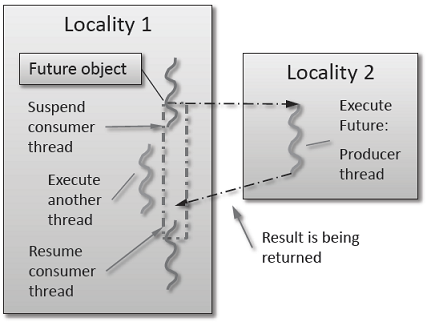
Fig. 1 Schematic of a future execution.
Once the function has finished executing, a write operation is performed on the future. The write operation marks the future as completed, and optionally stores data returned by the function. When the result of the delayed computation is needed, a read operation is performed on the future. If the future’s function hasn’t completed when a read operation is performed on it, the reader HPX-thread is suspended until the future is ready. The future facility allows HPX to schedule work early in a program so that when the function value is needed it will already be calculated and available. We use this property in our Fibonacci example below to enable its parallel execution.
Setup
The source code for this example can be found here:
fibonacci_local.cpp.
To compile this program, go to your HPX build directory (see HPX build system for information on configuring and building HPX) and enter:
make examples.quickstart.fibonacci_local
To run the program type:
./bin/fibonacci_local
This should print (time should be approximate):
fibonacci(10) == 55
elapsed time: 0.002430 [s]
This run used the default settings, which calculate the tenth element of the
Fibonacci sequence. To declare which Fibonacci value you want to calculate, use
the --n-value option. Additionally you can use the --hpx:threads
option to declare how many OS-threads you wish to use when running the program.
For instance, running:
./bin/fibonacci --n-value 20 --hpx:threads 4
Will yield:
fibonacci(20) == 6765
elapsed time: 0.062854 [s]
Walkthrough
Now that you have compiled and run the code, let’s look at how the code works.
Since this code is written in C++, we will begin with the main() function.
Here you can see that in HPX, main() is only used to initialize the
runtime system. It is important to note that application-specific command line
options are defined here. HPX uses Boost.Program Options for command line
processing. You can see that our programs --n-value option is set by calling
the add_options() method on an instance of
hpx::program_options::options_description. The default value of the
variable is set to 10. This is why when we ran the program for the first time
without using the --n-value option the program returned the 10th value of
the Fibonacci sequence. The constructor argument of the description is the text
that appears when a user uses the --hpx:help option to see what
command line options are available. HPX_APPLICATION_STRING is a macro that
expands to a string constant containing the name of the HPX application
currently being compiled.
In HPX main() is used to initialize the runtime system and pass the
command line arguments to the program. If you wish to add command line options
to your program you would add them here using the instance of the Boost class
options_description, and invoking the public member function
.add_options() (see Boost Documentation for more details). hpx::init
calls hpx_main() after setting up HPX, which is where the logic of our
program is encoded.
int main(int argc, char* argv[])
{
// Configure application-specific options
hpx::program_options::options_description desc_commandline(
"Usage: " HPX_APPLICATION_STRING " [options]");
desc_commandline.add_options()("n-value",
hpx::program_options::value<std::uint64_t>()->default_value(10),
"n value for the Fibonacci function");
// Initialize and run HPX
hpx::init_params init_args;
init_args.desc_cmdline = desc_commandline;
return hpx::init(argc, argv, init_args);
}
The hpx::init function in main() starts the runtime system, and
invokes hpx_main() as the first HPX-thread. Below we can see that the
basic program is simple. The command line option --n-value is read in, a
timer (hpx::chrono::high_resolution_timer) is set up to record the
time it takes to do the computation, the fibonacci function is invoked
synchronously, and the answer is printed out.
int hpx_main(hpx::program_options::variables_map& vm)
{
// extract command line argument, i.e. fib(N)
std::uint64_t n = vm["n-value"].as<std::uint64_t>();
{
// Keep track of the time required to execute.
hpx::chrono::high_resolution_timer t;
std::uint64_t r = fibonacci(n);
char const* fmt = "fibonacci({1}) == {2}\nelapsed time: {3} [s]\n";
hpx::util::format_to(std::cout, fmt, n, r, t.elapsed());
}
return hpx::finalize(); // Handles HPX shutdown
}
The fibonacci function itself is synchronous as the work done inside is
asynchronous. To understand what is happening we have to look inside the
fibonacci function:
std::uint64_t fibonacci(std::uint64_t n)
{
if (n < 2)
return n;
// Invoking the Fibonacci algorithm twice is inefficient.
// However, we intentionally demonstrate it this way to create some
// heavy workload.
hpx::future<std::uint64_t> n1 = hpx::async(fibonacci, n - 1);
hpx::future<std::uint64_t> n2 = hpx::async(fibonacci, n - 2);
return n1.get() +
n2.get(); // wait for the Futures to return their values
}
This block of code looks similar to regular C++ code. First, if (n < 2),
meaning n is 0 or 1, then we return 0 or 1 (recall the first element of the
Fibonacci sequence is 0 and the second is 1). If n is larger than 1 we spawn two
new tasks whose results are contained in n1 and n2. This is done using
hpx::async which takes as arguments a function (function pointer,
object or lambda) and the arguments to the function. Instead of returning a
std::uint64_t like fibonacci does, hpx::async returns a future of a
std::uint64_t, i.e. hpx::future<std::uint64_t>. Each of these futures
represents an asynchronous, recursive call to fibonacci. After we’ve created
the futures, we wait for both of them to finish computing, we add them together,
and return that value as our result. We get the values from the futures using
the get method. The recursive call tree will continue until n is equal to 0
or 1, at which point the value can be returned because it is implicitly known.
When this termination condition is reached, the futures can then be added up,
producing the n-th value of the Fibonacci sequence.
Note that calling get potentially blocks the calling HPX-thread, and lets
other HPX-threads run in the meantime. There are, however, more efficient ways
of doing this. examples/quickstart/fibonacci_futures.cpp contains many more
variations of locally computing the Fibonacci numbers, where each method makes
different tradeoffs in where asynchrony and parallelism is applied. To get
started, however, the method above is sufficient and optimizations can be
applied once you are more familiar with HPX. The example
Dataflow: Interest calculator presents dataflow, which is a way to more
efficiently chain together multiple tasks.
Asynchronous execution with hpx::async and actions: Fibonacci
This example extends the previous example by
introducing actions: functions that can be run remotely. In this
example, however, we will still only run the action locally. The mechanism to
execute actions stays the same: hpx::async. Later
examples will demonstrate running actions on remote localities
(e.g. Remote execution with actions: Hello world).
Setup
The source code for this example can be found here:
fibonacci.cpp.
To compile this program, go to your HPX build directory (see HPX build system for information on configuring and building HPX) and enter:
make examples.quickstart.fibonacci
To run the program type:
./bin/fibonacci
This should print (time should be approximate):
fibonacci(10) == 55
elapsed time: 0.00186288 [s]
This run used the default settings, which calculate the tenth element of the
Fibonacci sequence. To declare which Fibonacci value you want to calculate, use
the --n-value option. Additionally you can use the --hpx:threads
option to declare how many OS-threads you wish to use when running the program.
For instance, running:
./bin/fibonacci --n-value 20 --hpx:threads 4
Will yield:
fibonacci(20) == 6765
elapsed time: 0.233827 [s]
Walkthrough
The code needed to initialize the HPX runtime is the same as in the previous example:
int main(int argc, char* argv[])
{
// Configure application-specific options
hpx::program_options::options_description
desc_commandline("Usage: " HPX_APPLICATION_STRING " [options]");
desc_commandline.add_options()
( "n-value",
hpx::program_options::value<std::uint64_t>()->default_value(10),
"n value for the Fibonacci function")
;
// Initialize and run HPX
hpx::init_params init_args;
init_args.desc_cmdline = desc_commandline;
return hpx::init(argc, argv, init_args);
}
The hpx::init function in main() starts the runtime system, and
invokes hpx_main() as the first HPX-thread. The command line option
--n-value is read in, a timer
(hpx::chrono::high_resolution_timer) is set up to record the time it
takes to do the computation, the fibonacci action is invoked
synchronously, and the answer is printed out.
int hpx_main(hpx::program_options::variables_map& vm)
{
// extract command line argument, i.e. fib(N)
std::uint64_t n = vm["n-value"].as<std::uint64_t>();
{
// Keep track of the time required to execute.
hpx::chrono::high_resolution_timer t;
// Wait for fib() to return the value
fibonacci_action fib;
std::uint64_t r = fib(hpx::find_here(), n);
char const* fmt = "fibonacci({1}) == {2}\nelapsed time: {3} [s]\n";
hpx::util::format_to(std::cout, fmt, n, r, t.elapsed());
}
return hpx::finalize(); // Handles HPX shutdown
}
Upon a closer look we see that we’ve created a std::uint64_t to store the
result of invoking our fibonacci_action fib. This action will
launch synchronously (as the work done inside of the action will be
asynchronous itself) and return the result of the Fibonacci sequence. But wait,
what is an action? And what is this fibonacci_action? For starters,
an action is a wrapper for a function. By wrapping functions, HPX can
send packets of work to different processing units. These vehicles allow users
to calculate work now, later, or on certain nodes. The first argument to our
action is the location where the action should be run. In this
case, we just want to run the action on the machine that we are
currently on, so we use hpx::find_here. To
further understand this we turn to the code to find where fibonacci_action
was defined:
// forward declaration of the Fibonacci function
std::uint64_t fibonacci(std::uint64_t n);
// This is to generate the required boilerplate we need for the remote
// invocation to work.
HPX_PLAIN_ACTION(fibonacci, fibonacci_action);
A plain action is the most basic form of action. Plain
actions wrap simple global functions which are not associated with any
particular object (we will discuss other types of actions in
Components and actions: Accumulator). In this block of code the function fibonacci()
is declared. After the declaration, the function is wrapped in an action
in the declaration HPX_PLAIN_ACTION. This function takes two
arguments: the name of the function that is to be wrapped and the name of the
action that you are creating.
This picture should now start making sense. The function fibonacci() is
wrapped in an action fibonacci_action, which was run synchronously
but created asynchronous work, then returns a std::uint64_t representing the
result of the function fibonacci(). Now, let’s look at the function
fibonacci():
std::uint64_t fibonacci(std::uint64_t n)
{
if (n < 2)
return n;
// We restrict ourselves to execute the Fibonacci function locally.
hpx::naming::id_type const locality_id = hpx::find_here();
// Invoking the Fibonacci algorithm twice is inefficient.
// However, we intentionally demonstrate it this way to create some
// heavy workload.
fibonacci_action fib;
hpx::future<std::uint64_t> n1 =
hpx::async(fib, locality_id, n - 1);
hpx::future<std::uint64_t> n2 =
hpx::async(fib, locality_id, n - 2);
return n1.get() + n2.get(); // wait for the Futures to return their values
}
This block of code is much more straightforward and should look familiar from
the previous example. First, if (n < 2),
meaning n is 0 or 1, then we return 0 or 1 (recall the first element of the
Fibonacci sequence is 0 and the second is 1). If n is larger than 1 we spawn two
tasks using hpx::async. Each of these futures represents an
asynchronous, recursive call to fibonacci. As previously we wait for both
futures to finish computing, get the results, add them together, and return that
value as our result. The recursive call tree will continue until n is equal to 0
or 1, at which point the value can be returned because it is implicitly known.
When this termination condition is reached, the futures can then be added up,
producing the n-th value of the Fibonacci sequence.
Remote execution with actions: Hello world
This program will print out a hello world message on every OS-thread on every locality. The output will look something like this:
hello world from OS-thread 1 on locality 0
hello world from OS-thread 1 on locality 1
hello world from OS-thread 0 on locality 0
hello world from OS-thread 0 on locality 1
Setup
The source code for this example can be found here:
hello_world_distributed.cpp.
To compile this program, go to your HPX build directory (see HPX build system for information on configuring and building HPX) and enter:
make examples.quickstart.hello_world_distributed
To run the program type:
./bin/hello_world_distributed
This should print:
hello world from OS-thread 0 on locality 0
To use more OS-threads use the command line option --hpx:threads and
type the number of threads that you wish to use. For example, typing:
./bin/hello_world_distributed --hpx:threads 2
will yield:
hello world from OS-thread 1 on locality 0
hello world from OS-thread 0 on locality 0
Notice how the ordering of the two print statements will change with subsequent runs. To run this program on multiple localities please see the section How to use HPX applications with PBS.
Walkthrough
Now that you have compiled and run the code, let’s look at how the code works,
beginning with main():
// Here is the main entry point. By using the include 'hpx/hpx_main.hpp' HPX
// will invoke the plain old C-main() as its first HPX thread.
int main()
{
// Get a list of all available localities.
std::vector<hpx::naming::id_type> localities = hpx::find_all_localities();
// Reserve storage space for futures, one for each locality.
std::vector<hpx::lcos::future<void>> futures;
futures.reserve(localities.size());
for (hpx::naming::id_type const& node : localities)
{
// Asynchronously start a new task. The task is encapsulated in a
// future, which we can query to determine if the task has
// completed.
typedef hello_world_foreman_action action_type;
futures.push_back(hpx::async<action_type>(node));
}
// The non-callback version of hpx::lcos::wait_all takes a single parameter,
// a vector of futures to wait on. hpx::wait_all only returns when
// all of the futures have finished.
hpx::wait_all(futures);
return 0;
}
In this excerpt of the code we again see the use of futures. This time the
futures are stored in a vector so that they can easily be accessed.
hpx::wait_all is a family of functions that wait on for an
std::vector<> of futures to become ready. In this piece of code, we are
using the synchronous version of hpx::wait_all, which takes one
argument (the std::vector<> of futures to wait on). This function will not
return until all the futures in the vector have been executed.
In Asynchronous execution with hpx::async and actions: Fibonacci we used hpx::find_here to specify the
target of our actions. Here, we instead use
hpx::find_all_localities, which returns an std::vector<>
containing the identifiers of all the machines in the system, including the one
that we are on.
As in Asynchronous execution with hpx::async and actions: Fibonacci our futures are set using
hpx::async<>. The hello_world_foreman_action is declared
here:
// Define the boilerplate code necessary for the function 'hello_world_foreman'
// to be invoked as an HPX action.
HPX_PLAIN_ACTION(hello_world_foreman, hello_world_foreman_action);
Another way of thinking about this wrapping technique is as follows: functions (the work to be done) are wrapped in actions, and actions can be executed locally or remotely (e.g. on another machine participating in the computation).
Now it is time to look at the hello_world_foreman() function which was
wrapped in the action above:
void hello_world_foreman()
{
// Get the number of worker OS-threads in use by this locality.
std::size_t const os_threads = hpx::get_os_thread_count();
// Populate a set with the OS-thread numbers of all OS-threads on this
// locality. When the hello world message has been printed on a particular
// OS-thread, we will remove it from the set.
std::set<std::size_t> attendance;
for (std::size_t os_thread = 0; os_thread < os_threads; ++os_thread)
attendance.insert(os_thread);
// As long as there are still elements in the set, we must keep scheduling
// HPX-threads. Because HPX features work-stealing task schedulers, we have
// no way of enforcing which worker OS-thread will actually execute
// each HPX-thread.
while (!attendance.empty())
{
// Each iteration, we create a task for each element in the set of
// OS-threads that have not said "Hello world". Each of these tasks
// is encapsulated in a future.
std::vector<hpx::lcos::future<std::size_t>> futures;
futures.reserve(attendance.size());
for (std::size_t worker : attendance)
{
// Asynchronously start a new task. The task is encapsulated in a
// future, which we can query to determine if the task has
// completed. We give the task a hint to run on a particular worker
// thread, but no guarantees are given by the scheduler that the
// task will actually run on that worker thread.
hpx::execution::parallel_executor exec(
hpx::threads::thread_schedule_hint(
hpx::threads::thread_schedule_hint_mode::thread,
static_cast<std::int16_t>(worker)));
futures.push_back(hpx::async(exec, hello_world_worker, worker));
}
// Wait for all of the futures to finish. The callback version of the
// hpx::lcos::wait_each function takes two arguments: a vector of futures,
// and a binary callback. The callback takes two arguments; the first
// is the index of the future in the vector, and the second is the
// return value of the future. hpx::lcos::wait_each doesn't return until
// all the futures in the vector have returned.
hpx::lcos::local::spinlock mtx;
hpx::lcos::wait_each(hpx::unwrapping([&](std::size_t t) {
if (std::size_t(-1) != t)
{
std::lock_guard<hpx::lcos::local::spinlock> lk(mtx);
attendance.erase(t);
}
}),
futures);
}
}
Now, before we discuss hello_world_foreman(), let’s talk about the
hpx::wait_each function.
The version of hpx::lcos::wait_each invokes a callback function
provided by the user, supplying the callback function with the result of the
future.
In hello_world_foreman(), an std::set<> called attendance keeps
track of which OS-threads have printed out the hello world message. When the
OS-thread prints out the statement, the future is marked as ready, and
hpx::lcos::wait_each in hello_world_foreman(). If it is not
executing on the correct OS-thread, it returns a value of -1, which causes
hello_world_foreman() to leave the OS-thread id in attendance.
std::size_t hello_world_worker(std::size_t desired)
{
// Returns the OS-thread number of the worker that is running this
// HPX-thread.
std::size_t current = hpx::get_worker_thread_num();
if (current == desired)
{
// The HPX-thread has been run on the desired OS-thread.
char const* msg = "hello world from OS-thread {1} on locality {2}\n";
hpx::util::format_to(hpx::cout, msg, desired, hpx::get_locality_id())
<< std::flush;
return desired;
}
// This HPX-thread has been run by the wrong OS-thread, make the foreman
// try again by rescheduling it.
return std::size_t(-1);
}
Because HPX features work stealing task schedulers, there is no way to guarantee that an action will be scheduled on a particular OS-thread. This is why we must use a guess-and-check approach.
Components and actions: Accumulator
The accumulator example demonstrates the use of components. Components are C++ classes that expose methods as a type of HPX action. These actions are called component actions.
Components are globally named, meaning that a component action can be called remotely (e.g., from another machine). There are two accumulator examples in HPX.
In the Asynchronous execution with hpx::async and actions: Fibonacci and the Remote execution with actions: Hello world, we introduced plain actions, which wrapped global functions. The target of a plain action is an identifier which refers to a particular machine involved in the computation. For plain actions, the target is the machine where the action will be executed.
Component actions, however, do not target machines. Instead, they target component instances. The instance may live on the machine that we’ve invoked the component action from, or it may live on another machine.
The component in this example exposes three different functions:
reset()- Resets the accumulator value to 0.add(arg)- Addsargto the accumulators value.query()- Queries the value of the accumulator.
This example creates an instance of the accumulator, and then allows the user to enter commands at a prompt, which subsequently invoke actions on the accumulator instance.
Setup
The source code for this example can be found here:
accumulator_client.cpp.
To compile this program, go to your HPX build directory (see HPX build system for information on configuring and building HPX) and enter:
make examples.accumulators.accumulator
To run the program type:
./bin/accumulator_client
Once the program starts running, it will print the following prompt and then wait for input. An example session is given below:
commands: reset, add [amount], query, help, quit
> add 5
> add 10
> query
15
> add 2
> query
17
> reset
> add 1
> query
1
> quit
Walkthrough
Now, let’s take a look at the source code of the accumulator example. This
example consists of two parts: an HPX component library (a library that
exposes an HPX component) and a client application which uses the library.
This walkthrough will cover the HPX component library. The code for the client
application can be found here: accumulator_client.cpp.
An HPX component is represented by two C++ classes:
A server class - The implementation of the component’s functionality.
A client class - A high-level interface that acts as a proxy for an instance of the component.
Typically, these two classes both have the same name, but the server class
usually lives in different sub-namespaces (server). For example, the full
names of the two classes in accumulator are:
examples::server::accumulator(server class)examples::accumulator(client class)
The server class
The following code is from: accumulator.hpp.
All HPX component server classes must inherit publicly from the HPX
component base class: hpx::components::component_base
The accumulator component inherits from
hpx::components::locking_hook. This allows the runtime system to
ensure that all action invocations are serialized. That means that the system
ensures that no two actions are invoked at the same time on a given component
instance. This makes the component thread safe and no additional locking has to
be implemented by the user. Moreover, an accumulator component is a component
because it also inherits from hpx::components::component_base (the
template argument passed to locking_hook is used as its base class). The
following snippet shows the corresponding code:
class accumulator
: public hpx::components::locking_hook<
hpx::components::component_base<accumulator> >
Our accumulator class will need a data member to store its value in, so let’s declare a data member:
argument_type value_;
The constructor for this class simply initializes value_ to 0:
accumulator() : value_(0) {}
Next, let’s look at the three methods of this component that we will be exposing as component actions:
Here are the action types. These types wrap the methods we’re exposing. The wrapping technique is very similar to the one used in the Asynchronous execution with hpx::async and actions: Fibonacci and the Remote execution with actions: Hello world:
HPX_DEFINE_COMPONENT_ACTION(accumulator, reset);
HPX_DEFINE_COMPONENT_ACTION(accumulator, add);
HPX_DEFINE_COMPONENT_ACTION(accumulator, query);
The last piece of code in the server class header is the declaration of the action type registration code:
HPX_REGISTER_ACTION_DECLARATION(
examples::server::accumulator::reset_action,
accumulator_reset_action);
HPX_REGISTER_ACTION_DECLARATION(
examples::server::accumulator::add_action,
accumulator_add_action);
HPX_REGISTER_ACTION_DECLARATION(
examples::server::accumulator::query_action,
accumulator_query_action);
Note
The code above must be placed in the global namespace.
The rest of the registration code is in
accumulator.cpp
///////////////////////////////////////////////////////////////////////////////
// Add factory registration functionality.
HPX_REGISTER_COMPONENT_MODULE();
///////////////////////////////////////////////////////////////////////////////
typedef hpx::components::component<
examples::server::accumulator
> accumulator_type;
HPX_REGISTER_COMPONENT(accumulator_type, accumulator);
///////////////////////////////////////////////////////////////////////////////
// Serialization support for accumulator actions.
HPX_REGISTER_ACTION(
accumulator_type::wrapped_type::reset_action,
accumulator_reset_action);
HPX_REGISTER_ACTION(
accumulator_type::wrapped_type::add_action,
accumulator_add_action);
HPX_REGISTER_ACTION(
accumulator_type::wrapped_type::query_action,
accumulator_query_action);
Note
The code above must be placed in the global namespace.
The client class
The following code is from accumulator.hpp.
The client class is the primary interface to a component instance. Client classes are used to create components:
// Create a component on this locality.
examples::accumulator c = hpx::new_<examples::accumulator>(hpx::find_here());
and to invoke component actions:
c.add(hpx::launch::apply, 4);
Clients, like servers, need to inherit from a base class, this time,
hpx::components::client_base:
class accumulator
: public hpx::components::client_base<
accumulator, server::accumulator
>
For readability, we typedef the base class like so:
typedef hpx::components::client_base<
accumulator, server::accumulator
> base_type;
Here are examples of how to expose actions through a client class:
There are a few different ways of invoking actions:
Non-blocking: For actions that don’t have return types, or when we do not care about the result of an action, we can invoke the action using fire-and-forget semantics. This means that once we have asked HPX to compute the action, we forget about it completely and continue with our computation. We use
hpx::applyto invoke an action in a non-blocking fashion.
void reset(hpx::launch::apply_policy)
{
HPX_ASSERT(this->get_id());
typedef server::accumulator::reset_action action_type;
hpx::apply<action_type>(this->get_id());
}
Asynchronous: Futures, as demonstrated in Asynchronous execution with hpx::async: Fibonacci, Asynchronous execution with hpx::async and actions: Fibonacci, and the Remote execution with actions: Hello world, enable asynchronous action invocation. Here’s an example from the accumulator client class:
hpx::future<argument_type> query(hpx::launch::async_policy)
{
HPX_ASSERT(this->get_id());
typedef server::accumulator::query_action action_type;
return hpx::async<action_type>(hpx::launch::async, this->get_id());
}
Synchronous: To invoke an action in a fully synchronous manner, we can simply call
hpx::async().get()(i.e., create a future and immediately wait on it to be ready). Here’s an example from the accumulator client class:
void add(argument_type arg)
{
HPX_ASSERT(this->get_id());
typedef server::accumulator::add_action action_type;
action_type()(this->get_id(), arg);
}
Note that this->get_id() references a data member of the
hpx::components::client_base base class which identifies the server
accumulator instance.
hpx::naming::id_type is a type which represents a global identifier
in HPX. This type specifies the target of an action. This is the type that is
returned by hpx::find_here in which case it represents the
locality the code is running on.
Dataflow: Interest calculator
HPX provides its users with several different tools to simply express parallel concepts. One of these tools is a local control object (LCO) called dataflow. An LCO is a type of component that can spawn a new thread when triggered. They are also distinguished from other components by a standard interface that allow users to understand and use them easily. A Dataflow, being an LCO, is triggered when the values it depends on become available. For instance, if you have a calculation X that depends on the results of three other calculations, you could set up a dataflow that would begin the calculation X as soon as the other three calculations have returned their values. Dataflows are set up to depend on other dataflows. It is this property that makes dataflow a powerful parallelization tool. If you understand the dependencies of your calculation, you can devise a simple algorithm that sets up a dependency tree to be executed. In this example, we calculate compound interest. To calculate compound interest, one must calculate the interest made in each compound period, and then add that interest back to the principal before calculating the interest made in the next period. A practical person would, of course, use the formula for compound interest:
where \(F\) is the future value, \(P\) is the principal value, \(i\) is the interest rate, and \(n\) is the number of compound periods.
However, for the sake of this example, we have chosen to manually calculate the future value by iterating:
and
Setup
The source code for this example can be found here:
interest_calculator.cpp.
To compile this program, go to your HPX build directory (see HPX build system for information on configuring and building HPX) and enter:
make examples.quickstart.interest_calculator
To run the program type:
./bin/interest_calculator --principal 100 --rate 5 --cp 6 --time 36
This should print:
Final amount: 134.01
Amount made: 34.0096
Walkthrough
Let us begin with main. Here we can see that we again are using
Boost.Program Options to set our command line variables (see
Asynchronous execution with hpx::async and actions: Fibonacci for more details). These options set the principal,
rate, compound period, and time. It is important to note that the units of time
for cp and time must be the same.
int main(int argc, char ** argv)
{
options_description cmdline("Usage: " HPX_APPLICATION_STRING " [options]");
cmdline.add_options()
("principal", value<double>()->default_value(1000), "The principal [$]")
("rate", value<double>()->default_value(7), "The interest rate [%]")
("cp", value<int>()->default_value(12), "The compound period [months]")
("time", value<int>()->default_value(12*30),
"The time money is invested [months]")
;
hpx::init_params init_args;
init_args.desc_cmdline = cmdline;
return hpx::init(argc, argv, init_args);
}
Next we look at hpx_main.
int hpx_main(variables_map & vm)
{
{
using hpx::dataflow;
using hpx::make_ready_future;
using hpx::shared_future;
using hpx::unwrapping;
hpx::naming::id_type here = hpx::find_here();
double init_principal=vm["principal"].as<double>(); //Initial principal
double init_rate=vm["rate"].as<double>(); //Interest rate
int cp=vm["cp"].as<int>(); //Length of a compound period
int t=vm["time"].as<int>(); //Length of time money is invested
init_rate/=100; //Rate is a % and must be converted
t/=cp; //Determine how many times to iterate interest calculation:
//How many full compound periods can fit in the time invested
// In non-dataflow terms the implemented algorithm would look like:
//
// int t = 5; // number of time periods to use
// double principal = init_principal;
// double rate = init_rate;
//
// for (int i = 0; i < t; ++i)
// {
// double interest = calc(principal, rate);
// principal = add(principal, interest);
// }
//
// Please note the similarity with the code below!
shared_future<double> principal = make_ready_future(init_principal);
shared_future<double> rate = make_ready_future(init_rate);
for (int i = 0; i < t; ++i)
{
shared_future<double> interest = dataflow(unwrapping(calc), principal, rate);
principal = dataflow(unwrapping(add), principal, interest);
}
// wait for the dataflow execution graph to be finished calculating our
// overall interest
double result = principal.get();
std::cout << "Final amount: " << result << std::endl;
std::cout << "Amount made: " << result-init_principal << std::endl;
}
return hpx::finalize();
}
Here we find our command line variables read in, the rate is converted from a
percent to a decimal, the number of calculation iterations is determined, and
then our shared_futures are set up. Notice that we first place our principal and
rate into shares futures by passing the variables init_principal and
init_rate using hpx::make_ready_future.
In this way hpx::shared_future<double> principal
and rate will be initialized to init_principal and init_rate when
hpx::make_ready_future<double> returns a future containing
those initial values. These shared futures then enter the for loop and are
passed to interest. Next principal and interest are passed to the
reassignment of principal using a hpx::dataflow. A dataflow
will first wait for its arguments to be ready before launching any callbacks, so
add in this case will not begin until both principal and interest
are ready. This loop continues for each compound period that must be calculated.
To see how interest and principal are calculated in the loop, let us look
at calc_action and add_action:
// Calculate interest for one period
double calc(double principal, double rate)
{
return principal * rate;
}
///////////////////////////////////////////////////////////////////////////////
// Add the amount made to the principal
double add(double principal, double interest)
{
return principal + interest;
}
After the shared future dependencies have been defined in hpx_main, we see the following statement:
double result = principal.get();
This statement calls hpx::future::get on the shared future
principal which had its value calculated by our for loop. The program will wait
here until the entire dataflow tree has been calculated and the value assigned
to result. The program then prints out the final value of the investment and the
amount of interest made by subtracting the final value of the investment from
the initial value of the investment.
Local to remote: 1D stencil
When developers write code they typically begin with a simple serial code and build upon it until all of the required functionality is present. The following set of examples were developed to demonstrate this iterative process of evolving a simple serial program to an efficient, fully-distributed HPX application. For this demonstration, we implemented a 1D heat distribution problem. This calculation simulates the diffusion of heat across a ring from an initialized state to some user-defined point in the future. It does this by breaking each portion of the ring into discrete segments and using the current segment’s temperature and the temperature of the surrounding segments to calculate the temperature of the current segment in the next timestep as shown by Fig. 2 below.
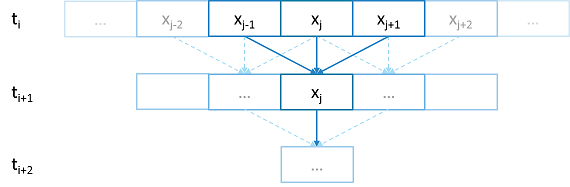
Fig. 2 Heat diffusion example program flow.
We parallelize this code over the following eight examples:
The first example is straight serial code. In this code we instantiate a vector
U that contains two vectors of doubles as seen in the structure
stepper.
struct stepper
{
// Our partition type
typedef double partition;
// Our data for one time step
typedef std::vector<partition> space;
// Our operator
static double heat(double left, double middle, double right)
{
return middle + (k*dt/(dx*dx)) * (left - 2*middle + right);
}
// do all the work on 'nx' data points for 'nt' time steps
space do_work(std::size_t nx, std::size_t nt)
{
// U[t][i] is the state of position i at time t.
std::vector<space> U(2);
for (space& s : U)
s.resize(nx);
// Initial conditions: f(0, i) = i
for (std::size_t i = 0; i != nx; ++i)
U[0][i] = double(i);
// Actual time step loop
for (std::size_t t = 0; t != nt; ++t)
{
space const& current = U[t % 2];
space& next = U[(t + 1) % 2];
next[0] = heat(current[nx-1], current[0], current[1]);
for (std::size_t i = 1; i != nx-1; ++i)
next[i] = heat(current[i-1], current[i], current[i+1]);
next[nx-1] = heat(current[nx-2], current[nx-1], current[0]);
}
// Return the solution at time-step 'nt'.
return U[nt % 2];
}
};
Each element in the vector of doubles represents a single grid point. To
calculate the change in heat distribution, the temperature of each grid point,
along with its neighbors, is passed to the function heat. In order to
improve readability, references named current and next are created
which, depending on the time step, point to the first and second vector of
doubles. The first vector of doubles is initialized with a simple heat ramp.
After calling the heat function with the data in the current vector, the
results are placed into the next vector.
In example 2 we employ a technique called futurization. Futurization is a method
by which we can easily transform a code that is serially executed into a code
that creates asynchronous threads. In the simplest case this involves replacing
a variable with a future to a variable, a function with a future to a function,
and adding a .get() at the point where a value is actually needed. The code
below shows how this technique was applied to the struct stepper.
struct stepper
{
// Our partition type
typedef hpx::shared_future<double> partition;
// Our data for one time step
typedef std::vector<partition> space;
// Our operator
static double heat(double left, double middle, double right)
{
return middle + (k*dt/(dx*dx)) * (left - 2*middle + right);
}
// do all the work on 'nx' data points for 'nt' time steps
hpx::future<space> do_work(std::size_t nx, std::size_t nt)
{
using hpx::dataflow;
using hpx::unwrapping;
// U[t][i] is the state of position i at time t.
std::vector<space> U(2);
for (space& s : U)
s.resize(nx);
// Initial conditions: f(0, i) = i
for (std::size_t i = 0; i != nx; ++i)
U[0][i] = hpx::make_ready_future(double(i));
auto Op = unwrapping(&stepper::heat);
// Actual time step loop
for (std::size_t t = 0; t != nt; ++t)
{
space const& current = U[t % 2];
space& next = U[(t + 1) % 2];
// WHEN U[t][i-1], U[t][i], and U[t][i+1] have been computed, THEN we
// can compute U[t+1][i]
for (std::size_t i = 0; i != nx; ++i)
{
next[i] = dataflow(
hpx::launch::async, Op,
current[idx(i, -1, nx)], current[i], current[idx(i, +1, nx)]
);
}
}
// Now the asynchronous computation is running; the above for-loop does not
// wait on anything. There is no implicit waiting at the end of each timestep;
// the computation of each U[t][i] will begin as soon as its dependencies
// are ready and hardware is available.
// Return the solution at time-step 'nt'.
return hpx::when_all(U[nt % 2]);
}
};
In example 2, we redefine our partition type as a shared_future and, in
main, create the object result, which is a future to a vector of
partitions. We use result to represent the last vector in a string of
vectors created for each timestep. In order to move to the next timestep, the
values of a partition and its neighbors must be passed to heat once the
futures that contain them are ready. In HPX, we have an LCO (Local Control
Object) named Dataflow that assists the programmer in expressing this
dependency. Dataflow allows us to pass the results of a set of futures to a
specified function when the futures are ready. Dataflow takes three types of
arguments, one which instructs the dataflow on how to perform the function call
(async or sync), the function to call (in this case Op), and futures to the
arguments that will be passed to the function. When called, dataflow immediately
returns a future to the result of the specified function. This allows users to
string dataflows together and construct an execution tree.
After the values of the futures in dataflow are ready, the values must be pulled
out of the future container to be passed to the function heat. In order to
do this, we use the HPX facility unwrapping, which underneath calls
.get() on each of the futures so that the function heat will be passed
doubles and not futures to doubles.
By setting up the algorithm this way, the program will be able to execute as quickly as the dependencies of each future are met. Unfortunately, this example runs terribly slow. This increase in execution time is caused by the overheads needed to create a future for each data point. Because the work done within each call to heat is very small, the overhead of creating and scheduling each of the three futures is greater than that of the actual useful work! In order to amortize the overheads of our synchronization techniques, we need to be able to control the amount of work that will be done with each future. We call this amount of work per overhead grain size.
In example 3, we return to our serial code to figure out how to control the
grain size of our program. The strategy that we employ is to create “partitions”
of data points. The user can define how many partitions are created and how many
data points are contained in each partition. This is accomplished by creating
the struct partition, which contains a member object data_, a vector of
doubles that holds the data points assigned to a particular instance of
partition.
In example 4, we take advantage of the partition setup by redefining space
to be a vector of shared_futures with each future representing a partition. In
this manner, each future represents several data points. Because the user can
define how many data points are in each partition, and, therefore, how
many data points are represented by one future, a user can control the
grainsize of the simulation. The rest of the code is then futurized in the same
manner as example 2. It should be noted how strikingly similar
example 4 is to example 2.
Example 4 finally shows good results. This code scales equivalently to the OpenMP version. While these results are promising, there are more opportunities to improve the application’s scalability. Currently, this code only runs on one locality, but to get the full benefit of HPX, we need to be able to distribute the work to other machines in a cluster. We begin to add this functionality in example 5.
In order to run on a distributed system, a large amount of boilerplate code must
be added. Fortunately, HPX provides us with the concept of a component,
which saves us from having to write quite as much code. A component is an object
that can be remotely accessed using its global address. Components are made of
two parts: a server and a client class. While the client class is not required,
abstracting the server behind a client allows us to ensure type safety instead
of having to pass around pointers to global objects. Example 5 renames example
4’s struct partition to partition_data and adds serialization support.
Next, we add the server side representation of the data in the structure
partition_server. Partition_server inherits from
hpx::components::component_base, which contains a server-side component
boilerplate. The boilerplate code allows a component’s public members to be
accessible anywhere on the machine via its Global Identifier (GID). To
encapsulate the component, we create a client side helper class. This object
allows us to create new instances of our component and access its members
without having to know its GID. In addition, we are using the client class to
assist us with managing our asynchrony. For example, our client class
partition‘s member function get_data() returns a future to
partition_data get_data(). This struct inherits its boilerplate code from
hpx::components::client_base.
In the structure stepper, we have also had to make some changes to
accommodate a distributed environment. In order to get the data from a
particular neighboring partition, which could be remote, we must retrieve the data from all
of the neighboring partitions. These retrievals are asynchronous and the function
heat_part_data, which, amongst other things, calls heat, should not be
called unless the data from the neighboring partitions have arrived. Therefore,
it should come as no surprise that we synchronize this operation with another
instance of dataflow (found in heat_part). This dataflow receives futures
to the data in the current and surrounding partitions by calling get_data()
on each respective partition. When these futures are ready, dataflow passes them
to the unwrapping function, which extracts the shared_array of doubles and
passes them to the lambda. The lambda calls heat_part_data on the
locality, which the middle partition is on.
Although this example could run distributed, it only runs on one
locality, as it always uses hpx::find_here() as the target for the
functions to run on.
In example 6, we begin to distribute the partition data on different nodes. This
is accomplished in stepper::do_work() by passing the GID of the
locality where we wish to create the partition to the partition
constructor.
for (std::size_t i = 0; i != np; ++i)
U[0][i] = partition(localities[locidx(i, np, nl)], nx, double(i));
We distribute the partitions evenly based on the number of localities used,
which is described in the function locidx. Because some of the data needed
to update the partition in heat_part could now be on a new locality,
we must devise a way of moving data to the locality of the middle
partition. We accomplished this by adding a switch in the function
get_data() that returns the end element of the buffer data_ if it is
from the left partition or the first element of the buffer if the data is from
the right partition. In this way only the necessary elements, not the whole
buffer, are exchanged between nodes. The reader should be reminded that this
exchange of end elements occurs in the function get_data() and, therefore, is
executed asynchronously.
Now that we have the code running in distributed, it is time to make some
optimizations. The function heat_part spends most of its time on two tasks:
retrieving remote data and working on the data in the middle partition. Because
we know that the data for the middle partition is local, we can overlap the work
on the middle partition with that of the possibly remote call of get_data().
This algorithmic change, which was implemented in example 7, can be seen below:
// The partitioned operator, it invokes the heat operator above on all elements
// of a partition.
static partition heat_part(partition const& left,
partition const& middle, partition const& right)
{
using hpx::dataflow;
using hpx::unwrapping;
hpx::shared_future<partition_data> middle_data =
middle.get_data(partition_server::middle_partition);
hpx::future<partition_data> next_middle = middle_data.then(
unwrapping(
[middle](partition_data const& m) -> partition_data
{
HPX_UNUSED(middle);
// All local operations are performed once the middle data of
// the previous time step becomes available.
std::size_t size = m.size();
partition_data next(size);
for (std::size_t i = 1; i != size-1; ++i)
next[i] = heat(m[i-1], m[i], m[i+1]);
return next;
}
)
);
return dataflow(
hpx::launch::async,
unwrapping(
[left, middle, right](partition_data next, partition_data const& l,
partition_data const& m, partition_data const& r) -> partition
{
HPX_UNUSED(left);
HPX_UNUSED(right);
// Calculate the missing boundary elements once the
// corresponding data has become available.
std::size_t size = m.size();
next[0] = heat(l[size-1], m[0], m[1]);
next[size-1] = heat(m[size-2], m[size-1], r[0]);
// The new partition_data will be allocated on the same locality
// as 'middle'.
return partition(middle.get_id(), std::move(next));
}
),
std::move(next_middle),
left.get_data(partition_server::left_partition),
middle_data,
right.get_data(partition_server::right_partition)
);
}
Example 8 completes the futurization process and utilizes the full potential of
HPX by distributing the program flow to multiple localities, usually defined as
nodes in a cluster. It accomplishes this task by running an instance of HPX main
on each locality. In order to coordinate the execution of the program,
the struct stepper is wrapped into a component. In this way, each
locality contains an instance of stepper that executes its own instance
of the function do_work(). This scheme does create an interesting
synchronization problem that must be solved. When the program flow was being
coordinated on the head node, the GID of each component was known. However, when
we distribute the program flow, each partition has no notion of the GID of its
neighbor if the next partition is on another locality. In order to make
the GIDs of neighboring partitions visible to each other, we created two buffers
to store the GIDs of the remote neighboring partitions on the left and right
respectively. These buffers are filled by sending the GID of newly created
edge partitions to the right and left buffers of the neighboring localities.
In order to finish the simulation, the solution vectors named result are then
gathered together on locality 0 and added into a vector of spaces
overall_result using the HPX functions gather_id and gather_here.
Example 8 completes this example series, which takes the serial code of example 1 and incrementally morphs it into a fully distributed parallel code. This evolution was guided by the simple principles of futurization, the knowledge of grainsize, and utilization of components. Applying these techniques easily facilitates the scalable parallelization of most applications.
Manual
The manual is your comprehensive guide to HPX. It contains detailed information on how to build and use HPX in different scenarios.
Getting HPX
There are HPX packages available for a few Linux distributions. The easiest way to get started with HPX is to use those packages. We keep an up-to-date list with instructions on the HPX Downloads page. If you use one of the available packages you can skip the next section, HPX build system, but we still recommend that you look through it as it contains useful information on how you can customize HPX at compile-time.
If there isn’t a package available for your platform you should either clone our repository:
or download a package with the source files from HPX Downloads.
HPX build system
The build system for HPX is based on CMake. CMake is a cross-platform build-generator tool. CMake does not build the project, it generates the files needed by your build tool (GNU make, Visual Studio, etc.) for building HPX.
This section gives an introduction on how to use our build system to build HPX and how to use HPX in your own projects.
CMake basics
CMake is a cross-platform build-generator tool. CMake does not build the project, it generates the files needed by your build tool (gnu make, visual studio, etc.) for building HPX.
In general, the HPX CMake scripts try to adhere to the general CMake policies on how to write CMake-based projects.
Basic CMake usage
This section explains basic aspects of CMake, specifically options needed for day-to-day usage.
CMake comes with extensive documentation in the form of html files and on the
CMake executable itself. Execute cmake --help for further help options.
CMake needs to know which build tool it will generate files for (GNU make,
Visual Studio, Xcode, etc.). If not specified on the command line, it will try to
guess the build tool based on you environment. Once it has identified the build tool,
CMake uses the corresponding generator to create files for your build tool. You can
explicitly specify the generator with the command line option -G "Name of the
generator". To see the available generators on your platform, execute:
cmake --help
This will list the generator names at the end of the help text. Generator names are case-sensitive. Example:
cmake -G "Visual Studio 16 2019" path/to/hpx
For a given development platform there can be more than one adequate generator.
If you use Visual Studio "NMake Makefiles" is a generator you can use for
building with NMake. By default, CMake chooses the more specific generator
supported by your development environment. If you want an alternative generator,
you must tell this to CMake with the -G option.
Quick start
Here, you will use the command-line, non-interactive CMake interface.
Download and install CMake here: CMake Downloads. Version 3.17 is the minimum required version for HPX.
Open a shell. Your development tools must be reachable from this shell through the
PATHenvironment variable.Create a directory for containing the build. Building HPX on the source directory is not supported. cd to this directory:
mkdir mybuilddir cd mybuilddirExecute this command on the shell replacing
path/to/hpxwith the path to the root of your HPX source tree:cmake path/to/hpx
CMake will detect your development environment, perform a series of tests and will generate the files required for building HPX. CMake will use default values for all build parameters. See the CMake variables used to configure HPX section for fine-tuning your build.
This can fail if CMake can’t detect your toolset, or if it thinks that the
environment is not sane enough. In this case make sure that the toolset that you
intend to use is the only one reachable from the shell and that the shell itself
is the correct one for you development environment. CMake will refuse to build
MinGW makefiles if you have a POSIX shell reachable through the PATH
environment variable, for instance. You can force CMake to use various compilers
and tools. Please visit CMake Useful Variables
for a detailed overview of specific CMake variables.
Options and variables
Variables customize how the build will be generated. Options are boolean
variables, with possible values ON/OFF. Options and variables are
defined on the CMake command line like this:
cmake -DVARIABLE=value path/to/hpx
You can set a variable after the initial CMake invocation for changing its value. You can also undefine a variable:
cmake -UVARIABLE path/to/hpx
Variables are stored on the CMake cache. This is a file named CMakeCache.txt
on the root of the build directory. Do not hand-edit it.
Variables are listed here appending its type after a colon. You should write the variable and the type on the CMake command line:
cmake -DVARIABLE:TYPE=value path/to/llvm/source
CMake supports the following variable types: BOOL (options), STRING
(arbitrary string), PATH (directory name), FILEPATH (file name).
Prerequisites
Supported platforms
At this time, HPX supports the following platforms. Other platforms may work, but we do not test HPX with other platforms, so please be warned.
Name |
Minimum Version |
Architectures |
|---|---|---|
Linux |
2.6 |
x86-32, x86-64, k1om |
BlueGeneQ |
V1R2M0 |
PowerPC A2 |
Windows |
Any Windows system |
x86-32, x86-64 |
Mac OSX |
Any OSX system |
x86-64 |
Software and libraries
In the simplest case, HPX depends on Boost and Portable Hardware Locality (HWLOC). So, before you read further, please make sure you have a recent version of Boost installed on your target machine. HPX currently requires at least Boost V1.66.0 to work properly. It may build and run with older versions, but we do not test HPX with those versions, so please be warned.
The installation of Boost is described in detail in Boost’s Getting Started document. However, if you’ve never used the Boost libraries (or even if you have), here’s a quick primer: Installing Boost.
It is often possible to download the Boost libraries using the package manager of your distribution. Please refer to the corresponding documentation for your system for more information.
In addition, we require a recent version of hwloc in order to support thread pinning and NUMA awareness. See Installing Hwloc for instructions on building Portable Hardware Locality (HWLOC).
HPX is written in 99.99% Standard C++ (the remaining 0.01% is platform specific assembly code). As such, HPX is compilable with almost any standards compliant C++ compiler. A compiler supporting the C++11 Standard is highly recommended. The code base takes advantage of C++11 language features when available (move semantics, rvalue references, magic statics, etc.). This may speed up the execution of your code significantly. We currently support the following C++ compilers: GCC, MSVC, ICPC and clang. For the status of your favorite compiler with HPX visit HPX Buildbot Website.
Name |
Minimum version |
Notes |
Compilers |
||
7.0 |
||
7.0 |
||
Build System |
||
3.17 |
Cuda support 3.9 |
|
Required Libraries |
||
1.71.0 |
||
1.5 |
||
1.12.0 |
Note
When building Boost using gcc, please note that it is required to specify a
cxxflags=-std=c++14 command line argument to b2 (bjam).
Name |
Minimum version |
Notes |
Compilers |
||
Visual C++ (x64) |
2015 |
|
Build System |
||
3.17 |
||
Required Libraries |
||
1.71.0 |
||
1.5 |
||
1.12.0 |
Note
In most configurations, HPX depends only on header-only Boost. Boost.Filesystem is required if the standard library does not support filesystem. The following are not needed by default, but are required in certain configurations: Boost.Chrono, Boost.DateTime, Boost.Log, Boost.LogSetup, Boost.Regex, and Boost.Thread.
Depending on the options you chose while building and installing HPX, you will find that HPX may depend on several other libraries such as those listed below.
Note
In order to use a high speed parcelport, we currently recommend configuring
HPX to use MPI so that MPI can be used for communication between different
localities. Please set the CMake variable MPI_CXX_COMPILER to your MPI
C++ compiler wrapper if not detected automatically.
Name |
Minimum version |
Notes |
1.7.1 |
Used as a replacement for the system allocator, and for allocation diagnostics. |
|
0.97 |
Dependency of google-perftools on x86-64, used for stack unwinding. |
|
1.8.0 |
Can be used as a highspeed communication library backend for the parcelport. |
Note
When using OpenMPI please note that Ubuntu (notably 18.04 LTS) and older
Debian ship an OpenMPI 2.x built with --enable-heterogeneous which may
cause communication failures at runtime and should not be used.
Name |
Minimum version |
Notes |
Performance Application Programming Interface (PAPI) |
Used for accessing hardware performance data. |
|
2.1.0 |
Used as a replacement for the system allocator. |
|
1.0.0 |
Used as a replacement for the system allocator. |
|
1.6.7 |
Used for data I/O in some example applications. See important note below. |
Name |
Minimum version |
Notes |
1.6.7 |
Used for data I/O in some example applications. See important note below. |
Important
The C++ HDF5 libraries must be compiled with enabled thread safety support. This has to be explicitly specified while configuring the HDF5 libraries as it is not the default. Additionally, you must set the following environment variables before configuring the HDF5 libraries (this part only needs to be done on Linux):
export CFLAGS='-DHDatexit=""'
export CPPFLAGS='-DHDatexit=""'
Documentation
To build the HPX documentation, you need recent versions of the following packages:
python3sphinx(Python package)sphinx_rtd_theme(Python package)breathe 4.16.0(Python package)doxygen
If the Python dependencies are not available through your system package
manager, you can install them using the Python package manager pip:
pip install --user sphinx sphinx_rtd_theme breathe
You may need to set the following CMake variables to make sure CMake can find the required dependencies.
Installing Boost
Important
When building Boost using gcc, please note that it is required to specify a
cxxflags=-std=c++14 command line argument to b2 (bjam).
Important
On Windows, depending on the installed versions of Visual Studio, you might
also want to pass the correct toolset to the b2 command depending on
which version of the IDE you want to use. In addition, passing
address-model=64 is highly recommended. It might also be necessary to add
command line argument --build-type=complete to the b2 command on the
Windows platform.
The easiest way to create a working Boost installation is to compile Boost from
sources yourself. This is particularly important as many high performance
resources, even if they have Boost installed, usually only provide you with an
older version of Boost. We suggest you download the most recent release of the
Boost libraries from here: Boost Downloads. Unpack the downloaded archive
into a directory of your choosing. We will refer to this directory a $BOOST.
Building and installing the Boost binaries is simple. Regardless of what platform you are on, the basic instructions are as follows (with possible additional platform-dependent command line arguments):
cd $BOOST
bootstrap --prefix=<where to install boost>
./b2 -j<N>
./b2 install
where: <where to install boost> is the directory the built binaries will be
installed to, and <N> is the number of cores to use to build the Boost
binaries.
After the above sequence of commands has been executed (this may take a while!),
you will need to specify the directory where Boost was installed as
BOOST_ROOT (<where to install boost>) while executing CMake for HPX as
explained in detail in the sections How to install HPX on Unix variants and
How to install HPX on Windows.
Installing Hwloc
Note
These instructions are for everything except Windows. On Windows there is no
need to build hwloc. Instead, download the latest release, extract the files,
and set HWLOC_ROOT during CMake configuration to the directory in which
you extracted the files.
We suggest you download the most recent release of hwloc from here:
Hwloc Downloads. Unpack the downloaded archive into a directory of your
choosing. We will refer to this directory as $HWLOC.
To build hwloc run:
cd $HWLOC
./configure --prefix=<where to install hwloc>
make -j<N> install
where: <where to install hwloc> is the directory the built binaries will be
installed to, and <N> is the number of cores to use to build hwloc.
After the above sequence of commands has been executed, you will need to specify
the directory where hwloc was installed as HWLOC_ROOT (<where to install
hwloc>) while executing CMake for HPX as explained in detail in the sections
How to install HPX on Unix variants and How to install HPX on Windows.
Please see Hwloc Documentation for more information about hwloc.
Building HPX
Basic information
Once CMake has been run, the build process can be started. The HPX build process is highly configurable through CMake, and various CMake variables influence the build process. The build process consists of the following parts:
The HPX core libraries (target core): This forms the basic set of HPX libraries. The generated targets are:
hpx: The core HPX library (always enabled).hpx_init: The HPX initialization library that applications need to link against to define the HPX entry points (disabled for static builds).hpx_wrap: The HPX static library used to determine the runtime behavior of HPX code and respective entry points forhpx_main.hiostreams_component: The component used for (distributed) IO (always enabled).component_storage_component: The component needed for migration to persistent storage.unordered_component: The component needed for a distributed (partitioned) hash table.partioned_vector_component: The component needed for a distributed (partitioned) vector.memory_component: A dynamically loaded plugin that exposes memory based performance counters (only available on Linux).io_counter_component: A dynamically loaded plugin that exposes I/O performance counters (only available on Linux).papi_component: A dynamically loaded plugin that exposes PAPI performance counters (enabled withHPX_WITH_PAPI:BOOL, default isOff).
HPX Examples (target
examples): This target is enabled by default and builds all HPX examples (disable by settingHPX_WITH_EXAMPLES:BOOL=Off). HPX examples are part of thealltarget and are included in the installation if enabled.HPX Tests (target
tests): This target builds the HPX test suite and is enabled by default (disable by settingHPX_WITH_TESTS:BOOL=Off). They are not built by thealltarget and have to be built separately.HPX Documentation (target
docs): This target builds the documentation, and is not enabled by default (enable by settingHPX_WITH_DOCUMENTATION:BOOL=On. For more information see Documentation.
For a complete list of available CMake variables that influence the build of HPX, see CMake variables used to configure HPX.
The variables can be used to refine the recipes that can be found at Platform specific build recipes which show some basic steps on how to build HPX for a specific platform.
In order to use HPX, only the core libraries are required (the ones marked as
optional above are truly optional). When building against HPX, the CMake
variable HPX_LIBRARIES will contain hpx and hpx_init (for pkgconfig,
those are added to the Libs sections). In order to use the optional
libraries, you need to specify them as link dependencies in your build (See
Creating HPX projects).
As HPX is a modern C++ library, we require a certain minimum set of features from the C++11 standard. In addition, we make use of certain C++14 features if the used compiler supports them. This means that the HPX build system will try to determine the highest support C++ standard flavor and check for availability of those features. That is, the default will be the highest C++ standard version available. If you want to force HPX to use a specific C++ standard version, you can use the following CMake variables:
HPX_WITH_CXX14: Enables C++14 support (this is the minimum requirement)HPX_WITH_CXX17: Enables C++17 supportHPX_WITH_CXX2A: Enables (experimental) C++20 support
Build types
CMake can be configured to generate project files suitable for builds that
have enabled debugging support or for an optimized build (without debugging
support). The CMake variable used to set the build type is
CMAKE_BUILD_TYPE (for more information see the CMake Documentation).
Available build types are:
Debug: Full debug symbols are available as well as additional assertions to help debugging. To enable the debug build type for the HPX API, the C++ Macro
HPX_DEBUGis defined.RelWithDebInfo: Release build with debugging symbols. This is most useful for profiling applications
Release: Release build. This disables assertions and enables default compiler optimizations.
RelMinSize: Release build with optimizations for small binary sizes.
Important
We currently don’t guarantee ABI compatibility between Debug and Release
builds. Please make sure that applications built against HPX use the same
build type as you used to build HPX. For CMake builds, this means that
the CMAKE_BUILD_TYPE variables have to match and for projects not using
CMake, the HPX_DEBUG macro has to be set in debug mode.
Platform specific notes
Some platforms require users to have special link and/or compiler flags specified to build HPX. This is handled via CMake’s support for different toolchains (see cmake-toolchains(7) for more information). This is also used for cross compilation.
HPX ships with a set of toolchains that can be used for compilation of HPX itself and applications depending on HPX. Please see CMake toolchains shipped with HPX for more information.
In order to enable full static linking with the libraries, the CMake variable
HPX_WITH_STATIC_LINKING:BOOL has to be set to On.
Debugging applications using core files
For HPX to generate useful core files, HPX has to be compiled without signal
and exception handlers
HPX_WITH_DISABLED_SIGNAL_EXCEPTION_HANDLERS:BOOL. If this option is
not specified, the signal handlers change the application state. For example,
after a segmentation fault the stack trace will show the signal handler.
Similarly, unhandled exceptions are also caught by these handlers and the
stack trace will not point to the location where the unhandled exception was
thrown.
In general, core files are a helpful tool to inspect the state of the application at the moment of the crash (post-mortem debugging), without the need of attaching a debugger beforehand. This approach to debugging is especially useful if the error cannot be reliably reproduced, as only a single crashed application run is required to gain potentially helpful information like a stacktrace.
To debug with core files, the operating system first has to be told to actually write them. On most Unix systems this can be done by calling:
ulimit -c unlimited
in the shell. Now the debugger can be started up with:
gdb <application> <core file name>
The debugger should now display the last state of the application. The default
file name for core files is core.
Platform specific build recipes
Note
The following build recipes are mostly user-contributed and may be outdated. We always welcome updated and new build recipes.
How to install HPX on Unix variants
Create a build directory. HPX requires an out-of-tree build. This means you will be unable to run CMake in the HPX source tree.
cd hpx mkdir my_hpx_build cd my_hpx_build
Invoke CMake from your build directory, pointing the CMake driver to the root of your HPX source tree.
cmake -DBOOST_ROOT=/root/of/boost/installation \ -DHWLOC_ROOT=/root/of/hwloc/installation [other CMake variable definitions] \ /path/to/source/tree
For instance:
cmake -DBOOST_ROOT=~/packages/boost -DHWLOC_ROOT=/packages/hwloc -DCMAKE_INSTALL_PREFIX=~/packages/hpx ~/downloads/hpx_1.5.1
Invoke GNU make. If you are on a machine with multiple cores, add the -jN flag to your make invocation, where N is the number of parallel processes HPX gets compiled with.
gmake -j4
Caution
Compiling and linking HPX needs a considerable amount of memory. It is advisable that at least 2 GB of memory per parallel process is available.
Note
Many Linux distributions use
makeas an alias forgmake.To complete the build and install HPX:
gmake install
Important
These commands will build and install the essential core components of HPX only. In order to build and run the tests, please invoke:
gmake tests && gmake test
and in order to build (and install) all examples invoke:
cmake -DHPX_WITH_EXAMPLES=On . gmake examples gmake install
For more detailed information about using CMake, please refer to its documentation
and also the section Building HPX. Please pay special attention to the
section about HPX_WITH_MALLOC:STRING as this is crucial for getting
decent performance.
How to install HPX on OS X (Mac)
This section describes how to build HPX for OS X (Mac).
To build Boost with Clang and make it link to libc++ as standard library, you’ll
need to set up either of the following in your ~/user-config.jam file:
# user-config.jam (put this file into your home directory)
# ...
using clang
:
: "/usr/bin/clang++"
: <cxxflags>"-std=c++11 -fcolor-diagnostics"
<linkflags>"-stdlib=libc++ -L/path/to/libcxx/lib"
;
(Again, remember to replace /path/to with whatever you used earlier.)
Then, you can use one of the following for your build command:
b2 --build-dir=/tmp/build-boost --layout=versioned toolset=clang install -j4
or:
b2 --build-dir=/tmp/build-boost --layout=versioned toolset=clang install -j4
We verified this using Boost V1.53. If you use a different version, just
remember to replace /usr/local/include/boost-1_53 with whatever prefix
you used in your installation.
cd /path/to
git clone https://github.com/STEllAR-GROUP/hpx.git
mkdir build-hpx && cd build-hpx
To build with Clang, execute:
cmake ../hpx \
-DCMAKE_CXX_COMPILER=clang++ \
-DBOOST_ROOT=/path/to/boost \
-DHWLOC_ROOT=/path/to/hwloc \
-DHPX_WITH_GENERIC_CONTEXT_COROUTINES=On
make -j
For more detailed information about using CMake, please refer its documentation and to the section Building HPX.
Alternatively, you can install a recent version of gcc as well as all required libraries via MacPorts:
Install MacPorts
Install CMake, gcc, hwloc:
sudo brew install cmake sudo brew install boost sudo brew install hwloc sudo brew install make
You may also want:
sudo brew install gperftools
If you need to build Boost manually (the Boost package of MacPorts is built with Clang, and unfortunately doesn’t work with a GCC-build version of HPX):
wget https://dl.bintray.com/boostorg/release/1.69.0/source/boost_1_69_0.tar.bz2 tar xjf boost_1_69_0.tar.bz2 pushd boost_1_69_0 export BOOST_ROOT=$HOME/boost_1_69_0 ./bootstrap.sh --prefix=$BOOST_DIR ./b2 -j8 ./b2 -j8 install export DYLD_LIBRARY_PATH=$DYLD_LIBRARY_PATH:$BOOST_ROOT/lib popd
Build HPX:
git clone https://github.com/STEllAR-GROUP/hpx.git mkdir hpx-build pushd hpx-build export HPX_ROOT=$HOME/hpx cmake -DCMAKE_CXX_COMPILER=g++ \ -DCMAKE_CXX_FLAGS="-Wno-unused-local-typedefs" \ -DBOOST_ROOT=$BOOST_ROOT \ -DHWLOC_ROOT=/opt/local \ -DCMAKE_INSTALL_PREFIX=$HOME/hpx \ -DHPX_WITH_GENERIC_CONTEXT_COROUTINES=On \ $(pwd)/../hpx make -j8 make -j8 install export DYLD_LIBRARY_PATH=$DYLD_LIBRARY_PATH:$HPX_ROOT/lib/hpx popd
Note that you need to set
BOOST_ROOT,HPX_ROOTandDYLD_LIBRARY_PATH(for bothBOOST_ROOTandHPX_ROOT) every time you configure, build, or run an HPX application.Note that you need to set
HPX_WITH_GENERIC_CONTEXT_COROUTINES=Onfor MacOS.If you want to use HPX with MPI, you need to enable the MPI parcelport, and also specify the location of the MPI wrapper scripts. This can be done using the following command:
cmake -DHPX_WITH_PARCELPORT_MPI=ON \ -DCMAKE_CXX_COMPILER=g++ \ -DMPI_CXX_COMPILER=openmpic++ \ -DCMAKE_CXX_FLAGS="-Wno-unused-local-typedefs" \ -DBOOST_ROOT=$BOOST_DIR \ -DHWLOC_ROOT=/opt/local \ -DCMAKE_INSTALL_PREFIX=$HOME/hpx $(pwd)/../hpx
How to install HPX on Windows
Download the Boost c++ libraries from Boost Downloads
Install the Boost library as explained in the section Installing Boost
Install the hwloc library as explained in the section Installing Hwloc
Download the latest version of CMake binaries, which are located under the platform section of the downloads page at CMake Downloads.
Download the latest version of HPX from the STE||AR website: HPX Downloads.
Create a build folder. HPX requires an out-of-tree-build. This means that you will be unable to run CMake in the HPX source folder.
Open up the CMake GUI. In the input box labelled “Where is the source code:”, enter the full path to the source folder. The source directory is the one where the sources were checked out. CMakeLists.txt files in the source directory as well as the subdirectories describe the build to CMake. In addition to this, there are CMake scripts (usually ending in .cmake) stored in a special CMake directory. CMake does not alter any file in the source directory and doesn’t add new ones either. In the input box labelled “Where to build the binaries:”, enter the full path to the build folder you created before. The build directory is one where all compiler outputs are stored, which includes object files and final executables.
Add CMake variable definitions (if any) by clicking the “Add Entry” button. There are two required variables you need to define:
BOOST_ROOTandHWLOC_ROOTThese (PATH) variables need to be set to point to the root folder of your Boost and hwloc installations. It is recommended to set the variableCMAKE_INSTALL_PREFIXas well. This determines where the HPX libraries will be built and installed. If this (PATH) variable is set, it has to refer to the directory where the built HPX files should be installed to.Press the “Configure” button. A window will pop up asking you which compilers to use. Select the Visual Studio 10 (64Bit) compiler (it usually is the default if available). The Visual Studio 2012 (64Bit) and Visual Studio 2013 (64Bit) compilers are supported as well. Note that while it is possible to build HPX for x86, we don’t recommend doing so as 32 bit runs are severely restricted by a 32 bit Windows system limitation affecting the number of HPX threads you can create.
Press “Configure” again. Repeat this step until the “Generate” button becomes clickable (and until no variable definitions are marked in red anymore).
Press “Generate”.
Open up the build folder, and double-click hpx.sln.
Build the INSTALL target.
For more detailed information about using CMake please refer its documentation and also the section Building HPX.
Download the CMake V3.18.1 installer (or latest version) from here
Download the hwloc V1.11.0 (or the latest version) from here and unpack it.
Download the latest Boost libraries from here and unpack them.
Build the Boost DLLs and LIBs by using these commands from Command Line (or PowerShell). Open CMD/PowerShell inside the Boost dir and type in:
bootstrap.bat
This batch file will set up everything needed to create a successful build. Now execute:
b2.exe link=shared variant=release,debug architecture=x86 address-model=64 threading=multi --build-type=complete install
This command will start a (very long) build of all available Boost libraries. Please, be patient.
Open CMake-GUI.exe and set up your source directory (input field ‘Where is the source code’) to the base directory of the source code you downloaded from HPX’s GitHub pages. Here’s an example of CMake path settings, which point to the
Documents/GitHub/hpxfolder: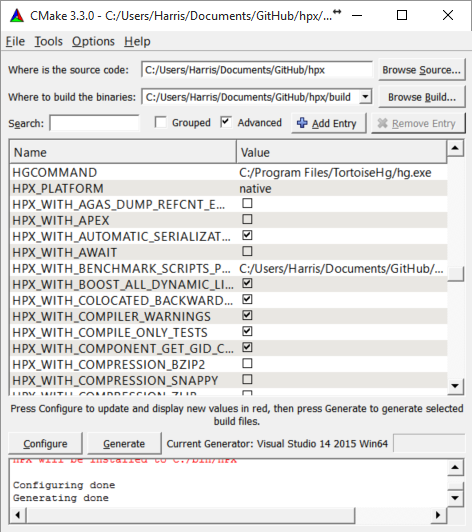
Fig. 3 Example CMake path settings.
Inside ‘Where is the source-code’ enter the base directory of your HPX source directory (do not enter the “src” sub-directory!). Inside ‘Where to build the binaries’ you should put in the path where all the building processes will happen. This is important because the building machinery will do an “out-of-tree” build. CMake will not touch or change the original source files in any way. Instead, it will generate Visual Studio Solution Files, which will build HPX packages out of the HPX source tree.
Set three new environment variables (in CMake, not in Windows environment):
BOOST_ROOT,HWLOC_ROOT,CMAKE_INSTALL_PREFIX. The meaning of these variables is as follows:BOOST_ROOTthe HPX root directory of the unpacked Boost headers/cpp files.HWLOC_ROOTthe HPX root directory of the unpacked Portable Hardware Locality files.CMAKE_INSTALL_PREFIXthe HPX root directory where the future builds of HPX should be installed.Note
HPX is a very large software collection, so it is not recommended to use the default
C:\Program Files\hpx. Many users may prefer to use simpler paths without whitespace, likeC:\bin\hpxorD:\bin\hpxetc.
To insert new env-vars click on “Add Entry” and then insert the name inside “Name”, select
PATHas Type and put the path-name in the “Path” text field. Repeat this for the first three variables.This is how variable insertion will look:
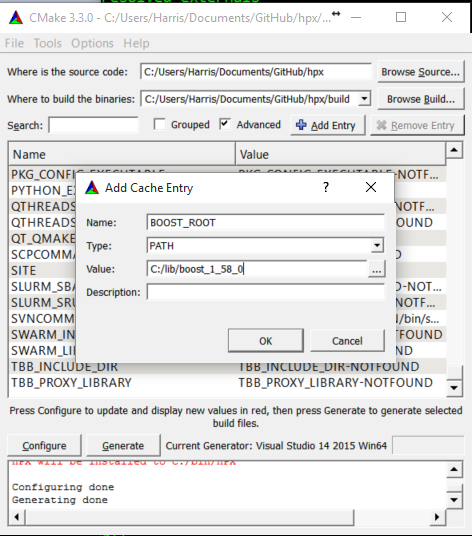
Fig. 4 Example CMake adding entry.
Alternatively, users could provide
BOOST_LIBRARYDIRinstead ofBOOST_ROOT; the difference is thatBOOST_LIBRARYDIRshould point to the subdirectory inside Boost root where all the compiled DLLs/LIBs are. For example,BOOST_LIBRARYDIRmay point to thebin.v2subdirectory under the Boost rootdir. It is important to keep the meanings of these two variables separated from each other:BOOST_DIRpoints to the ROOT folder of the Boost library.BOOST_LIBRARYDIRpoints to the subdir inside the Boost root folder where the compiled binaries are.Click the ‘Configure’ button of CMake-GUI. You will be immediately presented with a small window where you can select the C++ compiler to be used within Visual Studio. This has been tested using the latest v14 (a.k.a C++ 2015) but older versions should be sufficient too. Make sure to select the 64Bit compiler.
After the generate process has finished successfully, click the ‘Generate’ button. Now, CMake will put new VS Solution files into the BUILD folder you selected at the beginning.
Open Visual Studio and load the
HPX.slnfrom your build folder.Go to
CMakePredefinedTargetsand build theINSTALLproject:
Fig. 5 Visual Studio INSTALL target.
It will take some time to compile everything, and in the end you should see an output similar to this one:
Fig. 6 Visual Studio build output.
How to install HPX on Fedora distributions
Important
There are official HPX packages for Fedora. Unless you want to customize your, build you may want to start off with the official packages. Instructions can be found on the HPX Downloads page.
Note
This section of the manual is based off of our collaborator Patrick Diehl’s blog post Installing |hpx| on Fedora 22.
Install all packages for minimal installation:
sudo dnf install gcc-c++ cmake boost-build boost boost-devel hwloc-devel \ hwloc papi-devel gperftools-devel docbook-dtds \ docbook-style-xsl libsodium-devel doxygen boost-doc hdf5-devel \ fop boost-devel boost-openmpi-devel boost-mpich-devel
Get the development branch of HPX:
git clone https://github.com/STEllAR-GROUP/hpx.git
Configure it with CMake:
cd hpx mkdir build cd build cmake -DCMAKE_INSTALL_PREFIX=/opt/hpx .. make -j make install
Note
To build HPX without examples use:
cmake -DCMAKE_INSTALL_PREFIX=/opt/hpx -DHPX_WITH_EXAMPLES=Off ..
Add the library path of HPX to ldconfig:
sudo echo /opt/hpx/lib > /etc/ld.so.conf.d/hpx.conf sudo ldconfig
How to install HPX on Arch distributions
Important
There are HPX packages for Arch in the AUR. Unless you want to customize your build, you may want to start off with those. Instructions can be found on the HPX Downloads page.
Install all packages for a minimal installation:
sudo pacman -S gcc clang cmake boost hwloc gperftools
For building the documentation, you will need to further install the following:
sudo pacman -S doxygen python-pip pip install --user sphinx sphinx_rtd_theme breathe
The rest of the installation steps are the same as those for the Fedora or Unix variants.
How to install HPX on Debian-based distributions
Install all packages for a minimal installation:
sudo apt install cmake libboost-all-dev hwloc libgoogle-perftools-dev
To build the documentation you will need to further install the following:
sudo apt install doxygen python-pip pip install --user sphinx sphinx_rtd_theme breathe
or the following if you prefer to get Python packages from the Debian repositories:
sudo apt install doxygen python-sphinx python-sphinx-rtd-theme python-breathe
The rest of the installation steps are same as those for the Fedora or Unix variants.
CMake toolchains shipped with HPX
In order to compile HPX for various platforms, we provide a variety of toolchain
files that take care of setting up various CMake variables like compilers, etc.
They are located in the cmake/toolchains directory:
To use them, pass the -DCMAKE_TOOLCHAIN_FILE=<toolchain> argument to the
CMake invocation.
ARM-gcc
# Copyright (c) 2015 Thomas Heller
#
# SPDX-License-Identifier: BSL-1.0
# Distributed under the Boost Software License, Version 1.0. (See accompanying
# file LICENSE_1_0.txt or copy at http://www.boost.org/LICENSE_1_0.txt)
set(CMAKE_SYSTEM_NAME Linux)
set(CMAKE_CROSSCOMPILING ON)
# Set the gcc Compiler
set(CMAKE_CXX_COMPILER arm-linux-gnueabihf-g++-4.8)
set(HPX_WITH_GENERIC_CONTEXT_COROUTINES
ON
CACHE BOOL "enable generic coroutines"
)
set(CMAKE_FIND_ROOT_PATH_MODE_PROGRAM NEVER)
set(CMAKE_FIND_ROOT_PATH_MODE_LIBRARY ONLY)
set(CMAKE_FIND_ROOT_PATH_MODE_INCLUDE ONLY)
set(CMAKE_FIND_ROOT_PATH_MODE_PACKAGE ONLY)
BGION-gcc
# Copyright (c) 2014 John Biddiscombe
#
# SPDX-License-Identifier: BSL-1.0
# Distributed under the Boost Software License, Version 1.0. (See accompanying
# file LICENSE_1_0.txt or copy at http://www.boost.org/LICENSE_1_0.txt)
# This is the default toolchain file to be used with CNK on a BlueGene/Q. It
# sets the appropriate compile flags and compiler such that HPX will compile.
# Note that you still need to provide Boost, hwloc and other utility libraries
# like a custom allocator yourself.
#
# Usage : cmake
# -DCMAKE_TOOLCHAIN_FILE=~/src/hpx/cmake/toolchains/BGION-gcc.cmake ~/src/hpx
#
set(CMAKE_SYSTEM_NAME Linux)
# Set the gcc Compiler
set(CMAKE_CXX_COMPILER g++)
# Add flags we need for BGAS compilation
set(CMAKE_CXX_FLAGS_INIT
"-D__powerpc__ -D__bgion__ -I/gpfs/bbp.cscs.ch/home/biddisco/src/bgas/rdmahelper "
CACHE STRING "Initial compiler flags used to compile for BGAS"
)
# cmake-format: off
# the V1R2M2 includes are necessary for some hardware specific features
# -DHPX_SMALL_STACK_SIZE=0x200000
# -DHPX_MEDIUM_STACK_SIZE=0x200000
# -DHPX_LARGE_STACK_SIZE=0x200000
# -DHPX_HUGE_STACK_SIZE=0x200000
# cmake-format: on
set(CMAKE_EXE_LINKER_FLAGS_INIT
"-L/gpfs/bbp.cscs.ch/apps/bgas/tools/gcc/gcc-4.8.2/install/lib64 -latomic -lrt"
CACHE STRING "BGAS flags"
)
# We do not perform cross compilation here ...
set(CMAKE_CROSSCOMPILING OFF)
# Set our platform name
set(HPX_PLATFORM "native")
# Disable generic coroutines (and use posix version)
set(HPX_WITH_GENERIC_CONTEXT_COROUTINES
OFF
CACHE BOOL "disable generic coroutines"
)
# Always disable the tcp parcelport as it is non-functional on the BGQ.
set(HPX_WITH_PARCELPORT_TCP
ON
CACHE BOOL ""
)
# Always enable the tcp parcelport as it is currently the only way to
# communicate on the BGQ.
set(HPX_WITH_PARCELPORT_MPI
ON
CACHE BOOL ""
)
# We have a bunch of cores on the A2 processor ...
set(HPX_WITH_MAX_CPU_COUNT
"64"
CACHE STRING ""
)
# We have no custom malloc yet
if(NOT DEFINED HPX_WITH_MALLOC)
set(HPX_WITH_MALLOC
"system"
CACHE STRING ""
)
endif()
set(HPX_HIDDEN_VISIBILITY
OFF
CACHE BOOL ""
)
#
# Convenience setup for jb @ bbpbg2.cscs.ch
#
set(BOOST_ROOT "/gpfs/bbp.cscs.ch/home/biddisco/apps/gcc-4.8.2/boost_1_56_0")
set(HWLOC_ROOT "/gpfs/bbp.cscs.ch/home/biddisco/apps/gcc-4.8.2/hwloc-1.8.1")
set(CMAKE_BUILD_TYPE
"Debug"
CACHE STRING "Default build"
)
#
# Testing flags
#
set(BUILD_TESTING
ON
CACHE BOOL "Testing enabled by default"
)
set(HPX_WITH_TESTS
ON
CACHE BOOL "Testing enabled by default"
)
set(HPX_WITH_TESTS_BENCHMARKS
ON
CACHE BOOL "Testing enabled by default"
)
set(HPX_WITH_TESTS_REGRESSIONS
ON
CACHE BOOL "Testing enabled by default"
)
set(HPX_WITH_TESTS_UNIT
ON
CACHE BOOL "Testing enabled by default"
)
set(HPX_WITH_TESTS_EXAMPLES
ON
CACHE BOOL "Testing enabled by default"
)
set(HPX_WITH_TESTS_EXTERNAL_BUILD
OFF
CACHE BOOL "Turn off build of cmake build tests"
)
set(DART_TESTING_TIMEOUT
45
CACHE STRING "Life is too short"
)
# HPX_WITH_STATIC_LINKING
BGQ
# Copyright (c) 2014 Thomas Heller
#
# SPDX-License-Identifier: BSL-1.0
# Distributed under the Boost Software License, Version 1.0. (See accompanying
# file LICENSE_1_0.txt or copy at http://www.boost.org/LICENSE_1_0.txt)
#
# This is the default toolchain file to be used with CNK on a BlueGene/Q. It sets
# the appropriate compile flags and compiler such that HPX will compile.
# Note that you still need to provide Boost, hwloc and other utility libraries
# like a custom allocator yourself.
#
set(CMAKE_SYSTEM_NAME Linux)
# Set the Intel Compiler
set(CMAKE_CXX_COMPILER bgclang++11)
set(MPI_CXX_COMPILER mpiclang++11)
set(CMAKE_CXX_FLAGS_INIT
""
CACHE STRING ""
)
set(CMAKE_CXX_COMPILE_OBJECT
"<CMAKE_CXX_COMPILER> -fPIC <DEFINES> <FLAGS> -o <OBJECT> -c <SOURCE>"
CACHE STRING ""
)
set(CMAKE_CXX_LINK_EXECUTABLE
"<CMAKE_CXX_COMPILER> -fPIC -dynamic <FLAGS> <CMAKE_CXX_LINK_FLAGS> <LINK_FLAGS> <OBJECTS> -o <TARGET> <LINK_LIBRARIES>"
CACHE STRING ""
)
set(CMAKE_CXX_CREATE_SHARED_LIBRARY
"<CMAKE_CXX_COMPILER> -fPIC -shared <CMAKE_SHARED_LIBRARY_CXX_FLAGS> <LANGUAGE_COMPILE_FLAGS> <LINK_FLAGS> <CMAKE_SHARED_LIBRARY_CREATE_CXX_FLAGS> <SONAME_FLAG><TARGET_SONAME> -o <TARGET> <OBJECTS> <LINK_LIBRARIES>"
CACHE STRING ""
)
# Disable searches in the default system paths. We are cross compiling after all
# and cmake might pick up wrong libraries that way
set(CMAKE_FIND_ROOT_PATH_MODE_PROGRAM BOTH)
set(CMAKE_FIND_ROOT_PATH_MODE_LIBRARY ONLY)
set(CMAKE_FIND_ROOT_PATH_MODE_INCLUDE ONLY)
set(CMAKE_FIND_ROOT_PATH_MODE_PACKAGE ONLY)
# We do a cross compilation here ...
set(CMAKE_CROSSCOMPILING ON)
# Set our platform name
set(HPX_PLATFORM "BlueGeneQ")
# Always disable the tcp parcelport as it is non-functional on the BGQ.
set(HPX_WITH_PARCELPORT_TCP OFF)
# Always enable the mpi parcelport as it is currently the only way to
# communicate on the BGQ.
set(HPX_WITH_PARCELPORT_MPI ON)
# We have a bunch of cores on the BGQ ...
set(HPX_WITH_MAX_CPU_COUNT "64")
# We default to tbbmalloc as our allocator on the MIC
if(NOT DEFINED HPX_WITH_MALLOC)
set(HPX_WITH_MALLOC
"system"
CACHE STRING ""
)
endif()
Cray
# Copyright (c) 2014 Thomas Heller
#
# SPDX-License-Identifier: BSL-1.0
# Distributed under the Boost Software License, Version 1.0. (See accompanying
# file LICENSE_1_0.txt or copy at http://www.boost.org/LICENSE_1_0.txt)
#
# This is the default toolchain file to be used with Intel Xeon PHIs. It sets
# the appropriate compile flags and compiler such that HPX will compile.
# Note that you still need to provide Boost, hwloc and other utility libraries
# like a custom allocator yourself.
#
# set(CMAKE_SYSTEM_NAME Cray-CNK-Intel)
if(HPX_WITH_STATIC_LINKING)
set_property(GLOBAL PROPERTY TARGET_SUPPORTS_SHARED_LIBS FALSE)
else()
endif()
# Set the Cray Compiler Wrapper
set(CMAKE_CXX_COMPILER CC)
set(CMAKE_CXX_FLAGS_INIT
""
CACHE STRING ""
)
set(CMAKE_SHARED_LIBRARY_CXX_FLAGS
"-fPIC -shared"
CACHE STRING ""
)
set(CMAKE_SHARED_LIBRARY_CREATE_CXX_FLAGS
"-fPIC -shared"
CACHE STRING ""
)
set(CMAKE_SHARED_LIBRARY_CREATE_CXX_FLAGS
"-fPIC -shared"
CACHE STRING ""
)
set(CMAKE_CXX_COMPILE_OBJECT
"<CMAKE_CXX_COMPILER> -shared -fPIC <DEFINES> <INCLUDES> <FLAGS> -o <OBJECT> -c <SOURCE>"
CACHE STRING ""
)
set(CMAKE_CXX_LINK_EXECUTABLE
"<CMAKE_CXX_COMPILER> -fPIC -dynamic <FLAGS> <CMAKE_CXX_LINK_FLAGS> <LINK_FLAGS> <OBJECTS> -o <TARGET> <LINK_LIBRARIES>"
CACHE STRING ""
)
set(CMAKE_CXX_CREATE_SHARED_LIBRARY
"<CMAKE_CXX_COMPILER> -fPIC -shared <CMAKE_SHARED_LIBRARY_CXX_FLAGS> <LANGUAGE_COMPILE_FLAGS> <LINK_FLAGS> <CMAKE_SHARED_LIBRARY_CREATE_CXX_FLAGS> <SONAME_FLAG><TARGET_SONAME> -o <TARGET> <OBJECTS> <LINK_LIBRARIES>"
CACHE STRING ""
)
# Disable searches in the default system paths. We are cross compiling after all
# and cmake might pick up wrong libraries that way
set(CMAKE_FIND_ROOT_PATH_MODE_PROGRAM BOTH)
set(CMAKE_FIND_ROOT_PATH_MODE_LIBRARY ONLY)
set(CMAKE_FIND_ROOT_PATH_MODE_INCLUDE ONLY)
set(CMAKE_FIND_ROOT_PATH_MODE_PACKAGE ONLY)
set(HPX_WITH_PARCELPORT_TCP
ON
CACHE BOOL ""
)
set(HPX_WITH_PARCELPORT_MPI
ON
CACHE BOOL ""
)
set(HPX_WITH_PARCELPORT_MPI_MULTITHREADED
OFF
CACHE BOOL ""
)
set(HPX_WITH_PARCELPORT_LIBFABRIC
ON
CACHE BOOL ""
)
set(HPX_PARCELPORT_LIBFABRIC_PROVIDER
"gni"
CACHE STRING "See libfabric docs for details, gni,verbs,psm2 etc etc"
)
set(HPX_PARCELPORT_LIBFABRIC_THROTTLE_SENDS
"256"
CACHE STRING "Max number of messages in flight at once"
)
set(HPX_PARCELPORT_LIBFABRIC_WITH_DEV_MODE
OFF
CACHE BOOL "Custom libfabric logging flag"
)
set(HPX_PARCELPORT_LIBFABRIC_WITH_LOGGING
OFF
CACHE BOOL "Libfabric parcelport logging on/off flag"
)
set(HPX_WITH_ZERO_COPY_SERIALIZATION_THRESHOLD
"4096"
CACHE
STRING
"The threshold in bytes to when perform zero copy optimizations (default: 128)"
)
# We do a cross compilation here ...
set(CMAKE_CROSSCOMPILING
ON
CACHE BOOL ""
)
CrayKNL
# Copyright (c) 2014 Thomas Heller
#
# SPDX-License-Identifier: BSL-1.0
# Distributed under the Boost Software License, Version 1.0. (See accompanying
# file LICENSE_1_0.txt or copy at http://www.boost.org/LICENSE_1_0.txt)
#
# This is the default toolchain file to be used with Intel Xeon PHIs. It sets
# the appropriate compile flags and compiler such that HPX will compile.
# Note that you still need to provide Boost, hwloc and other utility libraries
# like a custom allocator yourself.
#
if(HPX_WITH_STATIC_LINKING)
set_property(GLOBAL PROPERTY TARGET_SUPPORTS_SHARED_LIBS FALSE)
else()
endif()
# Set the Cray Compiler Wrapper
set(CMAKE_CXX_COMPILER CC)
set(CMAKE_CXX_FLAGS_INIT
""
CACHE STRING ""
)
set(CMAKE_SHARED_LIBRARY_CXX_FLAGS
"-fPIC -shared"
CACHE STRING ""
)
set(CMAKE_SHARED_LIBRARY_CREATE_CXX_FLAGS
"-fPIC -shared"
CACHE STRING ""
)
set(CMAKE_SHARED_LIBRARY_CREATE_CXX_FLAGS
"-fPIC -shared"
CACHE STRING ""
)
set(CMAKE_CXX_COMPILE_OBJECT
"<CMAKE_CXX_COMPILER> -shared -fPIC <DEFINES> <INCLUDES> <FLAGS> -o <OBJECT> -c <SOURCE>"
CACHE STRING ""
)
set(CMAKE_CXX_LINK_EXECUTABLE
"<CMAKE_CXX_COMPILER> -fPIC -dynamic <FLAGS> <CMAKE_CXX_LINK_FLAGS> <LINK_FLAGS> <OBJECTS> -o <TARGET> <LINK_LIBRARIES>"
CACHE STRING ""
)
set(CMAKE_CXX_CREATE_SHARED_LIBRARY
"<CMAKE_CXX_COMPILER> -fPIC -shared <CMAKE_SHARED_LIBRARY_CXX_FLAGS> <LANGUAGE_COMPILE_FLAGS> <LINK_FLAGS> <CMAKE_SHARED_LIBRARY_CREATE_CXX_FLAGS> <SONAME_FLAG><TARGET_SONAME> -o <TARGET> <OBJECTS> <LINK_LIBRARIES>"
CACHE STRING ""
)
#
# Disable searches in the default system paths. We are cross compiling after all
# and cmake might pick up wrong libraries that way
set(CMAKE_FIND_ROOT_PATH_MODE_PROGRAM BOTH)
set(CMAKE_FIND_ROOT_PATH_MODE_LIBRARY ONLY)
set(CMAKE_FIND_ROOT_PATH_MODE_INCLUDE ONLY)
set(CMAKE_FIND_ROOT_PATH_MODE_PACKAGE ONLY)
set(HPX_WITH_PARCELPORT_TCP
ON
CACHE BOOL ""
)
set(HPX_WITH_PARCELPORT_MPI
ON
CACHE BOOL ""
)
set(HPX_WITH_PARCELPORT_MPI_MULTITHREADED
OFF
CACHE BOOL ""
)
set(HPX_WITH_PARCELPORT_LIBFABRIC
ON
CACHE BOOL ""
)
set(HPX_PARCELPORT_LIBFABRIC_PROVIDER
"gni"
CACHE STRING "See libfabric docs for details, gni,verbs,psm2 etc etc"
)
set(HPX_PARCELPORT_LIBFABRIC_THROTTLE_SENDS
"256"
CACHE STRING "Max number of messages in flight at once"
)
set(HPX_PARCELPORT_LIBFABRIC_WITH_DEV_MODE
OFF
CACHE BOOL "Custom libfabric logging flag"
)
set(HPX_PARCELPORT_LIBFABRIC_WITH_LOGGING
OFF
CACHE BOOL "Libfabric parcelport logging on/off flag"
)
set(HPX_WITH_ZERO_COPY_SERIALIZATION_THRESHOLD
"4096"
CACHE
STRING
"The threshold in bytes to when perform zero copy optimizations (default: 128)"
)
# Set the TBBMALLOC_PLATFORM correctly so that find_package(TBBMalloc) sets the
# right hints
set(TBBMALLOC_PLATFORM
"mic-knl"
CACHE STRING ""
)
# We have a bunch of cores on the MIC ... increase the default
set(HPX_WITH_MAX_CPU_COUNT
"512"
CACHE STRING ""
)
# We do a cross compilation here ...
set(CMAKE_CROSSCOMPILING
ON
CACHE BOOL ""
)
# RDTSCP is available on Xeon/Phis
set(HPX_WITH_RDTSCP
ON
CACHE BOOL ""
)
CrayKNLStatic
# Copyright (c) 2014-2017 Thomas Heller
# Copyright (c) 2017 Bryce Adelstein Lelbach
#
# SPDX-License-Identifier: BSL-1.0
# Distributed under the Boost Software License, Version 1.0. (See accompanying
# file LICENSE_1_0.txt or copy at http://www.boost.org/LICENSE_1_0.txt)
set(HPX_WITH_STATIC_LINKING
ON
CACHE BOOL ""
)
set(HPX_WITH_STATIC_EXE_LINKING
ON
CACHE BOOL ""
)
set_property(GLOBAL PROPERTY TARGET_SUPPORTS_SHARED_LIBS FALSE)
# Set the Cray Compiler Wrapper
set(CMAKE_CXX_COMPILER CC)
set(CMAKE_CXX_FLAGS_INIT
""
CACHE STRING ""
)
set(CMAKE_CXX_COMPILE_OBJECT
"<CMAKE_CXX_COMPILER> -static -fPIC <DEFINES> <INCLUDES> <FLAGS> -o <OBJECT> -c <SOURCE>"
CACHE STRING ""
)
set(CMAKE_CXX_LINK_EXECUTABLE
"<CMAKE_CXX_COMPILER> -fPIC <FLAGS> <CMAKE_CXX_LINK_FLAGS> <LINK_FLAGS> <OBJECTS> -o <TARGET> <LINK_LIBRARIES>"
CACHE STRING ""
)
# Disable searches in the default system paths. We are cross compiling after all
# and cmake might pick up wrong libraries that way
set(CMAKE_FIND_ROOT_PATH_MODE_PROGRAM BOTH)
set(CMAKE_FIND_ROOT_PATH_MODE_LIBRARY ONLY)
set(CMAKE_FIND_ROOT_PATH_MODE_INCLUDE ONLY)
set(CMAKE_FIND_ROOT_PATH_MODE_PACKAGE ONLY)
set(HPX_WITH_PARCELPORT_TCP
ON
CACHE BOOL ""
)
set(HPX_WITH_PARCELPORT_MPI
ON
CACHE BOOL ""
)
set(HPX_WITH_PARCELPORT_MPI_MULTITHREADED
ON
CACHE BOOL ""
)
set(HPX_WITH_PARCELPORT_LIBFABRIC
ON
CACHE BOOL ""
)
set(HPX_PARCELPORT_LIBFABRIC_PROVIDER
"gni"
CACHE STRING "See libfabric docs for details, gni,verbs,psm2 etc etc"
)
set(HPX_PARCELPORT_LIBFABRIC_THROTTLE_SENDS
"256"
CACHE STRING "Max number of messages in flight at once"
)
set(HPX_PARCELPORT_LIBFABRIC_WITH_DEV_MODE
OFF
CACHE BOOL "Custom libfabric logging flag"
)
set(HPX_PARCELPORT_LIBFABRIC_WITH_LOGGING
OFF
CACHE BOOL "Libfabric parcelport logging on/off flag"
)
set(HPX_WITH_ZERO_COPY_SERIALIZATION_THRESHOLD
"4096"
CACHE
STRING
"The threshold in bytes to when perform zero copy optimizations (default: 128)"
)
# Set the TBBMALLOC_PLATFORM correctly so that find_package(TBBMalloc) sets the
# right hints
set(TBBMALLOC_PLATFORM
"mic-knl"
CACHE STRING ""
)
# We have a bunch of cores on the MIC ... increase the default
set(HPX_WITH_MAX_CPU_COUNT
"512"
CACHE STRING ""
)
# We do a cross compilation here ...
set(CMAKE_CROSSCOMPILING
ON
CACHE BOOL ""
)
# RDTSCP is available on Xeon/Phis
set(HPX_WITH_RDTSCP
ON
CACHE BOOL ""
)
CrayStatic
# Copyright (c) 2014-2017 Thomas Heller
# Copyright (c) 2017 Bryce Adelstein Lelbach
#
# SPDX-License-Identifier: BSL-1.0
# Distributed under the Boost Software License, Version 1.0. (See accompanying
# file LICENSE_1_0.txt or copy at http://www.boost.org/LICENSE_1_0.txt)
set(HPX_WITH_STATIC_LINKING
ON
CACHE BOOL ""
)
set(HPX_WITH_STATIC_EXE_LINKING
ON
CACHE BOOL ""
)
set_property(GLOBAL PROPERTY TARGET_SUPPORTS_SHARED_LIBS FALSE)
# Set the Cray Compiler Wrapper
set(CMAKE_CXX_COMPILER CC)
set(CMAKE_CXX_FLAGS_INIT
""
CACHE STRING ""
)
set(CMAKE_CXX_COMPILE_OBJECT
"<CMAKE_CXX_COMPILER> -static -fPIC <DEFINES> <INCLUDES> <FLAGS> -o <OBJECT> -c <SOURCE>"
CACHE STRING ""
)
set(CMAKE_CXX_LINK_EXECUTABLE
"<CMAKE_CXX_COMPILER> -fPIC <FLAGS> <CMAKE_CXX_LINK_FLAGS> <LINK_FLAGS> <OBJECTS> -o <TARGET> <LINK_LIBRARIES>"
CACHE STRING ""
)
# Disable searches in the default system paths. We are cross compiling after all
# and cmake might pick up wrong libraries that way
set(CMAKE_FIND_ROOT_PATH_MODE_PROGRAM BOTH)
set(CMAKE_FIND_ROOT_PATH_MODE_LIBRARY ONLY)
set(CMAKE_FIND_ROOT_PATH_MODE_INCLUDE ONLY)
set(CMAKE_FIND_ROOT_PATH_MODE_PACKAGE ONLY)
# We do a cross compilation here ...
set(CMAKE_CROSSCOMPILING
ON
CACHE BOOL ""
)
# RDTSCP is available on Xeon/Phis
set(HPX_WITH_RDTSCP
ON
CACHE BOOL ""
)
set(HPX_WITH_PARCELPORT_TCP
ON
CACHE BOOL ""
)
set(HPX_WITH_PARCELPORT_MPI
ON
CACHE BOOL ""
)
set(HPX_WITH_PARCELPORT_MPI_MULTITHREADED
ON
CACHE BOOL ""
)
set(HPX_WITH_PARCELPORT_LIBFABRIC
ON
CACHE BOOL ""
)
set(HPX_PARCELPORT_LIBFABRIC_PROVIDER
"gni"
CACHE STRING "See libfabric docs for details, gni,verbs,psm2 etc etc"
)
set(HPX_PARCELPORT_LIBFABRIC_THROTTLE_SENDS
"256"
CACHE STRING "Max number of messages in flight at once"
)
set(HPX_PARCELPORT_LIBFABRIC_WITH_DEV_MODE
OFF
CACHE BOOL "Custom libfabric logging flag"
)
set(HPX_PARCELPORT_LIBFABRIC_WITH_LOGGING
OFF
CACHE BOOL "Libfabric parcelport logging on/off flag"
)
set(HPX_WITH_ZERO_COPY_SERIALIZATION_THRESHOLD
"4096"
CACHE
STRING
"The threshold in bytes to when perform zero copy optimizations (default: 128)"
)
XeonPhi
# Copyright (c) 2014 Thomas Heller
#
# SPDX-License-Identifier: BSL-1.0
# Distributed under the Boost Software License, Version 1.0. (See accompanying
# file LICENSE_1_0.txt or copy at http://www.boost.org/LICENSE_1_0.txt)
#
# This is the default toolchain file to be used with Intel Xeon PHIs. It sets
# the appropriate compile flags and compiler such that HPX will compile.
# Note that you still need to provide Boost, hwloc and other utility libraries
# like a custom allocator yourself.
#
set(CMAKE_SYSTEM_NAME Linux)
# Set the Intel Compiler
set(CMAKE_CXX_COMPILER icpc)
# Add the -mmic compile flag such that everything will be compiled for the
# correct platform
set(CMAKE_CXX_FLAGS_INIT
"-mmic"
CACHE STRING "Initial compiler flags used to compile for the Xeon Phi"
)
# Disable searches in the default system paths. We are cross compiling after all
# and cmake might pick up wrong libraries that way
set(CMAKE_FIND_ROOT_PATH_MODE_PROGRAM BOTH)
set(CMAKE_FIND_ROOT_PATH_MODE_LIBRARY ONLY)
set(CMAKE_FIND_ROOT_PATH_MODE_INCLUDE ONLY)
set(CMAKE_FIND_ROOT_PATH_MODE_PACKAGE ONLY)
# We do a cross compilation here ...
set(CMAKE_CROSSCOMPILING ON)
# Set our platform name
set(HPX_PLATFORM "XeonPhi")
set(HPX_WITH_PARCELPORT_MPI
ON
CACHE BOOL "Enable the MPI based parcelport."
)
# We have a bunch of cores on the MIC ... increase the default
set(HPX_WITH_MAX_CPU_COUNT
"256"
CACHE STRING ""
)
# We default to tbbmalloc as our allocator on the MIC
if(NOT DEFINED HPX_WITH_MALLOC)
set(HPX_WITH_MALLOC
"tbbmalloc"
CACHE STRING ""
)
endif()
# Set the TBBMALLOC_PLATFORM correctly so that find_package(TBBMalloc) sets the
# right hints
set(TBBMALLOC_PLATFORM
"mic"
CACHE STRING ""
)
set(HPX_HIDDEN_VISIBILITY
OFF
CACHE BOOL
"Use -fvisibility=hidden for builds on platforms which support it"
)
# RDTSC is available on Xeon/Phis
set(HPX_WITH_RDTSC
ON
CACHE BOOL ""
)
CMake variables used to configure HPX
In order to configure HPX, you can set a variety of options to allow CMake to generate your specific makefiles/project files.
Variables that influence how HPX is built
The options are split into these categories:
Generic options
-
HPX_WITH_ASYNC_CUDA:BOOL¶ ON
-
HPX_WITH_AUTOMATIC_SERIALIZATION_REGISTRATION:BOOL¶ Use automatic serialization registration for actions and functions. This affects compatibility between HPX applications compiled with different compilers (default ON)
-
HPX_WITH_BENCHMARK_SCRIPTS_PATH:PATH¶ Directory to place batch scripts in
-
HPX_WITH_BUILD_BINARY_PACKAGE:BOOL¶ Build HPX on the build infrastructure on any LINUX distribution (default: OFF).
-
HPX_WITH_CHECK_MODULE_DEPENDENCIES:BOOL¶ Verify that no modules are cross-referenced from a different module category (default: OFF)
-
HPX_WITH_COMPILER_WARNINGS:BOOL¶ Enable compiler warnings (default: ON)
-
HPX_WITH_COMPILER_WARNINGS_AS_ERRORS:BOOL¶ Turn compiler warnings into errors (default: OFF)
-
HPX_WITH_COMPRESSION_BZIP2:BOOL¶ Enable bzip2 compression for parcel data (default: OFF).
-
HPX_WITH_COMPRESSION_SNAPPY:BOOL¶ Enable snappy compression for parcel data (default: OFF).
-
HPX_WITH_COMPRESSION_ZLIB:BOOL¶ Enable zlib compression for parcel data (default: OFF).
-
HPX_WITH_CUDA:BOOL¶ Enable HPX_WITH_ASYNC_CUDA (CUDA or HIP futures) and HPX_WITH_CUDA_COMPUTE (CUDA/HIP enabled parallel algorithms) (default: OFF)
-
HPX_WITH_CUDA_CLANG:BOOL¶ Use clang to compile CUDA code (default: OFF)
-
HPX_WITH_CUDA_COMPUTE:BOOL¶ Enable HPX CUDA/HIP compute capability (parallel algorithms) module (default: ON, dependent on HPX_WITH_CUDA or HPX_WITH_HIP, and HPX_WITH_ASYNC_CUDA) - note: enabling this also enables CUDA/HIP futures via HPX_WITH_ASYNC_CUDA
-
HPX_WITH_DATAPAR:BOOL¶ Enable data parallel algorithm support (default: ON)
-
HPX_WITH_DATAPAR_VC:BOOL¶ Enable data parallel algorithm support using the external Vc library (default: OFF)
-
HPX_WITH_DATAPAR_VC_NO_LIBRARY:BOOL¶ Don’t link with the Vc static library (default: OFF)
-
HPX_WITH_DEPRECATION_WARNINGS:BOOL¶ Enable warnings for deprecated facilities. (default: ON)
-
HPX_WITH_DISABLED_SIGNAL_EXCEPTION_HANDLERS:BOOL¶ Disables the mechanism that produces debug output for caught signals and unhandled exceptions (default: OFF)
-
HPX_WITH_DYNAMIC_HPX_MAIN:BOOL¶ Enable dynamic overload of system
main()(Linux and Apple only, default: ON)
-
HPX_WITH_FAULT_TOLERANCE:BOOL¶ Build HPX to tolerate failures of nodes, i.e. ignore errors in active communication channels (default: OFF)
-
HPX_WITH_FULL_RPATH:BOOL¶ Build and link HPX libraries and executables with full RPATHs (default: ON)
-
HPX_WITH_GCC_VERSION_CHECK:BOOL¶ Don’t ignore version reported by gcc (default: ON)
-
HPX_WITH_GENERIC_CONTEXT_COROUTINES:BOOL¶ Use Boost.Context as the underlying coroutines context switch implementation.
-
HPX_WITH_HIDDEN_VISIBILITY:BOOL¶ Use -fvisibility=hidden for builds on platforms which support it (default OFF)
-
HPX_WITH_HIP:BOOL¶ Enable compilation with HIPCC (default: OFF)
-
HPX_WITH_INIT_START_OVERLOADS_COMPATIBILITY:BOOL¶ Enable deprecated init() and start() overloads functions (default: OFF)
-
HPX_WITH_LOGGING:BOOL¶ Build HPX with logging enabled (default: ON).
-
HPX_WITH_MALLOC:STRING¶ Define which allocator should be linked in. Options are: system, tcmalloc, jemalloc, mimalloc, tbbmalloc, and custom (default is: tcmalloc)
-
HPX_WITH_NICE_THREADLEVEL:BOOL¶ Set HPX worker threads to have high NICE level (may impact performance) (default: OFF)
-
HPX_WITH_PARCEL_COALESCING:BOOL¶ Enable the parcel coalescing plugin (default: ON).
-
HPX_WITH_PKGCONFIG:BOOL¶ Enable generation of pkgconfig files (default: ON on Linux without CUDA/HIP, otherwise OFF)
-
HPX_WITH_PRECOMPILED_HEADERS:BOOL¶ Enable precompiled headers for certain build targets (experimental) (default OFF)
-
HPX_WITH_RUN_MAIN_EVERYWHERE:BOOL¶ Run hpx_main by default on all localities (default: OFF).
-
HPX_WITH_STACKOVERFLOW_DETECTION:BOOL¶ Enable stackoverflow detection for HPX threads/coroutines. (default: OFF, debug: ON)
-
HPX_WITH_STATIC_LINKING:BOOL¶ Compile HPX statically linked libraries (Default: OFF)
-
HPX_WITH_UNITY_BUILD:BOOL¶ Enable unity build for certain build targets (default OFF)
-
HPX_WITH_VIM_YCM:BOOL¶ Generate HPX completion file for VIM YouCompleteMe plugin
-
HPX_WITH_ZERO_COPY_SERIALIZATION_THRESHOLD:STRING¶ The threshold in bytes to when perform zero copy optimizations (default: 128)
Build Targets options
-
HPX_WITH_ASIO_TAG:STRING¶ Asio repository tag or branch
-
HPX_WITH_COMPILE_ONLY_TESTS:BOOL¶ Create build system support for compile time only HPX tests (default ON)
-
HPX_WITH_DISTRIBUTED_RUNTIME:BOOL¶ Enable the distributed runtime (default: ON). Turning off the distributed runtime completely disallows the creation and use of components and actions. Turning this option off is experimental!
-
HPX_WITH_DOCUMENTATION:BOOL¶ Build the HPX documentation (default OFF).
-
HPX_WITH_DOCUMENTATION_OUTPUT_FORMATS:STRING¶ List of documentation output formats to generate. Valid options are html;singlehtml;latexpdf;man. Multiple values can be separated with semicolons. (default html).
-
HPX_WITH_EXAMPLES:BOOL¶ Build the HPX examples (default ON)
-
HPX_WITH_EXAMPLES_HDF5:BOOL¶ Enable examples requiring HDF5 support (default: OFF).
-
HPX_WITH_EXAMPLES_OPENMP:BOOL¶ Enable examples requiring OpenMP support (default: OFF).
-
HPX_WITH_EXAMPLES_QT4:BOOL¶ Enable examples requiring Qt4 support (default: OFF).
-
HPX_WITH_EXAMPLES_QTHREADS:BOOL¶ Enable examples requiring QThreads support (default: OFF).
-
HPX_WITH_EXAMPLES_TBB:BOOL¶ Enable examples requiring TBB support (default: OFF).
-
HPX_WITH_EXECUTABLE_PREFIX:STRING¶ Executable prefix (default none), ‘hpx_’ useful for system install.
-
HPX_WITH_FAIL_COMPILE_TESTS:BOOL¶ Create build system support for fail compile HPX tests (default ON)
-
HPX_WITH_FETCH_ASIO:BOOL¶ Use FetchContent to fetch Asio. By default an installed Asio will be used. (default: OFF)
-
HPX_WITH_IO_COUNTERS:BOOL¶ Enable IO counters (default: ON)
-
HPX_WITH_TESTS:BOOL¶ Build the HPX tests (default ON)
-
HPX_WITH_TESTS_BENCHMARKS:BOOL¶ Build HPX benchmark tests (default: ON)
-
HPX_WITH_TESTS_EXAMPLES:BOOL¶ Add HPX examples as tests (default: ON)
-
HPX_WITH_TESTS_EXTERNAL_BUILD:BOOL¶ Build external cmake build tests (default: ON)
-
HPX_WITH_TESTS_HEADERS:BOOL¶ Build HPX header tests (default: OFF)
-
HPX_WITH_TESTS_REGRESSIONS:BOOL¶ Build HPX regression tests (default: ON)
-
HPX_WITH_TESTS_UNIT:BOOL¶ Build HPX unit tests (default: ON)
-
HPX_WITH_TOOLS:BOOL¶ Build HPX tools (default: OFF)
Thread Manager options
-
HPX_COROUTINES_WITH_SWAP_CONTEXT_EMULATION:BOOL¶ Emulate SwapContext API for coroutines (Windows only, default: OFF)
-
HPX_SCHEDULER_MAX_TERMINATED_THREADS:STRING¶ [Deprecated] Maximum number of terminated threads collected before those are cleaned up (default: 100)
-
HPX_WITH_COROUTINE_COUNTERS:BOOL¶ Enable keeping track of coroutine creation and rebind counts (default: OFF)
-
HPX_WITH_IO_POOL:BOOL¶ Disable internal IO thread pool, do not change if not absolutely necessary (default: ON)
-
HPX_WITH_MAX_CPU_COUNT:STRING¶ HPX applications will not use more that this number of OS-Threads (empty string means dynamic) (default: 64)
-
HPX_WITH_MAX_NUMA_DOMAIN_COUNT:STRING¶ HPX applications will not run on machines with more NUMA domains (default: 8)
-
HPX_WITH_SCHEDULER_LOCAL_STORAGE:BOOL¶ Enable scheduler local storage for all HPX schedulers (default: OFF)
-
HPX_WITH_SPINLOCK_DEADLOCK_DETECTION:BOOL¶ Enable spinlock deadlock detection (default: OFF)
-
HPX_WITH_SPINLOCK_POOL_NUM:STRING¶ Number of elements a spinlock pool manages (default: 128)
-
HPX_WITH_STACKTRACES:BOOL¶ Attach backtraces to HPX exceptions (default: ON)
-
HPX_WITH_STACKTRACES_DEMANGLE_SYMBOLS:BOOL¶ Thread stack back trace symbols will be demangled (default: ON)
-
HPX_WITH_STACKTRACES_STATIC_SYMBOLS:BOOL¶ Thread stack back trace will resolve static symbols (default: OFF)
-
HPX_WITH_THREAD_BACKTRACE_DEPTH:STRING¶ Thread stack back trace depth being captured (default: 20)
-
HPX_WITH_THREAD_BACKTRACE_ON_SUSPENSION:BOOL¶ Enable thread stack back trace being captured on suspension (default: OFF)
-
HPX_WITH_THREAD_CREATION_AND_CLEANUP_RATES:BOOL¶ Enable measuring thread creation and cleanup times (default: OFF)
-
HPX_WITH_THREAD_CUMULATIVE_COUNTS:BOOL¶ Enable keeping track of cumulative thread counts in the schedulers (default: ON)
-
HPX_WITH_THREAD_IDLE_RATES:BOOL¶ Enable measuring the percentage of overhead times spent in the scheduler (default: OFF)
-
HPX_WITH_THREAD_LOCAL_STORAGE:BOOL¶ Enable thread local storage for all HPX threads (default: OFF)
-
HPX_WITH_THREAD_MANAGER_IDLE_BACKOFF:BOOL¶ HPX scheduler threads do exponential backoff on idle queues (default: ON)
-
HPX_WITH_THREAD_QUEUE_WAITTIME:BOOL¶ Enable collecting queue wait times for threads (default: OFF)
-
HPX_WITH_THREAD_STACK_MMAP:BOOL¶ Use mmap for stack allocation on appropriate platforms
-
HPX_WITH_THREAD_STEALING_COUNTS:BOOL¶ Enable keeping track of counts of thread stealing incidents in the schedulers (default: OFF)
-
HPX_WITH_THREAD_TARGET_ADDRESS:BOOL¶ Enable storing target address in thread for NUMA awareness (default: OFF)
-
HPX_WITH_TIMER_POOL:BOOL¶ Disable internal timer thread pool, do not change if not absolutely necessary (default: ON)
AGAS options
-
HPX_WITH_AGAS_DUMP_REFCNT_ENTRIES:BOOL¶ Enable dumps of the AGAS refcnt tables to logs (default: OFF)
Parcelport options
-
HPX_WITH_NETWORKING:BOOL¶ Enable support for networking and multi-node runs (default: ON)
-
HPX_WITH_PARCELPORT_ACTION_COUNTERS:BOOL¶ Enable performance counters reporting parcelport statistics on a per-action basis.
-
HPX_WITH_PARCELPORT_LIBFABRIC:BOOL¶ Enable the libfabric based parcelport. This is currently an experimental feature
-
HPX_WITH_PARCELPORT_MPI:BOOL¶ Enable the MPI based parcelport.
-
HPX_WITH_PARCELPORT_TCP:BOOL¶ Enable the TCP based parcelport.
-
HPX_WITH_PARCEL_PROFILING:BOOL¶ Enable profiling data for parcels
Profiling options
-
HPX_WITH_APEX:BOOL¶ Enable APEX instrumentation support.
-
HPX_WITH_GOOGLE_PERFTOOLS:BOOL¶ Enable Google Perftools instrumentation support.
-
HPX_WITH_ITTNOTIFY:BOOL¶ Enable Amplifier (ITT) instrumentation support.
-
HPX_WITH_PAPI:BOOL¶ Enable the PAPI based performance counter.
Debugging options
-
HPX_WITH_ATTACH_DEBUGGER_ON_TEST_FAILURE:BOOL¶ Break the debugger if a test has failed (default: OFF)
-
HPX_WITH_PARALLEL_TESTS_BIND_NONE:BOOL¶ Pass –hpx:bind=none to tests that may run in parallel (cmake -j flag) (default: OFF)
-
HPX_WITH_SANITIZERS:BOOL¶ Configure with sanitizer instrumentation support.
-
HPX_WITH_TESTS_DEBUG_LOG:BOOL¶ Turn on debug logs (–hpx:debug-hpx-log) for tests (default: OFF)
-
HPX_WITH_TESTS_DEBUG_LOG_DESTINATION:STRING¶ Destination for test debug logs (default: cout)
-
HPX_WITH_TESTS_MAX_THREADS_PER_LOCALITY:STRING¶ Maximum number of threads to use for tests (default: 0, use the number of threads specified by the test)
-
HPX_WITH_THREAD_DEBUG_INFO:BOOL¶ Enable thread debugging information (default: OFF, implicitly enabled in debug builds)
-
HPX_WITH_THREAD_DESCRIPTION_FULL:BOOL¶ Use function address for thread description (default: OFF)
-
HPX_WITH_THREAD_GUARD_PAGE:BOOL¶ Enable thread guard page (default: ON)
-
HPX_WITH_VALGRIND:BOOL¶ Enable Valgrind instrumentation support.
-
HPX_WITH_VERIFY_LOCKS:BOOL¶ Enable lock verification code (default: OFF, implicitly enabled in debug builds)
-
HPX_WITH_VERIFY_LOCKS_BACKTRACE:BOOL¶ Enable thread stack back trace being captured on lock registration (to be used in combination with HPX_WITH_VERIFY_LOCKS=ON, default: OFF)
-
HPX_WITH_VERIFY_LOCKS_GLOBALLY:BOOL¶ Enable global lock verification code (default: OFF, implicitly enabled in debug builds)
Modules options
HPX_ITERATOR_SUPPORT_WITH_BOOST_ITERATOR_TRAVERSAL_TAG_COMPATIBILITY:BOOLHPX_SERIALIZATION_WITH_ALL_TYPES_ARE_BITWISE_SERIALIZABLE:BOOL
-
HPX_DATASTRUCTURES_WITH_ADAPT_STD_TUPLE:BOOL¶ Enable compatibility of hpx::tuple with std::tuple. (default: ON)
-
HPX_FILESYSTEM_WITH_BOOST_FILESYSTEM_COMPATIBILITY:BOOL¶ Enable Boost.FileSystem compatibility. (default: ON)
-
HPX_ITERATOR_SUPPORT_WITH_BOOST_ITERATOR_TRAVERSAL_TAG_COMPATIBILITY:BOOL¶ Enable Boost.Iterator traversal tag compatibility. (default: OFF)
-
HPX_SERIALIZATION_WITH_ALL_TYPES_ARE_BITWISE_SERIALIZABLE:BOOL¶ Assume all types are bitwise serializable. (default: OFF)
-
HPX_SERIALIZATION_WITH_BOOST_TYPES:BOOL¶ Enable serialization of certain Boost types. (default: ON)
-
HPX_TOPOLOGY_WITH_ADDITIONAL_HWLOC_TESTING:BOOL¶ Enable HWLOC filtering that makes it report no cores, this is purely an
option supporting better testing - do not enable under normal circumstances. (default: OFF)
Additional tools and libraries used by HPX
Here is a list of additional libraries and tools that are either optionally supported by the build system or are optionally required for certain examples or tests. These libraries and tools can be detected by the HPX build system.
Each of the tools or libraries listed here will be automatically detected if
they are installed in some standard location. If a tool or library is installed
in a different location, you can specify its base directory by appending
_ROOT to the variable name as listed below. For instance, to configure a
custom directory for BOOST, specify BOOST_ROOT=/custom/boost/root.
-
BOOST_ROOT:PATH¶ Specifies where to look for the Boost installation to be used for compiling HPX. Set this if CMake is not able to locate a suitable version of Boost. The directory specified here can be either the root of an installed Boost distribution or the directory where you unpacked and built Boost without installing it (with staged libraries).
-
HWLOC_ROOT:PATH¶ Specifies where to look for the hwloc library. Set this if CMake is not able to locate a suitable version of hwloc. Hwloc provides platform- independent support for extracting information about the used hardware architecture (number of cores, number of NUMA domains, hyperthreading, etc.). HPX utilizes this information if available.
-
PAPI_ROOT:PATH¶ Specifies where to look for the PAPI library. The PAPI library is needed to compile a special component exposing PAPI hardware events and counters as HPX performance counters. This is not available on the Windows platform.
-
AMPLIFIER_ROOT:PATH¶ Specifies where to look for one of the tools of the Intel Parallel Studio product, either Intel Amplifier or Intel Inspector. This should be set if the CMake variable
HPX_USE_ITT_NOTIFYis set toON. Enabling ITT support in HPX will integrate any application with the mentioned Intel tools, which customizes the generated information for your application and improves the generated diagnostics.
In addition, some of the examples may need the following variables:
-
HDF5_ROOT:PATH¶ Specifies where to look for the Hierarchical Data Format V5 (HDF5) include files and libraries.
Creating HPX projects
Using HPX with pkg-config
How to build HPX applications with pkg-config
After you are done installing HPX, you should be able to build the following
program. It prints Hello World! on the locality you run it on.
// Including 'hpx/hpx_main.hpp' instead of the usual 'hpx/hpx_init.hpp' enables
// to use the plain C-main below as the direct main HPX entry point.
#include <hpx/hpx_main.hpp>
#include <hpx/iostream.hpp>
int main()
{
// Say hello to the world!
hpx::cout << "Hello World!\n" << hpx::flush;
return 0;
}
Copy the text of this program into a file called hello_world.cpp.
Now, in the directory where you put hello_world.cpp, issue the following
commands (where $HPX_LOCATION is the build directory or
CMAKE_INSTALL_PREFIX you used while building HPX):
export PKG_CONFIG_PATH=$PKG_CONFIG_PATH:$HPX_LOCATION/lib/pkgconfig
c++ -o hello_world hello_world.cpp \
`pkg-config --cflags --libs hpx_application`\
-lhpx_iostreams -DHPX_APPLICATION_NAME=hello_world
Important
When using pkg-config with HPX, the pkg-config flags must go after the
-o flag.
Note
HPX libraries have different names in debug and release mode. If you want
to link against a debug HPX library, you need to use the _debug suffix
for the pkg-config name. That means instead of hpx_application or
hpx_component, you will have to use hpx_application_debug or
hpx_component_debug Moreover, all referenced HPX components need to
have an appended d suffix. For example, instead of -lhpx_iostreams you will
need to specify -lhpx_iostreamsd.
Important
If the HPX libraries are in a path that is not found by the dynamic
linker, you will need to add the path $HPX_LOCATION/lib to your linker search
path (for example LD_LIBRARY_PATH on Linux).
To test the program, type:
./hello_world
which should print Hello World! and exit.
How to build HPX components with pkg-config
Let’s try a more complex example involving an HPX component. An HPX component is a class that exposes HPX actions. HPX components are compiled into dynamically loaded modules called component libraries. Here’s the source code:
hello_world_component.cpp
#include <hpx/config.hpp>
#if !defined(HPX_COMPUTE_DEVICE_CODE)
#include "hello_world_component.hpp"
#include <hpx/iostream.hpp>
#include <iostream>
namespace examples { namespace server
{
void hello_world::invoke()
{
hpx::cout << "Hello HPX World!" << std::endl;
}
}}
HPX_REGISTER_COMPONENT_MODULE();
typedef hpx::components::component<
examples::server::hello_world
> hello_world_type;
HPX_REGISTER_COMPONENT(hello_world_type, hello_world);
HPX_REGISTER_ACTION(
examples::server::hello_world::invoke_action, hello_world_invoke_action);
#endif
hello_world_component.hpp
#pragma once
#include <hpx/config.hpp>
#if !defined(HPX_COMPUTE_DEVICE_CODE)
#include <hpx/hpx.hpp>
#include <hpx/include/actions.hpp>
#include <hpx/include/lcos.hpp>
#include <hpx/include/components.hpp>
#include <hpx/serialization.hpp>
#include <utility>
namespace examples { namespace server
{
struct HPX_COMPONENT_EXPORT hello_world
: hpx::components::component_base<hello_world>
{
void invoke();
HPX_DEFINE_COMPONENT_ACTION(hello_world, invoke);
};
}}
HPX_REGISTER_ACTION_DECLARATION(
examples::server::hello_world::invoke_action, hello_world_invoke_action);
namespace examples
{
struct hello_world
: hpx::components::client_base<hello_world, server::hello_world>
{
typedef hpx::components::client_base<hello_world, server::hello_world>
base_type;
hello_world(hpx::future<hpx::naming::id_type> && f)
: base_type(std::move(f))
{}
hello_world(hpx::naming::id_type && f)
: base_type(std::move(f))
{}
void invoke()
{
hpx::async<server::hello_world::invoke_action>(this->get_id()).get();
}
};
}
#endif
hello_world_client.cpp
#include <hpx/config.hpp>
#if defined(HPX_COMPUTE_HOST_CODE)
#include <hpx/wrap_main.hpp>
#include "hello_world_component.hpp"
int main()
{
{
// Create a single instance of the component on this locality.
examples::hello_world client =
hpx::new_<examples::hello_world>(hpx::find_here());
// Invoke the component's action, which will print "Hello World!".
client.invoke();
}
return 0;
}
#endif
Copy the three source files above into three files (called
hello_world_component.cpp, hello_world_component.hpp and
hello_world_client.cpp, respectively).
Now, in the directory where you put the files, run the following command to
build the component library. (where $HPX_LOCATION is the build directory or
CMAKE_INSTALL_PREFIX you used while building HPX):
export PKG_CONFIG_PATH=$PKG_CONFIG_PATH:$HPX_LOCATION/lib/pkgconfig
c++ -o libhpx_hello_world.so hello_world_component.cpp \
`pkg-config --cflags --libs hpx_component` \
-lhpx_iostreams -DHPX_COMPONENT_NAME=hpx_hello_world
Now pick a directory in which to install your HPX component libraries. For
this example, we’ll choose a directory named my_hpx_libs:
mkdir ~/my_hpx_libs
mv libhpx_hello_world.so ~/my_hpx_libs
Note
HPX libraries have different names in debug and release mode. If you want
to link against a debug HPX library, you need to use the _debug suffix
for the pkg-config name. That means instead of hpx_application or
hpx_component you will have to use hpx_application_debug or
hpx_component_debug. Moreover, all referenced HPX components need to
have a appended d suffix, e.g. instead of -lhpx_iostreams you will
need to specify -lhpx_iostreamsd.
Important
If the HPX libraries are in a path that is not found by the dynamic linker.
You need to add the path $HPX_LOCATION/lib to your linker search path
(for example LD_LIBRARY_PATH on Linux).
Now, to build the application that uses this component (hello_world_client.cpp),
we do:
export PKG_CONFIG_PATH=$PKG_CONFIG_PATH:$HPX_LOCATION/lib/pkgconfig
c++ -o hello_world_client hello_world_client.cpp \
``pkg-config --cflags --libs hpx_application``\
-L${HOME}/my_hpx_libs -lhpx_hello_world -lhpx_iostreams
Important
When using pkg-config with HPX, the pkg-config flags must go after the
-o flag.
Finally, you’ll need to set your LD_LIBRARY_PATH before you can run the program. To run the program, type:
export LD_LIBRARY_PATH="$LD_LIBRARY_PATH:$HOME/my_hpx_libs"
./hello_world_client
which should print Hello HPX World! and exit.
Using HPX with CMake-based projects
In addition to the pkg-config support discussed on the previous pages, HPX comes with full CMake support. In order to integrate HPX into existing or new CMakeLists.txt, you can leverage the find_package command integrated into CMake. Following, is a Hello World component example using CMake.
Let’s revisit what we have. We have three files that compose our example application:
hello_world_component.hpphello_world_component.cpphello_world_client.hpp
The basic structure to include HPX into your CMakeLists.txt is shown here:
# Require a recent version of cmake
cmake_minimum_required(VERSION 3.17 FATAL_ERROR)
# This project is C++ based.
project(your_app CXX)
# Instruct cmake to find the HPX settings
find_package(HPX)
In order to have CMake find HPX, it needs to be told where to look for the
HPXConfig.cmake file that is generated when HPX is built or installed. It is
used by find_package(HPX) to set up all the necessary macros needed to use
HPX in your project. The ways to achieve this are:
Set the
HPX_DIRCMake variable to point to the directory containing theHPXConfig.cmakescript on the command line when you invoke CMake:cmake -DHPX_DIR=$HPX_LOCATION/lib/cmake/HPX ...
where
$HPX_LOCATIONis the build directory orCMAKE_INSTALL_PREFIXyou used when building/configuring HPX.Set the
CMAKE_PREFIX_PATHvariable to the root directory of your HPX build or install location on the command line when you invoke CMake:cmake -DCMAKE_PREFIX_PATH=$HPX_LOCATION ...
The difference between
CMAKE_PREFIX_PATHandHPX_DIRis that CMake will add common postfixes, such aslib/cmake/<project, to theCMAKE_PREFIX_PATHand search in these locations too. Note that if your project uses HPX as well as other CMake-managed projects, the paths to the locations of these multiple projects may be concatenated in theCMAKE_PREFIX_PATH.The variables above may be set in the CMake GUI or curses ccmake interface instead of the command line.
Additionally, if you wish to require HPX for your project, replace the
find_package(HPX) line with find_package(HPX REQUIRED).
You can check if HPX was successfully found with the HPX_FOUND CMake variable.
Using CMake targets
The recommended way of setting up your targets to use HPX is to link to the
HPX::hpx CMake target:
target_link_libraries(hello_world_component PUBLIC HPX::hpx)
This requires that you have already created the target like this:
add_library(hello_world_component SHARED hello_world_component.cpp)
target_include_directories(hello_world_component PUBLIC ${CMAKE_CURRENT_SOURCE_DIR})
When you link your library to the HPX::hpx CMake target, you will be able
use HPX functionality in your library. To use main() as the implicit entry
point in your application you must additionally link your application to the
CMake target HPX::wrap_main. This target is automatically linked to
executables if you are using the macros described below
(Using macros to create new targets). See Re-use the main() function as the main HPX entry point for more information on
implicitly using main() as the entry point.
Creating a component requires setting two additional compile definitions:
target_compile_options(hello_world_component
HPX_COMPONENT_NAME=hello_world
HPX_COMPONENT_EXPORTS)
Instead of setting these definitions manually you may link to the
HPX::component target, which sets HPX_COMPONENT_NAME to
hpx_<target_name>, where <target_name> is the target name of your
library. Note that these definitions should be PRIVATE to make sure these
definitions are not propagated transitively to dependent targets.
In addition to making your library a component you can make it a plugin. To do
so link to the HPX::plugin target. Similarly to HPX::component this will
set HPX_PLUGIN_NAME to hpx_<target_name>. This definition should also be
PRIVATE. Unlike regular shared libraries, plugins are loaded at runtime from
certain directories and will not be found without additional configuration.
Plugins should be installed into a directory containing only plugins. For
example, the plugins created by HPX itself are installed into the hpx
subdirectory in the library install directory (typically lib or lib64).
When using the HPX::plugin target you need to install your plugins into an
appropriate directory. You may also want to set the location of your plugin in
the build directory with the *_OUTPUT_DIRECTORY* CMake target properties to
be able to load the plugins in the build directory. Once you’ve set the install
or output directory of your plugin you need to tell your executable where to
find it at runtime. You can do this either by setting the environment variable
HPX_COMPONENT_PATHS or the ini setting hpx.component_paths (see
--hpx:ini) to the directory containing your plugin.
Using macros to create new targets
In addition to the targets described above, HPX provides convenience macros to hide optional boilerplate code that may be useful for your project. The link to the targets described above. We recommend that you use the targets directly whenever possible as they tend to compose better with other targets.
The macro for adding an HPX component is add_hpx_component. It can be
used in your CMakeLists.txt file like this:
# build your application using HPX
add_hpx_component(hello_world
SOURCES hello_world_component.cpp
HEADERS hello_world_component.hpp
COMPONENT_DEPENDENCIES iostreams)
Note
add_hpx_component adds a _component suffix to the target name. In the
example above, a hello_world_component target will be created.
The available options to add_hpx_component are:
SOURCES: The source files for that componentHEADERS: The header files for that componentDEPENDENCIES: Other libraries or targets this component depends onCOMPONENT_DEPENDENCIES: The components this component depends onPLUGIN: Treats this component as a plugin-able libraryCOMPILE_FLAGS: Additional compiler flagsLINK_FLAGS: Additional linker flagsFOLDER: Adds the headers and source files to this Source Group folder
EXCLUDE_FROM_ALL: Do not build this component as part of thealltarget
After adding the component, the way you add the executable is as follows:
# build your application using HPX
add_hpx_executable(hello_world
SOURCES hello_world_client.cpp
COMPONENT_DEPENDENCIES hello_world)
Note
add_hpx_executable automatically adds a _component suffix to dependencies
specified in COMPONENT_DEPENDENCIES, meaning you can directly use the name given
when adding a component using add_hpx_component.
When you configure your application, all you need to do is set the HPX_DIR
variable to point to the installation of HPX.
Note
All library targets built with HPX are exported and readily available to be
used as arguments to target_link_libraries
in your targets. The HPX include directories are available with the
HPX_INCLUDE_DIRS CMake variable.
Using the HPX compiler wrapper hpxcxx
The hpxcxx compiler wrapper helps to compile a HPX component, application,
or object file, based on the arguments passed to it.
hpxcxx [--exe=<APPLICATION_NAME> | --comp=<COMPONENT_NAME> | -c] FLAGS FILES
The hpxcxx command requires that either an application or a component is
built or -c flag is specified. If the build is against a debug build, the
-g is to be specified while building.
FLAGS¶-l <LIBRARY> | -l<LIBRARY>: Links<LIBRARY>to the build-g: Specifies that the application or component build is against a debug build-rd: Setsrelease-with-debug-infooption-mr: Setsminsize-releaseoption
All other flags (like -o OUTPUT_FILE) are directly passed to the underlying
C++ compiler.
Using macros to set up existing targets to use HPX
In addition to the add_hpx_component and add_hpx_executable, you can use
the hpx_setup_target macro to have an already existing target to be used
with the HPX libraries:
hpx_setup_target(target)
Optional parameters are:
EXPORT: Adds it to the CMake export list HPXTargetsINSTALL: Generates an install rule for the targetPLUGIN: Treats this component as a plugin-able libraryTYPE: The type can be: EXECUTABLE, LIBRARY or COMPONENTDEPENDENCIES: Other libraries or targets this component depends onCOMPONENT_DEPENDENCIES: The components this component depends onCOMPILE_FLAGS: Additional compiler flagsLINK_FLAGS: Additional linker flags
If you do not use CMake, you can still build against HPX, but you should refer to the section on How to build HPX components with pkg-config.
Note
Since HPX relies on dynamic libraries, the dynamic linker needs to know
where to look for them. If HPX isn’t installed into a path that is
configured as a linker search path, external projects need to either set
RPATH or adapt LD_LIBRARY_PATH to point to where the HPX libraries
reside. In order to set RPATHs, you can include HPX_SetFullRPATH in
your project after all libraries you want to link against have been added.
Please also consult the CMake documentation here.
Using HPX with Makefile
A basic project building with HPX is through creating makefiles. The process
of creating one can get complex depending upon the use of cmake parameter
HPX_WITH_HPX_MAIN (which defaults to ON).
How to build HPX applications with makefile
If HPX is installed correctly, you should be able to build and run a simple
Hello World program. It prints Hello World! on the locality you
run it on.
// Including 'hpx/hpx_main.hpp' instead of the usual 'hpx/hpx_init.hpp' enables
// to use the plain C-main below as the direct main HPX entry point.
#include <hpx/hpx_main.hpp>
#include <hpx/iostream.hpp>
int main()
{
// Say hello to the world!
hpx::cout << "Hello World!\n" << hpx::flush;
return 0;
}
Copy the content of this program into a file called hello_world.cpp.
Now, in the directory where you put hello_world.cpp, create a Makefile. Add the following code:
CXX=(CXX) # Add your favourite compiler here or let makefile choose default.
CXXFLAGS=-O3 -std=c++17
BOOST_ROOT=/path/to/boost
HWLOC_ROOT=/path/to/hwloc
TCMALLOC_ROOT=/path/to/tcmalloc
HPX_ROOT=/path/to/hpx
INCLUDE_DIRECTIVES=$(HPX_ROOT)/include $(BOOST_ROOT)/include $(HWLOC_ROOT)/include
LIBRARY_DIRECTIVES=-L$(HPX_ROOT)/lib $(HPX_ROOT)/lib/libhpx_init.a $(HPX_ROOT)/lib/libhpx.so $(BOOST_ROOT)/lib/libboost_atomic-mt.so $(BOOST_ROOT)/lib/libboost_filesystem-mt.so $(BOOST_ROOT)/lib/libboost_program_options-mt.so $(BOOST_ROOT)/lib/libboost_regex-mt.so $(BOOST_ROOT)/lib/libboost_system-mt.so -lpthread $(TCMALLOC_ROOT)/libtcmalloc_minimal.so $(HWLOC_ROOT)/libhwloc.so -ldl -lrt
LINK_FLAGS=$(HPX_ROOT)/lib/libhpx_wrap.a -Wl,-wrap=main # should be left empty for HPX_WITH_HPX_MAIN=OFF
hello_world: hello_world.o
$(CXX) $(CXXFLAGS) -o hello_world hello_world.o $(LIBRARY_DIRECTIVES) $(LINK_FLAGS)
hello_world.o:
$(CXX) $(CXXFLAGS) -c -o hello_world.o hello_world.cpp $(INCLUDE_DIRECTIVES)
Important
LINK_FLAGS should be left empty if HPX_WITH_HPX_MAIN is set to OFF.
Boost in the above example is build with --layout=tagged. Actual Boost
flags may vary on your build of Boost.
To build the program, type:
make
A successful build should result in hello_world binary. To test, type:
./hello_world
How to build HPX components with makefile
Let’s try a more complex example involving an HPX component. An HPX component is a class that exposes HPX actions. HPX components are compiled into dynamically-loaded modules called component libraries. Here’s the source code:
hello_world_component.cpp
#include <hpx/config.hpp>
#if !defined(HPX_COMPUTE_DEVICE_CODE)
#include "hello_world_component.hpp"
#include <hpx/iostream.hpp>
#include <iostream>
namespace examples { namespace server
{
void hello_world::invoke()
{
hpx::cout << "Hello HPX World!" << std::endl;
}
}}
HPX_REGISTER_COMPONENT_MODULE();
typedef hpx::components::component<
examples::server::hello_world
> hello_world_type;
HPX_REGISTER_COMPONENT(hello_world_type, hello_world);
HPX_REGISTER_ACTION(
examples::server::hello_world::invoke_action, hello_world_invoke_action);
#endif
hello_world_component.hpp
#pragma once
#include <hpx/config.hpp>
#if !defined(HPX_COMPUTE_DEVICE_CODE)
#include <hpx/hpx.hpp>
#include <hpx/include/actions.hpp>
#include <hpx/include/lcos.hpp>
#include <hpx/include/components.hpp>
#include <hpx/serialization.hpp>
#include <utility>
namespace examples { namespace server
{
struct HPX_COMPONENT_EXPORT hello_world
: hpx::components::component_base<hello_world>
{
void invoke();
HPX_DEFINE_COMPONENT_ACTION(hello_world, invoke);
};
}}
HPX_REGISTER_ACTION_DECLARATION(
examples::server::hello_world::invoke_action, hello_world_invoke_action);
namespace examples
{
struct hello_world
: hpx::components::client_base<hello_world, server::hello_world>
{
typedef hpx::components::client_base<hello_world, server::hello_world>
base_type;
hello_world(hpx::future<hpx::naming::id_type> && f)
: base_type(std::move(f))
{}
hello_world(hpx::naming::id_type && f)
: base_type(std::move(f))
{}
void invoke()
{
hpx::async<server::hello_world::invoke_action>(this->get_id()).get();
}
};
}
#endif
hello_world_client.cpp
#include <hpx/config.hpp>
#if defined(HPX_COMPUTE_HOST_CODE)
#include <hpx/wrap_main.hpp>
#include "hello_world_component.hpp"
int main()
{
{
// Create a single instance of the component on this locality.
examples::hello_world client =
hpx::new_<examples::hello_world>(hpx::find_here());
// Invoke the component's action, which will print "Hello World!".
client.invoke();
}
return 0;
}
#endif
Now, in the directory, create a Makefile. Add the following code:
CXX=(CXX) # Add your favourite compiler here or let makefile choose default.
CXXFLAGS=-O3 -std=c++17
BOOST_ROOT=/path/to/boost
HWLOC_ROOT=/path/to/hwloc
TCMALLOC_ROOT=/path/to/tcmalloc
HPX_ROOT=/path/to/hpx
INCLUDE_DIRECTIVES=$(HPX_ROOT)/include $(BOOST_ROOT)/include $(HWLOC_ROOT)/include
LIBRARY_DIRECTIVES=-L$(HPX_ROOT)/lib $(HPX_ROOT)/lib/libhpx_init.a $(HPX_ROOT)/lib/libhpx.so $(BOOST_ROOT)/lib/libboost_atomic-mt.so $(BOOST_ROOT)/lib/libboost_filesystem-mt.so $(BOOST_ROOT)/lib/libboost_program_options-mt.so $(BOOST_ROOT)/lib/libboost_regex-mt.so $(BOOST_ROOT)/lib/libboost_system-mt.so -lpthread $(TCMALLOC_ROOT)/libtcmalloc_minimal.so $(HWLOC_ROOT)/libhwloc.so -ldl -lrt
LINK_FLAGS=$(HPX_ROOT)/lib/libhpx_wrap.a -Wl,-wrap=main # should be left empty for HPX_WITH_HPX_MAIN=OFF
hello_world_client: libhpx_hello_world hello_world_client.o
$(CXX) $(CXXFLAGS) -o hello_world_client $(LIBRARY_DIRECTIVES) libhpx_hello_world $(LINK_FLAGS)
hello_world_client.o: hello_world_client.cpp
$(CXX) $(CXXFLAGS) -o hello_world_client.o hello_world_client.cpp $(INCLUDE_DIRECTIVES)
libhpx_hello_world: hello_world_component.o
$(CXX) $(CXXFLAGS) -o libhpx_hello_world hello_world_component.o $(LIBRARY_DIRECTIVES)
hello_world_component.o: hello_world_component.cpp
$(CXX) $(CXXFLAGS) -c -o hello_world_component.o hello_world_component.cpp $(INCLUDE_DIRECTIVES)
To build the program, type:
make
A successful build should result in hello_world binary. To test, type:
./hello_world
Note
Due to high variations in CMake flags and library dependencies, it is recommended to build HPX applications and components with pkg-config or CMakeLists.txt. Writing Makefile may result in broken builds if due care is not taken. pkg-config files and CMake systems are configured with CMake build of HPX. Hence, they are stable when used together and provide better support overall.
Starting the HPX runtime
In order to write an application which uses services from the HPX runtime system you need to initialize the HPX library by inserting certain calls into the code of your application. Depending on your use case, this can be done in 3 different ways:
Minimally invasive: Re-use the
main()function as the main HPX entry point.Balanced use case: Supply your own main HPX entry point while blocking the main thread.
Most flexibility: Supply your own main HPX entry point while avoiding to block the main thread.
Suspend and resume: As above but suspend and resume the HPX runtime to allow for other runtimes to be used.
Re-use the main() function as the main HPX entry point
This method is the least intrusive to your code. It however provides you with the smallest flexibility in terms of initializing the HPX runtime system. The following code snippet shows what a minimal HPX application using this technique looks like:
#include <hpx/hpx_main.hpp>
int main(int argc, char* argv[])
{
return 0;
}
The only change to your code you have to make is to include the file
hpx/hpx_main.hpp. In this case the function main() will be invoked as
the first HPX thread of the application. The runtime system will be
initialized behind the scenes before the function main() is executed and
will automatically stop after main() has returned. For this method to work
you must link your application to the CMake target HPX::wrap_main. This is
done automatically if you are using the provided macros
(Using macros to create new targets) to set up your application, but must be done
explicitly if you are using targets directly (Using CMake targets).
All HPX API functions can be used from within the main() function now.
Note
The function main() does not need to expect receiving argc and
argv as shown above, but could expose the signature int main(). This
is consistent with the usually allowed prototypes for the function main()
in C++ applications.
All command line arguments specific to HPX will still be processed by the
HPX runtime system as usual. However, those command line options will be
removed from the list of values passed to argc/argv of the function
main(). The list of values passed to main() will hold only the
commandline options which are not recognized by the HPX runtime system (see
the section HPX Command Line Options for more details on what options are recognized
by HPX).
Note
In this mode all one-letter-shortcuts are disabled which are normally
available on the HPX command line (such as -t or -l see
HPX Command Line Options). This is done to minimize any possible interaction
between the command line options recognized by the HPX runtime system and
any command line options defined by the application.
The value returned from the function main() as shown above will be returned
to the operating system as usual.
Important
To achieve this seamless integration, the header file hpx/hpx_main.hpp
defines a macro:
#define main hpx_startup::user_main
which could result in unexpected behavior.
Important
To achieve this seamless integration, we use different implementations for
different operating systems. In case of Linux or macOS, the code present in
hpx_wrap.cpp is put into action. We hook into the system function in case
of Linux and provide alternate entry point in case of macOS. For other
operating systems we rely on a macro:
#define main hpx_startup::user_main
provided in the header file hpx/hpx_main.hpp. This implementation can
result in unexpected behavior.
Caution
We make use of an override variable include_libhpx_wrap in the header
file hpx/hpx_main.hpp to swiftly choose the function call stack at
runtime. Therefore, the header file should only be included in the main
executable. Including it in the components will result in multiple definition
of the variable.
Supply your own main HPX entry point while blocking the main thread
With this method you need to provide an explicit main thread function named
hpx_main at global scope. This function will be invoked as the main entry
point of your HPX application on the console locality only (this
function will be invoked as the first HPX thread of your application). All
HPX API functions can be used from within this function.
The thread executing the function hpx::init will block waiting for
the runtime system to exit. The value returned from hpx_main will be
returned from hpx::init after the runtime system has stopped.
The function hpx::finalize has to be called on one of the HPX
localities in order to signal that all work has been scheduled and the runtime
system should be stopped after the scheduled work has been executed.
This method of invoking HPX has the advantage of you being able to decide
which version of hpx::init to call. This allows to pass
additional configuration parameters while initializing the HPX runtime system.
#include <hpx/hpx_init.hpp>
int hpx_main(int argc, char* argv[])
{
// Any HPX application logic goes here...
return hpx::finalize();
}
int main(int argc, char* argv[])
{
// Initialize HPX, run hpx_main as the first HPX thread, and
// wait for hpx::finalize being called.
return hpx::init(argc, argv);
}
Note
The function hpx_main does not need to expect receiving argc/argv
as shown above, but could expose one of the following signatures:
int hpx_main();
int hpx_main(int argc, char* argv[]);
int hpx_main(hpx::program_options::variables_map& vm);
This is consistent with (and extends) the usually allowed prototypes for the
function main() in C++ applications.
The header file to include for this method of using HPX is
hpx/hpx_init.hpp.
There are many additional overloads of hpx::init available, such as
for instance to provide your own entry point function instead of hpx_main.
Please refer to the function documentation for more details (see: hpx/hpx_init.hpp).
Supply your own main HPX entry point while avoiding to block the main thread
With this method you need to provide an explicit main thread function named
hpx_main at global scope. This function will be invoked as the main entry
point of your HPX application on the console locality only (this
function will be invoked as the first HPX thread of your application). All
HPX API functions can be used from within this function.
The thread executing the function hpx::start will not block
waiting for the runtime system to exit, but will return immediately.
The function hpx::finalize has to be called on one of the HPX
localities in order to signal that all work has been scheduled and the runtime
system should be stopped after the scheduled work has been executed.
This method of invoking HPX is useful for applications where the main thread
is used for special operations, such a GUIs. The function hpx::stop
can be used to wait for the HPX runtime system to exit and should be at least
used as the last function called in main(). The value returned from
hpx_main will be returned from hpx::stop after the runtime
system has stopped.
#include <hpx/hpx_start.hpp>
int hpx_main(int argc, char* argv[])
{
// Any HPX application logic goes here...
return hpx::finalize();
}
int main(int argc, char* argv[])
{
// Initialize HPX, run hpx_main.
hpx::start(argc, argv);
// ...Execute other code here...
// Wait for hpx::finalize being called.
return hpx::stop();
}
Note
The function hpx_main does not need to expect receiving argc/argv
as shown above, but could expose one of the following signatures:
int hpx_main();
int hpx_main(int argc, char* argv[]);
int hpx_main(hpx::program_options::variables_map& vm);
This is consistent with (and extends) the usually allowed prototypes for the
function main() in C++ applications.
The header file to include for this method of using HPX is
hpx/hpx_start.hpp.
There are many additional overloads of hpx::start available, such as
for instance to provide your own entry point function instead of hpx_main.
Please refer to the function documentation for more details (see:
hpx/hpx_start.hpp).
Suspending and resuming the HPX runtime
In some applications it is required to combine HPX with other runtimes. To
support this use case HPX provides two functions: hpx::suspend and
hpx::resume. hpx::suspend is a blocking call which will
wait for all scheduled tasks to finish executing and then put the thread pool OS
threads to sleep. hpx::resume simply wakes up the sleeping threads
so that they are ready to accept new work. hpx::suspend and
hpx::resume can be found in the header hpx/hpx_suspend.hpp.
#include <hpx/hpx_start.hpp>
#include <hpx/hpx_suspend.hpp>
int main(int argc, char* argv[])
{
// Initialize HPX, don't run hpx_main
hpx::start(nullptr, argc, argv);
// Schedule a function on the HPX runtime
hpx::apply(&my_function, ...);
// Wait for all tasks to finish, and suspend the HPX runtime
hpx::suspend();
// Execute non-HPX code here
// Resume the HPX runtime
hpx::resume();
// Schedule more work on the HPX runtime
// hpx::finalize has to be called from the HPX runtime before hpx::stop
hpx::apply([]() { hpx::finalize(); });
return hpx::stop();
}
Note
hpx::suspend does not wait for hpx::finalize to be
called. Only call hpx::finalize when you wish to fully stop the
HPX runtime.
Warning
hpx::suspendonly waits for local tasks, i.e. tasks on thecurrent locality, to finish executing. When using
hpx::suspendin a multi-locality scenario the user is responsible for ensuring that any work required from other localities has also finished.
HPX also supports suspending individual thread pools and threads. For details
on how to do that see the documentation for hpx::threads::thread_pool_base.
Automatically suspending worker threads
The previous method guarantees that the worker threads are suspended when you ask for it and that they stay suspended. An alternative way to achieve the same effect is to tweak how quickly HPX suspends its worker threads when they run out of work. The following configuration values make sure that HPX idles very quickly:
hpx.max_idle_backoff_time = 1000
hpx.max_idle_loop_count = 0
They can be set on the command line using
--hpx:ini=hpx.max_idle_backoff_time=1000 and
--hpx:ini=hpx.max_idle_loop_count=0. See Launching and configuring HPX applications
for more details on how to set configuration parameters.
After setting idling parameters the previous example could now be written like this instead:
#include <hpx/hpx_start.hpp>
int main(int argc, char* argv[])
{
// Initialize HPX, don't run hpx_main
hpx::start(nullptr, argc, argv);
// Schedule some functions on the HPX runtime
// NOTE: run_as_hpx_thread blocks until completion.
hpx::run_as_hpx_thread(&my_function, ...);
hpx::run_as_hpx_thread(&my_other_function, ...);
// hpx::finalize has to be called from the HPX runtime before hpx::stop
hpx::apply([]() { hpx::finalize(); });
return hpx::stop();
}
In this example each call to hpx::run_as_hpx_thread acts as a
“parallel region”.
Working of hpx_main.hpp
In order to initialize HPX from main(), we make use of linker tricks.
It is implemented differently for different Operating Systems. Method of implementation is as follows:
Linux: Using linker
--wrapoption.Mac OSX: Using the linker
-eoption.Windows: Using
#define main hpx_startup::user_main
Linux implementation
We make use of the Linux linker ld‘s --wrap option to wrap the
main() function. This way any call to main() are redirected to our own
implementation of main. It is here that we check for the existence of
hpx_main.hpp by making use of a shadow variable include_libhpx_wrap. The
value of this variable determines the function stack at runtime.
The implementation can be found in libhpx_wrap.a.
Important
It is necessary that hpx_main.hpp be not included more than once.
Multiple inclusions can result in multiple definition of
include_libhpx_wrap.
Mac OSX implementation
Here we make use of yet another linker option -e to change the entry point
to our custom entry function initialize_main. We initialize the HPX
runtime system from this function and call main from the initialized system. We
determine the function stack at runtime by making use of the shadow variable
include_libhpx_wrap.
The implementation can be found in libhpx_wrap.a.
Important
It is necessary that hpx_main.hpp be not included more than once.
Multiple inclusions can result in multiple definition of
include_libhpx_wrap.
Windows implementation
We make use of a macro #define main hpx_startup::user_main to take care of
the initializations.
This implementation could result in unexpected behaviors.
Launching and configuring HPX applications
Configuring HPX applications
All HPX applications can be configured using special command line options and/or using special configuration files. This section describes the available options, the configuration file format, and the algorithm used to locate possible predefined configuration files. Additionally this section describes the defaults assumed if no external configuration information is supplied.
During startup any HPX application applies a predefined search pattern to locate one or more configuration files. All found files will be read and merged in the sequence they are found into one single internal database holding all configuration properties. This database is used during the execution of the application to configure different aspects of the runtime system.
In addition to the ini files, any application can supply its own configuration
files, which will be merged with the configuration database as well. Moreover,
the user can specify additional configuration parameters on the command line
when executing an application. The HPX runtime system will merge all command
line configuration options (see the description of the --hpx:ini,
--hpx:config, and --hpx:app-config command line options).
The HPX INI File Format
All HPX applications can be configured using a special file format which is
similar to the well-known Windows INI file format. This is a structured text format
allowing to group key/value pairs (properties) into sections. The basic element
contained in an ini file is the property. Every property has a name and a
value, delimited by an equals sign '='. The name appears to the left of the
equals sign:
name=value
The value may contain equal signs as only the first '=' character
is interpreted as the delimiter between name and value Whitespace before
the name, after the value and immediately before and after the delimiting equal
sign is ignored. Whitespace inside the value is retained.
Properties may be grouped into arbitrarily named sections. The section name
appears on a line by itself, in square brackets [ and ]. All properties
after the section declaration are associated with that section. There is no
explicit “end of section” delimiter; sections end at the next section
declaration, or the end of the file:
[section]
In HPX sections can be nested. A nested section has a name composed of
all section names it is embedded in. The section names are concatenated using
a dot '.':
[outer_section.inner_section]
Here inner_section is logically nested within outer_section.
It is possible to use the full section name concatenated with the property name to refer to a particular property. For example in:
[a.b.c]
d = e
the property value of d can be referred to as a.b.c.d=e.
In HPX ini files can contain comments. Hash signs '#' at the beginning
of a line indicate a comment. All characters starting with the '#' until the
end of line are ignored.
If a property with the same name is reused inside a section, the second occurrence of this property name will override the first occurrence (discard the first value). Duplicate sections simply merge their properties together, as if they occurred contiguously.
In HPX ini files, a property value ${FOO:default} will use the environmental
variable FOO to extract the actual value if it is set and default otherwise.
No default has to be specified. Therefore ${FOO} refers to the environmental
variable FOO. If FOO is not set or empty the overall expression will evaluate
to an empty string. A property value $[section.key:default] refers to the value
held by the property section.key if it exists and default otherwise. No
default has to be specified. Therefore $[section.key] refers to the property
section.key. If the property section.key is not set or empty, the overall
expression will evaluate to an empty string.
Note
Any property $[section.key:default] is evaluated whenever it is queried
and not when the configuration data is initialized. This allows for lazy
evaluation and relaxes initialization order of different sections. The only
exception are recursive property values, e.g. values referring to the very
key they are associated with. Those property values are evaluated at
initialization time to avoid infinite recursion.
Built-in Default Configuration Settings
During startup any HPX application applies a predefined search pattern to locate one or more configuration files. All found files will be read and merged in the sequence they are found into one single internal data structure holding all configuration properties.
As a first step the internal configuration database is filled with a set of default configuration properties. Those settings are described on a section by section basis below.
Note
You can print the default configuration settings used for an executable
by specifying the command line option --hpx:dump-config.
system configuration section¶[system]
pid = <process-id>
prefix = <current prefix path of core HPX library>
executable = <current prefix path of executable>
Property |
Description |
|
This is initialized to store the current OS-process id of the application instance. |
|
This is initialized to the base directory HPX has been loaded from. |
|
This is initialized to the base directory the current executable has been loaded from. |
hpx configuration section¶[hpx]
location = ${HPX_LOCATION:$[system.prefix]}
component_path = $[hpx.location]/lib/hpx:$[system.executable_prefix]/lib/hpx:$[system.executable_prefix]/../lib/hpx
master_ini_path = $[hpx.location]/share/hpx-<version>:$[system.executable_prefix]/share/hpx-<version>:$[system.executable_prefix]/../share/hpx-<version>
ini_path = $[hpx.master_ini_path]/ini
os_threads = 1
localities = 1
program_name =
cmd_line =
lock_detection = ${HPX_LOCK_DETECTION:0}
throw_on_held_lock = ${HPX_THROW_ON_HELD_LOCK:1}
minimal_deadlock_detection = <debug>
spinlock_deadlock_detection = <debug>
spinlock_deadlock_detection_limit = ${HPX_SPINLOCK_DEADLOCK_DETECTION_LIMIT:1000000}
max_background_threads = ${HPX_MAX_BACKGROUND_THREADS:$[hpx.os_threads]}
max_idle_loop_count = ${HPX_MAX_IDLE_LOOP_COUNT:<hpx_idle_loop_count_max>}
max_busy_loop_count = ${HPX_MAX_BUSY_LOOP_COUNT:<hpx_busy_loop_count_max>}
max_idle_backoff_time = ${HPX_MAX_IDLE_BACKOFF_TIME:<hpx_idle_backoff_time_max>}
exception_verbosity = ${HPX_EXCEPTION_VERBOSITY:2}
[hpx.stacks]
small_size = ${HPX_SMALL_STACK_SIZE:<hpx_small_stack_size>}
medium_size = ${HPX_MEDIUM_STACK_SIZE:<hpx_medium_stack_size>}
large_size = ${HPX_LARGE_STACK_SIZE:<hpx_large_stack_size>}
huge_size = ${HPX_HUGE_STACK_SIZE:<hpx_huge_stack_size>}
use_guard_pages = ${HPX_THREAD_GUARD_PAGE:1}
Property |
Description |
|
This is initialized to the id of the locality this application instance is running on. |
|
Duplicates are discarded.
This property can refer to a list of directories separated by |
|
This is initialized to the list of default paths of the main hpx.ini
configuration files. This property can refer to a list of directories
separated by |
|
This is initialized to the default path where HPX will look for more
ini configuration files. This property can refer to a list of directories
separated by |
|
This setting reflects the number of OS-threads used for running HPX-threads. Defaults to number of detected cores (not hyperthreads/PUs). |
|
This setting reflects the number of localities the application is running
on. Defaults to |
|
This setting reflects the program name of the application instance.
Initialized from the command line |
|
This setting reflects the actual command line used to launch this application instance. |
|
This setting verifies that no locks are being held while a HPX thread
is suspended. This setting is applicable only if
|
|
This setting causes an exception if during lock detection at least one
lock is being held while a HPX thread is suspended. This setting is
applicable only if |
|
This setting enables support for minimal deadlock detection for
HPX-threads. By default this is set to |
|
This setting verifies that spinlocks don’t spin longer than specified
using the |
|
This setting specifies the upper limit of allowed number of spins that
spinlocks are allowed to perform. This setting is applicable only if
|
|
This setting defines the number of threads in the scheduler which are used to execute background work. By default this is the same as the number of cores used for the scheduler. |
|
By default this is defined by the preprocessor constant
|
|
This setting defines the maximum value of the busy-loop counter in the
scheduler. By default this is defined by the preprocessor constant
|
|
This setting defines the maximum time (in milliseconds) for the scheduler
to sleep after being idle for |
|
This setting defines the verbosity of exceptions. Valid values are
integers. A setting of |
|
This is initialized to the small stack size to be used by HPX-threads.
Set by default to the value of the compile time preprocessor constant
|
|
This is initialized to the medium stack size to be used by HPX-threads.
Set by default to the value of the compile time preprocessor constant
|
|
This is initialized to the large stack size to be used by HPX-threads.
Set by default to the value of the compile time preprocessor constant
|
|
This is initialized to the huge stack size to be used by HPX-threads.
Set by default to the value of the compile time preprocessor constant
|
|
This entry controls whether the coroutine library will generate stack
guard pages or not. This entry is applicable on Linux only and only if
the |
hpx.threadpools configuration section¶[hpx.threadpools]
io_pool_size = ${HPX_NUM_IO_POOL_SIZE:2}
parcel_pool_size = ${HPX_NUM_PARCEL_POOL_SIZE:2}
timer_pool_size = ${HPX_NUM_TIMER_POOL_SIZE:2}
Property |
Description |
|
The value of this property defines the number of OS-threads created for the internal I/O thread pool. |
|
The value of this property defines the number of OS-threads created for the internal parcel thread pool. |
|
The value of this property defines the number of OS-threads created for the internal timer thread pool. |
hpx.thread_queue configuration section¶Important
These setting control internal values used by the thread scheduling queues in the HPX scheduler. You should not modify these settings except if you know exactly what you are doing]
[hpx.thread_queue]
min_tasks_to_steal_pending = ${HPX_THREAD_QUEUE_MIN_TASKS_TO_STEAL_PENDING:0}
min_tasks_to_steal_staged = ${HPX_THREAD_QUEUE_MIN_TASKS_TO_STEAL_STAGED:0}
min_add_new_count = ${HPX_THREAD_QUEUE_MIN_ADD_NEW_COUNT:10}
max_add_new_count = ${HPX_THREAD_QUEUE_MAX_ADD_NEW_COUNT:10}
max_delete_count = ${HPX_THREAD_QUEUE_MAX_DELETE_COUNT:1000}
Property |
Description |
|
The value of this property defines the number of pending HPX threads which have to be available before neighboring cores are allowed to steal work. The default is to allow stealing always. |
|
The value of this property defines the number of staged HPX tasks have which to be available before neighboring cores are allowed to steal work. The default is to allow stealing always. |
|
The value of this property defines the minimal number tasks to be converted into HPX threads whenever the thread queues for a core have run empty. |
|
The value of this property defines the maximal number tasks to be converted into HPX threads whenever the thread queues for a core have run empty. |
|
The value of this property defines the number of terminated HPX threads to discard during each invocation of the corresponding function. |
hpx.components configuration section¶[hpx.components]
load_external = ${HPX_LOAD_EXTERNAL_COMPONENTS:1}
Property |
Description |
|
This entry defines whether external components will be loaded on this
locality. This entry normally is set to |
Additionally, the section hpx.components will be populated with the
information gathered from all found components. The information loaded for each
of the components will contain at least the following properties:
[hpx.components.<component_instance_name>]
name = <component_name>
path = <full_path_of_the_component_module>
enabled = $[hpx.components.load_external]
Property |
Description |
|
This is the name of a component, usually the same as the second argument
to the macro used while registering the component with
|
|
This is either the full path file name of the component module or the
directory the component module is located in. In this case, the component
module name will be derived from the property
|
|
This setting explicitly enables or disables the component. This is an optional property, HPX assumed that the component is enabled if it is not defined. |
The value for <component_instance_name> is usually the same as for the
corresponding name property. However generally it can be defined to any
arbitrary instance name. It is used to distinguish between different ini
sections, one for each component.
hpx.parcel configuration section¶[hpx.parcel]
address = ${HPX_PARCEL_SERVER_ADDRESS:<hpx_initial_ip_address>}
port = ${HPX_PARCEL_SERVER_PORT:<hpx_initial_ip_port>}
bootstrap = ${HPX_PARCEL_BOOTSTRAP:<hpx_parcel_bootstrap>}
max_connections = ${HPX_PARCEL_MAX_CONNECTIONS:<hpx_parcel_max_connections>}
max_connections_per_locality = ${HPX_PARCEL_MAX_CONNECTIONS_PER_LOCALITY:<hpx_parcel_max_connections_per_locality>}
max_message_size = ${HPX_PARCEL_MAX_MESSAGE_SIZE:<hpx_parcel_max_message_size>}
max_outbound_message_size = ${HPX_PARCEL_MAX_OUTBOUND_MESSAGE_SIZE:<hpx_parcel_max_outbound_message_size>}
array_optimization = ${HPX_PARCEL_ARRAY_OPTIMIZATION:1}
zero_copy_optimization = ${HPX_PARCEL_ZERO_COPY_OPTIMIZATION:$[hpx.parcel.array_optimization]}
async_serialization = ${HPX_PARCEL_ASYNC_SERIALIZATION:1}
message_handlers = ${HPX_PARCEL_MESSAGE_HANDLERS:0}
Property |
Description |
|
This property defines the default IP address to be used for the parcel
layer to listen to. This IP address will be used as long as no other
values are specified (for instance using the |
|
This property defines the default IP port to be used for the parcel layer
to listen to. This IP port will be used as long as no other values are
specified (for instance using the |
|
This property defines which parcelport type should be used during
application bootstrap. The default depends on the compile time
preprocessor constant |
|
This property defines how many network connections between different
localities are overall kept alive by each of locality. The
default depends on the compile time preprocessor constant
|
|
This property defines the maximum number of network connections that one
locality will open to another locality. The default depends
on the compile time preprocessor constant
|
|
This property defines the maximum allowed message size which will be
transferable through the parcel layer. The default depends on the
compile time preprocessor constant |
|
This property defines the maximum allowed outbound coalesced message size
which will be transferable through the parcel layer. The default depends
on the compile time preprocessor constant
|
|
This property defines whether this locality is allowed to utilize
array optimizations during serialization of parcel data. The default is
|
|
This property defines whether this locality is allowed to utilize
zero copy optimizations during serialization of parcel data. The default
is the same value as set for |
|
This property defines whether this locality is allowed to spawn a
new thread for serialization (this is both for encoding and decoding
parcels). The default is |
|
This property defines whether message handlers are loaded. The default is
|
The following settings relate to the TCP/IP parcelport.
[hpx.parcel.tcp]
enable = ${HPX_HAVE_PARCELPORT_TCP:$[hpx.parcel.enabled]}
array_optimization = ${HPX_PARCEL_TCP_ARRAY_OPTIMIZATION:$[hpx.parcel.array_optimization]}
zero_copy_optimization = ${HPX_PARCEL_TCP_ZERO_COPY_OPTIMIZATION:$[hpx.parcel.zero_copy_optimization]}
async_serialization = ${HPX_PARCEL_TCP_ASYNC_SERIALIZATION:$[hpx.parcel.async_serialization]}
parcel_pool_size = ${HPX_PARCEL_TCP_PARCEL_POOL_SIZE:$[hpx.threadpools.parcel_pool_size]}
max_connections = ${HPX_PARCEL_TCP_MAX_CONNECTIONS:$[hpx.parcel.max_connections]}
max_connections_per_locality = ${HPX_PARCEL_TCP_MAX_CONNECTIONS_PER_LOCALITY:$[hpx.parcel.max_connections_per_locality]}
max_message_size = ${HPX_PARCEL_TCP_MAX_MESSAGE_SIZE:$[hpx.parcel.max_message_size]}
max_outbound_message_size = ${HPX_PARCEL_TCP_MAX_OUTBOUND_MESSAGE_SIZE:$[hpx.parcel.max_outbound_message_size]}
Property |
Description |
|
Enable the use of the default TCP parcelport. Note that the initial bootstrap of the overall HPX application will be performed using the default TCP connections. This parcelport is enabled by default. This will be disabled only if MPI is enabled (see below). |
|
This property defines whether this locality is allowed to utilize
array optimizations in the TCP/IP parcelport during serialization of
parcel data. The default is the same value as set for
|
|
This property defines whether this locality is allowed to utilize
zero copy optimizations in the TCP/IP parcelport during serialization of
parcel data. The default is the same value as set for
|
|
This property defines whether this locality is allowed to spawn a
new thread for serialization in the TCP/IP parcelport (this is both for
encoding and decoding parcels). The default is the same value as set for
|
|
The value of this property defines the number of OS-threads created for
the internal parcel thread pool of the TCP parcel port. The default is
taken from |
|
This property defines how many network connections between different
localities are overall kept alive by each of locality. The
default is taken from |
|
This property defines the maximum number of network connections that one
locality will open to another locality. The default is
taken from |
|
This property defines the maximum allowed message size which will be
transferable through the parcel layer. The default is taken from
|
|
This property defines the maximum allowed outbound coalesced message size
which will be transferable through the parcel layer. The default is
taken from |
The following settings relate to the MPI parcelport. These settings take effect
only if the compile time constant HPX_HAVE_PARCELPORT_MPI is set (the
equivalent cmake variable is HPX_WITH_PARCELPORT_MPI and has to be set to
ON.
[hpx.parcel.mpi]
enable = ${HPX_HAVE_PARCELPORT_MPI:$[hpx.parcel.enabled]}
env = ${HPX_HAVE_PARCELPORT_MPI_ENV:MV2_COMM_WORLD_RANK,PMI_RANK,OMPI_COMM_WORLD_SIZE,ALPS_APP_PE}
multithreaded = ${HPX_HAVE_PARCELPORT_MPI_MULTITHREADED:0}
rank = <MPI_rank>
processor_name = <MPI_processor_name>
array_optimization = ${HPX_HAVE_PARCEL_MPI_ARRAY_OPTIMIZATION:$[hpx.parcel.array_optimization]}
zero_copy_optimization = ${HPX_HAVE_PARCEL_MPI_ZERO_COPY_OPTIMIZATION:$[hpx.parcel.zero_copy_optimization]}
use_io_pool = ${HPX_HAVE_PARCEL_MPI_USE_IO_POOL:$1}
async_serialization = ${HPX_HAVE_PARCEL_MPI_ASYNC_SERIALIZATION:$[hpx.parcel.async_serialization]}
parcel_pool_size = ${HPX_HAVE_PARCEL_MPI_PARCEL_POOL_SIZE:$[hpx.threadpools.parcel_pool_size]}
max_connections = ${HPX_HAVE_PARCEL_MPI_MAX_CONNECTIONS:$[hpx.parcel.max_connections]}
max_connections_per_locality = ${HPX_HAVE_PARCEL_MPI_MAX_CONNECTIONS_PER_LOCALITY:$[hpx.parcel.max_connections_per_locality]}
max_message_size = ${HPX_HAVE_PARCEL_MPI_MAX_MESSAGE_SIZE:$[hpx.parcel.max_message_size]}
max_outbound_message_size = ${HPX_HAVE_PARCEL_MPI_MAX_OUTBOUND_MESSAGE_SIZE:$[hpx.parcel.max_outbound_message_size]}
Property |
Description |
|
Enable the use of the MPI parcelport. HPX tries to detect if the application was started within a parallel MPI environment. If the detection was successful, the MPI parcelport is enabled by default. To explicitly disable the MPI parcelport, set to 0. Note that the initial bootstrap of the overall HPX application will be performed using MPI as well. |
|
This property influences which environment variables (comma separated) will be analyzed to find out whether the application was invoked by MPI. |
|
This property is used to determine what threading mode to use when
initializing MPI. If this setting is |
|
This property will be initialized to the MPI rank of the locality. |
|
This property will be initialized to the MPI processor name of the locality. |
|
This property defines whether this locality is allowed to utilize
array optimizations in the MPI parcelport during serialization of
parcel data. The default is the same value as set for
|
|
This property defines whether this locality is allowed to utilize
zero copy optimizations in the MPI parcelport during serialization of
parcel data. The default is the same value as set for
|
|
This property can be set to run the progress thread inside of HPX threads
instead of a separate thread pool. The default is |
|
This property defines whether this locality is allowed to spawn a
new thread for serialization in the MPI parcelport (this is both for
encoding and decoding parcels). The default is the same value as set for
|
|
The value of this property defines the number of OS-threads created for
the internal parcel thread pool of the MPI parcel port. The default is
taken from |
|
This property defines how many network connections between different
localities are overall kept alive by each of locality. The
default is taken from |
|
This property defines the maximum number of network connections that one
locality will open to another locality. The default is
taken from |
|
This property defines the maximum allowed message size which will be
transferable through the parcel layer. The default is taken from
|
|
This property defines the maximum allowed outbound coalesced message size
which will be transferable through the parcel layer. The default is
taken from |
hpx.agas configuration section¶[hpx.agas]
address = ${HPX_AGAS_SERVER_ADDRESS:<hpx_initial_ip_address>}
port = ${HPX_AGAS_SERVER_PORT:<hpx_initial_ip_port>}
service_mode = hosted
dedicated_server = 0
max_pending_refcnt_requests = ${HPX_AGAS_MAX_PENDING_REFCNT_REQUESTS:<hpx_initial_agas_max_pending_refcnt_requests>}
use_caching = ${HPX_AGAS_USE_CACHING:1}
use_range_caching = ${HPX_AGAS_USE_RANGE_CACHING:1}
local_cache_size = ${HPX_AGAS_LOCAL_CACHE_SIZE:<hpx_agas_local_cache_size>}
Property |
Description |
|
This property defines the default IP address to be used for the
AGAS root server. This IP address will be used as long as no
other values are specified (for instance using the |
|
This property defines the default IP port to be used for the AGAS
root server. This IP port will be used as long as no other values are
specified (for instance using the |
|
This property specifies what type of AGAS service is running on
this locality. Currently, two modes exist. The locality
that acts as the AGAS server runs in |
|
This property specifies whether the AGAS server is exclusively
running AGAS services and not hosting any application components.
It is a boolean value. Set to |
|
This property defines the number of reference counting requests
(increments or decrements) to buffer. The default depends on the compile
time preprocessor constant
|
|
This property specifies whether a software address translation cache is
used. It is a boolean value. Defaults to |
|
This property specifies whether range-based caching is used by the
software address translation cache. This property is ignored if
hpx.agas.use_caching is false. It is a boolean value. Defaults to |
|
This property defines the size of the software address translation cache
for AGAS services. This property is ignored
if |
hpx.commandline configuration section¶The following table lists the definition of all pre-defined command line option shortcuts. For more information about commandline options see the section HPX Command Line Options.
[hpx.commandline]
aliasing = ${HPX_COMMANDLINE_ALIASING:1}
allow_unknown = ${HPX_COMMANDLINE_ALLOW_UNKNOWN:0}
[hpx.commandline.aliases]
-a = --hpx:agas
-c = --hpx:console
-h = --hpx:help
-I = --hpx:ini
-l = --hpx:localities
-p = --hpx:app-config
-q = --hpx:queuing
-r = --hpx:run-agas-server
-t = --hpx:threads
-v = --hpx:version
-w = --hpx:worker
-x = --hpx:hpx
-0 = --hpx:node=0
-1 = --hpx:node=1
-2 = --hpx:node=2
-3 = --hpx:node=3
-4 = --hpx:node=4
-5 = --hpx:node=5
-6 = --hpx:node=6
-7 = --hpx:node=7
-8 = --hpx:node=8
-9 = --hpx:node=9
Property |
Description |
|
Enable command line aliases as defined in the section
|
|
Allow for unknown command line options to be passed through to
|
|
On the commandline, |
|
On the commandline, |
|
On the commandline, |
|
On the commandline, |
|
On the commandline, |
|
On the commandline, |
|
On the commandline, |
|
On the commandline, |
|
On the commandline, |
|
On the commandline, |
|
On the commandline, |
|
On the commandline, |
|
On the commandline, |
|
On the commandline, |
|
On the commandline, |
|
On the commandline, |
|
On the commandline, |
|
On the commandline, |
|
On the commandline, |
|
On the commandline, |
|
On the commandline, |
|
On the commandline, |
|
On the commandline, |
|
On the commandline, |
Loading INI files
During startup and after the internal database has been initialized as described in the section Built-in Default Configuration Settings, HPX will try to locate and load additional ini files to be used as a source for configuration properties. This allows for a wide spectrum of additional customization possibilities by the user and system administrators. The sequence of locations where HPX will try loading the ini files is well defined and documented in this section. All ini files found are merged into the internal configuration database. The merge operation itself conforms to the rules as described in the section The HPX INI File Format.
Load all component shared libraries found in the directories specified by the property
hpx.component_pathand retrieve their default configuration information (see section Loading components for more details). This property can refer to a list of directories separated by':'(Linux, Android, and MacOS) or using';'(Windows).Load all files named
hpx.iniin the directories referenced by the propertyhpx.master_ini_pathThis property can refer to a list of directories separated by':'(Linux, Android, and MacOS) or using';'(Windows).Load a file named
.hpx.iniin the current working directory, e.g. the directory the application was invoked from.Load a file referenced by the environment variable
HPX_INI. This variable is expected to provide the full path name of the ini configuration file (if any).Load a file named
/etc/hpx.ini. This lookup is done on non-Windows systems only.Load a file named
.hpx.iniin the home directory of the current user, e.g. the directory referenced by the environment variableHOME.Load a file named
.hpx.iniin the directory referenced by the environment variablePWD.Load the file specified on the command line using the option
--hpx:config.Load all properties specified on the command line using the option
--hpx:ini. The properties will be added to the database in the same sequence as they are specified on the command line. The format for those options is for instance--hpx:ini=hpx.default_stack_size=0x4000. In addition to the explicit command line options, this will set the following properties as implied from other settings:hpx.parcel.addressandhpx.parcel.portas set by--hpx:hpxhpx.agas.address,hpx.agas.portandhpx.agas.service_modeas set by--hpx:agashpx.program_nameandhpx.cmd_linewill be derived from the actual command linehpx.os_threadsandhpx.localitiesas set by
hpx.runtime_modewill be derived from any explicit--hpx:console,--hpx:worker, or--hpx:connect, or it will be derived from other settings, such as--hpx:node=0which implies--hpx:console
Load files based on the pattern
*.iniin all directories listed by the propertyhpx.ini_path. All files found during this search will be merged. The propertyhpx.ini_pathcan hold a list of directories separated by':'(on Linux or Mac) or';'(on Windows).Load the file specified on the command line using the option
--hpx:app-config. Note that this file will be merged as the content for a top level section[application].
Note
Any changes made to the configuration database caused by one of the steps
will influence the loading process for all subsequent steps. For instance, if
one of the ini files loaded changes the property hpx.ini_path this will
influence the directories searched in step 9 as described above.
Important
The HPX core library will verify that all configuration settings specified
on the command line (using the --hpx:ini option) will be checked
for validity. That means that the library will accept only known
configuration settings. This is to protect the user from unintentional typos
while specifying those settings. This behavior can be overwritten by
appending a '!' to the configuration key, thus forcing the setting to be
entered into the configuration database, for instance: --hpx:ini=hpx.foo! = 1
If any of the environment variables or files listed above is not found the corresponding loading step will be silently skipped.
Loading components
HPX relies on loading application specific components during the runtime of an application. Moreover, HPX comes with a set of preinstalled components supporting basic functionalities useful for almost every application. Any component in HPX is loaded from a shared library, where any of the shared libraries can contain more than one component type. During startup, HPX tries to locate all available components (e.g. their corresponding shared libraries) and creates an internal component registry for later use. This section describes the algorithm used by HPX to locate all relevant shared libraries on a system. As described, this algorithm is customizable by the configuration properties loaded from the ini files (see section Loading INI files).
Loading components is a two stage process. First HPX tries to locate all component shared libraries, loads those, and generates default configuration section in the internal configuration database for each component found. For each found component the following information is generated:
[hpx.components.<component_instance_name>]
name = <name_of_shared_library>
path = $[component_path]
enabled = $[hpx.components.load_external]
default = 1
The values in this section correspond to the expected configuration information for a component as described in the section Built-in Default Configuration Settings.
In order to locate component shared libraries, HPX will try loading all
shared libraries (files with the platform specific extension of a shared
library, Linux: *.so, Windows: *.dll, MacOS: *.dylib found in the
directory referenced by the ini property hpx.component_path).
This first step corresponds to step 1) during the process of filling the internal configuration database with default information as described in section Loading INI files.
After all of the configuration information has been loaded, HPX performs the
second step in terms of loading components. During this step, HPX scans all
existing configuration sections
[hpx.component.<some_component_instance_name>] and instantiates a special
factory object for each of the successfully located and loaded components.
During the application’s life time, these factory objects will be responsible to
create new and discard old instances of the component they are associated with.
This step is performed after step 11) of the process of filling the internal
configuration database with default information as described in section
Loading INI files.
Application specific component example
In this section we assume to have a simple application component which exposes
one member function as a component action. The header file app_server.hpp
declares the C++ type to be exposed as a component. This type has a member
function print_greeting() which is exposed as an action
print_greeting_action. We assume the source files for this example are
located in a directory referenced by $APP_ROOT:
// file: $APP_ROOT/app_server.hpp
#include <hpx/hpx.hpp>
#include <hpx/include/iostreams.hpp>
namespace app
{
// Define a simple component exposing one action 'print_greeting'
class HPX_COMPONENT_EXPORT server
: public hpx::components::component_base<server>
{
void print_greeting ()
{
hpx::cout << "Hey, how are you?\n" << hpx::flush;
}
// Component actions need to be declared, this also defines the
// type 'print_greeting_action' representing the action.
HPX_DEFINE_COMPONENT_ACTION(server, print_greeting, print_greeting_action);
};
}
// Declare boilerplate code required for each of the component actions.
HPX_REGISTER_ACTION_DECLARATION(app::server::print_greeting_action);
The corresponding source file contains mainly macro invocations which define boilerplate code needed for HPX to function properly:
// file: $APP_ROOT/app_server.cpp
#include "app_server.hpp"
// Define boilerplate required once per component module.
HPX_REGISTER_COMPONENT_MODULE();
// Define factory object associated with our component of type 'app::server'.
HPX_REGISTER_COMPONENT(app::server, app_server);
// Define boilerplate code required for each of the component actions. Use the
// same argument as used for HPX_REGISTER_ACTION_DECLARATION above.
HPX_REGISTER_ACTION(app::server::print_greeting_action);
The following gives an example of how the component can be used. We create one
instance of the app::server component on the current locality and
invoke the exposed action print_greeting_action using the global id of the
newly created instance. Note, that no special code is required to delete the
component instance after it is not needed anymore. It will be deleted
automatically when its last reference goes out of scope, here at the closing
brace of the block surrounding the code:
// file: $APP_ROOT/use_app_server_example.cpp
#include <hpx/hpx_init.hpp>
#include "app_server.hpp"
int hpx_main()
{
{
// Create an instance of the app_server component on the current locality.
hpx::naming:id_type app_server_instance =
hpx::create_component<app::server>(hpx::find_here());
// Create an instance of the action 'print_greeting_action'.
app::server::print_greeting_action print_greeting;
// Invoke the action 'print_greeting' on the newly created component.
print_greeting(app_server_instance);
}
return hpx::finalize();
}
int main(int argc, char* argv[])
{
return hpx::init(argc, argv);
}
In order to make sure that the application will be able to use the component
app::server, special configuration information must be passed to HPX. The
simples way to allow HPX to ‘find’ the component is to provide special ini
configuration files, which add the necessary information to the internal
configuration database. The component should have a special ini file containing
the information specific to the component app_server.
# file: $APP_ROOT/app_server.ini
[hpx.components.app_server]
name = app_server
path = $APP_LOCATION/
Here $APP_LOCATION is the directory where the (binary) component shared
library is located. HPX will attempt to load the shared library from there.
The section name hpx.components.app_server reflects the instance name of the
component (app_server is an arbitrary, but unique name). The property value
for hpx.components.app_server.name should be the same as used for the second
argument to the macro HPX_REGISTER_COMPONENT above.
Additionally a file .hpx.ini which could be located in the current working
directory (see step 3 as described in the section Loading INI files) can
be used to add to the ini search path for components:
# file: $PWD/.hpx.ini
[hpx]
ini_path = $[hpx.ini_path]:$APP_ROOT/
This assumes that the above ini file specific to the component is located in
the directory $APP_ROOT.
Note
It is possible to reference the defined property from inside its value. HPX
will gracefully use the previous value of hpx.ini_path for the reference
on the right hand side and assign the overall (now expanded) value to the
property.
Logging
HPX uses a sophisticated logging framework allowing to follow in detail what operations have been performed inside the HPX library in what sequence. This information proves to be very useful for diagnosing problems or just for improving the understanding what is happening in HPX as a consequence of invoking HPX API functionality.
Default logging
Enabling default logging is a simple process. The detailed description in the remainder of this section explains different ways to customize the defaults. Default logging can be enabled by using one of the following:
a command line switch
--hpx:debug-hpx-log, which will enable logging to the console terminalthe command line switch
--hpx:debug-hpx-log=<filename>, which enables logging to a given file<filename>, orsetting an environment variable
HPX_LOGLEVEL=<loglevel>while running the HPX application. In this case<loglevel>should be a number between (or equal to)1and5where1means minimal logging and5causes to log all available messages. When setting the environment variable the logs will be written to a file namedhpx.<PID>.loin the current working directory, where<PID>is the process id of the console instance of the application.
Customizing logging
Generally, logging can be customized either using environment variable settings or using by an ini configuration file. Logging is generated in several categories, each of which can be customized independently. All customizable configuration parameters have reasonable defaults, allowing to use logging without any additional configuration effort. The following table lists the available categories.
Category |
Category shortcut |
Information to be generated |
Environment variable |
General |
None |
Logging information generated by different subsystems of HPX, such as thread-manager, parcel layer, LCOs, etc. |
|
|
Logging output generated by the AGAS subsystem |
|
|
Application |
|
Logging generated by applications. |
|
By default, all logging output is redirected to the console instance of an application, where it is collected and written to a file, one file for each logging category.
Each logging category can be customized at two levels, the parameters for each
are stored in the ini configuration sections hpx.logging.CATEGORY and
hpx.logging.console.CATEGORY (where CATEGORY is the category shortcut as
listed in the table above). The former influences logging at the source
locality and the latter modifies the logging behaviour for each of the
categories at the console instance of an application.
Levels
All HPX logging output has seven different logging levels. These levels can be set explicitly or through environmental variables in the main HPX ini file as shown below. The logging levels and their associated integral values are shown in the table below, ordered from most verbose to least verbose. By default, all HPX logs are set to 0, e.g. all logging output is disabled by default.
Logging level |
Integral value |
|---|---|
|
|
|
|
|
|
|
|
|
|
No logging |
|
Tip
The easiest way to enable logging output is to set the environment variable
corresponding to the logging category to an integral value as described in
the table above. For instance, setting HPX_LOGLEVEL=5 will enable full
logging output for the general category. Please note that the syntax and
means of setting environment variables varies between operating systems.
Configuration
Logs will be saved to destinations as configured by the user. By default,
logging output is saved on the console instance of an application to
hpx.<CATEGORY>.<PID>.lo (where CATEGORY and PID> are placeholders
for the category shortcut and the OS process id). The output for the general
logging category is saved to hpx.<PID>.log. The default settings for the
general logging category are shown here (the syntax is described in the section
The HPX INI File Format):
[hpx.logging]
level = ${HPX_LOGLEVEL:0}
destination = ${HPX_LOGDESTINATION:console}
format = ${HPX_LOGFORMAT:(T%locality%/%hpxthread%.%hpxphase%/%hpxcomponent%) P%parentloc%/%hpxparent%.%hpxparentphase% %time%($hh:$mm.$ss.$mili) [%idx%]|\\n}
The logging level is taken from the environment variable HPX_LOGLEVEL and
defaults to zero, e.g. no logging. The default logging destination is read from
the environment variable HPX_LOGDESTINATION On any of the localities it
defaults to console which redirects all generated logging output to the
console instance of an application. The following table lists the possible
destinations for any logging output. It is possible to specify more than one
destination separated by whitespace.
Logging destination |
Description |
file( |
Direct all output to a file with the given <filename>. |
cout |
Direct all output to the local standard output of the application instance on this locality. |
cerr |
Direct all output to the local standard error output of the application instance on this locality. |
console |
Direct all output to the console instance of the application. The console instance has its logging destinations configured separately. |
android_log |
Direct all output to the (Android) system log (available on Android systems only). |
The logging format is read from the environment variable HPX_LOGFORMAT and
it defaults to a complex format description. This format consists of several
placeholder fields (for instance %locality% which will be replaced by
concrete values when the logging output is generated. All other information is
transferred verbatim to the output. The table below describes the available
field placeholders. The separator character | separates the logging message
prefix formatted as shown and the actual log message which will replace the
separator.
Name |
Description |
The id of the locality on which the logging message was generated. |
|
hpxthread |
The id of the HPX-thread generating this logging output. |
hpxphase |
The phase 1 of the HPX-thread generating this logging output. |
hpxcomponent |
The local virtual address of the component which the current HPX-thread is accessing. |
parentloc |
The id of the locality where the HPX thread was running which initiated the current HPX-thread. The current HPX-thread is generating this logging output. |
hpxparent |
The id of the HPX-thread which initiated the current HPX-thread. The current HPX-thread is generating this logging output. |
hpxparentphase |
The phase of the HPX-thread when it initiated the current HPX-thread. The current HPX-thread is generating this logging output. |
time |
The time stamp for this logging outputline as generated by the source locality. |
idx |
The sequence number of the logging output line as generated on the source locality. |
osthread |
The sequence number of the OS-thread which executes the current HPX-thread. |
Note
Not all of the field placeholder may be expanded for all generated logging
output. If no value is available for a particular field it is replaced with a
sequence of '-' characters.]
Here is an example line from a logging output generated by one of the HPX examples (please note that this is generated on a single line, without line break):
(T00000000/0000000002d46f90.01/00000000009ebc10) P--------/0000000002d46f80.02 17:49.37.320 [000000000000004d]
<info> [RT] successfully created component {0000000100ff0001, 0000000000030002} of type: component_barrier[7(3)]
The default settings for the general logging category on the console is shown here:
[hpx.logging.console]
level = ${HPX_LOGLEVEL:$[hpx.logging.level]}
destination = ${HPX_CONSOLE_LOGDESTINATION:file(hpx.$[system.pid].log)}
format = ${HPX_CONSOLE_LOGFORMAT:|}
These settings define how the logging is customized once the logging output is
received by the console instance of an application. The logging level is read
from the environment variable HPX_LOGLEVEL (as set for the console instance
of the application). The level defaults to the same values as the corresponding
settings in the general logging configuration shown before. The destination on
the console instance is set to be a file which name is generated based from its
OS process id. Setting the environment variable HPX_CONSOLE_LOGDESTINATION
allows customization of the naming scheme for the output file. The logging
format is set to leave the original logging output unchanged, as received from
one of the localities the application runs on.
HPX Command Line Options
The predefined command line options for any application using
hpx::init are described in the following subsections.
HPX options (allowed on command line only)
-
--hpx:help¶ print out program usage (default: this message), possible values:
full(additionally prints options from components)
-
--hpx:version¶ print out HPX version and copyright information
-
--hpx:info¶ print out HPX configuration information
-
--hpx:options-filearg¶ specify a file containing command line options (alternatively: @filepath)
HPX options (additionally allowed in an options file)
-
--hpx:worker¶ run this instance in worker mode
-
--hpx:console¶ run this instance in console mode
-
--hpx:connect¶ run this instance in worker mode, but connecting late
-
--hpx:hpxarg¶ the IP address the HPX parcelport is listening on, expected format:
address:port(default:127.0.0.1:7910)
-
--hpx:agasarg¶ the IP address the AGAS root server is running on, expected format:
address:port(default:127.0.0.1:7910)
-
--hpx:nodefilearg¶ the file name of a node file to use (list of nodes, one node name per line and core)
-
--hpx:nodesarg¶ the (space separated) list of the nodes to use (usually this is extracted from a node file)
-
--hpx:endnodes¶ this can be used to end the list of nodes specified using the option
--hpx:nodes
-
--hpx:ifsuffixarg¶ suffix to append to host names in order to resolve them to the proper network interconnect
-
--hpx:ifprefixarg¶ prefix to prepend to host names in order to resolve them to the proper network interconnect
-
--hpx:iftransformarg¶ sed-style search and replace (
s/search/replace/) used to transform host names to the proper network interconnect
-
--hpx:localitiesarg¶ the number of localities to wait for at application startup (default:
1)
-
--hpx:ignore-batch-env¶ ignore batch environment variables
-
--hpx:expect-connecting-localities¶ this locality expects other localities to dynamically connect (this is implied if the number of initial localities is larger than 1)
-
--hpx:pu-offset¶ the first processing unit this instance of HPX should be run on (default:
0)
-
--hpx:pu-step¶ the step between used processing unit numbers for this instance of HPX (default:
1)
-
--hpx:threadsarg¶ the number of operating system threads to spawn for this HPX locality. Possible values are: numeric values
1,2,3and so on,all(which spawns one thread per processing unit, includes hyperthreads), orcores(which spawns one thread per core) (default:cores).
-
--hpx:coresarg¶ the number of cores to utilize for this HPX locality (default:
all, i.e. the number of cores is based on the number of threads--hpx:threadsassuming--hpx:bind=compact
-
--hpx:affinityarg¶ the affinity domain the OS threads will be confined to, possible values:
pu,core,numa,machine(default:pu)
-
--hpx:bindarg¶ the detailed affinity description for the OS threads, see More details about HPX command line options for a detailed description of possible values. Do not use with
--hpx:pu-step,--hpx:pu-offsetor--hpx:affinityoptions. Implies--hpx:numa-sensitive(--hpx:bind=none) disables defining thread affinities).
-
--hpx:use-process-mask¶ use the process mask to restrict available hardware resources (implies
--hpx:ignore-batch-env)
-
--hpx:print-bind¶ print to the console the bit masks calculated from the arguments specified to all
--hpx:bindoptions.
-
--hpx:queuingarg¶ the queue scheduling policy to use, options are
local,local-priority-fifo,local-priority-lifo,static,static-priority,abp-priority-fifoandabp-priority-lifo(default:local-priority-fifo)
-
--hpx:high-priority-threadsarg¶ the number of operating system threads maintaining a high priority queue (default: number of OS threads), valid for
--hpx:queuing=abp-priority,--hpx:queuing=static-priorityand--hpx:queuing=local-priorityonly
-
--hpx:numa-sensitive¶ makes the scheduler NUMA sensitive
HPX configuration options
-
--hpx:app-configarg¶ load the specified application configuration (ini) file
-
--hpx:configarg¶ load the specified hpx configuration (ini) file
-
--hpx:iniarg¶ add a configuration definition to the default runtime configuration
-
--hpx:exit¶ exit after configuring the runtime
HPX debugging options
-
--hpx:list-symbolic-names¶ list all registered symbolic names after startup
-
--hpx:list-component-types¶ list all dynamic component types after startup
-
--hpx:dump-config-initial¶ print the initial runtime configuration
-
--hpx:dump-config¶ print the final runtime configuration
-
--hpx:debug-hpx-log[arg]¶ enable all messages on the HPX log channel and send all HPX logs to the target destination (default:
cout)
-
--hpx:debug-agas-log[arg]¶ enable all messages on the AGAS log channel and send all AGAS logs to the target destination (default:
cout)
-
--hpx:debug-parcel-log[arg]¶ enable all messages on the parcel transport log channel and send all parcel transport logs to the target destination (default:
cout)
-
--hpx:debug-timing-log[arg]¶ enable all messages on the timing log channel and send all timing logs to the target destination (default:
cout)
-
--hpx:debug-app-log[arg]¶ enable all messages on the application log channel and send all application logs to the target destination (default:
cout)
-
--hpx:debug-clp¶ debug command line processing
-
--hpx:attach-debuggerarg¶ wait for a debugger to be attached, possible arg values:
startuporexception(default:startup)
Command line argument shortcuts
Additionally, the following shortcuts are available from every HPX application.
Shortcut option |
Equivalent long option |
|---|---|
|
|
|
|
|
|
|
|
|
|
|
|
|
|
|
|
|
|
|
|
|
|
|
|
|
|
|
|
|
|
|
|
|
|
|
|
|
|
|
|
|
|
|
It is possible to define your own shortcut options. In fact, all of the shortcuts listed above are pre-defined using the technique described here. Also, it is possible to redefine any of the pre-defined shortcuts to expand differently as well.
Shortcut options are obtained from the internal configuration database. They are
stored as key-value properties in a special properties section named
hpx.commandline. You can define your own shortcuts by adding the
corresponding definitions to one of the ini configuration files as described
in the section Configuring HPX applications. For instance, in order to define a command
line shortcut --p which should expand to -hpx:print-counter, the
following configuration information needs to be added to one of the ini
configuration files:
[hpx.commandline.aliases]
--pc = --hpx:print-counter
Note
Any arguments for shortcut options passed on the command line are retained and passed as arguments to the corresponding expanded option. For instance, given the definition above, the command line option:
--pc=/threads{locality#0/total}/count/cumulative
would be expanded to:
--hpx:print-counter=/threads{locality#0/total}/count/cumulative
Important
Any shortcut option should either start with a single '-' or with two
'--' characters. Shortcuts starting with a single '-' are interpreted
as short options (i.e. everything after the first character following the
'-' is treated as the argument). Shortcuts starting with '--' are
interpreted as long options. No other shortcut formats are supported.
Specifying options for single localities only
For runs involving more than one locality it is sometimes desirable to
supply specific command line options to single localities only. When the HPX
application is launched using a scheduler (like PBS, for more details see
section How to use HPX applications with PBS), specifying dedicated command line options for single
localities may be desirable. For this reason all of the command line options
which have the general format --hpx:<some_key> can be used in a more general
form: --hpx:<N>:<some_key>, where <N> is the number of the locality
this command line options will be applied to, all other localities will simply
ignore the option. For instance, the following PBS script passes the option
--hpx:pu-offset=4 to the locality '1' only.
#!/bin/bash
#
#PBS -l nodes=2:ppn=4
APP_PATH=~/packages/hpx/bin/hello_world_distributed
APP_OPTIONS=
pbsdsh -u $APP_PATH $APP_OPTIONS --hpx:1:pu-offset=4 --hpx:nodes=`cat $PBS_NODEFILE`
Caution
If the first application specific argument (inside $APP_OPTIONS is a
non-option (i.e. does not start with a - or a --, then it must be
placed before the option --hpx:nodes, which, in this case,
should be the last option on the command line.
Alternatively, use the option --hpx:endnodes to explicitly
mark the end of the list of node names:
pbsdsh -u $APP_PATH --hpx:1:pu-offset=4 --hpx:nodes=`cat $PBS_NODEFILE` --hpx:endnodes $APP_OPTIONS
More details about HPX command line options
This section documents the following list of the command line options in more detail:
--hpx:bind¶This command line option allows one to specify the required affinity of the
HPX worker threads to the underlying processing units. As a result the worker
threads will run only on the processing units identified by the corresponding
bind specification. The affinity settings are to be specified using
--hpx:bind=<BINDINGS>, where <BINDINGS> have to be formatted as
described below.
In addition to the syntax described below one can use --hpx:bind=none to disable all binding of any threads to a particular core. This is
mostly supported for debugging purposes.
The specified affinities refer to specific regions within a machine hardware topology. In order to understand the hardware topology of a particular machine it may be useful to run the lstopo tool which is part of Portable Hardware Locality (HWLOC) to see the reported topology tree. Seeing and understanding a topology tree will definitely help in understanding the concepts that are discussed below.
Affinities can be specified using HWLOC (Portable Hardware Locality (HWLOC)) tuples. Tuples of HWLOC
objects and associated indexes can be specified in the form
object:index, object:index-index or object:index,...,index. HWLOC
objects represent types of mapped items in a topology tree. Possible values for
objects are socket, numanode, core and pu (processing unit).
Indexes are non-negative integers that specify a unique physical object in a
topology tree using its logical sequence number.
Chaining multiple tuples together in the more general form
object1:index1[.object2:index2[...]] is permissible. While the first tuple’s
object may appear anywhere in the topology, the Nth tuple’s object must have a
shallower topology depth than the (N+1)th tuple’s object. Put simply: as you
move right in a tuple chain, objects must go deeper in the topology tree.
Indexes specified in chained tuples are relative to the scope of the parent
object. For example, socket:0.core:1 refers to the second core in the first
socket (all indices are zero based).
Multiple affinities can be specified using several --hpx:bind command
line options or by appending several affinities separated by a ';' By
default, if multiple affinities are specified, they are added.
"all" is a special affinity consisting in the entire current topology.
Note
All ‘names’ in an affinity specification, such as thread, socket,
numanode, pu or all can be abbreviated. Thus the affinity
specification threads:0-3=socket:0.core:1.pu:1 is fully equivalent to its
shortened form t:0-3=s:0.c:1.p:1.
Here is a full grammar describing the possible format of mappings:
mappings ::=distribution|mapping(";"mapping)* distribution ::= "compact" | "scatter" | "balanced" | "numa-balanced" mapping ::=thread_spec"="pu_specsthread_spec ::= "thread:"range_specspu_specs ::=pu_spec("."pu_spec)* pu_spec ::=type":"range_specs| "~"pu_specrange_specs ::=range_spec(","range_spec)* range_spec ::= int | int "-" int | "all" type ::= "socket" | "numanode" | "core" | "pu"
The following example assumes a system with at least 4 cores, where each core
has more than 1 processing unit (hardware threads). Running
hello_world_distributed with 4 OS-threads (on 4 processing units), where
each of those threads is bound to the first processing unit of each of the
cores, can be achieved by invoking:
hello_world_distributed -t4 --hpx:bind=thread:0-3=core:0-3.pu:0
Here thread:0-3 specifies the OS threads for which to define affinity
bindings, and core:0-3.pu: defines that for each of the cores (core:0-3)
only their first processing unit pu:0 should be used.
Note
The command line option --hpx:print-bind can be used to print the
bitmasks generated from the affinity mappings as specified with
--hpx:bind. For instance, on a system with hyperthreading enabled
(i.e. 2 processing units per core), the command line:
hello_world_distributed -t4 --hpx:bind=thread:0-3=core:0-3.pu:0 --hpx:print-bind
will cause this output to be printed:
0: PU L#0(P#0), Core L#0, Socket L#0, Node L#0(P#0)
1: PU L#2(P#2), Core L#1, Socket L#0, Node L#0(P#0)
2: PU L#4(P#4), Core L#2, Socket L#0, Node L#0(P#0)
3: PU L#6(P#6), Core L#3, Socket L#0, Node L#0(P#0)
where each bit in the bitmasks corresponds to a processing unit the listed worker thread will be bound to run on.
The difference between the four possible predefined distribution schemes
(compact, scatter, balanced and numa-balanced) is best explained
with an example. Imagine that we have a system with 4 cores and 4 hardware
threads per core on 2 sockets. If we place 8 threads the assignments produced by
the compact, scatter, balanced and numa-balanced types are shown
in the figure below. Notice that compact does not fully utilize all the
cores in the system. For this reason it is recommended that applications are run
using the scatter or balanced/numa-balanced options in most cases.
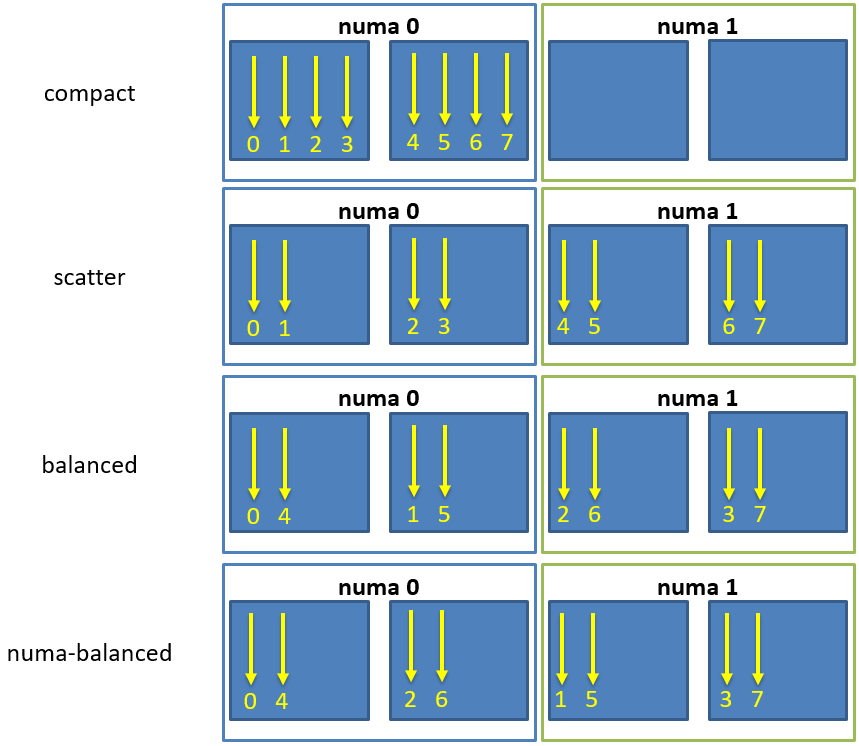
Fig. 7 Schematic of thread affinity type distributions.
In addition to the predefined distributions it is possible to restrict the
resources used by HPX to the process CPU mask. The CPU mask is typically set
by e.g. MPI and batch environments. Using the command line option
--hpx:use-process-mask makes HPX act as if only the processing units
in the CPU mask are available for use by HPX. The number of threads is
automatically determined from the CPU mask. The number of threads can still be
changed manually using this option, but only to a number less than or equal to
the number of processing units in the CPU mask. The option
--hpx:print-bind is useful in conjunction with
--hpx:use-process-mask to make sure threads are placed as expected.
- 1
The phase of a HPX-thread counts how often this thread has been activated.
Writing single-node HPX applications
HPX is a C++ Standard Library for Concurrency and Parallelism. This means that it implements all of the corresponding facilities as defined by the C++ Standard. Additionally, HPX implements functionalities proposed as part of the ongoing C++ standardization process. This section focuses on the features available in HPX for parallel and concurrent computation on a single node, although many of the features presented here are also implemented to work in the distributed case.
Using LCOs
Lightweight Control Objects (LCOs) provide synchronization for HPX applications. Most of them are familiar from other frameworks, but a few of them work in slightly different ways adapted to HPX. The following synchronization objects are available in HPX:
futurequeueobject_semaphorebarrier
Channels
Channels combine communication (the exchange of a value) with synchronization (guaranteeing that two calculations (tasks) are in a known state). A channel can transport any number of values of a given type from a sender to a receiver:
hpx::lcos::local::channel<int> c;
hpx::future<int> f = c.get();
HPX_ASSERT(!f.is_ready());
c.set(42);
HPX_ASSERT(f.is_ready());
hpx::cout << f.get() << hpx::endl;
Channels can be handed to another thread (or in case of channel components, to other localities), thus establishing a communication channel between two independent places in the program:
void do_something(hpx::lcos::local::receive_channel<int> c,
hpx::lcos::local::send_channel<> done)
{
// prints 43
hpx::cout << c.get(hpx::launch::sync) << hpx::endl;
// signal back
done.set();
}
void send_receive_channel()
{
hpx::lcos::local::channel<int> c;
hpx::lcos::local::channel<> done;
hpx::apply(&do_something, c, done);
// send some value
c.set(43);
// wait for thread to be done
done.get().wait();
}
Note how hpx::lcos::local::channel::get without any arguments
returns a future which is ready when a value has been set on the channel. The
launch policy hpx::launch::sync can be used to make
hpx::lcos::local::channel::get block until a value is set and
return the value directly.
A channel component is created on one locality and can be sent to another locality using an action. This example also demonstrates how a channel can be used as a range of values:
// channel components need to be registered for each used type (not needed
// for hpx::lcos::local::channel)
HPX_REGISTER_CHANNEL(double);
void channel_sender(hpx::lcos::channel<double> c)
{
for (double d : c)
hpx::cout << d << std::endl;
}
HPX_PLAIN_ACTION(channel_sender);
void channel()
{
// create the channel on this locality
hpx::lcos::channel<double> c(hpx::find_here());
// pass the channel to a (possibly remote invoked) action
hpx::apply(channel_sender_action(), hpx::find_here(), c);
// send some values to the receiver
std::vector<double> v = {1.2, 3.4, 5.0};
for (double d : v)
c.set(d);
// explicitly close the communication channel (implicit at destruction)
c.close();
}
Composable guards
Composable guards operate in a manner similar to locks, but are applied only to asynchronous functions. The guard (or guards) is automatically locked at the beginning of a specified task and automatically unlocked at the end. Because guards are never added to an existing task’s execution context, the calling of guards is freely composable and can never deadlock.
To call an application with a single guard, simply declare the guard and call run_guarded() with a function (task):
hpx::lcos::local::guard gu;
run_guarded(gu,task);
If a single method needs to run with multiple guards, use a guard set:
boost::shared<hpx::lcos::local::guard> gu1(new hpx::lcos::local::guard());
boost::shared<hpx::lcos::local::guard> gu2(new hpx::lcos::local::guard());
gs.add(*gu1);
gs.add(*gu2);
run_guarded(gs,task);
Guards use two atomic operations (which are not called repeatedly) to manage what they do, so overhead should be extremely low. The following guards are available in HPX:
conditional_triggercounting_semaphoredatafloweventmutexoncerecursive_mutexspinlockspinlock_no_backofftrigger
Extended facilities for futures
Concurrency is about both decomposing and composing the program from the parts that work well individually and together. It is in the composition of connected and multicore components where today’s C++ libraries are still lacking.
The functionality of std::future offers a partial solution. It allows for
the separation of the initiation of an operation and the act of waiting for its
result; however, the act of waiting is synchronous. In communication-intensive
code this act of waiting can be unpredictable, inefficient and simply
frustrating. The example below illustrates a possible synchronous wait using
futures:
#include <future>
using namespace std;
int main()
{
future<int> f = async([]() { return 123; });
int result = f.get(); // might block
}
For this reason, HPX implements a set of extensions to std::future (as
proposed by __cpp11_n4107__). This proposal introduces the following key
asynchronous operations to hpx::future, hpx::shared_future and
hpx::async, which enhance and enrich these facilities.
Facility |
Description |
|
In asynchronous programming, it is very common for one asynchronous
operation, on completion, to invoke a second operation and pass data to
it. The current C++ standard does not allow one to register a
continuation to a future. With |
unwrapping constructor for |
In some scenarios, you might want to create a future that returns another future, resulting in nested futures. Although it is possible to write code to unwrap the outer future and retrieve the nested future and its result, such code is not easy to write because users must handle exceptions and it may cause a blocking call. Unwrapping can allow users to mitigate this problem by doing an asynchronous call to unwrap the outermost future. |
|
There are often situations where a |
|
Some functions may know the value at the point of construction. In these
cases the value is immediately available, but needs to be returned as a
future. By using |
The standard also omits the ability to compose multiple futures. This is a common pattern that is ubiquitous in other asynchronous frameworks and is absolutely necessary in order to make C++ a powerful asynchronous programming language. Not including these functions is synonymous to Boolean algebra without AND/OR.
In addition to the extensions proposed by N4313, HPX adds functions allowing users to compose several futures in a more flexible way.
Facility |
Description |
Comment |
Asynchronously wait for at least one of multiple future or shared_future objects to finish. |
N4313, |
|
Synchronously wait for at least one of multiple future or shared_future objects to finish. |
HPX only |
|
Asynchronously wait for all future and shared_future objects to finish. |
N4313, |
|
Synchronously wait for all future and shared_future objects to finish. |
HPX only |
|
Asynchronously wait for multiple future and shared_future objects to finish. |
HPX only |
|
Synchronously wait for multiple future and shared_future objects to finish. |
HPX only |
|
Asynchronously wait for multiple future and shared_future objects to finish and call a function for each of the future objects as soon as it becomes ready. |
HPX only |
|
Synchronously wait for multiple future and shared_future objects to finish and call a function for each of the future objects as soon as it becomes ready. |
HPX only |
High level parallel facilities
In preparation for the upcoming C++ Standards, there are currently several proposals targeting different facilities supporting parallel programming. HPX implements (and extends) some of those proposals. This is well aligned with our strategy to align the APIs exposed from HPX with current and future C++ Standards.
At this point, HPX implements several of the C++ Standardization working papers, most notably N4409 (Working Draft, Technical Specification for C++ Extensions for Parallelism), N4411 (Task Blocks), and N4406 (Parallel Algorithms Need Executors).
Using parallel algorithms
A parallel algorithm is a function template described by this document
which is declared in the (inline) namespace hpx::parallel::v1.
Note
For compilers that do not support inline namespaces, all of the namespace
v1 is imported into the namespace hpx::parallel. The effect is similar
to what inline namespaces would do, namely all names defined in
hpx::parallel::v1 are accessible from the namespace hpx::parallel as
well.
All parallel algorithms are very similar in semantics to their sequential
counterparts (as defined in the namespace std) with an additional formal
template parameter named ExecutionPolicy. The execution policy is generally
passed as the first argument to any of the parallel algorithms and describes the
manner in which the execution of these algorithms may be parallelized and the
manner in which they apply user-provided function objects.
The applications of function objects in parallel algorithms invoked with an
execution policy object of type hpx::execution::sequenced_policy or
hpx::execution::sequenced_task_policy execute in sequential order. For
hpx::execution::sequenced_policy the execution happens in the calling thread.
The applications of function objects in parallel algorithms invoked with an
execution policy object of type hpx::execution::parallel_policy or
hpx::execution::parallel_task_policy are permitted to execute in an unordered
fashion in unspecified threads, and are indeterminately sequenced within each
thread.
Important
It is the caller’s responsibility to ensure correctness, such as making sure that the invocation does not introduce data races or deadlocks.
The applications of function objects in parallel algorithms invoked with an
execution policy of type hpx::execution::parallel_unsequenced_policy is, in HPX,
equivalent to the use of the execution policy hpx::execution::parallel_policy.
Algorithms invoked with an execution policy object of type hpx::parallel::v1::execution_policy
execute internally as if invoked with the contained execution policy object. No
exception is thrown when an hpx::parallel::v1::execution_policy contains an execution policy of
type hpx::execution::sequenced_task_policy or hpx::execution::parallel_task_policy
(which normally turn the algorithm into its asynchronous version). In this case
the execution is semantically equivalent to the case of passing a
hpx::execution::sequenced_policy or hpx::execution::parallel_policy contained in the
hpx::parallel::v1::execution_policy object respectively.
Parallel exceptions
During the execution of a standard parallel algorithm, if temporary memory
resources are required by any of the algorithms and no memory is available, the
algorithm throws a std::bad_alloc exception.
During the execution of any of the parallel algorithms, if the application of a function object terminates with an uncaught exception, the behavior of the program is determined by the type of execution policy used to invoke the algorithm:
If the execution policy object is of type
hpx::execution::parallel_unsequenced_policy,hpx::terminateshall be called.If the execution policy object is of type
hpx::execution::sequenced_policy,hpx::execution::sequenced_task_policy,hpx::execution::parallel_policy, orhpx::execution::parallel_task_policy, the execution of the algorithm terminates with anhpx::exception_listexception. All uncaught exceptions thrown during the application of user-provided function objects shall be contained in thehpx::exception_list.
For example, the number of invocations of the user-provided function object in
for_each is unspecified. When hpx::parallel::v1::for_each is executed sequentially, only one
exception will be contained in the hpx::exception_list object.
These guarantees imply that, unless the algorithm has failed to allocate memory
and terminated with std::bad_alloc, all exceptions thrown during the
execution of the algorithm are communicated to the caller. It is unspecified
whether an algorithm implementation will “forge ahead” after encountering and
capturing a user exception.
The algorithm may terminate with the std::bad_alloc exception even if one or
more user-provided function objects have terminated with an exception. For
example, this can happen when an algorithm fails to allocate memory while
creating or adding elements to the hpx::exception_list object.
Parallel algorithms
HPX provides implementations of the following parallel algorithms:
Name |
Description |
In header |
Algorithm page at cppreference.com |
Computes the differences between adjacent elements in a range. |
|
||
Checks if a predicate is |
|
||
Checks if a predicate is |
|
||
Returns the number of elements equal to a given value. |
|
||
Returns the number of elements satisfying a specific criteria. |
|
||
Determines if two sets of elements are the same. |
|
||
Finds the first element equal to a given value. |
|
||
Finds the last sequence of elements in a certain range. |
|
||
Searches for any one of a set of elements. |
|
||
Finds the first element satisfying a specific criteria. |
|
||
Finds the first element not satisfying a specific criteria. |
|
||
Applies a function to a range of elements. |
|
||
Applies a function to a number of elements. |
|
||
Checks if a range of values is lexicographically less than another range of values. |
|
||
|
Finds the first position where two ranges differ. |
|
|
Checks if a predicate is |
|
||
Searches for a range of elements. |
|
||
Searches for a number consecutive copies of an element in a range. |
|
Name |
Description |
In header |
Algorithm page at cppreference.com |
Copies a range of elements to a new location. |
|
||
Copies a number of elements to a new location. |
|
||
Copies the elements from a range to a new location for which the given predicate is |
|
||
Moves a range of elements to a new location. |
|
||
Assigns a range of elements a certain value. |
|
||
Assigns a value to a number of elements. |
|
||
Saves the result of a function in a range. |
|
||
Saves the result of N applications of a function. |
|
||
Removes the elements from a range that are equal to the given value. |
|
||
Removes the elements from a range that are equal to the given predicate is |
|
||
Copies the elements from a range to a new location that are not equal to the given value. |
|
||
Copies the elements from a range to a new location for which the given predicate is |
|
||
Replaces all values satisfying specific criteria with another value. |
|
||
Replaces all values satisfying specific criteria with another value. |
|
||
Copies a range, replacing elements satisfying specific criteria with another value. |
|
||
Copies a range, replacing elements satisfying specific criteria with another value. |
|
||
Reverses the order elements in a range. |
|
||
Creates a copy of a range that is reversed. |
|
||
Rotates the order of elements in a range. |
|
||
Copies and rotates a range of elements. |
|
||
Swaps two ranges of elements. |
|
||
Applies a function to a range of elements. |
|
||
Eliminates all but the first element from every consecutive group of equivalent elements from a range. |
|
||
Eliminates all but the first element from every consecutive group of equivalent elements from a range. |
|
Name |
Description |
In header |
Algorithm page at cppreference.com |
Merges two sorted ranges. |
|
||
Merges two ordered ranges in-place. |
|
||
Returns true if one set is a subset of another. |
|
||
Computes the difference between two sets. |
|
||
Computes the intersection of two sets. |
|
||
Computes the symmetric difference between two sets. |
|
||
Computes the union of two sets. |
|
Name |
Description |
In header |
Algorithm page at cppreference.com |
Returns |
|
||
Returns the first element that breaks a max heap. |
|
||
Constructs a max heap in the range [first, last). |
|
Name |
Description |
In header |
Algorithm page at cppreference.com |
Returns the largest element in a range. |
|
||
Returns the smallest element in a range. |
|
||
Returns the smallest and the largest element in a range. |
|
Name |
Description |
In header |
Algorithm page at cppreference.com |
Returns |
|
||
Divides elements into two groups without preserving their relative order. |
|
||
Copies a range dividing the elements into two groups. |
|
||
Divides elements into two groups while preserving their relative order. |
|
Name |
Description |
In header |
Algorithm page at cppreference.com |
Returns |
|
||
Returns the first unsorted element. |
|
||
Sorts the elements in a range. |
|
||
Sorts the elements in a range, maintain sequence of equal elements. |
|
||
Sorts the first elements in a range. |
|
||
Sorts one range of data using keys supplied in another range. |
|
Name |
Description |
In header |
Algorithm page at cppreference.com |
Calculates the difference between each element in an input range and the preceding element. |
|
||
Does an exclusive parallel scan over a range of elements. |
|
||
Sums up a range of elements. |
|
||
Does an inclusive parallel scan over a range of elements. |
|
||
Performs an inclusive scan on consecutive elements with matching keys,
with a reduction to output only the final sum for each key. The key
sequence |
|
||
Sums up a range of elements after applying a function. Also, accumulates the inner products of two input ranges. |
|
||
Does an inclusive parallel scan over a range of elements after applying a function. |
|
||
|
Does an exclusive parallel scan over a range of elements after applying a function. |
|
Name |
Description |
In header |
Algorithm page at cppreference.com |
Destroys a range of objects. |
|
||
Destroys a range of objects. |
|
||
Copies a range of objects to an uninitialized area of memory. |
|
||
Copies a number of objects to an uninitialized area of memory. |
|
||
Copies a range of objects to an uninitialized area of memory. |
|
||
Copies a number of objects to an uninitialized area of memory. |
|
||
Copies an object to an uninitialized area of memory. |
|
||
Copies an object to an uninitialized area of memory. |
|
||
Moves a range of objects to an uninitialized area of memory. |
|
||
Moves a number of objects to an uninitialized area of memory. |
|
||
Constructs objects in an uninitialized area of memory. |
|
||
Constructs objects in an uninitialized area of memory. |
|
Name |
Description |
In header |
Implements loop functionality over a range specified by integral or iterator bounds. |
|
|
Implements loop functionality over a range specified by integral or iterator bounds. |
|
|
Implements loop functionality over a range specified by integral or iterator bounds. |
|
|
Implements loop functionality over a range specified by integral or iterator bounds. |
|
Executor parameters and executor parameter traits
HPX introduces the notion of execution parameters and execution parameter traits. At this point, the only parameter that can be customized is the size of the chunks of work executed on a single HPX thread (such as the number of loop iterations combined to run as a single task).
An executor parameter object is responsible for exposing the calculation of the size of the chunks scheduled. It abstracts the (potentially platform-specific) algorithms of determining those chunk sizes.
The way executor parameters are implemented is aligned with the way executors
are implemented. All functionalities of concrete executor parameter types are
exposed and accessible through a corresponding
hpx::parallel::executor_parameter_traits type.
With executor_parameter_traits, clients access all types of executor
parameters uniformly:
std::size_t chunk_size =
executor_parameter_traits<my_parameter_t>::get_chunk_size(my_parameter,
my_executor, [](){ return 0; }, num_tasks);
This call synchronously retrieves the size of a single chunk of loop iterations
(or similar) to combine for execution on a single HPX thread if the overall
number of tasks to schedule is given by num_tasks. The lambda function
exposes a means of test-probing the execution of a single iteration for
performance measurement purposes. The execution parameter type might dynamically
determine the execution time of one or more tasks in order to calculate the
chunk size; see hpx::execution::auto_chunk_size for an example of
this executor parameter type.
Other functions in the interface exist to discover whether an executor parameter
type should be invoked once (i.e., it returns a static chunk size; see
hpx::execution::static_chunk_size) or whether it should be invoked
for each scheduled chunk of work (i.e., it returns a variable chunk size; for an
example, see hpx::execution::guided_chunk_size).
Although this interface appears to require executor parameter type authors to implement all different basic operations, none are required. In practice, all operations have sensible defaults. However, some executor parameter types will naturally specialize all operations for maximum efficiency.
HPX implements the following executor parameter types:
hpx::execution::auto_chunk_size: Loop iterations are divided into pieces and then assigned to threads. The number of loop iterations combined is determined based on measurements of how long the execution of 1% of the overall number of iterations takes. This executor parameter type makes sure that as many loop iterations are combined as necessary to run for the amount of time specified.hpx::execution::static_chunk_size: Loop iterations are divided into pieces of a given size and then assigned to threads. If the size is not specified, the iterations are, if possible, evenly divided contiguously among the threads. This executor parameters type is equivalent to OpenMP’s STATIC scheduling directive.hpx::execution::dynamic_chunk_size: Loop iterations are divided into pieces of a given size and then dynamically scheduled among the cores; when a core finishes one chunk, it is dynamically assigned another. If the size is not specified, the default chunk size is 1. This executor parameter type is equivalent to OpenMP’s DYNAMIC scheduling directive.hpx::execution::guided_chunk_size: Iterations are dynamically assigned to cores in blocks as cores request them until no blocks remain to be assigned. This is similar todynamic_chunk_sizeexcept that the block size decreases each time a number of loop iterations is given to a thread. The size of the initial block is proportional tonumber_of_iterations / number_of_cores. Subsequent blocks are proportional tonumber_of_iterations_remaining / number_of_cores. The optional chunk size parameter defines the minimum block size. The default minimal chunk size is 1. This executor parameter type is equivalent to OpenMP’s GUIDED scheduling directive.
Using task blocks
The define_task_block, run and the wait functions implemented based
on N4411 are based on the task_block concept that is a part of the
common subset of the Microsoft Parallel Patterns Library (PPL) and the Intel Threading Building Blocks (TBB) libraries.
These implementations adopt a simpler syntax than exposed by those libraries— one that is influenced by language-based concepts, such as spawn and sync from Cilk++ and async and finish from X10. They improve on existing practice in the following ways:
The exception handling model is simplified and more consistent with normal C++ exceptions.
Most violations of strict fork-join parallelism can be enforced at compile time (with compiler assistance, in some cases).
The syntax allows scheduling approaches other than child stealing.
Consider an example of a parallel traversal of a tree, where a user-provided function compute is applied to each node of the tree, returning the sum of the results:
template <typename Func>
int traverse(node& n, Func && compute)
{
int left = 0, right = 0;
define_task_block(
[&](task_block<>& tr) {
if (n.left)
tr.run([&] { left = traverse(*n.left, compute); });
if (n.right)
tr.run([&] { right = traverse(*n.right, compute); });
});
return compute(n) + left + right;
}
The example above demonstrates the use of two of the functions,
hpx::parallel::define_task_block and the
hpx::parallel::task_block::run member function of a
hpx::parallel::task_block.
The task_block function delineates a region in a program code potentially
containing invocations of threads spawned by the run member function of the
task_block class. The run function spawns an HPX thread, a unit of
work that is allowed to execute in parallel with respect to the caller. Any
parallel tasks spawned by run within the task block are joined back to a
single thread of execution at the end of the define_task_block. run
takes a user-provided function object f and starts it asynchronously—i.e.,
it may return before the execution of f completes. The HPX scheduler may
choose to run f immediately or delay running f until compute resources
become available.
A task_block can be constructed only by define_task_block because it has
no public constructors. Thus, run can be invoked directly or indirectly
only from a user-provided function passed to define_task_block:
void g();
void f(task_block<>& tr)
{
tr.run(g); // OK, invoked from within task_block in h
}
void h()
{
define_task_block(f);
}
int main()
{
task_block<> tr; // Error: no public constructor
tr.run(g); // No way to call run outside of a define_task_block
return 0;
}
Extensions for task blocks
HPX implements some extensions for task_block beyond the actual
standards proposal N4411. The main addition is that a task_block
can be invoked with an execution policy as its first argument, very similar to
the parallel algorithms.
An execution policy is an object that expresses the requirements on the
ordering of functions invoked as a consequence of the invocation of a
task block. Enabling passing an execution policy to define_task_block
gives the user control over the amount of parallelism employed by the
created task_block. In the following example the use of an explicit
par execution policy makes the user’s intent explicit:
template <typename Func>
int traverse(node *n, Func&& compute)
{
int left = 0, right = 0;
define_task_block(
execution::par, // execution::parallel_policy
[&](task_block<>& tb) {
if (n->left)
tb.run([&] { left = traverse(n->left, compute); });
if (n->right)
tb.run([&] { right = traverse(n->right, compute); });
});
return compute(n) + left + right;
}
This also causes the hpx::parallel::v2::task_block object to be a
template in our implementation. The template argument is the type of the
execution policy used to create the task block. The template argument defaults
to hpx::execution::parallel_policy.
HPX still supports calling hpx::parallel::v2::define_task_block
without an explicit execution policy. In this case the task block will run using
the hpx::execution::parallel_policy.
HPX also adds the ability to access the execution policy that was used to
create a given task_block.
Often, users want to be able to not only define an execution policy to use by
default for all spawned tasks inside the task block, but also to
customize the execution context for one of the tasks executed by
task_block::run. Adding an optionally passed executor instance to that
function enables this use case:
template <typename Func>
int traverse(node *n, Func&& compute)
{
int left = 0, right = 0;
define_task_block(
execution::par, // execution::parallel_policy
[&](auto& tb) {
if (n->left)
{
// use explicitly specified executor to run this task
tb.run(my_executor(), [&] { left = traverse(n->left, compute); });
}
if (n->right)
{
// use the executor associated with the par execution policy
tb.run([&] { right = traverse(n->right, compute); });
}
});
return compute(n) + left + right;
}
HPX still supports calling hpx::parallel::v2::task_block::run
without an explicit executor object. In this case the task will be run using the
executor associated with the execution policy that was used to call
hpx::parallel::v2::define_task_block.
Writing distributed HPX applications
This section focuses on the features of HPX needed to write distributed applications, namely the Active Global Address Space (AGAS), remotely executable functions (i.e. actions), and distributed objects (i.e. components).
Global names
HPX implements an Active Global Address Space (AGAS) which is exposing a single uniform address space spanning all localities an application runs on. AGAS is a fundamental component of the ParalleX execution model. Conceptually, there is no rigid demarcation of local or global memory in AGAS; all available memory is a part of the same address space. AGAS enables named objects to be moved (migrated) across localities without having to change the object’s name, i.e., no references to migrated objects have to be ever updated. This feature has significance for dynamic load balancing and in applications where the workflow is highly dynamic, allowing work to be migrated from heavily loaded nodes to less loaded nodes. In addition, immutability of names ensures that AGAS does not have to keep extra indirections (“bread crumbs”) when objects move, hence minimizing complexity of code management for system developers as well as minimizing overheads in maintaining and managing aliases.
The AGAS implementation in HPX does not automatically expose every local address to the global address space. It is the responsibility of the programmer to explicitly define which of the objects have to be globally visible and which of the objects are purely local.
In HPX global addresses (global names) are represented using the
hpx::id_type data type. This data type is conceptually very similar to
void* pointers as it does not expose any type information of the object it
is referring to.
The only predefined global addresses are assigned to all localities. The following HPX API functions allow one to retrieve the global addresses of localities:
hpx::find_here: retrieve the global address of the locality this function is called on.hpx::find_all_localities: retrieve the global addresses of all localities available to this application (including the locality the function is being called on).hpx::find_remote_localities: retrieve the global addresses of all remote localities available to this application (not including the locality the function is being called on)hpx::get_num_localities: retrieve the number of localities available to this application.hpx::find_locality: retrieve the global address of any locality supporting the given component type.hpx::get_colocation_id: retrieve the global address of the locality currently hosting the object with the given global address.
Additionally, the global addresses of localities can be used to create new instances of components using the following HPX API function:
hpx::components::new_: Create a new instance of the givenComponenttype on the specified locality.
Note
HPX does not expose any functionality to delete component instances. All
global addresses (as represented using hpx::id_type) are automatically
garbage collected. When the last (global) reference to a particular component
instance goes out of scope the corresponding component instance is
automatically deleted.
Applying actions
Action type definition
Actions are special types we use to describe possibly remote operations. For
every global function and every member function which has to be invoked
distantly, a special type must be defined. For any global function the special
macro HPX_PLAIN_ACTION can be used to define the
action type. Here is an example demonstrating this:
namespace app
{
void some_global_function(double d)
{
cout << d;
}
}
// This will define the action type 'some_global_action' which represents
// the function 'app::some_global_function'.
HPX_PLAIN_ACTION(app::some_global_function, some_global_action);
Important
The macro HPX_PLAIN_ACTION has to be placed in
global namespace, even if the wrapped function is located in some other
namespace. The newly defined action type is placed in the global namespace as
well.
If the action type should be defined somewhere not in global namespace, the
action type definition has to be split into two macro invocations
(HPX_DEFINE_PLAIN_ACTION and HPX_REGISTER_ACTION) as shown
in the next example:
namespace app
{
void some_global_function(double d)
{
cout << d;
}
// On conforming compilers the following macro expands to:
//
// typedef hpx::actions::make_action<
// decltype(&some_global_function), &some_global_function
// >::type some_global_action;
//
// This will define the action type 'some_global_action' which represents
// the function 'some_global_function'.
HPX_DEFINE_PLAIN_ACTION(some_global_function, some_global_action);
}
// The following macro expands to a series of definitions of global objects
// which are needed for proper serialization and initialization support
// enabling the remote invocation of the function``some_global_function``
HPX_REGISTER_ACTION(app::some_global_action, app_some_global_action);
The shown code defines an action type some_global_action inside the namespace
app.
Important
If the action type definition is split between two macros as shown above, the
name of the action type to create has to be the same for both macro
invocations (here some_global_action).
Important
The second argument passed to HPX_REGISTER_ACTION (app_some_global_action) has
to comprise a globally unique C++ identifier representing the action. This is
used for serialization purposes.
For member functions of objects which have been registered with AGAS
(e.g. ‘components’) a different registration macro
HPX_DEFINE_COMPONENT_ACTION has to be utilized. Any component needs
to be declared in a header file and have some special support macros defined in
a source file. Here is an example demonstrating this. The first snippet has to
go into the header file:
namespace app
{
struct some_component
: hpx::components::component_base<some_component>
{
int some_member_function(std::string s)
{
return boost::lexical_cast<int>(s);
}
// This will define the action type 'some_member_action' which
// represents the member function 'some_member_function' of the
// object type 'some_component'.
HPX_DEFINE_COMPONENT_ACTION(some_component, some_member_function,
some_member_action);
};
}
// Note: The second argument to the macro below has to be systemwide-unique
// C++ identifiers
HPX_REGISTER_ACTION_DECLARATION(app::some_component::some_member_action, some_component_some_action);
The next snippet belongs into a source file (e.g. the main application source file) in the simplest case:
typedef hpx::components::component<app::some_component> component_type;
typedef app::some_component some_component;
HPX_REGISTER_COMPONENT(component_type, some_component);
// The parameters for this macro have to be the same as used in the corresponding
// HPX_REGISTER_ACTION_DECLARATION() macro invocation above
typedef some_component::some_member_action some_component_some_action;
HPX_REGISTER_ACTION(some_component_some_action);
Granted, these macro invocations are a bit more complex than for simple global functions, however we believe they are still manageable.
The most important macro invocation is the HPX_DEFINE_COMPONENT_ACTION in the header file
as this defines the action type we need to invoke the member function. For a
complete example of a simple component action see [hpx_link
examples/quickstart/component_in_executable.cpp..component_in_executable.cpp]
Action invocation
The process of invoking a global function (or a member function of an object) with the help of the associated action is called ‘applying the action’. Actions can have arguments, which will be supplied while the action is applied. At the minimum, one parameter is required to apply any action - the id of the locality the associated function should be invoked on (for global functions), or the id of the component instance (for member functions). Generally, HPX provides several ways to apply an action, all of which are described in the following sections.
Generally, HPX actions are very similar to ‘normal’ C++ functions except that actions can be invoked remotely. Fig. 8 below shows an overview of the main API exposed by HPX. This shows the function invocation syntax as defined by the C++ language (dark gray), the additional invocation syntax as provided through C++ Standard Library features (medium gray), and the extensions added by HPX (light gray) where:
ffunction to invoke,p..: (optional) arguments,R: return type off,action: action type defined by,HPX_DEFINE_PLAIN_ACTIONorHPX_DEFINE_COMPONENT_ACTIONencapsulatingf,a: an instance of the type`action,id: the global address the action is applied to.
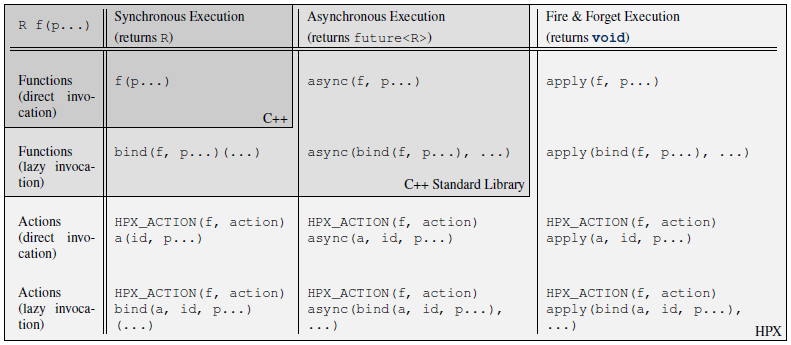
Fig. 8 Overview of the main API exposed by HPX.
This figure shows that HPX allows the user to apply actions with a syntax
similar to the C++ standard. In fact, all action types have an overloaded
function operator allowing to synchronously apply the action. Further, HPX
implements hpx::async which semantically works similar to the
way std::async works for plain C++ function.
Note
The similarity of applying an action to conventional function invocations
extends even further. HPX implements hpx::bind and hpx::function
two facilities which are semantically equivalent to the std::bind and
std::function types as defined by the C++11 Standard. While
hpx::async extends beyond the conventional semantics by supporting
actions and conventional C++ functions, the HPX facilities hpx::bind
and hpx::function extend beyond the conventional standard facilities too.
The HPX facilities not only support conventional functions, but can be used
for actions as well.
Additionally, HPX exposes hpx::apply and hpx::async_continue both of
which refine and extend the standard C++ facilities.
The different ways to invoke a function in HPX will be explained in more detail in the following sections.
Applying an action asynchronously without any synchronization
This method (‘fire and forget’) will make sure the function associated with the action is scheduled to run on the target locality. Applying the action does not wait for the function to start running, instead it is a fully asynchronous operation. The following example shows how to apply the action as defined in the previous section on the local locality (the locality this code runs on):
some_global_action act; // define an instance of some_global_action
hpx::apply(act, hpx::find_here(), 2.0);
(the function hpx::find_here() returns the id of the local locality,
i.e. the locality this code executes on).
Any component member function can be invoked using the same syntactic construct.
Given that id is the global address for a component instance created
earlier, this invocation looks like:
some_component_action act; // define an instance of some_component_action
hpx::apply(act, id, "42");
In this case any value returned from this action (e.g. in this case the integer
42 is ignored. Please look at Action type definition for the code
defining the component action some_component_action used.
Applying an action asynchronously with synchronization
This method will make sure the action is scheduled to run on the target
locality. Applying the action itself does not wait for the function to
start running or to complete, instead this is a fully asynchronous operation
similar to using hpx::apply as described above. The difference is that this
method will return an instance of a hpx::future<> encapsulating the result
of the (possibly remote) execution. The future can be used to synchronize with
the asynchronous operation. The following example shows how to apply the action
from above on the local locality:
some_global_action act; // define an instance of some_global_action
hpx::future<void> f = hpx::async(act, hpx::find_here(), 2.0);
//
// ... other code can be executed here
//
f.get(); // this will possibly wait for the asynchronous operation to 'return'
(as before, the function hpx::find_here() returns the id of the local
locality (the locality this code is executed on).
Note
The use of a hpx::future<void> allows the current thread to synchronize
with any remote operation not returning any value.
Note
Any std::future<> returned from std::async() is required to block in
its destructor if the value has not been set for this future yet. This is not
true for hpx::future<> which will never block in its destructor, even if
the value has not been returned to the future yet. We believe that
consistency in the behavior of futures is more important than standards
conformance in this case.
Any component member function can be invoked using the same syntactic construct.
Given that id is the global address for a component instance created
earlier, this invocation looks like:
some_component_action act; // define an instance of some_component_action
hpx::future<int> f = hpx::async(act, id, "42");
//
// ... other code can be executed here
//
cout << f.get(); // this will possibly wait for the asynchronous operation to 'return' 42
Note
The invocation of f.get() will return the result immediately (without
suspending the calling thread) if the result from the asynchronous operation
has already been returned. Otherwise, the invocation of f.get() will
suspend the execution of the calling thread until the asynchronous operation
returns its result.
Applying an action synchronously
This method will schedule the function wrapped in the specified action on the target locality. While the invocation appears to be synchronous (as we will see), the calling thread will be suspended while waiting for the function to return. Invoking a plain action (e.g. a global function) synchronously is straightforward:
some_global_action act; // define an instance of some_global_action
act(hpx::find_here(), 2.0);
While this call looks just like a normal synchronous function invocation, the function wrapped by the action will be scheduled to run on a new thread and the calling thread will be suspended. After the new thread has executed the wrapped global function, the waiting thread will resume and return from the synchronous call.
Equivalently, any action wrapping a component member function can be invoked synchronously as follows:
some_component_action act; // define an instance of some_component_action
int result = act(id, "42");
The action invocation will either schedule a new thread locally to execute the
wrapped member function (as before, id is the global address of the
component instance the member function should be invoked on), or it will send a
parcel to the remote locality of the component causing a new thread to
be scheduled there. The calling thread will be suspended until the function
returns its result. This result will be returned from the synchronous action
invocation.
It is very important to understand that this ‘synchronous’ invocation syntax in fact conceals an asynchronous function call. This is beneficial as the calling thread is suspended while waiting for the outcome of a potentially remote operation. The HPX thread scheduler will schedule other work in the meantime, allowing the application to make further progress while the remote result is computed. This helps overlapping computation with communication and hiding communication latencies.
Note
The syntax of applying an action is always the same, regardless whether the target locality is remote to the invocation locality or not. This is a very important feature of HPX as it frees the user from the task of keeping track what actions have to be applied locally and which actions are remote. If the target for applying an action is local, a new thread is automatically created and scheduled. Once this thread is scheduled and run, it will execute the function encapsulated by that action. If the target is remote, HPX will send a parcel to the remote locality which encapsulates the action and its parameters. Once the parcel is received on the remote locality HPX will create and schedule a new thread there. Once this thread runs on the remote locality, it will execute the function encapsulated by the action.
Applying an action with a continuation but without any synchronization
This method is very similar to the method described in section Applying an action asynchronously without any synchronization. The
difference is that it allows the user to chain a sequence of asynchronous
operations, while handing the (intermediate) results from one step to the next
step in the chain. Where hpx::apply invokes a single function using ‘fire
and forget’ semantics, hpx::apply_continue asynchronously triggers a chain
of functions without the need for the execution flow ‘to come back’ to the
invocation site. Each of the asynchronous functions can be executed on a
different locality.
Applying an action with a continuation and with synchronization
This method is very similar to the method described in section Applying an action asynchronously with synchronization. In
addition to what hpx::async can do, the functions hpx::async_continue
takes an additional function argument. This function will be called as the
continuation of the executed action. It is expected to perform additional
operations and to make sure that a result is returned to the original invocation
site. This method chains operations asynchronously by providing a continuation
operation which is automatically executed once the first action has finished
executing.
As an example we chain two actions, where the result of the first action is forwarded to the second action and the result of the second action is sent back to the original invocation site:
// first action
std::int32_t action1(std::int32_t i)
{
return i+1;
}
HPX_PLAIN_ACTION(action1); // defines action1_type
// second action
std::int32_t action2(std::int32_t i)
{
return i*2;
}
HPX_PLAIN_ACTION(action2); // defines action2_type
// this code invokes 'action1' above and passes along a continuation
// function which will forward the result returned from 'action1' to
// 'action2'.
action1_type act1; // define an instance of 'action1_type'
action2_type act2; // define an instance of 'action2_type'
hpx::future<int> f =
hpx::async_continue(act1, hpx::make_continuation(act2),
hpx::find_here(), 42);
hpx::cout << f.get() << "\n"; // will print: 86 ((42 + 1) * 2)
By default, the continuation is executed on the same locality as
hpx::async_continue is invoked from. If you want to specify the
locality where the continuation should be executed, the code above has
to be written as:
// this code invokes 'action1' above and passes along a continuation
// function which will forward the result returned from 'action1' to
// 'action2'.
action1_type act1; // define an instance of 'action1_type'
action2_type act2; // define an instance of 'action2_type'
hpx::future<int> f =
hpx::async_continue(act1, hpx::make_continuation(act2, hpx::find_here()),
hpx::find_here(), 42);
hpx::cout << f.get() << "\n"; // will print: 86 ((42 + 1) * 2)
Similarly, it is possible to chain more than 2 operations:
action1_type act1; // define an instance of 'action1_type'
action2_type act2; // define an instance of 'action2_type'
hpx::future<int> f =
hpx::async_continue(act1,
hpx::make_continuation(act2, hpx::make_continuation(act1)),
hpx::find_here(), 42);
hpx::cout << f.get() << "\n"; // will print: 87 ((42 + 1) * 2 + 1)
The function hpx::make_continuation creates a special function object
which exposes the following prototype:
struct continuation
{
template <typename Result>
void operator()(hpx::id_type id, Result&& result) const
{
...
}
};
where the parameters passed to the overloaded function operator operator()()
are:
the
idis the global id where the final result of the asynchronous chain of operations should be sent to (in most cases this is the id of thehpx::futurereturned from the initial call tohpx::async_continue. Any custom continuation function should make sure thisidis forwarded to the last operation in the chain.the
resultis the result value of the current operation in the asynchronous execution chain. This value needs to be forwarded to the next operation.
Note
All of those operations are implemented by the predefined continuation
function object which is returned from hpx::make_continuation. Any (custom)
function object used as a continuation should conform to the same interface.
Action error handling
Like in any other asynchronous invocation scheme it is important to be able to handle error conditions occurring while the asynchronous (and possibly remote) operation is executed. In HPX all error handling is based on standard C++ exception handling. Any exception thrown during the execution of an asynchronous operation will be transferred back to the original invocation locality, where it is rethrown during synchronization with the calling thread.
Important
Exceptions thrown during asynchronous execution can be transferred back to
the invoking thread only for the synchronous and the asynchronous case with
synchronization. Like with any other unhandled exception, any exception
thrown during the execution of an asynchronous action without
synchronization will result in calling hpx::terminate causing the running
application to exit immediately.
Note
Even if error handling internally relies on exceptions, most of the API functions exposed by HPX can be used without throwing an exception. Please see Working with exceptions for more information.
As an example, we will assume that the following remote function will be executed:
namespace app
{
void some_function_with_error(int arg)
{
if (arg < 0) {
HPX_THROW_EXCEPTION(bad_parameter, "some_function_with_error",
"some really bad error happened");
}
// do something else...
}
}
// This will define the action type 'some_error_action' which represents
// the function 'app::some_function_with_error'.
HPX_PLAIN_ACTION(app::some_function_with_error, some_error_action);
The use of HPX_THROW_EXCEPTION to report the error encapsulates the
creation of a hpx::exception which is initialized with the error
code hpx::bad_parameter. Additionally it carries the passed strings, the
information about the file name, line number, and call stack of the point the
exception was thrown from.
We invoke this action using the synchronous syntax as described before:
// note: wrapped function will throw hpx::exception
some_error_action act; // define an instance of some_error_action
try {
act(hpx::find_here(), -3); // exception will be rethrown from here
}
catch (hpx::exception const& e) {
// prints: 'some really bad error happened: HPX(bad parameter)'
cout << e.what();
}
If this action is invoked asynchronously with synchronization, the exception is
propagated to the waiting thread as well and is re-thrown from the future’s
function get():
// note: wrapped function will throw hpx::exception
some_error_action act; // define an instance of some_error_action
hpx::future<void> f = hpx::async(act, hpx::find_here(), -3);
try {
f.get(); // exception will be rethrown from here
}
catch (hpx::exception const& e) {
// prints: 'some really bad error happened: HPX(bad parameter)'
cout << e.what();
}
For more information about error handling please refer to the section Working with exceptions. There we also explain how to handle error conditions without having to rely on exception.
Writing components
A component in HPX is a C++ class which can be created remotely and for which its member functions can be invoked remotely as well. The following sections highlight how components can be defined, created, and used.
Defining components
In order for a C++ class type to be managed remotely in HPX, the type must be
derived from the hpx::components::component_base template type. We
call such C++ class types ‘components’.
Note that the component type itself is passed as a template argument to the base class:
// header file some_component.hpp
#include <hpx/include/components.hpp>
namespace app
{
// Define a new component type 'some_component'
struct some_component
: hpx::components::component_base<some_component>
{
// This member function is has to be invoked remotely
int some_member_function(std::string const& s)
{
return boost::lexical_cast<int>(s);
}
// This will define the action type 'some_member_action' which
// represents the member function 'some_member_function' of the
// object type 'some_component'.
HPX_DEFINE_COMPONENT_ACTION(some_component, some_member_function, some_member_action);
};
}
// This will generate the necessary boiler-plate code for the action allowing
// it to be invoked remotely. This declaration macro has to be placed in the
// header file defining the component itself.
//
// Note: The second argument to the macro below has to be systemwide-unique
// C++ identifiers
//
HPX_REGISTER_ACTION_DECLARATION(app::some_component::some_member_action, some_component_some_action);
There is more boiler plate code which has to be placed into a source file in order for the component to be usable. Every component type is required to have macros placed into its source file, one for each component type and one macro for each of the actions defined by the component type.
For instance:
// source file some_component.cpp
#include "some_component.hpp"
// The following code generates all necessary boiler plate to enable the
// remote creation of 'app::some_component' instances with 'hpx::new_<>()'
//
using some_component = app::some_component;
using some_component_type = hpx::components::component<some_component>;
// Please note that the second argument to this macro must be a
// (system-wide) unique C++-style identifier (without any namespaces)
//
HPX_REGISTER_COMPONENT(some_component_type, some_component);
// The parameters for this macro have to be the same as used in the corresponding
// HPX_REGISTER_ACTION_DECLARATION() macro invocation in the corresponding
// header file.
//
// Please note that the second argument to this macro must be a
// (system-wide) unique C++-style identifier (without any namespaces)
//
HPX_REGISTER_ACTION(app::some_component::some_member_action, some_component_some_action);
Defining client side representation classes
Often it is very convenient to define a separate type for a component which can be used on the client side (from where the component is instantiated and used). This step might seem as unnecessary duplicating code, however it significantly increases the type safety of the code.
A possible implementation of such a client side representation for the component described in the previous section could look like:
#include <hpx/include/components.hpp>
namespace app
{
// Define a client side representation type for the component type
// 'some_component' defined in the previous section.
//
struct some_component_client
: hpx::components::client_base<some_component_client, some_component>
{
using base_type = hpx::components::client_base<
some_component_client, some_component>;
some_component_client(hpx::future<hpx::id_type> && id)
: base_type(std::move(id))
{}
hpx::future<int> some_member_function(std::string const& s)
{
some_component::some_member_action act;
return hpx::async(act, get_id(), s);
}
};
}
A client side object stores the global id of the component instance it
represents. This global id is accessible by calling the function
client_base<>::get_id(). The special constructor which is provided in the
example allows to create this client side object directly using the API function
hpx::new_.
Creating component instances
Instances of defined component types can be created in two different ways. If the component to create has a defined client side representation type, then this can be used, otherwise use the server type.
The following examples assume that some_component_type is the type of the
server side implementation of the component to create. All additional arguments
(see , ... notation below) are passed through to the corresponding
constructor calls of those objects:
// create one instance on the given locality
hpx::id_type here = hpx::find_here();
hpx::future<hpx::id_type> f =
hpx::new_<some_component_type>(here, ...);
// create one instance using the given distribution
// policy (here: hpx::colocating_distribution_policy)
hpx::id_type here = hpx::find_here();
hpx::future<hpx::id_type> f =
hpx::new_<some_component_type>(hpx::colocated(here), ...);
// create multiple instances on the given locality
hpx::id_type here = find_here();
hpx::future<std::vector<hpx::id_type>> f =
hpx::new_<some_component_type[]>(here, num, ...);
// create multiple instances using the given distribution
// policy (here: hpx::binpacking_distribution_policy)
hpx::future<std::vector<hpx::id_type>> f = hpx::new_<some_component_type[]>(
hpx::binpacking(hpx::find_all_localities()), num, ...);
The examples below demonstrate the use of the same API functions for creating
client side representation objects (instead of just plain ids). These examples
assume that client_type is the type of the client side representation of the
component type to create. As above, all additional arguments
(see , ... notation below) are passed through to the corresponding constructor
calls of the server side implementation objects corresponding to the
client_type:
// create one instance on the given locality
hpx::id_type here = hpx::find_here();
client_type c = hpx::new_<client_type>(here, ...);
// create one instance using the given distribution
// policy (here: hpx::colocating_distribution_policy)
hpx::id_type here = hpx::find_here();
client_type c = hpx::new_<client_type>(hpx::colocated(here), ...);
// create multiple instances on the given locality
hpx::id_type here = hpx::find_here();
hpx::future<std::vector<client_type>> f =
hpx::new_<client_type[]>(here, num, ...);
// create multiple instances using the given distribution
// policy (here: hpx::binpacking_distribution_policy)
hpx::future<std::vector<client_type>> f = hpx::new_<client_type[]>(
hpx::binpacking(hpx::find_all_localities()), num, ...);
Using component instances
Segmented containers
In parallel programming, there is now a plethora of solutions aimed at implementing “partially contiguous” or segmented data structures, whether on shared memory systems or distributed memory systems. HPX implements such structures by drawing inspiration from Standard C++ containers.
Using segmented containers
A segmented container is a template class that is described in the namespace
hpx. All segmented containers are very similar semantically to their
sequential counterpart (defined in namespace std but with an additional
template parameter named DistPolicy). The distribution policy is an optional
parameter that is passed last to the segmented container constructor (after the
container size when no default value is given, after the default value if not).
The distribution policy describes the manner in which a container is segmented
and the placement of each segment among the available runtime localities.
However, only a part of the std container member functions were
reimplemented:
(constructor),(destructor),operator=operator[]begin,cbegin,end,cendsize
An example of how to use the partitioned_vector container would be:
#include <hpx/include/partitioned_vector.hpp>
// The following code generates all necessary boiler plate to enable the
// remote creation of 'partitioned_vector' segments
//
HPX_REGISTER_PARTITIONED_VECTOR(double);
// By default, the number of segments is equal to the current number of
// localities
//
hpx::partitioned_vector<double> va(50);
hpx::partitioned_vector<double> vb(50, 0.0);
An example of how to use the partitioned_vector container
with distribution policies would be:
#include <hpx/include/partitioned_vector.hpp>
#include <hpx/runtime_distributed/find_localities.hpp>
// The following code generates all necessary boiler plate to enable the
// remote creation of 'partitioned_vector' segments
//
HPX_REGISTER_PARTITIONED_VECTOR(double);
std::size_t num_segments = 10;
std::vector<hpx::id_type> locs = hpx::find_all_localities()
auto layout =
hpx::container_layout( num_segments, locs );
// The number of segments is 10 and those segments are spread across the
// localities collected in the variable locs in a Round-Robin manner
//
hpx::partitioned_vector<double> va(50, layout);
hpx::partitioned_vector<double> vb(50, 0.0, layout);
By definition, a segmented container must be accessible from any thread although its construction is synchronous only for the thread who has called its constructor. To overcome this problem, it is possible to assign a symbolic name to the segmented container:
#include <hpx/include/partitioned_vector.hpp>
// The following code generates all necessary boiler plate to enable the
// remote creation of 'partitioned_vector' segments
//
HPX_REGISTER_PARTITIONED_VECTOR(double);
hpx::future<void> fserver = hpx::async(
[](){
hpx::partitioned_vector<double> v(50);
// Register the 'partitioned_vector' with the name "some_name"
//
v.register_as("some_name");
/* Do some code */
});
hpx::future<void> fclient =
hpx::async(
[](){
// Naked 'partitioned_vector'
//
hpx::partitioned_vector<double> v;
// Now the variable v points to the same 'partitioned_vector' that has
// been registered with the name "some_name"
//
v.connect_to("some_name");
/* Do some code */
});
HPX provides the following segmented containers:
Name |
Description |
In header |
Class page at cppreference.com |
|
Dynamic segmented contiguous array. |
|
Name |
Description |
In header |
Class page at cppreference.com |
|
Segmented collection of key-value pairs, hashed by keys, keys are unique. |
|
Segmented iterators and segmented iterator traits
The basic iterator used in the STL library is only suitable for one-dimensional
structures. The iterators we use in HPX must adapt to the segmented format of
our containers. Our iterators are then able to know when incrementing themselves
if the next element of type T is in the same data segment or in another
segment. In this second case, the iterator will automatically point to the
beginning of the next segment.
Note
Note that the dereference operation operator * does not directly return a
reference of type T& but an intermediate object wrapping this reference.
When this object is used as an l-value, a remote write operation is
performed; When this object is used as an r-value, implicit conversion to
T type will take care of performing remote read operation.
It is sometimes useful not only to iterate element by element, but also segment
by segment, or simply get a local iterator in order to avoid additional
construction costs at each deferencing operations. To mitigate this need, the
hpx::traits::segmented_iterator_traits are used.
With segmented_iterator_traits users can uniformly get the iterators
which specifically iterates over segments (by providing a segmented iterator
as a parameter), or get the local begin/end iterators of the nearest
local segment (by providing a per-segment iterator as a parameter):
#include <hpx/include/partitioned_vector.hpp>
// The following code generates all necessary boiler plate to enable the
// remote creation of 'partitioned_vector' segments
//
HPX_REGISTER_PARTITIONED_VECTOR(double);
using iterator = hpx::partitioned_vector<T>::iterator;
using traits = hpx::traits::segmented_iterator_traits<iterator>;
hpx::partitioned_vector<T> v;
std::size_t count = 0;
auto seg_begin = traits::segment(v.begin());
auto seg_end = traits::segment(v.end());
// Iterate over segments
for (auto seg_it = seg_begin; seg_it != seg_end; ++seg_it)
{
auto loc_begin = traits::begin(seg_it);
auto loc_end = traits::end(seg_it);
// Iterate over elements inside segments
for (auto lit = loc_begin; lit != loc_end; ++lit, ++count)
{
*lit = count;
}
}
Which is equivalent to:
hpx::partitioned_vector<T> v;
std::size_t count = 0;
auto begin = v.begin();
auto end = v.end();
for (auto it = begin; it != end; ++it, ++count)
{
*it = count;
}
Using views
The use of multidimensional arrays is quite common in the numerical field
whether to perform dense matrix operations or to process images. It exist many
libraries which implement such object classes overloading their basic operators
(e.g.``+``, -, *, (), etc.). However, such operation becomes more
delicate when the underlying data layout is segmented or when it is mandatory to
use optimized linear algebra subroutines (i.e. BLAS subroutines).
Our solution is thus to relax the level of abstraction by allowing the user to work not directly on n-dimensionnal data, but on “n-dimensionnal collections of 1-D arrays”. The use of well-accepted techniques on contiguous data is thus preserved at the segment level, and the composability of the segments is made possible thanks to multidimensional array-inspired access mode.
Although HPX refutes by design this programming model, the locality plays a dominant role when it comes to implement vectorized code. To maximize local computations and avoid unneeded data transfers, a parallel section (or Single Programming Multiple Data section) is required. Because the use of global variables is prohibited, this parallel section is created via the RAII idiom.
To define a parallel section, simply write an action taking a spmd_block
variable as a first parameter:
#include <hpx/collectives/spmd_block.hpp>
void bulk_function(hpx::lcos::spmd_block block /* , arg0, arg1, ... */)
{
// Parallel section
/* Do some code */
}
HPX_PLAIN_ACTION(bulk_function, bulk_action);
Note
In the following paragraphs, we will use the term “image” several times. An image is defined as a lightweight process whose entry point is a function provided by the user. It’s an “image of the function”.
The spmd_block class contains the following methods:
[def Team information]
get_num_images,this_image,images_per_locality[def Control statements]
sync_all,sync_images
Here is a sample code summarizing the features offered by the spmd_block
class:
#include <hpx/collectives/spmd_block.hpp>
void bulk_function(hpx::lcos::spmd_block block /* , arg0, arg1, ... */)
{
std::size_t num_images = block.get_num_images();
std::size_t this_image = block.this_image();
std::size_t images_per_locality = block.images_per_locality();
/* Do some code */
// Synchronize all images in the team
block.sync_all();
/* Do some code */
// Synchronize image 0 and image 1
block.sync_images(0,1);
/* Do some code */
std::vector<std::size_t> vec_images = {2,3,4};
// Synchronize images 2, 3 and 4
block.sync_images(vec_images);
// Alternative call to synchronize images 2, 3 and 4
block.sync_images(vec_images.begin(), vec_images.end());
/* Do some code */
// Non-blocking version of sync_all()
hpx::future<void> event =
block.sync_all(hpx::launch::async);
// Callback waiting for 'event' to be ready before being scheduled
hpx::future<void> cb =
event.then(
[](hpx::future<void>)
{
/* Do some code */
});
// Finally wait for the execution tree to be finished
cb.get();
}
HPX_PLAIN_ACTION(bulk_test_function, bulk_test_action);
Then, in order to invoke the parallel section, call the function
define_spmd_block specifying an arbitrary symbolic name and indicating the
number of images per locality to create:
void bulk_function(hpx::lcos::spmd_block block, /* , arg0, arg1, ... */)
{
}
HPX_PLAIN_ACTION(bulk_test_function, bulk_test_action);
int main()
{
/* std::size_t arg0, arg1, ...; */
bulk_action act;
std::size_t images_per_locality = 4;
// Instantiate the parallel section
hpx::lcos::define_spmd_block(
"some_name", images_per_locality, std::move(act) /*, arg0, arg1, ... */);
return 0;
}
Note
In principle, the user should never call the spmd_block constructor. The
define_spmd_block function is responsible of instantiating spmd_block
objects and broadcasting them to each created image.
Some classes are defined as “container views” when the purpose is to observe
and/or modify the values of a container using another perspective than the one
that characterizes the container. For example, the values of an std::vector
object can be accessed via the expression [i]. Container views can be used,
for example, when it is desired for those values to be “viewed” as a 2D matrix
that would have been flattened in a std::vector. The values would be
possibly accessible via the expression vv(i,j) which would call internally
the expression v[k].
By default, the partitioned_vector class integrates 1-D views of its segments:
#include <hpx/include/partitioned_vector.hpp>
// The following code generates all necessary boiler plate to enable the
// remote creation of 'partitioned_vector' segments
//
HPX_REGISTER_PARTITIONED_VECTOR(double);
using iterator = hpx::partitioned_vector<double>::iterator;
using traits = hpx::traits::segmented_iterator_traits<iterator>;
hpx::partitioned_vector<double> v;
// Create a 1-D view of the vector of segments
auto vv = traits::segment(v.begin());
// Access segment i
std::vector<double> v = vv[i];
Our views are called “multidimensional” in the sense that they generalize to N
dimensions the purpose of segmented_iterator_traits::segment() in the 1-D
case. Note that in a parallel section, the 2-D expression a(i,j) = b(i,j) is
quite confusing because without convention, each of the images invoked will race
to execute the statement. For this reason, our views are not only
multidimensional but also “spmd-aware”.
Note
SPMD-awareness: The convention is simple. If an assignment statement contains a view subscript as an l-value, it is only and only the image holding the r-value who is evaluating the statement. (In MPI sense, it is called a Put operation).
Here are some examples of using subscripts in the 2-D view case:
#include <hpx/components/containers/partitioned_vector/partitioned_vector_view.hpp>
#include <hpx/include/partitioned_vector.hpp>
// The following code generates all necessary boiler plate to enable the
// remote creation of 'partitioned_vector' segments
//
HPX_REGISTER_PARTITIONED_VECTOR(double);
using Vec = hpx::partitioned_vector<double>;
using View_2D = hpx::partitioned_vector_view<double,2>;
/* Do some code */
Vec v;
// Parallel section (suppose 'block' an spmd_block instance)
{
std::size_t height, width;
// Instantiate the view
View_2D vv(block, v.begin(), v.end(), {height,width});
// The l-value is a view subscript, the image that owns vv(1,0)
// evaluates the assignment.
vv(0,1) = vv(1,0);
// The l-value is a view subscript, the image that owns the r-value
// (result of expression 'std::vector<double>(4,1.0)') evaluates the
// assignment : oops! race between all participating images.
vv(2,3) = std::vector<double>(4,1.0);
}
Here are some examples of using iterators in the 3-D view case:
#include <hpx/components/containers/partitioned_vector/partitioned_vector_view.hpp>
#include <hpx/include/partitioned_vector.hpp>
// The following code generates all necessary boiler plate to enable the
// remote creation of 'partitioned_vector' segments
//
HPX_REGISTER_PARTITIONED_VECTOR(int);
using Vec = hpx::partitioned_vector<int>;
using View_3D = hpx::partitioned_vector_view<int,3>;
/* Do some code */
Vec v1, v2;
// Parallel section (suppose 'block' an spmd_block instance)
{
std::size_t sixe_x, size_y, size_z;
// Instantiate the views
View_3D vv1(block, v1.begin(), v1.end(), {sixe_x,size_y,size_z});
View_3D vv2(block, v2.begin(), v2.end(), {sixe_x,size_y,size_z});
// Save previous segments covered by vv1 into segments covered by vv2
auto vv2_it = vv2.begin();
auto vv1_it = vv1.cbegin();
for(; vv2_it != vv2.end(); vv2_it++, vv1_it++)
{
// It's a Put operation
*vv2_it = *vv1_it;
}
// Ensure that all images have performed their Put operations
block.sync_all();
// Ensure that only one image is putting updated data into the different
// segments covered by vv1
if(block.this_image() == 0)
{
int idx = 0;
// Update all the segments covered by vv1
for(auto i = vv1.begin(); i != vv1.end(); i++)
{
// It's a Put operation
*i = std::vector<float>(elt_size,idx++);
}
}
}
Here is an example that shows how to iterate only over segments owned by the current image:
#include <hpx/components/containers/partitioned_vector/partitioned_vector_view.hpp>
#include <hpx/components/containers/partitioned_vector/partitioned_vector_local_view.hpp>
#include <hpx/include/partitioned_vector.hpp>
// The following code generates all necessary boiler plate to enable the
// remote creation of 'partitioned_vector' segments
//
HPX_REGISTER_PARTITIONED_VECTOR(float);
using Vec = hpx::partitioned_vector<float>;
using View_1D = hpx::partitioned_vector_view<float,1>;
/* Do some code */
Vec v;
// Parallel section (suppose 'block' an spmd_block instance)
{
std::size_t num_segments;
// Instantiate the view
View_1D vv(block, v.begin(), v.end(), {num_segments});
// Instantiate the local view from the view
auto local_vv = hpx::local_view(vv);
for ( auto i = local_vv.begin(); i != local_vv.end(); i++ )
{
std::vector<float> & segment = *i;
/* Do some code */
}
}
It is possible to construct views from other views: we call it sub-views. The constraint nevertheless for the subviews is to retain the dimension and the value type of the input view. Here is an example showing how to create a sub-view:
#include <hpx/components/containers/partitioned_vector/partitioned_vector_view.hpp>
#include <hpx/include/partitioned_vector.hpp>
// The following code generates all necessary boiler plate to enable the
// remote creation of 'partitioned_vector' segments
//
HPX_REGISTER_PARTITIONED_VECTOR(float);
using Vec = hpx::partitioned_vector<float>;
using View_2D = hpx::partitioned_vector_view<float,2>;
/* Do some code */
Vec v;
// Parallel section (suppose 'block' an spmd_block instance)
{
std::size_t N = 20;
std::size_t tilesize = 5;
// Instantiate the view
View_2D vv(block, v.begin(), v.end(), {N,N});
// Instantiate the subview
View_2D svv(
block,&vv(tilesize,0),&vv(2*tilesize-1,tilesize-1),{tilesize,tilesize},{N,N});
if(block.this_image() == 0)
{
// Equivalent to 'vv(tilesize,0) = 2.0f'
svv(0,0) = 2.0f;
// Equivalent to 'vv(2*tilesize-1,tilesize-1) = 3.0f'
svv(tilesize-1,tilesize-1) = 3.0f;
}
}
Note
The last parameter of the subview constructor is the size of the original
view. If one would like to create a subview of the subview and so on, this
parameter should stay unchanged. {N,N} for the above example).
C++ co-arrays
Fortran has extended its scalar element indexing approach to reference each segment of a distributed array. In this extension, a segment is attributed a ?co-index? and lives in a specific locality. A co-index provides the application with enough information to retrieve the corresponding data reference. In C++, containers present themselves as a ?smarter? alternative of Fortran arrays but there are still no corresponding standardized features similar to the Fortran co-indexing approach. We present here an implementation of such features in HPX.
As mentioned before, a co-array is a distributed array whose segments are accessible through an array-inspired access mode. We have previously seen that it is possible to reproduce such access mode using the concept of views. Nevertheless, the user must pre-create a segmented container to instantiate this view. We illustrate below how a single constructor call can perform those two operations:
#include <hpx/components/containers/coarray/coarray.hpp>
#include <hpx/collectives/spmd_block.hpp>
// The following code generates all necessary boiler plate to enable the
// co-creation of 'coarray'
//
HPX_REGISTER_COARRAY(double);
// Parallel section (suppose 'block' an spmd_block instance)
{
using hpx::container::placeholders::_;
std::size_t height=32, width=4, segment_size=10;
hpx::coarray<double,3> a(block, "a", {height,width,_}, segment_size);
/* Do some code */
}
Unlike segmented containers, a co-array object can only be instantiated within a parallel section. Here is the description of the parameters to provide to the coarray constructor:
Parameter |
Description |
|
Reference to a |
|
Symbolic name of type |
|
Dimensions of the |
|
Size of a co-indexed element (i.e. size of the object referenced by the
expression |
Note that the “last dimension size” cannot be set by the user. It only accepts
the constexpr variable hpx::container::placeholders::_. This size, which is
considered private, is equal to the number of current images (value returned by
block.get_num_images()).
Note
An important constraint to remember about coarray objects is that all segments sharing the same “last dimension index” are located in the same image.
The member functions owned by the coarray objects are exactly the same as
those of spmd multidimensional views. These are:
* Subscript-based operations
* Iterator-based operations
However, one additional functionality is provided. Knowing that the element
a(i,j,k) is in the memory of the kth image, the use of local subscripts
is possible.
Note
For spmd multidimensional views, subscripts are only global as it still involves potential remote data transfers.
Here is an example of using local subscripts:
#include <hpx/components/containers/coarray/coarray.hpp>
#include <hpx/collectives/spmd_block.hpp>
// The following code generates all necessary boiler plate to enable the
// co-creation of 'coarray'
//
HPX_REGISTER_COARRAY(double);
// Parallel section (suppose 'block' an spmd_block instance)
{
using hpx::container::placeholders::_;
std::size_t height=32, width=4, segment_size=10;
hpx::coarray<double,3> a(block, "a", {height,width,_}, segment_size);
double idx = block.this_image()*height*width;
for (std::size_t j = 0; j<width; j++)
for (std::size_t i = 0; i<height; i++)
{
// Local write operation performed via the use of local subscript
a(i,j,_) = std::vector<double>(elt_size,idx);
idx++;
}
block.sync_all();
}
Note
When the “last dimension index” of a subscript is equal to
hpx::container::placeholders::_, local subscript (and not global
subscript) is used. It is equivalent to a global subscript used with a “last
dimension index” equal to the value returned by block.this_image().
Running on batch systems
This section walks you through launching HPX applications on various batch systems.
How to use HPX applications with PBS
Most HPX applications are executed on parallel computers. These platforms typically provide integrated job management services that facilitate the allocation of computing resources for each parallel program. HPX includes support for one of the most common job management systems, the Portable Batch System (PBS).
All PBS jobs require a script to specify the resource requirements and other
parameters associated with a parallel job. The PBS script is basically a shell
script with PBS directives placed within commented sections at the beginning of
the file. The remaining (not commented-out) portions of the file executes just
like any other regular shell script. While the description of all available PBS
options is outside the scope of this tutorial (the interested reader may refer
to in-depth documentation for
more information), below is a minimal example to illustrate the approach. The following
test application will use the multithreaded hello_world_distributed
program, explained in the section Remote execution with actions: Hello world.
#!/bin/bash
#
#PBS -l nodes=2:ppn=4
APP_PATH=~/packages/hpx/bin/hello_world_distributed
APP_OPTIONS=
pbsdsh -u $APP_PATH $APP_OPTIONS --hpx:nodes=`cat $PBS_NODEFILE`
Caution
If the first application specific argument (inside $APP_OPTIONS) is a
non-option (i.e., does not start with a - or a --), then the argument has to
be placed before the option --hpx:nodes, which, in this case, should
be the last option on the command line.
Alternatively, use the option --hpx:endnodes to explicitly mark the
end of the list of node names:
pbsdsh -u $APP_PATH --hpx:nodes`cat $PBS_NODEFILE` --hpx:endnodes $APP_OPTIONS
The #PBS -l nodes=2:ppn=4 directive will cause two compute nodes to be
allocated for the application, as specified in the option nodes. Each of the
nodes will dedicate four cores to the program, as per the option ppn, short
for “processors per node” (PBS does not distinguish between processors and
cores). Note that requesting more cores per node than physically available is
pointless and may prevent PBS from accepting the script.
On newer PBS versions the PBS command syntax might be different. For instance, the PBS script above would look like:
#!/bin/bash
#
#PBS -l select=2:ncpus=4
APP_PATH=~/packages/hpx/bin/hello_world_distributed
APP_OPTIONS=
pbsdsh -u $APP_PATH $APP_OPTIONS --hpx:nodes=`cat $PBS_NODEFILE`
APP_PATH and APP_OPTIONS are shell variables that respectively specify
the correct path to the executable (hello_world_distributed in this case)
and the command line options. Since the hello_world_distributed application
doesn’t need any command line options, APP_OPTIONS has been left empty.
Unlike in other execution environments, there is no need to use the
--hpx:threads option to indicate the required number of OS threads per
node; the HPX library will derive this parameter automatically from PBS.
Finally, pbsdsh is a PBS command that starts tasks to the resources allocated to the current job. It is recommended to leave this line as shown and modify only the PBS options and shell variables as needed for a specific application.
Important
A script invoked by pbsdsh starts in a very basic environment: the user’s
$HOME directory is defined and is the current directory, the LANG
variable is set to C and the PATH is set to the basic
/usr/local/bin:/usr/bin:/bin as defined in a system-wide file
pbs_environment. Nothing that would normally be set up by a system shell
profile or user shell profile is defined, unlike the environment for the main
job script.
Another choice is for the pbsdsh command in your main job script to invoke
your program via a shell, like sh or bash, so that it gives an initialized
environment for each instance. Users can create a small script runme.sh, which is used
to invoke the program:
#!/bin/bash
# Small script which invokes the program based on what was passed on its
# command line.
#
# This script is executed by the bash shell which will initialize all
# environment variables as usual.
$@
Now, the script is invoked using the pbsdsh tool:
#!/bin/bash
#
#PBS -l nodes=2:ppn=4
APP_PATH=~/packages/hpx/bin/hello_world_distributed
APP_OPTIONS=
pbsdsh -u runme.sh $APP_PATH $APP_OPTIONS --hpx:nodes=`cat $PBS_NODEFILE`
All that remains now is submitting the job to the queuing system. Assuming that
the contents of the PBS script were saved in the file pbs_hello_world.sh in the
current directory, this is accomplished by typing:
qsub ./pbs_hello_world_pbs.sh
If the job is accepted, qsub will print out the assigned job ID, which may look like:
$ 42.supercomputer.some.university.edu
To check the status of your job, issue the following command:
qstat 42.supercomputer.some.university.edu
and look for a single-letter job status symbol. The common cases include:
Q - signifies that the job is queued and awaiting its turn to be executed.
R - indicates that the job is currently running.
C - means that the job has completed.
The example qstat output below shows a job waiting for execution resources to become available:
Job id Name User Time Use S Queue
------------------------- ---------------- --------------- -------- - -----
42.supercomputer ...ello_world.sh joe_user 0 Q batch
After the job completes, PBS will place two files, pbs_hello_world.sh.o42 and
pbs_hello_world.sh.e42, in the directory where the job was submitted. The
first contains the standard output and the second contains the standard error
from all the nodes on which the application executed. In our example, the error
output file should be empty and the standard output file should contain something
similar to:
hello world from OS-thread 3 on locality 0
hello world from OS-thread 2 on locality 0
hello world from OS-thread 1 on locality 1
hello world from OS-thread 0 on locality 0
hello world from OS-thread 3 on locality 1
hello world from OS-thread 2 on locality 1
hello world from OS-thread 1 on locality 0
hello world from OS-thread 0 on locality 1
Congratulations! You have just run your first distributed HPX application!
How to use HPX applications with SLURM
Just like PBS (described in section How to use HPX applications with PBS), SLURM is a job management system which is widely used on large supercomputing systems. Any HPX application can easily be run using SLURM. This section describes how this can be done.
The easiest way to run an HPX application using SLURM is to utilize the command line tool srun, which interacts with the SLURM batch scheduling system:
srun -p <partition> -N <number-of-nodes> hpx-application <application-arguments>
Here, <partition> is one of the node partitions existing on the target
machine (consult the machine’s documentation to get a list of existing
partitions) and <number-of-nodes> is the number of compute nodes that should
be used. By default, the HPX application is started with one locality per
node and uses all available cores on a node. You can change the number of
localities started per node (for example, to account for NUMA effects) by
specifying the -n option of srun. The number of cores per locality
can be set by -c. The <application-arguments> are any application
specific arguments that need to be passed on to the application.
Note
There is no need to use any of the HPX command line options related to the number of localities, number of threads, or related to networking ports. All of this information is automatically extracted from the SLURM environment by the HPX startup code.
Important
The srun documentation explicitly states: “If -c is specified without
-n, as many tasks will be allocated per node as possible while satisfying
the -c restriction. For instance on a cluster with 8 CPUs per node, a job
request for 4 nodes and 3 CPUs per task may be allocated 3 or 6 CPUs per node
(1 or 2 tasks per node) depending upon resource consumption by other jobs.”
For this reason, it’s recommended to always specify -n <number-of-instances>,
even if <number-of-instances> is equal to one (1).
Interactive shells
To get an interactive development shell on one of the nodes, users can issue the following command:
srun -p <node-type> -N <number-of-nodes> --pty /bin/bash -l
After the shell has been opened, users can run their HPX application. By default,
it uses all available cores. Note that if you requested one node, you don’t need
to do srun again. However, if you requested more than one node, and want to
run your distributed application, you can use srun again to start up the
distributed HPX application. It will use the resources that have been requested
for the interactive shell.
Scheduling batch jobs
The above mentioned method of running HPX applications is fine for development
purposes. The disadvantage that comes with srun is that it only returns once
the application is finished. This might not be appropriate for longer-running
applications (for example, benchmarks or larger scale simulations). In order to
cope with that limitation, users can use the sbatch command.
The sbatch command expects a script that it can run once the requested
resources are available. In order to request resources, users need to add
#SBATCH comments in their script or provide the necessary parameters to
sbatch directly. The parameters are the same as with run. The commands
you need to execute are the same you would need to start your application as if
you were in an interactive shell.
Debugging HPX applications
Using a debugger with HPX applications
Using a debugger such as gdb with HPX applications is no problem. However,
there are some things to keep in mind to make the experience somewhat more
productive.
Call stacks in HPX can often be quite unwieldy as the library is heavily
templated and the call stacks can be very deep. For this reason it is sometimes
a good idea compile HPX in RelWithDebInfo mode, which applies some
optimizations but keeps debugging symbols. This can often compress call stacks
significantly. On the other hand, stepping through the code can also be more
difficult because of statements being reordered and variables being optimized
away. Also, note that because HPX implements user-space threads and context
switching, call stacks may not always be complete in a debugger.
HPX launches not only worker threads but also a few helper threads. The first thread is the main thread, which typically does no work in an HPX application, except at startup and shutdown. If using the default settings, HPX will spawn six additional threads (used for service thread pools). The first worker thread is usually the eighth thread, and most user codes will be run on these worker threads. The last thread is a helper thread used for HPX shutdown.
Finally, since HPX is a multi-threaded runtime, the following gdb options
can be helpful:
set pagination off
set non-stop on
Non-stop mode allows users to have a single thread stop on a breakpoint without stopping all other threads as well.
Using sanitizers with HPX applications
Warning
Not all parts of HPX are sanitizer clean. This means that users may end up with false positives from HPX itself when using sanitizers for their applications.
To use sanitizers with HPX, turn on HPX_WITH_SANITIZERS and turn
off HPX_WITH_STACKOVERFLOW_DETECTION during CMake configuration. It’s
recommended to also build Boost with the same sanitizers that will be
used for HPX. The appropriate sanitizers can then be enabled using CMake by
appending -fsanitize=address -fno-omit-frame-pointer to CMAKE_CXX_FLAGS
and -fsanitize=address to CMAKE_EXE_LINKER_FLAGS. Replace address
with the sanitizer that you want to use.
Optimizing HPX applications
Performance counters
Performance counters in HPX are used to provide information as to how well the runtime system or an application is performing. The counter data can help determine system bottlenecks, and fine-tune system and application performance. The HPX runtime system, its networking, and other layers provide counter data that an application can consume to provide users with information about how well the application is performing.
Applications can also use counter data to determine how much system resources to consume. For example, an application that transfers data over the network could consume counter data from a network switch to determine how much data to transfer without competing for network bandwidth with other network traffic. The application could use the counter data to adjust its transfer rate as the bandwidth usage from other network traffic increases or decreases.
Performance counters are HPX parallel processes that expose a predefined interface. HPX exposes special API functions that allow one to create, manage, and read the counter data, and release instances of performance counters. Performance Counter instances are accessed by name, and these names have a predefined structure which is described in the section Performance counter names. The advantage of this is that any Performance Counter can be accessed remotely (from a different locality) or locally (from the same locality). Moreover, since all counters expose their data using the same API, any code consuming counter data can be utilized to access arbitrary system information with minimal effort.
Counter data may be accessed in real time. More information about how to consume counter data can be found in the section Consuming performance counter data.
All HPX applications provide command line options related to performance counters, such as the ability to list available counter types, or periodically query specific counters to be printed to the screen or save them in a file. For more information, please refer to the section HPX Command Line Options.
Performance counter names
All Performance Counter instances have a name uniquely identifying each instance. This name can be used to access the counter, retrieve all related meta data, and to query the counter data (as described in the section Consuming performance counter data). Counter names are strings with a predefined structure. The general form of a countername is:
/objectname{full_instancename}/countername@parameters
where full_instancename could be either another (full) counter name or a
string formatted as:
parentinstancename#parentindex/instancename#instanceindex
Each separate part of a countername (e.g., objectname, countername
parentinstancename, instancename, and parameters) should start with
a letter ('a'…'z', 'A'…'Z') or an underscore
character ('_'), optionally followed by letters, digits ('0'…'9'), hyphen ('-'), or underscore characters. Whitespace is not allowed
inside a counter name. The characters '/', '{', '}', '#' and
'@' have a special meaning and are used to delimit the different parts of
the counter name.
The parts parentinstanceindex and instanceindex are integers. If an
index is not specified, HPX will assume a default of -1.
Two counter name examples
This section gives examples of both simple counter names and aggregate counter names. For more information on simple and aggregate counter names, please see Performance counter instances.
An example of a well-formed (and meaningful) simple counter name would be:
/threads{locality#0/total}/count/cumulative
This counter returns the current cumulative number of executed (retired)
HPX threads for the locality 0. The counter type of this counter
is /threads/count/cumulative and the full instance name is
locality#0/total. This counter type does not require an instanceindex or
parameters to be specified.
In this case, the parentindex (the '0') designates the locality
for which the counter instance is created. The counter will return the number of
HPX threads retired on that particular locality.
Another example for a well formed (aggregate) counter name is:
/statistics{/threads{locality#0/total}/count/cumulative}/average@500
This counter takes the simple counter from the first example, samples its values
every 500 milliseconds, and returns the average of the value samples
whenever it is queried. The counter type of this counter is
/statistics/average and the instance name is the full name of the counter
for which the values have to be averaged. In this case, the parameters (the
'500') specify the sampling interval for the averaging to take place (in
milliseconds).
Performance counter types
Every performance counter belongs to a specific performance counter type which
classifies the counters into groups of common semantics. The type of a counter
is identified by the objectname and the countername parts of the name.
/objectname/countername
When an application starts HPX will register all available counter types on each of the localities. These counter types are held in a special performance counter registration database, which can be used to retrieve the meta data related to a counter type and to create counter instances based on a given counter instance name.
Performance counter instances
The full_instancename distinguishes different counter instances of the same
counter type. The formatting of the full_instancename depends on the counter
type. There are two types of counters: simple counters, which usually generate
the counter values based on direct measurements, and aggregate counters, which
take another counter and transform its values before generating their own
counter values. An example for a simple counter is given above:
counting retired HPX threads. An aggregate counter is shown as an example
above as well: calculating the average of the underlying
counter values sampled at constant time intervals.
While simple counters use instance names formatted as
parentinstancename#parentindex/instancename#instanceindex, most aggregate
counters have the full counter name of the embedded counter as their instance
name.
Not all simple counter types require specifying all four elements of a full counter
instance name; some of the parts (parentinstancename, parentindex,
instancename, and instanceindex) are optional for specific counters.
Please refer to the documentation of a particular counter for more information
about the formatting requirements for the name of this counter (see
Existing HPX performance counters).
The parameters are used to pass additional information to a counter at
creation time. They are optional, and they fully depend on the concrete counter.
Even if a specific counter type allows additional parameters to be given, those
usually are not required as sensible defaults will be chosen. Please refer to
the documentation of a particular counter for more information about what
parameters are supported, how to specify them, and what default values are
assumed (see also Existing HPX performance counters).
Every locality of an application exposes its own set of performance counter types and performance counter instances. The set of exposed counters is determined dynamically at application start based on the execution environment of the application. For instance, this set is influenced by the current hardware environment for the locality (such as whether the locality has access to accelerators), and the software environment of the application (such as the number of OS threads used to execute HPX threads).
Using wildcards in performance counter names
It is possible to use wildcard characters when specifying performance counter names. Performance counter names can contain two types of wildcard characters:
Wildcard characters in the performance counter type
Wildcard characters in the performance counter instance name
A wildcard character has a meaning which is very close to usual file name wildcard matching rules implemented by common shells (like bash).
Wildcard |
Description |
|
This wildcard character matches any number (zero or more) of arbitrary characters. |
|
This wildcard character matches any single arbitrary character. |
|
This wildcard character matches any single character from the list of specified within the square brackets. |
Wildcard |
Description |
|
This wildcard character matches any locality or any thread,
depending on whether it is used for |
Consuming performance counter data
You can consume performance data using either the command line interface, the HPX application or the HPX API. The command line interface is easier to use, but it is less flexible and does not allow one to adjust the behaviour of your application at runtime. The command line interface provides a convenience abstraction but simplified abstraction for querying and logging performance counter data for a set of performance counters.
Consuming performance counter data from the command line
HPX provides a set of predefined command line options for every application
that uses hpx::init for its initialization. While there are many more
command line options available (see HPX Command Line Options), the set of options related
to performance counters allows one to list existing counters, and query existing
counters once at application termination or repeatedly after a constant time
interval.
The following table summarizes the available command line options:
Command line option |
Description |
|
Prints the specified performance counter either repeatedly and/or at the
times specified by |
|
Prints the specified performance counter either repeatedly and/or at the
times specified by |
|
Prints the performance counter(s) specified with |
|
Prints the performance counter(s) specified with |
|
Lists the names of all registered performance counters. |
|
Lists the description of all registered performance counters. |
|
Prints the performance counter(s) specified with |
|
Prints the performance counter(s) specified with |
|
Prints the performance counter(s) specified with |
|
Resets all performance counter(s) specified with |
|
Appends counter type description to generated output. |
|
Each locality prints only its own local counters. |
While the options --hpx:list-counters and --hpx:list-counter-infos give
a short list of all available counters, the full documentation for those can
be found in the section Existing HPX performance counters.
A simple example
All of the commandline options mentioned above can be tested using
the hello_world_distributed example.
Listing all available counters hello_world_distributed --hpx:list-counters
yields:
List of available counter instances (replace * below with the appropriate
sequence number)
-------------------------------------------------------------------------
/agas/count/allocate /agas/count/bind /agas/count/bind_gid
/agas/count/bind_name ... /threads{locality#*/allocator#*}/count/objects
/threads{locality#*/total}/count/stack-recycles
/threads{locality#*/total}/idle-rate
/threads{locality#*/worker-thread#*}/idle-rate
Providing more information about all available counters,
hello_world_distributed --hpx:list-counter-infos yields:
Information about available counter instances (replace * below with the
appropriate sequence number)
------------------------------------------------------------------------------
fullname: /agas/count/allocate helptext: returns the number of invocations of
the AGAS service 'allocate' type: counter_raw version: 1.0.0
------------------------------------------------------------------------------
------------------------------------------------------------------------------
fullname: /agas/count/bind helptext: returns the number of invocations of the
AGAS service 'bind' type: counter_raw version: 1.0.0
------------------------------------------------------------------------------
------------------------------------------------------------------------------
fullname: /agas/count/bind_gid helptext: returns the number of invocations of
the AGAS service 'bind_gid' type: counter_raw version: 1.0.0
------------------------------------------------------------------------------
...
This command will not only list the counter names but also a short description of the data exposed by this counter.
Note
The list of available counters may differ depending on the concrete execution environment (hardware or software) of your application.
Requesting the counter data for one or more performance counters can be achieved
by invoking hello_world_distributed with a list of counter names:
hello_world_distributed \
--hpx:print-counter=/threads{locality#0/total}/count/cumulative \
--hpx:print-counter=/agas{locality#0/total}/count/bind
which yields for instance:
hello world from OS-thread 0 on locality 0
/threads{locality#0/total}/count/cumulative,1,0.212527,[s],33
/agas{locality#0/total}/count/bind,1,0.212790,[s],11
The first line is the normal output generated by hello_world_distributed and
has no relation to the counter data listed. The last two lines contain the
counter data as gathered at application shutdown. These lines have six fields, the
counter name, the sequence number of the counter invocation, the time stamp at
which this information has been sampled, the unit of measure for the time stamp,
the actual counter value and an optional unit of measure for the counter value.
Note
The command line option --hpx:print-counter-types will append a seventh
field to the generated output. This field will hold an abbreviated counter
type.
The actual counter value can be represented by a single number (for counters
returning singular values) or a list of numbers separated by ':' (for
counters returning an array of values, like for instance a histogram).
Note
The name of the performance counter will be enclosed in double quotes '"'
if it contains one or more commas ','.
Requesting to query the counter data once after a constant time interval with this command line:
hello_world_distributed \
--hpx:print-counter=/threads{locality#0/total}/count/cumulative \
--hpx:print-counter=/agas{locality#0/total}/count/bind \
--hpx:print-counter-interval=20
yields for instance (leaving off the actual console output of the
hello_world_distributed example for brevity):
threads{locality#0/total}/count/cumulative,1,0.002409,[s],22
agas{locality#0/total}/count/bind,1,0.002542,[s],9
threads{locality#0/total}/count/cumulative,2,0.023002,[s],41
agas{locality#0/total}/count/bind,2,0.023557,[s],10
threads{locality#0/total}/count/cumulative,3,0.037514,[s],46
agas{locality#0/total}/count/bind,3,0.038679,[s],10
The command --hpx:print-counter-destination=<file> will redirect all counter
data gathered to the specified file name, which avoids cluttering the console
output of your application.
The command line option --hpx:print-counter supports using a limited set of
wildcards for a (very limited) set of use cases. In particular, all occurrences
of #* as in locality#* and in worker-thread#* will be automatically
expanded to the proper set of performance counter names representing the actual
environment for the executed program. For instance, if your program is utilizing
four worker threads for the execution of HPX threads (see command line option
--hpx:threads) the following command line
hello_world_distributed \
--hpx:threads=4 \
--hpx:print-counter=/threads{locality#0/worker-thread#*}/count/cumulative
will print the value of the performance counters monitoring each of the worker threads:
hello world from OS-thread 1 on locality 0
hello world from OS-thread 0 on locality 0
hello world from OS-thread 3 on locality 0
hello world from OS-thread 2 on locality 0
/threads{locality#0/worker-thread#0}/count/cumulative,1,0.0025214,[s],27
/threads{locality#0/worker-thread#1}/count/cumulative,1,0.0025453,[s],33
/threads{locality#0/worker-thread#2}/count/cumulative,1,0.0025683,[s],29
/threads{locality#0/worker-thread#3}/count/cumulative,1,0.0025904,[s],33
The command --hpx:print-counter-format takes values csv and
csv-short to generate CSV formatted counter values with a header.
With format as csv:
hello_world_distributed \
--hpx:threads=2 \
--hpx:print-counter-format csv \
--hpx:print-counter /threads{locality#*/total}/count/cumulative \
--hpx:print-counter /threads{locality#*/total}/count/cumulative-phases
will print the values of performance counters in CSV format with the full countername as a header:
hello world from OS-thread 1 on locality 0
hello world from OS-thread 0 on locality 0
/threads{locality#*/total}/count/cumulative,/threads{locality#*/total}/count/cumulative-phases
39,93
With format csv-short:
hello_world_distributed \
--hpx:threads 2 \
--hpx:print-counter-format csv-short \
--hpx:print-counter cumulative,/threads{locality#*/total}/count/cumulative \
--hpx:print-counter phases,/threads{locality#*/total}/count/cumulative-phases
will print the values of performance counters in CSV format with the short countername as a header:
hello world from OS-thread 1 on locality 0
hello world from OS-thread 0 on locality 0
cumulative,phases
39,93
With format csv and csv-short when used with --hpx:print-counter-interval:
hello_world_distributed \
--hpx:threads 2 \
--hpx:print-counter-format csv-short \
--hpx:print-counter cumulative,/threads{locality#*/total}/count/cumulative \
--hpx:print-counter phases,/threads{locality#*/total}/count/cumulative-phases \
--hpx:print-counter-interval 5
will print the header only once repeating the performance counter value(s) repeatedly:
cum,phases
25,42
hello world from OS-thread 1 on locality 0
hello world from OS-thread 0 on locality 0
44,95
The command --hpx:no-csv-header can be used with
--hpx:print-counter-format to print performance counter values in CSV format
without any header:
hello_world_distributed \
--hpx:threads 2 \
--hpx:print-counter-format csv-short \
--hpx:print-counter cumulative,/threads{locality#*/total}/count/cumulative \
--hpx:print-counter phases,/threads{locality#*/total}/count/cumulative-phases \
--hpx:no-csv-header
will print:
hello world from OS-thread 1 on locality 0
hello world from OS-thread 0 on locality 0
37,91
Consuming performance counter data using the HPX API
HPX provides an API that allows users to discover performance counters and to retrieve the current value of any existing performance counter from any application.
Discover existing performance counters
Retrieve the current value of any performance counter
Performance counters are specialized HPX components. In order to retrieve a counter value, the performance counter needs to be instantiated. HPX exposes a client component object for this purpose:
hpx::performance_counters::performance_counter counter(std::string const& name);
Instantiating an instance of this type will create the performance counter
identified by the given name. Only the first invocation for any given counter
name will create a new instance of that counter. All following invocations for a
given counter name will reference the initially created instance. This ensures
that at any point in time there is never more than one active instance of
any of the existing performance counters.
In order to access the counter value (or to invoke any of the other functionality
related to a performance counter, like start, stop or reset) member
functions of the created client component instance should be called:
// print the current number of threads created on locality 0
hpx::performance_counters::performance_counter count(
"/threads{locality#0/total}/count/cumulative");
hpx::cout << count.get_value<int>().get() << hpx::endl;
For more information about the client component type, see
hpx::performance_counters::performance_counter
Note
In the above example count.get_value() returns a future. In order to print
the result we must append .get() to retrieve the value. You could write the
above example like this for more clarity:
// print the current number of threads created on locality 0
hpx::performance_counters::performance_counter count(
"/threads{locality#0/total}/count/cumulative");
hpx::future<int> result = count.get_value<int>();
hpx::cout << result.get() << hpx::endl;
Providing performance counter data
HPX offers several ways by which you may provide your own data as a performance counter. This has the benefit of exposing additional, possibly application-specific information using the existing Performance Counter framework, unifying the process of gathering data about your application.
An application that wants to provide counter data can implement a performance counter to provide the data. When a consumer queries performance data, the HPX runtime system calls the provider to collect the data. The runtime system uses an internal registry to determine which provider to call.
Generally, there are two ways of exposing your own performance counter data: a simple, function-based way and a more complex, but more powerful way of implementing a full performance counter. Both alternatives are described in the following sections.
Exposing performance counter data using a simple function
The simplest way to expose arbitrary numeric data is to write a function which will then be called whenever a consumer queries this counter. Currently, this type of performance counter can only be used to expose integer values. The expected signature of this function is:
std::int64_t some_performance_data(bool reset);
The argument bool reset (which is supplied by the runtime system when the
function is invoked) specifies whether the counter value should be reset after
evaluating the current value (if applicable).
For instance, here is such a function returning how often it was invoked:
// The atomic variable 'counter' ensures the thread safety of the counter.
boost::atomic<std::int64_t> counter(0);
std::int64_t some_performance_data(bool reset)
{
std::int64_t result = ++counter;
if (reset)
counter = 0;
return result;
}
This example function exposes a linearly-increasing value as our performance data. The value is incremented on each invocation, i.e., each time a consumer requests the counter data of this performance counter.
The next step in exposing this counter to the runtime system is to register the
function as a new raw counter type using the HPX API function
hpx::performance_counters::install_counter_type. A counter type
represents certain common characteristics of counters, like their counter type
name and any associated description information. The following snippet shows an
example of how to register the function some_performance_data, which is shown
above, for a counter type named "/test/data". This registration has to be
executed before any consumer instantiates, and queries an instance of this
counter type:
#include <hpx/include/performance_counters.hpp>
void register_counter_type()
{
// Call the HPX API function to register the counter type.
hpx::performance_counters::install_counter_type(
"/test/data", // counter type name
&some_performance_data, // function providing counter data
"returns a linearly increasing counter value" // description text (optional)
"" // unit of measure (optional)
);
}
Now it is possible to instantiate a new counter instance based on the naming
scheme "/test{locality#*/total}/data" where * is a zero-based integer
index identifying the locality for which the counter instance should be
accessed. The function
hpx::performance_counters::install_counter_type enables users to
instantiate exactly one counter instance for each locality. Repeated
requests to instantiate such a counter will return the same instance, i.e., the
instance created for the first request.
If this counter needs to be accessed using the standard HPX command line
options, the registration has to be performed during application startup, before
hpx_main is executed. The best way to achieve this is to register an HPX
startup function using the API function
hpx::register_startup_function before calling hpx::init to
initialize the runtime system:
int main(int argc, char* argv[])
{
// By registering the counter type we make it available to any consumer
// who creates and queries an instance of the type "/test/data".
//
// This registration should be performed during startup. The
// function 'register_counter_type' should be executed as an HPX thread right
// before hpx_main is executed.
hpx::register_startup_function(®ister_counter_type);
// Initialize and run HPX.
return hpx::init(argc, argv);
}
Please see the code in simplest_performance_counter.cpp
for a full example demonstrating this functionality.
Implementing a full performance counter
Sometimes, the simple way of exposing a single value as a performance counter is not sufficient. For that reason, HPX provides a means of implementing full performance counters which support:
Retrieving the descriptive information about the performance counter
Retrieving the current counter value
Resetting the performance counter (value)
Starting the performance counter
Stopping the performance counter
Setting the (initial) value of the performance counter
Every full performance counter will implement a predefined interface:
// Copyright (c) 2007-2020 Hartmut Kaiser
//
// SPDX-License-Identifier: BSL-1.0
// Distributed under the Boost Software License, Version 1.0. (See accompanying
// file LICENSE_1_0.txt or copy at http://www.boost.org/LICENSE_1_0.txt)
#pragma once
#include <hpx/config.hpp>
#include <hpx/async_base/launch_policy.hpp>
#include <hpx/components/client_base.hpp>
#include <hpx/functional/bind_front.hpp>
#include <hpx/futures/future.hpp>
#include <hpx/modules/execution.hpp>
#include <hpx/performance_counters/counters_fwd.hpp>
#include <hpx/performance_counters/server/base_performance_counter.hpp>
#include <string>
#include <utility>
#include <vector>
///////////////////////////////////////////////////////////////////////////////
namespace hpx { namespace performance_counters {
///////////////////////////////////////////////////////////////////////////
struct HPX_EXPORT performance_counter
: components::client_base<performance_counter,
server::base_performance_counter>
{
using base_type = components::client_base<performance_counter,
server::base_performance_counter>;
performance_counter() = default;
performance_counter(std::string const& name);
performance_counter(
std::string const& name, hpx::id_type const& locality);
performance_counter(id_type const& id)
: base_type(id)
{
}
performance_counter(future<id_type>&& id)
: base_type(std::move(id))
{
}
performance_counter(hpx::future<performance_counter>&& c)
: base_type(std::move(c))
{
}
///////////////////////////////////////////////////////////////////////
future<counter_info> get_info() const;
counter_info get_info(
launch::sync_policy, error_code& ec = throws) const;
future<counter_value> get_counter_value(bool reset = false);
counter_value get_counter_value(
launch::sync_policy, bool reset = false, error_code& ec = throws);
future<counter_value> get_counter_value() const;
counter_value get_counter_value(
launch::sync_policy, error_code& ec = throws) const;
future<counter_values_array> get_counter_values_array(
bool reset = false);
counter_values_array get_counter_values_array(
launch::sync_policy, bool reset = false, error_code& ec = throws);
future<counter_values_array> get_counter_values_array() const;
counter_values_array get_counter_values_array(
launch::sync_policy, error_code& ec = throws) const;
///////////////////////////////////////////////////////////////////////
future<bool> start();
bool start(launch::sync_policy, error_code& ec = throws);
future<bool> stop();
bool stop(launch::sync_policy, error_code& ec = throws);
future<void> reset();
void reset(launch::sync_policy, error_code& ec = throws);
future<void> reinit(bool reset = true);
void reinit(
launch::sync_policy, bool reset = true, error_code& ec = throws);
///////////////////////////////////////////////////////////////////////
future<std::string> get_name() const;
std::string get_name(
launch::sync_policy, error_code& ec = throws) const;
private:
template <typename T>
static T extract_value(future<counter_value>&& value)
{
return value.get().get_value<T>();
}
public:
template <typename T>
future<T> get_value(bool reset = false)
{
return get_counter_value(reset).then(hpx::launch::sync,
util::bind_front(&performance_counter::extract_value<T>));
}
template <typename T>
T get_value(
launch::sync_policy, bool reset = false, error_code& ec = throws)
{
return get_counter_value(launch::sync, reset).get_value<T>(ec);
}
template <typename T>
future<T> get_value() const
{
return get_counter_value().then(hpx::launch::sync,
util::bind_front(&performance_counter::extract_value<T>));
}
template <typename T>
T get_value(launch::sync_policy, error_code& ec = throws) const
{
return get_counter_value(launch::sync).get_value<T>(ec);
}
};
// Return all counters matching the given name (with optional wild cards).
HPX_EXPORT std::vector<performance_counter> discover_counters(
std::string const& name, error_code& ec = throws);
}} // namespace hpx::performance_counters
In order to implement a full performance counter, you have to create an HPX
component exposing this interface. To simplify this task, HPX provides a
ready-made base class which handles all the boiler plate of creating
a component for you. The remainder of this section will explain the process of creating a full
performance counter based on the Sine example, which you can find in the
directory examples/performance_counters/sine/.
The base class is defined in the header file [hpx_link hpx/performance_counters/base_performance_counter.hpp..hpx/performance_counters/base_performance_counter.hpp] as:
// Copyright (c) 2007-2018 Hartmut Kaiser
//
// SPDX-License-Identifier: BSL-1.0
// Distributed under the Boost Software License, Version 1.0. (See accompanying
// file LICENSE_1_0.txt or copy at http://www.boost.org/LICENSE_1_0.txt)
#pragma once
#include <hpx/config.hpp>
#include <hpx/actions_base/component_action.hpp>
#include <hpx/components_base/component_type.hpp>
#include <hpx/components_base/server/component_base.hpp>
#include <hpx/performance_counters/counters.hpp>
#include <hpx/performance_counters/server/base_performance_counter.hpp>
///////////////////////////////////////////////////////////////////////////////
//[performance_counter_base_class
namespace hpx { namespace performance_counters {
template <typename Derived>
class base_performance_counter;
}} // namespace hpx::performance_counters
//]
///////////////////////////////////////////////////////////////////////////////
namespace hpx { namespace performance_counters {
template <typename Derived>
class base_performance_counter
: public hpx::performance_counters::server::base_performance_counter
, public hpx::components::component_base<Derived>
{
private:
typedef hpx::components::component_base<Derived> base_type;
public:
typedef Derived type_holder;
typedef hpx::performance_counters::server::base_performance_counter
base_type_holder;
base_performance_counter() {}
base_performance_counter(
hpx::performance_counters::counter_info const& info)
: base_type_holder(info)
{
}
// Disambiguate finalize() which is implemented in both base classes
void finalize()
{
base_type_holder::finalize();
base_type::finalize();
}
};
}} // namespace hpx::performance_counters
The single template parameter is expected to receive the type of the derived class implementing the performance counter. In the Sine example this looks like:
// Copyright (c) 2007-2012 Hartmut Kaiser
//
// SPDX-License-Identifier: BSL-1.0
// Distributed under the Boost Software License, Version 1.0. (See accompanying
// file LICENSE_1_0.txt or copy at http://www.boost.org/LICENSE_1_0.txt)
#pragma once
#include <hpx/config.hpp>
#if !defined(HPX_COMPUTE_DEVICE_CODE)
#include <hpx/hpx.hpp>
#include <hpx/include/lcos_local.hpp>
#include <hpx/include/performance_counters.hpp>
#include <hpx/include/util.hpp>
#include <cstdint>
namespace performance_counters { namespace sine { namespace server
{
///////////////////////////////////////////////////////////////////////////
//[sine_counter_definition
class sine_counter
: public hpx::performance_counters::base_performance_counter<sine_counter>
//]
{
public:
sine_counter() : current_value_(0), evaluated_at_(0) {}
explicit sine_counter(
hpx::performance_counters::counter_info const& info);
/// This function will be called in order to query the current value of
/// this performance counter
hpx::performance_counters::counter_value get_counter_value(bool reset);
/// The functions below will be called to start and stop collecting
/// counter values from this counter.
bool start();
bool stop();
/// finalize() will be called just before the instance gets destructed
void finalize();
protected:
bool evaluate();
private:
typedef hpx::lcos::local::spinlock mutex_type;
mutable mutex_type mtx_;
double current_value_;
std::uint64_t evaluated_at_;
hpx::util::interval_timer timer_;
};
}}}
#endif
i.e., the type sine_counter is derived from the base class passing the type
as a template argument (please see simplest_performance_counter.cpp
for the full source code of the counter definition). For more information about this
technique (called Curiously Recurring Template Pattern - CRTP), please see for
instance the corresponding Wikipedia article. This base
class itself is derived from the performance_counter interface described
above.
Additionally, a full performance counter implementation not only exposes the actual value but also provides information about:
The point in time a particular value was retrieved.
A (sequential) invocation count.
The actual counter value.
An optional scaling coefficient.
Information about the counter status.
Existing HPX performance counters
The HPX runtime system exposes a wide variety of predefined performance counters. These counters expose critical information about different modules of the runtime system. They can help determine system bottlenecks and fine-tune system and application performance.
Counter type |
Counter instance formatting |
Description |
Parameters |
where:
primary namespace services: component namespace services: locality namespace services: symbol namespace services: |
where:
The value for |
None |
Returns the total number of invocations of the specified AGAS service since its creation. |
where:
|
where:
|
None |
Returns the overall total number of invocations of all AGAS services provided by the given AGAS service category since its creation. |
where:
primary namespace services: component namespace services: locality namespace services: symbol namespace services: |
where:
The value for |
None |
Returns the overall execution time of the specified AGAS service since its creation (in nanoseconds). |
where:
|
where:
|
None |
Returns the overall execution time of all AGAS services provided by the given AGAS service category since its creation (in nanoseconds). |
|
where:
|
None |
Returns the number of cache entries resident in the AGAS cache of
the specified locality (see |
where:
|
where:
|
None |
Returns the number of cache events (evictions, hits, inserts, and misses)
in the AGAS cache of the specified locality (see
|
where:
|
where:
|
None |
Returns the number of invocations of the specified cache API function of the AGAS cache. |
where:
|
where:
|
None |
Returns the overall time spent executing of the specified API function of the AGAS cache. |
Counter type |
Counter instance formatting |
Description |
Parameters |
where:
|
where:
|
Returns the overall number of raw (uncompressed) bytes sent or received
(see The performance counters for the connection type Please see CMake variables used to configure HPX for more details. |
None |
where:
|
where:
|
Returns the total time (in nanoseconds) between the start of each
asynchronous transmission operation and the end of the corresponding
operation for the specified The performance counters for the connection type Please see CMake variables used to configure HPX for more details. |
None |
where:
|
where:
|
Returns the overall number of bytes transferred (see The performance counters for the connection type Please see CMake variables used to configure HPX for more details. |
If the configure-time option |
where:
|
where:
|
Returns the overall time spent performing outgoing data serialization for
the specified The performance counters for the connection type Please see CMake variables used to configure HPX for more details. |
If the configure-time option |
|
where:
|
Returns the overall number of routed (outbound) parcels transferred by the given locality. Routed parcels are those which cannot directly be delivered to its destination as the local AGAS is not able to resolve the destination address. In this case a parcel is sent to the AGAS service component which is responsible for creating the destination GID (and is responsible for resolving the destination address). This AGAS service component will deliver the parcel to its final target. |
If the configure-time option |
where:
|
where:
|
Returns the overall number of parcels transferred using the specified
The performance counters for the connection type Please see CMake variables used to configure HPX for more details. |
None |
where:
|
where:
|
Returns the overall number of messages 1 transferred using the
specified The performance counters for the connection type Please see CMake variables used to configure HPX for more details. |
None |
where:
<connection_type` is one of the following: |
where:
|
Returns the overall number cache events (evictions, hits, inserts,
misses, and reclaims) for the connection cache of the given connection
type on the given locality (see The performance counters for the connection type Please see CMake variables used to configure HPX for more details. |
None |
where:
|
where:
|
Returns the current number of parcels stored in the parcel queue (see
|
None |
Counter type |
Counter instance formatting |
Description |
Parameters |
|
where:
|
Returns the overall number of executed (retired) HPX-threads on the
given locality since application start. If the instance name is
|
None |
|
where:
|
Returns the average time spent executing one HPX-thread on the given
locality since application start. If the instance name is |
None |
|
where:
|
Returns the average time spent on overhead while executing one
HPX-thread on the given locality since application start. If
the instance name is |
None |
|
where:
|
Returns the overall number of executed HPX-thread phases (invocations)
on the given locality since application start. If the instance
name is |
None |
|
where:
|
Returns the average time spent executing one HPX-thread phase
(invocation) on the given locality since application start. If
the instance name is |
None |
|
where:
|
Returns the average time spent on overhead executing one HPX-thread
phase (invocation) on the given locality since application start.
If the instance name is |
None |
|
where:
|
Returns the overall time spent running the scheduler on the given
locality since application start. If the instance name is |
None |
|
where:
|
Returns the overall time spent executing all HPX-threads on the given
locality since application start. If the instance name is |
None |
|
where:
|
Returns the overall overhead time incurred executing all HPX-threads on
the given locality since application start. If the instance name
is |
None |
where:
|
where:
The |
Returns the current number of HPX-threads having the given thread state
on the given locality. If the instance name is |
None |
where:
|
where:
The |
Returns the average wait time of HPX-threads (if the thread state is
These counters are available only if the compile time constant
|
None |
|
where:
|
Returns the average idle rate for the given worker thread(s) on the given
locality. The idle rate is defined as the ratio of the time spent
on scheduling and management tasks and the overall time spent executing
work since the application started. This counter is available only if the
configuration time constant |
None |
|
where:
|
Returns the average idle rate for the given worker thread(s) on the given
locality which is caused by creating new threads. The creation idle
rate is defined as the ratio of the time spent on creating new threads and
the overall time spent executing work since the application started. This
counter is available only if the configuration time constants
|
None |
|
where:
|
Returns the average idle rate for the given worker thread(s) on the given
locality which is caused by cleaning up terminated threads. The
cleanup idle rate is defined as the ratio of the time spent on cleaning up
terminated thread objects and the overall time spent executing work since
the application started. This counter is available only if the
configuration time constants |
None |
|
where:
|
Returns the overall length of all queues for the given worker thread(s) on the given locality. |
None |
|
where:
|
Returns the total number of HPX-thread unbind (madvise) operations performed for the referenced locality. Note that this counter is not available on Windows based platforms. |
None |
|
where:
|
Returns the total number of HPX-thread recycling operations performed. |
None |
|
|
Returns the total number of HPX-threads ‘stolen’ from the pending
thread queue by a neighboring thread worker thread (these threads are
executed by a different worker thread than they were initially scheduled
on). This counter is available only if the configuration time constant
|
None |
|
where:
|
Returns the total number of times that the referenced worker-thread on
the referenced locality failed to find pending HPX-threads in
its associated queue. This counter is available only if the configuration
time constant |
None |
|
where:
|
Returns the total number of times that the referenced worker-thread on
the referenced locality looked for pending HPX-threads in its
associated queue. This counter is available only if the configuration
time constant |
None |
|
where:
|
Returns the total number of HPX-threads ‘stolen’ from the staged thread
queue by a neighboring worker thread (these threads are executed by a
different worker thread than they were initially scheduled on). This
counter is available only if the configuration time constant
|
None |
|
where:
|
Returns the total number of HPX-threads ‘stolen’ to the pending thread
queue of the worker thread (these threads are executed by a different
worker thread than they were initially scheduled on). This counter is
available only if the configuration time constant
|
None |
|
where:
|
Returns the total number of HPX-threads ‘stolen’ to the staged thread
queue of a neighboring worker thread (these threads are executed by a
different worker thread than they were initially scheduled on). This
counter is available only if the configuration time constant
|
None |
|
where:
|
Returns the total number of HPX-thread objects created. Note that thread objects are reused to improve system performance, thus this number does not reflect the number of actually executed (retired) HPX-threads. |
None |
|
where:
|
|
Percent |
|
where:
|
Returns the current (instantaneous) idle-loop count for the given HPX- worker thread or the accumulated value for all worker threads. |
None |
|
where:
|
Returns the current (instantaneous) busy-loop count for the given HPX- worker thread or the accumulated value for all worker threads. |
None |
|
where:
|
Returns the overall time spent performing background work on the given
locality since application start. If the instance name is |
None |
|
where:
|
Returns the background overhead on the given locality since application
start. If the instance name is |
None |
|
where:
|
Returns the overall time spent performing background work related to
sending parcels on the given locality since application start. If the
instance name is This counter will currently return meaningful values for the MPI parcelport only. |
None |
|
where:
|
Returns the background overhead related to sending parcels on the given
locality since application start. If the instance name is This counter will currently return meaningful values for the MPI parcelport only. |
None |
|
where:
|
Returns the overall time spent performing background work related to
receiving parcels on the given locality since application start. If the
instance name is This counter will currently return meaningful values for the MPI parcelport only. |
None |
|
where:
|
Returns the background overhead related to receiving parcels on the given
locality since application start. If the instance name is This counter will currently return meaningful values for the MPI parcelport only. |
None |
Counter type |
Counter instance formatting |
Description |
Parameters |
|
where:
|
Returns the overall number of currently active components of the specified type on the given locality. |
The type of the component. This is the string which has been used while
registering the component with HPX, e.g. which has been passed as the
second parameter to the macro |
|
|
Returns the overall (local) invocation count of the specified action type on the given locality. |
The action type. This is the string which has been used while registering
the action with HPX, e.g. which has been passed as the second parameter
to the macro |
|
where:
|
Returns the overall (remote) invocation count of the specified action type on the given locality. |
The action type. This is the string which has been used while registering
the action with HPX, e.g. which has been passed as the second parameter
to the macro |
|
where:
|
Returns the overall time since application start on the given locality in nanoseconds. |
None |
|
where:
|
Returns the amount of virtual memory currently allocated by the referenced locality (in bytes). |
None |
|
where:
|
Returns the amount of resident memory currently allocated by the referenced locality (in bytes). |
None |
|
where:
|
|
None |
|
where:
|
Returns the number of bytes read by the process (aggregate of count arguments passed to read() call or its analogues). This performance counter is available only on systems which expose the related data through the /proc file system. |
None |
|
where:
|
Returns the number of bytes written by the process (aggregate of count arguments passed to write() call or its analogues). This performance counter is available only on systems which expose the related data through the /proc file system. |
None |
|
where:
|
Returns the number of system calls that perform I/O reads. This performance counter is available only on systems which expose the related data through the /proc file system. |
None |
|
where:
|
Returns the number of system calls that perform I/O writes. This performance counter is available only on systems which expose the related data through the /proc file system. |
None |
|
where:
|
Returns the number of bytes retrieved from storage by I/O operations. This performance counter is available only on systems which expose the related data through the /proc file system. |
None |
|
where:
|
Returns the number of bytes retrieved from storage by I/O operations. This performance counter is available only on systems which expose the related data through the /proc file system. |
None |
|
where:
|
Returns the number of bytes accounted by write_bytes_transferred that has not been ultimately stored due to truncation or deletion. This performance counter is available only on systems which expose the related data through the /proc file system. |
None |
Counter type |
Counter instance formatting |
Description |
Parameters |
where:
For a full list of available PAPI events and their (short) description
use the |
where:
|
This counter returns the current count of occurrences of the specified
PAPI event. This counter is available only if the configuration time
constant |
None |
Counter type |
Counter instance formatting |
Description |
Parameters |
|
Any full performance counter name. The referenced performance counter is queried at fixed time intervals as specified by the first parameter. |
Returns the current average (mean) value calculated based on the values queried from the underlying counter (the one specified as the instance name). |
Any parameter will be interpreted as a list of up to two comma separated
(integer) values, where the first is the time interval (in milliseconds)
at which the underlying counter should be queried. If no value is
specified, the counter will assume |
|
Any full performance counter name. The referenced performance counter is queried at fixed time intervals as specified by the first parameter. |
Returns the current rolling average (mean) value calculated based on the values queried from the underlying counter (the one specified as the instance name). |
Any parameter will be interpreted as a list of up to three comma
separated (integer) values, where the first is the time interval (in
milliseconds) at which the underlying counter should be queried. If no
value is specified, the counter will assume |
|
Any full performance counter name. The referenced performance counter is queried at fixed time intervals as specified by the first parameter. |
Returns the current standard deviation (stddev) value calculated based on the values queried from the underlying counter (the one specified as the instance name). |
Any parameter will be interpreted as a list of up to two comma separated
(integer) values, where the first is the time interval (in milliseconds)
at which the underlying counter should be queried. If no value is
specified, the counter will assume |
|
Any full performance counter name. The referenced performance counter is queried at fixed time intervals as specified by the first parameter. |
Returns the current rolling variance (stddev) value calculated based on the values queried from the underlying counter (the one specified as the instance name). |
Any parameter will be interpreted as a list of up to three comma
separated (integer) values, where the first is the time interval (in
milliseconds) at which the underlying counter should be queried. If no
value is specified, the counter will assume |
|
Any full performance counter name. The referenced performance counter is queried at fixed time intervals as specified by the first parameter. |
Returns the current (statistically estimated) median value calculated based on the values queried from the underlying counter (the one specified as the instance name). |
Any parameter will be interpreted as a list of up to two comma separated
(integer) values, where the first is the time interval (in milliseconds)
at which the underlying counter should be queried. If no value is
specified, the counter will assume |
|
Any full performance counter name. The referenced performance counter is queried at fixed time intervals as specified by the first parameter. |
Returns the current maximum value calculated based on the values queried from the underlying counter (the one specified as the instance name). |
Any parameter will be interpreted as a list of up to two comma separated
(integer) values, where the first is the time interval (in milliseconds)
at which the underlying counter should be queried. If no value is
specified, the counter will assume |
|
Any full performance counter name. The referenced performance counter is queried at fixed time intervals as specified by the first parameter. |
Returns the current rolling maximum value calculated based on the values queried from the underlying counter (the one specified as the instance name). |
Any parameter will be interpreted as a list of up to three comma
separated (integer) values, where the first is the time interval (in
milliseconds) at which the underlying counter should be queried. If no
value is specified, the counter will assume |
|
Any full performance counter name. The referenced performance counter is queried at fixed time intervals as specified by the first parameter. |
Returns the current minimum value calculated based on the values queried from the underlying counter (the one specified as the instance name). |
Any parameter will be interpreted as a list of up to two comma separated
(integer) values, where the first is the time interval (in milliseconds)
at which the underlying counter should be queried. If no value is
specified, the counter will assume |
|
Any full performance counter name. The referenced performance counter is queried at fixed time intervals as specified by the first parameter. |
Returns the current rolling minimum value calculated based on the values queried from the underlying counter (the one specified as the instance name). |
Any parameter will be interpreted as a list of up to three comma
separated (integer) values, where the first is the time interval (in
milliseconds) at which the underlying counter should be queried. If no
value is specified, the counter will assume |
Counter type |
Counter instance formatting |
Description |
Parameters |
|
None |
Returns the sum calculated based on the values queried from the underlying counters (the ones specified as the parameters). |
The parameter will be interpreted as a comma separated list of full performance counter names which are queried whenever this counter is accessed. Any wildcards in the counter names will be expanded. |
|
None |
Returns the difference calculated based on the values queried from the underlying counters (the ones specified as the parameters). |
The parameter will be interpreted as a comma separated list of full performance counter names which are queried whenever this counter is accessed. Any wildcards in the counter names will be expanded. |
|
None |
Returns the product calculated based on the values queried from the underlying counters (the ones specified as the parameters). |
The parameter will be interpreted as a comma separated list of full performance counter names which are queried whenever this counter is accessed. Any wildcards in the counter names will be expanded. |
|
None |
Returns the result of division of the values queried from the underlying counters (the ones specified as the parameters). |
The parameter will be interpreted as a comma separated list of full performance counter names which are queried whenever this counter is accessed. Any wildcards in the counter names will be expanded. |
|
None |
Returns the average value of all values queried from the underlying counters (the ones specified as the parameters). |
The parameter will be interpreted as a comma separated list of full performance counter names which are queried whenever this counter is accessed. Any wildcards in the counter names will be expanded. |
|
None |
Returns the standard deviation of all values queried from the underlying counters (the ones specified as the parameters). |
The parameter will be interpreted as a comma separated list of full performance counter names which are queried whenever this counter is accessed. Any wildcards in the counter names will be expanded. |
|
None |
Returns the median value of all values queried from the underlying counters (the ones specified as the parameters). |
The parameter will be interpreted as a comma separated list of full performance counter names which are queried whenever this counter is accessed. Any wildcards in the counter names will be expanded. |
|
None |
Returns the minimum value of all values queried from the underlying counters (the ones specified as the parameters). |
The parameter will be interpreted as a comma separated list of full performance counter names which are queried whenever this counter is accessed. Any wildcards in the counter names will be expanded. |
|
None |
Returns the maximum value of all values queried from the underlying counters (the ones specified as the parameters). |
The parameter will be interpreted as a comma separated list of full performance counter names which are queried whenever this counter is accessed. Any wildcards in the counter names will be expanded. |
|
None |
Returns the count value of all values queried from the underlying counters (the ones specified as the parameters). |
The parameter will be interpreted as a comma separated list of full performance counter names which are queried whenever this counter is accessed. Any wildcards in the counter names will be expanded. |
Note
The /arithmetics counters can consume an arbitrary number of other
counters. For this reason those have to be specified as parameters (a comma
separated list of counters appended after a '@'). For instance:
./bin/hello_world_distributed -t2 \
--hpx:print-counter=/threads{locality#0/worker-thread#*}/count/cumulative \
--hpx:print-counter=/arithmetics/add@/threads{locality#0/worker-thread#*}/count/cumulative
hello world from OS-thread 0 on locality 0
hello world from OS-thread 1 on locality 0
/threads{locality#0/worker-thread#0}/count/cumulative,1,0.515640,[s],25
/threads{locality#0/worker-thread#1}/count/cumulative,1,0.515520,[s],36
/arithmetics/add@/threads{locality#0/worker-thread#*}/count/cumulative,1,0.516445,[s],64
Since all wildcards in the parameters are expanded, this example is fully
equivalent to specifying both counters separately to /arithmetics/add:
./bin/hello_world_distributed -t2 \
--hpx:print-counter=/threads{locality#0/worker-thread#*}/count/cumulative \
--hpx:print-counter=/arithmetics/add@\
/threads{locality#0/worker-thread#0}/count/cumulative,\
/threads{locality#0/worker-thread#1}/count/cumulative
Counter type |
Counter instance formatting |
Description |
Parameters |
|
where:
|
Returns the number of parcels handled by the message handler associated with the action which is given by the counter parameter. |
The action type. This is the string which has been used while registering
the action with HPX, e.g. which has been passed as the second parameter
to the macro |
|
where:
|
Returns the number of messages generated by the message handler associated with the action which is given by the counter parameter. |
The action type. This is the string which has been used while registering
the action with HPX, e.g. which has been passed as the second parameter
to the macro |
|
where:
|
Returns the average number of parcels sent in a message generated by the message handler associated with the action which is given by the counter parameter. |
The action type. This is the string which has been used while registering
the action with HPX, e.g. which has been passed as the second parameter
to the macro |
|
where:
|
Returns the average time between arriving parcels for the action which is given by the counter parameter. |
The action type. This is the string which has been used while registering
the action with HPX, e.g. which has been passed as the second parameter
to the macro |
|
where:
|
Returns a histogram representing the times between arriving parcels for the action which is given by the counter parameter. This counter returns an array of values, where the first three values represent the three parameters used for the histogram followed by one value for each of the histogram buckets. The first unit of measure displayed for this counter For each bucket the counter shows a value between |
The action type and optional histogram parameters. The action type is
the string which has been used while registering the action with HPX,
e.g. which has been passed as the second parameter to the macro
The action type may be followed by a comma separated list of up-to three
numbers: the lower and upper boundaries for the collected histogram, and
the number of buckets for the histogram to generate. By default these
three numbers will be assumed to be |
Note
The performance counters related to parcel coalescing are available only if
the configuration time constant HPX_WITH_PARCEL_COALESCING is set to
ON (default: ON). However, even in this case it will be available
only for actions that are enabled for parcel coalescing (see the
macros HPX_ACTION_USES_MESSAGE_COALESCING and
HPX_ACTION_USES_MESSAGE_COALESCING_NOTHROW).
APEX integration
HPX provides integration with APEX, which is a framework for application
profiling using task timers and various performance counters. It can be added as
a git submodule by turning on the option HPX_WITH_APEX:BOOL during
CMake configuration. TAU is an optional dependency when using APEX.
To build HPX with APEX, add HPX_WITH_APEX=ON, and,
optionally, TAU_ROOT=$PATH_TO_TAU to your CMake configuration. In
addition, you can override the tag used for APEX with the
HPX_WITH_APEX_TAG option. Please see the APEX HPX documentation for detailed
instructions on using APEX with HPX.
HPX runtime and resources
HPX thread scheduling policies
The HPX runtime has five thread scheduling policies: local-priority,
static-priority, local, static and abp-priority. These policies can be specified
from the command line using the command line option --hpx:queuing. In
order to use a particular scheduling policy, the runtime system must be built
with the appropriate scheduler flag turned on (e.g. cmake
-DHPX_THREAD_SCHEDULERS=local, see CMake variables used to configure HPX for more
information).
Priority local scheduling policy (default policy)
default or invoke using:
--hpx:queuinglocal-priority-fifo
The priority local scheduling policy maintains one queue per operating system
(OS) thread. The OS thread pulls its work from this queue. By default the number
of high priority queues is equal to the number of OS threads; the number of high
priority queues can be specified on the command line using
--hpx:high-priority-threads. High priority threads are executed by any
of the OS threads before any other work is executed. When a queue is empty work
will be taken from high priority queues first. There is one low priority queue
from which threads will be scheduled only when there is no other work.
For this scheduling policy there is an option to turn on NUMA sensitivity using
the command line option --hpx:numa-sensitive. When NUMA sensitivity is
turned on work stealing is done from queues associated with the same NUMA domain
first, only after that work is stolen from other NUMA domains.
This scheduler is enabled at build time by default and will be available always.
This scheduler can be used with two underlying queuing policies (FIFO:
first-in-first-out, and LIFO: last-in-first-out). The default is FIFO. In order
to use the LIFO policy use the command line option --hpx:queuing=local-priority-lifo.
Static priority scheduling policy
invoke using:
--hpx:queuing=static-priority(or-qs)flag to turn on for build:
HPX_THREAD_SCHEDULERS=allorHPX_THREAD_SCHEDULERS=static-priority
The static scheduling policy maintains one queue per OS thread from which each OS thread pulls its tasks (user threads). Threads are distributed in a round robin fashion. There is no thread stealing in this policy.
Local scheduling policy
invoke using:
--hpx:queuing=local(or-ql)flag to turn on for build:
HPX_THREAD_SCHEDULERS=allorHPX_THREAD_SCHEDULERS=local
The local scheduling policy maintains one queue per OS thread from which each OS thread pulls its tasks (user threads).
Static scheduling policy
invoke using:
--hpx:queuing=staticflag to turn on for build:
HPX_THREAD_SCHEDULERS=allorHPX_THREAD_SCHEDULERS=static
The static scheduling policy maintains one queue per OS thread from which each OS thread pulls its tasks (user threads). Threads are distributed in a round robin fashion. There is no thread stealing in this policy.
Priority ABP scheduling policy
invoke using:
--hpx:queuing=abp-priority-fifoflag to turn on for build:
HPX_THREAD_SCHEDULERS=allorHPX_THREAD_SCHEDULERS=abp-priority
Priority ABP policy maintains a double ended lock free queue for each OS thread.
By default the number of high priority queues is equal to the number of OS
threads; the number of high priority queues can be specified on the command line
using --hpx:high-priority-threads. High priority threads are executed
by the first OS threads before any other work is executed. When a queue is empty
work will be taken from high priority queues first. There is one low priority
queue from which threads will be scheduled only when there is no other work. For
this scheduling policy there is an option to turn on NUMA sensitivity using the
command line option --hpx:numa-sensitive. When NUMA sensitivity
is turned on work stealing is done from queues associated with the same NUMA
domain first, only after that work is stolen from other NUMA domains.
This scheduler can be used with two underlying queuing policies (FIFO:
first-in-first-out, and LIFO: last-in-first-out). In order to use the LIFO
policy use the command line option --hpx:queuing=abp-priority-lifo.
The HPX resource partitioner
The HPX resource partitioner lets you take the execution resources available
on a system—processing units, cores, and numa domains—and assign them to
thread pools. By default HPX creates a single thread pool name default.
While this is good for most use cases, the resource partitioner lets you create
multiple thread pools with custom resources and options.
Creating custom thread pools is useful for cases where you have tasks which absolutely need to run without interference from other tasks. An example of this is when using MPI for distribution instead of the built-in mechanisms in HPX (useful in legacy applications). In this case one can create a thread pool containing a single thread for MPI communication. MPI tasks will then always run on the same thread, instead of potentially being stuck in a queue behind other threads.
Note that HPX thread pools are completely independent from each other in the sense that task stealing will never happen between different thread pools. However, tasks running on a particular thread pool can schedule tasks on another thread pool.
Note
It is simpler in some situations to schedule important tasks with high priority instead of using a separate thread pool.
Using the resource partitioner
The hpx::resource::partitioner is now created during HPX runtime
initialization without explicit action needed from the user. To specify some of
the initialization parameters you can use the hpx::init_params.
#include <hpx/local/init.hpp>
int hpx_main()
{
return hpx::local::finalize();
}
int main(int argc, char** argv)
{
// Setup the init parameters
hpx::local::init_params init_args;
hpx::local::init(hpx_main, argc, argv, init_args);
}
The resource partitioner callback is the interface to add thread pools to the
HPX runtime and to assign resources to the thread pools. In order to create
custom thread pools you can specify the resource partitioner callback
hpx::init_params::rp_callback which will be called once the
resource partitioner will be created , see the example below. You can also
specify other parameters, see hpx::init_params.
To add a thread pool use the
hpx::resource::partitioner::create_thread_pool method. If you
simply want to use the default scheduler and scheduler options it is enough to
call rp.create_thread_pool("my-thread-pool").
Then, to add resources to the thread pool you can use the
hpx::resource::partitioner::add_resource method. The resource
partitioner exposes the hardware topology retrieved using Portable Hardware Locality (HWLOC) and lets you
iterate through the topology to add the wanted processing units to the thread
pool. Below is an example of adding all processing units from the first NUMA
domain to a custom thread pool, unless there is only one NUMA domain in which
case we leave the first processing unit for the default thread pool:
#include <hpx/local/init.hpp>
#include <hpx/modules/resource_partitioner.hpp>
#include <iostream>
int hpx_main()
{
return hpx::local::finalize();
}
void init_resource_partitioner_handler(hpx::resource::partitioner& rp,
hpx::program_options::variables_map const& /*vm*/)
{
rp.create_thread_pool("my-thread-pool");
bool one_numa_domain = rp.numa_domains().size() == 1;
bool skipped_first_pu = false;
hpx::resource::numa_domain const& d = rp.numa_domains()[0];
for (hpx::resource::core const& c : d.cores())
{
for (hpx::resource::pu const& p : c.pus())
{
if (one_numa_domain && !skipped_first_pu)
{
skipped_first_pu = true;
continue;
}
rp.add_resource(p, "my-thread-pool");
}
}
}
int main(int argc, char* argv[])
{
// Set the callback to init the thread_pools
hpx::local::init_params init_args;
init_args.rp_callback = &init_resource_partitioner_handler;
hpx::local::init(hpx_main, argc, argv, init_args);
}
Note
Whatever processing units not assigned to a thread pool by the time
hpx::init is called will be added to the default thread pool. It
is also possible to explicitly add processing units to the default thread
pool, and to create the default thread pool manually (in order to e.g. set
the scheduler type).
Tip
The command line option --hpx:print-bind is useful for checking
that the thread pools have been set up the way you expect.
Difference between the old and new version
In the old version, you had to create an instance of the
resource_partitioner with argc and argv.
int main(int argc, char** argv)
{
hpx::resource::partitioner rp(argc, argv);
hpx::init();
}
From HPX 1.5.0 onwards, you just pass argc and argv to hpx::init()
or hpx::start() for the binding options to be parsed by the resource
partitioner.
int main(int argc, char** argv)
{
hpx::init_params init_args;
hpx::init(argc, argv, init_args);
}
In the old version, when creating a custom thread pool, you just called the utilities on the resource partitioner instantiated previously.
int main(int argc, char** argv)
{
hpx::resource::partitioner rp(argc, argv);
rp.create_thread_pool("my-thread-pool");
bool one_numa_domain = rp.numa_domains().size() == 1;
bool skipped_first_pu = false;
hpx::resource::numa_domain const& d = rp.numa_domains()[0];
for (const hpx::resource::core& c : d.cores())
{
for (const hpx::resource::pu& p : c.pus())
{
if (one_numa_domain && !skipped_first_pu)
{
skipped_first_pu = true;
continue;
}
rp.add_resource(p, "my-thread-pool");
}
}
hpx::init();
}
You now specify the resource partitioner callback which will tie the resources to the resource partitioner created during runtime initialization.
void init_resource_partitioner_handler(hpx::resource::partitioner& rp)
{
rp.create_thread_pool("my-thread-pool");
bool one_numa_domain = rp.numa_domains().size() == 1;
bool skipped_first_pu = false;
hpx::resource::numa_domain const& d = rp.numa_domains()[0];
for (const hpx::resource::core& c : d.cores())
{
for (const hpx::resource::pu& p : c.pus())
{
if (one_numa_domain && !skipped_first_pu)
{
skipped_first_pu = true;
continue;
}
rp.add_resource(p, "my-thread-pool");
}
}
}
int main(int argc, char* argv[])
{
hpx::init_params init_args;
init_args.rp_callback = &init_resource_partitioner_handler;
hpx::init(argc, argv, init_args);
}
Advanced usage
It is possible to customize the built in schedulers by passing scheduler options
to hpx::resource::partitioner::create_thread_pool. It is also possible
to create and use custom schedulers.
Note
It is not recommended to create your own scheduler. The HPX developers use
this to experiment with new scheduler designs before making them available to
users via the standard mechanisms of choosing a scheduler (command line
options). If you would like to experiment with a custom scheduler the
resource partitioner example shared_priority_queue_scheduler.cpp contains
a fully implemented scheduler with logging etc. to make exploration easier.
To choose a scheduler and custom mode for a thread pool, pass additional options when creating the thread pool like this:
rp.create_thread_pool("my-thread-pool",
hpx::resource::policies::local_priority_lifo,
hpx::policies::scheduler_mode(
hpx::policies::scheduler_mode::default |
hpx::policies::scheduler_mode::enable_elasticity));
The available schedulers are documented here:
hpx::resource::scheduling_policy, and the available scheduler modes
here: hpx::threads::policies::scheduler_mode. Also see the examples
folder for examples of advanced resource partitioner usage:
simple_resource_partitioner.cpp and
oversubscribing_resource_partitioner.cpp.
Miscellaneous
Error handling
Like in any other asynchronous invocation scheme, it is important to be able to handle error conditions occurring while the asynchronous (and possibly remote) operation is executed. In HPX all error handling is based on standard C++ exception handling. Any exception thrown during the execution of an asynchronous operation will be transferred back to the original invocation locality, where it will be rethrown during synchronization with the calling thread.
The source code for this example can be found here:
error_handling.cpp.
Working with exceptions
For the following description assume that the function raise_exception()
is executed by invoking the plain action raise_exception_type.
#include <hpx/iostream.hpp>
#include <hpx/modules/runtime_local.hpp>
//[error_handling_raise_exception
void raise_exception()
The exception is thrown using the macro HPX_THROW_EXCEPTION. The type
of the thrown exception is hpx::exception. This associates
additional diagnostic information with the exception, such as file name and line
number, locality id and thread id, and stack backtrace from the point
where the exception was thrown.
Any exception thrown during the execution of an action is transferred back to
the (asynchronous) invocation site. It will be rethrown in this context when the
calling thread tries to wait for the result of the action by invoking either
future<>::get() or the synchronous action invocation wrapper as shown here:
{
///////////////////////////////////////////////////////////////////////
// Error reporting using exceptions
//[exception_diagnostic_information
hpx::cout << "Error reporting using exceptions\n";
try {
// invoke raise_exception() which throws an exception
raise_exception_action do_it;
do_it(hpx::find_here());
}
catch (hpx::exception const& e) {
// Print just the essential error information.
hpx::cout << "caught exception: " << e.what() << "\n\n";
// Print all of the available diagnostic information as stored with
// the exception.
Note
The exception is transferred back to the invocation site even if it is executed on a different locality.
Additionally, this example demonstrates how an exception thrown by an (possibly
remote) action can be handled. It shows the use of
hpx::diagnostic_information, which retrieves all available diagnostic
information from the exception as a formatted string. This includes, for
instance, the name of the source file and line number, the sequence number of
the OS thread and the HPX thread id, the locality id and the stack
backtrace of the point where the original exception was thrown.
Under certain circumstances it is desirable to output only some of the diagnostics, or to output those using different formatting. For this case, HPX exposes a set of lower-level functions as demonstrated in the following code snippet:
//]
// Detailed error reporting using exceptions
//[exception_diagnostic_elements
hpx::cout << "Detailed error reporting using exceptions\n";
try {
// Invoke raise_exception() which throws an exception.
raise_exception_action do_it;
do_it(hpx::find_here());
}
catch (hpx::exception const& e) {
// Print the elements of the diagnostic information separately.
hpx::cout << "{what}: " << hpx::get_error_what(e) << "\n";
hpx::cout << "{locality-id}: " << hpx::get_error_locality_id(e) << "\n";
hpx::cout << "{hostname}: " << hpx::get_error_host_name(e) << "\n";
hpx::cout << "{pid}: " << hpx::get_error_process_id(e) << "\n";
hpx::cout << "{function}: " << hpx::get_error_function_name(e) << "\n";
hpx::cout << "{file}: " << hpx::get_error_file_name(e) << "\n";
hpx::cout << "{line}: " << hpx::get_error_line_number(e) << "\n";
hpx::cout << "{os-thread}: " << hpx::get_error_os_thread(e) << "\n";
hpx::cout << "{thread-id}: " << std::hex << hpx::get_error_thread_id(e)
<< "\n";
hpx::cout << "{thread-description}: "
<< hpx::get_error_thread_description(e) << "\n";
hpx::cout << "{state}: " << std::hex << hpx::get_error_state(e)
<< "\n";
Working with error codes
Most of the API functions exposed by HPX can be invoked in two different
modes. By default those will throw an exception on error as described above.
However, sometimes it is desirable not to throw an exception in case of an error
condition. In this case an object instance of the hpx::error_code
type can be passed as the last argument to the API function. In case of an error,
the error condition will be returned in that hpx::error_code
instance. The following example demonstrates extracting the full diagnostic
information without exception handling:
///////////////////////////////////////////////////////////////////////
// Error reporting using error code
{
//[error_handling_diagnostic_information
hpx::cout << "Error reporting using error code\n";
// Create a new error_code instance.
hpx::error_code ec;
// If an instance of an error_code is passed as the last argument while
// invoking the action, the function will not throw in case of an error
// but store the error information in this error_code instance instead.
raise_exception_action do_it;
do_it(hpx::find_here(), ec);
if (ec) {
// Print just the essential error information.
hpx::cout << "returned error: " << ec.get_message() << "\n";
// Print all of the available diagnostic information as stored with
// the exception.
hpx::cout << "diagnostic information:"
Note
The error information is transferred back to the invocation site even if it is executed on a different locality.
This example show how an error can be handled without having to resolve to
exceptions and that the returned hpx::error_code instance can be
used in a very similar way as the hpx::exception type above. Simply
pass it to the hpx::diagnostic_information, which retrieves all
available diagnostic information from the error code instance as a formatted
string.
As for handling exceptions, when working with error codes, under certain circumstances it is desirable to output only some of the diagnostics, or to output those using different formatting. For this case, HPX exposes a set of lower-level functions usable with error codes as demonstrated in the following code snippet:
// Detailed error reporting using error code
{
//[error_handling_diagnostic_elements
hpx::cout << "Detailed error reporting using error code\n";
// Create a new error_code instance.
hpx::error_code ec;
// If an instance of an error_code is passed as the last argument while
// invoking the action, the function will not throw in case of an error
// but store the error information in this error_code instance instead.
raise_exception_action do_it;
do_it(hpx::find_here(), ec);
if (ec) {
// Print the elements of the diagnostic information separately.
hpx::cout << "{what}: " << hpx::get_error_what(ec) << "\n";
hpx::cout << "{locality-id}: " << hpx::get_error_locality_id(ec) << "\n";
hpx::cout << "{hostname}: " << hpx::get_error_host_name(ec) << "\n";
hpx::cout << "{pid}: " << hpx::get_error_process_id(ec) << "\n";
hpx::cout << "{function}: " << hpx::get_error_function_name(ec)
<< "\n";
hpx::cout << "{file}: " << hpx::get_error_file_name(ec) << "\n";
hpx::cout << "{line}: " << hpx::get_error_line_number(ec) << "\n";
hpx::cout << "{os-thread}: " << hpx::get_error_os_thread(ec) << "\n";
hpx::cout << "{thread-id}: " << std::hex
<< hpx::get_error_thread_id(ec) << "\n";
hpx::cout << "{thread-description}: "
<< hpx::get_error_thread_description(ec) << "\n\n";
hpx::cout << "{state}: " << std::hex << hpx::get_error_state(ec)
<< "\n";
hpx::cout << "{stack-trace}: " << hpx::get_error_backtrace(ec) << "\n";
For more information please refer to the documentation of
hpx::get_error_what, hpx::get_error_locality_id,
hpx::get_error_host_name, hpx::get_error_process_id,
hpx::get_error_function_name, hpx::get_error_file_name,
hpx::get_error_line_number, hpx::get_error_os_thread,
hpx::get_error_thread_id,
hpx::get_error_thread_description,
hpx::get_error_backtrace, hpx::get_error_env, and
hpx::get_error_state.
Lightweight error codes
Sometimes it is not desirable to collect all the ambient information about the error at the point where it happened as this might impose too much overhead for simple scenarios. In this case, HPX provides a lightweight error code facility that will hold the error code only. The following snippet demonstrates its use:
// Error reporting using lightweight error code
{
//[lightweight_error_handling_diagnostic_information
hpx::cout << "Error reporting using an lightweight error code\n";
// Create a new error_code instance.
hpx::error_code ec(hpx::lightweight);
// If an instance of an error_code is passed as the last argument while
// invoking the action, the function will not throw in case of an error
// but store the error information in this error_code instance instead.
raise_exception_action do_it;
do_it(hpx::find_here(), ec);
if (ec) {
// Print just the essential error information.
hpx::cout << "returned error: " << ec.get_message() << "\n";
// Print all of the available diagnostic information as stored with
// the exception.
All functions that retrieve other diagnostic elements from the
hpx::error_code will fail if called with a lightweight error_code
instance.
Utilities in HPX
In order to ease the burden of programming, HPX provides several utilities to users. The following section documents those facilies.
Checkpoint
See checkpoint.
The HPX I/O-streams component
The HPX I/O-streams subsystem extends the standard C++ output streams
std::cout and std::cerr to work in the distributed setting of an HPX
application. All of the output streamed to hpx::cout will be dispatched to
std::cout on the console locality. Likewise, all output generated
from hpx::cerr will be dispatched to std::cerr on the console
locality.
Note
All existing standard manipulators can be used in conjunction with
hpx::cout and hpx::cerr Historically, HPX also defines
hpx::endl and hpx::flush but those are just aliases for the
corresponding standard manipulators.
In order to use either hpx::cout or hpx::cerr, application codes need to
#include <hpx/include/iostreams.hpp>. For an example, please see the
following ‘Hello world’ program:
// Copyright (c) 2007-2012 Hartmut Kaiser
//
// SPDX-License-Identifier: BSL-1.0
// Distributed under the Boost Software License, Version 1.0. (See accompanying
// file LICENSE_1_0.txt or copy at http://www.boost.org/LICENSE_1_0.txt)
///////////////////////////////////////////////////////////////////////////////
// The purpose of this example is to execute a HPX-thread printing
// "Hello World!" once. That's all.
//[hello_world_1_getting_started
// Including 'hpx/hpx_main.hpp' instead of the usual 'hpx/hpx_init.hpp' enables
// to use the plain C-main below as the direct main HPX entry point.
#include <hpx/hpx_main.hpp>
#include <hpx/iostream.hpp>
int main()
{
// Say hello to the world!
hpx::cout << "Hello World!\n" << hpx::flush;
return 0;
}
//]
Additionally, those applications need to link with the iostreams component. When
using CMake this can be achieved by using the COMPONENT_DEPENDENCIES
parameter; for instance:
include(HPX_AddExecutable)
add_hpx_executable(
hello_world
SOURCES hello_world.cpp
COMPONENT_DEPENDENCIES iostreams
)
Note
The hpx::cout and hpx::cerr streams buffer all output locally until a
std::endl or std::flush is encountered. That means that no output
will appear on the console as long as either of these is explicitly used.
Troubleshooting
This section contains commonly encountered problems when compiling or using HPX.
Undefined reference to boost::program_options
Boost.ProgramOptions is not ABI compatible between all C++ versions and compilers. Because of this you may see linker errors similar to this:
...: undefined reference to `boost::program_options::operator<<(std::ostream&, boost::program_options::options_description const&)'
if you are not linking to a compatible version of Boost.ProgramOptions. We
recommend that you use hpx::program_options, which is part of HPX, as a
replacement for boost::program_options (see program_options).
Until you have migrated to use hpx::program_options we recommend that you
always build Boost libraries and HPX with the same compiler and C++
standard.
Undefined reference to hpx::cout
You may see an linker error message that looks a bit like this:
hello_world.cpp:(.text+0x5aa): undefined reference to `hpx::cout'
hello_world.cpp:(.text+0x5c3): undefined reference to `hpx::iostreams::flush'
This usually happens if you are trying to use HPX iostreams functionality such
as hpx::cout but are not linking against it. The iostreams functionality is
not part of the core HPX library, and must be linked to explicitly. Typically
this can be solved by adding COMPONENT_DEPENDENCIES iostreams to a call to
add_hpx_library/add_hpx_executable/hpx_setup_target if using CMake. See
Creating HPX projects for more details.
Additional material
2-day workshop held at CSCS in 2016
Overview
HPX is organized into different sub-libraries and those in turn into modules.
The libraries and modules are independent, with clear dependencies and no
cycles. As an end-user, the use of these libraries is completely transparent. If
you use e.g. add_hpx_executable to create a target in your project you will
automatically get all modules as dependencies. See below for a list of the
available libraries and modules. Currently these are nothing more than an
internal grouping and do not affect usage. They cannot be consumed individually
at the moment.
Core modules
affinity
The affinity module contains helper functionality for mapping worker threads to hardware resources.
See the API reference of the module for more details.
allocator_support
This module provides utilities for allocators. It contains
hpx::util::internal_allocator which directly forwards allocation
calls to jemalloc. This utility is is mainly useful on Windows.
See the API reference of the module for more details.
asio
The asio module is a thin wrapper around the Boost.ASIO library, providing a few additional helper functions.
See the API reference of the module for more details.
assertion
The assertion library implements the macros HPX_ASSERT and
HPX_ASSERT_MSG. Those two macros can be used to implement assertions
which are turned of during a release build.
By default, the location and function where the assert has been called from are
displayed when the assertion fires. This behavior can be modified by using
hpx::assertion::set_assertion_handler. When HPX initializes, it uses
this function to specify a more elaborate assertion handler. If your application
needs to customize this, it needs to do so before calling
hpx::hpx_init, hpx::hpx_main or using the C-main
wrappers.
See the API reference of the module for more details.
cache
This module provides two cache data structures:
hpx::util::cache::local_cachehpx::util::cache::lru_cache
See the API reference of the module for more details.
concepts
This module provides helpers for emulating concepts. It provides the following macros:
See the API reference of the module for more details.
concurrency
This module provides concurrency primitives useful for multi-threaded programming such as:
hpx::util::cache_line_dataandhpx::util::cache_aligned_data: wrappers for aligning and padding data to cache lines.various lockfree queue data structures
See the API reference of the module for more details.
config
The config module contains various configuration options, typically hidden behind macros that choose the correct implementation based on the compiler and other available options.
See the API reference of the module for more details.
config_registry
The config_registry module is a low level module providing helper functionality
for registering configuration entries to a global registry from other modules.
The hpx::config_registry::add_module_config function is used to add
configuration options, and hpx::config_registry::get_module_configs
can be used to retrieve configuration entries registered so far.
add_module_config_helper can be used to register configuration
entries through static global options.
See the API reference of this module for more details.
coroutines
The coroutines module provides coroutine (user-space thread) implementations for different platforms.
See the API reference of the module for more details.
datastructures
The datastructures module provides basic data structures (typically provided for compatibility with older C++ standards):
hpx::util::basic_anyhpx::util::optionalhpx::util::tuple
See the API reference of the module for more details.
debugging
This module provides helpers for demangling symbol names.
See the API reference of the module for more details.
errors
This module provides support for exceptions and error codes:
See the API reference of the module for more details.
execution_base
The basic execution module is the main entry point to implement parallel and concurrent operations. It is modeled after P0443 with some additions and implementations for the described concepts. Most notably, it provides an abstraction for execution resources, execution contexts and execution agents in such a way, that it provides customization points that those aforementioned concepts can be replaced and combined with ease.
For that purpose, three virtual base classes are provided to be able to provide implementations with different properties:
resource_base: This is the abstraction for execution resources, that isfor example CPU cores or an accelerator.
context_base: An execution context uses execution resources and is ableto spawn new execution agents, as new threads of executions on the available resources.
agent_base: The execution agent represents the thread of execution, andcan be used to yield, suspend, resume or abort a thread of execution.
filesystem
This module provides a compatibility layer for the C++17 filesystem library. If
the filesystem library is available this module will simply forward its contents
into the hpx::filesystem namespace. If the library is not available it will
fall back to Boost.Filesystem instead.
See the API reference of the module for more details.
format
The format module exposes the format and format_to
functions for formatting strings.
See the API reference of the module for more details.
functional
This module provides function wrappers and helpers for managing functions and their arguments.
hpx::util::functionhpx::util::function_refhpx::util::unique_functionhpx::util::result_of
See the API reference of the module for more details.
hardware
The hardware module abstracts away hardware specific details of timestamps and CPU features.
See the API reference of the module for more details.
hashing
The hashing module provides two hashing implementations:
See the API reference of the module for more details.
ini
TODO: High-level description of the module.
See the API reference of this module for more details.
io_service
This module provides an abstraction over Boost.ASIO, combining multiple
asio::io_contexts into a single pool.
hpx::util::io_service_pool provides a simple pool of
asio::io_contexts with an API similar to asio::io_context.
hpx::threads::detail::io_service_thread_pool wraps
hpx::util::io_service_pool into an interface derived from
hpx::threads::detail::thread_pool_base.
See the API reference of this module for more details.
iterator_support
This module provides helpers for iterators. It provides
hpx::util::iterator_facade and
hpx::util::iterator_adaptor for creating new iterators, and the
trait hpx::util::is_iterator along with more specific iterator
traits.
See the API reference of the module for more details.
itt_notify
This module provides support for profiling with Intel VTune.
See the API reference of this module for more details.
logging
This module provides useful macros for logging information.
See the API reference of the module for more details.
memory
Part of this module is a forked version of boost::intrusive_ptr from Boost.SmartPtr.
See the API reference of the module for more details.
plugin
This module provides base utilities for creating plugins.
See the API reference of the module for more details.
prefix
This module provides utilities for handling the prefix of an HPX application, i.e. the paths used for searching components and plugins.
See the API reference of this module for more details.
preprocessor
This library contains useful preprocessor macros:
See the API reference of the module for more details.
properties
This module implements the prefer customization point for properties in
terms of P2220. This differs from P1393 in that it relies fully on
tag_dispatch overloads and fewer base customization points. Actual properties
are defined in modules. All functionality is experimental and can be accessed
through the hpx::experimental namespace.
See the API reference of this module for more details.
schedulers
This module provides schedulers used by thread pools in the thread_pools module. There are currently three main schedulers:
hpx::threads::policies::local_priority_queue_schedulerhpx::threads::policies::static_priority_queue_schedulerhpx::threads::policies::shared_priority_queue_scheduler
Other schedulers are specializations or variations of the above schedulers. See the examples of the resource_partitioner module for examples of specifying a custom scheduler for a thread pool.
See the API reference of this module for more details.
serialization
This module provides serialization primitives and support for all built-in types as well as all C++ Standard Library collection and utility types. This list is extended by HPX vocabulary types with proper support for global reference counting. HPX’s mode of serialization is derived from Boost’s serialization model and, as such, is mostly interface compatible with its Boost counterpart.
The purest form of serializing data is to copy the content of the payload bit by bit; however, this method is impractical for generic C++ types, which might be composed of more than just regular built-in types. Instead, HPX’s approach to serialization is derived from the Boost Serialization library, and is geared towards allowing the programmer of a given class explicit control and syntax of what to serialize. It is based on operator overloading of two special archive types that hold a buffer or stream to store the serialized data and is responsible for dispatching the serialization mechanism to the intrusive or non-intrusive version. The serialization process is recursive. Each member that needs to be serialized must be specified explicitly. The advantage of this approach is that the serialization code is written in C++ and leverages all necessary programming techniques. The generic, user-facing interface allows for effective application of the serialization process without obstructing the algorithms that need special code for packing and unpacking. It also allows for optimizations in the implementation of the archives.
See the API reference of the module for more details.
static_reinit
This module provides a simple wrapper around static variables that can be reinitialized.
See the API reference of this module for more details.
statistics
This module provide some statistics utilities like rolling min/max and histogram.
See the API reference of the module for more details.
string_util
This module contains string utilities inspired by the Boost string algorithms library.
See the API reference of this module for more details.
synchronization
This module provides synchronization primitives which should be used rather than the C++ standard ones in HPX threads:
hpx::lcos::local::spinlock(std::mutex compatible spinlock)hpx::lcos::local::spinlock_no_backoff(boost::mutex compatible spinlock)hpx::lcos::local::spinlock_pool
See lcos_local, async_combinators, and async for higher level synchronization facilities.
See the API reference of this module for more details.
testing
The testing module contains useful macros for testing. The results of tests can
be printed with hpx::util::report_errors. The following macros are
provided:
See the API reference of the module for more details.
thread_pools
This module defines the thread pools and utilities used by the HPX runtime.
The only thread pool implementation provided by this module is
hpx::threads::detail::scheduled_thread_pool, which is derived from
hpx::threads::detail::thread_pool_base defined in the
threading_base module.
See the API reference of this module for more details.
thread_support
This module provides miscellaneous utilities for threading and concurrency.
See the API reference of the module for more details.
threading_base
This module contains the base class definition required for threads. The base
class hpx::threads::thread_data is inherited by two specializations
for stackful and stackless threads:
hpx::threads::thread_data_stackful and
hpx::threads::thread_data_stackless. In addition, the module
defines the base classes for schedulers and thread pools:
hpx::threads::policies::scheduler_base and
hpx::threads::thread_pool_base.
See the API reference of this module for more details.
timing
This module provides the timing utilities (clocks and timers).
See the API reference of the module for more details.
topology
This module provides the class hpx::threads::topology which
represents the hardware resources available on a node. The class is a light
wrapper around the Portable Hardware Locality (HWLOC) library. The hpx::threads::cpu_mask is
a small companion class that represents a set of resources on a node.
See the API reference of the module for more details.
type_support
This module provides helper facilities related to types.
See the API reference of the module for more details.
util
The util module provides miscellaneous standalone utilities.
See the API reference of the module for more details.
version
This module macros and functions for accessing version information about HPX and its dependencies.
See the API reference of this module for more details.
Parallelism modules
algorithms
The algorithms module exposes the full set of algorithms defined by the C++ standard. There is also partial support for C++ ranges.
See the API reference of the module for more details.
async_base
The async_base module defines the basic functionality for spawning tasks on thread pools. This module does not implement any functionality on its own, but is extended by async_local and modules_async_distributed with implementations for the local and distributed cases.
See the API reference of this module for more details.
async_combinators
This module contains combinators for futures. The when_* functions allow you
to turn multiple futures into a single future which is ready when all, any,
some, or each of the given futures are ready. The wait_* combinators are
equivalent to the when_* functions except that they do not return a future.
The split_future combinator takes a single future of a container (e.g.
tuple) and turns it into a container of futures.
See lcos_local, synchronization, and async for other synchronization facilities.
See the API reference of this module for more details.
async_local
This module extends async_base to provide local implementations of
hpx::async, hpx::apply, hpx::sync, and
hpx::dataflow.
See the API reference of this module for more details.
execution
This library implements executors and execution policies for use with parallel algorithms and other facilities related to managing the execution of tasks.
See the API reference of the module for more details.
executors
The executors module exposes executors and execution policies. Most importantly, it exposes the following classes and constants:
hpx::execution::seqhpx::execution::par_unseqhpx::execution::task
See the API reference of this module for more details.
futures
This module defines the hpx::lcos::future and
hpx::lcos::shared_future classes corresponding to the C++ standard
library classes std::future and std::shared_future. Note that the
specializations of hpx::lcos::future::then for executors and
execution policies are defined in the execution module.
See the API reference of this module for more details.
lcos_local
This module provides the following local LCOs:
hpx::lcos::local::channelhpx::lcos::local::one_element_channelhpx::lcos::local::receive_channelhpx::lcos::local::send_channelhpx::lcos::local::packaged_taskhpx::lcos::local::promisehpx::lcos::local::receive_buffer
See lcos_distributed for distributed LCOs. Basic synchronization primitives for use in HPX threads can be found in synchronization. async_combinators contains useful utility functions for combining futures.
See the API reference of this module for more details.
pack_traversal
This module exposes the basic functionality for traversing various packs, both
synchronously and asynchronously: hpx::util::traverse_pack and
hpx::util::traverse_pack_async. It also exposes the higher level
functionality of unwrapping nested futures: hpx::util::unwrap and
its function object form hpx::util::functional::unwrap.
See the API reference of this module for more details.
resiliency
In HPX, a program failure is a manifestation of a failing task. This module exposes several APIs that allow users to manage failing tasks in a convenient way by either replaying a failed task or by replicating a specific task.
Task replay is analogous to the Checkpoint/Restart mechanism found in conventional execution models. The key difference being localized fault detection. When the runtime detects an error, it replays the failing task as opposed to completely rolling back the entire program to the previous checkpoint.
Task replication is designed to provide reliability enhancements by replicating a set of tasks and evaluating their results to determine a consensus among them. This technique is most effective in situations where there are few tasks in the critical path of the DAG which leaves the system underutilized or where hardware or software failures may result in an incorrect result instead of an error. However, the drawback of this method is the additional computational cost incurred by repeating a task multiple times.
The following API functions are exposed:
hpx::resiliency::experimental::async_replay: This version of task replay will catch user-defined exceptions and automatically reschedule the task N times before throwing anhpx::resiliency::experimental::abort_replay_exceptionif no task is able to complete execution without an exception.hpx::resiliency::experimental::async_replay_validate: This version of replay adds an argument to async replay which receives a user-provided validation function to test the result of the task against. If the task’s output is validated, the result is returned. If the output fails the check or an exception is thrown, the task is replayed until no errors are encountered or the number of specified retries has been exceeded.hpx::resiliency::experimental::async_replicate: This is the most basic implementation of the task replication. The API returns the first result that runs without detecting any errors.hpx::resiliency::experimental::async_replicate_validate: This API additionally takes a validation function which evaluates the return values produced by the threads. The first task to compute a valid result is returned.hpx::resiliency::experimental::async_replicate_vote: This API adds a vote function to the basic replicate function. Many hardware or software failures are silent errors which do not interrupt program flow. In order to detect errors of this kind, it is necessary to run the task several times and compare the values returned by every version of the task. In order to determine which return value is “correct”, the API allows the user to provide a custom consensus function to properly form a consensus. This voting function then returns the “correct”” answer.hpx::resiliency::experimental::async_replicate_vote_validate: This combines the features of the previously discussed replicate set. Replicate vote validate allows a user to provide a validation function to filter results. Additionally, as described in replicate vote, the user can provide a “voting function” which returns the consensus formed by the voting logic.hpx::resiliency::experimental::dataflow_replay: This version of dataflow replay will catch user-defined exceptions and automatically reschedules the task N times before throwing anhpx::resiliency::experimental::abort_replay_exceptionif no task is able to complete execution without an exception. Any arguments for the executed task that are futures will cause the task invocation to be delayed until all of those futures have become ready.hpx::resiliency::experimental::dataflow_replay_validate: This version of replay adds an argument to dataflow replay which receives a user-provided validation function to test the result of the task against. If the task’s output is validated, the result is returned. If the output fails the check or an exception is thrown, the task is replayed until no errors are encountered or the number of specified retries have been exceeded. Any arguments for the executed task that are futures will cause the task invocation to be delayed until all of those futures have become ready.hpx::resiliency::experimental::dataflow_replicate: This is the most basic implementation of the task replication. The API returns the first result that runs without detecting any errors. Any arguments for the executed task that are futures will cause the task invocation to be delayed until all of those futures have become ready.hpx::resiliency::experimental::dataflow_replicate_validate: This API additionally takes a validation function which evaluates the return values produced by the threads. The first task to compute a valid result is returned. Any arguments for the executed task that are futures will cause the task invocation to be delayed until all of those futures have become ready.hpx::resiliency::experimental::dataflow_replicate_vote: This API adds a vote function to the basic replicate function. Many hardware or software failures are silent errors which do not interrupt program flow. In order to detect errors of this kind, it is necessary to run the task several times and compare the values returned by every version of the task. In order to determine which return value is “correct”, the API allows the user to provide a custom consensus function to properly form a consensus. This voting function then returns the “correct” answer. Any arguments for the executed task that are futures will cause the task invocation to be delayed until all of those futures have become ready.hpx::resiliency::experimental::dataflow_replicate_vote_validate: This combines the features of the previously discussed replicate set. Replicate vote validate allows a user to provide a validation function to filter results. Additionally, as described in replicate vote, the user can provide a “voting function” which returns the consensus formed by the voting logic. Any arguments for the executed task that are futures will cause the task invocation to be delayed until all of those futures have become ready.
See the API reference of the module for more details.
thread_pool_util
This module contains helper functions for asynchronously suspending and resuming thread pools and their worker threads.
See the API reference of this module for more details.
threading
This module provides the equivalents of std::thread and std::jthread
for lightweight HPX threads:
See the API reference of this module for more details.
timed_execution
This module provides extensions to the executor interfaces defined in the execution module that allow timed submission of tasks on thread pools (at or after a specified time).
See the API reference of this module for more details.
Main HPX modules
actions
TODO: High-level description of the library.
See the API reference of this module for more details.
actions_base
TODO: High-level description of the library.
See the API reference of this module for more details.
agas
TODO: High-level description of the module.
See the API reference of this module for more details.
agas_base
This module holds the implementation of the four AGAS services: primary namespace, locality namespace, component namespace, and symbol namespace.
See the API reference of this module for more details.
async_colocated
TODO: High-level description of the module.
See the API reference of this module for more details.
async_cuda
This library adds a simple API that enables the user to retrieve a future from a cuda stream. Typically, a user may launch one or more kernels and then get a future from the stream that will become ready when those kernels have completed. The act of getting a future from the cuda_stream_helper object in this library hides the creation of a cuda stream event and the attachment of this event to the promise that is backing the future returned.
The usage is best illustrated by looking at an example
// create a cuda target using device number 0,1,2...
hpx::cuda::experimental::target target(device);
// create a stream helper object
hpx::cuda::experimental::cuda_future_helper helper(device);
// launch a kernel and return a future
auto fn = &cuda_trivial_kernel<double>;
double d = 3.1415;
auto f = helper.async(fn, d);
// attach a continuation to the future
f.then([](hpx::future<void>&& f) {
std::cout << "trivial kernel completed \n";
}).get();
Kernels and CPU work may be freely intermixed/overlapped and synchronized with futures.
It is important to note that multiple kernels may be launched without fetching a future, and multiple futures may be obtained from the helper. Please refer to the unit tests and examples for further examples.
CMake variables
HPX_WITH_CUDA - this is a general option that will enable both HPX_WITH_ASYNC_CUDA
and HPX_WITH_CUDA_COMPUTE when turned ON.
HPX_WITH_ASYNC_CUDA=ON enables the building of this module which requires
only the presence of CUDA on the system and only exposes cuda+fuures support
(HPX_WITH_ASYNC_CUDA may be used when HPX_WITH_CUDA_COMPUTE=OFF).
HPX_WITH_CUDA_COMPUTE=ON enables building HPX compute features that allow parallel
algorithms to be passed through to the GPU/CUDA backend.
See the API reference of this module for more details.
async
This module contains functionality for asynchronously launching work on remote
localities: hpx::async, hpx::apply. This module extends
the local-only functions in libs_async_local.
See the API reference of this module for more details.
async_mpi
The MPI library is intended to simplify the process of integrating MPI based codes with the HPX runtime. Any MPI function that is asynchronous and uses an MPI_Request may be converted into an hpx::future. The syntax is designed to allow a simple replacement of the MPI call with a futurized async version that accepts an executor instead of a communicator, and returns a future instead of assigning a request. Typically, an MPI call of the form
int MPI_Isend(buf, count, datatype, rank, tag, comm, request);
becomes
hpx::future<int> f = hpx::async(executor, MPI_Isend, buf, count, datatype, rank, tag);
When the MPI operation is complete, the future will become ready. This allows communication to integrated cleanly with the rest of HPX, in particular the continuation style of programming may be used to build up more complex code. Consider the following example, that chains user processing, sends and receives using continuations…
// create an executor for MPI dispatch
hpx::mpi::experimental::executor exec(MPI_COMM_WORLD);
// post an asynchronous receive using MPI_Irecv
hpx::future<int> f_recv = hpx::async(
exec, MPI_Irecv, &data, rank, MPI_INT, rank_from, i);
// attach a continuation to run when the recv completes,
f_recv.then([=, &tokens, &counter](auto&&)
{
// call an application specific function
msg_recv(rank, size, rank_to, rank_from, tokens[i], i);
// send a new message
hpx::future<int> f_send = hpx::async(
exec, MPI_Isend, &tokens[i], 1, MPI_INT, rank_to, i);
// when that send completes
f_send.then([=, &tokens, &counter](auto&&)
{
// call an application specific function
msg_send(rank, size, rank_to, rank_from, tokens[i], i);
});
}
The example above makes use of MPI_Isend and MPI_Irecv, but any MPI function
that uses requests may be futurized in this manner.
The following is a (non exhaustive) list of MPI functions that should be supported,
though not all have been tested at the time of writing
(please report any problems to the issue tracker).
int MPI_Isend(...);
int MPI_Ibsend(...);
int MPI_Issend(...);
int MPI_Irsend(...);
int MPI_Irecv(...);
int MPI_Imrecv(...);
int MPI_Ibarrier(...);
int MPI_Ibcast(...);
int MPI_Igather(...);
int MPI_Igatherv(...);
int MPI_Iscatter(...);
int MPI_Iscatterv(...);
int MPI_Iallgather(...);
int MPI_Iallgatherv(...);
int MPI_Ialltoall(...);
int MPI_Ialltoallv(...);
int MPI_Ialltoallw(...);
int MPI_Ireduce(...);
int MPI_Iallreduce(...);
int MPI_Ireduce_scatter(...);
int MPI_Ireduce_scatter_block(...);
int MPI_Iscan(...);
int MPI_Iexscan(...);
int MPI_Ineighbor_allgather(...);
int MPI_Ineighbor_allgatherv(...);
int MPI_Ineighbor_alltoall(...);
int MPI_Ineighbor_alltoallv(...);
int MPI_Ineighbor_alltoallw(...);
Note that the HPX mpi futurization wrapper should work with any asynchronous MPI call, as long as the function signature has the last two arguments MPI_xxx(…, MPI_Comm comm, MPI_Request *request) - internally these two parameters will be substituted by the executor and future data parameters that are supplied by template instantiations inside the hpx::mpi code.
See the API reference of this module for more details.
batch_environments
This module allows for the detection of execution as batch jobs, a series of programs executed without user intervention. All data is preselected and will be executed according to preset parameters, such as date or completion of another task. Batch environments are especially useful for executing repetitive tasks.
HPX supports the creation of batch jobs through the Portable Batch System (PBS) and SLURM.
For more information on batch environments, see Running on batch systems and the API reference for the module.
checkpoint
A common need of users is to periodically backup an application. This practice
provides resiliency and potential restart points in code. HPX utilizes the
concept of a checkpoint to support this use case.
Found in hpx/util/checkpoint.hpp, checkpoints are defined as objects
that hold a serialized version of an object or set of objects at a particular
moment in time. This representation can be stored in memory for later use or it
can be written to disk for storage and/or recovery at a later point. In order to
create and fill this object with data, users must use a function called
save_checkpoint. In code the function looks like this:
hpx::future<hpx::util::checkpoint> hpx::util::save_checkpoint(a, b, c, ...);
save_checkpoint takes arbitrary data containers, such as int,
double, float, vector, and future, and serializes them into a
newly created checkpoint object. This function returns a future to a
checkpoint containing the data. Here’s an example of a simple use case:
using hpx::util::checkpoint;
using hpx::util::save_checkpoint;
std::vector<int> vec{1,2,3,4,5};
hpx::future<checkpoint> save_checkpoint(vec);
Once the future is ready, the checkpoint object will contain the vector
vec and its five elements.
prepare_checkpoint takes arbitrary data containers (same as for
save_checkpoint), , such as int,
double, float, vector, and future, and calculates the necessary
buffer space for the checkpoint that would be created if save_checkpoint
was called with the same arguments. This function returns a future to a
checkpoint that is appropriately initialized. Here’s an example of a
simple use case:
using hpx::util::checkpoint;
using hpx::util::prepare_checkpoint;
std::vector<int> vec{1,2,3,4,5};
hpx::future<checkpoint> prepare_checkpoint(vec);
Once the future is ready, the checkpoint object will be initialized with an appropriately sized internal buffer.
It is also possible to modify the launch policy used by save_checkpoint.
This is accomplished by passing a launch policy as the first argument. It is
important to note that passing hpx::launch::sync will cause
save_checkpoint to return a checkpoint instead of a future to a
checkpoint. All other policies passed to save_checkpoint will return a
future to a checkpoint.
Sometimes checkpoint s must be declared before they are used.
save_checkpoint allows users to move pre-created checkpoint s into the
function as long as they are the first container passing into the function (In
the case where a launch policy is used, the checkpoint will immediately
follow the launch policy). An example of these features can be found below:
char character = 'd';
int integer = 10;
float flt = 10.01f;
bool boolean = true;
std::string str = "I am a string of characters";
std::vector<char> vec(str.begin(), str.end());
checkpoint archive;
// Test 1
// test basic functionality
hpx::shared_future<checkpoint> f_archive = save_checkpoint(
std::move(archive), character, integer, flt, boolean, str, vec);
Once users can create checkpoints they must now be able to restore the
objects they contain into memory. This is accomplished by the function
restore_checkpoint. This function takes a checkpoint and fills its data
into the containers it is provided. It is important to remember that the
containers must be ordered in the same way they were placed into the
checkpoint. For clarity see the example below:
char character2;
int integer2;
float flt2;
bool boolean2;
std::string str2;
std::vector<char> vec2;
restore_checkpoint(data, character2, integer2, flt2, boolean2, str2, vec2);
The core utility of checkpoint is in its ability to make certain data
persistent. Often, this means that the data needs to be stored in an object,
such as a file, for later use. HPX has two solutions for these issues: stream
operator overloads and access iterators.
HPX contains two stream overloads, operator<< and operator>>, to stream
data out of and into checkpoint. Here is an example of the overloads in
use below:
double a9 = 1.0, b9 = 1.1, c9 = 1.2;
std::ofstream test_file_9("test_file_9.txt");
hpx::future<checkpoint> f_9 = save_checkpoint(a9, b9, c9);
test_file_9 << f_9.get();
test_file_9.close();
double a9_1, b9_1, c9_1;
std::ifstream test_file_9_1("test_file_9.txt");
checkpoint archive9;
test_file_9_1 >> archive9;
restore_checkpoint(archive9, a9_1, b9_1, c9_1);
This is the primary way to move data into and out of a checkpoint. It is
important to note, however, that users should be cautious when using a stream
operator to load data and another function to remove it (or vice versa). Both
operator<< and operator>> rely on a .write() and a .read()
function respectively. In order to know how much data to read from the
std::istream, the operator<< will write the size of the checkpoint
before writing the checkpoint data. Correspondingly, the operator>> will
read the size of the stored data before reading the data into a new instance of
checkpoint. As long as the user employs the operator<< and
operator>> to stream the data, this detail can be ignored.
Important
Be careful when mixing operator<< and operator>> with other
facilities to read and write to a checkpoint. operator<< writes an
extra variable, and operator>> reads this variable back separately. Used
together the user will not encounter any issues and can safely ignore this
detail.
Users may also move the data into and out of a checkpoint using the exposed
.begin() and .end() iterators. An example of this use case is
illustrated below.
std::ofstream test_file_7("checkpoint_test_file.txt");
std::vector<float> vec7{1.02f, 1.03f, 1.04f, 1.05f};
hpx::future<checkpoint> fut_7 = save_checkpoint(vec7);
checkpoint archive7 = fut_7.get();
std::copy(archive7.begin(), // Write data to ofstream
archive7.end(), // ie. the file
std::ostream_iterator<char>(test_file_7));
test_file_7.close();
std::vector<float> vec7_1;
std::vector<char> char_vec;
std::ifstream test_file_7_1("checkpoint_test_file.txt");
if (test_file_7_1)
{
test_file_7_1.seekg(0, test_file_7_1.end);
auto length = test_file_7_1.tellg();
test_file_7_1.seekg(0, test_file_7_1.beg);
char_vec.resize(length);
test_file_7_1.read(char_vec.data(), length);
}
checkpoint archive7_1(std::move(char_vec)); // Write data to checkpoint
restore_checkpoint(archive7_1, vec7_1);
Checkpointing components
save_checkpoint and restore_checkpoint are also able to store components
inside checkpoints. This can be done in one of two ways. First a client of
the component can be passed to save_checkpoint. When the user wishes to
resurrect the component she can pass a client instance to
restore_checkpoint.
This technique is demonstrated below:
// Try to checkpoint and restore a component with a client
std::vector<int> vec3{10, 10, 10, 10, 10};
// Create a component instance through client constructor
data_client D(hpx::find_here(), std::move(vec3));
hpx::future<checkpoint> f3 = save_checkpoint(D);
// Create a new client
data_client E;
// Restore server inside client instance
restore_checkpoint(f3.get(), E);
The second way a user can save a component is by passing a shared_ptr to the
component to save_checkpoint. This component can be resurrected by creating
a new instance of the component type and passing a shared_ptr to the new
instance to restore_checkpoint.
This technique is demonstrated below:
// test checkpoint a component using a shared_ptr
std::vector<int> vec{1, 2, 3, 4, 5};
data_client A(hpx::find_here(), std::move(vec));
// Checkpoint Server
hpx::id_type old_id = A.get_id();
hpx::future<std::shared_ptr<data_server>> f_a_ptr =
hpx::get_ptr<data_server>(A.get_id());
std::shared_ptr<data_server> a_ptr = f_a_ptr.get();
hpx::future<checkpoint> f = save_checkpoint(a_ptr);
auto&& data = f.get();
// test prepare_checkpoint API
checkpoint c = prepare_checkpoint(hpx::launch::sync, a_ptr);
HPX_TEST(c.size() == data.size());
// Restore Server
// Create a new server instance
std::shared_ptr<data_server> b_server;
restore_checkpoint(data, b_server);
checkpoint_base
The checkpoint_base module contains lower level facilities that wrap simple check-pointing capabilities. This module does not implement special handling for futures or components, but simply serializes all arguments to or from a given container.
This module exposes the hpx::util::save_checkpoint_data,
hpx::util::restore_checkpoint_data, and hpx::util::prepare_checkpoint_data
APIs. These functions encapsulate the basic serialization functionalities
necessary to save/restore a variadic list of arguments to/from a given data
container.
See the API reference of this module for more details.
collectives
The collectives module exposes a set of distributed collective operations. Those can be used to exchange data between participating sites in a coordinated way. At this point the module exposes the following collective primitives:
hpx::collectives::all_gather: receives a set of values from all participating sites.hpx::collectives::all_reduce: performs a reduction on data from each participating site to each participating site.hpx::collectives::all_to_all: each participating site provides its element of the data to collect while all participating sites receive the data from every other site.hpx::collectives::broadcast_toandhpx::collectives::broadcast_from: performs a broadcast operation from a root site to all participating sites.- cpp:func:hpx::collectives::exclusive_scan
performs an exclusive scan operation
on a set of values received from all call sites operating on the given base name.
hpx::collectives::gather_hereandhpx::collectives::gather_there: gathers values from all participating sites.- cpp:func:hpx::collectives::inclusive_scan
performs an inclusive scan operation
on a set of values received from all call sites operating on the given base name.
hpx::collectives::reduce_hereandhpx::collectives::reduce_there: performs a reduction on data from each participating site to a root site.hpx::collectives::scatter_toandhpx::collectives::scatter_from: receives an element of a set of values operating on the given base name.hpx::lcos::broadcast: performs a given action on all given global identifiers.hpx::lcos::barrier: distributed barrier.hpx::lcos::fold: performs a fold with a given action on all given global identifiers.hpx::lcos::latch: distributed latch.hpx::lcos::reduce: performs a reduction on data from each given global identifiers.hpx::lcos::spmd_block: performs the same operation on a local image while providing handles to the other images.
See the API reference of the module for more details.
command_line_handling
The command_line_handling module defines and handles the command-line options required by the HPX runtime, combining them with configuration options defined by the runtime_configuration module. The actual parsing of command line options is handled by the program_options module.
See the API reference of the module for more details.
command_line_handling_local
TODO: High-level description of the module.
See the API reference of this module for more details.
components
TODO: High-level description of the module.
See the API reference of this module for more details.
components_base
TODO: High-level description of the library.
See the API reference of this module for more details.
compute
The compute module provides utilities for handling task and memory affinity on host systems. The compute_cuda for extensions to CUDA programmable GPU devices.
See the API reference of the module for more details.
compute_cuda
This module extends the compute module to handle CUDA programmable GPU devices.
See the API reference of the module for more details.
distribution_policies
TODO: High-level description of the module.
See the API reference of this module for more details.
executors_distributed
This module provides the executor
hpx::parallel::execution::disribution_policy_executor. It allows
one to create work that is implicitly distributed over multiple localities.
See the API reference of this module for more details.
include
This module provides no functionality in itself. Instead it provides headers that group together other headers that often appear together.
See the API reference of this module for more details.
include_local
This module provides no functionality in itself. Instead it provides headers that group together other headers that often appear together. This module provides local-only headers.
See the API reference of this module for more details.
init_runtime
TODO: High-level description of the library.
See the API reference of this module for more details.
init_runtime_local
TODO: High-level description of the module.
See the API reference of this module for more details.
lcos_distributed
This module contains distributed LCOs. Currently the only LCO provided is :cpp:class::hpx::lcos::channel, a construct for sending values from one locality to another. See libs_lcos_local for local LCOs.
See the API reference of this module for more details.
mpi_base
This module provides helper functionality for detecting MPI environments.
See the API reference of this module for more details.
naming
TODO: High-level description of the module.
See the API reference of this module for more details.
naming_base
This module provides a forward declaration of address_type, component_type and invalid_locality_id.
See the API reference of this module for more details.
performance_counters
This module provides the basic functionality required for defining performance counters. See Performance counters for more information about performance counters.
See the API reference of this module for more details.
program_options
The module program_options is a direct fork of the Boost.ProgramOptions library
(Boost V1.70.0). For more information about this library please see here.
In order to be included as an HPX module, the Boost.ProgramOptions library has
been moved to the namespace hpx::program_options. We have also replaced all
Boost facilities the library depends on with either the equivalent facilities
from the standard library or from HPX. As a result, the HPX program_options module
is fully interface compatible with Boost.ProgramOptions (sans the hpx
namespace and the #include <hpx/modules/program_options.hpp> changes that need to be
applied to all code relying on this library).
All credit goes to Vladimir Prus, the author of the excellent Boost.ProgramOptions library. All bugs have been introduced by us.
See the API reference of the module for more details.
resiliency_distributed
Software resiliency features of HPX were introduced in the resiliency module. This module extends the APIs to run on distributed-memory systems allowing the user to invoke the failing task on other localities at runtime. This is useful in cases where a node is identified to fail more often (e.g., for certain ALU computes) as the task can now be replayed or replicated among different localities. The API exposed allows for an easy integration with the local only resiliency APIs as well.
Distributed software resilience APIs have a similar function signature
and lives under the same namespace of hpx::resiliency::experimental.
The difference arises in the formal parameters where distributed APIs takes
the localities as the first argument, and an action as opposed to a function or
a function object. The localities signify the order in which the API will either
schedule (in case of Task Replay) tasks in a round robin fashion or replicate
the tasks onto the list of localities.
The list of APIs exposed by distributed resiliency modules is the same as those defined in local resiliency module.
See the API reference of this module for more details.
resource_partitioner
The resource_partitioner module defines hpx::resource::partitioner,
the class used by the runtime and users to partition available hardware
resources into thread pools. See Using the resource partitioner for more
details on using the resource partitioner in applications.
See the API reference of this module for more details.
runtime_components
TODO: High-level description of the module.
See the API reference of this module for more details.
runtime_configuration
This module handles the configuration options required by the runtime.
See the API reference of this module for more details.
runtime_distributed
TODO: High-level description of the module.
See the API reference of this module for more details.
runtime_local
TODO: High-level description of the library.
See the API reference of this module for more details.
segmented_algorithms
Segmented algorithms extend the usual parallel algorithms by providing overloads that work with distributed containers, such as partitioned vectors.
See the API reference of the module for more details.
thread_manager
This module defines the hpx::threads::threadmanager class. This is
used by the runtime to manage the creation and destruction of thread pools. The
resource_partitioner module handles the partitioning of resources
into thread pools, but not the creation of thread pools.
See the API reference of this module for more details.
API reference
HPX follows a versioning scheme with three numbers: major.minor.patch. We
guarantee no breaking changes in the API for patch releases. Minor releases may
remove or break existing APIs, but only after a deprecation period of at least
two minor releases. In rare cases do we outright remove old and unused
functionality without a deprecation period.
We do not provide any ABI compatibility guarantees between any versions, debug and release builds, and builds with different C++ standards.
The public API of HPX is presented below. Clicking on a name brings you to the full documentation for the class or function. Including the header specified in a heading brings in the features listed under that heading.
Note
Names listed here are guaranteed stable with respect to semantic versioning. However, at the moment the list is incomplete and certain unlisted features are intended to be in the public API. While we work on completing the list, if you’re unsure about whether a particular unlisted name is part of the public API you can get into contact with us or open an issue and we’ll clarify the situation.
Public API
All names below are also available in the top-level hpx namespace unless
otherwise noted. The names in hpx should be preferred. The names in
sub-namespaces will eventually be removed.
Header hpx/algorithm.hpp
This header includes Header hpx/local/algorithm.hpp and contains overloads of the algorithms for segmented iterators.
Header hpx/local/algorithm.hpp
Corresponds to the C++ standard library header algorithm. See Using parallel algorithms for more information about the parallel algorithms.
Functions
hpx::parallel::v1::mismatchhpx::ranges::fillhpx::ranges::fill_nhpx::ranges::find_ifhpx::ranges::find_if_nothpx::ranges::is_heaphpx::ranges::is_heap_untilhpx::ranges::is_partitionedhpx::ranges::move
Header hpx/any.hpp
This header includes Header hpx/local/any.hpp.
Header hpx/local/any.hpp
Corresponds to the C++ standard library header any.
hpx::any is compatible with std::any.
Header hpx/assert.hpp
Corresponds to the C++ standard library header cassert.
HPX_ASSERT is the HPX equivalent to assert in cassert.
HPX_ASSERT can also be used in CUDA device code.
Macros
Header hpx/barrier.hpp
This header includes Header hpx/local/barrier.hpp and contains a
distributed barrier implementation. This functionality is also exposed through
the hpx::distributed namespace. The name in hpx::distributed should be
preferred.
Classes
Header hpx/local/barrier.hpp
Corresponds to the C++ standard library header barrier.
Classes
hpx::lcos::local::cpp20_barrier
Header hpx/channel.hpp
This header includes Header hpx/local/channel.hpp and contains a
distributed channel implementation. This functionality is also exposed through
the hpx::distributed namespace. The name in hpx::distributed should be
preferred.
Classes
hpx::lcos::channel
Header hpx/local/channel.hpp
Contains a local channel implementation.
Classes
hpx::lcos::local::channel
Header hpx/chrono.hpp
This header includes Header hpx/local/chrono.hpp.
Header hpx/local/chrono.hpp
Corresponds to the C++ standard library header chrono.
The following replacements and extensions are provided compared to
chrono. The classes below are also available in the
hpx::chrono namespace, not in the top-level hpx namespace.
Header hpx/condition_variable.hpp
This header includes Header hpx/local/condition_variable.hpp.
Header hpx/local/condition_variable.hpp
Corresponds to the C++ standard library header condition_variable.
Header hpx/exception.hpp
This header includes Header hpx/local/exception.hpp.
Header hpx/local/exception.hpp
Corresponds to the C++ standard library header exception.
hpx::exception extends std::exception and is the base class for
all exceptions thrown in HPX. HPX_THROW_EXCEPTION can be used to
throw HPX exceptions with file and line information attached to the exception.
Macros
Classes
Header hpx/execution.hpp
This header includes Header hpx/local/execution.hpp.
Header hpx/local/execution.hpp
Corresponds to the C++ standard library header execution. See High level parallel facilities, Using parallel algorithms and Executor parameters and executor parameter traits for more information about execution policies and executor parameters.
Note
These names are only available in the hpx::execution namespace, not in
the top-level hpx namespace.
Constants
hpx::execution::seqhpx::execution::par_unseqhpx::execution::task
Classes
Header hpx/functional.hpp
This header includes Header hpx/local/functional.hpp.
Header hpx/local/functional.hpp
Corresponds to the C++ standard library header
functional. hpx::util::function is a more
efficient and serializable replacement for std::function.
Constants
The following constants are also available in hpx::placeholders, not the
top-level hpx namespace.
hpx::util::placeholders::_1hpx::util::placeholders::_2…
hpx::util::placeholders::_9
Classes
hpx::util::functionhpx::util::function_refhpx::util::unique_function
Header hpx/future.hpp
This header includes Header hpx/local/future.hpp and contains
overloads of hpx::async, hpx::apply,
hpx::sync, and hpx::dataflow that can be used with
actions. See Action invocation for more information about invoking
actions.
Note
The alias from hpx::promise to hpx::lcos::promise is
deprecated and will be removed in a future release. The alias
hpx::distributed::promise should be used in new applications.
Classes
hpx::lcos::promise
Functions
Header hpx/local/future.hpp
Corresponds to the C++ standard library header future. See Extended facilities for futures for more information about extensions to futures compared to the C++ standard library.
Note
All names except hpx::lcos::local::promise are also available in
the top-level hpx namespace. hpx::promise refers to
hpx::lcos::promise, a distributed variant of
hpx::lcos::local::promise, but will eventually refer to
hpx::lcos::local::promise after a deprecation period.
Classes
hpx::lcos::futurehpx::lcos::shared_futurehpx::lcos::local::promise
Functions
Examples
#include <hpx/assert.hpp>
#include <hpx/future.hpp>
#include <hpx/hpx_main.hpp>
#include <hpx/tuple.hpp>
#include <iostream>
#include <utility>
int main()
{
// Asynchronous execution with futures
hpx::future<void> f1 = hpx::async(hpx::launch::async, []() {});
hpx::shared_future<int> f2 =
hpx::async(hpx::launch::async, []() { return 42; });
hpx::future<int> f3 =
f2.then([](hpx::shared_future<int>&& f) { return f.get() * 3; });
hpx::lcos::local::promise<double> p;
auto f4 = p.get_future();
HPX_ASSERT(!f4.is_ready());
p.set_value(123.45);
HPX_ASSERT(f4.is_ready());
hpx::packaged_task<int()> t([]() { return 43; });
hpx::future<int> f5 = t.get_future();
HPX_ASSERT(!f5.is_ready());
t();
HPX_ASSERT(f5.is_ready());
// Fire-and-forget
hpx::apply([]() {
std::cout << "This will be printed later\n" << std::flush;
});
// Synchronous execution
hpx::sync([]() {
std::cout << "This will be printed immediately\n" << std::flush;
});
// Combinators
hpx::future<double> f6 = hpx::async([]() { return 3.14; });
hpx::future<double> f7 = hpx::async([]() { return 42.0; });
std::cout
<< hpx::when_all(f6, f7)
.then([](hpx::future<
hpx::tuple<hpx::future<double>, hpx::future<double>>>
f) {
hpx::tuple<hpx::future<double>, hpx::future<double>> t =
f.get();
double pi = hpx::get<0>(t).get();
double r = hpx::get<1>(t).get();
return pi * r * r;
})
.get()
<< std::endl;
// Easier continuations with dataflow; it waits for all future or
// shared_future arguments before executing the continuation, and also
// accepts non-future arguments
hpx::future<double> f8 = hpx::async([]() { return 3.14; });
hpx::future<double> f9 = hpx::make_ready_future(42.0);
hpx::shared_future<double> f10 = hpx::async([]() { return 123.45; });
hpx::future<hpx::tuple<double, double>> f11 = hpx::dataflow(
[](hpx::future<double> a, hpx::future<double> b,
hpx::shared_future<double> c, double d) {
return hpx::make_tuple<>(a.get() + b.get(), c.get() / d);
},
f8, f9, f10, -3.9);
// split_future gives a tuple of futures from a future of tuple
hpx::tuple<hpx::future<double>, hpx::future<double>> f12 =
hpx::split_future(std::move(f11));
std::cout << hpx::get<1>(f12).get() << std::endl;
return 0;
}
Header hpx/init.hpp
This header contains functionality for starting, stopping, suspending, and resuming the HPX runtime. This is the main way to explicitly start the HPX runtime. See Starting the HPX runtime for more details on starting the HPX runtime.
Classes
Header hpx/latch.hpp
This header includes Header hpx/local/latch.hpp and contains a
distributed latch implementation. This functionality is also exposed through the
hpx::distributed namespace. The name in hpx::distributed should be
preferred.
Classes
Header hpx/mutex.hpp
This header includes Header hpx/local/mutex.hpp.
Header hpx/local/mutex.hpp
Corresponds to the C++ standard library header mutex.
Classes
Functions
Header hpx/memory.hpp
This header includes Header hpx/local/memory.hpp.
Header hpx/local/memory.hpp
Corresponds to the C++ standard library header memory. It contains parallel versions of the copy, fill, move, and construct helper functions in memory. See Using parallel algorithms for more information about the parallel algorithms.
Functions
Header hpx/numeric.hpp
This header includes Header hpx/local/numeric.hpp.
Header hpx/local/numeric.hpp
Corresponds to the C++ standard library header numeric. See Using parallel algorithms for more information about the parallel algorithms.
Functions
Header hpx/optional.hpp
This header includes Header hpx/local/optional.hpp.
Header hpx/local/optional.hpp
Corresponds to the C++ standard library header optional.
hpx::util::optional is compatible with std::optional.
Constants
Classes
hpx::util::optional
Functions
Header hpx/runtime.hpp
This header includes Header hpx/local/runtime.hpp and contains functions for accessing distributed runtime information.
Header hpx/local/runtime.hpp
This header contains functions for accessing local runtime information.
Header hpx/system_error.hpp
This header includes Header hpx/local/system_error.hpp.
Header hpx/local/system_error.hpp
Corresponds to the C++ standard library header system_error.
Classes
Header hpx/task_block.hpp
This header includes Header hpx/local/task_black.hpp.
Header hpx/local/task_black.hpp
Corresponds to the task_block feature in N4411. See
Using task blocks for more details on using task blocks.
Classes
hpx::parallel::v2::task_block
Header hpx/thread.hpp
This header includes Header hpx/local/thread.hpp.
Header hpx/local/thread.hpp
Corresponds to the C++ standard library header thread. The functionality in this header is equivalent to the standard library thread functionality, with the exception that the HPX equivalents are implemented on top of lightweight threads and the HPX runtime.
Classes
Header hpx/semaphore.hpp
This header includes Header hpx/local/semaphore.hpp.
Header hpx/local/semaphore.hpp
Corresponds to the C++ standard library header semaphore.
Classes
hpx::lcos::local::cpp20_binary_semaphorehpx::lcos::local::cpp20_counting_semaphore
Header hpx/stop_token.hpp
This header includes Header hpx/local/stop_token.hpp.
Header hpx/local/stop_token.hpp
Corresponds to the C++ standard library header stop_token.
Constants
hpx::nostopstate
Classes
hpx::stop_callback
Header hpx/tuple.hpp
This header includes Header hpx/local/tuple.hpp.
Header hpx/local/tuple.hpp
Corresponds to the C++ standard library header tuple.
hpx::tuple can be used in CUDA device code, unlike std::tuple.
Constants
Classes
hpx::tuplehpx::tuple_element
Functions
Header hpx/type_traits.hpp
This header includes Header hpx/local/type_traits.hpp.
Header hpx/local/type_traits.hpp
Corresponds to the C++ standard library header type_traits.
Classes
hpx::is_invocablehpx::is_invocable_r
Header hpx/unwrap.hpp
This header includes Header hpx/local/unwrap.hpp.
Header hpx/local/unwrap.hpp
Contains utilities for unwrapping futures.
Header hpx/version.hpp
This header provides version information about HPX.
Macros
HPX_VERSION_MAJORHPX_VERSION_MINORHPX_VERSION_SUBMINORHPX_VERSION_FULLHPX_VERSION_DATEHPX_VERSION_TAGHPX_AGAS_VERSION
Header hpx/wrap_main.hpp
This header does not provide any direct functionality but is used for implicitly
using main as the runtime entry point. See Re-use the main() function as the main HPX entry point for more details
on implicitly starting the HPX runtime.
Full API
The full API of HPX is presented below. The listings for the public API above refer to the full documentation below.
Note
Most names listed in the full API reference are implementation details or considered unstable. They are listed mostly for completeness. If there is a particular feature you think deserves being in the public API we may consider promoting it. In general we prioritize making sure features corresponding to C++ standard library features are stable and complete.
Main HPX library
This lists functionality in the main HPX library that has not been moved to modules yet.
-
namespace
hpx
-
namespace
components¶ Functions
-
template<typename
Component>
future<naming::id_type>migrate_from_storage(naming::id_type const &to_resurrect, naming::id_type const &target = naming::invalid_id)¶ Migrate the component with the given id from the specified target storage (resurrect the object)
The function migrate_from_storage<Component> will migrate the component referenced by to_resurrect from the storage facility specified where the object is currently stored on. It returns a future referring to the migrated component instance. The component instance is resurrected on the locality specified by target_locality.
- Return
A future representing the global id of the migrated component instance. This should be the same as to_resurrect.
- Parameters
to_resurrect: [in] The global id of the component to migrate.target: [in] The optional locality to resurrect the object on. By default the object is resurrected on the locality it was located on last.
- Template Parameters
The: only template argument specifies the component type of the component to migrate from the given storage facility.
-
template<typename
Component>
future<naming::id_type>migrate_to_storage(naming::id_type const &to_migrate, naming::id_type const &target_storage)¶ Migrate the component with the given id to the specified target storage
The function migrate_to_storage<Component> will migrate the component referenced by to_migrate to the storage facility specified with target_storage. It returns a future referring to the migrated component instance.
- Return
A future representing the global id of the migrated component instance. This should be the same as migrate_to.
- Parameters
to_migrate: [in] The global id of the component to migrate.target_storage: [in] The id of the storage facility to migrate this object to.
- Template Parameters
The: only template argument specifies the component type of the component to migrate to the given storage facility.
-
template<typename
Derived, typenameStub>
Derivedmigrate_to_storage(client_base<Derived, Stub> const &to_migrate, hpx::components::component_storage const &target_storage)¶ Migrate the given component to the specified target storage
The function migrate_to_storage will migrate the component referenced by to_migrate to the storage facility specified with target_storage. It returns a future referring to the migrated component instance.
- Return
A client side representation of representing of the migrated component instance. This should be the same as migrate_to.
- Parameters
to_migrate: [in] The client side representation of the component to migrate.target_storage: [in] The id of the storage facility to migrate this object to.
-
template<typename
-
file
migrate_from_storage.hpp - #include <hpx/config.hpp>#include <hpx/components_base/traits/is_component.hpp>#include <hpx/futures/future.hpp>#include <hpx/naming_base/id_type.hpp>#include <hpx/components/component_storage/server/migrate_from_storage.hpp>#include <type_traits>
-
file
migrate_to_storage.hpp - #include <hpx/config.hpp>#include <hpx/components/client_base.hpp>#include <hpx/components_base/traits/is_component.hpp>#include <hpx/futures/future.hpp>#include <hpx/naming_base/id_type.hpp>#include <hpx/components/component_storage/component_storage.hpp>#include <hpx/components/component_storage/server/migrate_to_storage.hpp>#include <type_traits>
-
file
set_parcel_write_handler.hpp - #include <hpx/config.hpp>
-
dir
/hpx/source/components/component_storage
-
dir
/hpx/source/components/component_storage/include/hpx/components/component_storage
-
dir
/hpx/source/components/component_storage/include/hpx/components
-
dir
/hpx/source/components
-
dir
/hpx/source/components/component_storage/include/hpx
-
dir
/hpx/source/hpx
-
dir
/hpx/source/components/component_storage/include
-
dir
/hpx/source/hpx/runtime
-
dir
/hpx/source
affinity
The contents of this module can be included with the header
hpx/modules/affinity.hpp. These headers may be used by user-code but are not
guaranteed stable (neither header location nor contents). You are using these at
your own risk. If you wish to use non-public functionality from a module we
strongly suggest only including the module header hpx/modules/affinity.hpp, not
the particular header in which the functionality you would like to use is
defined. See Public API for a list of names that are part of the public
HPX API.
-
namespace
hpx -
namespace
threads¶ Functions
-
void
parse_affinity_options(std::string const &spec, std::vector<mask_type> &affinities, std::size_t used_cores, std::size_t max_cores, std::size_t num_threads, std::vector<std::size_t> &num_pus, bool use_process_mask, error_code &ec = throws)
-
void
parse_affinity_options(std::string const &spec, std::vector<mask_type> &affinities, error_code &ec = throws)
-
void
-
namespace
allocator_support
The contents of this module can be included with the header
hpx/modules/allocator_support.hpp. These headers may be used by user-code but are not
guaranteed stable (neither header location nor contents). You are using these at
your own risk. If you wish to use non-public functionality from a module we
strongly suggest only including the module header hpx/modules/allocator_support.hpp, not
the particular header in which the functionality you would like to use is
defined. See Public API for a list of names that are part of the public
HPX API.
Functions
-
void
__aligned_free(void *p)
-
namespace
hpx -
namespace
util¶ Functions
-
template<typename
T= int>
structaligned_allocator¶ Public Types
-
typedef T
value_type
-
typedef T *
pointer
-
typedef T &
reference
-
typedef T const &
const_reference
Public Functions
-
aligned_allocator()
-
template<typename
U>aligned_allocator(aligned_allocator<U> const&)
-
const_pointer
address(const_reference x) const
-
HPX_NODISCARD pointer hpx::util::aligned_allocator::allocate(size_type n, void const * = nullptr)
Public Members
-
const typedef T* hpx::util::aligned_allocator::const_pointer
-
typedef T
-
template<typename
-
namespace
-
namespace
hpx
-
namespace
hpx -
namespace
util
-
namespace
-
namespace
hpx -
namespace
traits¶ Variables
-
template<typename T>HPX_INLINE_CONSTEXPR_VARIABLE bool hpx::traits::is_allocator_v = is_allocator<T>::value
-
-
namespace
asio
The contents of this module can be included with the header
hpx/modules/asio.hpp. These headers may be used by user-code but are not
guaranteed stable (neither header location nor contents). You are using these at
your own risk. If you wish to use non-public functionality from a module we
strongly suggest only including the module header hpx/modules/asio.hpp, not
the particular header in which the functionality you would like to use is
defined. See Public API for a list of names that are part of the public
HPX API.
-
namespace
hpx -
namespace
util Typedefs
-
using
endpoint_iterator_type= asio::ip::tcp::resolver::iterator
Functions
-
asio::ip::tcp::endpoint
resolve_hostname(std::string const &hostname, std::uint16_t port, asio::io_context &io_service)
-
endpoint_iterator_type
connect_begin(std::string const &address, std::uint16_t port, asio::io_context &io_service)
-
template<typename
Locality>
endpoint_iterator_typeconnect_begin(Locality const &loc, asio::io_context &io_service)¶ Returns an iterator which when dereferenced will give an endpoint suitable for a call to connect() related to this locality.
-
endpoint_iterator_type
connect_end()
-
endpoint_iterator_type
accept_begin(std::string const &address, std::uint16_t port, asio::io_context &io_service)
-
template<typename
Locality>
endpoint_iterator_typeaccept_begin(Locality const &loc, asio::io_context &io_service)¶ Returns an iterator which when dereferenced will give an endpoint suitable for a call to accept() related to this locality.
-
endpoint_iterator_type
accept_end()
-
using
-
namespace
-
namespace
hpx -
namespace
util -
struct
map_hostnames¶ Public Types
-
typedef util::function_nonser<std::string(std::string const&)>
transform_function_type
Public Functions
-
map_hostnames(bool debug = false)
-
void
use_transform(transform_function_type const &f)
-
typedef util::function_nonser<std::string(std::string const&)>
-
struct
-
namespace
assertion
The contents of this module can be included with the header
hpx/modules/assertion.hpp. These headers may be used by user-code but are not
guaranteed stable (neither header location nor contents). You are using these at
your own risk. If you wish to use non-public functionality from a module we
strongly suggest only including the module header hpx/modules/assertion.hpp, not
the particular header in which the functionality you would like to use is
defined. See Public API for a list of names that are part of the public
HPX API.
Defines
-
HPX_ASSERT_CURRENT_FUNCTION
-
namespace
hpx
Defines
-
HPX_ASSERT(expr)¶ This macro asserts that expr evaluates to true.
If
exprevaluates to false, The source location andmsgis being printed along with the expression and additional. Afterwards the program is being aborted. The assertion handler can be customized by calling hpx::assertion::set_assertion_handler().- Parameters
expr: The expression to assert on. This can either be an expression that’s convertible to bool or a callable which returns boolmsg: The optional message that is used to give further information if the assert fails. This should be convertible to a std::string
Asserts are enabled if HPX_DEBUG is set. This is the default for
CMAKE_BUILD_TYPE=Debug
-
HPX_ASSERT_MSG(expr, msg)¶ - See
HPX_ASSERT
-
namespace
hpx -
namespace
assertion Typedefs
-
using
assertion_handler= void (*)(source_location const &loc, const char *expr, std::string const &msg)¶ The signature for an assertion handler.
Functions
-
void
set_assertion_handler(assertion_handler handler)¶ Set the assertion handler to be used within a program. If the handler has been set already once, the call to this function will be ignored.
- Note
This function is not thread safe
-
using
-
namespace
cache
The contents of this module can be included with the header
hpx/modules/cache.hpp. These headers may be used by user-code but are not
guaranteed stable (neither header location nor contents). You are using these at
your own risk. If you wish to use non-public functionality from a module we
strongly suggest only including the module header hpx/modules/cache.hpp, not
the particular header in which the functionality you would like to use is
defined. See Public API for a list of names that are part of the public
HPX API.
-
namespace
hpx -
namespace
util -
namespace
cache¶ -
template<typename
Key, typenameEntry, typenameUpdatePolicy= std::less<Entry>, typenameInsertPolicy= policies::always<Entry>, typenameCacheStorage= std::map<Key, Entry>, typenameStatistics= statistics::no_statistics>
classlocal_cache¶ - #include <hpx/cache/local_cache.hpp>
The local_cache implements the basic functionality needed for a local (non-distributed) cache.
- Template Parameters
Key: The type of the keys to use to identify the entries stored in the cacheEntry: The type of the items to be held in the cache, must model the CacheEntry conceptUpdatePolicy: A (optional) type specifying a (binary) function object used to sort the cache entries based on their ‘age’. The ‘oldest’ entries (according to this sorting criteria) will be discarded first if the maximum capacity of the cache is reached. The default is std::less<Entry>. The function object will be invoked using 2 entry instances of the type Entry. This type must model the UpdatePolicy model.InsertPolicy: A (optional) type specifying a (unary) function object used to allow global decisions whether a particular entry should be added to the cache or not. The default is policies::always, imposing no global insert related criteria on the cache. The function object will be invoked using the entry instance to be inserted into the cache. This type must model the InsertPolicy model.CacheStorage: A (optional) container type used to store the cache items. The container must be an associative and STL compatible container.The default is a std::map<Key, Entry>.Statistics: A (optional) type allowing to collect some basic statistics about the operation of the cache instance. The type must conform to the CacheStatistics concept. The default value is the type statistics::no_statistics which does not collect any numbers, but provides empty stubs allowing the code to compile.
Public Types
-
typedef Key
key_type
-
typedef Entry
entry_type
-
typedef UpdatePolicy
update_policy_type
-
typedef InsertPolicy
insert_policy_type
-
typedef CacheStorage
storage_type
-
typedef Statistics
statistics_type
-
typedef entry_type::value_type
value_type
-
typedef storage_type::size_type
size_type
-
typedef storage_type::value_type
storage_value_type
Public Functions
-
local_cache(size_type max_size = 0, update_policy_type const &up = update_policy_type(), insert_policy_type const &ip = insert_policy_type())¶ Construct an instance of a local_cache.
- Parameters
max_size: [in] The maximal size this cache is allowed to reach any time. The default is zero (no size limitation). The unit of this value is usually determined by the unit of the values returned by the entry’s get_size function.up: [in] An instance of the UpdatePolicy to use for this cache. The default is to use a default constructed instance of the type as defined by the UpdatePolicy template parameter.ip: [in] An instance of the InsertPolicy to use for this cache. The default is to use a default constructed instance of the type as defined by the InsertPolicy template parameter.
-
local_cache(local_cache &&other)
-
size_type
size() const¶ Return current size of the cache.
- Return
The current size of this cache instance.
-
size_type
capacity() const¶ Access the maximum size the cache is allowed to grow to.
- Note
The unit of this value is usually determined by the unit of the return values of the entry’s function entry::get_size.
- Return
The maximum size this cache instance is currently allowed to reach. If this number is zero the cache has no limitation with regard to a maximum size.
-
bool
reserve(size_type max_size)¶ Change the maximum size this cache can grow to.
- Return
This function returns true if successful. It returns false if the new max_size is smaller than the current limit and the cache could not be shrunk to the new maximum size.
- Parameters
max_size: [in] The new maximum size this cache will be allowed to grow to.
-
bool
holds_key(key_type const &k) const¶ Check whether the cache currently holds an entry identified by the given key.
- Note
This function does not call the entry’s function entry::touch. It just checks if the cache contains an entry corresponding to the given key.
- Return
This function returns true if the cache holds the referenced entry, otherwise it returns false.
- Parameters
k: [in] The key for the entry which should be looked up in the cache.
-
bool
get_entry(key_type const &k, key_type &realkey, entry_type &val)¶ Get a specific entry identified by the given key.
- Note
The function will call the entry’s entry::touch function if the value corresponding to the provided key is found in the cache.
- Return
This function returns true if the cache holds the referenced entry, otherwise it returns false.
- Parameters
k: [in] The key for the entry which should be retrieved from the cache.val: [out] If the entry indexed by the key is found in the cache this value on successful return will be a copy of the corresponding entry.
-
bool
get_entry(key_type const &k, entry_type &val)¶ Get a specific entry identified by the given key.
- Note
The function will call the entry’s entry::touch function if the value corresponding to the provided key is found in the cache.
- Return
This function returns true if the cache holds the referenced entry, otherwise it returns false.
- Parameters
k: [in] The key for the entry which should be retrieved from the cache.val: [out] If the entry indexed by the key is found in the cache this value on successful return will be a copy of the corresponding entry.
-
bool
get_entry(key_type const &k, value_type &val)¶ Get a specific entry identified by the given key.
- Note
The function will call the entry’s entry::touch function if the value corresponding to the provided is found in the cache.
- Return
This function returns true if the cache holds the referenced entry, otherwise it returns false.
- Parameters
k: [in] The key for the entry which should be retrieved from the cacheval: [out] If the entry indexed by the key is found in the cache this value on successful return will be a copy of the corresponding value.
-
bool
insert(key_type const &k, value_type const &val)¶ Insert a new element into this cache.
- Note
This function invokes both, the insert policy as provided to the constructor and the function entry::insert of the newly constructed entry instance. If either of these functions returns false the key/value pair doesn’t get inserted into the cache and the insert function will return false. Other reasons for this function to fail (return false) are a) the key/value pair is already held in the cache or b) inserting the new value into the cache maxed out its capacity and it was not possible to free any of the existing entries.
- Return
This function returns true if the entry has been successfully added to the cache, otherwise it returns false.
- Parameters
k: [in] The key for the entry which should be added to the cache.value: [in] The value which should be added to the cache.
-
bool
insert(key_type const &k, entry_type &e)¶ Insert a new entry into this cache.
- Note
This function invokes both, the insert policy as provided to the constructor and the function entry::insert of the provided entry instance. If either of these functions returns false the key/value pair doesn’t get inserted into the cache and the insert function will return false. Other reasons for this function to fail (return false) are a) the key/value pair is already held in the cache or b) inserting the new value into the cache maxed out its capacity and it was not possible to free any of the existing entries.
- Return
This function returns true if the entry has been successfully added to the cache, otherwise it returns false.
- Parameters
k: [in] The key for the entry which should be added to the cache.value: [in] The entry which should be added to the cache.
-
bool
update(key_type const &k, value_type const &val)¶ Update an existing element in this cache.
- Note
The function will call the entry’s entry::touch function if the indexed value is found in the cache.
- Note
The difference to the other overload of the insert function is that this overload replaces the cached value only, while the other overload replaces the whole cache entry, updating the cache entry properties.
- Return
This function returns true if the entry has been successfully updated, otherwise it returns false. If the entry currently is not held by the cache it is added and the return value reflects the outcome of the corresponding insert operation.
- Parameters
k: [in] The key for the value which should be updated in the cache.value: [in] The value which should be used as a replacement for the existing value in the cache. Any existing cache entry is not changed except for its value.
-
template<typename
F>
boolupdate_if(key_type const &k, value_type const &val, F f)¶ Update an existing element in this cache.
- Note
The function will call the entry’s entry::touch function if the indexed value is found in the cache.
- Note
The difference to the other overload of the insert function is that this overload replaces the cached value only, while the other overload replaces the whole cache entry, updating the cache entry properties.
- Return
This function returns true if the entry has been successfully updated, otherwise it returns false. If the entry currently is not held by the cache it is added and the return value reflects the outcome of the corresponding insert operation.
- Parameters
k: [in] The key for the value which should be updated in the cache.value: [in] The value which should be used as a replacement for the existing value in the cache. Any existing cache entry is not changed except for its value.f: [in] A callable taking two arguments, k and the key found in the cache (in that order). If f returns true, then the update will continue. If f returns false, then the update will not succeed.
-
bool
update(key_type const &k, entry_type &e)¶ Update an existing entry in this cache.
- Note
The function will call the entry’s entry::touch function if the indexed value is found in the cache.
- Note
The difference to the other overload of the insert function is that this overload replaces the whole cache entry, while the other overload retplaces the cached value only, leaving the cache entry properties untouched.
- Return
This function returns true if the entry has been successfully updated, otherwise it returns false. If the entry currently is not held by the cache it is added and the return value reflects the outcome of the corresponding insert operation.
- Parameters
k: [in] The key for the entry which should be updated in the cache.value: [in] The entry which should be used as a replacement for the existing entry in the cache. Any existing entry is first removed and then this entry is added.
-
template<typename
Func>
size_typeerase(Func const &ep = policies::always<storage_value_type>())¶ Remove stored entries from the cache for which the supplied function object returns true.
- Return
This function returns the overall size of the removed entries (which is the sum of the values returned by the entry::get_size functions of the removed entries).
- Parameters
ep: [in] This parameter has to be a (unary) function object. It is invoked for each of the entries currently held in the cache. An entry is considered for removal from the cache whenever the value returned from this invocation is true. Even then the entry might not be removed from the cache as its entry::remove function might return false.
-
size_type
erase()¶ Remove all stored entries from the cache.
- Note
All entries are considered for removal, but in the end an entry might not be removed from the cache as its entry::remove function might return false. This function is very useful for instance in conjunction with an entry’s entry::remove function enforcing additional criteria like entry expiration, etc.
- Return
This function returns the overall size of the removed entries (which is the sum of the values returned by the entry::get_size functions of the removed entries).
-
void
clear()¶ Clear the cache.
Unconditionally removes all stored entries from the cache.
-
statistics_type const &
get_statistics() const¶ Allow to access the embedded statistics instance.
- Return
This function returns a reference to the statistics instance embedded inside this cache
-
statistics_type &
get_statistics()
Protected Functions
-
bool
free_space(long num_free)
Private Types
-
typedef storage_type::iterator
iterator
-
typedef storage_type::const_iterator
const_iterator
-
typedef statistics_type::update_on_exit
update_on_exit
Private Members
-
storage_type
store_
-
adapted_update_policy_type
update_policy_
-
insert_policy_type
insert_policy_
-
statistics_type
statistics_
-
template<typename
-
namespace
-
namespace
-
namespace
hpx -
namespace
util -
namespace
cache -
template<typename
Key, typenameEntry, typenameStatistics= statistics::no_statistics>
classlru_cache¶ - #include <hpx/cache/lru_cache.hpp>
The lru_cache implements the basic functionality needed for a local (non-distributed) LRU cache.
- Template Parameters
Key: The type of the keys to use to identify the entries stored in the cacheEntry: The type of the items to be held in the cache.Statistics: A (optional) type allowing to collect some basic statistics about the operation of the cache instance. The type must conform to the CacheStatistics concept. The default value is the type statistics::no_statistics which does not collect any numbers, but provides empty stubs allowing the code to compile.
Public Types
-
typedef Key
key_type
-
typedef Entry
entry_type
-
typedef Statistics
statistics_type
-
typedef std::pair<key_type, entry_type>
entry_pair
-
typedef std::list<entry_pair>
storage_type
-
typedef std::map<Key, typename storage_type::iterator>
map_type
Public Functions
-
lru_cache(size_type max_size = 0)¶ Construct an instance of a lru_cache.
- Parameters
max_size: [in] The maximal size this cache is allowed to reach any time. The default is zero (no size limitation). The unit of this value is usually determined by the unit of the values returned by the entry’s get_size function.
-
size_type
size() const¶ Return current size of the cache.
- Return
The current size of this cache instance.
-
size_type
capacity() const¶ Access the maximum size the cache is allowed to grow to.
- Note
The unit of this value is usually determined by the unit of the return values of the entry’s function entry::get_size.
- Return
The maximum size this cache instance is currently allowed to reach. If this number is zero the cache has no limitation with regard to a maximum size.
-
void
reserve(size_type max_size)¶ Change the maximum size this cache can grow to.
- Parameters
max_size: [in] The new maximum size this cache will be allowed to grow to.
-
bool
holds_key(key_type const &key)¶ Check whether the cache currently holds an entry identified by the given key.
- Note
This function does not call the entry’s function entry::touch. It just checks if the cache contains an entry corresponding to the given key.
- Return
This function returns true if the cache holds the referenced entry, otherwise it returns false.
- Parameters
k: [in] The key for the entry which should be looked up in the cache.
-
bool
get_entry(key_type const &key, key_type &realkey, entry_type &entry)¶ Get a specific entry identified by the given key.
- Note
The function will “touch” the entry and mark it as recently used if the key was found in the cache.
- Return
This function returns true if the cache holds the referenced entry, otherwise it returns false.
- Parameters
key: [in] The key for the entry which should be retrieved from the cache.entry: [out] If the entry indexed by the key is found in the cache this value on successful return will be a copy of the corresponding entry.
-
bool
get_entry(key_type const &key, entry_type &entry)¶ Get a specific entry identified by the given key.
- Note
The function will “touch” the entry and mark it as recently used if the key was found in the cache.
- Return
This function returns true if the cache holds the referenced entry, otherwise it returns false.
- Parameters
key: [in] The key for the entry which should be retrieved from the cache.entry: [out] If the entry indexed by the key is found in the cache this value on successful return will be a copy of the corresponding entry.
-
bool
insert(key_type const &key, entry_type const &entry)¶ Insert a new entry into this cache.
- Note
This function assumes that the entry is not in the cache already. Inserting an already existing entry is considered undefined behavior
- Parameters
key: [in] The key for the entry which should be added to the cache.entry: [in] The entry which should be added to the cache.
-
void
insert_nonexist(key_type const &key, entry_type const &entry)
-
void
update(key_type const &key, entry_type const &entry)¶ Update an existing element in this cache.
- Note
The function will “touch” the entry and mark it as recently used if the key was found in the cache.
- Note
The difference to the other overload of the insert function is that this overload replaces the cached value only, while the other overload replaces the whole cache entry, updating the cache entry properties.
- Parameters
key: [in] The key for the value which should be updated in the cache.entry: [in] The entry which should be used as a replacement for the existing value in the cache. Any existing cache entry is not changed except for its value.
-
template<typename
F>
boolupdate_if(key_type const &key, entry_type const &entry, F &&f)¶ Update an existing element in this cache.
- Note
The function will “touch” the entry and mark it as recently used if the key was found in the cache.
- Note
The difference to the other overload of the insert function is that this overload replaces the cached value only, while the other overload replaces the whole cache entry, updating the cache entry properties.
- Return
This function returns true if the entry has been successfully updated, otherwise it returns false. If the entry currently is not held by the cache it is added and the return value reflects the outcome of the corresponding insert operation.
- Parameters
key: [in] The key for the value which should be updated in the cache.entry: [in] The value which should be used as a replacement for the existing value in the cache. Any existing cache entry is not changed except for its value.f: [in] A callable taking two arguments, k and the key found in the cache (in that order). If f returns true, then the update will continue. If f returns false, then the update will not succeed.
-
template<typename
Func>
size_typeerase(Func const &ep)¶ Remove stored entries from the cache for which the supplied function object returns true.
- Return
This function returns the overall size of the removed entries (which is the sum of the values returned by the entry::get_size functions of the removed entries).
- Parameters
ep: [in] This parameter has to be a (unary) function object. It is invoked for each of the entries currently held in the cache. An entry is considered for removal from the cache whenever the value returned from this invocation is true.
-
size_type
erase()¶ Remove all stored entries from the cache.
- Return
This function returns the overall size of the removed entries (which is the sum of the values returned by the entry::get_size functions of the removed entries).
-
statistics_type const &
get_statistics() const¶ Allow to access the embedded statistics instance.
- Return
This function returns a reference to the statistics instance embedded inside this cache
-
statistics_type &
get_statistics()
Private Types
-
typedef statistics_type::update_on_exit
update_on_exit
-
template<typename
-
namespace
-
namespace
-
namespace
hpx -
namespace
util -
namespace
cache -
namespace
entries¶ -
class
entry¶ - #include <hpx/cache/entries/entry.hpp>
- Template Parameters
Value: The data type to be stored in a cache. It has to be default constructible, copy constructible and less_than_comparable.Derived: The (optional) type for which this type is used as a base class.
Public Types
-
typedef Value
value_type
Public Functions
-
entry()¶ Any cache entry has to be default constructible.
-
entry(value_type const &val)¶ Construct a new instance of a cache entry holding the given value.
-
bool
touch()¶ The function touch is called by a cache holding this instance whenever it has been requested (touched).
- Note
It is possible to change the entry in a way influencing the sort criteria mandated by the UpdatePolicy. In this case the function should return true to indicate this to the cache, forcing to reorder the cache entries.
- Note
This function is part of the CacheEntry concept
- Return
This function should return true if the cache needs to update it’s internal heap. Usually this is needed if the entry has been changed by touch() in a way influencing the sort order as mandated by the cache’s UpdatePolicy
-
bool
insert()¶ The function insert is called by a cache whenever it is about to be inserted into the cache.
- Note
This function is part of the CacheEntry concept
- Return
This function should return true if the entry should be added to the cache, otherwise it should return false.
-
bool
remove()¶ The function remove is called by a cache holding this instance whenever it is about to be removed from the cache.
- Note
This function is part of the CacheEntry concept
- Return
The return value can be used to avoid removing this instance from the cache. If the value is true it is ok to remove the entry, other wise it will stay in the cache.
-
std::size_t
get_size() const¶ Return the ‘size’ of this entry. By default the size of each entry is just one (1), which is sensible if the cache has a limit (capacity) measured in number of entries.
-
value_type &
get()¶ Get a reference to the stored data value.
- Note
This function is part of the CacheEntry concept
-
value_type const &
get() const
Private Members
-
value_type
value_
Friends
-
bool
operator<(entry const &lhs, entry const &rhs)¶ Forwarding operator< allowing to compare entries instead of the values.
-
class
-
namespace
-
namespace
-
namespace
-
namespace
hpx -
namespace
util -
namespace
cache -
namespace
entries -
template<typename
Value>
classfifo_entry: public hpx::util::cache::entries::entry<Value, fifo_entry<Value>>¶ - #include <hpx/cache/entries/fifo_entry.hpp>
The fifo_entry type can be used to store arbitrary values in a cache. Using this type as the cache’s entry type makes sure that the least recently inserted entries are discarded from the cache first.
- Note
The fifo_entry conforms to the CacheEntry concept.
- Note
This type can be used to model a ‘last in first out’ cache policy if it is used with a std::greater as the caches’ UpdatePolicy (instead of the default std::less).
- Template Parameters
Value: The data type to be stored in a cache. It has to be default constructible, copy constructible and less_than_comparable.
Public Functions
-
fifo_entry()¶ Any cache entry has to be default constructible.
-
fifo_entry(Value const &val)¶ Construct a new instance of a cache entry holding the given value.
-
bool
insert()¶ The function insert is called by a cache whenever it is about to be inserted into the cache.
- Note
This function is part of the CacheEntry concept
- Return
This function should return true if the entry should be added to the cache, otherwise it should return false.
Friends
-
bool
operator<(fifo_entry const &lhs, fifo_entry const &rhs)¶ Compare the ‘age’ of two entries. An entry is ‘older’ than another entry if it has been created earlier (FIFO).
-
template<typename
-
namespace
-
namespace
-
namespace
-
namespace
hpx -
namespace
util -
namespace
cache -
namespace
entries -
template<typename
Value>
classlfu_entry: public hpx::util::cache::entries::entry<Value, lfu_entry<Value>>¶ - #include <hpx/cache/entries/lfu_entry.hpp>
The lfu_entry type can be used to store arbitrary values in a cache. Using this type as the cache’s entry type makes sure that the least frequently used entries are discarded from the cache first.
- Note
The lfu_entry conforms to the CacheEntry concept.
- Note
This type can be used to model a ‘most frequently used’ cache policy if it is used with a std::greater as the caches’ UpdatePolicy (instead of the default std::less).
- Template Parameters
Value: The data type to be stored in a cache. It has to be default constructible, copy constructible and less_than_comparable.
Public Functions
-
lfu_entry()¶ Any cache entry has to be default constructible.
-
lfu_entry(Value const &val)¶ Construct a new instance of a cache entry holding the given value.
-
bool
touch()¶ The function touch is called by a cache holding this instance whenever it has been requested (touched).
In the case of the LFU entry we store the reference count tracking the number of times this entry has been requested. This which will be used to compare the age of an entry during the invocation of the operator<().
- Return
This function should return true if the cache needs to update it’s internal heap. Usually this is needed if the entry has been changed by touch() in a way influencing the sort order as mandated by the cache’s UpdatePolicy
-
unsigned long const &
get_access_count() const
Private Members
-
unsigned long
ref_count_
Friends
-
bool
operator<(lfu_entry const &lhs, lfu_entry const &rhs)¶ Compare the ‘age’ of two entries. An entry is ‘older’ than another entry if it has been accessed less frequently (LFU).
-
template<typename
-
namespace
-
namespace
-
namespace
-
namespace
hpx -
namespace
util -
namespace
cache -
namespace
entries -
template<typename
Value>
classlru_entry: public hpx::util::cache::entries::entry<Value, lru_entry<Value>>¶ - #include <hpx/cache/entries/lru_entry.hpp>
The lru_entry type can be used to store arbitrary values in a cache. Using this type as the cache’s entry type makes sure that the least recently used entries are discarded from the cache first.
- Note
The lru_entry conforms to the CacheEntry concept.
- Note
This type can be used to model a ‘most recently used’ cache policy if it is used with a std::greater as the caches’ UpdatePolicy (instead of the default std::less).
- Template Parameters
Value: The data type to be stored in a cache. It has to be default constructible, copy constructible and less_than_comparable.
Public Functions
-
lru_entry()¶ Any cache entry has to be default constructible.
-
lru_entry(Value const &val)¶ Construct a new instance of a cache entry holding the given value.
-
bool
touch()¶ The function touch is called by a cache holding this instance whenever it has been requested (touched).
In the case of the LRU entry we store the time of the last access which will be used to compare the age of an entry during the invocation of the operator<().
- Return
This function should return true if the cache needs to update it’s internal heap. Usually this is needed if the entry has been changed by touch() in a way influencing the sort order as mandated by the cache’s UpdatePolicy
Friends
-
bool
operator<(lru_entry const &lhs, lru_entry const &rhs)¶ Compare the ‘age’ of two entries. An entry is ‘older’ than another entry if it has been accessed less recently (LRU).
-
template<typename
-
namespace
-
namespace
-
namespace
-
namespace
hpx -
namespace
util -
namespace
cache -
namespace
entries -
class
size_entry¶ - #include <hpx/cache/entries/size_entry.hpp>
The size_entry type can be used to store values in a cache which have a size associated (such as files, etc.). Using this type as the cache’s entry type makes sure that the entries with the biggest size are discarded from the cache first.
- Note
The size_entry conforms to the CacheEntry concept.
- Note
This type can be used to model a ‘discard smallest first’ cache policy if it is used with a std::greater as the caches’ UpdatePolicy (instead of the default std::less).
- Template Parameters
Value: The data type to be stored in a cache. It has to be default constructible, copy constructible and less_than_comparable.Derived: The (optional) type for which this type is used as a base class.
Public Functions
-
size_entry()¶ Any cache entry has to be default constructible.
Private Types
-
typedef detail::size_derived<Value, Derived>::type
derived_type
-
typedef entry<Value, derived_type>
base_type
Friends
-
bool
operator<(size_entry const &lhs, size_entry const &rhs)¶ Compare the ‘age’ of two entries. An entry is ‘older’ than another entry if it has a bigger size.
-
class
-
namespace
-
namespace
-
namespace
-
namespace
hpx
-
namespace
hpx -
namespace
util -
namespace
cache -
namespace
statistics¶ -
class
local_full_statistics: public hpx::util::cache::statistics::local_statistics¶ Public Functions
-
std::int64_t
get_get_entry_count(bool reset)¶ The function get_get_entry_count returns the number of invocations of the get_entry() API function of the cache.
-
std::int64_t
get_insert_entry_count(bool reset)¶ The function get_insert_entry_count returns the number of invocations of the insert_entry() API function of the cache.
-
std::int64_t
get_update_entry_count(bool reset)¶ The function get_update_entry_count returns the number of invocations of the update_entry() API function of the cache.
-
std::int64_t
get_erase_entry_count(bool reset)¶ The function get_erase_entry_count returns the number of invocations of the erase() API function of the cache.
-
std::int64_t
get_get_entry_time(bool reset)¶ The function get_get_entry_time returns the overall time spent executing of the get_entry() API function of the cache.
-
std::int64_t
get_insert_entry_time(bool reset)¶ The function get_insert_entry_time returns the overall time spent executing of the insert_entry() API function of the cache.
Private Members
-
api_counter_data
get_entry_
-
api_counter_data
insert_entry_
-
api_counter_data
update_entry_
-
api_counter_data
erase_entry_
Friends
-
friend
hpx::util::cache::statistics::update_on_exit
-
struct
update_on_exit¶ - #include <local_full_statistics.hpp>
Helper class to update timings and counts on function exit.
Private Static Functions
-
static api_counter_data &
get_api_counter_data(local_full_statistics &stat, method m)
-
static api_counter_data &
-
std::int64_t
-
class
-
namespace
-
namespace
-
namespace
-
namespace
hpx -
namespace
util -
namespace
cache -
namespace
statistics -
class
local_statistics: public hpx::util::cache::statistics::no_statistics¶ Subclassed by hpx::util::cache::statistics::local_full_statistics
Public Functions
-
local_statistics()
-
void
got_hit()¶ The function got_hit will be called by a cache instance whenever a entry got touched.
-
void
got_miss()¶ The function got_miss will be called by a cache instance whenever a requested entry has not been found in the cache.
-
void
got_insertion()¶ The function got_insertion will be called by a cache instance whenever a new entry has been inserted.
-
void
got_eviction()¶ The function got_eviction will be called by a cache instance whenever an entry has been removed from the cache because a new inserted entry let the cache grow beyond its capacity.
-
void
clear()¶ Reset all statistics.
-
-
class
-
namespace
-
namespace
-
namespace
-
namespace
hpx -
namespace
util -
namespace
cache -
namespace
statistics Enums
-
class
no_statistics¶ Subclassed by hpx::util::cache::statistics::local_statistics
Public Functions
-
void
got_hit()¶ The function got_hit will be called by a cache instance whenever a entry got touched.
-
void
got_miss()¶ The function got_miss will be called by a cache instance whenever a requested entry has not been found in the cache.
-
void
got_insertion()¶ The function got_insertion will be called by a cache instance whenever a new entry has been inserted.
-
void
got_eviction()¶ The function got_eviction will be called by a cache instance whenever an entry has been removed from the cache because a new inserted entry let the cache grow beyond its capacity.
-
void
clear()¶ Reset all statistics.
-
std::int64_t
get_get_entry_count(bool)¶ The function get_get_entry_count returns the number of invocations of the get_entry() API function of the cache.
-
std::int64_t
get_insert_entry_count(bool)¶ The function get_insert_entry_count returns the number of invocations of the insert_entry() API function of the cache.
-
std::int64_t
get_update_entry_count(bool)¶ The function get_update_entry_count returns the number of invocations of the update_entry() API function of the cache.
-
std::int64_t
get_erase_entry_count(bool)¶ The function get_erase_entry_count returns the number of invocations of the erase() API function of the cache.
-
std::int64_t
get_get_entry_time(bool)¶ The function get_get_entry_time returns the overall time spent executing of the get_entry() API function of the cache.
-
std::int64_t
get_insert_entry_time(bool)¶ The function get_insert_entry_time returns the overall time spent executing of the insert_entry() API function of the cache.
-
struct
update_on_exit¶ - #include <no_statistics.hpp>
Helper class to update timings and counts on function exit.
Public Functions
-
update_on_exit(no_statistics const&, method)
-
-
void
-
class
-
namespace
-
namespace
-
namespace
concepts
The contents of this module can be included with the header
hpx/modules/concepts.hpp. These headers may be used by user-code but are not
guaranteed stable (neither header location nor contents). You are using these at
your own risk. If you wish to use non-public functionality from a module we
strongly suggest only including the module header hpx/modules/concepts.hpp, not
the particular header in which the functionality you would like to use is
defined. See Public API for a list of names that are part of the public
HPX API.
Defines
-
HPX_HAS_MEMBER_XXX_TRAIT_DEF(MEMBER)¶ This macro creates a boolean unary meta-function which result is true if and only if its parameter type has member function with MEMBER name (no matter static it is or not). The generated trait ends up in a namespace where the macro itself has been placed.
Defines
-
HPX_HAS_XXX_TRAIT_DEF(Name)¶ This macro creates a boolean unary meta-function such that for any type X, has_name<X>::value == true if and only if X is a class type and has a nested type member x::name. The generated trait ends up in a namespace where the macro itself has been placed.
concurrency
The contents of this module can be included with the header
hpx/modules/concurrency.hpp. These headers may be used by user-code but are not
guaranteed stable (neither header location nor contents). You are using these at
your own risk. If you wish to use non-public functionality from a module we
strongly suggest only including the module header hpx/modules/concurrency.hpp, not
the particular header in which the functionality you would like to use is
defined. See Public API for a list of names that are part of the public
HPX API.
-
namespace
hpx
-
template<typename
Data>
structcache_aligned_data<Data, std::false_type>¶ Public Functions
-
cache_aligned_data()
-
cache_aligned_data(Data &&data)
-
cache_aligned_data(Data const &data)
Public Members
-
Data
data_
-
-
namespace
hpx -
namespace
threads
-
namespace
util -
-
template<typename
Data, typenameNeedsPadding= typename detail::needs_padding<Data>::type>
structcache_aligned_data¶ Public Functions
-
cache_aligned_data()
-
cache_aligned_data(Data &&data)
-
cache_aligned_data(Data const &data)
-
-
template<typename
Data>
structcache_aligned_data<Data, std::false_type> Public Functions
-
cache_aligned_data()
-
cache_aligned_data(Data &&data)
-
cache_aligned_data(Data const &data)
Public Members
-
Data
data_
-
-
template<typename
Data, typenameNeedsPadding= typename detail::needs_padding<Data>::type>
structcache_aligned_data_derived: public Data¶ Public Functions
-
cache_aligned_data_derived()
-
cache_aligned_data_derived(Data &&data)
-
cache_aligned_data_derived(Data const &data)
Public Members
-
template<>
charcacheline_pad[get_cache_line_padding_size(sizeof(Data))]
-
-
template<typename
-
namespace
Defines
-
MOODYCAMEL_THREADLOCAL
-
MOODYCAMEL_EXCEPTIONS_ENABLED
-
MOODYCAMEL_TRY
-
MOODYCAMEL_CATCH(...)
-
MOODYCAMEL_RETHROW
-
MOODYCAMEL_THROW(expr)
-
MOODYCAMEL_NOEXCEPT
-
MOODYCAMEL_NOEXCEPT_CTOR(type, valueType, expr)
-
MOODYCAMEL_NOEXCEPT_ASSIGN(type, valueType, expr)
-
MOODYCAMEL_DELETE_FUNCTION
-
namespace
hpx -
namespace
concurrency¶ Functions
-
template<typename
T, typenameTraits>
voidswap(typename ConcurrentQueue<T, Traits>::ImplicitProducerKVP &a, typename ConcurrentQueue<T, Traits>::ImplicitProducerKVP &b)
-
template<typename
T, typenameTraits>
voidswap(ConcurrentQueue<T, Traits> &a, ConcurrentQueue<T, Traits> &b)
-
void
swap(ProducerToken &a, ProducerToken &b)
-
void
swap(ConsumerToken &a, ConsumerToken &b)
-
template<typename
T, typenameTraits= ConcurrentQueueDefaultTraits>
classConcurrentQueue¶ Public Types
-
typedef ::hpx::concurrency::ProducerToken
producer_token_t
-
typedef ::hpx::concurrency::ConsumerToken
consumer_token_t
-
typedef Traits::index_t
index_t
-
typedef Traits::size_t
size_t
Public Functions
-
ConcurrentQueue(size_t capacity = 6 * BLOCK_SIZE)
-
~ConcurrentQueue()
-
ConcurrentQueue(ConcurrentQueue const&)
-
ConcurrentQueue &
operator=(ConcurrentQueue const&)
-
ConcurrentQueue(ConcurrentQueue &&other)
-
ConcurrentQueue &
operator=(ConcurrentQueue &&other)
-
void
swap(ConcurrentQueue &other)
-
bool
enqueue(T const &item)
-
bool
enqueue(T &&item)
-
bool
enqueue(producer_token_t const &token, T const &item)
-
bool
enqueue(producer_token_t const &token, T &&item)
-
template<typename
It>
boolenqueue_bulk(producer_token_t const &token, It itemFirst, size_t count)
-
bool
try_enqueue(T const &item)
-
bool
try_enqueue(T &&item)
-
bool
try_enqueue(producer_token_t const &token, T const &item)
-
bool
try_enqueue(producer_token_t const &token, T &&item)
-
template<typename
It>
booltry_enqueue_bulk(producer_token_t const &token, It itemFirst, size_t count)
-
template<typename
U>
booltry_dequeue(consumer_token_t &token, U &item)
-
template<typename
It>
size_ttry_dequeue_bulk(consumer_token_t &token, It itemFirst, size_t max)
-
template<typename
U>
booltry_dequeue_from_producer(producer_token_t const &producer, U &item)
-
template<typename
It>
size_ttry_dequeue_bulk_from_producer(producer_token_t const &producer, It itemFirst, size_t max)
Public Static Functions
-
static bool
is_lock_free()
Public Static Attributes
-
const size_t
EXPLICIT_BLOCK_EMPTY_COUNTER_THRESHOLD= static_cast<size_t>(Traits::EXPLICIT_BLOCK_EMPTY_COUNTER_THRESHOLD)
-
const size_t
EXPLICIT_INITIAL_INDEX_SIZE= static_cast<size_t>(Traits::EXPLICIT_INITIAL_INDEX_SIZE)
-
const size_t
IMPLICIT_INITIAL_INDEX_SIZE= static_cast<size_t>(Traits::IMPLICIT_INITIAL_INDEX_SIZE)
-
const size_t
INITIAL_IMPLICIT_PRODUCER_HASH_SIZE= static_cast<size_t>(Traits::INITIAL_IMPLICIT_PRODUCER_HASH_SIZE)
-
const std::uint32_t
EXPLICIT_CONSUMER_CONSUMPTION_QUOTA_BEFORE_ROTATE= static_cast<std::uint32_t>(Traits::EXPLICIT_CONSUMER_CONSUMPTION_QUOTA_BEFORE_ROTATE)
-
const size_t hpx::concurrency::ConcurrentQueue::MAX_SUBQUEUE_SIZE = (details::const_numeric_max<size_t>::value - static_cast<size_t>(Traits::MAX_SUBQUEUE_SIZE) < BLOCK_SIZE) ? details::const_numeric_max<size_t>::value : ((static_cast<size_t>(Traits::MAX_SUBQUEUE_SIZE) + (BLOCK_SIZE - 1)) / BLOCK_SIZE * BLOCK_SIZE)
Private Types
Private Functions
-
ConcurrentQueue &
swap_internal(ConcurrentQueue &other)
-
template<AllocationMode
canAlloc, typenameU>
boolinner_enqueue(producer_token_t const &token, U &&element)
-
template<AllocationMode
canAlloc, typenameU>
boolinner_enqueue(U &&element)
-
template<AllocationMode
canAlloc, typenameIt>
boolinner_enqueue_bulk(producer_token_t const &token, It itemFirst, size_t count)
-
template<AllocationMode
canAlloc, typenameIt>
boolinner_enqueue_bulk(It itemFirst, size_t count)
-
bool
update_current_producer_after_rotation(consumer_token_t &token)
-
template<AllocationMode
canAlloc>
Block *requisition_block()
-
ProducerBase *
recycle_or_create_producer(bool isExplicit)
-
ProducerBase *
recycle_or_create_producer(bool isExplicit, bool &recycled)
-
ProducerBase *
add_producer(ProducerBase *producer)
-
void
reown_producers()
-
void
populate_initial_implicit_producer_hash()
-
void
swap_implicit_producer_hashes(ConcurrentQueue &other)
-
ImplicitProducer *
get_or_add_implicit_producer()
Private Members
-
std::atomic<ProducerBase*>
producerListTail
-
std::atomic<ImplicitProducerHash*>
implicitProducerHash
-
ImplicitProducerHash
initialImplicitProducerHash
-
std::array<ImplicitProducerKVP, INITIAL_IMPLICIT_PRODUCER_HASH_SIZE>
initialImplicitProducerHashEntries
Private Static Functions
Friends
-
friend
hpx::concurrency::ProducerToken
-
friend
hpx::concurrency::ConsumerToken
-
friend
hpx::concurrency::ExplicitProducer
-
friend
hpx::concurrency::ImplicitProducer
-
friend
hpx::concurrency::ConcurrentQueueTests
-
struct
Block¶ Public Functions
-
template<>
Block()
-
template<InnerQueueContext
context>
boolis_empty() const
-
template<InnerQueueContext
context>
boolset_empty(index_t i)
-
template<InnerQueueContext
context>
boolset_many_empty(index_t i, size_t count)
-
template<InnerQueueContext
context>
voidset_all_empty()
-
template<InnerQueueContext
context>
voidreset_empty()
-
template<>
T *operator[](index_t idx)
-
template<>
T const *operator[](index_t idx) const
Public Members
-
template<>
charelements[sizeof(T) *BLOCK_SIZE]
-
template<>
details::max_align_tdummy
-
template<>
Block *next
-
std::atomic<bool> hpx::concurrency::ConcurrentQueue< T, Traits >::Block::emptyFlags[BLOCK_SIZE<=EXPLICIT_BLOCK_EMPTY_COUNTER_THRESHOLD ? BLOCK_SIZE :1]
-
template<>
booldynamicallyAllocated
Private Members
-
template<>
union hpx::concurrency::ConcurrentQueue::Block::[anonymous] [anonymous]
-
template<>
-
struct
ExplicitProducer: public hpx::concurrency::ConcurrentQueue<T, Traits>::ProducerBase¶ Public Functions
-
template<>
ExplicitProducer(ConcurrentQueue *parent)
-
template<>
~ExplicitProducer()
-
template<AllocationMode
allocMode, typenameU>
boolenqueue(U &&element)
-
template<typename
U>
booldequeue(U &element)
-
template<AllocationMode
allocMode, typenameIt>
boolenqueue_bulk(It itemFirst, size_t count)
-
template<typename
It>
size_tdequeue_bulk(It &itemFirst, size_t max)
Private Functions
-
template<>
boolnew_block_index(size_t numberOfFilledSlotsToExpose)
Private Members
-
template<>
size_tpr_blockIndexSlotsUsed
-
template<>
size_tpr_blockIndexSize
-
template<>
size_tpr_blockIndexFront
-
template<>
BlockIndexEntry *pr_blockIndexEntries
-
template<>
void *pr_blockIndexRaw
-
struct
BlockIndexEntry
-
struct
BlockIndexHeader
-
template<>
-
template<typename
N>
structFreeList¶ Public Functions
-
template<>
FreeList()
-
template<>
voidswap(FreeList &other)
-
template<>
FreeList &operator=(FreeList const&)
-
template<>
voidadd(N *node)
-
template<>
N *try_get()
-
template<>
N *head_unsafe() const
Private Functions
-
template<>
voidadd_knowing_refcount_is_zero(N *node)
-
template<>
-
struct
ImplicitProducer: public hpx::concurrency::ConcurrentQueue<T, Traits>::ProducerBase¶ Public Functions
-
template<>
ImplicitProducer(ConcurrentQueue *parent)
-
template<>
~ImplicitProducer()
-
template<AllocationMode
allocMode, typenameU>
boolenqueue(U &&element)
-
template<typename
U>
booldequeue(U &element)
-
template<AllocationMode
allocMode, typenameIt>
boolenqueue_bulk(It itemFirst, size_t count)
-
template<typename
It>
size_tdequeue_bulk(It &itemFirst, size_t max)
Private Functions
-
template<AllocationMode
allocMode>
boolinsert_block_index_entry(BlockIndexEntry *&idxEntry, index_t blockStartIndex)
-
template<>
voidrewind_block_index_tail()
-
template<>
BlockIndexEntry *get_block_index_entry_for_index(index_t index) const
-
template<>
size_tget_block_index_index_for_index(index_t index, BlockIndexHeader *&localBlockIndex) const
-
template<>
boolnew_block_index()
Private Members
-
template<>
size_tnextBlockIndexCapacity
Private Static Attributes
-
template<>
const index_tINVALID_BLOCK_BASE= 1
-
struct
BlockIndexEntry
-
struct
BlockIndexHeader
-
template<>
-
struct
ImplicitProducerHash
-
struct
ImplicitProducerKVP¶ Public Functions
-
template<>
ImplicitProducerKVP()
-
template<>
ImplicitProducerKVP(ImplicitProducerKVP &&other)
-
template<>
ImplicitProducerKVP &operator=(ImplicitProducerKVP &&other)
-
template<>
voidswap(ImplicitProducerKVP &other)
-
template<>
-
struct
ProducerBase: public hpx::concurrency::details::ConcurrentQueueProducerTypelessBase¶ Public Functions
-
template<>
ProducerBase(ConcurrentQueue *parent_, bool isExplicit_)
-
template<>
virtual~ProducerBase()
-
template<typename
U>
booldequeue(U &element)
-
template<typename
It>
size_tdequeue_bulk(It &itemFirst, size_t max)
-
template<>
ProducerBase *next_prod() const
-
template<>
size_tsize_approx() const
-
template<>
index_tgetTail() const
-
template<>
-
typedef ::hpx::concurrency::ProducerToken
-
struct
ConcurrentQueueDefaultTraits¶ -
Public Static Attributes
-
const size_t
MAX_SUBQUEUE_SIZE= details::const_numeric_max<size_t>::value
-
const size_t
-
struct
ConsumerToken¶ Public Functions
-
ConsumerToken(ConsumerToken &&other)
-
ConsumerToken &
operator=(ConsumerToken &&other)
-
void
swap(ConsumerToken &other)
-
ConsumerToken(ConsumerToken const&)
-
ConsumerToken &
operator=(ConsumerToken const&)
Private Members
-
details::ConcurrentQueueProducerTypelessBase *
currentProducer
-
details::ConcurrentQueueProducerTypelessBase *
desiredProducer
Friends
-
friend
hpx::concurrency::ConcurrentQueue
-
friend
hpx::concurrency::ConcurrentQueueTests
-
-
struct
ProducerToken¶ Public Functions
-
ProducerToken(ProducerToken &&other)
-
ProducerToken &
operator=(ProducerToken &&other)
-
void
swap(ProducerToken &other)
-
bool
valid() const
-
~ProducerToken()
-
ProducerToken(ProducerToken const&)
-
ProducerToken &
operator=(ProducerToken const&)
Protected Attributes
-
details::ConcurrentQueueProducerTypelessBase *
producer
Friends
-
friend
hpx::concurrency::ConcurrentQueue
-
friend
hpx::concurrency::ConcurrentQueueTests
-
-
namespace
details¶ -
Functions
-
static thread_id_t
thread_id()
-
static bool() hpx::concurrency::details::likely(bool x)
-
static bool() hpx::concurrency::details::unlikely(bool x)
-
static size_t
hash_thread_id(thread_id_t id)
-
template<typename
U>
static char *align_for(char *ptr)
-
template<bool
use32>
struct_hash_32_or_64
-
template<>
struct_hash_32_or_64<1>
-
struct
ConcurrentQueueProducerTypelessBase¶ Public Functions
-
ConcurrentQueueProducerTypelessBase()
Public Members
-
ProducerToken *
token
-
-
template<typename
T>
structconst_numeric_max¶ Public Static Attributes
-
const T hpx::concurrency::details::const_numeric_max::value= std::numeric_limits<T>::is_signed ? (static_cast<T>(1) << (sizeof(T) * CHAR_BIT - 1)) - static_cast<T>(1) : static_cast<T>(-1)
-
-
union
max_align_t
-
template<bool
Enable>
structnomove_if
-
template<>
structnomove_if<false>
-
template<>
structstatic_is_lock_free<bool>
-
template<typename
U>
structstatic_is_lock_free<U*>¶ Public Types
-
enum [anonymous]
Values:
-
value= ATOMIC_POINTER_LOCK_FREE
-
-
enum [anonymous]
-
template<typename
T>
structstatic_is_lock_free_num¶ Public Types
-
enum [anonymous]
Values:
-
value= 0
-
-
enum [anonymous]
-
template<>
structstatic_is_lock_free_num<int>¶ Public Types
-
enum [anonymous]
Values:
-
value= ATOMIC_INT_LOCK_FREE
-
-
enum [anonymous]
-
template<>
structstatic_is_lock_free_num<long>¶ Public Types
-
enum [anonymous]
Values:
-
value= ATOMIC_LONG_LOCK_FREE
-
-
enum [anonymous]
-
template<>
structstatic_is_lock_free_num<long long>¶ Public Types
-
enum [anonymous]
Values:
-
value= ATOMIC_LLONG_LOCK_FREE
-
-
enum [anonymous]
-
template<>
structstatic_is_lock_free_num<short>¶ Public Types
-
enum [anonymous]
Values:
-
value= ATOMIC_SHORT_LOCK_FREE
-
-
enum [anonymous]
-
template<>
structstatic_is_lock_free_num<signed char>¶ Public Types
-
enum [anonymous]
Values:
-
value= ATOMIC_CHAR_LOCK_FREE
-
-
enum [anonymous]
-
template<typename
thread_id_t>
structthread_id_converter¶ -
Public Static Functions
-
static thread_id_hash_t
prehash(thread_id_t const &x)
-
static thread_id_hash_t
-
static thread_id_t
-
template<typename
-
namespace
-
namespace
boost¶ -
namespace
lockfree¶ -
-
template<typename
T, typenamefreelist_t= caching_freelist_t, typenameAlloc= std::allocator<T>>
structdeque¶ Public Types
-
template<>
usingnode= deque_node<T>
-
template<>
usinganchor= deque_anchor<T>
-
template<>
usingnode_allocator= typename std::allocator_traits<Alloc>::template rebind_alloc<node>
-
template<>
usingpool= typename std::conditional<std::is_same<freelist_t, caching_freelist_t>::value, caching_freelist<node, node_allocator>, static_freelist<node, node_allocator>>::type
Public Functions
-
HPX_NON_COPYABLE(deque)
-
~deque()
-
bool
empty() const
-
bool
is_lock_free() const
-
bool
push_left(T const &data)
-
bool
push_right(T const &data)
-
bool
pop_left(T &r)
-
bool
pop_left(T *r)
-
bool
pop_right(T &r)
-
bool
pop_right(T *r)
-
template<>
-
template<typename
T>
structdeque_anchor¶ -
Public Functions
-
deque_anchor()
-
deque_anchor(deque_anchor const &p)
-
deque_anchor(pair const &p)
-
pair
lrs() volatile const
-
node *
left() volatile const
-
node *
right() volatile const
-
tag_t
status() volatile const
-
tag_t
tag() volatile const
-
bool
cas(deque_anchor &expected, deque_anchor const &desired) volatile
-
bool
cas(pair &expected, deque_anchor const &desired) volatile
-
bool
cas(deque_anchor &expected, pair const &desired) volatile
-
bool
cas(pair &expected, pair const &desired) volatile
-
bool
operator==(volatile deque_anchor const &rhs) const
-
bool
operator!=(volatile deque_anchor const &rhs) const
-
bool
operator==(volatile pair const &rhs) const
-
bool
operator!=(volatile pair const &rhs) const
-
bool
is_lock_free() const
Private Members
-
atomic_pair
pair_
-
-
template<typename
T>
structdeque_node¶ Public Types
-
typedef detail::tagged_ptr<deque_node>
pointer
Public Functions
-
deque_node()
-
deque_node(deque_node const &p)
-
deque_node(deque_node *lptr, deque_node *rptr, T const &v, tag_t ltag = 0, tag_t rtag = 0)
-
typedef detail::tagged_ptr<deque_node>
-
template<typename
-
namespace
-
namespace
hpx
config
The contents of this module can be included with the header
hpx/modules/config.hpp. These headers may be used by user-code but are not
guaranteed stable (neither header location nor contents). You are using these at
your own risk. If you wish to use non-public functionality from a module we
strongly suggest only including the module header hpx/modules/config.hpp, not
the particular header in which the functionality you would like to use is
defined. See Public API for a list of names that are part of the public
HPX API.
Defines
-
HPX_INITIAL_IP_PORT¶ This is the default ip/port number used by the parcel subsystem.
-
HPX_CONNECTING_IP_PORT
-
HPX_INITIAL_IP_ADDRESS
-
HPX_RUNTIME_INSTANCE_LIMIT¶ This defines the maximum number of possible runtime instances in one executable
-
HPX_PARCEL_BOOTSTRAP¶ This defines the type of the parcelport to be used during application bootstrap. This value can be changed at runtime by the configuration parameter:
hpx.parcel.bootstrap = …
(or by setting the corresponding environment variable HPX_PARCEL_BOOTSTRAP).
-
HPX_PARCEL_MAX_CONNECTIONS¶ This defines the number of outgoing (parcel-) connections kept alive (to all other localities). This value can be changed at runtime by setting the configuration parameter:
hpx.parcel.max_connections = …
(or by setting the corresponding environment variable HPX_PARCEL_MAX_CONNECTIONS).
-
HPX_PARCEL_IPC_DATA_BUFFER_CACHE_SIZE¶ This defines the number of outgoing ipc (parcel-) connections kept alive (to each of the other localities on the same node). This value can be changed at runtime by setting the configuration parameter:
hpx.parcel.ipc.data_buffer_cache_size = …
(or by setting the corresponding environment variable HPX_PARCEL_IPC_DATA_BUFFER_CACHE_SIZE).
-
HPX_PARCEL_MPI_MAX_REQUESTS¶ This defines the number of MPI requests in flight This value can be changed at runtime by setting the configuration parameter:
hpx.parcel.mpi.max_requests = …
(or by setting the corresponding environment variable HPX_PARCEL_MPI_MAX_REQUESTS).
-
HPX_PARCEL_MAX_CONNECTIONS_PER_LOCALITY¶ This defines the number of outgoing (parcel-) connections kept alive (to each of the other localities). This value can be changed at runtime by setting the configuration parameter:
hpx.parcel.max_connections_per_locality = …
(or by setting the corresponding environment variable HPX_PARCEL_MAX_CONNECTIONS_PER_LOCALITY).
-
HPX_PARCEL_MAX_MESSAGE_SIZE¶ This defines the maximally allowed message size for messages transferred between localities. This value can be changed at runtime by setting the configuration parameter:
hpx.parcel.max_message_size = …
(or by setting the corresponding environment variable HPX_PARCEL_MAX_MESSAGE_SIZE).
-
HPX_PARCEL_MAX_OUTBOUND_MESSAGE_SIZE¶ This defines the maximally allowed outbound message size for coalescing messages transferred between localities. This value can be changed at runtime by setting the configuration parameter:
hpx.parcel.max_outbound_message_size = …
(or by setting the corresponding environment variable HPX_PARCEL_MAX_OUTBOUND_MESSAGE_SIZE).
-
HPX_PARCEL_SERIALIZATION_OVERHEAD
-
HPX_AGAS_LOCAL_CACHE_SIZE¶ This defines the number of AGAS address translations kept in the local cache. This is just the initial size which may be adjusted depending on the load of the system (not implemented yet), etc. It must be a minimum of 3 for AGAS v3 bootstrapping.
This value can be changes at runtime by setting the configuration parameter:
hpx.agas.local_cache_size = …
(or by setting the corresponding environment variable HPX_AGAS_LOCAL_CACHE_SIZE)
-
HPX_INITIAL_AGAS_MAX_PENDING_REFCNT_REQUESTS
-
HPX_GLOBALCREDIT_INITIAL¶ This defines the initial global reference count associated with any created object.
-
HPX_NUM_IO_POOL_SIZE¶ This defines the default number of OS-threads created for the different internal thread pools
-
HPX_NUM_PARCEL_POOL_SIZE
-
HPX_NUM_TIMER_POOL_SIZE
-
HPX_SPINLOCK_DEADLOCK_DETECTION_LIMIT¶ By default, enable minimal thread deadlock detection in debug builds only.
-
HPX_COROUTINE_NUM_HEAPS¶ This defines the default number of coroutine heaps.
-
HPX_HAVE_THREAD_BACKTRACE_DEPTH¶ By default, enable storing the thread phase in debug builds only.
By default, enable storing the parent thread information in debug builds only. By default, enable storing the thread description in debug builds only. By default, enable storing the target address of the data the thread is accessing in debug builds only. By default we do not maintain stack back-traces on suspension. This is a pure debugging aid to be able to see in the debugger where a suspended thread got stuck. By default we capture only 20 levels of stack back trace on suspension
-
HPX_MAX_NETWORK_RETRIES
-
HPX_NETWORK_RETRIES_SLEEP
-
HPX_INI_PATH_DELIMITER
-
HPX_PATH_DELIMITERS
-
HPX_SHARED_LIB_EXTENSION
-
HPX_EXECUTABLE_EXTENSION
-
HPX_MAKE_DLL_STRING(n)
-
HPX_MANGLE_NAME(n)
-
HPX_MANGLE_STRING(n)
-
HPX_COMPONENT_NAME_DEFAULT
-
HPX_COMPONENT_NAME
-
HPX_COMPONENT_STRING
-
HPX_PLUGIN_COMPONENT_PREFIX
-
HPX_PLUGIN_NAME_DEFAULT
-
HPX_PLUGIN_NAME
-
HPX_PLUGIN_STRING
-
HPX_PLUGIN_PLUGIN_PREFIX
-
HPX_APPLICATION_STRING
-
HPX_IDLE_LOOP_COUNT_MAX
-
HPX_BUSY_LOOP_COUNT_MAX
-
HPX_THREAD_QUEUE_MAX_THREAD_COUNT
-
HPX_THREAD_QUEUE_MIN_TASKS_TO_STEAL_PENDING
-
HPX_THREAD_QUEUE_MIN_TASKS_TO_STEAL_STAGED
-
HPX_THREAD_QUEUE_MIN_ADD_NEW_COUNT
-
HPX_THREAD_QUEUE_MAX_ADD_NEW_COUNT
-
HPX_THREAD_QUEUE_MIN_DELETE_COUNT
-
HPX_THREAD_QUEUE_MAX_DELETE_COUNT
-
HPX_THREAD_QUEUE_MAX_TERMINATED_THREADS
-
HPX_IDLE_BACKOFF_TIME_MAX
-
HPX_WRAPPER_HEAP_STEP
-
HPX_INITIAL_GID_RANGE
-
HPX_CONTINUATION_MAX_RECURSION_DEPTH
Defines
-
HPX_NOINLINE¶ Function attribute to tell compiler not to inline the function.
-
HPX_NORETURN¶ Function attribute to tell compiler that the function does not return.
-
HPX_DEPRECATED(x)¶ Marks an entity as deprecated. The argument
xspecifies a custom message that is included in the compiler warning. For more details see<>__.
-
HPX_FALLTHROUGH¶ Indicates that the fall through from the previous case label is intentional and should not be diagnosed by a compiler that warns on fallthrough. For more details see
<>__.
-
HPX_NODISCARD¶ If a function declared nodiscard or a function returning an enumeration or class declared nodiscard by value is called from a discarded-value expression other than a cast to void, the compiler is encouraged to issue a warning. For more details see
__.
-
HPX_NO_UNIQUE_ADDRESS¶ Indicates that this data member need not have an address distinct from all other non-static data members of its class. For more details see
__.
Defines
-
HPX_LIKELY(expr)¶ Hint at the compiler that
expris likely to be true.
-
HPX_UNLIKELY(expr)¶ Hint at the compiler that
expris likely to be false.
Defines
-
HPX_COMPILER_FENCE¶ Generates assembly that serves as a fence to the compiler CPU to disable optimization. Usually implemented in the form of a memory barrier.
-
HPX_SMT_PAUSE¶ Generates assembly the executes a “pause” instruction. Useful in spinning loops.
Defines
-
HPX_NATIVE_TLS¶ This macro is replaced with the compiler specific keyword attribute to mark a variable as thread local. For more details see
<__.This macro is deprecated. It is always replaced with the
thread_localkeyword. Prefer usingthread_localdirectly instead.
Defines
-
HPX_GCC_VERSION¶ Returns the GCC version HPX is compiled with. Only set if compiled with GCC.
-
HPX_CLANG_VERSION¶ Returns the Clang version HPX is compiled with. Only set if compiled with Clang.
-
HPX_INTEL_VERSION¶ Returns the Intel Compiler version HPX is compiled with. Only set if compiled with the Intel Compiler.
-
HPX_MSVC¶ This macro is set if the compilation is with MSVC.
-
HPX_MINGW¶ This macro is set if the compilation is with Mingw.
-
HPX_WINDOWS¶ This macro is set if the compilation is for Windows.
-
HPX_NATIVE_MIC¶ This macro is set if the compilation is for Intel Knights Landing.
Defines
-
HPX_CONSTEXPR¶ This macro evaluates to
constexprif the compiler supports it.This macro is deprecated. It is always replaced with the
constexprkeyword. Prefer usingconstexprdirectly instead.
-
HPX_CONSTEXPR_OR_CONST¶ This macro evaluates to
constexprif the compiler supports it,constotherwise.This macro is deprecated. It is always replaced with the
constexprkeyword. Prefer usingconstexprdirectly instead.
-
HPX_INLINE_CONSTEXPR_VARIABLE¶ This macro evaluates to
inline constexprif the compiler supports it,constexprotherwise.
-
HPX_STATIC_CONSTEXPR¶ This macro evaluates to
static constexprif the compiler supports it,static constotherwise.This macro is deprecated. It is always replaced with the
static constexprkeyword. Prefer usingstatic constexprdirectly instead.
Defines
-
HPX_DEBUG¶ Defined if HPX is compiled in debug mode.
-
HPX_BUILD_TYPE¶ Evaluates to
debugif compiled in debug mode,releaseotherwise.
Defines
-
HPX_HAVE_DEPRECATION_WARNINGS_V1_4
-
HPX_DEPRECATED_V1_4(x)
-
HPX_HAVE_DEPRECATION_WARNINGS_V1_5
-
HPX_DEPRECATED_V1_5(x)
-
HPX_HAVE_DEPRECATION_WARNINGS_V1_6
-
HPX_DEPRECATED_V1_6(x)
-
HPX_HAVE_DEPRECATION_WARNINGS_V1_7
-
HPX_DEPRECATED_V1_7(x)
-
HPX_HAVE_DEPRECATION_WARNINGS_V1_8
-
HPX_DEPRECATED_V1_8(x)
-
HPX_DEPRECATED_V(major, minor, x)
Defines
-
HPX_NON_COPYABLE(cls)¶ Marks a class as non-copyable and non-movable.
Defines
-
HPX_EXPORT¶ Marks a class or function to be exported from HPX or imported if it is consumed.
Defines
-
HPX_FORCEINLINE¶ Marks a function to be forced inline.
Defines
-
HPX_CAPTURE_FORWARD(var)¶ Evaluates to
var = std::forward<decltype(var)>(var)if the compiler supports C++14 Lambdas. Defaults tovar.This macro is deprecated. Prefer using
var = std::forward<decltype((var))>(var)directly instead.
-
HPX_CAPTURE_MOVE(var)¶ Evaluates to
var = std::move(var)if the compiler supports C++14 Lambdas. Defaults tovar.This macro is deprecated. Prefer using
var = std::move(var)directly instead.
Defines
-
HPX_CXX20_CAPTURE_THIS(...)
Defines
-
HPX_THREADS_STACK_OVERHEAD
-
HPX_SMALL_STACK_SIZE
-
HPX_MEDIUM_STACK_SIZE
-
HPX_LARGE_STACK_SIZE
-
HPX_HUGE_STACK_SIZE
Defines
-
HPX_WEAK_SYMBOL
config_registry
The contents of this module can be included with the header
hpx/modules/config_registry.hpp. These headers may be used by user-code but are not
guaranteed stable (neither header location nor contents). You are using these at
your own risk. If you wish to use non-public functionality from a module we
strongly suggest only including the module header hpx/modules/config_registry.hpp, not
the particular header in which the functionality you would like to use is
defined. See Public API for a list of names that are part of the public
HPX API.
Defines
-
HPX_CONFIG_REGISTRY_EXPORT
-
namespace
hpx -
namespace
config_registry¶ Functions
-
HPX_CONFIG_REGISTRY_EXPORT std::vector<module_config> const& hpx::config_registry::get_module_configs()
-
HPX_CONFIG_REGISTRY_EXPORT void hpx::config_registry::add_module_config(module_config const & config)
-
struct
add_module_config_helper¶ Public Functions
-
add_module_config_helper(module_config const &config)
-
-
struct
module_config
-
-
namespace
coroutines
The contents of this module can be included with the header
hpx/modules/coroutines.hpp. These headers may be used by user-code but are not
guaranteed stable (neither header location nor contents). You are using these at
your own risk. If you wish to use non-public functionality from a module we
strongly suggest only including the module header hpx/modules/coroutines.hpp, not
the particular header in which the functionality you would like to use is
defined. See Public API for a list of names that are part of the public
HPX API.
-
namespace
hpx -
namespace
threads -
namespace
coroutines¶ -
class
coroutine¶ Public Types
-
using
impl_type= detail::coroutine_impl
-
using
functor_type= util::unique_function_nonser<result_type(arg_type)>
Public Functions
-
coroutine(functor_type &&f, thread_id_type id, std::ptrdiff_t stack_size = detail::default_stack_size)
-
thread_id_type
get_thread_id() const
-
void
rebind(functor_type &&f, thread_id_type id)
-
result_type
operator()(arg_type arg = arg_type())
-
bool
is_ready() const
-
using
-
class
-
namespace
-
namespace
-
namespace
hpx -
namespace
threads -
namespace
coroutines -
class
stackless_coroutine¶ Public Types
-
using
result_type= std::pair<thread_schedule_state, thread_id_type>
-
using
arg_type= thread_restart_state
-
using
functor_type= util::unique_function_nonser<result_type(arg_type)>
Public Functions
-
stackless_coroutine(functor_type &&f, thread_id_type id, std::ptrdiff_t = default_stack_size)
-
~stackless_coroutine()
-
stackless_coroutine(stackless_coroutine const &src)
-
stackless_coroutine &
operator=(stackless_coroutine const &src)
-
stackless_coroutine(stackless_coroutine &&src)
-
stackless_coroutine &
operator=(stackless_coroutine &&src)
-
thread_id_type
get_thread_id() const
-
void
rebind(functor_type &&f, thread_id_type id)
-
void
reset_tss()
-
void
reset()
-
stackless_coroutine::result_type
operator()(arg_type arg = arg_type())
-
operator bool() const
-
bool
is_ready() const
Friends
-
friend
hpx::threads::coroutines::reset_on_exit
-
struct
reset_on_exit¶ -
Public Members
-
stackless_coroutine &
this_
-
stackless_coroutine &
-
using
-
class
-
namespace
-
namespace
Defines
-
HPX_THREAD_STATE_UNSCOPED_ENUM_DEPRECATION_MSG
-
HPX_THREAD_PRIORITY_UNSCOPED_ENUM_DEPRECATION_MSG
-
HPX_THREAD_STATE_EX_UNSCOPED_ENUM_DEPRECATION_MSG
-
HPX_THREAD_STACKSIZE_UNSCOPED_ENUM_DEPRECATION_MSG
-
HPX_THREAD_SCHEDULE_HINT_UNSCOPED_ENUM_DEPRECATION_MSG
-
namespace
hpx -
namespace
threads Enums
-
enum
thread_schedule_state¶ The thread_schedule_state enumerator encodes the current state of a thread instance
Values:
-
unknown= 0
-
active= 1¶ thread is currently active (running, has resources)
-
pending= 2¶ thread is pending (ready to run, but no hardware resource available)
-
suspended= 3¶ thread has been suspended (waiting for synchronization event, but still known and under control of the thread-manager)
-
depleted= 4¶ thread has been depleted (deeply suspended, it is not known to the thread-manager)
-
terminated= 5¶ thread has been stopped an may be garbage collected
-
staged= 6¶ this is not a real thread state, but allows to reference staged task descriptions, which eventually will be converted into thread objects
-
pending_do_not_schedule= 7
-
pending_boost= 8
-
-
enum
thread_priority¶ This enumeration lists all possible thread-priorities for HPX threads.
Values:
-
unknown= -1
-
default_= 0¶ Will assign the priority of the task to the default (normal) priority.
-
low= 1¶ Task goes onto a special low priority queue and will not be executed until all high/normal priority tasks are done, even if they are added after the low priority task.
-
normal= 2¶ Task will be executed when it is taken from the normal priority queue, this is usually a first in-first-out ordering of tasks (depending on scheduler choice). This is the default priority.
-
high_recursive= 3¶ The task is a high priority task and any child tasks spawned by this task will be made high priority as well - unless they are specifically flagged as non default priority.
-
boost= 4¶ Same as thread_priority_high except that the thread will fall back to thread_priority_normal if resumed after being suspended.
-
high= 5¶ Task goes onto a special high priority queue and will be executed before normal/low priority tasks are taken (some schedulers modify the behavior slightly and the documentation for those should be consulted).
-
bound= 6¶ Task goes onto a special high priority queue and will never be stolen by another thread after initial assignment. This should be used for thread placement tasks such as OpenMP type for loops.
-
-
enum
thread_restart_state¶ The thread_restart_state enumerator encodes the reason why a thread is being restarted
Values:
-
unknown= 0
-
signaled= 1¶ The thread has been signaled.
-
timeout= 2¶ The thread has been reactivated after a timeout
-
terminate= 3¶ The thread needs to be terminated.
-
abort= 4¶ The thread needs to be aborted.
-
-
enum
thread_stacksize¶ A thread_stacksize references any of the possible stack-sizes for HPX threads.
Values:
-
unknown= -1
-
small_= 1¶ use small stack size (the underscore is to work around small being defined to char on Windows)
-
medium= 2¶ use medium sized stack size
-
large= 3¶ use large stack size
-
huge= 4¶ use very large stack size
-
nostack= 5¶ this thread does not suspend (does not need a stack)
-
current= 6¶ use size of current thread’s stack
-
default_= small_ use default stack size
-
-
enum
thread_schedule_hint_mode¶ The type of hint given when creating new tasks.
Values:
-
none= 0¶ A hint that leaves the choice of scheduling entirely up to the scheduler.
-
thread= 1¶ A hint that tells the scheduler to prefer scheduling a task on the local thread number associated with this hint. Local thread numbers are indexed from zero. It is up to the scheduler to decide how to interpret thread numbers that are larger than the number of threads available to the scheduler. Typically thread numbers will wrap around when too large.
-
numa= 2¶ A hint that tells the scheduler to prefer scheduling a task on the NUMA domain associated with this hint. NUMA domains are indexed from zero. It is up to the scheduler to decide how to interpret NUMA domain indices that are larger than the number of available NUMA domains to the scheduler. Typically indices will wrap around when too large.
-
Functions
-
std::ostream &
operator<<(std::ostream &os, thread_schedule_state const t)
-
char const *
get_thread_state_name(thread_schedule_state state)¶ Returns the name of the given state.
Get the readable string representing the name of the given thread_state constant.
- Parameters
state: this represents the thread state.
-
std::ostream &
operator<<(std::ostream &os, thread_priority const t)
-
char const *
get_thread_priority_name(thread_priority priority)¶ Return the thread priority name.
Get the readable string representing the name of the given thread_priority constant.
- Parameters
this: represents the thread priority.
-
std::ostream &
operator<<(std::ostream &os, thread_restart_state const t)
-
char const *
get_thread_state_ex_name(thread_restart_state state)¶ Get the readable string representing the name of the given thread_restart_state constant.
-
char const *
get_thread_state_name(thread_state state)¶ Get the readable string representing the name of the given thread_state constant.
-
std::ostream &
operator<<(std::ostream &os, thread_stacksize const t)
-
char const *
get_stack_size_enum_name(thread_stacksize size)¶ Returns the stack size name.
Get the readable string representing the given stack size constant.
- Parameters
size: this represents the stack size
-
hpx::threads::HPX_DEPRECATED_V(1, 6, HPX_THREAD_SCHEDULE_HINT_UNSCOPED_ENUM_DEPRECATION_MSG) const
Variables
-
constexpr thread_schedule_state
unknown= thread_schedule_state::unknown
-
constexpr thread_schedule_state
active= thread_schedule_state::active
-
constexpr thread_schedule_state
pending= thread_schedule_state::pending
-
constexpr thread_schedule_state
suspended= thread_schedule_state::suspended
-
constexpr thread_schedule_state
depleted= thread_schedule_state::depleted
-
constexpr thread_schedule_state
terminated= thread_schedule_state::terminated
-
constexpr thread_schedule_state
staged= thread_schedule_state::staged
-
constexpr thread_schedule_state
pending_do_not_schedule= thread_schedule_state::pending_do_not_schedule
-
constexpr thread_schedule_state
pending_boost= thread_schedule_state::pending_boost
-
constexpr thread_priority
thread_priority_unknown= thread_priority::unknown
-
constexpr thread_priority
thread_priority_default= thread_priority::default_
-
constexpr thread_priority
thread_priority_low= thread_priority::low
-
constexpr thread_priority
thread_priority_normal= thread_priority::normal
-
constexpr thread_priority
thread_priority_high_recursive= thread_priority::high_recursive
-
constexpr thread_priority
thread_priority_boost= thread_priority::boost
-
constexpr thread_priority
thread_priority_high= thread_priority::high
-
constexpr thread_priority
thread_priority_bound= thread_priority::bound
-
constexpr thread_priority
thread_priority_critical= thread_priority::critical
-
constexpr thread_restart_state
wait_unknown= thread_restart_state::unknown
-
constexpr thread_restart_state
wait_signaled= thread_restart_state::signaled
-
constexpr thread_restart_state
wait_timeout= thread_restart_state::timeout
-
constexpr thread_restart_state
wait_terminate= thread_restart_state::terminate
-
constexpr thread_restart_state
wait_abort= thread_restart_state::abort
-
constexpr thread_stacksize
thread_stacksize_unknown= thread_stacksize::unknown
-
constexpr thread_stacksize
thread_stacksize_small= thread_stacksize::small_
-
constexpr thread_stacksize
thread_stacksize_medium= thread_stacksize::medium
-
constexpr thread_stacksize
thread_stacksize_large= thread_stacksize::large
-
constexpr thread_stacksize
thread_stacksize_huge= thread_stacksize::huge
-
constexpr thread_stacksize
thread_stacksize_nostack= thread_stacksize::nostack
-
constexpr thread_stacksize
thread_stacksize_current= thread_stacksize::current
-
constexpr thread_stacksize
thread_stacksize_default= thread_stacksize::default_
-
constexpr thread_stacksize
thread_stacksize_minimal= thread_stacksize::minimal
-
constexpr thread_stacksize
thread_stacksize_maximal= thread_stacksize::maximal
-
struct
thread_schedule_hint¶ - #include <thread_enums.hpp>
A hint given to a scheduler to guide where a task should be scheduled.
A scheduler is free to ignore the hint, or modify the hint to suit the resources available to the scheduler.
Public Functions
-
constexpr
thread_schedule_hint()¶ Construct a default hint with mode thread_schedule_hint_mode::none.
-
constexpr
thread_schedule_hint(std::int16_t thread_hint)¶ Construct a hint with mode thread_schedule_hint_mode::thread and the given hint as the local thread number.
-
constexpr
thread_schedule_hint(thread_schedule_hint_mode mode, std::int16_t hint)¶ Construct a hint with the given mode and hint. The numerical hint is unused when the mode is thread_schedule_hint_mode::none.
Public Members
-
thread_schedule_hint_mode
mode¶ The mode of the scheduling hint.
-
constexpr
-
enum
-
namespace
-
namespace
hpx -
namespace
threads -
-
struct
thread_id¶ Public Functions
-
constexpr
thread_id()
-
constexpr
thread_id(thread_id_repr thrd)
-
constexpr
operator bool() const
-
constexpr thread_id_repr
get() const
-
constexpr void
reset()
Private Types
-
using
thread_id_repr= void*
Private Members
-
thread_id_repr
thrd_
Friends
-
friend constexpr bool
operator==(thread_id const &lhs, thread_id const &rhs)
-
friend constexpr bool
operator!=(thread_id const &lhs, thread_id const &rhs)
-
friend constexpr bool
operator<(thread_id const &lhs, thread_id const &rhs)
-
friend constexpr bool
operator>(thread_id const &lhs, thread_id const &rhs)
-
friend constexpr bool
operator<=(thread_id const &lhs, thread_id const &rhs)
-
friend constexpr bool
operator>=(thread_id const &lhs, thread_id const &rhs)
-
constexpr
-
struct
-
namespace
datastructures
The contents of this module can be included with the header
hpx/modules/datastructures.hpp. These headers may be used by user-code but are not
guaranteed stable (neither header location nor contents). You are using these at
your own risk. If you wish to use non-public functionality from a module we
strongly suggest only including the module header hpx/modules/datastructures.hpp, not
the particular header in which the functionality you would like to use is
defined. See Public API for a list of names that are part of the public
HPX API.
-
template<>
classbasic_any<void, void, void, std::true_type>¶ Public Functions
-
constexpr
basic_any()
-
template<typename
T, typenameEnable= typename std::enable_if<!std::is_same<basic_any, typename std::decay<T>::type>::value>::type>basic_any(T &&x, typename std::enable_if<std::is_copy_constructible<typename std::decay<T>::type>::value>::type* = nullptr)
-
~basic_any()
-
basic_any &
operator=(basic_any const &x)
-
basic_any &
operator=(basic_any &&rhs)
-
template<typename
T, typenameEnable= typename std::enable_if<!std::is_same<basic_any, typename std::decay<T>::type>::value && std::is_copy_constructible<typename std::decay<T>::type>::value>::type>
basic_any &operator=(T &&rhs)
-
basic_any &
swap(basic_any &x)
-
bool
has_value() const
-
void
reset()
-
bool
equal_to(basic_any const &rhs) const
Private Functions
-
basic_any &
assign(basic_any const &x)
-
constexpr
-
template<typename
Char>
classbasic_any<void, void, Char, std::true_type>¶ Public Functions
-
constexpr
basic_any()
-
basic_any(basic_any const &x)
-
basic_any(basic_any &&x)
-
template<typename
T, typenameEnable= typename std::enable_if<!std::is_same<basic_any, typename std::decay<T>::type>::value>::type>basic_any(T &&x, typename std::enable_if<std::is_copy_constructible<typename std::decay<T>::type>::value>::type* = nullptr)
-
~basic_any()
-
basic_any &
operator=(basic_any const &x)
-
basic_any &
operator=(basic_any &&rhs)
-
template<typename
T, typenameEnable= typename std::enable_if<!std::is_same<basic_any, typename std::decay<T>::type>::value && std::is_copy_constructible<typename std::decay<T>::type>::value>::type>
basic_any &operator=(T &&rhs)
-
basic_any &
swap(basic_any &x)
-
std::type_info const &
type() const
-
template<typename
T>
T const &cast() const
-
bool
has_value() const
-
void
reset()
-
bool
equal_to(basic_any const &rhs) const
Private Functions
-
basic_any &
assign(basic_any const &x)
-
constexpr
-
template<>
classbasic_any<void, void, void, std::false_type>¶ Public Functions
-
constexpr
basic_any()
-
basic_any(basic_any &&x)
-
template<typename
T, typenameEnable= typename std::enable_if<!std::is_same<basic_any, typename std::decay<T>::type>::value>::type>basic_any(T &&x, typename std::enable_if<std::is_move_constructible<typename std::decay<T>::type>::value>::type* = nullptr)
-
basic_any(basic_any const &x)
-
basic_any &
operator=(basic_any const &x)
-
~basic_any()
-
basic_any &
operator=(basic_any &&rhs)
-
template<typename
T, typenameEnable= typename std::enable_if<!std::is_same<basic_any, typename std::decay<T>::type>::value && std::is_move_constructible<typename std::decay<T>::type>::value>::type>
basic_any &operator=(T &&rhs)
-
basic_any &
swap(basic_any &x)
-
std::type_info const &
type() const
-
template<typename
T>
T const &cast() const
-
bool
has_value() const
-
void
reset()
-
bool
equal_to(basic_any const &rhs) const
-
constexpr
-
template<typename
Char>
classbasic_any<void, void, Char, std::false_type>¶ Public Functions
-
constexpr
basic_any()
-
basic_any(basic_any &&x)
-
template<typename
T, typenameEnable= typename std::enable_if<!std::is_same<basic_any, typename std::decay<T>::type>::value>::type>basic_any(T &&x, typename std::enable_if<std::is_move_constructible<typename std::decay<T>::type>::value>::type* = nullptr)
-
basic_any(basic_any const &x)
-
basic_any &
operator=(basic_any const &x)
-
~basic_any()
-
basic_any &
operator=(basic_any &&rhs)
-
template<typename
T, typenameEnable= typename std::enable_if<!std::is_same<basic_any, typename std::decay<T>::type>::value && std::is_move_constructible<typename std::decay<T>::type>::value>::type>
basic_any &operator=(T &&rhs)
-
basic_any &
swap(basic_any &x)
-
std::type_info const &
type() const
-
template<typename
T>
T const &cast() const
-
bool
has_value() const
-
void
reset()
-
bool
equal_to(basic_any const &rhs) const
-
constexpr
-
namespace
hpx Typedefs
Functions
-
template<typename
T>
util::basic_any<void, void, void, std::false_type>make_unique_any_nonser(T &&t)
-
template<typename
T, typenameIArch, typenameOArch, typenameChar, typenameCopyable>
T *any_cast(util::basic_any<IArch, OArch, Char, Copyable> *operand)
-
template<typename
T, typenameIArch, typenameOArch, typenameChar, typenameCopyable>
T const *any_cast(util::basic_any<IArch, OArch, Char, Copyable> const *operand)
-
namespace
util Typedefs
Functions
-
template<typename
IArch, typenameOArch, typenameChar, typenameCopyable, typenameEnable= typename std::enable_if<!std::is_void<Char>::value>::type>
std::basic_istream<Char> &operator>>(std::basic_istream<Char> &i, basic_any<IArch, OArch, Char, Copyable> &obj)
-
template<typename
IArch, typenameOArch, typenameChar, typenameCopyable, typenameEnable= typename std::enable_if<!std::is_void<Char>::value>::type>
std::basic_ostream<Char> &operator<<(std::basic_ostream<Char> &o, basic_any<IArch, OArch, Char, Copyable> const &obj)
-
template<typename
IArch, typenameOArch, typenameChar, typenameCopyable>
voidswap(basic_any<IArch, OArch, Char, Copyable> &lhs, basic_any<IArch, OArch, Char, Copyable> &rhs)
-
template<typename T>hpx::util::HPX_DEPRECATED_V(1, 6, "hpx::util::make_any_nonser is deprecated. Please use " "hpx::make_any_nonser instead.")
-
template<typename
T, typenameChar>
basic_any<void, void, Char, std::true_type>make_streamable_any_nonser(T &&t)
-
template<typename T>hpx::util::HPX_DEPRECATED_V(1, 6, "hpx::util::make_unique_any_nonser is deprecated. Please use " "hpx::make_unique_any_nonser instead.")
Variables
-
hpx::util::void
-
template<typename
Char>
classbasic_any<void, void, Char, std::false_type> Public Functions
-
constexpr
basic_any()
-
basic_any(basic_any &&x)
-
template<typename
T, typenameEnable= typename std::enable_if<!std::is_same<basic_any, typename std::decay<T>::type>::value>::type>basic_any(T &&x, typename std::enable_if<std::is_move_constructible<typename std::decay<T>::type>::value>::type* = nullptr)
-
basic_any(basic_any const &x)
-
basic_any &
operator=(basic_any const &x)
-
~basic_any()
-
basic_any &
operator=(basic_any &&rhs)
-
template<typename
T, typenameEnable= typename std::enable_if<!std::is_same<basic_any, typename std::decay<T>::type>::value && std::is_move_constructible<typename std::decay<T>::type>::value>::type>
basic_any &operator=(T &&rhs)
-
basic_any &
swap(basic_any &x)
-
std::type_info const &
type() const
-
template<typename
T>
T const &cast() const
-
bool
has_value() const
-
void
reset()
-
bool
equal_to(basic_any const &rhs) const
-
constexpr
-
template<typename
Char>
classbasic_any<void, void, Char, std::true_type> Public Functions
-
constexpr
basic_any()
-
basic_any(basic_any const &x)
-
basic_any(basic_any &&x)
-
template<typename
T, typenameEnable= typename std::enable_if<!std::is_same<basic_any, typename std::decay<T>::type>::value>::type>basic_any(T &&x, typename std::enable_if<std::is_copy_constructible<typename std::decay<T>::type>::value>::type* = nullptr)
-
~basic_any()
-
basic_any &
operator=(basic_any const &x)
-
basic_any &
operator=(basic_any &&rhs)
-
template<typename
T, typenameEnable= typename std::enable_if<!std::is_same<basic_any, typename std::decay<T>::type>::value && std::is_copy_constructible<typename std::decay<T>::type>::value>::type>
basic_any &operator=(T &&rhs)
-
basic_any &
swap(basic_any &x)
-
std::type_info const &
type() const
-
template<typename
T>
T const &cast() const
-
bool
has_value() const
-
void
reset()
-
bool
equal_to(basic_any const &rhs) const
Private Functions
-
basic_any &
assign(basic_any const &x)
-
constexpr
-
template<>
classbasic_any<void, void, void, std::false_type> Public Functions
-
constexpr
basic_any()
-
basic_any(basic_any &&x)
-
template<typename
T, typenameEnable= typename std::enable_if<!std::is_same<basic_any, typename std::decay<T>::type>::value>::type>basic_any(T &&x, typename std::enable_if<std::is_move_constructible<typename std::decay<T>::type>::value>::type* = nullptr)
-
basic_any(basic_any const &x)
-
basic_any &
operator=(basic_any const &x)
-
~basic_any()
-
basic_any &
operator=(basic_any &&rhs)
-
template<typename
T, typenameEnable= typename std::enable_if<!std::is_same<basic_any, typename std::decay<T>::type>::value && std::is_move_constructible<typename std::decay<T>::type>::value>::type>
basic_any &operator=(T &&rhs)
-
basic_any &
swap(basic_any &x)
-
std::type_info const &
type() const
-
template<typename
T>
T const &cast() const
-
bool
has_value() const
-
void
reset()
-
bool
equal_to(basic_any const &rhs) const
-
constexpr
-
template<>
classbasic_any<void, void, void, std::true_type> Public Functions
-
constexpr
basic_any()
-
basic_any(basic_any const &x)
-
basic_any(basic_any &&x)
-
template<typename
T, typenameEnable= typename std::enable_if<!std::is_same<basic_any, typename std::decay<T>::type>::value>::type>basic_any(T &&x, typename std::enable_if<std::is_copy_constructible<typename std::decay<T>::type>::value>::type* = nullptr)
-
~basic_any()
-
basic_any &
operator=(basic_any const &x)
-
basic_any &
operator=(basic_any &&rhs)
-
template<typename
T, typenameEnable= typename std::enable_if<!std::is_same<basic_any, typename std::decay<T>::type>::value && std::is_copy_constructible<typename std::decay<T>::type>::value>::type>
basic_any &operator=(T &&rhs)
-
basic_any &
swap(basic_any &x)
-
std::type_info const &
type() const
-
template<typename
T>
T const &cast() const
-
bool
has_value() const
-
void
reset()
-
bool
equal_to(basic_any const &rhs) const
Private Functions
-
basic_any &
assign(basic_any const &x)
-
constexpr
-
template<typename
-
template<typename
-
template<std::size_t...
Is, typename ...Ts>
structmember_pack<util::index_pack<Is...>, Ts...> : public hpx::util::detail::member_leaf<Is, Ts>¶ Public Functions
-
member_pack()
-
-
namespace
hpx -
namespace
serialization
-
namespace
-
namespace
hpx -
namespace
util Functions
-
class
bad_optional_access: public logic_error
-
struct
nullopt_t
-
template<typename
T>
classoptional¶ Public Types
-
template<>
usingvalue_type= T
Public Functions
-
constexpr
optional()
-
optional(T const &val)
-
optional(T &&val)
-
~optional()
-
optional &
operator=(optional const &other)
-
optional &
operator=(optional &&other)
-
optional &
operator=(T const &other)
-
optional &
operator=(T &&other)
-
constexpr T const *
operator->() const
-
T *
operator->()
-
constexpr T const &
operator*() const
-
T &
operator*()
-
constexpr
operator bool() const
-
constexpr bool
has_value() const
-
T &
value()
-
T const &
value() const
-
void
swap(optional &other)
-
void
reset()
-
template<>
-
class
-
namespace
Defines
-
HPX_DEFINE_TAG_SPECIFIER(NAME)
-
namespace
hpx
-
namespace
hpx -
namespace
util Functions
-
template<typename
Tag1, typenameTag2, typenameT1, typenameT2>
constexpr tagged_pair<Tag1(typename std::decay<T1>::type), Tag2(typename std::decay<T2>::type)>make_tagged_pair(std::pair<T1, T2> &&p)
-
template<typename
Tag1, typenameTag2, typenameT1, typenameT2>
constexpr tagged_pair<Tag1(typename std::decay<T1>::type), Tag2(typename std::decay<T2>::type)>make_tagged_pair(std::pair<T1, T2> const &p)
-
template<typename
Tag1, typenameTag2, typename ...Ts>
constexpr tagged_pair<Tag1(typename hpx::tuple_element<0, hpx::tuple<Ts...>>::type), Tag2(typename hpx::tuple_element<1, hpx::tuple<Ts...>>::type)>make_tagged_pair(hpx::tuple<Ts...> &&p)
-
template<typename
-
namespace
-
namespace
hpx -
namespace
util
-
namespace
-
template<typename
T0, typenameT1>
structtuple_element<0, std::pair<T0, T1>>¶ Public Types
-
template<>
usingtype= T0
-
template<>
-
template<typename
T0, typenameT1>
structtuple_element<1, std::pair<T0, T1>>¶ Public Types
-
template<>
usingtype= T1
-
template<>
-
template<std::size_t
I, typenameType, std::size_tSize>
structtuple_element<I, std::array<Type, Size>>¶ Public Types
-
template<>
usingtype= Type
-
template<>
-
namespace
hpx Functions
-
template<typename ...
Ts>
constexpr tuple<typename util::decay_unwrap<Ts>::type...>make_tuple(Ts&&... vs)
-
template<typename ...
Ts, typename ...Us>
constexpr std::enable_if<sizeof...(Ts) == sizeof...(Us), bool>::typeoperator==(tuple<Ts...> const &t, tuple<Us...> const &u)
-
template<typename ...
Ts, typename ...Us>
constexpr std::enable_if<sizeof...(Ts) == sizeof...(Us), bool>::typeoperator!=(tuple<Ts...> const &t, tuple<Us...> const &u)
-
template<typename ...
Ts, typename ...Us>
constexpr std::enable_if<sizeof...(Ts) == sizeof...(Us), bool>::typeoperator<(tuple<Ts...> const &t, tuple<Us...> const &u)
-
template<typename ...
Ts, typename ...Us>
constexpr std::enable_if<sizeof...(Ts) == sizeof...(Us), bool>::typeoperator>(tuple<Ts...> const &t, tuple<Us...> const &u)
-
template<typename ...
Ts, typename ...Us>
constexpr std::enable_if<sizeof...(Ts) == sizeof...(Us), bool>::typeoperator<=(tuple<Ts...> const &t, tuple<Us...> const &u)
-
template<typename ...
Ts>
classtuple¶ Public Functions
-
template<typename
Dependent= void, typenameEnable= typename std::enable_if<util::all_of<std::is_constructible<Ts>...>::value, Dependent>::type>
constexprtuple()
-
constexpr
tuple(Ts const&... vs)
-
template<typename
U, typename ...Us, typenameEnable= typename std::enable_if<!std::is_same<tuple, typename std::decay<U>::type>::value || util::pack<Us...>::size != 0>::type, typenameEnableCompatible= typename std::enable_if<hpx::detail::are_tuples_compatible<tuple, tuple<U, Us...>>::value>::type>
constexprtuple(U &&v, Us&&... vs)
-
template<typename
UTuple, typenameEnable= typename std::enable_if<!std::is_same<tuple, typename std::decay<UTuple>::type>::value>::type, typenameEnableCompatible= typename std::enable_if<hpx::detail::are_tuples_compatible<tuple, UTuple>::value>::type>
constexprtuple(UTuple &&other)
-
tuple &
operator=(tuple const &other)
-
tuple &
operator=(tuple &&other)
-
void
swap(tuple &other)
Private Functions
-
template<std::size_t...
Is, typenameUTuple>
constexprtuple(util::index_pack<Is...>, UTuple &&other)
-
template<std::size_t...
Is>
voidassign_(util::index_pack<Is...>, tuple const &other)
-
template<std::size_t...
Is>
voidassign_(util::index_pack<Is...>, tuple &&other)
-
template<std::size_t...
Is>
voidswap_(util::index_pack<Is...>, tuple &other)
Private Members
-
util::member_pack_for<Ts...>
_members
-
template<typename
-
template<>
classtuple<>
-
template<typename
T0, typenameT1>
structtuple_element<0, std::pair<T0, T1>> Public Types
-
template<>
usingtype= T0
-
template<>
-
template<typename
T0, typenameT1>
structtuple_element<1, std::pair<T0, T1>> Public Types
-
template<>
usingtype= T1
-
template<>
-
template<std::size_t
I, typenameType, std::size_tSize>
structtuple_element<I, std::array<Type, Size>> Public Types
-
template<>
usingtype= Type
-
template<>
-
template<class
T>
structtuple_size¶ Subclassed by hpx::tuple_size< const T >, hpx::tuple_size< const volatile T >, hpx::tuple_size< volatile T >
-
namespace
adl_barrier¶ Functions
-
template<std::size_t
I, typenameTuple, typenameEnable= typename util::always_void<typename hpx::tuple_element<I, Tuple>::type>::type>
constexpr hpx::tuple_element<I, Tuple>::type &get(Tuple &t)
-
template<std::size_t
I, typenameTuple, typenameEnable= typename util::always_void<typename hpx::tuple_element<I, Tuple>::type>::type>
constexpr hpx::tuple_element<I, Tuple>::type const &get(Tuple const &t)
-
template<std::size_t
I, typenameTuple, typenameEnable= typename util::always_void<typename hpx::tuple_element<I, typename std::decay<Tuple>::type>::type>::type>
constexpr hpx::tuple_element<I, Tuple>::type &&get(Tuple &&t)
-
template<std::size_t
I, typenameTuple, typenameEnable= typename util::always_void<typename hpx::tuple_element<I, Tuple>::type>::type>
constexpr hpx::tuple_element<I, Tuple>::type const &&get(Tuple const &&t)
-
template<std::size_t
I, typenameTuple, typenameEnable>
constexpr tuple_element<I, Tuple>::type &get(Tuple &t)
-
template<std::size_t
I, typenameTuple, typenameEnable>
constexpr tuple_element<I, Tuple>::type const &get(Tuple const &t)
-
template<std::size_t
-
namespace
std_adl_barrier¶ Functions
-
template<std::size_t
I, typename ...Ts>
constexpr hpx::tuple_element<I, hpx::tuple<Ts...>>::type &get(hpx::tuple<Ts...> &t)
-
template<std::size_t
I, typename ...Ts>
constexpr hpx::tuple_element<I, hpx::tuple<Ts...>>::type const &get(hpx::tuple<Ts...> const &t)
-
template<std::size_t
I, typename ...Ts>
constexpr hpx::tuple_element<I, hpx::tuple<Ts...>>::type &&get(hpx::tuple<Ts...> &&t)
-
template<std::size_t
I, typename ...Ts>
constexpr hpx::tuple_element<I, hpx::tuple<Ts...>>::type const &&get(hpx::tuple<Ts...> const &&t)
-
template<std::size_t
I, typename ...Ts>
constexpr tuple_element<I, tuple<Ts...>>::type &get(tuple<Ts...> &t)
-
template<std::size_t
I, typename ...Ts>
constexpr tuple_element<I, tuple<Ts...>>::type const &get(tuple<Ts...> const &t)
-
template<std::size_t
-
namespace
util Functions
-
hpx::util::HPX_DEPRECATED_V(1, 6, "hpx::util::ignore is deprecated. Use hpx::ignore instead.")
-
template<typename... Ts>hpx::util::HPX_DEPRECATED_V(1, 6, "hpx::util::make_tuple is deprecated. Use hpx::make_tuple instead.") const&&
-
template<typename... Ts>hpx::util::HPX_DEPRECATED_V(1, 6, "hpx::util::tie is deprecated. Use hpx::tie instead.") const&&
-
template<typename... Ts>hpx::util::HPX_DEPRECATED_V(1, 6, "hpx::util::forward_as_tuple is deprecated. Use hpx::forward_as_tuple " "instead.") const&&
-
template<typename... Ts>hpx::util::HPX_DEPRECATED_V(1, 6, "hpx::util::tuple_cat is deprecated. Use hpx::tuple_cat " "instead.") const&&
-
template<std::size_t I, typename Tuple>hpx::util::HPX_DEPRECATED_V(1, 6, "hpx::util::get is deprecated. Use hpx::get " "instead.") const&&
-
-
template<typename ...
debugging
The contents of this module can be included with the header
hpx/modules/debugging.hpp. These headers may be used by user-code but are not
guaranteed stable (neither header location nor contents). You are using these at
your own risk. If you wish to use non-public functionality from a module we
strongly suggest only including the module header hpx/modules/debugging.hpp, not
the particular header in which the functionality you would like to use is
defined. See Public API for a list of names that are part of the public
HPX API.
-
namespace
hpx -
namespace
util Functions
-
void
attach_debugger()¶ Tries to break an attached debugger, if not supported a loop is invoked which gives enough time to attach a debugger manually.
-
void
-
namespace
-
namespace
hpx -
namespace
util
-
namespace
-
namespace
hpx -
namespace
util -
namespace
debug¶ Typedefs
Functions
-
namespace
-
namespace
Variables
-
char **
environ
Defines
-
HPX_DP_LAZY(Expr, printer)
errors
The contents of this module can be included with the header
hpx/modules/errors.hpp. These headers may be used by user-code but are not
guaranteed stable (neither header location nor contents). You are using these at
your own risk. If you wish to use non-public functionality from a module we
strongly suggest only including the module header hpx/modules/errors.hpp, not
the particular header in which the functionality you would like to use is
defined. See Public API for a list of names that are part of the public
HPX API.
-
namespace
hpx Enums
-
enum
error¶ Possible error conditions.
This enumeration lists all possible error conditions which can be reported from any of the API functions.
Values:
-
success= 0¶ The operation was successful.
-
no_success= 1¶ The operation did failed, but not in an unexpected manner.
-
not_implemented= 2¶ The operation is not implemented.
-
out_of_memory= 3¶ The operation caused an out of memory condition.
-
bad_action_code= 4
-
bad_component_type= 5¶ The specified component type is not known or otherwise invalid.
-
network_error= 6¶ A generic network error occurred.
-
version_too_new= 7¶ The version of the network representation for this object is too new.
-
version_too_old= 8¶ The version of the network representation for this object is too old.
-
version_unknown= 9¶ The version of the network representation for this object is unknown.
-
unknown_component_address= 10
-
duplicate_component_address= 11¶ The given global id has already been registered.
-
invalid_status= 12¶ The operation was executed in an invalid status.
-
bad_parameter= 13¶ One of the supplied parameters is invalid.
-
internal_server_error= 14
-
bad_request= 16
-
repeated_request= 17
-
lock_error= 18
-
duplicate_console= 19¶ There is more than one console locality.
-
no_registered_console= 20¶ There is no registered console locality available.
-
startup_timed_out= 21
-
uninitialized_value= 22
-
bad_response_type= 23
-
deadlock= 24
-
assertion_failure= 25
-
null_thread_id= 26¶ Attempt to invoke a API function from a non-HPX thread.
-
invalid_data= 27
-
yield_aborted= 28¶ The yield operation was aborted.
-
dynamic_link_failure= 29
-
commandline_option_error= 30¶ One of the options given on the command line is erroneous.
-
serialization_error= 31¶ There was an error during serialization of this object.
-
unhandled_exception= 32¶ An unhandled exception has been caught.
-
kernel_error= 33¶ The OS kernel reported an error.
-
broken_task= 34¶ The task associated with this future object is not available anymore.
-
task_moved= 35¶ The task associated with this future object has been moved.
-
task_already_started= 36¶ The task associated with this future object has already been started.
-
future_already_retrieved= 37¶ The future object has already been retrieved.
-
promise_already_satisfied= 38¶ The value for this future object has already been set.
-
future_does_not_support_cancellation= 39¶ The future object does not support cancellation.
-
future_can_not_be_cancelled= 40¶ The future can’t be canceled at this time.
-
no_state= 41¶ The future object has no valid shared state.
-
broken_promise= 42¶ The promise has been deleted.
-
thread_resource_error= 43
-
future_cancelled= 44
-
thread_cancelled= 45
-
thread_not_interruptable= 46
-
duplicate_component_id= 47¶ The component type has already been registered.
-
unknown_error= 48¶ An unknown error occurred.
-
bad_plugin_type= 49¶ The specified plugin type is not known or otherwise invalid.
-
filesystem_error= 50¶ The specified file does not exist or other filesystem related error.
-
bad_function_call= 51¶ equivalent of std::bad_function_call
-
task_canceled_exception= 52¶ parallel::v2::task_canceled_exception
-
task_block_not_active= 53¶ task_region is not active
-
out_of_range= 54¶ Equivalent to std::out_of_range.
-
length_error= 55¶ Equivalent to std::length_error.
-
migration_needs_retry= 56¶ migration failed because of global race, retry
-
-
enum
-
namespace
hpx Unnamed Group
-
error_code
make_error_code(error e, throwmode mode = plain)¶ Returns a new error_code constructed from the given parameters.
-
error_code
make_error_code(error e, char const *func, char const *file, long line, throwmode mode = plain)
-
error_code
make_error_code(error e, char const *msg, throwmode mode = plain)¶ Returns error_code(e, msg, mode).
-
error_code
make_error_code(error e, char const *msg, char const *func, char const *file, long line, throwmode mode = plain)
-
error_code
make_error_code(error e, std::string const &msg, throwmode mode = plain)¶ Returns error_code(e, msg, mode).
-
error_code
make_error_code(error e, std::string const &msg, char const *func, char const *file, long line, throwmode mode = plain)
-
error_code
make_error_code(std::exception_ptr const &e)
Functions
-
std::error_category const &
get_hpx_category()¶ Returns generic HPX error category used for new errors.
-
std::error_category const &
get_hpx_rethrow_category()¶ Returns generic HPX error category used for errors re-thrown after the exception has been de-serialized.
-
error_code
make_success_code(throwmode mode = plain)¶ Returns error_code(hpx::success, “success”, mode).
-
class
error_code: public error_code¶ - #include <error_code.hpp>
A hpx::error_code represents an arbitrary error condition.
The class hpx::error_code describes an object used to hold error code values, such as those originating from the operating system or other low-level application program interfaces.
- Note
Class hpx::error_code is an adjunct to error reporting by exception
Public Functions
-
error_code(throwmode mode = plain)¶ Construct an object of type error_code.
- Parameters
mode: The parametermodespecifies whether the constructed hpx::error_code belongs to the error category hpx_category (if mode is plain, this is the default) or to the category hpx_category_rethrow (if mode is rethrow).
- Exceptions
nothing:
-
error_code(error e, throwmode mode = plain)¶ Construct an object of type error_code.
- Parameters
e: The parametereholds the hpx::error code the new exception should encapsulate.mode: The parametermodespecifies whether the constructed hpx::error_code belongs to the error category hpx_category (if mode is plain, this is the default) or to the category hpx_category_rethrow (if mode is rethrow).
- Exceptions
nothing:
-
error_code(error e, char const *func, char const *file, long line, throwmode mode = plain)¶ Construct an object of type error_code.
- Parameters
e: The parametereholds the hpx::error code the new exception should encapsulate.func: The name of the function where the error was raised.file: The file name of the code where the error was raised.line: The line number of the code line where the error was raised.mode: The parametermodespecifies whether the constructed hpx::error_code belongs to the error category hpx_category (if mode is plain, this is the default) or to the category hpx_category_rethrow (if mode is rethrow).
- Exceptions
nothing:
-
error_code(error e, char const *msg, throwmode mode = plain)¶ Construct an object of type error_code.
- Parameters
e: The parametereholds the hpx::error code the new exception should encapsulate.msg: The parametermsgholds the error message the new exception should encapsulate.mode: The parametermodespecifies whether the constructed hpx::error_code belongs to the error category hpx_category (if mode is plain, this is the default) or to the category hpx_category_rethrow (if mode is rethrow).
- Exceptions
std::bad_alloc: (if allocation of a copy of the passed string fails).
-
error_code(error e, char const *msg, char const *func, char const *file, long line, throwmode mode = plain)¶ Construct an object of type error_code.
- Parameters
e: The parametereholds the hpx::error code the new exception should encapsulate.msg: The parametermsgholds the error message the new exception should encapsulate.func: The name of the function where the error was raised.file: The file name of the code where the error was raised.line: The line number of the code line where the error was raised.mode: The parametermodespecifies whether the constructed hpx::error_code belongs to the error category hpx_category (if mode is plain, this is the default) or to the category hpx_category_rethrow (if mode is rethrow).
- Exceptions
std::bad_alloc: (if allocation of a copy of the passed string fails).
-
error_code(error e, std::string const &msg, throwmode mode = plain)¶ Construct an object of type error_code.
- Parameters
e: The parametereholds the hpx::error code the new exception should encapsulate.msg: The parametermsgholds the error message the new exception should encapsulate.mode: The parametermodespecifies whether the constructed hpx::error_code belongs to the error category hpx_category (if mode is plain, this is the default) or to the category hpx_category_rethrow (if mode is rethrow).
- Exceptions
std::bad_alloc: (if allocation of a copy of the passed string fails).
-
error_code(error e, std::string const &msg, char const *func, char const *file, long line, throwmode mode = plain)¶ Construct an object of type error_code.
- Parameters
e: The parametereholds the hpx::error code the new exception should encapsulate.msg: The parametermsgholds the error message the new exception should encapsulate.func: The name of the function where the error was raised.file: The file name of the code where the error was raised.line: The line number of the code line where the error was raised.mode: The parametermodespecifies whether the constructed hpx::error_code belongs to the error category hpx_category (if mode is plain, this is the default) or to the category hpx_category_rethrow (if mode is rethrow).
- Exceptions
std::bad_alloc: (if allocation of a copy of the passed string fails).
-
std::string
get_message() const¶ Return a reference to the error message stored in the hpx::error_code.
- Exceptions
nothing:
-
void
clear()¶ Clear this error_code object. The postconditions of invoking this method are.
value() == hpx::success and category() == hpx::get_hpx_category()
-
error_code(error_code const &rhs)¶ Copy constructor for error_code
- Note
This function maintains the error category of the left hand side if the right hand side is a success code.
-
error_code &
operator=(error_code const &rhs)¶ Assignment operator for error_code
- Note
This function maintains the error category of the left hand side if the right hand side is a success code.
Private Functions
-
error_code
-
namespace
hpx Typedefs
Functions
-
void
set_custom_exception_info_handler(custom_exception_info_handler_type f)
-
void
set_pre_exception_handler(pre_exception_handler_type f)
-
std::string
get_error_what(exception_info const &xi)¶ Return the error message of the thrown exception.
The function hpx::get_error_what can be used to extract the diagnostic information element representing the error message as stored in the given exception instance.
- Return
The error message stored in the exception If the exception instance does not hold this information, the function will return an empty string.
- See
hpx::diagnostic_information(), hpx::get_error_host_name(), hpx::get_error_process_id(), hpx::get_error_function_name(), hpx::get_error_file_name(), hpx::get_error_line_number(), hpx::get_error_os_thread(), hpx::get_error_thread_id(), hpx::get_error_thread_description(), hpx::get_error() hpx::get_error_backtrace(), hpx::get_error_env(), hpx::get_error_config(), hpx::get_error_state()
- Parameters
xi: The parameterewill be inspected for the requested diagnostic information elements which have been stored at the point where the exception was thrown. This parameter can be one of the following types: hpx::exception_info, hpx::error_code, std::exception, or std::exception_ptr.
- Exceptions
std::bad_alloc: (if one of the required allocations fails)
-
error
get_error(hpx::exception const &e)¶ Return the error code value of the exception thrown.
The function hpx::get_error can be used to extract the diagnostic information element representing the error value code as stored in the given exception instance.
- Return
The error value code of the locality where the exception was thrown. If the exception instance does not hold this information, the function will return hpx::naming::invalid_locality_id.
- See
hpx::diagnostic_information(), hpx::get_error_host_name(), hpx::get_error_process_id(), hpx::get_error_function_name(), hpx::get_error_file_name(), hpx::get_error_line_number(), hpx::get_error_os_thread(), hpx::get_error_thread_id(), hpx::get_error_thread_description(), hpx::get_error_backtrace(), hpx::get_error_env(), hpx::get_error_what(), hpx::get_error_config(), hpx::get_error_state()
- Parameters
e: The parameterewill be inspected for the requested diagnostic information elements which have been stored at the point where the exception was thrown. This parameter can be one of the following types: hpx::exception, hpx::error_code, or std::exception_ptr.
- Exceptions
nothing:
-
error
get_error(hpx::error_code const &e)
-
std::string
get_error_function_name(hpx::exception_info const &xi)¶ Return the function name from which the exception was thrown.
The function hpx::get_error_function_name can be used to extract the diagnostic information element representing the name of the function as stored in the given exception instance.
- Return
The name of the function from which the exception was thrown. If the exception instance does not hold this information, the function will return an empty string.
- See
hpx::diagnostic_information(), hpx::get_error_host_name(), hpx::get_error_process_id() hpx::get_error_file_name(), hpx::get_error_line_number(), hpx::get_error_os_thread(), hpx::get_error_thread_id(), hpx::get_error_thread_description(), hpx::get_error(), hpx::get_error_backtrace(), hpx::get_error_env(), hpx::get_error_what(), hpx::get_error_config(), hpx::get_error_state()
- Parameters
xi: The parameterewill be inspected for the requested diagnostic information elements which have been stored at the point where the exception was thrown. This parameter can be one of the following types: hpx::exception_info, hpx::error_code, std::exception, or std::exception_ptr.
- Exceptions
std::bad_alloc: (if one of the required allocations fails)
-
std::string
get_error_file_name(hpx::exception_info const &xi)¶ Return the (source code) file name of the function from which the exception was thrown.
The function hpx::get_error_file_name can be used to extract the diagnostic information element representing the name of the source file as stored in the given exception instance.
- Return
The name of the source file of the function from which the exception was thrown. If the exception instance does not hold this information, the function will return an empty string.
- See
hpx::diagnostic_information(), hpx::get_error_host_name(), hpx::get_error_process_id(), hpx::get_error_function_name(), hpx::get_error_line_number(), hpx::get_error_os_thread(), hpx::get_error_thread_id(), hpx::get_error_thread_description(), hpx::get_error(), hpx::get_error_backtrace(), hpx::get_error_env(), hpx::get_error_what(), hpx::get_error_config(), hpx::get_error_state()
- Parameters
xi: The parameterewill be inspected for the requested diagnostic information elements which have been stored at the point where the exception was thrown. This parameter can be one of the following types: hpx::exception_info, hpx::error_code, std::exception, or std::exception_ptr.
- Exceptions
std::bad_alloc: (if one of the required allocations fails)
-
long
get_error_line_number(hpx::exception_info const &xi)¶ Return the line number in the (source code) file of the function from which the exception was thrown.
The function hpx::get_error_line_number can be used to extract the diagnostic information element representing the line number as stored in the given exception instance.
- Return
The line number of the place where the exception was thrown. If the exception instance does not hold this information, the function will return -1.
- See
hpx::diagnostic_information(), hpx::get_error_host_name(), hpx::get_error_process_id(), hpx::get_error_function_name(), hpx::get_error_file_name() hpx::get_error_os_thread(), hpx::get_error_thread_id(), hpx::get_error_thread_description(), hpx::get_error(), hpx::get_error_backtrace(), hpx::get_error_env(), hpx::get_error_what(), hpx::get_error_config(), hpx::get_error_state()
- Parameters
xi: The parameterewill be inspected for the requested diagnostic information elements which have been stored at the point where the exception was thrown. This parameter can be one of the following types: hpx::exception_info, hpx::error_code, std::exception, or std::exception_ptr.
- Exceptions
nothing:
-
class
exception: public system_error¶ - #include <exception.hpp>
A hpx::exception is the main exception type used by HPX to report errors.
The hpx::exception type is the main exception type used by HPX to report errors. Any exceptions thrown by functions in the HPX library are either of this type or of a type derived from it. This implies that it is always safe to use this type only in catch statements guarding HPX library calls.
Subclassed by hpx::exception_list
Public Functions
-
exception(error e = success)¶ Construct a hpx::exception from a hpx::error.
- Parameters
e: The parametereholds the hpx::error code the new exception should encapsulate.
-
exception(std::system_error const &e)¶ Construct a hpx::exception from a boost::system_error.
-
exception(std::error_code const &e)¶ Construct a hpx::exception from a boost::system::error_code (this is new for Boost V1.69). This constructor is required to compensate for the changes introduced as a resolution to LWG3162 (https://cplusplus.github.io/LWG/issue3162).
-
exception(error e, char const *msg, throwmode mode = plain)¶ Construct a hpx::exception from a hpx::error and an error message.
- Parameters
e: The parametereholds the hpx::error code the new exception should encapsulate.msg: The parametermsgholds the error message the new exception should encapsulate.mode: The parametermodespecifies whether the returned hpx::error_code belongs to the error category hpx_category (if mode is plain, this is the default) or to the category hpx_category_rethrow (if mode is rethrow).
-
exception(error e, std::string const &msg, throwmode mode = plain)¶ Construct a hpx::exception from a hpx::error and an error message.
- Parameters
e: The parametereholds the hpx::error code the new exception should encapsulate.msg: The parametermsgholds the error message the new exception should encapsulate.mode: The parametermodespecifies whether the returned hpx::error_code belongs to the error category hpx_category (if mode is plain, this is the default) or to the category hpx_category_rethrow (if mode is rethrow).
-
~exception()¶ Destruct a hpx::exception
- Exceptions
nothing:
-
error
get_error() const¶ The function get_error() returns the hpx::error code stored in the referenced instance of a hpx::exception. It returns the hpx::error code this exception instance was constructed from.
- Exceptions
nothing:
-
error_code
get_error_code(throwmode mode = plain) const¶ The function get_error_code() returns a hpx::error_code which represents the same error condition as this hpx::exception instance.
- Parameters
mode: The parametermodespecifies whether the returned hpx::error_code belongs to the error category hpx_category (if mode is plain, this is the default) or to the category hpx_category_rethrow (if mode is rethrow).
-
-
struct
thread_interrupted: public exception¶ - #include <exception.hpp>
A hpx::thread_interrupted is the exception type used by HPX to interrupt a running HPX thread.
The hpx::thread_interrupted type is the exception type used by HPX to interrupt a running thread.
A running thread can be interrupted by invoking the interrupt() member function of the corresponding hpx::thread object. When the interrupted thread next executes one of the specified interruption points (or if it is currently blocked whilst executing one) with interruption enabled, then a hpx::thread_interrupted exception will be thrown in the interrupted thread. If not caught, this will cause the execution of the interrupted thread to terminate. As with any other exception, the stack will be unwound, and destructors for objects of automatic storage duration will be executed.
If a thread wishes to avoid being interrupted, it can create an instance of hpx::this_thread::disable_interruption. Objects of this class disable interruption for the thread that created them on construction, and restore the interruption state to whatever it was before on destruction.
void f() { // interruption enabled here { hpx::this_thread::disable_interruption di; // interruption disabled { hpx::this_thread::disable_interruption di2; // interruption still disabled } // di2 destroyed, interruption state restored // interruption still disabled } // di destroyed, interruption state restored // interruption now enabled }
The effects of an instance of hpx::this_thread::disable_interruption can be temporarily reversed by constructing an instance of hpx::this_thread::restore_interruption, passing in the hpx::this_thread::disable_interruption object in question. This will restore the interruption state to what it was when the hpx::this_thread::disable_interruption object was constructed, and then disable interruption again when the hpx::this_thread::restore_interruption object is destroyed.
void g() { // interruption enabled here { hpx::this_thread::disable_interruption di; // interruption disabled { hpx::this_thread::restore_interruption ri(di); // interruption now enabled } // ri destroyed, interruption disable again } // di destroyed, interruption state restored // interruption now enabled }
At any point, the interruption state for the current thread can be queried by calling hpx::this_thread::interruption_enabled().
-
void
-
namespace
hpx Enums
-
enum
throwmode¶ Encode error category for new error_code.
Values:
-
plain= 0
-
rethrow= 1
-
lightweight= 0x80
-
Variables
-
error_code
throws¶ Predefined error_code object used as “throw on error” tag.
The predefined hpx::error_code object hpx::throws is supplied for use as a “throw on error” tag.
Functions that specify an argument in the form ‘error_code& ec=throws’ (with appropriate namespace qualifiers), have the following error handling semantics:
If &ec != &throws and an error occurred: ec.value() returns the implementation specific error number for the particular error that occurred and ec.category() returns the error_category for ec.value().
If &ec != &throws and an error did not occur, ec.clear().
If an error occurs and &ec == &throws, the function throws an exception of type hpx::exception or of a type derived from it. The exception’s get_errorcode() member function returns a reference to an hpx::error_code object with the behavior as specified above.
-
enum
Defines
-
HPX_DEFINE_ERROR_INFO(NAME, TYPE)
-
namespace
hpx Functions
-
template<typename E>HPX_NORETURN void hpx::throw_with_info(E && e, exception_info && xi = exception_info ())
-
template<typename E>HPX_NORETURN void hpx::throw_with_info(E && e, exception_info const & xi)
-
template<typename
E>
exception_info *get_exception_info(E &e)
-
template<typename
E>
exception_info const *get_exception_info(E const &e)
-
template<typename
F>
autoinvoke_with_exception_info(hpx::error_code const &ec, F &&f)
-
class
exception_info¶ Subclassed by hpx::detail::exception_with_info_base
Public Functions
-
exception_info()
-
exception_info(exception_info const &other)
-
exception_info(exception_info &&other)
-
exception_info &
operator=(exception_info const &other)
-
exception_info &
operator=(exception_info &&other)
-
virtual
~exception_info()
-
template<typename ...
ErrorInfo>
exception_info &set(ErrorInfo&&... tagged_values)
-
-
-
namespace
hpx -
class
exception_list: public hpx::exception¶ - #include <exception_list.hpp>
The class exception_list is a container of exception_ptr objects parallel algorithms may use to communicate uncaught exceptions encountered during parallel execution to the caller of the algorithm
The type exception_list::const_iterator fulfills the requirements of a forward iterator.
Public Types
-
using
iterator= exception_list_type::const_iterator¶ bidirectional iterator
Public Functions
-
std::size_t
size() const¶ The number of exception_ptr objects contained within the exception_list.
- Note
Complexity: Constant time.
-
exception_list_type::const_iterator
begin() const¶ An iterator referring to the first exception_ptr object contained within the exception_list.
-
exception_list_type::const_iterator
end() const¶ An iterator which is the past-the-end value for the exception_list.
-
using
-
class
Defines
-
HPX_THROW_EXCEPTION(errcode, f, ...)¶ Throw a hpx::exception initialized from the given parameters.
The macro HPX_THROW_EXCEPTION can be used to throw a hpx::exception. The purpose of this macro is to prepend the source file name and line number of the position where the exception is thrown to the error message. Moreover, this associates additional diagnostic information with the exception, such as file name and line number, locality id and thread id, and stack backtrace from the point where the exception was thrown.
The parameter
errcodeholds the hpx::error code the new exception should encapsulate. The parameterfis expected to hold the name of the function exception is thrown from and the parametermsgholds the error message the new exception should encapsulate.void raise_exception() { // Throw a hpx::exception initialized from the given parameters. // Additionally associate with this exception some detailed // diagnostic information about the throw-site. HPX_THROW_EXCEPTION(hpx::no_success, "raise_exception", "simulated error"); }
- Example:
-
HPX_THROWS_IF(ec, errcode, f, ...)¶ Either throw a hpx::exception or initialize hpx::error_code from the given parameters.
The macro HPX_THROWS_IF can be used to either throw a hpx::exception or to initialize a hpx::error_code from the given parameters. If &ec == &hpx::throws, the semantics of this macro are equivalent to HPX_THROW_EXCEPTION. If &ec != &hpx::throws, the hpx::error_code instance
ecis initialized instead.The parameter
errcodeholds the hpx::error code from which the new exception should be initialized. The parameterfis expected to hold the name of the function exception is thrown from and the parametermsgholds the error message the new exception should encapsulate.
execution_base
The contents of this module can be included with the header
hpx/modules/execution_base.hpp. These headers may be used by user-code but are not
guaranteed stable (neither header location nor contents). You are using these at
your own risk. If you wish to use non-public functionality from a module we
strongly suggest only including the module header hpx/modules/execution_base.hpp, not
the particular header in which the functionality you would like to use is
defined. See Public API for a list of names that are part of the public
HPX API.
-
namespace
hpx -
namespace
execution_base¶ -
struct
agent_base¶ Public Functions
-
virtual
~agent_base()
-
virtual context_base const &
context() const = 0
-
virtual void
yield(char const *desc) = 0
-
virtual void
suspend(char const *desc) = 0
-
virtual void
resume(char const *desc) = 0
-
virtual void
abort(char const *desc) = 0
-
virtual void
sleep_for(hpx::chrono::steady_duration const &sleep_duration, char const *desc) = 0
-
virtual void
sleep_until(hpx::chrono::steady_time_point const &sleep_time, char const *desc) = 0
-
virtual
-
struct
-
namespace
-
namespace
hpx -
namespace
execution_base -
class
agent_ref¶ Public Functions
-
constexpr
agent_ref()
-
constexpr
agent_ref(agent_base *impl)
-
constexpr
operator bool() const
-
void
reset(agent_base *impl = nullptr)
-
void
yield(char const *desc = "hpx::execution_base::agent_ref::yield")
-
void
suspend(char const *desc = "hpx::execution_base::agent_ref::suspend")
-
void
resume(char const *desc = "hpx::execution_base::agent_ref::resume")
-
void
abort(char const *desc = "hpx::execution_base::agent_ref::abort")
-
template<typename
Rep, typenamePeriod>
voidsleep_for(std::chrono::duration<Rep, Period> const &sleep_duration, char const *desc = "hpx::execution_base::agent_ref::sleep_for")
-
template<typename
Clock, typenameDuration>
voidsleep_until(std::chrono::time_point<Clock, Duration> const &sleep_time, char const *desc = "hpx::execution_base::agent_ref::sleep_until")
-
agent_base &
ref()
Private Functions
-
void
sleep_for(hpx::chrono::steady_duration const &sleep_duration, char const *desc)
-
void
sleep_until(hpx::chrono::steady_time_point const &sleep_time, char const *desc)
Private Members
-
agent_base *
impl_
-
constexpr
-
class
-
namespace
-
namespace
hpx -
namespace
execution_base -
struct
context_base
-
struct
-
namespace
-
namespace
hpx -
namespace
execution¶ -
namespace
experimental¶ Functions
-
template<typename
O>
voidstart(O &&o)¶ start is a customization point object. The expression
hpx::execution::experimental::start(r)is equivalent to:r.start(), if that expression is valid. If the function selected does not signal the receiverr’s done channel, the program is ill-formed (no diagnostic required).Otherwise, `start(r), if that expression is valid, with overload resolution performed in a context that include the declaration
void start();Otherwise, the expression is ill-formed.
The customization is implemented in terms of
hpx::functional::tag_dispatch.
Variables
-
hpx::execution::experimental::start_t
start
-
template<typename O>HPX_INLINE_CONSTEXPR_VARIABLE bool hpx::execution::experimental::is_operation_state_v=is_operation_state<O>::value
-
template<typename
O>
structis_operation_state¶ - #include <operation_state.hpp>
An
operation_stateis an object representing the asynchronous operation that has been returned from callinghpx::execution::experimental::connectwith asenderand areceiver. The only operation on anoperation_stateis:hpx::execution::experimental::start
hpx::execution::experimental::startcan be called exactly once. Once it has been invoked, the caller needs to ensure that the receiver’s completion signaling operations strongly happen before the destructor of the state is called. The call tohpx::execution::experimental::startneeds to happen strongly before the completion signaling operations.
-
struct
start_t: public hpx::functional::tag_priority_noexcept<start_t>¶ Friends
-
template<typename
OperationState>
friend constexpr autotag_override_dispatch(start_t, OperationState &o)
-
template<typename
-
template<typename
-
namespace
-
namespace
-
namespace
hpx -
namespace
execution -
namespace
experimental Functions
-
template<typename
R, typename ...As>
voidset_value(R &&r, As&&... as)¶ set_value is a customization point object. The expression
hpx::execution::set_value(r, as...)is equivalent to:r.set_value(as...), if that expression is valid. If the function selected does not send the value(s)as...to the Receiverr’s value channel, the program is ill-formed (no diagnostic required).Otherwise, `set_value(r, as…), if that expression is valid, with overload resolution performed in a context that include the declaration
void set_value();Otherwise, the expression is ill-formed.
The customization is implemented in terms of
hpx::functional::tag_dispatch.
-
template<typename
R>
voidset_done(R &&r)¶ set_done is a customization point object. The expression
hpx::execution::set_done(r)is equivalent to:r.set_done(), if that expression is valid. If the function selected does not signal the Receiverr’s done channel, the program is ill-formed (no diagnostic required).Otherwise, `set_done(r), if that expression is valid, with overload resolution performed in a context that include the declaration
void set_done();Otherwise, the expression is ill-formed.
The customization is implemented in terms of
hpx::functional::tag_dispatch.
-
template<typename
R, typenameE>
voidset_error(R &&r, E &&e)¶ set_error is a customization point object. The expression
hpx::execution::set_error(r, e)is equivalent to:r.set_done(e), if that expression is valid. If the function selected does not send the errorethe Receiverr’s error channel, the program is ill-formed (no diagnostic required).Otherwise, `set_error(r, e), if that expression is valid, with overload resolution performed in a context that include the declaration
void set_error();Otherwise, the expression is ill-formed.
The customization is implemented in terms of
hpx::functional::tag_dispatch.
Variables
-
hpx::execution::experimental::set_value_t
set_value
-
hpx::execution::experimental::set_error_t
set_error
-
hpx::execution::experimental::set_done_t
set_done
-
template<typename T, typename E = std::exception_ptr>HPX_INLINE_CONSTEXPR_VARIABLE bool hpx::execution::experimental::is_receiver_v = is_receiver<T, E>::value
-
template<typename T, typename... As>HPX_INLINE_CONSTEXPR_VARIABLE bool hpx::execution::experimental::is_receiver_of_v=is_receiver_of<T, As...>::value
-
template<typename T, typename... As>HPX_INLINE_CONSTEXPR_VARIABLE bool hpx::execution::experimental::is_nothrow_receiver_of_v=is_nothrow_receiver_of<T, As...>::value
-
template<typename
T, typenameE>
structis_receiver¶ - #include <receiver.hpp>
Receiving values from asynchronous computations is handled by the
Receiverconcept. AReceiverneeds to be able to receive an error or be marked as being canceled. As such, the Receiver concept is defined by having the following two customization points defined, which form the completion-signal operations:hpx::execution::experimental::set_donehpx::execution::experimental::set_error
Those two functions denote the completion-signal operations. The Receiver contract is as follows:
None of a Receiver’s completion-signal operation shall be invoked before
hpx::execution::experimental::starthas been called on the operation state object that was returned by connecting a Receiver to a senderhpx::execution::experimental::connect.Once
hpx::execution::starthas been called on the operation state object, exactly one of the Receiver’s completion-signal operation shall complete without an exception before the Receiver is destroyed
Once one of the Receiver’s completion-signal operation has been completed without throwing an exception, the Receiver contract has been satisfied. In other words: The asynchronous operation has been completed.
-
template<typename
T, typename ...As>
structis_receiver_of¶ - #include <receiver.hpp>
The
receiver_ofconcept is a refinement of theReceiverconcept by requiring one additional completion-signal operation:hpx::execution::set_value
This completion-signal operation adds the following to the Receiver’s contract:
If
hpx::execution::set_valueexits with an exception, it is still valid to callhpx::execution::set_errororhpx::execution::set_done
- See
hpx::execution::traits::is_receiver
-
struct
set_done_t: public hpx::functional::tag_priority_noexcept<set_done_t>
-
struct
set_error_t: public hpx::functional::tag_priority_noexcept<set_error_t>
-
struct
set_value_t: public hpx::functional::tag_priority<set_value_t>
-
template<typename
-
namespace
-
namespace
-
namespace
hpx -
namespace
util Functions
-
constexpr bool
unregister_lock(void const*)
-
constexpr void
verify_no_locks()
-
constexpr void
force_error_on_lock()
-
constexpr void
enable_lock_detection()
-
constexpr void
disable_lock_detection()
-
constexpr void
ignore_lock(void const*)
-
constexpr void
reset_ignored(void const*)
-
constexpr void
ignore_all_locks()
-
constexpr void
reset_ignored_all()
-
constexpr bool
-
namespace
-
namespace
hpx
-
namespace
hpx -
namespace
execution -
namespace
experimental Typedefs
Functions
-
template<typename
E, typenameF>
voidexecute(E &&e, F &&f)¶ execute is a customization point object. For some subexpression
eandf, letEbedecltype((e))and letFbedecltype((F)). The expressionexecute(e, f)is ill-formed ifFdoes not modelinvocable, or ifEdoes not model eitherexecutororsender. The result of the expressionhpx::execution::experimental::execute(e, f)is then equivalent to:e.execute(f), if that expression is valid. If the function selected does not execute the function objectfon the executore, the program is ill-formed with no diagnostic required.Otherwise,
execute(e, f), if that expression is valid, with overload resolution performed in a context that includes the declarationvoid execute();and that does not include a declaration ofhpx::execution::experimental::execute. If the function selected by overload resolution does not execute the function objectfon the executore, the program is ill-formed with no diagnostic required.Otherwise, execution::submit(e, as-receiver<remove_cvref_t<F>, E>{forward<F>(f)}) if
F is not an instance of as-invocable<R,E’> for some type R where E and E’ name the same type ignoring cv and reference qualifiers, and
invocable<remove_cvref_t<F>&> && sender_to<E, as-receiver<remove_cvref_t<F>, E>> is true
where as-receiver is some implementation-defined class template equivalent to:
template<class F, class> struct as-receiver { F f_; void set_value() noexcept(is_nothrow_invocable_v<F&>) { invoke(f_); } template<class E> [[noreturn]] void set_error(E&&) noexcept { terminate(); } void set_done() noexcept {} };
The customization is implemented in terms of
hpx::functional::tag_dispatch.
-
template<typename
S, typenameR>
voidconnect(S &&s, R &&r)¶ connect is a customization point object. For some subexpression
sandr, letSbe the type such thatdecltype((s))isSand letRbe the type such thatdecltype((r))isR. The result of the expressionhpx::execution::experimental::connect(s, r)is then equivalent to:s.connect(r), if that expression is valid and returns a type satisfying theoperation_state(- See
hpx::execution::experimental::traits::is_operation_state) and if
Ssatisfies thesenderconcept.
s.connect(r), if that expression is valid and returns a type satisfying theoperation_state(- See
hpx::execution::experimental::traits::is_operation_state) and if
Ssatisfies thesenderconcept. Overload resolution is performed in a context that include the declarationvoid connect();
Otherwise, as-operation{s, r}, if
r is not an instance of as-receiver<F, S’> for some type F where S and S’ name the same type ignoring cv and reference qualifiers, and
receiver_of<R> && executor-of-impl<remove_cvref_t
-
template<typename
S, typenameR>
autosubmit(S &&s, R &&r)¶ The name submit denotes a customization point object.
For some subexpressions s and r, let S be decltype((s)) and let R be decltype((r)). The expression submit(s, r) is ill-formed if sender_to<S, R> is not true. Otherwise, it is expression-equivalent to:
* s.submit(r), if that expression is valid and S models sender. If the function selected does not submit the receiver object r via the sender s, the program is ill-formed with no diagnostic required. * Otherwise, submit(s, r), if that expression is valid and S models sender, with overload resolution performed in a context that includes the declaration void submit(); and that does not include a declaration of execution::submit. If the function selected by overload resolution does not submit the receiver object r via the sender s, the program is ill-formed with no diagnostic required. * Otherwise, start((newsubmit-state<S, R>{s,r})->state_), where submit-state is an implementation-defined class template equivalent to template<class S, class R> struct submit-state { struct submit-receiver { submit-state * p_; template<class...As> requires receiver_of<R, As...> void set_value(As&&... as) && noexcept(is_nothrow_receiver_of_v<R, As...>) { set_value(std::move(p_->r_), (As&&) as...); delete p_; } template<class E> requires receiver<R, E> void set_error(E&& e) && noexcept { set_error(std::move(p_->r_), (E&&) e); delete p_; } void set_done() && noexcept { set_done(std::move(p_->r_)); delete p_; } }; remove_cvref_t<R> r_; connect_result_t<S, submit-receiver> state_; submit-state(S&& s, R&& r) : r_((R&&) r) , state_(connect((S&&) s, submit-receiver{this})) {} };
The customization is implemented in terms of
hpx::functional::tag_dispatch.
Variables
-
template<typename Sender>HPX_INLINE_CONSTEXPR_VARIABLE bool hpx::execution::experimental::is_sender_v = is_sender<Sender>::value
-
hpx::execution::experimental::execute_t
execute
-
hpx::execution::experimental::connect_t
connect
-
hpx::execution::experimental::submit_t
submit
-
template<typename Executor>HPX_INLINE_CONSTEXPR_VARIABLE bool hpx::execution::experimental::is_executor_v=is_executor<Executor>::value
-
template<typename Executor, typename F>HPX_INLINE_CONSTEXPR_VARIABLE bool hpx::execution::experimental::is_executor_of_v=is_executor_of<Executor, F>::value
-
hpx::execution::experimental::schedule_t
schedule
-
template<typename Scheduler>HPX_INLINE_CONSTEXPR_VARIABLE bool hpx::execution::experimental::is_scheduler_v=is_scheduler<Scheduler>::value
-
struct
connect_t: public hpx::functional::tag_priority<connect_t>
-
struct
execute_t: public hpx::functional::tag_priority<execute_t>
-
template<typename
Sender>
structis_sender¶ - #include <sender.hpp>
The name schedule denotes a customization point object. For some subexpression s, let S be decltype((s)). The expression schedule(s) is expression-equivalent to:
* s.schedule(), if that expression is valid and its type models sender. * Otherwise, schedule(s), if that expression is valid and its type models sender with overload resolution performed in a context that includes the declaration void schedule(); and that does not include a declaration of schedule. * Otherwise, as-sender<remove_cvref_t<S>>{s} if S satisfies executor, where as-sender is an implementation-defined class template equivalent to template<class E> struct as-sender { private: E ex_; public: template<template<class...> class Tuple, template<class...> class Variant> using value_types = Variant<Tuple<>>; template<template<class...> class Variant> using error_types = Variant<std::exception_ptr>; static constexpr bool sends_done = true; explicit as-sender(E e) noexcept : ex_((E&&) e) {} template<class R> requires receiver_of<R> connect_result_t<E, R> connect(R&& r) && { return connect((E&&) ex_, (R&&) r); } template<class R> requires receiver_of<R> connect_result_t<const E &, R> connect(R&& r) const & { return connect(ex_, (R&&) r); } }; * Otherwise, schedule(s) is ill-formed.
The customization is implemented in terms of
hpx::functional::tag_dispatch. A sender is a type that is describing an asynchronous operation. The operation itself might not have started yet. In order to get the result of this asynchronous operation, a sender needs to be connected to a receiver with the corresponding value, error and done channels:hpx::execution::experimental::connect
In addition,
hpx::execution::experimental::::sender_traitsneeds to be specialized in some form.A sender’s destructor shall not block pending completion of submitted operations.
-
struct
schedule_t: public hpx::functional::tag_priority<schedule_t>
-
template<typename
Sender>
structsender_traits¶ - #include <sender.hpp>
sender_traitsexpose the different value and error types exposed by a sender. This can be either specialized directly for user defined sender types or embedded value_types, error_types and sends_done inside the sender type can be provided.Subclassed by hpx::execution::experimental::sender_traits< Sender & >, hpx::execution::experimental::sender_traits< Sender && >, hpx::execution::experimental::sender_traits< Sender const >, hpx::execution::experimental::sender_traits< Sender volatile >
-
struct
submit_t: public hpx::functional::tag_priority<submit_t>¶ Public Members
-
hpx::execution::experimental::submit_t::state{ start((new detail::submit_state<S, R>{ std::forward<S>(s), std::forward<R>(r)}) ->state)
-
-
template<typename
-
namespace
-
namespace
-
namespace
hpx -
namespace
execution_base -
namespace
this_thread¶ Functions
-
hpx::execution_base::agent_ref
agent()
-
void
yield(char const *desc = "hpx::execution_base::this_thread::yield")
-
void
suspend(char const *desc = "hpx::execution_base::this_thread::suspend")
-
struct
reset_agent¶ Public Functions
-
reset_agent(detail::agent_storage*, agent_base &impl)
-
reset_agent(agent_base &impl)
-
~reset_agent()
-
-
hpx::execution_base::agent_ref
-
namespace
-
namespace
util
-
namespace
-
namespace
hpx -
namespace
traits Typedefs
Variables
-
template<typename T>HPX_INLINE_CONSTEXPR_VARIABLE bool hpx::traits::is_one_way_executor_v=is_one_way_executor<T>::value
-
template<typename T>HPX_INLINE_CONSTEXPR_VARIABLE bool hpx::traits::is_never_blocking_one_way_executor_v=is_never_blocking_one_way_executor<T>::value
-
template<typename T>HPX_INLINE_CONSTEXPR_VARIABLE bool hpx::traits::is_bulk_one_way_executor_v=is_bulk_one_way_executor<T>::value
-
template<typename T>HPX_INLINE_CONSTEXPR_VARIABLE bool hpx::traits::is_two_way_executor_v=is_two_way_executor<T>::value
-
template<typename T>HPX_INLINE_CONSTEXPR_VARIABLE bool hpx::traits::is_bulk_two_way_executor_v=is_bulk_two_way_executor<T>::value
-
template<typename T>HPX_INLINE_CONSTEXPR_VARIABLE bool hpx::traits::is_executor_any_v=is_executor_any<T>::value
-
-
namespace
-
template<typename
Executor>
structextract_executor_parameters<Executor, typename hpx::util::always_void<typename Executor::executor_parameters_type>::type>¶ Public Types
-
template<>
usingtype= typename Executor::executor_parameters_type
-
template<>
-
template<typename
Parameters>
structextract_has_variable_chunk_size<Parameters, typename hpx::util::always_void<typename Parameters::has_variable_chunk_size>::type>¶ Public Types
-
template<>
usingtype= typename Parameters::has_variable_chunk_size
-
template<>
-
namespace
hpx -
namespace
parallel¶ -
namespace
execution¶ Typedefs
Variables
-
template<typename T>HPX_INLINE_CONSTEXPR_VARIABLE bool hpx::parallel::execution::is_executor_parameters_v=is_executor_parameters<T>::value
-
template<typename
Executor, typenameEnable= void>
structextract_executor_parameters¶ Public Types
-
template<>
usingtype= sequential_executor_parameters
-
template<>
-
template<typename
Executor>
structextract_executor_parameters<Executor, typename hpx::util::always_void<typename Executor::executor_parameters_type>::type> Public Types
-
template<>
usingtype= typename Executor::executor_parameters_type
-
template<>
-
template<typename
Parameters, typenameEnable= void>
structextract_has_variable_chunk_size
-
template<typename
Parameters>
structextract_has_variable_chunk_size<Parameters, typename hpx::util::always_void<typename Parameters::has_variable_chunk_size>::type> Public Types
-
template<>
usingtype= typename Parameters::has_variable_chunk_size
-
template<>
-
-
namespace
-
namespace
filesystem
The contents of this module can be included with the header
hpx/modules/filesystem.hpp. These headers may be used by user-code but are not
guaranteed stable (neither header location nor contents). You are using these at
your own risk. If you wish to use non-public functionality from a module we
strongly suggest only including the module header hpx/modules/filesystem.hpp, not
the particular header in which the functionality you would like to use is
defined. See Public API for a list of names that are part of the public
HPX API.
This file provides a compatibility layer using Boost.Filesystem for the C++17 filesystem library. It is not intended to be a complete compatibility layer. It only contains functions required by the HPX codebase. It also provides some functions only available in Boost.Filesystem when using C++17 filesystem.
-
namespace
hpx -
namespace
filesystem
-
namespace
format
The contents of this module can be included with the header
hpx/modules/format.hpp. These headers may be used by user-code but are not
guaranteed stable (neither header location nor contents). You are using these at
your own risk. If you wish to use non-public functionality from a module we
strongly suggest only including the module header hpx/modules/format.hpp, not
the particular header in which the functionality you would like to use is
defined. See Public API for a list of names that are part of the public
HPX API.
Defines
-
DECL_TYPE_SPECIFIER(Type, Spec)
-
namespace
hpx -
namespace
util
-
namespace
-
namespace
hpx -
namespace
util -
class
bad_lexical_cast: public bad_cast
-
class
-
namespace
-
namespace
hpx -
namespace
util
-
namespace
-
namespace
hpx -
namespace
util
-
namespace
functional
The contents of this module can be included with the header
hpx/modules/functional.hpp. These headers may be used by user-code but are not
guaranteed stable (neither header location nor contents). You are using these at
your own risk. If you wish to use non-public functionality from a module we
strongly suggest only including the module header hpx/modules/functional.hpp, not
the particular header in which the functionality you would like to use is
defined. See Public API for a list of names that are part of the public
HPX API.
-
namespace
hpx -
namespace
serialization
-
namespace
util Functions
-
namespace
placeholders¶ Variables
-
HPX_INLINE_CONSTEXPR_VARIABLE detail::placeholder<1> hpx::util::placeholders::_1 = {}
-
HPX_INLINE_CONSTEXPR_VARIABLE detail::placeholder<2> hpx::util::placeholders::_2 = {}
-
HPX_INLINE_CONSTEXPR_VARIABLE detail::placeholder<3> hpx::util::placeholders::_3 = {}
-
HPX_INLINE_CONSTEXPR_VARIABLE detail::placeholder<4> hpx::util::placeholders::_4 = {}
-
HPX_INLINE_CONSTEXPR_VARIABLE detail::placeholder<5> hpx::util::placeholders::_5 = {}
-
HPX_INLINE_CONSTEXPR_VARIABLE detail::placeholder<6> hpx::util::placeholders::_6 = {}
-
HPX_INLINE_CONSTEXPR_VARIABLE detail::placeholder<7> hpx::util::placeholders::_7 = {}
-
HPX_INLINE_CONSTEXPR_VARIABLE detail::placeholder<8> hpx::util::placeholders::_8 = {}
-
HPX_INLINE_CONSTEXPR_VARIABLE detail::placeholder<9> hpx::util::placeholders::_9 = {}
-
-
namespace
-
namespace
-
namespace
hpx -
namespace
serialization
-
namespace
util
-
namespace
-
namespace
hpx -
namespace
serialization
-
namespace
util
-
namespace
-
namespace
hpx -
namespace
serialization
-
namespace
util
-
namespace
Defines
-
HPX_UTIL_REGISTER_FUNCTION_DECLARATION(Sig, F, Name)
-
HPX_UTIL_REGISTER_FUNCTION(Sig, F, Name)
-
namespace
hpx -
namespace
util -
-
template<typename
R, typename ...Ts, boolSerializable>
classfunction<R(Ts...), Serializable> : public detail::basic_function<R(Ts...), true, Serializable>¶ Public Types
-
template<>
usingresult_type= R
Public Functions
-
function &
operator=(function const&)
-
function &
operator=(function&&)
Private Types
-
template<>
usingbase_type= detail::basic_function<R(Ts...), true, Serializable>
-
template<>
-
template<typename
-
namespace
-
namespace
hpx -
namespace
util -
template<typename
R, typename ...Ts>
classfunction_ref<R(Ts...)>¶ Public Functions
-
template<typename
F, typenameFD= typename std::decay<F>::type, typenameEnable= typename std::enable_if<!std::is_same<FD, function_ref>::value && is_invocable_r_v<R, F&, Ts...>>::type>function_ref(F &&f)
-
function_ref(function_ref const &other)
-
template<typename
F, typenameFD= typename std::decay<F>::type, typenameEnable= typename std::enable_if<!std::is_same<FD, function_ref>::value && is_invocable_r_v<R, F&, Ts...>>::type>
function_ref &operator=(F &&f)
-
function_ref &
operator=(function_ref const &other)
-
template<typename
F, typenameT= typename std::remove_reference<F>::type, typenameEnable= typename std::enable_if<!std::is_pointer<T>::value>::type>
voidassign(F &&f)
-
void
swap(function_ref &f)
-
R
operator()(Ts... vs) const
-
char const *
get_function_annotation() const
-
util::itt::string_handle
get_function_annotation_itt() const
Private Types
-
template<>
usingVTable= detail::function_ref_vtable<R(Ts...)>
Private Static Functions
-
template<typename
T>
static VTable const *get_vtable()
-
template<typename
-
template<typename
-
namespace
Defines
-
HPX_INVOKE_R(R, F, ...)
-
namespace
hpx -
namespace
util Functions
-
template<typename
F, typename ...Ts>
constexpr util::invoke_result<F, Ts...>::typeinvoke(F &&f, Ts&&... vs)¶ Invokes the given callable object f with the content of the argument pack vs
- Return
The result of the callable object when it’s called with the given argument types.
- Note
This function is similar to
std::invoke(C++17)- Parameters
f: Requires to be a callable object. If f is a member function pointer, the first argument in the pack will be treated as the callee (this object).vs: An arbitrary pack of arguments
- Exceptions
std::exception: like objects thrown by call to object f with the argument types vs.
-
template<typename
-
namespace
-
namespace
hpx -
namespace
util Functions
-
template<typename
F, typenameTuple>
constexpr detail::invoke_fused_result<F, Tuple>::typeinvoke_fused(F &&f, Tuple &&t)¶ Invokes the given callable object f with the content of the sequenced type t (tuples, pairs)
- Return
The result of the callable object when it’s called with the content of the given sequenced type.
- Note
This function is similar to
std::apply(C++17)- Parameters
f: Must be a callable object. If f is a member function pointer, the first argument in the sequenced type will be treated as the callee (this object).t: A type which is content accessible through a call to hpx::util::get.
- Exceptions
std::exception: like objects thrown by call to object f with the arguments contained in the sequenceable type t.
-
template<typename
-
namespace
-
namespace
hpx -
namespace
util
-
namespace
-
namespace
hpx -
namespace
util
-
namespace
-
namespace
hpx -
namespace
serialization
-
namespace
util
-
namespace
-
namespace
hpx -
namespace
util
-
namespace
-
namespace
hpx -
namespace
functional¶ Typedefs
-
template<typename
Tag, typename ...Args>
usingtag_dispatch_result= invoke_result<decltype(tag_dispatch), Tag, Args...>¶ hpx::functional::tag_dispatch_result<Tag, Args...>is the trait returning the result type of the call hpx::functioanl::tag_dispatch. This can be used in a SFINAE context.
-
template<typename
Tag, typename ...Args>
usingtag_dispatch_result_t= typename tag_dispatch_result<Tag, Args...>::type¶ hpx::functional::tag_dispatch_result_t<Tag, Args...>evaluates tohpx::functional::tag_dispatch_result_t<Tag, Args...>::type
Variables
-
constexpr unspecified
tag_dispatch= unspecified¶ The
hpx::functional::tag_dispatchname defines a constexpr object that is invocable with one or more arguments. The first argument is a ‘tag’ (typically a DPO). It is only invocable if an overload of tag_dispatch() that accepts the same arguments could be found via ADL.The evaluation of the expression
hpx::tag_dispatch(tag, args...)is equivalent to evaluating the unqualified call totag_dispatch(decay-copy(tag), std::forward<Args>(args)...).hpx::functional::tag_dispatchis implemented against P1895.Example: Defining a new customization point
foo:namespace mylib { inline constexpr struct foo_fn final : hpx::functional::tag<foo_fn> { } foo{}; }
Defining an object
barwhich customizesfoo:struct bar { int x = 42; friend constexpr int tag_dispatch(mylib::foo_fn, bar const& x) { return b.x; } };
Using the customization point:
static_assert(42 == mylib::foo(bar{}), "The answer is 42");
-
template<typename
Tag, typename ...Args>
constexpr boolis_tag_dispatchable_v= is_tag_dispatchable<Tag, Args...>::value¶ hpx::functional::is_tag_dispatchable_v<Tag, Args...>evaluates tohpx::functional::is_tag_dispatchable<Tag, Args...>::value
-
template<typename
Tag, typename ...Args>
constexpr boolis_nothrow_tag_dispatchable_v= is_nothrow_tag_dispatchable<Tag, Args...>::value¶ hpx::functional::is_tag_dispatchable_v<Tag, Args...>evaluates tohpx::functional::is_tag_dispatchable<Tag, Args...>::value
-
template<typename
Tag, typename ...Args>
structis_nothrow_tag_dispatchable¶ - #include <tag_dispatch.hpp>
hpx::functional::is_nothrow_tag_dispatchable<Tag, Args...>is std::true_type if an overload oftag_dispatch(tag, args...)can be found via ADL and is noexcept.
-
template<typename
Tag, typename ...Args>
structis_tag_dispatchable¶ - #include <tag_dispatch.hpp>
hpx::functional::is_tag_dispatchable<Tag, Args...>is std::true_type if an overload oftag_dispatch(tag, args...)can be found via ADL.
-
template<typename
Tag>
structtag¶ - #include <tag_dispatch.hpp>
hpx::functional::tag<Tag>defines a base class that implements the necessary tag dispatching functionality for a given typeTag
-
template<typename
Tag>
structtag_noexcept¶ - #include <tag_dispatch.hpp>
hpx::functional::tag_noexcept<Tag>defines a base class that implements the necessary tag dispatching functionality for a given typeTagThe implementation has to be noexcept
-
template<typename
-
namespace
-
namespace
hpx -
namespace
functional Typedefs
-
template<typename
Tag, typename ...Args>
usingtag_fallback_dispatch_result= invoke_result<decltype(tag_fallback_dispatch), Tag, Args...>¶ hpx::functional::tag_fallback_dispatch_result<Tag, Args...>is the trait returning the result type of the call hpx::functioanl::tag_fallback_dispatch. This can be used in a SFINAE context.
-
template<typename
Tag, typename ...Args>
usingtag_fallback_dispatch_result_t= typename tag_fallback_dispatch_result<Tag, Args...>::type¶ hpx::functional::tag_fallback_dispatch_result_t<Tag, Args...>evaluates tohpx::functional::tag_fallback_dispatch_result_t<Tag, Args...>::type
Variables
-
constexpr unspecified
tag_fallback_dispatch= unspecified¶ The
hpx::functional::tag_fallback_dispatchname defines a constexpr object that is invocable with one or more arguments. The first argument is a ‘tag’ (typically a DPO). It is only invocable if an overload of tag_fallback_dispatch() that accepts the same arguments could be found via ADL.The evaluation of the expression
hpx::functional::tag_fallback_dispatch(tag, args...)is equivalent to evaluating the unqualified call totag_fallback_dispatch(decay-copy(tag), std::forward<Args>(args)...).hpx::functional::tag_fallback_dispatchis implemented against P1895.Example: Defining a new customization point
foo:namespace mylib { inline constexpr struct foo_fn final : hpx::functional::tag_fallback<foo_fn> { } foo{}; }
Defining an object
barwhich customizesfoo:struct bar { int x = 42; friend constexpr int tag_fallback_dispatch(mylib::foo_fn, bar const& x) { return b.x; } };
Using the customization point:
static_assert(42 == mylib::foo(bar{}), "The answer is 42");
-
template<typename
Tag, typename ...Args>
constexpr boolis_tag_fallback_dispatchable_v= is_tag_fallback_dispatchable<Tag, Args...>::value¶ hpx::functional::is_tag_fallback_dispatchable_v<Tag, Args...>evaluates tohpx::functional::is_tag_fallback_dispatchable<Tag, Args...>::value
-
template<typename
Tag, typename ...Args>
constexpr boolis_nothrow_tag_fallback_dispatchable_v= is_nothrow_tag_fallback_dispatchable<Tag, Args...>::value¶ hpx::functional::is_tag_fallback_dispatchable_v<Tag, Args...>evaluates tohpx::functional::is_tag_fallback_dispatchable<Tag, Args...>::value
-
template<typename
Tag, typename ...Args>
structis_nothrow_tag_fallback_dispatchable¶ - #include <tag_fallback_dispatch.hpp>
hpx::functional::is_nothrow_tag_fallback_dispatchable<Tag, Args...>is std::true_type if an overload oftag_fallback_dispatch(tag, args...)can be found via ADL and is noexcept.
-
template<typename
Tag, typename ...Args>
structis_tag_fallback_dispatchable¶ - #include <tag_fallback_dispatch.hpp>
hpx::functional::is_tag_fallback_dispatchable<Tag, Args...>is std::true_type if an overload oftag_fallback_dispatch(tag, args...)can be found via ADL.
-
template<typename
Tag>
structtag_fallback¶ - #include <tag_fallback_dispatch.hpp>
hpx::functional::tag_fallback<Tag>defines a base class that implements the necessary tag dispatching functionality for a given typeTag
-
template<typename
Tag>
structtag_fallback_noexcept¶ - #include <tag_fallback_dispatch.hpp>
hpx::functional::tag_fallback_noexcept<Tag>defines a base class that implements the necessary tag dispatching functionality for a given typeTagwhere the implementation is required to be noexcept
-
template<typename
-
namespace
-
namespace
hpx -
namespace
functional Typedefs
-
template<typename
Tag, typename ...Args>
usingtag_override_dispatch_result= invoke_result<decltype(tag_override_dispatch), Tag, Args...>¶ hpx::functional::tag_override_dispatch_result<Tag, Args...>is the trait returning the result type of the call hpx::functioanl::tag_override_dispatch. This can be used in a SFINAE context.
-
template<typename
Tag, typename ...Args>
usingtag_override_dispatch_result_t= typename tag_override_dispatch_result<Tag, Args...>::type¶ hpx::functional::tag_override_dispatch_result_t<Tag, Args...>evaluates tohpx::functional::tag_override_dispatch_result_t<Tag, Args...>::type
Variables
-
constexpr unspecified
tag_override_dispatch= unspecified¶ The
hpx::functional::tag_override_dispatchname defines a constexpr object that is invocable with one or more arguments. The first argument is a ‘tag’ (typically a DPO). It is only invocable if an overload of tag_override_dispatch() that accepts the same arguments could be found via ADL.The evaluation of the expression
hpx::functional::tag_override_dispatch(tag, args...)is equivalent to evaluating the unqualified call totag_override_dispatch(decay-copy(tag), std::forward<Args>(args)...).hpx::functional::tag_override_dispatchis implemented against P1895.Example: Defining a new customization point
foo:namespace mylib { inline constexpr struct foo_fn final : hpx::functional::tag_override<foo_fn> { } foo{}; }
Defining an object
barwhich customizesfoo:struct bar { int x = 42; friend constexpr int tag_override_dispatch(mylib::foo_fn, bar const& x) { return b.x; } };
Using the customization point:
static_assert(42 == mylib::foo(bar{}), "The answer is 42");
-
template<typename
Tag, typename ...Args>
constexpr boolis_tag_override_dispatchable_v= is_tag_override_dispatchable<Tag, Args...>::value¶ hpx::functional::is_tag_override_dispatchable_v<Tag, Args...>evaluates tohpx::functional::is_tag_override_dispatchable<Tag, Args...>::value
-
template<typename
Tag, typename ...Args>
constexpr boolis_nothrow_tag_override_dispatchable_v= is_nothrow_tag_override_dispatchable<Tag, Args...>::value¶ hpx::functional::is_tag_override_dispatchable_v<Tag, Args...>evaluates tohpx::functional::is_tag_override_dispatchable<Tag, Args...>::value
-
template<typename
Tag, typename ...Args>
structis_nothrow_tag_override_dispatchable¶ - #include <tag_priority_dispatch.hpp>
hpx::functional::is_nothrow_tag_override_dispatchable<Tag, Args...>is std::true_type if an overload oftag_override_dispatch(tag, args...)can be found via ADL and is noexcept.
-
template<typename
Tag, typename ...Args>
structis_tag_override_dispatchable¶ - #include <tag_priority_dispatch.hpp>
hpx::functional::is_tag_override_dispatchable<Tag, Args...>is std::true_type if an overload oftag_override_dispatch(tag, args...)can be found via ADL.
-
template<typename
Tag>
structtag_override¶ - #include <tag_priority_dispatch.hpp>
hpx::functional::tag_override<Tag>defines a base class that implements the necessary tag dispatching functionality for a given typeTag
-
template<typename
Tag>
structtag_override_noexcept¶ - #include <tag_priority_dispatch.hpp>
hpx::functional::tag_override_noexcept<Tag>defines a base class that implements the necessary tag dispatching functionality for a given typeTagwhere the implementation is required to be noexcept
-
template<typename
-
namespace
Defines
-
HPX_UTIL_REGISTER_UNIQUE_FUNCTION_DECLARATION(Sig, F, Name)
-
HPX_UTIL_REGISTER_UNIQUE_FUNCTION(Sig, F, Name)
-
namespace
hpx -
namespace
util -
-
template<typename
R, typename ...Ts, boolSerializable>
classunique_function<R(Ts...), Serializable> : public detail::basic_function<R(Ts...), false, Serializable>¶ Public Types
-
typedef R
result_type
Public Functions
-
unique_function(unique_function&&)
-
unique_function &
operator=(unique_function&&)
Private Types
-
template<>
usingbase_type= detail::basic_function<R(Ts...), false, Serializable>
-
typedef R
-
template<typename
-
namespace
-
template<typename
R, typenameObj, typename ...Ts>
structget_function_address<R (Obj::*)(Ts...) const>
-
namespace
hpx
-
namespace
hpx
-
namespace
hpx -
namespace
traits Variables
-
template<typename T>HPX_INLINE_CONSTEXPR_VARIABLE bool hpx::traits::is_action_v = is_action<T>::value
-
template<typename T>HPX_INLINE_CONSTEXPR_VARIABLE bool hpx::traits::is_bound_action_v=is_bound_action<T>::value
-
-
namespace
-
namespace
hpx
-
namespace
hpx Variables
-
template<typename F, typename... Ts>HPX_INLINE_CONSTEXPR_VARIABLE bool hpx::is_invocable_v=is_invocable<F, Ts...>::value
-
template<typename R, typename F, typename... Ts>HPX_INLINE_CONSTEXPR_VARIABLE bool hpx::is_invocable_r_v=is_invocable_r<R, F, Ts...>::value
-
namespace
traits
-
-
namespace
hpx -
namespace
traits -
template<typename
T>
structis_placeholder¶ - #include <is_placeholder.hpp>
If
Tis a standard, Boost, or HPX placeholder (_1, _2, _3, …) then this template is derived fromstd::integral_constant<int, 1>,std::integral_constant<int, 2>,std::integral_constant<int, 3>, respectively. Otherwise it is derived from ,std::integral_constant<int, 0>.
-
template<typename
-
namespace
hardware
The contents of this module can be included with the header
hpx/modules/hardware.hpp. These headers may be used by user-code but are not
guaranteed stable (neither header location nor contents). You are using these at
your own risk. If you wish to use non-public functionality from a module we
strongly suggest only including the module header hpx/modules/hardware.hpp, not
the particular header in which the functionality you would like to use is
defined. See Public API for a list of names that are part of the public
HPX API.
-
namespace
hpx -
namespace
util -
namespace
hardware¶ Functions
-
namespace
-
namespace
-
namespace
hpx
-
namespace
hpx -
namespace
util -
namespace
hardware Functions
-
HPX_DEVICE std::uint64_t hpx::util::hardware::timestamp_cuda()
-
-
namespace
-
namespace
-
namespace
hpx -
namespace
util -
namespace
hardware
-
namespace
-
namespace
hashing
The contents of this module can be included with the header
hpx/modules/hashing.hpp. These headers may be used by user-code but are not
guaranteed stable (neither header location nor contents). You are using these at
your own risk. If you wish to use non-public functionality from a module we
strongly suggest only including the module header hpx/modules/hashing.hpp, not
the particular header in which the functionality you would like to use is
defined. See Public API for a list of names that are part of the public
HPX API.
-
namespace
hpx -
namespace
util
-
namespace
-
namespace
hpx -
namespace
util -
class
jenkins_hash¶ - #include <jenkins_hash.hpp>
The jenkins_hash class encapsulates a hash calculation function published by Bob Jenkins here: http://burtleburtle.net/bob/hash
Public Types
Public Functions
-
jenkins_hash()¶ constructors and destructor
-
~jenkins_hash()
-
void
swap(jenkins_hash &rhs)¶ support for std::swap
-
-
class
-
namespace
ini
The contents of this module can be included with the header
hpx/modules/ini.hpp. These headers may be used by user-code but are not
guaranteed stable (neither header location nor contents). You are using these at
your own risk. If you wish to use non-public functionality from a module we
strongly suggest only including the module header hpx/modules/ini.hpp, not
the particular header in which the functionality you would like to use is
defined. See Public API for a list of names that are part of the public
HPX API.
Defines
-
HPX_SECTION_VERSION
-
namespace
hpx -
namespace
util -
class
section¶ Public Types
-
typedef util::function_nonser<void(std::string const&, std::string const&)>
entry_changed_func
-
typedef std::pair<std::string, entry_changed_func>
entry_type
-
typedef std::map<std::string, entry_type>
entry_map
Public Functions
-
section()
-
~section()
-
void
parse(std::string const &sourcename, std::vector<std::string> const &lines, bool verify_existing = true, bool weed_out_comments = true, bool replace_existing = true)
-
void
parse(std::string const &sourcename, std::string const &line, bool verify_existing = true, bool weed_out_comments = true, bool replace_existing = true)
-
void
dump(int ind = 0) const
-
section_map &
get_sections()
-
section_map const &
get_sections() const
-
void
add_entry(std::string const &key, entry_type const &val)
-
void
add_notification_callback(std::string const &key, entry_changed_func const &callback)
Protected Functions
Private Functions
-
void
add_section(std::unique_lock<mutex_type> &l, std::string const &sec_name, section &sec, section *root = nullptr)
-
bool
has_section(std::unique_lock<mutex_type> &l, std::string const &sec_name) const
-
section *
get_section(std::unique_lock<mutex_type> &l, std::string const &sec_name)
-
section const *
get_section(std::unique_lock<mutex_type> &l, std::string const &sec_name) const
-
section *
add_section_if_new(std::unique_lock<mutex_type> &l, std::string const &sec_name)
-
void
add_entry(std::unique_lock<mutex_type> &l, std::string const &fullkey, std::string const &key, std::string val)
-
void
add_entry(std::unique_lock<mutex_type> &l, std::string const &fullkey, std::string const &key, entry_type const &val)
-
bool
has_entry(std::unique_lock<mutex_type> &l, std::string const &key) const
-
std::string
get_entry(std::unique_lock<mutex_type> &l, std::string const &key) const
-
std::string
get_entry(std::unique_lock<mutex_type> &l, std::string const &key, std::string const &dflt) const
-
void
add_notification_callback(std::unique_lock<mutex_type> &l, std::string const &key, entry_changed_func const &callback)
-
std::string
expand(std::unique_lock<mutex_type> &l, std::string in) const
-
void
expand(std::unique_lock<mutex_type> &l, std::string&, std::string::size_type) const
-
void
expand_bracket(std::unique_lock<mutex_type> &l, std::string&, std::string::size_type) const
-
void
expand_brace(std::unique_lock<mutex_type> &l, std::string&, std::string::size_type) const
-
std::string
expand_only(std::unique_lock<mutex_type> &l, std::string in, std::string const &expand_this) const
-
void
expand_only(std::unique_lock<mutex_type> &l, std::string&, std::string::size_type, std::string const &expand_this) const
Friends
-
friend
hpx::util::hpx::serialization::access
-
typedef util::function_nonser<void(std::string const&, std::string const&)>
-
class
-
namespace
io_service
The contents of this module can be included with the header
hpx/modules/io_service.hpp. These headers may be used by user-code but are not
guaranteed stable (neither header location nor contents). You are using these at
your own risk. If you wish to use non-public functionality from a module we
strongly suggest only including the module header hpx/modules/io_service.hpp, not
the particular header in which the functionality you would like to use is
defined. See Public API for a list of names that are part of the public
HPX API.
-
namespace
hpx -
namespace
util -
class
io_service_pool¶ - #include <io_service_pool.hpp>
A pool of io_service objects.
Public Functions
-
HPX_NON_COPYABLE(io_service_pool)
-
io_service_pool(std::size_t pool_size = 2, threads::policies::callback_notifier const ¬ifier = threads::policies::callback_notifier(), char const *pool_name = "", char const *name_postfix = "")¶ Construct the io_service pool.
- Parameters
pool_size: [in] The number of threads to run to serve incoming requestsstart_thread: [in]
-
io_service_pool(threads::policies::callback_notifier const ¬ifier, char const *pool_name = "", char const *name_postfix = "")¶ Construct the io_service pool.
- Parameters
start_thread: [in]
-
~io_service_pool()
-
bool
run(bool join_threads = true, barrier *startup = nullptr)¶ Run all io_service objects in the pool. If join_threads is true this will also wait for all threads to complete
-
bool
run(std::size_t num_threads, bool join_threads = true, barrier *startup = nullptr)¶ Run all io_service objects in the pool. If join_threads is true this will also wait for all threads to complete
-
void
stop()¶ Stop all io_service objects in the pool.
-
void
join()¶ Join all io_service threads in the pool.
-
void
clear()¶ Clear all internal data structures.
-
void
wait()¶ Wait for all work to be done.
-
bool
stopped()
-
asio::io_context &
get_io_service(int index = -1)¶ Get an io_service to use.
-
void
thread_run(std::size_t index, barrier *startup = nullptr)¶ Activate the thread index for this thread pool.
-
char const *
get_name() const¶ Return name of this pool.
Protected Functions
-
void
stop_locked()
-
void
join_locked()
-
void
clear_locked()
-
void
wait_locked()
Private Types
-
using
work_type= asio::io_context::work
Private Members
-
std::vector<io_service_ptr>
io_services_¶ The pool of io_services.
-
bool
stopped_¶ set to true if stopped
-
threads::policies::callback_notifier const &
notifier_¶ call this for each thread start/stop
-
char const *
pool_name_
-
char const *
pool_name_postfix_
-
bool
waiting_¶ Set to true if waiting for work to finish.
-
-
class
-
namespace
iterator_support
The contents of this module can be included with the header
hpx/modules/iterator_support.hpp. These headers may be used by user-code but are not
guaranteed stable (neither header location nor contents). You are using these at
your own risk. If you wish to use non-public functionality from a module we
strongly suggest only including the module header hpx/modules/iterator_support.hpp, not
the particular header in which the functionality you would like to use is
defined. See Public API for a list of names that are part of the public
HPX API.
Defines
-
HPX_ITERATOR_TRAVERSAL_TAG_NS
-
namespace
hpx -
namespace
iterators¶ -
struct
bidirectional_traversal_tag: public hpx::iterators::forward_traversal_tag¶ Subclassed by hpx::iterators::random_access_traversal_tag
-
struct
forward_traversal_tag: public hpx::iterators::single_pass_traversal_tag¶ Subclassed by hpx::iterators::bidirectional_traversal_tag
-
struct
incrementable_traversal_tag: public hpx::iterators::no_traversal_tag¶ Subclassed by hpx::iterators::single_pass_traversal_tag
-
struct
no_traversal_tag¶ Subclassed by hpx::iterators::incrementable_traversal_tag
-
struct
single_pass_traversal_tag: public hpx::iterators::incrementable_traversal_tag¶ Subclassed by hpx::iterators::forward_traversal_tag
-
struct
-
namespace
traits Typedefs
-
template<typename
Traversal>
usingpure_traversal_tag= HPX_ITERATOR_TRAVERSAL_TAG_NS::iterators::pure_traversal_tag<Traversal>
-
template<typename
Traversal>
usingpure_traversal_tag_t= typename pure_traversal_tag<Traversal>::type
-
template<typename
Iterator>
usingpure_iterator_traversal= HPX_ITERATOR_TRAVERSAL_TAG_NS::iterators::pure_iterator_traversal<Iterator>
-
template<typename
Iterator>
usingpure_iterator_traversal_t= typename pure_iterator_traversal<Iterator>::type
-
template<typename
Cat>
usingiterator_category_to_traversal= HPX_ITERATOR_TRAVERSAL_TAG_NS::iterators::iterator_category_to_traversal<Cat>
-
template<typename
Cat>
usingiterator_category_to_traversal_t= typename iterator_category_to_traversal<Cat>::type
-
template<typename
Iterator>
usingiterator_traversal= HPX_ITERATOR_TRAVERSAL_TAG_NS::iterators::iterator_traversal<Iterator>
-
template<typename
Iterator>
usingiterator_traversal_t= typename iterator_traversal<Iterator>::type
Variables
-
template<typename Traversal>HPX_INLINE_CONSTEXPR_VARIABLE bool hpx::traits::pure_traversal_tag_v= pure_traversal_tag<Traversal>::value
-
template<typename Iterator>HPX_INLINE_CONSTEXPR_VARIABLE bool hpx::traits::pure_iterator_traversal_v= pure_iterator_traversal<Iterator>::value
-
template<typename Cat>HPX_INLINE_CONSTEXPR_VARIABLE bool hpx::traits::iterator_category_to_traversal_v= iterator_category_to_traversal<Cat>::value
-
template<typename Iterator>HPX_INLINE_CONSTEXPR_VARIABLE bool hpx::traits::iterator_traversal_v= iterator_traversal<Iterator>::value
-
template<typename
-
namespace
-
template<typename
Incrementable, typenameCategoryOrTraversal, typenameDifference>
classcounting_iterator<Incrementable, CategoryOrTraversal, Difference, typename std::enable_if<std::is_integral<Incrementable>::value>::type> : public hpx::util::iterator_adaptor<counting_iterator<Incrementable, CategoryOrTraversal, Difference>, Incrementable, Incrementable, traversal, Incrementable const&, difference>¶ Public Functions
-
counting_iterator()
-
counting_iterator(counting_iterator const &rhs)
-
counting_iterator(Incrementable x)
Private Types
-
template<>
usingbase_type= typename detail::counting_iterator_base<Incrementable, CategoryOrTraversal, Difference>::type
Private Functions
-
void
increment()
-
void
decrement()
-
base_type::reference
dereference() const
-
template<typename
OtherIncrementable>
base_type::difference_typedistance_to(counting_iterator<OtherIncrementable, CategoryOrTraversal, Difference> const &y) const
Friends
-
friend
iterator_core_access
-
-
namespace
hpx -
namespace
util Functions
-
template<typename
Incrementable>
counting_iterator<Incrementable>make_counting_iterator(Incrementable x)
-
template<typename
Incrementable, typenameCategoryOrTraversal, typenameDifference, typenameEnable>
classcounting_iterator¶ Public Functions
-
counting_iterator()
-
counting_iterator(counting_iterator const &rhs)
-
counting_iterator(Incrementable x)
Private Types
-
template<>
usingbase_type= typename detail::counting_iterator_base<Incrementable, CategoryOrTraversal, Difference>::type
Private Functions
-
base_type::reference
dereference() const
Friends
-
friend
hpx::util::iterator_core_access
-
-
template<typename
Incrementable, typenameCategoryOrTraversal, typenameDifference>
classcounting_iterator<Incrementable, CategoryOrTraversal, Difference, typename std::enable_if<std::is_integral<Incrementable>::value>::type> : public hpx::util::iterator_adaptor<counting_iterator<Incrementable, CategoryOrTraversal, Difference>, Incrementable, Incrementable, traversal, Incrementable const&, difference> Public Functions
-
counting_iterator()
-
counting_iterator(counting_iterator const &rhs)
-
counting_iterator(Incrementable x)
Private Types
-
template<>
usingbase_type= typename detail::counting_iterator_base<Incrementable, CategoryOrTraversal, Difference>::type
Private Functions
-
template<typename
Iterator>
boolequal(Iterator const &rhs) const
-
void
increment()
-
void
decrement()
-
template<typename
Distance>
voidadvance(Distance n)
-
base_type::reference
dereference() const
-
template<typename
OtherIncrementable>
base_type::difference_typedistance_to(counting_iterator<OtherIncrementable, CategoryOrTraversal, Difference> const &y) const
Friends
-
friend
hpx::util::iterator_core_access
-
-
template<typename
-
namespace
-
namespace
hpx -
namespace
util Functions
-
template<typename
Generator>
classgenerator_iterator: public hpx::util::iterator_facade<generator_iterator<Generator>, Generator::result_type, std::forward_iterator_tag, Generator::result_type const&>¶ Public Functions
-
generator_iterator()
-
generator_iterator(Generator *g)
-
void
increment()
-
Generator::result_type const &
dereference() const
-
bool
equal(generator_iterator const &y) const
Private Types
-
-
template<typename
-
namespace
-
namespace
hpx -
namespace
util -
template<typename
Derived, typenameBase, typenameValue= void, typenameCategory= void, typenameReference= void, typenameDifference= void, typenamePointer= void>
classiterator_adaptor: public hpx::util::iterator_facade<Derived, value_type, iterator_category, reference_type, difference_type, void>¶ Subclassed by hpx::util::counting_iterator< Incrementable, CategoryOrTraversal, Difference, typename std::enable_if< std::is_integral< Incrementable >::value >::type >
Public Types
-
typedef Base
base_type
Protected Types
-
typedef hpx::util::detail::iterator_adaptor_base<Derived, Base, Value, Category, Reference, Difference, Pointer>::type
base_adaptor_type
-
typedef iterator_adaptor<Derived, Base, Value, Category, Reference, Difference, Pointer>
iterator_adaptor_
Private Functions
-
base_adaptor_type::reference
dereference() const
-
template<typename
OtherDerived, typenameOtherIterator, typenameV, typenameC, typenameR, typenameD, typenameP>
boolequal(iterator_adaptor<OtherDerived, OtherIterator, V, C, R, D, P> const &x) const
-
template<typename
DifferenceType>
voidadvance(DifferenceType n)
-
void
increment()
-
template<typename
Iterator= Base, typenameEnable= typename std::enable_if<traits::is_bidirectional_iterator<Iterator>::value>::type>
voiddecrement()
-
template<typename
OtherDerived, typenameOtherIterator, typenameV, typenameC, typenameR, typenameD, typenameP>
base_adaptor_type::difference_typedistance_to(iterator_adaptor<OtherDerived, OtherIterator, V, C, R, D, P> const &y) const
Private Members
-
Base
iterator_
Friends
-
friend
hpx::util::hpx::util::iterator_core_access
-
typedef Base
-
template<typename
-
namespace
Defines
-
HPX_UTIL_ITERATOR_FACADE_INTEROP_HEAD(prefix, op, result_type)
-
namespace
hpx -
namespace
util Functions
-
template<typename
Derived, typenameT, typenameCategory, typenameReference, typenameDistance, typenamePointer>
util::detail::postfix_increment_result<Derived, typename Derived::value_type, typename Derived::reference>::typeoperator++(iterator_facade<Derived, T, Category, Reference, Distance, Pointer> &i, int)
-
hpx::util::HPX_UTIL_ITERATOR_FACADE_INTEROP_HEAD(inline, bool)
-
hpx::util::HPX_UTIL_ITERATOR_FACADE_INTEROP_HEAD(inline, !, bool)
-
hpx::util::HPX_UTIL_ITERATOR_FACADE_INTEROP_HEAD(inline)
-
hpx::util::HPX_UTIL_ITERATOR_FACADE_INTEROP_HEAD(inline, <=, bool)
-
hpx::util::HPX_UTIL_ITERATOR_FACADE_INTEROP_HEAD(inline, >=, bool)
-
hpx::util::HPX_UTIL_ITERATOR_FACADE_INTEROP_HEAD(inline, -, typename std::iterator_traits< Derived2 >::difference_type)
-
class
iterator_core_access
-
template<typename
Derived, typenameT, typenameCategory, typenameReference= T&, typenameDistance= std::ptrdiff_t, typenamePointer= void>
structiterator_facade: public hpx::util::detail::iterator_facade_base<Derived, T, Category, T&, std::ptrdiff_t, void>¶ Subclassed by hpx::util::iterator_adaptor< Derived, Base, Value, Category, Reference, Difference, Pointer >
Public Functions
-
iterator_facade()
Protected Types
-
typedef iterator_facade<Derived, T, Category, Reference, Distance, Pointer>
iterator_adaptor_
Private Types
-
typedef detail::iterator_facade_base<Derived, T, Category, Reference, Distance, Pointer>
base_type
-
-
template<typename
-
namespace
-
namespace
hpx -
namespace
util Functions
-
template<typename
Range, typenameIterator= typename traits::range_iterator<Range>::type, typenameSentinel= typename traits::range_iterator<Range>::type>
std::enable_if<traits::is_range<Range>::value, iterator_range<Iterator, Sentinel>>::typemake_iterator_range(Range &r)
-
template<typename
-
namespace
-
namespace
hpx -
namespace
util -
namespace
range_adl¶ Functions
-
template<typename
C, typenameIterator= typename detail::iterator<C>::type>
constexpr Iteratorbegin(C &c)
-
template<typename
C, typenameIterator= typename detail::iterator<C const>::type>
constexpr Iteratorbegin(C const &c)
-
template<typename
C, typenameSentinel= typename detail::sentinel<C>::type>
constexpr Sentinelend(C &c)
-
template<typename
C, typenameSentinel= typename detail::sentinel<C const>::type>
constexpr Sentinelend(C const &c)
-
template<typename
-
namespace
-
namespace
-
namespace
hpx -
namespace
util Functions
-
template<typename
Transformer, typenameIterator>
transform_iterator<Iterator, Transformer>make_transform_iterator(Iterator const &it, Transformer const &f)
-
template<typename
Transformer, typenameIterator>
transform_iterator<Iterator, Transformer>make_transform_iterator(Iterator const &it)
-
template<typename
Iterator, typenameTransformer, typenameReference, typenameValue, typenameCategory, typenameDifference>
classtransform_iterator¶ Public Functions
-
transform_iterator()
-
transform_iterator(Iterator const &it)
-
transform_iterator(Iterator const &it, Transformer const &f)
-
template<typename
OtherIterator, typenameOtherTransformer, typenameOtherReference, typenameOtherValue, typenameOtherCategory, typenameOtherDifference>transform_iterator(transform_iterator<OtherIterator, OtherTransformer, OtherReference, OtherValue, OtherCategory, OtherDifference> const &t, typename std::enable_if<std::is_convertible<OtherIterator, Iterator>::value && std::is_convertible<OtherTransformer, Transformer>::value && std::is_convertible<OtherCategory, Category>::value && std::is_convertible<OtherDifference, Difference>::value>::type* = nullptr)
-
Transformer const &
transformer() const
Private Types
-
typedef detail::transform_iterator_base<Iterator, Transformer, Reference, Value, Category, Difference>::type
base_type
Private Members
-
Transformer
transformer_
Friends
-
friend
hpx::util::hpx::util::iterator_core_access
-
-
template<typename
-
namespace
-
template<typename ...
Ts>
classzip_iterator<hpx::tuple<Ts...>> : public hpx::util::detail::zip_iterator_base<hpx::tuple<Ts...>, zip_iterator<hpx::tuple<Ts...>>>¶ Public Functions
-
zip_iterator()
-
zip_iterator(Ts const&... vs)
-
zip_iterator(zip_iterator const &other)
-
zip_iterator(zip_iterator &&other)
-
zip_iterator &
operator=(zip_iterator const &other)
-
zip_iterator &
operator=(zip_iterator &&other)
-
-
template<typename
F, typename ...Ts>
structlift_zipped_iterators<F, util::zip_iterator<Ts...>>¶ Public Types
Public Static Functions
-
template<std::size_t...
Is, typename ...Ts_>
static result_typecall(util::index_pack<Is...>, hpx::tuple<Ts_...> const &t)
-
template<typename ...
Ts_>
static result_typecall(util::zip_iterator<Ts_...> const &iter)
-
template<std::size_t...
-
namespace
hpx -
namespace
traits -
namespace
functional¶ -
template<typename
F, typename ...Ts>
structlift_zipped_iterators<F, util::zip_iterator<Ts...>> Public Types
-
typedef util::zip_iterator<Ts...>::iterator_tuple_type
tuple_type
-
typedef hpx::tuple<typename element_result_of<typename F::template apply<Ts>, Ts>::type...>
result_type
Public Static Functions
-
template<std::size_t...
Is, typename ...Ts_>
static result_typecall(util::index_pack<Is...>, hpx::tuple<Ts_...> const &t)
-
template<typename ...
Ts_>
static result_typecall(util::zip_iterator<Ts_...> const &iter)
-
typedef util::zip_iterator<Ts...>::iterator_tuple_type
-
template<typename
-
namespace
-
namespace
util Functions
-
template<typename ...
Ts>
classzip_iterator: public hpx::util::detail::zip_iterator_base<hpx::tuple<Ts...>, zip_iterator<Ts...>>¶ Public Functions
-
zip_iterator()
-
zip_iterator(Ts const&... vs)
-
zip_iterator(hpx::tuple<Ts...> &&t)
-
zip_iterator(zip_iterator const &other)
-
zip_iterator(zip_iterator &&other)
-
zip_iterator &
operator=(zip_iterator const &other)
-
zip_iterator &
operator=(zip_iterator &&other)
-
-
template<typename ...
Ts>
classzip_iterator<hpx::tuple<Ts...>> : public hpx::util::detail::zip_iterator_base<hpx::tuple<Ts...>, zip_iterator<hpx::tuple<Ts...>>> Public Functions
-
zip_iterator()
-
zip_iterator(Ts const&... vs)
-
zip_iterator(hpx::tuple<Ts...> &&t)
-
zip_iterator(zip_iterator const &other)
-
zip_iterator(zip_iterator &&other)
-
zip_iterator &
operator=(zip_iterator const &other)
-
zip_iterator &
operator=(zip_iterator &&other)
-
-
template<typename ...
-
namespace
-
namespace
hpx -
namespace
traits Typedefs
-
template<typename
Iter>
usingis_bidirectional_iterator_t= typename is_bidirectional_iterator<Iter>::type
-
template<typename
Iter>
usingis_random_access_iterator_t= typename is_random_access_iterator<Iter>::type
-
template<typename
Iter>
usingis_segmented_local_iterator_t= typename is_segmented_local_iterator<Iter>::type
Variables
-
template<typename Iter>HPX_INLINE_CONSTEXPR_VARIABLE bool hpx::traits::is_iterator_v = is_iterator<Iter>::value
-
template<typename Iter>HPX_INLINE_CONSTEXPR_VARIABLE bool hpx::traits::is_output_iterator_v=is_output_iterator<Iter>::value
-
template<typename Iter>HPX_INLINE_CONSTEXPR_VARIABLE bool hpx::traits::is_input_iterator_v=is_input_iterator<Iter>::value
-
template<typename Iter>HPX_INLINE_CONSTEXPR_VARIABLE bool hpx::traits::is_forward_iterator_v=is_forward_iterator<Iter>::value
-
template<typename Iter>HPX_INLINE_CONSTEXPR_VARIABLE bool hpx::traits::is_bidirectional_iterator_v=is_bidirectional_iterator<Iter>::value
-
template<typename Iter>HPX_INLINE_CONSTEXPR_VARIABLE bool hpx::traits::is_random_access_iterator_v=is_random_access_iterator<Iter>::value
-
template<typename Iter>HPX_INLINE_CONSTEXPR_VARIABLE bool hpx::traits::is_segmented_iterator_v=is_segmented_iterator<Iter>::value
-
template<typename Iter>HPX_INLINE_CONSTEXPR_VARIABLE bool hpx::traits::is_segmented_local_iterator_v=is_segmented_local_iterator<Iter>::value
-
template<typename Iter>HPX_INLINE_CONSTEXPR_VARIABLE bool hpx::traits::is_zip_iterator_v=is_zip_iterator<Iter>::value
-
template<typename Iter>HPX_INLINE_CONSTEXPR_VARIABLE bool hpx::traits::is_contiguous_iterator_v=is_contiguous_iterator<Iter>::value
-
template<typename
-
namespace
-
namespace
hpx
-
namespace
hpx -
namespace
traits Variables
-
template<typename Sent, typename Iter>HPX_INLINE_CONSTEXPR_VARIABLE bool hpx::traits::disable_sized_sentinel_for = false
-
-
namespace
Functions
-
template<typename
Iter, typenameValueType, typenameEnable= std::enable_if_t<hpx::traits::is_forward_iterator<Iter>::value>>
booloperator==(Iter it, sentinel<ValueType> s)
-
template<typename
Iter, typenameValueType, typenameEnable= std::enable_if_t<hpx::traits::is_forward_iterator<Iter>::value>>
booloperator==(sentinel<ValueType> s, Iter it)
-
template<typename
Value>
structiterator¶ Public Types
-
template<>
usingvalue_type= Value
-
template<>
usingpointer= Value const*
-
template<>
usingreference= Value const&
Public Functions
-
iterator(Value initialState)
-
virtual Value
operator*() const
-
virtual Value
operator->() const
-
iterator &
operator++()
-
iterator
operator++(int)
-
iterator &
operator--()
-
iterator
operator--(int)
-
virtual Value
operator[](difference_type n) const
-
iterator &
operator+=(difference_type n)
-
iterator
operator+(difference_type n) const
-
iterator &
operator-=(difference_type n)
-
iterator
operator-(difference_type n) const
-
bool
operator==(const iterator &that) const
-
bool
operator!=(const iterator &that) const
-
bool
operator<(const iterator &that) const
-
bool
operator<=(const iterator &that) const
-
bool
operator>(const iterator &that) const
-
bool
operator>=(const iterator &that) const
Protected Attributes
-
Value
state
-
template<>
itt_notify
The contents of this module can be included with the header
hpx/modules/itt_notify.hpp. These headers may be used by user-code but are not
guaranteed stable (neither header location nor contents). You are using these at
your own risk. If you wish to use non-public functionality from a module we
strongly suggest only including the module header hpx/modules/itt_notify.hpp, not
the particular header in which the functionality you would like to use is
defined. See Public API for a list of names that are part of the public
HPX API.
Defines
-
HPX_ITT_SYNC_CREATE(obj, type, name)
-
HPX_ITT_SYNC_RENAME(obj, name)
-
HPX_ITT_SYNC_PREPARE(obj)
-
HPX_ITT_SYNC_CANCEL(obj)
-
HPX_ITT_SYNC_ACQUIRED(obj)
-
HPX_ITT_SYNC_RELEASING(obj)
-
HPX_ITT_SYNC_RELEASED(obj)
-
HPX_ITT_SYNC_DESTROY(obj)
-
HPX_ITT_STACK_CREATE(ctx)
-
HPX_ITT_STACK_CALLEE_ENTER(ctx)
-
HPX_ITT_STACK_CALLEE_LEAVE(ctx)
-
HPX_ITT_STACK_DESTROY(ctx)
-
HPX_ITT_FRAME_BEGIN(frame, id)
-
HPX_ITT_FRAME_END(frame, id)
-
HPX_ITT_MARK_CREATE(mark, name)
-
HPX_ITT_MARK_OFF(mark)
-
HPX_ITT_MARK(mark, parameter)
-
HPX_ITT_THREAD_SET_NAME(name)
-
HPX_ITT_THREAD_IGNORE()
-
HPX_ITT_TASK_BEGIN(domain, name)
-
HPX_ITT_TASK_BEGIN_ID(domain, id, name)
-
HPX_ITT_TASK_END(domain)
-
HPX_ITT_DOMAIN_CREATE(name)
-
HPX_ITT_STRING_HANDLE_CREATE(name)
-
HPX_ITT_MAKE_ID(addr, extra)
-
HPX_ITT_ID_CREATE(domain, id)
-
HPX_ITT_ID_DESTROY(id)
-
HPX_ITT_HEAP_FUNCTION_CREATE(name, domain)
-
HPX_ITT_HEAP_ALLOCATE_BEGIN(f, size, initialized)
-
HPX_ITT_HEAP_ALLOCATE_END(f, addr, size, initialized)
-
HPX_ITT_HEAP_FREE_BEGIN(f, addr)
-
HPX_ITT_HEAP_FREE_END(f, addr)
-
HPX_ITT_HEAP_REALLOCATE_BEGIN(f, addr, new_size, initialized)
-
HPX_ITT_HEAP_REALLOCATE_END(f, addr, new_addr, new_size, initialized)
-
HPX_ITT_HEAP_INTERNAL_ACCESS_BEGIN()
-
HPX_ITT_HEAP_INTERNAL_ACCESS_END()
-
HPX_ITT_COUNTER_CREATE(name, domain)
-
HPX_ITT_COUNTER_CREATE_TYPED(name, domain, type)
-
HPX_ITT_COUNTER_SET_VALUE(id, value_ptr)
-
HPX_ITT_COUNTER_DESTROY(id)
-
HPX_ITT_METADATA_ADD(domain, id, key, data)
Typedefs
-
using
__itt_heap_function= void*
Functions
-
constexpr void
itt_sync_create(void*, const char*, const char*)
-
constexpr void
itt_sync_rename(void*, const char*)
-
constexpr void
itt_sync_prepare(void*)
-
constexpr void
itt_sync_acquired(void*)
-
constexpr void
itt_sync_cancel(void*)
-
constexpr void
itt_sync_releasing(void*)
-
constexpr void
itt_sync_released(void*)
-
constexpr void
itt_sync_destroy(void*)
-
constexpr ___itt_caller *
itt_stack_create()
-
constexpr void
itt_stack_enter(___itt_caller*)
-
constexpr void
itt_stack_leave(___itt_caller*)
-
constexpr void
itt_stack_destroy(___itt_caller*)
-
constexpr void
itt_frame_begin(___itt_domain const*, ___itt_id*)
-
constexpr void
itt_frame_end(___itt_domain const*, ___itt_id*)
-
constexpr int
itt_mark_create(char const*)
-
constexpr void
itt_mark_off(int)
-
constexpr void
itt_mark(int, char const*)
-
constexpr void
itt_thread_set_name(char const*)
-
constexpr void
itt_thread_ignore()
-
constexpr void
itt_task_begin(___itt_domain const*, ___itt_string_handle*)
-
constexpr void
itt_task_begin(___itt_domain const*, ___itt_id*, ___itt_string_handle*)
-
constexpr void
itt_task_end(___itt_domain const*)
-
constexpr ___itt_domain *
itt_domain_create(char const*)
-
constexpr ___itt_string_handle *
itt_string_handle_create(char const*)
-
constexpr ___itt_id *
itt_make_id(void*, unsigned long)
-
constexpr void
itt_id_create(___itt_domain const*, ___itt_id*)
-
constexpr void
itt_id_destroy(___itt_id*)
-
constexpr __itt_heap_function
itt_heap_function_create(const char*, const char*)
-
constexpr void
itt_heap_allocate_begin(__itt_heap_function, std::size_t, int)
-
constexpr void
itt_heap_allocate_end(__itt_heap_function, void**, std::size_t, int)
-
constexpr void
itt_heap_free_begin(__itt_heap_function, void*)
-
constexpr void
itt_heap_free_end(__itt_heap_function, void*)
-
constexpr void
itt_heap_reallocate_begin(__itt_heap_function, void*, std::size_t, int)
-
constexpr void
itt_heap_reallocate_end(__itt_heap_function, void*, void**, std::size_t, int)
-
constexpr void
itt_heap_internal_access_begin()
-
constexpr void
itt_heap_internal_access_end()
-
constexpr ___itt_counter *
itt_counter_create(char const*, char const*)
-
constexpr ___itt_counter *
itt_counter_create_typed(char const*, char const*, int)
-
constexpr void
itt_counter_destroy(___itt_counter*)
-
constexpr void
itt_counter_set_value(___itt_counter*, void*)
-
constexpr int
itt_event_create(char const*, int)
-
constexpr int
itt_event_start(int)
-
constexpr int
itt_event_end(int)
-
constexpr void
itt_metadata_add(___itt_domain*, ___itt_id*, ___itt_string_handle*, std::uint64_t const&)
-
constexpr void
itt_metadata_add(___itt_domain*, ___itt_id*, ___itt_string_handle*, double const&)
-
constexpr void
itt_metadata_add(___itt_domain*, ___itt_id*, ___itt_string_handle*, char const*)
-
constexpr void
itt_metadata_add(___itt_domain*, ___itt_id*, ___itt_string_handle*, void const*)
-
namespace
hpx -
namespace
util -
namespace
itt¶ -
-
struct
caller_context
-
struct
counter
-
struct
domain¶ Subclassed by hpx::util::itt::thread_domain
-
struct
frame_context
-
struct
heap_allocate¶ Public Functions
-
template<typename
T>
constexprheap_allocate(heap_function&, T**, std::size_t, int)
-
~heap_allocate()
-
template<typename
-
struct
heap_free
-
struct
heap_function
-
struct
heap_internal_access
-
struct
id
-
struct
mark_context
-
struct
mark_event
-
struct
stack_context
-
struct
task¶ Public Functions
-
constexpr
task(domain const&, string_handle const&, std::uint64_t)
-
constexpr
task(domain const&, string_handle const&)
-
~task()
-
constexpr
-
struct
undo_frame_context
-
struct
undo_mark_context
-
struct
-
namespace
-
namespace
logging
The contents of this module can be included with the header
hpx/modules/logging.hpp. These headers may be used by user-code but are not
guaranteed stable (neither header location nor contents). You are using these at
your own risk. If you wish to use non-public functionality from a module we
strongly suggest only including the module header hpx/modules/logging.hpp, not
the particular header in which the functionality you would like to use is
defined. See Public API for a list of names that are part of the public
HPX API.
-
namespace
hpx -
namespace
util -
namespace
logging¶ Enums
-
enum
level¶ Handling levels - classes that can hold and/or deal with levels.
filters and level holders
By default we have these levels:
- debug (smallest level), - info, - warning , - error , - fatal (highest level)
Depending on which level is enabled for your application, some messages will reach the log: those messages having at least that level. For instance, if info level is enabled, all logged messages will reach the log. If warning level is enabled, all messages are logged, but the warnings. If debug level is enabled, messages that have levels debug, error, fatal will be logged.
Values:
-
disable_all= static_cast<unsigned int>(-1)
-
enable_all= 0
-
debug= 1000
-
info= 2000
-
warning= 3000
-
error= 4000
-
fatal= 5000
-
always= 6000
-
enum
-
namespace
-
namespace
Include this file when you’re using the logging lib, but don’t necessarily want to use formatters and destinations. If you want to use formatters and destinations, then you can include this one instead:
#include <hpx/logging/format.hpp>
-
namespace
hpx -
namespace
util -
namespace
logging -
namespace
destination¶ Destination is a manipulator. It contains a place where the message, after being formatted, is to be written to.
Some viable destinations are : the console, a file, a socket, etc.
-
struct
manipulator¶ - #include <manipulator.hpp>
What to use as base class, for your destination classes.
Subclassed by hpx::util::logging::destination::cerr, hpx::util::logging::destination::cout, hpx::util::logging::destination::dbg_window, hpx::util::logging::destination::file, hpx::util::logging::destination::stream
Public Functions
-
virtual void
configure(std::string const&)¶ Override this if you want to allow configuration through scripting.
That is, this allows configuration of your manipulator at run-time.
-
virtual
~manipulator()
Protected Functions
-
manipulator()
-
virtual void
-
struct
-
namespace
formatter¶ Formatter is a manipulator. It allows you to format the message before writing it to the destination(s)
Examples of formatters are : prepend the time, prepend high-precision time, prepend the index of the message, etc.
-
struct
manipulator¶ - #include <manipulator.hpp>
What to use as base class, for your formatter classes.
Subclassed by hpx::util::logging::formatter::high_precision_time, hpx::util::logging::formatter::idx, hpx::util::logging::formatter::thread_id
Public Functions
-
virtual void
configure(std::string const&)¶ Override this if you want to allow configuration through scripting.
That is, this allows configuration of your manipulator at run-time.
-
virtual
~manipulator()
Protected Functions
-
manipulator()
-
virtual void
-
struct
-
namespace
-
namespace
-
namespace
-
namespace
hpx -
namespace
util -
namespace
logging -
class
message¶ - #include <message.hpp>
Optimizes the formatting for prepending and/or appending strings to the original message.
It keeps all the modified message in one string. Useful if some formatter needs to access the whole string at once.
reserve() - the size that is reserved for prepending (similar to string::reserve function)
Note : as strings are prepended, reserve() shrinks.
-
class
-
namespace
-
namespace
-
namespace
hpx -
namespace
util -
namespace
logging -
namespace
destination Destination is a manipulator. It contains a place where the message, after being formatted, is to be written to.
Some viable destinations are : the console, a file, a socket, etc.
-
struct
cerr: public hpx::util::logging::destination::manipulator¶ - #include <destinations.hpp>
Writes the string to cerr.
Public Functions
-
~cerr()
Protected Functions
-
cerr()
-
-
struct
cout: public hpx::util::logging::destination::manipulator¶ - #include <destinations.hpp>
Writes the string to console.
Public Functions
-
~cout()
Protected Functions
-
cout()
-
-
struct
dbg_window: public hpx::util::logging::destination::manipulator¶ - #include <destinations.hpp>
Writes the string to output debug window.
For non-Windows systems, this is the console.
Public Functions
-
~dbg_window()
Public Static Functions
-
static std::unique_ptr<dbg_window>
make()
Protected Functions
-
dbg_window()
-
-
struct
file: public hpx::util::logging::destination::manipulator¶ - #include <destinations.hpp>
Writes the string to a file.
Public Functions
-
~file()
Public Static Functions
-
static std::unique_ptr<file>
make(std::string const &file_name, file_settings set = {})¶ constructs the file destination
- Parameters
file_name: name of the fileset: [optional] file settings - see file_settings class, and dealing_with_flags
Protected Functions
-
file(std::string const &file_name, file_settings set)
-
-
struct
stream: public hpx::util::logging::destination::manipulator¶ - #include <destinations.hpp>
writes to stream.
- Note
: The stream must outlive this object! Or, clear() the stream, before the stream is deleted.
-
struct
-
namespace
-
namespace
-
namespace
-
namespace
hpx -
namespace
util -
namespace
logging -
namespace
formatter Formatter is a manipulator. It allows you to format the message before writing it to the destination(s)
Examples of formatters are : prepend the time, prepend high-precision time, prepend the index of the message, etc.
-
struct
high_precision_time: public hpx::util::logging::formatter::manipulator¶ - #include <formatters.hpp>
Prefixes the message with a high-precision time (. You pass the format string at construction.
#include <hpx/logging/format/formatter/high_precision_time.hpp>
Internally, it uses hpx::util::date_time::microsec_time_clock. So, our precision matches this class.
The format can contain escape sequences: $dd - day, 2 digits $MM - month, 2 digits $yy - year, 2 digits $yyyy - year, 4 digits $hh - hour, 2 digits $mm - minute, 2 digits $ss - second, 2 digits $mili - milliseconds $micro - microseconds (if the high precision clock allows; otherwise, it pads zeros) $nano - nanoseconds (if the high precision clock allows; otherwise, it pads zeros)
Example:
high_precision_time("$mm:$ss:$micro");
- Parameters
convert: [optional] In case there needs to be a conversion between std::(w)string and the string that holds your logged message. See convert_format.
Public Functions
-
~high_precision_time()
Public Static Functions
-
static std::unique_ptr<high_precision_time>
make(std::string const &format)
-
struct
idx: public hpx::util::logging::formatter::manipulator¶ - #include <formatters.hpp>
prefixes each message with an index.
Example:
L_ << "my message"; L_ << "my 2nd message";
This will output something similar to:
[1] my message [2] my 2nd message
Public Functions
-
~idx()
Protected Functions
-
idx()
-
-
struct
thread_id: public hpx::util::logging::formatter::manipulator¶ - #include <formatters.hpp>
Writes the thread_id to the log.
- Parameters
convert: [optional] In case there needs to be a conversion between std::(w)string and the string that holds your logged message. See convert_format.
Public Functions
-
~thread_id()
Protected Functions
-
thread_id()
-
struct
-
namespace
-
namespace
-
namespace
-
namespace
hpx -
namespace
util -
namespace
logging -
namespace
writer¶ -
struct
named_write¶ - #include <named_write.hpp>
Composed of a named formatter and a named destinations. Thus, you can specify the formatting and destinations as strings.
#include <hpx/logging/format/named_write.hpp>
Contains a very easy interface for using formatters and destinations:
at construction, specify 2 params: the formatter string and the destinations string
Setting the formatters and destinations to write to is extremely simple:
// Set the formatters (first param) and destinatins (second step) in one step g_l()->writer().write("%time%($hh:$mm.$ss.$mili) [%idx%] |\n", "cout file(out.txt) debug"); // set the formatter(s) g_l()->writer().format("%time%($hh:$mm.$ss.$mili) [%idx%] |\n"); // set the destination(s) g_l()->writer().destination("cout file(out.txt) debug");
Public Functions
-
named_write()
-
void
format(std::string const &format_str)¶ sets the format string: what should be before, and what after the original message, separated by “|”
Example:
“[%idx%] |\n” - this writes “[%idx%] ” before the message, and “\n” after the message
If “|” is not present, the whole message is prepended to the message
-
void
destination(std::string const &destination_str)¶ sets the destinations string - where should logged messages be outputted
-
void
write(std::string const &format_str, std::string const &destination_str)¶ Specifies the formats and destinations in one step.
-
template<typename
Formatter>
voidset_formatter(std::string const &name, Formatter fmt)¶ Replaces a formatter from the named formatter.
You can use this, for instance, when you want to share a formatter between multiple named writers.
-
template<typename
Formatter, typename ...Args>
voidset_formatter(std::string const &name, Args&&... args)
-
template<typename
Destination>
voidset_destination(std::string const &name, Destination dest)¶ Replaces a destination from the named destination.
You can use this, for instance, when you want to share a destination between multiple named writers.
Private Functions
-
struct
-
namespace
-
namespace
-
namespace
Defines
-
LAGAS_(lvl)
-
LPT_(lvl)
-
LTIM_(lvl)
-
LPROGRESS_
-
LHPX_(lvl, cat)
-
LAPP_(lvl)
-
LDEB_
-
LTM_(lvl)
-
LRT_(lvl)
-
LOSH_(lvl)
-
LERR_(lvl)
-
LLCO_(lvl)
-
LPCS_(lvl)
-
LAS_(lvl)
-
LBT_(lvl)
-
LFATAL_
-
LAGAS_CONSOLE_(lvl)
-
LPT_CONSOLE_(lvl)
-
LTIM_CONSOLE_(lvl)
-
LHPX_CONSOLE_(lvl)
-
LAPP_CONSOLE_(lvl)
-
LDEB_CONSOLE_
-
LAGAS_ENABLED(lvl)
-
LPT_ENABLED(lvl)
-
LTIM_ENABLED(lvl)
-
LHPX_ENABLED(lvl)
-
LAPP_ENABLED(lvl)
-
LDEB_ENABLED
Functions
-
template<typename
T>
bootstrap_logging const &operator<<(bootstrap_logging const &l, T&&)
Variables
-
constexpr bootstrap_logging
lbt_
-
namespace
hpx
memory
The contents of this module can be included with the header
hpx/modules/memory.hpp. These headers may be used by user-code but are not
guaranteed stable (neither header location nor contents). You are using these at
your own risk. If you wish to use non-public functionality from a module we
strongly suggest only including the module header hpx/modules/memory.hpp, not
the particular header in which the functionality you would like to use is
defined. See Public API for a list of names that are part of the public
HPX API.
-
namespace
hpx -
namespace
memory¶ Functions
-
template<typename
T, typenameU>
booloperator==(intrusive_ptr<T> const &a, intrusive_ptr<U> const &b)
-
template<typename
T>
classintrusive_ptr¶ Public Types
-
template<>
usingelement_type= T
Public Functions
-
constexpr
intrusive_ptr()
-
intrusive_ptr(T *p, bool add_ref = true)
-
template<typename
U, typenameEnable= typename std::enable_if<memory::detail::sp_convertible<U, T>::value>::type>intrusive_ptr(intrusive_ptr<U> const &rhs)
-
intrusive_ptr(intrusive_ptr const &rhs)
-
~intrusive_ptr()
-
constexpr
intrusive_ptr(intrusive_ptr &&rhs)
-
intrusive_ptr &
operator=(intrusive_ptr &&rhs)
-
template<typename
U, typenameEnable= typename std::enable_if<memory::detail::sp_convertible<U, T>::value>::type>
constexprintrusive_ptr(intrusive_ptr<U> &&rhs)
-
intrusive_ptr &
operator=(intrusive_ptr const &rhs)
-
intrusive_ptr &
operator=(T *rhs)
-
void
reset()
-
void
reset(T *rhs)
-
void
reset(T *rhs, bool add_ref)
-
constexpr T *
get() const
-
constexpr T *
detach()
-
T &
operator*() const
-
T *
operator->() const
-
constexpr
operator bool() const
-
constexpr void
swap(intrusive_ptr &rhs)
Private Types
-
template<>
usingthis_type= intrusive_ptr
Private Members
-
T *
px= nullptr
Friends
-
friend
hpx::memory::intrusive_ptr
-
template<>
-
template<typename
-
namespace
-
namespace
std
-
namespace
hpx -
namespace
serialization Functions
-
template<typename
T>
voidload(input_archive &ar, hpx::intrusive_ptr<T> &ptr, unsigned)
-
template<typename
T>
voidsave(output_archive &ar, hpx::intrusive_ptr<T> const &ptr, unsigned)
-
hpx::serialization::HPX_SERIALIZATION_SPLIT_FREE_TEMPLATE((template< typename T >), ( hpx::intrusive_ptr < T >))
-
template<typename
-
namespace
plugin
The contents of this module can be included with the header
hpx/modules/plugin.hpp. These headers may be used by user-code but are not
guaranteed stable (neither header location nor contents). You are using these at
your own risk. If you wish to use non-public functionality from a module we
strongly suggest only including the module header hpx/modules/plugin.hpp, not
the particular header in which the functionality you would like to use is
defined. See Public API for a list of names that are part of the public
HPX API.
Defines
-
HPX_PLUGIN_EXPORT_API
-
HPX_PLUGIN_API
-
HPX_PLUGIN_ARGUMENT_LIMIT
-
HPX_PLUGIN_SYMBOLS_PREFIX_DYNAMIC
-
HPX_PLUGIN_SYMBOLS_PREFIX
-
HPX_PLUGIN_SYMBOLS_PREFIX_DYNAMIC_STR
-
HPX_PLUGIN_SYMBOLS_PREFIX_STR
-
namespace
hpx -
namespace
util -
namespace
plugin¶ Typedefs
-
namespace
-
namespace
Defines
-
HPX_HAS_DLOPEN
Defines
-
HPX_PLUGIN_NAME_2(name1, name2)
-
HPX_PLUGIN_NAME_3(name, base, cname)
-
HPX_PLUGIN_LIST_NAME_(prefix, name, base)
-
HPX_PLUGIN_EXPORTER_NAME_(prefix, name, base, cname)
-
HPX_PLUGIN_EXPORTER_INSTANCE_NAME_(prefix, name, base, cname)
-
HPX_PLUGIN_FORCE_LOAD_NAME_(prefix, name, base)
-
HPX_PLUGIN_LIST_NAME(name, base)
-
HPX_PLUGIN_EXPORTER_NAME(name, base, cname)
-
HPX_PLUGIN_EXPORTER_INSTANCE_NAME(name, base, cname)
-
HPX_PLUGIN_FORCE_LOAD_NAME(name, base)
-
HPX_PLUGIN_LIST_NAME_DYNAMIC(name, base)
-
HPX_PLUGIN_EXPORTER_NAME_DYNAMIC(name, base, cname)
-
HPX_PLUGIN_EXPORTER_INSTANCE_NAME_DYNAMIC(name, base, cname)
-
HPX_PLUGIN_FORCE_LOAD_NAME_DYNAMIC(name, base)
-
HPX_PLUGIN_EXPORT_(prefix, name, BaseType, ActualType, actualname, classname)
-
HPX_PLUGIN_EXPORT(name, BaseType, ActualType, actualname, classname)
-
HPX_PLUGIN_EXPORT_DYNAMIC(name, BaseType, ActualType, actualname, classname)
-
HPX_PLUGIN_EXPORT_LIST_(prefix, name, classname)
-
HPX_PLUGIN_EXPORT_LIST(name, classname)
-
HPX_PLUGIN_EXPORT_LIST_DYNAMIC(name, classname)
-
namespace
hpx -
namespace
util -
namespace
plugin -
template<class
BasePlugin>
structplugin_factory: public hpx::util::plugin::detail::plugin_factory_item<BasePlugin, detail::plugin_factory_item_base, virtual_constructor<BasePlugin>::type>
-
template<class
BasePlugin>
structstatic_plugin_factory: public hpx::util::plugin::detail::static_plugin_factory_item<BasePlugin, detail::static_plugin_factory_item_base, virtual_constructor<BasePlugin>::type>¶ Public Functions
-
static_plugin_factory(get_plugins_list_type const &f)
-
-
template<class
-
namespace
-
namespace
-
namespace
hpx
-
namespace
hpx -
namespace
util -
namespace
plugin Typedefs
-
using
exported_plugins_type= std::map<std::string, hpx::any_nonser>
-
typedef
exported_plugins_type*(HPX_PLUGIN_API* hpx::util::plugin::get_plugins_list_type) ()
-
typedef
exported_plugins_type* HPX_PLUGIN_API hpx::util::plugin::get_plugins_list_np()
-
using
dll_handle= shared_ptr<get_plugins_list_np>
-
template<typename
BasePlugin>
structvirtual_constructor
-
using
-
namespace
-
namespace
prefix
The contents of this module can be included with the header
hpx/modules/prefix.hpp. These headers may be used by user-code but are not
guaranteed stable (neither header location nor contents). You are using these at
your own risk. If you wish to use non-public functionality from a module we
strongly suggest only including the module header hpx/modules/prefix.hpp, not
the particular header in which the functionality you would like to use is
defined. See Public API for a list of names that are part of the public
HPX API.
-
namespace
hpx -
namespace
util
-
namespace
preprocessor
The contents of this module can be included with the header
hpx/modules/preprocessor.hpp. These headers may be used by user-code but are not
guaranteed stable (neither header location nor contents). You are using these at
your own risk. If you wish to use non-public functionality from a module we
strongly suggest only including the module header hpx/modules/preprocessor.hpp, not
the particular header in which the functionality you would like to use is
defined. See Public API for a list of names that are part of the public
HPX API.
Defines
-
HPX_PP_CAT(A, B)¶ Concatenates the tokens
AandBinto a single token. Evaluates toAB- Parameters
A: First tokenB: Second token
Defines
-
HPX_PP_EXPAND(X)¶ The HPX_PP_EXPAND macro performs a double macro-expansion on its argument.
This macro can be used to produce a delayed preprocessor expansion.
- Parameters
X: Token to be expanded twice
Example:
#define MACRO(a, b, c) (a)(b)(c) #define ARGS() (1, 2, 3) HPX_PP_EXPAND(MACRO ARGS()) // expands to (1)(2)(3)
Defines
-
HPX_PP_IDENTITY(...)
Defines
-
HPX_PP_NARGS(...)¶ Expands to the number of arguments passed in
Example Usage:
HPX_PP_NARGS(hpx, pp, nargs) HPX_PP_NARGS(hpx, pp) HPX_PP_NARGS(hpx)
- Parameters
...: The variadic number of arguments
Expands to:
3 2 1
Defines
-
HPX_PP_STRINGIZE(X)¶ The HPX_PP_STRINGIZE macro stringizes its argument after it has been expanded.
The passed argument
Xwill expand to"X". Note that the stringizing operator (#) prevents arguments from expanding. This macro circumvents this shortcoming.- Parameters
X: The text to be converted to a string literal
Defines
-
HPX_PP_STRIP_PARENS(X)¶ For any symbol
X, this macro returns the same symbol from which potential outer parens have been removed. If no outer parens are found, this macros evaluates toXitself without error.The original implementation of this macro is from Steven Watanbe as shown in http://boost.2283326.n4.nabble.com/preprocessor-removing-parentheses-td2591973.html#a2591976
HPX_PP_STRIP_PARENS(no_parens) HPX_PP_STRIP_PARENS((with_parens))
- Example Usage:
- Parameters
X: Symbol to strip parens from
This produces the following output
no_parens with_parens
properties
The contents of this module can be included with the header
hpx/modules/properties.hpp. These headers may be used by user-code but are not
guaranteed stable (neither header location nor contents). You are using these at
your own risk. If you wish to use non-public functionality from a module we
strongly suggest only including the module header hpx/modules/properties.hpp, not
the particular header in which the functionality you would like to use is
defined. See Public API for a list of names that are part of the public
HPX API.
-
namespace
hpx -
namespace
experimental¶ Variables
-
hpx::experimental::prefer_t
prefer
-
struct
prefer_t: public hpx::functional::tag_fallback<prefer_t>
-
hpx::experimental::prefer_t
-
namespace
schedulers
The contents of this module can be included with the header
hpx/modules/schedulers.hpp. These headers may be used by user-code but are not
guaranteed stable (neither header location nor contents). You are using these at
your own risk. If you wish to use non-public functionality from a module we
strongly suggest only including the module header hpx/modules/schedulers.hpp, not
the particular header in which the functionality you would like to use is
defined. See Public API for a list of names that are part of the public
HPX API.
-
namespace
hpx -
namespace
threads -
namespace
policies¶ Typedefs
-
using
default_local_priority_queue_scheduler_terminated_queue= lockfree_fifo
-
template<typename
Mutex= std::mutex, typenamePendingQueuing= lockfree_fifo, typenameStagedQueuing= lockfree_fifo, typenameTerminatedQueuing= default_local_priority_queue_scheduler_terminated_queue>
classlocal_priority_queue_scheduler: public scheduler_base¶ - #include <local_priority_queue_scheduler.hpp>
The local_priority_queue_scheduler maintains exactly one queue of work items (threads) per OS thread, where this OS thread pulls its next work from. Additionally it maintains separate queues: several for high priority threads and one for low priority threads. High priority threads are executed by the first N OS threads before any other work is executed. Low priority threads are executed by the last OS thread whenever no other work is available.
Public Types
-
typedef thread_queue<Mutex, PendingQueuing, StagedQueuing, TerminatedQueuing>
thread_queue_type
-
typedef init_parameter
init_parameter_type
Public Functions
-
local_priority_queue_scheduler(init_parameter_type const &init, bool deferred_initialization = true)
-
~local_priority_queue_scheduler()
-
void
abort_all_suspended_threads()
-
bool
cleanup_terminated(bool delete_all)
-
void
create_thread(thread_init_data &data, thread_id_type *id, error_code &ec)
-
bool
get_next_thread(std::size_t num_thread, bool running, threads::thread_data *&thrd, bool enable_stealing)¶ Return the next thread to be executed, return false if none is available
-
void
schedule_thread(threads::thread_data *thrd, threads::thread_schedule_hint schedulehint, bool allow_fallback = false, thread_priority priority = thread_priority::normal)¶ Schedule the passed thread.
-
void
schedule_thread_last(threads::thread_data *thrd, threads::thread_schedule_hint schedulehint, bool allow_fallback = false, thread_priority priority = thread_priority::normal)
-
void
destroy_thread(threads::thread_data *thrd)¶ Destroy the passed thread as it has been terminated.
-
std::int64_t
get_thread_count(thread_schedule_state state = thread_schedule_state::unknown, thread_priority priority = thread_priority::default_, std::size_t num_thread = std::size_t(-1), bool = false) const
-
bool
enumerate_threads(util::function_nonser<bool(thread_id_type)> const &f, thread_schedule_state state = thread_schedule_state::unknown, ) const
-
bool
wait_or_add_new(std::size_t num_thread, bool running, std::int64_t &idle_loop_count, bool enable_stealing, std::size_t &added)¶ This is a function which gets called periodically by the thread manager to allow for maintenance tasks to be executed in the scheduler. Returns true if the OS thread calling this function has to be terminated (i.e. no more work has to be done).
-
void
reset_thread_distribution()
Protected Attributes
-
detail::affinity_data const &
affinity_data_
-
thread_queue_type
low_priority_queue_
-
std::vector<util::cache_line_data<thread_queue_type*>>
queues_
-
std::vector<util::cache_line_data<thread_queue_type*>>
high_priority_queues_
-
struct
init_parameter¶ Public Functions
-
template<>
init_parameter(std::size_t num_queues, detail::affinity_data const &affinity_data, std::size_t num_high_priority_queues = std::size_t(-1), thread_queue_init_parameters thread_queue_init = {}, char const *description = "local_priority_queue_scheduler")
-
template<>
-
typedef thread_queue<Mutex, PendingQueuing, StagedQueuing, TerminatedQueuing>
-
using
-
namespace
-
namespace
-
namespace
hpx -
namespace
threads -
namespace
policies Typedefs
-
using
default_local_queue_scheduler_terminated_queue= lockfree_fifo
-
template<typename
Mutex= std::mutex, typenamePendingQueuing= lockfree_fifo, typenameStagedQueuing= lockfree_fifo, typenameTerminatedQueuing= default_local_queue_scheduler_terminated_queue>
classlocal_queue_scheduler: public scheduler_base¶ - #include <local_queue_scheduler.hpp>
The local_queue_scheduler maintains exactly one queue of work items (threads) per OS thread, where this OS thread pulls its next work from.
Public Types
-
typedef thread_queue<Mutex, PendingQueuing, StagedQueuing, TerminatedQueuing>
thread_queue_type
-
typedef init_parameter
init_parameter_type
Public Functions
-
local_queue_scheduler(init_parameter_type const &init, bool deferred_initialization = true)
-
virtual
~local_queue_scheduler()
-
void
abort_all_suspended_threads()
-
bool
cleanup_terminated(bool delete_all)
-
void
create_thread(thread_init_data &data, thread_id_type *id, error_code &ec)
-
virtual bool
get_next_thread(std::size_t num_thread, bool running, threads::thread_data *&thrd, bool)¶ Return the next thread to be executed, return false if none is available
-
void
schedule_thread(threads::thread_data *thrd, threads::thread_schedule_hint schedulehint, bool allow_fallback, thread_priority = thread_priority::normal)¶ Schedule the passed thread.
-
void
schedule_thread_last(threads::thread_data *thrd, threads::thread_schedule_hint schedulehint, bool allow_fallback, thread_priority = thread_priority::normal)
-
void
destroy_thread(threads::thread_data *thrd)¶ Destroy the passed thread as it has been terminated.
-
std::int64_t
get_thread_count(thread_schedule_state state = thread_schedule_state::unknown, thread_priority priority = thread_priority::default_, std::size_t num_thread = std::size_t(-1), bool = false) const
-
bool
enumerate_threads(util::function_nonser<bool(thread_id_type)> const &f, thread_schedule_state state = thread_schedule_state::unknown, ) const
-
virtual bool
wait_or_add_new(std::size_t num_thread, bool running, std::int64_t &idle_loop_count, bool, std::size_t &added)¶ This is a function which gets called periodically by the thread manager to allow for maintenance tasks to be executed in the scheduler. Returns true if the OS thread calling this function has to be terminated (i.e. no more work has to be done).
Protected Attributes
-
std::vector<thread_queue_type*>
queues_
-
detail::affinity_data const &
affinity_data_
-
mask_type
steals_in_numa_domain_
-
mask_type
steals_outside_numa_domain_
-
struct
init_parameter¶ Public Functions
-
template<>
init_parameter(std::size_t num_queues, detail::affinity_data const &affinity_data, thread_queue_init_parameters thread_queue_init = {}, char const *description = "local_queue_scheduler")
-
template<>
-
typedef thread_queue<Mutex, PendingQueuing, StagedQueuing, TerminatedQueuing>
-
using
-
namespace
-
namespace
-
namespace
hpx -
namespace
threads -
namespace
policies -
struct
concurrentqueue_fifo
-
struct
lockfree_fifo
-
template<typename
T>
structlockfree_fifo_backend¶ Public Types
-
template<>
usingvalue_type= T
-
template<>
usingreference= T&
-
template<>
usingconst_reference= T const&
Public Functions
-
lockfree_fifo_backend(size_type initial_size = 0, size_type = size_type(-1))
-
bool
push(const_reference val, bool = false)
-
bool
pop(reference val, bool = true)
-
bool
empty()
Private Members
-
container_type
queue_
-
template<>
-
template<typename
T>
structmoodycamel_fifo_backend¶ Public Types
-
template<>
usingcontainer_type= hpx::concurrency::ConcurrentQueue<T>
-
template<>
usingvalue_type= T
-
template<>
usingreference= T&
-
template<>
usingconst_reference= T const&
-
template<>
usingrval_reference= T&&
Public Functions
-
moodycamel_fifo_backend(size_type initial_size = 0, size_type = size_type(-1))
-
bool
push(rval_reference val, bool = false)
-
bool
push(const_reference val, bool = false)
-
bool
pop(reference val, bool = true)
-
bool
empty()
Private Members
-
container_type
queue_
-
template<>
-
struct
-
namespace
-
namespace
Defines
-
QUEUE_HOLDER_NUMA_DEBUG
-
namespace
hpx Functions
-
static hpx::debug::enable_print<QUEUE_HOLDER_NUMA_DEBUG> hpx::nq_deb("QH_NUMA")
-
namespace
threads -
namespace
policies -
template<typename
QueueType>
structqueue_holder_numa¶ Public Types
-
template<>
usingThreadQueue= queue_holder_thread<QueueType>
-
template<>
usingmutex_type= typename QueueType::mutex_type
Public Functions
-
queue_holder_numa()
-
~queue_holder_numa()
-
bool
get_next_thread_HP(std::size_t qidx, threads::thread_data *&thrd, bool stealing, bool core_stealing)
-
bool
get_next_thread(std::size_t qidx, threads::thread_data *&thrd, bool stealing, bool core_stealing)
-
bool
add_new_HP(ThreadQueue *receiver, std::size_t qidx, std::size_t &added, bool stealing, bool allow_stealing)
-
bool
add_new(ThreadQueue *receiver, std::size_t qidx, std::size_t &added, bool stealing, bool allow_stealing)
-
std::int64_t
get_thread_count(thread_schedule_state state = thread_schedule_state::unknown, thread_priority priority = thread_priority::default_) const
-
void
abort_all_suspended_threads()
-
bool
enumerate_threads(util::function_nonser<bool(thread_id_type)> const &f, thread_schedule_state state, ) const
-
void
debug_info()
-
template<>
-
template<typename
-
namespace
-
Defines
-
QUEUE_HOLDER_THREAD_DEBUG
-
namespace
hpx Functions
-
static hpx::debug::enable_print<QUEUE_HOLDER_THREAD_DEBUG> hpx::tq_deb("QH_THRD")
-
namespace
threads -
namespace
policies Enums
-
template<typename
QueueType>
structqueue_holder_thread¶ Public Types
-
template<>
usingthread_holder_type= queue_holder_thread<QueueType>
-
template<>
usingthread_heap_type= std::list<thread_id_type, util::internal_allocator<thread_id_type>>
-
template<>
usingtask_description= thread_init_data
-
template<>
usingthread_map_type= std::unordered_set<thread_id_type, std::hash<thread_id_type>, std::equal_to<thread_id_type>, util::internal_allocator<thread_id_type>>
-
template<>
usingterminated_items_type= lockfree_fifo::apply<thread_data*>::type
Public Functions
-
queue_holder_thread(QueueType *bp_queue, QueueType *hp_queue, QueueType *np_queue, QueueType *lp_queue, std::size_t domain, std::size_t queue, std::size_t thread_num, std::size_t owner, const thread_queue_init_parameters &init)
-
~queue_holder_thread()
-
bool
owns_bp_queue() const
-
bool
owns_hp_queue() const
-
bool
owns_np_queue() const
-
bool
owns_lp_queue() const
-
void
schedule_thread(threads::thread_data *thrd, thread_priority priority, bool other_end = false)
-
void
create_thread(thread_init_data &data, thread_id_type *tid, std::size_t thread_num, error_code &ec)
-
void
create_thread_object(threads::thread_id_type &tid, threads::thread_init_data &data)
-
void
recycle_thread(thread_id_type tid)
-
void
add_to_thread_map(threads::thread_id_type tid)
-
void
remove_from_thread_map(threads::thread_id_type tid, bool dealloc)
-
bool
get_next_thread_HP(threads::thread_data *&thrd, bool stealing, bool check_new)
-
bool
get_next_thread(threads::thread_data *&thrd, bool stealing)
-
std::size_t
get_thread_count_staged(thread_priority priority) const
-
std::size_t
get_thread_count_pending(thread_priority priority) const
-
std::size_t
get_thread_count(thread_schedule_state state = thread_schedule_state::unknown, thread_priority priority = thread_priority::default_) const
-
void
destroy_thread(threads::thread_data *thrd, std::size_t thread_num, bool xthread)¶ Destroy the passed thread as it has been terminated.
-
void
abort_all_suspended_threads()
-
bool
enumerate_threads(util::function_nonser<bool(thread_id_type)> const &f, thread_schedule_state state = thread_schedule_state::unknown, ) const
-
void
debug_info()
-
void
debug_queues(const char *prefix)
Public Members
-
QueueType *const
bp_queue_
-
QueueType *const
hp_queue_
-
QueueType *const
np_queue_
-
QueueType *const
lp_queue_
-
util::cache_line_data<mutex_type>
thread_map_mtx_
-
thread_heap_type
thread_heap_small_
-
thread_heap_type
thread_heap_medium_
-
thread_heap_type
thread_heap_large_
-
thread_heap_type
thread_heap_huge_
-
thread_heap_type
thread_heap_nostack_
-
thread_map_type
thread_map_
-
util::cache_line_data<std::atomic<std::int32_t>>
thread_map_count_
-
terminated_items_type
terminated_items_
-
util::cache_line_data<std::atomic<std::int32_t>>
terminated_items_count_
-
thread_queue_init_parameters
parameters_
Public Static Functions
-
static void
deallocate(threads::thread_data *p)
Public Static Attributes
-
util::internal_allocator<threads::thread_data>
thread_alloc_
-
template<>
-
template<typename
-
namespace
-
-
namespace
hpx Typedefs
Functions
-
static print_onoff hpx::spq_deb("SPQUEUE")
-
static print_on hpx::spq_arr("SPQUEUE")
-
namespace
threads -
namespace
policies Typedefs
-
struct
core_ratios¶ Public Functions
- #include <shared_priority_queue_scheduler.hpp>
The shared_priority_queue_scheduler maintains a set of high, normal, and low priority queues. For each priority level there is a core/queue ratio which determines how many cores share a single queue. If the high priority core/queue ratio is 4 the first 4 cores will share a single high priority queue, the next 4 will share another one and so on. In addition, the shared_priority_queue_scheduler is NUMA-aware and takes NUMA scheduling hints into account when creating and scheduling work.
Warning: PendingQueuing lifo causes lockup on termination
Public Types
Public Functions
Return the next thread to be executed, return false if none available.
Return the next thread to be executed, return false if none available.
Schedule the passed thread.
Put task on the back of the queue : not yet implemented just put it on the normal queue for now
Public Static Functions
Protected Types
Protected Attributes
Public Functions
Public Members
-
struct
-
namespace
-
-
namespace
hpx -
namespace
threads -
namespace
policies Typedefs
-
using
default_static_priority_queue_scheduler_terminated_queue= lockfree_fifo
-
template<typename
Mutex= std::mutex, typenamePendingQueuing= lockfree_fifo, typenameStagedQueuing= lockfree_fifo, typenameTerminatedQueuing= default_static_priority_queue_scheduler_terminated_queue>
classstatic_priority_queue_scheduler: public hpx::threads::policies::local_priority_queue_scheduler<std::mutex, lockfree_fifo, lockfree_fifo, default_static_priority_queue_scheduler_terminated_queue>¶ - #include <static_priority_queue_scheduler.hpp>
The static_priority_queue_scheduler maintains exactly one queue of work items (threads) per OS thread, where this OS thread pulls its next work from. Additionally it maintains separate queues: several for high priority threads and one for low priority threads. High priority threads are executed by the first N OS threads before any other work is executed. Low priority threads are executed by the last OS thread whenever no other work is available. This scheduler does not do any work stealing.
Public Types
-
template<>
usingbase_type= local_priority_queue_scheduler<Mutex, PendingQueuing, StagedQueuing, TerminatedQueuing>
Public Functions
-
static_priority_queue_scheduler(init_parameter_type const &init, bool deferred_initialization = true)
-
void
set_scheduler_mode(scheduler_mode mode)
-
template<>
-
using
-
namespace
-
namespace
-
namespace
hpx -
namespace
threads -
namespace
policies Typedefs
-
using
default_static_queue_scheduler_terminated_queue= lockfree_fifo
-
template<typename
Mutex= std::mutex, typenamePendingQueuing= lockfree_fifo, typenameStagedQueuing= lockfree_fifo, typenameTerminatedQueuing= default_static_queue_scheduler_terminated_queue>
classstatic_queue_scheduler: public hpx::threads::policies::local_queue_scheduler<std::mutex, lockfree_fifo, lockfree_fifo, default_static_queue_scheduler_terminated_queue>¶ - #include <static_queue_scheduler.hpp>
The local_queue_scheduler maintains exactly one queue of work items (threads) per OS thread, where this OS thread pulls its next work from.
Public Types
-
typedef local_queue_scheduler<Mutex, PendingQueuing, StagedQueuing, TerminatedQueuing>
base_type
Public Functions
-
static_queue_scheduler(typename base_type::init_parameter_type const &init, bool deferred_initialization = true)
-
void
set_scheduler_mode(scheduler_mode mode)
-
bool
get_next_thread(std::size_t num_thread, bool, threads::thread_data *&thrd, bool)¶ Return the next thread to be executed, return false if none is available
-
bool
wait_or_add_new(std::size_t num_thread, bool running, std::int64_t &idle_loop_count, bool, std::size_t &added)¶ This is a function which gets called periodically by the thread manager to allow for maintenance tasks to be executed in the scheduler. Returns true if the OS thread calling this function has to be terminated (i.e. no more work has to be done).
-
typedef local_queue_scheduler<Mutex, PendingQueuing, StagedQueuing, TerminatedQueuing>
-
using
-
namespace
-
namespace
-
namespace
hpx -
namespace
threads -
namespace
policies -
template<typename
Mutex, typenamePendingQueuing, typenameStagedQueuing, typenameTerminatedQueuing>
classthread_queue¶ Public Functions
-
bool
cleanup_terminated_locked(bool delete_all = false)¶ This function makes sure all threads which are marked for deletion (state is terminated) are properly destroyed.
This returns ‘true’ if there are no more terminated threads waiting to be deleted.
-
bool
cleanup_terminated(bool delete_all = false)
-
thread_queue(std::size_t queue_num = std::size_t(-1), thread_queue_init_parameters parameters = {})
-
~thread_queue()
-
void
create_thread(thread_init_data &data, thread_id_type *id, error_code &ec)
-
bool
get_next_thread(threads::thread_data *&thrd, bool allow_stealing = false, bool steal = false)¶ Return the next thread to be executed, return false if none is available
-
void
schedule_thread(threads::thread_data *thrd, bool other_end = false)¶ Schedule the passed thread.
-
void
destroy_thread(threads::thread_data *thrd)¶ Destroy the passed thread as it has been terminated.
-
std::int64_t
get_thread_count(thread_schedule_state state = thread_schedule_state::unknown) const¶ Return the number of existing threads with the given state.
-
void
abort_all_suspended_threads()
-
bool
enumerate_threads(util::function_nonser<bool(thread_id_type)> const &f, thread_schedule_state state = thread_schedule_state::unknown, ) const
Public Static Functions
-
static void
deallocate(threads::thread_data *p)
Protected Functions
-
template<typename
Lock>
voidcreate_thread_object(threads::thread_id_type &thrd, threads::thread_init_data &data, Lock &lk)
-
std::size_t
add_new(std::int64_t add_count, thread_queue *addfrom, std::unique_lock<mutex_type> &lk, bool steal = false)
-
bool
add_new_always(std::size_t &added, thread_queue *addfrom, std::unique_lock<mutex_type> &lk, bool steal = false)
-
void
recycle_thread(thread_id_type thrd)
Protected Static Attributes
-
util::internal_allocator<typename thread_queue<Mutex, PendingQueuing, StagedQueuing, TerminatedQueuing>::task_description>
task_description_alloc_
Private Types
-
template<>
usingmutex_type= Mutex
-
template<>
usingthread_map_type= std::unordered_set<thread_id_type, std::hash<thread_id_type>, std::equal_to<thread_id_type>, util::internal_allocator<thread_id_type>>
-
template<>
usingthread_heap_type= std::list<thread_id_type, util::internal_allocator<thread_id_type>>
-
template<>
usingthread_description= thread_data
-
template<>
usingwork_items_type= typename PendingQueuing::template apply<thread_description*>::type
-
template<>
usingtask_items_type= typename StagedQueuing::template apply<task_description*>::type
-
template<>
usingterminated_items_type= typename TerminatedQueuing::template apply<thread_data*>::type
Private Members
-
thread_queue_init_parameters
parameters_
-
mutex_type
mtx_
-
thread_map_type
thread_map_
-
work_items_type
work_items_
-
terminated_items_type
terminated_items_
-
task_items_type
new_tasks_
-
thread_heap_type
thread_heap_small_
-
thread_heap_type
thread_heap_medium_
-
thread_heap_type
thread_heap_large_
-
thread_heap_type
thread_heap_huge_
-
thread_heap_type
thread_heap_nostack_
-
util::cache_line_data<std::atomic<std::int64_t>>
new_tasks_count_
-
util::cache_line_data<std::atomic<std::int64_t>>
work_items_count_
-
struct
task_description¶ Public Members
-
template<>
thread_init_datadata
-
template<>
-
bool
-
template<typename
-
namespace
-
namespace
Defines
-
THREAD_QUEUE_MC_DEBUG
-
namespace
hpx Functions
-
static hpx::debug::enable_print<THREAD_QUEUE_MC_DEBUG> hpx::tqmc_deb("_TQ_MC_")
-
namespace
threads -
namespace
policies -
template<typename
Mutex, typenamePendingQueuing, typenameStagedQueuing, typenameTerminatedQueuing>
classthread_queue_mc¶ Public Types
-
typedef Mutex
mutex_type
-
template<>
usingthread_queue_type= thread_queue_mc<Mutex, PendingQueuing, StagedQueuing, TerminatedQueuing>
-
template<>
usingthread_heap_type= std::list<thread_id_type, util::internal_allocator<thread_id_type>>
-
template<>
usingtask_description= thread_init_data
-
template<>
usingthread_description= thread_data
-
typedef PendingQueuing::template apply<thread_description*>::type
work_items_type
-
typedef concurrentqueue_fifo::apply<task_description>::type
task_items_type
Public Functions
-
thread_queue_mc(const thread_queue_init_parameters ¶meters, std::size_t queue_num = std::size_t(-1))
-
void
set_holder(queue_holder_thread<thread_queue_type> *holder)
-
~thread_queue_mc()
-
void
create_thread(thread_init_data &data, thread_id_type *id, error_code &ec)
-
bool
get_next_thread(threads::thread_data *&thrd, bool other_end, bool check_new = false)¶ Return the next thread to be executed, return false if none is available
-
void
schedule_work(threads::thread_data *thrd, bool other_end)¶ Schedule the passed thread (put it on the ready work queue)
Public Members
-
thread_queue_init_parameters
parameters_
-
const int
queue_index_
-
queue_holder_thread<thread_queue_type> *
holder_
-
task_items_type
new_task_items_
-
work_items_type
work_items_
-
util::cache_line_data<std::atomic<std::int32_t>>
new_tasks_count_
-
util::cache_line_data<std::atomic<std::int32_t>>
work_items_count_
-
typedef Mutex
-
template<typename
-
namespace
-
serialization
The contents of this module can be included with the header
hpx/modules/serialization.hpp. These headers may be used by user-code but are not
guaranteed stable (neither header location nor contents). You are using these at
your own risk. If you wish to use non-public functionality from a module we
strongly suggest only including the module header hpx/modules/serialization.hpp, not
the particular header in which the functionality you would like to use is
defined. See Public API for a list of names that are part of the public
HPX API.
-
template<typename
T>
structserialize_non_intrusive<T, std::enable_if_t<has_serialize_adl<T>::value>>
-
namespace
hpx -
namespace
serialization -
class
access¶ Public Static Functions
-
template<typename
T>
classhas_serialize¶ Public Static Attributes
-
constexpr bool
value= decltype(test<T>(0))::value
-
constexpr bool
-
template<typename
T>
classserialize_dispatcher¶ Public Types
-
struct
empty¶ Public Static Functions
-
template<class
Archive>
static voidcall(Archive&, T&, unsigned)
-
template<class
-
struct
intrusive_polymorphic¶ Public Static Functions
-
template<>
static voidcall(hpx::serialization::input_archive &ar, T &t, unsigned)
-
template<>
static voidcall(hpx::serialization::output_archive &ar, T const &t, unsigned)
-
template<>
-
struct
-
template<typename
-
class
-
namespace
-
namespace
hpx -
namespace
serialization Functions
-
template<typename
Archive, typenameT, std::size_tN>
voidserialize(Archive &ar, std::array<T, N> &a, const unsigned int)
-
template<typename
T>
output_archive &operator<<(output_archive &ar, array<T> t)
-
template<typename
T>
input_archive &operator>>(input_archive &ar, array<T> t)
-
template<typename
T>
output_archive &operator&(output_archive &ar, array<T> t)
-
template<typename
T>
input_archive &operator&(input_archive &ar, array<T> t)
-
template<typename
T, std::size_tN>
output_archive &operator<<(output_archive &ar, T (&t)[N])
-
template<typename
T, std::size_tN>
input_archive &operator>>(input_archive &ar, T (&t)[N])
-
template<typename
T, std::size_tN>
output_archive &operator&(output_archive &ar, T (&t)[N])
-
template<typename
T, std::size_tN>
input_archive &operator&(input_archive &ar, T (&t)[N])
-
template<class
T>
classarray¶ Public Types
-
template<>
usingvalue_type= T
Public Functions
-
value_type *
address() const
-
void
serialize_optimized(output_archive &ar, unsigned int, std::true_type)
-
void
serialize_optimized(input_archive &ar, unsigned int, std::true_type)
-
template<>
-
template<typename
-
namespace
-
template<typename
Derived, typenameBase>
structbase_object_type<Derived, Base, std::true_type>¶ -
Public Members
-
Derived &
d_
-
Derived &
-
namespace
hpx -
namespace
serialization Functions
-
template<typename
D, typenameB>
output_archive &operator<<(output_archive &ar, base_object_type<D, B> t)
-
template<typename
D, typenameB>
input_archive &operator>>(input_archive &ar, base_object_type<D, B> t)
-
template<typename
D, typenameB>
output_archive &operator&(output_archive &ar, base_object_type<D, B> t)
-
template<typename
D, typenameB>
input_archive &operator&(input_archive &ar, base_object_type<D, B> t)
-
template<typename
Derived, typenameBase, typenameEnable= typename hpx::traits::is_intrusive_polymorphic<Derived>::type>
structbase_object_type¶ Public Functions
-
base_object_type(Derived &d)
Public Members
-
Derived &
d_
-
-
template<typename
Derived, typenameBase>
structbase_object_type<Derived, Base, std::true_type> Public Functions
-
base_object_type(Derived &d)
-
template<class
Archive>
voidsave(Archive &ar, unsigned) const
-
template<class
Archive>
voidload(Archive &ar, unsigned)
-
HPX_SERIALIZATION_SPLIT_MEMBER()
Public Members
-
Derived &
d_
-
-
template<typename
-
namespace
-
namespace
hpx -
namespace
serialization Enums
Functions
-
template<typename
Archive>
structbasic_archive¶ Subclassed by hpx::serialization::input_archive
Public Functions
-
virtual
~basic_archive()
-
bool
enable_compression() const
-
bool
endian_big() const
-
bool
endian_little() const
-
bool
disable_array_optimization() const
-
bool
disable_data_chunking() const
-
bool
is_preprocessing() const
-
void
reset()
Protected Functions
-
basic_archive(basic_archive const&)
-
basic_archive &
operator=(basic_archive const&)
-
virtual
-
template<typename
-
namespace
-
namespace
hpx -
namespace
serialization -
struct
binary_filter
-
struct
-
namespace
-
namespace
hpx -
namespace
serialization Functions
-
template<std::size_t
N>
voidserialize(input_archive &ar, std::bitset<N> &d, unsigned)
-
template<std::size_t
N>
voidserialize(output_archive &ar, std::bitset<N> const &bs, unsigned)
-
template<std::size_t
-
namespace
-
namespace
hpx -
namespace
serialization Functions
-
template<typename
T>
voidserialize(input_archive &ar, std::complex<T> &c, unsigned)
-
template<typename
T>
voidserialize(output_archive &ar, std::complex<T> const &c, unsigned)
-
template<typename
-
namespace
-
namespace
hpx -
namespace
serialization -
struct
erased_input_container¶ Subclassed by hpx::serialization::input_container< Container >
-
struct
erased_output_container¶ Subclassed by hpx::serialization::output_container< Container, Chunker >
-
struct
-
namespace
-
namespace
hpx -
namespace
serialization Functions
-
template<typename
T, typenameAllocator>
voidserialize(input_archive &ar, std::deque<T, Allocator> &d, unsigned)
-
template<typename
T, typenameAllocator>
voidserialize(output_archive &ar, std::deque<T, Allocator> const &d, unsigned)
-
template<typename
-
namespace
-
namespace
hpx -
namespace
serialization
-
namespace
util Enums
-
enum
exception_type¶ Values:
-
unknown_exception= 0
-
std_runtime_error= 1
-
std_invalid_argument= 2
-
std_out_of_range= 3
-
std_logic_error= 4
-
std_bad_alloc= 5
-
std_bad_cast= 6
-
std_bad_typeid= 7
-
std_bad_exception= 8
-
std_exception= 9
-
boost_system_error= 10
-
hpx_exception= 11
-
hpx_thread_interrupted_exception= 12
-
std_system_error= 14
-
-
enum
-
namespace
-
namespace
hpx -
namespace
serialization -
struct
input_archive: public hpx::serialization::basic_archive<input_archive>¶ Public Types
-
using
base_type= basic_archive<input_archive>
Public Functions
-
template<typename
Container>input_archive(Container &buffer, std::size_t inbound_data_size = 0, const std::vector<serialization_chunk> *chunks = nullptr)
-
template<typename
T>
std::enable_if_t<!std::is_integral<T>::value && !std::is_enum<T>::value>load(T &t)
-
template<typename
T>
std::enable_if_t<std::is_integral<T>::value || std::is_enum<T>::value>load(T &t)
-
void
load(float &f)
-
void
load(double &d)
-
void
load(char &c)
-
void
load(bool &b)
Private Functions
Private Members
-
std::unique_ptr<erased_input_container>
buffer_
Friends
-
friend
hpx::serialization::basic_archive< input_archive >
-
friend
hpx::serialization::array
-
using
-
struct
-
namespace
-
namespace
hpx -
namespace
serialization -
template<typename
Container>
structinput_container: public hpx::serialization::erased_input_container¶ Public Functions
-
input_container(Container const &cont, std::vector<serialization_chunk> const *chunks, std::size_t inbound_data_size)
-
void
set_filter(binary_filter *filter)
Public Members
-
Container const &
cont_
-
std::unique_ptr<binary_filter>
filter_
-
std::vector<serialization_chunk> const *
chunks_
-
-
template<typename
-
namespace
-
namespace
hpx -
namespace
serialization Functions
-
template<typename
T, typenameAllocator>
voidserialize(input_archive &ar, std::list<T, Allocator> &ls, unsigned)
-
template<typename
T, typenameAllocator>
voidserialize(output_archive &ar, const std::list<T, Allocator> &ls, unsigned)
-
template<typename
-
namespace
-
namespace
hpx -
namespace
serialization Functions
-
template<typename
Key, typenameValue>
voidserialize(input_archive &ar, std::pair<Key, Value> &t, unsigned)
-
template<typename
Key, typenameValue>
voidserialize(output_archive &ar, const std::pair<Key, Value> &t, unsigned)
-
template<typename
-
namespace
-
namespace
hpx -
namespace
serialization Functions
-
template<typename
T>
voidsave(output_archive &ar, hpx::util::optional<T> const &o, unsigned)
-
template<typename
T>
voidload(input_archive &ar, hpx::util::optional<T> &o, unsigned)
-
hpx::serialization::HPX_SERIALIZATION_SPLIT_FREE_TEMPLATE((template< typename T >), (hpx::util::optional< T >))
-
template<typename
-
namespace
-
namespace
hpx -
namespace
serialization -
struct
output_archive: public hpx::serialization::basic_archive<output_archive>¶ Public Types
-
using
base_type= basic_archive<output_archive>
Public Functions
-
template<typename
Container>output_archive(Container &buffer, std::uint32_t flags = 0U, std::vector<serialization_chunk> *chunks = nullptr, binary_filter *filter = nullptr)
-
void
reset()
-
void
flush()
-
bool
is_preprocessing() const
Protected Functions
-
template<typename
T>
std::enable_if_t<!std::is_integral<T>::value && !std::is_enum<T>::value>save(T const &t)
-
template<typename
T>
std::enable_if_t<std::is_integral<T>::value || std::is_enum<T>::value>save(T t)
-
void
save(float f)
-
void
save(double d)
-
void
save(char c)
-
void
save(bool b)
Protected Attributes
-
std::unique_ptr<erased_output_container>
buffer_
Private Static Functions
-
static std::uint32_t
make_flags(std::uint32_t flags, std::vector<serialization_chunk> *chunks)
Friends
-
friend
hpx::serialization::basic_archive< output_archive >
-
friend
hpx::serialization::array
-
using
-
struct
-
namespace
-
namespace
hpx -
namespace
serialization -
template<typename
Container, typenameChunker>
structfiltered_output_container: public hpx::serialization::output_container<Container, Chunker>¶ Public Types
-
template<>
usingbase_type= output_container<Container, Chunker>
Public Functions
-
filtered_output_container(Container &cont, std::vector<serialization_chunk> *chunks = nullptr)
-
~filtered_output_container()
-
void
flush()
-
void
set_filter(binary_filter *filter)
-
template<>
-
template<typename
Container, typenameChunker>
structoutput_container: public hpx::serialization::erased_output_container¶ Subclassed by hpx::serialization::filtered_output_container< Container, Chunker >
Public Functions
-
output_container(Container &cont, std::vector<serialization_chunk> *chunks = nullptr)
-
~output_container()
-
void
flush()
-
void
reset()
-
void
set_filter(binary_filter*)
-
bool
is_preprocessing() const
-
-
template<typename
-
namespace
-
template<typename
IArch, typenameOArch, typenameChar>
classbasic_any<IArch, OArch, Char, std::true_type>¶ Public Functions
-
constexpr
basic_any()
-
basic_any(basic_any const &x)
-
basic_any(basic_any &&x)
-
template<typename
T, typenameEnable= typename std::enable_if<!std::is_same<basic_any, typename std::decay<T>::type>::value>::type>basic_any(T &&x, typename std::enable_if<std::is_copy_constructible<typename std::decay<T>::type>::value>::type* = nullptr)
-
~basic_any()
-
basic_any &
operator=(basic_any const &x)
-
basic_any &
operator=(basic_any &&rhs)
-
template<typename
T, typenameEnable= typename std::enable_if<!std::is_same<basic_any, typename std::decay<T>::type>::value && std::is_copy_constructible<typename std::decay<T>::type>::value>::type>
basic_any &operator=(T &&rhs)
-
basic_any &
swap(basic_any &x)
-
std::type_info const &
type() const
-
template<typename
T>
T const &cast() const
-
bool
has_value() const
-
void
reset()
-
bool
equal_to(basic_any const &rhs) const
Private Functions
-
basic_any &
assign(basic_any const &x)
-
void
load(IArch &ar, const unsigned version)
-
void
save(OArch &ar, const unsigned version) const
-
HPX_SERIALIZATION_SPLIT_MEMBER()
Private Static Functions
Friends
-
friend
hpx::serialization::access
-
constexpr
-
namespace
hpx Typedefs
-
using
any= util::basic_any<serialization::input_archive, serialization::output_archive, char, std::true_type>
Functions
-
template<typename
T, typenameChar>
util::basic_any<serialization::input_archive, serialization::output_archive, Char>make_any(T &&t)
-
namespace
util Typedefs
-
using
instead= basic_any<serialization::input_archive, serialization::output_archive, char, std::true_type>
-
using
wany= basic_any<serialization::input_archive, serialization::output_archive, wchar_t, std::true_type>
Functions
-
template<typename T, typename Char>hpx::util::HPX_DEPRECATED_V(1, 6, "hpx::util::make_any is deprecated. Please use hpx::make_any instead.")
-
template<typename
IArch, typenameOArch, typenameChar>
classbasic_any<IArch, OArch, Char, std::true_type> Public Functions
-
constexpr
basic_any()
-
basic_any(basic_any const &x)
-
basic_any(basic_any &&x)
-
template<typename
T, typenameEnable= typename std::enable_if<!std::is_same<basic_any, typename std::decay<T>::type>::value>::type>basic_any(T &&x, typename std::enable_if<std::is_copy_constructible<typename std::decay<T>::type>::value>::type* = nullptr)
-
~basic_any()
-
basic_any &
operator=(basic_any const &x)
-
basic_any &
operator=(basic_any &&rhs)
-
template<typename
T, typenameEnable= typename std::enable_if<!std::is_same<basic_any, typename std::decay<T>::type>::value && std::is_copy_constructible<typename std::decay<T>::type>::value>::type>
basic_any &operator=(T &&rhs)
-
basic_any &
swap(basic_any &x)
-
std::type_info const &
type() const
-
template<typename
T>
T const &cast() const
-
bool
has_value() const
-
void
reset()
-
bool
equal_to(basic_any const &rhs) const
Private Functions
-
basic_any &
assign(basic_any const &x)
-
void
load(IArch &ar, const unsigned version)
-
void
save(OArch &ar, const unsigned version) const
-
HPX_SERIALIZATION_SPLIT_MEMBER()
Private Static Functions
Friends
-
friend
hpx::util::hpx::serialization::access
-
constexpr
-
struct
hash_any¶ Public Functions
-
template<typename
Char>
std::size_toperator()(const basic_any<serialization::input_archive, serialization::output_archive, Char, std::true_type> &elem) const
-
template<typename
-
using
-
using
-
namespace
hpx -
namespace
serialization -
Functions
-
serialization_chunk
create_index_chunk(std::size_t index, std::size_t size)
-
serialization_chunk
create_pointer_chunk(void const *pos, std::size_t size, std::uint64_t rkey = 0)
-
union
chunk_data
-
struct
serialization_chunk
-
serialization_chunk
-
namespace
Defines
-
HPX_SERIALIZATION_SPLIT_MEMBER()
-
HPX_SERIALIZATION_SPLIT_FREE(T)
-
HPX_SERIALIZATION_SPLIT_FREE_TEMPLATE(TEMPLATE, ARGS)
-
namespace
hpx -
namespace
serialization Functions
-
template<typename
T>
output_archive &operator<<(output_archive &ar, T const &t)
-
template<typename
T>
input_archive &operator>>(input_archive &ar, T &t)
-
template<typename
T>
output_archive &operator&(output_archive &ar, T const &t)
-
template<typename
T>
input_archive &operator&(input_archive &ar, T &t)
-
template<typename
-
namespace
-
namespace
hpx -
namespace
serialization -
template<typename
T, typenameAllocator= std::allocator<T>>
classserialize_buffer¶ Public Types
-
template<>
usingvalue_type= T
Public Functions
-
serialize_buffer(allocator_type const &alloc = allocator_type())
-
serialize_buffer(T *data, std::size_t size, init_mode mode = copy, allocator_type const &alloc = allocator_type())
-
template<typename
Deallocator>serialize_buffer(T *data, std::size_t size, allocator_type const &alloc, Deallocator const &dealloc)
-
template<typename
Deleter>serialize_buffer(T *data, std::size_t size, init_mode mode, Deleter const &deleter, allocator_type const &alloc = allocator_type())
-
template<typename
Deleter>serialize_buffer(T const *data, std::size_t size, init_mode mode, Deleter const &deleter, allocator_type const &alloc = allocator_type())
-
template<typename
Deallocator, typenameDeleter>serialize_buffer(T *data, std::size_t size, allocator_type const &alloc, Deallocator const&, Deleter const &deleter)
-
template<typename
Deleter>serialize_buffer(T const *data, std::size_t size, Deleter const &deleter, allocator_type const &alloc = allocator_type())
-
serialize_buffer(T const *data, std::size_t size, init_mode mode, allocator_type const &alloc = allocator_type())
-
T *
data()
-
T const *
data() const
-
T *
begin()
-
T *
end()
-
buffer_type
data_array() const
Private Types
-
template<>
usingallocator_type= Allocator
Private Functions
Private Static Functions
-
static void
no_deleter(T*)
-
template<typename
Deallocator>
static voiddeleter(T *p, Deallocator dealloc, std::size_t size)
Friends
-
friend
hpx::serialization::hpx::serialization::access
-
bool
operator==(serialize_buffer const &rhs, serialize_buffer const &lhs)
-
template<>
-
template<typename
-
namespace
-
namespace
hpx -
namespace
serialization
-
namespace
-
namespace
hpx -
namespace
serialization Functions
-
namespace
-
namespace
hpx -
namespace
serialization
-
namespace
-
namespace
hpx -
namespace
serialization Functions
-
template<typename
Char, typenameCharTraits, typenameAllocator>
voidserialize(input_archive &ar, std::basic_string<Char, CharTraits, Allocator> &s, unsigned)
-
template<typename
Char, typenameCharTraits, typenameAllocator>
voidserialize(output_archive &ar, std::basic_string<Char, CharTraits, Allocator> const &s, unsigned)
-
template<typename
-
namespace
-
namespace
hpx -
namespace
serialization
-
namespace
-
namespace
hpx -
namespace
serialization Functions
-
template<typename
T>
voidload(input_archive &ar, std::unique_ptr<T> &ptr, unsigned)
-
template<typename
T>
voidsave(output_archive &ar, const std::unique_ptr<T> &ptr, unsigned)
-
template<typename
-
namespace
-
namespace
hpx -
namespace
serialization
-
namespace
-
namespace
hpx -
namespace
serialization Functions
-
template<typename
T>
voidserialize(input_archive &ar, std::valarray<T> &arr, int)
-
template<typename
T>
voidserialize(output_archive &ar, std::valarray<T> const &arr, int)
-
template<typename
-
namespace
-
namespace
hpx -
namespace
serialization Functions
-
template<typename
Allocator>
voidserialize(input_archive &ar, std::vector<bool, Allocator> &v, unsigned)
-
template<typename
T, typenameAllocator>
voidserialize(input_archive &ar, std::vector<T, Allocator> &v, unsigned)
-
template<typename
Allocator>
voidserialize(output_archive &ar, std::vector<bool, Allocator> const &v, unsigned)
-
template<typename
T, typenameAllocator>
voidserialize(output_archive &ar, std::vector<T, Allocator> const &v, unsigned)
-
template<typename
-
namespace
Defines
-
HPX_IS_BITWISE_SERIALIZABLE(T)
-
namespace
hpx -
namespace
traits Variables
-
template<typename T>HPX_INLINE_CONSTEXPR_VARIABLE bool hpx::traits::is_bitwise_serializable_v=is_bitwise_serializable<T>::value
-
-
namespace
Defines
-
HPX_IS_NOT_BITWISE_SERIALIZABLE(T)
-
namespace
hpx -
namespace
traits Variables
-
template<typename T>HPX_INLINE_CONSTEXPR_VARIABLE bool hpx::traits::is_not_bitwise_serializable_v = true
-
-
namespace
Defines
-
HPX_TRAITS_NONINTRUSIVE_POLYMORPHIC(Class)
-
HPX_TRAITS_NONINTRUSIVE_POLYMORPHIC_TEMPLATE(TEMPLATE, ARG_LIST)
-
HPX_TRAITS_SERIALIZED_WITH_ID(Class)
-
HPX_TRAITS_SERIALIZED_WITH_ID_TEMPLATE(TEMPLATE, ARG_LIST)
-
namespace
hpx -
namespace
traits Variables
-
template<typename T>HPX_INLINE_CONSTEXPR_VARIABLE bool hpx::traits::is_intrusive_polymorphic_v=is_intrusive_polymorphic<T>::value
-
template<typename T>HPX_INLINE_CONSTEXPR_VARIABLE bool hpx::traits::is_nonintrusive_polymorphic_v=is_nonintrusive_polymorphic<T>::value
-
template<typename T>HPX_INLINE_CONSTEXPR_VARIABLE bool hpx::traits::is_serialized_with_id_v=is_serialized_with_id<T>::value
-
-
namespace
-
namespace
hpx -
namespace
traits -
template<typename
Container>
structdefault_serialization_access_data¶ Subclassed by hpx::traits::serialization_access_data< Container >
Public Static Functions
-
static constexpr bool
is_preprocessing()
-
static bool
flush(serialization::binary_filter*, Container&, std::size_t, std::size_t size, std::size_t &written)
-
static constexpr std::size_t
init_data(Container const&, serialization::binary_filter*, std::size_t, std::size_t decompressed_size)
-
static constexpr void
reset(Container&)
-
static constexpr bool
-
template<typename
Container>
structserialization_access_data: public hpx::traits::default_serialization_access_data<Container>¶ Subclassed by hpx::traits::serialization_access_data< Container const >
Public Static Functions
-
static bool
flush(serialization::binary_filter *filter, Container &cont, std::size_t current, std::size_t size, std::size_t &written)
-
static std::size_t
init_data(Container const &cont, serialization::binary_filter *filter, std::size_t current, std::size_t decompressed_size)
-
static bool
-
template<typename
-
namespace
static_reinit
The contents of this module can be included with the header
hpx/modules/static_reinit.hpp. These headers may be used by user-code but are not
guaranteed stable (neither header location nor contents). You are using these at
your own risk. If you wish to use non-public functionality from a module we
strongly suggest only including the module header hpx/modules/static_reinit.hpp, not
the particular header in which the functionality you would like to use is
defined. See Public API for a list of names that are part of the public
HPX API.
Defines
-
HPX_EXPORT_REINITIALIZABLE_STATIC
-
namespace
hpx -
namespace
util Variables
-
template<typename
T, typenameTag, std::size_tN>
structreinitializable_static -
Public Functions
-
HPX_NON_COPYABLE(reinitializable_static)
-
reinitializable_static()
-
operator reference()
-
operator const_reference() const
-
const_reference
get(std::size_t item = 0) const
Private Types
-
typedef std::add_pointer<value_type>::type
pointer
-
typedef std::aligned_storage<sizeof(value_type), std::alignment_of<value_type>::value>::type
storage_type
-
-
template<typename
-
namespace
-
namespace
hpx -
namespace
util Functions
-
void
reinit_register(util::function_nonser<void()> const &constructutil::function_nonser<void()> const &destruct)
-
void
reinit_construct()
-
void
reinit_destruct()
-
void
-
namespace
statistics
The contents of this module can be included with the header
hpx/modules/statistics.hpp. These headers may be used by user-code but are not
guaranteed stable (neither header location nor contents). You are using these at
your own risk. If you wish to use non-public functionality from a module we
strongly suggest only including the module header hpx/modules/statistics.hpp, not
the particular header in which the functionality you would like to use is
defined. See Public API for a list of names that are part of the public
HPX API.
-
namespace
boost
-
namespace
hpx -
namespace
util Functions
-
template<typename T>constexpr T const&() hpx::util::max(T const & a, T const & b)
-
-
namespace
-
namespace
hpx -
namespace
util Functions
-
template<typename T>constexpr T const&() hpx::util::min(T const & a, T const & b)
-
-
namespace
-
namespace
boost
string_util
The contents of this module can be included with the header
hpx/modules/string_util.hpp. These headers may be used by user-code but are not
guaranteed stable (neither header location nor contents). You are using these at
your own risk. If you wish to use non-public functionality from a module we
strongly suggest only including the module header hpx/modules/string_util.hpp, not
the particular header in which the functionality you would like to use is
defined. See Public API for a list of names that are part of the public
HPX API.
-
namespace
hpx -
namespace
string_util
-
namespace
-
namespace
hpx -
namespace
string_util
-
namespace
-
namespace
hpx -
namespace
string_util -
Functions
-
template<typename
Container, typenamePredicate, typenameCharT, typenameTraits, typenameAllocator>
voidsplit(Container &container, std::basic_string<CharT, Traits, Allocator> const &str, Predicate &&pred, token_compress_mode compress_mode = token_compress_mode::off)
-
template<typename
Container, typenamePredicate>
voidsplit(Container &container, char const *str, Predicate &&pred, token_compress_mode compress_mode = token_compress_mode::off)
-
template<typename
-
namespace
-
namespace
hpx -
namespace
string_util
-
namespace
synchronization
The contents of this module can be included with the header
hpx/modules/synchronization.hpp. These headers may be used by user-code but are not
guaranteed stable (neither header location nor contents). You are using these at
your own risk. If you wish to use non-public functionality from a module we
strongly suggest only including the module header hpx/modules/synchronization.hpp, not
the particular header in which the functionality you would like to use is
defined. See Public API for a list of names that are part of the public
HPX API.
-
namespace
hpx -
namespace
experimental -
template<typename
ReadWriteT, typenameReadT, typenameAllocator>
classasync_rw_mutex¶ - #include <async_rw_mutex.hpp>
Read-write mutex where access is granted to a value through senders.
The wrapped value is accessed through read and readwrite, both of which return senders which call set_value on a connected receiver when the wrapped value is safe to read or write. The senders send the value through a wrapper type which is implicitly convertible to a reference of the wrapped value. Read-only senders send wrappers that are convertible to const references.
A read-write sender gives exclusive access to the wrapped value, while a read-only sender gives shared (with other read-only senders) access to the value.
A void mutex acts as a mutex around some user-managed resource, i.e. the void mutex does not manage any value and the types sent by the senders are not convertible. The sent types are copyable and release access to the protected resource when released.
The order in which senders call set_value is determined by the order in which the senders are retrieved from the mutex. Connecting and starting the senders is thread-safe.
Retrieving senders from the mutex is not thread-safe.
The mutex is movable and non-copyable.
Public Types
-
template<>
usingvalue_type= readwrite_type
-
template<>
usingread_access_type= detail::async_rw_mutex_access_wrapper<readwrite_type, read_type, detail::async_rw_mutex_access_type::read>
-
template<>
usingreadwrite_access_type= detail::async_rw_mutex_access_wrapper<readwrite_type, read_type, detail::async_rw_mutex_access_type::readwrite>
-
template<>
usingallocator_type= Allocator
Public Functions
-
async_rw_mutex()
-
template<typename
U, typename = std::enable_if_t<!std::is_same<std::decay_t<U>, async_rw_mutex>::value>>async_rw_mutex(U &&u, allocator_type const &alloc = {})
-
async_rw_mutex(async_rw_mutex&&)
-
async_rw_mutex &
operator=(async_rw_mutex&&)
-
async_rw_mutex(async_rw_mutex const&)
-
async_rw_mutex &
operator=(async_rw_mutex const&)
-
sender<detail::async_rw_mutex_access_type::read>
read()
-
sender<detail::async_rw_mutex_access_type::readwrite>
readwrite()
Private Types
Private Members
-
value_type
value
-
allocator_type
alloc
-
detail::async_rw_mutex_access_type
prev_access= detail::async_rw_mutex_access_type::readwrite
-
shared_state_ptr_type
prev_state
-
shared_state_ptr_type
state
-
template<detail::async_rw_mutex_access_type
AccessType>
structsender¶ Public Types
-
template<>
template<>
usingaccess_type= detail::async_rw_mutex_access_wrapper<readwrite_type, read_type, AccessType>
-
template<>
template<template<typename...> classTuple, template<typename...> classVariant>
usingvalue_types= Variant<Tuple<access_type>>
Public Functions
-
template<typename
R>
autoconnect(R &&r) &&
Public Static Attributes
-
template<>
constexpr boolsends_done= false
-
template<typename
R>
structoperation_state¶ Public Functions
-
template<>
template<>operation_state(operation_state&&)
-
template<>
template<>
operation_state &operator=(operation_state&&)
-
template<>
template<>operation_state(operation_state const&)
-
template<>
template<>
operation_state &operator=(operation_state const&)
-
template<>
template<>
voidstart()
Public Members
-
template<>
template<>
shared_state_ptr_typeprev_state
-
template<>
template<>
shared_state_ptr_typestate
-
template<>
-
template<>
-
template<>
-
template<typename
Allocator>
classasync_rw_mutex<void, void, Allocator>¶ Public Types
-
template<>
usingread_type= void
-
template<>
usingreadwrite_type= void
-
template<>
usingread_access_type= detail::async_rw_mutex_access_wrapper<readwrite_type, read_type, detail::async_rw_mutex_access_type::read>
-
template<>
usingreadwrite_access_type= detail::async_rw_mutex_access_wrapper<readwrite_type, read_type, detail::async_rw_mutex_access_type::readwrite>
-
template<>
usingallocator_type= Allocator
Public Functions
-
async_rw_mutex(allocator_type const &alloc = {})
-
async_rw_mutex(async_rw_mutex&&)
-
async_rw_mutex &
operator=(async_rw_mutex&&)
-
async_rw_mutex(async_rw_mutex const&)
-
async_rw_mutex &
operator=(async_rw_mutex const&)
-
sender<detail::async_rw_mutex_access_type::read>
read()
-
sender<detail::async_rw_mutex_access_type::readwrite>
readwrite()
Private Types
Private Members
-
allocator_type
alloc
-
detail::async_rw_mutex_access_type
prev_access= detail::async_rw_mutex_access_type::readwrite
-
shared_state_ptr_type
prev_state
-
shared_state_ptr_type
state
-
template<detail::async_rw_mutex_access_type
AccessType>
structsender¶ Public Types
-
template<>
template<>
usingaccess_type= detail::async_rw_mutex_access_wrapper<readwrite_type, read_type, AccessType>
-
template<>
template<template<typename...> classTuple, template<typename...> classVariant>
usingvalue_types= Variant<Tuple<access_type>>
Public Functions
-
template<typename
R>
autoconnect(R &&r) &&
Public Static Attributes
-
template<>
constexpr boolsends_done= false
-
template<typename
R>
structoperation_state¶ Public Functions
-
template<>
template<>operation_state(operation_state&&)
-
template<>
template<>
operation_state &operator=(operation_state&&)
-
template<>
template<>operation_state(operation_state const&)
-
template<>
template<>
operation_state &operator=(operation_state const&)
-
template<>
template<>
voidstart()
Public Members
-
template<>
template<>
shared_state_ptr_typeprev_state
-
template<>
template<>
shared_state_ptr_typestate
-
template<>
-
template<>
-
template<>
-
template<typename
-
namespace
-
namespace
hpx -
namespace
lcos¶ -
namespace
local¶ -
class
barrier¶ - #include <barrier.hpp>
A barrier can be used to synchronize a specific number of threads, blocking all of the entering threads until all of the threads have entered the barrier.
- Note
A barrier is not a LCO in the sense that it has no global id and it can’t be triggered using the action (parcel) mechanism. It is just a low level synchronization primitive allowing to synchronize a given number of threads.
Public Functions
-
~barrier()
-
void
wait()¶ The function wait will block the number of entering threads (as given by the constructor parameter number_of_threads), releasing all waiting threads as soon as the last thread entered this function.
-
void
count_up()¶ The function count_up will increase the number of threads to be waited in wait function.
-
void
reset(std::size_t number_of_threads)¶ The function reset will reset the number of threads as given by the function parameter number_of_threads. the newer coming threads executing the function wait will be waiting until total_ is equal to barrier_flag. The last thread exiting the wait function will notify the newer threads waiting and the newer threads will get the reset number_of_threads_. The function reset can be executed while previous threads executing waiting after they have been waken up. Thus total_ can not be reset to barrier_flag which will break the comparison condition under the function wait.
Private Members
-
mutex_type
mtx_
-
template<typename
OnCompletion= detail::empty_oncompletion>
classcpp20_barrier¶ Public Types
-
template<>
usingarrival_token= bool
Public Functions
-
HPX_NON_COPYABLE(cpp20_barrier)
-
HPX_NODISCARD arrival_token hpx::lcos::local::cpp20_barrier::arrive(std::ptrdiff_t update = 1)
-
void
wait(arrival_token &&old_phase) const
-
void
arrive_and_wait()¶ Effects: Equivalent to: wait(arrive()).
-
void
arrive_and_drop()
Public Static Functions
-
static constexpr std::ptrdiff_t() hpx::lcos::local::cpp20_barrier::max()
-
template<>
-
class
-
namespace
-
namespace
-
namespace
hpx -
namespace
lcos -
namespace
local -
-
template<typename
T, typenameMutex= util::spinlock>
classbounded_channel¶ Public Functions
-
bounded_channel(bounded_channel &&rhs)
-
bounded_channel &
operator=(bounded_channel &&rhs)
-
~bounded_channel()
-
bool
get(T *val = nullptr) const
-
bool
set(T &&t)
Private Types
-
template<>
usingmutex_type= Mutex
-
-
template<typename
-
namespace
-
namespace
-
namespace
hpx -
namespace
lcos -
namespace
local -
-
template<typename
T, typenameMutex= util::spinlock>
classbase_channel_mpsc¶ Public Functions
-
base_channel_mpsc(base_channel_mpsc &&rhs)
-
base_channel_mpsc &
operator=(base_channel_mpsc &&rhs)
-
~base_channel_mpsc()
-
bool
get(T *val = nullptr) const
-
bool
set(T &&t)
Private Types
-
template<>
usingmutex_type= Mutex
Private Members
-
struct
tail_data
-
-
template<typename
-
namespace
-
namespace
-
namespace
hpx -
namespace
lcos -
namespace
local
-
namespace
-
namespace
-
namespace
hpx -
namespace
lcos -
namespace
local -
-
class
condition_variable¶ Public Functions
-
condition_variable()
-
~condition_variable()
-
void
notify_one(error_code &ec = throws)
-
void
notify_all(error_code &ec = throws)
-
template<typename
Mutex>
voidwait(std::unique_lock<Mutex> &lock, error_code &ec = throws)
-
template<typename
Mutex, typenamePredicate>
voidwait(std::unique_lock<Mutex> &lock, Predicate pred, error_code& = throws)
-
template<typename
Mutex>
cv_statuswait_until(std::unique_lock<Mutex> &lock, hpx::chrono::steady_time_point const &abs_time, error_code &ec = throws)
-
template<typename
Mutex, typenamePredicate>
boolwait_until(std::unique_lock<Mutex> &lock, hpx::chrono::steady_time_point const &abs_time, Predicate pred, error_code &ec = throws)
-
template<typename
Mutex>
cv_statuswait_for(std::unique_lock<Mutex> &lock, hpx::chrono::steady_duration const &rel_time, error_code &ec = throws)
-
template<typename
Mutex, typenamePredicate>
boolwait_for(std::unique_lock<Mutex> &lock, hpx::chrono::steady_duration const &rel_time, Predicate pred, error_code &ec = throws)
Private Types
-
using
mutex_type= detail::condition_variable_data::mutex_type
-
-
class
condition_variable_any¶ Public Functions
-
condition_variable_any()
-
~condition_variable_any()
-
void
notify_one(error_code &ec = throws)
-
void
notify_all(error_code &ec = throws)
-
template<typename
Lock>
voidwait(Lock &lock, error_code &ec = throws)
-
template<typename
Lock, typenamePredicate>
voidwait(Lock &lock, Predicate pred, error_code& = throws)
-
template<typename
Lock>
cv_statuswait_until(Lock &lock, hpx::chrono::steady_time_point const &abs_time, error_code &ec = throws)
-
template<typename
Lock, typenamePredicate>
boolwait_until(Lock &lock, hpx::chrono::steady_time_point const &abs_time, Predicate pred, error_code &ec = throws)
-
template<typename
Lock>
cv_statuswait_for(Lock &lock, hpx::chrono::steady_duration const &rel_time, error_code &ec = throws)
-
template<typename
Lock, typenamePredicate>
boolwait_for(Lock &lock, hpx::chrono::steady_duration const &rel_time, Predicate pred, error_code &ec = throws)
-
template<typename
Lock, typenamePredicate>
boolwait(Lock &lock, stop_token stoken, Predicate pred, error_code &ec = throws)
-
template<typename
Lock, typenamePredicate>
boolwait_until(Lock &lock, stop_token stoken, hpx::chrono::steady_time_point const &abs_time, Predicate pred, error_code &ec = throws)
-
template<typename
Lock, typenamePredicate>
boolwait_for(Lock &lock, stop_token stoken, hpx::chrono::steady_duration const &rel_time, Predicate pred, error_code &ec = throws)
Private Types
-
using
mutex_type= detail::condition_variable_data::mutex_type
-
-
class
-
namespace
-
namespace
-
namespace
hpx -
namespace
lcos -
namespace
local Typedefs
-
typedef counting_semaphore_var
counting_semaphore
-
template<typename
Mutex= hpx::lcos::local::spinlock, intN= 0>
classcounting_semaphore_var: private hpx::lcos::local::cpp20_counting_semaphore<PTRDIFF_MAX, hpx::lcos::local::spinlock>¶ Public Functions
-
counting_semaphore_var(counting_semaphore_var const&)
-
counting_semaphore_var &
operator=(counting_semaphore_var const&)
Private Types
-
template<>
usingmutex_type= Mutex
-
-
template<typename
Mutex= hpx::lcos::local::spinlock>
classcpp20_binary_semaphore: public hpx::lcos::local::cpp20_counting_semaphore<1, hpx::lcos::local::spinlock>
-
template<std::ptrdiff_t
LeastMaxValue= PTRDIFF_MAX, typenameMutex= hpx::lcos::local::spinlock>
classcpp20_counting_semaphore¶ Public Functions
-
HPX_NON_COPYABLE(cpp20_counting_semaphore)
-
~cpp20_counting_semaphore()
-
bool
try_acquire()
-
void
acquire()
-
bool
try_acquire_until(hpx::chrono::steady_time_point const &abs_time)
-
bool
try_acquire_for(hpx::chrono::steady_duration const &rel_time)
Public Static Functions
-
static constexpr std::ptrdiff_t() hpx::lcos::local::cpp20_counting_semaphore::max()
Protected Types
-
template<>
usingmutex_type= Mutex
-
-
typedef counting_semaphore_var
-
namespace
-
namespace
-
namespace
hpx -
namespace
lcos -
namespace
local -
class
event¶ - #include <event.hpp>
Event semaphores can be used for synchronizing multiple threads that need to wait for an event to occur. When the event occurs, all threads waiting for the event are woken up.
Public Functions
-
event()¶ Construct a new event semaphore.
-
bool
occurred()¶ Check if the event has occurred.
-
void
wait()¶ Wait for the event to occur.
-
void
set()¶ Release all threads waiting on this semaphore.
-
void
reset()¶ Reset the event.
Private Functions
-
void
wait_locked(std::unique_lock<mutex_type> &l)
-
void
set_locked(std::unique_lock<mutex_type> l)
-
-
class
-
namespace
-
namespace
-
namespace
hpx -
namespace
lcos -
namespace
local -
class
cpp20_latch¶ - #include <latch.hpp>
Latches are a thread coordination mechanism that allow one or more threads to block until an operation is completed. An individual latch is a singleuse object; once the operation has been completed, the latch cannot be reused.
Subclassed by hpx::lcos::local::latch
Public Functions
-
HPX_NON_COPYABLE(cpp20_latch)
-
cpp20_latch(std::ptrdiff_t count)¶ Initialize the latch
Requires: count >= 0. Synchronization: None Postconditions: counter_ == count.
-
~cpp20_latch()¶ Requires: No threads are blocked at the synchronization point.
- Note
May be called even if some threads have not yet returned from wait() or count_down_and_wait(), provided that counter_ is 0.
- Note
The destructor might not return until all threads have exited wait() or count_down_and_wait().
- Note
It is the caller’s responsibility to ensure that no other thread enters wait() after one thread has called the destructor. This may require additional coordination.
-
void
count_down(std::ptrdiff_t update)¶ Decrements counter_ by n. Does not block.
Requires: counter_ >= n and n >= 0.
Synchronization: Synchronizes with all calls that block on this latch and with all try_wait calls on this latch that return true .
- Exceptions
Nothing.:
-
bool
try_wait() const¶ Returns: With very low probability false. Otherwise counter == 0.
-
void
wait() const¶ If counter_ is 0, returns immediately. Otherwise, blocks the calling thread at the synchronization point until counter_ reaches 0.
- Exceptions
Nothing.:
Public Static Functions
-
static constexpr std::ptrdiff_t() hpx::lcos::local::cpp20_latch::max() Returns: The maximum value of counter that the implementation supports.
Protected Attributes
-
util::cache_line_data<mutex_type>
mtx_
-
util::cache_line_data<local::detail::condition_variable>
cond_
-
bool
notified_
-
-
class
latch: public hpx::lcos::local::cpp20_latch¶ - #include <latch.hpp>
A latch maintains an internal counter_ that is initialized when the latch is created. Threads may block at a synchronization point waiting for counter_ to be decremented to 0. When counter_ reaches 0, all such blocked threads are released.
Calls to countdown_and_wait() , count_down() , wait() , is_ready(), count_up() , and reset() behave as atomic operations.
- Note
A local::latch is not an LCO in the sense that it has no global id and it can’t be triggered using the action (parcel) mechanism. Use lcos::latch instead if this is required. It is just a low level synchronization primitive allowing to synchronize a given number of threads.
Public Functions
-
latch(std::ptrdiff_t count)¶ Initialize the latch
Requires: count >= 0. Synchronization: None Postconditions: counter_ == count.
-
~latch()¶ Requires: No threads are blocked at the synchronization point.
- Note
May be called even if some threads have not yet returned from wait() or count_down_and_wait(), provided that counter_ is 0.
- Note
The destructor might not return until all threads have exited wait() or count_down_and_wait().
- Note
It is the caller’s responsibility to ensure that no other thread enters wait() after one thread has called the destructor. This may require additional coordination.
-
void
count_down_and_wait()¶ Decrements counter_ by 1 . Blocks at the synchronization point until counter_ reaches 0.
Requires: counter_ > 0.
Synchronization: Synchronizes with all calls that block on this latch and with all is_ready calls on this latch that return true.
- Exceptions
Nothing.:
-
bool
is_ready() const¶ Returns: counter_ == 0. Does not block.
- Exceptions
Nothing.:
-
void
abort_all()
-
class
-
namespace
-
namespace
-
namespace
hpx -
namespace
lcos -
namespace
local -
-
template<typename
Mutex>
classupgrade_lock¶ Public Types
-
template<>
usingmutex_type= Mutex
Public Functions
-
upgrade_lock(upgrade_lock const&)
-
upgrade_lock &
operator=(upgrade_lock const&)
-
upgrade_lock()
-
upgrade_lock(Mutex &m_)
-
upgrade_lock(upgrade_lock<Mutex> &&other)
-
upgrade_lock &
operator=(upgrade_lock<Mutex> &&other)
-
void
swap(upgrade_lock &other)
-
Mutex *
mutex() const
-
Mutex *
release()
-
~upgrade_lock()
-
void
lock()
-
bool
try_lock()
-
void
unlock()
-
operator bool() const
-
bool
owns_lock() const
Friends
-
friend
hpx::lcos::local::upgrade_to_unique_lock
-
template<>
-
template<typename
Mutex>
classupgrade_to_unique_lock¶ Public Types
-
template<>
usingmutex_type= Mutex
Public Functions
-
upgrade_to_unique_lock(upgrade_to_unique_lock const&)
-
upgrade_to_unique_lock &
operator=(upgrade_to_unique_lock const&)
-
upgrade_to_unique_lock(upgrade_lock<Mutex> &m_)
-
~upgrade_to_unique_lock()
-
upgrade_to_unique_lock(upgrade_to_unique_lock<Mutex> &&other)
-
upgrade_to_unique_lock &
operator=(upgrade_to_unique_lock<Mutex> &&other)
-
void
swap(upgrade_to_unique_lock &other)
-
operator bool() const
-
bool
owns_lock() const
-
Mutex *
mutex() const
-
template<>
-
template<typename
-
namespace
-
namespace
-
namespace
hpx -
namespace
lcos -
namespace
local -
class
mutex¶ Subclassed by hpx::lcos::local::timed_mutex
Public Functions
-
mutex(char const *const description = "")
-
~mutex()
-
void
lock(char const *description, error_code &ec = throws)
-
void
lock(error_code &ec = throws)
-
bool
try_lock(char const *description, error_code &ec = throws)
-
bool
try_lock(error_code &ec = throws)
-
void
unlock(error_code &ec = throws)
-
-
class
timed_mutex: private hpx::lcos::local::mutex¶ Public Functions
-
HPX_NON_COPYABLE(timed_mutex)
-
timed_mutex(char const *const description = "")
-
~timed_mutex()
-
bool
try_lock_until(hpx::chrono::steady_time_point const &abs_time, char const *description, error_code &ec = throws)
-
bool
try_lock_until(hpx::chrono::steady_time_point const &abs_time, error_code &ec = throws)
-
bool
try_lock_for(hpx::chrono::steady_duration const &rel_time, char const *description, error_code &ec = throws)
-
bool
try_lock_for(hpx::chrono::steady_duration const &rel_time, error_code &ec = throws)
-
void
lock(char const *description, error_code &ec = throws)
-
void
lock(error_code &ec = throws)
-
bool
try_lock(char const *description, error_code &ec = throws)
-
bool
try_lock(error_code &ec = throws)
-
void
unlock(error_code &ec = throws)
-
-
class
-
namespace
-
namespace
threads -
Functions
-
thread_id_type
get_self_id()¶ The function get_self_id returns the HPX thread id of the current thread (or zero if the current thread is not a HPX thread).
-
thread_self *
get_self_ptr()¶ The function get_self_ptr returns a pointer to the (OS thread specific) self reference to the current HPX thread.
-
thread_id_type
-
namespace
-
namespace
hpx -
namespace
lcos -
namespace
local -
struct
no_mutex
-
struct
-
namespace
-
namespace
Defines
-
HPX_ONCE_INIT
-
namespace
hpx
-
namespace
hpx -
namespace
lcos -
namespace
local Typedefs
-
using
recursive_mutex= detail::recursive_mutex_impl<>
-
using
-
namespace
-
namespace
-
namespace
hpx -
namespace
lcos -
namespace
local Typedefs
-
namespace
-
namespace
-
namespace
hpx -
namespace
lcos -
namespace
local Typedefs
-
typedef sliding_semaphore_var
sliding_semaphore
-
template<typename
Mutex= hpx::lcos::local::spinlock>
classsliding_semaphore_var¶ - #include <sliding_semaphore.hpp>
A semaphore is a protected variable (an entity storing a value) or abstract data type (an entity grouping several variables that may or may not be numerical) which constitutes the classic method for restricting access to shared resources, such as shared memory, in a multiprogramming environment. Semaphores exist in many variants, though usually the term refers to a counting semaphore, since a binary semaphore is better known as a mutex. A counting semaphore is a counter for a set of available resources, rather than a locked/unlocked flag of a single resource. It was invented by Edsger Dijkstra. Semaphores are the classic solution to preventing race conditions in the dining philosophers problem, although they do not prevent resource deadlocks.
Sliding semaphores can be used for synchronizing multiple threads as well: one thread waiting for several other threads to touch (signal) the semaphore, or several threads waiting for one other thread to touch this semaphore. The difference to a counting semaphore is that a sliding semaphore will not limit the number of threads which are allowed to proceed, but will make sure that the difference between the (arbitrary) number passed to set and wait does not exceed a given threshold.
Public Functions
-
sliding_semaphore_var(std::int64_t max_difference, std::int64_t lower_limit = 0)¶ Construct a new sliding semaphore.
-
void
set_max_difference(std::int64_t max_difference, std::int64_t lower_limit = 0)¶ Set/Change the difference that will cause the semaphore to trigger.
-
void
wait(std::int64_t upper_limit)¶ Wait for the semaphore to be signaled.
- Parameters
upper_limit: [in] The new upper limit. The calling thread will be suspended if the difference between this value and the largest lower_limit which was set by signal() is larger than the max_difference.
-
bool
try_wait(std::int64_t upper_limit = 1)¶ Try to wait for the semaphore to be signaled.
- Return
The function returns true if the calling thread would not block if it was calling wait().
- Parameters
upper_limit: [in] The new upper limit. The calling thread will be suspended if the difference between this value and the largest lower_limit which was set by signal() is larger than the max_difference.
-
void
signal(std::int64_t lower_limit)¶ Signal the semaphore.
- Parameters
lower_limit: [in] The new lower limit. This will update the current lower limit of this semaphore. It will also re-schedule all suspended threads for which their associated upper limit is not larger than the lower limit plus the max_difference.
Private Types
-
typedef Mutex
mutex_type
-
-
typedef sliding_semaphore_var
-
namespace
-
namespace
-
namespace
hpx
-
namespace
hpx
-
namespace
hpx -
namespace
lcos
-
namespace
-
namespace
hpx Functions
-
template<typename
Callback>
stop_callback<typename std::decay<Callback>::type>make_stop_callback(stop_token const &st, Callback &&cb)
-
template<typename
Callback>
stop_callback<typename std::decay<Callback>::type>make_stop_callback(stop_token &&st, Callback &&cb)
-
void
swap(stop_token &lhs, stop_token &rhs)
-
void
swap(stop_source &lhs, stop_source &rhs)
Variables
-
HPX_INLINE_CONSTEXPR_VARIABLE nostopstate_t hpx::nostopstate = {}
-
template<typename
Callback>
classstop_callback: private hpx::detail::stop_callback_base¶ Public Types
-
template<>
usingcallback_type= Callback
Public Functions
-
template<typename
CB, typenameEnable= typename std::enable_if<std::is_constructible<Callback, CB>::value>::type>stop_callback(stop_token const &st, CB &&cb)
-
template<typename
CB, typenameEnable= typename std::enable_if<std::is_constructible<Callback, CB>::value>::type>stop_callback(stop_token &&st, CB &&cb)
-
~stop_callback()
-
stop_callback(stop_callback const&)
-
stop_callback(stop_callback&&)
-
stop_callback &
operator=(stop_callback const&)
-
stop_callback &
operator=(stop_callback&&)
Private Functions
-
void
execute()
-
template<>
-
class
stop_source¶ Public Functions
-
stop_source()
-
stop_source(nostopstate_t)
-
stop_source(stop_source const &rhs)
-
stop_source(stop_source&&)
-
stop_source &
operator=(stop_source const &rhs)
-
stop_source &
operator=(stop_source&&)
-
~stop_source()
-
void
swap(stop_source &s)
-
HPX_NODISCARD stop_token hpx::stop_source::get_token() const
-
HPX_NODISCARD bool hpx::stop_source::stop_possible() const
-
HPX_NODISCARD bool hpx::stop_source::stop_requested() const
-
bool
request_stop()
Friends
-
HPX_NODISCARD friend bool operator==(stop_source const & lhs, stop_source const & rhs)
-
HPX_NODISCARD friend bool operator!=(stop_source const & lhs, stop_source const & rhs)
-
-
class
stop_token¶ Public Functions
-
stop_token()
-
stop_token(stop_token const &rhs)
-
stop_token(stop_token&&)
-
stop_token &
operator=(stop_token const &rhs)
-
stop_token &
operator=(stop_token&&)
-
~stop_token()
-
void
swap(stop_token &s)
-
HPX_NODISCARD bool hpx::stop_token::stop_requested() const
-
HPX_NODISCARD bool hpx::stop_token::stop_possible() const
Friends
-
friend
hpx::stop_callback
-
friend
hpx::stop_source
-
HPX_NODISCARD friend bool operator==(stop_token const & lhs, stop_token const & rhs)
-
HPX_NODISCARD friend bool operator!=(stop_token const & lhs, stop_token const & rhs)
-
-
template<typename
testing
The contents of this module can be included with the header
hpx/modules/testing.hpp. These headers may be used by user-code but are not
guaranteed stable (neither header location nor contents). You are using these at
your own risk. If you wish to use non-public functionality from a module we
strongly suggest only including the module header hpx/modules/testing.hpp, not
the particular header in which the functionality you would like to use is
defined. See Public API for a list of names that are part of the public
HPX API.
Defines
-
HPX_TEST(...)
-
HPX_TEST_(...)
-
HPX_TEST_1(expr)
-
HPX_TEST_2(strm, expr)
-
HPX_TEST_IMPL(fixture, expr)
-
HPX_TEST_MSG(...)
-
HPX_TEST_MSG_(...)
-
HPX_TEST_MSG_2(expr, msg)
-
HPX_TEST_MSG_3(strm, expr, msg)
-
HPX_TEST_MSG_IMPL(fixture, expr, msg)
-
HPX_TEST_EQ(...)
-
HPX_TEST_EQ_(...)
-
HPX_TEST_EQ_2(expr1, expr2)
-
HPX_TEST_EQ_3(strm, expr1, expr2)
-
HPX_TEST_EQ_IMPL(fixture, expr1, expr2)
-
HPX_TEST_NEQ(...)
-
HPX_TEST_NEQ_(...)
-
HPX_TEST_NEQ_2(expr1, expr2)
-
HPX_TEST_NEQ_3(strm, expr1, expr2)
-
HPX_TEST_NEQ_IMPL(fixture, expr1, expr2)
-
HPX_TEST_LT(...)
-
HPX_TEST_LT_(...)
-
HPX_TEST_LT_2(expr1, expr2)
-
HPX_TEST_LT_3(strm, expr1, expr2)
-
HPX_TEST_LT_IMPL(fixture, expr1, expr2)
-
HPX_TEST_LTE(...)
-
HPX_TEST_LTE_(...)
-
HPX_TEST_LTE_2(expr1, expr2)
-
HPX_TEST_LTE_3(strm, expr1, expr2)
-
HPX_TEST_LTE_IMPL(fixture, expr1, expr2)
-
HPX_TEST_RANGE(...)
-
HPX_TEST_RANGE_(...)
-
HPX_TEST_RANGE_3(expr1, expr2, expr3)
-
HPX_TEST_RANGE_4(strm, expr1, expr2, expr3)
-
HPX_TEST_RANGE_IMPL(fixture, expr1, expr2, expr3)
-
HPX_TEST_EQ_MSG(...)
-
HPX_TEST_EQ_MSG_(...)
-
HPX_TEST_EQ_MSG_3(expr1, expr2, msg)
-
HPX_TEST_EQ_MSG_4(strm, expr1, expr2, msg)
-
HPX_TEST_EQ_MSG_IMPL(fixture, expr1, expr2, msg)
-
HPX_TEST_NEQ_MSG(...)
-
HPX_TEST_NEQ_MSG_(...)
-
HPX_TEST_NEQ_MSG_3(expr1, expr2, msg)
-
HPX_TEST_NEQ_MSG_4(strm, expr1, expr2, msg)
-
HPX_TEST_NEQ_MSG_IMPL(fixture, expr1, expr2, msg)
-
HPX_TEST_LT_MSG(...)
-
HPX_TEST_LT_MSG_(...)
-
HPX_TEST_LT_MSG_3(expr1, expr2, msg)
-
HPX_TEST_LT_MSG_4(strm, expr1, expr2, msg)
-
HPX_TEST_LT_MSG_IMPL(fixture, expr1, expr2, msg)
-
HPX_TEST_LTE_MSG(...)
-
HPX_TEST_LTE_MSG_(...)
-
HPX_TEST_LTE_MSG_3(expr1, expr2, msg)
-
HPX_TEST_LTE_MSG_4(strm, expr1, expr2, msg)
-
HPX_TEST_LTE_MSG_IMPL(fixture, expr1, expr2, msg)
-
HPX_TEST_RANGE_MSG(...)
-
HPX_TEST_RANGE_MSG_(...)
-
HPX_TEST_RANGE_MSG_4(expr1, expr2, expr3, msg)
-
HPX_TEST_RANGE_MSG_5(strm, expr1, expr2, expr3, msg)
-
HPX_TEST_RANGE_MSG_IMPL(fixture, expr1, expr2, expr3, msg)
-
HPX_SANITY(...)
-
HPX_SANITY_(...)
-
HPX_SANITY_1(expr)
-
HPX_SANITY_2(strm, expr)
-
HPX_SANITY_IMPL(fixture, expr)
-
HPX_SANITY_MSG(...)
-
HPX_SANITY_MSG_(...)
-
HPX_SANITY_MSG_2(expr, msg)
-
HPX_SANITY_MSG_3(strm, expr, msg)
-
HPX_SANITY_MSG_IMPL(fixture, expr, msg)
-
HPX_SANITY_EQ(...)
-
HPX_SANITY_EQ_(...)
-
HPX_SANITY_EQ_2(expr1, expr2)
-
HPX_SANITY_EQ_3(strm, expr1, expr2)
-
HPX_SANITY_EQ_IMPL(fixture, expr1, expr2)
-
HPX_SANITY_NEQ(...)
-
HPX_SANITY_NEQ_(...)
-
HPX_SANITY_NEQ_2(expr1, expr2)
-
HPX_SANITY_NEQ_3(strm, expr1, expr2)
-
HPX_SANITY_NEQ_IMPL(fixture, expr1, expr2)
-
HPX_SANITY_LT(...)
-
HPX_SANITY_LT_(...)
-
HPX_SANITY_LT_2(expr1, expr2)
-
HPX_SANITY_LT_3(strm, expr1, expr2)
-
HPX_SANITY_LT_IMPL(fixture, expr1, expr2)
-
HPX_SANITY_LTE(...)
-
HPX_SANITY_LTE_(...)
-
HPX_SANITY_LTE_2(expr1, expr2)
-
HPX_SANITY_LTE_3(strm, expr1, expr2)
-
HPX_SANITY_LTE_IMPL(fixture, expr1, expr2)
-
HPX_SANITY_RANGE(...)
-
HPX_SANITY_RANGE_(...)
-
HPX_SANITY_RANGE_3(expr1, expr2, expr3)
-
HPX_SANITY_RANGE_4(strm, expr1, expr2, expr3)
-
HPX_SANITY_RANGE_IMPL(fixture, expr1, expr2, expr3)
-
HPX_SANITY_EQ_MSG(...)
-
HPX_SANITY_EQ_MSG_(...)
-
HPX_SANITY_EQ_MSG_3(expr1, expr2, msg)
-
HPX_SANITY_EQ_MSG_4(strm, expr1, expr2, msg)
-
HPX_SANITY_EQ_MSG_IMPL(fixture, expr1, expr2, msg)
-
HPX_TEST_THROW(...)
-
HPX_TEST_THROW_(...)
-
HPX_TEST_THROW_2(expression, exception)
-
HPX_TEST_THROW_3(strm, expression, exception)
-
HPX_TEST_THROW_IMPL(fixture, expression, exception)
-
namespace
hpx -
namespace
util Typedefs
-
using
test_failure_handler_type= function_nonser<void()>
-
using
-
namespace
-
namespace
hpx -
namespace
util Functions
-
void
perf_test_report(std::string const &name, std::string const &exec, const std::size_t steps, function_nonser<void(void)> &&test)
-
void
-
namespace
thread_pools
The contents of this module can be included with the header
hpx/modules/thread_pools.hpp. These headers may be used by user-code but are not
guaranteed stable (neither header location nor contents). You are using these at
your own risk. If you wish to use non-public functionality from a module we
strongly suggest only including the module header hpx/modules/thread_pools.hpp, not
the particular header in which the functionality you would like to use is
defined. See Public API for a list of names that are part of the public
HPX API.
thread_support
The contents of this module can be included with the header
hpx/modules/thread_support.hpp. These headers may be used by user-code but are not
guaranteed stable (neither header location nor contents). You are using these at
your own risk. If you wish to use non-public functionality from a module we
strongly suggest only including the module header hpx/modules/thread_support.hpp, not
the particular header in which the functionality you would like to use is
defined. See Public API for a list of names that are part of the public
HPX API.
-
namespace
hpx -
namespace
util -
class
atomic_count¶ Public Functions
-
HPX_NON_COPYABLE(atomic_count)
-
atomic_count(long value)
-
atomic_count &
operator=(long value)
-
long
operator++()
-
long
operator--()
-
atomic_count &
operator+=(long n)
-
atomic_count &
operator-=(long n)
-
operator long() const
-
-
class
-
namespace
-
namespace
hpx -
namespace
util Functions
-
void
set_thread_name(char const*)
-
void
-
namespace
Defines
-
HPX_EXPORT_THREAD_SPECIFIC_PTR
-
namespace
hpx
threading_base
The contents of this module can be included with the header
hpx/modules/threading_base.hpp. These headers may be used by user-code but are not
guaranteed stable (neither header location nor contents). You are using these at
your own risk. If you wish to use non-public functionality from a module we
strongly suggest only including the module header hpx/modules/threading_base.hpp, not
the particular header in which the functionality you would like to use is
defined. See Public API for a list of names that are part of the public
HPX API.
-
namespace
hpx -
namespace
util Functions
-
template<typename
F>
constexpr F &&annotated_function(F &&f, char const* = nullptr)¶ Given a function as an argument, the user can annotate_function as well. Annotating includes setting the thread description per thread id.
- Parameters
function:
-
struct
annotate_function
-
template<typename
-
namespace
-
namespace
hpx -
namespace
threads -
namespace
policies -
class
callback_notifier¶ Public Types
-
typedef util::function_nonser<void(std::size_t, std::size_t, char const*, char const*)>
on_startstop_type
-
typedef util::function_nonser<bool(std::size_t, std::exception_ptr const&)>
on_error_type
Public Functions
-
callback_notifier()
-
void
on_start_thread(std::size_t local_thread_num, std::size_t global_thread_num, char const *pool_name, char const *postfix) const
-
void
on_stop_thread(std::size_t local_thread_num, std::size_t global_thread_num, char const *pool_name, char const *postfix) const
-
void
add_on_start_thread_callback(on_startstop_type const &callback)
-
void
add_on_stop_thread_callback(on_startstop_type const &callback)
-
void
set_on_error_callback(on_error_type const &callback)
Public Members
-
std::deque<on_startstop_type>
on_start_thread_callbacks_
-
std::deque<on_startstop_type>
on_stop_thread_callbacks_
-
on_error_type
on_error_
-
typedef util::function_nonser<void(std::size_t, std::size_t, char const*, char const*)>
-
class
-
namespace
-
namespace
-
namespace
hpx -
namespace
threads -
struct
execution_agent: public agent_base¶ Public Functions
-
execution_agent(coroutines::detail::coroutine_impl *coroutine)
-
execution_context const &
context() const
-
void
yield(char const *desc)
-
void
suspend(char const *desc)
-
void
resume(char const *desc)
-
void
abort(char const *desc)
-
void
sleep_for(hpx::chrono::steady_duration const &sleep_duration, char const *desc)
-
void
sleep_until(hpx::chrono::steady_time_point const &sleep_time, char const *desc)
Private Functions
-
hpx::threads::thread_restart_state
do_yield(char const *desc, threads::thread_schedule_state state)
-
void
do_resume(char const *desc, hpx::threads::thread_restart_state statex)
-
-
struct
execution_context: public context_base¶ Public Functions
-
hpx::execution_base::resource_base const &
resource() const
Public Members
-
hpx::execution_base::resource_base
resource_
-
hpx::execution_base::resource_base const &
-
struct
-
namespace
-
namespace
hpx -
namespace
util -
namespace
external_timer¶ Functions
-
std::shared_ptr<task_wrapper>
new_task(thread_description const&, std::uint32_t, threads::thread_id_type const&)
-
struct
scoped_timer
-
std::shared_ptr<task_wrapper>
-
namespace
-
namespace
-
namespace
hpx -
namespace
threads Functions
-
threads::thread_id_type
register_thread(threads::thread_init_data &data, threads::thread_pool_base *pool, error_code &ec = throws)¶ Create a new thread using the given data.
- Return
This function will return the internal id of the newly created HPX-thread.
- Note
As long as ec is not pre-initialized to hpx::throws this function doesn’t throw but returns the result code using the parameter ec. Otherwise it throws an instance of hpx::exception.
- Parameters
data: [in] The data to use for creating the thread.pool: [in] The thread pool to use for launching the work.ec: [in,out] This represents the error status on exit, if this is pre-initialized to hpx::throws the function will throw on error instead.
- Exceptions
invalid_status: if the runtime system has not been started yet.
-
threads::thread_id_type
register_thread(threads::thread_init_data &data, error_code &ec = throws)¶ Create a new thread using the given data on the same thread pool as the calling thread, or on the default thread pool if not on an HPX thread.
- Return
This function will return the internal id of the newly created HPX-thread.
- Note
As long as ec is not pre-initialized to hpx::throws this function doesn’t throw but returns the result code using the parameter ec. Otherwise it throws an instance of hpx::exception.
- Parameters
data: [in] The data to use for creating the thread.ec: [in,out] This represents the error status on exit, if this is pre-initialized to hpx::throws the function will throw on error instead.
- Exceptions
invalid_status: if the runtime system has not been started yet.
-
void
register_work(threads::thread_init_data &data, threads::thread_pool_base *pool, error_code &ec = throws)¶ Create a new work item using the given data.
- Note
As long as ec is not pre-initialized to hpx::throws this function doesn’t throw but returns the result code using the parameter ec. Otherwise it throws an instance of hpx::exception.
- Parameters
data: [in] The data to use for creating the thread.pool: [in] The thread pool to use for launching the work.ec: [in,out] This represents the error status on exit, if this is pre-initialized to hpx::throws the function will throw on error instead.
- Exceptions
invalid_status: if the runtime system has not been started yet.
-
void
register_work(threads::thread_init_data &data, error_code &ec = throws)¶ Create a new work item using the given data on the same thread pool as the calling thread, or on the default thread pool if not on an HPX thread.
- Note
As long as ec is not pre-initialized to hpx::throws this function doesn’t throw but returns the result code using the parameter ec. Otherwise it throws an instance of hpx::exception.
- Parameters
data: [in] The data to use for creating the thread.ec: [in,out] This represents the error status on exit, if this is pre-initialized to hpx::throws the function will throw on error instead.
- Exceptions
invalid_status: if the runtime system has not been started yet.
-
threads::thread_id_type
-
namespace
-
namespace
hpx -
namespace
threads -
namespace
policies Functions
-
std::ostream &
operator<<(std::ostream &os, scheduler_base const &scheduler)
-
struct
scheduler_base¶ - #include <scheduler_base.hpp>
The scheduler_base defines the interface to be implemented by all scheduler policies
Public Types
-
using
polling_function_ptr= detail::polling_status (*)()
Public Functions
-
HPX_NON_COPYABLE(scheduler_base)
-
scheduler_base(std::size_t num_threads, char const *description = "", thread_queue_init_parameters thread_queue_init = {}, scheduler_mode mode = nothing_special)
-
virtual
~scheduler_base()
-
threads::thread_pool_base *
get_parent_pool() const
-
void
set_parent_pool(threads::thread_pool_base *p)
-
char const *
get_description() const
-
void
do_some_work(std::size_t)¶ This function gets called by the thread-manager whenever new work has been added, allowing the scheduler to reactivate one or more of possibly idling OS threads
-
std::size_t
select_active_pu(std::unique_lock<pu_mutex_type> &l, std::size_t num_thread, bool allow_fallback = false)
-
scheduler_mode
get_scheduler_mode() const
-
bool
has_scheduler_mode(scheduler_mode mode) const
-
virtual void
set_scheduler_mode(scheduler_mode mode)
-
void
add_scheduler_mode(scheduler_mode mode)
-
void
remove_scheduler_mode(scheduler_mode mode)
-
void
add_remove_scheduler_mode(scheduler_mode to_add_mode, scheduler_mode to_remove_mode)
-
void
update_scheduler_mode(scheduler_mode mode, bool set)
-
pu_mutex_type &
get_pu_mutex(std::size_t num_thread)
-
std::vector<std::size_t>
domain_threads(std::size_t local_id, const std::vector<std::size_t> &ts, util::function_nonser<bool(std::size_t, std::size_t)> pred)
-
virtual std::int64_t
get_thread_count(thread_schedule_state state = thread_schedule_state::unknown, thread_priority priority = thread_priority::default_, std::size_t num_thread = std::size_t(-1), bool reset = false) const = 0
-
void
increment_background_thread_count()
-
void
decrement_background_thread_count()
-
virtual bool
enumerate_threads(util::function_nonser<bool(thread_id_type)> const &f, thread_schedule_state state = thread_schedule_state::unknown, ) const = 0
-
virtual void
abort_all_suspended_threads() = 0
-
virtual bool
cleanup_terminated(bool delete_all) = 0
-
virtual void
create_thread(thread_init_data &data, thread_id_type *id, error_code &ec) = 0
-
virtual bool
get_next_thread(std::size_t num_thread, bool running, threads::thread_data *&thrd, bool enable_stealing) = 0
-
virtual void
schedule_thread(threads::thread_data *thrd, threads::thread_schedule_hint schedulehint, bool allow_fallback = false, thread_priority priority = thread_priority::normal) = 0
-
virtual void
schedule_thread_last(threads::thread_data *thrd, threads::thread_schedule_hint schedulehint, bool allow_fallback = false, thread_priority priority = thread_priority::normal) = 0
-
virtual void
destroy_thread(threads::thread_data *thrd) = 0
-
virtual bool
wait_or_add_new(std::size_t num_thread, bool running, std::int64_t &idle_loop_count, bool enable_stealing, std::size_t &added) = 0
-
virtual void
reset_thread_distribution()
-
std::ptrdiff_t
get_stack_size(threads::thread_stacksize stacksize) const
-
void
set_mpi_polling_functions(polling_function_ptr mpi_func, polling_work_count_function_ptr mpi_work_count_func)
-
void
clear_mpi_polling_function()
-
void
set_cuda_polling_functions(polling_function_ptr cuda_func, polling_work_count_function_ptr cuda_work_count_func)
-
void
clear_cuda_polling_function()
-
detail::polling_status
custom_polling_function() const
Public Static Functions
-
static detail::polling_status
null_polling_function()
Protected Attributes
-
util::cache_line_data<std::atomic<scheduler_mode>>
mode_
-
std::vector<pu_mutex_type>
suspend_mtxs_
-
std::vector<pu_mutex_type>
pu_mtxs_
-
char const *
description_
-
thread_queue_init_parameters
thread_queue_init_
-
threads::thread_pool_base *
parent_pool_
-
std::atomic<polling_function_ptr>
polling_function_mpi_
-
std::atomic<polling_function_ptr>
polling_function_cuda_
-
std::atomic<polling_work_count_function_ptr>
polling_work_count_function_mpi_
-
std::atomic<polling_work_count_function_ptr>
polling_work_count_function_cuda_
-
using
-
std::ostream &
-
namespace
-
namespace
-
namespace
hpx -
namespace
threads -
namespace
policies Enums
-
enum
scheduler_mode¶ This enumeration describes the possible modes of a scheduler.
Values:
-
nothing_special= 0x000¶ As the name suggests, this option can be used to disable all other options.
-
do_background_work= 0x001¶ The scheduler will periodically call a provided callback function from a special HPX thread to enable performing background-work, for instance driving networking progress or garbage-collect AGAS.
-
reduce_thread_priority= 0x002¶ The kernel priority of the os-thread driving the scheduler will be reduced below normal.
-
delay_exit= 0x004¶ The scheduler will wait for some unspecified amount of time before exiting the scheduling loop while being terminated to make sure no other work is being scheduled during processing the shutdown request.
-
fast_idle_mode= 0x008¶ Some schedulers have the capability to act as ‘embedded’ schedulers. In this case it needs to periodically invoke a provided callback into the outer scheduler more frequently than normal. This option enables this behavior.
-
enable_elasticity= 0x010¶ This option allows for the scheduler to dynamically increase and reduce the number of processing units it runs on. Setting this value not succeed for schedulers that do not support this functionality.
-
enable_stealing= 0x020¶ This option allows schedulers that support work thread/stealing to enable/disable it
-
enable_stealing_numa= 0x040¶ This option allows schedulersthat support it to disallow stealing between numa domains
-
assign_work_round_robin= 0x080¶ This option tells schedulersthat support it to add tasks round robin to queues on each core
-
assign_work_thread_parent= 0x100¶ This option tells schedulers that support it to add tasks round to the same core/queue that the parent task is running on
-
steal_high_priority_first= 0x200¶ This option tells schedulers that support it to always (try to) steal high priority tasks from other queues before finishing their own lower priority tasks
-
steal_after_local= 0x400¶ This option tells schedulers that support it to steal tasks only when their local queues are empty
-
enable_idle_backoff= 0x0800¶ This option allows for certain schedulers to explicitly disable exponential idle-back off
-
default_mode= do_background_work | reduce_thread_priority | delay_exit | enable_stealing | enable_stealing_numa | assign_work_round_robin | steal_after_local | enable_idle_backoff¶ This option represents the default mode.
-
all_flags= do_background_work | reduce_thread_priority | delay_exit | fast_idle_mode | enable_elasticity | enable_stealing | enable_stealing_numa | assign_work_round_robin | assign_work_thread_parent | steal_high_priority_first | steal_after_local | enable_idle_backoff¶ This enables all available options.
-
-
enum
-
namespace
-
namespace
-
namespace
hpx Enums
-
enum
state¶ Values:
-
state_invalid= -1
-
state_initialized= 0
-
first_valid_runtime_state= state_initialized
-
state_pre_startup= 1
-
state_startup= 2
-
state_pre_main= 3
-
state_starting= 4
-
state_running= 5
-
state_suspended= 6
-
state_pre_sleep= 7
-
state_sleeping= 8
-
state_pre_shutdown= 9
-
state_shutdown= 10
-
state_stopping= 11
-
state_terminating= 12
-
state_stopped= 13
-
last_valid_runtime_state= state_stopped
-
-
enum
-
namespace
hpx -
namespace
threads Functions
-
constexpr thread_data *
get_thread_id_data(thread_id_type const &tid)
-
thread_self &
get_self()¶ The function get_self returns a reference to the (OS thread specific) self reference to the current HPX thread.
-
thread_self *
get_self_ptr() The function get_self_ptr returns a pointer to the (OS thread specific) self reference to the current HPX thread.
-
thread_self_impl_type *
get_ctx_ptr()¶ The function get_ctx_ptr returns a pointer to the internal data associated with each coroutine.
-
thread_self *
get_self_ptr_checked(error_code &ec = throws)¶ The function get_self_ptr_checked returns a pointer to the (OS thread specific) self reference to the current HPX thread.
-
thread_id_type
get_self_id() The function get_self_id returns the HPX thread id of the current thread (or zero if the current thread is not a HPX thread).
-
thread_data *
get_self_id_data()¶ The function get_self_id_data returns the data of the HPX thread id associated with the current thread (or nullptr if the current thread is not a HPX thread).
-
thread_id_type
get_parent_id()¶ The function get_parent_id returns the HPX thread id of the current thread’s parent (or zero if the current thread is not a HPX thread).
- Note
This function will return a meaningful value only if the code was compiled with HPX_HAVE_THREAD_PARENT_REFERENCE being defined.
-
std::size_t
get_parent_phase()¶ The function get_parent_phase returns the HPX phase of the current thread’s parent (or zero if the current thread is not a HPX thread).
- Note
This function will return a meaningful value only if the code was compiled with HPX_HAVE_THREAD_PARENT_REFERENCE being defined.
-
std::ptrdiff_t
get_self_stacksize()¶ The function get_self_stacksize returns the stack size of the current thread (or zero if the current thread is not a HPX thread).
-
thread_stacksize
get_self_stacksize_enum()¶ The function get_self_stacksize_enum returns the stack size of the /.
-
std::uint32_t
get_parent_locality_id()¶ The function get_parent_locality_id returns the id of the locality of the current thread’s parent (or zero if the current thread is not a HPX thread).
- Note
This function will return a meaningful value only if the code was compiled with HPX_HAVE_THREAD_PARENT_REFERENCE being defined.
-
class
thread_data¶ - #include <thread_data.hpp>
A thread is the representation of a ParalleX thread. It’s a first class object in ParalleX. In our implementation this is a user level thread running on top of one of the OS threads spawned by the thread-manager.
A thread encapsulates:
A thread status word (see the functions thread::get_state and thread::set_state)
A function to execute (the thread function)
A frame (in this implementation this is a block of memory used as the threads stack)
A block of registers (not implemented yet)
Generally, threads are not created or executed directly. All functionality related to the management of threads is implemented by the thread-manager.
Subclassed by hpx::threads::thread_data_stackful, hpx::threads::thread_data_stackless
Public Types
-
using
spinlock_pool= util::spinlock_pool<thread_data>
Public Functions
-
thread_data(thread_data const&)
-
thread_data(thread_data&&)
-
thread_data &
operator=(thread_data const&)
-
thread_data &
operator=(thread_data&&)
-
thread_state
get_state(std::memory_order order = std::memory_order_acquire) const¶ The get_state function queries the state of this thread instance.
- Return
This function returns the current state of this thread. It will return one of the values as defined by the thread_state enumeration.
- Note
This function will be seldom used directly. Most of the time the state of a thread will be retrieved by using the function threadmanager::get_state.
-
thread_state
set_state(thread_schedule_state state, thread_restart_state state_ex = thread_restart_state::unknown, std::memory_order load_order = std::memory_order_acquire, std::memory_order exchange_order = std::memory_order_seq_cst)¶ The set_state function changes the state of this thread instance.
- Note
This function will be seldom used directly. Most of the time the state of a thread will have to be changed using the threadmanager. Moreover, changing the thread state using this function does not change its scheduling status. It only sets the thread’s status word. To change the thread’s scheduling status threadmanager::set_state should be used.
- Parameters
newstate: [in] The new state to be set for the thread.
-
bool
set_state_tagged(thread_schedule_state newstate, thread_state &prev_state, thread_state &new_tagged_state, std::memory_order exchange_order = std::memory_order_seq_cst)
-
bool
restore_state(thread_state new_state, thread_state old_state, std::memory_order load_order = std::memory_order_relaxed, std::memory_order load_exchange = std::memory_order_seq_cst)¶ The restore_state function changes the state of this thread instance depending on its current state. It will change the state atomically only if the current state is still the same as passed as the second parameter. Otherwise it won’t touch the thread state of this instance.
- Note
This function will be seldom used directly. Most of the time the state of a thread will have to be changed using the threadmanager. Moreover, changing the thread state using this function does not change its scheduling status. It only sets the thread’s status word. To change the thread’s scheduling status threadmanager::set_state should be used.
- Return
This function returns true if the state has been changed successfully
- Parameters
newstate: [in] The new state to be set for the thread.oldstate: [in] The old state of the thread which still has to be the current state.
-
bool
restore_state(thread_schedule_state new_state, thread_restart_state state_ex, thread_state old_state, std::memory_order load_exchange = std::memory_order_seq_cst)
-
constexpr std::uint64_t
get_component_id() const¶ Return the id of the component this thread is running in.
-
util::thread_description
get_description() const
-
util::thread_description
set_description(util::thread_description)
-
util::thread_description
get_lco_description() const
-
util::thread_description
set_lco_description(util::thread_description)
-
constexpr thread_id_type
get_parent_thread_id() const¶ Return the thread id of the parent thread.
-
constexpr thread_priority
get_priority() const
-
void
set_priority(thread_priority priority)
-
bool
interruption_requested() const
-
bool
interruption_enabled() const
-
bool
set_interruption_enabled(bool enable)
-
void
interrupt(bool flag = true)
-
bool
interruption_point(bool throw_on_interrupt = true)
-
bool
add_thread_exit_callback(util::function_nonser<void()> const &f)
-
void
run_thread_exit_callbacks()
-
void
free_thread_exit_callbacks()
-
policies::scheduler_base *
get_scheduler_base() const
-
thread_stacksize
get_stack_size_enum() const
-
template<typename
ThreadQueue>
ThreadQueue &get_queue()
-
coroutine_type::result_type
operator()(hpx::execution_base::this_thread::detail::agent_storage *agent_storage)¶ Execute the thread function.
- Return
This function returns the thread state the thread should be scheduled from this point on. The thread manager will use the returned value to set the thread’s scheduling status.
-
virtual thread_id_type
get_thread_id() const
-
virtual void
rebind(thread_init_data &init_data) = 0
-
thread_data(thread_init_data &init_data, void *queue, std::ptrdiff_t stacksize, bool is_stackless = false)
-
virtual
~thread_data()
-
virtual void
destroy() = 0
Public Members
-
bool
is_stackless_
Protected Functions
-
thread_restart_state
set_state_ex(thread_restart_state new_state)¶ The set_state function changes the extended state of this thread instance.
- Note
This function will be seldom used directly. Most of the time the state of a thread will have to be changed using the threadmanager.
- Parameters
newstate: [in] The new extended state to be set for the thread.
-
void
rebind_base(thread_init_data &init_data)
Private Members
-
thread_priority
priority_
-
bool
requested_interrupt_
-
bool
enabled_interrupt_
-
bool
ran_exit_funcs_
-
std::forward_list<util::function_nonser<void()>>
exit_funcs_
-
policies::scheduler_base *
scheduler_base_
-
thread_stacksize
stacksize_enum_
-
void *
queue_
-
constexpr thread_data *
-
namespace
-
namespace
hpx -
namespace
threads -
class
thread_data_stackful: public hpx::threads::thread_data¶ - #include <thread_data_stackful.hpp>
A thread is the representation of a ParalleX thread. It’s a first class object in ParalleX. In our implementation this is a user level thread running on top of one of the OS threads spawned by the thread-manager.
A thread encapsulates:
A thread status word (see the functions thread::get_state and thread::set_state)
A function to execute (the thread function)
A frame (in this implementation this is a block of memory used as the threads stack)
A block of registers (not implemented yet)
Generally, threads are not created or executed directly. All functionality related to the management of threads is implemented by the thread-manager.
Public Functions
-
coroutine_type::result_type
call(hpx::execution_base::this_thread::detail::agent_storage *agent_storage)
-
void
rebind(thread_init_data &init_data)
-
thread_data_stackful(thread_init_data &init_data, void *queue, std::ptrdiff_t stacksize)
-
~thread_data_stackful()
-
void
destroy()
Public Static Functions
-
thread_data *
create(thread_init_data &init_data, void *queue, std::ptrdiff_t stacksize)
Private Functions
-
thread_data *
this_()
Private Static Attributes
-
util::internal_allocator<thread_data_stackful>
thread_alloc_
-
class
-
namespace
-
namespace
hpx -
namespace
threads -
class
thread_data_stackless: public hpx::threads::thread_data¶ - #include <thread_data_stackless.hpp>
A thread is the representation of a ParalleX thread. It’s a first class object in ParalleX. In our implementation this is a user level thread running on top of one of the OS threads spawned by the thread-manager.
A thread encapsulates:
A thread status word (see the functions thread::get_state and thread::set_state)
A function to execute (the thread function)
A frame (in this implementation this is a block of memory used as the threads stack)
A block of registers (not implemented yet)
Generally, threads are not created or executed directly. All functionality related to the management of threads is implemented by the thread-manager.
Public Functions
-
stackless_coroutine_type::result_type
call()
-
void
rebind(thread_init_data &init_data)
-
thread_data_stackless(thread_init_data &init_data, void *queue, std::ptrdiff_t stacksize)
-
~thread_data_stackless()
-
void
destroy()
Public Static Functions
-
thread_data *
create(thread_init_data &init_data, void *queue, std::ptrdiff_t stacksize)
Private Functions
-
thread_data *
this_()
Private Members
-
stackless_coroutine_type
coroutine_
Private Static Attributes
-
util::internal_allocator<thread_data_stackless>
thread_alloc_
-
class
-
namespace
-
namespace
hpx -
namespace
threads Functions
-
util::thread_description
get_thread_description(thread_id_type const &id, error_code &ec = throws)¶ The function get_thread_description is part of the thread related API allows to query the description of one of the threads known to the thread-manager.
- Return
This function returns the description of the thread referenced by the id parameter. If the thread is not known to the thread-manager the return value will be the string “<unknown>”.
- Note
As long as ec is not pre-initialized to hpx::throws this function doesn’t throw but returns the result code using the parameter ec. Otherwise it throws an instance of hpx::exception.
- Parameters
id: [in] The thread id of the thread being queried.ec: [in,out] this represents the error status on exit, if this is pre-initialized to hpx::throws the function will throw on error instead.
-
util::thread_description
set_thread_description(thread_id_type const &id, util::thread_description const &desc = util::thread_description(), error_code &ec = throws)
-
util::thread_description
get_thread_lco_description(thread_id_type const &id, error_code &ec = throws)
-
util::thread_description
set_thread_lco_description(thread_id_type const &id, util::thread_description const &desc = util::thread_description(), error_code &ec = throws)
-
util::thread_description
-
namespace
util Functions
-
std::ostream &
operator<<(std::ostream&, thread_description const&)
-
std::string
as_string(thread_description const &desc)
-
struct
thread_description¶ -
Public Functions
-
thread_description()
-
constexpr
thread_description(char const*)
-
template<typename
F, typename = typename std::enable_if<!std::is_same<F, thread_description>::value && !traits::is_action<F>::value>::type>
constexprthread_description(F const&, char const* = nullptr)
-
template<typename
Action, typename = typename std::enable_if<traits::is_action<Action>::value>::type>
constexprthread_description(Action, char const* = nullptr)
-
constexpr char const *
get_description() const
-
constexpr
operator bool() const
-
constexpr bool
valid() const
Private Functions
-
void
init_from_alternative_name(char const *altname)
-
-
std::ostream &
-
namespace
-
namespace
hpx -
namespace
this_thread¶ Functions
-
threads::thread_restart_state
suspend(threads::thread_schedule_state state, threads::thread_id_type const &id, util::thread_description const &description = util::thread_description("this_thread::suspend"), error_code &ec = throws)¶ The function suspend will return control to the thread manager (suspends the current thread). It sets the new state of this thread to the thread state passed as the parameter.
- Note
Must be called from within a HPX-thread.
- Exceptions
If:&ec != &throws, never throws, but will set ec to an appropriate value when an error occurs. Otherwise, this function will throw an hpx::exception with an error code of hpx::yield_aborted if it is signaled with wait_aborted. If called outside of a HPX-thread, this function will throw an hpx::exception with an error code of hpx::null_thread_id. If this function is called while the thread-manager is not running, it will throw an hpx::exception with an error code of hpx::invalid_status.
-
threads::thread_restart_state
suspend(threads::thread_schedule_state state = threads::thread_schedule_state::pending, util::thread_description const &description = util::thread_description("this_thread::suspend"), error_code &ec = throws)¶ The function suspend will return control to the thread manager (suspends the current thread). It sets the new state of this thread to the thread state passed as the parameter.
- Note
Must be called from within a HPX-thread.
- Exceptions
If:&ec != &throws, never throws, but will set ec to an appropriate value when an error occurs. Otherwise, this function will throw an hpx::exception with an error code of hpx::yield_aborted if it is signaled with wait_aborted. If called outside of a HPX-thread, this function will throw an hpx::exception with an error code of hpx::null_thread_id. If this function is called while the thread-manager is not running, it will throw an hpx::exception with an error code of hpx::invalid_status.
-
threads::thread_restart_state
suspend(hpx::chrono::steady_time_point const &abs_time, threads::thread_id_type const &id, util::thread_description const &description = util::thread_description("this_thread::suspend"), error_code &ec = throws)¶ The function suspend will return control to the thread manager (suspends the current thread). It sets the new state of this thread to suspended and schedules a wakeup for this threads at the given time.
- Note
Must be called from within a HPX-thread.
- Exceptions
If:&ec != &throws, never throws, but will set ec to an appropriate value when an error occurs. Otherwise, this function will throw an hpx::exception with an error code of hpx::yield_aborted if it is signaled with wait_aborted. If called outside of a HPX-thread, this function will throw an hpx::exception with an error code of hpx::null_thread_id. If this function is called while the thread-manager is not running, it will throw an hpx::exception with an error code of hpx::invalid_status.
-
threads::thread_restart_state
suspend(hpx::chrono::steady_time_point const &abs_time, util::thread_description const &description = util::thread_description("this_thread::suspend"), error_code &ec = throws)¶ The function suspend will return control to the thread manager (suspends the current thread). It sets the new state of this thread to suspended and schedules a wakeup for this threads at the given time.
- Note
Must be called from within a HPX-thread.
- Exceptions
If:&ec != &throws, never throws, but will set ec to an appropriate value when an error occurs. Otherwise, this function will throw an hpx::exception with an error code of hpx::yield_aborted if it is signaled with wait_aborted. If called outside of a HPX-thread, this function will throw an hpx::exception with an error code of hpx::null_thread_id. If this function is called while the thread-manager is not running, it will throw an hpx::exception with an error code of hpx::invalid_status.
-
threads::thread_restart_state
suspend(hpx::chrono::steady_duration const &rel_time, util::thread_description const &description = util::thread_description("this_thread::suspend"), error_code &ec = throws)¶ The function suspend will return control to the thread manager (suspends the current thread). It sets the new state of this thread to suspended and schedules a wakeup for this threads after the given duration.
- Note
Must be called from within a HPX-thread.
- Exceptions
If:&ec != &throws, never throws, but will set ec to an appropriate value when an error occurs. Otherwise, this function will throw an hpx::exception with an error code of hpx::yield_aborted if it is signaled with wait_aborted. If called outside of a HPX-thread, this function will throw an hpx::exception with an error code of hpx::null_thread_id. If this function is called while the thread-manager is not running, it will throw an hpx::exception with an error code of hpx::invalid_status.
-
threads::thread_restart_state
suspend(hpx::chrono::steady_duration const &rel_time, threads::thread_id_type const &id, util::thread_description const &description = util::thread_description("this_thread::suspend"), error_code &ec = throws)¶ The function suspend will return control to the thread manager (suspends the current thread). It sets the new state of this thread to suspended and schedules a wakeup for this threads after the given duration.
- Note
Must be called from within a HPX-thread.
- Exceptions
If:&ec != &throws, never throws, but will set ec to an appropriate value when an error occurs. Otherwise, this function will throw an hpx::exception with an error code of hpx::yield_aborted if it is signaled with wait_aborted. If called outside of a HPX-thread, this function will throw an hpx::exception with an error code of hpx::null_thread_id. If this function is called while the thread-manager is not running, it will throw an hpx::exception with an error code of hpx::invalid_status.
-
threads::thread_restart_state
suspend(std::uint64_t ms, util::thread_description const &description = util::thread_description("this_thread::suspend"), error_code &ec = throws)¶ The function suspend will return control to the thread manager (suspends the current thread). It sets the new state of this thread to suspended and schedules a wakeup for this threads after the given time (specified in milliseconds).
- Note
Must be called from within a HPX-thread.
- Exceptions
If:&ec != &throws, never throws, but will set ec to an appropriate value when an error occurs. Otherwise, this function will throw an hpx::exception with an error code of hpx::yield_aborted if it is signaled with wait_aborted. If called outside of a HPX-thread, this function will throw an hpx::exception with an error code of hpx::null_thread_id. If this function is called while the thread-manager is not running, it will throw an hpx::exception with an error code of hpx::invalid_status.
-
threads::thread_pool_base *
get_pool(error_code &ec = throws)¶ Returns a pointer to the pool that was used to run the current thread
- Exceptions
If:&ec != &throws, never throws, but will set ec to an appropriate value when an error occurs. Otherwise, this function will throw an hpx::exception with an error code of hpx::yield_aborted if it is signaled with wait_aborted. If called outside of a HPX-thread, this function will throw an hpx::exception with an error code of hpx::null_thread_id. If this function is called while the thread-manager is not running, it will throw an hpx::exception with an error code of hpx::invalid_status.
-
threads::thread_restart_state
-
namespace
threads Functions
-
thread_state
set_thread_state(thread_id_type const &id, thread_schedule_state state = thread_schedule_state::pending, thread_restart_state stateex = thread_restart_state::signaled, thread_priority priority = thread_priority::normal, bool retry_on_active = true, hpx::error_code &ec = throws)¶ Set the thread state of the thread referenced by the thread_id id.
- Note
If the thread referenced by the parameter id is in thread_state::active state this function schedules a new thread which will set the state of the thread as soon as its not active anymore. The function returns thread_state::active in this case.
- Return
This function returns the previous state of the thread referenced by the id parameter. It will return one of the values as defined by the thread_state enumeration. If the thread is not known to the thread-manager the return value will be thread_state::unknown.
- Note
As long as ec is not pre-initialized to hpx::throws this function doesn’t throw but returns the result code using the parameter ec. Otherwise it throws an instance of hpx::exception.
- Parameters
id: [in] The thread id of the thread the state should be modified for.state: [in] The new state to be set for the thread referenced by the id parameter.stateex: [in] The new extended state to be set for the thread referenced by the id parameter.priority:ec: [in,out] this represents the error status on exit, if this is pre-initialized to hpx::throws the function will throw on error instead.
-
thread_id_type
set_thread_state(thread_id_type const &id, hpx::chrono::steady_time_point const &abs_time, std::atomic<bool> *started, thread_schedule_state state = thread_schedule_state::pending, thread_restart_state stateex = thread_restart_state::timeout, thread_priority priority = thread_priority::normal, bool retry_on_active = true, error_code &ec = throws)¶ Set the thread state of the thread referenced by the thread_id id.
Set a timer to set the state of the given thread to the given new value after it expired (at the given time)
- Return
- Note
As long as ec is not pre-initialized to hpx::throws this function doesn’t throw but returns the result code using the parameter ec. Otherwise it throws an instance of hpx::exception.
- Parameters
id: [in] The thread id of the thread the state should be modified for.abs_time: [in] Absolute point in time for the new thread to be runstarted: [in,out] A helper variable allowing to track the state of the timer helper threadstate: [in] The new state to be set for the thread referenced by the id parameter.stateex: [in] The new extended state to be set for the thread referenced by the id parameter.priority:ec: [in,out] this represents the error status on exit, if this is pre-initialized to hpx::throws the function will throw on error instead.
-
thread_id_type
set_thread_state(thread_id_type const &id, hpx::chrono::steady_time_point const &abs_time, thread_schedule_state state = thread_schedule_state::pending, thread_restart_state stateex = thread_restart_state::timeout, thread_priority priority = thread_priority::normal, bool retry_on_active = true, error_code& = throws)
-
thread_id_type
set_thread_state(thread_id_type const &id, hpx::chrono::steady_duration const &rel_time, thread_schedule_state state = thread_schedule_state::pending, thread_restart_state stateex = thread_restart_state::timeout, thread_priority priority = thread_priority::normal, bool retry_on_active = true, error_code &ec = throws)¶ Set the thread state of the thread referenced by the thread_id id.
Set a timer to set the state of the given thread to the given new value after it expired (after the given duration)
- Return
- Note
As long as ec is not pre-initialized to hpx::throws this function doesn’t throw but returns the result code using the parameter ec. Otherwise it throws an instance of hpx::exception.
- Parameters
id: [in] The thread id of the thread the state should be modified for.rel_time: [in] Time duration after which the new thread should be runstate: [in] The new state to be set for the thread referenced by the id parameter.stateex: [in] The new extended state to be set for the thread referenced by the id parameter.priority:ec: [in,out] this represents the error status on exit, if this is pre-initialized to hpx::throws the function will throw on error instead.
-
thread_state
get_thread_state(thread_id_type const &id, error_code &ec = throws)¶ The function get_thread_backtrace is part of the thread related API allows to query the currently stored thread back trace (which is captured during thread suspension).
- Return
This function returns the currently captured stack back trace of the thread referenced by the id parameter. If the thread is not known to the thread-manager the return value will be the zero.
- Note
As long as ec is not pre-initialized to hpx::throws this function doesn’t throw but returns the result code using the parameter ec. Otherwise it throws an instance of hpx::exception. The function get_thread_state is part of the thread related API. It queries the state of one of the threads known to the thread-manager.
- Return
This function returns the thread state of the thread referenced by the id parameter. If the thread is not known to the thread-manager the return value will be terminated.
- Note
As long as ec is not pre-initialized to hpx::throws this function doesn’t throw but returns the result code using the parameter ec. Otherwise it throws an instance of hpx::exception.
- Parameters
id: [in] The thread id of the thread being queried.ec: [in,out] this represents the error status on exit, if this is pre-initialized to hpx::throws the function will throw on error instead.
- Parameters
id: [in] The thread id of the thread the state should be modified for.ec: [in,out] this represents the error status on exit, if this is pre-initialized to hpx::throws the function will throw on error instead.
-
std::size_t
get_thread_phase(thread_id_type const &id, error_code &ec = throws)¶ The function get_thread_phase is part of the thread related API. It queries the phase of one of the threads known to the thread-manager.
- Return
This function returns the thread phase of the thread referenced by the id parameter. If the thread is not known to the thread-manager the return value will be ~0.
- Note
As long as ec is not pre-initialized to hpx::throws this function doesn’t throw but returns the result code using the parameter ec. Otherwise it throws an instance of hpx::exception.
- Parameters
id: [in] The thread id of the thread the phase should be modified for.ec: [in,out] this represents the error status on exit, if this is pre-initialized to hpx::throws the function will throw on error instead.
-
bool
get_thread_interruption_enabled(thread_id_type const &id, error_code &ec = throws)¶ Returns whether the given thread can be interrupted at this point.
- Return
This function returns true if the given thread can be interrupted at this point in time. It will return false otherwise.
- Note
As long as ec is not pre-initialized to hpx::throws this function doesn’t throw but returns the result code using the parameter ec. Otherwise it throws an instance of hpx::exception.
- Parameters
id: [in] The thread id of the thread which should be queried.ec: [in,out] this represents the error status on exit, if this is pre-initialized to hpx::throws the function will throw on error instead.
-
bool
set_thread_interruption_enabled(thread_id_type const &id, bool enable, error_code &ec = throws)¶ Set whether the given thread can be interrupted at this point.
- Return
This function returns the previous value of whether the given thread could have been interrupted.
- Note
As long as ec is not pre-initialized to hpx::throws this function doesn’t throw but returns the result code using the parameter ec. Otherwise it throws an instance of hpx::exception.
- Parameters
id: [in] The thread id of the thread which should receive the new value.enable: [in] This value will determine the new interruption enabled status for the given thread.ec: [in,out] this represents the error status on exit, if this is pre-initialized to hpx::throws the function will throw on error instead.
-
bool
get_thread_interruption_requested(thread_id_type const &id, error_code &ec = throws)¶ Returns whether the given thread has been flagged for interruption.
- Return
This function returns true if the given thread was flagged for interruption. It will return false otherwise.
- Note
As long as ec is not pre-initialized to hpx::throws this function doesn’t throw but returns the result code using the parameter ec. Otherwise it throws an instance of hpx::exception.
- Parameters
id: [in] The thread id of the thread which should be queried.ec: [in,out] this represents the error status on exit, if this is pre-initialized to hpx::throws the function will throw on error instead.
-
void
interrupt_thread(thread_id_type const &id, bool flag, error_code &ec = throws)¶ Flag the given thread for interruption.
- Note
As long as ec is not pre-initialized to hpx::throws this function doesn’t throw but returns the result code using the parameter ec. Otherwise it throws an instance of hpx::exception.
- Parameters
id: [in] The thread id of the thread which should be interrupted.flag: [in] The flag encodes whether the thread should be interrupted (if it is true), or ‘uninterrupted’ (if it is false).ec: [in,out] this represents the error status on exit, if this is pre-initialized to hpx::throws the function will throw on error instead.
-
void
interrupt_thread(thread_id_type const &id, error_code &ec = throws)
-
void
interruption_point(thread_id_type const &id, error_code &ec = throws)¶ Interrupt the current thread at this point if it was canceled. This will throw a thread_interrupted exception, which will cancel the thread.
- Note
As long as ec is not pre-initialized to hpx::throws this function doesn’t throw but returns the result code using the parameter ec. Otherwise it throws an instance of hpx::exception.
- Parameters
id: [in] The thread id of the thread which should be interrupted.ec: [in,out] this represents the error status on exit, if this is pre-initialized to hpx::throws the function will throw on error instead.
-
threads::thread_priority
get_thread_priority(thread_id_type const &id, error_code &ec = throws)¶ Return priority of the given thread
- Note
As long as ec is not pre-initialized to hpx::throws this function doesn’t throw but returns the result code using the parameter ec. Otherwise it throws an instance of hpx::exception.
- Parameters
id: [in] The thread id of the thread whose priority is queried.ec: [in,out] this represents the error status on exit, if this is pre-initialized to hpx::throws the function will throw on error instead.
-
std::ptrdiff_t
get_stack_size(thread_id_type const &id, error_code &ec = throws)¶ Return stack size of the given thread
- Note
As long as ec is not pre-initialized to hpx::throws this function doesn’t throw but returns the result code using the parameter ec. Otherwise it throws an instance of hpx::exception.
- Parameters
id: [in] The thread id of the thread whose priority is queried.ec: [in,out] this represents the error status on exit, if this is pre-initialized to hpx::throws the function will throw on error instead.
-
threads::thread_pool_base *
get_pool(thread_id_type const &id, error_code &ec = throws)¶ Returns a pointer to the pool that was used to run the current thread
- Exceptions
If:&ec != &throws, never throws, but will set ec to an appropriate value when an error occurs. Otherwise, this function will throw an hpx::exception with an error code of hpx::yield_aborted if it is signaled with wait_aborted. If called outside of a HPX-thread, this function will throw an hpx::exception with an error code of hpx::null_thread_id. If this function is called while the thread-manager is not running, it will throw an hpx::exception with an error code of hpx::invalid_status.
-
thread_state
-
namespace
-
namespace
hpx -
namespace
threads -
class
thread_init_data¶ Public Functions
-
thread_init_data()
-
thread_init_data &
operator=(thread_init_data &&rhs)
-
thread_init_data(thread_init_data &&rhs)
-
template<typename
F>thread_init_data(F &&f, util::thread_description const &desc, thread_priority priority_ = thread_priority::normal, thread_schedule_hint os_thread = thread_schedule_hint(), thread_stacksize stacksize_ = thread_stacksize::default_, thread_schedule_state initial_state_ = thread_schedule_state::pending, bool run_now_ = false, policies::scheduler_base *scheduler_base_ = nullptr)
Public Members
-
thread_priority
priority
-
thread_schedule_hint
schedulehint
-
thread_stacksize
stacksize
-
thread_schedule_state
initial_state
-
bool
run_now
-
policies::scheduler_base *
scheduler_base
-
-
class
-
namespace
-
namespace
hpx Functions
-
std::size_t
get_worker_thread_num()¶ Return the number of the current OS-thread running in the runtime instance the current HPX-thread is executed with.
This function returns the zero based index of the OS-thread which executes the current HPX-thread.
- Note
The returned value is zero based and its maximum value is smaller than the overall number of OS-threads executed (as returned by get_os_thread_count().
- Note
This function needs to be executed on a HPX-thread. It will fail otherwise (it will return -1).
-
std::size_t
get_worker_thread_num(error_code &ec)¶ Return the number of the current OS-thread running in the runtime instance the current HPX-thread is executed with.
This function returns the zero based index of the OS-thread which executes the current HPX-thread.
- Note
The returned value is zero based and its maximum value is smaller than the overall number of OS-threads executed (as returned by get_os_thread_count(). It will return -1 if the current thread is not a known thread or if the runtime is not in running state.
- Note
This function needs to be executed on a HPX-thread. It will fail otherwise (it will return -1).
- Parameters
ec: [in,out] this represents the error status on exit.
-
std::size_t
get_local_worker_thread_num()¶ Return the number of the current OS-thread running in the current thread pool the current HPX-thread is executed with.
This function returns the zero based index of the OS-thread on the current thread pool which executes the current HPX-thread.
- Note
The returned value is zero based and its maximum value is smaller than the number of OS-threads executed on the current thread pool. It will return -1 if the current thread is not a known thread or if the runtime is not in running state.
- Note
This function needs to be executed on a HPX-thread. It will fail otherwise (it will return -1).
-
std::size_t
get_local_worker_thread_num(error_code &ec)¶ Return the number of the current OS-thread running in the current thread pool the current HPX-thread is executed with.
This function returns the zero based index of the OS-thread on the current thread pool which executes the current HPX-thread.
- Note
The returned value is zero based and its maximum value is smaller than the number of OS-threads executed on the current thread pool. It will return -1 if the current thread is not a known thread or if the runtime is not in running state.
- Note
This function needs to be executed on a HPX-thread. It will fail otherwise (it will return -1).
- Parameters
ec: [in,out] this represents the error status on exit.
-
std::size_t
get_thread_pool_num()¶ Return the number of the current thread pool the current HPX-thread is executed with.
This function returns the zero based index of the thread pool which executes the current HPX-thread.
- Note
The returned value is zero based and its maximum value is smaller than the number of thread pools started by the runtime. It will return -1 if the current thread pool is not a known thread pool or if the runtime is not in running state.
- Note
This function needs to be executed on a HPX-thread. It will fail otherwise (it will return -1).
-
std::size_t
get_thread_pool_num(error_code &ec)¶ Return the number of the current thread pool the current HPX-thread is executed with.
This function returns the zero based index of the thread pool which executes the current HPX-thread.
- Note
The returned value is zero based and its maximum value is smaller than the number of thread pools started by the runtime. It will return -1 if the current thread pool is not a known thread pool or if the runtime is not in running state.
- Note
This function needs to be executed on a HPX-thread. It will fail otherwise (it will return -1).
- Parameters
ec: [in,out] this represents the error status on exit.
-
std::size_t
-
namespace
hpx -
namespace
threads Functions
-
std::ostream &
operator<<(std::ostream &os, thread_pool_base const &thread_pool)
-
struct
executor_statistics¶ - #include <thread_pool_base.hpp>
Data structure which stores statistics collected by an executor instance.
Public Functions
-
executor_statistics()
-
-
class
thread_pool_base¶ - #include <thread_pool_base.hpp>
The base class used to manage a pool of OS threads.
Public Functions
-
virtual void
suspend_processing_unit_direct(std::size_t virt_core, error_code &ec = throws) = 0¶ Suspends the given processing unit. Blocks until the processing unit has been suspended.
- Parameters
virt_core: [in] The processing unit on the the pool to be suspended. The processing units are indexed starting from 0.
-
virtual void
resume_processing_unit_direct(std::size_t virt_core, error_code &ec = throws) = 0¶ Resumes the given processing unit. Blocks until the processing unit has been resumed.
- Parameters
virt_core: [in] The processing unit on the the pool to be resumed. The processing units are indexed starting from 0.
-
virtual void
resume_direct(error_code &ec = throws) = 0¶ Resumes the thread pool. Blocks until all OS threads on the thread pool have been resumed.
- Parameters
ec: [in,out] this represents the error status on exit, if this is pre-initialized to hpx::throws the function will throw on error instead.
-
virtual void
suspend_direct(error_code &ec = throws) = 0¶ Suspends the thread pool. Blocks until all OS threads on the thread pool have been suspended.
- Note
A thread pool cannot be suspended from an HPX thread running on the pool itself.
- Parameters
ec: [in,out] this represents the error status on exit, if this is pre-initialized to hpx::throws the function will throw on error instead.
- Exceptions
hpx::exception: if called from an HPX thread which is running on the pool itself.
-
virtual void
-
struct
thread_pool_init_parameters¶ Public Functions
-
thread_pool_init_parameters(std::string const &name, std::size_t index, policies::scheduler_mode mode, std::size_t num_threads, std::size_t thread_offset, hpx::threads::policies::callback_notifier ¬ifier, hpx::threads::policies::detail::affinity_data const &affinity_data, hpx::threads::detail::network_background_callback_type const &network_background_callback = hpx::threads::detail::network_background_callback_type(), std::size_t max_background_threads = std::size_t(-1), std::size_t max_idle_loop_count = HPX_IDLE_LOOP_COUNT_MAX, std::size_t max_busy_loop_count = HPX_BUSY_LOOP_COUNT_MAX, std::size_t shutdown_check_count = 10)
Public Members
-
policies::scheduler_mode
mode_
-
hpx::threads::policies::callback_notifier &
notifier_
-
-
std::ostream &
-
namespace
-
namespace
hpx -
namespace
threads -
namespace
policies -
struct
thread_queue_init_parameters¶ Public Functions
-
thread_queue_init_parameters(std::int64_t max_thread_count = std::int64_t(HPX_THREAD_QUEUE_MAX_THREAD_COUNT), std::int64_t min_tasks_to_steal_pending = std::int64_t(HPX_THREAD_QUEUE_MIN_TASKS_TO_STEAL_PENDING), std::int64_t min_tasks_to_steal_staged = std::int64_t(HPX_THREAD_QUEUE_MIN_TASKS_TO_STEAL_STAGED), std::int64_t min_add_new_count = std::int64_t(HPX_THREAD_QUEUE_MIN_ADD_NEW_COUNT), std::int64_t max_add_new_count = std::int64_t(HPX_THREAD_QUEUE_MAX_ADD_NEW_COUNT), std::int64_t min_delete_count = std::int64_t(HPX_THREAD_QUEUE_MIN_DELETE_COUNT), std::int64_t max_delete_count = std::int64_t(HPX_THREAD_QUEUE_MAX_DELETE_COUNT), std::int64_t max_terminated_threads = std::int64_t(HPX_THREAD_QUEUE_MAX_TERMINATED_THREADS), double max_idle_backoff_time = double(HPX_IDLE_BACKOFF_TIME_MAX), std::ptrdiff_t small_stacksize = HPX_SMALL_STACK_SIZE, std::ptrdiff_t medium_stacksize = HPX_MEDIUM_STACK_SIZE, std::ptrdiff_t large_stacksize = HPX_LARGE_STACK_SIZE, std::ptrdiff_t huge_stacksize = HPX_HUGE_STACK_SIZE)
Public Members
-
double
max_idle_backoff_time_
-
-
struct
-
namespace
-
namespace
-
namespace
hpx -
namespace
threads -
template<typename
T>
classthread_specific_ptr¶ Public Types
-
typedef T
element_type
Public Functions
-
thread_specific_ptr()
-
thread_specific_ptr(void (*func_)(T*))
-
~thread_specific_ptr()
-
T *
get() const
-
T *
operator->() const
-
T &
operator*() const
-
T *
release()
-
void
reset(T *new_value = nullptr)
Private Types
-
typedef coroutines::detail::tss_cleanup_function
cleanup_function
Private Functions
-
thread_specific_ptr(thread_specific_ptr&)
-
thread_specific_ptr &
operator=(thread_specific_ptr&)
Private Members
-
std::shared_ptr<cleanup_function>
cleanup_
-
typedef T
-
template<typename
-
namespace
timing
The contents of this module can be included with the header
hpx/modules/timing.hpp. These headers may be used by user-code but are not
guaranteed stable (neither header location nor contents). You are using these at
your own risk. If you wish to use non-public functionality from a module we
strongly suggest only including the module header hpx/modules/timing.hpp, not
the particular header in which the functionality you would like to use is
defined. See Public API for a list of names that are part of the public
HPX API.
-
namespace
hpx -
-
namespace
util Typedefs
-
typedef hpx::chrono::steady_duration
instead
-
typedef hpx::chrono::steady_duration
-
namespace
-
namespace
hpx
-
namespace
hpx -
namespace
util -
template<typename
T>
structscoped_timer¶ Public Functions
-
scoped_timer(T &t, bool enabled = true)
-
scoped_timer(scoped_timer const&)
-
scoped_timer(scoped_timer &&rhs)
-
~scoped_timer()
-
scoped_timer &
operator=(scoped_timer const &rhs)
-
scoped_timer &
operator=(scoped_timer &&rhs)
-
bool
enabled() const
-
-
template<typename
-
namespace
-
namespace
hpx -
namespace
chrono -
class
steady_duration¶ Public Functions
-
steady_duration(value_type const &rel_time)
-
template<typename
Rep, typenamePeriod>steady_duration(std::chrono::duration<Rep, Period> const &rel_time)
-
value_type const &
value() const
-
steady_clock::time_point
from_now() const
Private Types
-
typedef steady_clock::duration
value_type
Private Members
-
value_type
_rel_time
-
-
class
steady_time_point¶ Public Functions
-
steady_time_point(value_type const &abs_time)
-
template<typename
Clock, typenameDuration>steady_time_point(std::chrono::time_point<Clock, Duration> const &abs_time)
-
value_type const &
value() const
Private Types
-
typedef steady_clock::time_point
value_type
Private Members
-
value_type
_abs_time
-
-
class
-
namespace
-
namespace
hpx -
namespace
util -
class
tick_counter
-
class
-
namespace
topology
The contents of this module can be included with the header
hpx/modules/topology.hpp. These headers may be used by user-code but are not
guaranteed stable (neither header location nor contents). You are using these at
your own risk. If you wish to use non-public functionality from a module we
strongly suggest only including the module header hpx/modules/topology.hpp, not
the particular header in which the functionality you would like to use is
defined. See Public API for a list of names that are part of the public
HPX API.
-
namespace
hpx -
namespace
threads Typedefs
-
using
hwloc_bitmap_ptr= std::shared_ptr<hpx_hwloc_bitmap_wrapper>
Enums
-
enum
hpx_hwloc_membind_policy¶ Please see hwloc documentation for the corresponding enums HWLOC_MEMBIND_XXX.
Values:
-
membind_default= HWLOC_MEMBIND_DEFAULT
-
membind_firsttouch= HWLOC_MEMBIND_FIRSTTOUCH
-
membind_bind= HWLOC_MEMBIND_BIND
-
membind_interleave= HWLOC_MEMBIND_INTERLEAVE
-
membind_replicate= HWLOC_MEMBIND_REPLICATE
-
membind_nexttouch= HWLOC_MEMBIND_NEXTTOUCH
-
membind_mixed= HWLOC_MEMBIND_MIXED
-
membind_user= HWLOC_MEMBIND_MIXED + 256
-
Functions
-
HPX_NODISCARD unsigned int hpx::threads::hardware_concurrency()
-
struct
hpx_hwloc_bitmap_wrapper¶ Public Functions
-
HPX_NON_COPYABLE(hpx_hwloc_bitmap_wrapper)
-
hpx_hwloc_bitmap_wrapper()
-
hpx_hwloc_bitmap_wrapper(void *bmp)
-
~hpx_hwloc_bitmap_wrapper()
-
void
reset(hwloc_bitmap_t bmp)
-
operator bool() const
-
hwloc_bitmap_t
get_bmp() const
Private Members
-
hwloc_bitmap_t
bmp_
-
-
struct
topology¶ Public Functions
-
topology()
-
~topology()
-
std::size_t
get_socket_number(std::size_t num_thread, error_code& = throws) const¶ Return the Socket number of the processing unit the given thread is running on.
- Parameters
ec: [in,out] this represents the error status on exit, if this is pre-initialized to hpx::throws the function will throw on error instead.
-
std::size_t
get_numa_node_number(std::size_t num_thread, error_code& = throws) const¶ Return the NUMA node number of the processing unit the given thread is running on.
- Parameters
ec: [in,out] this represents the error status on exit, if this is pre-initialized to hpx::throws the function will throw on error instead.
-
mask_cref_type
get_machine_affinity_mask(error_code &ec = throws) const¶ Return a bit mask where each set bit corresponds to a processing unit available to the application.
- Parameters
ec: [in,out] this represents the error status on exit, if this is pre-initialized to hpx::throws the function will throw on error instead.
-
mask_type
get_service_affinity_mask(mask_cref_type used_processing_units, error_code &ec = throws) const¶ Return a bit mask where each set bit corresponds to a processing unit available to the service threads in the application.
- Parameters
used_processing_units: [in] This is the mask of processing units which are not available for service threads.ec: [in,out] this represents the error status on exit, if this is pre-initialized to hpx::throws the function will throw on error instead.
-
mask_cref_type
get_socket_affinity_mask(std::size_t num_thread, error_code &ec = throws) const¶ Return a bit mask where each set bit corresponds to a processing unit available to the given thread inside the socket it is running on.
- Parameters
ec: [in,out] this represents the error status on exit, if this is pre-initialized to hpx::throws the function will throw on error instead.
-
mask_cref_type
get_numa_node_affinity_mask(std::size_t num_thread, error_code &ec = throws) const¶ Return a bit mask where each set bit corresponds to a processing unit available to the given thread inside the NUMA domain it is running on.
- Parameters
ec: [in,out] this represents the error status on exit, if this is pre-initialized to hpx::throws the function will throw on error instead.
-
mask_type
get_numa_node_affinity_mask_from_numa_node(std::size_t num_node) const¶ Return a bit mask where each set bit corresponds to a processing unit associated with the given NUMA node.
- Parameters
ec: [in,out] this represents the error status on exit, if this is pre-initialized to hpx::throws the function will throw on error instead.
-
mask_cref_type
get_core_affinity_mask(std::size_t num_thread, error_code &ec = throws) const¶ Return a bit mask where each set bit corresponds to a processing unit available to the given thread inside the core it is running on.
- Parameters
ec: [in,out] this represents the error status on exit, if this is pre-initialized to hpx::throws the function will throw on error instead.
-
mask_cref_type
get_thread_affinity_mask(std::size_t num_thread, error_code &ec = throws) const¶ Return a bit mask where each set bit corresponds to a processing unit available to the given thread.
- Parameters
ec: [in,out] this represents the error status on exit, if this is pre-initialized to hpx::throws the function will throw on error instead.
-
void
set_thread_affinity_mask(mask_cref_type mask, error_code &ec = throws) const¶ Use the given bit mask to set the affinity of the given thread. Each set bit corresponds to a processing unit the thread will be allowed to run on.
- Note
Use this function on systems where the affinity must be set from inside the thread itself.
- Parameters
ec: [in,out] this represents the error status on exit, if this is pre-initialized to hpx::throws the function will throw on error instead.
-
mask_type
get_thread_affinity_mask_from_lva(void const *lva, error_code &ec = throws) const¶ Return a bit mask where each set bit corresponds to a processing unit co-located with the memory the given address is currently allocated on.
- Parameters
ec: [in,out] this represents the error status on exit, if this is pre-initialized to hpx::throws the function will throw on error instead.
-
void
print_affinity_mask(std::ostream &os, std::size_t num_thread, mask_cref_type m, const std::string &pool_name) const¶ Prints the.
- Parameters
m: to os in a human readable form
-
bool
reduce_thread_priority(error_code &ec = throws) const¶ Reduce thread priority of the current thread.
- Parameters
ec: [in,out] this represents the error status on exit, if this is pre-initialized to hpx::throws the function will throw on error instead.
-
std::size_t
get_number_of_numa_node_cores(std::size_t numa) const¶ Return number of cores in given numa domain.
-
std::size_t
get_number_of_numa_node_pus(std::size_t numa) const¶ Return number of processing units in a given numa domain.
-
std::size_t
get_number_of_socket_pus(std::size_t socket) const¶ Return number of processing units in a given socket.
-
std::size_t
get_number_of_core_pus(std::size_t core) const¶ Return number of processing units in given core.
-
std::size_t
get_number_of_socket_cores(std::size_t socket) const¶ Return number of cores units in given socket.
-
std::size_t
get_core_number(std::size_t num_thread, error_code& = throws) const
-
mask_type
get_cpubind_mask(error_code &ec = throws) const
-
mask_type
get_cpubind_mask(std::thread &handle, error_code &ec = throws) const
-
hwloc_bitmap_ptr
cpuset_to_nodeset(mask_cref_type cpuset) const¶ convert a cpu mask into a numa node mask in hwloc bitmap form
-
void
write_to_log() const
-
void *
allocate(std::size_t len) const¶ This is equivalent to malloc(), except that it tries to allocate page-aligned memory from the OS.
-
void *
allocate_membind(std::size_t len, hwloc_bitmap_ptr bitmap, hpx_hwloc_membind_policy policy, int flags) const¶ allocate memory with binding to a numa node set as specified by the policy and flags (see hwloc docs)
-
int
get_numa_domain(const void *addr) const
-
void
deallocate(void *addr, std::size_t len) const¶ Free memory that was previously allocated by allocate.
-
mask_type
init_core_affinity_mask_from_core(std::size_t num_core, mask_cref_type default_mask = empty_mask) const
-
hwloc_bitmap_t
mask_to_bitmap(mask_cref_type mask, hwloc_obj_type_t htype) const
-
mask_type
bitmap_to_mask(hwloc_bitmap_t bitmap, hwloc_obj_type_t htype) const
Private Functions
-
void
extract_node_mask(hwloc_obj_t parent, mask_type &mask) const
-
mask_type
init_machine_affinity_mask() const
-
void
init_num_of_pus()
Private Members
-
hwloc_topology_t
topo
-
bool
use_pus_as_cores_
-
mutex_type
topo_mtx
-
mask_type
machine_affinity_mask_
Private Static Attributes
-
mask_type
empty_mask
-
-
using
-
namespace
type_support
The contents of this module can be included with the header
hpx/modules/type_support.hpp. These headers may be used by user-code but are not
guaranteed stable (neither header location nor contents). You are using these at
your own risk. If you wish to use non-public functionality from a module we
strongly suggest only including the module header hpx/modules/type_support.hpp, not
the particular header in which the functionality you would like to use is
defined. See Public API for a list of names that are part of the public
HPX API.
-
namespace
hpx -
namespace
util Typedefs
-
template<typename ...
T>
usingalways_void_t= typename always_void<T...>::type
-
template<typename ...
-
namespace
-
namespace
hpx -
namespace
util
-
namespace
-
namespace
hpx -
namespace
util Typedefs
-
template<template<typename...> class
Op, typename ...Args>
usingis_detected= typename detail::detector<nonesuch, void, Op, Args...>::value_t
-
template<template<typename...> class
Op, typename ...Args>
usingdetected_t= typename detail::detector<nonesuch, void, Op, Args...>::type
-
template<typename
Default, template<typename...> classOp, typename ...Args>
usingdetected_or= detail::detector<Default, void, Op, Args...>
-
template<typename
Default, template<typename...> classOp, typename ...Args>
usingdetected_or_t= typename detected_or<Default, Op, Args...>::type
-
struct
nonesuch
-
template<template<typename...> class
-
namespace
-
namespace
hpx
-
namespace
hpx -
namespace
util
-
namespace
-
namespace
hpx
-
namespace
hpx -
namespace
util Typedefs
Variables
-
template<typename... Ts>HPX_INLINE_CONSTEXPR_VARIABLE bool hpx::util::all_of_v = all_of<Ts...>::value
-
template<typename... Ts>HPX_INLINE_CONSTEXPR_VARIABLE bool hpx::util::any_of_v = any_of<Ts...>::value
-
template<typename... Ts>HPX_INLINE_CONSTEXPR_VARIABLE bool hpx::util::none_of_v = none_of<Ts...>::value
-
-
namespace
Defines
-
HPX_EXPORT_STATIC_
-
namespace
hpx -
namespace
util -
template<typename
T, typenameTag= T>
structstatic_¶ -
Public Functions
-
HPX_NON_COPYABLE(static_)
-
static_()
-
operator reference()
-
operator const_reference() const
-
const_reference
get() const
Private Types
-
typedef std::add_pointer<value_type>::type
pointer
-
typedef std::aligned_storage<sizeof(value_type), std::alignment_of<value_type>::value>::type
storage_type
-
-
template<typename
-
namespace
-
namespace
hpx -
namespace
util Variables
-
constexpr unused_type
unused= unused_type()
-
struct
unused_type¶ Public Functions
-
constexpr
unused_type()
-
constexpr
unused_type(unused_type const&)
-
constexpr
unused_type(unused_type&&)
-
template<typename
T>
constexpr unused_type const &operator=(T const&) const
-
template<typename
T>
unused_type &operator=(T const&)
-
constexpr unused_type const &
operator=(unused_type const&) const
-
unused_type &
operator=(unused_type const&)
-
constexpr unused_type const &
operator=(unused_type&&) const
-
unused_type &
operator=(unused_type&&)
-
constexpr
-
constexpr unused_type
-
namespace
-
template<typename
T>
structunwrap_reference<std::reference_wrapper<T>>¶ Public Types
-
typedef T
type
-
typedef T
-
template<typename
T>
structunwrap_reference<std::reference_wrapper<T> const>¶ Public Types
-
typedef T
type
-
typedef T
-
namespace
hpx
-
namespace
hpx -
namespace
util -
template<>
structvoid_guard<void>
-
template<>
-
namespace
util
The contents of this module can be included with the header
hpx/modules/util.hpp. These headers may be used by user-code but are not
guaranteed stable (neither header location nor contents). You are using these at
your own risk. If you wish to use non-public functionality from a module we
strongly suggest only including the module header hpx/modules/util.hpp, not
the particular header in which the functionality you would like to use is
defined. See Public API for a list of names that are part of the public
HPX API.
-
namespace
hpx -
namespace
util
-
namespace
-
namespace
hpx -
namespace
util Functions
-
namespace
-
namespace
hpx -
namespace
util
-
namespace
-
namespace
hpx -
namespace
util Functions
-
template<typename
Iterator>
boolinsert_checked(std::pair<Iterator, bool> const &r)¶ Helper function for writing predicates that test whether an std::map insertion succeeded. This inline template function negates the need to explicitly write the sometimes lengthy std::pair<Iterator, bool> type.
- Return
This function returns r.second.
- Parameters
r: [in] The return value of a std::map insert operation.
-
template<typename
Iterator>
boolinsert_checked(std::pair<Iterator, bool> const &r, Iterator &it)¶ Helper function for writing predicates that test whether an std::map insertion succeeded. This inline template function negates the need to explicitly write the sometimes lengthy std::pair<Iterator, bool> type.
- Return
This function returns r.second.
- Parameters
r: [in] The return value of a std::map insert operation.r: [out] A reference to an Iterator, which is set to r.first.
-
template<typename
-
namespace
-
namespace
hpx -
namespace
util -
class
ios_flags_saver¶ -
Public Functions
-
ios_flags_saver(state_type &s)
-
ios_flags_saver(state_type &s, aspect_type const &a)
-
~ios_flags_saver()
-
ios_flags_saver(ios_flags_saver const&)
-
ios_flags_saver &
operator=(ios_flags_saver const&)
-
void
restore()
-
-
class
-
namespace
-
namespace
hpx
-
namespace
hpx -
namespace
util Functions
-
std::string
regex_from_pattern(std::string const &pattern, error_code &ec = throws)
-
std::string
-
namespace
-
namespace
hpx -
namespace
util Functions
-
bool
parse_sed_expression(std::string const &input, std::string &search, std::string &replace)¶ Parse a sed command.
- Return
true if the parsing was successful, false otherwise.
- Note
Currently, only supports search and replace syntax (s/search/replace/)
- Parameters
input: [in] The content to parse.search: [out] If the parsing is successful, this string is set to the search expression.search: [out] If the parsing is successful, this string is set to the replace expression.
-
struct
sed_transform¶ - #include <sed_transform.hpp>
An unary function object which applies a sed command to its subject and returns the resulting string.
- Note
Currently, only supports search and replace syntax (s/search/replace/)
-
bool
-
namespace
version
The contents of this module can be included with the header
hpx/modules/version.hpp. These headers may be used by user-code but are not
guaranteed stable (neither header location nor contents). You are using these at
your own risk. If you wish to use non-public functionality from a module we
strongly suggest only including the module header hpx/modules/version.hpp, not
the particular header in which the functionality you would like to use is
defined. See Public API for a list of names that are part of the public
HPX API.
-
namespace
hpx Functions
actions
The contents of this module can be included with the header
hpx/modules/actions.hpp. These headers may be used by user-code but are not
guaranteed stable (neither header location nor contents). You are using these at
your own risk. If you wish to use non-public functionality from a module we
strongly suggest only including the module header hpx/modules/actions.hpp, not
the particular header in which the functionality you would like to use is
defined. See Public API for a list of names that are part of the public
HPX API.
-
namespace
hpx Functions
-
bool
is_pre_startup()
-
bool
actions_base
The contents of this module can be included with the header
hpx/modules/actions_base.hpp. These headers may be used by user-code but are not
guaranteed stable (neither header location nor contents). You are using these at
your own risk. If you wish to use non-public functionality from a module we
strongly suggest only including the module header hpx/modules/actions_base.hpp, not
the particular header in which the functionality you would like to use is
defined. See Public API for a list of names that are part of the public
HPX API.
-
namespace
hpx -
namespace
actions¶ Functions
-
template<typename
Action>
threads::thread_priorityaction_priority()
-
template<typename
-
namespace
Defines
-
HPX_REGISTER_ACTION_DECLARATION(...)¶ Declare the necessary component action boilerplate code.
The macro HPX_REGISTER_ACTION_DECLARATION can be used to declare all the boilerplate code which is required for proper functioning of component actions in the context of HPX.
The parameter action is the type of the action to declare the boilerplate for.
This macro can be invoked with an optional second parameter. This parameter specifies a unique name of the action to be used for serialization purposes. The second parameter has to be specified if the first parameter is not usable as a plain (non-qualified) C++ identifier, i.e. the first parameter contains special characters which cannot be part of a C++ identifier, such as ‘<’, ‘>’, or ‘:’.
namespace app { // Define a simple component exposing one action 'print_greeting' class HPX_COMPONENT_EXPORT server : public hpx::components::component_base<server> { void print_greeting () { hpx::cout << "Hey, how are you?\n" << hpx::flush; } // Component actions need to be declared, this also defines the // type 'print_greeting_action' representing the action. HPX_DEFINE_COMPONENT_ACTION(server, print_greeting, print_greeting_action); }; } // Declare boilerplate code required for each of the component actions. HPX_REGISTER_ACTION_DECLARATION(app::server::print_greeting_action);
- Example:
- Note
This macro has to be used once for each of the component actions defined using one of the HPX_DEFINE_COMPONENT_ACTION macros. It has to be visible in all translation units using the action, thus it is recommended to place it into the header file defining the component.
-
HPX_REGISTER_ACTION_DECLARATION_(...)
-
HPX_REGISTER_ACTION_DECLARATION_1(action)
-
HPX_REGISTER_ACTION(...)¶ Define the necessary component action boilerplate code.
The macro HPX_REGISTER_ACTION can be used to define all the boilerplate code which is required for proper functioning of component actions in the context of HPX.
The parameter action is the type of the action to define the boilerplate for.
This macro can be invoked with an optional second parameter. This parameter specifies a unique name of the action to be used for serialization purposes. The second parameter has to be specified if the first parameter is not usable as a plain (non-qualified) C++ identifier, i.e. the first parameter contains special characters which cannot be part of a C++ identifier, such as ‘<’, ‘>’, or ‘:’.
- Note
This macro has to be used once for each of the component actions defined using one of the HPX_DEFINE_COMPONENT_ACTION or HPX_DEFINE_PLAIN_ACTION macros. It has to occur exactly once for each of the actions, thus it is recommended to place it into the source file defining the component.
- Note
Only one of the forms of this macro HPX_REGISTER_ACTION or HPX_REGISTER_ACTION_ID should be used for a particular action, never both.
-
HPX_REGISTER_ACTION_ID(action, actionname, actionid)¶ Define the necessary component action boilerplate code and assign a predefined unique id to the action.
The macro HPX_REGISTER_ACTION can be used to define all the boilerplate code which is required for proper functioning of component actions in the context of HPX.
The parameter action is the type of the action to define the boilerplate for.
The parameter actionname specifies an unique name of the action to be used for serialization purposes. The second parameter has to be usable as a plain (non-qualified) C++ identifier, it should not contain special characters which cannot be part of a C++ identifier, such as ‘<’, ‘>’, or ‘:’.
The parameter actionid specifies an unique integer value which will be used to represent the action during serialization.
- Note
This macro has to be used once for each of the component actions defined using one of the HPX_DEFINE_COMPONENT_ACTION or global actions HPX_DEFINE_PLAIN_ACTION macros. It has to occur exactly once for each of the actions, thus it is recommended to place it into the source file defining the component.
- Note
Only one of the forms of this macro HPX_REGISTER_ACTION or HPX_REGISTER_ACTION_ID should be used for a particular action, never both.
-
namespace
hpx -
namespace
actions -
template<typename
Component, typenameSignature, typenameDerived>
structbasic_action¶ - #include <basic_action_fwd.hpp>
- Template Parameters
Component: component typeSignature: return type and argumentsDerived: derived action class
-
template<typename
-
namespace
Defines
-
HPX_DEFINE_COMPONENT_ACTION(...)¶ Registers a member function of a component as an action type with HPX.
The macro HPX_DEFINE_COMPONENT_ACTION can be used to register a member function of a component as an action type named action_type.
The parameter component is the type of the component exposing the member function func which should be associated with the newly defined action type. The parameter
action_typeis the name of the action type to register with HPX.namespace app { // Define a simple component exposing one action 'print_greeting' class HPX_COMPONENT_EXPORT server : public hpx::components::component_base<server> { void print_greeting() const { hpx::cout << "Hey, how are you?\n" << hpx::flush; } // Component actions need to be declared, this also defines the // type 'print_greeting_action' representing the action. HPX_DEFINE_COMPONENT_ACTION(server, print_greeting, print_greeting_action); }; }
- Example:
The first argument must provide the type name of the component the action is defined for.
The second argument must provide the member function name the action should wrap.
The default value for the third argument (the typename of the defined action) is derived from the name of the function (as passed as the second argument) by appending ‘_action’. The third argument can be omitted only if the second argument with an appended suffix ‘_action’ resolves to a valid, unqualified C++ type name.
- Note
The macro HPX_DEFINE_COMPONENT_ACTION can be used with 2 or 3 arguments. The third argument is optional.
Defines
-
HPX_DEFINE_PLAIN_ACTION(...)¶ Defines a plain action type.
namespace app { void some_global_function(double d) { cout << d; } // This will define the action type 'app::some_global_action' which // represents the function 'app::some_global_function'. HPX_DEFINE_PLAIN_ACTION(some_global_function, some_global_action); }
- Example:
- Note
Usually this macro will not be used in user code unless the intent is to avoid defining the action_type in global namespace. Normally, the use of the macro HPX_PLAIN_ACTION is recommended.
- Note
The macro HPX_DEFINE_PLAIN_ACTION can be used with 1 or 2 arguments. The second argument is optional. The default value for the second argument (the typename of the defined action) is derived from the name of the function (as passed as the first argument) by appending ‘_action’. The second argument can be omitted only if the first argument with an appended suffix ‘_action’ resolves to a valid, unqualified C++ type name.
-
HPX_DECLARE_PLAIN_ACTION(...)¶ Declares a plain action type.
-
HPX_PLAIN_ACTION(...)¶ Defines a plain action type based on the given function func and registers it with HPX.
The macro HPX_PLAIN_ACTION can be used to define a plain action (e.g. an action encapsulating a global or free function) based on the given function func. It defines the action type name representing the given function. This macro additionally registers the newly define action type with HPX.
The parameter
funcis a global or free (non-member) function which should be encapsulated into a plain action. The parameternameis the name of the action type defined by this macro.namespace app { void some_global_function(double d) { cout << d; } } // This will define the action type 'some_global_action' which represents // the function 'app::some_global_function'. HPX_PLAIN_ACTION(app::some_global_function, some_global_action);
- Example:
- Note
The macro HPX_PLAIN_ACTION has to be used at global namespace even if the wrapped function is located in some other namespace. The newly defined action type is placed into the global namespace as well.
- Note
The macro HPX_PLAIN_ACTION_ID can be used with 1, 2, or 3 arguments. The second and third arguments are optional. The default value for the second argument (the typename of the defined action) is derived from the name of the function (as passed as the first argument) by appending ‘_action’. The second argument can be omitted only if the first argument with an appended suffix ‘_action’ resolves to a valid, unqualified C++ type name. The default value for the third argument is hpx::components::factory_check.
- Note
Only one of the forms of this macro HPX_PLAIN_ACTION or HPX_PLAIN_ACTION_ID should be used for a particular action, never both.
-
HPX_PLAIN_ACTION_ID(func, name, id)¶ Defines a plain action type based on the given function func and registers it with HPX.
The macro HPX_PLAIN_ACTION_ID can be used to define a plain action (e.g. an action encapsulating a global or free function) based on the given function func. It defines the action type actionname representing the given function. The parameter actionid
The parameter actionid specifies an unique integer value which will be used to represent the action during serialization.
The parameter
funcis a global or free (non-member) function which should be encapsulated into a plain action. The parameternameis the name of the action type defined by this macro.The second parameter has to be usable as a plain (non-qualified) C++ identifier, it should not contain special characters which cannot be part of a C++ identifier, such as ‘<’, ‘>’, or ‘:’.
namespace app { void some_global_function(double d) { cout << d; } } // This will define the action type 'some_global_action' which represents // the function 'app::some_global_function'. HPX_PLAIN_ACTION_ID(app::some_global_function, some_global_action, some_unique_id);
- Example:
- Note
The macro HPX_PLAIN_ACTION_ID has to be used at global namespace even if the wrapped function is located in some other namespace. The newly defined action type is placed into the global namespace as well.
- Note
Only one of the forms of this macro HPX_PLAIN_ACTION or HPX_PLAIN_ACTION_ID should be used for a particular action, never both.
-
namespace
hpx -
namespace
traits -
template<typename
Action, typenameEnable= void>
structaction_continuation
-
template<typename
-
namespace
-
namespace
hpx
-
namespace
hpx
-
namespace
hpx -
namespace
traits -
template<typename
Action, typenameEnable= void>
structaction_is_target_valid
-
template<typename
-
namespace
-
namespace
hpx -
namespace
traits -
template<typename
Action, typenameEnable= void>
structaction_priority¶ Public Static Attributes
-
constexpr threads::thread_priority
value= threads::thread_priority::default_
-
constexpr threads::thread_priority
-
template<typename
-
namespace
-
namespace
hpx -
namespace
traits -
template<typename
Action, typenameEnable= void>
structaction_schedule_thread¶ Public Static Functions
-
static void
call(naming::address_type lva, naming::component_type comptype, threads::thread_init_data &data)
-
static void
-
template<typename
-
namespace
-
namespace
hpx
-
namespace
hpx -
namespace
traits -
template<typename
Action, typenameEnable= void>
structaction_stacksize¶ Public Static Attributes
-
constexpr threads::thread_stacksize
value= threads::thread_stacksize::default_
-
constexpr threads::thread_stacksize
-
template<typename
-
namespace
-
namespace
hpx -
namespace
traits -
template<typename
Continuation, typenameEnable= void>
structaction_trigger_continuation
-
template<typename
-
namespace
-
namespace
hpx -
namespace
traits -
template<typename
Action, typenameEnable= void>
structaction_was_object_migrated¶ Public Static Functions
-
static std::pair<bool, components::pinned_ptr>
call(hpx::naming::gid_type const &id, naming::address_type lva)
-
static std::pair<bool, components::pinned_ptr>
call(hpx::naming::id_type const &id, naming::address_type lva)
-
static std::pair<bool, components::pinned_ptr>
-
template<typename
-
namespace
-
namespace
hpx -
namespace
traits -
template<typename
Action, typenameEnable= void>
structextract_action
-
template<typename
-
namespace
-
namespace
hpx -
namespace
traits
-
namespace
-
namespace
hpx -
namespace
traits -
template<typename
Policy, typenameEnable= void>
structnum_container_partitions
-
template<typename
-
namespace
agas
The contents of this module can be included with the header
hpx/modules/agas.hpp. These headers may be used by user-code but are not
guaranteed stable (neither header location nor contents). You are using these at
your own risk. If you wish to use non-public functionality from a module we
strongly suggest only including the module header hpx/modules/agas.hpp, not
the particular header in which the functionality you would like to use is
defined. See Public API for a list of names that are part of the public
HPX API.
-
namespace
hpx -
namespace
agas¶ -
struct
addressing_service¶ Public Types
-
using
component_id_type= components::component_type
-
using
iterate_types_function_type= hpx::util::function<void(std::string const&, components::component_type)>
-
using
gva_cache_type= hpx::util::cache::lru_cache<gva_cache_key, gva, hpx::util::cache::statistics::local_full_statistics>
Public Functions
-
HPX_NON_COPYABLE(addressing_service)
-
addressing_service(util::runtime_configuration const &ini_)
-
~addressing_service()
-
void
bootstrap(parcelset::endpoints_type const &endpoints, util::runtime_configuration &rtcfg)
-
void
adjust_local_cache_size(std::size_t)¶ Adjust the size of the local AGAS Address resolution cache.
-
naming::gid_type const &
get_local_locality(error_code& = throws) const
-
void
register_console(parcelset::endpoints_type const &eps)
-
bool
is_bootstrap() const
-
bool
is_console() const¶ Returns whether this addressing_service represents the console locality.
-
bool
is_connecting() const¶ Returns whether this addressing_service is connecting to a running application.
-
void
register_server_instances()
-
void
garbage_collect_non_blocking(error_code &ec = throws)
-
void
garbage_collect(error_code &ec = throws)
-
std::int64_t
synchronize_with_async_incref(hpx::future<std::int64_t> fut, naming::id_type const &id, std::int64_t compensated_credit)
-
server::primary_namespace &
get_local_primary_namespace_service()
-
naming::address::address_type
get_primary_ns_lva() const
-
naming::address::address_type
get_symbol_ns_lva() const
-
server::component_namespace *
get_local_component_namespace_service()
-
server::locality_namespace *
get_local_locality_namespace_service()
-
server::symbol_namespace &
get_local_symbol_namespace_service()
-
bool
register_locality(parcelset::endpoints_type const &endpoints, naming::gid_type &prefix, std::uint32_t num_threads, error_code &ec = throws)¶ Add a locality to the runtime.
-
parcelset::endpoints_type const &
resolve_locality(naming::gid_type const &gid, error_code &ec = throws)¶ Resolve a locality to its prefix.
- Return
Returns an empty vector if the locality is not registered.
-
bool
unregister_locality(naming::gid_type const &gid, error_code &ec = throws)¶ Remove a locality from the runtime.
-
void
remove_resolved_locality(naming::gid_type const &gid)¶ remove given locality from locality cache
-
bool
get_console_locality(naming::gid_type &locality, error_code &ec = throws)¶ Get locality locality_id of the console locality.
- Return
This function returns true if a console locality_id exists and returns false otherwise.
- Note
As long as ec is not pre-initialized to hpx::throws this function doesn’t throw but returns the result code using the parameter ec. Otherwise it throws an instance of hpx::exception.
- Parameters
locality_id: [out] The locality_id value uniquely identifying the console locality. This is valid only, if the return value of this function is true.try_cache: [in] If this is set to true the console is first tried to be found in the local cache. Otherwise this function will always query AGAS, even if the console locality_id is already known locally.ec: [in,out] this represents the error status on exit, if this is pre-initialized to hpx::throws the function will throw on error instead.
-
bool
get_localities(std::vector<naming::gid_type> &locality_ids, components::component_type type, error_code &ec = throws)¶ Query for the locality_ids of all known localities.
This function returns the locality_ids of all localities known to the AGAS server or all localities having a registered factory for a given component type.
- Note
As long as ec is not pre-initialized to hpx::throws this function doesn’t throw but returns the result code using the parameter ec. Otherwise it throws an instance of hpx::exception.
- Parameters
locality_ids: [out] The vector will contain the prefixes of all localities registered with the AGAS server. The returned vector holds the prefixes representing the runtime_support components of these localities.type: [in] The component type will be used to determine the set of prefixes having a registered factory for this component. The default value for this parameter is components::component_invalid, which will return prefixes of all localities.ec: [in,out] this represents the error status on exit, if this is pre-initialized to hpx::throws the function will throw on error instead.
-
lcos::future<std::uint32_t>
get_num_localities_async(components::component_type type = components::component_invalid) const¶ Query for the number of all known localities.
This function returns the number of localities known to the AGAS server or the number of localities having a registered factory for a given component type.
- Note
As long as ec is not pre-initialized to hpx::throws this function doesn’t throw but returns the result code using the parameter ec. Otherwise it throws an instance of hpx::exception.
- Parameters
type: [in] The component type will be used to determine the set of prefixes having a registered factory for this component. The default value for this parameter is components::component_invalid, which will return prefixes of all localities.ec: [in,out] this represents the error status on exit, if this is pre-initialized to hpx::throws the function will throw on error instead.
-
std::uint32_t
get_num_localities(components::component_type type, error_code &ec = throws) const
-
std::uint32_t
get_num_localities(error_code &ec = throws) const
-
std::uint32_t
get_num_overall_threads(error_code &ec = throws) const
-
std::vector<std::uint32_t>
get_num_threads(error_code &ec = throws) const
-
components::component_type
get_component_id(std::string const &name, error_code &ec = throws)¶ Return a unique id usable as a component type.
This function returns the component type id associated with the given component name. If this is the first request for this component name a new unique id will be created.
- Return
The function returns the currently associated component type. Any error results in an exception thrown from this function.
- Note
As long as ec is not pre-initialized to hpx::throws this function doesn’t throw but returns the result code using the parameter ec. Otherwise it throws an instance of hpx::exception.
- Parameters
name: [in] The component name (string) to get the component type for.ec: [in,out] this represents the error status on exit, if this is pre-initialized to hpx::throws the function will throw on error instead.
-
void
iterate_types(iterate_types_function_type const &f, error_code &ec = throws)
-
std::string
get_component_type_name(components::component_type id, error_code &ec = throws)
-
components::component_type
register_factory(naming::gid_type const &locality_id, std::string const &name, error_code &ec = throws)¶ Register a factory for a specific component type.
This function allows to register a component factory for a given locality and component type.
- Return
The function returns the currently associated component type. Any error results in an exception thrown from this function. The returned component type is the same as if the function get_component_id was called using the same component name.
- Note
As long as ec is not pre-initialized to hpx::throws this function doesn’t throw but returns the result code using the parameter ec. Otherwise it throws an instance of hpx::exception.
- Parameters
locality_id: [in] The locality value uniquely identifying the given locality the factory needs to be registered for.name: [in] The component name (string) to register a factory for the given component type for.ec: [in,out] this represents the error status on exit, if this is pre-initialized to hpx::throws the function will throw on error instead.
-
components::component_type
register_factory(std::uint32_t locality_id, std::string const &name, error_code &ec = throws)
-
bool
get_id_range(std::uint64_t count, naming::gid_type &lower_bound, naming::gid_type &upper_bound, error_code &ec = throws)¶ Get unique range of freely assignable global ids.
Every locality needs to be able to assign global ids to different components without having to consult the AGAS server for every id to generate. This function can be called to preallocate a range of ids usable for this purpose.
- Return
This function returns true if a new range has been generated (it has been called for the first time for the given locality) and returns false if this locality already got a range assigned in an earlier call. Any error results in an exception thrown from this function.
- Note
This function assigns a range of global ids usable by the given locality for newly created components. Any of the returned global ids still has to be bound to a local address, either by calling bind or bind_range.
- Note
As long as ec is not pre-initialized to hpx::throws this function doesn’t throw but returns the result code using the parameter ec. Otherwise it throws an instance of hpx::exception.
- Parameters
l: [in] The locality the locality id needs to be generated for. Repeating calls using the same locality results in identical locality_id values.count: [in] The number of global ids to be generated.lower_bound: [out] The lower bound of the assigned id range. The returned value can be used as the first id to assign. This is valid only, if the return value of this function is true.upper_bound: [out] The upper bound of the assigned id range. The returned value can be used as the last id to assign. This is valid only, if the return value of this function is true.ec: [in,out] this represents the error status on exit, if this is pre-initialized to hpx::throws the function will throw on error instead.
-
bool
bind_local(naming::gid_type const &id, naming::address const &addr, error_code &ec = throws)¶ Bind a global address to a local address.
Every element in the HPX namespace has a unique global address (global id). This global address has to be associated with a concrete local address to be able to address an instance of a component using its global address.
- Return
This function returns true, if this global id got associated with an local address. It returns false otherwise.
- Note
As long as ec is not pre-initialized to hpx::throws this function doesn’t throw but returns the result code using the parameter ec. Otherwise it throws an instance of hpx::exception.
- Note
Binding a gid to a local address sets its global reference count to one.
- Parameters
id: [in] The global address which has to be bound to the local address.addr: [in] The local address to be bound to the global address.ec: [in,out] this represents the error status on exit, if this is pre-initialized to hpx::throws the function will throw on error instead.
-
hpx::future<bool>
bind_async(naming::gid_type const &id, naming::address const &addr, std::uint32_t locality_id)
-
hpx::future<bool>
bind_async(naming::gid_type const &id, naming::address const &addr, naming::gid_type const &locality)
-
bool
bind_range_local(naming::gid_type const &lower_id, std::uint64_t count, naming::address const &baseaddr, std::uint64_t offset, error_code &ec = throws)¶ Bind unique range of global ids to given base address.
Every locality needs to be able to bind global ids to different components without having to consult the AGAS server for every id to bind. This function can be called to bind a range of consecutive global ids to a range of consecutive local addresses (separated by a given offset).
- Return
This function returns true, if the given range was successfully bound. It returns false otherwise.
- Note
As long as ec is not pre-initialized to hpx::throws this function doesn’t throw but returns the result code using the parameter ec. Otherwise it throws an instance of hpx::exception.
- Note
Binding a gid to a local address sets its global reference count to one.
- Parameters
lower_id: [in] The lower bound of the assigned id range. The value can be used as the first id to assign.count: [in] The number of consecutive global ids to bind starting at lower_id.baseaddr: [in] The local address to bind to the global id given by lower_id. This is the base address for all additional local addresses to bind to the remaining global ids.offset: [in] The offset to use to calculate the local addresses to be bound to the range of global ids.ec: [in,out] this represents the error status on exit, if this is pre-initialized to hpx::throws the function will throw on error instead.
-
hpx::future<bool>
bind_range_async(naming::gid_type const &lower_id, std::uint64_t count, naming::address const &baseaddr, std::uint64_t offset, naming::gid_type const &locality)
-
hpx::future<bool>
bind_range_async(naming::gid_type const &lower_id, std::uint64_t count, naming::address const &baseaddr, std::uint64_t offset, std::uint32_t locality_id)
-
bool
unbind_local(naming::gid_type const &id, error_code &ec = throws)¶ Unbind a global address.
Remove the association of the given global address with any local address, which was bound to this global address. Additionally it returns the local address which was bound at the time of this call.
- Return
The function returns true if the association has been removed, and it returns false if no association existed. Any error results in an exception thrown from this function.
- Note
You can unbind only global ids bound using the function bind. Do not use this function to unbind any of the global ids bound using bind_range.
- Note
As long as ec is not pre-initialized to hpx::throws this function doesn’t throw but returns the result code using the parameter ec. Otherwise it throws an instance of hpx::exception.
- Note
This function will raise an error if the global reference count of the given gid is not zero! TODO: confirm that this happens.
- Parameters
id: [in] The global address (id) for which the association has to be removed.ec: [in,out] this represents the error status on exit, if this is pre-initialized to hpx::throws the function will throw on error instead.
-
bool
unbind_local(naming::gid_type const &id, naming::address &addr, error_code &ec = throws)¶ Unbind a global address.
Remove the association of the given global address with any local address, which was bound to this global address. Additionally it returns the local address which was bound at the time of this call.
- Return
The function returns true if the association has been removed, and it returns false if no association existed. Any error results in an exception thrown from this function.
- Note
You can unbind only global ids bound using the function bind. Do not use this function to unbind any of the global ids bound using bind_range.
- Note
As long as ec is not pre-initialized to hpx::throws this function doesn’t throw but returns the result code using the parameter ec. Otherwise it throws an instance of hpx::exception.
- Note
This function will raise an error if the global reference count of the given gid is not zero! TODO: confirm that this happens.
- Parameters
id: [in] The global address (id) for which the association has to be removed.addr: [out] The local address which was associated with the given global address (id). This is valid only if the return value of this function is true.ec: [in,out] this represents the error status on exit, if this is pre-initialized to hpx::throws the function will throw on error instead.
-
bool
unbind_range_local(naming::gid_type const &lower_id, std::uint64_t count, error_code &ec = throws)¶ Unbind the given range of global ids.
- Return
This function returns true if a new range has been generated (it has been called for the first time for the given locality) and returns false if this locality already got a range assigned in an earlier call. Any error results in an exception thrown from this function.
- Note
You can unbind only global ids bound using the function bind_range. Do not use this function to unbind any of the global ids bound using bind.
- Note
As long as ec is not pre-initialized to hpx::throws this function doesn’t throw but returns the result code using the parameter ec. Otherwise it throws an instance of hpx::exception.
- Note
This function will raise an error if the global reference count of the given gid is not zero! TODO: confirm that this happens.
- Parameters
lower_id: [in] The lower bound of the assigned id range. The value must the first id of the range as specified to the corresponding call to bind_range.count: [in] The number of consecutive global ids to unbind starting at lower_id. This number must be identical to the number of global ids bound by the corresponding call to bind_rangeec: [in,out] this represents the error status on exit, if this is pre-initialized to hpx::throws the function will throw on error instead.
-
bool
unbind_range_local(naming::gid_type const &lower_id, std::uint64_t count, naming::address &addr, error_code &ec = throws)¶ Unbind the given range of global ids.
- Return
This function returns true if a new range has been generated (it has been called for the first time for the given locality) and returns false if this locality already got a range assigned in an earlier call.
- Note
You can unbind only global ids bound using the function bind_range. Do not use this function to unbind any of the global ids bound using bind.
- Note
As long as ec is not pre-initialized to hpx::throws this function doesn’t throw but returns the result code using the parameter ec. Otherwise it throws an instance of hpx::exception.
- Note
This function will raise an error if the global reference count of the given gid is not zero!
- Parameters
lower_id: [in] The lower bound of the assigned id range. The value must the first id of the range as specified to the corresponding call to bind_range.count: [in] The number of consecutive global ids to unbind starting at lower_id. This number must be identical to the number of global ids bound by the corresponding call to bind_rangeaddr: [out] The local address which was associated with the given global address (id). This is valid only if the return value of this function is true.ec: [in,out] this represents the error status on exit, if this is pre-initialized to hpx::throws the function will throw on error instead.
-
hpx::future<naming::address>
unbind_range_async(naming::gid_type const &lower_id, std::uint64_t count = 1)
-
bool
is_local_address_cached(naming::gid_type const &id, error_code &ec = throws)¶ Test whether the given address refers to a local object.
This function will test whether the given address refers to an object living on the locality of the caller.
- Return
This function returns true if the passed address refers to an object which lives on the locality of the caller.
- Note
As long as ec is not pre-initialized to hpx::throws this function doesn’t throw but returns the result code using the parameter ec. Otherwise it throws an instance of hpx::exception.
- Parameters
addr: [in] The address to test.ec: [in,out] this represents the error status on exit, if this is pre-initialized to hpx::throws the function will throw on error instead.
-
bool
is_local_address_cached(naming::gid_type const &id, naming::address &addr, error_code &ec = throws)
-
bool
resolve_local(naming::gid_type const &id, naming::address &addr, error_code &ec = throws)¶ Resolve a given global address (id) to its associated local address.
This function returns the local address which is currently associated with the given global address (id).
- Return
This function returns true if the global address has been resolved successfully (there exists an association to a local address) and the associated local address has been returned. The function returns false if no association exists for the given global address. Any error results in an exception thrown from this function.
- Note
As long as ec is not pre-initialized to hpx::throws this function doesn’t throw but returns the result code using the parameter ec. Otherwise it throws an instance of hpx::exception.
- Parameters
id: [in] The global address (id) for which the associated local address should be returned.addr: [out] The local address which currently is associated with the given global address (id), this is valid only if the return value of this function is true.ec: [in,out] this represents the error status on exit, if this is pre-initialized to hpx::throws the function will throw on error instead.
-
bool
resolve_full_local(naming::gid_type const &id, naming::address &addr, error_code &ec = throws)
-
bool
resolve_local(naming::gid_type const *gids, naming::address *addrs, std::size_t size, boost::dynamic_bitset<> &locals, error_code &ec = throws)
-
bool
resolve_full_local(naming::gid_type const *gids, naming::address *addrs, std::size_t size, boost::dynamic_bitset<> &locals, error_code &ec = throws)
-
bool
resolve_cached(naming::gid_type const *gids, naming::address *addrs, std::size_t size, boost::dynamic_bitset<> &locals, error_code &ec = throws)
-
lcos::future<std::int64_t>
incref_async(naming::gid_type const &gid, std::int64_t credits = 1, naming::id_type const &keep_alive = naming::invalid_id)¶ Increment the global reference count for the given id.
- Return
Whether the operation was successful.
- Note
As long as ec is not pre-initialized to hpx::throws this function doesn’t throw but returns the result code using the parameter ec. Otherwise it throws an instance of hpx::exception.
- Parameters
id: [in] The global address (id) for which the global reference count has to be incremented.credits: [in] The number of reference counts to add for the given id.ec: [in,out] this represents the error status on exit, if this is pre-initialized to hpx::throws the function will throw on error instead.
-
std::int64_t
incref(naming::gid_type const &gid, std::int64_t credits = 1, error_code &ec = throws)
-
void
decref(naming::gid_type const &id, std::int64_t credits = 1, error_code &ec = throws)¶ Decrement the global reference count for the given id.
- Return
The global reference count after the decrement.
- Note
As long as ec is not pre-initialized to hpx::throws this function doesn’t throw but returns the result code using the parameter ec. Otherwise it throws an instance of hpx::exception.
- Parameters
id: [in] The global address (id) for which the global reference count has to be decremented.t: [out] If this was the last outstanding global reference for the given gid (the return value of this function is zero), t will be set to the component type of the corresponding element. Otherwise t will not be modified.credits: [in] The number of reference counts to add for the given id.ec: [in,out] this represents the error status on exit, if this is pre-initialized to hpx::throws the function will throw on error instead.
-
hpx::future<iterate_names_return_type>
iterate_ids(std::string const &pattern)¶ Invoke the supplied hpx::function for every registered global name.
This function iterates over all registered global ids and returns every found entry matching the given name pattern. Any error results in an exception thrown (or reported) from this function.
- Parameters
pattern: [in] pattern (poosibly using wildcards) to match all existing entries against
-
bool
register_name(std::string const &name, naming::gid_type const &id, error_code &ec = throws)¶ Register a global name with a global address (id)
This function registers an association between a global name (string) and a global address (id) usable with one of the functions above (bind, unbind, and resolve).
- Return
The function returns true if the global name was registered. It returns false if the global name is not registered.
- Note
As long as ec is not pre-initialized to hpx::throws this function doesn’t throw but returns the result code using the parameter ec. Otherwise it throws an instance of hpx::exception.
- Parameters
name: [in] The global name (string) to be associated with the global address.id: [in] The global address (id) to be associated with the global address.ec: [in,out] this represents the error status on exit, if this is pre-initialized to hpx::throws the function will throw on error instead.
-
lcos::future<naming::id_type>
unregister_name_async(std::string const &name)¶ Unregister a global name (release any existing association)
This function releases any existing association of the given global name with a global address (id).
- Return
The function returns true if an association of this global name has been released, and it returns false, if no association existed. Any error results in an exception thrown from this function.
- Note
As long as ec is not pre-initialized to hpx::throws this function doesn’t throw but returns the result code using the parameter ec. Otherwise it throws an instance of hpx::exception.
- Parameters
name: [in] The global name (string) for which any association with a global address (id) has to be released.ec: [in,out] this represents the error status on exit, if this is pre-initialized to hpx::throws the function will throw on error instead.
-
lcos::future<naming::id_type>
resolve_name_async(std::string const &name)¶ Query for the global address associated with a given global name.
This function returns the global address associated with the given global name.
This function returns true if it returned global address (id), which is currently associated with the given global name, and it returns false, if currently there is no association for this global name. Any error results in an exception thrown from this function.
- Return
[out] The id currently associated with the given global name (valid only if the return value is true).
- Parameters
name: [in] The global name (string) for which the currently associated global address has to be retrieved.ec: [in,out] this represents the error status on exit, if this is pre-initialized to hpx::throws the function will throw on error instead.
- Note
As long as ec is not pre-initialized to hpx::throws this function doesn’t throw but returns the result code using the parameter ec. Otherwise it throws an instance of hpx::exception.
-
future<hpx::id_type>
on_symbol_namespace_event(std::string const &name, bool call_for_past_events = false)¶ Install a listener for a given symbol namespace event.
This function installs a listener for a given symbol namespace event. It returns a future which becomes ready as a result of the listener being triggered.
- Return
A future instance encapsulating the global id which is causing the registered listener to be triggered.
- Note
The only event type which is currently supported is symbol_ns_bind, i.e. the listener is triggered whenever a global id is registered with the given name.
- Parameters
name: [in] The global name (string) for which the given event should be triggered.evt: [in] The event for which a listener should be installed.call_for_past_events: [in, optional] Trigger the listener even if the given event has already happened in the past. The default for this parameter is false.
-
void
update_cache_entry(naming::gid_type const &gid, gva const &gva, error_code &ec = throws)¶ - Warning
This function is for internal use only. It is dangerous and may break your code if you use it.
-
void
update_cache_entry(naming::gid_type const &gid, naming::address const &addr, std::uint64_t count = 0, std::uint64_t offset = 0, error_code &ec = throws)¶ - Warning
This function is for internal use only. It is dangerous and may break your code if you use it.
-
bool
get_cache_entry(naming::gid_type const &gid, gva &gva, naming::gid_type &idbase, error_code &ec = throws)¶ - Warning
This function is for internal use only. It is dangerous and may break your code if you use it.
-
void
remove_cache_entry(naming::gid_type const &id, error_code &ec = throws)¶ - Warning
This function is for internal use only. It is dangerous and may break your code if you use it.
-
void
clear_cache(error_code &ec = throws)¶ - Warning
This function is for internal use only. It is dangerous and may break your code if you use it.
-
void
start_shutdown(error_code &ec = throws)
-
hpx::future<std::pair<naming::id_type, naming::address>>
begin_migration(naming::id_type const &id)¶ start/stop migration of an object
- Return
Current locality and address of the object to migrate
-
std::pair<bool, components::pinned_ptr>
was_object_migrated(naming::gid_type const &gid, util::unique_function_nonser<components::pinned_ptr()> &&f)¶ Maintain list of migrated objects.
-
hpx::future<void>
mark_as_migrated(naming::gid_type const &gid, util::unique_function_nonser<std::pair<bool, hpx::future<void>>()> &&fbool expect_to_be_marked_as_migrating, )¶ Mark the given object as being migrated (if the object is unpinned). Delay migration until the object is unpinned otherwise.
Public Members
-
mutex_type
gva_cache_mtx_
-
std::shared_ptr<gva_cache_type>
gva_cache_
-
mutex_type
migrated_objects_mtx_
-
migrated_objects_table_type
migrated_objects_table_
-
mutex_type
console_cache_mtx_
-
mutex_type
refcnt_requests_mtx_
-
bool
enable_refcnt_caching_
-
std::shared_ptr<refcnt_requests_type>
refcnt_requests_
-
const service_mode
service_type
-
const runtime_mode
runtime_type
-
const bool
caching_
-
const bool
range_caching_
-
const threads::thread_priority
action_priority_
-
std::unique_ptr<component_namespace>
component_ns_
-
std::unique_ptr<locality_namespace>
locality_ns_
-
symbol_namespace
symbol_ns_
-
primary_namespace
primary_ns_
-
mutex_type
resolved_localities_mtx_
-
resolved_localities_type
resolved_localities_
Protected Functions
-
void
launch_bootstrap(parcelset::endpoints_type const &endpoints, util::runtime_configuration &rtcfg)
-
naming::address
resolve_full_postproc(naming::gid_type const &id, future<primary_namespace::resolved_type> f)
Private Functions
-
void
send_refcnt_requests(std::unique_lock<mutex_type> &l, error_code &ec = throws)¶ Assumes that refcnt_requests_mtx_ is locked.
-
void
send_refcnt_requests_non_blocking(std::unique_lock<mutex_type> &l, error_code &ec)¶ Assumes that refcnt_requests_mtx_ is locked.
-
std::vector<hpx::future<std::vector<std::int64_t>>>
send_refcnt_requests_async(std::unique_lock<mutex_type> &l)¶ Assumes that refcnt_requests_mtx_ is locked.
-
void
send_refcnt_requests_sync(std::unique_lock<mutex_type> &l, error_code &ec)¶ Assumes that refcnt_requests_mtx_ is locked.
-
using
-
struct
-
namespace
-
namespace
hpx -
namespace
naming¶ Typedefs
-
using
resolver_client= agas::addressing_service
Functions
-
agas::addressing_service &
get_agas_client()
-
agas::addressing_service *
get_agas_client_ptr()
-
using
-
namespace
-
namespace
hpx -
namespace
agas
-
namespace
agas_base
The contents of this module can be included with the header
hpx/modules/agas_base.hpp. These headers may be used by user-code but are not
guaranteed stable (neither header location nor contents). You are using these at
your own risk. If you wish to use non-public functionality from a module we
strongly suggest only including the module header hpx/modules/agas_base.hpp, not
the particular header in which the functionality you would like to use is
defined. See Public API for a list of names that are part of the public
HPX API.
-
namespace
hpx AGAS’s primary namespace maps 128-bit global identifiers (GIDs) to resolved addresses.
The following is the canonical description of the partitioning of AGAS’s primary namespace.
|-----MSB------||------LSB-----| BBBBBBBBBBBBBBBBBBBBBBBBBBBBBBBB |prefix||RC||----identifier----| MSB - Most significant bits (bit 64 to bit 127) LSB - Least significant bits (bit 0 to bit 63) prefix - Highest 32 bits (bit 96 to bit 127) of the MSB. Each locality is assigned a prefix. This creates a 96-bit address space for each locality. RC - Bit 88 to bit 92 of the MSB. This is the log2 of the number of reference counting credits on the GID. Bit 93 is used by the locking scheme for gid_types. Bit 94 is a flag which is set if the credit value is valid. Bit 95 is a flag that is set if a GID's credit count is ever split (e.g. if the GID is ever passed to another locality). - Bit 87 marks the gid such that it will not be stored in any of the AGAS caches. This is used mainly for ids which represent 'one-shot' objects (like promises). identifier - Bit 64 to bit 86 of the MSB, and the entire LSB. The content of these bits depends on the component type of the underlying object. For all user-defined components, these bits contain a unique 88-bit number which is assigned sequentially for each locality. For \a hpx#components#component_runtime_support the high 24 bits are zeroed and the low 64 bits hold the LVA of the component.- Note
The layout of the address space is implementation defined, and subject to change. Never write application code that relies on the internal layout of GIDs. AGAS only guarantees that all assigned GIDs will be unique.
The following address ranges are reserved. Some are either explicitly or implicitly protected by AGAS. The letter x represents a single-byte wild card.
00000000xxxxxxxxxxxxxxxxxxxxxxxx Historically unused address space reserved for future use. xxxxxxxxxxxx0000xxxxxxxxxxxxxxxx Address space for LVA-encoded GIDs. 00000001xxxxxxxxxxxxxxxxxxxxxxxx Prefix of the bootstrap AGAS locality. 00000001000000010000000000000001 Address of the primary_namespace component on the bootstrap AGAS locality. 00000001000000010000000000000002 Address of the component_namespace component on the bootstrap AGAS locality. 00000001000000010000000000000003 Address of the symbol_namespace component on the bootstrap AGAS locality. 00000001000000010000000000000004 Address of the locality_namespace component on the bootstrap AGAS locality.
-
namespace
agas Typedefs
-
using
iterate_types_function_type= hpx::util::function<void(std::string const&, components::component_type)>
Variables
-
constexpr char const *const
service_name= "/0/agas/"
-
using
-
namespace
components
-
namespace
hpx AGAS’s primary namespace maps 128-bit global identifiers (GIDs) to resolved addresses.
The following is the canonical description of the partitioning of AGAS’s primary namespace.
|-----MSB------||------LSB-----| BBBBBBBBBBBBBBBBBBBBBBBBBBBBBBBB |prefix||RC||----identifier----| MSB - Most significant bits (bit 64 to bit 127) LSB - Least significant bits (bit 0 to bit 63) prefix - Highest 32 bits (bit 96 to bit 127) of the MSB. Each locality is assigned a prefix. This creates a 96-bit address space for each locality. RC - Bit 88 to bit 92 of the MSB. This is the log2 of the number of reference counting credits on the GID. Bit 93 is used by the locking scheme for gid_types. Bit 94 is a flag which is set if the credit value is valid. Bit 95 is a flag that is set if a GID's credit count is ever split (e.g. if the GID is ever passed to another locality). - Bit 87 marks the gid such that it will not be stored in any of the AGAS caches. This is used mainly for ids which represent 'one-shot' objects (like promises). identifier - Bit 64 to bit 86 of the MSB, and the entire LSB. The content of these bits depends on the component type of the underlying object. For all user-defined components, these bits contain a unique 88-bit number which is assigned sequentially for each locality. For \a hpx#components#component_runtime_support the high 24 bits are zeroed and the low 64 bits hold the LVA of the component.- Note
The layout of the address space is implementation defined, and subject to change. Never write application code that relies on the internal layout of GIDs. AGAS only guarantees that all assigned GIDs will be unique.
The following address ranges are reserved. Some are either explicitly or implicitly protected by AGAS. The letter x represents a single-byte wild card.
00000000xxxxxxxxxxxxxxxxxxxxxxxx Historically unused address space reserved for future use. xxxxxxxxxxxx0000xxxxxxxxxxxxxxxx Address space for LVA-encoded GIDs. 00000001xxxxxxxxxxxxxxxxxxxxxxxx Prefix of the bootstrap AGAS locality. 00000001000000010000000000000001 Address of the primary_namespace component on the bootstrap AGAS locality. 00000001000000010000000000000002 Address of the component_namespace component on the bootstrap AGAS locality. 00000001000000010000000000000003 Address of the symbol_namespace component on the bootstrap AGAS locality. 00000001000000010000000000000004 Address of the locality_namespace component on the bootstrap AGAS locality.
-
namespace
agas -
struct
component_namespace¶ Public Functions
-
virtual
~component_namespace()
-
virtual naming::address::address_type
ptr() const = 0
-
virtual components::component_type
bind_prefix(std::string const &key, std::uint32_t prefix) = 0
-
virtual components::component_type
bind_name(std::string const &name) = 0
-
virtual std::vector<std::uint32_t>
resolve_id(components::component_type key) = 0
-
virtual void
iterate_types(iterate_types_function_type const &f) = 0
-
virtual std::string
get_component_type_name(components::component_type type) = 0
-
virtual lcos::future<std::uint32_t>
get_num_localities(components::component_type type) = 0
-
virtual void
unregister_server_instance(error_code&)
-
server::component_namespace *
get_service()
-
virtual
-
struct
-
namespace
hpx AGAS’s primary namespace maps 128-bit global identifiers (GIDs) to resolved addresses.
The following is the canonical description of the partitioning of AGAS’s primary namespace.
|-----MSB------||------LSB-----| BBBBBBBBBBBBBBBBBBBBBBBBBBBBBBBB |prefix||RC||----identifier----| MSB - Most significant bits (bit 64 to bit 127) LSB - Least significant bits (bit 0 to bit 63) prefix - Highest 32 bits (bit 96 to bit 127) of the MSB. Each locality is assigned a prefix. This creates a 96-bit address space for each locality. RC - Bit 88 to bit 92 of the MSB. This is the log2 of the number of reference counting credits on the GID. Bit 93 is used by the locking scheme for gid_types. Bit 94 is a flag which is set if the credit value is valid. Bit 95 is a flag that is set if a GID's credit count is ever split (e.g. if the GID is ever passed to another locality). - Bit 87 marks the gid such that it will not be stored in any of the AGAS caches. This is used mainly for ids which represent 'one-shot' objects (like promises). identifier - Bit 64 to bit 86 of the MSB, and the entire LSB. The content of these bits depends on the component type of the underlying object. For all user-defined components, these bits contain a unique 88-bit number which is assigned sequentially for each locality. For \a hpx#components#component_runtime_support the high 24 bits are zeroed and the low 64 bits hold the LVA of the component.- Note
The layout of the address space is implementation defined, and subject to change. Never write application code that relies on the internal layout of GIDs. AGAS only guarantees that all assigned GIDs will be unique.
The following address ranges are reserved. Some are either explicitly or implicitly protected by AGAS. The letter x represents a single-byte wild card.
00000000xxxxxxxxxxxxxxxxxxxxxxxx Historically unused address space reserved for future use. xxxxxxxxxxxx0000xxxxxxxxxxxxxxxx Address space for LVA-encoded GIDs. 00000001xxxxxxxxxxxxxxxxxxxxxxxx Prefix of the bootstrap AGAS locality. 00000001000000010000000000000001 Address of the primary_namespace component on the bootstrap AGAS locality. 00000001000000010000000000000002 Address of the component_namespace component on the bootstrap AGAS locality. 00000001000000010000000000000003 Address of the symbol_namespace component on the bootstrap AGAS locality. 00000001000000010000000000000004 Address of the locality_namespace component on the bootstrap AGAS locality.
-
namespace
agas Functions
-
struct
gva¶ -
Public Functions
-
gva()
-
gva(naming::gid_type const &p, component_type t = components::component_invalid, std::uint64_t c = 1, lva_type a = 0, std::uint64_t o = 0)
-
gva(void *a)
-
void
lva(void *a)
Public Members
-
component_type
type
Private Functions
Friends
-
friend
hpx::agas::hpx::serialization::access
-
-
struct
-
namespace
hpx AGAS’s primary namespace maps 128-bit global identifiers (GIDs) to resolved addresses.
The following is the canonical description of the partitioning of AGAS’s primary namespace.
|-----MSB------||------LSB-----| BBBBBBBBBBBBBBBBBBBBBBBBBBBBBBBB |prefix||RC||----identifier----| MSB - Most significant bits (bit 64 to bit 127) LSB - Least significant bits (bit 0 to bit 63) prefix - Highest 32 bits (bit 96 to bit 127) of the MSB. Each locality is assigned a prefix. This creates a 96-bit address space for each locality. RC - Bit 88 to bit 92 of the MSB. This is the log2 of the number of reference counting credits on the GID. Bit 93 is used by the locking scheme for gid_types. Bit 94 is a flag which is set if the credit value is valid. Bit 95 is a flag that is set if a GID's credit count is ever split (e.g. if the GID is ever passed to another locality). - Bit 87 marks the gid such that it will not be stored in any of the AGAS caches. This is used mainly for ids which represent 'one-shot' objects (like promises). identifier - Bit 64 to bit 86 of the MSB, and the entire LSB. The content of these bits depends on the component type of the underlying object. For all user-defined components, these bits contain a unique 88-bit number which is assigned sequentially for each locality. For \a hpx#components#component_runtime_support the high 24 bits are zeroed and the low 64 bits hold the LVA of the component.- Note
The layout of the address space is implementation defined, and subject to change. Never write application code that relies on the internal layout of GIDs. AGAS only guarantees that all assigned GIDs will be unique.
The following address ranges are reserved. Some are either explicitly or implicitly protected by AGAS. The letter x represents a single-byte wild card.
00000000xxxxxxxxxxxxxxxxxxxxxxxx Historically unused address space reserved for future use. xxxxxxxxxxxx0000xxxxxxxxxxxxxxxx Address space for LVA-encoded GIDs. 00000001xxxxxxxxxxxxxxxxxxxxxxxx Prefix of the bootstrap AGAS locality. 00000001000000010000000000000001 Address of the primary_namespace component on the bootstrap AGAS locality. 00000001000000010000000000000002 Address of the component_namespace component on the bootstrap AGAS locality. 00000001000000010000000000000003 Address of the symbol_namespace component on the bootstrap AGAS locality. 00000001000000010000000000000004 Address of the locality_namespace component on the bootstrap AGAS locality.
-
namespace
agas -
struct
locality_namespace¶ Public Functions
-
virtual
~locality_namespace()
-
virtual naming::address::address_type
ptr() const = 0
-
virtual std::uint32_t
allocate(parcelset::endpoints_type const &endpoints, std::uint64_t count, std::uint32_t num_threads, naming::gid_type const &suggested_prefix) = 0
-
virtual void
unregister_server_instance(error_code&)
-
virtual server::locality_namespace *
get_service()
-
virtual
-
struct
-
namespace
hpx AGAS’s primary namespace maps 128-bit global identifiers (GIDs) to resolved addresses.
The following is the canonical description of the partitioning of AGAS’s primary namespace.
|-----MSB------||------LSB-----| BBBBBBBBBBBBBBBBBBBBBBBBBBBBBBBB |prefix||RC||----identifier----| MSB - Most significant bits (bit 64 to bit 127) LSB - Least significant bits (bit 0 to bit 63) prefix - Highest 32 bits (bit 96 to bit 127) of the MSB. Each locality is assigned a prefix. This creates a 96-bit address space for each locality. RC - Bit 88 to bit 92 of the MSB. This is the log2 of the number of reference counting credits on the GID. Bit 93 is used by the locking scheme for gid_types. Bit 94 is a flag which is set if the credit value is valid. Bit 95 is a flag that is set if a GID's credit count is ever split (e.g. if the GID is ever passed to another locality). - Bit 87 marks the gid such that it will not be stored in any of the AGAS caches. This is used mainly for ids which represent 'one-shot' objects (like promises). identifier - Bit 64 to bit 86 of the MSB, and the entire LSB. The content of these bits depends on the component type of the underlying object. For all user-defined components, these bits contain a unique 88-bit number which is assigned sequentially for each locality. For \a hpx#components#component_runtime_support the high 24 bits are zeroed and the low 64 bits hold the LVA of the component.- Note
The layout of the address space is implementation defined, and subject to change. Never write application code that relies on the internal layout of GIDs. AGAS only guarantees that all assigned GIDs will be unique.
The following address ranges are reserved. Some are either explicitly or implicitly protected by AGAS. The letter x represents a single-byte wild card.
00000000xxxxxxxxxxxxxxxxxxxxxxxx Historically unused address space reserved for future use. xxxxxxxxxxxx0000xxxxxxxxxxxxxxxx Address space for LVA-encoded GIDs. 00000001xxxxxxxxxxxxxxxxxxxxxxxx Prefix of the bootstrap AGAS locality. 00000001000000010000000000000001 Address of the primary_namespace component on the bootstrap AGAS locality. 00000001000000010000000000000002 Address of the component_namespace component on the bootstrap AGAS locality. 00000001000000010000000000000003 Address of the symbol_namespace component on the bootstrap AGAS locality. 00000001000000010000000000000004 Address of the locality_namespace component on the bootstrap AGAS locality.
-
namespace
agas -
struct
primary_namespace¶ -
Public Functions
-
primary_namespace()
-
~primary_namespace()
-
naming::address::address_type
ptr() const
-
hpx::future<std::pair<naming::id_type, naming::address>>
begin_migration(naming::gid_type const &id)
-
resolved_type
resolve_gid(naming::gid_type const &id)
-
future<resolved_type>
resolve_full(naming::gid_type id)
-
future<std::int64_t>
increment_credit(std::int64_t credits, naming::gid_type lower, naming::gid_type upper)
-
void
unregister_server_instance(error_code &ec)
-
server::primary_namespace &
get_service()
Public Static Functions
Private Members
-
std::unique_ptr<server::primary_namespace>
server_
-
-
struct
-
namespace
hpx AGAS’s primary namespace maps 128-bit global identifiers (GIDs) to resolved addresses.
The following is the canonical description of the partitioning of AGAS’s primary namespace.
|-----MSB------||------LSB-----| BBBBBBBBBBBBBBBBBBBBBBBBBBBBBBBB |prefix||RC||----identifier----| MSB - Most significant bits (bit 64 to bit 127) LSB - Least significant bits (bit 0 to bit 63) prefix - Highest 32 bits (bit 96 to bit 127) of the MSB. Each locality is assigned a prefix. This creates a 96-bit address space for each locality. RC - Bit 88 to bit 92 of the MSB. This is the log2 of the number of reference counting credits on the GID. Bit 93 is used by the locking scheme for gid_types. Bit 94 is a flag which is set if the credit value is valid. Bit 95 is a flag that is set if a GID's credit count is ever split (e.g. if the GID is ever passed to another locality). - Bit 87 marks the gid such that it will not be stored in any of the AGAS caches. This is used mainly for ids which represent 'one-shot' objects (like promises). identifier - Bit 64 to bit 86 of the MSB, and the entire LSB. The content of these bits depends on the component type of the underlying object. For all user-defined components, these bits contain a unique 88-bit number which is assigned sequentially for each locality. For \a hpx#components#component_runtime_support the high 24 bits are zeroed and the low 64 bits hold the LVA of the component.- Note
The layout of the address space is implementation defined, and subject to change. Never write application code that relies on the internal layout of GIDs. AGAS only guarantees that all assigned GIDs will be unique.
The following address ranges are reserved. Some are either explicitly or implicitly protected by AGAS. The letter x represents a single-byte wild card.
00000000xxxxxxxxxxxxxxxxxxxxxxxx Historically unused address space reserved for future use. xxxxxxxxxxxx0000xxxxxxxxxxxxxxxx Address space for LVA-encoded GIDs. 00000001xxxxxxxxxxxxxxxxxxxxxxxx Prefix of the bootstrap AGAS locality. 00000001000000010000000000000001 Address of the primary_namespace component on the bootstrap AGAS locality. 00000001000000010000000000000002 Address of the component_namespace component on the bootstrap AGAS locality. 00000001000000010000000000000003 Address of the symbol_namespace component on the bootstrap AGAS locality. 00000001000000010000000000000004 Address of the locality_namespace component on the bootstrap AGAS locality.
-
namespace
agas -
struct
symbol_namespace¶ Public Types
-
using
server_type= server::symbol_namespace
Public Functions
-
symbol_namespace()
-
~symbol_namespace()
-
naming::address_type
ptr() const
-
hpx::future<iterate_names_return_type>
iterate_async(std::string const &pattern) const
-
iterate_names_return_type
iterate(std::string const &pattern) const
-
void
unregister_server_instance(error_code &ec)
-
server::symbol_namespace &
get_service()
Public Static Functions
Private Members
-
std::unique_ptr<server_type>
server_
-
using
-
struct
-
namespace
hpx AGAS’s primary namespace maps 128-bit global identifiers (GIDs) to resolved addresses.
The following is the canonical description of the partitioning of AGAS’s primary namespace.
|-----MSB------||------LSB-----| BBBBBBBBBBBBBBBBBBBBBBBBBBBBBBBB |prefix||RC||----identifier----| MSB - Most significant bits (bit 64 to bit 127) LSB - Least significant bits (bit 0 to bit 63) prefix - Highest 32 bits (bit 96 to bit 127) of the MSB. Each locality is assigned a prefix. This creates a 96-bit address space for each locality. RC - Bit 88 to bit 92 of the MSB. This is the log2 of the number of reference counting credits on the GID. Bit 93 is used by the locking scheme for gid_types. Bit 94 is a flag which is set if the credit value is valid. Bit 95 is a flag that is set if a GID's credit count is ever split (e.g. if the GID is ever passed to another locality). - Bit 87 marks the gid such that it will not be stored in any of the AGAS caches. This is used mainly for ids which represent 'one-shot' objects (like promises). identifier - Bit 64 to bit 86 of the MSB, and the entire LSB. The content of these bits depends on the component type of the underlying object. For all user-defined components, these bits contain a unique 88-bit number which is assigned sequentially for each locality. For \a hpx#components#component_runtime_support the high 24 bits are zeroed and the low 64 bits hold the LVA of the component.- Note
The layout of the address space is implementation defined, and subject to change. Never write application code that relies on the internal layout of GIDs. AGAS only guarantees that all assigned GIDs will be unique.
The following address ranges are reserved. Some are either explicitly or implicitly protected by AGAS. The letter x represents a single-byte wild card.
00000000xxxxxxxxxxxxxxxxxxxxxxxx Historically unused address space reserved for future use. xxxxxxxxxxxx0000xxxxxxxxxxxxxxxx Address space for LVA-encoded GIDs. 00000001xxxxxxxxxxxxxxxxxxxxxxxx Prefix of the bootstrap AGAS locality. 00000001000000010000000000000001 Address of the primary_namespace component on the bootstrap AGAS locality. 00000001000000010000000000000002 Address of the component_namespace component on the bootstrap AGAS locality. 00000001000000010000000000000003 Address of the symbol_namespace component on the bootstrap AGAS locality. 00000001000000010000000000000004 Address of the locality_namespace component on the bootstrap AGAS locality.
-
namespace
agas Functions
-
namespace
server¶ Variables
-
constexpr char const *const
component_namespace_service_name= "component/"
-
struct
component_namespace: public components::fixed_component_base<component_namespace>¶ Public Types
-
using
base_type= components::fixed_component_base<component_namespace>
-
using
component_id_type= components::component_type
-
using
component_id_table_type= std::unordered_map<std::string, component_id_type>
-
using
factory_table_type= std::map<component_id_type, prefixes_type>
Public Functions
-
component_namespace()
-
void
finalize()
-
void
register_server_instance(char const *servicename, error_code &ec = throws)
-
void
unregister_server_instance(error_code &ec = throws)
-
components::component_type
bind_prefix(std::string const &key, std::uint32_t prefix)
-
components::component_type
bind_name(std::string const &name)
-
std::vector<std::uint32_t>
resolve_id(components::component_type key)
-
void
iterate_types(iterate_types_function_type const &f)
-
std::string
get_component_type_name(components::component_type type)
-
std::uint32_t
get_num_localities(components::component_type type)
-
HPX_DEFINE_COMPONENT_ACTION(component_namespace, bind_prefix)
-
HPX_DEFINE_COMPONENT_ACTION(component_namespace, bind_name)
-
HPX_DEFINE_COMPONENT_ACTION(component_namespace, resolve_id)
-
HPX_DEFINE_COMPONENT_ACTION(component_namespace, unbind)
-
HPX_DEFINE_COMPONENT_ACTION(component_namespace, iterate_types)
-
HPX_DEFINE_COMPONENT_ACTION(component_namespace, get_component_type_name)
-
HPX_DEFINE_COMPONENT_ACTION(component_namespace, get_num_localities)
Public Members
-
counter_data
counter_data_
Public Static Functions
-
static void
register_counter_types(error_code &ec = throws)
-
static void
register_global_counter_types(error_code &ec = throws)
Private Members
-
mutex_type
mutex_
-
component_id_table_type
component_ids_
-
factory_table_type
factories_
-
component_id_type
type_counter
-
struct
counter_data¶ -
Public Functions
-
HPX_NON_COPYABLE(counter_data)
-
counter_data()
-
void
increment_bind_prefix_count()
-
void
increment_bind_name_count()
-
void
increment_resolve_id_count()
-
void
increment_unbind_name_count()
-
void
increment_iterate_types_count()
-
void
increment_get_component_type_name_count()
-
void
increment_num_localities_count()
-
void
enable_all()
Public Members
-
api_counter_data
bind_prefix_
-
api_counter_data
bind_name_
-
api_counter_data
resolve_id_
-
api_counter_data
unbind_name_
-
api_counter_data
iterate_types_
-
api_counter_data
get_component_type_name_
-
api_counter_data
num_localities_
-
-
using
-
constexpr char const *const
-
namespace
-
namespace
hpx AGAS’s primary namespace maps 128-bit global identifiers (GIDs) to resolved addresses.
The following is the canonical description of the partitioning of AGAS’s primary namespace.
|-----MSB------||------LSB-----| BBBBBBBBBBBBBBBBBBBBBBBBBBBBBBBB |prefix||RC||----identifier----| MSB - Most significant bits (bit 64 to bit 127) LSB - Least significant bits (bit 0 to bit 63) prefix - Highest 32 bits (bit 96 to bit 127) of the MSB. Each locality is assigned a prefix. This creates a 96-bit address space for each locality. RC - Bit 88 to bit 92 of the MSB. This is the log2 of the number of reference counting credits on the GID. Bit 93 is used by the locking scheme for gid_types. Bit 94 is a flag which is set if the credit value is valid. Bit 95 is a flag that is set if a GID's credit count is ever split (e.g. if the GID is ever passed to another locality). - Bit 87 marks the gid such that it will not be stored in any of the AGAS caches. This is used mainly for ids which represent 'one-shot' objects (like promises). identifier - Bit 64 to bit 86 of the MSB, and the entire LSB. The content of these bits depends on the component type of the underlying object. For all user-defined components, these bits contain a unique 88-bit number which is assigned sequentially for each locality. For \a hpx#components#component_runtime_support the high 24 bits are zeroed and the low 64 bits hold the LVA of the component.- Note
The layout of the address space is implementation defined, and subject to change. Never write application code that relies on the internal layout of GIDs. AGAS only guarantees that all assigned GIDs will be unique.
The following address ranges are reserved. Some are either explicitly or implicitly protected by AGAS. The letter x represents a single-byte wild card.
00000000xxxxxxxxxxxxxxxxxxxxxxxx Historically unused address space reserved for future use. xxxxxxxxxxxx0000xxxxxxxxxxxxxxxx Address space for LVA-encoded GIDs. 00000001xxxxxxxxxxxxxxxxxxxxxxxx Prefix of the bootstrap AGAS locality. 00000001000000010000000000000001 Address of the primary_namespace component on the bootstrap AGAS locality. 00000001000000010000000000000002 Address of the component_namespace component on the bootstrap AGAS locality. 00000001000000010000000000000003 Address of the symbol_namespace component on the bootstrap AGAS locality. 00000001000000010000000000000004 Address of the locality_namespace component on the bootstrap AGAS locality.
-
namespace
agas Functions
-
namespace
server Variables
-
constexpr char const *const
locality_namespace_service_name= "locality/"
-
struct
locality_namespace: public components::fixed_component_base<locality_namespace>¶ Public Types
-
using
base_type= components::fixed_component_base<locality_namespace>
-
using
partition_table_type= std::map<std::uint32_t, partition_type>
Public Functions
-
locality_namespace(primary_namespace *primary)
-
void
finalize()
-
void
register_server_instance(char const *servicename, error_code &ec = throws)
-
void
unregister_server_instance(error_code &ec = throws)
-
std::uint32_t
allocate(parcelset::endpoints_type const &endpoints, std::uint64_t count, std::uint32_t num_threads, naming::gid_type suggested_prefix)
-
HPX_DEFINE_COMPONENT_ACTION(locality_namespace, allocate)
-
HPX_DEFINE_COMPONENT_ACTION(locality_namespace, free)
-
HPX_DEFINE_COMPONENT_ACTION(locality_namespace, localities)
-
HPX_DEFINE_COMPONENT_ACTION(locality_namespace, resolve_locality)
-
HPX_DEFINE_COMPONENT_ACTION(locality_namespace, get_num_localities)
-
HPX_DEFINE_COMPONENT_ACTION(locality_namespace, get_num_threads)
-
HPX_DEFINE_COMPONENT_ACTION(locality_namespace, get_num_overall_threads)
Public Members
-
counter_data
counter_data_
-
struct
counter_data¶ -
Public Functions
-
HPX_NON_COPYABLE(counter_data)
-
counter_data()
-
void
increment_allocate_count()
-
void
increment_resolve_locality_count()
-
void
increment_free_count()
-
void
increment_localities_count()
-
void
increment_num_localities_count()
-
void
increment_num_threads_count()
-
void
enable_all()
Public Members
-
api_counter_data
allocate_
-
api_counter_data
resolve_locality_
-
api_counter_data
free_
-
api_counter_data
localities_
-
api_counter_data
num_localities_
-
api_counter_data
num_threads_
-
-
using
-
constexpr char const *const
-
namespace
Variables
-
HPX_ACTION_USES_MEDIUM_STACK ( hpx::agas::server::primary_namespace::allocate_action) HPX_REGISTER_ACTION_DECLARATION( hpx typedef std::pair<hpx::naming::id_type, hpx::naming::address> std_pair_address_id_type
-
namespace
hpx AGAS’s primary namespace maps 128-bit global identifiers (GIDs) to resolved addresses.
The following is the canonical description of the partitioning of AGAS’s primary namespace.
|-----MSB------||------LSB-----| BBBBBBBBBBBBBBBBBBBBBBBBBBBBBBBB |prefix||RC||----identifier----| MSB - Most significant bits (bit 64 to bit 127) LSB - Least significant bits (bit 0 to bit 63) prefix - Highest 32 bits (bit 96 to bit 127) of the MSB. Each locality is assigned a prefix. This creates a 96-bit address space for each locality. RC - Bit 88 to bit 92 of the MSB. This is the log2 of the number of reference counting credits on the GID. Bit 93 is used by the locking scheme for gid_types. Bit 94 is a flag which is set if the credit value is valid. Bit 95 is a flag that is set if a GID's credit count is ever split (e.g. if the GID is ever passed to another locality). - Bit 87 marks the gid such that it will not be stored in any of the AGAS caches. This is used mainly for ids which represent 'one-shot' objects (like promises). identifier - Bit 64 to bit 86 of the MSB, and the entire LSB. The content of these bits depends on the component type of the underlying object. For all user-defined components, these bits contain a unique 88-bit number which is assigned sequentially for each locality. For \a hpx#components#component_runtime_support the high 24 bits are zeroed and the low 64 bits hold the LVA of the component.- Note
The layout of the address space is implementation defined, and subject to change. Never write application code that relies on the internal layout of GIDs. AGAS only guarantees that all assigned GIDs will be unique.
The following address ranges are reserved. Some are either explicitly or implicitly protected by AGAS. The letter x represents a single-byte wild card.
00000000xxxxxxxxxxxxxxxxxxxxxxxx Historically unused address space reserved for future use. xxxxxxxxxxxx0000xxxxxxxxxxxxxxxx Address space for LVA-encoded GIDs. 00000001xxxxxxxxxxxxxxxxxxxxxxxx Prefix of the bootstrap AGAS locality. 00000001000000010000000000000001 Address of the primary_namespace component on the bootstrap AGAS locality. 00000001000000010000000000000002 Address of the component_namespace component on the bootstrap AGAS locality. 00000001000000010000000000000003 Address of the symbol_namespace component on the bootstrap AGAS locality. 00000001000000010000000000000004 Address of the locality_namespace component on the bootstrap AGAS locality.
-
namespace
agas Functions
-
namespace
server Variables
-
constexpr char const *const
primary_namespace_service_name= "primary/"
-
struct
primary_namespace: public components::fixed_component_base<primary_namespace>¶ Public Types
-
using
base_type= components::fixed_component_base<primary_namespace>
-
using
gva_table_type= std::map<naming::gid_type, gva_table_data_type>
Public Functions
-
primary_namespace()
-
void
finalize()
-
void
register_server_instance(char const *servicename, std::uint32_t locality_id = naming::invalid_locality_id, error_code &ec = throws)
-
void
unregister_server_instance(error_code &ec = throws)
-
resolved_type
resolve_gid(naming::gid_type const &id)
-
std::int64_t
increment_credit(std::int64_t credits, naming::gid_type lower, naming::gid_type upper)
-
std::vector<std::int64_t>
decrement_credit(std::vector<hpx::tuple<std::int64_t, naming::gid_type, naming::gid_type>> const &requests)
-
HPX_DEFINE_COMPONENT_ACTION(primary_namespace, allocate)
-
HPX_DEFINE_COMPONENT_ACTION(primary_namespace, bind_gid)
-
HPX_DEFINE_COMPONENT_ACTION(primary_namespace, colocate)
-
HPX_DEFINE_COMPONENT_ACTION(primary_namespace, begin_migration)
-
HPX_DEFINE_COMPONENT_ACTION(primary_namespace, end_migration)
-
HPX_DEFINE_COMPONENT_ACTION(primary_namespace, decrement_credit)
-
HPX_DEFINE_COMPONENT_ACTION(primary_namespace, increment_credit)
-
HPX_DEFINE_COMPONENT_ACTION(primary_namespace, resolve_gid)
-
HPX_DEFINE_COMPONENT_ACTION(primary_namespace, unbind_gid)
Public Members
-
counter_data
counter_data_
Private Types
-
using
migration_table_type= std::map<naming::gid_type, hpx::tuple<bool, std::size_t, lcos::local::detail::condition_variable>>
-
using
free_entry_allocator_type= util::internal_allocator<free_entry>
-
using
free_entry_list_type= std::list<free_entry, free_entry_allocator_type>
Private Functions
-
void
wait_for_migration_locked(std::unique_lock<mutex_type> &l, naming::gid_type const &id, error_code &ec)
-
resolved_type
resolve_gid_locked(std::unique_lock<mutex_type> &l, naming::gid_type const &gid, error_code &ec)
-
void
increment(naming::gid_type const &lower, naming::gid_type const &upper, std::int64_t &credits, error_code &ec)
-
void
resolve_free_list(std::unique_lock<mutex_type> &l, std::list<refcnt_table_type::iterator> const &free_list, free_entry_list_type &free_entry_list, naming::gid_type const &lower, naming::gid_type const &upper, error_code &ec)
-
void
decrement_sweep(free_entry_list_type &free_list, naming::gid_type const &lower, naming::gid_type const &upper, std::int64_t credits, error_code &ec)
-
void
free_components_sync(free_entry_list_type &free_list, naming::gid_type const &lower, naming::gid_type const &upper, error_code &ec)
Private Members
-
mutex_type
mutex_
-
gva_table_type
gvas_
-
refcnt_table_type
refcnts_
-
migration_table_type
migrating_objects_
-
struct
counter_data¶ Public Functions
-
HPX_NON_COPYABLE(counter_data)
-
counter_data()
-
void
increment_bind_gid_count()
-
void
increment_resolve_gid_count()
-
void
increment_unbind_gid_count()
-
void
increment_increment_credit_count()
-
void
increment_decrement_credit_count()
-
void
increment_allocate_count()
-
void
increment_begin_migration_count()
-
void
increment_end_migration_count()
-
void
enable_all()
Public Members
-
api_counter_data
bind_gid_
-
api_counter_data
resolve_gid_
-
api_counter_data
unbind_gid_
-
api_counter_data
increment_credit_
-
api_counter_data
decrement_credit_
-
api_counter_data
allocate_
-
api_counter_data
begin_migration_
-
api_counter_data
end_migration_
-
-
using
-
constexpr char const *const
-
namespace
-
namespace
hpx AGAS’s primary namespace maps 128-bit global identifiers (GIDs) to resolved addresses.
The following is the canonical description of the partitioning of AGAS’s primary namespace.
|-----MSB------||------LSB-----| BBBBBBBBBBBBBBBBBBBBBBBBBBBBBBBB |prefix||RC||----identifier----| MSB - Most significant bits (bit 64 to bit 127) LSB - Least significant bits (bit 0 to bit 63) prefix - Highest 32 bits (bit 96 to bit 127) of the MSB. Each locality is assigned a prefix. This creates a 96-bit address space for each locality. RC - Bit 88 to bit 92 of the MSB. This is the log2 of the number of reference counting credits on the GID. Bit 93 is used by the locking scheme for gid_types. Bit 94 is a flag which is set if the credit value is valid. Bit 95 is a flag that is set if a GID's credit count is ever split (e.g. if the GID is ever passed to another locality). - Bit 87 marks the gid such that it will not be stored in any of the AGAS caches. This is used mainly for ids which represent 'one-shot' objects (like promises). identifier - Bit 64 to bit 86 of the MSB, and the entire LSB. The content of these bits depends on the component type of the underlying object. For all user-defined components, these bits contain a unique 88-bit number which is assigned sequentially for each locality. For \a hpx#components#component_runtime_support the high 24 bits are zeroed and the low 64 bits hold the LVA of the component.- Note
The layout of the address space is implementation defined, and subject to change. Never write application code that relies on the internal layout of GIDs. AGAS only guarantees that all assigned GIDs will be unique.
The following address ranges are reserved. Some are either explicitly or implicitly protected by AGAS. The letter x represents a single-byte wild card.
00000000xxxxxxxxxxxxxxxxxxxxxxxx Historically unused address space reserved for future use. xxxxxxxxxxxx0000xxxxxxxxxxxxxxxx Address space for LVA-encoded GIDs. 00000001xxxxxxxxxxxxxxxxxxxxxxxx Prefix of the bootstrap AGAS locality. 00000001000000010000000000000001 Address of the primary_namespace component on the bootstrap AGAS locality. 00000001000000010000000000000002 Address of the component_namespace component on the bootstrap AGAS locality. 00000001000000010000000000000003 Address of the symbol_namespace component on the bootstrap AGAS locality. 00000001000000010000000000000004 Address of the locality_namespace component on the bootstrap AGAS locality.
-
namespace
agas Functions
-
namespace
server Variables
-
constexpr char const *const
symbol_namespace_service_name= "symbol/"
-
struct
symbol_namespace: public components::fixed_component_base<symbol_namespace>¶ Public Types
-
using
base_type= components::fixed_component_base<symbol_namespace>
Public Functions
-
symbol_namespace()
-
void
finalize()
-
void
register_server_instance(char const *servicename, std::uint32_t locality_id = naming::invalid_locality_id, error_code &ec = throws)
-
void
unregister_server_instance(error_code &ec = throws)
-
iterate_names_return_type
iterate(std::string const &pattern)
-
HPX_DEFINE_COMPONENT_ACTION(symbol_namespace, bind)
-
HPX_DEFINE_COMPONENT_ACTION(symbol_namespace, resolve)
-
HPX_DEFINE_COMPONENT_ACTION(symbol_namespace, unbind)
-
HPX_DEFINE_COMPONENT_ACTION(symbol_namespace, iterate)
-
HPX_DEFINE_COMPONENT_ACTION(symbol_namespace, on_event)
Public Members
-
counter_data
counter_data_
Public Static Functions
-
static void
register_counter_types(error_code &ec = throws)
-
static void
register_global_counter_types(error_code &ec = throws)
-
struct
counter_data¶ -
Public Functions
-
HPX_NON_COPYABLE(counter_data)
-
counter_data()
-
void
increment_bind_count()
-
void
increment_resolve_count()
-
void
increment_unbind_count()
-
void
increment_iterate_names_count()
-
void
increment_on_event_count()
-
void
enable_all()
Public Members
-
api_counter_data
bind_
-
api_counter_data
resolve_
-
api_counter_data
unbind_
-
api_counter_data
iterate_names_
-
api_counter_data
on_event_
-
-
using
-
constexpr char const *const
-
namespace
async_colocated
The contents of this module can be included with the header
hpx/modules/async_colocated.hpp. These headers may be used by user-code but are not
guaranteed stable (neither header location nor contents). You are using these at
your own risk. If you wish to use non-public functionality from a module we
strongly suggest only including the module header hpx/modules/async_colocated.hpp, not
the particular header in which the functionality you would like to use is
defined. See Public API for a list of names that are part of the public
HPX API.
Defines
-
HPX_REGISTER_ASYNC_COLOCATED_DECLARATION(Action, Name)
-
HPX_REGISTER_ASYNC_COLOCATED(Action, Name)
-
namespace
hpx Functions
-
naming::id_type
get_colocation_id(launch::sync_policy, naming::id_type const &id, error_code &ec = throws)¶ Return the id of the locality where the object referenced by the given id is currently located on.
The function hpx::get_colocation_id() returns the id of the locality where the given object is currently located.
- Note
As long as ec is not pre-initialized to hpx::throws this function doesn’t throw but returns the result code using the parameter ec. Otherwise it throws an instance of hpx::exception.
- See
- Parameters
id: [in] The id of the object to locate.ec: [in,out] this represents the error status on exit, if this is pre-initialized to hpx::throws the function will throw on error instead.
-
naming::id_type
Defines
-
HPX_REGISTER_APPLY_COLOCATED_DECLARATION(Action, Name)
-
HPX_REGISTER_APPLY_COLOCATED(action, name)
-
namespace
hpx -
namespace
util -
namespace
functional Functions
-
template<typename
Bound>
functional::detail::apply_continuation_impl<Bound, hpx::util::unused_type>apply_continuation(Bound &&bound)
-
template<typename
Bound, typenameContinuation>
functional::detail::apply_continuation_impl<Bound, Continuation>apply_continuation(Bound &&bound, Continuation &&c)
-
template<typename
Bound>
functional::detail::async_continuation_impl<Bound, hpx::util::unused_type>async_continuation(Bound &&bound)
-
template<typename
Bound, typenameContinuation>
functional::detail::async_continuation_impl<Bound, Continuation>async_continuation(Bound &&bound, Continuation &&c)
-
struct
extract_locality
-
template<typename
-
namespace
-
namespace
-
namespace
hpx -
namespace
components -
namespace
server
-
namespace
-
namespace
async_cuda
The contents of this module can be included with the header
hpx/modules/async_cuda.hpp. These headers may be used by user-code but are not
guaranteed stable (neither header location nor contents). You are using these at
your own risk. If you wish to use non-public functionality from a module we
strongly suggest only including the module header hpx/modules/async_cuda.hpp, not
the particular header in which the functionality you would like to use is
defined. See Public API for a list of names that are part of the public
HPX API.
-
namespace
hpx -
namespace
cuda¶ -
namespace
experimental¶ -
struct
cuda_event_pool¶ Public Functions
-
cuda_event_pool()
-
~cuda_event_pool()
-
bool
pop(cudaEvent_t &event)
-
bool
push(cudaEvent_t event)
Public Static Functions
-
static cuda_event_pool &
get_event_pool()
Public Static Attributes
-
constexpr int
initial_events_in_pool= 128
Private Functions
-
void
add_event_to_pool()
-
-
struct
-
namespace
-
namespace
-
namespace
hpx
-
namespace
hpx -
namespace
cuda -
namespace
experimental -
struct
cuda_executor: public hpx::cuda::experimental::cuda_executor_base¶ Public Functions
-
~cuda_executor()
-
-
struct
cuda_executor_base¶ Subclassed by hpx::cuda::experimental::cuda_executor
-
struct
-
namespace
-
namespace
-
namespace
hpx -
namespace
cuda -
namespace
experimental
-
namespace
-
namespace
-
namespace
hpx -
namespace
cuda -
namespace
experimental -
struct
enable_user_polling
-
struct
-
namespace
-
namespace
-
namespace
hpx -
namespace
cuda -
namespace
experimental
-
namespace
-
namespace
-
namespace
hpx -
-
namespace
cuda -
namespace
experimental -
-
struct
target¶ Public Functions
-
target()
-
target(int device)
-
native_handle_type &
native_handle()
-
native_handle_type const &
native_handle() const
-
void
synchronize() const
Private Members
-
native_handle_type
handle_
Friends
-
bool
operator==(target const &lhs, target const &rhs)
-
struct
native_handle_type¶ -
Public Functions
-
native_handle_type(int device = 0)
-
~native_handle_type()
-
native_handle_type(native_handle_type const &rhs)
-
native_handle_type(native_handle_type &&rhs)
-
native_handle_type &
operator=(native_handle_type const &rhs)
-
native_handle_type &
operator=(native_handle_type &&rhs)
-
cudaStream_t
get_stream() const
-
int
get_device() const
-
void
reset()
Private Functions
-
void
init_processing_units()
Friends
-
friend
hpx::cuda::experimental::target
-
-
-
struct
-
namespace
-
namespace
async_distributed
The contents of this module can be included with the header
hpx/modules/async_distributed.hpp. These headers may be used by user-code but are not
guaranteed stable (neither header location nor contents). You are using these at
your own risk. If you wish to use non-public functionality from a module we
strongly suggest only including the module header hpx/modules/async_distributed.hpp, not
the particular header in which the functionality you would like to use is
defined. See Public API for a list of names that are part of the public
HPX API.
-
namespace
hpx
-
namespace
hpx
-
namespace
hpx Functions
-
template<typename
Action, typenameCont, typename ...Ts>
lcos::future<typename traits::promise_local_result<typename detail::result_of_async_continue<Action, Cont>::type>::type>async_continue(Cont &&cont, naming::id_type const &gid, Ts&&... vs)
-
template<typename
Component, typenameSignature, typenameDerived, typenameCont, typename ...Ts>
lcos::future<typename traits::promise_local_result<typename detail::result_of_async_continue<Derived, Cont>::type>::type>async_continue(hpx::actions::basic_action<Component, Signature, Derived>, Cont &&cont, naming::id_type const &gid, Ts&&... vs)
-
template<typename
Action, typenameCont, typenameDistPolicy, typename ...Ts>
std::enable_if<traits::is_distribution_policy<DistPolicy>::value, lcos::future<typename traits::promise_local_result<typename detail::result_of_async_continue<Action, Cont>::type>::type>>::typeasync_continue(Cont &&cont, DistPolicy const &policy, Ts&&... vs)
-
template<typename
Component, typenameSignature, typenameDerived, typenameCont, typenameDistPolicy, typename ...Ts>
std::enable_if<traits::is_distribution_policy<DistPolicy>::value, lcos::future<typename traits::promise_local_result<typename detail::result_of_async_continue<Derived, Cont>::type>::type>>::typeasync_continue(hpx::actions::basic_action<Component, Signature, Derived>, Cont &&cont, DistPolicy const &policy, Ts&&... vs)
-
template<typename
-
namespace
hpx Functions
-
template<typename
Action, typenameCont, typenameCallback, typename ...Ts>
lcos::future<typename traits::promise_local_result<typename detail::result_of_async_continue<Action, Cont>::type>::type>async_continue_cb(Cont &&cont, naming::id_type const &gid, Callback &&cb, Ts&&... vs)
-
template<typename
Component, typenameSignature, typenameDerived, typenameCont, typenameCallback, typename ...Ts>
lcos::future<typename traits::promise_local_result<typename detail::result_of_async_continue<Derived, Cont>::type>::type>async_continue_cb(hpx::actions::basic_action<Component, Signature, Derived>, Cont &&cont, naming::id_type const &gid, Callback &&cb, Ts&&... vs)
-
template<typename
Action, typenameCont, typenameDistPolicy, typenameCallback, typename ...Ts>
std::enable_if<traits::is_distribution_policy<DistPolicy>::value, lcos::future<typename traits::promise_local_result<typename detail::result_of_async_continue<Action, Cont>::type>::type>>::typeasync_continue_cb(Cont &&cont, DistPolicy const &policy, Callback &&cb, Ts&&... vs)
-
template<typename
Component, typenameSignature, typenameDerived, typenameCont, typenameDistPolicy, typenameCallback, typename ...Ts>
std::enable_if<traits::is_distribution_policy<DistPolicy>::value, lcos::future<typename traits::promise_local_result<typename detail::result_of_async_continue<Derived, Cont>::type>::type>>::typeasync_continue_cb(hpx::actions::basic_action<Component, Signature, Derived>, Cont &&cont, DistPolicy const &policy, Callback &&cb, Ts&&... vs)
-
template<typename
-
template<>
structget_lva<lcos::base_lco>¶ Public Static Functions
-
static lcos::base_lco *
call(naming::address_type lva)
-
static lcos::base_lco *
-
template<>
structget_lva<lcos::base_lco const>¶ Public Static Functions
-
static lcos::base_lco const *
call(naming::address_type lva)
-
static lcos::base_lco const *
-
namespace
hpx -
template<>
structget_lva<lcos::base_lco> Public Static Functions
-
static lcos::base_lco *
call(naming::address_type lva)
-
static lcos::base_lco *
-
template<>
structget_lva<lcos::base_lco const> Public Static Functions
-
static lcos::base_lco const *
call(naming::address_type lva)
-
static lcos::base_lco const *
-
namespace
lcos -
class
base_lco¶ - #include <base_lco.hpp>
The base_lco class is the common base class for all LCO’s implementing a simple set_event action
Subclassed by hpx::lcos::base_lco_with_value< Result, RemoteResult, ComponentTag >, hpx::lcos::base_lco_with_value< void, void, ComponentTag >
Public Types
-
typedef components::managed_component<base_lco>
wrapping_type
Public Functions
-
virtual void
set_event() = 0
-
virtual
~base_lco()¶ Destructor, needs to be virtual to allow for clean destruction of derived objects
-
virtual void
finalize()¶ finalize() will be called just before the instance gets destructed
-
void
set_event_nonvirt()¶ The function set_event_nonvirt is called whenever a set_event_action is applied on a instance of a LCO. This function just forwards to the virtual function set_event, which is overloaded by the derived concrete LCO.
-
void
set_exception_nonvirt(std::exception_ptr const &e)¶ The function set_exception is called whenever a set_exception_action is applied on a instance of a LCO. This function just forwards to the virtual function set_exception, which is overloaded by the derived concrete LCO.
- Parameters
e: [in] The exception encapsulating the error to report to this LCO instance.
-
void
connect_nonvirt(naming::id_type const &id)¶ The function connect_nonvirt is called whenever a connect_action is applied on a instance of a LCO. This function just forwards to the virtual function connect, which is overloaded by the derived concrete LCO.
- Parameters
id: [in] target id
-
void
disconnect_nonvirt(naming::id_type const &id)¶ The function disconnect_nonvirt is called whenever a disconnect_action is applied on a instance of a LCO. This function just forwards to the virtual function disconnect, which is overloaded by the derived concrete LCO.
- Parameters
id: [in] target id
-
HPX_DEFINE_COMPONENT_DIRECT_ACTION(base_lco, set_event_nonvirt, set_event_action)¶ Each of the exposed functions needs to be encapsulated into an action type, allowing to generate all required boilerplate code for threads, serialization, etc.
The set_event_action may be used to unconditionally trigger any LCO instances, it carries no additional parameters.
-
HPX_DEFINE_COMPONENT_DIRECT_ACTION(base_lco, set_exception_nonvirt, set_exception_action)¶ The set_exception_action may be used to transfer arbitrary error information from the remote site to the LCO instance specified as a continuation. This action carries 2 parameters:
- Parameters
std::exception_ptr: [in] The exception encapsulating the error to report to this LCO instance.
-
HPX_DEFINE_COMPONENT_DIRECT_ACTION(base_lco, connect_nonvirt, connect_action)¶ The connect_action may be used to.
-
HPX_DEFINE_COMPONENT_DIRECT_ACTION(base_lco, disconnect_nonvirt, disconnect_action)¶ The set_exception_action may be used to.
Public Static Functions
-
static components::component_type
get_component_type()
-
static void
set_component_type(components::component_type type)
-
typedef components::managed_component<base_lco>
-
class
-
template<>
Defines
-
HPX_REGISTER_BASE_LCO_WITH_VALUE_DECLARATION(...)
-
HPX_REGISTER_BASE_LCO_WITH_VALUE_DECLARATION_(...)
-
HPX_REGISTER_BASE_LCO_WITH_VALUE_DECLARATION2(Value, RemoteValue, Name)
-
HPX_REGISTER_BASE_LCO_WITH_VALUE_DECLARATION_1(Value)
-
HPX_REGISTER_BASE_LCO_WITH_VALUE_DECLARATION_2(Value, Name)
-
HPX_REGISTER_BASE_LCO_WITH_VALUE_DECLARATION_3(Value, RemoteValue, Name)
-
HPX_REGISTER_BASE_LCO_WITH_VALUE_DECLARATION_4(Value, RemoteValue, Name, Tag)
-
HPX_REGISTER_BASE_LCO_WITH_VALUE(...)
-
HPX_REGISTER_BASE_LCO_WITH_VALUE_(...)
-
HPX_REGISTER_BASE_LCO_WITH_VALUE_1(Value)
-
HPX_REGISTER_BASE_LCO_WITH_VALUE_2(Value, Name)
-
HPX_REGISTER_BASE_LCO_WITH_VALUE_3(Value, RemoteValue, Name)
-
HPX_REGISTER_BASE_LCO_WITH_VALUE_4(Value, RemoteValue, Name, Tag)
-
HPX_REGISTER_BASE_LCO_WITH_VALUE_ID(...)
-
HPX_REGISTER_BASE_LCO_WITH_VALUE_ID_(...)
-
HPX_REGISTER_BASE_LCO_WITH_VALUE_ID2(Value, RemoteValue, Name, ActionIdGet, ActionIdSet)
-
HPX_REGISTER_BASE_LCO_WITH_VALUE_ID_4(Value, Name, ActionIdGet, ActionIdSet)
-
HPX_REGISTER_BASE_LCO_WITH_VALUE_ID_5(Value, RemoteValue, Name, ActionIdGet, ActionIdSet)
-
HPX_REGISTER_BASE_LCO_WITH_VALUE_ID_6(Value, RemoteValue, Name, ActionIdGet, ActionIdSet, Tag)
-
namespace
hpx -
namespace
lcos -
template<typename
Result, typenameRemoteResult, typenameComponentTag>
classbase_lco_with_value: public hpx::lcos::base_lco, public ComponentTag¶ - #include <base_lco_with_value.hpp>
The base_lco_with_value class is the common base class for all LCO’s synchronizing on a value. The RemoteResult template argument should be set to the type of the argument expected for the set_value action.
- Template Parameters
RemoteResult: The type of the result value to be carried back to the LCO instance.ComponentTag: The tag type representing the type of the component (either component_tag or managed_component_tag).
Public Types
-
template<>
usingwrapping_type= typename detail::base_lco_wrapping_type<ComponentTag, base_lco_with_value>::type
-
template<>
usingbase_type_holder= base_lco_with_value
Public Functions
-
void
set_value_nonvirt(RemoteResult &&result)¶ The function set_value_nonvirt is called whenever a set_value_action is applied on this LCO instance. This function just forwards to the virtual function set_value, which is overloaded by the derived concrete LCO.
- Parameters
result: [in] The result value to be transferred from the remote operation back to this LCO instance.
-
Result
get_value_nonvirt()¶ The function get_result_nonvirt is called whenever a get_result_action is applied on this LCO instance. This function just forwards to the virtual function get_result, which is overloaded by the derived concrete LCO.
-
HPX_DEFINE_COMPONENT_DIRECT_ACTION(base_lco_with_value, set_value_nonvirt, set_value_action)¶ The set_value_action may be used to trigger any LCO instances while carrying an additional parameter of any type.
RemoteResult is taken by rvalue ref. This allows for perfect forwarding. When the action thread function is created, the values are moved into the called function. If we took it by const lvalue reference, we would disable the possibility to further move the result to the designated destination.
- Parameters
RemoteResult: [in] The type of the result to be transferred back to this LCO instance.
-
HPX_DEFINE_COMPONENT_DIRECT_ACTION(base_lco_with_value, get_value_nonvirt, get_value_action)¶ The get_value_action may be used to query the value this LCO instance exposes as its ‘result’ value.
Public Static Functions
-
static components::component_type
get_component_type()
-
static void
set_component_type(components::component_type type)
Protected Types
-
typedef std::conditional<std::is_void<Result>::value, util::unused_type, Result>::type
result_type
Protected Functions
-
~base_lco_with_value()¶ Destructor, needs to be virtual to allow for clean destruction of derived objects
-
void
set_event()
-
virtual void
set_value(RemoteResult &&result) = 0
-
virtual result_type
get_value() = 0
-
virtual result_type
get_value(error_code&)
-
template<typename
ComponentTag>
classbase_lco_with_value<void, void, ComponentTag> : public hpx::lcos::base_lco, public ComponentTag¶ - #include <base_lco_with_value.hpp>
The base_lco<void> specialization is used whenever the set_event action for a particular LCO doesn’t carry any argument.
- Template Parameters
void: This specialization expects no result value and is almost completely equivalent to the plain base_lco.
Public Types
-
template<>
usingwrapping_type= typename detail::base_lco_wrapping_type<ComponentTag, base_lco_with_value>::type
-
template<>
usingbase_type_holder= base_lco_with_value
Public Functions
-
void
get_value()
Protected Functions
-
~base_lco_with_value() Destructor, needs to be virtual to allow for clean destruction of derived objects
-
template<typename
-
namespace
-
template<>
structtyped_continuation<void, util::unused_type> : public hpx::actions::continuation¶ Public Types
-
template<>
usingresult_type= void
Public Functions
-
typed_continuation()
-
template<typename
F, typenameEnable= typename std::enable_if<!std::is_same<typename std::decay<F>::type, typed_continuation>::value>::type>typed_continuation(F &&f)
-
typed_continuation(typed_continuation&&)
-
typed_continuation &
operator=(typed_continuation&&)
-
void
trigger()
-
void
trigger_value(util::unused_type&&)
-
void
trigger_value(util::unused_type const&)
Private Functions
-
void
serialize(hpx::serialization::input_archive &ar, unsigned)
-
void
serialize(hpx::serialization::output_archive &ar, unsigned)
Private Members
-
function_type
f_
Friends
-
friend
hpx::serialization::access serialization support
-
template<>
-
namespace
hpx -
namespace
actions -
class
continuation¶ Subclassed by hpx::actions::typed_continuation< Result, Result >, hpx::actions::typed_continuation< void, util::unused_type >
Public Types
-
typedef void
continuation_tag
Public Functions
-
continuation()
-
continuation(continuation &&o)
-
continuation &
operator=(continuation &&o)
-
void
serialize(hpx::serialization::input_archive &ar, unsigned)
-
void
serialize(hpx::serialization::output_archive &ar, unsigned)
-
typedef void
-
template<typename
Result, typenameRemoteResult>
structtyped_continuation¶ Public Functions
-
typed_continuation()
-
template<typename
F, typenameEnable= typename std::enable_if<!std::is_same<typename std::decay<F>::type, typed_continuation>::value>::type>typed_continuation(F &&f)
-
typed_continuation(typed_continuation&&)
-
typed_continuation &
operator=(typed_continuation&&)
-
void
trigger_value(RemoteResult &&result)
Private Types
-
template<>
usingbase_type= typed_continuation<RemoteResult>
Friends
-
friend
hpx::actions::hpx::serialization::access serialization support
-
-
template<typename
Result>
structtyped_continuation<Result, Result> : public hpx::actions::continuation¶ Public Types
-
template<>
usingresult_type= Result
Public Functions
-
typed_continuation()
-
template<typename
F, typenameEnable= typename std::enable_if<!std::is_same<typename std::decay<F>::type, typed_continuation>::value>::type>typed_continuation(F &&f)
-
typed_continuation(typed_continuation&&)
-
typed_continuation &
operator=(typed_continuation&&)
-
void
trigger_value(Result &&result)
Protected Attributes
-
function_type
f_
Private Functions
-
template<typename
Archive>
voidserialize(Archive &ar, unsigned)
Friends
-
friend
hpx::actions::hpx::serialization::access serialization support
-
template<>
-
template<>
structtyped_continuation<void, util::unused_type> : public hpx::actions::continuation Public Types
-
template<>
usingresult_type= void
Public Functions
-
typed_continuation()
-
template<typename
F, typenameEnable= typename std::enable_if<!std::is_same<typename std::decay<F>::type, typed_continuation>::value>::type>typed_continuation(F &&f)
-
typed_continuation(typed_continuation&&)
-
typed_continuation &
operator=(typed_continuation&&)
-
void
trigger()
-
void
trigger_value(util::unused_type&&)
-
void
trigger_value(util::unused_type const&)
Private Functions
-
void
serialize(hpx::serialization::input_archive &ar, unsigned)
-
void
serialize(hpx::serialization::output_archive &ar, unsigned)
Private Members
-
function_type
f_
Friends
-
friend
hpx::actions::hpx::serialization::access serialization support
-
template<>
-
class
-
namespace
-
namespace
hpx -
namespace
actions -
template<typename
Cont, typenameF>
structcontinuation2_impl¶ Public Functions
-
continuation2_impl()
-
template<typename
Cont_, typenameF_>continuation2_impl(Cont_ &&cont, hpx::id_type const &target, F_ &&f)
-
virtual
~continuation2_impl()
Private Types
Friends
-
friend
hpx::actions::hpx::serialization::access
-
-
template<typename
-
namespace
-
namespace
hpx -
namespace
actions Functions
-
template<typename
Result, typenameRemoteResult, typenameF, typename ...Ts>
voidtrigger(typed_continuation<Result, RemoteResult>&&, F&&, Ts&&...)
-
template<typename
-
namespace
-
namespace
hpx -
namespace
actions -
template<typename
Cont>
structcontinuation_impl¶ -
Friends
-
friend
hpx::actions::hpx::serialization::access
-
friend
-
template<typename
-
namespace
-
namespace
hpx
-
namespace
hpx Functions
-
hpx::actions::set_lco_value_continuation
make_continuation()
-
template<typename
Cont>
hpx::actions::continuation_impl<typename std::decay<Cont>::type>make_continuation(Cont &&cont)
-
template<typename
Cont>
hpx::actions::continuation_impl<typename std::decay<Cont>::type>make_continuation(Cont &&f, hpx::id_type const &target)
-
hpx::actions::set_lco_value_continuation
-
namespace
hpx -
namespace
lcos -
template<typename
Action, typenameResult, boolDirectExecute>
classpackaged_action¶ - #include <packaged_action.hpp>
A packaged_action can be used by a single thread to invoke a (remote) action and wait for the result. The result is expected to be sent back to the packaged_action using the LCO’s set_event action
A packaged_action is one of the simplest synchronization primitives provided by HPX. It allows to synchronize on a eager evaluated remote operation returning a result of the type Result.
- Note
The action executed using the packaged_action as a continuation must return a value of a type convertible to the type as specified by the template parameter Result.
- Template Parameters
Action: The template parameter Action defines the action to be executed by this packaged_action instance. The arguments arg0,… argN are used as parameters for this action.Result: The template parameter Result defines the type this packaged_action is expected to return from its associated future packaged_action::get_future.DirectExecute: The template parameter DirectExecute is an optimization aid allowing to execute the action directly if the target is local (without spawning a new thread for this). This template does not have to be supplied explicitly as it is derived from the template parameter Action.
-
template<typename
Action, typenameResult>
classpackaged_action<Action, Result, false> : public promise<Result, hpx::traits::extract_action<Action>::remote_result_type>¶ Subclassed by hpx::lcos::packaged_action< Action, Result, true >
Public Functions
-
packaged_action()
-
template<typename
Callback, typename ...Ts>
voidapply_cb(naming::id_type const &id, Callback &&cb, Ts&&... vs)
-
template<typename
Callback, typename ...Ts>
voidapply_cb(naming::address &&addr, naming::id_type const &id, Callback &&cb, Ts&&... vs)
-
template<typename ...
Ts>
voidapply_p(naming::id_type const &id, threads::thread_priority priority, Ts&&... vs)
-
template<typename ...
Ts>
voidapply_p(naming::address &&addr, naming::id_type const &id, threads::thread_priority priority, Ts&&... vs)
-
template<typename
Callback, typename ...Ts>
voidapply_p_cb(naming::id_type const &id, threads::thread_priority priority, Callback &&cb, Ts&&... vs)
-
template<typename
Callback, typename ...Ts>
voidapply_p_cb(naming::address &&addr, naming::id_type const &id, threads::thread_priority priority, Callback &&cb, Ts&&... vs)
Protected Types
-
template<>
usingaction_type= typename hpx::traits::extract_action<Action>::type
-
template<>
usingremote_result_type= typename action_type::remote_result_type
-
template<>
usingbase_type= promise<Result, remote_result_type>
Protected Functions
-
template<typename ...
Ts>
voiddo_apply(naming::address &&addr, naming::id_type const &id, threads::thread_priority priority, Ts&&... vs)
-
template<typename ...
Ts>
voiddo_apply(naming::id_type const &id, threads::thread_priority priority, Ts&&... vs)
-
-
template<typename
Action, typenameResult>
classpackaged_action<Action, Result, true> : public hpx::lcos::packaged_action<Action, Result, false>¶ Public Functions
-
packaged_action() Construct a (non-functional) instance of an packaged_action. To use this instance its member function apply needs to be directly called.
Private Types
-
template<>
usingaction_type= typename packaged_action::action_type
-
-
template<typename
-
namespace
-
namespace
hpx
-
namespace
hpx
-
namespace
hpx -
namespace
actions Functions
-
template<typename
Result, typenameRemoteResult, typenameF, typename ...Ts>
voidtrigger(typed_continuation<Result, RemoteResult> &&cont, F &&f, Ts&&... vs)
-
template<typename
-
namespace
-
namespace
hpx Functions
-
void
trigger_lco_event(naming::id_type const &id, naming::address &&addr, bool move_credits = true)¶ Trigger the LCO referenced by the given id.
- Parameters
id: [in] This represents the id of the LCO which should be triggered.addr: [in] This represents the addr of the LCO which should be triggered.move_credits: [in] If this is set to true then it is ok to send all credits in id along with the generated message. The default value is true.
-
void
trigger_lco_event(naming::id_type const &id, bool move_credits = true)¶ Trigger the LCO referenced by the given id.
- Parameters
id: [in] This represents the id of the LCO which should be triggered.move_credits: [in] If this is set to true then it is ok to send all credits in id along with the generated message. The default value is true.
-
void
trigger_lco_event(naming::id_type const &id, naming::address &&addr, naming::id_type const &cont, bool move_credits = true)¶ Trigger the LCO referenced by the given id.
- Parameters
id: [in] This represents the id of the LCO which should be triggered.addr: [in] This represents the addr of the LCO which should be triggered.cont: [in] This represents the LCO to trigger after completion.move_credits: [in] If this is set to true then it is ok to send all credits in id along with the generated message. The default value is true.
-
void
trigger_lco_event(naming::id_type const &id, naming::id_type const &cont, bool move_credits = true)¶ Trigger the LCO referenced by the given id.
- Parameters
id: [in] This represents the id of the LCO which should be triggered.cont: [in] This represents the LCO to trigger after completion.move_credits: [in] If this is set to true then it is ok to send all credits in id along with the generated message. The default value is true.
-
template<typename
Result>
voidset_lco_value(naming::id_type const &id, naming::address &&addr, Result &&t, bool move_credits = true)¶ Set the result value for the LCO referenced by the given id.
- Parameters
id: [in] This represents the id of the LCO which should receive the given value.addr: [in] This represents the addr of the LCO which should be triggered.t: [in] This is the value which should be sent to the LCO.move_credits: [in] If this is set to true then it is ok to send all credits in id along with the generated message. The default value is true.
-
template<typename
Result>
std::enable_if<!std::is_same<typename std::decay<Result>::type, naming::address>::value>::typeset_lco_value(naming::id_type const &id, Result &&t, bool move_credits = true)¶ Set the result value for the (managed) LCO referenced by the given id.
- Parameters
id: [in] This represents the id of the LCO which should receive the given value.t: [in] This is the value which should be sent to the LCO.move_credits: [in] If this is set to true then it is ok to send all credits in id along with the generated message. The default value is true.
-
template<typename
Result>
std::enable_if<!std::is_same<typename std::decay<Result>::type, naming::address>::value>::typeset_lco_value_unmanaged(naming::id_type const &id, Result &&t, bool move_credits = true)¶ Set the result value for the (unmanaged) LCO referenced by the given id.
- Parameters
id: [in] This represents the id of the LCO which should receive the given value.t: [in] This is the value which should be sent to the LCO.move_credits: [in] If this is set to true then it is ok to send all credits in id along with the generated message. The default value is true.
-
template<typename
Result>
voidset_lco_value(naming::id_type const &id, naming::address &&addr, Result &&t, naming::id_type const &cont, bool move_credits = true)¶ Set the result value for the LCO referenced by the given id.
- Parameters
id: [in] This represents the id of the LCO which should receive the given value.addr: [in] This represents the addr of the LCO which should be triggered.t: [in] This is the value which should be sent to the LCO.cont: [in] This represents the LCO to trigger after completion.move_credits: [in] If this is set to true then it is ok to send all credits in id along with the generated message. The default value is true.
-
template<typename
Result>
std::enable_if<!std::is_same<typename std::decay<Result>::type, naming::address>::value>::typeset_lco_value(naming::id_type const &id, Result &&t, naming::id_type const &cont, bool move_credits = true)¶ Set the result value for the (managed) LCO referenced by the given id.
- Parameters
id: [in] This represents the id of the LCO which should receive the given value.t: [in] This is the value which should be sent to the LCO.cont: [in] This represents the LCO to trigger after completion.move_credits: [in] If this is set to true then it is ok to send all credits in id along with the generated message. The default value is true.
-
template<typename
Result>
std::enable_if<!std::is_same<typename std::decay<Result>::type, naming::address>::value>::typeset_lco_value_unmanaged(naming::id_type const &id, Result &&t, naming::id_type const &cont, bool move_credits = true)¶ Set the result value for the (unmanaged) LCO referenced by the given id.
- Parameters
id: [in] This represents the id of the LCO which should receive the given value.t: [in] This is the value which should be sent to the LCO.cont: [in] This represents the LCO to trigger after completion.move_credits: [in] If this is set to true then it is ok to send all credits in id along with the generated message. The default value is true.
-
void
set_lco_error(naming::id_type const &id, naming::address &&addr, std::exception_ptr const &e, bool move_credits = true)¶ Set the error state for the LCO referenced by the given id.
- Parameters
id: [in] This represents the id of the LCO which should receive the error value.addr: [in] This represents the addr of the LCO which should be triggered.e: [in] This is the error value which should be sent to the LCO.move_credits: [in] If this is set to true then it is ok to send all credits in id along with the generated message. The default value is true.
-
void
set_lco_error(naming::id_type const &id, naming::address &&addr, std::exception_ptr &&e, bool move_credits = true)¶ Set the error state for the LCO referenced by the given id.
- Parameters
id: [in] This represents the id of the LCO which should receive the error value.addr: [in] This represents the addr of the LCO which should be triggered.e: [in] This is the error value which should be sent to the LCO.move_credits: [in] If this is set to true then it is ok to send all credits in id along with the generated message. The default value is true.
-
void
set_lco_error(naming::id_type const &id, std::exception_ptr const &e, bool move_credits = true)¶ Set the error state for the LCO referenced by the given id.
- Parameters
id: [in] This represents the id of the LCO which should receive the error value.e: [in] This is the error value which should be sent to the LCO.move_credits: [in] If this is set to true then it is ok to send all credits in id along with the generated message. The default value is true.
-
void
set_lco_error(naming::id_type const &id, std::exception_ptr &&e, bool move_credits = true)¶ Set the error state for the LCO referenced by the given id.
- Parameters
id: [in] This represents the id of the LCO which should receive the error value.e: [in] This is the error value which should be sent to the LCO.move_credits: [in] If this is set to true then it is ok to send all credits in id along with the generated message. The default value is true.
-
void
set_lco_error(naming::id_type const &id, naming::address &&addr, std::exception_ptr const &e, naming::id_type const &cont, bool move_credits = true)¶ Set the error state for the LCO referenced by the given id.
- Parameters
id: [in] This represents the id of the LCO which should receive the error value.addr: [in] This represents the addr of the LCO which should be triggered.e: [in] This is the error value which should be sent to the LCO.cont: [in] This represents the LCO to trigger after completion.move_credits: [in] If this is set to true then it is ok to send all credits in id along with the generated message. The default value is true.
-
void
set_lco_error(naming::id_type const &id, naming::address &&addr, std::exception_ptr &&e, naming::id_type const &cont, bool move_credits = true)¶ Set the error state for the LCO referenced by the given id.
- Parameters
id: [in] This represents the id of the LCO which should receive the error value.addr: [in] This represents the addr of the LCO which should be triggered.e: [in] This is the error value which should be sent to the LCO.cont: [in] This represents the LCO to trigger after completion.move_credits: [in] If this is set to true then it is ok to send all credits in id along with the generated message. The default value is true.
-
void
set_lco_error(naming::id_type const &id, std::exception_ptr const &e, naming::id_type const &cont, bool move_credits = true)¶ Set the error state for the LCO referenced by the given id.
- Parameters
id: [in] This represents the id of the LCO which should receive the error value.e: [in] This is the error value which should be sent to the LCO.cont: [in] This represents the LCO to trigger after completion.move_credits: [in] If this is set to true then it is ok to send all credits in id along with the generated message. The default value is true.
-
void
set_lco_error(naming::id_type const &id, std::exception_ptr &&e, naming::id_type const &cont, bool move_credits = true)¶ Set the error state for the LCO referenced by the given id.
- Parameters
id: [in] This represents the id of the LCO which should receive the error value.e: [in] This is the error value which should be sent to the LCO.cont: [in] This represents the LCO to trigger after completion.move_credits: [in] If this is set to true then it is ok to send all credits in id along with the generated message. The default value is true.
-
void
-
namespace
hpx Functions
-
template<typename
Action, typename ...Ts>
boolapply_p(naming::id_type const &id, threads::thread_priority priority, Ts&&... vs)
-
template<typename
Action, typenameClient, typenameStub, typename ...Ts>
boolapply_p(components::client_base<Client, Stub> const &c, threads::thread_priority priority, Ts&&... vs)
-
template<typename
Action, typenameDistPolicy, typename ...Ts>
std::enable_if<traits::is_distribution_policy<DistPolicy>::value, bool>::typeapply_p(DistPolicy const &policy, threads::thread_priority priority, Ts&&... vs)
-
template<typename
Action, typenameClient, typenameStub, typename ...Ts>
boolapply(components::client_base<Client, Stub> const &c, Ts&&... vs)
-
template<typename
Action, typenameDistPolicy, typename ...Ts>
std::enable_if<traits::is_distribution_policy<DistPolicy>::value, bool>::typeapply(DistPolicy const &policy, Ts&&... vs)
-
template<typename
Action, typenameContinuation, typename ...Ts>
std::enable_if<traits::is_continuation<Continuation>::value, bool>::typeapply_p(Continuation &&c, naming::id_type const &gid, threads::thread_priority priority, Ts&&... vs)
-
template<typename
Action, typenameContinuation, typenameClient, typenameStub, typename ...Ts>
std::enable_if<traits::is_continuation<Continuation>::value, bool>::typeapply_p(Continuation &&cont, components::client_base<Client, Stub> const &c, threads::thread_priority priority, Ts&&... vs)
-
template<typename
Action, typenameContinuation, typenameDistPolicy, typename ...Ts>
std::enable_if<traits::is_continuation<Continuation>::value && traits::is_distribution_policy<DistPolicy>::value, bool>::typeapply_p(Continuation &&c, DistPolicy const &policy, threads::thread_priority priority, Ts&&... vs)
-
template<typename
Action, typenameContinuation, typename ...Ts>
std::enable_if<traits::is_continuation<Continuation>::value, bool>::typeapply(Continuation &&c, naming::id_type const &gid, Ts&&... vs)
-
template<typename
Action, typenameContinuation, typenameClient, typenameStub, typename ...Ts>
std::enable_if<traits::is_continuation<Continuation>::value, bool>::typeapply(Continuation &&cont, components::client_base<Client, Stub> const &c, Ts&&... vs)
-
template<typename
Action, typenameContinuation, typenameDistPolicy, typename ...Ts>
std::enable_if<traits::is_distribution_policy<DistPolicy>::value && traits::is_continuation<Continuation>::value, bool>::typeapply(Continuation &&c, DistPolicy const &policy, Ts&&... vs)
-
template<typename
Action, typename ...Ts>
boolapply_c_p(naming::id_type const &contgid, naming::id_type const &gid, threads::thread_priority priority, Ts&&... vs)
-
template<typename
-
namespace
hpx Functions
-
template<typename
Action, typenameCallback, typename ...Ts>
boolapply_p_cb(naming::id_type const &gid, threads::thread_priority priority, Callback &&cb, Ts&&... vs)
-
template<typename
Action, typenameCallback, typename ...Ts>
boolapply_cb(naming::id_type const &gid, Callback &&cb, Ts&&... vs)
-
template<typename
Component, typenameSignature, typenameDerived, typenameCallback, typename ...Ts>
boolapply_cb(hpx::actions::basic_action<Component, Signature, Derived>, naming::id_type const &gid, Callback &&cb, Ts&&... vs)
-
template<typename
Action, typenameDistPolicy, typenameCallback, typename ...Ts>
std::enable_if<traits::is_distribution_policy<DistPolicy>::value, bool>::typeapply_p_cb(DistPolicy const &policy, threads::thread_priority priority, Callback &&cb, Ts&&... vs)
-
template<typename
Action, typenameDistPolicy, typenameCallback, typename ...Ts>
std::enable_if<traits::is_distribution_policy<DistPolicy>::value, bool>::typeapply_cb(DistPolicy const &policy, Callback &&cb, Ts&&... vs)
-
template<typename
Component, typenameSignature, typenameDerived, typenameDistPolicy, typenameCallback, typename ...Ts>
std::enable_if<traits::is_distribution_policy<DistPolicy>::value, bool>::typeapply_cb(hpx::actions::basic_action<Component, Signature, Derived>, DistPolicy const &policy, Callback &&cb, Ts&&... vs)
-
template<typename
Action, typenameContinuation, typenameCallback, typename ...Ts>
boolapply_p_cb(Continuation &&c, naming::address &&addr, naming::id_type const &gid, threads::thread_priority priority, Callback &&cb, Ts&&... vs)
-
template<typename
Action, typenameContinuation, typenameCallback, typename ...Ts>
boolapply_p_cb(Continuation &&c, naming::id_type const &gid, threads::thread_priority priority, Callback &&cb, Ts&&... vs)
-
template<typename
Action, typenameContinuation, typenameCallback, typename ...Ts>
boolapply_cb(Continuation &&c, naming::id_type const &gid, Callback &&cb, Ts&&... vs)
-
template<typename
Component, typenameContinuation, typenameSignature, typenameDerived, typenameCallback, typename ...Ts>
boolapply_cb(Continuation &&c, hpx::actions::basic_action<Component, Signature, Derived>, naming::id_type const &gid, Callback &&cb, Ts&&... vs)
-
template<typename
Action, typenameContinuation, typenameDistPolicy, typenameCallback, typename ...Ts>
std::enable_if<traits::is_continuation<Continuation>::value && traits::is_distribution_policy<DistPolicy>::value, bool>::typeapply_p_cb(Continuation &&c, DistPolicy const &policy, threads::thread_priority priority, Callback &&cb, Ts&&... vs)
-
template<typename
Action, typenameContinuation, typenameDistPolicy, typenameCallback, typename ...Ts>
std::enable_if<traits::is_continuation<Continuation>::value && traits::is_distribution_policy<DistPolicy>::value, bool>::typeapply_cb(Continuation &&c, DistPolicy const &policy, Callback &&cb, Ts&&... vs)
-
template<typename
Component, typenameContinuation, typenameSignature, typenameDerived, typenameDistPolicy, typenameCallback, typename ...Ts>
std::enable_if<traits::is_distribution_policy<DistPolicy>::value, bool>::typeapply_cb(Continuation &&c, hpx::actions::basic_action<Component, Signature, Derived>, DistPolicy const &policy, Callback &&cb, Ts&&... vs)
-
template<typename
Action, typenameCallback, typename ...Ts>
boolapply_c_p_cb(naming::id_type const &contgid, naming::id_type const &gid, threads::thread_priority priority, Callback &&cb, Ts&&... vs)
-
template<typename
Action, typenameCallback, typename ...Ts>
boolapply_c_cb(naming::id_type const &contgid, naming::id_type const &gid, Callback &&cb, Ts&&... vs)
-
namespace
functional Functions
-
template<typename
Action, typenameCallback, typename ...Ts>
apply_c_p_cb_impl<Action, typename std::decay<Callback>::type, typename std::decay<Ts>::type...>apply_c_p_cb(naming::id_type const &contid, naming::address &&addr, naming::id_type const &id, threads::thread_priority p, Callback &&cb, Ts&&... vs)
-
template<typename
Action, typenameCallback, typename ...Ts>
structapply_c_p_cb_impl¶ -
Public Functions
-
template<typename ...
Ts_>apply_c_p_cb_impl(naming::id_type const &contid, naming::address &&addr, naming::id_type const &id, threads::thread_priority p, Callback &&cb, Ts_&&... vs)
-
apply_c_p_cb_impl(apply_c_p_cb_impl &&rhs)
-
apply_c_p_cb_impl &
operator=(apply_c_p_cb_impl &&rhs)
-
void
operator()()
Protected Functions
-
template<std::size_t...
Is>
voidapply_action(util::index_pack<Is...>)
-
template<typename ...
-
template<typename
-
template<typename
-
namespace
hpx Functions
-
template<typename
Action, typenameCont, typename ...Ts>
boolapply_continue(Cont &&cont, id_type const &gid, Ts&&... vs)
-
template<typename
Component, typenameSignature, typenameDerived, typenameCont, typename ...Ts>
boolapply_continue(hpx::actions::basic_action<Component, Signature, Derived>, Cont &&cont, id_type const &gid, Ts&&... vs)
-
template<typename
-
namespace
hpx Functions
-
template<typename
Action, typenameCont, typenameCallback, typename ...Ts>
boolapply_continue_cb(Cont &&cont, id_type const &gid, Callback &&cb, Ts&&... vs)
-
template<typename
Component, typenameSignature, typenameDerived, typenameCont, typenameCallback, typename ...Ts>
boolapply_continue_cb(hpx::actions::basic_action<Component, Signature, Derived>, Cont &&cont, id_type const &gid, Callback &&cb, Ts&&... vs)
-
template<typename
-
namespace
hpx Functions
-
template<typename
Action, typenameCont, typename ...Ts>
boolapply_continue(Cont &&cont, naming::id_type const &gid, Ts&&... vs)
-
template<typename
Component, typenameSignature, typenameDerived, typenameCont, typename ...Ts>
boolapply_continue(hpx::actions::basic_action<Component, Signature, Derived>, Cont &&cont, naming::id_type const &gid, Ts&&... vs)
-
template<typename
-
namespace
hpx -
namespace
applier
-
namespace
-
template<typename
Result, typenameRemoteResult>
structaction_trigger_continuation<actions::typed_continuation<Result, RemoteResult>>
-
namespace
hpx -
namespace
traits -
template<typename
Result, typenameRemoteResult>
structaction_trigger_continuation<actions::typed_continuation<Result, RemoteResult>>
-
template<typename
-
namespace
async_mpi
The contents of this module can be included with the header
hpx/modules/async_mpi.hpp. These headers may be used by user-code but are not
guaranteed stable (neither header location nor contents). You are using these at
your own risk. If you wish to use non-public functionality from a module we
strongly suggest only including the module header hpx/modules/async_mpi.hpp, not
the particular header in which the functionality you would like to use is
defined. See Public API for a list of names that are part of the public
HPX API.
-
namespace
hpx
batch_environments
The contents of this module can be included with the header
hpx/modules/batch_environments.hpp. These headers may be used by user-code but are not
guaranteed stable (neither header location nor contents). You are using these at
your own risk. If you wish to use non-public functionality from a module we
strongly suggest only including the module header hpx/modules/batch_environments.hpp, not
the particular header in which the functionality you would like to use is
defined. See Public API for a list of names that are part of the public
HPX API.
-
namespace
hpx
-
namespace
hpx -
namespace
util -
struct
batch_environment¶ Public Types
-
struct
-
namespace
-
namespace
hpx
checkpoint
The contents of this module can be included with the header
hpx/modules/checkpoint.hpp. These headers may be used by user-code but are not
guaranteed stable (neither header location nor contents). You are using these at
your own risk. If you wish to use non-public functionality from a module we
strongly suggest only including the module header hpx/modules/checkpoint.hpp, not
the particular header in which the functionality you would like to use is
defined. See Public API for a list of names that are part of the public
HPX API.
This header defines the save_checkpoint and restore_checkpoint functions. These functions are designed to help HPX application developer’s checkpoint their applications. Save_checkpoint serializes one or more objects and saves them as a byte stream. Restore_checkpoint converts the byte stream back into instances of the objects.
-
namespace
hpx -
namespace
util Functions
-
std::ostream &
operator<<(std::ostream &ost, checkpoint const &ckp)¶ Operator<< Overload
This overload is the main way to write data from a checkpoint to an object such as a file. Inside the function, the size of the checkpoint will be written to the stream before the checkpoint’s data. The operator>> overload uses this to read the correct number of bytes. Be mindful of this additional write and read when you use different facilities to write out or read in data to a checkpoint!
- Parameters
ost: Output stream to write to.ckp: Checkpoint to copy from.
- Return
Operator<< returns the ostream object.
-
std::istream &
operator>>(std::istream &ist, checkpoint &ckp)¶ Operator>> Overload
This overload is the main way to read in data from an object such as a file to a checkpoint. It is important to note that inside the function, the first variable to be read is the size of the checkpoint. This size variable is written to the stream before the checkpoint’s data in the operator<< overload. Be mindful of this additional read and write when you use different facilities to read in or write out data from a checkpoint!
- Parameters
ist: Input stream to write from.ckp: Checkpoint to write to.
- Return
Operator>> returns the ostream object.
-
template<typename
T, typename ...Ts, typenameU= typename std::enable_if<!hpx::traits::is_launch_policy<T>::value && !std::is_same<typename std::decay<T>::type, checkpoint>::value>::type>
hpx::future<checkpoint>save_checkpoint(T &&t, Ts&&... ts)¶ Save_checkpoint
Save_checkpoint takes any number of objects which a user may wish to store and returns a future to a checkpoint object. This function can also store a component either by passing a shared_ptr to the component or by passing a component’s client instance to save_checkpoint. Additionally the function can take a policy as a first object which changes its behavior depending on the policy passed to it. Most notably, if a sync policy is used save_checkpoint will simply return a checkpoint object.
- Template Parameters
T: Containers passed to save_checkpoint to be serialized and placed into a checkpoint object.Ts: More containers passed to save_checkpoint to be serialized and placed into a checkpoint object.U: This parameter is used to make sure that T is not a launch policy or a checkpoint. This forces the compiler to choose the correct overload.
- Parameters
t: A container to restore.ts: Other containers to restore Containers must be in the same order that they were inserted into the checkpoint.
- Return
Save_checkpoint returns a future to a checkpoint with one exception: if you pass hpx::launch::sync as the first argument. In this case save_checkpoint will simply return a checkpoint.
-
template<typename
T, typename ...Ts>
hpx::future<checkpoint>save_checkpoint(checkpoint &&c, T &&t, Ts&&... ts)¶ Save_checkpoint - Take a pre-initialized checkpoint
Save_checkpoint takes any number of objects which a user may wish to store and returns a future to a checkpoint object. This function can also store a component either by passing a shared_ptr to the component or by passing a component’s client instance to save_checkpoint. Additionally the function can take a policy as a first object which changes its behavior depending on the policy passed to it. Most notably, if a sync policy is used save_checkpoint will simply return a checkpoint object.
- Template Parameters
T: Containers passed to save_checkpoint to be serialized and placed into a checkpoint object.Ts: More containers passed to save_checkpoint to be serialized and placed into a checkpoint object.
- Parameters
c: Takes a pre-initialized checkpoint to copy data into.t: A container to restore.ts: Other containers to restore Containers must be in the same order that they were inserted into the checkpoint.
- Return
Save_checkpoint returns a future to a checkpoint with one exception: if you pass hpx::launch::sync as the first argument. In this case save_checkpoint will simply return a checkpoint.
-
template<typename
T, typename ...Ts, typenameU= typename std::enable_if<!std::is_same<typename std::decay<T>::type, checkpoint>::value>::type>
hpx::future<checkpoint>save_checkpoint(hpx::launch p, T &&t, Ts&&... ts)¶ Save_checkpoint - Policy overload
Save_checkpoint takes any number of objects which a user may wish to store and returns a future to a checkpoint object. This function can also store a component either by passing a shared_ptr to the component or by passing a component’s client instance to save_checkpoint. Additionally the function can take a policy as a first object which changes its behavior depending on the policy passed to it. Most notably, if a sync policy is used save_checkpoint will simply return a checkpoint object.
- Template Parameters
T: Containers passed to save_checkpoint to be serialized and placed into a checkpoint object.Ts: More containers passed to save_checkpoint to be serialized and placed into a checkpoint object.
- Parameters
p: Takes an HPX launch policy. Allows the user to change the way the function is launched i.e. async, sync, etc.t: A container to restore.ts: Other containers to restore Containers must be in the same order that they were inserted into the checkpoint.
- Return
Save_checkpoint returns a future to a checkpoint with one exception: if you pass hpx::launch::sync as the first argument. In this case save_checkpoint will simply return a checkpoint.
-
template<typename
T, typename ...Ts>
hpx::future<checkpoint>save_checkpoint(hpx::launch p, checkpoint &&c, T &&t, Ts&&... ts)¶ Save_checkpoint - Policy overload & pre-initialized checkpoint
Save_checkpoint takes any number of objects which a user may wish to store and returns a future to a checkpoint object. This function can also store a component either by passing a shared_ptr to the component or by passing a component’s client instance to save_checkpoint. Additionally the function can take a policy as a first object which changes its behavior depending on the policy passed to it. Most notably, if a sync policy is used save_checkpoint will simply return a checkpoint object.
- Template Parameters
T: Containers passed to save_checkpoint to be serialized and placed into a checkpoint object.Ts: More containers passed to save_checkpoint to be serialized and placed into a checkpoint object.
- Parameters
p: Takes an HPX launch policy. Allows the user to change the way the function is launched i.e. async, sync, etc.c: Takes a pre-initialized checkpoint to copy data into.t: A container to restore.ts: Other containers to restore Containers must be in the same order that they were inserted into the checkpoint.
- Return
Save_checkpoint returns a future to a checkpoint with one exception: if you pass hpx::launch::sync as the first argument. In this case save_checkpoint will simply return a checkpoint.
-
template<typename
T, typename ...Ts, typenameU= typename std::enable_if<!std::is_same<typename std::decay<T>::type, checkpoint>::value>::type>
checkpointsave_checkpoint(hpx::launch::sync_policy sync_p, T &&t, Ts&&... ts)¶ Save_checkpoint - Sync_policy overload
Save_checkpoint takes any number of objects which a user may wish to store and returns a future to a checkpoint object. This function can also store a component either by passing a shared_ptr to the component or by passing a component’s client instance to save_checkpoint. Additionally the function can take a policy as a first object which changes its behavior depending on the policy passed to it. Most notably, if a sync policy is used save_checkpoint will simply return a checkpoint object.
- Template Parameters
T: Containers passed to save_checkpoint to be serialized and placed into a checkpoint object.Ts: More containers passed to save_checkpoint to be serialized and placed into a checkpoint object.U: This parameter is used to make sure that T is not a checkpoint. This forces the compiler to choose the correct overload.
- Parameters
sync_p: hpx::launch::sync_policyt: A container to restore.ts: Other containers to restore Containers must be in the same order that they were inserted into the checkpoint.
- Return
Save_checkpoint which is passed hpx::launch::sync_policy will return a checkpoint which contains the serialized values checkpoint.
-
template<typename
T, typename ...Ts>
checkpointsave_checkpoint(hpx::launch::sync_policy sync_p, checkpoint &&c, T &&t, Ts&&... ts)¶ Save_checkpoint - Sync_policy overload & pre-init. checkpoint
Save_checkpoint takes any number of objects which a user may wish to store and returns a future to a checkpoint object. This function can also store a component either by passing a shared_ptr to the component or by passing a component’s client instance to save_checkpoint. Additionally the function can take a policy as a first object which changes its behavior depending on the policy passed to it. Most notably, if a sync policy is used save_checkpoint will simply return a checkpoint object.
- Template Parameters
T: Containers passed to save_checkpoint to be serialized and placed into a checkpoint object.Ts: More containers passed to save_checkpoint to be serialized and placed into a checkpoint object.
- Parameters
sync_p: hpx::launch::sync_policyc: Takes a pre-initialized checkpoint to copy data into.t: A container to restore.ts: Other containers to restore Containers must be in the same order that they were inserted into the checkpoint.
- Return
Save_checkpoint which is passed hpx::launch::sync_policy will return a checkpoint which contains the serialized values checkpoint.
-
template<typename
T, typename ...Ts, typenameU= typename std::enable_if<!hpx::traits::is_launch_policy<T>::value && !std::is_same<typename std::decay<T>::type, checkpoint>::value>::type>
hpx::future<checkpoint>prepare_checkpoint(T const &t, Ts const&... ts)¶ prepare_checkpoint
prepare_checkpoint takes the containers which have to be filled from the byte stream by a subsequent restore_checkpoint invocation. prepare_checkpoint will calculate the necessary buffer size and will return an appropriately sized checkpoint object.
- Return
prepare_checkpoint returns a properly resized checkpoint object that can be used for a subsequent restore_checkpoint operation.
- Template Parameters
T: A container to restore.Ts: Other containers to restore. Containers must be in the same order that they were inserted into the checkpoint.
- Parameters
t: A container to restore.ts: Other containers to restore Containers must be in the same order that they were inserted into the checkpoint.
-
template<typename
T, typename ...Ts>
hpx::future<checkpoint>prepare_checkpoint(checkpoint &&c, T const &t, Ts const&... ts)¶ prepare_checkpoint
prepare_checkpoint takes the containers which have to be filled from the byte stream by a subsequent restore_checkpoint invocation. prepare_checkpoint will calculate the necessary buffer size and will return an appropriately sized checkpoint object.
- Return
prepare_checkpoint returns a properly resized checkpoint object that can be used for a subsequent restore_checkpoint operation.
- Template Parameters
T: A container to restore.Ts: Other containers to restore. Containers must be in the same order that they were inserted into the checkpoint.
- Parameters
c: Takes a pre-initialized checkpoint to preparet: A container to restore.ts: Other containers to restore Containers must be in the same order that they were inserted into the checkpoint.
-
template<typename
T, typename ...Ts, typenameU= typename std::enable_if<!std::is_same<T, checkpoint>::value>::type>
hpx::future<checkpoint>prepare_checkpoint(hpx::launch p, T const &t, Ts const&... ts)¶ prepare_checkpoint
prepare_checkpoint takes the containers which have to be filled from the byte stream by a subsequent restore_checkpoint invocation. prepare_checkpoint will calculate the necessary buffer size and will return an appropriately sized checkpoint object.
- Return
prepare_checkpoint returns a properly resized checkpoint object that can be used for a subsequent restore_checkpoint operation.
- Template Parameters
T: A container to restore.Ts: Other containers to restore. Containers must be in the same order that they were inserted into the checkpoint.
- Parameters
p: Takes an HPX launch policy. Allows the user to change the way the function is launched i.e. async, sync, etc.t: A container to restore.ts: Other containers to restore Containers must be in the same order that they were inserted into the checkpoint.
-
template<typename
T, typename ...Ts>
hpx::future<checkpoint>prepare_checkpoint(hpx::launch p, checkpoint &&c, T const &t, Ts const&... ts)¶ prepare_checkpoint
prepare_checkpoint takes the containers which have to be filled from the byte stream by a subsequent restore_checkpoint invocation. prepare_checkpoint will calculate the necessary buffer size and will return an appropriately sized checkpoint object.
- Return
prepare_checkpoint returns a properly resized checkpoint object that can be used for a subsequent restore_checkpoint operation.
- Template Parameters
T: A container to restore.Ts: Other containers to restore. Containers must be in the same order that they were inserted into the checkpoint.
- Parameters
p: Takes an HPX launch policy. Allows the user to change the way the function is launched i.e. async, sync, etc.c: Takes a pre-initialized checkpoint to preparet: A container to restore.ts: Other containers to restore Containers must be in the same order that they were inserted into the checkpoint.
-
template<typename
T, typename ...Ts>
voidrestore_checkpoint(checkpoint const &c, T &t, Ts&... ts)¶ Restore_checkpoint
Restore_checkpoint takes a checkpoint object as a first argument and the containers which will be filled from the byte stream (in the same order as they were placed in save_checkpoint). Restore_checkpoint can resurrect a stored component in two ways: by passing in a instance of a component’s shared_ptr or by passing in an instance of the component’s client.
- Return
Restore_checkpoint returns void.
- Template Parameters
T: A container to restore.Ts: Other containers to restore. Containers must be in the same order that they were inserted into the checkpoint.
- Parameters
c: The checkpoint to restore.t: A container to restore.ts: Other containers to restore Containers must be in the same order that they were inserted into the checkpoint.
-
class
checkpoint¶ - #include <checkpoint.hpp>
Checkpoint Object
Checkpoint is the container object which is produced by save_checkpoint and is consumed by a restore_checkpoint. A checkpoint may be moved into the save_checkpoint object to write the byte stream to the pre-created checkpoint object.
Checkpoints are able to store all containers which are able to be serialized including components.
Public Functions
-
checkpoint()
-
~checkpoint()
-
checkpoint(checkpoint const &c)
-
checkpoint(checkpoint &&c)
-
checkpoint &
operator=(checkpoint const &c)
-
checkpoint &
operator=(checkpoint &&c)
-
const_iterator
begin() const
-
const_iterator
end() const
-
char *
data()
-
char const *
data() const
Friends
-
friend
hpx::util::hpx::serialization::access
-
std::ostream &
operator<<(std::ostream &ost, checkpoint const &ckp)¶ Operator<< Overload
This overload is the main way to write data from a checkpoint to an object such as a file. Inside the function, the size of the checkpoint will be written to the stream before the checkpoint’s data. The operator>> overload uses this to read the correct number of bytes. Be mindful of this additional write and read when you use different facilities to write out or read in data to a checkpoint!
- Parameters
ost: Output stream to write to.ckp: Checkpoint to copy from.
- Return
Operator<< returns the ostream object.
-
std::istream &
operator>>(std::istream &ist, checkpoint &ckp)¶ Operator>> Overload
This overload is the main way to read in data from an object such as a file to a checkpoint. It is important to note that inside the function, the first variable to be read is the size of the checkpoint. This size variable is written to the stream before the checkpoint’s data in the operator<< overload. Be mindful of this additional read and write when you use different facilities to read in or write out data from a checkpoint!
- Parameters
ist: Input stream to write from.ckp: Checkpoint to write to.
- Return
Operator>> returns the ostream object.
-
template<typename
T, typename ...Ts>
voidrestore_checkpoint(checkpoint const &c, T &t, Ts&... ts)¶ Restore_checkpoint
Restore_checkpoint takes a checkpoint object as a first argument and the containers which will be filled from the byte stream (in the same order as they were placed in save_checkpoint). Restore_checkpoint can resurrect a stored component in two ways: by passing in a instance of a component’s shared_ptr or by passing in an instance of the component’s client.
- Return
Restore_checkpoint returns void.
- Template Parameters
T: A container to restore.Ts: Other containers to restore. Containers must be in the same order that they were inserted into the checkpoint.
- Parameters
c: The checkpoint to restore.t: A container to restore.ts: Other containers to restore Containers must be in the same order that they were inserted into the checkpoint.
-
bool
operator==(checkpoint const &lhs, checkpoint const &rhs)
-
bool
operator!=(checkpoint const &lhs, checkpoint const &rhs)
-
-
std::ostream &
-
namespace
checkpoint_base
The contents of this module can be included with the header
hpx/modules/checkpoint_base.hpp. These headers may be used by user-code but are not
guaranteed stable (neither header location nor contents). You are using these at
your own risk. If you wish to use non-public functionality from a module we
strongly suggest only including the module header hpx/modules/checkpoint_base.hpp, not
the particular header in which the functionality you would like to use is
defined. See Public API for a list of names that are part of the public
HPX API.
-
namespace
hpx -
namespace
util Functions
-
template<typename
Container, typename ...Ts>
voidsave_checkpoint_data(Container &data, Ts&&... ts)¶ save_checkpoint_data
Save_checkpoint_data takes any number of objects which a user may wish to store in the given container.
- Template Parameters
Container: Container used to store the check-pointed data.Ts: Types of variables to checkpoint
- Parameters
cont: Container instance used to store the checkpoint datats: Variable instances to be inserted into the checkpoint.
-
template<typename ...
Ts>
std::size_tprepare_checkpoint_data(Ts const&... ts)¶ prepare_checkpoint_data
prepare_checkpoint_data takes any number of objects which a user may wish to store in a subsequent save_checkpoint_data operation. The function will return the number of bytes necessary to store the data that will be produced.
- Template Parameters
Ts: Types of variables to checkpoint
- Parameters
ts: Variable instances to be inserted into the checkpoint.
-
template<typename
Container, typename ...Ts>
voidrestore_checkpoint_data(Container const &cont, Ts&... ts)¶ restore_checkpoint_data
restore_checkpoint_data takes any number of objects which a user may wish to restore from the given container. The sequence of objects has to correspond to the sequence of objects for the corresponding call to save_checkpoint_data that had used the given container instance.
- Template Parameters
Container: Container used to restore the check-pointed data.Ts: Types of variables to restore
- Parameters
cont: Container instance used to restore the checkpoint datats: Variable instances to be restored from the container
-
template<typename
-
namespace
collectives
The contents of this module can be included with the header
hpx/modules/collectives.hpp. These headers may be used by user-code but are not
guaranteed stable (neither header location nor contents). You are using these at
your own risk. If you wish to use non-public functionality from a module we
strongly suggest only including the module header hpx/modules/collectives.hpp, not
the particular header in which the functionality you would like to use is
defined. See Public API for a list of names that are part of the public
HPX API.
-
namespace
hpx -
namespace
collectives¶ Functions
-
template<typename
T>
hpx::future<std::vector<std::decay_t<T>>>all_gather(char const *basename, T &&result, num_sites_arg num_sites = num_sites_arg(), this_site_arg this_site = this_site_arg(), generation_arg generation = generation_arg(), root_site_arg root_site = root_site_arg())¶ AllGather a set of values from different call sites
This function receives a set of values from all call sites operating on the given base name.
- Return
This function returns a future holding a vector with all values send by all participating sites. It will become ready once the all_gather operation has been completed.
- Parameters
basename: The base name identifying the all_gather operationlocal_result: The value to transmit to all participating sites from this call site.num_sites: The number of participating sites (default: all localities).generation: The generational counter identifying the sequence number of the all_gather operation performed on the given base name. This is optional and needs to be supplied only if the all_gather operation on the given base name has to be performed more than once.this_site: The sequence number of this invocation (usually the locality id). This value is optional and defaults to whatever hpx::get_locality_id() returns. \params root_site The site that is responsible for creating the all_gather support object. This value is optional and defaults to ‘0’ (zero).
-
template<typename
T>
hpx::future<std::vector<std::decay_t<T>>>all_gather(communicator comm, T &&result, this_site_arg this_site = this_site_arg())¶ AllGather a set of values from different call sites
This function receives a set of values from all call sites operating on the given base name.
- Return
This function returns a future holding a vector with all values send by all participating sites. It will become ready once the all_gather operation has been completed.
- Parameters
comm: A communicator object returned from create_reducerlocal_result: The value to transmit to all participating sites from this call site.this_site: The sequence number of this invocation (usually the locality id). This value is optional and defaults to whatever hpx::get_locality_id() returns.
-
template<typename
-
namespace
-
namespace
hpx -
namespace
collectives Functions
-
template<typename
T, typenameF>
hpx::future<std::decay_t<T>>all_reduce(char const *basename, T &&result, F &&op, num_sites_arg num_sites = num_sites_arg(), this_site_arg this_site = this_site_arg(), generation_arg generation = generation_arg(), root_site_arg root_site = root_site_arg())¶ AllReduce a set of values from different call sites
This function receives a set of values from all call sites operating on the given base name.
- Return
This function returns a future holding a vector with all values send by all participating sites. It will become ready once the all_reduce operation has been completed.
- Parameters
basename: The base name identifying the all_reduce operationlocal_result: The value to transmit to all participating sites from this call site.op: Reduction operation to apply to all values supplied from all participating sitesnum_sites: The number of participating sites (default: all localities).generation: The generational counter identifying the sequence number of the all_reduce operation performed on the given base name. This is optional and needs to be supplied only if the all_reduce operation on the given base name has to be performed more than once.this_site: The sequence number of this invocation (usually the locality id). This value is optional and defaults to whatever hpx::get_locality_id() returns. \params root_site The site that is responsible for creating the all_reduce support object. This value is optional and defaults to ‘0’ (zero).
-
template<typename
T, typenameF>
hpx::future<std::decay_t<T>>all_reduce(communicator comm, T &&result, F &&op, this_site_arg this_site = this_site_arg())¶ AllReduce a set of values from different call sites
This function receives a set of values from all call sites operating on the given base name.
- Return
This function returns a future holding a vector with all values send by all participating sites. It will become ready once the all_reduce operation has been completed.
- Parameters
comm: A communicator object returned from create_reducerlocal_result: The value to transmit to all participating sites from this call site.op: Reduction operation to apply to all values supplied from all participating sitesthis_site: The sequence number of this invocation (usually the locality id). This value is optional and defaults to whatever hpx::get_locality_id() returns.
-
template<typename
-
namespace
-
namespace
hpx -
namespace
collectives Functions
-
template<typename
T>
hpx::future<std::vector<std::decay_t<T>>>all_to_all(char const *basename, T &&result, num_sites_arg num_sites = num_sites_arg(), this_site_arg this_site = this_site_arg(), generation_arg generation = generation_arg(), root_site_arg root_site = root_site_arg())¶ AllToAll a set of values from different call sites
This function receives a set of values from all call sites operating on the given base name.
- Return
This function returns a future holding a vector with all values send by all participating sites. It will become ready once the all_to_all operation has been completed.
- Parameters
basename: The base name identifying the all_to_all operationlocal_result: The value to transmit to all participating sites from this call site.num_sites: The number of participating sites (default: all localities).generation: The generational counter identifying the sequence number of the all_to_all operation performed on the given base name. This is optional and needs to be supplied only if the all_to_all operation on the given base name has to be performed more than once.this_site: The sequence number of this invocation (usually the locality id). This value is optional and defaults to whatever hpx::get_locality_id() returns. \params root_site The site that is responsible for creating the all_to_all support object. This value is optional and defaults to ‘0’ (zero).
-
template<typename
T>
hpx::future<std::vector<std::decay_t<T>>>all_to_all(communicator comm, T &&result, this_site_arg this_site = this_site_arg())¶ AllToAll a set of values from different call sites
This function receives a set of values from all call sites operating on the given base name.
- Return
This function returns a future holding a vector with all values send by all participating sites. It will become ready once the all_to_all operation has been completed.
- Parameters
comm: A communicator object returned from create_reducerlocal_result: The value to transmit to all participating sites from this call site.this_site: The sequence number of this invocation (usually the locality id). This value is optional and defaults to whatever hpx::get_locality_id() returns.
-
template<typename
-
namespace
-
namespace
hpx -
namespace
collectives -
struct
generation_arg¶ Public Functions
-
constexpr generation_arg &
operator=(std::size_t generation)
-
constexpr
operator std::size_t() const
-
constexpr generation_arg &
-
struct
num_sites_arg¶ Public Functions
-
constexpr num_sites_arg &
operator=(std::size_t num_sites)
-
constexpr
operator std::size_t() const
-
constexpr num_sites_arg &
-
struct
root_site_arg¶ Public Functions
-
constexpr root_site_arg &
operator=(std::size_t root_site)
-
constexpr
operator std::size_t() const
-
constexpr root_site_arg &
-
struct
that_site_arg¶ Public Functions
-
constexpr that_site_arg &
operator=(std::size_t that_site)
-
constexpr
operator std::size_t() const
-
constexpr that_site_arg &
-
struct
-
namespace
-
namespace
hpx -
namespace
lcos -
class
barrier¶ - #include <barrier.hpp>
The barrier is an implementation performing a barrier over a number of participating threads. The different threads don’t have to be on the same locality. This barrier can be invoked in a distributed application.
For a local only barrier
- See
hpx::lcos::local::barrier.
Public Functions
-
barrier(std::string const &base_name)¶ Creates a barrier, rank is locality id, size is number of localities
A barrier
base_name is created. It expects that hpx::get_num_localities() participate and the local rank is hpx::get_locality_id().- Parameters
base_name: The name of the barrier
-
barrier(std::string const &base_name, std::size_t num)¶ Creates a barrier with a given size, rank is locality id
A barrier
base_name is created. It expects that num participate and the local rank is hpx::get_locality_id().- Parameters
base_name: The name of the barriernum: The number of participating threads
-
barrier(std::string const &base_name, std::size_t num, std::size_t rank)¶ Creates a barrier with a given size and rank
A barrier
base_name is created. It expects that num participate and the local rank is rank.- Parameters
base_name: The name of the barriernum: The number of participating threadsrank: The rank of the calling site for this invocation
-
barrier(std::string const &base_name, std::vector<std::size_t> const &ranks, std::size_t rank)¶ Creates a barrier with a vector of ranks
A barrier
base_name is created. It expects that ranks.size() and the local rank is rank (must be contained in ranks).- Parameters
base_name: The name of the barrierranks: Gives a list of participating ranks (this could be derived from a list of locality idsrank: The rank of the calling site for this invocation
-
void
wait()¶ Wait until each participant entered the barrier. Must be called by all participants
- Return
This function returns once all participants have entered the barrier (have called wait).
Public Static Functions
-
static void
synchronize()¶ Perform a global synchronization using the default global barrier The barrier is created once at startup and can be reused throughout the lifetime of an HPX application.
- Note
This function currently does not support dynamic connection and disconnection of localities.
-
class
-
namespace
-
namespace
hpx -
namespace
collectives Functions
-
template<typename
T>
hpx::future<void>broadcast_to(char const *basename, T &&local_result, num_sites_arg num_sites = num_sites_arg(), this_site_arg this_site = this_site_arg(), generation_arg generation = generation_arg())¶ Broadcast a value to different call sites
This function sends a set of values to all call sites operating on the given base name.
- Return
This function returns a future that will become ready once the broadcast operation has been completed.
- Parameters
basename: The base name identifying the broadcast operationlocal_result: A value to transmit to all participating sites from this call site.num_sites: The number of participating sites (default: all localities).generation: The generational counter identifying the sequence number of the broadcast operation performed on the given base name. This is optional and needs to be supplied only if the broadcast operation on the given base name has to be performed more than once.this_site: The sequence number of this invocation (usually the locality id). This value is optional and defaults to whatever hpx::get_locality_id() returns.
-
template<typename
T>
hpx::future<void>broadcast_to(communicator comm, T &&local_result, this_site_arg this_site = this_site_arg())¶ Broadcast a value to different call sites
This function sends a set of values to all call sites operating on the given base name.
- Return
This function returns a future that will become ready once the broadcast operation has been completed.
- Parameters
comm: A communicator object returned from create_reducerlocal_result: A value to transmit to all participating sites from this call site.this_site: The sequence number of this invocation (usually the locality id). This value is optional and defaults to whatever hpx::get_locality_id() returns.
-
template<typename
T>
hpx::future<T>broadcast_from(char const *basename, this_site_arg this_site = this_site_arg(), generation_arg generation = generation_arg())¶ Receive a value that was broadcast to different call sites
This function sends a set of values to all call sites operating on the given base name.
- Return
This function returns a future holding the value that was sent to all participating sites. It will become ready once the broadcast operation has been completed.
- Parameters
basename: The base name identifying the broadcast operationgeneration: The generational counter identifying the sequence number of the broadcast operation performed on the given base name. This is optional and needs to be supplied only if the broadcast operation on the given base name has to be performed more than once.this_site: The sequence number of this invocation (usually the locality id). This value is optional and defaults to whatever hpx::get_locality_id() returns.
-
template<typename
T>
hpx::future<T>broadcast_from(communicator comm, this_site_arg this_site = this_site_arg())¶ Receive a value that was broadcast to different call sites
This function sends a set of values to all call sites operating on the given base name.
- Return
This function returns a future holding the value that was sent to all participating sites. It will become ready once the broadcast operation has been completed.
- Parameters
comm: A communicator object returned from create_reducerthis_site: The sequence number of this invocation (usually the locality id). This value is optional and defaults to whatever hpx::get_locality_id() returns.
-
template<typename
-
namespace
-
namespace
hpx -
namespace
lcos Functions
-
template<typename Action, typename ArgN, ...>hpx::future<std::vector<decltype(Action(hpx::id_type, ArgN, ...))> > hpx::lcos::broadcast(std::vector< hpx::id_type > const & ids, ArgN argN, ...) Perform a distributed broadcast operation.
The function hpx::lcos::broadcast performs a distributed broadcast operation resulting in action invocations on a given set of global identifiers. The action can be either a plain action (in which case the global identifiers have to refer to localities) or a component action (in which case the global identifiers have to refer to instances of a component type which exposes the action.
The given action is invoked asynchronously on all given identifiers, and the arguments ArgN are passed along to those invocations.
- Return
This function returns a future representing the result of the overall reduction operation.
- Note
If decltype(Action(…)) is void, then the result of this function is future<void>.
- Parameters
ids: [in] A list of global identifiers identifying the target objects for which the given action will be invoked.argN: [in] Any number of arbitrary arguments (passed by const reference) which will be forwarded to the action invocation.
-
template<typename Action, typename ArgN, ...>void hpx::lcos::broadcast_apply(std::vector< hpx::id_type > const & ids, ArgN argN, ...) Perform an asynchronous (fire&forget) distributed broadcast operation.
The function hpx::lcos::broadcast_apply performs an asynchronous (fire&forget) distributed broadcast operation resulting in action invocations on a given set of global identifiers. The action can be either a plain action (in which case the global identifiers have to refer to localities) or a component action (in which case the global identifiers have to refer to instances of a component type which exposes the action.
The given action is invoked asynchronously on all given identifiers, and the arguments ArgN are passed along to those invocations.
- Parameters
ids: [in] A list of global identifiers identifying the target objects for which the given action will be invoked.argN: [in] Any number of arbitrary arguments (passed by const reference) which will be forwarded to the action invocation.
-
template<typename Action, typename ArgN, ...>hpx::future< std::vector<decltype(Action(hpx::id_type, ArgN, ..., std::size_t))> > hpx::lcos::broadcast_with_index(std::vector< hpx::id_type > const & ids, ArgN argN, ...) Perform a distributed broadcast operation.
The function hpx::lcos::broadcast_with_index performs a distributed broadcast operation resulting in action invocations on a given set of global identifiers. The action can be either a plain action (in which case the global identifiers have to refer to localities) or a component action (in which case the global identifiers have to refer to instances of a component type which exposes the action.
The given action is invoked asynchronously on all given identifiers, and the arguments ArgN are passed along to those invocations.
The function passes the index of the global identifier in the given list of identifiers as the last argument to the action.
- Return
This function returns a future representing the result of the overall reduction operation.
- Note
If decltype(Action(…)) is void, then the result of this function is future<void>.
- Parameters
ids: [in] A list of global identifiers identifying the target objects for which the given action will be invoked.argN: [in] Any number of arbitrary arguments (passed by const reference) which will be forwarded to the action invocation.
-
template<typename Action, typename ArgN, ...>void hpx::lcos::broadcast_apply_with_index(std::vector< hpx::id_type > const & ids, ArgN argN, ...) Perform an asynchronous (fire&forget) distributed broadcast operation.
The function hpx::lcos::broadcast_apply_with_index performs an asynchronous (fire&forget) distributed broadcast operation resulting in action invocations on a given set of global identifiers. The action can be either a plain action (in which case the global identifiers have to refer to localities) or a component action (in which case the global identifiers have to refer to instances of a component type which exposes the action.
The given action is invoked asynchronously on all given identifiers, and the arguments ArgN are passed along to those invocations.
The function passes the index of the global identifier in the given list of identifiers as the last argument to the action.
- Parameters
ids: [in] A list of global identifiers identifying the target objects for which the given action will be invoked.argN: [in] Any number of arbitrary arguments (passed by const reference) which will be forwarded to the action invocation.
-
-
namespace
-
namespace
hpx -
namespace
collectives Functions
-
hpx::future<channel_communicator>
create_channel_communicator(char const *basename, num_sites_arg num_sites = num_sites_arg(), this_site_arg this_site = this_site_arg())¶ Create a new communicator object usable with peer-to-peer channel-based operations
This functions creates a new communicator object that can be called in order to pre-allocate a communicator object usable with multiple invocations of channel-based peer-to-peer operations.
- Return
This function returns a future to a new communicator object usable with the collective operation.
- Parameters
basename: The base name identifying the collective operationnum_sites: The number of participating sites (default: all localities).this_site: The sequence number of this invocation (usually the locality id). This value is optional and defaults to whatever hpx::get_locality_id() returns.
-
channel_communicator
create_channel_communicator(hpx::launch::sync_policy, char const *basename, num_sites_arg num_sites = num_sites_arg(), this_site_arg this_site = this_site_arg())¶ Create a new communicator object usable with peer-to-peer channel-based operations
This functions creates a new communicator object that can be called in order to pre-allocate a communicator object usable with multiple invocations of channel-based peer-to-peer operations.
- Return
This function returns a new communicator object usable with the collective operation.
- Parameters
basename: The base name identifying the collective operationnum_sites: The number of participating sites (default: all localities).this_site: The sequence number of this invocation (usually the locality id). This value is optional and defaults to whatever hpx::get_locality_id() returns.
-
template<typename
T>
hpx::future<void>set(channel_communicator comm, that_site_arg site, T &&value)¶ Send a value to the given site
This function sends a value to the given site based on the given communicator.
- Return
This function returns a future<void> that becomes ready once the data transfer operation has finished.
- Parameters
comm: The channel communicator object to use for the data transfersite: The destination sitevalue: The value to send
-
template<typename
T>
hpx::future<T>get(channel_communicator comm, that_site_arg site)¶ Send a value to the given site
This function receives a value from the given site based on the given communicator.
- Return
This function returns a future<T> that becomes ready once the data transfer operation has finished. The future will hold the received value.
- Parameters
comm: The channel communicator object to use for the data transfersite: The source site
-
hpx::future<channel_communicator>
-
namespace
-
namespace
hpx -
namespace
lcos Functions
-
hpx::future<hpx::id_type>
create_communication_set(char const *basename, std::size_t num_sites = std::size_t(-1), std::size_t this_site = std::size_t(-1), std::size_t arity = std::size_t(-1))¶ The function create_communication_set sets up a (distributed) tree-like communication structure that can be used with any of the collective APIs (such like all_to_all and similar).
- Return
This function returns a future holding an id_type of the communicator object to be used on the current locality.
- Parameters
basename: The base name identifying the all_to_all operationnum_sites: The number of participating sites (default: all localities).this_site: The sequence number of this invocation (usually the locality id). This value is optional and defaults to whatever hpx::get_locality_id() returns.arity: The number of children each of the communication nodes is connected to (default: picked based on num_sites)
-
hpx::future<hpx::id_type>
-
namespace
-
namespace
hpx -
namespace
collectives Functions
-
communicator
create_communicator(char const *basename, num_sites_arg num_sites = num_sites_arg(), this_site_arg this_site = this_site_arg(), generation_arg generation = generation_arg(), root_site_arg root_site = root_site_arg())¶ Create a new communicator object usable with any collective operation
This functions creates a new communicator object that can be called in order to pre-allocate a communicator object usable with multiple invocations of any of the collective operations (such as all_gather, all_reduce, all_to_all, broadcast, etc.).
- Return
This function returns a new communicator object usable with the collective operation.
- Parameters
basename: The base name identifying the collective operationnum_sites: The number of participating sites (default: all localities).generation: The generational counter identifying the sequence number of the collective operation performed on the given base name. This is optional and needs to be supplied only if the collective operation on the given base name has to be performed more than once.this_site: The sequence number of this invocation (usually the locality id). This value is optional and defaults to whatever hpx::get_locality_id() returns. \params root_site The site that is responsible for creating the collective support object. This value is optional and defaults to ‘0’ (zero).
-
communicator
-
namespace
-
namespace
hpx -
namespace
collectives Functions
-
template<typename
T, typenameF>
hpx::future<std::decay_t<T>>exclusive_scan(char const *basename, T &&result, F &&op, num_sites_arg num_sites = num_sites_arg(), this_site_arg this_site = this_site_arg(), generation_arg generation = generation_arg(), root_site_arg root_site = root_site_arg())¶ Exclusive scan a set of values from different call sites
This function performs an exclusive scan operation on a set of values received from all call sites operating on the given base name.
- Note
The result returned on the root_site is always the same as the result returned on thus_site == 1 and is the same as the value provided by the thje root_site.
- Return
This function returns a future holding a vector with all values send by all participating sites. It will become ready once the exclusive_scan operation has been completed.
- Parameters
basename: The base name identifying the exclusive_scan operationlocal_result: The value to transmit to all participating sites from this call site.op: Reduction operation to apply to all values supplied from all participating sitesnum_sites: The number of participating sites (default: all localities).generation: The generational counter identifying the sequence number of the exclusive_scan operation performed on the given base name. This is optional and needs to be supplied only if the exclusive_scan operation on the given base name has to be performed more than once.this_site: The sequence number of this invocation (usually the locality id). This value is optional and defaults to whatever hpx::get_locality_id() returns. \params root_site The site that is responsible for creating the exclusive_scan support object. This value is optional and defaults to ‘0’ (zero).
-
template<typename
T, typenameF>
hpx::future<std::decay_t<T>>exclusive_scan(communicator comm, T &&result, F &&op, this_site_arg this_site = this_site_arg())¶ Exclusive scan a set of values from different call sites
This function performs an exclusive scan operation on a set of values received from all call sites operating on the given base name.
- Note
The result returned on the root_site is always the same as the result returned on thus_site == 1 and is the same as the value provided by the thje root_site.
- Return
This function returns a future holding a vector with all values send by all participating sites. It will become ready once the exclusive_scan operation has been completed.
- Parameters
comm: A communicator object returned from create_reducerlocal_result: The value to transmit to all participating sites from this call site.op: Reduction operation to apply to all values supplied from all participating sitesthis_site: The sequence number of this invocation (usually the locality id). This value is optional and defaults to whatever hpx::get_locality_id() returns.
-
template<typename
-
namespace
-
namespace
hpx -
namespace
lcos Functions
-
template<typename Action, typename FoldOp, typename Init, typename ArgN, ...>hpx::future<decltype(Action(hpx::id_type, ArgN, ...))> hpx::lcos::fold(std::vector< hpx::id_type > const & ids, FoldOp && fold_op, Init && init, ArgN argN, ...) Perform a distributed fold operation.
The function hpx::lcos::fold performs a distributed folding operation over results returned from action invocations on a given set of global identifiers. The action can be either a plain action (in which case the global identifiers have to refer to localities) or a component action (in which case the global identifiers have to refer to instances of a component type which exposes the action.
- Note
The type of the initial value must be convertible to the result type returned from the invoked action.
- Return
This function returns a future representing the result of the overall folding operation.
- Parameters
ids: [in] A list of global identifiers identifying the target objects for which the given action will be invoked.fold_op: [in] A binary function expecting two results as returned from the action invocations. The function (or function object) is expected to return the result of the folding operation performed on its arguments.init: [in] The initial value to be used for the folding operationargN: [in] Any number of arbitrary arguments (passed by value, by const reference or by rvalue reference) which will be forwarded to the action invocation.
-
template<typename Action, typename FoldOp, typename Init, typename ArgN, ...>hpx::future<decltype(Action(hpx::id_type, ArgN, ..., std::size_t))> hpx::lcos::fold_with_index(std::vector< hpx::id_type > const & ids, FoldOp && fold_op, Init && init, ArgN argN, ...) Perform a distributed folding operation.
The function hpx::lcos::fold_with_index performs a distributed folding operation over results returned from action invocations on a given set of global identifiers. The action can be either plain action (in which case the global identifiers have to refer to localities) or a component action (in which case the global identifiers have to refer to instances of a component type which exposes the action.
The function passes the index of the global identifier in the given list of identifiers as the last argument to the action.
- Note
The type of the initial value must be convertible to the result type returned from the invoked action.
- Return
This function returns a future representing the result of the overall folding operation.
- Parameters
ids: [in] A list of global identifiers identifying the target objects for which the given action will be invoked.fold_op: [in] A binary function expecting two results as returned from the action invocations. The function (or function object) is expected to return the result of the folding operation performed on its arguments.init: [in] The initial value to be used for the folding operationargN: [in] Any number of arbitrary arguments (passed by value, by const reference or by rvalue reference) which will be forwarded to the action invocation.
-
template<typename Action, typename FoldOp, typename Init, typename ArgN, ...>hpx::future<decltype(Action(hpx::id_type, ArgN, ...))> hpx::lcos::inverse_fold(std::vector< hpx::id_type > const & ids, FoldOp && fold_op, Init && init, ArgN argN, ...) Perform a distributed inverse folding operation.
The function hpx::lcos::inverse_fold performs an inverse distributed folding operation over results returned from action invocations on a given set of global identifiers. The action can be either a plain action (in which case the global identifiers have to refer to localities) or a component action (in which case the global identifiers have to refer to instances of a component type which exposes the action.
- Note
The type of the initial value must be convertible to the result type returned from the invoked action.
- Return
This function returns a future representing the result of the overall folding operation.
- Parameters
ids: [in] A list of global identifiers identifying the target objects for which the given action will be invoked.fold_op: [in] A binary function expecting two results as returned from the action invocations. The function (or function object) is expected to return the result of the folding operation performed on its arguments.init: [in] The initial value to be used for the folding operationargN: [in] Any number of arbitrary arguments (passed by value, by const reference or by rvalue reference) which will be forwarded to the action invocation.
-
template<typename Action, typename FoldOp, typename Init, typename ArgN, ...>hpx::future<decltype(Action(hpx::id_type, ArgN, ..., std::size_t))> hpx::lcos::inverse_fold_with_index(std::vector< hpx::id_type > const & ids, FoldOp && fold_op, Init && init, ArgN argN, ...) Perform a distributed inverse folding operation.
The function hpx::lcos::inverse_fold_with_index performs an inverse distributed folding operation over results returned from action invocations on a given set of global identifiers. The action can be either plain action (in which case the global identifiers have to refer to localities) or a component action (in which case the global identifiers have to refer to instances of a component type which exposes the action.
The function passes the index of the global identifier in the given list of identifiers as the last argument to the action.
- Note
The type of the initial value must be convertible to the result type returned from the invoked action.
- Return
This function returns a future representing the result of the overall folding operation.
- Parameters
ids: [in] A list of global identifiers identifying the target objects for which the given action will be invoked.fold_op: [in] A binary function expecting two results as returned from the action invocations. The function (or function object) is expected to return the result of the folding operation performed on its arguments.init: [in] The initial value to be used for the folding operationargN: [in] Any number of arbitrary arguments (passed by value, by const reference or by rvalue reference) which will be forwarded to the action invocation.
-
-
namespace
-
namespace
hpx -
namespace
collectives Functions
-
template<typename
T>
hpx::future<std::vector<decay_t<T>>>gather_here(char const *basename, T &&result, num_sites_arg num_sites = num_sites_arg(), this_site_arg this_site = this_site_arg(), generation_arg generation = generation_arg())¶ Gather a set of values from different call sites
This function receives a set of values from all call sites operating on the given base name.
- Return
This function returns a future holding a vector with all gathered values. It will become ready once the gather operation has been completed.
- Parameters
basename: The base name identifying the gather operationresult: The value to transmit to the central gather point from this call site.num_sites: The number of participating sites (default: all localities).generation: The generational counter identifying the sequence number of the gather operation performed on the given base name. This is optional and needs to be supplied only if the gather operation on the given base name has to be performed more than once.this_site: The sequence number of this invocation (usually the locality id). This value is optional and defaults to whatever hpx::get_locality_id() returns.
-
template<typename
T>
hpx::future<std::vector<decay_t<T>>>gather_here(communicator comm, T &&result, this_site_arg this_site = this_site_arg())¶ Gather a set of values from different call sites
This function receives a set of values from all call sites operating on the given base name.
- Return
This function returns a future holding a vector with all gathered values. It will become ready once the gather operation has been completed.
- Parameters
comm: A communicator object returned from create_reducerresult: The value to transmit to the central gather point from this call site.this_site: The sequence number of this invocation (usually the locality id). This value is optional and defaults to whatever hpx::get_locality_id() returns.
-
template<typename
T>
hpx::future<std::vector<decay_t<T>>>gather_there(char const *basename, T &&result, this_site_arg this_site = this_site_arg(), generation_arg generation = generation_arg(), root_site_arg root_site = root_site_arg())¶ Gather a given value at the given call site
This function transmits the value given by result to a central gather site (where the corresponding gather_here is executed)
- Return
This function returns a future holding a vector with all gathered values. It will become ready once the gather operation has been completed.
- Parameters
basename: The base name identifying the gather operationresult: The value to transmit to the central gather point from this call site.generation: The generational counter identifying the sequence number of the gather operation performed on the given base name. This is optional and needs to be supplied only if the gather operation on the given base name has to be performed more than once.this_site: The sequence number of this invocation (usually the locality id). This value is optional and defaults to whatever hpx::get_locality_id() returns.root_site: The sequence number of the central gather point (usually the locality id). This value is optional and defaults to 0.
-
template<typename
T>
hpx::future<std::vector<decay_t<T>>>gather_there(communicator comm, T &&result, this_site_arg this_site = this_site_arg())¶ Gather a given value at the given call site
This function transmits the value given by result to a central gather site (where the corresponding gather_here is executed)
- Return
This function returns a future holding a vector with all gathered values. It will become ready once the gather operation has been completed.
- Parameters
comm: A communicator object returned from create_reducerresult: The value to transmit to the central gather point from this call site.this_site: The sequence number of this invocation (usually the locality id). This value is optional and defaults to whatever hpx::get_locality_id() returns.
-
template<typename
-
namespace
-
namespace
hpx -
namespace
collectives Functions
-
template<typename
T, typenameF>
hpx::future<std::decay_t<T>>inclusive_scan(char const *basename, T &&result, F &&op, num_sites_arg num_sites = num_sites_arg(), this_site_arg this_site = this_site_arg(), generation_arg generation = generation_arg(), root_site_arg root_site = root_site_arg())¶ Inclusive inclusive_scan a set of values from different call sites
This function performs an inclusive scan operation on a set of values received from all call sites operating on the given base name.
- Return
This function returns a future holding a vector with all values send by all participating sites. It will become ready once the inclusive_scan operation has been completed.
- Parameters
basename: The base name identifying the inclusive_scan operationlocal_result: The value to transmit to all participating sites from this call site.op: Reduction operation to apply to all values supplied from all participating sitesnum_sites: The number of participating sites (default: all localities).generation: The generational counter identifying the sequence number of the inclusive_scan operation performed on the given base name. This is optional and needs to be supplied only if the inclusive_scan operation on the given base name has to be performed more than once.this_site: The sequence number of this invocation (usually the locality id). This value is optional and defaults to whatever hpx::get_locality_id() returns. \params root_site The site that is responsible for creating the inclusive_scan support object. This value is optional and defaults to ‘0’ (zero).
-
template<typename
T, typenameF>
hpx::future<std::decay_t<T>>inclusive_scan(communicator comm, T &&result, F &&op, this_site_arg this_site = this_site_arg())¶ Inclusive inclusive_scan a set of values from different call sites
This function performs an inclusive scan operation on a set of values received from all call sites operating on the given base name.
- Return
This function returns a future holding a vector with all values send by all participating sites. It will become ready once the inclusive_scan operation has been completed.
- Parameters
comm: A communicator object returned from create_reducerlocal_result: The value to transmit to all participating sites from this call site.op: Reduction operation to apply to all values supplied from all participating sitesthis_site: The sequence number of this invocation (usually the locality id). This value is optional and defaults to whatever hpx::get_locality_id() returns.
-
template<typename
-
namespace
-
namespace
hpx -
namespace
lcos -
class
latch: public components::client_base<latch, lcos::server::latch>¶ Public Functions
-
latch()
-
latch(std::ptrdiff_t count)¶ Initialize the latch
Requires: count >= 0. Synchronization: None Postconditions: counter_ == count.
-
latch(naming::id_type const &id)¶ Extension: Create a client side representation for the existing server::latch instance with the given global id id.
-
latch(hpx::future<naming::id_type> &&f)¶ Extension: Create a client side representation for the existing server::latch instance with the given global id id.
Extension: Create a client side representation for the existing server::latch instance with the given global id id.
-
void
count_down_and_wait()¶ Decrements counter_ by 1 . Blocks at the synchronization point until counter_ reaches 0.
Requires: counter_ > 0.
Synchronization: Synchronizes with all calls that block on this latch and with all is_ready calls on this latch that return true.
- Exceptions
Nothing.:
-
void
count_down(std::ptrdiff_t n)¶ Decrements counter_ by n. Does not block.
Requires: counter_ >= n and n >= 0.
Synchronization: Synchronizes with all calls that block on this latch and with all is_ready calls on this latch that return true .
- Exceptions
Nothing.:
-
bool
is_ready() const¶ Returns: counter_ == 0. Does not block.
- Exceptions
Nothing.:
-
void
wait() const¶ If counter_ is 0, returns immediately. Otherwise, blocks the calling thread at the synchronization point until counter_ reaches 0.
- Exceptions
Nothing.:
Private Types
-
typedef components::client_base<latch, lcos::server::latch>
base_type
-
-
class
-
namespace
-
namespace
hpx -
namespace
collectives Functions
-
template<typename
T, typenameF>
hpx::future<std::decay_t<T>>reduce_here(char const *basename, T &&result, F &&op, num_sites_arg num_sites = num_sites_arg(), this_site_arg this_site = this_site_arg(), generation_arg generation = generation_arg())¶ Reduce a set of values from different call sites
This function receives a set of values from all call sites operating on the given base name.
- Return
This function returns a future holding a vector with all values send by all participating sites. It will become ready once the all_reduce operation has been completed.
- Parameters
basename: The base name identifying the all_reduce operationlocal_result: A value to reduce on the central reduction point from this call site.op: Reduction operation to apply to all values supplied from all participating sitesnum_sites: The number of participating sites (default: all localities).generation: The generational counter identifying the sequence number of the all_reduce operation performed on the given base name. This is optional and needs to be supplied only if the all_reduce operation on the given base name has to be performed more than once.this_site: The sequence number of this invocation (usually the locality id). This value is optional and defaults to whatever hpx::get_locality_id() returns.
-
template<typename
T, typenameF>
hpx::future<decay_t<T>>reduce_here(communicator comm, T &&local_result, F &&op, this_site_arg this_site = this_site_arg())¶ Reduce a set of values from different call sites
This function receives a set of values that are the result of applying a given operator on values supplied from all call sites operating on the given base name.
- Return
This function returns a future holding a value calculated based on the values send by all participating sites. It will become ready once the all_reduce operation has been completed.
- Parameters
comm: A communicator object returned from create_communicatorlocal_result: A value to reduce on the root_site from this call site.op: Reduction operation to apply to all values supplied from all participating sitesthis_site: The sequence number of this invocation (usually the locality id). This value is optional and defaults to whatever hpx::get_locality_id() returns.
-
template<typename
T, typenameF>
hpx::future<void>reduce_there(char const *basename, T &&result, this_site_arg this_site = this_site_arg(), generation_arg generation = generation_arg(), root_site_arg root_site = root_site_arg())¶ Reduce a given value at the given call site
This function transmits the value given by result to a central reduce site (where the corresponding reduce_here is executed)
- Return
This function returns a future<void>. It will become ready once the reduction operation has been completed.
- Parameters
basename: The base name identifying the reduction operationresult: A future referring to the value to transmit to the central reduction point from this call site.generation: The generational counter identifying the sequence number of the reduction operation performed on the given base name. This is optional and needs to be supplied only if the reduction operation on the given base name has to be performed more than once.this_site: The sequence number of this invocation (usually the locality id). This value is optional and defaults to whatever hpx::get_locality_id() returns.root_site: The sequence number of the central reduction point (usually the locality id). This value is optional and defaults to 0.
-
template<typename
T>
hpx::future<void>reduce_there(communicator comm, T &&local_result, this_site_arg this_site = this_site_arg())¶ Reduce a given value at the given call site
This function transmits the value given by result to a central reduce site (where the corresponding reduce_here is executed)
- Return
This function returns a future holding a value calculated based on the values send by all participating sites. It will become ready once the all_reduce operation has been completed.
- Parameters
comm: A communicator object returned from create_communicatorlocal_result: A value to reduce on the central reduction point from this call site.this_site: The sequence number of this invocation (usually the locality id). This value is optional and defaults to whatever hpx::get_locality_id() returns.
-
template<typename
-
namespace
-
namespace
hpx -
namespace
lcos Functions
-
template<typename Action, typename ReduceOp, typename ArgN, ...>hpx::future<decltype(Action(hpx::id_type, ArgN, ...))> hpx::lcos::reduce(std::vector< hpx::id_type > const & ids, ReduceOp && reduce_op, ArgN argN, ...) Perform a distributed reduction operation.
The function hpx::lcos::reduce performs a distributed reduction operation over results returned from action invocations on a given set of global identifiers. The action can be either a plain action (in which case the global identifiers have to refer to localities) or a component action (in which case the global identifiers have to refer to instances of a component type which exposes the action.
- Return
This function returns a future representing the result of the overall reduction operation.
- Parameters
ids: [in] A list of global identifiers identifying the target objects for which the given action will be invoked.reduce_op: [in] A binary function expecting two results as returned from the action invocations. The function (or function object) is expected to return the result of the reduction operation performed on its arguments.argN: [in] Any number of arbitrary arguments (passed by by const reference) which will be forwarded to the action invocation.
-
template<typename Action, typename ReduceOp, typename ArgN, ...>hpx::future<decltype(Action(hpx::id_type, ArgN, ..., std::size_t))> hpx::lcos::reduce_with_index(std::vector< hpx::id_type > const & ids, ReduceOp && reduce_op, ArgN argN, ...) Perform a distributed reduction operation.
The function hpx::lcos::reduce_with_index performs a distributed reduction operation over results returned from action invocations on a given set of global identifiers. The action can be either plain action (in which case the global identifiers have to refer to localities) or a component action (in which case the global identifiers have to refer to instances of a component type which exposes the action.
The function passes the index of the global identifier in the given list of identifiers as the last argument to the action.
- Return
This function returns a future representing the result of the overall reduction operation.
- Parameters
ids: [in] A list of global identifiers identifying the target objects for which the given action will be invoked.reduce_op: [in] A binary function expecting two results as returned from the action invocations. The function (or function object) is expected to return the result of the reduction operation performed on its arguments.argN: [in] Any number of arbitrary arguments (passed by by const reference) which will be forwarded to the action invocation.
-
-
namespace
-
namespace
hpx -
namespace
collectives Functions
-
template<typename
T>
hpx::future<T>scatter_from(char const *basename, this_site_arg this_site = this_site_arg(), generation_arg generation = generation_arg(), root_site_arg root_site = root_site_arg())¶ Scatter (receive) a set of values to different call sites
This function receives an element of a set of values operating on the given base name.
- Return
This function returns a future holding a the scattered value. It will become ready once the scatter operation has been completed.
- Parameters
basename: The base name identifying the scatter operationgeneration: The generational counter identifying the sequence number of the scatter operation performed on the given base name. This is optional and needs to be supplied only if the scatter operation on the given base name has to be performed more than once.this_site: The sequence number of this invocation (usually the locality id). This value is optional and defaults to whatever hpx::get_locality_id() returns.root_site: The sequence number of the central scatter point (usually the locality id). This value is optional and defaults to 0.
-
template<typename
T>
hpx::future<T>scatter_from(communicator comm, this_site_arg this_site = this_site_arg())¶ Scatter (receive) a set of values to different call sites
This function receives an element of a set of values operating on the given base name.
- Return
This function returns a future holding a the scattered value. It will become ready once the scatter operation has been completed.
- Parameters
comm: A communicator object returned from create_reducerthis_site: The sequence number of this invocation (usually the locality id). This value is optional and defaults to whatever hpx::get_locality_id() returns.
-
template<typename
T>
hpx::future<T>scatter_to(char const *basename, std::vector<T> &&result, num_sites_arg num_sites = num_sites_arg(), this_site_arg this_site = this_site_arg(), generation_arg generation = generation_arg())¶ Scatter (send) a part of the value set at the given call site
This function transmits the value given by result to a central scatter site (where the corresponding scatter_from is executed)
- Return
This function returns a future holding a the scattered value. It will become ready once the scatter operation has been completed.
- Parameters
basename: The base name identifying the scatter operationresult: The value to transmit to the central scatter point from this call site.num_sites: The number of participating sites (default: all localities).generation: The generational counter identifying the sequence number of the scatter operation performed on the given base name. This is optional and needs to be supplied only if the scatter operation on the given base name has to be performed more than once.this_site: The sequence number of this invocation (usually the locality id). This value is optional and defaults to whatever hpx::get_locality_id() returns.
-
template<typename
T>
hpx::future<T>scatter_to(communicator comm, std::vector<T> &&result, this_site_arg this_site = this_site_arg())¶ Scatter (send) a part of the value set at the given call site
This function transmits the value given by result to a central scatter site (where the corresponding scatter_from is executed)
- Return
This function returns a future holding a the scattered value. It will become ready once the scatter operation has been completed.
- Parameters
comm: A communicator object returned from create_reducernum_sites: The number of participating sites (default: all localities).this_site: The sequence number of this invocation (usually the locality id). This value is optional and defaults to whatever hpx::get_locality_id() returns.
-
template<typename
-
namespace
-
namespace
hpx -
namespace
lcos Functions
-
struct
spmd_block¶ - #include <spmd_block.hpp>
The class spmd_block defines an interface for launching multiple images while giving handles to each image to interact with the remaining images. The define_spmd_block function templates create multiple images of a user-defined action and launches them in a possibly separate thread. A temporary spmd block object is created and diffused to each image. The constraint for the action given to the define_spmd_block function is to accept a spmd_block as first parameter.
Public Functions
-
spmd_block()
-
spmd_block(std::string const &name, std::size_t images_per_locality, std::size_t num_images, std::size_t image_id)
-
void
sync_all() const
-
template<typename
Iterator>
std::enable_if<traits::is_input_iterator<Iterator>::value>::typesync_images(Iterator begin, Iterator end) const
-
template<typename ...
I>
std::enable_if<util::all_of<typename std::is_integral<I>::type...>::value>::typesync_images(I... i)
-
hpx::future<void>
sync_images(hpx::launch::async_policy const&, std::set<std::size_t> const &images) const
-
hpx::future<void>
sync_images(hpx::launch::async_policy const &policy, std::vector<std::size_t> const &input_images) const
Private Types
Friends
-
friend
hpx::lcos::hpx::serialization::access
-
-
struct
-
namespace
command_line_handling
The contents of this module can be included with the header
hpx/modules/command_line_handling.hpp. These headers may be used by user-code but are not
guaranteed stable (neither header location nor contents). You are using these at
your own risk. If you wish to use non-public functionality from a module we
strongly suggest only including the module header hpx/modules/command_line_handling.hpp, not
the particular header in which the functionality you would like to use is
defined. See Public API for a list of names that are part of the public
HPX API.
-
namespace
hpx -
namespace
util -
struct
command_line_handling¶ Public Functions
-
command_line_handling(runtime_configuration rtcfg, std::vector<std::string> ini_config, function_nonser<int(hpx::program_options::variables_map &vm)> hpx_main_f)
Public Members
-
hpx::program_options::variables_map
vm_
-
util::runtime_configuration
rtcfg_
-
util::function_nonser<int(hpx::program_options::variables_map &vm)>
hpx_main_f_
-
bool
use_process_mask_
-
bool
cmd_line_parsed_
-
bool
info_printed_
-
bool
version_printed_
Protected Functions
-
void
check_affinity_domain() const
-
void
check_affinity_description() const
-
void
check_pu_offset() const
-
void
check_pu_step() const
-
bool
handle_arguments(util::manage_config &cfgmap, hpx::program_options::variables_map &vm, std::vector<std::string> &ini_config, std::size_t &node, bool initial = false)
-
void
enable_logging_settings(hpx::program_options::variables_map &vm, std::vector<std::string> &ini_config)
-
void
store_command_line(int argc, char **argv)
-
void
store_unregistered_options(std::string const &cmd_name, std::vector<std::string> const &unregistered_options)
-
bool
handle_help_options(hpx::program_options::options_description const &help)
-
void
handle_attach_debugger()
-
-
struct
-
namespace
-
namespace
hpx -
namespace
util Functions
-
int
handle_late_commandline_options(util::runtime_configuration &ini, hpx::program_options::options_description const &options, void (*handle_print_bind)(std::size_t), void (*handle_list_parcelports)() = nullptr, )
-
int
-
namespace
-
namespace
hpx -
namespace
util Functions
-
bool
parse_commandline(hpx::util::section const &rtcfg, hpx::program_options::options_description const &app_options, std::string const &cmdline, hpx::program_options::variables_map &vm, std::size_t node, int error_mode = return_on_error, hpx::runtime_mode mode = runtime_mode::default_, hpx::program_options::options_description *visible = nullptr, std::vector<std::string> *unregistered_options = nullptr)
-
bool
parse_commandline(hpx::util::section const &rtcfg, hpx::program_options::options_description const &app_options, std::string const &arg0, std::vector<std::string> const &args, hpx::program_options::variables_map &vm, std::size_t node, int error_mode = return_on_error, hpx::runtime_mode mode = runtime_mode::default_, hpx::program_options::options_description *visible = nullptr, std::vector<std::string> *unregistered_options = nullptr)
-
bool
-
namespace
command_line_handling_local
The contents of this module can be included with the header
hpx/modules/command_line_handling_local.hpp. These headers may be used by user-code but are not
guaranteed stable (neither header location nor contents). You are using these at
your own risk. If you wish to use non-public functionality from a module we
strongly suggest only including the module header hpx/modules/command_line_handling_local.hpp, not
the particular header in which the functionality you would like to use is
defined. See Public API for a list of names that are part of the public
HPX API.
-
namespace
hpx -
namespace
util
-
namespace
components
The contents of this module can be included with the header
hpx/modules/components.hpp. These headers may be used by user-code but are not
guaranteed stable (neither header location nor contents). You are using these at
your own risk. If you wish to use non-public functionality from a module we
strongly suggest only including the module header hpx/modules/components.hpp, not
the particular header in which the functionality you would like to use is
defined. See Public API for a list of names that are part of the public
HPX API.
-
namespace
hpx Functions
-
template<typename
Client>
std::vector<Client>find_all_from_basename(std::string base_name, std::size_t num_ids)¶ Return all registered clients from all localities from the given base name.
This function locates all ids which were registered with the given base name. It returns a list of futures representing those ids.
Return all registered ids from all localities from the given base name.
- Return
A list of futures representing the ids which were registered using the given base name.
- Note
The futures embedded in the returned client objects will become ready even if the event (for instance, binding the name to an id) has already happened in the past. This is important in order to reliably retrieve ids from a name, even if the name was already registered.
- Template Parameters
Client: The client type to return
- Parameters
base_name: [in] The base name for which to retrieve the registered ids.num_ids: [in] The number of registered ids to expect.
This function locates all ids which were registered with the given base name. It returns a list of futures representing those ids.
- Return
A list of futures representing the ids which were registered using the given base name.
- Note
The futures will become ready even if the event (for instance, binding the name to an id) has already happened in the past. This is important in order to reliably retrieve ids from a name, even if the name was already registered.
- Parameters
base_name: [in] The base name for which to retrieve the registered ids.num_ids: [in] The number of registered ids to expect.
-
template<typename
Client>
std::vector<Client>find_from_basename(std::string base_name, std::vector<std::size_t> const &ids)¶ Return registered clients from the given base name and sequence numbers.
This function locates the ids which were registered with the given base name and the given sequence numbers. It returns a list of futures representing those ids.
Return registered ids from the given base name and sequence numbers.
- Return
A list of futures representing the ids which were registered using the given base name and sequence numbers.
- Note
The futures embedded in the returned client objects will become ready even if the event (for instance, binding the name to an id) has already happened in the past. This is important in order to reliably retrieve ids from a name, even if the name was already registered.
- Template Parameters
Client: The client type to return
- Parameters
base_name: [in] The base name for which to retrieve the registered ids.ids: [in] The sequence numbers of the registered ids.
This function locates the ids which were registered with the given base name and the given sequence numbers. It returns a list of futures representing those ids.
- Return
A list of futures representing the ids which were registered using the given base name and sequence numbers.
- Note
The futures will become ready even if the event (for instance, binding the name to an id) has already happened in the past. This is important in order to reliably retrieve ids from a name, even if the name was already registered.
- Parameters
base_name: [in] The base name for which to retrieve the registered ids.ids: [in] The sequence numbers of the registered ids.
-
template<typename
Client>
Clientfind_from_basename(std::string base_name, std::size_t sequence_nr)¶ Return registered id from the given base name and sequence number.
This function locates the id which was registered with the given base name and the given sequence number. It returns a future representing those id.
This function locates the id which was registered with the given base name and the given sequence number. It returns a future representing those id.
- Return
A representing the id which was registered using the given base name and sequence numbers.
- Note
The future embedded in the returned client object will become ready even if the event (for instance, binding the name to an id) has already happened in the past. This is important in order to reliably retrieve ids from a name, even if the name was already registered.
- Template Parameters
Client: The client type to return
- Parameters
base_name: [in] The base name for which to retrieve the registered ids.sequence_nr: [in] The sequence number of the registered id.
- Return
A representing the id which was registered using the given base name and sequence numbers.
- Note
The future will become ready even if the event (for instance, binding the name to an id) has already happened in the past. This is important in order to reliably retrieve ids from a name, even if the name was already registered.
- Parameters
base_name: [in] The base name for which to retrieve the registered ids.sequence_nr: [in] The sequence number of the registered id.
-
template<typename
Client, typenameStub>
hpx::future<bool>register_with_basename(std::string base_name, components::client_base<Client, Stub> &client, std::size_t sequence_nr)¶ Register the id wrapped in the given client using the given base name.
The function registers the object the given client refers to using the provided base name.
- Return
A future representing the result of the registration operation itself.
- Note
The operation will fail if the given sequence number is not unique.
- Template Parameters
Client: The client type to register
- Parameters
base_name: [in] The base name for which to retrieve the registered ids.client: [in] The client which should be registered using the given base name.sequence_nr: [in, optional] The sequential number to use for the registration of the id. This number has to be unique system wide for each registration using the same base name. The default is the current locality identifier. Also, the sequence numbers have to be consecutive starting from zero.
-
template<typename
Client>
Clientunregister_with_basename(std::string base_name, std::size_t sequence_nr)¶ Unregister the given id using the given base name.
Unregister the given base name.
The function unregisters the given ids using the provided base name.
The function unregisters the given ids using the provided base name.
- Return
A future representing the result of the un-registration operation itself.
- Template Parameters
Client: The client type to return
- Parameters
base_name: [in] The base name for which to retrieve the registered ids.sequence_nr: [in, optional] The sequential number to use for the un-registration. This number has to be the same as has been used with register_with_basename before.
- Return
A future representing the result of the un-registration operation itself.
- Parameters
base_name: [in] The base name for which to retrieve the registered ids.sequence_nr: [in, optional] The sequential number to use for the un-registration. This number has to be the same as has been used with register_with_basename before.
-
template<typename
-
namespace
hpx Functions
-
hpx::future<bool>
register_with_basename(std::string base_name, hpx::id_type id, std::size_t sequence_nr = ~static_cast<std::size_t>(0))¶ Register the given id using the given base name.
The function registers the given ids using the provided base name.
- Return
A future representing the result of the registration operation itself.
- Note
The operation will fail if the given sequence number is not unique.
- Parameters
base_name: [in] The base name for which to retrieve the registered ids.id: [in] The id to register using the given base name.sequence_nr: [in, optional] The sequential number to use for the registration of the id. This number has to be unique system wide for each registration using the same base name. The default is the current locality identifier. Also, the sequence numbers have to be consecutive starting from zero.
-
hpx::future<bool>
register_with_basename(std::string base_name, hpx::future<hpx::id_type> f, std::size_t sequence_nr = ~static_cast<std::size_t>(0))¶ Register the id wrapped in the given future using the given base name.
The function registers the object the given future refers to using the provided base name.
- Return
A future representing the result of the registration operation itself.
- Note
The operation will fail if the given sequence number is not unique.
- Parameters
base_name: [in] The base name for which to retrieve the registered ids.f: [in] The future which should be registered using the given base name.sequence_nr: [in, optional] The sequential number to use for the registration of the id. This number has to be unique system wide for each registration using the same base name. The default is the current locality identifier. Also, the sequence numbers have to be consecutive starting from zero.
-
hpx::future<bool>
-
namespace
hpx
-
namespace
hpx -
namespace
components Functions
-
template<typename
Derived, typenameStub>
classclient_base: public detail::make_stub::type<Stub>¶ Public Types
-
template<>
usingstub_argument_type= Stub
-
template<>
usingserver_component_type= typename detail::make_stub::server_component_type
-
template<>
usingis_client_tag= void
Public Functions
-
client_base()
-
client_base(id_type const &id)
-
client_base(id_type &&id)
-
client_base(future<id_type> &&f)
-
client_base(client_base const &rhs)
-
client_base(client_base &&rhs)
-
client_base(future<Derived> &&d)
-
~client_base()
-
client_base &
operator=(id_type const &id)
-
client_base &
operator=(id_type &&id)
-
client_base &
operator=(future<id_type> &&f)
-
client_base &
operator=(client_base const &rhs)
-
client_base &
operator=(client_base &&rhs)
-
bool
valid() const
-
operator bool() const
-
void
free()
-
id_type const &
get_id() const
-
shared_future<id_type>
detach()
-
void
reset(id_type const &id)
-
void
reset(id_type &&id)
-
id_type const &
get() const
-
bool
is_ready() const
-
bool
has_value() const
-
bool
has_exception() const
-
void
wait() const
Protected Types
-
template<>
usingstub_type= typename detail::make_stub<Stub>::type
-
template<>
usingfuture_type= shared_future<id_type>
Protected Functions
Protected Attributes
-
template<>
-
template<typename
-
namespace
serialization
-
namespace
-
namespace
hpx -
namespace
components -
template<typename
Executor, typenameBaseComponent>
structexecutor_component: public BaseComponent¶ Public Functions
-
template<typename ...
Arg>executor_component(executor_type const &exec, Arg&&... arg)
Public Static Functions
-
template<typename
Executor_= Executor>
static voidschedule_thread(hpx::naming::address::address_type lva, naming::address::component_type, hpx::threads::thread_init_data &data, hpx::threads::thread_schedule_state)¶ This is the default hook implementation for schedule_thread which forwards to the executor instance associated with this component.
Protected Attributes
-
executor_type
exec_
-
template<typename ...
-
template<typename
-
namespace
-
namespace
hpx Functions
Returns a future referring to the pointer to the underlying memory of a component.
The function hpx::get_ptr can be used to extract a future referring to the pointer to the underlying memory of a given component.
- Return
This function returns a future representing the pointer to the underlying memory for the component instance with the given id.
- Note
This function will successfully return the requested result only if the given component is currently located on the calling locality. Otherwise the function will raise an error.
- Note
The component instance the returned pointer refers to can not be migrated as long as there is at least one copy of the returned shared_ptr alive.
- Parameters
id: [in] The global id of the component for which the pointer to the underlying memory should be retrieved.
- Template Parameters
The: only template parameter has to be the type of the server side component.
Returns a future referring to the pointer to the underlying memory of a component.
The function hpx::get_ptr can be used to extract a future referring to the pointer to the underlying memory of a given component.
- Return
This function returns a future representing the pointer to the underlying memory for the component instance with the given id.
- Note
This function will successfully return the requested result only if the given component is currently located on the calling locality. Otherwise the function will raise an error.
- Note
The component instance the returned pointer refers to can not be migrated as long as there is at least one copy of the returned shared_ptr alive.
- Parameters
c: [in] A client side representation of the component for which the pointer to the underlying memory should be retrieved.
Returns the pointer to the underlying memory of a component.
The function hpx::get_ptr_sync can be used to extract the pointer to the underlying memory of a given component.
- Return
This function returns the pointer to the underlying memory for the component instance with the given id.
- Note
This function will successfully return the requested result only if the given component is currently located on the requesting locality. Otherwise the function will raise and error.
- Note
The component instance the returned pointer refers to can not be migrated as long as there is at least one copy of the returned shared_ptr alive.
- Note
As long as ec is not pre-initialized to hpx::throws this function doesn’t throw but returns the result code using the parameter ec. Otherwise it throws an instance of hpx::exception.
- Parameters
p: [in] The parameter p represents a placeholder type to turn make the call synchronous.id: [in] The global id of the component for which the pointer to the underlying memory should be retrieved.ec: [in,out] this represents the error status on exit, if this is pre-initialized to hpx::throws the function will throw on error instead.
- Template Parameters
The: only template parameter has to be the type of the server side component.
Returns the pointer to the underlying memory of a component.
The function hpx::get_ptr_sync can be used to extract the pointer to the underlying memory of a given component.
- Return
This function returns the pointer to the underlying memory for the component instance with the given id.
- Note
This function will successfully return the requested result only if the given component is currently located on the requesting locality. Otherwise the function will raise and error.
- Note
The component instance the returned pointer refers to can not be migrated as long as there is at least one copy of the returned shared_ptr alive.
- Note
As long as ec is not pre-initialized to hpx::throws this function doesn’t throw but returns the result code using the parameter ec. Otherwise it throws an instance of hpx::exception.
- Parameters
p: [in] The parameter p represents a placeholder type to turn make the call synchronous.c: [in] A client side representation of the component for which the pointer to the underlying memory should be retrieved.ec: [in,out] this represents the error status on exit, if this is pre-initialized to hpx::throws the function will throw on error instead.
-
namespace
hpx -
namespace
components Functions
-
template<typename
Client>
std::enable_if<traits::is_client<Client>::value, Client>::typemake_client(hpx::id_type const &id)
-
template<typename
Client>
std::enable_if<traits::is_client<Client>::value, Client>::typemake_client(hpx::id_type &&id)
-
template<typename
Client>
std::enable_if<traits::is_client<Client>::value, Client>::typemake_client(hpx::future<hpx::id_type> const &id)
-
template<typename
Client>
std::enable_if<traits::is_client<Client>::value, Client>::typemake_client(hpx::future<hpx::id_type> &&id)
-
template<typename
Client>
std::enable_if<traits::is_client<Client>::value, std::vector<Client>>::typemake_clients(std::vector<hpx::id_type> const &ids)
-
template<typename
Client>
std::enable_if<traits::is_client<Client>::value, std::vector<Client>>::typemake_clients(std::vector<hpx::id_type> &&ids)
-
template<typename
Client>
std::enable_if<traits::is_client<Client>::value, std::vector<Client>>::typemake_clients(std::vector<hpx::future<hpx::id_type>> const &ids)
-
template<typename
Client>
std::enable_if<traits::is_client<Client>::value, std::vector<Client>>::typemake_clients(std::vector<hpx::future<hpx::id_type>> &&ids)
-
template<typename
-
namespace
components_base
The contents of this module can be included with the header
hpx/modules/components_base.hpp. These headers may be used by user-code but are not
guaranteed stable (neither header location nor contents). You are using these at
your own risk. If you wish to use non-public functionality from a module we
strongly suggest only including the module header hpx/modules/components_base.hpp, not
the particular header in which the functionality you would like to use is
defined. See Public API for a list of names that are part of the public
HPX API.
-
namespace
hpx -
namespace
agas Functions
-
bool
is_console()
-
bool
register_name(launch::sync_policy, std::string const &name, naming::gid_type const &gid, error_code &ec = throws)
-
bool
register_name(launch::sync_policy, std::string const &name, naming::id_type const &id, error_code &ec = throws)
-
naming::id_type
unregister_name(launch::sync_policy, std::string const &name, error_code &ec = throws)
-
naming::id_type
resolve_name(launch::sync_policy, std::string const &name, error_code &ec = throws)
-
hpx::future<std::uint32_t>
get_num_localities(naming::component_type type = naming::component_invalid)
-
std::uint32_t
get_num_localities(launch::sync_policy, naming::component_type type, error_code &ec = throws)
-
std::uint32_t
get_num_localities(launch::sync_policy, error_code &ec = throws)
-
std::string
get_component_type_name(naming::component_type type, error_code &ec = throws)
-
std::uint32_t
get_num_overall_threads(launch::sync_policy, error_code &ec = throws)
-
std::uint32_t
get_locality_id(error_code &ec = throws)
-
std::vector<std::uint32_t>
get_all_locality_ids(naming::component_type type, error_code &ec = throws)
-
std::vector<std::uint32_t>
get_all_locality_ids(error_code &ec = throws)
-
bool
is_local_address_cached(naming::gid_type const &gid, error_code &ec = throws)
-
bool
is_local_address_cached(naming::gid_type const &gid, naming::address &addr, error_code &ec = throws)
-
bool
is_local_address_cached(naming::id_type const &id, error_code &ec = throws)
-
bool
is_local_address_cached(naming::id_type const &id, naming::address &addr, error_code &ec = throws)
-
void
update_cache_entry(naming::gid_type const &gid, naming::address const &addr, std::uint64_t count = 0, std::uint64_t offset = 0, error_code &ec = throws)
-
hpx::future<bool>
bind(naming::gid_type const &gid, naming::address const &addr, std::uint32_t locality_id)
-
bool
bind(launch::sync_policy, naming::gid_type const &gid, naming::address const &addr, std::uint32_t locality_id, error_code &ec = throws)
-
hpx::future<bool>
bind(naming::gid_type const &gid, naming::address const &addr, naming::gid_type const &locality_)
-
bool
bind(launch::sync_policy, naming::gid_type const &gid, naming::address const &addr, naming::gid_type const &locality_, error_code &ec = throws)
-
naming::address
unbind(launch::sync_policy, naming::gid_type const &gid, std::uint64_t count = 1, error_code &ec = throws)
-
bool
bind_gid_local(naming::gid_type const &gid, naming::address const &addr, error_code &ec = throws)
-
void
unbind_gid_local(naming::gid_type const &gid, error_code &ec = throws)
-
bool
bind_range_local(naming::gid_type const &gid, std::size_t count, naming::address const &addr, std::size_t offset, error_code &ec = throws)
-
void
garbage_collect_non_blocking(error_code &ec = throws)
-
void
garbage_collect(error_code &ec = throws)
-
void
garbage_collect_non_blocking(naming::id_type const &id, error_code &ec = throws)¶ Invoke an asynchronous garbage collection step on the given target locality.
-
void
garbage_collect(naming::id_type const &id, error_code &ec = throws)¶ Invoke a synchronous garbage collection step on the given target locality.
-
naming::id_type
get_console_locality(error_code &ec = throws)¶ Return an id_type referring to the console locality.
-
hpx::future<std::int64_t>
incref(naming::gid_type const &gid, std::int64_t credits, naming::id_type const &keep_alive = naming::invalid_id)
-
std::int64_t
incref(launch::sync_policy, naming::gid_type const &gid, std::int64_t credits = 1, naming::id_type const &keep_alive = naming::invalid_id, error_code &ec = throws)
-
naming::id_type
get_colocation_id(launch::sync_policy, naming::id_type const &id, error_code &ec = throws)
-
hpx::future<hpx::id_type>
on_symbol_namespace_event(std::string const &name, bool call_for_past_events)
-
hpx::future<std::pair<naming::id_type, naming::address>>
begin_migration(naming::id_type const &id)
-
hpx::future<void>
mark_as_migrated(naming::gid_type const &gid, util::unique_function_nonser<std::pair<bool, hpx::future<void>>()> &&fbool expect_to_be_marked_as_migrating, )
-
std::pair<bool, components::pinned_ptr>
was_object_migrated(naming::gid_type const &gid, util::unique_function_nonser<components::pinned_ptr()> &&f)
-
std::map<std::string, hpx::id_type>
find_symbols(hpx::launch::sync_policy, std::string const &pattern = "*")
-
naming::component_type
register_factory(std::uint32_t prefix, std::string const &name, error_code &ec = throws)
-
naming::component_type
get_component_id(std::string const &name, error_code &ec = throws)
-
bool
-
namespace
Defines
-
HPX_DEFINE_COMPONENT_COMMANDLINE_OPTIONS(add_options_function)
-
HPX_REGISTER_COMMANDLINE_MODULE(add_options_function)
-
HPX_REGISTER_COMMANDLINE_MODULE_DYNAMIC(add_options_function)
-
namespace
hpx -
namespace
components -
struct
component_commandline: public component_commandline_base¶ - #include <component_commandline.hpp>
The component_startup_shutdown provides a minimal implementation of a component’s startup/shutdown function provider.
Public Functions
-
hpx::program_options::options_description
add_commandline_options()¶ Return any additional command line options valid for this component.
- Return
The module is expected to fill a options_description object with any additional command line options this component will handle.
- Note
This function will be executed by the runtime system during system startup.
-
hpx::program_options::options_description
-
namespace
commandline_options_provider¶ Functions
-
hpx::program_options::options_description
add_commandline_options()
-
hpx::program_options::options_description
-
struct
-
namespace
Defines
-
HPX_DEFINE_COMPONENT_STARTUP_SHUTDOWN(startup_, shutdown_)
-
HPX_REGISTER_STARTUP_SHUTDOWN_MODULE_(startup, shutdown)
-
HPX_REGISTER_STARTUP_SHUTDOWN_MODULE(startup, shutdown)
-
HPX_REGISTER_STARTUP_SHUTDOWN_MODULE_DYNAMIC(startup, shutdown)
-
HPX_REGISTER_STARTUP_MODULE(startup)
-
HPX_REGISTER_STARTUP_MODULE_DYNAMIC(startup)
-
HPX_REGISTER_SHUTDOWN_MODULE(shutdown)
-
HPX_REGISTER_SHUTDOWN_MODULE_DYNAMIC(shutdown)
-
namespace
hpx -
namespace
components -
template<bool(*)(startup_function_type &, bool &) Startup, bool(*)(shutdown_function_type &, bool &) Shutdown> hpx::components::component_startup_shutdown : public component_startup_shutdown_base - #include <component_startup_shutdown.hpp>
The component_startup_shutdown class provides a minimal implementation of a component’s startup/shutdown function provider.
Public Functions
-
bool
get_startup_function(startup_function_type &startup, bool &pre_startup)¶ Return any startup function for this component.
- Return
Returns true if the parameter startup has been successfully initialized with the startup function.
- Parameters
startup: [in, out] The module is expected to fill this function object with a reference to a startup function. This function will be executed by the runtime system during system startup.
-
bool
get_shutdown_function(shutdown_function_type &shutdown, bool &pre_shutdown)¶ Return any startup function for this component.
- Return
Returns true if the parameter shutdown has been successfully initialized with the shutdown function.
- Parameters
shutdown: [in, out] The module is expected to fill this function object with a reference to a startup function. This function will be executed by the runtime system during system startup.
-
bool
-
-
namespace
Defines
-
HPX_DEFINE_GET_COMPONENT_TYPE(component)
-
HPX_DEFINE_GET_COMPONENT_TYPE_TEMPLATE(template_, component)
-
HPX_DEFINE_GET_COMPONENT_TYPE_STATIC(component, type)
-
HPX_DEFINE_COMPONENT_NAME(...)
-
HPX_DEFINE_COMPONENT_NAME_(...)
-
HPX_DEFINE_COMPONENT_NAME_2(Component, name)
-
HPX_DEFINE_COMPONENT_NAME_3(Component, name, base_name)
-
namespace
hpx -
namespace
components Typedefs
Enums
-
enum
component_enum_type¶ Values:
-
component_invalid= naming::address::component_invalid
-
component_runtime_support= 0
-
component_plain_function= 1
-
component_base_lco= 2
-
component_base_lco_with_value_unmanaged= 3
-
component_base_lco_with_value= 4
-
component_latch= ((5 << 10) | component_base_lco_with_value)
-
component_barrier= ((6 << 10) | component_base_lco)
-
component_promise= ((7 << 10) | component_base_lco_with_value)
-
component_agas_locality_namespace= 8
-
component_agas_primary_namespace= 9
-
component_agas_component_namespace= 10
-
component_agas_symbol_namespace= 11
-
component_last
-
component_first_dynamic= component_last
-
component_upper_bound= 0xfffffL
-
Functions
-
bool &
enabled(component_type type)
-
util::atomic_count &
instance_count(component_type type)
-
component_deleter_type &
deleter(component_type type)
-
bool
enumerate_instance_counts(util::unique_function_nonser<bool(component_type)> const &f)
-
const std::string
get_component_type_name(component_type type)¶ Return the string representation for a given component type id.
-
constexpr component_type
get_base_type(component_type t)¶ The lower short word of the component type is the type of the component exposing the actions.
-
constexpr component_type
get_derived_type(component_type t)¶ The upper short word of the component is the actual component type.
-
constexpr component_type
derived_component_type(component_type derived, component_type base)¶ A component derived from a base component exposing the actions needs to have a specially formatted component type.
-
constexpr bool
types_are_compatible(component_type lhs, component_type rhs)¶ Verify the two given component types are matching (compatible)
-
template<typename
Component, typenameEnable= void>
constexpr char const *get_component_name()
-
template<typename
Component, typenameEnable= void>
constexpr const char *get_component_base_name()
-
template<typename
Component>
component_typeget_component_type()
-
template<typename
Component>
voidset_component_type(component_type type)
-
enum
-
namespace
naming
-
namespace
-
namespace
hpx -
namespace
components Typedefs
-
typedef component_base<Component>
instead
-
template<typename
Component, typenameDerived>
classmanaged_component¶ - #include <managed_component_base.hpp>
The managed_component template is used as a indirection layer for components allowing to gracefully handle the access to non-existing components.
Additionally it provides memory management capabilities for the wrapping instances, and it integrates the memory management with the AGAS service. Every instance of a managed_component gets assigned a global id. The provided memory management allocates the managed_component instances from a special heap, ensuring fast allocation and avoids a full network round trip to the AGAS service for each of the allocated instances.
- Template Parameters
Component:Derived:
-
typedef component_base<Component>
-
namespace
-
namespace
hpx -
namespace
util -
class
unique_id_ranges¶ - #include <generate_unique_ids.hpp>
The unique_id_ranges class is a type responsible for generating unique ids for components, parcels, threads etc.
Public Functions
-
unique_id_ranges()
-
-
class
-
namespace
-
template<typename
Component>
structget_lva<Component, typename std::enable_if<!traits::is_managed_component<Component>::value>::type>¶ Public Static Functions
-
static Component *
call(naming::address_type lva)
-
static Component *
-
template<typename
Component>
structget_lva<Component, typename std::enable_if<traits::is_managed_component<Component>::value && !std::is_const<Component>::value>::type>¶ Public Static Functions
-
static Component *
call(naming::address_type lva)
-
static Component *
-
template<typename
Component>
structget_lva<Component, typename std::enable_if<traits::is_managed_component<Component>::value && std::is_const<Component>::value>::type>¶ Public Static Functions
-
static Component *
call(naming::address_type lva)
-
static Component *
-
namespace
hpx -
template<typename
Component, typenameEnable= void>
structget_lva¶ - #include <get_lva.hpp>
The get_lva template is a helper structure allowing to convert a local virtual address as stored in a local address (returned from the function resolver_client::resolve) to the address of the component implementing the action.
The default implementation uses the template argument Component to deduce the type wrapping the component implementing the action. This is used to get the needed address.
- Template Parameters
Component: This is the type of the component implementing the action to execute.
-
template<typename
Component>
structget_lva<Component, typename std::enable_if<!traits::is_managed_component<Component>::value>::type> Public Static Functions
-
static Component *
call(naming::address_type lva)
-
static Component *
-
template<typename
Component>
structget_lva<Component, typename std::enable_if<traits::is_managed_component<Component>::value && !std::is_const<Component>::value>::type> Public Static Functions
-
static Component *
call(naming::address_type lva)
-
static Component *
-
template<typename
Component>
structget_lva<Component, typename std::enable_if<traits::is_managed_component<Component>::value && std::is_const<Component>::value>::type> Public Static Functions
-
static Component *
call(naming::address_type lva)
-
static Component *
-
template<typename
-
template<typename
Component>
structcreate_helper<Component, typename std::enable_if<traits::component_decorates_action<Component>::value>::type>¶ Public Static Functions
-
static pinned_ptr
call(naming::address_type lva)
-
static pinned_ptr
-
namespace
hpx -
namespace
components -
class
pinned_ptr¶ Public Functions
-
pinned_ptr()
-
pinned_ptr(pinned_ptr const &rhs)
-
pinned_ptr(pinned_ptr &&rhs)
-
pinned_ptr &
operator=(pinned_ptr const &rhs)
-
pinned_ptr &
operator=(pinned_ptr &&rhs)
Public Static Functions
-
template<typename
Component>
static pinned_ptrcreate(naming::address_type lva)
Private Functions
-
template<typename
Component>pinned_ptr(naming::address_type lva, id<Component>)
-
template<typename
Component, typenameEnable= void>
structcreate_helper¶ Public Static Functions
-
static pinned_ptr
call(naming::address_type)
-
static pinned_ptr
-
template<typename
Component>
structcreate_helper<Component, typename std::enable_if<traits::component_decorates_action<Component>::value>::type> Public Static Functions
-
static pinned_ptr
call(naming::address_type lva)
-
static pinned_ptr
-
-
class
-
namespace
-
namespace
hpx -
namespace
components -
template<typename
ServerComponent>
structstub_base¶ Public Types
-
template<>
usingserver_component_type= ServerComponent
Public Static Functions
-
static components::component_type
get_component_type()
-
template<>
-
template<typename
-
namespace
-
namespace
hpx -
namespace
components -
template<typename
Component>
classabstract_fixed_component_base: private hpx::traits::detail::fixed_component_tag¶ Public Types
-
template<>
usingwrapping_type= fixed_component<Component>
-
template<>
usingthis_component_type= Component
-
template<>
usingbase_type_holder= Component
Public Functions
-
virtual
~abstract_fixed_component_base()
Public Static Functions
-
static constexpr component_type
get_component_type()
-
static constexpr void
set_component_type(component_type t)
-
template<>
-
template<typename
-
namespace
-
namespace
hpx -
namespace
components -
template<typename
BaseComponent, typenameMutex= lcos::local::spinlock>
structabstract_base_migration_support: public BaseComponent¶ - #include <abstract_migration_support.hpp>
This hook has to be inserted into the derivation chain of any abstract_component_base for it to support migration.
Public Types
-
template<>
usingdecorates_action= void
Public Functions
-
virtual
~abstract_base_migration_support()
-
virtual void
pin() = 0
-
virtual bool
unpin() = 0
-
virtual void
mark_as_migrated() = 0
-
virtual void
on_migrated() = 0
Public Static Functions
-
template<typename
F>
static threads::thread_function_typedecorate_action(naming::address_type lva, F &&f)
Protected Functions
-
threads::thread_result_type
thread_function(threads::thread_function_type &&f, components::pinned_ptr, threads::thread_restart_state state)
-
template<>
-
template<typename
Derived, typenameBase>
structabstract_migration_support: public hpx::components::migration_support<Derived>, public Base¶ - #include <abstract_migration_support.hpp>
This hook has to be inserted into the derivation chain of any component for it to support migration.
Public Types
-
template<>
usingbase_type= migration_support<Derived>
-
template<>
usingabstract_base_type= Base
-
template<>
usingtype_holder= Derived
-
template<>
usingbase_type_holder= Base
-
template<>
-
template<typename
-
namespace
-
namespace
hpx -
namespace
traits -
template<typename
Component, typenameEnable>
structcomponent_heap_type¶ Public Types
-
template<>
usingtype= hpx::components::detail::simple_heap<Component>
-
template<>
-
template<typename
-
namespace
Defines
-
HPX_REGISTER_COMPONENT_HEAP(Component)
-
namespace
hpx -
namespace
components
-
namespace
-
namespace
hpx -
namespace
components -
namespace
server Functions
-
template<typename
Component, typename ...Ts>
naming::gid_typecreate(Ts&&... ts)¶ Create a component and forward the passed parameters.
Create arrays of components using their default constructor.
-
template<typename
-
namespace
-
namespace
-
namespace
hpx -
namespace
components -
namespace
server
-
namespace
-
namespace
-
namespace
hpx -
namespace
components -
template<typename
BaseComponent, typenameMutex= lcos::local::spinlock>
structlocking_hook: public BaseComponent¶ - #include <locking_hook.hpp>
This hook can be inserted into the derivation chain of any component allowing to automatically lock all action invocations for any instance of the given component.
Public Types
-
template<>
usingdecorates_action= void
Public Functions
-
locking_hook(locking_hook const &rhs)
-
locking_hook(locking_hook &&rhs)
-
locking_hook &
operator=(locking_hook const &rhs)
-
locking_hook &
operator=(locking_hook &&rhs)
Public Static Functions
-
template<typename
F>
static threads::thread_function_typedecorate_action(naming::address_type lva, F &&f)
Protected Types
-
template<>
usingyield_decorator_type= util::function_nonser<threads::thread_arg_type(threads::thread_result_type)>
Protected Functions
Private Members
-
mutex_type
mtx_
-
struct
decorate_wrapper
-
struct
undecorate_wrapper¶ -
Public Members
-
template<>
yield_decorator_typeyield_decorator_
-
template<>
-
template<>
-
template<typename
-
namespace
-
template<>
structdestroy_backptr<traits::managed_object_controls_lifetime>¶ Public Static Functions
-
template<typename
BackPtr>
static constexpr voidcall(BackPtr*)
-
template<typename
-
namespace
hpx -
namespace
components Functions
-
template<typename
Component, typenameDerived>
voidintrusive_ptr_add_ref(managed_component<Component, Derived> *p)
-
template<typename
Component, typenameDerived>
voidintrusive_ptr_release(managed_component<Component, Derived> *p)
-
namespace
detail_adl_barrier¶ -
template<>
structdestroy_backptr<traits::managed_object_controls_lifetime> Public Static Functions
-
template<typename
BackPtr>
static constexpr voidcall(BackPtr*)
-
template<typename
-
template<>
structdestroy_backptr<traits::managed_object_is_lifetime_controlled> Public Static Functions
-
template<typename
BackPtr>
static voidcall(BackPtr *back_ptr)
-
template<typename
-
template<>
structinit<traits::construct_with_back_ptr>
-
template<>
structinit<traits::construct_without_back_ptr>
-
template<>
structmanage_lifetime<traits::managed_object_controls_lifetime>
-
template<>
structmanage_lifetime<traits::managed_object_is_lifetime_controlled>
-
template<>
-
template<typename
-
namespace
-
namespace
hpx -
namespace
components -
template<typename
BaseComponent, typenameMutex= lcos::local::spinlock>
structmigration_support: public BaseComponent¶ - #include <migration_support.hpp>
This hook has to be inserted into the derivation chain of any component for it to support migration.
Public Types
-
template<>
usingdecorates_action= void
Public Functions
-
~migration_support()
-
void
pin()
-
bool
unpin()
-
void
mark_as_migrated()
-
constexpr void
on_migrated()¶ This hook is invoked on the newly created object after the migration has been finished
Public Static Functions
-
static constexpr bool
supports_migration()
-
template<typename
F>
static threads::thread_function_typedecorate_action(naming::address_type lva, F &&f)
-
static std::pair<bool, components::pinned_ptr>
was_object_migrated(hpx::naming::gid_type const &id, naming::address_type lva)
Protected Functions
-
threads::thread_result_type
thread_function(threads::thread_function_type &&f, components::pinned_ptr, threads::thread_restart_state state)
-
template<>
-
template<typename
-
namespace
-
namespace
hpx -
namespace
util -
class
one_size_heap_list¶ Subclassed by hpx::components::detail::wrapper_heap_list< Heap >
Public Types
-
using
list_type= std::list<std::shared_ptr<util::wrapper_heap_base>>
-
using
unique_lock_type= std::unique_lock<mutex_type>
-
using
heap_parameters= wrapper_heap_base::heap_parameters
Public Functions
-
one_size_heap_list()
-
template<typename
Heap>one_size_heap_list(char const *class_name, heap_parameters parameters, Heap* = nullptr)
-
template<typename
Heap>one_size_heap_list(std::string const &class_name, heap_parameters parameters, Heap* = nullptr)
-
~one_size_heap_list()
-
bool
did_alloc(void *p) const
Public Members
-
std::shared_ptr<util::wrapper_heap_base> (*
create_heap_)(char const*, std::size_t, heap_parameters)
-
const heap_parameters
parameters_
Private Static Functions
-
using
-
class
-
namespace
Defines
-
HPX_DEBUG_WRAPPER_HEAP
-
namespace
hpx -
namespace
util -
struct
wrapper_heap_base¶ Subclassed by hpx::components::detail::wrapper_heap
Public Functions
-
virtual
~wrapper_heap_base()
-
virtual bool
did_alloc(void *p) const = 0
-
virtual naming::gid_type
get_gid(util::unique_id_ranges &ids, void *p, components::component_type type) = 0
-
struct
heap_parameters
-
virtual
-
struct
-
namespace
-
namespace
hpx -
namespace
traits
-
namespace
-
namespace
hpx
-
namespace
hpx -
namespace
traits -
template<typename
Component, typenameEnable= void>
structcomponent_pin_support
-
template<typename
-
namespace
-
namespace
hpx
-
namespace
hpx -
namespace
components Typedefs
-
using
component_type= std::int32_t
-
using
-
namespace
traits -
template<typename
Component, typenameEnable= void>
structcomponent_type_database¶ Subclassed by hpx::traits::component_type_database< Component const, Enable >
Public Static Functions
-
static components::component_type
get()
-
static void
set(components::component_type)
Public Static Attributes
-
components::component_type
value= components::component_type(-1)
-
static components::component_type
-
template<typename
-
namespace
-
namespace
hpx -
namespace
traits -
template<typename
Component, typenameEnable= void>
structcomponent_type_is_compatible
-
template<typename
-
namespace
-
namespace
hpx
-
template<typename
Component>
structmanaged_component_ctor_policy<Component, typename util::always_void<typename Component::has_managed_component_base>::type>¶ Public Types
-
template<>
usingtype= typename Component::ctor_policy
-
template<>
-
template<typename
Component>
structmanaged_component_dtor_policy<Component, typename util::always_void<typename Component::has_managed_component_base>::type>¶ Public Types
-
template<>
usingtype= typename Component::dtor_policy
-
template<>
-
namespace
hpx -
namespace
traits -
template<typename
T, typenameEnable= void>
structmanaged_component_ctor_policy¶ Public Types
-
template<>
usingtype= construct_without_back_ptr
-
template<>
-
template<typename
Component>
structmanaged_component_ctor_policy<Component, typename util::always_void<typename Component::has_managed_component_base>::type> Public Types
-
template<>
usingtype= typename Component::ctor_policy
-
template<>
-
template<typename
T, typenameEnable= void>
structmanaged_component_dtor_policy¶ Public Types
-
template<>
usingtype= managed_object_controls_lifetime
-
template<>
-
template<typename
Component>
structmanaged_component_dtor_policy<Component, typename util::always_void<typename Component::has_managed_component_base>::type> Public Types
-
template<>
usingtype= typename Component::dtor_policy
-
template<>
-
template<typename
-
namespace
compute
The contents of this module can be included with the header
hpx/modules/compute.hpp. These headers may be used by user-code but are not
guaranteed stable (neither header location nor contents). You are using these at
your own risk. If you wish to use non-public functionality from a module we
strongly suggest only including the module header hpx/modules/compute.hpp, not
the particular header in which the functionality you would like to use is
defined. See Public API for a list of names that are part of the public
HPX API.
-
namespace
hpx -
namespace
compute Functions
-
template<typename
T, typenameAllocator= std::allocator<T>>
classvector¶ Public Types
-
typedef T
value_type¶ Member types (FIXME: add reference to std.
-
typedef Allocator
allocator_type
-
typedef alloc_traits::access_target
access_target
-
typedef alloc_traits::reference
reference
-
typedef alloc_traits::const_reference
const_reference
-
typedef alloc_traits::pointer
pointer
-
typedef alloc_traits::const_pointer
const_pointer
-
typedef detail::iterator<T, Allocator>
iterator
-
typedef detail::iterator<T const, Allocator>
const_iterator
-
typedef detail::reverse_iterator<T, Allocator>
reverse_iterator
-
typedef detail::const_reverse_iterator<T, Allocator>
const_reverse_iterator
Public Functions
-
vector(Allocator const &alloc = Allocator())
-
template<typename
InIter, typenameEnable= typename std::enable_if<hpx::traits::is_input_iterator<InIter>::value>::type>vector(InIter first, InIter last, Allocator const &alloc)
-
~vector()
-
vector &
operator=(vector const &other)
-
vector &
operator=(vector &&other)
-
allocator_type
get_allocator() const¶ Returns the allocator associated with the container.
-
const_reference
operator[](size_type pos) const
-
pointer
data()¶ Returns pointer to the underlying array serving as element storage. The pointer is such that range [data(); data() + size()) is always a valid range, even if the container is empty (data() is not dereferenceable in that case).
-
const_pointer
data() const¶ Returns pointer to the underlying array serving as element storage. The pointer is such that range [data(); data() + size()) is always a valid range, even if the container is empty (data() is not dereferenceable in that case).
-
T *
device_data() const¶ Returns a raw pointer corresponding to the address of the data allocated on the device.
-
bool
empty() const¶ Returns: size() == 0.
-
void
resize(size_type)¶ Effects: If size <= size(), equivalent to calling pop_back() size() - size times. If size() < size, appends size - size() default-inserted elements to the sequence.
Requires: T shall be MoveInsertable and DefaultInsertable into *this.
Remarks: If an exception is thrown other than by the move constructor of a non-CopyInsertable T there are no effects.
-
void
resize(size_type, T const&)¶ Effects: If size <= size(), equivalent to calling pop_back() size() - size times. If size() < size, appends size - size() copies of val to the sequence.
Requires: T shall be CopyInsertable into *this.
Remarks: If an exception is thrown there are no effects.
-
const_iterator
cbegin() const
-
const_iterator
cend() const
-
const_iterator
begin() const
-
const_iterator
end() const
-
void
swap(vector &other)¶ Effects: Exchanges the contents and capacity() of *this with that of x.
Complexity: Constant time.
-
void
clear()¶ Effects: Erases all elements in the range [begin(),end()). Destroys all elements in a. Invalidates all references, pointers, and iterators referring to the elements of a and may invalidate the past-the-end iterator.
Post: a.empty() returns true.
Complexity: Linear.
-
typedef T
-
template<typename
-
namespace
-
namespace
hpx -
namespace
compute -
namespace
host¶ -
template<typename
T, typenameExecutor= hpx::parallel::execution::restricted_thread_pool_executor>
structblock_allocator: public hpx::compute::host::detail::policy_allocator<T, hpx::execution::parallel_policy_shim<block_executor<hpx::parallel::execution::restricted_thread_pool_executor>, block_executor<hpx::parallel::execution::restricted_thread_pool_executor>::executor_parameters_type>>¶ - #include <block_allocator.hpp>
The block_allocator allocates blocks of memory evenly divided onto the passed vector of targets. This is done by using first touch memory placement.
This allocator can be used to write NUMA aware algorithms:
using allocator_type = hpx::compute::host::block_allocator<int>; using vector_type = hpx::compute::vector<int, allocator_type>;
auto numa_nodes = hpx::compute::host::numa_domains(); std::size_t N = 2048; vector_type v(N, allocator_type(numa_nodes));
Public Types
-
template<>
usingexecutor_type= block_executor<Executor>
-
template<>
usingexecutor_parameters_type= typename executor_type::executor_parameters_type
-
template<>
usingpolicy_type= hpx::execution::parallel_policy_shim<executor_type, executor_parameters_type>
-
template<>
usingbase_type= detail::policy_allocator<T, policy_type>
-
template<>
-
template<typename
-
namespace
-
namespace
-
template<typename
Executor>
structexecutor_execution_category<compute::host::block_executor<Executor>>
-
namespace
hpx -
namespace
compute -
namespace
host -
template<typename
Executor= hpx::parallel::execution::restricted_thread_pool_executor>
structblock_executor¶ - #include <block_executor.hpp>
The block executor can be used to build NUMA aware programs. It will distribute work evenly across the passed targets
- Template Parameters
Executor: The underlying executor to use
Public Types
-
template<>
usingexecutor_parameters_type= hpx::execution::static_chunk_size
Public Functions
-
block_executor(std::vector<host::target> const &targets, threads::thread_priority priority = threads::thread_priority::high, threads::thread_stacksize stacksize = threads::thread_stacksize::default_, threads::thread_schedule_hint schedulehint = {})
-
block_executor(block_executor const &other)
-
block_executor(block_executor &&other)
-
block_executor &
operator=(block_executor const &other)
-
block_executor &
operator=(block_executor &&other)
-
template<typename
F, typename ...Ts>
hpx::future<typename hpx::util::detail::invoke_deferred_result<F, Ts...>::type>async_execute(F &&f, Ts&&... ts)
-
template<typename
F, typename ...Ts>
hpx::util::detail::invoke_deferred_result<F, Ts...>::typesync_execute(F &&f, Ts&&... ts)
-
template<typename
F, typenameShape, typename ...Ts>
std::vector<hpx::future<typename parallel::execution::detail::bulk_function_result<F, Shape, Ts...>::type>>bulk_async_execute(F &&f, Shape const &shape, Ts&&... ts)
Private Functions
-
void
init_executors()
Private Members
-
threads::thread_priority
priority_= threads::thread_priority::high
-
threads::thread_stacksize
stacksize_= threads::thread_stacksize::default_
-
threads::thread_schedule_hint
schedulehint_= {}
-
template<typename
-
namespace
-
namespace
-
namespace
hpx -
namespace
compute -
namespace
host
-
namespace
-
namespace
-
namespace
hpx -
namespace
parallel -
namespace
util¶ -
template<typename
T, typenameExecutors>
classnuma_allocator¶ Public Types
-
typedef T
value_type
-
typedef value_type *
pointer
-
typedef value_type const *
const_pointer
-
typedef value_type &
reference
-
typedef value_type const &
const_reference
Public Functions
-
numa_allocator(numa_allocator const &rhs)
-
template<typename
U>numa_allocator(numa_allocator<U, Executors> const &rhs)
-
const_pointer
address(const_reference r)
Private Types
-
typedef Executors::value_type
executor_type
-
typedef T
-
template<typename
-
namespace
-
namespace
Defines
-
NUMA_BINDING_ALLOCATOR_DEBUG
-
namespace
hpx Functions
-
static hpx::debug::enable_print<NUMA_BINDING_ALLOCATOR_DEBUG> hpx::nba_deb("NUM_B_A")
-
namespace
compute -
namespace
host Typedefs
-
template<typename
T>
structnuma_binding_allocator¶ - #include <numa_binding_allocator.hpp>
The numa_binding_allocator allocates memory using a policy based on hwloc flags for memory binding. This allocator can be used to request data that is bound to one or more numa domains via the bitmap mask supplied
Public Types
-
typedef T
value_type
-
typedef T *
pointer
-
typedef T &
reference
-
typedef T const &
const_reference
Public Functions
-
numa_binding_allocator()
-
numa_binding_allocator(threads::hpx_hwloc_membind_policy policy, unsigned int flags)
-
numa_binding_allocator(numa_binding_helper_ptr bind_func, threads::hpx_hwloc_membind_policy policy, unsigned int flags)
-
numa_binding_allocator(numa_binding_allocator const &rhs)
-
template<typename
U>numa_binding_allocator(numa_binding_allocator<U> const &rhs)
-
numa_binding_allocator(numa_binding_allocator &&rhs)
-
numa_binding_allocator &
operator=(numa_binding_allocator const &rhs)
-
numa_binding_allocator &
operator=(numa_binding_allocator &&rhs)
-
const_pointer
address(const_reference x) const
-
int
get_numa_domain(void *page)
-
std::string
display_binding(pointer p, numa_binding_helper_ptr helper)
Public Members
-
const typedef T* hpx::compute::host::numa_binding_allocator::const_pointer
-
threads::hpx_hwloc_membind_policy
policy_
-
unsigned int
flags_
Protected Functions
-
std::vector<threads::hwloc_bitmap_ptr>
create_nodesets(threads::hwloc_bitmap_ptr bitmap) const
-
void
touch_pages(pointer p, size_t n, numa_binding_helper_ptr helper, size_type numa_domain, std::vector<threads::hwloc_bitmap_ptr> const &nodesets) const
-
void
bind_pages(pointer p, size_t n, numa_binding_helper_ptr helper, size_type numa_domain, std::vector<threads::hwloc_bitmap_ptr> const &nodesets) const
-
typedef T
-
template<typename
T>
structnuma_binding_helper
-
template<typename
-
namespace
-
-
namespace
hpx -
namespace
compute -
namespace
host
-
namespace
-
namespace
-
namespace
hpx -
namespace
compute -
namespace
host -
struct
target¶ Public Functions
-
target()
-
native_handle_type &
native_handle()
-
native_handle_type const &
native_handle() const
-
void
synchronize() const
Private Functions
-
void
serialize(serialization::input_archive &ar, const unsigned int)
-
void
serialize(serialization::output_archive &ar, const unsigned int)
Private Members
-
native_handle_type
handle_
Friends
-
friend
hpx::compute::host::hpx::serialization::access
-
bool
operator==(target const &lhs, target const &rhs)
-
-
struct
-
namespace
-
namespace
-
template<>
structaccess_target<host::target>¶ -
Public Static Functions
-
template<typename
T>
static T const &read(target_type const&, T const *t)
-
template<typename
T>
static voidwrite(target_type const&, T *dst, T const *src)
-
template<typename
-
template<>
structaccess_target<std::vector<host::target>>¶ -
Public Static Functions
-
template<typename
T>
static T const &read(target_type const&, T const *t)
-
template<typename
T>
static voidwrite(target_type const&, T *dst, T const *src)
-
template<typename
-
namespace
hpx -
namespace
compute -
namespace
traits¶ -
template<>
structaccess_target<host::target> -
Public Static Functions
-
template<typename
T>
static T const &read(target_type const&, T const *t)
-
template<typename
T>
static voidwrite(target_type const&, T *dst, T const *src)
-
template<typename
-
template<>
structaccess_target<std::vector<host::target>> -
Public Static Functions
-
template<typename
T>
static T const &read(target_type const&, T const *t)
-
template<typename
T>
static voidwrite(target_type const&, T *dst, T const *src)
-
template<typename
-
template<>
-
namespace
-
namespace
-
namespace
hpx -
namespace
serialization Functions
-
template<typename
T, typenameAllocator>
voidserialize(input_archive &ar, compute::vector<T, Allocator> &v, unsigned)
-
template<typename
T, typenameAllocator>
voidserialize(output_archive &ar, compute::vector<T, Allocator> const &v, unsigned)
-
template<typename
-
namespace
-
namespace
hpx -
namespace
compute -
namespace
traits -
template<typename
Allocator>
structallocator_traits¶ Public Types
-
template<>
usingreference= typename detail::get_reference_type<Allocator>::type
-
template<>
usingconst_reference= typename detail::get_const_reference_type<Allocator>::type
-
template<>
usingaccess_target= typename detail::get_target_traits<Allocator>::type
-
template<>
usingtarget_type= typename access_target::target_type
-
template<>
-
template<typename
-
namespace
-
namespace
compute_cuda
The contents of this module can be included with the header
hpx/modules/compute_cuda.hpp. These headers may be used by user-code but are not
guaranteed stable (neither header location nor contents). You are using these at
your own risk. If you wish to use non-public functionality from a module we
strongly suggest only including the module header hpx/modules/compute_cuda.hpp, not
the particular header in which the functionality you would like to use is
defined. See Public API for a list of names that are part of the public
HPX API.
distribution_policies
The contents of this module can be included with the header
hpx/modules/distribution_policies.hpp. These headers may be used by user-code but are not
guaranteed stable (neither header location nor contents). You are using these at
your own risk. If you wish to use non-public functionality from a module we
strongly suggest only including the module header hpx/modules/distribution_policies.hpp, not
the particular header in which the functionality you would like to use is
defined. See Public API for a list of names that are part of the public
HPX API.
-
namespace
hpx -
namespace
components Variables
-
HPX_INLINE_CONSTEXPR_VARIABLE char const* const hpx::components::default_binpacking_counter_name= "/runtime{locality/total}/count/component@"
-
const binpacking_distribution_policy
binpacked= {}¶ A predefined instance of the binpacking distribution_policy. It will represent the local locality and will place all items to create here.
-
struct
binpacking_distribution_policy¶ - #include <binpacking_distribution_policy.hpp>
This class specifies the parameters for a binpacking distribution policy to use for creating a given number of items on a given set of localities. The binpacking policy will distribute the new objects in a way such that each of the localities will equalize the number of overall objects of this type based on a given criteria (by default this criteria is the overall number of objects of this type).
Public Functions
-
binpacking_distribution_policy()¶ Default-construct a new instance of a binpacking_distribution_policy. This policy will represent one locality (the local locality).
-
binpacking_distribution_policy
operator()(std::vector<id_type> const &locs, char const *perf_counter_name = default_binpacking_counter_name) const¶ Create a new default_distribution policy representing the given set of localities.
- Parameters
locs: [in] The list of localities the new instance should representperf_counter_name: [in] The name of the performance counter which should be used as the distribution criteria (by default the overall number of existing instances of the given component type will be used).
-
binpacking_distribution_policy
operator()(std::vector<id_type> &&locs, char const *perf_counter_name = default_binpacking_counter_name) const¶ Create a new default_distribution policy representing the given set of localities.
- Parameters
locs: [in] The list of localities the new instance should representperf_counter_name: [in] The name of the performance counter which should be used as the distribution criteria (by default the overall number of existing instances of the given component type will be used).
-
binpacking_distribution_policy
operator()(id_type const &loc, char const *perf_counter_name = default_binpacking_counter_name) const¶ Create a new default_distribution policy representing the given locality
- Parameters
loc: [in] The locality the new instance should representperf_counter_name: [in] The name of the performance counter that should be used as the distribution criteria (by default the overall number of existing instances of the given component type will be used).
-
template<typename
Component, typename ...Ts>
hpx::future<hpx::id_type>create(Ts&&... vs) const¶ Create one object on one of the localities associated by this policy instance
- Return
A future holding the global address which represents the newly created object
- Parameters
vs: [in] The arguments which will be forwarded to the constructor of the new object.
-
template<typename
Component, typename ...Ts>
hpx::future<std::vector<bulk_locality_result>>bulk_create(std::size_t count, Ts&&... vs) const¶ Create multiple objects on the localities associated by this policy instance
- Return
A future holding the list of global addresses which represent the newly created objects
- Parameters
count: [in] The number of objects to createvs: [in] The arguments which will be forwarded to the constructors of the new objects.
-
-
-
namespace
-
namespace
hpx -
namespace
components Variables
-
const colocating_distribution_policy
colocated= {}¶ A predefined instance of the co-locating distribution_policy. It will represent the local locality and will place all items to create here.
-
struct
colocating_distribution_policy¶ - #include <colocating_distribution_policy.hpp>
This class specifies the parameters for a distribution policy to use for creating a given number of items on the locality where a given object is currently placed.
Public Functions
-
colocating_distribution_policy()¶ Default-construct a new instance of a colocating_distribution_policy. This policy will represent the local locality.
-
colocating_distribution_policy
operator()(id_type const &id) const¶ Create a new colocating_distribution_policy representing the locality where the given object is current located
- Parameters
id: [in] The global address of the object with which the new instances should be colocated on
-
template<typename
Client, typenameStub>
colocating_distribution_policyoperator()(client_base<Client, Stub> const &client) const¶ Create a new colocating_distribution_policy representing the locality where the given object is current located
- Parameters
client: [in] The client side representation of the object with which the new instances should be colocated on
-
template<typename
Component, typename ...Ts>
hpx::future<hpx::id_type>create(Ts&&... vs) const¶ Create one object on the locality of the object this distribution policy instance is associated with
- Note
This function is part of the placement policy implemented by this class
- Return
A future holding the global address which represents the newly created object
- Parameters
vs: [in] The arguments which will be forwarded to the constructor of the new object.
-
template<typename
Component, typename ...Ts>
hpx::future<std::vector<bulk_locality_result>>bulk_create(std::size_t count, Ts&&... vs) const¶ Create multiple objects colocated with the object represented by this policy instance
- Note
This function is part of the placement policy implemented by this class
- Return
A future holding the list of global addresses which represent the newly created objects
- Parameters
count: [in] The number of objects to createvs: [in] The arguments which will be forwarded to the constructors of the new objects.
-
template<typename
Action, typename ...Ts>
async_result<Action>::typeasync(launch policy, Ts&&... vs) const
-
template<typename
Action, typenameCallback, typename ...Ts>
async_result<Action>::typeasync_cb(launch policy, Callback &&cb, Ts&&... vs) const¶ - Note
This function is part of the invocation policy implemented by this class
-
template<typename
Action, typenameContinuation, typename ...Ts>
boolapply(Continuation &&c, threads::thread_priority priority, Ts&&... vs) const¶ - Note
This function is part of the invocation policy implemented by this class
-
template<typename
Action, typename ...Ts>
boolapply(threads::thread_priority priority, Ts&&... vs) const
-
template<typename
Action, typenameContinuation, typenameCallback, typename ...Ts>
boolapply_cb(Continuation &&c, threads::thread_priority priority, Callback &&cb, Ts&&... vs) const¶ - Note
This function is part of the invocation policy implemented by this class
-
template<typename
Action, typenameCallback, typename ...Ts>
boolapply_cb(threads::thread_priority priority, Callback &&cb, Ts&&... vs) const
-
template<typename
Action>
structasync_result¶ - #include <colocating_distribution_policy.hpp>
- Note
This function is part of the invocation policy implemented by this class
-
-
const colocating_distribution_policy
-
namespace
-
namespace
hpx Variables
-
const container_distribution_policy
container_layout= {}
-
struct
container_distribution_policy: public default_distribution_policy¶ Public Functions
-
container_distribution_policy()
-
container_distribution_policy
operator()(std::size_t num_partitions) const
-
container_distribution_policy
operator()(hpx::id_type const &locality) const
-
container_distribution_policy
operator()(std::vector<id_type> const &localities) const
-
container_distribution_policy
operator()(std::vector<id_type> &&localities) const
-
container_distribution_policy
operator()(std::size_t num_partitions, std::vector<id_type> const &localities) const
-
container_distribution_policy
operator()(std::size_t num_partitions, std::vector<id_type> &&localities) const
Private Functions
Friends
-
friend
hpx::hpx::serialization::access
-
-
namespace
traits -
template<>
structnum_container_partitions<container_distribution_policy>¶ Public Static Functions
-
static std::size_t
call(container_distribution_policy const &policy)
-
static std::size_t
-
template<>
-
const container_distribution_policy
-
namespace
hpx -
namespace
components Variables
-
const target_distribution_policy
target= {}¶ A predefined instance of the target_distribution_policy. It will represent the local locality and will place all items to create here.
-
struct
target_distribution_policy¶ - #include <target_distribution_policy.hpp>
This class specifies the parameters for a simple distribution policy to use for creating (and evenly distributing) a given number of items on a given set of localities.
Public Functions
-
target_distribution_policy()¶ Default-construct a new instance of a target_distribution_policy. This policy will represent one locality (the local locality).
-
target_distribution_policy
operator()(id_type const &id) const¶ Create a new target_distribution_policy representing the given locality
- Parameters
loc: [in] The locality the new instance should represent
-
template<typename
Component, typename ...Ts>
hpx::future<hpx::id_type>create(Ts&&... vs) const¶ Create one object on one of the localities associated by this policy instance
- Note
This function is part of the placement policy implemented by this class
- Return
A future holding the global address which represents the newly created object
- Parameters
vs: [in] The arguments which will be forwarded to the constructor of the new object.
-
template<typename
Component, typename ...Ts>
hpx::future<std::vector<bulk_locality_result>>bulk_create(std::size_t count, Ts&&... vs) const¶ Create multiple objects on the localities associated by this policy instance
- Note
This function is part of the placement policy implemented by this class
- Return
A future holding the list of global addresses which represent the newly created objects
- Parameters
count: [in] The number of objects to createvs: [in] The arguments which will be forwarded to the constructors of the new objects.
-
template<typename
Action, typename ...Ts>
async_result<Action>::typeasync(launch policy, Ts&&... vs) const
-
template<typename
Action, typenameCallback, typename ...Ts>
async_result<Action>::typeasync_cb(launch policy, Callback &&cb, Ts&&... vs) const¶ - Note
This function is part of the invocation policy implemented by this class
-
template<typename
Action, typenameContinuation, typename ...Ts>
boolapply(Continuation &&c, threads::thread_priority priority, Ts&&... vs) const¶ - Note
This function is part of the invocation policy implemented by this class
-
template<typename
Action, typename ...Ts>
boolapply(threads::thread_priority priority, Ts&&... vs) const
-
template<typename
Action, typenameContinuation, typenameCallback, typename ...Ts>
boolapply_cb(Continuation &&c, threads::thread_priority priority, Callback &&cb, Ts&&... vs) const¶ - Note
This function is part of the invocation policy implemented by this class
-
template<typename
Action, typenameCallback, typename ...Ts>
boolapply_cb(threads::thread_priority priority, Callback &&cb, Ts&&... vs) const
-
template<typename
Action>
structasync_result¶ - #include <target_distribution_policy.hpp>
- Note
This function is part of the invocation policy implemented by this class
-
-
const target_distribution_policy
-
namespace
-
namespace
hpx -
namespace
components -
struct
unwrapping_result_policy¶ - #include <unwrapping_result_policy.hpp>
This class is a distribution policy that can be using with actions that return futures. For those actions it is possible to apply certain optimizations if the action is invoked synchronously.
Public Functions
-
unwrapping_result_policy(id_type const &id)
-
template<typename
Client, typenameStub>unwrapping_result_policy(client_base<Client, Stub> const &client)
-
template<typename
Action, typename ...Ts>
async_result<Action>::typeasync(launch policy, Ts&&... vs) const
-
template<typename
Action, typename ...Ts>
async_result<Action>::typeasync(launch::sync_policy, Ts&&... vs) const
-
template<typename
Action, typenameCallback, typename ...Ts>
async_result<Action>::typeasync_cb(launch policy, Callback &&cb, Ts&&... vs) const
-
template<typename
Action, typenameContinuation, typename ...Ts>
boolapply(Continuation &&c, threads::thread_priority priority, Ts&&... vs) const¶ - Note
This function is part of the invocation policy implemented by this class
-
template<typename
Action, typename ...Ts>
boolapply(threads::thread_priority priority, Ts&&... vs) const
-
template<typename
Action, typenameContinuation, typenameCallback, typename ...Ts>
boolapply_cb(Continuation &&c, threads::thread_priority priority, Callback &&cb, Ts&&... vs) const¶ - Note
This function is part of the invocation policy implemented by this class
-
template<typename
Action, typenameCallback, typename ...Ts>
boolapply_cb(threads::thread_priority priority, Callback &&cb, Ts&&... vs) const
-
template<typename
Action>
structasync_result
-
-
struct
-
namespace
executors_distributed
The contents of this module can be included with the header
hpx/modules/executors_distributed.hpp. These headers may be used by user-code but are not
guaranteed stable (neither header location nor contents). You are using these at
your own risk. If you wish to use non-public functionality from a module we
strongly suggest only including the module header hpx/modules/executors_distributed.hpp, not
the particular header in which the functionality you would like to use is
defined. See Public API for a list of names that are part of the public
HPX API.
include
The contents of this module can be included with the header
hpx/modules/include.hpp. These headers may be used by user-code but are not
guaranteed stable (neither header location nor contents). You are using these at
your own risk. If you wish to use non-public functionality from a module we
strongly suggest only including the module header hpx/modules/include.hpp, not
the particular header in which the functionality you would like to use is
defined. See Public API for a list of names that are part of the public
HPX API.
include_local
The contents of this module can be included with the header
hpx/modules/include_local.hpp. These headers may be used by user-code but are not
guaranteed stable (neither header location nor contents). You are using these at
your own risk. If you wish to use non-public functionality from a module we
strongly suggest only including the module header hpx/modules/include_local.hpp, not
the particular header in which the functionality you would like to use is
defined. See Public API for a list of names that are part of the public
HPX API.
-
namespace
hpx
-
namespace
hpx Typedefs
-
using
latch= hpx::lcos::local::cpp20_latch
-
using
-
namespace
hpx
-
namespace
hpx
init_runtime
The contents of this module can be included with the header
hpx/modules/init_runtime.hpp. These headers may be used by user-code but are not
guaranteed stable (neither header location nor contents). You are using these at
your own risk. If you wish to use non-public functionality from a module we
strongly suggest only including the module header hpx/modules/init_runtime.hpp, not
the particular header in which the functionality you would like to use is
defined. See Public API for a list of names that are part of the public
HPX API.
-
namespace
hpx Functions
-
int
finalize(double shutdown_timeout, double localwait = -1.0, error_code &ec = throws)¶ Main function to gracefully terminate the HPX runtime system.
The function hpx::finalize is the main way to (gracefully) exit any HPX application. It should be called from one locality only (usually the console) and it will notify all connected localities to finish execution. Only after all other localities have exited this function will return, allowing to exit the console locality as well.
During the execution of this function the runtime system will invoke all registered shutdown functions (see hpx::init) on all localities.
The default value (
-1.0) will try to find a globally set timeout value (can be set as the configuration parameterhpx.shutdown_timeout), and if that is not set or-1.0as well, it will disable any timeout, each connected locality will wait for all existing HPX-threads to terminate.- Parameters
shutdown_timeout: This parameter allows to specify a timeout (in microseconds), specifying how long any of the connected localities should wait for pending tasks to be executed. After this timeout, all suspended HPX-threads will be aborted. Note, that this function will not abort any running HPX-threads. In any case the shutdown will not proceed as long as there is at least one pending/running HPX-thread.
The default value (
-1.0) will try to find a globally set wait time value (can be set as the configuration parameter “hpx.finalize_wait_time”), and if this is not set or-1.0as well, it will disable any addition local wait time before proceeding.- Parameters
localwait: This parameter allows to specify a local wait time (in microseconds) before the connected localities will be notified and the overall shutdown process starts.
This function will block and wait for all connected localities to exit before returning to the caller. It should be the last HPX-function called by any application.
- Return
This function will always return zero.
- Note
As long as ec is not pre-initialized to hpx::throws this function doesn’t throw but returns the result code using the parameter ec. Otherwise it throws an instance of hpx::exception.
- Parameters
ec: [in,out] this represents the error status on exit, if this is pre-initialized to hpx::throws the function will throw on error instead.
Using this function is an alternative to hpx::disconnect, these functions do not need to be called both.
-
int
finalize(error_code &ec = throws)¶ Main function to gracefully terminate the HPX runtime system.
The function hpx::finalize is the main way to (gracefully) exit any HPX application. It should be called from one locality only (usually the console) and it will notify all connected localities to finish execution. Only after all other localities have exited this function will return, allowing to exit the console locality as well.
During the execution of this function the runtime system will invoke all registered shutdown functions (see hpx::init) on all localities.
This function will block and wait for all connected localities to exit before returning to the caller. It should be the last HPX-function called by any application.
- Return
This function will always return zero.
- Note
As long as ec is not pre-initialized to hpx::throws this function doesn’t throw but returns the result code using the parameter ec. Otherwise it throws an instance of hpx::exception.
- Parameters
ec: [in,out] this represents the error status on exit, if this is pre-initialized to hpx::throws the function will throw on error instead.
Using this function is an alternative to hpx::disconnect, these functions do not need to be called both.
-
HPX_NORETURN void hpx::terminate() Terminate any application non-gracefully.
The function hpx::terminate is the non-graceful way to exit any application immediately. It can be called from any locality and will terminate all localities currently used by the application.
- Note
This function will cause HPX to call
std::terminate()on all localities associated with this application. If the function is called not from an HPX thread it will fail and return an error using the argument ec.
-
int
disconnect(double shutdown_timeout, double localwait = -1.0, error_code &ec = throws)¶ Disconnect this locality from the application.
The function hpx::disconnect can be used to disconnect a locality from a running HPX application.
During the execution of this function the runtime system will invoke all registered shutdown functions (see hpx::init) on this locality.
The default value (
-1.0) will try to find a globally set timeout value (can be set as the configuration parameter “hpx.shutdown_timeout”), and if that is not set or-1.0as well, it will disable any timeout, each connected locality will wait for all existing HPX-threads to terminate.- Parameters
shutdown_timeout: This parameter allows to specify a timeout (in microseconds), specifying how long this locality should wait for pending tasks to be executed. After this timeout, all suspended HPX-threads will be aborted. Note, that this function will not abort any running HPX-threads. In any case the shutdown will not proceed as long as there is at least one pending/running HPX-thread.
The default value (
-1.0) will try to find a globally set wait time value (can be set as the configuration parameterhpx.finalize_wait_time), and if this is not set or-1.0as well, it will disable any addition local wait time before proceeding.- Parameters
localwait: This parameter allows to specify a local wait time (in microseconds) before the connected localities will be notified and the overall shutdown process starts.
This function will block and wait for this locality to finish executing before returning to the caller. It should be the last HPX-function called by any locality being disconnected.
- Return
This function will always return zero.
- Note
As long as ec is not pre-initialized to hpx::throws this function doesn’t throw but returns the result code using the parameter ec. Otherwise it throws an instance of hpx::exception.
- Parameters
ec: [in,out] this represents the error status on exit, if this is pre-initialized to hpx::throws the function will throw on error instead.
-
int
disconnect(error_code &ec = throws)¶ Disconnect this locality from the application.
The function hpx::disconnect can be used to disconnect a locality from a running HPX application.
During the execution of this function the runtime system will invoke all registered shutdown functions (see hpx::init) on this locality.
This function will block and wait for this locality to finish executing before returning to the caller. It should be the last HPX-function called by any locality being disconnected.
- Return
This function will always return zero.
- Note
As long as ec is not pre-initialized to hpx::throws this function doesn’t throw but returns the result code using the parameter ec. Otherwise it throws an instance of hpx::exception.
- Parameters
ec: [in,out] this represents the error status on exit, if this is pre-initialized to hpx::throws the function will throw on error instead.
-
int
stop(error_code &ec = throws)¶ Stop the runtime system.
This function will block and wait for this locality to finish executing before returning to the caller. It should be the last HPX-function called on every locality. This function should be used only if the runtime system was started using
hpx::start.- Return
The function returns the value, which has been returned from the user supplied main HPX function (usually
hpx_main).
-
int
-
namespace
hpx Functions
-
int
init(std::function<int(hpx::program_options::variables_map&)> f, int argc, char **argv, init_params const ¶ms = init_params(), )¶ Main entry point for launching the HPX runtime system.
This is the main entry point for any HPX application. This function (or one of its overloads below) should be called from the users
main()function. It will set up the HPX runtime environment and schedule the function given byfas a HPX thread. This overload will not callhpx_main.This is the main entry point for any HPX application. This function (or one of its overloads below) should be called from the users
main()function. It will set up the HPX runtime environment and schedule the function given byfas a HPX thread.- Return
The function returns the value, which has been returned from the user supplied
f.- Note
If the parameter
modeis not given (defaulted), the created runtime system instance will be executed in console or worker mode depending on the command line arguments passed inargc/argv. Otherwise it will be executed as specified by the parametermode.- Parameters
f: [in] The function to be scheduled as an HPX thread. Usually this function represents the main entry point of any HPX application. Iffisnullptrthe HPX runtime environment will be started without invokingf.argc: [in] The number of command line arguments passed inargv. This is usually the unchanged value as passed by the operating system (tomain()).argv: [in] The command line arguments for this application, usually that is the value as passed by the operating system (tomain()).params: [in] The parameters to the hpx::init function (See documentation of hpx::init_params)
-
int
init(std::function<int(int, char**)> f, int argc, char **argv, init_params const ¶ms = init_params(), )¶ Main entry point for launching the HPX runtime system.
This is the main entry point for any HPX application. This function (or one of its overloads below) should be called from the users
main()function. It will set up the HPX runtime environment and schedule the function given byfas a HPX thread. This overload will not callhpx_main.This is the main entry point for any HPX application. This function (or one of its overloads below) should be called from the users
main()function. It will set up the HPX runtime environment and schedule the function given byfas a HPX thread.- Return
The function returns the value, which has been returned from the user supplied
f.- Note
If the parameter
modeis not given (defaulted), the created runtime system instance will be executed in console or worker mode depending on the command line arguments passed inargc/argv. Otherwise it will be executed as specified by the parametermode.- Parameters
f: [in] The function to be scheduled as an HPX thread. Usually this function represents the main entry point of any HPX application. Iffisnullptrthe HPX runtime environment will be started without invokingf.argc: [in] The number of command line arguments passed inargv. This is usually the unchanged value as passed by the operating system (tomain()).argv: [in] The command line arguments for this application, usually that is the value as passed by the operating system (tomain()).params: [in] The parameters to the hpx::init function (See documentation of hpx::init_params)
-
int
init(int argc, char **argv, init_params const ¶ms = init_params())¶ Main entry point for launching the HPX runtime system.
This is the main entry point for any HPX application. This function (or one of its overloads below) should be called from the users
main()function. It will set up the HPX runtime environment and schedule the function given byfas a HPX thread. This overload will not callhpx_main.This is the main entry point for any HPX application. This function (or one of its overloads below) should be called from the users
main()function. It will set up the HPX runtime environment and schedule the function given byfas a HPX thread.- Return
The function returns the value, which has been returned from the user supplied
f.- Note
If the parameter
modeis not given (defaulted), the created runtime system instance will be executed in console or worker mode depending on the command line arguments passed inargc/argv. Otherwise it will be executed as specified by the parametermode.- Parameters
argc: [in] The number of command line arguments passed inargv. This is usually the unchanged value as passed by the operating system (tomain()).argv: [in] The command line arguments for this application, usually that is the value as passed by the operating system (tomain()).params: [in] The parameters to the hpx::init function (See documentation of hpx::init_params)
-
int
init(std::nullptr_t f, int argc, char **argv, init_params const ¶ms = init_params())¶ Main entry point for launching the HPX runtime system.
This is the main entry point for any HPX application. This function (or one of its overloads below) should be called from the users
main()function. It will set up the HPX runtime environment and schedule the function given byfas a HPX thread. This overload will not callhpx_main.This is the main entry point for any HPX application. This function (or one of its overloads below) should be called from the users
main()function. It will set up the HPX runtime environment and schedule the function given byfas a HPX thread.- Return
The function returns the value, which has been returned from the user supplied
f.- Note
If the parameter
modeis not given (defaulted), the created runtime system instance will be executed in console or worker mode depending on the command line arguments passed inargc/argv. Otherwise it will be executed as specified by the parametermode.- Parameters
f: [in] The function to be scheduled as an HPX thread. Usually this function represents the main entry point of any HPX application. Iffisnullptrthe HPX runtime environment will be started without invokingf.argc: [in] The number of command line arguments passed inargv. This is usually the unchanged value as passed by the operating system (tomain()).argv: [in] The command line arguments for this application, usually that is the value as passed by the operating system (tomain()).params: [in] The parameters to the hpx::init function (See documentation of hpx::init_params)
-
int
init(init_params const ¶ms = init_params())¶ Main entry point for launching the HPX runtime system.
This is a simplified main entry point, which can be used to set up the runtime for an HPX application (the runtime system will be set up in console mode or worker mode depending on the command line settings).
This is a simplified main entry point, which can be used to set up the runtime for an HPX application (the runtime system will be set up in console mode or worker mode depending on the command line settings).
- Return
The function returns the value, which has been returned from
hpx_main(or 0 when executed in worker mode).- Note
The created runtime system instance will be executed in console or worker mode depending on the command line arguments passed in
argc/argv. If not command line arguments are passed, console mode is assumed.- Note
If no command line arguments are passed the HPX runtime system will not support any of the default command line options as described in the section ‘HPX Command Line Options’.
- Parameters
params: [in] The parameters to the hpx::init function (See documentation of hpx::init_params)
-
int
-
namespace
hpx -
struct
init_params¶ - #include <hpx_init_params.hpp>
Parameters used to initialize the HPX runtime through hpx::init and hpx::start.
Public Members
-
std::reference_wrapper<hpx::program_options::options_description const>
desc_cmdline= detail::default_desc
-
startup_function_type
startup
-
shutdown_function_type
shutdown
-
hpx::runtime_mode
mode= ::hpx::runtime_mode::default_
-
hpx::resource::partitioner_mode
rp_mode= ::hpx::resource::mode_default
-
std::reference_wrapper<hpx::program_options::options_description const>
-
struct
-
namespace
hpx Functions
-
bool
start(std::function<int(hpx::program_options::variables_map&)> f, int argc, char **argv, init_params const ¶ms = init_params(), )¶ Main non-blocking entry point for launching the HPX runtime system.
This is the main, non-blocking entry point for any HPX application. This function (or one of its overloads below) should be called from the users
main()function. It will set up the HPX runtime environment and schedule the function given byfas a HPX thread. It will return immediately after that. Usehpx::waitandhpx::stopto synchronize with the runtime system’s execution. This overload will not callhpx_main.This is the main, non-blocking entry point for any HPX application. This function (or one of its overloads below) should be called from the users
main()function. It will set up the HPX runtime environment and schedule the function given byfas an HPX thread. It will return immediately after that. Usehpx::waitandhpx::stopto synchronize with the runtime system’s execution.- Return
The function returns true if command line processing succeeded and the runtime system was started successfully. It will return false otherwise.
- Note
If the parameter
modeis not given (defaulted), the created runtime system instance will be executed in console or worker mode depending on the command line arguments passed inargc/argv. Otherwise it will be executed as specified by the parametermode.- Parameters
f: [in] The function to be scheduled as an HPX thread. Usually this function represents the main entry point of any HPX application. Iffisnullptrthe HPX runtime environment will be started without invokingf.argc: [in] The number of command line arguments passed inargv. This is usually the unchanged value as passed by the operating system (tomain()).argv: [in] The command line arguments for this application, usually that is the value as passed by the operating system (tomain()).params: [in] The parameters to the hpx::start function (See documentation of hpx::init_params)
-
bool
start(std::function<int(int, char**)> f, int argc, char **argv, init_params const ¶ms = init_params(), )¶ Main non-blocking entry point for launching the HPX runtime system.
This is the main, non-blocking entry point for any HPX application. This function (or one of its overloads below) should be called from the users
main()function. It will set up the HPX runtime environment and schedule the function given byfas a HPX thread. It will return immediately after that. Usehpx::waitandhpx::stopto synchronize with the runtime system’s execution. This overload will not callhpx_main.This is the main, non-blocking entry point for any HPX application. This function (or one of its overloads below) should be called from the users
main()function. It will set up the HPX runtime environment and schedule the function given byfas an HPX thread. It will return immediately after that. Usehpx::waitandhpx::stopto synchronize with the runtime system’s execution.- Return
The function returns true if command line processing succeeded and the runtime system was started successfully. It will return false otherwise.
- Note
If the parameter
modeis not given (defaulted), the created runtime system instance will be executed in console or worker mode depending on the command line arguments passed inargc/argv. Otherwise it will be executed as specified by the parametermode.- Parameters
f: [in] The function to be scheduled as an HPX thread. Usually this function represents the main entry point of any HPX application. Iffisnullptrthe HPX runtime environment will be started without invokingf.argc: [in] The number of command line arguments passed inargv. This is usually the unchanged value as passed by the operating system (tomain()).argv: [in] The command line arguments for this application, usually that is the value as passed by the operating system (tomain()).params: [in] The parameters to the hpx::start function (See documentation of hpx::init_params)
-
bool
start(int argc, char **argv, init_params const ¶ms = init_params())¶ Main non-blocking entry point for launching the HPX runtime system.
This is the main, non-blocking entry point for any HPX application. This function (or one of its overloads below) should be called from the users
main()function. It will set up the HPX runtime environment and schedule the function given byfas a HPX thread. It will return immediately after that. Usehpx::waitandhpx::stopto synchronize with the runtime system’s execution. This overload will not callhpx_main.This is the main, non-blocking entry point for any HPX application. This function (or one of its overloads below) should be called from the users
main()function. It will set up the HPX runtime environment and schedule the function given byfas an HPX thread. It will return immediately after that. Usehpx::waitandhpx::stopto synchronize with the runtime system’s execution.- Return
The function returns true if command line processing succeeded and the runtime system was started successfully. It will return false otherwise.
- Note
If the parameter
modeis not given (defaulted), the created runtime system instance will be executed in console or worker mode depending on the command line arguments passed inargc/argv. Otherwise it will be executed as specified by the parametermode.- Parameters
argc: [in] The number of command line arguments passed inargv. This is usually the unchanged value as passed by the operating system (tomain()).argv: [in] The command line arguments for this application, usually that is the value as passed by the operating system (tomain()).params: [in] The parameters to the hpx::start function (See documentation of hpx::init_params)
-
bool
start(std::nullptr_t f, int argc, char **argv, init_params const ¶ms = init_params())¶ Main non-blocking entry point for launching the HPX runtime system.
This is the main, non-blocking entry point for any HPX application. This function (or one of its overloads below) should be called from the users
main()function. It will set up the HPX runtime environment and schedule the function given byfas a HPX thread. It will return immediately after that. Usehpx::waitandhpx::stopto synchronize with the runtime system’s execution. This overload will not callhpx_main.This is the main, non-blocking entry point for any HPX application. This function (or one of its overloads below) should be called from the users
main()function. It will set up the HPX runtime environment and schedule the function given byfas an HPX thread. It will return immediately after that. Usehpx::waitandhpx::stopto synchronize with the runtime system’s execution.- Return
The function returns true if command line processing succeeded and the runtime system was started successfully. It will return false otherwise.
- Note
If the parameter
modeis not given (defaulted), the created runtime system instance will be executed in console or worker mode depending on the command line arguments passed inargc/argv. Otherwise it will be executed as specified by the parametermode.- Parameters
f: [in] The function to be scheduled as an HPX thread. Usually this function represents the main entry point of any HPX application. Iffisnullptrthe HPX runtime environment will be started without invokingf.argc: [in] The number of command line arguments passed inargv. This is usually the unchanged value as passed by the operating system (tomain()).argv: [in] The command line arguments for this application, usually that is the value as passed by the operating system (tomain()).params: [in] The parameters to the hpx::start function (See documentation of hpx::init_params)
-
bool
start(init_params const ¶ms = init_params())¶ Main non-blocking entry point for launching the HPX runtime system.
This is a simplified main, non-blocking entry point, which can be used to set up the runtime for an HPX application (the runtime system will be set up in console mode or worker mode depending on the command line settings). It will return immediately after that. Use
hpx::waitandhpx::stopto synchronize with the runtime system’s execution.This is the main, non-blocking entry point for any HPX application. This function (or one of its overloads below) should be called from the users
main()function. It will set up the HPX runtime environment and schedule the function given byfas an HPX thread. It will return immediately after that. Usehpx::waitandhpx::stopto synchronize with the runtime system’s execution.- Return
The function returns true if command line processing succeeded and the runtime system was started successfully. It will return false otherwise.
- Note
The created runtime system instance will be executed in console or worker mode depending on the command line arguments passed in
argc/argv. If not command line arguments are passed, console mode is assumed.- Note
If no command line arguments are passed the HPX runtime system will not support any of the default command line options as described in the section ‘HPX Command Line Options’.
- Parameters
params: [in] The parameters to the hpx::start function (See documentation of hpx::init_params)
-
bool
-
namespace
hpx Functions
-
int
suspend(error_code &ec = throws)¶ Suspend the runtime system.
The function hpx::suspend is used to suspend the HPX runtime system. It can only be used when running HPX on a single locality. It will block waiting for all thread pools to be empty. This function only be called when the runtime is running, or already suspended in which case this function will do nothing.
- Return
This function will always return zero.
- Note
As long as ec is not pre-initialized to hpx::throws this function doesn’t throw but returns the result code using the parameter ec. Otherwise it throws an instance of hpx::exception.
- Parameters
ec: [in,out] this represents the error status on exit, if this is pre-initialized to hpx::throws the function will throw on error instead.
-
int
resume(error_code &ec = throws)¶ Resume the HPX runtime system.
The function hpx::resume is used to resume the HPX runtime system. It can only be used when running HPX on a single locality. It will block waiting for all thread pools to be resumed. This function only be called when the runtime suspended, or already running in which case this function will do nothing.
- Return
This function will always return zero.
- Note
As long as ec is not pre-initialized to hpx::throws this function doesn’t throw but returns the result code using the parameter ec. Otherwise it throws an instance of hpx::exception.
- Parameters
ec: [in,out] this represents the error status on exit, if this is pre-initialized to hpx::throws the function will throw on error instead.
-
int
-
namespace
hpx_startup
init_runtime_local
The contents of this module can be included with the header
hpx/modules/init_runtime_local.hpp. These headers may be used by user-code but are not
guaranteed stable (neither header location nor contents). You are using these at
your own risk. If you wish to use non-public functionality from a module we
strongly suggest only including the module header hpx/modules/init_runtime_local.hpp, not
the particular header in which the functionality you would like to use is
defined. See Public API for a list of names that are part of the public
HPX API.
-
namespace
hpx -
namespace
local¶ Functions
-
int
init(std::function<int(hpx::program_options::variables_map&)> f, int argc, char **argv, init_params const ¶ms = init_params(), )
-
int
init(std::function<int(int, char**)> f, int argc, char **argv, init_params const ¶ms = init_params(), )
-
int
init(std::function<int()> fint argc, char **argv, init_params const ¶ms = init_params(), )
-
int
init(std::nullptr_t, int argc, char **argv, init_params const ¶ms = init_params())
-
bool
start(std::function<int(hpx::program_options::variables_map&)> f, int argc, char **argv, init_params const ¶ms = init_params(), )
-
bool
start(std::function<int(int, char**)> f, int argc, char **argv, init_params const ¶ms = init_params(), )
-
bool
start(std::function<int()> fint argc, char **argv, init_params const ¶ms = init_params(), )
-
bool
start(std::nullptr_t, int argc, char **argv, init_params const ¶ms = init_params())
-
int
finalize(error_code &ec = throws)
-
int
stop(error_code &ec = throws)
-
int
suspend(error_code &ec = throws)
-
int
resume(error_code &ec = throws)
-
struct
init_params¶ Public Members
-
std::reference_wrapper<hpx::program_options::options_description const>
desc_cmdline= detail::default_desc
-
startup_function_type
startup
-
shutdown_function_type
shutdown
-
hpx::resource::partitioner_mode
rp_mode= ::hpx::resource::mode_default
-
std::reference_wrapper<hpx::program_options::options_description const>
-
int
-
namespace
lcos_distributed
The contents of this module can be included with the header
hpx/modules/lcos_distributed.hpp. These headers may be used by user-code but are not
guaranteed stable (neither header location nor contents). You are using these at
your own risk. If you wish to use non-public functionality from a module we
strongly suggest only including the module header hpx/modules/lcos_distributed.hpp, not
the particular header in which the functionality you would like to use is
defined. See Public API for a list of names that are part of the public
HPX API.
-
namespace
hpx -
namespace
lcos -
template<typename
T>
classchannel¶ Public Types
-
template<>
usingvalue_type= T
Public Functions
-
channel()
-
hpx::future<T>
get(launch::async_policy, std::size_t generation = default_generation) const
-
hpx::future<T>
get(std::size_t generation = default_generation) const
-
T
get(launch::sync_policy, std::size_t generation = default_generation, hpx::error_code &ec = hpx::throws) const
-
T
get(launch::sync_policy, hpx::error_code &ec, std::size_t generation = default_generation) const
-
template<typename
U, typenameU2= T>
std::enable_if_t<!std::is_void<U2>::value, bool>set(launch::apply_policy, U val, std::size_t generation = default_generation)
-
template<typename
U, typenameU2= T>
std::enable_if_t<!std::is_void<U2>::value, hpx::future<void>>set(launch::async_policy, U val, std::size_t generation = default_generation)
-
template<typename
U, typenameU2= T>
std::enable_if_t<!std::is_void<U2>::value>set(launch::sync_policy, U val, std::size_t generation = default_generation)
-
template<typename
U, typenameU2= T>
std::enable_if_t<!std::is_void<U2>::value && !traits::is_launch_policy<U>::value>set(U val, std::size_t generation = default_generation)
-
template<typename
U= T>
std::enable_if_t<std::is_void<U>::value, bool>set(launch::apply_policy, std::size_t generation = default_generation)
-
template<typename
U= T>
std::enable_if_t<std::is_void<U>::value, hpx::future<void>>set(launch::async_policy, std::size_t generation = default_generation)
-
template<typename
U= T>
std::enable_if_t<std::is_void<U>::value>set(launch::sync_policy, std::size_t generation = default_generation)
-
template<typename
U= T>
std::enable_if_t<std::is_void<U>::value>set(std::size_t generation = default_generation)
-
channel_iterator<T, channel<T>>
begin() const
-
channel_iterator<T, channel<T>>
end() const
-
channel_iterator<T, channel<T>>
rbegin() const
-
channel_iterator<T, channel<T>>
rend() const
Private Types
-
template<>
usingbase_type= components::client_base<channel<T>, lcos::server::channel<T>>
-
template<>
-
template<typename
T, typenameChannel>
classchannel_iterator: public hpx::util::iterator_facade<channel_iterator<T, Channel>, T const, std::input_iterator_tag>¶ -
Private Types
Private Functions
-
bool
equal(channel_iterator const &rhs) const
-
void
increment()
-
base_type::reference
dereference() const
Friends
-
friend
hpx::lcos::hpx::util::iterator_core_access
-
bool
-
template<typename
Channel>
classchannel_iterator<void, Channel> : public hpx::util::iterator_facade<channel_iterator<void, Channel>, util::unused_type const, std::input_iterator_tag>¶ Public Functions
-
channel_iterator()
-
channel_iterator(Channel const &c)
Private Types
Private Functions
-
bool
get_checked()
-
bool
equal(channel_iterator const &rhs) const
-
void
increment()
-
base_type::reference
dereference() const
Private Members
-
Channel const *
channel_
-
bool
data_
Friends
-
friend
hpx::lcos::hpx::util::iterator_core_access
-
-
template<typename
T>
classreceive_channel¶ Public Types
-
template<>
usingvalue_type= T
Public Functions
-
receive_channel()
-
receive_channel(channel<T> const &c)
-
hpx::future<T>
get(launch::async_policy, std::size_t generation = default_generation) const
-
hpx::future<T>
get(std::size_t generation = default_generation) const
-
T
get(launch::sync_policy, std::size_t generation = default_generation, hpx::error_code &ec = hpx::throws) const
-
T
get(launch::sync_policy, hpx::error_code &ec, std::size_t generation = default_generation) const
-
channel_iterator<T, channel<T>>
begin() const
-
channel_iterator<T, channel<T>>
end() const
-
channel_iterator<T, channel<T>>
rbegin() const
-
channel_iterator<T, channel<T>>
rend() const
Private Types
-
template<>
usingbase_type= components::client_base<receive_channel<T>, lcos::server::channel<T>>
-
template<>
-
template<typename
T>
classsend_channel¶ Public Types
-
template<>
usingvalue_type= T
Public Functions
-
send_channel()
-
send_channel(channel<T> const &c)
-
template<typename
U, typenameU2= T>
std::enable_if_t<!std::is_void<U2>::value, bool>set(launch::apply_policy, U val, std::size_t generation = default_generation)
-
template<typename
U, typenameU2= T>
std::enable_if_t<!std::is_void<U2>::value, hpx::future<void>>set(launch::async_policy, U val, std::size_t generation = default_generation)
-
template<typename
U, typenameU2= T>
std::enable_if_t<!std::is_void<U2>::value>set(launch::sync_policy, U val, std::size_t generation = default_generation)
-
template<typename
U, typenameU2= T>
std::enable_if_t<!std::is_void<U2>::value && !traits::is_launch_policy<U>::value>set(U val, std::size_t generation = default_generation)
-
template<typename
U= T>
std::enable_if_t<std::is_void<U>::value, bool>set(launch::apply_policy, std::size_t generation = default_generation)
-
template<typename
U= T>
std::enable_if_t<std::is_void<U>::value, hpx::future<void>>set(launch::async_policy, std::size_t generation = default_generation)
-
template<typename
U= T>
std::enable_if_t<std::is_void<U>::value>set(launch::sync_policy, std::size_t generation = default_generation)
Private Types
-
template<>
usingbase_type= components::client_base<send_channel<T>, lcos::server::channel<T>>
-
template<>
-
template<typename
-
namespace
-
namespace
hpx -
namespace
lcos -
template<typename
ValueType>
structobject_semaphore: public components::client_base<object_semaphore<ValueType>, lcos::server::object_semaphore<ValueType>>¶ Public Types
-
template<>
usingbase_type= components::client_base<object_semaphore, lcos::server::object_semaphore<ValueType>>
Public Functions
-
object_semaphore()
-
future<void>
abort_pending(launch::async_policy, error ec = no_success)
-
void
abort_pending(launch::sync_policy, error = no_success)
-
template<>
-
template<typename
-
namespace
Defines
-
HPX_REGISTER_CHANNEL_DECLARATION(...)
-
HPX_REGISTER_CHANNEL_DECLARATION_(...)
-
HPX_REGISTER_CHANNEL_DECLARATION_1(type)
-
HPX_REGISTER_CHANNEL_DECLARATION_2(type, name)
-
HPX_REGISTER_CHANNEL(...)
-
HPX_REGISTER_CHANNEL_(...)
-
HPX_REGISTER_CHANNEL_1(type)
-
HPX_REGISTER_CHANNEL_2(type, name)
-
namespace
hpx -
namespace
lcos -
namespace
server¶ -
template<typename
T, typenameRemoteType>
classchannel¶ Public Types
Public Functions
-
channel()
-
void
set_value(RemoteType &&result)
-
result_type
get_value()
-
result_type
get_value(error_code &ec)
-
HPX_DEFINE_COMPONENT_DIRECT_ACTION(channel, get_generation)
-
HPX_DEFINE_COMPONENT_DIRECT_ACTION(channel, set_generation)
Public Static Functions
-
static components::component_type
get_component_type()
-
static void
set_component_type(components::component_type type)
Private Types
-
template<>
usingbase_type= components::component_base<channel>
-
template<>
usingresult_type= std::conditional_t<std::is_void<T>::value, util::unused_type, T>
-
-
template<typename
-
namespace
-
namespace
-
namespace
hpx -
namespace
lcos -
namespace
server -
template<typename
ValueType>
structobject_semaphore: public components::managed_component_base<object_semaphore<ValueType>>¶ Public Types
-
template<>
usingbase_type= components::managed_component_base<object_semaphore>
-
template<>
usingslist_option_type= boost::intrusive::member_hook<queue_thread_entry, typename queue_thread_entry::hook_type, &queue_thread_entry::slist_hook_>
-
template<>
usingthread_queue_type= boost::intrusive::slist<queue_thread_entry, slist_option_type, boost::intrusive::cache_last<true>, boost::intrusive::constant_time_size<false>>
-
template<>
usingvalue_slist_option_type= boost::intrusive::member_hook<queue_value_entry, typename queue_value_entry::hook_type, &queue_value_entry::slist_hook_>
-
template<>
usingvalue_queue_type= boost::intrusive::slist<queue_value_entry, value_slist_option_type, boost::intrusive::cache_last<true>, boost::intrusive::constant_time_size<false>>
Public Functions
-
object_semaphore()
-
~object_semaphore()
-
void
wait()
-
HPX_DEFINE_COMPONENT_ACTION(object_semaphore, abort_pending, abort_pending_action)
-
struct
queue_thread_entry¶ Public Types
-
template<>
-
template<typename
-
namespace
-
namespace
mpi_base
The contents of this module can be included with the header
hpx/modules/mpi_base.hpp. These headers may be used by user-code but are not
guaranteed stable (neither header location nor contents). You are using these at
your own risk. If you wish to use non-public functionality from a module we
strongly suggest only including the module header hpx/modules/mpi_base.hpp, not
the particular header in which the functionality you would like to use is
defined. See Public API for a list of names that are part of the public
HPX API.
-
namespace
hpx -
namespace
util -
struct
mpi_environment¶ Public Static Functions
-
static bool
check_mpi_environment(runtime_configuration const &cfg)
-
static bool
-
struct
-
namespace
naming
The contents of this module can be included with the header
hpx/modules/naming.hpp. These headers may be used by user-code but are not
guaranteed stable (neither header location nor contents). You are using these at
your own risk. If you wish to use non-public functionality from a module we
strongly suggest only including the module header hpx/modules/naming.hpp, not
the particular header in which the functionality you would like to use is
defined. See Public API for a list of names that are part of the public
HPX API.
-
namespace
hpx -
namespace
naming Functions
-
void
save(serialization::output_archive &ar, id_type const&, unsigned int)
-
void
load(serialization::input_archive &ar, id_type&, unsigned int)
-
void
-
namespace
naming_base
The contents of this module can be included with the header
hpx/modules/naming_base.hpp. These headers may be used by user-code but are not
guaranteed stable (neither header location nor contents). You are using these at
your own risk. If you wish to use non-public functionality from a module we
strongly suggest only including the module header hpx/modules/naming_base.hpp, not
the particular header in which the functionality you would like to use is
defined. See Public API for a list of names that are part of the public
HPX API.
Defines
-
HPX_ADDRESS_VERSION
-
namespace
hpx -
namespace
naming -
struct
address¶ Public Types
-
using
component_type= naming::component_type
-
using
address_type= naming::address_type
Public Functions
-
constexpr
address()
-
constexpr
address(gid_type const &l, component_type t = component_invalid)
-
address(gid_type const &l, component_type t, void *lva)
-
constexpr
address(gid_type const &l, component_type t, address_type a)
-
address(void *lva, component_type t = component_invalid)
-
constexpr
address(address_type a)
-
constexpr
operator bool() const
Public Static Attributes
-
constexpr const component_type
component_invalid= -1
Private Functions
-
HPX_SERIALIZATION_SPLIT_MEMBER()
Friends
-
friend
hpx::naming::hpx::serialization::access address (local virtual address)
-
friend constexpr bool
operator==(address const &lhs, address const &rhs)
-
using
-
struct
-
namespace
Defines
-
HPX_GIDTYPE_VERSION
-
namespace
hpx -
namespace
naming Functions
-
void
save(serialization::output_archive &ar, gid_type const&, unsigned int)
-
void
load(serialization::input_archive &ar, gid_type&, unsigned int version)
Variables
-
HPX_INLINE_CONSTEXPR_VARIABLE const gid_type hpx::naming::invalid_gid = {}
-
struct
gid_type¶ - #include <gid_type.hpp>
Global identifier for components across the HPX system.
Subclassed by hpx::naming::detail::id_type_impl
Public Types
Public Functions
-
constexpr
gid_type()
-
~gid_type()
-
constexpr
operator bool() const
-
void
set_lsb(void *lsb)
-
void
lock()
-
bool
try_lock()
-
void
unlock()
-
mutex_type &
get_mutex() const
Public Static Attributes
-
constexpr std::uint64_t
credit_mask= credit_base_mask << credit_shift
-
constexpr std::uint64_t
component_type_mask= component_type_base_mask << component_type_shift
-
constexpr std::uint64_t
credit_bits_mask= credit_mask | was_split_mask | has_credits_mask
-
constexpr std::uint64_t
internal_bits_mask= credit_bits_mask | is_locked_mask | dont_cache_mask | is_migratable
-
constexpr std::uint64_t
special_bits_mask= locality_id_mask | internal_bits_mask | component_type_mask
Friends
-
gid_type
operator+(gid_type const &lhs, gid_type const &rhs)
-
gid_type
operator-(gid_type const &lhs, gid_type const &rhs)
-
bool
operator==(gid_type const &lhs, gid_type const &rhs)
-
bool
operator!=(gid_type const &lhs, gid_type const &rhs)
-
bool
operator<(gid_type const &lhs, gid_type const &rhs)
-
bool
operator>=(gid_type const &lhs, gid_type const &rhs)
-
bool
operator<=(gid_type const &lhs, gid_type const &rhs)
-
bool
operator>(gid_type const &lhs, gid_type const &rhs)
-
void
save(serialization::output_archive &ar, gid_type const&, unsigned int)
-
void
load(serialization::input_archive &ar, gid_type&, unsigned int version)
-
constexpr
-
void
-
namespace
-
namespace
hpx -
namespace
naming Functions
-
struct
id_type¶ Public Types
Public Functions
-
constexpr
id_type()
-
id_type(std::uint64_t lsb_id, management_type t)
-
id_type(gid_type const &gid, management_type t)
-
id_type(std::uint64_t msb_id, std::uint64_t lsb_id, management_type t)
-
operator bool() const
-
void
set_lsb(void *lsb)
-
void
make_unmanaged() const
Friends
-
bool
operator==(id_type const &lhs, id_type const &rhs)
-
bool
operator!=(id_type const &lhs, id_type const &rhs)
-
bool
operator<(id_type const &lhs, id_type const &rhs)
-
bool
operator<=(id_type const &lhs, id_type const &rhs)
-
bool
operator>(id_type const &lhs, id_type const &rhs)
-
bool
operator>=(id_type const &lhs, id_type const &rhs)
-
constexpr
-
struct
-
namespace
traits
-
namespace
-
namespace
hpx -
namespace
naming -
Variables
-
HPX_INLINE_CONSTEXPR_VARIABLE std::uint32_t hpx::naming::invalid_locality_id= ~static_cast<std::uint32_t>(0)
-
HPX_INLINE_CONSTEXPR_VARIABLE std::int32_t hpx::naming::component_invalid = -1
-
-
namespace
-
namespace
hpx -
namespace
naming Functions
-
id_type
unmanaged(id_type const &id) The helper function hpx::unmanaged can be used to generate a global identifier which does not participate in the automatic garbage collection.
- Return
This function returns a new global id referencing the same object as the parameter id. The only difference is that the returned global identifier does not participate in the automatic garbage collection.
- Note
This function allows to apply certain optimizations to the process of memory management in HPX. It however requires the user to take full responsibility for keeping the referenced objects alive long enough.
- Parameters
id: [in] The id to generated the unmanaged global id from This parameter can be itself a managed or a unmanaged global id.
-
id_type
-
namespace
performance_counters
The contents of this module can be included with the header
hpx/modules/performance_counters.hpp. These headers may be used by user-code but are not
guaranteed stable (neither header location nor contents). You are using these at
your own risk. If you wish to use non-public functionality from a module we
strongly suggest only including the module header hpx/modules/performance_counters.hpp, not
the particular header in which the functionality you would like to use is
defined. See Public API for a list of names that are part of the public
HPX API.
-
namespace
hpx -
namespace
performance_counters¶ Functions
-
bool
action_invocation_counter_discoverer(hpx::actions::detail::invocation_count_registry const ®istry, counter_info const &info, counter_path_elements &p, discover_counter_func const &f, discover_counters_mode mode, error_code &ec)
-
bool
-
namespace
-
namespace
hpx -
namespace
performance_counters Functions
-
void
register_agas_counter_types(agas::addressing_service &client)¶ Install performance counter types exposing properties from the local cache.
-
void
-
namespace
-
namespace
hpx -
namespace
agas Enums
-
enum
namespace_action_code¶ Values:
-
invalid_request= 0
-
locality_ns_service= 0b1100000
-
locality_ns_bulk_service= 0b1100001
-
locality_ns_allocate= 0b1100010
-
locality_ns_free= 0b1100011
-
locality_ns_localities= 0b1100100
-
locality_ns_num_localities= 0b1100101
-
locality_ns_num_threads= 0b1100110
-
locality_ns_statistics_counter= 0b1100111
-
locality_ns_resolve_locality= 0b1101000
-
primary_ns_service= 0b1000000
-
primary_ns_bulk_service= 0b1000001
-
primary_ns_route= 0b1000010
-
primary_ns_bind_gid= 0b1000011
-
primary_ns_resolve_gid= 0b1000100
-
primary_ns_unbind_gid= 0b1000101
-
primary_ns_increment_credit= 0b1000110
-
primary_ns_decrement_credit= 0b1000111
-
primary_ns_allocate= 0b1001000
-
primary_ns_begin_migration= 0b1001001
-
primary_ns_end_migration= 0b1001010
-
primary_ns_statistics_counter= 0b1001011
-
component_ns_service= 0b0100000
-
component_ns_bulk_service= 0b0100001
-
component_ns_bind_prefix= 0b0100010
-
component_ns_bind_name= 0b0100011
-
component_ns_resolve_id= 0b0100100
-
component_ns_unbind_name= 0b0100101
-
component_ns_iterate_types= 0b0100110
-
component_ns_get_component_type_name= 0b0100111
-
component_ns_num_localities= 0b0101000
-
component_ns_statistics_counter= 0b0101001
-
symbol_ns_service= 0b0010000
-
symbol_ns_bulk_service= 0b0010001
-
symbol_ns_bind= 0b0010010
-
symbol_ns_resolve= 0b0010011
-
symbol_ns_unbind= 0b0010100
-
symbol_ns_iterate_names= 0b0010101
-
symbol_ns_on_event= 0b0010110
-
symbol_ns_statistics_counter= 0b0010111
-
Variables
-
constexpr char const *const
performance_counter_basename= "/agas/"
-
enum
-
namespace
-
namespace
hpx -
namespace
performance_counters -
template<typename
Derived>
classbase_performance_counter¶ Public Types
-
typedef Derived
type_holder
-
typedef hpx::performance_counters::server::base_performance_counter
base_type_holder
Public Functions
-
base_performance_counter()
-
base_performance_counter(hpx::performance_counters::counter_info const &info)
-
void
finalize()
Private Types
-
typedef hpx::components::component_base<Derived>
base_type
-
typedef Derived
-
template<typename
-
namespace
-
namespace
hpx -
namespace
agas Functions
-
void
component_namespace_register_counter_types(error_code &ec = throws)
-
void
-
namespace
-
namespace
hpx -
namespace
performance_counters Functions
-
bool
default_counter_discoverer(counter_info const&, discover_counter_func const&, discover_counters_mode, error_code&)¶ Default discovery function for performance counters; to be registered with the counter types. It will pass the counter_info and the error_code to the supplied function.
-
bool
locality_counter_discoverer(counter_info const&, discover_counter_func const&, discover_counters_mode, error_code&)¶ Default discoverer function for performance counters; to be registered with the counter types. It is suitable to be used for all counters following the naming scheme:
/<objectname>(locality#<locality_id>/total)/<instancename>
-
bool
locality_pool_counter_discoverer(counter_info const&, discover_counter_func const&, discover_counters_mode, error_code&)¶ Default discoverer function for performance counters; to be registered with the counter types. It is suitable to be used for all counters following the naming scheme:
/<objectname>(locality#<locality_id>/pool#<pool_name>/total)/<instancename>
-
bool
locality0_counter_discoverer(counter_info const&, discover_counter_func const&, discover_counters_mode, error_code&)¶ Default discoverer function for AGAS performance counters; to be registered with the counter types. It is suitable to be used for all counters following the naming scheme:
/<objectname>{locality#0/total}/<instancename>
-
bool
locality_thread_counter_discoverer(counter_info const&, discover_counter_func const&, discover_counters_mode, error_code&)¶ Default discoverer function for performance counters; to be registered with the counter types. It is suitable to be used for all counters following the naming scheme:
/<objectname>(locality#<locality_id>/worker-thread#<threadnum>)/<instancename>
-
bool
locality_pool_thread_counter_discoverer(counter_info const &info, discover_counter_func const &f, discover_counters_mode mode, error_code &ec)¶ Default discoverer function for performance counters; to be registered with the counter types. It is suitable to be used for all counters following the naming scheme:
/<objectname>{locality#<locality_id>/pool#<poolname>/thread#<threadnum>}/<instancename>
-
bool
locality_pool_thread_no_total_counter_discoverer(counter_info const &info, discover_counter_func const &f, discover_counters_mode mode, error_code &ec)¶ Default discoverer function for performance counters; to be registered with the counter types. It is suitable to be used for all counters following the naming scheme:
/<objectname>{locality#<locality_id>/pool#<poolname>/thread#<threadnum>}/<instancename>
This is essentially the same as above just that locality#*/total is not supported.
-
bool
locality_numa_counter_discoverer(counter_info const&, discover_counter_func const&, discover_counters_mode, error_code&)¶ Default discoverer function for performance counters; to be registered with the counter types. It is suitable to be used for all counters following the naming scheme:
/<objectname>(locality#<locality_id>/numa-node#<threadnum>)/<instancename>
-
naming::gid_type
locality_raw_counter_creator(counter_info const&, hpx::util::function_nonser<std::int64_t(bool)> const&, error_code&, )¶ Creation function for raw counters. The passed function is encapsulating the actual value to monitor. This function checks the validity of the supplied counter name, it has to follow the scheme:
/<objectname>(locality#<locality_id>/total)/<instancename>
-
naming::gid_type
locality_raw_values_counter_creator(counter_info const&, hpx::util::function_nonser<std::vector<std::int64_t>(bool)> const&, error_code&, )
-
naming::gid_type
agas_raw_counter_creator(counter_info const&, error_code&, char const*const)¶ Creation function for raw counters. The passed function is encapsulating the actual value to monitor. This function checks the validity of the supplied counter name, it has to follow the scheme:
/agas(<objectinstance>/total)/<instancename>
-
bool
agas_counter_discoverer(counter_info const&, discover_counter_func const&, discover_counters_mode, error_code&)¶ Default discoverer function for performance counters; to be registered with the counter types. It is suitable to be used for all counters following the naming scheme:
/agas(<objectinstance>/total)/<instancename>
-
naming::gid_type
local_action_invocation_counter_creator(counter_info const&, error_code&)
-
bool
local_action_invocation_counter_discoverer(counter_info const&, discover_counter_func const&, discover_counters_mode, error_code&)
-
bool
-
namespace
-
namespace
hpx -
namespace
performance_counters Functions
-
hpx::future<id_type>
create_performance_counter_async(id_type target_id, counter_info const &info)
-
id_type
create_performance_counter(id_type target_id, counter_info const &info, error_code &ec = throws)
-
hpx::future<id_type>
-
namespace
-
namespace
hpx
-
namespace
hpx -
namespace
performance_counters Typedefs
-
typedef hpx::util::function_nonser<naming::gid_type(counter_info const&, error_code&)>
create_counter_func¶ This declares the type of a function, which will be called by HPX whenever a new performance counter instance of a particular type needs to be created.
-
typedef hpx::util::function_nonser<bool(counter_info const&, error_code&)>
discover_counter_func¶ This declares a type of a function, which will be passed to a discover_counters_func in order to be called for each discovered performance counter instance.
-
typedef hpx::util::function_nonser<bool(counter_info const&, discover_counter_func const&, discover_counters_mode, error_code&)>
discover_counters_func¶ This declares the type of a function, which will be called by HPX whenever it needs to discover all performance counter instances of a particular type.
Enums
-
enum
counter_type¶ Values:
-
counter_text¶ counter_text shows a variable-length text string. It does not deliver calculated values.
Formula: None Average: None Type: Text
-
counter_raw¶ counter_raw shows the last observed value only. It does not deliver an average.
Formula: None. Shows raw data as collected. Average: None Type: Instantaneous
-
counter_monotonically_increasing
-
counter_average_base¶ counter_average_base is used as the base data (denominator) in the computation of time or count averages for the counter_average_count and counter_average_timer counter types. This counter type collects the last observed value only.
Formula: None. This counter uses raw data in factional calculations without delivering an output. Average: SUM (N) / x Type: Instantaneous
-
counter_average_count¶ counter_average_count shows how many items are processed, on average, during an operation. Counters of this type display a ratio of the items processed (such as bytes sent) to the number of operations completed. The ratio is calculated by comparing the number of items processed during the last interval to the number of operations completed during the last interval.
Formula: (N1 - N0) / (D1 - D0), where the numerator (N) represents the number of items processed during the last sample interval, and the denominator (D) represents the number of operations completed during the last two sample intervals. Average: (Nx - N0) / (Dx - D0) Type: Average
-
counter_aggregating¶ counter_aggregating applies a function to an embedded counter instance. The embedded counter is usually evaluated repeatedly after a fixed (but configurable) time interval.
Formula: F(Nx)
-
counter_average_timer¶ counter_average_timer measures the average time it takes to complete a process or operation. Counters of this type display a ratio of the total elapsed time of the sample interval to the number of processes or operations completed during that time. This counter type measures time in ticks of the system clock. The variable F represents the number of ticks per second. The value of F is factored into the equation so that the result is displayed in seconds.
Formula: ((N1 - N0) / F) / (D1 - D0), where the numerator (N) represents the number of ticks counted during the last sample interval, the variable F represents the frequency of the ticks, and the denominator (D) represents the number of operations completed during the last sample interval. Average: ((Nx - N0) / F) / (Dx - D0) Type: Average
-
counter_elapsed_time¶ counter_elapsed_time shows the total time between when the component or process started and the time when this value is calculated. The variable F represents the number of time units that elapse in one second. The value of F is factored into the equation so that the result is displayed in seconds.
Formula: (D0 - N0) / F, where the nominator (D) represents the current time, the numerator (N) represents the time the object was started, and the variable F represents the number of time units that elapse in one second. Average: (Dx - N0) / F Type: Difference
-
counter_histogram¶ counter_histogram exposes a histogram of the measured values instead of a single value as many of the other counter types. Counters of this type expose a counter_value_array instead of a counter_value. Those will also not implement the get_counter_value() functionality. The results are exposed through a separate get_counter_values_array() function.
The first three values in the returned array represent the lower and upper boundaries, and the size of the histogram buckets. All remaining values in the returned array represent the number of measurements for each of the buckets in the histogram.
-
counter_raw_values¶ counter_raw_values exposes an array of measured values instead of a single value as many of the other counter types. Counters of this type expose a counter_value_array instead of a counter_value. Those will also not implement the get_counter_value() functionality. The results are exposed through a separate get_counter_values_array() function.
-
counter_text counter_text shows a variable-length text string. It does not deliver calculated values.
Formula: None Average: None Type: Text
-
counter_raw counter_raw shows the last observed value only. It does not deliver an average.
Formula: None. Shows raw data as collected. Average: None Type: Instantaneous
-
counter_monotonically_increasing
-
counter_average_base counter_average_base is used as the base data (denominator) in the computation of time or count averages for the counter_average_count and counter_average_timer counter types. This counter type collects the last observed value only.
Formula: None. This counter uses raw data in factional calculations without delivering an output. Average: SUM (N) / x Type: Instantaneous
-
counter_average_count counter_average_count shows how many items are processed, on average, during an operation. Counters of this type display a ratio of the items processed (such as bytes sent) to the number of operations completed. The ratio is calculated by comparing the number of items processed during the last interval to the number of operations completed during the last interval.
Formula: (N1 - N0) / (D1 - D0), where the numerator (N) represents the number of items processed during the last sample interval, and the denominator (D) represents the number of operations completed during the last two sample intervals. Average: (Nx - N0) / (Dx - D0) Type: Average
-
counter_aggregating counter_aggregating applies a function to an embedded counter instance. The embedded counter is usually evaluated repeatedly after a fixed (but configurable) time interval.
Formula: F(Nx)
-
counter_average_timer counter_average_timer measures the average time it takes to complete a process or operation. Counters of this type display a ratio of the total elapsed time of the sample interval to the number of processes or operations completed during that time. This counter type measures time in ticks of the system clock. The variable F represents the number of ticks per second. The value of F is factored into the equation so that the result is displayed in seconds.
Formula: ((N1 - N0) / F) / (D1 - D0), where the numerator (N) represents the number of ticks counted during the last sample interval, the variable F represents the frequency of the ticks, and the denominator (D) represents the number of operations completed during the last sample interval. Average: ((Nx - N0) / F) / (Dx - D0) Type: Average
-
counter_elapsed_time counter_elapsed_time shows the total time between when the component or process started and the time when this value is calculated. The variable F represents the number of time units that elapse in one second. The value of F is factored into the equation so that the result is displayed in seconds.
Formula: (D0 - N0) / F, where the nominator (D) represents the current time, the numerator (N) represents the time the object was started, and the variable F represents the number of time units that elapse in one second. Average: (Dx - N0) / F Type: Difference
-
counter_histogram counter_histogram exposes a histogram of the measured values instead of a single value as many of the other counter types. Counters of this type expose a counter_value_array instead of a counter_value. Those will also not implement the get_counter_value() functionality. The results are exposed through a separate get_counter_values_array() function.
The first three values in the returned array represent the lower and upper boundaries, and the size of the histogram buckets. All remaining values in the returned array represent the number of measurements for each of the buckets in the histogram.
-
counter_raw_values counter_raw_values exposes an array of measured values instead of a single value as many of the other counter types. Counters of this type expose a counter_value_array instead of a counter_value. Those will also not implement the get_counter_value() functionality. The results are exposed through a separate get_counter_values_array() function.
-
-
enum
counter_status¶ Status and error codes used by the functions related to performance counters.
Values:
-
status_valid_data¶ No error occurred, data is valid.
-
status_new_data¶ Data is valid and different from last call.
-
status_invalid_data¶ Some error occurred, data is not value.
-
status_already_defined¶ The type or instance already has been defined.
-
status_counter_unknown¶ The counter instance is unknown.
-
status_counter_type_unknown¶ The counter type is unknown.
-
status_generic_error¶ A unknown error occurred.
-
status_valid_data No error occurred, data is valid.
-
status_new_data Data is valid and different from last call.
-
status_invalid_data Some error occurred, data is not value.
-
status_already_defined The type or instance already has been defined.
-
status_counter_unknown The counter instance is unknown.
-
status_counter_type_unknown The counter type is unknown.
-
status_generic_error A unknown error occurred.
-
Functions
-
char const *
get_counter_type_name(counter_type state)¶ Return the readable name of a given counter type.
-
bool
status_is_valid(counter_status s)
-
counter_status
add_counter_type(counter_info const &info, error_code &ec)
-
naming::id_type
get_counter(std::string const &name, error_code &ec)
-
naming::id_type
get_counter(counter_info const &info, error_code &ec)
Variables
-
constexpr const char
counter_prefix[] = "/counters"
-
constexpr std::size_t
counter_prefix_len= (sizeof(counter_prefix) / sizeof(counter_prefix[0])) - 1
-
struct
counter_info¶ Public Functions
-
counter_info(counter_type type = counter_raw)
Public Members
-
counter_type
type_¶ The type of the described counter.
-
counter_status
status_¶ The status of the counter object.
Private Functions
-
void
serialize(serialization::output_archive &ar, const unsigned int)
-
void
serialize(serialization::input_archive &ar, const unsigned int)
Friends
-
friend
hpx::performance_counters::hpx::serialization::access
-
-
struct
counter_path_elements: public hpx::performance_counters::counter_type_path_elements¶ - #include <counters.hpp>
A counter_path_elements holds the elements of a full name for a counter instance. Generally, a full name of a counter instance has the structure:
/objectname{parentinstancename::parentindex/instancename#instanceindex} /countername#parameters
i.e. /queue{localityprefix/thread#2}/length
Public Types
-
typedef counter_type_path_elements
base_type
Public Functions
-
counter_path_elements()
-
counter_path_elements(std::string const &objectname, std::string const &countername, std::string const ¶meters, std::string const &parentname, std::string const &instancename, std::int64_t parentindex = -1, std::int64_t instanceindex = -1, bool parentinstance_is_basename = false)
-
counter_path_elements(std::string const &objectname, std::string const &countername, std::string const ¶meters, std::string const &parentname, std::string const &instancename, std::string const &subinstancename, std::int64_t parentindex = -1, std::int64_t instanceindex = -1, std::int64_t subinstanceindex = -1, bool parentinstance_is_basename = false)
Public Members
-
bool
parentinstance_is_basename_¶ the parentinstancename_
Private Functions
-
void
serialize(serialization::output_archive &ar, const unsigned int)
-
void
serialize(serialization::input_archive &ar, const unsigned int)
Friends
-
friend
hpx::performance_counters::hpx::serialization::access member holds a base counter name
-
typedef counter_type_path_elements
-
struct
counter_type_path_elements¶ - #include <counters.hpp>
A counter_type_path_elements holds the elements of a full name for a counter type. Generally, a full name of a counter type has the structure:
/objectname/countername
i.e. /queue/length
Subclassed by hpx::performance_counters::counter_path_elements
Public Functions
-
counter_type_path_elements()
Public Members
Protected Functions
-
void
serialize(serialization::output_archive &ar, const unsigned int)
-
void
serialize(serialization::input_archive &ar, const unsigned int)
Friends
-
friend
hpx::performance_counters::hpx::serialization::access
-
-
typedef hpx::util::function_nonser<naming::gid_type(counter_info const&, error_code&)>
-
namespace
Defines
-
HPX_PERFORMANCE_COUNTER_V1
-
namespace
hpx -
namespace
performance_counters Enums
-
enum
counter_type Values:
-
counter_text counter_text shows a variable-length text string. It does not deliver calculated values.
Formula: None Average: None Type: Text
-
counter_raw counter_raw shows the last observed value only. It does not deliver an average.
Formula: None. Shows raw data as collected. Average: None Type: Instantaneous
-
counter_monotonically_increasing
-
counter_average_base counter_average_base is used as the base data (denominator) in the computation of time or count averages for the counter_average_count and counter_average_timer counter types. This counter type collects the last observed value only.
Formula: None. This counter uses raw data in factional calculations without delivering an output. Average: SUM (N) / x Type: Instantaneous
-
counter_average_count counter_average_count shows how many items are processed, on average, during an operation. Counters of this type display a ratio of the items processed (such as bytes sent) to the number of operations completed. The ratio is calculated by comparing the number of items processed during the last interval to the number of operations completed during the last interval.
Formula: (N1 - N0) / (D1 - D0), where the numerator (N) represents the number of items processed during the last sample interval, and the denominator (D) represents the number of operations completed during the last two sample intervals. Average: (Nx - N0) / (Dx - D0) Type: Average
-
counter_aggregating counter_aggregating applies a function to an embedded counter instance. The embedded counter is usually evaluated repeatedly after a fixed (but configurable) time interval.
Formula: F(Nx)
-
counter_average_timer counter_average_timer measures the average time it takes to complete a process or operation. Counters of this type display a ratio of the total elapsed time of the sample interval to the number of processes or operations completed during that time. This counter type measures time in ticks of the system clock. The variable F represents the number of ticks per second. The value of F is factored into the equation so that the result is displayed in seconds.
Formula: ((N1 - N0) / F) / (D1 - D0), where the numerator (N) represents the number of ticks counted during the last sample interval, the variable F represents the frequency of the ticks, and the denominator (D) represents the number of operations completed during the last sample interval. Average: ((Nx - N0) / F) / (Dx - D0) Type: Average
-
counter_elapsed_time counter_elapsed_time shows the total time between when the component or process started and the time when this value is calculated. The variable F represents the number of time units that elapse in one second. The value of F is factored into the equation so that the result is displayed in seconds.
Formula: (D0 - N0) / F, where the nominator (D) represents the current time, the numerator (N) represents the time the object was started, and the variable F represents the number of time units that elapse in one second. Average: (Dx - N0) / F Type: Difference
-
counter_histogram counter_histogram exposes a histogram of the measured values instead of a single value as many of the other counter types. Counters of this type expose a counter_value_array instead of a counter_value. Those will also not implement the get_counter_value() functionality. The results are exposed through a separate get_counter_values_array() function.
The first three values in the returned array represent the lower and upper boundaries, and the size of the histogram buckets. All remaining values in the returned array represent the number of measurements for each of the buckets in the histogram.
-
counter_raw_values counter_raw_values exposes an array of measured values instead of a single value as many of the other counter types. Counters of this type expose a counter_value_array instead of a counter_value. Those will also not implement the get_counter_value() functionality. The results are exposed through a separate get_counter_values_array() function.
-
counter_text counter_text shows a variable-length text string. It does not deliver calculated values.
Formula: None Average: None Type: Text
-
counter_raw counter_raw shows the last observed value only. It does not deliver an average.
Formula: None. Shows raw data as collected. Average: None Type: Instantaneous
-
counter_monotonically_increasing
-
counter_average_base counter_average_base is used as the base data (denominator) in the computation of time or count averages for the counter_average_count and counter_average_timer counter types. This counter type collects the last observed value only.
Formula: None. This counter uses raw data in factional calculations without delivering an output. Average: SUM (N) / x Type: Instantaneous
-
counter_average_count counter_average_count shows how many items are processed, on average, during an operation. Counters of this type display a ratio of the items processed (such as bytes sent) to the number of operations completed. The ratio is calculated by comparing the number of items processed during the last interval to the number of operations completed during the last interval.
Formula: (N1 - N0) / (D1 - D0), where the numerator (N) represents the number of items processed during the last sample interval, and the denominator (D) represents the number of operations completed during the last two sample intervals. Average: (Nx - N0) / (Dx - D0) Type: Average
-
counter_aggregating counter_aggregating applies a function to an embedded counter instance. The embedded counter is usually evaluated repeatedly after a fixed (but configurable) time interval.
Formula: F(Nx)
-
counter_average_timer counter_average_timer measures the average time it takes to complete a process or operation. Counters of this type display a ratio of the total elapsed time of the sample interval to the number of processes or operations completed during that time. This counter type measures time in ticks of the system clock. The variable F represents the number of ticks per second. The value of F is factored into the equation so that the result is displayed in seconds.
Formula: ((N1 - N0) / F) / (D1 - D0), where the numerator (N) represents the number of ticks counted during the last sample interval, the variable F represents the frequency of the ticks, and the denominator (D) represents the number of operations completed during the last sample interval. Average: ((Nx - N0) / F) / (Dx - D0) Type: Average
-
counter_elapsed_time counter_elapsed_time shows the total time between when the component or process started and the time when this value is calculated. The variable F represents the number of time units that elapse in one second. The value of F is factored into the equation so that the result is displayed in seconds.
Formula: (D0 - N0) / F, where the nominator (D) represents the current time, the numerator (N) represents the time the object was started, and the variable F represents the number of time units that elapse in one second. Average: (Dx - N0) / F Type: Difference
-
counter_histogram counter_histogram exposes a histogram of the measured values instead of a single value as many of the other counter types. Counters of this type expose a counter_value_array instead of a counter_value. Those will also not implement the get_counter_value() functionality. The results are exposed through a separate get_counter_values_array() function.
The first three values in the returned array represent the lower and upper boundaries, and the size of the histogram buckets. All remaining values in the returned array represent the number of measurements for each of the buckets in the histogram.
-
counter_raw_values counter_raw_values exposes an array of measured values instead of a single value as many of the other counter types. Counters of this type expose a counter_value_array instead of a counter_value. Those will also not implement the get_counter_value() functionality. The results are exposed through a separate get_counter_values_array() function.
-
-
enum
counter_status Values:
-
status_valid_data No error occurred, data is valid.
-
status_new_data Data is valid and different from last call.
-
status_invalid_data Some error occurred, data is not value.
-
status_already_defined The type or instance already has been defined.
-
status_counter_unknown The counter instance is unknown.
-
status_counter_type_unknown The counter type is unknown.
-
status_generic_error A unknown error occurred.
-
status_valid_data No error occurred, data is valid.
-
status_new_data Data is valid and different from last call.
-
status_invalid_data Some error occurred, data is not value.
-
status_already_defined The type or instance already has been defined.
-
status_counter_unknown The counter instance is unknown.
-
status_counter_type_unknown The counter type is unknown.
-
status_generic_error A unknown error occurred.
-
Functions
-
counter_status
get_counter_type_name(counter_type_path_elements const &path, std::string &result, error_code &ec = throws)¶ Create a full name of a counter type from the contents of the given counter_type_path_elements instance.The generated counter type name will not contain any parameters.
-
counter_status
get_full_counter_type_name(counter_type_path_elements const &path, std::string &result, error_code &ec = throws)¶ Create a full name of a counter type from the contents of the given counter_type_path_elements instance. The generated counter type name will contain all parameters.
-
counter_status
get_counter_name(counter_path_elements const &path, std::string &result, error_code &ec = throws)¶ Create a full name of a counter from the contents of the given counter_path_elements instance.
-
counter_status
get_counter_instance_name(counter_path_elements const &path, std::string &result, error_code &ec = throws)¶ Create a name of a counter instance from the contents of the given counter_path_elements instance.
-
counter_status
get_counter_type_path_elements(std::string const &name, counter_type_path_elements &path, error_code &ec = throws)¶ Fill the given counter_type_path_elements instance from the given full name of a counter type.
-
counter_status
get_counter_path_elements(std::string const &name, counter_path_elements &path, error_code &ec = throws)¶ Fill the given counter_path_elements instance from the given full name of a counter.
-
counter_status
get_counter_name(std::string const &name, std::string &countername, error_code &ec = throws)¶ Return the canonical counter instance name from a given full instance name.
-
counter_status
get_counter_type_name(std::string const &name, std::string &type_name, error_code &ec = throws)¶ Return the canonical counter type name from a given (full) instance name.
-
counter_status
complement_counter_info(counter_info &info, counter_info const &type_info, error_code &ec = throws)¶ Complement the counter info if parent instance name is missing.
-
counter_status
complement_counter_info(counter_info &info, error_code &ec = throws)
-
counter_status
add_counter_type(counter_info const &info, create_counter_func const &create_counter, discover_counters_func const &discover_counters, error_code &ec = throws)
-
counter_status
discover_counter_types(discover_counter_func const &discover_counter, discover_counters_mode mode = discover_counters_minimal, error_code &ec = throws)¶ Call the supplied function for each registered counter type.
-
counter_status
discover_counter_types(std::vector<counter_info> &counters, discover_counters_mode mode = discover_counters_minimal, error_code &ec = throws)¶ Return a list of all available counter descriptions.
-
counter_status
discover_counter_type(std::string const &name, discover_counter_func const &discover_counter, discover_counters_mode mode = discover_counters_minimal, error_code &ec = throws)¶ Call the supplied function for the given registered counter type.
-
counter_status
discover_counter_type(counter_info const &info, discover_counter_func const &discover_counter, discover_counters_mode mode = discover_counters_minimal, error_code &ec = throws)
-
counter_status
discover_counter_type(std::string const &name, std::vector<counter_info> &counters, discover_counters_mode mode = discover_counters_minimal, error_code &ec = throws)¶ Return a list of matching counter descriptions for the given registered counter type.
-
counter_status
discover_counter_type(counter_info const &info, std::vector<counter_info> &counters, discover_counters_mode mode = discover_counters_minimal, error_code &ec = throws)
-
bool
expand_counter_info(counter_info const&, discover_counter_func const&, error_code&)¶ call the supplied function will all expanded versions of the supplied counter info.
This function expands all locality#* and worker-thread#* wild cards only.
-
counter_status
remove_counter_type(counter_info const &info, error_code &ec = throws)¶ Remove an existing counter type from the (local) registry.
- Note
This doesn’t remove existing counters of this type, it just inhibits defining new counters using this type.
-
counter_status
get_counter_type(std::string const &name, counter_info &info, error_code &ec = throws)¶ Retrieve the counter type for the given counter name from the (local) registry.
-
lcos::future<naming::id_type>
get_counter_async(std::string name, error_code &ec = throws)¶ Get the global id of an existing performance counter, if the counter does not exist yet, the function attempts to create the counter based on the given counter name.
-
lcos::future<naming::id_type>
get_counter_async(counter_info const &info, error_code &ec = throws)¶ Get the global id of an existing performance counter, if the counter does not exist yet, the function attempts to create the counter based on the given counter info.
-
void
get_counter_infos(counter_info const &info, counter_type &type, std::string &helptext, std::uint32_t &version, error_code &ec = throws)¶ Retrieve the meta data specific for the given counter instance.
-
void
get_counter_infos(std::string name, counter_type &type, std::string &helptext, std::uint32_t &version, error_code &ec = throws)¶ Retrieve the meta data specific for the given counter instance.
-
struct
counter_value¶ Public Functions
-
template<typename
T>
Tget_value(error_code &ec = throws) const¶ Retrieve the ‘real’ value of the counter_value, converted to the requested type T.
Public Members
-
counter_status
status_¶ The status of the counter value.
-
bool
scale_inverse_¶ If true, value_ needs to be divided by scaling_, otherwise it has to be multiplied.
Private Functions
-
void
serialize(serialization::output_archive &ar, const unsigned int)
-
void
serialize(serialization::input_archive &ar, const unsigned int)
Friends
-
friend
hpx::performance_counters::hpx::serialization::access
-
template<typename
-
struct
counter_values_array¶ Public Functions
-
counter_values_array(std::vector<std::int64_t> &&values, std::int64_t scaling = 1, bool scale_inverse = false)
-
counter_values_array(std::vector<std::int64_t> const &values, std::int64_t scaling = 1, bool scale_inverse = false)
-
template<typename
T>
Tget_value(std::size_t index, error_code &ec = throws) const¶ Retrieve the ‘real’ value of the counter_value, converted to the requested type T.
Public Members
-
counter_status
status_¶ The status of the counter value.
-
bool
scale_inverse_¶ If true, value_ needs to be divided by scaling_, otherwise it has to be multiplied.
Private Functions
-
void
serialize(serialization::output_archive &ar, const unsigned int)
-
void
serialize(serialization::input_archive &ar, const unsigned int)
Friends
-
friend
hpx::performance_counters::hpx::serialization::access
-
-
enum
-
namespace
-
namespace
hpx -
namespace
agas Functions
-
void
locality_namespace_register_counter_types(error_code &ec = throws)
-
void
-
namespace
-
namespace
hpx -
namespace
performance_counters Functions
-
void
install_counter(naming::id_type const &id, counter_info const &info, error_code &ec = throws)¶ Install a new performance counter in a way, which will uninstall it automatically during shutdown.
-
void
-
namespace
-
namespace
hpx -
namespace
performance_counters Functions
-
counter_status
install_counter_type(std::string const &name, hpx::util::function_nonser<std::int64_t(bool)> const &counter_value, std::string const &helptext = "", std::string const &uom = "", counter_type type = counter_raw, error_code &ec = throws, )¶ Install a new generic performance counter type in a way, which will uninstall it automatically during shutdown.
The function install_counter_type will register a new generic counter type based on the provided function. The counter type will be automatically unregistered during system shutdown. Any consumer querying any instance of this this counter type will cause the provided function to be called and the returned value to be exposed as the counter value.
The counter type is registered such that there can be one counter instance per locality. The expected naming scheme for the counter instances is:
'/objectname{locality#<*>/total}/countername'where ‘<*>’ is a zero based integer identifying the locality the counter is created on.- Note
As long as ec is not pre-initialized to hpx::throws this function doesn’t throw but returns the result code using the parameter ec. Otherwise it throws an instance of hpx::exception.
- Return
If successful, this function returns status_valid_data, otherwise it will either throw an exception or return an error_code from the enum counter_status (also, see note related to parameter ec).
- Note
The counter type registry is a locality based service. You will have to register each counter type on every locality where a corresponding performance counter will be created.
- Parameters
name: [in] The global virtual name of the counter type. This name is expected to have the format /objectname/countername.counter_value: [in] The function to call whenever the counter value is requested by a consumer.helptext: [in, optional] A longer descriptive text shown to the user to explain the nature of the counters created from this type.uom: [in] The unit of measure for the new performance counter type.type: [in] Type for the new performance counter type.ec: [in,out] this represents the error status on exit, if this is pre-initialized to hpx::throws the function will throw on error instead.
-
counter_status
install_counter_type(std::string const &name, hpx::util::function_nonser<std::vector<std::int64_t>(bool)> const &counter_value, std::string const &helptext = "", std::string const &uom = "", error_code &ec = throws, )¶ Install a new generic performance counter type returning an array of values in a way, that will uninstall it automatically during shutdown.
The function install_counter_type will register a new generic counter type that returns an array of values based on the provided function. The counter type will be automatically unregistered during system shutdown. Any consumer querying any instance of this this counter type will cause the provided function to be called and the returned array value to be exposed as the counter value.
The counter type is registered such that there can be one counter instance per locality. The expected naming scheme for the counter instances is:
'/objectname{locality#<*>/total}/countername'where ‘<*>’ is a zero based integer identifying the locality the counter is created on.- Note
As long as ec is not pre-initialized to hpx::throws this function doesn’t throw but returns the result code using the parameter ec. Otherwise it throws an instance of hpx::exception.
- Return
If successful, this function returns status_valid_data, otherwise it will either throw an exception or return an error_code from the enum counter_status (also, see note related to parameter ec).
- Note
The counter type registry is a locality based service. You will have to register each counter type on every locality where a corresponding performance counter will be created.
- Parameters
name: [in] The global virtual name of the counter type. This name is expected to have the format /objectname/countername.counter_value: [in] The function to call whenever the counter value (array of values) is requested by a consumer.helptext: [in, optional] A longer descriptive text shown to the user to explain the nature of the counters created from this type.uom: [in] The unit of measure for the new performance counter type.ec: [in,out] this represents the error status on exit, if this is pre-initialized to hpx::throws the function will throw on error instead.
-
void
install_counter_type(std::string const &name, counter_type type, error_code &ec = throws)¶ Install a new performance counter type in a way, which will uninstall it automatically during shutdown.
The function install_counter_type will register a new counter type based on the provided counter_type_info. The counter type will be automatically unregistered during system shutdown.
- Return
If successful, this function returns status_valid_data, otherwise it will either throw an exception or return an error_code from the enum counter_status (also, see note related to parameter ec).
- Note
The counter type registry is a locality based service. You will have to register each counter type on every locality where a corresponding performance counter will be created.
- Note
As long as ec is not pre-initialized to hpx::throws this function doesn’t throw but returns the result code using the parameter ec. Otherwise it throws an instance of hpx::exception.
- Parameters
name: [in] The global virtual name of the counter type. This name is expected to have the format /objectname/countername.type: [in] The type of the counters of this counter_type.ec: [in,out] this represents the error status on exit, if this is pre-initialized to hpx::throws the function will throw on error instead.
-
counter_status
install_counter_type(std::string const &name, counter_type type, std::string const &helptext, std::string const &uom = "", std::uint32_t version = HPX_PERFORMANCE_COUNTER_V1, error_code &ec = throws)¶ Install a new performance counter type in a way, which will uninstall it automatically during shutdown.
The function install_counter_type will register a new counter type based on the provided counter_type_info. The counter type will be automatically unregistered during system shutdown.
- Return
If successful, this function returns status_valid_data, otherwise it will either throw an exception or return an error_code from the enum counter_status (also, see note related to parameter ec).
- Note
The counter type registry is a locality based service. You will have to register each counter type on every locality where a corresponding performance counter will be created.
- Note
As long as ec is not pre-initialized to hpx::throws this function doesn’t throw but returns the result code using the parameter ec. Otherwise it throws an instance of hpx::exception.
- Parameters
name: [in] The global virtual name of the counter type. This name is expected to have the format /objectname/countername.type: [in] The type of the counters of this counter_type.helptext: [in] A longer descriptive text shown to the user to explain the nature of the counters created from this type.uom: [in] The unit of measure for the new performance counter type.version: [in] The version of the counter type. This is currently expected to be set to HPX_PERFORMANCE_COUNTER_V1.ec: [in,out] this represents the error status on exit, if this is pre-initialized to hpx::throws the function will throw on error instead.
-
counter_status
install_counter_type(std::string const &name, counter_type type, std::string const &helptext, create_counter_func const &create_counter, discover_counters_func const &discover_counters, std::uint32_t version = HPX_PERFORMANCE_COUNTER_V1, std::string const &uom = "", error_code &ec = throws)¶ Install a new generic performance counter type in a way, which will uninstall it automatically during shutdown.
The function install_counter_type will register a new generic counter type based on the provided counter_type_info. The counter type will be automatically unregistered during system shutdown.
- Note
As long as ec is not pre-initialized to hpx::throws this function doesn’t throw but returns the result code using the parameter ec. Otherwise it throws an instance of hpx::exception.
- Return
If successful, this function returns status_valid_data, otherwise it will either throw an exception or return an error_code from the enum counter_status (also, see note related to parameter ec).
- Note
The counter type registry is a locality based service. You will have to register each counter type on every locality where a corresponding performance counter will be created.
- Parameters
name: [in] The global virtual name of the counter type. This name is expected to have the format /objectname/countername.type: [in] The type of the counters of this counter_type.helptext: [in] A longer descriptive text shown to the user to explain the nature of the counters created from this type.version: [in] The version of the counter type. This is currently expected to be set to HPX_PERFORMANCE_COUNTER_V1.create_counter: [in] The function which will be called to create a new instance of this counter type.discover_counters: [in] The function will be called to discover counter instances which can be created.uom: [in] The unit of measure of the counter type (default: “”)ec: [in,out] this represents the error status on exit, if this is pre-initialized to hpx::throws the function will throw on error instead.
-
counter_status
-
namespace
-
namespace
hpx -
namespace
performance_counters Functions
-
std::vector<performance_counter>
discover_counters(std::string const &name, error_code &ec = throws)
-
struct
performance_counter: public components::client_base<performance_counter, server::base_performance_counter>¶ Public Types
-
using
base_type= components::client_base<performance_counter, server::base_performance_counter>
Public Functions
-
performance_counter()
-
performance_counter(id_type const &id)
-
performance_counter(future<id_type> &&id)
-
performance_counter(hpx::future<performance_counter> &&c)
-
future<counter_info>
get_info() const
-
counter_info
get_info(launch::sync_policy, error_code &ec = throws) const
-
future<counter_value>
get_counter_value(bool reset = false)
-
counter_value
get_counter_value(launch::sync_policy, bool reset = false, error_code &ec = throws)
-
future<counter_value>
get_counter_value() const
-
counter_value
get_counter_value(launch::sync_policy, error_code &ec = throws) const
-
future<counter_values_array>
get_counter_values_array(bool reset = false)
-
counter_values_array
get_counter_values_array(launch::sync_policy, bool reset = false, error_code &ec = throws)
-
future<counter_values_array>
get_counter_values_array() const
-
counter_values_array
get_counter_values_array(launch::sync_policy, error_code &ec = throws) const
-
future<bool>
start()
-
bool
start(launch::sync_policy, error_code &ec = throws)
-
future<bool>
stop()
-
bool
stop(launch::sync_policy, error_code &ec = throws)
-
future<void>
reset()
-
void
reset(launch::sync_policy, error_code &ec = throws)
-
future<void>
reinit(bool reset = true)
-
void
reinit(launch::sync_policy, bool reset = true, error_code &ec = throws)
-
std::string
get_name(launch::sync_policy, error_code &ec = throws) const
-
template<typename
T>
Tget_value(launch::sync_policy, bool reset = false, error_code &ec = throws)
-
template<typename
T>
Tget_value(launch::sync_policy, error_code &ec = throws) const
Private Static Functions
-
template<typename
T>
static Textract_value(future<counter_value> &&value)
-
using
-
std::vector<performance_counter>
-
namespace
-
namespace
hpx -
namespace
performance_counters -
struct
performance_counter_base¶ Subclassed by hpx::performance_counters::server::base_performance_counter
Public Functions
-
virtual
~performance_counter_base()¶ Destructor, needs to be virtual to allow for clean destruction of derived objects
-
virtual counter_info
get_counter_info() const = 0
-
virtual counter_value
get_counter_value(bool reset = false) = 0
-
virtual counter_values_array
get_counter_values_array(bool reset = false) = 0
-
virtual void
reset_counter_value() = 0
-
virtual void
set_counter_value(counter_value const&) = 0
-
virtual bool
start() = 0
-
virtual bool
stop() = 0
-
virtual void
reinit(bool reset) = 0
-
virtual
-
struct
-
namespace
-
namespace
hpx -
namespace
performance_counters -
class
performance_counter_set¶ Public Functions
-
performance_counter_set(bool print_counters_locally = false)¶ Create an empty set of performance counters.
-
performance_counter_set(std::string const &names, bool reset = false)¶ Create a set of performance counters from a name, possibly containing wild-card characters
-
void
add_counters(std::string const &names, bool reset = false, error_code &ec = throws)¶ Add more performance counters to the set based on the given name, possibly containing wild-card characters
-
void
add_counters(std::vector<std::string> const &names, bool reset = false, error_code &ec = throws)
-
std::vector<counter_info>
get_counter_infos() const¶ Retrieve the counter infos for all counters in this set.
-
std::vector<hpx::future<counter_value>>
get_counter_values(bool reset = false) const¶ Retrieve the values for all counters in this set supporting this operation
-
std::vector<counter_value>
get_counter_values(launch::sync_policy, bool reset = false, error_code &ec = throws) const
-
std::vector<hpx::future<counter_values_array>>
get_counter_values_array(bool reset = false) const¶ Retrieve the array-values for all counters in this set supporting this operation
-
std::vector<counter_values_array>
get_counter_values_array(launch::sync_policy, bool reset = false, error_code &ec = throws) const
-
void
reset(launch::sync_policy, error_code &ec = throws)
-
bool
start(launch::sync_policy, error_code &ec = throws)
-
bool
stop(launch::sync_policy, error_code &ec = throws)
-
void
reinit(launch::sync_policy, bool reset = true, error_code &ec = throws)
-
void
release()¶ Release all references to counters in the set.
Protected Functions
-
bool
find_counter(counter_info const &info, bool reset, error_code &ec)
Protected Static Functions
-
-
class
-
namespace
-
namespace
hpx -
namespace
agas Functions
-
void
primary_namespace_register_counter_types(error_code &ec = throws)
-
void
-
namespace
-
namespace
hpx -
namespace
util -
class
query_counters¶ Public Functions
-
query_counters(std::vector<std::string> const &names, std::vector<std::string> const &reset_names, std::int64_t interval, std::string const &dest, std::string const &form, std::vector<std::string> const &shortnames, bool csv_header, bool print_counters_locally, bool counter_types)
-
~query_counters()
-
void
start()
-
void
stop_evaluating_counters(bool terminate = false)
-
bool
evaluate(bool force = false)
-
void
terminate()
-
void
start_counters(error_code &ec = throws)
-
void
stop_counters(error_code &ec = throws)
-
void
reset_counters(error_code &ec = throws)
-
void
reinit_counters(bool reset = true, error_code &ec = throws)
-
bool
evaluate_counters(bool reset = false, char const *description = nullptr, bool force = false, error_code &ec = throws)
Protected Functions
-
void
find_counters()
-
bool
print_raw_counters(bool destination_is_cout, bool reset, bool no_output, char const *description, std::vector<performance_counters::counter_info> const &infos, error_code &ec)
-
bool
print_array_counters(bool destination_is_cout, bool reset, bool no_output, char const *description, std::vector<performance_counters::counter_info> const &infos, error_code &ec)
-
template<typename
Stream>
voidprint_headers(Stream &output, std::vector<performance_counters::counter_info> const &infos)
-
template<typename
Stream, typenameFuture>
voidprint_values(Stream *output, std::vector<Future>&&, std::vector<std::size_t> &&indices, std::vector<performance_counters::counter_info> const &infos)
-
template<typename
Stream>
voidprint_value(Stream *out, performance_counters::counter_info const &infos, performance_counters::counter_value const &value)
-
template<typename
Stream>
voidprint_value(Stream *out, performance_counters::counter_info const &infos, performance_counters::counter_values_array const &value)
-
template<typename
Stream>
voidprint_value_csv(Stream *out, performance_counters::counter_info const &infos, performance_counters::counter_value const &value)
-
template<typename
Stream>
voidprint_value_csv(Stream *out, performance_counters::counter_info const &infos, performance_counters::counter_values_array const &value)
Private Functions
-
query_counters *
this_()
Private Members
-
mutex_type
mtx_
-
performance_counters::performance_counter_set
counters_
-
bool
csv_header_
-
bool
print_counters_locally_
-
bool
counter_types_
-
interval_timer
timer_
-
-
class
-
namespace
-
namespace
hpx -
namespace
performance_counters -
class
registry¶ Public Functions
-
registry()
-
void
clear()¶ Reset registry by deleting all stored counter types.
-
counter_status
add_counter_type(counter_info const &info, create_counter_func const &create_counter, discover_counters_func const &discover_counters, error_code &ec = throws)¶ Add a new performance counter type to the (local) registry.
-
counter_status
discover_counter_types(discover_counter_func discover_counter, discover_counters_mode mode, error_code &ec = throws)¶ Call the supplied function for all registered counter types.
-
counter_status
discover_counter_type(std::string const &fullname, discover_counter_func discover_counter, discover_counters_mode mode, error_code &ec = throws)¶ Call the supplied function for the given registered counter type.
-
counter_status
discover_counter_type(counter_info const &info, discover_counter_func const &f, discover_counters_mode mode, error_code &ec = throws)
-
counter_status
get_counter_create_function(counter_info const &info, create_counter_func &create_counter, error_code &ec = throws) const¶ Retrieve the counter creation function which is associated with a given counter type.
-
counter_status
get_counter_discovery_function(counter_info const &info, discover_counters_func &func, error_code &ec) const¶ Retrieve the counter discovery function which is associated with a given counter type.
-
counter_status
remove_counter_type(counter_info const &info, error_code &ec = throws)¶ Remove an existing counter type from the (local) registry.
- Note
This doesn’t remove existing counters of this type, it just inhibits defining new counters using this type.
-
counter_status
create_raw_counter_value(counter_info const &info, std::int64_t *countervalue, naming::gid_type &id, error_code &ec = throws)¶ Create a new performance counter instance of type raw_counter based on given counter value.
-
counter_status
create_raw_counter(counter_info const &info, hpx::util::function_nonser<std::int64_t()> const &fnaming::gid_type &id, error_code &ec = throws, )¶ Create a new performance counter instance of type raw_counter based on given function returning the counter value.
-
counter_status
create_raw_counter(counter_info const &info, hpx::util::function_nonser<std::int64_t(bool)> const &f, naming::gid_type &id, error_code &ec = throws, )¶ Create a new performance counter instance of type raw_counter based on given function returning the counter value.
-
counter_status
create_raw_counter(counter_info const &info, hpx::util::function_nonser<std::vector<std::int64_t>()> const &fnaming::gid_type &id, error_code &ec = throws, )¶ Create a new performance counter instance of type raw_counter based on given function returning the counter value.
-
counter_status
create_raw_counter(counter_info const &info, hpx::util::function_nonser<std::vector<std::int64_t>(bool)> const &f, naming::gid_type &id, error_code &ec = throws, )¶ Create a new performance counter instance of type raw_counter based on given function returning the counter value.
-
counter_status
create_counter(counter_info const &info, naming::gid_type &id, error_code &ec = throws)¶ Create a new performance counter instance based on given counter info.
-
counter_status
create_statistics_counter(counter_info const &info, std::string const &base_counter_name, std::vector<std::size_t> const ¶meters, naming::gid_type &id, error_code &ec = throws)¶ Create a new statistics performance counter instance based on given base counter name and given base time interval (milliseconds).
-
counter_status
create_arithmetics_counter(counter_info const &info, std::vector<std::string> const &base_counter_names, naming::gid_type &id, error_code &ec = throws)¶ Create a new arithmetics performance counter instance based on given base counter names.
-
counter_status
create_arithmetics_counter_extended(counter_info const &info, std::vector<std::string> const &base_counter_names, naming::gid_type &id, error_code &ec = throws)¶ Create a new extended arithmetics performance counter instance based on given base counter names.
-
counter_status
add_counter(naming::id_type const &id, counter_info const &info, error_code &ec = throws)¶ Add an existing performance counter instance to the registry.
-
counter_status
remove_counter(counter_info const &info, naming::id_type const &id, error_code &ec = throws)¶ remove the existing performance counter from the registry
-
counter_status
get_counter_type(std::string const &name, counter_info &info, error_code &ec = throws)¶ Retrieve counter type information for given counter name.
Protected Functions
-
counter_type_map_type::iterator
locate_counter_type(std::string const &type_name)
-
counter_type_map_type::const_iterator
locate_counter_type(std::string const &type_name) const
Private Types
-
typedef std::map<std::string, counter_data>
counter_type_map_type
Private Members
-
counter_type_map_type
countertypes_
-
struct
counter_data¶ Public Functions
-
counter_data(counter_info const &info, create_counter_func const &create_counter, discover_counters_func const &discover_counters)
Public Members
-
counter_info
info_
-
create_counter_func
create_counter_
-
discover_counters_func
discover_counters_
-
-
-
class
-
namespace
-
namespace
hpx -
namespace
agas Functions
-
void
symbol_namespace_register_counter_types(error_code &ec = throws)
-
void
-
namespace
-
namespace
hpx -
namespace
performance_counters Functions
-
void
register_threadmanager_counter_types(threads::threadmanager &tm)
-
void
-
namespace
-
namespace
hpx -
namespace
performance_counters -
namespace
server¶ -
template<typename
Operation>
classarithmetics_counter: public hpx::performance_counters::server::base_performance_counter, public components::component_base<arithmetics_counter<Operation>>¶ Public Types
-
template<>
usingtype_holder= arithmetics_counter
-
template<>
usingbase_type_holder= base_performance_counter
Public Functions
-
arithmetics_counter()
-
arithmetics_counter(counter_info const &info, std::vector<std::string> const &base_counter_names)
-
hpx::performance_counters::counter_value
get_counter_value(bool reset = false)¶ Overloads from the base_counter base class.
-
bool
start()
-
bool
stop()
-
void
reset_counter_value()
-
void
finalize()
Private Types
-
template<>
usingbase_type= components::component_base<arithmetics_counter<Operation>>
Private Members
-
performance_counter_set
counters_
-
template<>
-
template<typename
-
namespace
-
namespace
-
namespace
hpx -
namespace
performance_counters -
namespace
server -
template<typename
Statistic>
classarithmetics_counter_extended: public hpx::performance_counters::server::base_performance_counter, public components::component_base<arithmetics_counter_extended<Statistic>>¶ Public Types
-
template<>
usingtype_holder= arithmetics_counter_extended
-
template<>
usingbase_type_holder= base_performance_counter
Public Functions
-
arithmetics_counter_extended()
-
arithmetics_counter_extended(counter_info const &info, std::vector<std::string> const &base_counter_names)
-
hpx::performance_counters::counter_value
get_counter_value(bool reset = false)¶ Overloads from the base_counter base class.
-
bool
start()
-
bool
stop()
-
void
reset_counter_value()
-
void
finalize()
Private Types
-
template<>
usingbase_type= components::component_base<arithmetics_counter_extended<Statistic>>
Private Members
-
performance_counter_set
counters_
-
template<>
-
template<typename
-
namespace
-
namespace
-
namespace
hpx -
namespace
performance_counters -
namespace
server -
class
base_performance_counter: public hpx::performance_counters::performance_counter_base, public component_tag¶ Subclassed by hpx::performance_counters::server::arithmetics_counter< Operation >, hpx::performance_counters::server::arithmetics_counter_extended< Statistic >, hpx::performance_counters::server::elapsed_time_counter, hpx::performance_counters::server::raw_counter, hpx::performance_counters::server::raw_values_counter, hpx::performance_counters::server::statistics_counter< Statistic >
Public Types
-
using
wrapping_type= components::component<base_performance_counter>
-
using
base_type_holder= base_performance_counter
Public Functions
-
base_performance_counter()
-
base_performance_counter(counter_info const &info)
-
constexpr void
finalize()¶ finalize() will be called just before the instance gets destructed
-
counter_info
get_counter_info_nonvirt() const
-
counter_value
get_counter_value_nonvirt(bool reset)
-
counter_values_array
get_counter_values_array_nonvirt(bool reset)
-
void
set_counter_value_nonvirt(counter_value const &info)
-
void
reset_counter_value_nonvirt()
-
bool
start_nonvirt()
-
bool
stop_nonvirt()
-
void
reinit_nonvirt(bool reset)
-
HPX_DEFINE_COMPONENT_ACTION(base_performance_counter, get_counter_info_nonvirt, get_counter_info_action)¶ Each of the exposed functions needs to be encapsulated into an action type, allowing to generate all required boilerplate code for threads, serialization, etc. The get_counter_info_action retrieves a performance counters information.
-
HPX_DEFINE_COMPONENT_ACTION(base_performance_counter, get_counter_value_nonvirt, get_counter_value_action)¶ The get_counter_value_action queries the value of a performance counter.
-
HPX_DEFINE_COMPONENT_ACTION(base_performance_counter, get_counter_values_array_nonvirt, get_counter_values_array_action)¶ The get_counter_value_action queries the value of a performance counter.
-
HPX_DEFINE_COMPONENT_ACTION(base_performance_counter, set_counter_value_nonvirt, set_counter_value_action)¶ The set_counter_value_action.
-
HPX_DEFINE_COMPONENT_ACTION(base_performance_counter, reset_counter_value_nonvirt, reset_counter_value_action)¶ The reset_counter_value_action.
-
HPX_DEFINE_COMPONENT_ACTION(base_performance_counter, start_nonvirt, start_action)¶ The start_action.
-
HPX_DEFINE_COMPONENT_ACTION(base_performance_counter, stop_nonvirt, stop_action)¶ The stop_action.
-
HPX_DEFINE_COMPONENT_ACTION(base_performance_counter, reinit_nonvirt, reinit_action)¶ The reinit_action.
Public Static Functions
-
static components::component_type
get_component_type()
-
static void
set_component_type(components::component_type t)
Protected Functions
-
void
reset_counter_value()¶ the following functions are not implemented by default, they will just throw
-
void
set_counter_value(counter_value const&)
-
counter_value
get_counter_value(bool)
-
counter_values_array
get_counter_values_array(bool)
-
bool
start()
-
bool
stop()
-
void
reinit(bool)
-
counter_info
get_counter_info() const
Protected Attributes
-
hpx::performance_counters::counter_info
info_
-
util::atomic_count
invocation_count_
-
using
-
class
-
namespace
-
namespace
-
namespace
hpx -
namespace
agas
-
namespace
-
namespace
hpx -
namespace
performance_counters -
namespace
server -
class
elapsed_time_counter: public hpx::performance_counters::server::base_performance_counter, public components::component_base<elapsed_time_counter>¶ Public Types
-
using
type_holder= elapsed_time_counter
-
using
base_type_holder= base_performance_counter
Public Functions
-
elapsed_time_counter()
-
elapsed_time_counter(counter_info const &info)
-
hpx::performance_counters::counter_value
get_counter_value(bool reset)
-
void
reset_counter_value()¶ the following functions are not implemented by default, they will just throw
-
bool
start()
-
bool
stop()
-
void
finalize()
Private Types
-
using
base_type= components::component_base<elapsed_time_counter>
-
using
-
class
-
namespace
-
namespace
-
namespace
hpx -
namespace
agas
-
namespace
-
namespace
hpx -
namespace
agas
-
namespace
-
namespace
hpx -
namespace
performance_counters -
namespace
server -
class
raw_counter: public hpx::performance_counters::server::base_performance_counter, public components::component_base<raw_counter>¶ -
Public Functions
-
raw_counter()
-
raw_counter(counter_info const &info, hpx::util::function_nonser<std::int64_t(bool)> f)
-
hpx::performance_counters::counter_value
get_counter_value(bool reset = false)
-
void
reset_counter_value()¶ the following functions are not implemented by default, they will just throw
-
void
finalize()
Private Types
-
using
base_type= components::component_base<raw_counter>
-
-
class
-
namespace
-
namespace
-
namespace
hpx -
namespace
performance_counters -
namespace
server -
class
raw_values_counter: public hpx::performance_counters::server::base_performance_counter, public components::component_base<raw_values_counter>¶ Public Types
-
using
type_holder= raw_values_counter
-
using
base_type_holder= base_performance_counter
Public Functions
-
raw_values_counter()
-
raw_values_counter(counter_info const &info, hpx::util::function_nonser<std::vector<std::int64_t>(bool)> f)
-
hpx::performance_counters::counter_values_array
get_counter_values_array(bool reset = false)
-
void
reset_counter_value()¶ the following functions are not implemented by default, they will just throw
-
void
finalize()
Private Types
-
using
base_type= components::component_base<raw_values_counter>
Private Members
-
hpx::util::function_nonser<std::vector<std::int64_t>bool)> hpx::performance_counters::server::raw_values_counter::f_
-
bool
reset_
-
using
-
class
-
namespace
-
namespace
-
namespace
hpx -
namespace
performance_counters -
namespace
server -
template<typename
Statistic>
classstatistics_counter: public hpx::performance_counters::server::base_performance_counter, public components::component_base<statistics_counter<Statistic>>¶ Public Types
-
typedef statistics_counter
type_holder
-
typedef base_performance_counter
base_type_holder
Public Functions
-
statistics_counter()
-
statistics_counter(counter_info const &info, std::string const &base_counter_name, std::size_t parameter1, std::size_t parameter2, bool reset_base_counter)
-
hpx::performance_counters::counter_value
get_counter_value(bool reset = false)¶ Overloads from the base_counter base class.
-
bool
start()
-
bool
stop()
-
void
reset_counter_value()¶ the following functions are not implemented by default, they will just throw
-
void
on_terminate()
-
void
finalize()
Protected Functions
-
bool
evaluate_base_counter(counter_value &value)
-
bool
evaluate()
-
bool
ensure_base_counter()
Private Types
-
typedef components::component_base<statistics_counter<Statistic>>
base_type
Private Functions
-
statistics_counter *
this_()
Private Members
-
mutex_type
mtx_
-
hpx::util::interval_timer
timer_
-
counter_value
prev_value_
-
bool
has_prev_value_
-
bool
reset_base_counter_
-
typedef statistics_counter
-
template<typename
-
namespace
-
namespace
-
namespace
hpx -
namespace
agas
-
namespace
program_options
The contents of this module can be included with the header
hpx/modules/program_options.hpp. These headers may be used by user-code but are not
guaranteed stable (neither header location nor contents). You are using these at
your own risk. If you wish to use non-public functionality from a module we
strongly suggest only including the module header hpx/modules/program_options.hpp, not
the particular header in which the functionality you would like to use is
defined. See Public API for a list of names that are part of the public
HPX API.
-
namespace
hpx -
namespace
program_options¶ -
namespace
command_line_style¶ Enums
-
enum
style_t¶ Various possible styles of options.
There are “long” options, which start with “–” and “short”, which start with either “-” or “/”. Both kinds can be allowed or disallowed, see allow_long and allow_short. The allowed character for short options is also configurable.
Option’s value can be specified in the same token as name (“–foo=bar”), or in the next token.
It’s possible to introduce long options by the same character as short options, see allow_long_disguise.
Finally, guessing (specifying only prefix of option) and case insensitive processing are supported.
Values:
-
allow_long= 1¶ Allow “–long_name” style.
-
allow_short= allow_long << 1¶ Allow “-<single character” style.
-
allow_dash_for_short= allow_short << 1¶ Allow “-” in short options.
-
allow_slash_for_short= allow_dash_for_short << 1¶ Allow “/” in short options.
-
long_allow_adjacent= allow_slash_for_short << 1¶ Allow option parameter in the same token for long option, like in
--foo=10
-
long_allow_next= long_allow_adjacent << 1¶ Allow option parameter in the next token for long options.
-
short_allow_adjacent= long_allow_next << 1¶ Allow option parameter in the same token for short options.
-
short_allow_next= short_allow_adjacent << 1¶ Allow option parameter in the next token for short options.
-
allow_sticky= short_allow_next << 1¶ Allow to merge several short options together, so that “-s -k” become “-sk”. All of the options but last should accept no parameter. For example, if “-s” accept a parameter, then “k” will be taken as parameter, not another short option. Dos-style short options cannot be sticky.
-
allow_guessing= allow_sticky << 1¶ Allow abbreviated spellings for long options, if they unambiguously identify long option. No long option name should be prefix of other long option name if guessing is in effect.
-
long_case_insensitive= allow_guessing << 1¶ Ignore the difference in case for long options.
-
short_case_insensitive= long_case_insensitive << 1¶ Ignore the difference in case for short options.
-
case_insensitive= (long_case_insensitive | short_case_insensitive)¶ Ignore the difference in case for all options.
-
allow_long_disguise= short_case_insensitive << 1¶ Allow long options with single option starting character, e.g
-foo=10
-
unix_style= (allow_short | short_allow_adjacent | short_allow_next | allow_long | long_allow_adjacent | long_allow_next | allow_sticky | allow_guessing | allow_dash_for_short)¶ The more-or-less traditional unix style.
-
default_style= unix_style¶ The default style.
-
-
enum
-
namespace
-
namespace
-
namespace
hpx -
namespace
program_options
-
namespace
-
namespace
hpx -
namespace
program_options -
class
environment_iterator: public hpx::program_options::eof_iterator<environment_iterator, std::pair<std::string, std::string>>¶ -
Private Members
-
char **
m_environment
-
char **
-
class
-
namespace
-
namespace
hpx -
namespace
program_options -
template<class
Derived, classValueType>
classeof_iterator: public util::iterator_facade<Derived, ValueType const, std::forward_iterator_tag>¶ - #include <eof_iterator.hpp>
The ‘eof_iterator’ class is useful for constructing forward iterators in cases where iterator extract data from some source and it’s easy to detect ‘eof’ – i.e. the situation where there’s no data. One apparent example is reading lines from a file.
Implementing such iterators using ‘iterator_facade’ directly would require to create class with three core operation, a couple of constructors. When using ‘eof_iterator’, the derived class should define only one method to get new value, plus a couple of constructors.
The basic idea is that iterator has ‘eof’ bit. Two iterators are equal only if both have their ‘eof’ bits set. The ‘get’ method either obtains the new value or sets the ‘eof’ bit.
Specifically, derived class should define:
A default constructor, which creates iterator with ‘eof’ bit set. The constructor body should call ‘found_eof’ method defined here.
Some other constructor. It should initialize some ‘data pointer’ used in iterator operation and then call ‘get’.
The ‘get’ method. It should operate this way:
look at some ‘data pointer’ to see if new element is available; if not, it should call ‘found_eof’.
extract new element and store it at location returned by the ‘value’ method.
advance the data pointer.
Essentially, the ‘get’ method has the functionality of both ‘increment’ and ‘dereference’. It’s very good for the cases where data extraction implicitly moves data pointer, like for stream operation.
Public Functions
-
eof_iterator()
Protected Functions
-
ValueType &
value()¶ Returns the reference which should be used by derived class to store the next value.
-
void
found_eof()¶ Should be called by derived class to indicate that it can’t produce next element.
Private Functions
-
void
increment()
-
bool
equal(const eof_iterator &other) const
-
const ValueType &
dereference() const
Friends
-
friend
hpx::program_options::hpx::util::iterator_core_access
-
template<class
-
namespace
-
namespace
hpx -
namespace
program_options -
-
class
ambiguous_option: public hpx::program_options::error_with_no_option_name¶ - #include <errors.hpp>
Class thrown when there’s ambiguity among several possible options.
Public Functions
-
~ambiguous_option()
Protected Functions
-
-
class
error: public logic_error¶ - #include <errors.hpp>
Base class for all errors in the library.
Subclassed by hpx::program_options::duplicate_option_error, hpx::program_options::error_with_option_name, hpx::program_options::invalid_command_line_style, hpx::program_options::reading_file, hpx::program_options::too_many_positional_options_error
-
class
error_with_no_option_name: public hpx::program_options::error_with_option_name¶ - #include <errors.hpp>
Base class of un-parsable options, when the desired option cannot be identified.
It makes no sense to have an option name, when we can’t match an option to the parameter
Having this a part of the error_with_option_name hierarchy makes error handling a lot easier, even if the name indicates some sort of conceptual dissonance!
Subclassed by hpx::program_options::ambiguous_option, hpx::program_options::unknown_option
-
class
error_with_option_name: public hpx::program_options::error¶ - #include <errors.hpp>
Base class for most exceptions in the library.
Substitutes the values for the parameter name placeholders in the template to create the human readable error message
Placeholders are surrounded by % signs: example% Poor man’s version of boost::format
If a parameter name is absent, perform default substitutions instead so ugly placeholders are never left in-place.
Options are displayed in “canonical” form This is the most unambiguous form of the parsed option name and would correspond to option_description::format_name() i.e. what is shown by print_usage()
The “canonical” form depends on whether the option is specified in short or long form, using dashes or slashes or without a prefix (from a configuration file)
Subclassed by hpx::program_options::error_with_no_option_name, hpx::program_options::invalid_syntax, hpx::program_options::multiple_occurrences, hpx::program_options::multiple_values, hpx::program_options::required_option, hpx::program_options::validation_error
Public Functions
-
error_with_option_name(const std::string &template_, const std::string &option_name = "", const std::string &original_token = "", int option_style = 0)
-
~error_with_option_name()¶ gcc says that throw specification on dtor is loosened without this line
-
void
set_substitute(const std::string ¶meter_name, const std::string &value)¶ Substitute parameter_name->value to create the error message from the error template
-
void
set_substitute_default(const std::string ¶meter_name, const std::string &from, const std::string &to)¶ If the parameter is missing, then make the from->to substitution instead
-
void
add_context(const std::string &option_name, const std::string &original_token, int option_style)¶ Add context to an exception
-
void
set_prefix(int option_style)
-
virtual void
set_option_name(const std::string &option_name)¶ Overridden in error_with_no_option_name
-
const char *
what() const¶ Creates the error_message on the fly Currently a thin wrapper for substitute_placeholders()
Protected Functions
-
virtual void
substitute_placeholders(const std::string &error_template) const¶ Makes all substitutions using the template
Protected Attributes
-
int
m_option_style¶ can be 0 = no prefix (config file options) allow_long allow_dash_for_short allow_slash_for_short allow_long_disguise
-
std::map<std::string, string_pair>
m_substitution_defaults
-
-
class
invalid_bool_value: public hpx::program_options::validation_error¶ - #include <errors.hpp>
Class thrown if there is an invalid bool value given
-
class
invalid_command_line_style: public hpx::program_options::error¶ - #include <errors.hpp>
Class thrown when there are programming error related to style
-
class
invalid_command_line_syntax: public hpx::program_options::invalid_syntax¶ - #include <errors.hpp>
Class thrown when there are syntax errors in given command line
-
class
invalid_config_file_syntax: public hpx::program_options::invalid_syntax
-
class
invalid_option_value: public hpx::program_options::validation_error¶ - #include <errors.hpp>
Class thrown if there is an invalid option value given
-
class
invalid_syntax: public hpx::program_options::error_with_option_name¶ - #include <errors.hpp>
Class thrown when there’s syntax error either for command line or config file options. See derived children for concrete classes.
Subclassed by hpx::program_options::invalid_command_line_syntax, hpx::program_options::invalid_config_file_syntax
Public Types
Public Functions
-
invalid_syntax(kind_t kind, const std::string &option_name = "", const std::string &original_token = "", int option_style = 0)
-
~invalid_syntax()
Protected Functions
-
-
class
multiple_occurrences: public hpx::program_options::error_with_option_name¶ - #include <errors.hpp>
Class thrown when there are several occurrences of an option, but user called a method which cannot return them all.
-
class
multiple_values: public hpx::program_options::error_with_option_name¶ - #include <errors.hpp>
Class thrown when there are several option values, but user called a method which cannot return them all.
-
class
reading_file: public hpx::program_options::error¶ - #include <errors.hpp>
Class thrown if config file can not be read
Public Functions
-
reading_file(const char *filename)
-
-
class
required_option: public hpx::program_options::error_with_option_name¶ - #include <errors.hpp>
Class thrown when a required/mandatory option is missing
-
class
too_many_positional_options_error: public hpx::program_options::error¶ - #include <errors.hpp>
Class thrown when there are too many positional options. This is a programming error.
Public Functions
-
too_many_positional_options_error()
-
-
class
unknown_option: public hpx::program_options::error_with_no_option_name¶ - #include <errors.hpp>
Class thrown when option name is not recognized.
-
class
validation_error: public hpx::program_options::error_with_option_name¶ - #include <errors.hpp>
Class thrown when value of option is incorrect.
Subclassed by hpx::program_options::invalid_bool_value, hpx::program_options::invalid_option_value
Public Types
Public Functions
-
validation_error(kind_t kind, const std::string &option_name = "", const std::string &original_token = "", int option_style = 0)
-
~validation_error()
Protected Functions
-
-
class
-
namespace
-
namespace
hpx -
namespace
program_options -
-
template<class
Char>
classbasic_option¶ - #include <option.hpp>
Option found in input source. Contains a key and a value. The key, in turn, can be a string (name of an option), or an integer (position in input source) – in case no name is specified. The latter is only possible for command line. The template parameter specifies the type of char used for storing the option’s value.
Public Functions
-
basic_option()
Public Members
-
std::string
string_key¶ String key of this option. Intentionally independent of the template parameter.
-
int
position_key¶ Position key of this option. All options without an explicit name are sequentially numbered starting from 0. If an option has explicit name, ‘position_key’ is equal to -1. It is possible that both position_key and string_key is specified, in case name is implicitly added.
-
std::vector<std::basic_string<Char>>
original_tokens¶ The original unchanged tokens this option was created from.
-
bool
unregistered¶ True if option was not recognized. In that case, ‘string_key’ and ‘value’ are results of purely syntactic parsing of source. The original tokens can be recovered from the “original_tokens” member.
-
bool
case_insensitive¶ True if string_key has to be handled case insensitive.
-
-
template<class
-
namespace
-
namespace
hpx -
namespace
program_options -
class
duplicate_option_error: public hpx::program_options::error¶ - #include <options_description.hpp>
Class thrown when duplicate option description is found.
-
class
option_description¶ - #include <options_description.hpp>
Describes one possible command line/config file option. There are two kinds of properties of an option. First describe it syntactically and are used only to validate input. Second affect interpretation of the option, for example default value for it or function that should be called when the value is finally known. Routines which perform parsing never use second kind of properties – they are side effect free.
Public Functions
-
option_description()
-
option_description(const char *name, const value_semantic *s)¶ Initializes the object with the passed data.
Note: it would be nice to make the second parameter auto_ptr, to explicitly pass ownership. Unfortunately, it’s often needed to create objects of types derived from ‘value_semantic’: options_description d; d.add_options()(“a”, parameter<int>(“n”)->default_value(1)); Here, the static type returned by ‘parameter’ should be derived from value_semantic.
Alas, derived->base conversion for auto_ptr does not really work, see http://www.open-std.org/jtc1/sc22/wg21/docs/papers/2000/n1232.pdf http://www.open-std.org/jtc1/sc22/wg21/docs/cwg_defects.html#84
So, we have to use plain old pointers. Besides, users are not expected to use the constructor directly.
The ‘name’ parameter is interpreted by the following rules:
if there’s no “,” character in ‘name’, it specifies long name
otherwise, the part before “,” specifies long name and the part after – short name.
-
option_description(const char *name, const value_semantic *s, const char *description)¶ Initializes the class with the passed data.
-
virtual
~option_description()
-
match_result
match(const std::string &option, bool approx, bool long_ignore_case, bool short_ignore_case) const¶ Given ‘option’, specified in the input source, returns ‘true’ if ‘option’ specifies *this.
-
const std::string &
key(const std::string &option) const¶ Returns the key that should identify the option, in particular in the variables_map class. The ‘option’ parameter is the option spelling from the input source. If option name contains ‘*’, returns ‘option’. If long name was specified, it’s the long name, otherwise it’s a short name with pre-pended ‘-‘.
-
std::string
canonical_display_name(int canonical_option_style = 0) const¶ Returns the canonical name for the option description to enable the user to recognized a matching option. 1) For short options (‘-‘, ‘/’), returns the short name prefixed. 2) For long options (‘’ / ‘-‘) returns the first long name prefixed 3) All other cases, returns the first long name (if present) or the short name, un-prefixed.
-
std::shared_ptr<const value_semantic>
semantic() const¶ Semantic of option’s value.
Private Functions
-
option_description &
set_names(const char *name)
Private Members
-
std::string
m_short_name¶ a one-character “switch” name - with its prefix, so that this is either empty or has length 2 (e.g. “-c”
-
std::vector<std::string>
m_long_names¶ one or more names by which this option may be specified on a command-line or in a config file, which are not a single-letter switch. The names here are without any prefix.
-
std::shared_ptr<const value_semantic>
m_value_semantic
-
-
class
options_description¶ - #include <options_description.hpp>
A set of option descriptions. This provides convenient interface for adding new option (the add_options) method, and facilities to search for options by name.
See here for option adding interface discussion.
Public Functions
-
options_description(unsigned line_length = m_default_line_length, unsigned min_description_length = m_default_line_length / 2)¶ Creates the instance.
-
options_description(const std::string &caption, unsigned line_length = m_default_line_length, unsigned min_description_length = m_default_line_length / 2)¶ Creates the instance. The ‘caption’ parameter gives the name of this ‘options_description’ instance. Primarily useful for output. The ‘description_length’ specifies the number of columns that should be reserved for the description text; if the option text encroaches into this, then the description will start on the next line.
Adds new variable description. Throws duplicate_variable_error if either short or long name matches that of already present one.
-
options_description &
add(const options_description &desc)¶ Adds a group of option description. This has the same effect as adding all option_descriptions in ‘desc’ individually, except that output operator will show a separate group. Returns *this.
-
std::size_t
get_option_column_width() const¶ Find the maximum width of the option column, including options in groups.
-
options_description_easy_init
add_options()¶ Returns an object of implementation-defined type suitable for adding options to options_description. The returned object will have overloaded operator() with parameter type matching ‘option_description’ constructors. Calling the operator will create new option_description instance and add it.
-
const option_description &
find(const std::string &name, bool approx, bool long_ignore_case = false, bool short_ignore_case = false) const
-
const option_description *
find_nothrow(const std::string &name, bool approx, bool long_ignore_case = false, bool short_ignore_case = false) const
-
const std::vector<std::shared_ptr<option_description>> &
options() const
-
void
print(std::ostream &os, std::size_t width = 0) const¶ Outputs ‘desc’ to the specified stream, calling ‘f’ to output each option_description element.
Public Static Attributes
-
const unsigned
m_default_line_length
Private Types
-
using
approximation_range= std::pair<name2index_iterator, name2index_iterator>
Private Members
-
std::vector<std::shared_ptr<option_description>>
m_options
-
std::vector<std::shared_ptr<options_description>>
groups
Friends
-
std::ostream &
operator<<(std::ostream &os, const options_description &desc)¶ Produces a human readable output of ‘desc’, listing options, their descriptions and allowed parameters. Other options_description instances previously passed to add will be output separately.
-
-
class
options_description_easy_init¶ - #include <options_description.hpp>
Class which provides convenient creation syntax to option_description.
Public Functions
-
options_description_easy_init(options_description *owner)
-
options_description_easy_init &
operator()(const char *name, const char *description)
-
options_description_easy_init &
operator()(const char *name, const value_semantic *s)
-
options_description_easy_init &
operator()(const char *name, const value_semantic *s, const char *description)
Private Members
-
options_description *
owner
-
-
class
-
namespace
-
namespace
hpx -
namespace
program_options Typedefs
-
using
parsed_options= basic_parsed_options<char>
-
using
wparsed_options= basic_parsed_options<wchar_t>
-
using
ext_parser= std::function<std::pair<std::string, std::string>(const std::string&)>¶ Augments basic_parsed_options<wchar_t> with conversion from ‘parsed_options’
-
using
command_line_parser= basic_command_line_parser<char>
-
using
wcommand_line_parser= basic_command_line_parser<wchar_t>
Enums
Functions
-
template<class
Char>
basic_parsed_options<Char>parse_command_line(int argc, const Char *const argv[], const options_description&, int style = 0, std::function<std::pair<std::string, std::string>(const std::string&)> ext = ext_parser())¶ Creates instance of ‘command_line_parser’, passes parameters to it, and returns the result of calling the ‘run’ method.
-
template<class
Char>
basic_parsed_options<Char>parse_config_file(std::basic_istream<Char>&, const options_description&, bool allow_unregistered = false)¶ Parse a config file.
Read from given stream.
-
template<class
Char= char>
basic_parsed_options<Char>parse_config_file(const char *filename, const options_description&, bool allow_unregistered = false)¶ Parse a config file.
Read from file with the given name. The character type is passed to the file stream.
-
template<class
Char>
std::vector<std::basic_string<Char>>collect_unrecognized(const std::vector<basic_option<Char>> &options, enum collect_unrecognized_mode mode)¶ Collects the original tokens for all named options with ‘unregistered’ flag set. If ‘mode’ is ‘include_positional’ also collects all positional options. Returns the vector of original tokens for all collected options.
-
parsed_options
parse_environment(const options_description&, const std::function<std::string(std::string)> &name_mapper)¶ Parse environment.
For each environment variable, the ‘name_mapper’ function is called to obtain the option name. If it returns empty string, the variable is ignored.
This is done since naming of environment variables is typically different from the naming of command line options.
-
parsed_options
parse_environment(const options_description&, const std::string &prefix)¶ Parse environment.
Takes all environment variables which start with ‘prefix’. The option name is obtained from variable name by removing the prefix and converting the remaining string into lower case.
-
parsed_options
parse_environment(const options_description&, const char *prefix)¶ This is an overloaded member function, provided for convenience. It differs from the above function only in what argument(s) it accepts. This function exists to resolve ambiguity between the two above functions when second argument is of ‘char*’ type. There’s implicit conversion to both std::function and string.
-
std::vector<std::string>
split_unix(const std::string &cmdline, const std::string &separator = " \t", const std::string "e = "'\"", const std::string &escape = "\\")¶ Splits a given string to a collection of single strings which can be passed to command_line_parser. The second parameter is used to specify a collection of possible separator chars used for splitting. The separator is defaulted to space ” “. Splitting is done in a unix style way, with respect to quotes ‘”’ and escape characters ‘'
-
std::vector<std::wstring> hpx::program_options::split_unix(const std::wstring & cmdline, const std::wstring & separator = L" \t", const std::wstring & quote = L"'\"", const std::wstring & escape = L"\\") This is an overloaded member function, provided for convenience. It differs from the above function only in what argument(s) it accepts.
-
template<class
Char>
classbasic_command_line_parser: private cmdline¶ - #include <parsers.hpp>
Command line parser.
The class allows one to specify all the information needed for parsing and to parse the command line. It is primarily needed to emulate named function parameters – a regular function with 5 parameters will be hard to use and creating overloads with a smaller number of parameters will be confusing.
For the most common case, the function parse_command_line is a better alternative.
There are two typedefs – command_line_parser and wcommand_line_parser, for charT == char and charT == wchar_t cases.
Public Functions
-
basic_command_line_parser(const std::vector<std::basic_string<Char>> &args)¶ Creates a command line parser for the specified arguments list. The ‘args’ parameter should not include program name.
-
basic_command_line_parser(int argc, const Char *const argv[])¶ Creates a command line parser for the specified arguments list. The parameters should be the same as passed to ‘main’.
-
basic_command_line_parser &
options(const options_description &desc)¶ Sets options descriptions to use.
-
basic_command_line_parser &
positional(const positional_options_description &desc)¶ Sets positional options description to use.
-
basic_command_line_parser &
style(int)¶ Sets the command line style.
-
basic_command_line_parser &
extra_parser(ext_parser)¶ Sets the extra parsers.
-
basic_parsed_options<Char>
run()¶ Parses the options and returns the result of parsing. Throws on error.
-
basic_command_line_parser &
allow_unregistered()¶ Specifies that unregistered options are allowed and should be passed though. For each command like token that looks like an option but does not contain a recognized name, an instance of basic_option<charT> will be added to result, with ‘unrecognized’ field set to ‘true’. It’s possible to collect all unrecognized options with the ‘collect_unrecognized’ function.
-
basic_command_line_parser &
extra_style_parser(style_parser s)
Private Members
-
const options_description *
m_desc
-
-
template<class
Char>
classbasic_parsed_options¶ - #include <parsers.hpp>
Results of parsing an input source. The primary use of this class is passing information from parsers component to value storage component. This class does not makes much sense itself.
Public Functions
-
basic_parsed_options(const options_description *xdescription, int options_prefix = 0)
Public Members
-
const options_description *
description¶ Options description that was used for parsing. Parsers should return pointer to the instance of option_description passed to them, and issues of lifetime are up to the caller. Can be NULL.
-
int
m_options_prefix¶ Mainly used for the diagnostic messages in exceptions. The canonical option prefix for the parser which generated these results, depending on the settings for basic_command_line_parser::style() or cmdline::style(). In order of precedence of command_line_style enums: allow_long allow_long_disguise allow_dash_for_short allow_slash_for_short
-
-
template<>
classbasic_parsed_options<wchar_t>¶ - #include <parsers.hpp>
Specialization of basic_parsed_options which:
provides convenient conversion from basic_parsed_options<char>
stores the passed char-based options for later use.
Public Functions
-
basic_parsed_options(const basic_parsed_options<char> &po)¶ Constructs wrapped options from options in UTF8 encoding.
Public Members
-
std::vector<basic_option<wchar_t>>
options
-
const options_description *
description
-
basic_parsed_options<char>
utf8_encoded_options¶ Stores UTF8 encoded options that were passed to constructor, to avoid reverse conversion in some cases.
-
int
m_options_prefix Mainly used for the diagnostic messages in exceptions. The canonical option prefix for the parser which generated these results, depending on the settings for basic_command_line_parser::style() or cmdline::style(). In order of precedence of command_line_style enums: allow_long allow_long_disguise allow_dash_for_short allow_slash_for_short
-
using
-
namespace
-
namespace
hpx -
namespace
program_options -
class
positional_options_description¶ - #include <positional_options.hpp>
Describes positional options.
The class allows to guess option names for positional options, which are specified on the command line and are identified by the position. The class uses the information provided by the user to associate a name with every positional option, or tell that no name is known.
The primary assumption is that only the relative order of the positional options themselves matters, and that any interleaving ordinary options don’t affect interpretation of positional options.
The user initializes the class by specifying that first N positional options should be given the name X1, following M options should be given the name X2 and so on.
Public Functions
-
positional_options_description()
-
positional_options_description &
add(const char *name, int max_count)¶ Species that up to ‘max_count’ next positional options should be given the ‘name’. The value of ‘-1’ means ‘unlimited’. No calls to ‘add’ can be made after call with ‘max_value’ equal to ‘-1’.
-
unsigned
max_total_count() const¶ Returns the maximum number of positional options that can be present. Can return (numeric_limits<unsigned>::max)() to indicate unlimited number.
-
const std::string &
name_for_position(unsigned position) const¶ Returns the name that should be associated with positional options at ‘position’. Precondition: position < max_total_count()
-
-
class
-
namespace
-
namespace
hpx -
namespace
program_options Functions
-
template<class
T>
typed_value<T> *value()¶ Creates a typed_value<T> instance. This function is the primary method to create value_semantic instance for a specific type, which can later be passed to ‘option_description’ constructor. The second overload is used when it’s additionally desired to store the value of option into program variable.
-
template<class
T>
typed_value<T> *value(T *v)¶ This is an overloaded member function, provided for convenience. It differs from the above function only in what argument(s) it accepts.
-
template<class
T>
typed_value<T, wchar_t> *wvalue()¶ Creates a typed_value<T> instance. This function is the primary method to create value_semantic instance for a specific type, which can later be passed to ‘option_description’ constructor.
-
template<class
T>
typed_value<T, wchar_t> *wvalue(T *v)¶ This is an overloaded member function, provided for convenience. It differs from the above function only in what argument(s) it accepts.
-
typed_value<bool> *
bool_switch()¶ Works the same way as the ‘value<bool>’ function, but the created value_semantic won’t accept any explicit value. So, if the option is present on the command line, the value will be ‘true’.
-
typed_value<bool> *
bool_switch(bool *v)¶ This is an overloaded member function, provided for convenience. It differs from the above function only in what argument(s) it accepts.
-
template<class
T, classChar= char>
classtyped_value: public hpx::program_options::value_semantic_codecvt_helper<char>, public hpx::program_options::typed_value_base¶ - #include <value_semantic.hpp>
Class which handles value of a specific type.
Public Functions
-
typed_value(T *store_to)¶ Ctor. The ‘store_to’ parameter tells where to store the value when it’s known. The parameter can be NULL.
-
typed_value *
default_value(const T &v)¶ Specifies default value, which will be used if none is explicitly specified. The type ‘T’ should provide operator<< for ostream.
-
typed_value *
default_value(const T &v, const std::string &textual)¶ Specifies default value, which will be used if none is explicitly specified. Unlike the above overload, the type ‘T’ need not provide operator<< for ostream, but textual representation of default value must be provided by the user.
-
typed_value *
implicit_value(const T &v)¶ Specifies an implicit value, which will be used if the option is given, but without an adjacent value. Using this implies that an explicit value is optional,
-
typed_value *
value_name(const std::string &name)¶ Specifies the name used to to the value in help message.
-
typed_value *
implicit_value(const T &v, const std::string &textual)¶ Specifies an implicit value, which will be used if the option is given, but without an adjacent value. Using this implies that an explicit value is optional, but if given, must be strictly adjacent to the option, i.e.: ‘-ovalue’ or ‘option=value’. Giving ‘-o’ or ‘option’ will cause the implicit value to be applied. Unlike the above overload, the type ‘T’ need not provide operator<< for ostream, but textual representation of default value must be provided by the user.
-
typed_value *
notifier(std::function<void(const T&)> f)¶ Specifies a function to be called when the final value is determined.
-
typed_value *
composing()¶ Specifies that the value is composing. See the ‘is_composing’ method for explanation.
-
typed_value *
multitoken()¶ Specifies that the value can span multiple tokens.
-
typed_value *
zero_tokens()¶ Specifies that no tokens may be provided as the value of this option, which means that only presence of the option is significant. For such option to be useful, either the ‘validate’ function should be specialized, or the ‘implicit_value’ method should be also used. In most cases, you can use the ‘bool_switch’ function instead of using this method.
-
typed_value *
required()¶ Specifies that the value must occur.
-
std::string
name() const¶ Returns the name of the option. The name is only meaningful for automatic help message.
-
bool
is_composing() const¶ Returns true if values from different sources should be composed. Otherwise, value from the first source is used and values from other sources are discarded.
-
unsigned
min_tokens() const¶ The minimum number of tokens for this option that should be present on the command line.
-
unsigned
max_tokens() const¶ The maximum number of tokens for this option that should be present on the command line.
-
bool
is_required() const¶ Returns true if value must be given. Non-optional value
-
void
xparse(hpx::any_nonser &value_store, const std::vector<std::basic_string<Char>> &new_tokens) const¶ Creates an instance of the ‘validator’ class and calls its operator() to perform the actual conversion.
-
virtual bool
apply_default(hpx::any_nonser &value_store) const¶ If default value was specified via previous call to ‘default_value’, stores that value into ‘value_store’. Returns true if default value was stored.
-
void
notify(const hpx::any_nonser &value_store) const¶ If an address of variable to store value was specified when creating *this, stores the value there. Otherwise, does nothing.
-
-
class
typed_value_base¶ - #include <value_semantic.hpp>
Base class for all option that have a fixed type, and are willing to announce this type to the outside world. Any ‘value_semantics’ for which you want to find out the type can be dynamic_cast-ed to typed_value_base. If conversion succeeds, the ‘type’ method can be called.
Subclassed by hpx::program_options::typed_value< T, Char >
-
class
untyped_value: public hpx::program_options::value_semantic_codecvt_helper<char>¶ - #include <value_semantic.hpp>
Class which specifies a simple handling of a value: the value will have string type and only one token is allowed.
Public Functions
-
untyped_value(bool zero_tokens = false)
-
std::string
name() const¶ Returns the name of the option. The name is only meaningful for automatic help message.
-
unsigned
min_tokens() const¶ The minimum number of tokens for this option that should be present on the command line.
-
unsigned
max_tokens() const¶ The maximum number of tokens for this option that should be present on the command line.
-
bool
is_composing() const¶ Returns true if values from different sources should be composed. Otherwise, value from the first source is used and values from other sources are discarded.
-
bool
is_required() const¶ Returns true if value must be given. Non-optional value
-
void
xparse(hpx::any_nonser &value_store, const std::vector<std::string> &new_tokens) const¶ If ‘value_store’ is already initialized, or new_tokens has more than one elements, throws. Otherwise, assigns the first string from ‘new_tokens’ to ‘value_store’, without any modifications.
-
bool
apply_default(hpx::any_nonser&) const¶ Does nothing.
-
void
notify(const hpx::any_nonser&) const¶ Does nothing.
Private Members
-
bool
m_zero_tokens
-
-
class
value_semantic¶ - #include <value_semantic.hpp>
Class which specifies how the option’s value is to be parsed and converted into C++ types.
Subclassed by hpx::program_options::value_semantic_codecvt_helper< char >, hpx::program_options::value_semantic_codecvt_helper< wchar_t >
Public Functions
-
virtual std::string
name() const = 0¶ Returns the name of the option. The name is only meaningful for automatic help message.
-
virtual unsigned
min_tokens() const = 0¶ The minimum number of tokens for this option that should be present on the command line.
-
virtual unsigned
max_tokens() const = 0¶ The maximum number of tokens for this option that should be present on the command line.
-
virtual bool
is_composing() const = 0¶ Returns true if values from different sources should be composed. Otherwise, value from the first source is used and values from other sources are discarded.
-
virtual bool
is_required() const = 0¶ Returns true if value must be given. Non-optional value
-
virtual void
parse(hpx::any_nonser &value_store, const std::vector<std::string> &new_tokens, bool utf8) const = 0¶ Parses a group of tokens that specify a value of option. Stores the result in ‘value_store’, using whatever representation is desired. May be be called several times if value of the same option is specified more than once.
-
virtual bool
apply_default(hpx::any_nonser &value_store) const = 0¶ Called to assign default value to ‘value_store’. Returns true if default value is assigned, and false if no default value exists.
-
virtual void
notify(const hpx::any_nonser &value_store) const = 0¶ Called when final value of an option is determined.
-
virtual
~value_semantic()
-
virtual std::string
-
template<class
Char>
classvalue_semantic_codecvt_helper¶ - #include <value_semantic.hpp>
Helper class which perform necessary character conversions in the ‘parse’ method and forwards the data further.
-
template<>
classvalue_semantic_codecvt_helper<char> : public hpx::program_options::value_semantic¶ - #include <value_semantic.hpp>
Helper conversion class for values that accept ascii strings as input. Overrides the ‘parse’ method and defines new ‘xparse’ method taking std::string. Depending on whether input to parse is ascii or UTF8, will pass it to xparse unmodified, or with UTF8->ascii conversion.
Subclassed by hpx::program_options::typed_value< T, Char >, hpx::program_options::untyped_value
Protected Functions
-
virtual void
xparse(hpx::any_nonser &value_store, const std::vector<std::string> &new_tokens) const = 0
Private Functions
-
void
parse(hpx::any_nonser &value_store, const std::vector<std::string> &new_tokens, bool utf8) const¶ Parses a group of tokens that specify a value of option. Stores the result in ‘value_store’, using whatever representation is desired. May be be called several times if value of the same option is specified more than once.
-
virtual void
-
template<>
classvalue_semantic_codecvt_helper<wchar_t> : public hpx::program_options::value_semantic¶ - #include <value_semantic.hpp>
Helper conversion class for values that accept ascii strings as input. Overrides the ‘parse’ method and defines new ‘xparse’ method taking std::wstring. Depending on whether input to parse is ascii or UTF8, will recode input to Unicode, or pass it unmodified.
Protected Functions
-
virtual void
xparse(hpx::any_nonser &value_store, const std::vector<std::wstring> &new_tokens) const = 0
Private Functions
-
void
parse(hpx::any_nonser &value_store, const std::vector<std::string> &new_tokens, bool utf8) const Parses a group of tokens that specify a value of option. Stores the result in ‘value_store’, using whatever representation is desired. May be be called several times if value of the same option is specified more than once.
-
virtual void
-
template<class
-
namespace
-
namespace
hpx -
namespace
program_options Functions
-
void
store(const basic_parsed_options<char> &options, variables_map &m, bool utf8 = false)¶ Stores in ‘m’ all options that are defined in ‘options’. If ‘m’ already has a non-defaulted value of an option, that value is not changed, even if ‘options’ specify some value.
-
void
store(const basic_parsed_options<wchar_t> &options, variables_map &m)¶ Stores in ‘m’ all options that are defined in ‘options’. If ‘m’ already has a non-defaulted value of an option, that value is not changed, even if ‘options’ specify some value. This is wide character variant.
-
void
notify(variables_map &m)¶ Runs all ‘notify’ function for options in ‘m’.
-
class
abstract_variables_map¶ - #include <variables_map.hpp>
Implements string->string mapping with convenient value casting facilities.
Subclassed by hpx::program_options::variables_map
Public Functions
-
abstract_variables_map()
-
abstract_variables_map(const abstract_variables_map *next)
-
virtual
~abstract_variables_map()
-
const variable_value &
operator[](const std::string &name) const¶ Obtains the value of variable ‘name’, from *this and possibly from the chain of variable maps.
if there’s no value in *this.
if there’s next variable map, returns value from it
otherwise, returns empty value
if there’s defaulted value
if there’s next variable map, which has a non-defaulted value, return that
otherwise, return value from *this
if there’s a non-defaulted value, returns it.
-
void
next(abstract_variables_map *next)¶ Sets next variable map, which will be used to find variables not found in *this.
Private Functions
-
virtual const variable_value &
get(const std::string &name) const = 0¶ Returns value of variable ‘name’ stored in *this, or empty value otherwise.
Private Members
-
const abstract_variables_map *
m_next
-
-
class
variable_value¶ - #include <variables_map.hpp>
Class holding value of option. Contains details about how the value is set and allows to conveniently obtain the value.
Public Functions
-
variable_value()
-
variable_value(const hpx::any_nonser &xv, bool xdefaulted)
-
template<class
T>
const T &as() const¶ If stored value if of type T, returns that value. Otherwise, throws boost::bad_any_cast exception.
-
template<class
T>
T &as()¶ This is an overloaded member function, provided for convenience. It differs from the above function only in what argument(s) it accepts.
-
bool
empty() const¶ Returns true if no value is stored.
-
bool
defaulted() const¶ Returns true if the value was not explicitly given, but has default value.
-
hpx::any_nonser &
value() const¶ Returns the contained value.
-
hpx::any_nonser &
value()¶ Returns the contained value.
Private Members
-
hpx::any_nonser
v
-
bool
m_defaulted
-
std::shared_ptr<const value_semantic>
m_value_semantic
Friends
-
friend
hpx::program_options::variables_map
-
void
store(const basic_parsed_options<char> &options, variables_map &m, bool utf8)¶ Stores in ‘m’ all options that are defined in ‘options’. If ‘m’ already has a non-defaulted value of an option, that value is not changed, even if ‘options’ specify some value.
-
-
class
variables_map: public hpx::program_options::abstract_variables_map, public std::map<std::string, variable_value>¶ - #include <variables_map.hpp>
Concrete variables map which store variables in real map.
This class is derived from std::map<std::string, variable_value>, so you can use all map operators to examine its content.
Public Functions
-
variables_map()
-
variables_map(const abstract_variables_map *next)
-
const variable_value &
operator[](const std::string &name) const
-
void
clear()
-
void
notify()
Private Functions
-
const variable_value &
get(const std::string &name) const¶ Implementation of abstract_variables_map::get which does ‘find’ in *this.
Private Members
-
std::set<std::string>
m_final¶ Names of option with ‘final’ values – which should not be changed by subsequence assignments.
-
std::map<std::string, std::string>
m_required¶ Names of required options, filled by parser which has access to options_description. The map values are the “canonical” names for each corresponding option. This is useful in creating diagnostic messages when the option is absent.
Friends
-
void
store(const basic_parsed_options<char> &options, variables_map &xm, bool utf8) Stores in ‘m’ all options that are defined in ‘options’. If ‘m’ already has a non-defaulted value of an option, that value is not changed, even if ‘options’ specify some value.
-
-
void
-
namespace
resiliency_distributed
The contents of this module can be included with the header
hpx/modules/resiliency_distributed.hpp. These headers may be used by user-code but are not
guaranteed stable (neither header location nor contents). You are using these at
your own risk. If you wish to use non-public functionality from a module we
strongly suggest only including the module header hpx/modules/resiliency_distributed.hpp, not
the particular header in which the functionality you would like to use is
defined. See Public API for a list of names that are part of the public
HPX API.
-
namespace
hpx -
namespace
resiliency -
namespace
experimental Functions
-
template<typename
Vote, typenamePred, typenameAction, typename ...Ts>
hpx::future<typename hpx::util::detail::invoke_deferred_result<Action, hpx::naming::id_type, Ts...>::type>tag_dispatch(async_replicate_vote_validate_t, const std::vector<hpx::naming::id_type> &ids, Vote &&vote, Pred &&pred, Action &&action, Ts&&... ts)
-
template<typename
Vote, typenameAction, typename ...Ts>
hpx::future<typename hpx::util::detail::invoke_deferred_result<Action, hpx::naming::id_type, Ts...>::type>tag_dispatch(async_replicate_vote_t, const std::vector<hpx::naming::id_type> &ids, Vote &&vote, Action &&action, Ts&&... ts)
-
template<typename
-
namespace
-
namespace
resource_partitioner
The contents of this module can be included with the header
hpx/modules/resource_partitioner.hpp. These headers may be used by user-code but are not
guaranteed stable (neither header location nor contents). You are using these at
your own risk. If you wish to use non-public functionality from a module we
strongly suggest only including the module header hpx/modules/resource_partitioner.hpp, not
the particular header in which the functionality you would like to use is
defined. See Public API for a list of names that are part of the public
HPX API.
-
namespace
hpx -
namespace
resource¶ -
class
core¶ Public Functions
-
core(std::size_t id = invalid_core_id, numa_domain *domain = nullptr)
Friends
-
friend
hpx::resource::pu
-
friend
hpx::resource::numa_domain
-
-
class
numa_domain¶ Public Functions
-
numa_domain(std::size_t id = invalid_numa_domain_id)
Friends
-
friend
hpx::resource::pu
-
friend
hpx::resource::core
-
-
class
partitioner¶ Public Functions
-
void
create_thread_pool(std::string const &name, scheduling_policy sched = scheduling_policy::unspecified, hpx::threads::policies::scheduler_mode = hpx::threads::policies::scheduler_mode::default_mode)
-
void
create_thread_pool(std::string const &name, scheduler_function scheduler_creation)
-
void
add_resource(hpx::resource::pu const &p, std::string const &pool_name, std::size_t num_threads = 1)
-
void
add_resource(hpx::resource::pu const &p, std::string const &pool_name, bool exclusive, std::size_t num_threads = 1)
-
void
add_resource(std::vector<hpx::resource::pu> const &pv, std::string const &pool_name, bool exclusive = true)
-
void
add_resource(hpx::resource::core const &c, std::string const &pool_name, bool exclusive = true)
-
void
add_resource(std::vector<hpx::resource::core> &cv, std::string const &pool_name, bool exclusive = true)
-
void
add_resource(hpx::resource::numa_domain const &nd, std::string const &pool_name, bool exclusive = true)
-
void
add_resource(std::vector<hpx::resource::numa_domain> const &ndv, std::string const &pool_name, bool exclusive = true)
-
std::vector<numa_domain> const &
numa_domains() const
-
void
configure_pools()
Private Functions
Private Members
-
detail::partitioner &
partitioner_
-
void
-
class
-
namespace
-
namespace
hpx -
namespace
resource Typedefs
-
using
scheduler_function= util::function_nonser<std::unique_ptr<hpx::threads::thread_pool_base>(hpx::threads::thread_pool_init_parameters, hpx::threads::policies::thread_queue_init_parameters)>
Enums
-
enum
partitioner_mode¶ This enumeration describes the modes available when creating a resource partitioner.
Values:
-
mode_default= 0¶ Default mode.
-
mode_allow_oversubscription= 1¶ Allow processing units to be oversubscribed, i.e. multiple worker threads to share a single processing unit.
-
mode_allow_dynamic_pools= 2¶ Allow worker threads to be added and removed from thread pools.
-
-
enum
scheduling_policy¶ This enumeration lists the available scheduling policies (or schedulers) when creating thread pools.
Values:
-
user_defined= -2
-
unspecified= -1
-
local= 0
-
local_priority_fifo= 1
-
local_priority_lifo= 2
-
static_= 3
-
static_priority= 4
-
abp_priority_fifo= 5
-
abp_priority_lifo= 6
-
-
using
-
namespace
runtime_components
The contents of this module can be included with the header
hpx/modules/runtime_components.hpp. These headers may be used by user-code but are not
guaranteed stable (neither header location nor contents). You are using these at
your own risk. If you wish to use non-public functionality from a module we
strongly suggest only including the module header hpx/modules/runtime_components.hpp, not
the particular header in which the functionality you would like to use is
defined. See Public API for a list of names that are part of the public
HPX API.
Defines
-
HPX_REGISTER_COMPONENT(type, name, mode)¶ Define a component factory for a component type.
This macro is used create and to register a minimal component factory for a component type which allows it to be remotely created using the hpx::new_<> function.
This macro can be invoked with one, two or three arguments
- Parameters
type: The type parameter is a (fully decorated) type of the component type for which a factory should be defined.name: The name parameter specifies the name to use to register the factory. This should uniquely (system-wide) identify the component type. The name parameter must conform to the C++ identifier rules (without any namespace). If this parameter is not given, the first parameter is used.mode: The mode parameter has to be one of the defined enumeration values of the enumeration hpx::components::factory_state_enum. The default for this parameter is hpx::components::factory_enabled.
Defines
-
HPX_REGISTER_MINIMAL_COMPONENT_REGISTRY(...)¶ This macro is used create and to register a minimal component registry with Hpx.Plugin.
-
HPX_REGISTER_MINIMAL_COMPONENT_REGISTRY_(...)
-
HPX_REGISTER_MINIMAL_COMPONENT_REGISTRY_2(ComponentType, componentname)
-
HPX_REGISTER_MINIMAL_COMPONENT_REGISTRY_3(ComponentType, componentname, state)
-
HPX_REGISTER_MINIMAL_COMPONENT_REGISTRY_DYNAMIC(...)
-
HPX_REGISTER_MINIMAL_COMPONENT_REGISTRY_DYNAMIC_(...)
-
HPX_REGISTER_MINIMAL_COMPONENT_REGISTRY_DYNAMIC_2(ComponentType, componentname)
-
HPX_REGISTER_MINIMAL_COMPONENT_REGISTRY_DYNAMIC_3(ComponentType, componentname, state)
-
namespace
hpx -
namespace
components -
template<typename
Component, factory_state_enumstate>
structcomponent_registry: public component_registry_base¶ - #include <component_registry.hpp>
The component_registry provides a minimal implementation of a component’s registry. If no additional functionality is required this type can be used to implement the full set of minimally required functions to be exposed by a component’s registry instance.
- Template Parameters
Component: The component type this registry should be responsible for.
Public Functions
-
bool
get_component_info(std::vector<std::string> &fillini, std::string const &filepath, bool is_static = false)¶ Return the ini-information for all contained components.
- Return
Returns true if the parameter fillini has been successfully initialized with the registry data of all implemented in this module.
- Parameters
fillini: [in] The module is expected to fill this vector with the ini-information (one line per vector element) for all components implemented in this module.
-
void
register_component_type()¶ Return the unique identifier of the component type this factory is responsible for.
- Return
Returns the unique identifier of the component type this factory instance is responsible for. This function throws on any error.
- Parameters
locality: [in] The id of the locality this factory is responsible for.agas_client: [in] The AGAS client to use for component id registration (if needed).
-
template<typename
-
namespace
-
namespace
hpx Functions
-
components::server::runtime_support *
get_runtime_support_ptr()
-
components::server::runtime_support *
-
namespace
hpx -
namespace
components
-
namespace
-
namespace
hpx -
namespace
components
-
namespace
-
namespace
hpx -
namespace
components Functions
-
template<typename
Component, typename ...Ts>
future<naming::id_type>create_async(naming::id_type const &gid, Ts&&... vs)¶ Asynchronously create a new instance of a component.
-
template<typename
Component, typename ...Ts>
future<std::vector<naming::id_type>>bulk_create_async(naming::id_type const &gid, std::size_t count, Ts&&... vs)
-
template<typename
Component, typename ...Ts>
naming::id_typecreate(naming::id_type const &gid, Ts&&... vs)
-
template<typename
Component, typename ...Ts>
std::vector<naming::id_type>bulk_create(naming::id_type const &gid, std::size_t count, Ts&&... vs)
-
template<typename
Component, typename ...Ts>
future<naming::id_type>create_colocated_async(naming::id_type const &gid, Ts&&... vs)
-
template<typename
Component, typename ...Ts>
static naming::id_typecreate_colocated(naming::id_type const &gid, Ts&&... vs)
-
template<typename
-
namespace
-
namespace
hpx -
namespace
components Variables
-
const default_distribution_policy
default_layout= {}¶ A predefined instance of the default distribution_policy. It will represent the local locality and will place all items to create here.
-
struct
default_distribution_policy¶ - #include <default_distribution_policy.hpp>
This class specifies the parameters for a simple distribution policy to use for creating (and evenly distributing) a given number of items on a given set of localities.
Public Functions
-
constexpr
default_distribution_policy()¶ Default-construct a new instance of a default_distribution_policy. This policy will represent one locality (the local locality).
-
default_distribution_policy
operator()(std::vector<id_type> const &locs) const¶ Create a new default_distribution policy representing the given set of localities.
- Parameters
locs: [in] The list of localities the new instance should represent
-
default_distribution_policy
operator()(std::vector<id_type> &&locs) const¶ Create a new default_distribution policy representing the given set of localities.
- Parameters
locs: [in] The list of localities the new instance should represent
-
default_distribution_policy
operator()(id_type const &loc) const¶ Create a new default_distribution policy representing the given locality
- Parameters
loc: [in] The locality the new instance should represent
-
template<typename
Component, typename ...Ts>
hpx::future<hpx::id_type>create(Ts&&... vs) const¶ Create one object on one of the localities associated by this policy instance
- Note
This function is part of the placement policy implemented by this class
- Return
A future holding the global address which represents the newly created object
- Parameters
vs: [in] The arguments which will be forwarded to the constructor of the new object.
-
template<typename
Component, typename ...Ts>
hpx::future<std::vector<bulk_locality_result>>bulk_create(std::size_t count, Ts&&... vs) const¶ Create multiple objects on the localities associated by this policy instance
- Note
This function is part of the placement policy implemented by this class
- Return
A future holding the list of global addresses which represent the newly created objects
- Parameters
count: [in] The number of objects to createvs: [in] The arguments which will be forwarded to the constructors of the new objects.
-
template<typename
Action, typename ...Ts>
async_result<Action>::typeasync(launch policy, Ts&&... vs) const
-
template<typename
Action, typenameCallback, typename ...Ts>
async_result<Action>::typeasync_cb(launch policy, Callback &&cb, Ts&&... vs) const¶ - Note
This function is part of the invocation policy implemented by this class
-
template<typename
Action, typenameContinuation, typename ...Ts>
boolapply(Continuation &&c, threads::thread_priority priority, Ts&&... vs) const¶ - Note
This function is part of the invocation policy implemented by this class
-
template<typename
Action, typename ...Ts>
boolapply(threads::thread_priority priority, Ts&&... vs) const
-
template<typename
Action, typenameContinuation, typenameCallback, typename ...Ts>
boolapply_cb(Continuation &&c, threads::thread_priority priority, Callback &&cb, Ts&&... vs) const¶ - Note
This function is part of the invocation policy implemented by this class
-
template<typename
Action, typenameCallback, typename ...Ts>
boolapply_cb(threads::thread_priority priority, Callback &&cb, Ts&&... vs) const
-
template<typename
Action>
structasync_result¶ - #include <default_distribution_policy.hpp>
- Note
This function is part of the invocation policy implemented by this class
-
constexpr
-
const default_distribution_policy
-
namespace
Defines
-
HPX_REGISTER_DERIVED_COMPONENT_FACTORY(...)¶ This macro is used create and to register a minimal component factory with Hpx.Plugin. This macro may be used if the registered component factory is the only factory to be exposed from a particular module. If more than one factory needs to be exposed the HPX_REGISTER_COMPONENT_FACTORY and HPX_REGISTER_COMPONENT_MODULE macros should be used instead.
-
HPX_REGISTER_DERIVED_COMPONENT_FACTORY_(...)
-
HPX_REGISTER_DERIVED_COMPONENT_FACTORY_3(ComponentType, componentname, basecomponentname)
-
HPX_REGISTER_DERIVED_COMPONENT_FACTORY_4(ComponentType, componentname, basecomponentname, state)
-
HPX_REGISTER_DERIVED_COMPONENT_FACTORY_DYNAMIC(...)
-
HPX_REGISTER_DERIVED_COMPONENT_FACTORY_DYNAMIC_(...)
-
HPX_REGISTER_DERIVED_COMPONENT_FACTORY_DYNAMIC_3(ComponentType, componentname, basecomponentname)
-
HPX_REGISTER_DERIVED_COMPONENT_FACTORY_DYNAMIC_4(ComponentType, componentname, basecomponentname, state)
Defines
-
HPX_DISTRIBUTED_METADATA_DECLARATION(...)
-
HPX_DISTRIBUTED_METADATA_DECLARATION_(...)
-
HPX_DISTRIBUTED_METADATA_DECLARATION_1(config)
-
HPX_DISTRIBUTED_METADATA_DECLARATION_2(config, name)
-
HPX_DISTRIBUTED_METADATA(...)
-
HPX_DISTRIBUTED_METADATA_(...)
-
HPX_DISTRIBUTED_METADATA_1(config)
-
HPX_DISTRIBUTED_METADATA_2(config, name)
-
namespace
hpx -
namespace
components -
namespace
server -
template<typename
ConfigData, typenameDerived= detail::this_type>
classdistributed_metadata_base: public hpx::components::component_base<std::conditional<std::is_same<detail::this_type, detail::this_type>::value, distributed_metadata_base<ConfigData, detail::this_type>, detail::this_type>::type>¶ Public Functions
-
distributed_metadata_base()
-
distributed_metadata_base(ConfigData const &data)
-
ConfigData
get() const¶ Retrieve the configuration data.
Private Members
-
ConfigData
data_
-
-
template<typename
-
namespace
-
namespace
-
namespace
hpx Functions
-
template<typename Component, typename... Ts><unspecified> hpx::new_(id_type const & locality, Ts &&... vs) Create one or more new instances of the given Component type on the specified locality.
This function creates one or more new instances of the given Component type on the specified locality and returns a future object for the global address which can be used to reference the new component instance.
- Note
This function requires to specify an explicit template argument which will define what type of component(s) to create, for instance:
hpx::future<hpx::id_type> f = hpx::new_<some_component>(hpx::find_here(), ...); hpx::id_type id = f.get();
- Return
The function returns different types depending on its use:
If the explicit template argument Component represents a component type (
traits::is_component<Component>::valueevaluates to true), the function will return an hpx::future object instance which can be used to retrieve the global address of the newly created component.If the explicit template argument Component represents a client side object (
traits::is_client<Component>::valueevaluates to true), the function will return a new instance of that type which can be used to refer to the newly created component instance.
- Parameters
locality: [in] The global address of the locality where the new instance should be created on.vs: [in] Any number of arbitrary arguments (passed by value, by const reference or by rvalue reference) which will be forwarded to the constructor of the created component instance.
-
template<typename Component, typename... Ts><unspecified> hpx::local_new(Ts &&... vs) Create one new instance of the given Component type on the current locality.
This function creates one new instance of the given Component type on the current locality and returns a future object for the global address which can be used to reference the new component instance.
- Note
This function requires to specify an explicit template argument which will define what type of component(s) to create, for instance:
hpx::future<hpx::id_type> f = hpx::local_new<some_component>(...); hpx::id_type id = f.get();
- Return
The function returns different types depending on its use:
If the explicit template argument Component represents a component type (
traits::is_component<Component>::valueevaluates to true), the function will return an hpx::future object instance which can be used to retrieve the global address of the newly created component. If the first argument ishpx::launch::syncthe function will directly return anhpx::id_type.If the explicit template argument Component represents a client side object (
traits::is_client<Component>::valueevaluates to true), the function will return a new instance of that type which can be used to refer to the newly created component instance.
- Note
The difference of this function to hpx::new_ is that it can be used in cases where the supplied arguments are non-copyable and non-movable. All operations are guaranteed to be local only.
- Parameters
vs: [in] Any number of arbitrary arguments (passed by value, by const reference or by rvalue reference) which will be forwarded to the constructor of the created component instance.
-
template<typename Component, typename... Ts><unspecified> hpx::new_(id_type const & locality, std::size_t count, Ts &&... vs) Create multiple new instances of the given Component type on the specified locality.
This function creates multiple new instances of the given Component type on the specified locality and returns a future object for the global address which can be used to reference the new component instance.
- Note
This function requires to specify an explicit template argument which will define what type of component(s) to create, for instance:
hpx::future<std::vector<hpx::id_type> > f = hpx::new_<some_component[]>(hpx::find_here(), 10, ...); hpx::id_type id = f.get();
- Return
The function returns different types depending on its use:
If the explicit template argument Component represents an array of a component type (i.e. Component[], where
traits::is_component<Component>::valueevaluates to true), the function will return an hpx::future object instance which holds a std::vector<hpx::id_type>, where each of the items in this vector is a global address of one of the newly created components.If the explicit template argument Component represents an array of a client side object type (i.e. Component[], where
traits::is_client<Component>::valueevaluates to true), the function will return an hpx::future object instance which holds a std::vector<hpx::id_type>, where each of the items in this vector is a client side instance of the given type, each representing one of the newly created components.
- Parameters
locality: [in] The global address of the locality where the new instance should be created on.count: [in] The number of component instances to createvs: [in] Any number of arbitrary arguments (passed by value, by const reference or by rvalue reference) which will be forwarded to the constructor of the created component instance.
-
template<typename Component, typename DistPolicy, typename... Ts><unspecified> hpx::new_(DistPolicy const & policy, Ts &&... vs) Create one or more new instances of the given Component type based on the given distribution policy.
This function creates one or more new instances of the given Component type on the localities defined by the given distribution policy and returns a future object for global address which can be used to reference the new component instance(s).
- Note
This function requires to specify an explicit template argument which will define what type of component(s) to create, for instance:
hpx::future<hpx::id_type> f = hpx::new_<some_component>(hpx::default_layout, ...); hpx::id_type id = f.get();
- Return
The function returns different types depending on its use:
If the explicit template argument Component represents a component type (
traits::is_component<Component>::valueevaluates to true), the function will return an hpx::future object instance which can be used to retrieve the global address of the newly created component.If the explicit template argument Component represents a client side object (
traits::is_client<Component>::valueevaluates to true), the function will return a new instance of that type which can be used to refer to the newly created component instance.
- Parameters
policy: [in] The distribution policy used to decide where to place the newly created.vs: [in] Any number of arbitrary arguments (passed by value, by const reference or by rvalue reference) which will be forwarded to the constructor of the created component instance.
-
template<typename Component, typename DistPolicy, typename... Ts><unspecified> hpx::new_(DistPolicy const & policy, std::size_t count, Ts &&... vs) Create multiple new instances of the given Component type on the localities as defined by the given distribution policy.
This function creates multiple new instances of the given Component type on the localities defined by the given distribution policy and returns a future object for the global address which can be used to reference the new component instance.
- Note
This function requires to specify an explicit template argument which will define what type of component(s) to create, for instance:
hpx::future<std::vector<hpx::id_type> > f = hpx::new_<some_component[]>(hpx::default_layout, 10, ...); hpx::id_type id = f.get();
- Return
The function returns different types depending on its use:
If the explicit template argument Component represents an array of a component type (i.e. Component[], where
traits::is_component<Component>::valueevaluates to true), the function will return an hpx::future object instance which holds a std::vector<hpx::id_type>, where each of the items in this vector is a global address of one of the newly created components.If the explicit template argument Component represents an array of a client side object type (i.e. Component[], where
traits::is_client<Component>::valueevaluates to true), the function will return an hpx::future object instance which holds a std::vector<hpx::id_type>, where each of the items in this vector is a client side instance of the given type, each representing one of the newly created components.
- Parameters
policy: [in] The distribution policy used to decide where to place the newly created.count: [in] The number of component instances to createvs: [in] Any number of arbitrary arguments (passed by value, by const reference or by rvalue reference) which will be forwarded to the constructor of the created component instance.
-
Functions
-
HPX_ACTION_HAS_CRITICAL_PRIORITY(hpx::components::server::console_error_sink_action)
-
namespace
hpx -
namespace
components -
namespace
server Functions
-
HPX_DEFINE_PLAIN_ACTION(console_error_sink, console_error_sink_action)
-
-
namespace
-
namespace
-
namespace
hpx -
namespace
components -
namespace
server Functions
-
console_error_dispatcher &
get_error_dispatcher()
-
class
console_error_dispatcher¶ Public Types
-
typedef util::function_nonser<void(std::string const&)>
sink_type
-
typedef util::function_nonser<void(std::string const&)>
-
console_error_dispatcher &
-
namespace
-
namespace
-
namespace
hpx -
namespace
components Typedefs
-
typedef hpx::tuple<logging_destination, std::size_t, std::string>
message_type
-
typedef std::vector<message_type>
messages_type
-
namespace
server Functions
-
void
console_logging(messages_type const&)
-
template<typename
Dummy= void>
classconsole_logging_action: public actions::direct_action<void (*)(messages_type const&), console_logging, console_logging_action<void>>¶ Public Functions
-
console_logging_action()
-
console_logging_action(messages_type const &msgs)
-
console_logging_action(threads::thread_priority, messages_type const &msgs)
Public Static Functions
-
template<typename
T>
static util::unused_typeexecute_function(naming::address_type, naming::component_type, T &&v)
Private Types
-
typedef actions::direct_action<void (*)(messages_type const&), console_logging, console_logging_action>
base_type
-
-
void
-
typedef hpx::tuple<logging_destination, std::size_t, std::string>
-
namespace
runtime_configuration
The contents of this module can be included with the header
hpx/modules/runtime_configuration.hpp. These headers may be used by user-code but are not
guaranteed stable (neither header location nor contents). You are using these at
your own risk. If you wish to use non-public functionality from a module we
strongly suggest only including the module header hpx/modules/runtime_configuration.hpp, not
the particular header in which the functionality you would like to use is
defined. See Public API for a list of names that are part of the public
HPX API.
-
namespace
hpx -
namespace
agas
-
namespace
Defines
-
HPX_REGISTER_COMMANDLINE_REGISTRY(RegistryType, componentname)¶ The macro HPX_REGISTER_COMMANDLINE_REGISTRY is used to register the given component factory with Hpx.Plugin. This macro has to be used for each of the components.
-
HPX_REGISTER_COMMANDLINE_REGISTRY_DYNAMIC(RegistryType, componentname)
-
HPX_REGISTER_COMMANDLINE_OPTIONS()¶ The macro HPX_REGISTER_COMMANDLINE_OPTIONS is used to define the required Hpx.Plugin entry point for the command line option registry. This macro has to be used in not more than one compilation unit of a component module.
-
HPX_REGISTER_COMMANDLINE_OPTIONS_DYNAMIC()
-
namespace
hpx -
namespace
components -
struct
component_commandline_base¶ - #include <component_commandline_base.hpp>
The component_commandline_base has to be used as a base class for all component command-line line handling registries.
Public Functions
-
virtual
~component_commandline_base()
-
virtual hpx::program_options::options_description
add_commandline_options() = 0¶ Return any additional command line options valid for this component.
- Return
The module is expected to fill a options_description object with any additional command line options this component will handle.
- Note
This function will be executed by the runtime system during system startup.
-
virtual
-
struct
-
namespace
Defines
-
HPX_REGISTER_COMPONENT_FACTORY(componentname)¶ This macro is used to register the given component factory with Hpx.Plugin. This macro has to be used for each of the component factories.
-
HPX_REGISTER_COMPONENT_MODULE()¶ This macro is used to define the required Hpx.Plugin entry points. This macro has to be used in exactly one compilation unit of a component module.
-
HPX_REGISTER_COMPONENT_MODULE_DYNAMIC()
Defines
-
HPX_REGISTER_COMPONENT_REGISTRY(RegistryType, componentname)¶ This macro is used to register the given component factory with Hpx.Plugin. This macro has to be used for each of the components.
-
HPX_REGISTER_COMPONENT_REGISTRY_DYNAMIC(RegistryType, componentname)
-
HPX_REGISTER_REGISTRY_MODULE()¶ This macro is used to define the required Hpx.Plugin entry points. This macro has to be used in exactly one compilation unit of a component module.
-
HPX_REGISTER_REGISTRY_MODULE_DYNAMIC()
-
namespace
hpx -
namespace
components -
struct
component_registry_base¶ - #include <component_registry_base.hpp>
The component_registry_base has to be used as a base class for all component registries.
Public Functions
-
virtual
~component_registry_base()
-
virtual bool
get_component_info(std::vector<std::string> &fillini, std::string const &filepath, bool is_static = false) = 0¶ Return the ini-information for all contained components.
- Return
Returns true if the parameter fillini has been successfully initialized with the registry data of all implemented in this module.
- Parameters
fillini: [in, out] The module is expected to fill this vector with the ini-information (one line per vector element) for all components implemented in this module.
-
virtual void
register_component_type() = 0¶ Return the unique identifier of the component type this factory is responsible for.
- Return
Returns the unique identifier of the component type this factory instance is responsible for. This function throws on any error.
- Parameters
locality: [in] The id of the locality this factory is responsible for.agas_client: [in] The AGAS client to use for component id registration (if needed).
-
virtual
-
struct
-
namespace
-
namespace
hpx -
namespace
util Functions
-
std::vector<std::shared_ptr<components::component_registry_base>>
load_component_factory_static(util::section &ini, std::string name, hpx::util::plugin::get_plugins_list_type get_factory, error_code &ec = throws)
-
std::vector<std::shared_ptr<components::component_registry_base>>
-
namespace
Defines
-
HPX_REGISTER_PLUGIN_BASE_REGISTRY(PluginType, name)¶ This macro is used to register the given component factory with Hpx.Plugin. This macro has to be used for each of the components.
-
HPX_REGISTER_PLUGIN_REGISTRY_MODULE()¶ This macro is used to define the required Hpx.Plugin entry points. This macro has to be used in exactly one compilation unit of a component module.
-
HPX_REGISTER_PLUGIN_REGISTRY_MODULE_DYNAMIC()
-
namespace
hpx -
namespace
plugins¶ -
struct
plugin_registry_base¶ - #include <plugin_registry_base.hpp>
The plugin_registry_base has to be used as a base class for all plugin registries.
Public Functions
-
virtual
~plugin_registry_base()
-
virtual bool
get_plugin_info(std::vector<std::string> &fillini) = 0¶ Return the configuration information for any plugin implemented by this module
- Return
Returns true if the parameter fillini has been successfully initialized with the registry data of all implemented in this module.
- Parameters
fillini: [in, out] The module is expected to fill this vector with the ini-information (one line per vector element) for all plugins implemented in this module.
-
virtual void
init(int*, char***, util::runtime_configuration&)
-
virtual
-
struct
-
namespace
-
namespace
hpx -
namespace
util -
class
runtime_configuration: public section¶ Public Functions
-
runtime_configuration(char const *argv0, runtime_mode mode)
-
void
load_components_static(std::vector<components::static_factory_load_data_type> const &static_modules)
-
agas::service_mode
get_agas_service_mode() const
-
bool
enable_networking() const
-
bool
get_agas_caching_mode() const
-
bool
get_agas_range_caching_mode() const
-
bool
load_application_configuration(char const *filename, error_code &ec = throws)
-
bool
get_itt_notify_mode() const
-
bool
enable_lock_detection() const
-
bool
enable_global_lock_detection() const
-
bool
enable_minimal_deadlock_detection() const
-
bool
enable_spinlock_deadlock_detection() const
-
std::ptrdiff_t
get_stack_size(threads::thread_stacksize stacksize) const
Public Members
-
runtime_mode
mode_
Private Functions
-
std::ptrdiff_t
init_stack_size(char const *entryname, char const *defaultvaluestr, std::ptrdiff_t defaultvalue) const
-
void
pre_initialize_ini()
-
void
post_initialize_ini(std::string &hpx_ini_file, std::vector<std::string> const &cmdline_ini_defs)
-
void
pre_initialize_logging_ini()
-
void
reconfigure()
Private Members
-
bool
need_to_call_pre_initialize
-
-
class
-
namespace
-
namespace
hpx Enums
-
enum
runtime_mode¶ A HPX runtime can be executed in two different modes: console mode and worker mode.
Values:
-
invalid= -1
-
console= 0¶ The runtime is the console locality.
-
worker= 1¶ The runtime is a worker locality.
-
connect= 2¶ The runtime is a worker locality connecting late
-
local= 3 The runtime is fully local.
-
default_= 4¶ The runtime mode will be determined based on the command line arguments
-
last
-
Functions
-
char const *
get_runtime_mode_name(runtime_mode state)¶ Get the readable string representing the name of the given runtime_mode constant.
-
runtime_mode
get_runtime_mode_from_name(std::string const &mode)¶ Returns the internal representation (runtime_mode constant) from the readable string representing the name.
This represents the internal representation from the readable string representing the name.
- Parameters
mode: this represents the runtime mode
-
enum
Defines
-
HPX_DECLARE_FACTORY_STATIC(name, base)
-
HPX_DEFINE_FACTORY_STATIC(module, name, base)
-
HPX_INIT_REGISTRY_MODULE_STATIC(name, base)
-
HPX_INIT_REGISTRY_FACTORY_STATIC(name, componentname, base)
-
HPX_INIT_REGISTRY_COMMANDLINE_STATIC(name, base)
-
HPX_INIT_REGISTRY_STARTUP_SHUTDOWN_STATIC(name, base)
-
namespace
hpx -
namespace
components Functions
-
void
init_registry_module(static_factory_load_data_type const&)
-
void
init_registry_factory(static_factory_load_data_type const&)
-
void
init_registry_commandline(static_factory_load_data_type const&)
-
void
init_registry_startup_shutdown(static_factory_load_data_type const&)
-
struct
static_factory_load_data_type
-
void
-
namespace
runtime_distributed
The contents of this module can be included with the header
hpx/modules/runtime_distributed.hpp. These headers may be used by user-code but are not
guaranteed stable (neither header location nor contents). You are using these at
your own risk. If you wish to use non-public functionality from a module we
strongly suggest only including the module header hpx/modules/runtime_distributed.hpp, not
the particular header in which the functionality you would like to use is
defined. See Public API for a list of names that are part of the public
HPX API.
-
namespace
hpx Functions
-
bool
tolerate_node_faults()
-
class
runtime_distributed: public runtime¶ - #include <runtime_distributed.hpp>
The runtime class encapsulates the HPX runtime system in a simple to use way. It makes sure all required parts of the HPX runtime system are properly initialized.
Public Functions
-
hpx::runtime_distributed::runtime_distributed(util::runtime_configuration & rtcfg, int(*pre_main)(runtime_mode) = nullptr) Construct a new HPX runtime instance
- Parameters
locality_mode: [in] This is the mode the given runtime instance should be executed in.
-
~runtime_distributed()¶ The destructor makes sure all HPX runtime services are properly shut down before exiting.
-
int
start(util::function_nonser<hpx_main_function_type> const &func, bool blocking = false)¶ Start the runtime system.
- Return
If a blocking is a true, this function will return the value as returned as the result of the invocation of the function object given by the parameter
func. Otherwise it will return zero.- Parameters
func: [in] This is the main function of an HPX application. It will be scheduled for execution by the thread manager as soon as the runtime has been initialized. This function is expected to expose an interface as defined by the typedef hpx_main_function_type.blocking: [in] This allows to control whether this call blocks until the runtime system has been stopped. If this parameter is true the function runtime::start will call runtime::wait internally.
-
int
start(bool blocking = false)¶ Start the runtime system.
- Return
If a blocking is a true, this function will return the value as returned as the result of the invocation of the function object given by the parameter
func. Otherwise it will return zero.- Parameters
blocking: [in] This allows to control whether this call blocks until the runtime system has been stopped. If this parameter is true the function runtime::start will call runtime::wait internally .
-
int
wait()¶ Wait for the shutdown action to be executed.
- Return
This function will return the value as returned as the result of the invocation of the function object given by the parameter
func.
-
void
stop(bool blocking = true)¶ Initiate termination of the runtime system.
- Parameters
blocking: [in] This allows to control whether this call blocks until the runtime system has been fully stopped. If this parameter is false then this call will initiate the stop action but will return immediately. Use a second call to stop with this parameter set to true to wait for all internal work to be completed.
-
int
finalize(double shutdown_timeout)
-
void
stop_helper(bool blocking, std::condition_variable &cond, std::mutex &mtx)¶ Stop the runtime system, wait for termination.
- Parameters
blocking: [in] This allows to control whether this call blocks until the runtime system has been fully stopped. If this parameter is false then this call will initiate the stop action but will return immediately. Use a second call to stop with this parameter set to true to wait for all internal work to be completed.
-
int
suspend()¶ Suspend the runtime system.
-
int
resume()¶ Resume the runtime system.
-
bool
report_error(std::size_t num_thread, std::exception_ptr const &e, bool terminate_all = true)¶ Report a non-recoverable error to the runtime system.
- Parameters
num_thread: [in] The number of the operating system thread the error has been detected in.e: [in] This is an instance encapsulating an exception which lead to this function call.terminate_all: [in] Kill all localities attached to the currently running application (default: true)
-
bool
report_error(std::exception_ptr const &e, bool terminate_all = true)¶ Report a non-recoverable error to the runtime system.
- Note
This function will retrieve the number of the current shepherd thread and forward to the report_error function above.
- Parameters
e: [in] This is an instance encapsulating an exception which lead to this function call.terminate_all: [in] Kill all localities attached to the currently running application (default: true)
-
int
run(util::function_nonser<hpx_main_function_type> const &func)¶ Run the HPX runtime system, use the given function for the main thread and block waiting for all threads to finish.
- Note
The parameter func is optional. If no function is supplied, the runtime system will simply wait for the shutdown action without explicitly executing any main thread.
- Return
This function will return the value as returned as the result of the invocation of the function object given by the parameter
func.- Parameters
func: [in] This is the main function of an HPX application. It will be scheduled for execution by the thread manager as soon as the runtime has been initialized. This function is expected to expose an interface as defined by the typedef hpx_main_function_type. This parameter is optional and defaults to none main thread function, in which case all threads have to be scheduled explicitly.
-
int
run()¶ Run the HPX runtime system, initially use the given number of (OS) threads in the thread-manager and block waiting for all threads to finish.
- Return
This function will always return 0 (zero).
-
bool
is_networking_enabled()
-
template<typename
F>
components::server::console_error_dispatcher::sink_typeset_error_sink(F &&sink)
-
performance_counters::registry &
get_counter_registry()¶ Allow access to the registry counter registry instance used by the HPX runtime.
-
performance_counters::registry const &
get_counter_registry() const¶ Allow access to the registry counter registry instance used by the HPX runtime.
-
void
register_counter_types()¶ Install all performance counters related to this runtime instance.
-
void
start_active_counters(error_code &ec = throws)
-
void
stop_active_counters(error_code &ec = throws)
-
void
reset_active_counters(error_code &ec = throws)
-
void
reinit_active_counters(bool reset = true, error_code &ec = throws)
-
void
evaluate_active_counters(bool reset = false, char const *description = nullptr, error_code &ec = throws)
-
void
stop_evaluating_counters(bool terminate = false)
-
naming::resolver_client &
get_agas_client()¶ Allow access to the AGAS client instance used by the HPX runtime.
-
hpx::threads::threadmanager &
get_thread_manager()¶ Allow access to the thread manager instance used by the HPX runtime.
-
void
init_id_pool_range()
-
util::unique_id_ranges &
get_id_pool()
-
void
initialize_agas()¶ Initialize AGAS operation.
-
void
add_pre_startup_function(startup_function_type f)¶ Add a function to be executed inside a HPX thread before hpx_main but guaranteed to be executed before any startup function registered with add_startup_function.
- Note
The difference to a startup function is that all pre-startup functions will be (system-wide) executed before any startup function.
- Parameters
f: The function ‘f’ will be called from inside a HPX thread before hpx_main is executed. This is very useful to setup the runtime environment of the application (install performance counters, etc.)
-
void
add_startup_function(startup_function_type f)¶ Add a function to be executed inside a HPX thread before hpx_main
- Parameters
f: The function ‘f’ will be called from inside a HPX thread before hpx_main is executed. This is very useful to setup the runtime environment of the application (install performance counters, etc.)
-
void
add_pre_shutdown_function(shutdown_function_type f)¶ Add a function to be executed inside a HPX thread during hpx::finalize, but guaranteed before any of the shutdown functions is executed.
- Note
The difference to a shutdown function is that all pre-shutdown functions will be (system-wide) executed before any shutdown function.
- Parameters
f: The function ‘f’ will be called from inside a HPX thread while hpx::finalize is executed. This is very useful to tear down the runtime environment of the application (uninstall performance counters, etc.)
-
void
add_shutdown_function(shutdown_function_type f)¶ Add a function to be executed inside a HPX thread during hpx::finalize
- Parameters
f: The function ‘f’ will be called from inside a HPX thread while hpx::finalize is executed. This is very useful to tear down the runtime environment of the application (uninstall performance counters, etc.)
-
hpx::util::io_service_pool *
get_thread_pool(char const *name)¶ Access one of the internal thread pools (io_service instances) HPX is using to perform specific tasks. The three possible values for the argument
nameare “main_pool”, “io_pool”, “parcel_pool”, and “timer_pool”. For any other argument value the function will return zero.
-
bool
register_thread(char const *name, std::size_t num = 0, bool service_thread = true, error_code &ec = throws)¶ Register an external OS-thread with HPX.
-
notification_policy_type
get_notification_policy(char const *prefix, runtime_local::os_thread_type type)¶ Generate a new notification policy instance for the given thread name prefix
-
std::uint32_t
get_locality_id(error_code &ec) const
-
std::uint32_t
get_num_localities(hpx::launch::sync_policy, error_code &ec) const
-
std::uint32_t
get_num_localities(hpx::launch::sync_policy, components::component_type type, error_code &ec) const
-
lcos::future<std::uint32_t>
get_num_localities(components::component_type type) const
Private Functions
-
runtime_distributed *
This()
-
threads::thread_result_type
run_helper(util::function_nonser<runtime::hpx_main_function_type> const &func, int &result)
-
void
init_tss_helper(char const *context, runtime_local::os_thread_type type, std::size_t local_thread_num, std::size_t global_thread_num, char const *pool_name, char const *postfix, bool service_thread)
-
void
init_tss_ex(std::string const &locality, char const *context, runtime_local::os_thread_type type, std::size_t local_thread_num, std::size_t global_thread_num, char const *pool_name, char const *postfix, bool service_thread, error_code &ec)
Private Members
-
runtime_mode
mode_
-
util::unique_id_ranges
id_pool_
-
naming::resolver_client
agas_client_
-
used_cores_map_type
used_cores_map_
-
std::unique_ptr<components::server::runtime_support>
runtime_support_
-
std::shared_ptr<util::query_counters>
active_counters_
-
int (*
pre_main_)(runtime_mode)
-
-
bool
-
namespace
hpx -
namespace
applier
-
namespace
-
namespace
applier¶ The namespace applier contains all definitions needed for the class hpx::applier::applier and its related functionality. This namespace is part of the HPX core module.
-
namespace
hpx -
namespace
components Functions
-
template<typename
Component>
future<naming::id_type>copy(naming::id_type const &to_copy)¶ Copy given component to the specified target locality.
The function copy<Component> will create a copy of the component referenced by to_copy on the locality specified with target_locality. It returns a future referring to the newly created component instance.
- Return
A future representing the global id of the newly (copied) component instance.
- Note
The new component instance is created on the locality of the component instance which is to be copied.
- Parameters
to_copy: [in] The global id of the component to copy
- Template Parameters
The: only template argument specifies the component type to create.
-
template<typename
Component>
future<naming::id_type>copy(naming::id_type const &to_copy, naming::id_type const &target_locality)¶ Copy given component to the specified target locality.
The function copy<Component> will create a copy of the component referenced by to_copy on the locality specified with target_locality. It returns a future referring to the newly created component instance.
- Return
A future representing the global id of the newly (copied) component instance.
- Parameters
to_copy: [in] The global id of the component to copytarget_locality: [in ] The locality where the copy should be created.
- Template Parameters
The: only template argument specifies the component type to create.
-
template<typename
Derived, typenameStub>
Derivedcopy(client_base<Derived, Stub> const &to_copy, naming::id_type const &target_locality = naming::invalid_id)¶ Copy given component to the specified target locality.
The function copy will create a copy of the component referenced by the client side object to_copy on the locality specified with target_locality. It returns a new client side object future referring to the newly created component instance.
- Return
A future representing the global id of the newly (copied) component instance.
- Note
If the second argument is omitted (or is invalid_id) the new component instance is created on the locality of the component instance which is to be copied.
- Parameters
to_copy: [in] The client side object representing the component to copytarget_locality: [in, optional] The locality where the copy should be created (default is same locality as source).
- Template Parameters
The: only template argument specifies the component type to create.
-
template<typename
-
namespace
-
namespace
hpx Functions
-
naming::id_type
find_root_locality(error_code &ec = throws)¶ Return the global id representing the root locality.
The function find_root_locality() can be used to retrieve the global id usable to refer to the root locality. The root locality is the locality where the main AGAS service is hosted.
- Note
Generally, the id of a locality can be used for instance to create new instances of components and to invoke plain actions (global functions).
- Return
The global id representing the root locality for this application.
- Note
As long as ec is not pre-initialized to hpx::throws this function doesn’t throw but returns the result code using the parameter ec. Otherwise it throws an instance of hpx::exception.
- Note
This function will return meaningful results only if called from an HPX-thread. It will return hpx::naming::invalid_id otherwise.
- See
- Parameters
ec: [in,out] this represents the error status on exit, if this is pre-initialized to hpx::throws the function will throw on error instead.
-
std::vector<naming::id_type>
find_all_localities(error_code &ec = throws)¶ Return the list of global ids representing all localities available to this application.
The function find_all_localities() can be used to retrieve the global ids of all localities currently available to this application.
- Note
Generally, the id of a locality can be used for instance to create new instances of components and to invoke plain actions (global functions).
- Return
The global ids representing the localities currently available to this application.
- Note
As long as ec is not pre-initialized to hpx::throws this function doesn’t throw but returns the result code using the parameter ec. Otherwise it throws an instance of hpx::exception.
- Note
This function will return meaningful results only if called from an HPX-thread. It will return an empty vector otherwise.
- See
- Parameters
ec: [in,out] this represents the error status on exit, if this is pre-initialized to hpx::throws the function will throw on error instead.
-
std::vector<naming::id_type>
find_remote_localities(error_code &ec = throws)¶ Return the list of locality ids of remote localities supporting the given component type. By default this function will return the list of all remote localities (all but the current locality).
The function find_remote_localities() can be used to retrieve the global ids of all remote localities currently available to this application (i.e. all localities except the current one).
- Note
Generally, the id of a locality can be used for instance to create new instances of components and to invoke plain actions (global functions).
- Return
The global ids representing the remote localities currently available to this application.
- Note
As long as ec is not pre-initialized to hpx::throws this function doesn’t throw but returns the result code using the parameter ec. Otherwise it throws an instance of hpx::exception.
- Note
This function will return meaningful results only if called from an HPX-thread. It will return an empty vector otherwise.
- See
- Parameters
ec: [in,out] this represents the error status on exit, if this is pre-initialized to hpx::throws the function will throw on error instead.
-
naming::id_type
-
namespace
hpx Functions
-
naming::id_type
find_here(error_code &ec = throws)¶ Return the global id representing this locality.
The function find_here() can be used to retrieve the global id usable to refer to the current locality.
- Note
Generally, the id of a locality can be used for instance to create new instances of components and to invoke plain actions (global functions).
- Return
The global id representing the locality this function has been called on.
- Note
As long as ec is not pre-initialized to hpx::throws this function doesn’t throw but returns the result code using the parameter ec. Otherwise it throws an instance of hpx::exception.
- Note
This function will return meaningful results only if called from an HPX-thread. It will return hpx::naming::invalid_id otherwise.
- See
- Parameters
ec: [in,out] this represents the error status on exit, if this is pre-initialized to hpx::throws the function will throw on error instead.
-
naming::id_type
-
namespace
hpx Functions
-
std::vector<naming::id_type>
find_all_localities(components::component_type type, error_code &ec = throws)¶ Return the list of global ids representing all localities available to this application which support the given component type.
The function find_all_localities() can be used to retrieve the global ids of all localities currently available to this application which support the creation of instances of the given component type.
- Note
Generally, the id of a locality can be used for instance to create new instances of components and to invoke plain actions (global functions).
- Return
The global ids representing the localities currently available to this application which support the creation of instances of the given component type. If no localities supporting the given component type are currently available, this function will return an empty vector.
- Note
As long as ec is not pre-initialized to hpx::throws this function doesn’t throw but returns the result code using the parameter ec. Otherwise it throws an instance of hpx::exception.
- Note
This function will return meaningful results only if called from an HPX-thread. It will return an empty vector otherwise.
- See
- Parameters
type: [in] The type of the components for which the function should return the available localities.ec: [in,out] this represents the error status on exit, if this is pre-initialized to hpx::throws the function will throw on error instead.
-
std::vector<naming::id_type>
find_remote_localities(components::component_type type, error_code &ec = throws)¶ Return the list of locality ids of remote localities supporting the given component type. By default this function will return the list of all remote localities (all but the current locality).
The function find_remote_localities() can be used to retrieve the global ids of all remote localities currently available to this application (i.e. all localities except the current one) which support the creation of instances of the given component type.
- Note
Generally, the id of a locality can be used for instance to create new instances of components and to invoke plain actions (global functions).
- Return
The global ids representing the remote localities currently available to this application.
- Note
As long as ec is not pre-initialized to hpx::throws this function doesn’t throw but returns the result code using the parameter ec. Otherwise it throws an instance of hpx::exception.
- Note
This function will return meaningful results only if called from an HPX-thread. It will return an empty vector otherwise.
- See
- Parameters
type: [in] The type of the components for which the function should return the available remote localities.ec: [in,out] this represents the error status on exit, if this is pre-initialized to hpx::throws the function will throw on error instead.
-
naming::id_type
find_locality(components::component_type type, error_code &ec = throws)¶ Return the global id representing an arbitrary locality which supports the given component type.
The function find_locality() can be used to retrieve the global id of an arbitrary locality currently available to this application which supports the creation of instances of the given component type.
- Note
Generally, the id of a locality can be used for instance to create new instances of components and to invoke plain actions (global functions).
- Return
The global id representing an arbitrary locality currently available to this application which supports the creation of instances of the given component type. If no locality supporting the given component type is currently available, this function will return hpx::naming::invalid_id.
- Note
As long as ec is not pre-initialized to hpx::throws this function doesn’t throw but returns the result code using the parameter ec. Otherwise it throws an instance of hpx::exception.
- Note
This function will return meaningful results only if called from an HPX-thread. It will return hpx::naming::invalid_id otherwise.
- See
- Parameters
type: [in] The type of the components for which the function should return any available locality.ec: [in,out] this represents the error status on exit, if this is pre-initialized to hpx::throws the function will throw on error instead.
-
std::vector<naming::id_type>
-
namespace
hpx Functions
-
future<std::string>
get_locality_name(naming::id_type const &id)¶ Return the name of the referenced locality.
This function returns a future referring to the name for the locality of the given id.
- Return
This function returns the name for the locality of the given id. The name is retrieved from the underlying networking layer and may be different for different parcel ports.
- See
std::string get_locality_name()
- Parameters
id: [in] The global id of the locality for which the name should be retrieved
-
future<std::string>
-
namespace
hpx Functions
-
lcos::future<std::uint32_t>
get_num_localities(components::component_type t)¶ Asynchronously return the number of localities which are currently registered for the running application.
The function get_num_localities asynchronously returns the number of localities currently connected to the console which support the creation of the given component type. The returned future represents the actual result.
- Note
This function will return meaningful results only if called from an HPX-thread. It will return 0 otherwise.
- See
hpx::find_all_localities, hpx::get_num_localities
- Parameters
t: The component type for which the number of connected localities should be retrieved.
-
std::uint32_t
get_num_localities(launch::sync_policy, components::component_type t, error_code &ec = throws)¶ Synchronously return the number of localities which are currently registered for the running application.
The function get_num_localities returns the number of localities currently connected to the console which support the creation of the given component type. The returned future represents the actual result.
- Note
This function will return meaningful results only if called from an HPX-thread. It will return 0 otherwise.
- See
hpx::find_all_localities, hpx::get_num_localities
- Parameters
t: The component type for which the number of connected localities should be retrieved.ec: [in,out] this represents the error status on exit, if this is pre-initialized to hpx::throws the function will throw on error instead.
-
lcos::future<std::uint32_t>
-
namespace
hpx -
namespace
components Functions
-
template<typename
Component, typenameDistPolicy>
future<naming::id_type>migrate(naming::id_type const &to_migrate, DistPolicy const &policy)¶ Migrate the given component to the specified target locality
The function migrate<Component> will migrate the component referenced by to_migrate to the locality specified with target_locality. It returns a future referring to the migrated component instance.
- Return
A future representing the global id of the migrated component instance. This should be the same as migrate_to.
- Parameters
to_migrate: [in] The client side representation of the component to migrate.policy: [in] A distribution policy which will be used to determine the locality to migrate this object to.
- Template Parameters
Component: Specifies the component type of the component to migrate.DistPolicy: Specifies the distribution policy to use to determine the destination locality.
-
template<typename
Derived, typenameStub, typenameDistPolicy>
Derivedmigrate(client_base<Derived, Stub> const &to_migrate, DistPolicy const &policy)¶ Migrate the given component to the specified target locality
The function migrate<Component> will migrate the component referenced by to_migrate to the locality specified with target_locality. It returns a future referring to the migrated component instance.
- Return
A future representing the global id of the migrated component instance. This should be the same as migrate_to.
- Parameters
to_migrate: [in] The client side representation of the component to migrate.policy: [in] A distribution policy which will be used to determine the locality to migrate this object to.
- Template Parameters
Derived: Specifies the component type of the component to migrate.DistPolicy: Specifies the distribution policy to use to determine the destination locality.
-
template<typename
Component>
future<naming::id_type>migrate(naming::id_type const &to_migrate, naming::id_type const &target_locality)¶ Migrate the component with the given id to the specified target locality
The function migrate<Component> will migrate the component referenced by to_migrate to the locality specified with target_locality. It returns a future referring to the migrated component instance.
- Return
A future representing the global id of the migrated component instance. This should be the same as migrate_to.
- Parameters
to_migrate: [in] The global id of the component to migrate.target_locality: [in] The locality where the component should be migrated to.
- Template Parameters
Component: Specifies the component type of the component to migrate.
-
template<typename
Derived, typenameStub>
Derivedmigrate(client_base<Derived, Stub> const &to_migrate, naming::id_type const &target_locality)¶ Migrate the given component to the specified target locality
The function migrate<Component> will migrate the component referenced by to_migrate to the locality specified with target_locality. It returns a future referring to the migrated component instance.
- Return
A client side representation of representing of the migrated component instance. This should be the same as migrate_to.
- Parameters
to_migrate: [in] The client side representation of the component to migrate.target_locality: [in] The id of the locality to migrate this object to.
- Template Parameters
Derived: Specifies the component type of the component to migrate.
-
template<typename
-
namespace
-
namespace
hpx -
namespace
components -
class
runtime_support: public hpx::components::stubs::runtime_support¶ - #include <runtime_support.hpp>
The runtime_support class is the client side representation of a server::runtime_support component
Public Functions
-
runtime_support(naming::id_type const &gid = naming::invalid_id)¶ Create a client side representation for the existing server::runtime_support instance with the given global id gid.
-
template<typename
Component, typename ...Ts>
naming::id_typecreate_component(Ts&&... vs)¶ Create a new component type using the runtime_support.
-
template<typename
Component, typename ...Ts>
lcos::future<naming::id_type>create_component_async(Ts&&... vs)¶ Asynchronously create a new component using the runtime_support.
-
template<typename
Component, typename ...Ts>
std::vector<naming::id_type>bulk_create_component(std::size_t, Ts&&... vs)¶ Asynchronously create N new default constructed components using the runtime_support
-
template<typename
Component, typename ...Ts>
lcos::future<std::vector<naming::id_type>>bulk_create_components_async(std::size_t, Ts&&... vs)¶ Asynchronously create a new component using the runtime_support.
-
int
load_components()
-
void
call_startup_functions(bool pre_startup)
-
void
shutdown(double timeout = -1)
-
void
shutdown_all(double timeout = -1)¶ Shutdown the runtime systems of all localities.
-
void
terminate()
-
void
terminate_all()¶ Terminate the runtime systems of all localities.
Private Types
-
typedef stubs::runtime_support
base_type
-
-
class
-
namespace
-
namespace
hpx -
namespace
components -
namespace
server
-
namespace
-
namespace
-
namespace
hpx -
namespace
components -
namespace
server Functions
-
template<typename
Component, typenameDistPolicy>
future<id_type>migrate_component(id_type const &to_migrate, naming::address const &addr, DistPolicy const &policy)
-
template<typename
Component, typenameDistPolicy>
future<id_type>trigger_migrate_component(id_type const &to_migrate, DistPolicy const &policy, naming::id_type const &id, naming::address const &addr)
-
template<typename
Component, typenameDistPolicy>
future<id_type>perform_migrate_component(id_type const &to_migrate, DistPolicy const &policy)
-
template<typename
-
namespace
-
namespace
-
namespace
hpx -
namespace
components -
namespace
server -
class
runtime_support¶ Public Types
-
typedef runtime_support
type_holder
Public Functions
-
runtime_support(hpx::util::runtime_configuration &cfg)
-
~runtime_support()
-
void
delete_function_lists()
-
void
tidy()
-
template<typename
Component, typenameT, typename ...Ts>
naming::gid_typecreate_component(T v, Ts... vs)
-
template<typename
Component, typenameT, typename ...Ts>
std::vector<naming::gid_type>bulk_create_component(std::size_t count, T v, Ts... vs)
-
void
shutdown(double timeout, naming::id_type const &respond_to)¶ Gracefully shutdown this runtime system instance.
-
void
shutdown_all(double timeout)¶ Gracefully shutdown runtime system instances on all localities.
-
HPX_NORETURN void hpx::components::server::runtime_support::terminate(naming::id_type const & respond_to) Shutdown this runtime system instance.
-
HPX_NORETURN void hpx::components::server::runtime_support::terminate_all() Shutdown runtime system instances on all localities.
-
void
terminate_all_act()
-
int
load_components()¶ Load all components on this locality.
-
void
call_startup_functions(bool pre_startup)
-
void
call_shutdown_functions(bool pre_shutdown)
-
void
garbage_collect()¶ Force a garbage collection operation in the AGAS layer.
-
naming::gid_type
create_performance_counter(performance_counters::counter_info const &info)¶ Create the given performance counter instance.
-
void
remove_from_connection_cache(naming::gid_type const &gid, parcelset::endpoints_type const &eps)¶ Remove the given locality from our connection cache.
-
HPX_DEFINE_COMPONENT_ACTION(runtime_support, load_components)¶ termination detection
-
HPX_DEFINE_COMPONENT_ACTION(runtime_support, call_startup_functions)
-
HPX_DEFINE_COMPONENT_ACTION(runtime_support, call_shutdown_functions)
-
HPX_DEFINE_COMPONENT_ACTION(runtime_support, shutdown)
-
HPX_DEFINE_COMPONENT_ACTION(runtime_support, shutdown_all)
-
HPX_DEFINE_COMPONENT_ACTION(runtime_support, terminate_act, terminate_action)
-
HPX_DEFINE_COMPONENT_ACTION(runtime_support, terminate_all_act, terminate_all_action)
-
HPX_DEFINE_COMPONENT_DIRECT_ACTION(runtime_support, get_config)
-
HPX_DEFINE_COMPONENT_ACTION(runtime_support, garbage_collect)
-
HPX_DEFINE_COMPONENT_ACTION(runtime_support, create_performance_counter)
-
HPX_DEFINE_COMPONENT_ACTION(runtime_support, remove_from_connection_cache)
-
void
run()¶ Start the runtime_support component.
-
void
wait()¶ Wait for the runtime_support component to notify the calling thread.
This function will be called from the main thread, causing it to block while the HPX functionality is executed. The main thread will block until the shutdown_action is executed, which in turn notifies all waiting threads.
-
void
stop(double timeout, naming::id_type const &respond_to, bool remove_from_remote_caches)¶ Notify all waiting (blocking) threads allowing the system to be properly stopped.
- Note
This function can be called from any thread.
-
void
stopped()¶ called locally only
-
void
notify_waiting_main()
-
bool
was_stopped() const
-
void
add_pre_startup_function(startup_function_type f)
-
void
add_startup_function(startup_function_type f)
-
void
add_pre_shutdown_function(shutdown_function_type f)
-
void
add_shutdown_function(shutdown_function_type f)
-
void
remove_here_from_connection_cache()
-
void
remove_here_from_console_connection_cache()
Public Static Functions
-
static component_type
get_component_type()
-
static void
set_component_type(component_type t)
-
static constexpr void
finalize()¶ finalize() will be called just before the instance gets destructed
- Parameters
self: [in] The HPX thread used to execute this function.appl: [in] The applier to be used for finalization of the component instance.
Protected Functions
-
int
load_components(util::section &ini, naming::gid_type const &prefix, naming::resolver_client &agas_client, hpx::program_options::options_description &options, std::set<std::string> &startup_handled)
-
bool
load_component(hpx::util::plugin::dll &d, util::section &ini, std::string const &instance, std::string const &component, filesystem::path const &lib, naming::gid_type const &prefix, naming::resolver_client &agas_client, bool isdefault, bool isenabled, hpx::program_options::options_description &options, std::set<std::string> &startup_handled)
-
bool
load_component_dynamic(util::section &ini, std::string const &instance, std::string const &component, filesystem::path lib, naming::gid_type const &prefix, naming::resolver_client &agas_client, bool isdefault, bool isenabled, hpx::program_options::options_description &options, std::set<std::string> &startup_handled)
-
bool
load_startup_shutdown_functions(hpx::util::plugin::dll &d, error_code &ec)
-
bool
load_commandline_options(hpx::util::plugin::dll &d, hpx::program_options::options_description &options, error_code &ec)
-
bool
load_component_static(util::section &ini, std::string const &instance, std::string const &component, filesystem::path const &lib, naming::gid_type const &prefix, naming::resolver_client &agas_client, bool isdefault, bool isenabled, hpx::program_options::options_description &options, std::set<std::string> &startup_handled)
-
bool
load_startup_shutdown_functions_static(std::string const &mod, error_code &ec)
-
bool
load_commandline_options_static(std::string const &mod, hpx::program_options::options_description &options, error_code &ec)
-
bool
load_plugins(util::section &ini, hpx::program_options::options_description &options, std::set<std::string> &startup_handled)
-
bool
load_plugin(hpx::util::plugin::dll &d, util::section &ini, std::string const &instance, std::string const &component, filesystem::path const &lib, bool isenabled, hpx::program_options::options_description &options, std::set<std::string> &startup_handled)
-
bool
load_plugin_dynamic(util::section &ini, std::string const &instance, std::string const &component, filesystem::path lib, bool isenabled, hpx::program_options::options_description &options, std::set<std::string> &startup_handled)
Private Types
-
typedef plugin_factory
plugin_factory_type
-
typedef std::map<std::string, plugin_factory_type>
plugin_map_type
-
typedef std::vector<static_factory_load_data_type>
static_modules_type
Private Members
-
bool
stop_called_
-
bool
stop_done_
-
bool
terminated_
-
plugin_map_mutex_type
p_mtx_
-
plugin_map_type
plugins_
-
modules_map_type &
modules_
-
static_modules_type
static_modules_
-
std::list<startup_function_type>
pre_startup_functions_
-
std::list<startup_function_type>
startup_functions_
-
std::list<shutdown_function_type>
pre_shutdown_functions_
-
std::list<shutdown_function_type>
shutdown_functions_
-
struct
plugin_factory¶ Public Functions
-
typedef runtime_support
-
class
-
namespace
-
namespace
-
namespace
hpx -
namespace
components -
namespace
stubs¶ -
struct
runtime_support¶ Subclassed by hpx::components::runtime_support
Public Static Functions
-
template<typename
Component, typename ...Ts>
static lcos::future<naming::id_type>create_component_async(naming::id_type const &gid, Ts&&... vs)¶ Create a new component type using the runtime_support with the given targetgid. This is a non-blocking call. The caller needs to call future::get on the result of this function to obtain the global id of the newly created object.
-
template<typename
Component, typename ...Ts>
static naming::id_typecreate_component(naming::id_type const &gid, Ts&&... vs)¶ Create a new component type using the runtime_support with the given targetgid. Block for the creation to finish.
-
template<typename
Component, typename ...Ts>
static lcos::future<std::vector<naming::id_type>>bulk_create_component_colocated_async(naming::id_type const &gid, std::size_t count, Ts&&... vs)¶ Create multiple new components type using the runtime_support colocated with the with the given targetgid. This is a non-blocking call.
-
template<typename
Component, typename ...Ts>
static std::vector<naming::id_type>bulk_create_component_colocated(naming::id_type const &gid, std::size_t count, Ts&&... vs)¶ Create multiple new components type using the runtime_support colocated with the with the given targetgid. Block for the creation to finish.
-
template<typename
Component, typename ...Ts>
static lcos::future<std::vector<naming::id_type>>bulk_create_component_async(naming::id_type const &gid, std::size_t count, Ts&&... vs)¶ Create multiple new components type using the runtime_support on the given locality. This is a non-blocking call.
-
template<typename
Component, typename ...Ts>
static std::vector<naming::id_type>bulk_create_component(naming::id_type const &gid, std::size_t count, Ts&&... vs)¶ Create multiple new components type using the runtime_support on the given locality. Block for the creation to finish.
-
template<typename
Component, typename ...Ts>
static lcos::future<naming::id_type>create_component_colocated_async(naming::id_type const &gid, Ts&&... vs)¶ Create a new component type using the runtime_support with the given targetgid. This is a non-blocking call. The caller needs to call future::get on the result of this function to obtain the global id of the newly created object.
-
template<typename
Component, typename ...Ts>
static naming::id_typecreate_component_colocated(naming::id_type const &gid, Ts&&... vs)¶ Create a new component type using the runtime_support with the given targetgid. Block for the creation to finish.
-
static lcos::future<void>
call_startup_functions_async(naming::id_type const &gid, bool pre_startup)
-
static lcos::future<void>
shutdown_async(naming::id_type const &targetgid, double timeout = -1)¶ Shutdown the given runtime system.
-
static void
shutdown_all(naming::id_type const &targetgid, double timeout = -1)¶ Shutdown the runtime systems of all localities.
-
static void
shutdown_all(double timeout = -1)
-
static lcos::future<void>
terminate_async(naming::id_type const &targetgid)¶ Retrieve configuration information.
Terminate the given runtime system
-
static void
terminate_all(naming::id_type const &targetgid)¶ Terminate the runtime systems of all localities.
-
static void
terminate_all()
-
static lcos::future<naming::id_type>
create_performance_counter_async(naming::id_type targetgid, performance_counters::counter_info const &info)
-
static naming::id_type
create_performance_counter(naming::id_type targetgid, performance_counters::counter_info const &info, error_code &ec = throws)
-
template<typename
-
struct
-
namespace
-
namespace
runtime_local
The contents of this module can be included with the header
hpx/modules/runtime_local.hpp. These headers may be used by user-code but are not
guaranteed stable (neither header location nor contents). You are using these at
your own risk. If you wish to use non-public functionality from a module we
strongly suggest only including the module header hpx/modules/runtime_local.hpp, not
the particular header in which the functionality you would like to use is
defined. See Public API for a list of names that are part of the public
HPX API.
Defines
-
HPX_REGISTER_STARTUP_SHUTDOWN_REGISTRY(RegistryType, componentname)¶ This macro is used to register the given component factory with Hpx.Plugin. This macro has to be used for each of the components.
-
HPX_REGISTER_STARTUP_SHUTDOWN_REGISTRY_DYNAMIC(RegistryType, componentname)
-
HPX_REGISTER_STARTUP_SHUTDOWN_FUNCTIONS()¶ This macro is used to define the required Hpx.Plugin entry point for the startup/shutdown registry. This macro has to be used in not more than one compilation unit of a component module.
-
HPX_REGISTER_STARTUP_SHUTDOWN_FUNCTIONS_DYNAMIC()
-
namespace
hpx -
namespace
components -
struct
component_startup_shutdown_base¶ - #include <component_startup_shutdown_base.hpp>
The component_startup_shutdown_base has to be used as a base class for all component startup/shutdown registries.
Public Functions
-
virtual
~component_startup_shutdown_base()
-
virtual bool
get_startup_function(startup_function_type &startup, bool &pre_startup) = 0¶ Return any startup function for this component.
- Return
Returns true if the parameter startup has been successfully initialized with the startup function.
- Parameters
startup: [in, out] The module is expected to fill this function object with a reference to a startup function. This function will be executed by the runtime system during system startup.
-
virtual bool
get_shutdown_function(shutdown_function_type &shutdown, bool &pre_shutdown) = 0¶ Return any startup function for this component.
- Return
Returns true if the parameter shutdown has been successfully initialized with the shutdown function.
- Parameters
shutdown: [in, out] The module is expected to fill this function object with a reference to a startup function. This function will be executed by the runtime system during system startup.
-
virtual
-
struct
-
namespace
-
namespace
hpx Functions
-
std::string
get_config_entry(std::string const &key, std::string const &dflt)¶ Retrieve the string value of a configuration entry given by
key.
-
std::string
get_config_entry(std::string const &key, std::size_t dflt)¶ Retrieve the integer value of a configuration entry given by
key.
-
void
set_config_entry(std::string const &key, std::string const &value)¶ Set the string value of a configuration entry given by
key.
-
std::string
-
namespace
hpx Functions
-
std::string
diagnostic_information(exception_info const &xi)¶ Extract the diagnostic information embedded in the given exception and return a string holding a formatted message.
The function hpx::diagnostic_information can be used to extract all diagnostic information stored in the given exception instance as a formatted string. This simplifies debug output as it composes the diagnostics into one, easy to use function call. This includes the name of the source file and line number, the sequence number of the OS-thread and the HPX-thread id, the locality id and the stack backtrace of the point where the original exception was thrown.
- Return
The formatted string holding all of the available diagnostic information stored in the given exception instance.
- See
hpx::get_error_locality_id(), hpx::get_error_host_name(), hpx::get_error_process_id(), hpx::get_error_function_name(), hpx::get_error_file_name(), hpx::get_error_line_number(), hpx::get_error_os_thread(), hpx::get_error_thread_id(), hpx::get_error_thread_description(), hpx::get_error(), hpx::get_error_backtrace(), hpx::get_error_env(), hpx::get_error_what(), hpx::get_error_config(), hpx::get_error_state()
- Parameters
xi: The parameterewill be inspected for all diagnostic information elements which have been stored at the point where the exception was thrown. This parameter can be one of the following types: hpx::exception_info, hpx::error_code, std::exception, or std::exception_ptr.
- Exceptions
std::bad_alloc: (if any of the required allocation operations fail)
-
std::uint32_t
get_error_locality_id(hpx::exception_info const &xi)¶ Return the locality id where the exception was thrown.
The function hpx::get_error_locality_id can be used to extract the diagnostic information element representing the locality id as stored in the given exception instance.
- Return
The locality id of the locality where the exception was thrown. If the exception instance does not hold this information, the function will return hpx::naming::invalid_locality_id.
- See
hpx::diagnostic_information(), hpx::get_error_host_name(), hpx::get_error_process_id(), hpx::get_error_function_name(), hpx::get_error_file_name(), hpx::get_error_line_number(), hpx::get_error_os_thread(), hpx::get_error_thread_id(), hpx::get_error_thread_description(), hpx::get_error(), hpx::get_error_backtrace(), hpx::get_error_env(), hpx::get_error_what(), hpx::get_error_config(), hpx::get_error_state()
- Parameters
xi: The parameterewill be inspected for the requested diagnostic information elements which have been stored at the point where the exception was thrown. This parameter can be one of the following types: hpx::exception_info, hpx::error_code, std::exception, or std::exception_ptr.
- Exceptions
nothing:
-
std::string
get_error_host_name(hpx::exception_info const &xi)¶ Return the hostname of the locality where the exception was thrown.
The function hpx::get_error_host_name can be used to extract the diagnostic information element representing the host name as stored in the given exception instance.
- Return
The hostname of the locality where the exception was thrown. If the exception instance does not hold this information, the function will return and empty string.
- See
hpx::diagnostic_information() hpx::get_error_process_id(), hpx::get_error_function_name(), hpx::get_error_file_name(), hpx::get_error_line_number(), hpx::get_error_os_thread(), hpx::get_error_thread_id(), hpx::get_error_thread_description(), hpx::get_error() hpx::get_error_backtrace(), hpx::get_error_env(), hpx::get_error_what(), hpx::get_error_config(), hpx::get_error_state()
- Parameters
xi: The parameterewill be inspected for the requested diagnostic information elements which have been stored at the point where the exception was thrown. This parameter can be one of the following types: hpx::exception_info, hpx::error_code, std::exception, or std::exception_ptr.
- Exceptions
std::bad_alloc: (if one of the required allocations fails)
-
std::int64_t
get_error_process_id(hpx::exception_info const &xi)¶ Return the (operating system) process id of the locality where the exception was thrown.
The function hpx::get_error_process_id can be used to extract the diagnostic information element representing the process id as stored in the given exception instance.
- Return
The process id of the OS-process which threw the exception If the exception instance does not hold this information, the function will return 0.
- See
hpx::diagnostic_information(), hpx::get_error_host_name(), hpx::get_error_function_name(), hpx::get_error_file_name(), hpx::get_error_line_number(), hpx::get_error_os_thread(), hpx::get_error_thread_id(), hpx::get_error_thread_description(), hpx::get_error(), hpx::get_error_backtrace(), hpx::get_error_env(), hpx::get_error_what(), hpx::get_error_config(), hpx::get_error_state()
- Parameters
xi: The parameterewill be inspected for the requested diagnostic information elements which have been stored at the point where the exception was thrown. This parameter can be one of the following types: hpx::exception_info, hpx::error_code, std::exception, or std::exception_ptr.
- Exceptions
nothing:
-
std::string
get_error_env(hpx::exception_info const &xi)¶ Return the environment of the OS-process at the point the exception was thrown.
The function hpx::get_error_env can be used to extract the diagnostic information element representing the environment of the OS-process collected at the point the exception was thrown.
- Return
The environment from the point the exception was thrown. If the exception instance does not hold this information, the function will return an empty string.
- See
hpx::diagnostic_information(), hpx::get_error_host_name(), hpx::get_error_process_id(), hpx::get_error_function_name(), hpx::get_error_file_name(), hpx::get_error_line_number(), hpx::get_error_os_thread(), hpx::get_error_thread_id(), hpx::get_error_thread_description(), hpx::get_error(), hpx::get_error_backtrace(), hpx::get_error_what(), hpx::get_error_config(), hpx::get_error_state()
- Parameters
xi: The parameterewill be inspected for the requested diagnostic information elements which have been stored at the point where the exception was thrown. This parameter can be one of the following types: hpx::exception_info, hpx::error_code, std::exception, or std::exception_ptr.
- Exceptions
std::bad_alloc: (if one of the required allocations fails)
-
std::string
get_error_backtrace(hpx::exception_info const &xi)¶ Return the stack backtrace from the point the exception was thrown.
The function hpx::get_error_backtrace can be used to extract the diagnostic information element representing the stack backtrace collected at the point the exception was thrown.
- Return
The stack back trace from the point the exception was thrown. If the exception instance does not hold this information, the function will return an empty string.
- See
hpx::diagnostic_information(), hpx::get_error_host_name(), hpx::get_error_process_id(), hpx::get_error_function_name(), hpx::get_error_file_name(), hpx::get_error_line_number(), hpx::get_error_os_thread(), hpx::get_error_thread_id(), hpx::get_error_thread_description(), hpx::get_error(), hpx::get_error_env(), hpx::get_error_what(), hpx::get_error_config(), hpx::get_error_state()
- Parameters
xi: The parameterewill be inspected for the requested diagnostic information elements which have been stored at the point where the exception was thrown. This parameter can be one of the following types: hpx::exception_info, hpx::error_code, std::exception, or std::exception_ptr.
- Exceptions
std::bad_alloc: (if one of the required allocations fails)
-
std::size_t
get_error_os_thread(hpx::exception_info const &xi)¶ Return the sequence number of the OS-thread used to execute HPX-threads from which the exception was thrown.
The function hpx::get_error_os_thread can be used to extract the diagnostic information element representing the sequence number of the OS-thread as stored in the given exception instance.
- Return
The sequence number of the OS-thread used to execute the HPX-thread from which the exception was thrown. If the exception instance does not hold this information, the function will return std::size(-1).
- See
hpx::diagnostic_information(), hpx::get_error_host_name(), hpx::get_error_process_id(), hpx::get_error_function_name(), hpx::get_error_file_name(), hpx::get_error_line_number(), hpx::get_error_thread_id(), hpx::get_error_thread_description(), hpx::get_error(), hpx::get_error_backtrace(), hpx::get_error_env(), hpx::get_error_what(), hpx::get_error_config(), hpx::get_error_state()
- Parameters
xi: The parameterewill be inspected for the requested diagnostic information elements which have been stored at the point where the exception was thrown. This parameter can be one of the following types: hpx::exception_info, hpx::error_code, std::exception, or std::exception_ptr.
- Exceptions
nothing:
-
std::size_t
get_error_thread_id(hpx::exception_info const &xi)¶ Return the unique thread id of the HPX-thread from which the exception was thrown.
The function hpx::get_error_thread_id can be used to extract the diagnostic information element representing the HPX-thread id as stored in the given exception instance.
- Return
The unique thread id of the HPX-thread from which the exception was thrown. If the exception instance does not hold this information, the function will return std::size_t(0).
- See
hpx::diagnostic_information(), hpx::get_error_host_name(), hpx::get_error_process_id(), hpx::get_error_function_name(), hpx::get_error_file_name(), hpx::get_error_line_number(), hpx::get_error_os_thread() hpx::get_error_thread_description(), hpx::get_error(), hpx::get_error_backtrace(), hpx::get_error_env(), hpx::get_error_what(), hpx::get_error_config(), hpx::get_error_state()
- Parameters
xi: The parameterewill be inspected for the requested diagnostic information elements which have been stored at the point where the exception was thrown. This parameter can be one of the following types: hpx::exception_info, hpx::error_code, std::exception, or std::exception_ptr.
- Exceptions
nothing:
-
std::string
get_error_thread_description(hpx::exception_info const &xi)¶ Return any additionally available thread description of the HPX-thread from which the exception was thrown.
The function hpx::get_error_thread_description can be used to extract the diagnostic information element representing the additional thread description as stored in the given exception instance.
- Return
Any additionally available thread description of the HPX-thread from which the exception was thrown. If the exception instance does not hold this information, the function will return an empty string.
- See
hpx::diagnostic_information(), hpx::get_error_host_name(), hpx::get_error_process_id(), hpx::get_error_function_name(), hpx::get_error_file_name(), hpx::get_error_line_number(), hpx::get_error_os_thread(), hpx::get_error_thread_id(), hpx::get_error_backtrace(), hpx::get_error_env(), hpx::get_error(), hpx::get_error_state(), hpx::get_error_what(), hpx::get_error_config()
- Parameters
xi: The parameterewill be inspected for the requested diagnostic information elements which have been stored at the point where the exception was thrown. This parameter can be one of the following types: hpx::exception_info, hpx::error_code, std::exception, or std::exception_ptr.
- Exceptions
std::bad_alloc: (if one of the required allocations fails)
-
std::string
get_error_config(hpx::exception_info const &xi)¶ Return the HPX configuration information point from which the exception was thrown.
The function hpx::get_error_config can be used to extract the HPX configuration information element representing the full HPX configuration information as stored in the given exception instance.
- Return
Any additionally available HPX configuration information the point from which the exception was thrown. If the exception instance does not hold this information, the function will return an empty string.
- See
hpx::diagnostic_information(), hpx::get_error_host_name(), hpx::get_error_process_id(), hpx::get_error_function_name(), hpx::get_error_file_name(), hpx::get_error_line_number(), hpx::get_error_os_thread(), hpx::get_error_thread_id(), hpx::get_error_backtrace(), hpx::get_error_env(), hpx::get_error(), hpx::get_error_state() hpx::get_error_what(), hpx::get_error_thread_description()
- Parameters
xi: The parameterewill be inspected for the requested diagnostic information elements which have been stored at the point where the exception was thrown. This parameter can be one of the following types: hpx::exception_info, hpx::error_code, std::exception, or std::exception_ptr.
- Exceptions
std::bad_alloc: (if one of the required allocations fails)
-
std::string
get_error_state(hpx::exception_info const &xi)¶ Return the HPX runtime state information at which the exception was thrown.
The function hpx::get_error_state can be used to extract the HPX runtime state information element representing the state the runtime system is currently in as stored in the given exception instance.
- Return
The point runtime state at the point at which the exception was thrown. If the exception instance does not hold this information, the function will return an empty string.
- See
hpx::diagnostic_information(), hpx::get_error_host_name(), hpx::get_error_process_id(), hpx::get_error_function_name(), hpx::get_error_file_name(), hpx::get_error_line_number(), hpx::get_error_os_thread(), hpx::get_error_thread_id(), hpx::get_error_backtrace(), hpx::get_error_env(), hpx::get_error(), hpx::get_error_what(), hpx::get_error_thread_description()
- Parameters
xi: The parameterewill be inspected for the requested diagnostic information elements which have been stored at the point where the exception was thrown. This parameter can be one of the following types: hpx::exception_info, hpx::error_code, std::exception, or std::exception_ptr.
- Exceptions
std::bad_alloc: (if one of the required allocations fails)
-
std::string
-
namespace
hpx -
namespace
util
-
namespace
-
namespace
hpx Functions
-
std::uint32_t
get_locality_id(error_code &ec = throws)¶ Return the number of the locality this function is being called from.
This function returns the id of the current locality.
- Note
The returned value is zero based and its maximum value is smaller than the overall number of localities the current application is running on (as returned by get_num_localities()).
- Note
As long as ec is not pre-initialized to hpx::throws this function doesn’t throw but returns the result code using the parameter ec. Otherwise it throws an instance of hpx::exception.
- Note
This function needs to be executed on a HPX-thread. It will fail otherwise (it will return -1).
- Parameters
ec: [in,out] this represents the error status on exit, if this is pre-initialized to hpx::throws the function will throw on error instead.
-
std::uint32_t
-
namespace
hpx Functions
-
std::string
get_locality_name()¶ Return the name of the locality this function is called on.
This function returns the name for the locality on which this function is called.
- Return
This function returns the name for the locality on which the function is called. The name is retrieved from the underlying networking layer and may be different for different parcelports.
- See
future<std::string> get_locality_name(naming::id_type const& id)
-
std::string
-
namespace
hpx Functions
-
std::uint32_t
get_initial_num_localities()¶ Return the number of localities which were registered at startup for the running application.
The function get_initial_num_localities returns the number of localities which were connected to the console at application startup.
- Note
As long as ec is not pre-initialized to hpx::throws this function doesn’t throw but returns the result code using the parameter ec. Otherwise it throws an instance of hpx::exception.
- See
hpx::find_all_localities, hpx::get_num_localities
-
lcos::future<std::uint32_t>
get_num_localities()¶ Asynchronously return the number of localities which are currently registered for the running application.
The function get_num_localities asynchronously returns the number of localities currently connected to the console. The returned future represents the actual result.
- Note
This function will return meaningful results only if called from an HPX-thread. It will return 0 otherwise.
- See
hpx::find_all_localities, hpx::get_num_localities
-
std::uint32_t
get_num_localities(launch::sync_policy, error_code &ec = throws)¶ Return the number of localities which are currently registered for the running application.
The function get_num_localities returns the number of localities currently connected to the console.
- Note
This function will return meaningful results only if called from an HPX-thread. It will return 0 otherwise.
- Note
As long as ec is not pre-initialized to hpx::throws this function doesn’t throw but returns the result code using the parameter ec. Otherwise it throws an instance of hpx::exception.
- See
hpx::find_all_localities, hpx::get_num_localities
- Parameters
ec: [in,out] this represents the error status on exit, if this is pre-initialized to hpx::throws the function will throw on error instead.
-
std::uint32_t
-
namespace
hpx Functions
-
std::size_t
get_os_thread_count()¶ Return the number of OS-threads running in the runtime instance the current HPX-thread is associated with.
-
std::size_t
get_os_thread_count(threads::executor const &exec)¶ Return the number of worker OS- threads used by the given executor to execute HPX threads.
This function returns the number of cores used to execute HPX threads for the given executor. If the function is called while no HPX runtime system is active, it will return zero. If the executor is not valid, this function will fall back to retrieving the number of OS threads used by HPX.
- Parameters
exec: [in] The executor to be used.
-
std::size_t
-
namespace
hpx
-
namespace
hpx -
namespace
util -
class
interval_timer¶ Public Functions
-
HPX_NON_COPYABLE(interval_timer)
-
interval_timer()
-
interval_timer(util::function_nonser<bool()> const &fstd::int64_t microsecs, std::string const &description = "", bool pre_shutdown = false, )
-
interval_timer(util::function_nonser<bool()> const &futil::function_nonser<void()> const &on_termstd::int64_t microsecs, std::string const &description = "", bool pre_shutdown = false, )
-
interval_timer(util::function_nonser<bool()> const &fhpx::chrono::steady_duration const &rel_time, char const *description = "", bool pre_shutdown = false, )
-
interval_timer(util::function_nonser<bool()> const &futil::function_nonser<void()> const &on_termhpx::chrono::steady_duration const &rel_time, char const *description = "", bool pre_shutdown = false, )
-
~interval_timer()
-
bool
start(bool evaluate = true)
-
bool
stop(bool terminate = false)
-
bool
restart(bool evaluate = true)
-
bool
is_started() const
-
bool
is_terminated() const
-
void
change_interval(hpx::chrono::steady_duration const &new_interval)
-
-
class
-
namespace
-
namespace
hpx -
namespace
runtime_local¶ Enums
-
enum
os_thread_type¶ Types of kernel threads registered with the runtime.
Values:
-
unknown= -1
-
main_thread= 0¶ kernel thread represents main thread
-
worker_thread¶ kernel thread is used to schedule HPX threads
-
io_thread¶ kernel thread can be used for IO operations
-
timer_thread¶ kernel is used by timer operations
-
parcel_thread¶ kernel is used by networking operations
-
custom_thread¶ kernel is registered by the application
-
Functions
-
std::string
get_os_thread_type_name(os_thread_type type)¶ Return a human-readable name representing one of the kernel thread types.
-
struct
os_thread_data¶ - #include <os_thread_type.hpp>
Registration data for kernel threads that is maintained by the runtime internally
-
enum
-
namespace
-
namespace
hpx -
namespace
util -
class
pool_timer¶ Public Functions
-
HPX_NON_COPYABLE(pool_timer)
-
pool_timer()
-
pool_timer(util::function_nonser<bool()> const &futil::function_nonser<void()> const &on_termstd::string const &description = "", bool pre_shutdown = true, )
-
~pool_timer()
-
bool
start(hpx::chrono::steady_duration const &time_duration, bool evaluate = false)
-
bool
stop()
-
bool
is_started() const
-
bool
is_terminated() const
-
-
class
-
namespace
-
namespace
hpx
-
namespace
hpx -
namespace
threads
-
namespace
-
namespace
hpx -
namespace
threads
-
namespace
-
namespace
hpx Functions
-
void
set_error_handlers()
-
class
runtime¶ Public Types
-
using
notification_policy_type= threads::policies::callback_notifier¶ Generate a new notification policy instance for the given thread name prefix
-
using
hpx_main_function_type= int()¶ The hpx_main_function_type is the default function type usable as the main HPX thread function.
Public Functions
-
virtual notification_policy_type
get_notification_policy(char const *prefix, runtime_local::os_thread_type type)
-
runtime(hpx::util::runtime_configuration &rtcfg, bool initialize = true)¶ Construct a new HPX runtime instance.
-
virtual
~runtime()¶ The destructor makes sure all HPX runtime services are properly shut down before exiting.
-
void
on_exit(util::function_nonser<void()> const &f)¶ Manage list of functions to call on exit.
-
void
starting()¶ Manage runtime ‘stopped’ state.
-
void
stopping()¶ Call all registered on_exit functions.
-
bool
stopped() const¶ This accessor returns whether the runtime instance has been stopped.
-
hpx::util::runtime_configuration &
get_config()¶ access configuration information
-
hpx::util::runtime_configuration const &
get_config() const
-
util::thread_mapper &
get_thread_mapper()¶ Return a reference to the internal PAPI thread manager.
-
virtual int
run(util::function_nonser<hpx_main_function_type> const &func)¶ Run the HPX runtime system, use the given function for the main thread and block waiting for all threads to finish.
- Note
The parameter func is optional. If no function is supplied, the runtime system will simply wait for the shutdown action without explicitly executing any main thread.
- Return
This function will return the value as returned as the result of the invocation of the function object given by the parameter
func.- Parameters
func: [in] This is the main function of an HPX application. It will be scheduled for execution by the thread manager as soon as the runtime has been initialized. This function is expected to expose an interface as defined by the typedef hpx_main_function_type. This parameter is optional and defaults to none main thread function, in which case all threads have to be scheduled explicitly.
-
virtual int
run()¶ Run the HPX runtime system, initially use the given number of (OS) threads in the thread-manager and block waiting for all threads to finish.
- Return
This function will always return 0 (zero).
-
virtual int
start(util::function_nonser<hpx_main_function_type> const &func, bool blocking = false)¶ Start the runtime system.
- Return
If a blocking is a true, this function will return the value as returned as the result of the invocation of the function object given by the parameter
func. Otherwise it will return zero.- Parameters
func: [in] This is the main function of an HPX application. It will be scheduled for execution by the thread manager as soon as the runtime has been initialized. This function is expected to expose an interface as defined by the typedef hpx_main_function_type.blocking: [in] This allows to control whether this call blocks until the runtime system has been stopped. If this parameter is true the function runtime::start will call runtime::wait internally.
-
virtual int
start(bool blocking = false)¶ Start the runtime system.
- Return
If a blocking is a true, this function will return the value as returned as the result of the invocation of the function object given by the parameter
func. Otherwise it will return zero.- Parameters
blocking: [in] This allows to control whether this call blocks until the runtime system has been stopped. If this parameter is true the function runtime::start will call runtime::wait internally .
-
virtual int
wait()¶ Wait for the shutdown action to be executed.
- Return
This function will return the value as returned as the result of the invocation of the function object given by the parameter
func.
-
virtual void
stop(bool blocking = true)¶ Initiate termination of the runtime system.
- Parameters
blocking: [in] This allows to control whether this call blocks until the runtime system has been fully stopped. If this parameter is false then this call will initiate the stop action but will return immediately. Use a second call to stop with this parameter set to true to wait for all internal work to be completed.
-
virtual int
suspend()¶ Suspend the runtime system.
-
virtual int
resume()¶ Resume the runtime system.
-
virtual int
finalize(double)
-
virtual bool
is_networking_enabled()¶ Return true if networking is enabled.
-
virtual hpx::threads::threadmanager &
get_thread_manager()¶ Allow access to the thread manager instance used by the HPX runtime.
-
virtual std::string
here() const¶ Returns a string of the locality endpoints (usable in debug output)
-
virtual bool
report_error(std::size_t num_thread, std::exception_ptr const &e, bool terminate_all = true)¶ Report a non-recoverable error to the runtime system.
- Parameters
num_thread: [in] The number of the operating system thread the error has been detected in.e: [in] This is an instance encapsulating an exception which lead to this function call.
-
virtual bool
report_error(std::exception_ptr const &e, bool terminate_all = true)¶ Report a non-recoverable error to the runtime system.
- Note
This function will retrieve the number of the current shepherd thread and forward to the report_error function above.
- Parameters
e: [in] This is an instance encapsulating an exception which lead to this function call.
-
virtual void
add_pre_startup_function(startup_function_type f)¶ Add a function to be executed inside a HPX thread before hpx_main but guaranteed to be executed before any startup function registered with add_startup_function.
- Note
The difference to a startup function is that all pre-startup functions will be (system-wide) executed before any startup function.
- Parameters
f: The function ‘f’ will be called from inside a HPX thread before hpx_main is executed. This is very useful to setup the runtime environment of the application (install performance counters, etc.)
-
virtual void
add_startup_function(startup_function_type f)¶ Add a function to be executed inside a HPX thread before hpx_main
- Parameters
f: The function ‘f’ will be called from inside a HPX thread before hpx_main is executed. This is very useful to setup the runtime environment of the application (install performance counters, etc.)
-
virtual void
add_pre_shutdown_function(shutdown_function_type f)¶ Add a function to be executed inside a HPX thread during hpx::finalize, but guaranteed before any of the shutdown functions is executed.
- Note
The difference to a shutdown function is that all pre-shutdown functions will be (system-wide) executed before any shutdown function.
- Parameters
f: The function ‘f’ will be called from inside a HPX thread while hpx::finalize is executed. This is very useful to tear down the runtime environment of the application (uninstall performance counters, etc.)
-
virtual void
add_shutdown_function(shutdown_function_type f)¶ Add a function to be executed inside a HPX thread during hpx::finalize
- Parameters
f: The function ‘f’ will be called from inside a HPX thread while hpx::finalize is executed. This is very useful to tear down the runtime environment of the application (uninstall performance counters, etc.)
-
virtual hpx::util::io_service_pool *
get_thread_pool(char const *name)¶ Access one of the internal thread pools (io_service instances) HPX is using to perform specific tasks. The three possible values for the argument
nameare “main_pool”, “io_pool”, “parcel_pool”, and “timer_pool”. For any other argument value the function will return zero.
-
virtual bool
register_thread(char const *name, std::size_t num = 0, bool service_thread = true, error_code &ec = throws)¶ Register an external OS-thread with HPX.
This function should be called from any OS-thread which is external to HPX (not created by HPX), but which needs to access HPX functionality, such as setting a value on a promise or similar.
‘main’, ‘io’, ‘timer’, ‘parcel’, ‘worker’
- Note
The function will compose a thread name of the form ‘<name>-thread#<num>’ which is used to register the thread. It is the user’s responsibility to ensure that each (composed) thread name is unique. HPX internally uses the following names for the threads it creates, do not reuse those:
- Parameters
name: [in] The name to use for thread registration.num: [in] The sequence number to use for thread registration. The default for this parameter is zero.service_thread: [in] The thread should be registered as a service thread. The default for this parameter is ‘true’. Any service threads will be pinned to cores not currently used by any of the HPX worker threads.
- Note
This function should be called for each thread exactly once. It will fail if it is called more than once.
- Return
This function will return whether the requested operation succeeded or not.
-
virtual bool
unregister_thread()¶ Unregister an external OS-thread with HPX.
This function will unregister any external OS-thread from HPX.
- Note
This function should be called for each thread exactly once. It will fail if it is called more than once. It will fail as well if the thread has not been registered before (see register_thread).
- Return
This function will return whether the requested operation succeeded or not.
-
virtual runtime_local::os_thread_data
get_os_thread_data(std::string const &label) const¶ Access data for a given OS thread that was previously registered by register_thread.
-
virtual bool
enumerate_os_threads(util::function_nonser<bool(runtime_local::os_thread_data const&)> const &f) const¶ Enumerate all OS threads that have registered with the runtime.
-
notification_policy_type::on_startstop_type
on_start_func() const
-
notification_policy_type::on_startstop_type
on_stop_func() const
-
notification_policy_type::on_error_type
on_error_func() const
-
notification_policy_type::on_startstop_type
on_start_func(notification_policy_type::on_startstop_type&&)
-
notification_policy_type::on_startstop_type
on_stop_func(notification_policy_type::on_startstop_type&&)
-
notification_policy_type::on_error_type
on_error_func(notification_policy_type::on_error_type&&)
-
virtual std::uint32_t
get_locality_id(error_code &ec) const
-
virtual std::uint32_t
get_num_localities(hpx::launch::sync_policy, error_code &ec) const
Public Static Functions
Protected Types
-
using
on_exit_type= std::vector<util::function_nonser<void()>>
Protected Functions
-
runtime(hpx::util::runtime_configuration &rtcfg, notification_policy_type &¬ifier, notification_policy_type &&main_pool_notifier, threads::detail::network_background_callback_type network_background_callback, bool initialize)
-
void
init()¶ Common initialization for different constructors.
-
void
init_tss()
-
void
deinit_tss()
-
threads::thread_result_type
run_helper(util::function_nonser<runtime::hpx_main_function_type> const &func, int &result, bool call_startup_functions)
Protected Attributes
-
on_exit_type
on_exit_functions_
-
hpx::util::runtime_configuration
rtcfg_
-
long
instance_number_
-
std::unique_ptr<util::thread_mapper>
thread_support_
-
notification_policy_type::on_startstop_type
on_start_func_
-
notification_policy_type::on_startstop_type
on_stop_func_
-
notification_policy_type::on_error_type
on_error_func_
-
int
result_
-
notification_policy_type
main_pool_notifier_
-
util::io_service_pool
main_pool_
-
notification_policy_type
notifier_
-
std::unique_ptr<hpx::threads::threadmanager>
thread_manager_
Private Functions
-
void
stop_helper(bool blocking, std::condition_variable &cond, std::mutex &mtx)¶ Helper function to stop the runtime.
- Parameters
blocking: [in] This allows to control whether this call blocks until the runtime system has been fully stopped. If this parameter is false then this call will initiate the stop action but will return immediately. Use a second call to stop with this parameter set to true to wait for all internal work to be completed.
-
void
init_tss_ex(char const *context, runtime_local::os_thread_type type, std::size_t local_thread_num, std::size_t global_thread_num, char const *pool_name, char const *postfix, bool service_thread, error_code &ec)
-
void
init_tss_helper(char const *context, runtime_local::os_thread_type type, std::size_t local_thread_num, std::size_t global_thread_num, char const *pool_name, char const *postfix, bool service_thread)
-
void
notify_finalize()
-
void
wait_finalize()
-
void
call_startup_functions(bool pre_startup)
Private Members
-
std::list<startup_function_type>
pre_startup_functions_
-
std::list<startup_function_type>
startup_functions_
-
std::list<shutdown_function_type>
pre_shutdown_functions_
-
std::list<shutdown_function_type>
shutdown_functions_
-
bool
stop_called_
-
bool
stop_done_
-
using
-
namespace
threads Functions
-
char const *
get_stack_size_name(std::ptrdiff_t size)¶ Returns the stack size name.
Get the readable string representing the given stack size constant.
- Parameters
size: this represents the stack size
-
std::ptrdiff_t
get_default_stack_size()¶ Returns the default stack size.
Get the default stack size in bytes.
-
std::ptrdiff_t
get_stack_size(thread_stacksize)¶ Returns the stack size corresponding to the given stack size enumeration.
Get the stack size corresponding to the given stack size enumeration.
- Parameters
size: this represents the stack size
-
char const *
-
namespace
util Functions
-
bool
retrieve_commandline_arguments(hpx::program_options::options_description const &app_options, hpx::program_options::variables_map &vm)
-
bool
retrieve_commandline_arguments(std::string const &appname, hpx::program_options::variables_map &vm)
-
bool
-
void
-
namespace
hpx Functions
-
bool
register_thread(runtime *rt, char const *name, error_code &ec = throws)¶ Register the current kernel thread with HPX, this should be done once for each external OS-thread intended to invoke HPX functionality. Calling this function more than once will return false.
-
void
unregister_thread(runtime *rt)¶ Unregister the thread from HPX, this should be done once in the end before the external thread exists.
-
runtime_local::os_thread_data
get_os_thread_data(std::string const &label)¶ Access data for a given OS thread that was previously registered by register_thread. This function must be called from a thread that was previously registered with the runtime.
-
bool
enumerate_os_threads(util::function_nonser<bool(os_thread_data const&)> const &f)¶ Enumerate all OS threads that have registered with the runtime.
-
std::size_t
get_runtime_instance_number()¶ Return the runtime instance number associated with the runtime instance the current thread is running in.
-
bool
register_on_exit(util::function_nonser<void()> const&)¶ Register a function to be called during system shutdown.
-
bool
is_starting()¶ Test whether the runtime system is currently being started.
This function returns whether the runtime system is currently being started or not, e.g. whether the current state of the runtime system is hpx::state_startup
- Note
This function needs to be executed on a HPX-thread. It will return false otherwise.
-
bool
tolerate_node_faults() Test if HPX runs in fault-tolerant mode.
This function returns whether the runtime system is running in fault-tolerant mode
-
bool
is_running()¶ Test whether the runtime system is currently running.
This function returns whether the runtime system is currently running or not, e.g. whether the current state of the runtime system is hpx::state_running
- Note
This function needs to be executed on a HPX-thread. It will return false otherwise.
-
bool
is_stopped()¶ Test whether the runtime system is currently stopped.
This function returns whether the runtime system is currently stopped or not, e.g. whether the current state of the runtime system is hpx::state_stopped
- Note
This function needs to be executed on a HPX-thread. It will return false otherwise.
-
bool
is_stopped_or_shutting_down()¶ Test whether the runtime system is currently being shut down.
This function returns whether the runtime system is currently being shut down or not, e.g. whether the current state of the runtime system is hpx::state_stopped or hpx::state_shutdown
- Note
This function needs to be executed on a HPX-thread. It will return false otherwise.
-
bool
-
namespace
hpx -
namespace
parallel -
namespace
execution Enums
-
enum
service_executor_type¶ Values:
-
io_thread_pool¶ Selects creating a service executor using the I/O pool of threads
-
parcel_thread_pool¶ Selects creating a service executor using the parcel pool of threads
-
timer_thread_pool¶ Selects creating a service executor using the timer pool of threads
-
main_thread¶ Selects creating a service executor using the main thread
-
-
struct
io_pool_executor: public service_executor¶ Public Functions
-
io_pool_executor()
-
-
struct
main_pool_executor: public service_executor¶ Public Functions
-
main_pool_executor()
-
-
struct
parcel_pool_executor: public service_executor¶ Public Functions
-
parcel_pool_executor(char const *name_suffix = "-tcp")
-
-
struct
service_executor: public service_executor¶ Public Functions
-
service_executor(service_executor_type t, char const *name_suffix = "")
-
-
struct
timer_pool_executor: public service_executor¶ Public Functions
-
timer_pool_executor()
-
-
enum
-
namespace
-
namespace
-
namespace
hpx Typedefs
-
typedef util::unique_function_nonser<void()>
shutdown_function_type¶ The type of a function which is registered to be executed as a shutdown or pre-shutdown function.
Functions
-
void
register_pre_shutdown_function(shutdown_function_type f)¶ Add a function to be executed by a HPX thread during hpx::finalize() but guaranteed before any shutdown function is executed (system-wide)
Any of the functions registered with register_pre_shutdown_function are guaranteed to be executed by an HPX thread during the execution of hpx::finalize() before any of the registered shutdown functions are executed (see: hpx::register_shutdown_function()).
- Note
If this function is called while the pre-shutdown functions are being executed, or after that point, it will raise a invalid_status exception.
- See
hpx::register_shutdown_function()
- Parameters
f: [in] The function to be registered to run by an HPX thread as a pre-shutdown function.
-
void
register_shutdown_function(shutdown_function_type f)¶ Add a function to be executed by a HPX thread during hpx::finalize() but guaranteed after any pre-shutdown function is executed (system-wide)
Any of the functions registered with register_shutdown_function are guaranteed to be executed by an HPX thread during the execution of hpx::finalize() after any of the registered pre-shutdown functions are executed (see: hpx::register_pre_shutdown_function()).
- Note
If this function is called while the shutdown functions are being executed, or after that point, it will raise a invalid_status exception.
- See
hpx::register_pre_shutdown_function()
- Parameters
f: [in] The function to be registered to run by an HPX thread as a shutdown function.
-
typedef util::unique_function_nonser<void()>
-
namespace
hpx Typedefs
-
typedef util::unique_function_nonser<void()>
startup_function_type¶ The type of a function which is registered to be executed as a startup or pre-startup function.
Functions
-
void
register_pre_startup_function(startup_function_type f)¶ Add a function to be executed by a HPX thread before hpx_main but guaranteed before any startup function is executed (system-wide).
Any of the functions registered with register_pre_startup_function are guaranteed to be executed by an HPX thread before any of the registered startup functions are executed (see hpx::register_startup_function()).
This function is one of the few API functions which can be called before the runtime system has been fully initialized. It will automatically stage the provided startup function to the runtime system during its initialization (if necessary).
- Note
If this function is called while the pre-startup functions are being executed or after that point, it will raise a invalid_status exception.
- Parameters
f: [in] The function to be registered to run by an HPX thread as a pre-startup function.
-
void
register_startup_function(startup_function_type f)¶ Add a function to be executed by a HPX thread before hpx_main but guaranteed after any pre-startup function is executed (system-wide).
Any of the functions registered with register_startup_function are guaranteed to be executed by an HPX thread after any of the registered pre-startup functions are executed (see: hpx::register_pre_startup_function()), but before hpx_main is being called.
This function is one of the few API functions which can be called before the runtime system has been fully initialized. It will automatically stage the provided startup function to the runtime system during its initialization (if necessary).
- Note
If this function is called while the startup functions are being executed or after that point, it will raise a invalid_status exception.
- Parameters
f: [in] The function to be registered to run by an HPX thread as a startup function.
-
typedef util::unique_function_nonser<void()>
-
namespace
hpx -
namespace
threads
-
namespace
-
namespace
hpx Functions
-
threads::policies::callback_notifier::on_startstop_type
get_thread_on_start_func()¶ Retrieve the currently installed start handler function. This is a function that will be called by HPX for each newly created thread that is made known to the runtime. HPX stores exactly one such function reference, thus the caller needs to make sure any newly registered start function chains into the previous one (see register_thread_on_start_func).
- Return
The currently installed error handler function.
- Note
This function can be called before the HPX runtime is initialized.
-
threads::policies::callback_notifier::on_startstop_type
get_thread_on_stop_func()¶ Retrieve the currently installed stop handler function. This is a function that will be called by HPX for each newly created thread that is made known to the runtime. HPX stores exactly one such function reference, thus the caller needs to make sure any newly registered stop function chains into the previous one (see register_thread_on_stop_func).
- Return
The currently installed error handler function.
- Note
This function can be called before the HPX runtime is initialized.
-
threads::policies::callback_notifier::on_error_type
get_thread_on_error_func()¶ Retrieve the currently installed error handler function. This is a function that will be called by HPX for each newly created thread that is made known to the runtime. HPX stores exactly one such function reference, thus the caller needs to make sure any newly registered error function chains into the previous one (see register_thread_on_error_func).
- Return
The currently installed error handler function.
- Note
This function can be called before the HPX runtime is initialized.
-
threads::policies::callback_notifier::on_startstop_type
register_thread_on_start_func(threads::policies::callback_notifier::on_startstop_type &&f)¶ Set the currently installed start handler function. This is a function that will be called by HPX for each newly created thread that is made known to the runtime. HPX stores exactly one such function reference, thus the caller needs to make sure any newly registered start function chains into the previous one (see get_thread_on_start_func).
- Return
The previously registered function of this category. It is the user’s responsibility to call that function if the callback is invoked by HPX.
- Note
This function can be called before the HPX runtime is initialized.
- Parameters
f: The function to install as the new start handler.
-
threads::policies::callback_notifier::on_startstop_type
register_thread_on_stop_func(threads::policies::callback_notifier::on_startstop_type &&f)¶ Set the currently installed stop handler function. This is a function that will be called by HPX for each newly created thread that is made known to the runtime. HPX stores exactly one such function reference, thus the caller needs to make sure any newly registered stop function chains into the previous one (see get_thread_on_stop_func).
- Return
The previously registered function of this category. It is the user’s responsibility to call that function if the callback is invoked by HPX.
- Note
This function can be called before the HPX runtime is initialized.
- Parameters
f: The function to install as the new stop handler.
-
threads::policies::callback_notifier::on_error_type
register_thread_on_error_func(threads::policies::callback_notifier::on_error_type &&f)¶ Set the currently installed error handler function. This is a function that will be called by HPX for each newly created thread that is made known to the runtime. HPX stores exactly one such function reference, thus the caller needs to make sure any newly registered error function chains into the previous one (see get_thread_on_error_func).
- Return
The previously registered function of this category. It is the user’s responsibility to call that function if the callback is invoked by HPX.
- Note
This function can be called before the HPX runtime is initialized.
- Parameters
f: The function to install as the new error handler.
-
threads::policies::callback_notifier::on_startstop_type
-
namespace
hpx -
namespace
util -
class
thread_mapper¶ Public Types
-
using
callback_type= detail::thread_mapper_callback_type
Public Functions
-
HPX_NON_COPYABLE(thread_mapper)
-
thread_mapper()
-
~thread_mapper()
-
std::uint32_t
register_thread(char const *label, runtime_local::os_thread_type type)
-
bool
unregister_thread()
-
bool
register_callback(std::uint32_t tix, callback_type const&)
-
runtime_local::os_thread_type
get_thread_type(std::uint32_t tix) const
-
bool
enumerate_os_threads(util::function_nonser<bool(os_thread_data const&)> const &f) const
Public Static Attributes
Private Types
-
using
-
class
-
namespace
-
namespace
hpx -
namespace
resource Functions
-
std::size_t
get_num_thread_pools()¶ Return the number of thread pools currently managed by the resource_partitioner
-
std::size_t
get_num_threads()¶ Return the number of threads in all thread pools currently managed by the resource_partitioner
-
std::size_t
get_num_threads(std::string const &pool_name)¶ Return the number of threads in the given thread pool currently managed by the resource_partitioner
-
std::size_t
get_num_threads(std::size_t pool_index)¶ Return the number of threads in the given thread pool currently managed by the resource_partitioner
-
std::size_t
get_pool_index(std::string const &pool_name)¶ Return the internal index of the pool given its name.
-
std::string const &
get_pool_name(std::size_t pool_index)¶ Return the name of the pool given its internal index.
-
threads::thread_pool_base &
get_thread_pool(std::string const &pool_name)¶ Return the name of the pool given its name.
-
threads::thread_pool_base &
get_thread_pool(std::size_t pool_index)¶ Return the thread pool given its internal index.
-
std::size_t
-
namespace
threads Functions
-
std::int64_t
get_thread_count(thread_schedule_state state = thread_schedule_state::unknown)¶ The function get_thread_count returns the number of currently known threads.
- Note
If state == unknown this function will not only return the number of currently existing threads, but will add the number of registered task descriptions (which have not been converted into threads yet).
- Parameters
state: [in] This specifies the thread-state for which the number of threads should be retrieved.
-
std::int64_t
get_thread_count(thread_priority priority, thread_schedule_state state = thread_schedule_state::unknown)¶ The function get_thread_count returns the number of currently known threads.
- Note
If state == unknown this function will not only return the number of currently existing threads, but will add the number of registered task descriptions (which have not been converted into threads yet).
- Parameters
priority: [in] This specifies the thread-priority for which the number of threads should be retrieved.state: [in] This specifies the thread-state for which the number of threads should be retrieved.
-
std::int64_t
get_idle_core_count()¶ The function get_idle_core_count returns the number of currently idling threads (cores).
-
mask_type
get_idle_core_mask()¶ The function get_idle_core_mask returns a bit-mask representing the currently idling threads (cores).
-
bool
enumerate_threads(util::function_nonser<bool(thread_id_type)> const &f, thread_schedule_state state = thread_schedule_state::unknown, )¶ The function enumerate_threads will invoke the given function f for each thread with a matching thread state.
- Parameters
f: [in] The function which should be called for each matching thread. Returning ‘false’ from this function will stop the enumeration process.state: [in] This specifies the thread-state for which the threads should be enumerated.
-
std::int64_t
-
namespace
-
namespace
hpx -
namespace
util -
namespace
debug Functions
-
std::vector<hpx::threads::thread_id_type>
get_task_ids(hpx::threads::thread_schedule_state state = hpx::threads::thread_schedule_state::suspended)
-
std::vector<hpx::threads::thread_data*>
get_task_data(hpx::threads::thread_schedule_state state = hpx::threads::thread_schedule_state::suspended)
-
std::vector<hpx::threads::thread_id_type>
-
namespace
-
namespace
segmented_algorithms
The contents of this module can be included with the header
hpx/modules/segmented_algorithms.hpp. These headers may be used by user-code but are not
guaranteed stable (neither header location nor contents). You are using these at
your own risk. If you wish to use non-public functionality from a module we
strongly suggest only including the module header hpx/modules/segmented_algorithms.hpp, not
the particular header in which the functionality you would like to use is
defined. See Public API for a list of names that are part of the public
HPX API.
-
namespace
hpx -
namespace
segmented
-
namespace
-
namespace
hpx -
namespace
segmented Functions
-
template<typename
InIter, typenameF>
booltag_dispatch(hpx::none_of_t, InIter first, InIter last, F &&f)
-
template<typename
ExPolicy, typenameSegIter, typenameF>
hpx::parallel::util::detail::algorithm_result<ExPolicy, bool>::typetag_dispatch(hpx::none_of_t, ExPolicy &&policy, SegIter first, SegIter last, F &&f)
-
template<typename
InIter, typenameF>
booltag_dispatch(hpx::any_of_t, InIter first, InIter last, F &&f)
-
template<typename
ExPolicy, typenameSegIter, typenameF>
hpx::parallel::util::detail::algorithm_result<ExPolicy, bool>::typetag_dispatch(hpx::any_of_t, ExPolicy &&policy, SegIter first, SegIter last, F &&f)
-
template<typename
-
namespace
-
namespace
hpx -
namespace
segmented Functions
-
template<typename
InIter, typenameT>
std::iterator_traits<InIter>::difference_typetag_dispatch(hpx::count_t, InIter first, InIter last, T const &value)
-
template<typename
ExPolicy, typenameSegIter, typenameT>
hpx::parallel::util::detail::algorithm_result<ExPolicy, typename std::iterator_traits<SegIter>::difference_type>::typetag_dispatch(hpx::count_t, ExPolicy &&policy, SegIter first, SegIter last, T const &value)
-
template<typename
-
namespace
-
namespace
hpx -
namespace
segmented
-
namespace
-
namespace
hpx -
namespace
segmented Functions
-
template<typename
SegIter, typenameT>
SegItertag_dispatch(hpx::find_t, SegIter first, SegIter last, T const &val)
-
template<typename
ExPolicy, typenameSegIter, typenameT>
parallel::util::detail::algorithm_result<ExPolicy, SegIter>::typetag_dispatch(hpx::find_t, ExPolicy &&policy, SegIter first, SegIter last, T const &val)
-
template<typename
FwdIter, typenameF>
FwdItertag_dispatch(hpx::find_if_t, FwdIter first, FwdIter last, F &&f)
-
template<typename
ExPolicy, typenameFwdIter, typenameF>
parallel::util::detail::algorithm_result<ExPolicy, FwdIter>::typetag_dispatch(hpx::find_if_t, ExPolicy &&policy, FwdIter first, FwdIter last, F &&f)
-
template<typename
-
namespace
-
namespace
hpx -
namespace
segmented Functions
-
template<typename
InIter, typenameF>
InItertag_dispatch(hpx::for_each_t, InIter first, InIter last, F &&f)
-
template<typename
ExPolicy, typenameSegIter, typenameF>
hpx::parallel::util::detail::algorithm_result<ExPolicy, SegIter>::typetag_dispatch(hpx::for_each_t, ExPolicy &&policy, SegIter first, SegIter last, F &&f)
-
template<typename
-
namespace
-
namespace
hpx -
namespace
segmented
-
namespace
-
namespace
hpx -
namespace
segmented Functions
-
template<typename
InIter, typenameOutIter, typenameOp= std::plus<typename std::iterator_traits<InIter>::value_type>>
OutItertag_dispatch(hpx::inclusive_scan_t, InIter first, InIter last, OutIter dest, Op &&op = Op())
-
template<typename
ExPolicy, typenameFwdIter1, typenameFwdIter2, typenameOp= std::plus<typename std::iterator_traits<FwdIter1>::value_type>>
parallel::util::detail::algorithm_result<ExPolicy, FwdIter2>::typetag_dispatch(hpx::inclusive_scan_t, ExPolicy &&policy, FwdIter1 first, FwdIter1 last, FwdIter2 dest, Op &&op = Op())
-
template<typename
-
namespace
-
namespace
hpx -
namespace
segmented
-
namespace
-
namespace
hpx -
namespace
segmented Functions
-
template<typename
SegIter, typenameOutIter, typenameF>
hpx::parallel::util::in_out_result<SegIter, OutIter>tag_dispatch(hpx::transform_t, SegIter first, SegIter last, OutIter dest, F &&f)
-
template<typename
ExPolicy, typenameSegIter, typenameOutIter, typenameF>
hpx::parallel::util::detail::algorithm_result<ExPolicy, hpx::parallel::util::in_out_result<SegIter, OutIter>>::typetag_dispatch(hpx::transform_t, ExPolicy &&policy, SegIter first, SegIter last, OutIter dest, F &&f)
-
template<typename
InIter1, typenameInIter2, typenameOutIter, typenameF>
hpx::parallel::util::in_in_out_result<InIter1, InIter2, OutIter>tag_dispatch(hpx::transform_t, InIter1 first1, InIter1 last1, InIter2 first2, OutIter dest, F &&f)
-
template<typename
ExPolicy, typenameInIter1, typenameInIter2, typenameOutIter, typenameF>
hpx::parallel::util::detail::algorithm_result<ExPolicy, hpx::parallel::util::in_in_out_result<InIter1, InIter2, OutIter>>::typetag_dispatch(hpx::transform_t, ExPolicy &&policy, InIter1 first1, InIter1 last1, InIter2 first2, OutIter dest, F &&f)
-
template<typename
InIter1, typenameInIter2, typenameOutIter, typenameF>
hpx::parallel::util::in_in_out_result<InIter1, InIter2, OutIter>tag_dispatch(hpx::transform_t, InIter1 first1, InIter1 last1, InIter2 first2, InIter2 last2, OutIter dest, F &&f)
-
template<typename
ExPolicy, typenameInIter1, typenameInIter2, typenameOutIter, typenameF>
hpx::parallel::util::detail::algorithm_result<ExPolicy, hpx::parallel::util::in_in_out_result<InIter1, InIter2, OutIter>>::typetag_dispatch(hpx::transform_t, ExPolicy &&policy, InIter1 first1, InIter1 last1, InIter2 first2, InIter2 last2, OutIter dest, F &&f)
-
template<typename
-
namespace
-
namespace
hpx -
namespace
segmented Functions
-
template<typename
InIter, typenameOutIter, typenameT, typenameOp, typenameConv>
OutItertag_dispatch(hpx::transform_exclusive_scan_t, InIter first, InIter last, OutIter dest, T init, Op &&op, Conv &&conv)
-
template<typename
ExPolicy, typenameFwdIter1, typenameFwdIter2, typenameT, typenameOp, typenameConv>
parallel::util::detail::algorithm_result<ExPolicy, FwdIter2>::typetag_dispatch(hpx::transform_exclusive_scan_t, ExPolicy &&policy, FwdIter1 first, FwdIter1 last, FwdIter2 dest, T init, Op &&op, Conv &&conv)
-
template<typename
-
namespace
-
namespace
hpx -
namespace
segmented Functions
-
template<typename
InIter, typenameOutIter, typenameOp, typenameConv>
OutItertag_dispatch(hpx::transform_inclusive_scan_t, InIter first, InIter last, OutIter dest, Op &&op, Conv &&conv)
-
template<typename
ExPolicy, typenameFwdIter1, typenameFwdIter2, typenameOp, typenameConv>
parallel::util::detail::algorithm_result<ExPolicy, FwdIter2>::typetag_dispatch(hpx::transform_inclusive_scan_t, ExPolicy &&policy, FwdIter1 first, FwdIter1 last, FwdIter2 dest, Op &&op, Conv &&conv)
-
template<typename
InIter, typenameOutIter, typenameT, typenameOp, typenameConv>
OutItertag_dispatch(hpx::transform_inclusive_scan_t, InIter first, InIter last, OutIter dest, Op &&op, Conv &&conv, T init)
-
template<typename
ExPolicy, typenameFwdIter1, typenameFwdIter2, typenameT, typenameOp, typenameConv>
parallel::util::detail::algorithm_result<ExPolicy, FwdIter2>::typetag_dispatch(hpx::transform_inclusive_scan_t, ExPolicy &&policy, FwdIter1 first, FwdIter1 last, FwdIter2 dest, Op &&op, Conv &&conv, T init)
-
template<typename
-
namespace
-
namespace
hpx -
namespace
segmented Functions
-
template<typename
SegIter, typenameT, typenameReduce, typenameConvert>
std::decay<T>tag_dispatch(hpx::transform_reduce_t, SegIter first, SegIter last, T &&init, Reduce &&red_op, Convert &&conv_op)
-
template<typename
ExPolicy, typenameSegIter, typenameT, typenameReduce, typenameConvert>
parallel::util::detail::algorithm_result<ExPolicy, typename std::decay<T>::type>::typetag_dispatch(hpx::transform_reduce_t, ExPolicy &&policy, SegIter first, SegIter last, T &&init, Reduce &&red_op, Convert &&conv_op)
-
template<typename
FwdIter1, typenameFwdIter2, typenameT, typenameReduce, typenameConvert>
Ttag_dispatch(hpx::transform_reduce_t, FwdIter1 first1, FwdIter1 last1, FwdIter2 first2, T init, Reduce &&red_op, Convert &&conv_op)
-
template<typename
ExPolicy, typenameFwdIter1, typenameFwdIter2, typenameT, typenameReduce, typenameConvert>
parallel::util::detail::algorithm_result<ExPolicy, T>::typetag_dispatch(hpx::transform_reduce_t, ExPolicy &&policy, FwdIter1 first1, FwdIter1 last1, FwdIter2 first2, T init, Reduce &&red_op, Convert &&conv_op)
-
template<typename
-
namespace
-
namespace
hpx -
namespace
util -
namespace
functional -
struct
segmented_iterator_begin
-
struct
segmented_iterator_end
-
struct
segmented_iterator_local
-
struct
segmented_iterator_local_begin¶ -
template<typename
Iterator>
structapply¶ Public Types
Public Functions
-
template<typename
LocalSegIter>
typeoperator()(LocalSegIter iter) const
-
template<typename
-
template<typename
-
struct
segmented_iterator_local_end¶ -
template<typename
Iterator>
structapply¶ Public Types
Public Functions
-
template<typename
LocalSegIter>
typeoperator()(LocalSegIter iter) const
-
template<typename
-
template<typename
-
struct
-
namespace
-
namespace
threadmanager
The contents of this module can be included with the header
hpx/modules/threadmanager.hpp. These headers may be used by user-code but are not
guaranteed stable (neither header location nor contents). You are using these at
your own risk. If you wish to use non-public functionality from a module we
strongly suggest only including the module header hpx/modules/threadmanager.hpp, not
the particular header in which the functionality you would like to use is
defined. See Public API for a list of names that are part of the public
HPX API.
-
namespace
hpx -
namespace
threads -
class
threadmanager¶ - #include <threadmanager.hpp>
The thread-manager class is the central instance of management for all (non-depleted) threads
Public Types
-
typedef threads::policies::callback_notifier
notification_policy_type
-
typedef std::unique_ptr<thread_pool_base>
pool_type
-
typedef threads::policies::scheduler_base
scheduler_type
Public Functions
-
threadmanager(hpx::util::runtime_configuration &rtcfg_, notification_policy_type ¬ifier, detail::network_background_callback_type network_background_callback = detail::network_background_callback_type())
-
~threadmanager()
-
void
init()
-
void
create_pools()
-
thread_pool_base &
default_pool() const
-
scheduler_type &
default_scheduler() const
-
thread_pool_base &
get_pool(std::string const &pool_name) const
-
thread_pool_base &
get_pool(pool_id_type const &pool_id) const
-
thread_pool_base &
get_pool(std::size_t thread_index) const
-
void
register_work(thread_init_data &data, error_code &ec = throws)¶ The function register_work adds a new work item to the thread manager. It doesn’t immediately create a new thread, it just adds the task parameters (function, initial state and description) to the internal management data structures. The thread itself will be created when the number of existing threads drops below the number of threads specified by the constructors max_count parameter.
- Parameters
func: [in] The function or function object to execute as the thread’s function. This must have a signature as defined by thread_function_type.description: [in] The value of this parameter allows to specify a description of the thread to create. This information is used for logging purposes mainly, but might be useful for debugging as well. This parameter is optional and defaults to an empty string.
-
void
register_thread(thread_init_data &data, thread_id_type &id, error_code &ec = throws)¶ The function register_thread adds a new work item to the thread manager. It creates a new thread, adds it to the internal management data structures, and schedules the new thread, if appropriate.
- Parameters
func: [in] The function or function object to execute as the thread’s function. This must have a signature as defined by thread_function_type.id: [out] This parameter will hold the id of the created thread. This id is guaranteed to be validly initialized before the thread function is executed.description: [in] The value of this parameter allows to specify a description of the thread to create. This information is used for logging purposes mainly, but might be useful for debugging as well. This parameter is optional and defaults to an empty string.
-
bool
run()¶ Run the thread manager’s work queue. This function instantiates the specified number of OS threads in each pool. All OS threads are started to execute the function tfunc.
- Return
The function returns true if the thread manager has been started successfully, otherwise it returns false.
-
void
stop(bool blocking = true)¶ Forcefully stop the thread-manager.
- Parameters
blocking:
-
bool
is_busy()
-
bool
is_idle()
-
void
wait()
-
void
suspend()
-
void
resume()
-
state
status() const¶ Return whether the thread manager is still running This returns the “minimal state”, i.e. the state of the least advanced thread pool.
-
std::int64_t
get_thread_count(thread_schedule_state state = thread_schedule_state::unknown, thread_priority priority = thread_priority::default_, std::size_t num_thread = std::size_t(-1), bool reset = false)¶ return the number of HPX-threads with the given state
- Note
This function lock the internal OS lock in the thread manager
-
mask_type
get_idle_core_mask()
-
bool
enumerate_threads(util::function_nonser<bool(thread_id_type)> const &f, thread_schedule_state state = thread_schedule_state::unknown, ) const
-
void
abort_all_suspended_threads()
-
bool
cleanup_terminated(bool delete_all)
-
std::size_t
get_os_thread_count() const¶ Return the number of OS threads running in this thread-manager.
This function will return correct results only if the thread-manager is running.
-
void
report_error(std::size_t num_thread, std::exception_ptr const &e)¶ API functions forwarding to notification policy.
This notifies the thread manager that the passed exception has been raised. The exception will be routed through the notifier and the scheduler (which will result in it being passed to the runtime object, which in turn will report it to the console, etc.).
-
mask_type
get_used_processing_units() const¶ Returns the mask identifying all processing units used by this thread manager.
-
hwloc_bitmap_ptr
get_pool_numa_bitmap(const std::string &pool_name) const
-
void
set_scheduler_mode(threads::policies::scheduler_mode mode)
-
void
add_scheduler_mode(threads::policies::scheduler_mode mode)
-
void
add_remove_scheduler_mode(threads::policies::scheduler_mode to_add_mode, threads::policies::scheduler_mode to_remove_mode)
-
void
remove_scheduler_mode(threads::policies::scheduler_mode mode)
-
void
reset_thread_distribution()
-
void
deinit_tss()
Private Members
-
mutex_type
mtx_
-
hpx::util::runtime_configuration &
rtcfg_
-
pool_vector
pools_
-
notification_policy_type &
notifier_
-
detail::network_background_callback_type
network_background_callback_
-
typedef threads::policies::callback_notifier
-
class
-
namespace
algorithms
The contents of this module can be included with the header
hpx/modules/algorithms.hpp. These headers may be used by user-code but are not
guaranteed stable (neither header location nor contents). You are using these at
your own risk. If you wish to use non-public functionality from a module we
strongly suggest only including the module header hpx/modules/algorithms.hpp, not
the particular header in which the functionality you would like to use is
defined. See Public API for a list of names that are part of the public
HPX API.
-
namespace
hpx -
namespace
traits Typedefs
-
template<typename
Source, typenameDest>
usingpointer_copy_category_t= typename pointer_copy_category<Source, Dest>::type
-
template<typename
Source, typenameDest>
usingpointer_move_category_t= typename pointer_move_category<Source, Dest>::type
-
template<typename
Iterator>
usingremove_const_iterator_value_type_t= typename remove_const_iterator_value_type<Iterator>::type
-
struct
general_pointer_tag¶ Subclassed by hpx::traits::trivially_copyable_pointer_tag
-
template<typename
Source, typenameDest, typenameEnable= void>
structpointer_copy_category¶ Public Types
-
template<>
usingtype= typename detail::pointer_copy_category::type
-
template<>
-
template<typename
-
namespace
-
template<typename
Iterator>
structprojected_iterator<Iterator, typename std::enable_if<is_segmented_iterator<Iterator>::value>::type>¶ Public Types
-
template<>
usinglocal_iterator= typename segmented_iterator_traits::local_iterator
-
template<>
usingtype= typename segmented_local_iterator_traits<local_iterator>::local_raw_iterator
-
template<>
-
template<typename
Iterator>
structprojected_iterator<Iterator, typename hpx::util::always_void<typename std::decay<Iterator>::type::proxy_type>::type>
-
namespace
hpx -
namespace
parallel -
namespace
traits¶ Typedefs
Variables
-
template<typename F, typename Iter>HPX_INLINE_CONSTEXPR_VARIABLE bool hpx::parallel::traits::is_projected_v=is_projected<F, Iter>::value
-
template<typename ExPolicy, typename F, typename... Projected>HPX_INLINE_CONSTEXPR_VARIABLE bool hpx::parallel::traits::is_indirect_callable_v=is_indirect_callable<ExPolicy, F, Projected...>::value
-
template<typename
Proj, typenameIter>
structprojected
-
-
namespace
-
namespace
traits -
template<typename
T, typenameEnable= void>
structprojected_iterator
-
template<typename
Iterator>
structprojected_iterator<Iterator, typename hpx::util::always_void<typename std::decay<Iterator>::type::proxy_type>::type> Public Types
-
template<>
usingtype= typename std::decay<Iterator>::type::proxy_type
-
template<>
-
template<typename
Iterator>
structprojected_iterator<Iterator, typename std::enable_if<is_segmented_iterator<Iterator>::value>::type> Public Types
-
template<>
usinglocal_iterator= typename segmented_iterator_traits::local_iterator
-
template<>
usingtype= typename segmented_local_iterator_traits<local_iterator>::local_raw_iterator
-
template<>
-
template<typename
-
namespace
-
template<typename
Proj, typenameRng>
structprojected_range<Proj, Rng, typename std::enable_if<hpx::traits::is_range<Rng>::value>::type>
-
namespace
hpx
-
namespace
hpx -
namespace
traits -
template<typename
Iterator, typenameEnable= void>
structsegmented_iterator_traits
-
template<typename
Iterator, typenameEnable= void>
structsegmented_local_iterator_traits¶ Public Types
-
typedef Iterator
iterator
-
typedef Iterator
local_iterator
-
typedef Iterator
local_raw_iterator
Public Static Functions
-
static local_raw_iterator const &
local(local_iterator const &it)
-
static local_iterator const &
remote(local_raw_iterator const &it)
-
static local_raw_iterator
local(local_iterator &&it)
-
static local_iterator
remote(local_raw_iterator &&it)
-
typedef Iterator
-
template<typename
-
namespace
-
namespace
hpx -
namespace
lcos -
namespace
local Functions
-
template<typename
ExPolicy, typenameF, typename ...Args, typename = typename std::enable_if<hpx::parallel::execution::is_async_execution_policy<ExPolicy>::value>::type>
std::vector<hpx::future<void>>define_spmd_block(ExPolicy &&policy, std::size_t num_images, F &&f, Args&&... args)
-
struct
spmd_block¶ - #include <spmd_block.hpp>
The class spmd_block defines an interface for launching multiple images while giving handles to each image to interact with the remaining images. The define_spmd_block function templates create multiple images of a user-defined function (or lambda) and launches them in a possibly separate thread. A temporary spmd block object is created and diffused to each image. The constraint for the function (or lambda) given to the define_spmd_block function is to accept a spmd_block as first parameter.
Public Functions
-
spmd_block(std::size_t num_images, std::size_t image_id, barrier_type &barrier, table_type &barriers, mutex_type &mtx)
-
spmd_block(spmd_block&&)
-
spmd_block(spmd_block const&)
-
spmd_block &
operator=(spmd_block&&)
-
spmd_block &
operator=(spmd_block const&)
-
void
sync_all() const
Private Types
Private Members
-
std::reference_wrapper<barrier_type>
barrier_
-
std::reference_wrapper<table_type>
barriers_
-
std::reference_wrapper<mutex_type>
mtx_
-
-
template<typename
-
namespace
-
namespace
parallel Typedefs
-
using
spmd_block= hpx::lcos::local::spmd_block¶ The class spmd_block defines an interface for launching multiple images while giving handles to each image to interact with the remaining images. The define_spmd_block function templates create multiple images of a user-defined function (or lambda) and launches them in a possibly separate thread. A temporary spmd block object is created and diffused to each image. The constraint for the function (or lambda) given to the define_spmd_block function is to accept a spmd_block as first parameter.
Functions
-
template<typename
ExPolicy, typenameF, typename ...Args, typename = typename std::enable_if<hpx::parallel::execution::is_async_execution_policy<ExPolicy>::value>::type>
std::vector<hpx::future<void>>define_spmd_block(ExPolicy &&policy, std::size_t num_images, F &&f, Args&&... args)
-
using
-
namespace
-
namespace
hpx -
namespace
parallel Functions
-
template<typename
ExPolicy, typenameF>
hpx::future<void>define_task_block(ExPolicy &&policy, F &&f)¶ Constructs a task_block, tr, using the given execution policy policy,and invokes the expression f(tr) on the user-provided object, f.
Postcondition: All tasks spawned from
f have finished execution. A call to define_task_block may return on a different thread than that on which it was called.- Template Parameters
ExPolicy: The type of the execution policy to use (deduced). It describes the manner in which the execution of the task block may be parallelized.F: The type of the user defined function to invoke inside the define_task_block (deduced). F shall be MoveConstructible.
- Parameters
policy: The execution policy to use for the scheduling of the iterations.f: The user defined function to invoke inside the task block. Given an lvalue tr of type task_block, the expression, (void)f(tr), shall be well-formed.
- Note
It is expected (but not mandated) that f will (directly or indirectly) call tr.run(callable_object).
- Exceptions
An: exception_list, as specified in Exception Handling.
-
template<typename
F>
voiddefine_task_block(F &&f)¶ Constructs a task_block, tr, and invokes the expression f(tr) on the user-provided object, f. This version uses parallel_policy for task scheduling.
Postcondition: All tasks spawned from
f have finished execution. A call to define_task_block may return on a different thread than that on which it was called.- Template Parameters
F: The type of the user defined function to invoke inside the define_task_block (deduced). F shall be MoveConstructible.
- Parameters
f: The user defined function to invoke inside the task block. Given an lvalue tr of type task_block, the expression, (void)f(tr), shall be well-formed.
- Note
It is expected (but not mandated) that f will (directly or indirectly) call tr.run(callable_object).
- Exceptions
An: exception_list, as specified in Exception Handling.
-
template<typename
ExPolicy, typenameF>
util::detail::algorithm_result<ExPolicy>::typedefine_task_block_restore_thread(ExPolicy &&policy, F &&f)¶ Constructs a task_block, tr, and invokes the expression f(tr) on the user-provided object, f.
Postcondition: All tasks spawned from
f have finished execution. A call to define_task_block_restore_thread always returns on the same thread as that on which it was called.- Template Parameters
ExPolicy: The type of the execution policy to use (deduced). It describes the manner in which the execution of the task block may be parallelized.F: The type of the user defined function to invoke inside the define_task_block (deduced). F shall be MoveConstructible.
- Parameters
policy: The execution policy to use for the scheduling of the iterations.f: The user defined function to invoke inside the define_task_block. Given an lvalue tr of type task_block, the expression, (void)f(tr), shall be well-formed.
- Exceptions
An: exception_list, as specified in Exception Handling.
- Note
It is expected (but not mandated) that f will (directly or indirectly) call tr.run(callable_object).
-
template<typename
F>
voiddefine_task_block_restore_thread(F &&f)¶ Constructs a task_block, tr, and invokes the expression f(tr) on the user-provided object, f. This version uses parallel_policy for task scheduling.
Postcondition: All tasks spawned from
f have finished execution. A call to define_task_block_restore_thread always returns on the same thread as that on which it was called.- Template Parameters
F: The type of the user defined function to invoke inside the define_task_block (deduced). F shall be MoveConstructible.
- Parameters
f: The user defined function to invoke inside the define_task_block. Given an lvalue tr of type task_block, the expression, (void)f(tr), shall be well-formed.
- Exceptions
An: exception_list, as specified in Exception Handling.
- Note
It is expected (but not mandated) that f will (directly or indirectly) call tr.run(callable_object).
-
namespace
v2¶ -
template<typename
ExPolicy= hpx::execution::parallel_policy>
classtask_block¶ - #include <task_block.hpp>
The class task_block defines an interface for forking and joining parallel tasks. The define_task_block and define_task_block_restore_thread function templates create an object of type task_block and pass a reference to that object to a user-provided callable object.
An object of class task_block cannot be constructed, destroyed, copied, or moved except by the implementation of the task region library. Taking the address of a task_block object via operator& or addressof is ill formed. The result of obtaining its address by any other means is unspecified.
is active if it was created by the nearest enclosing task block, where “task block” refers to an invocation of define_task_block or define_task_block_restore_thread and “nearest
enclosing” means the most recent invocation that has not yet completed. Code designated for execution in another thread by means other than the facilities in this section (e.g., using thread or async) are not enclosed in the task region and a
task_block passed to (or captured by) such code is not active within that code. Performing any operation on a task_block that is not active results in undefined behavior.The task_block that is active before a specific call to the run member function is not active within the asynchronous function that invoked run. (The invoked function should not, therefore, capture the task_block from the surrounding block.)
Example: define_task_block([&](auto& tr) { tr.run([&] { tr.run([] { f(); }); // Error: tr is not active define_task_block([&](auto& tr) { // Nested task block tr.run(f); // OK: inner tr is active /// ... }); }); /// ... });
- Template Parameters
ExPolicy: The execution policy an instance of a task_block was created with. This defaults to parallel_policy.
Public Types
-
template<>
usingexecution_policy= ExPolicy¶ Refers to the type of the execution policy used to create the task_block.
Public Functions
-
execution_policy const &
get_execution_policy() const¶ Return the execution policy instance used to create this task_block
-
template<typename
F, typename ...Ts>
voidrun(F &&f, Ts&&... ts)¶ Causes the expression f() to be invoked asynchronously. The invocation of f is permitted to run on an unspecified thread in an unordered fashion relative to the sequence of operations following the call to run(f) (the continuation), or indeterminately sequenced within the same thread as the continuation.
The call to run synchronizes with the invocation of f. The completion of f() synchronizes with the next invocation of wait on the same task_block or completion of the nearest enclosing task block (i.e., the define_task_block or define_task_block_restore_thread that created this task block).
Requires: F shall be MoveConstructible. The expression, (void)f(), shall be well-formed.
Precondition: this shall be the active task_block.
Postconditions: A call to run may return on a different thread than that on which it was called.
- Note
The call to run is sequenced before the continuation as if run returns on the same thread. The invocation of the user-supplied callable object f may be immediate or may be delayed until compute resources are available. run might or might not return before invocation of f completes.
- Exceptions
This: function may throw task_canceled_exception, as described in Exception Handling.
-
template<typename
Executor, typenameF, typename ...Ts>
voidrun(Executor &&exec, F &&f, Ts&&... ts)¶ Causes the expression f() to be invoked asynchronously using the given executor. The invocation of f is permitted to run on an unspecified thread associated with the given executor and in an unordered fashion relative to the sequence of operations following the call to run(exec, f) (the continuation), or indeterminately sequenced within the same thread as the continuation.
The call to run synchronizes with the invocation of f. The completion of f() synchronizes with the next invocation of wait on the same task_block or completion of the nearest enclosing task block (i.e., the define_task_block or define_task_block_restore_thread that created this task block).
Requires: Executor shall be a type modeling the Executor concept. F shall be MoveConstructible. The expression, (void)f(), shall be well-formed.
Precondition: this shall be the active task_block.
Postconditions: A call to run may return on a different thread than that on which it was called.
- Note
The call to run is sequenced before the continuation as if run returns on the same thread. The invocation of the user-supplied callable object f may be immediate or may be delayed until compute resources are available. run might or might not return before invocation of f completes.
- Exceptions
This: function may throw task_canceled_exception, as described in Exception Handling. The function will also throw a exception_list holding all exceptions that were caught while executing the tasks.
-
void
wait()¶ Blocks until the tasks spawned using this task_block have finished.
Precondition: this shall be the active task_block.
Postcondition: All tasks spawned by the nearest enclosing task region have finished. A call to wait may return on a different thread than that on which it was called.
Example: define_task_block([&](auto& tr) { tr.run([&]{ process(a, w, x); }); // Process a[w] through a[x] if (y < x) tr.wait(); // Wait if overlap between [w, x) and [y, z) process(a, y, z); // Process a[y] through a[z] });
- Note
The call to wait is sequenced before the continuation as if wait returns on the same thread.
- Exceptions
This: function may throw task_canceled_exception, as described in Exception Handling. The function will also throw a exception_list holding all exceptions that were caught while executing the tasks.
-
ExPolicy &
policy()¶ Returns a reference to the execution policy used to construct this object.
Precondition: this shall be the active task_block.
-
ExPolicy const &
policy() const¶ Returns a reference to the execution policy used to construct this object.
Precondition: this shall be the active task_block.
Private Members
-
hpx::execution::experimental::task_group
tasks_
-
threads::thread_id_type
id_
-
ExPolicy
policy_
-
class
task_canceled_exception: public exception¶ - #include <task_block.hpp>
The class task_canceled_exception defines the type of objects thrown by task_block::run or task_block::wait if they detect that an exception is pending within the current parallel region.
Public Functions
-
task_canceled_exception()
-
-
template<typename
-
template<typename
-
namespace
-
namespace
hpx -
namespace
execution -
namespace
experimental -
class
task_group
-
class
-
namespace
-
namespace
-
namespace
hpx -
namespace
parallel Functions
-
template<typename
ExPolicy, typenameFwdIter1, typenameFwdIter2>
std::enable_if<hpx::is_execution_policy<ExPolicy>::value, typename util::detail::algorithm_result<ExPolicy, FwdIter2>::type>::typeadjacent_difference(ExPolicy &&policy, FwdIter1 first, FwdIter1 last, FwdIter2 dest)¶ Assigns each value in the range given by result its corresponding element in the range [first, last] and the one preceding it except *result, which is assigned *first
The difference operations in the parallel
adjacent_difference invoked with an execution policy object of type sequenced_policy execute in sequential order in the calling thread.- Note
Complexity: Exactly (last - first) - 1 application of the binary operator and (last - first) assignments.
- Template Parameters
ExPolicy: The type of the execution policy to use (deduced). It describes the manner in which the execution of the algorithm may be parallelized and the manner in which it executes the assignments.FwdIter1: The type of the source iterators used for the input range (deduced). This iterator type must meet the requirements of an forward iterator.FwdIter2: The type of the source iterators used for the output range (deduced). This iterator type must meet the requirements of an forward iterator.
- Parameters
policy: The execution policy to use for the scheduling of the iterations.first: Refers to the beginning of the sequence of elements of the range the algorithm will be applied to.last: Refers to the end of the sequence of elements of the range the algorithm will be applied to.dest: Refers to the beginning of the sequence of elements the results will be assigned to.
The difference operations in the parallel adjacent_difference invoked with an execution policy object of type parallel_policy or parallel_task_policy are permitted to execute in an unordered fashion in unspecified threads, and indeterminately sequenced within each thread.
This overload of
adjacent_find is available if the user decides to provide their algorithm their own binary predicate op.- Return
The adjacent_difference algorithm returns a hpx::future<FwdIter2> if the execution policy is of type sequenced_task_policy or parallel_task_policy and returns FwdIter2 otherwise. The adjacent_find algorithm returns an iterator to the last element in the output range.
-
template<typename
ExPolicy, typenameFwdIter1, typenameFwdIter2, typenameOp>
std::enable_if<hpx::is_execution_policy<ExPolicy>::value, typename util::detail::algorithm_result<ExPolicy, FwdIter2>::type>::typeadjacent_difference(ExPolicy &&policy, FwdIter1 first, FwdIter1 last, FwdIter2 dest, Op &&op)¶ Assigns each value in the range given by result its corresponding element in the range [first, last] and the one preceding it except *result, which is assigned *first
The difference operations in the parallel
adjacent_difference invoked with an execution policy object of type sequenced_policy execute in sequential order in the calling thread.- Note
Complexity: Exactly (last - first) - 1 application of the binary operator and (last - first) assignments.
- Template Parameters
ExPolicy: The type of the execution policy to use (deduced). It describes the manner in which the execution of the algorithm may be parallelized and the manner in which it executes the assignments.FwdIter1: The type of the source iterators used for the input range (deduced). This iterator type must meet the requirements of an forward iterator.FwdIter2: The type of the source iterators used for the output range (deduced). This iterator type must meet the requirements of an forward iterator.Op: The type of the function/function object to use (deduced). Unlike its sequential form, the parallel overload of adjacent_difference requires Op to meet the requirements of CopyConstructible.
- Parameters
policy: The execution policy to use for the scheduling of the iterations.first: Refers to the beginning of the sequence of elements of the range the algorithm will be applied to.last: Refers to the end of the sequence of elements of the range the algorithm will be applied to.dest: Refers to the beginning of the sequence of elements the results will be assigned to.op: The binary operator which returns the difference of elements. The signature should be equivalent to the following:bool op(const Type1 &a, const Type1 &b);
The signature does not need to have const &, but the function must not modify the objects passed to it. The types
Type1 must be such that objects of type FwdIter1 can be dereferenced and then implicitly converted to the dereferenced type of dest.
The difference operations in the parallel adjacent_difference invoked with an execution policy object of type parallel_policy or parallel_task_policy are permitted to execute in an unordered fashion in unspecified threads, and indeterminately sequenced within each thread.
- Return
The adjacent_difference algorithm returns a hpx::future<FwdIter2> if the execution policy is of type sequenced_task_policy or parallel_task_policy and returns FwdIter2 otherwise. The adjacent_find algorithm returns an iterator to the last element in the output range.
-
template<typename
-
namespace
-
namespace
hpx Functions
-
template<typename
FwdIter, typenamePred= detail::equal_to>
FwdIteradjacent_find(FwdIter first, FwdIter last, Pred &&pred = Pred())¶ Searches the range [first, last) for two consecutive identical elements.
- Note
Complexity: Exactly the smaller of (result - first) + 1 and (last - first) - 1 application of the predicate where result is the value returned
- Return
The adjacent_find algorithm returns an iterator to the first of the identical elements. If no such elements are found, last is returned.
- Template Parameters
FwdIter: The type of the source iterators used for the range (deduced). This iterator type must meet the requirements of an forward iterator.Pred: The type of an optional function/function object to use.
- Parameters
first: Refers to the beginning of the sequence of elements of the range the algorithm will be applied to.last: Refers to the end of the sequence of elements of the range the algorithm will be applied to.pred: The binary predicate which returns true if the elements should be treated as equal. The signature should be equivalent to the following:bool pred(const Type1 &a, const Type1 &b);
The signature does not need to have const &, but the function must not modify the objects passed to it. The types
Type1 must be such that objects of type FwdIter can be dereferenced and then implicitly converted to Type1 .
-
template<typename
ExPolicy, typenameFwdIter, typenamePred= detail::equal_to>
std::enable_if<hpx::is_execution_policy<ExPolicy>::value, typename util::detail::algorithm_result<ExPolicy, FwdIter>::type>::typeadjacent_find(ExPolicy &&policy, FwdIter first, FwdIter last, Pred &&pred = Pred())¶ Searches the range [first, last) for two consecutive identical elements. This version uses the given binary predicate pred
The comparison operations in the parallel
adjacent_find invoked with an execution policy object of type sequenced_policy execute in sequential order in the calling thread.- Note
Complexity: Exactly the smaller of (result - first) + 1 and (last - first) - 1 application of the predicate where result is the value returned
- Template Parameters
ExPolicy: The type of the execution policy to use (deduced). It describes the manner in which the execution of the algorithm may be parallelized and the manner in which it executes the assignments.FwdIter: The type of the source iterators used for the range (deduced). This iterator type must meet the requirements of an forward iterator.Pred: The type of an optional function/function object to use. Unlike its sequential form, the parallel overload of adjacent_find requires Pred to meet the requirements of CopyConstructible. This defaults to std::equal_to<>
- Parameters
policy: The execution policy to use for the scheduling of the iterations.first: Refers to the beginning of the sequence of elements of the range the algorithm will be applied to.last: Refers to the end of the sequence of elements of the range the algorithm will be applied to.pred: The binary predicate which returns true if the elements should be treated as equal. The signature should be equivalent to the following:bool pred(const Type1 &a, const Type1 &b);
The signature does not need to have const &, but the function must not modify the objects passed to it. The types
Type1 must be such that objects of type FwdIter can be dereferenced and then implicitly converted to Type1 .
The comparison operations in the parallel adjacent_find invoked with an execution policy object of type parallel_policy or parallel_task_policy are permitted to execute in an unordered fashion in unspecified threads, and indeterminately sequenced within each thread.
This overload of
adjacent_find is available if the user decides to provide their algorithm their own binary predicate pred.- Return
The adjacent_find algorithm returns a hpx::future<InIter> if the execution policy is of type sequenced_task_policy or parallel_task_policy and returns InIter otherwise. The adjacent_find algorithm returns an iterator to the first of the identical elements. If no such elements are found, last is returned.
-
template<typename
-
namespace
hpx Functions
-
template<typename
ExPolicy, typenameFwdIter, typenameF, typenameProj= util::projection_identity>
util::detail::algorithm_result<ExPolicy, bool>::typenone_of(ExPolicy &&policy, FwdIter first, FwdIter last, F &&f, Proj &&proj = Proj())¶ Checks if unary predicate f returns true for no elements in the range [first, last).
The application of function objects in parallel algorithm invoked with an execution policy object of type
sequenced_policy execute in sequential order in the calling thread.- Note
Complexity: At most last - first applications of the predicate f
- Template Parameters
ExPolicy: The type of the execution policy to use (deduced). It describes the manner in which the execution of the algorithm may be parallelized and the manner in which it applies user-provided function objects.FwdIter: The type of the source iterators used (deduced). This iterator type must meet the requirements of an forward iterator.F: The type of the function/function object to use (deduced). Unlike its sequential form, the parallel overload of none_of requires F to meet the requirements of CopyConstructible.Proj: The type of an optional projection function. This defaults to util::projection_identity
- Parameters
policy: The execution policy to use for the scheduling of the iterations.first: Refers to the beginning of the sequence of elements the algorithm will be applied to.last: Refers to the end of the sequence of elements the algorithm will be applied to.f: Specifies the function (or function object) which will be invoked for each of the elements in the sequence specified by [first, last). The signature of this predicate should be equivalent to:bool pred(const Type &a);
The signature does not need to have const&, but the function must not modify the objects passed to it. The type
Type must be such that an object of type FwdIter can be dereferenced and then implicitly converted to Type.proj: Specifies the function (or function object) which will be invoked for each of the elements as a projection operation before the actual predicate is invoked.
The application of function objects in parallel algorithm invoked with an execution policy object of type parallel_policy or parallel_task_policy are permitted to execute in an unordered fashion in unspecified threads, and indeterminately sequenced within each thread.
- Return
The none_of algorithm returns a hpx::future<bool> if the execution policy is of type sequenced_task_policy or parallel_task_policy and returns bool otherwise. The none_of algorithm returns true if the unary predicate f returns true for no elements in the range, false otherwise. It returns true if the range is empty.
-
template<typename
ExPolicy, typenameFwdIter, typenameF, typenameProj= util::projection_identity>
util::detail::algorithm_result<ExPolicy, bool>::typeany_of(ExPolicy &&policy, FwdIter first, FwdIter last, F &&f, Proj &&proj = Proj())¶ Checks if unary predicate f returns true for at least one element in the range [first, last).
The application of function objects in parallel algorithm invoked with an execution policy object of type
sequenced_policy execute in sequential order in the calling thread.- Note
Complexity: At most last - first applications of the predicate f
- Template Parameters
ExPolicy: The type of the execution policy to use (deduced). It describes the manner in which the execution of the algorithm may be parallelized and the manner in which it applies user-provided function objects.FwdIter: The type of the source iterators used (deduced). This iterator type must meet the requirements of an forward iterator.F: The type of the function/function object to use (deduced). Unlike its sequential form, the parallel overload of any_of requires F to meet the requirements of CopyConstructible.Proj: The type of an optional projection function. This defaults to util::projection_identity
- Parameters
policy: The execution policy to use for the scheduling of the iterations.first: Refers to the beginning of the sequence of elements the algorithm will be applied to.last: Refers to the end of the sequence of elements the algorithm will be applied to.f: Specifies the function (or function object) which will be invoked for each of the elements in the sequence specified by [first, last). The signature of this predicate should be equivalent to:bool pred(const Type &a);
The signature does not need to have const&, but the function must not modify the objects passed to it. The type
Type must be such that an object of type FwdIter can be dereferenced and then implicitly converted to Type.proj: Specifies the function (or function object) which will be invoked for each of the elements as a projection operation before the actual predicate is invoked.
The application of function objects in parallel algorithm invoked with an execution policy object of type parallel_policy or parallel_task_policy are permitted to execute in an unordered fashion in unspecified threads, and indeterminately sequenced within each thread.
- Return
The any_of algorithm returns a hpx::future<bool> if the execution policy is of type sequenced_task_policy or parallel_task_policy and returns bool otherwise. The any_of algorithm returns true if the unary predicate f returns true for at least one element in the range, false otherwise. It returns false if the range is empty.
-
template<typename
ExPolicy, typenameFwdIter, typenameF, typenameProj= util::projection_identity>
util::detail::algorithm_result<ExPolicy, bool>::typeall_of(ExPolicy &&policy, FwdIter first, FwdIter last, F &&f, Proj &&proj = Proj())¶ Checks if unary predicate f returns true for all elements in the range [first, last).
The application of function objects in parallel algorithm invoked with an execution policy object of type
sequenced_policy execute in sequential order in the calling thread.- Note
Complexity: At most last - first applications of the predicate f
- Template Parameters
ExPolicy: The type of the execution policy to use (deduced). It describes the manner in which the execution of the algorithm may be parallelized and the manner in which it applies user-provided function objects.FwdIter: The type of the source iterators used (deduced). This iterator type must meet the requirements of an forward iterator.F: The type of the function/function object to use (deduced). Unlike its sequential form, the parallel overload of all_of requires F to meet the requirements of CopyConstructible.Proj: The type of an optional projection function. This defaults to util::projection_identity
- Parameters
policy: The execution policy to use for the scheduling of the iterations.first: Refers to the beginning of the sequence of elements the algorithm will be applied to.last: Refers to the end of the sequence of elements the algorithm will be applied to.f: Specifies the function (or function object) which will be invoked for each of the elements in the sequence specified by [first, last). The signature of this predicate should be equivalent to:bool pred(const Type &a);
The signature does not need to have const&, but the function must not modify the objects passed to it. The type
Type must be such that an object of type FwdIter can be dereferenced and then implicitly converted to Type.proj: Specifies the function (or function object) which will be invoked for each of the elements as a projection operation before the actual predicate is invoked.
The application of function objects in parallel algorithm invoked with an execution policy object of type parallel_policy or parallel_task_policy are permitted to execute in an unordered fashion in unspecified threads, and indeterminately sequenced within each thread.
- Return
The all_of algorithm returns a hpx::future<bool> if the execution policy is of type sequenced_task_policy or parallel_task_policy and returns bool otherwise. The all_of algorithm returns true if the unary predicate f returns true for all elements in the range, false otherwise. It returns true if the range is empty.
-
template<typename
-
namespace
hpx Functions
-
template<typename
ExPolicy, typenameFwdIter1, typenameFwdIter2>
hpx::parallel::util::detail::algorithm_result<ExPolicy, FwdIter2>::typecopy(ExPolicy &&policy, FwdIter1 first, FwdIter1 last, FwdIter2 dest)¶ Copies the elements in the range, defined by [first, last), to another range beginning at dest.
The assignments in the parallel
copy algorithm invoked with an execution policy object of type sequenced_policy execute in sequential order in the calling thread.- Note
Complexity: Performs exactly last - first assignments.
- Template Parameters
ExPolicy: The type of the execution policy to use (deduced). It describes the manner in which the execution of the algorithm may be parallelized and the manner in which it executes the assignments.FwdIter1: The type of the source iterators used (deduced). This iterator type must meet the requirements of an forward iterator.FwdIter2: The type of the iterator representing the destination range (deduced). This iterator type must meet the requirements of an forward iterator.
- Parameters
policy: The execution policy to use for the scheduling of the iterations.first: Refers to the beginning of the sequence of elements the algorithm will be applied to.last: Refers to the end of the sequence of elements the algorithm will be applied to.dest: Refers to the beginning of the destination range.
The assignments in the parallel copy algorithm invoked with an execution policy object of type parallel_policy or parallel_task_policy are permitted to execute in an unordered fashion in unspecified threads, and indeterminately sequenced within each thread.
- Return
The copy algorithm returns a hpx::future<FwdIter2> > if the execution policy is of type sequenced_task_policy or parallel_task_policy and returns FwdIter2> otherwise. The copy algorithm returns the pair of the input iterator last and the output iterator to the element in the destination range, one past the last element copied.
-
template<typename
ExPolicy, typenameFwdIter1, typenameSize, typenameFwdIter2>
hpx::parallel::util::detail::algorithm_result<ExPolicy, FwdIter2>::typecopy_n(ExPolicy &&policy, FwdIter1 first, Size count, FwdIter2 dest)¶ Copies the elements in the range [first, first + count), starting from first and proceeding to first + count - 1., to another range beginning at dest.
The assignments in the parallel
copy_n algorithm invoked with an execution policy object of type sequenced_policy execute in sequential order in the calling thread.- Note
Complexity: Performs exactly count assignments, if count > 0, no assignments otherwise.
- Template Parameters
ExPolicy: The type of the execution policy to use (deduced). It describes the manner in which the execution of the algorithm may be parallelized and the manner in which it executes the assignments.FwdIter1: The type of the source iterators used (deduced). This iterator type must meet the requirements of an forward iterator.Size: The type of the argument specifying the number of elements to apply f to.FwdIter2: The type of the iterator representing the destination range (deduced). This iterator type must meet the requirements of an forward iterator.
- Parameters
policy: The execution policy to use for the scheduling of the iterations.first: Refers to the beginning of the sequence of elements the algorithm will be applied to.count: Refers to the number of elements starting at first the algorithm will be applied to.dest: Refers to the beginning of the destination range.
The assignments in the parallel copy_n algorithm invoked with an execution policy object of type parallel_policy or parallel_task_policy are permitted to execute in an unordered fashion in unspecified threads, and indeterminately sequenced within each thread.
- Return
The copy_n algorithm returns a hpx::future<FwdIter2> if the execution policy is of type sequenced_task_policy or parallel_task_policy and returns FwdIter2 otherwise. The copy algorithm returns the pair of the input iterator forwarded to the first element after the last in the input sequence and the output iterator to the element in the destination range, one past the last element copied.
-
template<typename
ExPolicy, typenameFwdIter1, typenameFwdIter2, typenameF>
hpx::parallel::util::detail::algorithm_result<ExPolicy, FwdIter2>::typecopy_if(ExPolicy &&policy, FwdIter1 first, FwdIter1 last, FwdIter2 dest, Pred &&pred)¶ Copies the elements in the range, defined by [first, last), to another range beginning at dest. Copies only the elements for which the predicate f returns true. The order of the elements that are not removed is preserved.
The assignments in the parallel
copy_if algorithm invoked with an execution policy object of type sequenced_policy execute in sequential order in the calling thread.- Note
Complexity: Performs not more than last - first assignments, exactly last - first applications of the predicate f.
- Template Parameters
ExPolicy: The type of the execution policy to use (deduced). It describes the manner in which the execution of the algorithm may be parallelized and the manner in which it executes the assignments.FwdIter1: The type of the source iterators used (deduced). This iterator type must meet the requirements of an forward iterator.FwdIter2: The type of the iterator representing the destination range (deduced). This iterator type must meet the requirements of an forward iterator.Pred: The type of the function/function object to use (deduced). Unlike its sequential form, the parallel overload of copy_if requires F to meet the requirements of CopyConstructible.
- Parameters
policy: The execution policy to use for the scheduling of the iterations.first: Refers to the beginning of the sequence of elements the algorithm will be applied to.last: Refers to the end of the sequence of elements the algorithm will be applied to.dest: Refers to the beginning of the destination range.pred: Specifies the function (or function object) which will be invoked for each of the elements in the sequence specified by [first, last).This is an unary predicate which returns true for the required elements. The signature of this predicate should be equivalent to:bool pred(const Type &a);
The signature does not need to have const&, but the function must not modify the objects passed to it. The type
Type must be such that an object of type FwdIter1 can be dereferenced and then implicitly converted to Type.
The assignments in the parallel copy_if algorithm invoked with an execution policy object of type parallel_policy or parallel_task_policy are permitted to execute in an unordered fashion in unspecified threads, and indeterminately sequenced within each thread.
- Return
The copy_if algorithm returns a hpx::future<FwdIter2> > if the execution policy is of type sequenced_task_policy or parallel_task_policy and returns FwdIter2 otherwise. The copy algorithm returns the pair of the input iterator forwarded to the first element after the last in the input sequence and the output iterator to the element in the destination range, one past the last element copied.
-
template<typename
-
namespace
hpx Functions
-
template<typename
ExPolicy, typenameFwdIterB, typenameFwdIterE, typenameT, typenameProj= util::projection_identity>
util::detail::algorithm_result<ExPolicy, typename std::iterator_traits<FwdIterB>::difference_type>::typecount(ExPolicy &&policy, FwdIterB first, FwdIterE last, T const &value, Proj &&proj = Proj())¶ Returns the number of elements in the range [first, last) satisfying a specific criteria. This version counts the elements that are equal to the given value.
The comparisons in the parallel
count algorithm invoked with an execution policy object of type sequenced_policy execute in sequential order in the calling thread.- Note
Complexity: Performs exactly last - first comparisons.
- Template Parameters
ExPolicy: The type of the execution policy to use (deduced). It describes the manner in which the execution of the algorithm may be parallelized and the manner in which it executes the comparisons.FwdIterB: The type of the source begin iterator used (deduced). This iterator type must meet the requirements of an forward iterator.FwdIterE: The type of the source end iterator used (deduced). This iterator type must meet the requirements of an forward iterator.T: The type of the value to search for (deduced).Proj: The type of an optional projection function. This defaults to util::projection_identity
- Parameters
policy: The execution policy to use for the scheduling of the iterations.first: Refers to the beginning of the sequence of elements the algorithm will be applied to.last: Refers to the end of the sequence of elements the algorithm will be applied to.value: The value to search for.proj: Specifies the function (or function object) which will be invoked for each of the elements as a projection operation before the actual predicate is invoked.
- Note
The comparisons in the parallel count algorithm invoked with an execution policy object of type parallel_policy or parallel_task_policy are permitted to execute in an unordered fashion in unspecified threads, and indeterminately sequenced within each thread.
- Return
The count algorithm returns a hpx::future<difference_type> if the execution policy is of type sequenced_task_policy or parallel_task_policy and returns difference_type otherwise (where difference_type is defined by std::iterator_traits<FwdIterB>::difference_type. The count algorithm returns the number of elements satisfying the given criteria.
-
template<typename
ExPolicy, typenameIter, typenameSent, typenameF, typenameProj= util::projection_identity>
util::detail::algorithm_result<ExPolicy, typename std::iterator_traits<Iter>::difference_type>::typecount_if(ExPolicy &&policy, Iter first, Sent last, F &&f, Proj &&proj = Proj())¶ Returns the number of elements in the range [first, last) satisfying a specific criteria. This version counts elements for which predicate f returns true.
- Note
Complexity: Performs exactly last - first applications of the predicate.
- Note
The assignments in the parallel count_if algorithm invoked with an execution policy object of type sequenced_policy execute in sequential order in the calling thread.
- Note
The assignments in the parallel count_if algorithm invoked with an execution policy object of type parallel_policy or parallel_task_policy are permitted to execute in an unordered fashion in unspecified threads, and indeterminately sequenced within each thread.
- Return
The count_if algorithm returns hpx::future<difference_type> if the execution policy is of type sequenced_task_policy or parallel_task_policy and returns difference_type otherwise (where difference_type is defined by std::iterator_traits<FwdIterB>::difference_type. The count algorithm returns the number of elements satisfying the given criteria.
- Template Parameters
ExPolicy: The type of the execution policy to use (deduced). It describes the manner in which the execution of the algorithm may be parallelized and the manner in which it executes the comparisons.Iter: The type of the source begin iterator used (deduced). This iterator type must meet the requirements of an forward iterator.Sent: The type of the source end iterator used (deduced). This iterator type must meet the requirements of an forward iterator.F: The type of the function/function object to use (deduced). Unlike its sequential form, the parallel overload of count_if requires F to meet the requirements of CopyConstructible.Proj: The type of an optional projection function. This defaults to util::projection_identity
- Parameters
policy: The execution policy to use for the scheduling of the iterations.first: Refers to the beginning of the sequence of elements the algorithm will be applied to.last: Refers to the end of the sequence of elements the algorithm will be applied to.f: Specifies the function (or function object) which will be invoked for each of the elements in the sequence specified by [first, last).This is an unary predicate which returns true for the required elements. The signature of this predicate should be equivalent to:bool pred(const Type &a);
The signature does not need to have const&, but the function must not modify the objects passed to it. The type
Type must be such that an object of type FwdIterB can be dereferenced and then implicitly converted to Type.proj: Specifies the function (or function object) which will be invoked for each of the elements as a projection operation before the actual predicate is invoked.
-
template<typename
-
namespace
hpx Functions
-
template<typename
ExPolicy, typenameFwdIter>
util::detail::algorithm_result<ExPolicy>::typedestroy(ExPolicy &&policy, FwdIter first, FwdIter last)¶ Destroys objects of type typename iterator_traits<ForwardIt>::value_type in the range [first, last).
The operations in the parallel
destroy algorithm invoked with an execution policy object of type sequenced_policy execute in sequential order in the calling thread.- Note
Complexity: Performs exactly last - first operations.
- Template Parameters
ExPolicy: The type of the execution policy to use (deduced). It describes the manner in which the execution of the algorithm may be parallelized and the manner in which it executes the assignments.FwdIter: The type of the source iterators used (deduced). This iterator type must meet the requirements of an forward iterator.
- Parameters
policy: The execution policy to use for the scheduling of the iterations.first: Refers to the beginning of the sequence of elements the algorithm will be applied to.last: Refers to the end of the sequence of elements the algorithm will be applied to.
The operations in the parallel destroy algorithm invoked with an execution policy object of type parallel_policy or parallel_task_policy are permitted to execute in an unordered fashion in unspecified threads, and indeterminately sequenced within each thread.
- Return
The destroy algorithm returns a hpx::future<void>, if the execution policy is of type sequenced_task_policy or parallel_task_policy and returns void otherwise.
-
template<typename
ExPolicy, typenameFwdIter, typenameSize>
util::detail::algorithm_result<ExPolicy, FwdIter>::typedestroy_n(ExPolicy &&policy, FwdIter first, Size count)¶ Destroys objects of type typename iterator_traits<ForwardIt>::value_type in the range [first, first + count).
The operations in the parallel
destroy_n algorithm invoked with an execution policy object of type sequenced_policy execute in sequential order in the calling thread.- Note
Complexity: Performs exactly count operations, if count > 0, no assignments otherwise.
- Template Parameters
ExPolicy: The type of the execution policy to use (deduced). It describes the manner in which the execution of the algorithm may be parallelized and the manner in which it executes the assignments.FwdIter: The type of the source iterators used (deduced). This iterator type must meet the requirements of an forward iterator.Size: The type of the argument specifying the number of elements to apply this algorithm to.
- Parameters
policy: The execution policy to use for the scheduling of the iterations.first: Refers to the beginning of the sequence of elements the algorithm will be applied to.count: Refers to the number of elements starting at first the algorithm will be applied to.
The operations in the parallel destroy_n algorithm invoked with an execution policy object of type parallel_policy or parallel_task_policy are permitted to execute in an unordered fashion in unspecified threads, and indeterminately sequenced within each thread.
- Return
The destroy_n algorithm returns a hpx::future<FwdIter> if the execution policy is of type sequenced_task_policy or parallel_task_policy and returns FwdIter otherwise. The destroy_n algorithm returns the iterator to the element in the source range, one past the last element constructed.
-
template<typename
-
namespace
hpx Functions
-
template<typename
ExPolicy, typenameFwdIter1, typenameFwdIter2, typenamePred= detail::equal_to>
util::detail::algorithm_result<ExPolicy, bool>::typeequal(ExPolicy &&policy, FwdIter1 first1, FwdIter1 last1, FwdIter2 first2, FwdIter2 last2, Pred &&op = Pred())¶ Returns true if the range [first1, last1) is equal to the range [first2, last2), and false otherwise.
The comparison operations in the parallel
equal algorithm invoked with an execution policy object of type sequenced_policy execute in sequential order in the calling thread.- Note
Complexity: At most min(last1 - first1, last2 - first2) applications of the predicate f.
- Template Parameters
ExPolicy: The type of the execution policy to use (deduced). It describes the manner in which the execution of the algorithm may be parallelized and the manner in which it executes the assignments.FwdIter1: The type of the source iterators used for the first range (deduced). This iterator type must meet the requirements of an forward iterator.FwdIter2: The type of the source iterators used for the second range (deduced). This iterator type must meet the requirements of an forward iterator.Pred: The type of an optional function/function object to use. Unlike its sequential form, the parallel overload of equal requires Pred to meet the requirements of CopyConstructible. This defaults to std::equal_to<>
- Parameters
policy: The execution policy to use for the scheduling of the iterations.first1: Refers to the beginning of the sequence of elements of the first range the algorithm will be applied to.last1: Refers to the end of the sequence of elements of the first range the algorithm will be applied to.first2: Refers to the beginning of the sequence of elements of the second range the algorithm will be applied to.last2: Refers to the end of the sequence of elements of the second range the algorithm will be applied to.op: The binary predicate which returns true if the elements should be treated as equal. The signature of the predicate function should be equivalent to the following:bool pred(const Type1 &a, const Type2 &b);
The signature does not need to have const &, but the function must not modify the objects passed to it. The types
Type1 and Type2 must be such that objects of types FwdIter1 and FwdIter2 can be dereferenced and then implicitly converted to Type1 and Type2 respectively
The comparison operations in the parallel equal algorithm invoked with an execution policy object of type parallel_policy or parallel_task_policy are permitted to execute in an unordered fashion in unspecified threads, and indeterminately sequenced within each thread.
- Note
The two ranges are considered equal if, for every iterator i in the range [first1,last1), *i equals *(first2 + (i - first1)). This overload of equal uses operator== to determine if two elements are equal.
- Return
The equal algorithm returns a hpx::future<bool> if the execution policy is of type sequenced_task_policy or parallel_task_policy and returns bool otherwise. The equal algorithm returns true if the elements in the two ranges are equal, otherwise it returns false. If the length of the range [first1, last1) does not equal the length of the range [first2, last2), it returns false.
-
template<typename
ExPolicy, typenameFwdIter1, typenameFwdIter2, typenamePred= detail::equal_to>
util::detail::algorithm_result<ExPolicy, bool>::typeequal(ExPolicy &&policy, FwdIter1 first1, FwdIter1 last1, FwdIter2 first2, Pred &&op = Pred())¶ Returns true if the range [first1, last1) is equal to the range starting at first2, and false otherwise.
The comparison operations in the parallel
equal algorithm invoked with an execution policy object of type sequenced_policy execute in sequential order in the calling thread.- Note
Complexity: At most last1 - first1 applications of the predicate f.
- Template Parameters
ExPolicy: The type of the execution policy to use (deduced). It describes the manner in which the execution of the algorithm may be parallelized and the manner in which it executes the assignments.FwdIter1: The type of the source iterators used for the first range (deduced). This iterator type must meet the requirements of an forward iterator.FwdIter2: The type of the source iterators used for the second range (deduced). This iterator type must meet the requirements of an forward iterator.Pred: The type of an optional function/function object to use. Unlike its sequential form, the parallel overload of equal requires Pred to meet the requirements of CopyConstructible. This defaults to std::equal_to<>
- Parameters
policy: The execution policy to use for the scheduling of the iterations.first1: Refers to the beginning of the sequence of elements of the first range the algorithm will be applied to.last1: Refers to the end of the sequence of elements of the first range the algorithm will be applied to.first2: Refers to the beginning of the sequence of elements of the second range the algorithm will be applied to.op: The binary predicate which returns true if the elements should be treated as equal. The signature of the predicate function should be equivalent to the following:bool pred(const Type1 &a, const Type2 &b);
The signature does not need to have const &, but the function must not modify the objects passed to it. The types
Type1 and Type2 must be such that objects of types FwdIter1 and FwdIter2 can be dereferenced and then implicitly converted to Type1 and Type2 respectively
The comparison operations in the parallel equal algorithm invoked with an execution policy object of type parallel_policy or parallel_task_policy are permitted to execute in an unordered fashion in unspecified threads, and indeterminately sequenced within each thread.
- Note
The two ranges are considered equal if, for every iterator i in the range [first1,last1), *i equals *(first2 + (i - first1)). This overload of equal uses operator== to determine if two elements are equal.
- Return
The equal algorithm returns a hpx::future<bool> if the execution policy is of type sequenced_task_policy or parallel_task_policy and returns bool otherwise. The equal algorithm returns true if the elements in the two ranges are equal, otherwise it returns false.
-
template<typename
-
namespace
hpx Functions
-
template<typename
InIter, typenameOutIter, typenameT>
OutIterexclusive_scan(InIter first, InIter last, OutIter dest, T init)¶ Assigns through each iterator i in [result, result + (last - first)) the value of GENERALIZED_NONCOMMUTATIVE_SUM(+, init, *first, …, *(first + (i - result) - 1))
The reduce operations in the parallel
exclusive_scan algorithm invoked without an execution policy object will execute in sequential order in the calling thread.- Note
Complexity: O(last - first) applications of the predicate std::plus<T>.
- Template Parameters
InIter: The type of the source iterators used (deduced). This iterator type must meet the requirements of an input iterator.OutIter: The type of the iterator representing the destination range (deduced). This iterator type must meet the requirements of an output iterator.T: The type of the value to be used as initial (and intermediate) values (deduced).
- Parameters
first: Refers to the beginning of the sequence of elements the algorithm will be applied to.last: Refers to the end of the sequence of elements the algorithm will be applied to.dest: Refers to the beginning of the destination range.init: The initial value for the generalized sum.
The difference between
exclusive_scan and inclusive_scan is that inclusive_scan includes the ith input element in the ith sum.- Return
The exclusive_scan algorithm returns OutIter. The exclusive_scan algorithm returns the output iterator to the element in the destination range, one past the last element copied.
- Note
GENERALIZED_NONCOMMUTATIVE_SUM(+, a1, …, aN) is defined as:
a1 when N is 1
GENERALIZED_NONCOMMUTATIVE_SUM(+, a1, …, aK)
GENERALIZED_NONCOMMUTATIVE_SUM(+, aM, …, aN) where 1 < K+1 = M <= N.
-
template<typename
ExPolicy, typenameFwdIter1, typenameFwdIter2, typenameT>
util::detail::algorithm_result<ExPolicy, FwdIter2>::typeexclusive_scan(ExPolicy &&policy, FwdIter1 first, FwdIter1 last, FwdIter2 dest, T init)¶ Assigns through each iterator i in [result, result + (last - first)) the value of GENERALIZED_NONCOMMUTATIVE_SUM(+, init, *first, …, *(first + (i - result) - 1))
The reduce operations in the parallel
exclusive_scan algorithm invoked with an execution policy object of type sequenced_policy execute in sequential order in the calling thread.- Note
Complexity: O(last - first) applications of the predicate std::plus<T>.
- Template Parameters
ExPolicy: The type of the execution policy to use (deduced). It describes the manner in which the execution of the algorithm may be parallelized and the manner in which it executes the assignments.FwdIter1: The type of the source iterators used (deduced). This iterator type must meet the requirements of an forward iterator.FwdIter2: The type of the iterator representing the destination range (deduced). This iterator type must meet the requirements of an forward iterator.T: The type of the value to be used as initial (and intermediate) values (deduced).
- Parameters
policy: The execution policy to use for the scheduling of the iterations.first: Refers to the beginning of the sequence of elements the algorithm will be applied to.last: Refers to the end of the sequence of elements the algorithm will be applied to.dest: Refers to the beginning of the destination range.init: The initial value for the generalized sum.
The reduce operations in the parallel exclusive_scan algorithm invoked with an execution policy object of type parallel_policy or parallel_task_policy are permitted to execute in an unordered fashion in unspecified threads, and indeterminately sequenced within each thread.
The difference between
exclusive_scan and inclusive_scan is that inclusive_scan includes the ith input element in the ith sum.- Return
The exclusive_scan algorithm returns a hpx::future<FwdIter2> if the execution policy is of type sequenced_task_policy or parallel_task_policy and returns FwdIter2 otherwise. The exclusive_scan algorithm returns the output iterator to the element in the destination range, one past the last element copied.
- Note
GENERALIZED_NONCOMMUTATIVE_SUM(+, a1, …, aN) is defined as:
a1 when N is 1
GENERALIZED_NONCOMMUTATIVE_SUM(+, a1, …, aK)
GENERALIZED_NONCOMMUTATIVE_SUM(+, aM, …, aN) where 1 < K+1 = M <= N.
-
template<typename
InIter, typenameOutIter, typenameT, typenameOp>
OutIterexclusive_scan(InIter first, InIter last, OutIter dest, T init, Op &&op)¶ Assigns through each iterator i in [result, result + (last - first)) the value of GENERALIZED_NONCOMMUTATIVE_SUM(binary_op, init, *first, …, *(first + (i - result) - 1)).
The reduce operations in the parallel
exclusive_scan algorithm invoked without an execution policy object will execute in sequential order in the calling thread.- Note
Complexity: O(last - first) applications of the predicate op.
- Template Parameters
InIter: The type of the source iterators used (deduced). This iterator type must meet the requirements of an input iterator.OutIter: The type of the iterator representing the destination range (deduced). This iterator type must meet the requirements of an output iterator.T: The type of the value to be used as initial (and intermediate) values (deduced).Op: The type of the binary function object used for the reduction operation.
- Parameters
first: Refers to the beginning of the sequence of elements the algorithm will be applied to.last: Refers to the end of the sequence of elements the algorithm will be applied to.dest: Refers to the beginning of the destination range.init: The initial value for the generalized sum.op: Specifies the function (or function object) which will be invoked for each of the values of the input sequence. This is a binary predicate. The signature of this predicate should be equivalent to:Ret fun(const Type1 &a, const Type1 &b);
The signature does not need to have const&, but the function must not modify the objects passed to it. The types
Type1 and Ret must be such that an object of a type as given by the input sequence can be implicitly converted to any of those types.
The difference between
exclusive_scan and inclusive_scan is that inclusive_scan includes the ith input element in the ith sum. If op is not mathematically associative, the behavior of inclusive_scan may be non-deterministic.- Return
The exclusive_scan algorithm returns OutIter. The exclusive_scan algorithm returns the output iterator to the element in the destination range, one past the last element copied.
- Note
GENERALIZED_NONCOMMUTATIVE_SUM(op, a1, …, aN) is defined as:
a1 when N is 1
op(GENERALIZED_NONCOMMUTATIVE_SUM(op, a1, …, aK), GENERALIZED_NONCOMMUTATIVE_SUM(op, aM, …, aN)) where 1 < K+1 = M <= N.
-
template<typename
ExPolicy, typenameFwdIter1, typenameFwdIter2, typenameT, typenameOp>
util::detail::algorithm_result<ExPolicy, FwdIter2>::typeexclusive_scan(ExPolicy &&policy, FwdIter1 first, FwdIter1 last, FwdIter2 dest, T init, Op &&op)¶ Assigns through each iterator i in [result, result + (last - first)) the value of GENERALIZED_NONCOMMUTATIVE_SUM(binary_op, init, *first, …, *(first + (i - result) - 1)).
The reduce operations in the parallel
exclusive_scan algorithm invoked with an execution policy object of type sequenced_policy execute in sequential order in the calling thread.- Note
Complexity: O(last - first) applications of the predicate op.
- Template Parameters
ExPolicy: The type of the execution policy to use (deduced). It describes the manner in which the execution of the algorithm may be parallelized and the manner in which it executes the assignments.FwdIter1: The type of the source iterators used (deduced). This iterator type must meet the requirements of an forward iterator.FwdIter2: The type of the iterator representing the destination range (deduced). This iterator type must meet the requirements of an forward iterator.T: The type of the value to be used as initial (and intermediate) values (deduced).Op: The type of the binary function object used for the reduction operation.
- Parameters
policy: The execution policy to use for the scheduling of the iterations.first: Refers to the beginning of the sequence of elements the algorithm will be applied to.last: Refers to the end of the sequence of elements the algorithm will be applied to.dest: Refers to the beginning of the destination range.init: The initial value for the generalized sum.op: Specifies the function (or function object) which will be invoked for each of the values of the input sequence. This is a binary predicate. The signature of this predicate should be equivalent to:Ret fun(const Type1 &a, const Type1 &b);
The signature does not need to have const&, but the function must not modify the objects passed to it. The types
Type1 and Ret must be such that an object of a type as given by the input sequence can be implicitly converted to any of those types.
The reduce operations in the parallel exclusive_scan algorithm invoked with an execution policy object of type parallel_policy or parallel_task_policy are permitted to execute in an unordered fashion in unspecified threads, and indeterminately sequenced within each thread.
The difference between
exclusive_scan and inclusive_scan is that inclusive_scan includes the ith input element in the ith sum. If op is not mathematically associative, the behavior of inclusive_scan may be non-deterministic.- Return
The exclusive_scan algorithm returns a hpx::future<OutIter> if the execution policy is of type sequenced_task_policy or parallel_task_policy and returns OutIter otherwise. The exclusive_scan algorithm returns the output iterator to the element in the destination range, one past the last element copied.
- Note
GENERALIZED_NONCOMMUTATIVE_SUM(op, a1, …, aN) is defined as:
a1 when N is 1
op(GENERALIZED_NONCOMMUTATIVE_SUM(op, a1, …, aK), GENERALIZED_NONCOMMUTATIVE_SUM(op, aM, …, aN)) where 1 < K+1 = M <= N.
-
template<typename
-
namespace
hpx Functions
-
template<typename
ExPolicy, typenameFwdIter, typenameT>
util::detail::algorithm_result<ExPolicy>::typefill(ExPolicy &&policy, FwdIter first, FwdIter last, T value)¶ Assigns the given value to the elements in the range [first, last).
The comparisons in the parallel
fill algorithm invoked with an execution policy object of type sequenced_policy execute in sequential order in the calling thread.- Note
Complexity: Performs exactly last - first assignments.
- Template Parameters
ExPolicy: The type of the execution policy to use (deduced). It describes the manner in which the execution of the algorithm may be parallelized and the manner in which it executes the assignments.FwdIter: The type of the source iterators used (deduced). This iterator type must meet the requirements of an forward iterator.T: The type of the value to be assigned (deduced).
- Parameters
policy: The execution policy to use for the scheduling of the iterations.first: Refers to the beginning of the sequence of elements the algorithm will be applied to.last: Refers to the end of the sequence of elements the algorithm will be applied to.value: The value to be assigned.
The comparisons in the parallel fill algorithm invoked with an execution policy object of type parallel_policy or parallel_task_policy are permitted to execute in an unordered fashion in unspecified threads, and indeterminately sequenced within each thread.
- Return
The fill algorithm returns a hpx::future<void> if the execution policy is of type sequenced_task_policy or parallel_task_policy and returns difference_type otherwise (where difference_type is defined by void.
-
template<typename
ExPolicy, typenameFwdIter, typenameSize, typenameT>
util::detail::algorithm_result<ExPolicy, FwdIter>::typefill_n(ExPolicy &&policy, FwdIter first, Size count, T value)¶ Assigns the given value value to the first count elements in the range beginning at first if count > 0. Does nothing otherwise.
The comparisons in the parallel
fill_n algorithm invoked with an execution policy object of type sequenced_policy execute in sequential order in the calling thread.- Note
Complexity: Performs exactly count assignments, for count > 0.
- Template Parameters
ExPolicy: The type of the execution policy to use (deduced). It describes the manner in which the execution of the algorithm may be parallelized and the manner in which it executes the assignments.FwdIter: The type of the source iterators used (deduced). This iterator type must meet the requirements of an output iterator.Size: The type of the argument specifying the number of elements to apply f to.T: The type of the value to be assigned (deduced).
- Parameters
policy: The execution policy to use for the scheduling of the iterations.first: Refers to the beginning of the sequence of elements the algorithm will be applied to.count: Refers to the number of elements starting at first the algorithm will be applied to.value: The value to be assigned.
The comparisons in the parallel fill_n algorithm invoked with an execution policy object of type parallel_policy or parallel_task_policy are permitted to execute in an unordered fashion in unspecified threads, and indeterminately sequenced within each thread.
- Return
The fill_n algorithm returns a hpx::future<void> if the execution policy is of type sequenced_task_policy or parallel_task_policy and returns difference_type otherwise (where difference_type is defined by void.
-
template<typename
-
namespace
hpx Functions
-
template<typename
ExPolicy, typenameFwdIter, typenameT>
util::detail::algorithm_result<ExPolicy, FwdIter>::typefind(ExPolicy &&policy, FwdIter first, FwdIter last, T const &val)¶ Returns the first element in the range [first, last) that is equal to value
The comparison operations in the parallel
find algorithm invoked with an execution policy object of type sequenced_policy execute in sequential order in the calling thread.- Note
Complexity: At most last - first applications of the operator==().
- Template Parameters
ExPolicy: The type of the execution policy to use (deduced). It describes the manner in which the execution of the algorithm may be parallelized and the manner in which it executes the assignments.FwdIter: The type of the source iterators used for the first range (deduced). This iterator type must meet the requirements of an forward iterator.T: The type of the value to find (deduced).
- Parameters
policy: The execution policy to use for the scheduling of the iterations.first: Refers to the beginning of the sequence of elements of the first range the algorithm will be applied to.last: Refers to the end of the sequence of elements of the first range the algorithm will be applied to.val: the value to compare the elements to
The comparison operations in the parallel find algorithm invoked with an execution policy object of type parallel_policy or parallel_task_policy are permitted to execute in an unordered fashion in unspecified threads, and indeterminately sequenced within each thread.
- Return
The find algorithm returns a hpx::future<FwdIter> if the execution policy is of type sequenced_task_policy or parallel_task_policy and returns FwdIter otherwise. The find algorithm returns the first element in the range [first,last) that is equal to val. If no such element in the range of [first,last) is equal to val, then the algorithm returns last.
-
template<typename
ExPolicy, typenameFwdIter, typenameF>
util::detail::algorithm_result<ExPolicy, FwdIter>::typefind_if(ExPolicy &&policy, FwdIter first, FwdIter last, F &&f)¶ Returns the first element in the range [first, last) for which predicate f returns true
The comparison operations in the parallel
find_if algorithm invoked with an execution policy object of type sequenced_policy execute in sequential order in the calling thread.- Note
Complexity: At most last - first applications of the predicate.
- Template Parameters
ExPolicy: The type of the execution policy to use (deduced). It describes the manner in which the execution of the algorithm may be parallelized and the manner in which it executes the assignments.FwdIter: The type of the source iterators used for the first range (deduced). This iterator type must meet the requirements of a forward iterator.F: The type of the function/function object to use (deduced). Unlike its sequential form, the parallel overload of equal requires F to meet the requirements of CopyConstructible.
- Parameters
policy: The execution policy to use for the scheduling of the iterations.first: Refers to the beginning of the sequence of elements of the first range the algorithm will be applied to.last: Refers to the end of the sequence of elements of the first range the algorithm will be applied to.f: The unary predicate which returns true for the required element. The signature of the predicate should be equivalent to:bool pred(const Type &a);
The signature does not need to have const &, but the function must not modify the objects passed to it. The type
Type must be such that objects of type FwdIter can be dereferenced and then implicitly converted to Type.
The comparison operations in the parallel find_if algorithm invoked with an execution policy object of type parallel_policy or parallel_task_policy are permitted to execute in an unordered fashion in unspecified threads, and indeterminately sequenced within each thread.
- Return
The find_if algorithm returns a hpx::future<FwdIter> if the execution policy is of type sequenced_task_policy or parallel_task_policy and returns FwdIter otherwise. The find_if algorithm returns the first element in the range [first,last) that satisfies the predicate f. If no such element exists that satisfies the predicate f, the algorithm returns last.
-
template<typename
ExPolicy, typenameFwdIter, typenameF>
util::detail::algorithm_result<ExPolicy, FwdIter>::typefind_if_not(ExPolicy &&policy, FwdIter first, FwdIter last, F &&f)¶ Returns the first element in the range [first, last) for which predicate f returns false
The comparison operations in the parallel
find_if_not algorithm invoked with an execution policy object of type sequenced_policy execute in sequential order in the calling thread.- Note
Complexity: At most last - first applications of the predicate.
- Template Parameters
ExPolicy: The type of the execution policy to use (deduced). It describes the manner in which the execution of the algorithm may be parallelized and the manner in which it executes the assignments.FwdIter: The type of the source iterators used for the first range (deduced). This iterator type must meet the requirements of a forward iterator.F: The type of the function/function object to use (deduced). Unlike its sequential form, the parallel overload of equal requires F to meet the requirements of CopyConstructible.
- Parameters
policy: The execution policy to use for the scheduling of the iterations.first: Refers to the beginning of the sequence of elements of the first range the algorithm will be applied to.last: Refers to the end of the sequence of elements of the first range the algorithm will be applied to.f: The unary predicate which returns false for the required element. The signature of the predicate should be equivalent to:bool pred(const Type &a);
The signature does not need to have const &, but the function must not modify the objects passed to it. The type
Type must be such that objects of type FwdIter can be dereferenced and then implicitly converted to Type.
The comparison operations in the parallel find_if_not algorithm invoked with an execution policy object of type parallel_policy or parallel_task_policy are permitted to execute in an unordered fashion in unspecified threads, and indeterminately sequenced within each thread.
- Return
The find_if_not algorithm returns a hpx::future<FwdIter> if the execution policy is of type sequenced_task_policy or parallel_task_policy and returns FwdIter otherwise. The find_if_not algorithm returns the first element in the range [first, last) that does not satisfy the predicate f. If no such element exists that does not satisfy the predicate f, the algorithm returns last.
-
template<typename
ExPolicy, typenameFwdIter1, typenameFwdIter2, typenamePred= detail::equal_to>
util::detail::algorithm_result<ExPolicy, FwdIter1>::typefind_end(ExPolicy &&policy, FwdIter1 first1, FwdIter1 last1, FwdIter2 first2, FwdIter2 last2, Pred &&op = Pred())¶ Returns the last subsequence of elements [first2, last2) found in the range [first, last) using the given predicate f to compare elements.
The comparison operations in the parallel
find_end algorithm invoked with an execution policy object of type sequenced_policy execute in sequential order in the calling thread.- Note
Complexity: at most S*(N-S+1) comparisons where S = distance(first2, last2) and N = distance(first1, last1).
- Template Parameters
ExPolicy: The type of the execution policy to use (deduced). It describes the manner in which the execution of the algorithm may be parallelized and the manner in which it executes the assignments.FwdIter1: The type of the source iterators used for the first range (deduced). This iterator type must meet the requirements of an forward iterator.FwdIter2: The type of the source iterators used for the second range (deduced). This iterator type must meet the requirements of an forward iterator.Pred: The type of an optional function/function object to use. Unlike its sequential form, the parallel overload of replace requires Pred to meet the requirements of CopyConstructible. This defaults to std::equal_to<>Proj: The type of an optional projection function. This defaults to util::projection_identity and is applied to the elements of type dereferenced FwdIter1 and dereferenced FwdIter2.
- Parameters
policy: The execution policy to use for the scheduling of the iterations.first1: Refers to the beginning of the sequence of elements of the first range the algorithm will be applied to.last1: Refers to the end of the sequence of elements of the first range the algorithm will be applied to.first2: Refers to the beginning of the sequence of elements the algorithm will be searching for.last2: Refers to the end of the sequence of elements of the algorithm will be searching for.op: The binary predicate which returns true if the elements should be treated as equal. The signature should be equivalent to the following:bool pred(const Type1 &a, const Type2 &b);
The signature does not need to have const &, but the function must not modify the objects passed to it. The types
Type1 and Type2 must be such that objects of types FwdIter1 and FwdIter2 can be dereferenced and then implicitly converted to Type1 and Type2 respectively.proj: Specifies the function (or function object) which will be invoked for each of the elements of type dereferenced FwdIter1 and dereferenced FwdIter2 as a projection operation before the function f is invoked.
The comparison operations in the parallel find_end algorithm invoked with an execution policy object of type parallel_policy or parallel_task_policy are permitted to execute in an unordered fashion in unspecified threads, and indeterminately sequenced within each thread.
This overload of
find_end is available if the user decides to provide the algorithm their own predicate f.- Return
The find_end algorithm returns a hpx::future<FwdIter> if the execution policy is of type sequenced_task_policy or parallel_task_policy and returns FwdIter otherwise. The find_end algorithm returns an iterator to the beginning of the last subsequence [first2, last2) in range [first, last). If the length of the subsequence [first2, last2) is greater than the length of the range [first1, last1), last1 is returned. Additionally if the size of the subsequence is empty or no subsequence is found, last1 is also returned.
-
template<typename
ExPolicy, typenameFwdIter1, typenameFwdIter2, typenamePred= detail::equal_to>
util::detail::algorithm_result<ExPolicy, FwdIter1>::typefind_first_of(ExPolicy &&policy, FwdIter1 first, FwdIter1 last, FwdIter2 s_first, FwdIter2 s_last, Pred &&op = Pred())¶ Searches the range [first, last) for any elements in the range [s_first, s_last). Uses binary predicate p to compare elements
The comparison operations in the parallel
find_first_of algorithm invoked with an execution policy object of type sequenced_policy execute in sequential order in the calling thread.- Note
Complexity: at most (S*N) comparisons where S = distance(s_first, s_last) and N = distance(first, last).
- Template Parameters
ExPolicy: The type of the execution policy to use (deduced). It describes the manner in which the execution of the algorithm may be parallelized and the manner in which it executes the assignments.FwdIter1: The type of the source iterators used for the first range (deduced). This iterator type must meet the requirements of an forward iterator.FwdIter2: The type of the source iterators used for the second range (deduced). This iterator type must meet the requirements of an forward iterator.Pred: The type of an optional function/function object to use. Unlike its sequential form, the parallel overload of equal requires Pred to meet the requirements of CopyConstructible. This defaults to std::equal_to<>Proj1: The type of an optional projection function. This defaults to util::projection_identity and is applied to the elements of type dereferenced FwdIter1.Proj2: The type of an optional projection function. This defaults to util::projection_identity and is applied to the elements of type dereferenced FwdIter2.
- Parameters
policy: The execution policy to use for the scheduling of the iterations.first: Refers to the beginning of the sequence of elements of the first range the algorithm will be applied to.last: Refers to the end of the sequence of elements of the first range the algorithm will be applied to.s_first: Refers to the beginning of the sequence of elements the algorithm will be searching for.s_last: Refers to the end of the sequence of elements of the algorithm will be searching for.op: The binary predicate which returns true if the elements should be treated as equal. The signature should be equivalent to the following:bool pred(const Type1 &a, const Type2 &b);
The signature does not need to have const &, but the function must not modify the objects passed to it. The types
Type1 and Type2 must be such that objects of types FwdIter1 and FwdIter2 can be dereferenced and then implicitly converted to Type1 and Type2 respectively.proj1: Specifies the function (or function object) which will be invoked for each of the elements of type dereferenced FwdIter1 as a projection operation before the function op is invoked.proj2: Specifies the function (or function object) which will be invoked for each of the elements of type dereferenced FwdIter2 as a projection operation before the function op is invoked.
The comparison operations in the parallel find_first_of algorithm invoked with an execution policy object of type parallel_policy or parallel_task_policy are permitted to execute in an unordered fashion in unspecified threads, and indeterminately sequenced within each thread.
- Return
The find_first_of algorithm returns a hpx::future<FwdIter1> if the execution policy is of type sequenced_task_policy or parallel_task_policy and returns FwdIter1 otherwise. The find_first_of algorithm returns an iterator to the first element in the range [first, last) that is equal to an element from the range [s_first, s_last). If the length of the subsequence [s_first, s_last) is greater than the length of the range [first, last), last is returned. Additionally if the size of the subsequence is empty or no subsequence is found, last is also returned. This overload of find_end is available if the user decides to provide the algorithm their own predicate f.
-
template<typename
-
namespace
hpx Functions
-
template<typename
InIter, typenameF>
Ffor_each(InIter first, InIter last, F &&f)¶ Applies f to the result of dereferencing every iterator in the range [first, last).
If
f returns a result, the result is ignored.- Note
Complexity: Applies f exactly last - first times.
If the type of first satisfies the requirements of a mutable iterator, f may apply non-constant functions through the dereferenced iterator.
- Return
f.
- Template Parameters
InIter: The type of the source begin and end iterator used (deduced). This iterator type must meet the requirements of an input iterator.F: The type of the function/function object to use (deduced). F must meet requirements of MoveConstructible.
- Parameters
first: Refers to the beginning of the sequence of elements the algorithm will be applied to.last: Refers to the end of the sequence of elements the algorithm will be applied to.f: Specifies the function (or function object) which will be invoked for each of the elements in the sequence specified by [first, last). The signature of this predicate should be equivalent to:<ignored> pred(const Type &a);
The signature does not need to have const&. The type
Type must be such that an object of type FwdIter can be dereferenced and then implicitly converted to Type.
-
template<typename
ExPolicy, typenameFwdIter, typenameF>
util::detail::algorithm_result<ExPolicy, void>::typefor_each(ExPolicy &&policy, FwdIter first, FwdIter last, F &&f)¶ Applies f to the result of dereferencing every iterator in the range [first, last).
If
f returns a result, the result is ignored.- Note
Complexity: Applies f exactly last - first times.
If the type of first satisfies the requirements of a mutable iterator, f may apply non-constant functions through the dereferenced iterator.
Unlike its sequential form, the parallel overload of for_each does not return a copy of its Function parameter, since parallelization may not permit efficient state accumulation.
The application of function objects in parallel algorithm invoked with an execution policy object of type
sequenced_policy execute in sequential order in the calling thread.- Template Parameters
ExPolicy: The type of the execution policy to use (deduced). It describes the manner in which the execution of the algorithm may be parallelized and the manner in which it applies user-provided function objects.FwdIte: The type of the source begin and end iterator used (deduced). This iterator type must meet the requirements of an forward iterator.F: The type of the function/function object to use (deduced). Unlike its sequential form, the parallel overload of for_each requires F to meet the requirements of CopyConstructible.
- Parameters
policy: The execution policy to use for the scheduling of the iterations.first: Refers to the beginning of the sequence of elements the algorithm will be applied to.last: Refers to the end of the sequence of elements the algorithm will be applied to.f: Specifies the function (or function object) which will be invoked for each of the elements in the sequence specified by [first, last). The signature of this predicate should be equivalent to:<ignored> pred(const Type &a);
The signature does not need to have const&. The type
Type must be such that an object of type FwdIter can be dereferenced and then implicitly converted to Type.
The application of function objects in parallel algorithm invoked with an execution policy object of type parallel_policy or parallel_task_policy are permitted to execute in an unordered fashion in unspecified threads, and indeterminately sequenced within each thread.
- Return
The for_each algorithm returns a hpx::future<void> if the execution policy is of type sequenced_task_policy or parallel_task_policy and returns void otherwise.
-
template<typename
InIter, typenameSize, typenameF>
InIterfor_each_n(InIter first, Size count, F &&f)¶ Applies f to the result of dereferencing every iterator in the range [first, first + count), starting from first and proceeding to first + count - 1.
If
f returns a result, the result is ignored.- Note
Complexity: Applies f exactly count times.
If the type of first satisfies the requirements of a mutable iterator, f may apply non-constant functions through the dereferenced iterator.
- Return
first + count for non-negative values of count and first for negative values.
- Template Parameters
InIter: The type of the source begin and end iterator used (deduced). This iterator type must meet the requirements of an input iterator.Size: The type of the argument specifying the number of elements to apply f to.F: The type of the function/function object to use (deduced). F must meet requirements of MoveConstructible.
- Parameters
first: Refers to the beginning of the sequence of elements the algorithm will be applied to.count: Refers to the number of elements starting at first the algorithm will be applied to.f: Specifies the function (or function object) which will be invoked for each of the elements in the sequence specified by [first, last). The signature of this predicate should be equivalent to:<ignored> pred(const Type &a);
The signature does not need to have const&. The type
Type must be such that an object of type FwdIter can be dereferenced and then implicitly converted to Type.
-
template<typename
ExPolicy, typenameFwdIter, typenameSize, typenameF>
util::detail::algorithm_result<ExPolicy, FwdIter>::typefor_each_n(ExPolicy &&policy, FwdIter first, Size count, F &&f)¶ Applies f to the result of dereferencing every iterator in the range [first, first + count), starting from first and proceeding to first + count - 1.
If
f returns a result, the result is ignored.- Note
Complexity: Applies f exactly count times.
If the type of first satisfies the requirements of a mutable iterator, f may apply non-constant functions through the dereferenced iterator.
Unlike its sequential form, the parallel overload of for_each does not return a copy of its Function parameter, since parallelization may not permit efficient state accumulation.
The application of function objects in parallel algorithm invoked with an execution policy object of type
sequenced_policy execute in sequential order in the calling thread.- Template Parameters
ExPolicy: The type of the execution policy to use (deduced). It describes the manner in which the execution of the algorithm may be parallelized and the manner in which it applies user-provided function objects.FwdIter: The type of the source iterators used (deduced). This iterator type must meet the requirements of an forward iterator.Size: The type of the argument specifying the number of elements to apply f to.F: The type of the function/function object to use (deduced). Unlike its sequential form, the parallel overload of for_each requires F to meet the requirements of CopyConstructible.
- Parameters
policy: The execution policy to use for the scheduling of the iterations.first: Refers to the beginning of the sequence of elements the algorithm will be applied to.count: Refers to the number of elements starting at first the algorithm will be applied to.f: Specifies the function (or function object) which will be invoked for each of the elements in the sequence specified by [first, last). The signature of this predicate should be equivalent to:<ignored> pred(const Type &a);
The signature does not need to have const&. The type
Type must be such that an object of type FwdIter can be dereferenced and then implicitly converted to Type.
The application of function objects in parallel algorithm invoked with an execution policy object of type parallel_policy or parallel_task_policy are permitted to execute in an unordered fashion in unspecified threads, and indeterminately sequenced within each thread.
- Return
The for_each_n algorithm returns a hpx::future<FwdIter> if the execution policy is of type sequenced_task_policy or parallel_task_policy and returns FwdIter otherwise. It returns first + count for non-negative values of count and first for negative values.
-
template<typename
-
namespace
hpx Functions
-
template<typename
I, typename ...Args>
voidfor_loop(std::decay_t<I> first, I last, Args&&... args)¶ The for_loop implements loop functionality over a range specified by integral or iterator bounds. For the iterator case, these algorithms resemble for_each from the Parallelism TS, but leave to the programmer when and if to dereference the iterator.
The execution of for_loop without specifying an execution policy is equivalent to specifying hpx::execution::seq as the execution policy.
Requires:
I shall be an integral type or meet the requirements of an input iterator type. The args parameter pack shall have at least one element, comprising objects returned by invocations of reduction and/or induction function templates followed by exactly one element invocable element-access function, f. f shall meet the requirements of MoveConstructible.- Template Parameters
I: The type of the iteration variable. This could be an (forward) iterator type or an integral type.Args: A parameter pack, it’s last element is a function object to be invoked for each iteration, the others have to be either conforming to the induction or reduction concept.
- Parameters
first: Refers to the beginning of the sequence of elements the algorithm will be applied to.last: Refers to the end of the sequence of elements the algorithm will be applied to.args: The last element of this parameter pack is the function (object) to invoke, while the remaining elements of the parameter pack are instances of either induction or reduction objects. The function (or function object) which will be invoked for each of the elements in the sequence specified by [first, last) should expose a signature equivalent to:<ignored> pred(I const& a, ...);
The signature does not need to have const&. It will receive the current value of the iteration variable and one argument for each of the induction or reduction objects passed to the algorithms, representing their current values.
Effects: Applies f to each element in the input sequence, with additional arguments corresponding to the reductions and inductions in the args parameter pack. The length of the input sequence is last - first.
The first element in the input sequence is specified by first. Each subsequent element is generated by incrementing the previous element.
Along with an element from the input sequence, for each member of the
args parameter pack excluding f, an additional argument is passed to each application of f as follows:- Note
As described in the C++ standard, arithmetic on non-random-access iterators is performed using advance and distance.
- Note
The order of the elements of the input sequence is important for determining ordinal position of an application of f, even though the applications themselves may be unordered.
If the pack member is an object returned by a call to a reduction function listed in section, then the additional argument is a reference to a view of that reduction object. If the pack member is an object returned by a call to induction, then the additional argument is the induction value for that induction object corresponding to the position of the application of f in the input sequence.
Complexity: Applies f exactly once for each element of the input sequence.
Remarks: If f returns a result, the result is ignored.
-
template<typename
ExPolicy, typenameI, typename ...Args>
util::detail::algorithm_result<ExPolicy>::typefor_loop(ExPolicy &&policy, std::decay_t<I> first, I last, Args&&... args)¶ The for_loop implements loop functionality over a range specified by integral or iterator bounds. For the iterator case, these algorithms resemble for_each from the Parallelism TS, but leave to the programmer when and if to dereference the iterator.
Requires:
I shall be an integral type or meet the requirements of an input iterator type. The args parameter pack shall have at least one element, comprising objects returned by invocations of reduction and/or induction function templates followed by exactly one element invocable element-access function, f. f shall meet the requirements of MoveConstructible.- Template Parameters
ExPolicy: The type of the execution policy to use (deduced). It describes the manner in which the execution of the algorithm may be parallelized and the manner in which it applies user-provided function objects.I: The type of the iteration variable. This could be an (forward) iterator type or an integral type.Args: A parameter pack, it’s last element is a function object to be invoked for each iteration, the others have to be either conforming to the induction or reduction concept.
- Parameters
policy: The execution policy to use for the scheduling of the iterations.first: Refers to the beginning of the sequence of elements the algorithm will be applied to.last: Refers to the end of the sequence of elements the algorithm will be applied to.args: The last element of this parameter pack is the function (object) to invoke, while the remaining elements of the parameter pack are instances of either induction or reduction objects. The function (or function object) which will be invoked for each of the elements in the sequence specified by [first, last) should expose a signature equivalent to:<ignored> pred(I const& a, ...);
The signature does not need to have const&. It will receive the current value of the iteration variable and one argument for each of the induction or reduction objects passed to the algorithms, representing their current values.
Effects: Applies f to each element in the input sequence, with additional arguments corresponding to the reductions and inductions in the args parameter pack. The length of the input sequence is last - first.
The first element in the input sequence is specified by first. Each subsequent element is generated by incrementing the previous element.
Along with an element from the input sequence, for each member of the
args parameter pack excluding f, an additional argument is passed to each application of f as follows:- Note
As described in the C++ standard, arithmetic on non-random-access iterators is performed using advance and distance.
- Note
The order of the elements of the input sequence is important for determining ordinal position of an application of f, even though the applications themselves may be unordered.
If the pack member is an object returned by a call to a reduction function listed in section, then the additional argument is a reference to a view of that reduction object. If the pack member is an object returned by a call to induction, then the additional argument is the induction value for that induction object corresponding to the position of the application of f in the input sequence.
Complexity: Applies f exactly once for each element of the input sequence.
Remarks: If f returns a result, the result is ignored.
- Return
The for_loop algorithm returns a hpx::future<void> if the execution policy is of type hpx::execution::sequenced_task_policy or hpx::execution::parallel_task_policy and returns void otherwise.
-
template<typename
I, typenameS, typename ...Args>
voidfor_loop_strided(std::decay_t<I> first, I last, S stride, Args&&... args)¶ The for_loop_strided implements loop functionality over a range specified by integral or iterator bounds. For the iterator case, these algorithms resemble for_each from the Parallelism TS, but leave to the programmer when and if to dereference the iterator.
The execution of for_loop without specifying an execution policy is equivalent to specifying hpx::execution::seq as the execution policy.
Requires:
I shall be an integral type or meet the requirements of an input iterator type. The args parameter pack shall have at least one element, comprising objects returned by invocations of reduction and/or induction function templates followed by exactly one element invocable element-access function, f. f shall meet the requirements of MoveConstructible.- Template Parameters
I: The type of the iteration variable. This could be an (forward) iterator type or an integral type.S: The type of the stride variable. This should be an integral type.Args: A parameter pack, it’s last element is a function object to be invoked for each iteration, the others have to be either conforming to the induction or reduction concept.
- Parameters
first: Refers to the beginning of the sequence of elements the algorithm will be applied to.last: Refers to the end of the sequence of elements the algorithm will be applied to.stride: Refers to the stride of the iteration steps. This shall have non-zero value and shall be negative only if I has integral type or meets the requirements of a bidirectional iterator.args: The last element of this parameter pack is the function (object) to invoke, while the remaining elements of the parameter pack are instances of either induction or reduction objects. The function (or function object) which will be invoked for each of the elements in the sequence specified by [first, last) should expose a signature equivalent to:<ignored> pred(I const& a, ...);
The signature does not need to have const&. It will receive the current value of the iteration variable and one argument for each of the induction or reduction objects passed to the algorithms, representing their current values.
Effects: Applies f to each element in the input sequence, with additional arguments corresponding to the reductions and inductions in the args parameter pack. The length of the input sequence is last - first.
The first element in the input sequence is specified by first. Each subsequent element is generated by incrementing the previous element.
Along with an element from the input sequence, for each member of the
args parameter pack excluding f, an additional argument is passed to each application of f as follows:- Note
As described in the C++ standard, arithmetic on non-random-access iterators is performed using advance and distance.
- Note
The order of the elements of the input sequence is important for determining ordinal position of an application of f, even though the applications themselves may be unordered.
If the pack member is an object returned by a call to a reduction function listed in section, then the additional argument is a reference to a view of that reduction object. If the pack member is an object returned by a call to induction, then the additional argument is the induction value for that induction object corresponding to the position of the application of f in the input sequence.
Complexity: Applies f exactly once for each element of the input sequence.
Remarks: If f returns a result, the result is ignored.
-
template<typename
ExPolicy, typenameI, typenameS, typename ...Args>
util::detail::algorithm_result<ExPolicy>::typefor_loop_strided(ExPolicy &&policy, std::decay_t<I> first, I last, S stride, Args&&... args)¶ The for_loop_strided implements loop functionality over a range specified by integral or iterator bounds. For the iterator case, these algorithms resemble for_each from the Parallelism TS, but leave to the programmer when and if to dereference the iterator.
Requires:
I shall be an integral type or meet the requirements of an input iterator type. The args parameter pack shall have at least one element, comprising objects returned by invocations of reduction and/or induction function templates followed by exactly one element invocable element-access function, f. f shall meet the requirements of MoveConstructible.- Template Parameters
ExPolicy: The type of the execution policy to use (deduced). It describes the manner in which the execution of the algorithm may be parallelized and the manner in which it applies user-provided function objects.I: The type of the iteration variable. This could be an (forward) iterator type or an integral type.S: The type of the stride variable. This should be an integral type.Args: A parameter pack, it’s last element is a function object to be invoked for each iteration, the others have to be either conforming to the induction or reduction concept.
- Parameters
policy: The execution policy to use for the scheduling of the iterations.first: Refers to the beginning of the sequence of elements the algorithm will be applied to.last: Refers to the end of the sequence of elements the algorithm will be applied to.stride: Refers to the stride of the iteration steps. This shall have non-zero value and shall be negative only if I has integral type or meets the requirements of a bidirectional iterator.args: The last element of this parameter pack is the function (object) to invoke, while the remaining elements of the parameter pack are instances of either induction or reduction objects. The function (or function object) which will be invoked for each of the elements in the sequence specified by [first, last) should expose a signature equivalent to:<ignored> pred(I const& a, ...);
The signature does not need to have const&. It will receive the current value of the iteration variable and one argument for each of the induction or reduction objects passed to the algorithms, representing their current values.
Effects: Applies f to each element in the input sequence, with additional arguments corresponding to the reductions and inductions in the args parameter pack. The length of the input sequence is last - first.
The first element in the input sequence is specified by first. Each subsequent element is generated by incrementing the previous element.
Along with an element from the input sequence, for each member of the
args parameter pack excluding f, an additional argument is passed to each application of f as follows:- Note
As described in the C++ standard, arithmetic on non-random-access iterators is performed using advance and distance.
- Note
The order of the elements of the input sequence is important for determining ordinal position of an application of f, even though the applications themselves may be unordered.
If the pack member is an object returned by a call to a reduction function listed in section, then the additional argument is a reference to a view of that reduction object. If the pack member is an object returned by a call to induction, then the additional argument is the induction value for that induction object corresponding to the position of the application of f in the input sequence.
Complexity: Applies f exactly once for each element of the input sequence.
Remarks: If f returns a result, the result is ignored.
- Return
The for_loop_strided algorithm returns a hpx::future<void> if the execution policy is of type hpx::execution::sequenced_task_policy or hpx::execution::parallel_task_policy and returns void otherwise.
-
template<typename
I, typenameSize, typename ...Args>
voidfor_loop_n(I first, Size size, Args&&... args)¶ The for_loop_n implements loop functionality over a range specified by integral or iterator bounds. For the iterator case, these algorithms resemble for_each from the Parallelism TS, but leave to the programmer when and if to dereference the iterator.
The execution of for_loop_n without specifying an execution policy is equivalent to specifying hpx::execution::seq as the execution policy.
Requires:
I shall be an integral type or meet the requirements of an input iterator type. The args parameter pack shall have at least one element, comprising objects returned by invocations of reduction and/or induction function templates followed by exactly one element invocable element-access function, f. f shall meet the requirements of MoveConstructible.- Template Parameters
I: The type of the iteration variable. This could be an (forward) iterator type or an integral type.Size: The type of a non-negative integral value specifying the number of items to iterate over.Args: A parameter pack, it’s last element is a function object to be invoked for each iteration, the others have to be either conforming to the induction or reduction concept.
- Parameters
first: Refers to the beginning of the sequence of elements the algorithm will be applied to.size: Refers to the number of items the algorithm will be applied to.args: The last element of this parameter pack is the function (object) to invoke, while the remaining elements of the parameter pack are instances of either induction or reduction objects. The function (or function object) which will be invoked for each of the elements in the sequence specified by [first, last) should expose a signature equivalent to:<ignored> pred(I const& a, ...);
The signature does not need to have const&. It will receive the current value of the iteration variable and one argument for each of the induction or reduction objects passed to the algorithms, representing their current values.
Effects: Applies f to each element in the input sequence, with additional arguments corresponding to the reductions and inductions in the args parameter pack. The length of the input sequence is last - first.
The first element in the input sequence is specified by first. Each subsequent element is generated by incrementing the previous element.
Along with an element from the input sequence, for each member of the
args parameter pack excluding f, an additional argument is passed to each application of f as follows:- Note
As described in the C++ standard, arithmetic on non-random-access iterators is performed using advance and distance.
- Note
The order of the elements of the input sequence is important for determining ordinal position of an application of f, even though the applications themselves may be unordered.
If the pack member is an object returned by a call to a reduction function listed in section, then the additional argument is a reference to a view of that reduction object. If the pack member is an object returned by a call to induction, then the additional argument is the induction value for that induction object corresponding to the position of the application of f in the input sequence.
Complexity: Applies f exactly once for each element of the input sequence.
Remarks: If f returns a result, the result is ignored.
-
template<typename
ExPolicy, typenameI, typenameSize, typename ...Args>
util::detail::algorithm_result<ExPolicy>::typefor_loop_n(ExPolicy &&policy, I first, Size size, Args&&... args)¶ The for_loop_n implements loop functionality over a range specified by integral or iterator bounds. For the iterator case, these algorithms resemble for_each from the Parallelism TS, but leave to the programmer when and if to dereference the iterator.
Requires:
I shall be an integral type or meet the requirements of an input iterator type. The args parameter pack shall have at least one element, comprising objects returned by invocations of reduction and/or induction function templates followed by exactly one element invocable element-access function, f. f shall meet the requirements of MoveConstructible.- Template Parameters
ExPolicy: The type of the execution policy to use (deduced). It describes the manner in which the execution of the algorithm may be parallelized and the manner in which it applies user-provided function objects.I: The type of the iteration variable. This could be an (forward) iterator type or an integral type.Size: The type of a non-negative integral value specifying the number of items to iterate over.Args: A parameter pack, it’s last element is a function object to be invoked for each iteration, the others have to be either conforming to the induction or reduction concept.
- Parameters
policy: The execution policy to use for the scheduling of the iterations.first: Refers to the beginning of the sequence of elements the algorithm will be applied to.size: Refers to the number of items the algorithm will be applied to.args: The last element of this parameter pack is the function (object) to invoke, while the remaining elements of the parameter pack are instances of either induction or reduction objects. The function (or function object) which will be invoked for each of the elements in the sequence specified by [first, last) should expose a signature equivalent to:<ignored> pred(I const& a, ...);
The signature does not need to have const&. It will receive the current value of the iteration variable and one argument for each of the induction or reduction objects passed to the algorithms, representing their current values.
Effects: Applies f to each element in the input sequence, with additional arguments corresponding to the reductions and inductions in the args parameter pack. The length of the input sequence is last - first.
The first element in the input sequence is specified by first. Each subsequent element is generated by incrementing the previous element.
Along with an element from the input sequence, for each member of the
args parameter pack excluding f, an additional argument is passed to each application of f as follows:- Note
As described in the C++ standard, arithmetic on non-random-access iterators is performed using advance and distance.
- Note
The order of the elements of the input sequence is important for determining ordinal position of an application of f, even though the applications themselves may be unordered.
If the pack member is an object returned by a call to a reduction function listed in section, then the additional argument is a reference to a view of that reduction object. If the pack member is an object returned by a call to induction, then the additional argument is the induction value for that induction object corresponding to the position of the application of f in the input sequence.
Complexity: Applies f exactly once for each element of the input sequence.
Remarks: If f returns a result, the result is ignored.
- Return
The for_loop_n algorithm returns a hpx::future<void> if the execution policy is of type hpx::execution::sequenced_task_policy or hpx::execution::parallel_task_policy and returns void otherwise.
-
template<typename
I, typenameSize, typenameS, typename ...Args>
voidfor_loop_n_strided(I first, Size size, S stride, Args&&... args)¶ The for_loop_n_strided implements loop functionality over a range specified by integral or iterator bounds. For the iterator case, these algorithms resemble for_each from the Parallelism TS, but leave to the programmer when and if to dereference the iterator.
The execution of for_loop without specifying an execution policy is equivalent to specifying hpx::execution::seq as the execution policy.
Requires:
I shall be an integral type or meet the requirements of an input iterator type. The args parameter pack shall have at least one element, comprising objects returned by invocations of reduction and/or induction function templates followed by exactly one element invocable element-access function, f. f shall meet the requirements of MoveConstructible.- Template Parameters
I: The type of the iteration variable. This could be an (forward) iterator type or an integral type.Size: The type of a non-negative integral value specifying the number of items to iterate over.S: The type of the stride variable. This should be an integral type.Args: A parameter pack, it’s last element is a function object to be invoked for each iteration, the others have to be either conforming to the induction or reduction concept.
- Parameters
first: Refers to the beginning of the sequence of elements the algorithm will be applied to.size: Refers to the number of items the algorithm will be applied to.stride: Refers to the stride of the iteration steps. This shall have non-zero value and shall be negative only if I has integral type or meets the requirements of a bidirectional iterator.args: The last element of this parameter pack is the function (object) to invoke, while the remaining elements of the parameter pack are instances of either induction or reduction objects. The function (or function object) which will be invoked for each of the elements in the sequence specified by [first, last) should expose a signature equivalent to:<ignored> pred(I const& a, ...);
The signature does not need to have const&. It will receive the current value of the iteration variable and one argument for each of the induction or reduction objects passed to the algorithms, representing their current values.
Effects: Applies f to each element in the input sequence, with additional arguments corresponding to the reductions and inductions in the args parameter pack. The length of the input sequence is last - first.
The first element in the input sequence is specified by first. Each subsequent element is generated by incrementing the previous element.
Along with an element from the input sequence, for each member of the
args parameter pack excluding f, an additional argument is passed to each application of f as follows:- Note
As described in the C++ standard, arithmetic on non-random-access iterators is performed using advance and distance.
- Note
The order of the elements of the input sequence is important for determining ordinal position of an application of f, even though the applications themselves may be unordered.
If the pack member is an object returned by a call to a reduction function listed in section, then the additional argument is a reference to a view of that reduction object. If the pack member is an object returned by a call to induction, then the additional argument is the induction value for that induction object corresponding to the position of the application of f in the input sequence.
Complexity: Applies f exactly once for each element of the input sequence.
Remarks: If f returns a result, the result is ignored.
-
template<typename
ExPolicy, typenameI, typenameSize, typenameS, typename ...Args>
util::detail::algorithm_result<ExPolicy>::typefor_loop_n_strided(ExPolicy &&policy, I first, Size size, S stride, Args&&... args)¶ The for_loop_n_strided implements loop functionality over a range specified by integral or iterator bounds. For the iterator case, these algorithms resemble for_each from the Parallelism TS, but leave to the programmer when and if to dereference the iterator.
Requires:
I shall be an integral type or meet the requirements of an input iterator type. The args parameter pack shall have at least one element, comprising objects returned by invocations of reduction and/or induction function templates followed by exactly one element invocable element-access function, f. f shall meet the requirements of MoveConstructible.- Template Parameters
ExPolicy: The type of the execution policy to use (deduced). It describes the manner in which the execution of the algorithm may be parallelized and the manner in which it applies user-provided function objects.I: The type of the iteration variable. This could be an (forward) iterator type or an integral type.Size: The type of a non-negative integral value specifying the number of items to iterate over.S: The type of the stride variable. This should be an integral type.Args: A parameter pack, it’s last element is a function object to be invoked for each iteration, the others have to be either conforming to the induction or reduction concept.
- Parameters
policy: The execution policy to use for the scheduling of the iterations.first: Refers to the beginning of the sequence of elements the algorithm will be applied to.size: Refers to the number of items the algorithm will be applied to.stride: Refers to the stride of the iteration steps. This shall have non-zero value and shall be negative only if I has integral type or meets the requirements of a bidirectional iterator.args: The last element of this parameter pack is the function (object) to invoke, while the remaining elements of the parameter pack are instances of either induction or reduction objects. The function (or function object) which will be invoked for each of the elements in the sequence specified by [first, last) should expose a signature equivalent to:<ignored> pred(I const& a, ...);
The signature does not need to have const&. It will receive the current value of the iteration variable and one argument for each of the induction or reduction objects passed to the algorithms, representing their current values.
Effects: Applies f to each element in the input sequence, with additional arguments corresponding to the reductions and inductions in the args parameter pack. The length of the input sequence is last - first.
The first element in the input sequence is specified by first. Each subsequent element is generated by incrementing the previous element.
Along with an element from the input sequence, for each member of the
args parameter pack excluding f, an additional argument is passed to each application of f as follows:- Note
As described in the C++ standard, arithmetic on non-random-access iterators is performed using advance and distance.
- Note
The order of the elements of the input sequence is important for determining ordinal position of an application of f, even though the applications themselves may be unordered.
If the pack member is an object returned by a call to a reduction function listed in section, then the additional argument is a reference to a view of that reduction object. If the pack member is an object returned by a call to induction, then the additional argument is the induction value for that induction object corresponding to the position of the application of f in the input sequence.
Complexity: Applies f exactly once for each element of the input sequence.
Remarks: If f returns a result, the result is ignored.
- Return
The for_loop_n_strided algorithm returns a hpx::future<void> if the execution policy is of type hpx::execution::sequenced_task_policy or hpx::execution::parallel_task_policy and returns void otherwise.
-
template<typename
-
namespace
hpx -
namespace
parallel Functions
-
template<typename
T>
constexpr detail::induction_stride_helper<T>induction(T &&value, std::size_t stride)¶ The function template returns an induction object of unspecified type having a value type and encapsulating an initial value value of that type and, optionally, a stride.
For each element in the input range, a looping algorithm over input sequence S computes an induction value from an induction variable and ordinal position p within S by the formula i + p * stride if a stride was specified or i + p otherwise. This induction value is passed to the element access function.
If the value argument to induction is a non-const lvalue, then that lvalue becomes the live-out object for the returned induction object. For each induction object that has a live-out object, the looping algorithm assigns the value of i + n * stride to the live-out object upon return, where n is the number of elements in the input range.
- Return
This returns an induction object with value type T, initial value value, and (if specified) stride stride. If T is an lvalue of non-const type, value is used as the live-out object for the induction object; otherwise there is no live-out object.
- Template Parameters
T: The value type to be used by the induction object.
- Parameters
value: [in] The initial value to use for the induction objectstride: [in] The (optional) stride to use for the induction object (default: 1)
-
template<typename
-
namespace
-
namespace
hpx -
namespace
parallel Functions
-
template<typename
T, typenameOp>
constexpr detail::reduction_helper<T, typename std::decay<Op>::type>reduction(T &var, T const &identity, Op &&combiner)¶ The function template returns a reduction object of unspecified type having a value type and encapsulating an identity value for the reduction, a combiner function object, and a live-out object from which the initial value is obtained and into which the final value is stored.
A parallel algorithm uses reduction objects by allocating an unspecified number of instances, called views, of the reduction’s value type. Each view is initialized with the reduction object’s identity value, except that the live-out object (which was initialized by the caller) comprises one of the views. The algorithm passes a reference to a view to each application of an element-access function, ensuring that no two concurrently-executing invocations share the same view. A view can be shared between two applications that do not execute concurrently, but initialization is performed only once per view.
Modifications to the view by the application of element access functions accumulate as partial results. At some point before the algorithm returns, the partial results are combined, two at a time, using the reduction object’s combiner operation until a single value remains, which is then assigned back to the live-out object.
T shall meet the requirements of CopyConstructible and MoveAssignable. The expression var = combiner(var, var) shall be well formed.
- Template Parameters
T: The value type to be used by the induction object.Op: The type of the binary function (object) used to perform the reduction operation.
- Parameters
var: [in,out] The life-out value to use for the reduction object. This will hold the reduced value after the algorithm is finished executing.identity: [in] The identity value to use for the reduction operation.combiner: [in] The binary function (object) used to perform a pairwise reduction on the elements.
- Note
In order to produce useful results, modifications to the view should be limited to commutative operations closely related to the combiner operation. For example if the combiner is plus<T>, incrementing the view would be consistent with the combiner but doubling it or assigning to it would not.
- Return
This returns a reduction object of unspecified type having a value type of T. When the return value is used by an algorithm, the reference to var is used as the live-out object, new views are initialized to a copy of identity, and views are combined by invoking the copy of combiner, passing it the two views to be combined.
-
template<typename
-
namespace
-
namespace
hpx Functions
-
template<typename
ExPolicy, typenameFwdIter, typenameF>
util::detail::algorithm_result<ExPolicy, FwdIter>::typegenerate(ExPolicy &&policy, FwdIter first, FwdIter last, F &&f)¶ Assign each element in range [first, last) a value generated by the given function object f
The assignments in the parallel
generate algorithm invoked with an execution policy object of type sequenced_policy execute in sequential order in the calling thread.- Note
Complexity: Exactly distance(first, last) invocations of f and assignments.
- Template Parameters
ExPolicy: The type of the execution policy to use (deduced). It describes the manner in which the execution of the algorithm may be parallelized and the manner in which it executes the assignments.FwdIter: The type of the source iterators used (deduced). This iterator type must meet the requirements of a forward iterator.F: The type of the function/function object to use (deduced). Unlike its sequential form, the parallel overload of equal requires F to meet the requirements of CopyConstructible.
- Parameters
policy: The execution policy to use for the scheduling of the iterations.first: Refers to the beginning of the sequence of elements the algorithm will be applied to.last: Refers to the end of the sequence of elements the algorithm will be applied to.f: generator function that will be called. signature of function should be equivalent to the following:Ret fun();
The type
Ret must be such that an object of type FwdIter can be dereferenced and assigned a value of type Ret.
The assignments in the parallel generate algorithm invoked with an execution policy object of type parallel_policy or parallel_task_policy are permitted to execute in an unordered fashion in unspecified threads, and indeterminately sequenced within each thread.
- Return
The replace_if algorithm returns a hpx::future<FwdIter> if the execution policy is of type sequenced_task_policy or parallel_task_policy and returns FwdIter otherwise. It returns last.
-
template<typename
ExPolicy, typenameFwdIter, typenameSize, typenameF>
util::detail::algorithm_result<ExPolicy, FwdIter>::typegenerate_n(ExPolicy &&policy, FwdIter first, Size count, F &&f)¶ Assigns each element in range [first, first+count) a value generated by the given function object g.
The assignments in the parallel
generate_n algorithm invoked with an execution policy object of type sequenced_policy execute in sequential order in the calling thread.- Note
Complexity: Exactly count invocations of f and assignments, for count > 0.
- Template Parameters
ExPolicy: The type of the execution policy to use (deduced). It describes the manner in which the execution of the algorithm may be parallelized and the manner in which it executes the assignments.FwdIter: The type of the source iterators used (deduced). This iterator type must meet the requirements of an forward iterator.F: The type of the function/function object to use (deduced). Unlike its sequential form, the parallel overload of equal requires F to meet the requirements of CopyConstructible.
- Parameters
policy: The execution policy to use for the scheduling of the iterations.first: Refers to the beginning of the sequence of elements the algorithm will be applied to.count: Refers to the number of elements in the sequence the algorithm will be applied to.f: Refers to the generator function object that will be called. The signature of the function should be equivalent toRet fun();
The type
Ret must be such that an object of type OutputIt can be dereferenced and assigned a value of type Ret.
The assignments in the parallel generate_n algorithm invoked with an execution policy object of type parallel_policy or parallel_task_policy are permitted to execute in an unordered fashion in unspecified threads, and indeterminately sequenced within each thread.
- Return
The replace_if algorithm returns a hpx::future<FwdIter> if the execution policy is of type sequenced_task_policy or parallel_task_policy and returns FwdIter otherwise. It returns last.
-
template<typename
-
namespace
hpx Functions
-
template<typename
ExPolicy, typenameFwdIter1, typenameFwdIter2, typenamePred= detail::less>
util::detail::algorithm_result<ExPolicy, bool>::type::typeincludes(ExPolicy &&policy, FwdIter1 first1, FwdIter1 last1, FwdIter2 first2, FwdIter2 last2, Pred &&op = Pred())¶ Returns true if every element from the sorted range [first2, last2) is found within the sorted range [first1, last1). Also returns true if [first2, last2) is empty. The version expects both ranges to be sorted with the user supplied binary predicate f.
The comparison operations in the parallel
includes algorithm invoked with an execution policy object of type sequenced_policy execute in sequential order in the calling thread.- Note
At most 2*(N1+N2-1) comparisons, where N1 = std::distance(first1, last1) and N2 = std::distance(first2, last2).
- Template Parameters
ExPolicy: The type of the execution policy to use (deduced). It describes the manner in which the execution of the algorithm may be parallelized and the manner in which it executes the assignments.FwdIter1: The type of the source iterators used for the first range (deduced). This iterator type must meet the requirements of an forward iterator.FwdIter2: The type of the source iterators used for the second range (deduced). This iterator type must meet the requirements of an forward iterator.Pred: The type of an optional function/function object to use. Unlike its sequential form, the parallel overload of includes requires Pred to meet the requirements of CopyConstructible. This defaults to std::less<>
- Parameters
policy: The execution policy to use for the scheduling of the iterations.first1: Refers to the beginning of the sequence of elements of the first range the algorithm will be applied to.last1: Refers to the end of the sequence of elements of the first range the algorithm will be applied to.first2: Refers to the beginning of the sequence of elements of the second range the algorithm will be applied to.last2: Refers to the end of the sequence of elements of the second range the algorithm will be applied to.op: The binary predicate which returns true if the elements should be treated as includes. The signature of the predicate function should be equivalent to the following:bool pred(const Type1 &a, const Type2 &b);
The signature does not need to have const &, but the function must not modify the objects passed to it. The types
Type1 and Type2 must be such that objects of types FwdIter1 and FwdIter2 can be dereferenced and then implicitly converted to Type1 and Type2 respectively
The comparison operations in the parallel includes algorithm invoked with an execution policy object of type parallel_policy or parallel_task_policy are permitted to execute in an unordered fashion in unspecified threads, and indeterminately sequenced within each thread.
- Return
The includes algorithm returns a hpx::future<bool> if the execution policy is of type sequenced_task_policy or parallel_task_policy and returns bool otherwise. The includes algorithm returns true every element from the sorted range [first2, last2) is found within the sorted range [first1, last1). Also returns true if [first2, last2) is empty.
-
template<typename
-
namespace
hpx Functions
-
template<typename
InIter, typenameOutIter>
OutIterinclusive_scan(InIter first, InIter last, OutIter dest)¶ Assigns through each iterator i in [result, result + (last - first)) the value of GENERALIZED_NONCOMMUTATIVE_SUM(+, *first, …, *(first + (i - result))).
The reduce operations in the parallel
inclusive_scan algorithm invoked without an execution policy object will execute in sequential order in the calling thread.- Note
Complexity: O(last - first) applications of the predicate op.
- Template Parameters
InIter: The type of the source iterators used (deduced). This iterator type must meet the requirements of an input iterator.OutIter: The type of the iterator representing the destination range (deduced). This iterator type must meet the requirements of an output iterator.
- Parameters
first: Refers to the beginning of the sequence of elements the algorithm will be applied to.last: Refers to the end of the sequence of elements the algorithm will be applied to.dest: Refers to the beginning of the destination range.
The difference between
exclusive_scan and inclusive_scan is that inclusive_scan includes the ith input element in the ith sum.- Return
The inclusive_scan algorithm returns OutIter. The inclusive_scan algorithm returns the output iterator to the element in the destination range, one past the last element copied.
- Note
GENERALIZED_NONCOMMUTATIVE_SUM(+, a1, …, aN) is defined as:
a1 when N is 1
GENERALIZED_NONCOMMUTATIVE_SUM(+, a1, …, aK)
GENERALIZED_NONCOMMUTATIVE_SUM(+, aM, …, aN) where 1 < K+1 = M <= N.
-
template<typename
ExPolicy, typenameFwdIter1, typenameFwdIter2>
util::detail::algorithm_result<ExPolicy, FwdIter2>::typeinclusive_scan(ExPolicy &&policy, FwdIter1 first, FwdIter1 last, FwdIter2 dest)¶ Assigns through each iterator i in [result, result + (last - first)) the value of GENERALIZED_NONCOMMUTATIVE_SUM(+, *first, …, *(first + (i - result))).
The reduce operations in the parallel
inclusive_scan algorithm invoked with an execution policy object of type sequenced_policy execute in sequential order in the calling thread.- Note
Complexity: O(last - first) applications of the predicate op.
- Template Parameters
ExPolicy: The type of the execution policy to use (deduced). It describes the manner in which the execution of the algorithm may be parallelized and the manner in which it executes the assignments.FwdIter1: The type of the source iterators used (deduced). This iterator type must meet the requirements of an forward iterator.FwdIter2: The type of the iterator representing the destination range (deduced). This iterator type must meet the requirements of an forward iterator.
- Parameters
policy: The execution policy to use for the scheduling of the iterations.first: Refers to the beginning of the sequence of elements the algorithm will be applied to.last: Refers to the end of the sequence of elements the algorithm will be applied to.dest: Refers to the beginning of the destination range.
The reduce operations in the parallel inclusive_scan algorithm invoked with an execution policy object of type parallel_policy or parallel_task_policy are permitted to execute in an unordered fashion in unspecified threads, and indeterminately sequenced within each thread.
The difference between
exclusive_scan and inclusive_scan is that inclusive_scan includes the ith input element in the ith sum.- Return
The inclusive_scan algorithm returns a hpx::future<FwdIter2> if the execution policy is of type sequenced_task_policy or parallel_task_policy and returns FwdIter2 otherwise. The inclusive_scan algorithm returns the output iterator to the element in the destination range, one past the last element copied.
- Note
GENERALIZED_NONCOMMUTATIVE_SUM(+, a1, …, aN) is defined as:
a1 when N is 1
GENERALIZED_NONCOMMUTATIVE_SUM(+, a1, …, aK)
GENERALIZED_NONCOMMUTATIVE_SUM(+, aM, …, aN) where 1 < K+1 = M <= N.
-
template<typename
InIter, typenameOutIter, typenameOp>
OutIterinclusive_scan(InIter first, InIter last, OutIter dest, Op &&op)¶ Assigns through each iterator i in [result, result + (last - first)) the value of GENERALIZED_NONCOMMUTATIVE_SUM(op, *first, …, *(first + (i - result))).
The reduce operations in the parallel
inclusive_scan algorithm invoked without an execution policy object will execute in sequential order in the calling thread.- Note
Complexity: O(last - first) applications of the predicate op.
- Template Parameters
InIter: The type of the source iterators used (deduced). This iterator type must meet the requirements of an input iterator.OutIter: The type of the iterator representing the destination range (deduced). This iterator type must meet the requirements of an output iterator.Op: The type of the binary function object used for the reduction operation.
- Parameters
first: Refers to the beginning of the sequence of elements the algorithm will be applied to.last: Refers to the end of the sequence of elements the algorithm will be applied to.dest: Refers to the beginning of the destination range.op: Specifies the function (or function object) which will be invoked for each of the values of the input sequence. This is a binary predicate. The signature of this predicate should be equivalent to:Ret fun(const Type1 &a, const Type1 &b);
The signature does not need to have const&, but the function must not modify the objects passed to it. The types
Type1 and Ret must be such that an object of a type as given by the input sequence can be implicitly converted to any of those types.
The difference between
exclusive_scan and inclusive_scan is that inclusive_scan includes the ith input element in the ith sum.- Return
The inclusive_scan algorithm returns OutIter. The inclusive_scan algorithm returns the output iterator to the element in the destination range, one past the last element copied.
- Note
GENERALIZED_NONCOMMUTATIVE_SUM(+, a1, …, aN) is defined as:
a1 when N is 1
GENERALIZED_NONCOMMUTATIVE_SUM(+, a1, …, aK)
GENERALIZED_NONCOMMUTATIVE_SUM(+, aM, …, aN) where 1 < K+1 = M <= N.
-
template<typename
ExPolicy, typenameFwdIter1, typenameFwdIter2, typenameOp>
util::detail::algorithm_result<ExPolicy, FwdIter2>::typeinclusive_scan(ExPolicy &&policy, FwdIter1 first, FwdIter1 last, FwdIter2 dest, Op &&op)¶ Assigns through each iterator i in [result, result + (last - first)) the value of GENERALIZED_NONCOMMUTATIVE_SUM(op, *first, …, *(first + (i - result))).
The reduce operations in the parallel
inclusive_scan algorithm invoked with an execution policy object of type sequenced_policy execute in sequential order in the calling thread.- Note
Complexity: O(last - first) applications of the predicate op.
- Template Parameters
ExPolicy: The type of the execution policy to use (deduced). It describes the manner in which the execution of the algorithm may be parallelized and the manner in which it executes the assignments.FwdIter1: The type of the source iterators used (deduced). This iterator type must meet the requirements of an forward iterator.FwdIter2: The type of the iterator representing the destination range (deduced). This iterator type must meet the requirements of an forward iterator.Op: The type of the binary function object used for the reduction operation.
- Parameters
policy: The execution policy to use for the scheduling of the iterations.first: Refers to the beginning of the sequence of elements the algorithm will be applied to.last: Refers to the end of the sequence of elements the algorithm will be applied to.dest: Refers to the beginning of the destination range.op: Specifies the function (or function object) which will be invoked for each of the values of the input sequence. This is a binary predicate. The signature of this predicate should be equivalent to:Ret fun(const Type1 &a, const Type1 &b);
The signature does not need to have const&, but the function must not modify the objects passed to it. The types
Type1 and Ret must be such that an object of a type as given by the input sequence can be implicitly converted to any of those types.
The reduce operations in the parallel inclusive_scan algorithm invoked with an execution policy object of type parallel_policy or parallel_task_policy are permitted to execute in an unordered fashion in unspecified threads, and indeterminately sequenced within each thread.
The difference between
exclusive_scan and inclusive_scan is that inclusive_scan includes the ith input element in the ith sum.- Return
The inclusive_scan algorithm returns a hpx::future<FwdIter2> if the execution policy is of type sequenced_task_policy or parallel_task_policy and returns FwdIter2 otherwise. The inclusive_scan algorithm returns the output iterator to the element in the destination range, one past the last element copied.
- Note
GENERALIZED_NONCOMMUTATIVE_SUM(+, a1, …, aN) is defined as:
a1 when N is 1
GENERALIZED_NONCOMMUTATIVE_SUM(op, a1, …, aK)
GENERALIZED_NONCOMMUTATIVE_SUM(+, aM, …, aN) where 1 < K+1 = M <= N.
-
template<typename
InIter, typenameOutIter, typenameT, typenameOp>
OutIterinclusive_scan(InIter first, InIter last, OutIter dest, Op &&op, T init)¶ Assigns through each iterator i in [result, result + (last - first)) the value of GENERALIZED_NONCOMMUTATIVE_SUM(op, init, *first, …, *(first + (i - result))).
The reduce operations in the parallel
inclusive_scan algorithm invoked without an execution policy object will execute in sequential order in the calling thread.- Note
Complexity: O(last - first) applications of the predicate op.
- Template Parameters
InIter: The type of the source iterators used (deduced). This iterator type must meet the requirements of an input iterator.OutIter: The type of the iterator representing the destination range (deduced). This iterator type must meet the requirements of an output iterator.Op: The type of the binary function object used for the reduction operation.T: The type of the value to be used as initial (and intermediate) values (deduced).
- Parameters
first: Refers to the beginning of the sequence of elements the algorithm will be applied to.last: Refers to the end of the sequence of elements the algorithm will be applied to.dest: Refers to the beginning of the destination range.op: Specifies the function (or function object) which will be invoked for each of the values of the input sequence. This is a binary predicate. The signature of this predicate should be equivalent to:Ret fun(const Type1 &a, const Type1 &b);
The signature does not need to have const&, but the function must not modify the objects passed to it. The types
Type1 and Ret must be such that an object of a type as given by the input sequence can be implicitly converted to any of those types.init: The initial value for the generalized sum.
The difference between
exclusive_scan and inclusive_scan is that inclusive_scan includes the ith input element in the ith sum. If op is not mathematically associative, the behavior of inclusive_scan may be non-deterministic.- Return
The inclusive_scan algorithm returns OutIter. The inclusive_scan algorithm returns the output iterator to the element in the destination range, one past the last element copied.
- Note
GENERALIZED_NONCOMMUTATIVE_SUM(op, a1, …, aN) is defined as:
a1 when N is 1
op(GENERALIZED_NONCOMMUTATIVE_SUM(op, a1, …, aK), GENERALIZED_NONCOMMUTATIVE_SUM(op, aM, …, aN)) where 1 < K+1 = M <= N.
-
template<typename
ExPolicy, typenameFwdIter1, typenameFwdIter2, typenameT, typenameOp>
util::detail::algorithm_result<ExPolicy, FwdIter2>::typeinclusive_scan(ExPolicy &&policy, FwdIter1 first, FwdIter1 last, FwdIter2 dest, T init, Op &&op)¶ Assigns through each iterator i in [result, result + (last - first)) the value of GENERALIZED_NONCOMMUTATIVE_SUM(op, init, *first, …, *(first + (i - result))).
The reduce operations in the parallel
inclusive_scan algorithm invoked with an execution policy object of type sequenced_policy execute in sequential order in the calling thread.- Note
Complexity: O(last - first) applications of the predicate op.
- Template Parameters
ExPolicy: The type of the execution policy to use (deduced). It describes the manner in which the execution of the algorithm may be parallelized and the manner in which it executes the assignments.FwdIter1: The type of the source iterators used (deduced). This iterator type must meet the requirements of an forward iterator.FwdIter2: The type of the iterator representing the destination range (deduced). This iterator type must meet the requirements of an forward iterator.T: The type of the value to be used as initial (and intermediate) values (deduced).Op: The type of the binary function object used for the reduction operation.
- Parameters
policy: The execution policy to use for the scheduling of the iterations.first: Refers to the beginning of the sequence of elements the algorithm will be applied to.last: Refers to the end of the sequence of elements the algorithm will be applied to.dest: Refers to the beginning of the destination range.init: The initial value for the generalized sum.op: Specifies the function (or function object) which will be invoked for each of the values of the input sequence. This is a binary predicate. The signature of this predicate should be equivalent to:Ret fun(const Type1 &a, const Type1 &b);
The signature does not need to have const&, but the function must not modify the objects passed to it. The types
Type1 and Ret must be such that an object of a type as given by the input sequence can be implicitly converted to any of those types.
The reduce operations in the parallel inclusive_scan algorithm invoked with an execution policy object of type parallel_policy or parallel_task_policy are permitted to execute in an unordered fashion in unspecified threads, and indeterminately sequenced within each thread.
The difference between
exclusive_scan and inclusive_scan is that inclusive_scan includes the ith input element in the ith sum. If op is not mathematically associative, the behavior of inclusive_scan may be non-deterministic.- Return
The inclusive_scan algorithm returns a hpx::future<FwdIter2> if the execution policy is of type sequenced_task_policy or parallel_task_policy and returns FwdIter2 otherwise. The inclusive_scan algorithm returns the output iterator to the element in the destination range, one past the last element copied.
- Note
GENERALIZED_NONCOMMUTATIVE_SUM(op, a1, …, aN) is defined as:
a1 when N is 1
op(GENERALIZED_NONCOMMUTATIVE_SUM(op, a1, …, aK), GENERALIZED_NONCOMMUTATIVE_SUM(op, aM, …, aN)) where 1 < K+1 = M <= N.
-
template<typename
-
namespace
hpx Functions
-
template<typename
ExPolicy, typenameRandIter, typenameComp= detail::less>
util::detail::algorithm_result<ExPolicy, bool>::typeis_heap(ExPolicy &&policy, RandIter first, RandIter last, Comp &&comp = Comp())¶ Returns whether the range is max heap. That is, true if the range is max heap, false otherwise. The function uses the given comparison function object comp (defaults to using operator<()).
comp has to induce a strict weak ordering on the values.
- Note
Complexity: Performs at most N applications of the comparison comp, at most 2 * N applications of the projection proj, where N = last - first.
- Template Parameters
ExPolicy: The type of the execution policy to use (deduced). It describes the manner in which the execution of the algorithm may be parallelized and the manner in which it executes the assignments.RandIter: The type of the source iterators used (deduced). This iterator type must meet the requirements of a random access iterator.Comp: The type of the function/function object to use (deduced).
- Parameters
policy: The execution policy to use for the scheduling of the iterations.first: Refers to the beginning of the sequence of elements the algorithm will be applied to.last: Refers to the end of the sequence of elements the algorithm will be applied to.comp: comp is a callable object. The return value of the INVOKE operation applied to an object of type Comp, when contextually converted to bool, yields true if the first argument of the call is less than the second, and false otherwise. It is assumed that comp will not apply any non-constant function through the dereferenced iterator.
The application of function objects in parallel algorithm invoked with an execution policy object of type sequenced_policy execute in sequential order in the calling thread.
The application of function objects in parallel algorithm invoked with an execution policy object of type parallel_policy or parallel_task_policy are permitted to execute in an unordered fashion in unspecified threads, and indeterminately sequenced within each thread.
- Return
The is_heap algorithm returns a hpx::future<bool> if the execution policy is of type sequenced_task_policy or parallel_task_policy and returns bool otherwise. The is_heap algorithm returns whether the range is max heap. That is, true if the range is max heap, false otherwise.
-
template<typename
ExPolicy, typenameRandIter, typenameComp= detail::less>
util::detail::algorithm_result<ExPolicy, RandIter>::typeis_heap_until(ExPolicy &&policy, RandIter first, RandIter last, Comp &&comp = Comp())¶ Returns the upper bound of the largest range beginning at first which is a max heap. That is, the last iterator it for which range [first, it) is a max heap. The function uses the given comparison function object comp (defaults to using operator<()).
comp has to induce a strict weak ordering on the values.
- Note
Complexity: Performs at most N applications of the comparison comp, at most 2 * N applications of the projection proj, where N = last - first.
- Template Parameters
ExPolicy: The type of the execution policy to use (deduced). It describes the manner in which the execution of the algorithm may be parallelized and the manner in which it executes the assignments.RandIter: The type of the source iterators used (deduced). This iterator type must meet the requirements of a random access iterator.Comp: The type of the function/function object to use (deduced).
- Parameters
policy: The execution policy to use for the scheduling of the iterations.first: Refers to the beginning of the sequence of elements the algorithm will be applied to.last: Refers to the end of the sequence of elements the algorithm will be applied to.comp: comp is a callable object. The return value of the INVOKE operation applied to an object of type Comp, when contextually converted to bool, yields true if the first argument of the call is less than the second, and false otherwise. It is assumed that comp will not apply any non-constant function through the dereferenced iterator.
The application of function objects in parallel algorithm invoked with an execution policy object of type sequenced_policy execute in sequential order in the calling thread.
The application of function objects in parallel algorithm invoked with an execution policy object of type parallel_policy or parallel_task_policy are permitted to execute in an unordered fashion in unspecified threads, and indeterminately sequenced within each thread.
- Return
The is_heap_until algorithm returns a hpx::future<RandIter> if the execution policy is of type sequenced_task_policy or parallel_task_policy and returns RandIter otherwise. The is_heap_until algorithm returns the upper bound of the largest range beginning at first which is a max heap. That is, the last iterator it for which range [first, it) is a max heap.
-
template<typename
-
namespace
hpx Functions
-
template<typename
FwdIter, typenamePred>
boolis_partitioned(FwdIter first, FwdIter last, Pred &&pred)¶ Determines if the range [first, last) is partitioned.
- Note
Complexity: at most (N) predicate evaluations where N = distance(first, last).
- Return
The is_partitioned algorithm returns bool. The is_partitioned algorithm returns true if each element in the sequence for which pred returns true precedes those for which pred returns false. Otherwise is_partitioned returns false. If the range [first, last) contains less than two elements, the function is always true.
- Template Parameters
FwdIter: The type of the source iterators used for the This iterator type must meet the requirements of a forward iterator.Pred: The type of the function/function object to use (deduced).
- Parameters
first: Refers to the beginning of the sequence of elements of that the algorithm will be applied to.last: Refers to the end of the sequence of elements of that the algorithm will be applied to.pred: Refers to the unary predicate which returns true for elements expected to be found in the beginning of the range. The signature of the function should be equivalent tobool pred(const Type &a);
The signature does not need to have const &, but the function must not modify the objects passed to it. The type
Type must be such that objects of types FwdIter can be dereferenced and then implicitly converted to Type.
-
template<typename
ExPolicy, typenameFwdIter, typenamePred>
util::detail::algorithm_result<ExPolicy, bool>::typeis_partitioned(ExPolicy &&policy, FwdIter first, FwdIter last, Pred &&pred)¶ Determines if the range [first, last) is partitioned.
The predicate operations in the parallel
is_partitioned algorithm invoked with an execution policy object of type sequenced_policy executes in sequential order in the calling thread.- Note
Complexity: at most (N) predicate evaluations where N = distance(first, last).
- Template Parameters
ExPolicy: The type of the execution policy to use (deduced). It describes the manner in which the execution of the algorithm may be parallelized and the manner in which it executes the assignments.FwdIter: The type of the source iterators used for the This iterator type must meet the requirements of a forward iterator.Pred: The type of the function/function object to use (deduced). Pred must be CopyConstructible when using a parallel policy.
- Parameters
policy: The execution policy to use for the scheduling of the iterations.first: Refers to the beginning of the sequence of elements of that the algorithm will be applied to.last: Refers to the end of the sequence of elements of that the algorithm will be applied to.pred: Refers to the unary predicate which returns true for elements expected to be found in the beginning of the range. The signature of the function should be equivalent tobool pred(const Type &a);
The signature does not need to have const &, but the function must not modify the objects passed to it. The type
Type must be such that objects of types FwdIter can be dereferenced and then implicitly converted to Type.
The comparison operations in the parallel is_partitioned algorithm invoked with an execution policy object of type parallel_policy or parallel_task_policy are permitted to execute in an unordered fashion in unspecified threads, and indeterminately sequenced within each thread.
- Return
The is_partitioned algorithm returns a hpx::future<bool> if the execution policy is of type task_execution_policy and returns bool otherwise. The is_partitioned algorithm returns true if each element in the sequence for which pred returns true precedes those for which pred returns false. Otherwise is_partitioned returns false. If the range [first, last) contains less than two elements, the function is always true.
-
template<typename
-
namespace
hpx Functions
-
template<typename
FwdIter, typenamePred= hpx::parallel::v1::detail::less>
boolis_sorted(FwdIter first, FwdIter last, Pred &&pred = Pred())¶ Determines if the range [first, last) is sorted. Uses pred to compare elements.
The comparison operations in the parallel
is_sorted algorithm executes in sequential order in the calling thread.- Note
Complexity: at most (N+S-1) comparisons where N = distance(first, last). S = number of partitions
- Template Parameters
FwdIter: The type of the source iterators used for the This iterator type must meet the requirements of a forward iterator.Pred: The type of an optional function/function object to use.
- Parameters
first: Refers to the beginning of the sequence of elements of that the algorithm will be applied to.last: Refers to the end of the sequence of elements of that the algorithm will be applied to.pred: Refers to the binary predicate which returns true if the first argument should be treated as less than the second argument. The signature of the function should be equivalent tobool pred(const Type &a, const Type &b);
The signature does not need to have const &, but the function must not modify the objects passed to it. The type
Type must be such that objects of types FwdIter can be dereferenced and then implicitly converted to Type.
- Return
The is_sorted algorithm returns a bool. The is_sorted algorithm returns true if each element in the sequence [first, last) satisfies the predicate passed. If the range [first, last) contains less than two elements, the function always returns true.
-
template<typename
ExPolicy, typenameFwdIter, typenamePred= hpx::parallel::v1::detail::less>
hpx::parallel::util::detail::algorithm_result<ExPolicy, bool>::typeis_sorted(ExPolicy &&policy, FwdIter first, FwdIter last, Pred &&pred = Pred())¶ Determines if the range [first, last) is sorted. Uses pred to compare elements.
The comparison operations in the parallel
is_sorted algorithm invoked with an execution policy object of type sequenced_policy executes in sequential order in the calling thread.- Note
Complexity: at most (N+S-1) comparisons where N = distance(first, last). S = number of partitions
- Template Parameters
ExPolicy: The type of the execution policy to use (deduced). It describes the manner in which the execution of the algorithm may be parallelized and the manner in which it executes the assignments.FwdIter: The type of the source iterators used for the This iterator type must meet the requirements of a forward iterator.Pred: The type of an optional function/function object to use. Unlike its sequential form, the parallel overload of is_sorted requires Pred to meet the requirements of CopyConstructible. This defaults to std::less<>
- Parameters
policy: The execution policy to use for the scheduling of the iterations.first: Refers to the beginning of the sequence of elements of that the algorithm will be applied to.last: Refers to the end of the sequence of elements of that the algorithm will be applied to.pred: Refers to the binary predicate which returns true if the first argument should be treated as less than the second argument. The signature of the function should be equivalent tobool pred(const Type &a, const Type &b);
The signature does not need to have const &, but the function must not modify the objects passed to it. The type
Type must be such that objects of types FwdIter can be dereferenced and then implicitly converted to Type.
The comparison operations in the parallel is_sorted algorithm invoked with an execution policy object of type parallel_policy or parallel_task_policy are permitted to execute in an unordered fashion in unspecified threads, and indeterminately sequenced within each thread.
- Return
The is_sorted algorithm returns a hpx::future<bool> if the execution policy is of type task_execution_policy and returns bool otherwise. The is_sorted algorithm returns a bool if each element in the sequence [first, last) satisfies the predicate passed. If the range [first, last) contains less than two elements, the function always returns true.
-
template<typename
FwdIter, typenamePred= hpx::parallel::v1::detail::less>
FwdIteris_sorted_until(FwdIter first, FwdIter last, Pred &&pred = Pred())¶ Returns the first element in the range [first, last) that is not sorted. Uses a predicate to compare elements or the less than operator.
The comparison operations in the parallel
is_sorted_until algorithm execute in sequential order in the calling thread.- Note
Complexity: at most (N+S-1) comparisons where N = distance(first, last). S = number of partitions
- Template Parameters
FwdIter: The type of the source iterators used for the This iterator type must meet the requirements of a forward iterator.Pred: The type of an optional function/function object to use.
- Parameters
first: Refers to the beginning of the sequence of elements of that the algorithm will be applied to.last: Refers to the end of the sequence of elements of that the algorithm will be applied to.pred: Refers to the binary predicate which returns true if the first argument should be treated as less than the second argument. The signature of the function should be equivalent tobool pred(const Type &a, const Type &b);
The signature does not need to have const &, but the function must not modify the objects passed to it. The type
Type must be such that objects of types FwdIter can be dereferenced and then implicitly converted to Type.
- Return
The is_sorted_until algorithm returns a FwdIter. The is_sorted_until algorithm returns the first unsorted element. If the sequence has less than two elements or the sequence is sorted, last is returned.
-
template<typename
ExPolicy, typenameFwdIter, typenamePred= hpx::parallel::v1::detail::less>
hpx::parallel::util::detail::algorithm_result<ExPolicy, FwdIter>::typeis_sorted_until(ExPolicy &&policy, FwdIter first, FwdIter last, Pred &&pred = Pred())¶ Returns the first element in the range [first, last) that is not sorted. Uses a predicate to compare elements or the less than operator.
The comparison operations in the parallel
is_sorted_until algorithm invoked with an execution policy object of type sequenced_policy executes in sequential order in the calling thread.- Note
Complexity: at most (N+S-1) comparisons where N = distance(first, last). S = number of partitions
- Template Parameters
ExPolicy: The type of the execution policy to use (deduced). It describes the manner in which the execution of the algorithm may be parallelized and the manner in which it executes the assignments.FwdIter: The type of the source iterators used for the This iterator type must meet the requirements of a forward iterator.Pred: The type of an optional function/function object to use. Unlike its sequential form, the parallel overload of is_sorted_until requires Pred to meet the requirements of CopyConstructible. This defaults to std::less<>
- Parameters
policy: The execution policy to use for the scheduling of the iterations.first: Refers to the beginning of the sequence of elements of that the algorithm will be applied to.last: Refers to the end of the sequence of elements of that the algorithm will be applied to.pred: Refers to the binary predicate which returns true if the first argument should be treated as less than the second argument. The signature of the function should be equivalent tobool pred(const Type &a, const Type &b);
The signature does not need to have const &, but the function must not modify the objects passed to it. The type
Type must be such that objects of types FwdIter can be dereferenced and then implicitly converted to Type.
The comparison operations in the parallel is_sorted_until algorithm invoked with an execution policy object of type parallel_policy or parallel_task_policy are permitted to execute in an unordered fashion in unspecified threads, and indeterminately sequenced within each thread.
- Return
The is_sorted_until algorithm returns a hpx::future<FwdIter> if the execution policy is of type task_execution_policy and returns FwdIter otherwise. The is_sorted_until algorithm returns the first unsorted element. If the sequence has less than two elements or the sequence is sorted, last is returned.
-
template<typename
-
namespace
hpx Functions
-
template<typename
InIter1, typenameInIter2, typenamePred>
boollexicographical_compare(InIter1 first1, InIter1 last1, InIter2 first2, InIter2 last2, Pred &&pred)¶ Checks if the first range [first1, last1) is lexicographically less than the second range [first2, last2). uses a provided predicate to compare elements.
The comparison operations in the parallel
lexicographical_compare algorithm invoked without an execution policy object execute in sequential order in the calling thread.- Note
Complexity: At most 2 * min(N1, N2) applications of the comparison operation, where N1 = std::distance(first1, last) and N2 = std::distance(first2, last2).
- Template Parameters
InIter1: The type of the source iterators used for the first range (deduced). This iterator type must meet the requirements of an input iterator.InIter2: The type of the source iterators used for the second range (deduced). This iterator type must meet the requirements of an input iterator.Pred: The type of an optional function/function object to use. Unlike its sequential form, the parallel overload of lexicographical_compare requires Pred to meet the requirements of CopyConstructible. This defaults to std::less<>
- Parameters
first1: Refers to the beginning of the sequence of elements of the first range the algorithm will be applied to.last1: Refers to the end of the sequence of elements of the first range the algorithm will be applied to.first2: Refers to the beginning of the sequence of elements of the second range the algorithm will be applied to.last2: Refers to the end of the sequence of elements of the second range the algorithm will be applied to.pred: Refers to the comparison function that the first and second ranges will be applied to
- Note
Lexicographical comparison is an operation with the following properties
Two ranges are compared element by element
The first mismatching element defines which range is lexicographically less or greater than the other
If one range is a prefix of another, the shorter range is lexicographically less than the other
If two ranges have equivalent elements and are of the same length, then the ranges are lexicographically equal
An empty range is lexicographically less than any non-empty range
Two empty ranges are lexicographically equal
- Return
The lexicographically_compare algorithm returns a returns bool if the execution policy object is not passed in. The lexicographically_compare algorithm returns true if the first range is lexicographically less, otherwise it returns false. range [first2, last2), it returns false.
-
template<typename
FwdIter1, typenameFwdIter2, typenamePred>
util::detail::algorithm_result<ExPolicy, bool>::typelexicographical_compare(ExPolicy &&policy, FwdIter1 first1, FwdIter1 last1, FwdIter2 first2, FwdIter2 last2, Pred &&pred)¶ Checks if the first range [first1, last1) is lexicographically less than the second range [first2, last2). uses a provided predicate to compare elements.
The comparison operations in the parallel
lexicographical_compare algorithm invoked with an execution policy object of type sequenced_policy execute in sequential order in the calling thread.- Note
Complexity: At most 2 * min(N1, N2) applications of the comparison operation, where N1 = std::distance(first1, last) and N2 = std::distance(first2, last2).
- Template Parameters
ExPolicy: The type of the execution policy to use (deduced). It describes the manner in which the execution of the algorithm may be parallelized and the manner in which it executes the assignments.FwdIter1: The type of the source iterators used for the first range (deduced). This iterator type must meet the requirements of an forward iterator.FwdIter2: The type of the source iterators used for the second range (deduced). This iterator type must meet the requirements of an forward iterator.Pred: The type of an optional function/function object to use. Unlike its sequential form, the parallel overload of lexicographical_compare requires Pred to meet the requirements of CopyConstructible. This defaults to std::less<>
- Parameters
policy: The execution policy to use for the scheduling of the iterations.first1: Refers to the beginning of the sequence of elements of the first range the algorithm will be applied to.last1: Refers to the end of the sequence of elements of the first range the algorithm will be applied to.first2: Refers to the beginning of the sequence of elements of the second range the algorithm will be applied to.last2: Refers to the end of the sequence of elements of the second range the algorithm will be applied to.pred: Refers to the comparison function that the first and second ranges will be applied to
The comparison operations in the parallel lexicographical_compare algorithm invoked with an execution policy object of type parallel_policy or parallel_task_policy are permitted to execute in an unordered fashion in unspecified threads, and indeterminately sequenced within each thread.
- Note
Lexicographical comparison is an operation with the following properties
Two ranges are compared element by element
The first mismatching element defines which range is lexicographically less or greater than the other
If one range is a prefix of another, the shorter range is lexicographically less than the other
If two ranges have equivalent elements and are of the same length, then the ranges are lexicographically equal
An empty range is lexicographically less than any non-empty range
Two empty ranges are lexicographically equal
- Return
The lexicographically_compare algorithm returns a hpx::future<bool> if the execution policy is of type sequenced_task_policy or parallel_task_policy and returns bool otherwise. The lexicographically_compare algorithm returns true if the first range is lexicographically less, otherwise it returns false. range [first2, last2), it returns false.
-
template<typename
-
namespace
hpx Functions
-
template<typename
ExPolicy, typenameRndIter, typenameComp>
util::detail::algorithm_result<ExPolicy>::typemake_heap(ExPolicy &&policy, RndIter first, RndIter last, Comp &&comp)¶ Constructs a max heap in the range [first, last).
The predicate operations in the parallel
make_heap algorithm invoked with an execution policy object of type sequential_execution_policy executes in sequential order in the calling thread.- Note
Complexity: at most (3*N) comparisons where N = distance(first, last).
- Template Parameters
ExPolicy: The type of the execution policy to use (deduced). It describes the manner in which the execution of the algorithm may be parallelized and the manner in which it executes the assignments.RndIter: The type of the source iterators used for algorithm. This iterator must meet the requirements for a random access iterator.
- Parameters
first: Refers to the beginning of the sequence of elements of that the algorithm will be applied to.last: Refers to the end of the sequence of elements of that the algorithm will be applied to.comp: Refers to the binary predicate which returns true if the first argument should be treated as less than the second. The signature of the function should be equivalent tobool comp(const Type &a, const Type &b);
The signature does not need to have const &, but the function must not modify the objects passed to it. The type
Type must be such that objects of types RndIter can be dereferenced and then implicitly converted to Type.
The comparison operations in the parallel make_heap algorithm invoked with an execution policy object of type parallel_execution_policy or parallel_task_execution_policy are permitted to execute in an unordered fashion in unspecified threads, and indeterminately sequenced within each thread.
- Return
The make_heap algorithm returns a hpx::future<void> if the execution policy is of type task_execution_policy and returns void otherwise.
-
template<typename
ExPolicy, typenameRndIter>
hpx::parallel::util::detail::algorithm_result<ExPolicy>::typemake_heap(ExPolicy &&policy, RndIter first, RndIter last)¶ Constructs a max heap in the range [first, last). Uses the operator < for comparisons.
The predicate operations in the parallel
make_heap algorithm invoked with an execution policy object of type sequential_execution_policy executes in sequential order in the calling thread.- Note
Complexity: at most (3*N) comparisons where N = distance(first, last).
- Template Parameters
ExPolicy: The type of the execution policy to use (deduced). It describes the manner in which the execution of the algorithm may be parallelized and the manner in which it executes the assignments.RndIter: The type of the source iterators used for algorithm. This iterator must meet the requirements for a random access iterator.
- Parameters
first: Refers to the beginning of the sequence of elements of that the algorithm will be applied to.last: Refers to the end of the sequence of elements of that the algorithm will be applied to.
The comparison operations in the parallel make_heap algorithm invoked with an execution policy object of type parallel_execution_policy or parallel_task_execution_policy are permitted to execute in an unordered fashion in unspecified threads, and indeterminately sequenced within each thread.
- Return
The make_heap algorithm returns a hpx::future<void> if the execution policy is of type task_execution_policy and returns void otherwise.
-
template<typename
-
namespace
hpx Functions
-
template<typename
ExPolicy, typenameRandIter1, typenameRandIter2, typenameRandIter3, typenameComp= detail::less>
util::detail::algorithm_result<ExPolicy, RandIter3>::typemerge(ExPolicy &&policy, RandIter1 first1, RandIter1 last1, RandIter2 first2, RandIter2 last2, RandIter3 dest, Comp &&comp = Comp())¶ Merges two sorted ranges [first1, last1) and [first2, last2) into one sorted range beginning at dest. The order of equivalent elements in the each of original two ranges is preserved. For equivalent elements in the original two ranges, the elements from the first range precede the elements from the second range. The destination range cannot overlap with either of the input ranges.
The assignments in the parallel
merge algorithm invoked with an execution policy object of type sequenced_policy execute in sequential order in the calling thread.- Note
Complexity: Performs O(std::distance(first1, last1) + std::distance(first2, last2)) applications of the comparison comp and the each projection.
- Template Parameters
ExPolicy: The type of the execution policy to use (deduced). It describes the manner in which the execution of the algorithm may be parallelized and the manner in which it executes the assignments.RandIter1: The type of the source iterators used (deduced) representing the first sorted range. This iterator type must meet the requirements of an random access iterator.RandIter2: The type of the source iterators used (deduced) representing the second sorted range. This iterator type must meet the requirements of an random access iterator.RandIter3: The type of the iterator representing the destination range (deduced). This iterator type must meet the requirements of an random access iterator.Comp: The type of the function/function object to use (deduced). Unlike its sequential form, the parallel overload of merge requires Comp to meet the requirements of CopyConstructible. This defaults to std::less<>
- Parameters
policy: The execution policy to use for the scheduling of the iterations.first1: Refers to the beginning of the first range of elements the algorithm will be applied to.last1: Refers to the end of the first range of elements the algorithm will be applied to.first2: Refers to the beginning of the second range of elements the algorithm will be applied to.last2: Refers to the end of the second range of elements the algorithm will be applied to.dest: Refers to the beginning of the destination range.comp: comp is a callable object which returns true if the first argument is less than the second, and false otherwise. The signature of this comparison should be equivalent to:bool comp(const Type1 &a, const Type2 &b);
The signature does not need to have const&, but the function must not modify the objects passed to it. The types
Type1 and Type2 must be such that objects of types RandIter1 and RandIter2 can be dereferenced and then implicitly converted to both Type1 and Type2
The assignments in the parallel merge algorithm invoked with an execution policy object of type parallel_policy or parallel_task_policy are permitted to execute in an unordered fashion in unspecified threads, and indeterminately sequenced within each thread.
- Return
The merge algorithm returns a hpx::future<RandIter3> > if the execution policy is of type sequenced_task_policy or parallel_task_policy and returns tagged_tuple<RandIter3> otherwise. The merge algorithm returns the destination iterator to the end of the dest range.
-
template<typename
ExPolicy, typenameRandIter, typenameComp= detail::less>
util::detail::algorithm_result<ExPolicy>::typeinplace_merge(ExPolicy &&policy, RandIter first, RandIter middle, RandIter last, Comp &&comp = Comp())¶ Merges two consecutive sorted ranges [first, middle) and [middle, last) into one sorted range [first, last). The order of equivalent elements in the each of original two ranges is preserved. For equivalent elements in the original two ranges, the elements from the first range precede the elements from the second range.
The assignments in the parallel
inplace_merge algorithm invoked with an execution policy object of type sequenced_policy execute in sequential order in the calling thread.- Note
Complexity: Performs O(std::distance(first, last)) applications of the comparison comp and the each projection.
- Template Parameters
ExPolicy: The type of the execution policy to use (deduced). It describes the manner in which the execution of the algorithm may be parallelized and the manner in which it executes the assignments.RandIter: The type of the source iterators used (deduced). This iterator type must meet the requirements of an random access iterator.Comp: The type of the function/function object to use (deduced). Unlike its sequential form, the parallel overload of inplace_merge requires Comp to meet the requirements of CopyConstructible. This defaults to std::less<>
- Parameters
policy: The execution policy to use for the scheduling of the iterations.first: Refers to the beginning of the first sorted range the algorithm will be applied to.middle: Refers to the end of the first sorted range and the beginning of the second sorted range the algorithm will be applied to.last: Refers to the end of the second sorted range the algorithm will be applied to.comp: comp is a callable object which returns true if the first argument is less than the second, and false otherwise. The signature of this comparison should be equivalent to:bool comp(const Type1 &a, const Type2 &b);
The signature does not need to have const&, but the function must not modify the objects passed to it. The types
Type1 and Type2 must be such that objects of types RandIter can be dereferenced and then implicitly converted to both Type1 and Type2
The assignments in the parallel inplace_merge algorithm invoked with an execution policy object of type parallel_policy or parallel_task_policy are permitted to execute in an unordered fashion in unspecified threads, and indeterminately sequenced within each thread.
- Return
The inplace_merge algorithm returns a hpx::future<void> if the execution policy is of type sequenced_task_policy or parallel_task_policy and returns void otherwise. The inplace_merge algorithm returns the source iterator last
-
template<typename
-
namespace
hpx -
namespace
parallel Functions
-
template<typename
ExPolicy, typenameFwdIter, typenameProj= util::projection_identity, typenameF= detail::less>
util::detail::algorithm_result<ExPolicy, FwdIter>::typemin_element(ExPolicy &&policy, FwdIter first, FwdIter last, F &&f = F(), Proj &&proj = Proj())¶ Finds the smallest element in the range [first, last) using the given comparison function f.
The comparisons in the parallel
min_element algorithm invoked with an execution policy object of type sequenced_policy execute in sequential order in the calling thread.- Note
Complexity: Exactly max(N-1, 0) comparisons, where N = std::distance(first, last).
- Template Parameters
ExPolicy: The type of the execution policy to use (deduced). It describes the manner in which the execution of the algorithm may be parallelized and the manner in which it executes the assignments.FwdIter: The type of the source iterators used (deduced). This iterator type must meet the requirements of a forward iterator.F: The type of the function/function object to use (deduced). Unlike its sequential form, the parallel overload of min_element requires F to meet the requirements of CopyConstructible.Proj: The type of an optional projection function. This defaults to util::projection_identity
- Parameters
policy: The execution policy to use for the scheduling of the iterations.first: Refers to the beginning of the sequence of elements the algorithm will be applied to.last: Refers to the end of the sequence of elements the algorithm will be applied to.f: The binary predicate which returns true if the the left argument is less than the right element. The signature of the predicate function should be equivalent to the following:bool pred(const Type1 &a, const Type1 &b);
The signature does not need to have const &, but the function must not modify the objects passed to it. The type
Type1 must be such that objects of type FwdIter can be dereferenced and then implicitly converted to Type1.proj: Specifies the function (or function object) which will be invoked for each of the elements as a projection operation before the actual predicate is invoked.
The comparisons in the parallel min_element algorithm invoked with an execution policy object of type parallel_policy or parallel_task_policy are permitted to execute in an unordered fashion in unspecified threads, and indeterminately sequenced within each thread.
- Return
The min_element algorithm returns a hpx::future<FwdIter> if the execution policy is of type sequenced_task_policy or parallel_task_policy and returns FwdIter otherwise. The min_element algorithm returns the iterator to the smallest element in the range [first, last). If several elements in the range are equivalent to the smallest element, returns the iterator to the first such element. Returns last if the range is empty.
-
template<typename
ExPolicy, typenameFwdIter, typenameProj= util::projection_identity, typenameF= detail::less>
util::detail::algorithm_result<ExPolicy, FwdIter>::typemax_element(ExPolicy &&policy, FwdIter first, FwdIter last, F &&f = F(), Proj &&proj = Proj())¶ Finds the greatest element in the range [first, last) using the given comparison function f.
The comparisons in the parallel
max_element algorithm invoked with an execution policy object of type sequenced_policy execute in sequential order in the calling thread.- Note
Complexity: Exactly max(N-1, 0) comparisons, where N = std::distance(first, last).
- Template Parameters
ExPolicy: The type of the execution policy to use (deduced). It describes the manner in which the execution of the algorithm may be parallelized and the manner in which it executes the assignments.FwdIter: The type of the source iterators used (deduced). This iterator type must meet the requirements of a forward iterator.F: The type of the function/function object to use (deduced). Unlike its sequential form, the parallel overload of max_element requires F to meet the requirements of CopyConstructible.Proj: The type of an optional projection function. This defaults to util::projection_identity
- Parameters
policy: The execution policy to use for the scheduling of the iterations.first: Refers to the beginning of the sequence of elements the algorithm will be applied to.last: Refers to the end of the sequence of elements the algorithm will be applied to.f: The binary predicate which returns true if the This argument is optional and defaults to std::less. the left argument is less than the right element. The signature of the predicate function should be equivalent to the following:bool pred(const Type1 &a, const Type1 &b);
The signature does not need to have const &, but the function must not modify the objects passed to it. The type
Type1 must be such that objects of type FwdIter can be dereferenced and then implicitly converted to Type1.proj: Specifies the function (or function object) which will be invoked for each of the elements as a projection operation before the actual predicate is invoked.
The comparisons in the parallel max_element algorithm invoked with an execution policy object of type parallel_policy or parallel_task_policy are permitted to execute in an unordered fashion in unspecified threads, and indeterminately sequenced within each thread.
- Return
The max_element algorithm returns a hpx::future<FwdIter> if the execution policy is of type sequenced_task_policy or parallel_task_policy and returns FwdIter otherwise. The max_element algorithm returns the iterator to the smallest element in the range [first, last). If several elements in the range are equivalent to the smallest element, returns the iterator to the first such element. Returns last if the range is empty.
-
template<typename
ExPolicy, typenameFwdIter, typenameProj= util::projection_identity, typenameF= detail::less>
util::detail::algorithm_result<ExPolicy, hpx::util::tagged_pair<tag::min(FwdIter), tag::max(FwdIter)>>::typeminmax_element(ExPolicy &&policy, FwdIter first, FwdIter last, F &&f = F(), Proj &&proj = Proj())¶ Finds the greatest element in the range [first, last) using the given comparison function f.
The comparisons in the parallel
minmax_element algorithm invoked with an execution policy object of type sequenced_policy execute in sequential order in the calling thread.- Note
Complexity: At most max(floor(3/2*(N-1)), 0) applications of the predicate, where N = std::distance(first, last).
- Template Parameters
ExPolicy: The type of the execution policy to use (deduced). It describes the manner in which the execution of the algorithm may be parallelized and the manner in which it executes the assignments.FwdIter: The type of the source iterators used (deduced). This iterator type must meet the requirements of a forward iterator.F: The type of the function/function object to use (deduced). Unlike its sequential form, the parallel overload of minmax_element requires F to meet the requirements of CopyConstructible.Proj: The type of an optional projection function. This defaults to util::projection_identity
- Parameters
policy: The execution policy to use for the scheduling of the iterations.first: Refers to the beginning of the sequence of elements the algorithm will be applied to.last: Refers to the end of the sequence of elements the algorithm will be applied to.f: The binary predicate which returns true if the the left argument is less than the right element. This argument is optional and defaults to std::less. The signature of the predicate function should be equivalent to the following:bool pred(const Type1 &a, const Type1 &b);
The signature does not need to have const &, but the function must not modify the objects passed to it. The type
Type1 must be such that objects of type FwdIter can be dereferenced and then implicitly converted to Type1.proj: Specifies the function (or function object) which will be invoked for each of the elements as a projection operation before the actual predicate is invoked.
The comparisons in the parallel minmax_element algorithm invoked with an execution policy object of type parallel_policy or parallel_task_policy are permitted to execute in an unordered fashion in unspecified threads, and indeterminately sequenced within each thread.
- Return
The minmax_element algorithm returns a hpx::future<tagged_pair<tag::min(FwdIter), tag::max(FwdIter)> > if the execution policy is of type sequenced_task_policy or parallel_task_policy and returns tagged_pair<tag::min(FwdIter), tag::max(FwdIter)> otherwise. The minmax_element algorithm returns a pair consisting of an iterator to the smallest element as the first element and an iterator to the greatest element as the second. Returns std::make_pair(first, first) if the range is empty. If several elements are equivalent to the smallest element, the iterator to the first such element is returned. If several elements are equivalent to the largest element, the iterator to the last such element is returned.
-
template<typename
-
namespace
-
namespace
hpx Functions
-
template<typename
ExPolicy, typenameFwdIter1, typenameFwdIter2, typenamePred= detail::equal_to>
util::detail::algorithm_result<ExPolicy, std::pair<FwdIter1, FwdIter2>>::typemismatch(ExPolicy &&policy, FwdIter1 first1, FwdIter1 last1, FwdIter2 first2, FwdIter2 last2, Pred &&op = Pred())¶ Returns true if the range [first1, last1) is mismatch to the range [first2, last2), and false otherwise.
The comparison operations in the parallel
mismatch algorithm invoked with an execution policy object of type sequenced_policy execute in sequential order in the calling thread.- Note
Complexity: At most min(last1 - first1, last2 - first2) applications of the predicate f. If FwdIter1 and FwdIter2 meet the requirements of RandomAccessIterator and (last1 - first1) != (last2 - first2) then no applications of the predicate f are made.
- Template Parameters
ExPolicy: The type of the execution policy to use (deduced). It describes the manner in which the execution of the algorithm may be parallelized and the manner in which it executes the assignments.FwdIter1: The type of the source iterators used for the first range (deduced). This iterator type must meet the requirements of an forward iterator.FwdIter2: The type of the source iterators used for the second range (deduced). This iterator type must meet the requirements of an forward iterator.Pred: The type of an optional function/function object to use. Unlike its sequential form, the parallel overload of mismatch requires Pred to meet the requirements of CopyConstructible. This defaults to std::equal_to<>
- Parameters
policy: The execution policy to use for the scheduling of the iterations.first1: Refers to the beginning of the sequence of elements of the first range the algorithm will be applied to.last1: Refers to the end of the sequence of elements of the first range the algorithm will be applied to.first2: Refers to the beginning of the sequence of elements of the second range the algorithm will be applied to.last2: Refers to the end of the sequence of elements of the second range the algorithm will be applied to.op: The binary predicate which returns true if the elements should be treated as mismatch. The signature of the predicate function should be equivalent to the following:bool pred(const Type1 &a, const Type2 &b);
The signature does not need to have const &, but the function must not modify the objects passed to it. The types
Type1 and Type2 must be such that objects of types FwdIter1 and FwdIter2 can be dereferenced and then implicitly converted to Type1 and Type2 respectively
The comparison operations in the parallel mismatch algorithm invoked with an execution policy object of type parallel_policy or parallel_task_policy are permitted to execute in an unordered fashion in unspecified threads, and indeterminately sequenced within each thread.
- Note
The two ranges are considered mismatch if, for every iterator i in the range [first1,last1), *i mismatchs *(first2 + (i - first1)). This overload of mismatch uses operator== to determine if two elements are mismatch.
- Return
The mismatch algorithm returns a hpx::future<bool> if the execution policy is of type sequenced_task_policy or parallel_task_policy and returns bool otherwise. The mismatch algorithm returns true if the elements in the two ranges are mismatch, otherwise it returns false. If the length of the range [first1, last1) does not mismatch the length of the range [first2, last2), it returns false.
-
template<typename
ExPolicy, typenameFwdIter1, typenameFwdIter2, typenamePred= detail::equal_to>
util::detail::algorithm_result<ExPolicy, std::pair<FwdIter1, FwdIter2>>::typemismatch(ExPolicy &&policy, FwdIter1 first1, FwdIter1 last1, FwdIter2 first2, Pred &&op = Pred())¶ Returns std::pair with iterators to the first two non-equivalent elements.
The comparison operations in the parallel
mismatch algorithm invoked with an execution policy object of type sequenced_policy execute in sequential order in the calling thread.- Note
Complexity: At most last1 - first1 applications of the predicate f.
- Template Parameters
ExPolicy: The type of the execution policy to use (deduced). It describes the manner in which the execution of the algorithm may be parallelized and the manner in which it executes the assignments.FwdIter1: The type of the source iterators used for the first range (deduced). This iterator type must meet the requirements of an forward iterator.FwdIter2: The type of the source iterators used for the second range (deduced). This iterator type must meet the requirements of an forward iterator.Pred: The type of an optional function/function object to use. Unlike its sequential form, the parallel overload of mismatch requires Pred to meet the requirements of CopyConstructible. This defaults to std::equal_to<>
- Parameters
policy: The execution policy to use for the scheduling of the iterations.first1: Refers to the beginning of the sequence of elements of the first range the algorithm will be applied to.last1: Refers to the end of the sequence of elements of the first range the algorithm will be applied to.first2: Refers to the beginning of the sequence of elements of the second range the algorithm will be applied to.op: The binary predicate which returns true if the elements should be treated as mismatch. The signature of the predicate function should be equivalent to the following:bool pred(const Type1 &a, const Type2 &b);
The signature does not need to have const &, but the function must not modify the objects passed to it. The types
Type1 and Type2 must be such that objects of types FwdIter1 and FwdIter2 can be dereferenced and then implicitly converted to Type1 and Type2 respectively
The comparison operations in the parallel mismatch algorithm invoked with an execution policy object of type parallel_policy or parallel_task_policy are permitted to execute in an unordered fashion in unspecified threads, and indeterminately sequenced within each thread.
- Return
The mismatch algorithm returns a hpx::future<std::pair<FwdIter1, FwdIter2> > if the execution policy is of type sequenced_task_policy or parallel_task_policy and returns std::pair<FwdIter1, FwdIter2> otherwise. The mismatch algorithm returns the first mismatching pair of elements from two ranges: one defined by [first1, last1) and another defined by [first2, last2).
-
template<typename
-
namespace
hpx Functions
-
template<typename
ExPolicy, typenameFwdIter1, typenameFwdIter2>
util::detail::algorithm_result<ExPolicy, FwdIter2>::typemove(ExPolicy &&policy, FwdIter1 first, FwdIter1 last, FwdIter2 dest)¶ Moves the elements in the range [first, last), to another range beginning at dest. After this operation the elements in the moved-from range will still contain valid values of the appropriate type, but not necessarily the same values as before the move.
The move assignments in the parallel
move algorithm invoked with an execution policy object of type sequenced_policy execute in sequential order in the calling thread.- Note
Complexity: Performs exactly last - first move assignments.
- Template Parameters
ExPolicy: The type of the execution policy to use (deduced). It describes the manner in which the execution of the algorithm may be parallelized and the manner in which it executes the move assignments.FwdIter1: The type of the source iterators used (deduced). This iterator type must meet the requirements of an forward iterator.FwdIter2: The type of the iterator representing the destination range (deduced). This iterator type must meet the requirements of an forward iterator.
- Parameters
policy: The execution policy to use for the scheduling of the iterations.first: Refers to the beginning of the sequence of elements the algorithm will be applied to.last: Refers to the end of the sequence of elements the algorithm will be applied to.dest: Refers to the beginning of the destination range.
The move assignments in the parallel move algorithm invoked with an execution policy object of type parallel_policy or parallel_task_policy are permitted to execute in an unordered fashion in unspecified threads, and indeterminately sequenced within each thread.
- Return
The move algorithm returns a hpx::future<tagged_pair<tag::in(FwdIter1), tag::out(FwdIter2)> > if the execution policy is of type sequenced_task_policy or parallel_task_policy and returns tagged_pair<tag::in(FwdIter1), tag::out(FwdIter2)> otherwise. The move algorithm returns the pair of the input iterator last and the output iterator to the element in the destination range, one past the last element moved.
-
template<typename
-
namespace
hpx Functions
-
template<typename
RandIter>
util::detail::algorithm_result<ExPolicy>::typepartial_sort(ExPolicy &&policy, RandIter first, RandIter middle, RandIter last)¶ Places the first middle - first elements from the range [first, last) as sorted with respect to comp into the range [first, middle). The rest of the elements in the range [middle, last) are placed in an unspecified order.
- Note
Complexity: Approximately (last - first) * log(middle - first) comparisons.
- Return
The partial_sort algorithm returns a hpx::future<void> if the execution policy is of type sequenced_task_policy or parallel_task_policy and returns void otherwise.
- Template Parameters
ExPolicy: The type of the execution policy to use (deduced). It describes the manner in which the execution of the algorithm may be parallelized and the manner in which it applies user-provided function objects.RandIter: The type of the source begin, middle, and end iterators used (deduced). This iterator type must meet the requirements of a random access iterator.
- Parameters
policy: The execution policy to use for the scheduling of the iterations.first: Refers to the beginning of the sequence of elements the algorithm will be applied to.middle: Refers to the middle of the sequence of elements the algorithm will be applied to.last: Refers to the end of the sequence of elements the algorithm will be applied to.
-
template<typename
-
namespace
hpx -
namespace
parallel Functions
-
template<typename
ExPolicy, typenameBidirIter, typenameF, typenameProj= util::projection_identity>
util::detail::algorithm_result<ExPolicy, BidirIter>::typestable_partition(ExPolicy &&policy, BidirIter first, BidirIter last, F &&f, Proj &&proj = Proj())¶ Permutes the elements in the range [first, last) such that there exists an iterator i such that for every iterator j in the range [first, i) INVOKE(f, INVOKE (proj, *j)) != false, and for every iterator k in the range [i, last), INVOKE(f, INVOKE (proj, *k)) == false
The invocations of
f in the parallel stable_partition algorithm invoked with an execution policy object of type sequenced_policy executes in sequential order in the calling thread.- Note
Complexity: At most (last - first) * log(last - first) swaps, but only linear number of swaps if there is enough extra memory. Exactly last - first applications of the predicate and projection.
- Template Parameters
ExPolicy: The type of the execution policy to use (deduced). It describes the manner in which the execution of the algorithm may be parallelized and the manner in which it executes the invocations of f.BidirIter: The type of the source iterators used (deduced). This iterator type must meet the requirements of an input iterator.F: The type of the function/function object to use (deduced). Unlike its sequential form, the parallel overload of transform requires F to meet the requirements of CopyConstructible.Proj: The type of an optional projection function. This defaults to util::projection_identity
- Parameters
policy: The execution policy to use for the scheduling of the iterations.first: Refers to the beginning of the sequence of elements the algorithm will be applied to.last: Refers to the end of the sequence of elements the algorithm will be applied to.f: Unary predicate which returns true if the element should be ordered before other elements. Specifies the function (or function object) which will be invoked for each of the elements in the sequence specified by [first, last). The signature of this predicate should be equivalent to:bool fun(const Type &a);
The signature does not need to have const&. The type
Type must be such that an object of type BidirIter can be dereferenced and then implicitly converted to Type.proj: Specifies the function (or function object) which will be invoked for each of the elements as a projection operation before the actual predicate f is invoked.
The invocations of f in the parallel stable_partition algorithm invoked with an execution policy object of type parallel_policy or parallel_task_policy are permitted to execute in an unordered fashion in unspecified threads, and indeterminately sequenced within each thread.
- Return
The stable_partition algorithm returns an iterator i such that for every iterator j in the range [first, i), f(*j) != false INVOKE(f, INVOKE(proj, *j)) != false, and for every iterator k in the range [i, last), f(*k) == false INVOKE(f, INVOKE (proj, *k)) == false. The relative order of the elements in both groups is preserved. If the execution policy is of type parallel_task_policy the algorithm returns a future<> referring to this iterator.
-
template<typename
ExPolicy, typenameFwdIter, typenamePred, typenameProj= util::projection_identity>
util::detail::algorithm_result<ExPolicy, FwdIter>::typepartition(ExPolicy &&policy, FwdIter first, FwdIter last, Pred &&pred, Proj &&proj = Proj())¶ Reorders the elements in the range [first, last) in such a way that all elements for which the predicate pred returns true precede the elements for which the predicate pred returns false. Relative order of the elements is not preserved.
The assignments in the parallel
partition algorithm invoked with an execution policy object of type sequenced_policy execute in sequential order in the calling thread.- Note
Complexity: At most 2 * (last - first) swaps. Exactly last - first applications of the predicate and projection.
- Template Parameters
ExPolicy: The type of the execution policy to use (deduced). It describes the manner in which the execution of the algorithm may be parallelized and the manner in which it executes the assignments.FwdIter: The type of the source iterators used (deduced). This iterator type must meet the requirements of an forward iterator.Pred: The type of the function/function object to use (deduced). Unlike its sequential form, the parallel overload of partition requires Pred to meet the requirements of CopyConstructible.Proj: The type of an optional projection function. This defaults to util::projection_identity
- Parameters
policy: The execution policy to use for the scheduling of the iterations.first: Refers to the beginning of the sequence of elements the algorithm will be applied to.last: Refers to the end of the sequence of elements the algorithm will be applied to.pred: Specifies the function (or function object) which will be invoked for each of the elements in the sequence specified by [first, last). This is an unary predicate for partitioning the source iterators. The signature of this predicate should be equivalent to:bool pred(const Type &a);
The signature does not need to have const&, but the function must not modify the objects passed to it. The type
Type must be such that an object of type InIter can be dereferenced and then implicitly converted to Type.proj: Specifies the function (or function object) which will be invoked for each of the elements as a projection operation before the actual predicate is invoked.
The assignments in the parallel partition algorithm invoked with an execution policy object of type parallel_policy or parallel_task_policy are permitted to execute in an unordered fashion in unspecified threads, and indeterminately sequenced within each thread.
- Return
The partition algorithm returns a hpx::future<FwdIter> if the execution policy is of type parallel_task_policy and returns FwdIter otherwise. The partition algorithm returns the iterator to the first element of the second group.
-
template<typename
ExPolicy, typenameFwdIter1, typenameFwdIter2, typenameFwdIter3, typenamePred, typenameProj= util::projection_identity>
util::detail::algorithm_result<ExPolicy, hpx::util::tagged_tuple<tag::in(FwdIter1), tag::out1(FwdIter2), tag::out2(FwdIter3)>>::typepartition_copy(ExPolicy &&policy, FwdIter1 first, FwdIter1 last, FwdIter2 dest_true, FwdIter3 dest_false, Pred &&pred, Proj &&proj = Proj())¶ Copies the elements in the range, defined by [first, last), to two different ranges depending on the value returned by the predicate pred. The elements, that satisfy the predicate pred, are copied to the range beginning at dest_true. The rest of the elements are copied to the range beginning at dest_false. The order of the elements is preserved.
The assignments in the parallel
partition_copy algorithm invoked with an execution policy object of type sequenced_policy execute in sequential order in the calling thread.- Note
Complexity: Performs not more than last - first assignments, exactly last - first applications of the predicate f.
- Template Parameters
ExPolicy: The type of the execution policy to use (deduced). It describes the manner in which the execution of the algorithm may be parallelized and the manner in which it executes the assignments.FwdIter1: The type of the source iterators used (deduced). This iterator type must meet the requirements of an forward iterator.FwdIter2: The type of the iterator representing the destination range for the elements that satisfy the predicate pred (deduced). This iterator type must meet the requirements of an forward iterator.FwdIter3: The type of the iterator representing the destination range for the elements that don’t satisfy the predicate pred (deduced). This iterator type must meet the requirements of an forward iterator.Pred: The type of the function/function object to use (deduced). Unlike its sequential form, the parallel overload of partition_copy requires Pred to meet the requirements of CopyConstructible.Proj: The type of an optional projection function. This defaults to util::projection_identity
- Parameters
policy: The execution policy to use for the scheduling of the iterations.first: Refers to the beginning of the sequence of elements the algorithm will be applied to.last: Refers to the end of the sequence of elements the algorithm will be applied to.dest_true: Refers to the beginning of the destination range for the elements that satisfy the predicate pred.dest_false: Refers to the beginning of the destination range for the elements that don’t satisfy the predicate pred.pred: Specifies the function (or function object) which will be invoked for each of the elements in the sequence specified by [first, last). This is an unary predicate for partitioning the source iterators. The signature of this predicate should be equivalent to:bool pred(const Type &a);
The signature does not need to have const&, but the function must not modify the objects passed to it. The type
Type must be such that an object of type FwdIter1 can be dereferenced and then implicitly converted to Type.proj: Specifies the function (or function object) which will be invoked for each of the elements as a projection operation before the actual predicate is invoked.
The assignments in the parallel partition_copy algorithm invoked with an execution policy object of type parallel_policy or parallel_task_policy are permitted to execute in an unordered fashion in unspecified threads, and indeterminately sequenced within each thread.
- Return
The partition_copy algorithm returns a hpx::future<tagged_tuple<tag::in(InIter), tag::out1(OutIter1), tag::out2(OutIter2)> > if the execution policy is of type parallel_task_policy and returns tagged_tuple<tag::in(InIter), tag::out1(OutIter1), tag::out2(OutIter2)> otherwise. The partition_copy algorithm returns the tuple of the source iterator last, the destination iterator to the end of the dest_true range, and the destination iterator to the end of the dest_false range.
-
template<typename
-
namespace
-
namespace
hpx Functions
-
template<typename
ExPolicy, typenameFwdIter, typenameT, typenameF>
util::detail::algorithm_result<ExPolicy, T>::typereduce(ExPolicy &&policy, FwdIter first, FwdIter last, T init, F &&f)¶ Returns GENERALIZED_SUM(f, init, *first, …, *(first + (last - first) - 1)).
The reduce operations in the parallel
reduce algorithm invoked with an execution policy object of type sequenced_policy execute in sequential order in the calling thread.- Note
Complexity: O(last - first) applications of the predicate f.
- Template Parameters
ExPolicy: The type of the execution policy to use (deduced). It describes the manner in which the execution of the algorithm may be parallelized and the manner in which it executes the assignments.FwdIter: The type of the source begin and end iterators used (deduced). This iterator type must meet the requirements of an forward iterator.F: The type of the function/function object to use (deduced). Unlike its sequential form, the parallel overload of copy_if requires F to meet the requirements of CopyConstructible.T: The type of the value to be used as initial (and intermediate) values (deduced).
- Parameters
policy: The execution policy to use for the scheduling of the iterations.first: Refers to the beginning of the sequence of elements the algorithm will be applied to.last: Refers to the end of the sequence of elements the algorithm will be applied to.f: Specifies the function (or function object) which will be invoked for each of the elements in the sequence specified by [first, last). This is a binary predicate. The signature of this predicate should be equivalent to:Ret fun(const Type1 &a, const Type1 &b);
The signature does not need to have const&. The types
Type1 Ret must be such that an object of type FwdIter can be dereferenced and then implicitly converted to any of those types.init: The initial value for the generalized sum.
The reduce operations in the parallel copy_if algorithm invoked with an execution policy object of type parallel_policy or parallel_task_policy are permitted to execute in an unordered fashion in unspecified threads, and indeterminately sequenced within each thread.
The difference between
reduce and accumulate is that the behavior of reduce may be non-deterministic for non-associative or non-commutative binary predicate.- Return
The reduce algorithm returns a hpx::future<T> if the execution policy is of type sequenced_task_policy or parallel_task_policy and returns T otherwise. The reduce algorithm returns the result of the generalized sum over the elements given by the input range [first, last).
- Note
GENERALIZED_SUM(op, a1, …, aN) is defined as follows:
a1 when N is 1
op(GENERALIZED_SUM(op, b1, …, bK), GENERALIZED_SUM(op, bM, …, bN)), where:
b1, …, bN may be any permutation of a1, …, aN and
1 < K+1 = M <= N.
-
template<typename
ExPolicy, typenameFwdIter, typenameT>
util::detail::algorithm_result<ExPolicy, T>::typereduce(ExPolicy &&policy, FwdIter first, FwdIter last, T init)¶ Returns GENERALIZED_SUM(+, init, *first, …, *(first + (last - first) - 1)).
The reduce operations in the parallel
reduce algorithm invoked with an execution policy object of type sequenced_policy execute in sequential order in the calling thread.- Note
Complexity: O(last - first) applications of the operator+().
- Template Parameters
ExPolicy: The type of the execution policy to use (deduced). It describes the manner in which the execution of the algorithm may be parallelized and the manner in which it executes the assignments.FwdIter: The type of the source begin and end iterators used (deduced). This iterator type must meet the requirements of an forward iterator.T: The type of the value to be used as initial (and intermediate) values (deduced).
- Parameters
policy: The execution policy to use for the scheduling of the iterations.first: Refers to the beginning of the sequence of elements the algorithm will be applied to.last: Refers to the end of the sequence of elements the algorithm will be applied to.init: The initial value for the generalized sum.
The reduce operations in the parallel copy_if algorithm invoked with an execution policy object of type parallel_policy or parallel_task_policy are permitted to execute in an unordered fashion in unspecified threads, and indeterminately sequenced within each thread.
The difference between
reduce and accumulate is that the behavior of reduce may be non-deterministic for non-associative or non-commutative binary predicate.- Return
The reduce algorithm returns a hpx::future<T> if the execution policy is of type sequenced_task_policy or parallel_task_policy and returns T otherwise. The reduce algorithm returns the result of the generalized sum (applying operator+()) over the elements given by the input range [first, last).
- Note
GENERALIZED_SUM(+, a1, …, aN) is defined as follows:
a1 when N is 1
op(GENERALIZED_SUM(+, b1, …, bK), GENERALIZED_SUM(+, bM, …, bN)), where:
b1, …, bN may be any permutation of a1, …, aN and
1 < K+1 = M <= N.
-
template<typename
ExPolicy, typenameFwdIter>
util::detail::algorithm_result<ExPolicy, typename std::iterator_traits<FwdIter>::value_type>::typereduce(ExPolicy &&policy, FwdIter first, FwdIter last)¶ Returns GENERALIZED_SUM(+, T(), *first, …, *(first + (last - first) - 1)).
The reduce operations in the parallel
reduce algorithm invoked with an execution policy object of type sequenced_policy execute in sequential order in the calling thread.- Note
Complexity: O(last - first) applications of the operator+().
- Template Parameters
ExPolicy: The type of the execution policy to use (deduced). It describes the manner in which the execution of the algorithm may be parallelized and the manner in which it executes the assignments.FwdIter: The type of the source begin and end iterators used (deduced). This iterator type must meet the requirements of an forward iterator.
- Parameters
policy: The execution policy to use for the scheduling of the iterations.first: Refers to the beginning of the sequence of elements the algorithm will be applied to.last: Refers to the end of the sequence of elements the algorithm will be applied to.
The reduce operations in the parallel copy_if algorithm invoked with an execution policy object of type parallel_policy or parallel_task_policy are permitted to execute in an unordered fashion in unspecified threads, and indeterminately sequenced within each thread.
The difference between
reduce and accumulate is that the behavior of reduce may be non-deterministic for non-associative or non-commutative binary predicate.- Return
The reduce algorithm returns a hpx::future<T> if the execution policy is of type sequenced_task_policy or parallel_task_policy and returns T otherwise (where T is the value_type of FwdIter). The reduce algorithm returns the result of the generalized sum (applying operator+()) over the elements given by the input range [first, last).
- Note
The type of the initial value (and the result type) T is determined from the value_type of the used FwdIter.
- Note
GENERALIZED_SUM(+, a1, …, aN) is defined as follows:
a1 when N is 1
op(GENERALIZED_SUM(+, b1, …, bK), GENERALIZED_SUM(+, bM, …, bN)), where:
b1, …, bN may be any permutation of a1, …, aN and
1 < K+1 = M <= N.
-
template<typename
-
namespace
hpx -
namespace
parallel Functions
-
template<typename
ExPolicy, typenameRanIter, typenameRanIter2, typenameFwdIter1, typenameFwdIter2, typenameCompare= std::equal_to<typename std::iterator_traits<RanIter>::value_type>, typenameFunc= std::plus<typename std::iterator_traits<RanIter2>::value_type>>
util::detail::algorithm_result<ExPolicy, util::in_out_result<FwdIter1, FwdIter2>>::typereduce_by_key(ExPolicy &&policy, RanIter key_first, RanIter key_last, RanIter2 values_first, FwdIter1 keys_output, FwdIter2 values_output, Compare &&comp = Compare(), Func &&func = Func())¶ Reduce by Key performs an inclusive scan reduction operation on elements supplied in key/value pairs. The algorithm produces a single output value for each set of equal consecutive keys in [key_first, key_last). the value being the GENERALIZED_NONCOMMUTATIVE_SUM(op, init, *first, …, *(first + (i - result))). for the run of consecutive matching keys. The number of keys supplied must match the number of values.
comp has to induce a strict weak ordering on the values.
- Note
Complexity: O(last - first) applications of the predicate op.
- Template Parameters
ExPolicy: The type of the execution policy to use (deduced). It describes the manner in which the execution of the algorithm may be parallelized and the manner in which it applies user-provided function objects.RanIter: The type of the key iterators used (deduced). This iterator type must meet the requirements of a random access iterator.RanIter2: The type of the value iterators used (deduced). This iterator type must meet the requirements of a random access iterator.FwdIter1: The type of the iterator representing the destination key range (deduced). This iterator type must meet the requirements of an forward iterator.FwdIter2: The type of the iterator representing the destination value range (deduced). This iterator type must meet the requirements of an forward iterator.Compare: The type of the optional function/function object to use to compare keys (deduced). Assumed to be std::equal_to otherwise.Func: The type of the function/function object to use (deduced). Unlike its sequential form, the parallel overload of copy_if requires F to meet the requirements of CopyConstructible.
- Parameters
policy: The execution policy to use for the scheduling of the iterations.key_first: Refers to the beginning of the sequence of key elements the algorithm will be applied to.key_last: Refers to the end of the sequence of key elements the algorithm will be applied to.values_first: Refers to the beginning of the sequence of value elements the algorithm will be applied to.keys_output: Refers to the start output location for the keys produced by the algorithm.values_output: Refers to the start output location for the values produced by the algorithm.comp: comp is a callable object. The return value of the INVOKE operation applied to an object of type Comp, when contextually converted to bool, yields true if the first argument of the call is less than the second, and false otherwise. It is assumed that comp will not apply any non-constant function through the dereferenced iterator.func: Specifies the function (or function object) which will be invoked for each of the elements in the sequence specified by [first, last). This is a binary predicate. The signature of this predicate should be equivalent to:Ret fun(const Type1 &a, const Type1 &b);
The signature does not need to have const&. The types
Type1 Ret must be such that an object of type FwdIter can be dereferenced and then implicitly converted to any of those types.
The application of function objects in parallel algorithm invoked with an execution policy object of type sequenced_policy execute in sequential order in the calling thread.
The application of function objects in parallel algorithm invoked with an execution policy object of type parallel_policy or parallel_task_policy are permitted to execute in an unordered fashion in unspecified threads, and indeterminately sequenced within each thread.
- Return
The reduce_by_key algorithm returns a hpx::future<pair<Iter1,Iter2>> if the execution policy is of type sequenced_task_policy or parallel_task_policy and returns pair<Iter1,Iter2> otherwise.
-
template<typename
-
namespace
-
namespace
hpx Functions
-
template<typename
FwdIter, typenameT>
FwdIterremove(FwdIter first, FwdIter last, T const &value)¶ Removes all elements satisfying specific criteria from the range [first, last) and returns a past-the-end iterator for the new end of the range. This version removes all elements that are equal to value.
The assignments in the parallel
remove algorithm execute in sequential order in the calling thread.- Note
Complexity: Performs not more than last - first assignments, exactly last - first applications of the operator==().
- Template Parameters
ExPolicy: The type of the execution policy to use (deduced). It describes the manner in which the execution of the algorithm may be parallelized and the manner in which it executes the assignments.FwdIter: The type of the source iterators used (deduced). This iterator type must meet the requirements of an forward iterator.T: The type of the value to remove (deduced). This value type must meet the requirements of CopyConstructible.
- Parameters
policy: The execution policy to use for the scheduling of the iterations.first: Refers to the beginning of the sequence of elements the algorithm will be applied to.last: Refers to the end of the sequence of elements the algorithm will be applied to.value: Specifies the value of elements to remove.
- Return
The remove algorithm returns a FwdIter. The remove algorithm returns the iterator to the new end of the range.
-
template<typename
ExPolicy, typenameFwdIter, typenameT>
util::detail::algorithm_result<ExPolicy, FwdIter>::typeremove(ExPolicy &&policy, FwdIter first, FwdIter last, T const &value)¶ Removes all elements satisfying specific criteria from the range [first, last) and returns a past-the-end iterator for the new end of the range. This version removes all elements that are equal to value.
The assignments in the parallel
remove algorithm invoked with an execution policy object of type sequenced_policy execute in sequential order in the calling thread.- Note
Complexity: Performs not more than last - first assignments, exactly last - first applications of the operator==().
- Template Parameters
FwdIter: The type of the source iterators used (deduced). This iterator type must meet the requirements of an forward iterator.T: The type of the value to remove (deduced). This value type must meet the requirements of CopyConstructible.
- Parameters
first: Refers to the beginning of the sequence of elements the algorithm will be applied to.last: Refers to the end of the sequence of elements the algorithm will be applied to.value: Specifies the value of elements to remove.
The assignments in the parallel remove algorithm invoked with an execution policy object of type parallel_policy or parallel_task_policy are permitted to execute in an unordered fashion in unspecified threads, and indeterminately sequenced within each thread.
- Return
The remove algorithm returns a hpx::future<FwdIter> if the execution policy is of type sequenced_task_policy or parallel_task_policy and returns FwdIter otherwise. The remove algorithm returns the iterator to the new end of the range.
-
template<typename
FwdIter, typenamePred>
FwdIterremove_if(FwdIter first, FwdIter last, Pred &&pred)¶ Removes all elements satisfying specific criteria from the range [first, last) and returns a past-the-end iterator for the new end of the range. This version removes all elements for which predicate pred returns true.
The assignments in the parallel
remove_if algorithm execute in sequential order in the calling thread.- Note
Complexity: Performs not more than last - first assignments, exactly last - first applications of the predicate pred.
- Template Parameters
FwdIter: The type of the source iterators used (deduced). This iterator type must meet the requirements of an forward iterator.Pred: The type of the function/function object to use (deduced). Unlike its sequential form, the parallel overload of remove_if requires Pred to meet the requirements of CopyConstructible.
- Parameters
first: Refers to the beginning of the sequence of elements the algorithm will be applied to.last: Refers to the end of the sequence of elements the algorithm will be applied to.pred: Specifies the function (or function object) which will be invoked for each of the elements in the sequence specified by [first, last).This is an unary predicate which returns true for the required elements. The signature of this predicate should be equivalent to:bool pred(const Type &a);
The signature does not need to have const&, but the function must not modify the objects passed to it. The type
Type must be such that an object of type FwdIter can be dereferenced and then implicitly converted to Type.
- Return
The remove_if algorithm returns a FwdIter. The remove_if algorithm returns the iterator to the new end of the range.
-
template<typename
ExPolicy, typenameFwdIter, typenamePred>
util::detail::algorithm_result<ExPolicy, FwdIter>::typeremove_if(ExPolicy &&policy, FwdIter first, FwdIter last, Pred &&pred)¶ Removes all elements satisfying specific criteria from the range [first, last) and returns a past-the-end iterator for the new end of the range. This version removes all elements for which predicate pred returns true.
The assignments in the parallel
remove_if algorithm invoked with an execution policy object of type sequenced_policy execute in sequential order in the calling thread.- Note
Complexity: Performs not more than last - first assignments, exactly last - first applications of the predicate pred.
- Template Parameters
ExPolicy: The type of the execution policy to use (deduced). It describes the manner in which the execution of the algorithm may be parallelized and the manner in which it executes the assignments.FwdIter: The type of the source iterators used (deduced). This iterator type must meet the requirements of an forward iterator.Pred: The type of the function/function object to use (deduced). Unlike its sequential form, the parallel overload of remove_if requires Pred to meet the requirements of CopyConstructible.
- Parameters
policy: The execution policy to use for the scheduling of the iterations.first: Refers to the beginning of the sequence of elements the algorithm will be applied to.last: Refers to the end of the sequence of elements the algorithm will be applied to.pred: Specifies the function (or function object) which will be invoked for each of the elements in the sequence specified by [first, last).This is an unary predicate which returns true for the required elements. The signature of this predicate should be equivalent to:bool pred(const Type &a);
The signature does not need to have const&, but the function must not modify the objects passed to it. The type
Type must be such that an object of type FwdIter can be dereferenced and then implicitly converted to Type.
The assignments in the parallel remove_if algorithm invoked with an execution policy object of type parallel_policy or parallel_task_policy are permitted to execute in an unordered fashion in unspecified threads, and indeterminately sequenced within each thread.
- Return
The remove_if algorithm returns a hpx::future<FwdIter> if the execution policy is of type sequenced_task_policy or parallel_task_policy and returns FwdIter otherwise. The remove_if algorithm returns the iterator to the new end of the range.
-
template<typename
-
namespace
hpx Functions
-
template<typename
InIter, typenameOutIter, typenameT>
FwdIterremove_copy(InIter first, InIter last, OutIter dest, T const &value)¶ Copies the elements in the range, defined by [first, last), to another range beginning at dest. Copies only the elements for which the comparison operator returns false when compare to value. The order of the elements that are not removed is preserved.
Effects: Copies all the elements referred to by the iterator it in the range [first,last) for which the following corresponding conditions do not hold: *it == value
The assignments in the parallel
remove_copy algorithm execute in sequential order in the calling thread.- Note
Complexity: Performs not more than last - first assignments, exactly last - first applications of the predicate f.
- Template Parameters
InIter: The type of the source iterators used (deduced). This iterator type must meet the requirements of an input iterator.OutIter: The type of the iterator representing the destination range (deduced). This iterator type must meet the requirements of an output iterator.T: The type that the result of dereferencing FwdIter1 is compared to.
- Parameters
first: Refers to the beginning of the sequence of elements the algorithm will be applied to.last: Refers to the end of the sequence of elements the algorithm will be applied to.dest: Refers to the beginning of the destination range.val: Value to be removed.
- Return
The remove_copy algorithm returns an OutIter. The remove_copy algorithm returns the iterator to the element past the last element copied.
-
template<typename
ExPolicy, typenameFwdIter1, typenameFwdIter2, typenameT>
FwdIterremove_copy(ExPolicy &&policy, FwdIter1 first, FwdIter1 last, FwdIter2 dest, T const &val)¶ Copies the elements in the range, defined by [first, last), to another range beginning at dest. Copies only the elements for which the comparison operator returns false when compare to value. The order of the elements that are not removed is preserved.
Effects: Copies all the elements referred to by the iterator it in the range [first,last) for which the following corresponding conditions do not hold: *it == value
The assignments in the parallel
remove_copy algorithm invoked with an execution policy object of type sequenced_policy execute in sequential order in the calling thread.- Note
Complexity: Performs not more than last - first assignments, exactly last - first applications of the predicate f.
- Template Parameters
ExPolicy: The type of the execution policy to use (deduced). It describes the manner in which the execution of the algorithm may be parallelized and the manner in which it executes the assignments.FwdIter1: The type of the source iterators used (deduced). This iterator type must meet the requirements of an forward iterator.FwdIter2: The type of the iterator representing the destination range (deduced). This iterator type must meet the requirements of an forward iterator.T: The type that the result of dereferencing FwdIter1 is compared to.
- Parameters
policy: The execution policy to use for the scheduling of the iterations.first: Refers to the beginning of the sequence of elements the algorithm will be applied to.last: Refers to the end of the sequence of elements the algorithm will be applied to.dest: Refers to the beginning of the destination range.val: Value to be removed.
The assignments in the parallel remove_copy algorithm invoked with an execution policy object of type parallel_policy or parallel_task_policy are permitted to execute in an unordered fashion in unspecified threads, and indeterminately sequenced within each thread.
- Return
The remove_copy algorithm returns a hpx::future<FwdIter2> if the execution policy is of type sequenced_task_policy or parallel_task_policy and returns FwdIter2 otherwise. The remove_copy algorithm returns the iterator to the element past the last element copied.
-
template<typename
InIter, typenameOutIter, typenamePred>
FwdIterremove_copy_if(InIter first, InIter last, OutIter dest, Pred &&pred)¶ Copies the elements in the range, defined by [first, last), to another range beginning at dest. Copies only the elements for which the predicate f returns false. The order of the elements that are not removed is preserved.
Effects: Copies all the elements referred to by the iterator it in the range [first,last) for which the following corresponding conditions do not hold: INVOKE(pred, *it) != false.
The assignments in the parallel
remove_copy_if algorithm execute in sequential order in the calling thread.- Note
Complexity: Performs not more than last - first assignments, exactly last - first applications of the predicate f.
- Template Parameters
InIter: The type of the source iterators used (deduced). This iterator type must meet the requirements of an input iterator.OutIter: The type of the iterator representing the destination range (deduced).Pred: The type of the function/function object to use (deduced).
- Parameters
first: Refers to the beginning of the sequence of elements the algorithm will be applied to.last: Refers to the end of the sequence of elements the algorithm will be applied to.dest: Refers to the beginning of the destination range.pred: Specifies the function (or function object) which will be invoked for each of the elements in the sequence specified by [first, last).This is an unary predicate which returns true for the elements to be removed. The signature of this predicate should be equivalent to:bool pred(const Type &a);
The signature does not need to have const&, but the function must not modify the objects passed to it. The type
Type must be such that an object of type InIter can be dereferenced and then implicitly converted to Type.
- Return
The remove_copy_if algorithm returns an OutIter The remove_copy_if algorithm returns the iterator to the element past the last element copied.
-
template<typename
ExPolicy, typenameFwdIter1, typenameFwdIter2, typenamePred>
FwdIterremove_copy_if(ExPolicy &&policy, FwdIter1 first, FwdIter1 last, FwdIter2 dest, Pred &&pred)¶ Copies the elements in the range, defined by [first, last), to another range beginning at dest. Copies only the elements for which the predicate f returns false. The order of the elements that are not removed is preserved.
Effects: Copies all the elements referred to by the iterator it in the range [first,last) for which the following corresponding conditions do not hold: INVOKE(pred, *it) != false.
The assignments in the parallel
remove_copy_if algorithm invoked with an execution policy object of type sequenced_policy execute in sequential order in the calling thread.- Note
Complexity: Performs not more than last - first assignments, exactly last - first applications of the predicate f.
- Template Parameters
ExPolicy: The type of the execution policy to use (deduced). It describes the manner in which the execution of the algorithm may be parallelized and the manner in which it executes the assignments.FwdIter1: The type of the source iterators used (deduced). This iterator type must meet the requirements of an forward iterator.FwdIter2: The type of the iterator representing the destination range (deduced). This iterator type must meet the requirements of an forward iterator.Pred: The type of the function/function object to use (deduced). Unlike its sequential form, the parallel overload of remove_copy_if requires Pred to meet the requirements of CopyConstructible.
- Parameters
policy: The execution policy to use for the scheduling of the iterations.first: Refers to the beginning of the sequence of elements the algorithm will be applied to.last: Refers to the end of the sequence of elements the algorithm will be applied to.dest: Refers to the beginning of the destination range.pred: Specifies the function (or function object) which will be invoked for each of the elements in the sequence specified by [first, last).This is an unary predicate which returns true for the elements to be removed. The signature of this predicate should be equivalent to:bool pred(const Type &a);
The signature does not need to have const&, but the function must not modify the objects passed to it. The type
Type must be such that an object of type FwdIter1 can be dereferenced and then implicitly converted to Type.
The assignments in the parallel remove_copy_if algorithm invoked with an execution policy object of type parallel_policy or parallel_task_policy are permitted to execute in an unordered fashion in unspecified threads, and indeterminately sequenced within each thread.
- Return
The remove_copy_if algorithm returns a hpx::future<FwdIter2> if the execution policy is of type sequenced_task_policy or parallel_task_policy and returns FwdIter2 otherwise. The remove_copy_if algorithm returns the iterator to the element past the last element copied.
-
template<typename
-
namespace
hpx Functions
-
template<typename
Initer, typenameT>
voidreplace(InIter first, InIter last, T const &old_value, T const &new_value)¶ Replaces all elements satisfying specific criteria with new_value in the range [first, last).
Effects: Substitutes elements referred by the iterator it in the range [first, last) with new_value, when the following corresponding conditions hold: *it == old_value
The assignments in the parallel
replace algorithm execute in sequential order in the calling thread.- Note
Complexity: Performs exactly last - first assignments.
- Template Parameters
InIter: The type of the source iterators used (deduced). This iterator type must meet the requirements of an input iterator.T: The type of the old and new values to replace (deduced).
- Parameters
first: Refers to the beginning of the sequence of elements the algorithm will be applied to.last: Refers to the end of the sequence of elements the algorithm will be applied to.old_value: Refers to the old value of the elements to replace.new_value: Refers to the new value to use as the replacement.
- Return
The replace algorithm returns a void.
-
template<typename
ExPolicy, typenameFwdIter, typenameT>
parallel::util::detail::algorithm_result<ExPolicy, void>::typereplace(ExPolicy &&policy, FwdIter first, FwdIter last, T const &old_value, T const &new_value)¶ Replaces all elements satisfying specific criteria with new_value in the range [first, last).
Effects: Substitutes elements referred by the iterator it in the range [first, last) with new_value, when the following corresponding conditions hold: *it == old_value
The assignments in the parallel
replace algorithm invoked with an execution policy object of type sequenced_policy execute in sequential order in the calling thread.- Note
Complexity: Performs exactly last - first assignments.
- Template Parameters
ExPolicy: The type of the execution policy to use (deduced). It describes the manner in which the execution of the algorithm may be parallelized and the manner in which it executes the assignments.FwdIter: The type of the source iterators used (deduced). This iterator type must meet the requirements of a forward iterator.T: The type of the old and new values to replace (deduced).
- Parameters
policy: The execution policy to use for the scheduling of the iterations.first: Refers to the beginning of the sequence of elements the algorithm will be applied to.last: Refers to the end of the sequence of elements the algorithm will be applied to.old_value: Refers to the old value of the elements to replace.new_value: Refers to the new value to use as the replacement.
The assignments in the parallel replace algorithm invoked with an execution policy object of type parallel_policy or parallel_task_policy are permitted to execute in an unordered fashion in unspecified threads, and indeterminately sequenced within each thread.
- Return
The replace algorithm returns a hpx::future<void> if the execution policy is of type sequenced_task_policy or parallel_task_policy and returns void otherwise.
-
template<typename
Iter, typenamePred, typenameT>
voidreplace_if(Iter first, Iter last, Pred &&pred, T const &new_value)¶ Replaces all elements satisfying specific criteria (for which predicate f returns true) with new_value in the range [first, last).
Effects: Substitutes elements referred by the iterator it in the range [first, last) with new_value, when the following corresponding conditions hold: INVOKE(f, *it) != false
The assignments in the parallel
replace_if algorithm execute in sequential order in the calling thread.- Note
Complexity: Performs exactly last - first applications of the predicate.
- Template Parameters
Iter: The type of the source iterators used (deduced). This iterator type must meet the requirements of an input iterator.Pred: The type of the function/function object to use (deduced). Unlike its sequential form, the parallel overload of equal requires Pred to meet the requirements of CopyConstructible. (deduced).T: The type of the new values to replace (deduced).
- Parameters
first: Refers to the beginning of the sequence of elements the algorithm will be applied to.last: Refers to the end of the sequence of elements the algorithm will be applied to.pred: Specifies the function (or function object) which will be invoked for each of the elements in the sequence specified by [first, last).This is an unary predicate which returns true for the elements which need to replaced. The signature of this predicate should be equivalent to:bool pred(const Type &a);
The signature does not need to have const&, but the function must not modify the objects passed to it. The type
Type must be such that an object of type InIter can be dereferenced and then implicitly converted to Type.new_value: Refers to the new value to use as the replacement.
- Return
The replace_if algorithm returns void.
-
template<typename
ExPolicy, typenameFwdIter, typenamePred, typenameT>
parallel::util::detail::algorithm_result<ExPolicy, void>::typereplace_if(ExPolicy &&policy, FwdIter first, FwdIter last, Pred &&pred, T const &new_value)¶ Replaces all elements satisfying specific criteria (for which predicate f returns true) with new_value in the range [first, last).
Effects: Substitutes elements referred by the iterator it in the range [first, last) with new_value, when the following corresponding conditions hold: INVOKE(f, *it) != false
The assignments in the parallel
replace_if algorithm invoked with an execution policy object of type sequenced_policy execute in sequential order in the calling thread.- Note
Complexity: Performs exactly last - first applications of the predicate.
- Template Parameters
ExPolicy: The type of the execution policy to use (deduced). It describes the manner in which the execution of the algorithm may be parallelized and the manner in which it executes the assignments.FwdIter: The type of the source iterators used (deduced). This iterator type must meet the requirements of a forward iterator.Pred: The type of the function/function object to use (deduced). Unlike its sequential form, the parallel overload of equal requires Pred to meet the requirements of CopyConstructible. (deduced).T: The type of the new values to replace (deduced).
- Parameters
policy: The execution policy to use for the scheduling of the iterations.first: Refers to the beginning of the sequence of elements the algorithm will be applied to.last: Refers to the end of the sequence of elements the algorithm will be applied to.pred: Specifies the function (or function object) which will be invoked for each of the elements in the sequence specified by [first, last).This is an unary predicate which returns true for the elements which need to replaced. The signature of this predicate should be equivalent to:bool pred(const Type &a);
The signature does not need to have const&, but the function must not modify the objects passed to it. The type
Type must be such that an object of type FwdIter can be dereferenced and then implicitly converted to Type.new_value: Refers to the new value to use as the replacement.
The assignments in the parallel replace_if algorithm invoked with an execution policy object of type parallel_policy or parallel_task_policy are permitted to execute in an unordered fashion in unspecified threads, and indeterminately sequenced within each thread.
- Return
The replace_if algorithm returns a hpx::future<void> if the execution policy is of type sequenced_task_policy or parallel_task_policy and returns void otherwise.
-
template<typename
InIter, typenameOutIter, typenameT>
OutIterreplace_copy(InIter first, InIter last, OutIter dest, T const &old_value, T const &new_value)¶ Copies the all elements from the range [first, last) to another range beginning at dest replacing all elements satisfying a specific criteria with new_value.
Effects: Assigns to every iterator it in the range [result, result + (last - first)) either new_value or *(first + (it - result)) depending on whether the following corresponding condition holds: *(first + (i - result)) == old_value
The assignments in the parallel
replace_copy algorithm execute in sequential order in the calling thread.- Note
Complexity: Performs exactly last - first applications of the predicate. of the algorithm may be parallelized and the manner in which it executes the assignments.
- Template Parameters
InIter: The type of the source iterators used (deduced). This iterator type must meet the requirements of an input iterator.OutIter: The type of the iterator representing the destination range (deduced). This iterator type must meet the requirements of an output iterator.T: The type of the old and new values (deduced).
- Parameters
first: Refers to the beginning of the sequence of elements the algorithm will be applied to.last: Refers to the end of the sequence of elements the algorithm will be applied to.dest: Refers to the beginning of the destination range.old_value: Refers to the old value of the elements to replace.new_value: Refers to the new value to use as the replacement.
- Return
The replace_copy algorithm returns an OutIter The replace_copy algorithm returns the Iterator to the element past the last element copied.
-
template<typename
ExPolicy, typenameFwdIter1, typenameFwdIter2, typenameT>
parallel::util::detail::algorithm_result<ExPolicy, FwdIter2>::typereplace_copy(ExPolicy &&policy, FwdIter1 first, FwdIter1 last, FwdIter2 dest, T const &old_value, T const &new_value)¶ Copies the all elements from the range [first, last) to another range beginning at dest replacing all elements satisfying a specific criteria with new_value.
Effects: Assigns to every iterator it in the range [result, result + (last - first)) either new_value or *(first + (it - result)) depending on whether the following corresponding condition holds: *(first + (i - result)) == old_value
The assignments in the parallel
replace_copy algorithm invoked with an execution policy object of type sequenced_policy execute in sequential order in the calling thread.- Note
Complexity: Performs exactly last - first applications of the predicate.
- Template Parameters
ExPolicy: The type of the execution policy to use (deduced). It describes the manner in which the execution of the algorithm may be parallelized and the manner in which it executes the assignments.FwdIter1: The type of the source iterators used (deduced). This iterator type must meet the requirements of an forward iterator.FwdIter2: The type of the iterator representing the destination range (deduced). This iterator type must meet the requirements of an forward iterator.T: The type of the old and new values (deduced).
- Parameters
policy: The execution policy to use for the scheduling of the iterations.first: Refers to the beginning of the sequence of elements the algorithm will be applied to.last: Refers to the end of the sequence of elements the algorithm will be applied to.dest: Refers to the beginning of the destination range.old_value: Refers to the old value of the elements to replace.new_value: Refers to the new value to use as the replacement.
The assignments in the parallel replace_copy algorithm invoked with an execution policy object of type parallel_policy or parallel_task_policy are permitted to execute in an unordered fashion in unspecified threads, and indeterminately sequenced within each thread.
- Return
The replace_copy algorithm returns a hpx::future<FwdIter2> if the execution policy is of type sequenced_task_policy or parallel_task_policy and returns FwdIter2 otherwise. The replace_copy algorithm returns the Iterator to the element past the last element copied.
-
template<typename
InIter, typenameOutIter, typenamePred, typenameT>
OutIterreplace_copy_if(InIter first, InIter last, OutIter dest, Pred &&pred, T const &new_value)¶ Copies the all elements from the range [first, last) to another range beginning at dest replacing all elements satisfying a specific criteria with new_value.
Effects: Assigns to every iterator it in the range [result, result + (last - first)) either new_value or *(first + (it - result)) depending on whether the following corresponding condition holds: INVOKE(f, *(first + (i - result))) != false
The assignments in the parallel
replace_copy_if algorithm execute in sequential order in the calling thread.- Note
Complexity: Performs exactly last - first applications of the predicate.
- Template Parameters
InIter: The type of the source iterators used (deduced). This iterator type must meet the requirements of an input iterator.OutIter: The type of the iterator representing the destination range (deduced). This iterator type must meet the requirements of an output iterator.Pred: The type of the function/function object to use (deduced). Unlike its sequential form, the parallel overload of equal requires Pred to meet the requirements of CopyConstructible. (deduced).T: The type of the new values to replace (deduced).
- Parameters
first: Refers to the beginning of the sequence of elements the algorithm will be applied to.last: Refers to the end of the sequence of elements the algorithm will be applied to.dest: Refers to the beginning of the destination range.pred: Specifies the function (or function object) which will be invoked for each of the elements in the sequence specified by [first, last).This is an unary predicate which returns true for the elements which need to replaced. The signature of this predicate should be equivalent to:bool pred(const Type &a);
The signature does not need to have const&, but the function must not modify the objects passed to it. The type
Type must be such that an object of type InIter can be dereferenced and then implicitly converted to Type.new_value: Refers to the new value to use as the replacement.
- Return
The replace_copy_if algorithm returns an OutIter. The replace_copy_if algorithm returns the output iterator to the element in the destination range, one past the last element copied.
-
template<typename
ExPolicy, typenameFwdIter1, typenameFwdIter2, typenamePred, typenameT>
parallel::util::detail::algorithm_result<ExPolicy, FwdIter2>::typereplace_copy_if(ExPolicy &&policy, FwdIter1 first, FwdIter1 last, FwdIter2 dest, Pred &&pred, T const &new_value)¶ Copies the all elements from the range [first, last) to another range beginning at dest replacing all elements satisfying a specific criteria with new_value.
Effects: Assigns to every iterator it in the range [result, result + (last - first)) either new_value or *(first + (it - result)) depending on whether the following corresponding condition holds: INVOKE(f, *(first + (i - result))) != false
The assignments in the parallel
replace_copy_if algorithm invoked with an execution policy object of type sequenced_policy execute in sequential order in the calling thread.- Note
Complexity: Performs exactly last - first applications of the predicate.
- Template Parameters
ExPolicy: The type of the execution policy to use (deduced). It describes the manner in which the execution of the algorithm may be parallelized and the manner in which it executes the assignments.FwdIter1: The type of the source iterators used (deduced). This iterator type must meet the requirements of a forward iterator.FwdIter2: The type of the iterator representing the destination range (deduced). This iterator type must meet the requirements of a forward iterator.Pred: The type of the function/function object to use (deduced). Unlike its sequential form, the parallel overload of equal requires F to meet the requirements of CopyConstructible. (deduced).T: The type of the new values to replace (deduced).
- Parameters
policy: The execution policy to use for the scheduling of the iterations.first: Refers to the beginning of the sequence of elements the algorithm will be applied to.last: Refers to the end of the sequence of elements the algorithm will be applied to.dest: Refers to the beginning of the destination range.pred: Specifies the function (or function object) which will be invoked for each of the elements in the sequence specified by [first, last).This is an unary predicate which returns true for the elements which need to replaced. The signature of this predicate should be equivalent to:bool pred(const Type &a);
The signature does not need to have const&, but the function must not modify the objects passed to it. The type
Type must be such that an object of type FwdIter1 can be dereferenced and then implicitly converted to Type.new_value: Refers to the new value to use as the replacement.
The assignments in the parallel replace_copy_if algorithm invoked with an execution policy object of type parallel_policy or parallel_task_policy are permitted to execute in an unordered fashion in unspecified threads, and indeterminately sequenced within each thread.
- Return
The replace_copy_if algorithm returns a hpx::future<FwdIter2> if the execution policy is of type sequenced_task_policy or parallel_task_policy and returns FwdIter2 otherwise. The replace_copy_if algorithm returns the iterator to the element in the destination range, one past the last element copied.
-
template<typename
-
namespace
hpx Functions
-
template<typename
BidirIter>
voidreverse(BidirIter first, BidirIter last)¶ Reverses the order of the elements in the range [first, last). Behaves as if applying std::iter_swap to every pair of iterators first+i, (last-i) - 1 for each non-negative i < (last-first)/2.
The assignments in the parallel
reverse algorithm execute in sequential order in the calling thread.- Note
Complexity: Linear in the distance between first and last.
- Template Parameters
BidirIter: The type of the source iterators used (deduced). This iterator type must meet the requirements of an bidirectional iterator.
- Parameters
first: Refers to the beginning of the sequence of elements the algorithm will be applied to.last: Refers to the end of the sequence of elements the algorithm will be applied to.
- Return
The reverse algorithm returns a void.
-
template<typename
ExPolicy, typenameBidirIter>
parallel::util::detail::algorithm_result<ExPolicy, void>::typereverse(ExPolicy &&policy, BidirIter first, BidirIter last)¶ Reverses the order of the elements in the range [first, last). Behaves as if applying std::iter_swap to every pair of iterators first+i, (last-i) - 1 for each non-negative i < (last-first)/2.
The assignments in the parallel
reverse algorithm invoked with an execution policy object of type sequenced_policy execute in sequential order in the calling thread.- Note
Complexity: Linear in the distance between first and last.
- Template Parameters
ExPolicy: The type of the execution policy to use (deduced). It describes the manner in which the execution of the algorithm may be parallelized and the manner in which it executes the assignments.BidirIter: The type of the source iterators used (deduced). This iterator type must meet the requirements of an bidirectional iterator.
- Parameters
policy: The execution policy to use for the scheduling of the iterations.first: Refers to the beginning of the sequence of elements the algorithm will be applied to.last: Refers to the end of the sequence of elements the algorithm will be applied to.
The assignments in the parallel reverse algorithm invoked with an execution policy object of type parallel_policy or parallel_task_policy are permitted to execute in an unordered fashion in unspecified threads, and indeterminately sequenced within each thread.
- Return
The reverse algorithm returns a hpx::future<void> if the execution policy is of type sequenced_task_policy or parallel_task_policy and returns void otherwise.
-
template<typename
BidirIter, typenameOutIter>
OutIterreverse_copy(BidirIter first, BidirIter last, Outiter dest)¶ Copies the elements from the range [first, last) to another range beginning at dest_first in such a way that the elements in the new range are in reverse order. Behaves as if by executing the assignment *(dest_first + (last - first) - 1 - i) = *(first + i) once for each non-negative i < (last - first) If the source and destination ranges (that is, [first, last) and [dest_first, dest_first+(last-first)) respectively) overlap, the behavior is undefined.
The assignments in the parallel
reverse_copy algorithm execute in sequential order in the calling thread.- Note
Complexity: Performs exactly last - first assignments.
- Template Parameters
BidirIter: The type of the source iterators used (deduced). This iterator type must meet the requirements of an bidirectional iterator.OutIter: The type of the iterator representing the destination range (deduced). This iterator type must meet the requirements of an output iterator.
- Parameters
first: Refers to the beginning of the sequence of elements the algorithm will be applied to.last: Refers to the end of the sequence of elements the algorithm will be applied to.dest: Refers to the begin of the destination range.
- Return
The reverse_copy algorithm returns an OutIter. The reverse_copy algorithm returns the output iterator to the element in the destination range, one past the last element copied.
-
template<typename
ExPolicy, typenameBidirIter, typenameFwdIter>
util::detail::algorithm_result<ExPolicy, FwdIter>::typereverse_copy(ExPolicy &&policy, BidirIter first, BidirIter last, FwdIter dest_first)¶ Copies the elements from the range [first, last) to another range beginning at dest_first in such a way that the elements in the new range are in reverse order. Behaves as if by executing the assignment *(dest_first + (last - first) - 1 - i) = *(first + i) once for each non-negative i < (last - first) If the source and destination ranges (that is, [first, last) and [dest_first, dest_first+(last-first)) respectively) overlap, the behavior is undefined.
The assignments in the parallel
reverse_copy algorithm invoked with an execution policy object of type sequenced_policy execute in sequential order in the calling thread.- Note
Complexity: Performs exactly last - first assignments.
- Template Parameters
ExPolicy: The type of the execution policy to use (deduced). It describes the manner in which the execution of the algorithm may be parallelized and the manner in which it executes the assignments.BidirIter: The type of the source iterators used (deduced). This iterator type must meet the requirements of an bidirectional iterator.FwdIter: The type of the iterator representing the destination range (deduced). This iterator type must meet the requirements of an forward iterator.
- Parameters
policy: The execution policy to use for the scheduling of the iterations.first: Refers to the beginning of the sequence of elements the algorithm will be applied to.last: Refers to the end of the sequence of elements the algorithm will be applied to.dest: Refers to the begin of the destination range.
The assignments in the parallel reverse_copy algorithm invoked with an execution policy object of type parallel_policy or parallel_task_policy are permitted to execute in an unordered fashion in unspecified threads, and indeterminately sequenced within each thread.
- Return
The reverse_copy algorithm returns a hpx::future<FwdIter> if the execution policy is of type sequenced_task_policy or parallel_task_policy and returns FwdIter otherwise. The reverse_copy algorithm returns the output iterator to the element in the destination range, one past the last element copied.
-
template<typename
-
namespace
hpx -
namespace
parallel Functions
-
template<typename
ExPolicy, typenameFwdIter>
util::detail::algorithm_result<ExPolicy, util::in_out_result<FwdIter, FwdIter>>::typerotate(ExPolicy &&policy, FwdIter first, FwdIter new_first, FwdIter last)¶ Performs a left rotation on a range of elements. Specifically, rotate swaps the elements in the range [first, last) in such a way that the element new_first becomes the first element of the new range and new_first - 1 becomes the last element.
The assignments in the parallel
rotate algorithm invoked with an execution policy object of type sequenced_policy execute in sequential order in the calling thread.- Note
Complexity: Linear in the distance between first and last.
- Template Parameters
ExPolicy: The type of the execution policy to use (deduced). It describes the manner in which the execution of the algorithm may be parallelized and the manner in which it executes the assignments.FwdIter: The type of the source iterators used (deduced). This iterator type must meet the requirements of an forward iterator.
- Parameters
policy: The execution policy to use for the scheduling of the iterations.first: Refers to the beginning of the sequence of elements the algorithm will be applied to.new_first: Refers to the element that should appear at the beginning of the rotated range.last: Refers to the end of the sequence of elements the algorithm will be applied to.
The assignments in the parallel rotate algorithm invoked with an execution policy object of type parallel_policy or parallel_task_policy are permitted to execute in an unordered fashion in unspecified threads, and indeterminately sequenced within each thread.
- Note
The type of dereferenced FwdIter must meet the requirements of MoveAssignable and MoveConstructible.
- Return
The rotate algorithm returns a hpx::future<tagged_pair<tag::begin(FwdIter), tag::end(FwdIter)> > if the execution policy is of type parallel_task_policy and returns tagged_pair<tag::begin(FwdIter), tag::end(FwdIter)> otherwise. The rotate algorithm returns the iterator equal to pair(first + (last - new_first), last).
-
template<typename
ExPolicy, typenameFwdIter1, typenameFwdIter2>
util::detail::algorithm_result<ExPolicy, util::in_out_result<FwdIter1, FwdIter2>>::typerotate_copy(ExPolicy &&policy, FwdIter1 first, FwdIter1 new_first, FwdIter1 last, FwdIter2 dest_first)¶ Copies the elements from the range [first, last), to another range beginning at dest_first in such a way, that the element new_first becomes the first element of the new range and new_first - 1 becomes the last element.
The assignments in the parallel
rotate_copy algorithm invoked with an execution policy object of type sequenced_policy execute in sequential order in the calling thread.- Note
Complexity: Performs exactly last - first assignments.
- Template Parameters
ExPolicy: The type of the execution policy to use (deduced). It describes the manner in which the execution of the algorithm may be parallelized and the manner in which it executes the assignments.FwdIter1: The type of the source iterators used (deduced). This iterator type must meet the requirements of an bidirectional iterator.FwdIter2: The type of the iterator representing the destination range (deduced). This iterator type must meet the requirements of an forward iterator.
- Parameters
policy: The execution policy to use for the scheduling of the iterations.first: Refers to the beginning of the sequence of elements the algorithm will be applied to.new_first: Refers to the element that should appear at the beginning of the rotated range.last: Refers to the end of the sequence of elements the algorithm will be applied to.dest_first: Refers to the begin of the destination range.
The assignments in the parallel rotate_copy algorithm invoked with an execution policy object of type parallel_policy or parallel_task_policy are permitted to execute in an unordered fashion in unspecified threads, and indeterminately sequenced within each thread.
- Return
The rotate_copy algorithm returns a hpx::future<tagged_pair<tag::in(FwdIter1), tag::out(FwdIter2)> > if the execution policy is of type parallel_task_policy and returns tagged_pair<tag::in(FwdIter1), tag::out(FwdIter2)> otherwise. The rotate_copy algorithm returns the output iterator to the element past the last element copied.
-
template<typename
-
namespace
-
namespace
hpx Functions
-
template<typename
FwdIter, typenameFwdIter2, typenamePred= detail::equal_to>
FwdItersearch(FwdIter first, FwdIter last, FwdIter2 s_first, FwdIter2 s_last, Pred &&op = Pred())¶ Searches the range [first, last) for any elements in the range [s_first, s_last). Uses a provided predicate to compare elements.
The comparison operations in the parallel
search algorithm execute in sequential order in the calling thread.- Note
Complexity: at most (S*N) comparisons where S = distance(s_first, s_last) and N = distance(first, last).
- Template Parameters
FwdIter: The type of the source iterators used for the first range (deduced). This iterator type must meet the requirements of an forward iterator.FwdIter2: The type of the source iterators used for the second range (deduced). This iterator type must meet the requirements of an forward iterator.Pred: The type of an optional function/function object to use. Unlike its sequential form, the parallel overload of adjacent_find requires Pred to meet the requirements of CopyConstructible. This defaults to std::equal_to<>
- Parameters
first: Refers to the beginning of the sequence of elements of the first range the algorithm will be applied to.last: Refers to the end of the sequence of elements of the first range the algorithm will be applied to.s_first: Refers to the beginning of the sequence of elements the algorithm will be searching for.s_last: Refers to the end of the sequence of elements of the algorithm will be searching for.op: Refers to the binary predicate which returns true if the elements should be treated as equal. the signature of the function should be equivalent tobool pred(const Type1 &a, const Type2 &b);
The signature does not need to have const &, but the function must not modify the objects passed to it. The types
Type1 and Type2 must be such that objects of types FwdIter1 and FwdIter2 can be dereferenced and then implicitly converted to Type1 and Type2 respectively
- Return
The search algorithm returns a hpx::future<FwdIter> if the execution policy is of type task_execution_policy and returns FwdIter otherwise. The search algorithm returns an iterator to the beginning of the first subsequence [s_first, s_last) in range [first, last). If the length of the subsequence [s_first, s_last) is greater than the length of the range [first, last), last is returned. Additionally if the size of the subsequence is empty first is returned. If no subsequence is found, last is returned.
-
template<typename
ExPolicy, typenameFwdIter, typenameFwdIter2, typenamePred= detail::equal_to>
util::detail::algorithm_result<ExPolicy, FwdIter>::typesearch(ExPolicy &&policy, FwdIter first, FwdIter last, FwdIter2 s_first, FwdIter2 s_last, Pred &&op = Pred())¶ Searches the range [first, last) for any elements in the range [s_first, s_last). Uses a provided predicate to compare elements.
The comparison operations in the parallel
search algorithm invoked with an execution policy object of type sequenced_policy execute in sequential order in the calling thread.- Note
Complexity: at most (S*N) comparisons where S = distance(s_first, s_last) and N = distance(first, last).
- Template Parameters
ExPolicy: The type of the execution policy to use (deduced). It describes the manner in which the execution of the algorithm may be parallelized and the manner in which it executes the assignments.FwdIter: The type of the source iterators used for the first range (deduced). This iterator type must meet the requirements of an forward iterator.FwdIter2: The type of the source iterators used for the second range (deduced). This iterator type must meet the requirements of an forward iterator.Pred: The type of an optional function/function object to use. Unlike its sequential form, the parallel overload of adjacent_find requires Pred to meet the requirements of CopyConstructible. This defaults to std::equal_to<>
- Parameters
policy: The execution policy to use for the scheduling of the iterations.first: Refers to the beginning of the sequence of elements of the first range the algorithm will be applied to.last: Refers to the end of the sequence of elements of the first range the algorithm will be applied to.s_first: Refers to the beginning of the sequence of elements the algorithm will be searching for.s_last: Refers to the end of the sequence of elements of the algorithm will be searching for.op: Refers to the binary predicate which returns true if the elements should be treated as equal. the signature of the function should be equivalent tobool pred(const Type1 &a, const Type2 &b);
The signature does not need to have const &, but the function must not modify the objects passed to it. The types
Type1 and Type2 must be such that objects of types FwdIter1 and FwdIter2 can be dereferenced and then implicitly converted to Type1 and Type2 respectively
The comparison operations in the parallel search algorithm invoked with an execution policy object of type parallel_policy or parallel_task_policy are permitted to execute in an unordered fashion in unspecified threads, and indeterminately sequenced within each thread.
- Return
The search algorithm returns a hpx::future<FwdIter> if the execution policy is of type task_execution_policy and returns FwdIter otherwise. The search algorithm returns an iterator to the beginning of the first subsequence [s_first, s_last) in range [first, last). If the length of the subsequence [s_first, s_last) is greater than the length of the range [first, last), last is returned. Additionally if the size of the subsequence is empty first is returned. If no subsequence is found, last is returned.
-
template<typename
FwdIter, typenameFwdIter2, typenamePred= detail::equal_to>
FwdItersearch_n(FwdIter first, std::size_t count, FwdIter2 s_first, FwdIter2 s_last, Pred &&op = Pred())¶ Searches the range [first, last) for any elements in the range [s_first, s_last). Uses a provided predicate to compare elements.
The comparison operations in the parallel
search_n algorithm execute in sequential order in the calling thread.- Note
Complexity: at most (S*N) comparisons where S = distance(s_first, s_last) and N = count.
- Template Parameters
FwdIter: The type of the source iterators used for the first range (deduced). This iterator type must meet the requirements of an forward iterator.FwdIter2: The type of the source iterators used for the second range (deduced). This iterator type must meet the requirements of an forward iterator.Pred: The type of an optional function/function object to use. Unlike its sequential form, the parallel overload of adjacent_find requires Pred to meet the requirements of CopyConstructible. This defaults to std::equal_to<>
- Parameters
first: Refers to the beginning of the sequence of elements of the first range the algorithm will be applied to.count: Refers to the range of elements of the first range the algorithm will be applied to.s_first: Refers to the beginning of the sequence of elements the algorithm will be searching for.s_last: Refers to the end of the sequence of elements of the algorithm will be searching for.op: Refers to the binary predicate which returns true if the elements should be treated as equal. the signature of the function should be equivalent tobool pred(const Type1 &a, const Type2 &b);
The signature does not need to have const &, but the function must not modify the objects passed to it. The types
Type1 and Type2 must be such that objects of types FwdIter1 and FwdIter2 can be dereferenced and then implicitly converted to Type1 and Type2 respectively
- Return
The search_n algorithm returns FwdIter. The search_n algorithm returns an iterator to the beginning of the last subsequence [s_first, s_last) in range [first, first+count). If the length of the subsequence [s_first, s_last) is greater than the length of the range [first, first+count), first is returned. Additionally if the size of the subsequence is empty or no subsequence is found, first is also returned.
-
template<typename
ExPolicy, typenameFwdIter, typenameFwdIter2, typenamePred= detail::equal_to>
util::detail::algorithm_result<ExPolicy, FwdIter>::typesearch_n(ExPolicy &&policy, FwdIter first, std::size_t count, FwdIter2 s_first, FwdIter2 s_last, Pred &&op = Pred())¶ Searches the range [first, last) for any elements in the range [s_first, s_last). Uses a provided predicate to compare elements.
The comparison operations in the parallel
search_n algorithm invoked with an execution policy object of type sequenced_policy execute in sequential order in the calling thread.- Note
Complexity: at most (S*N) comparisons where S = distance(s_first, s_last) and N = count.
- Template Parameters
ExPolicy: The type of the execution policy to use (deduced). It describes the manner in which the execution of the algorithm may be parallelized and the manner in which it executes the assignments.FwdIter: The type of the source iterators used for the first range (deduced). This iterator type must meet the requirements of an forward iterator.FwdIter2: The type of the source iterators used for the second range (deduced). This iterator type must meet the requirements of an forward iterator.Pred: The type of an optional function/function object to use. Unlike its sequential form, the parallel overload of adjacent_find requires Pred to meet the requirements of CopyConstructible. This defaults to std::equal_to<>
- Parameters
policy: The execution policy to use for the scheduling of the iterations.first: Refers to the beginning of the sequence of elements of the first range the algorithm will be applied to.count: Refers to the range of elements of the first range the algorithm will be applied to.s_first: Refers to the beginning of the sequence of elements the algorithm will be searching for.s_last: Refers to the end of the sequence of elements of the algorithm will be searching for.op: Refers to the binary predicate which returns true if the elements should be treated as equal. the signature of the function should be equivalent tobool pred(const Type1 &a, const Type2 &b);
The signature does not need to have const &, but the function must not modify the objects passed to it. The types
Type1 and Type2 must be such that objects of types FwdIter1 and FwdIter2 can be dereferenced and then implicitly converted to Type1 and Type2 respectively
The comparison operations in the parallel search_n algorithm invoked with an execution policy object of type parallel_policy or parallel_task_policy are permitted to execute in an unordered fashion in unspecified threads, and indeterminately sequenced within each thread.
- Return
The search_n algorithm returns a hpx::future<FwdIter> if the execution policy is of type task_execution_policy and returns FwdIter otherwise. The search_n algorithm returns an iterator to the beginning of the last subsequence [s_first, s_last) in range [first, first+count). If the length of the subsequence [s_first, s_last) is greater than the length of the range [first, first+count), first is returned. Additionally if the size of the subsequence is empty or no subsequence is found, first is also returned.
-
template<typename
-
namespace
hpx Functions
-
template<typename
ExPolicy, typenameFwdIter1, typenameFwdIter2, typenameFwdIter3, typenamePred= detail::less>
util::detail::algorithm_result<ExPolicy, FwdIter3>::type::typeset_difference(ExPolicy &&policy, FwdIter1 first1, FwdIter1 last1, FwdIter2 first2, FwdIter2 last2, FwdIter3 dest, Pred &&op = Pred())¶ Constructs a sorted range beginning at dest consisting of all elements present in the range [first1, last1) and not present in the range [first2, last2). This algorithm expects both input ranges to be sorted with the given binary predicate f.
Equivalent elements are treated individually, that is, if some element is found
m times in [first1, last1) and n times in [first2, last2), it will be copied to dest exactly std::max(m-n, 0) times. The resulting range cannot overlap with either of the input ranges.- Note
Complexity: At most 2*(N1 + N2 - 1) comparisons, where N1 is the length of the first sequence and N2 is the length of the second sequence.
The resulting range cannot overlap with either of the input ranges.
The application of function objects in parallel algorithm invoked with a sequential execution policy object execute in sequential order in the calling thread (
sequenced_policy) or in a single new thread spawned from the current thread (for sequenced_task_policy).- Template Parameters
ExPolicy: The type of the execution policy to use (deduced). It describes the manner in which the execution of the algorithm may be parallelized and the manner in which it applies user-provided function objects.FwdIter1: The type of the source iterators used (deduced) representing the first sequence. This iterator type must meet the requirements of an forward iterator.FwdIter2: The type of the source iterators used (deduced) representing the first sequence. This iterator type must meet the requirements of an forward iterator.FwdIter3: The type of the iterator representing the destination range (deduced). This iterator type must meet the requirements of an output iterator.Pred: The type of an optional function/function object to use. Unlike its sequential form, the parallel overload of set_difference requires Pred to meet the requirements of CopyConstructible. This defaults to std::less<>
- Parameters
policy: The execution policy to use for the scheduling of the iterations.first1: Refers to the beginning of the sequence of elements of the first range the algorithm will be applied to.last1: Refers to the end of the sequence of elements of the first range the algorithm will be applied to.first2: Refers to the beginning of the sequence of elements of the second range the algorithm will be applied to.last2: Refers to the end of the sequence of elements of the second range the algorithm will be applied to.dest: Refers to the beginning of the destination range.op: The binary predicate which returns true if the elements should be treated as equal. The signature of the predicate function should be equivalent to the following:bool pred(const Type1 &a, const Type1 &b);
The signature does not need to have const &, but the function must not modify the objects passed to it. The type
Type1 must be such that objects of type InIter can be dereferenced and then implicitly converted to Type1
The application of function objects in parallel algorithm invoked with an execution policy object of type parallel_policy or parallel_task_policy are permitted to execute in an unordered fashion in unspecified threads, and indeterminately sequenced within each thread.
- Return
The set_difference algorithm returns a hpx::future<FwdIter3> if the execution policy is of type sequenced_task_policy or parallel_task_policy and returns FwdIter3 otherwise. The set_difference algorithm returns the output iterator to the element in the destination range, one past the last element copied.
-
template<typename
-
namespace
hpx Functions
-
template<typename
ExPolicy, typenameFwdIter1, typenameFwdIter2, typenameFwdIter3, typenamePred= detail::less>
util::detail::algorithm_result<ExPolicy, FwdIter3>::typeset_intersection(ExPolicy &&policy, FwdIter1 first1, FwdIter1 last1, FwdIter2 first2, FwdIter2 last2, FwdIter3 dest, Pred &&op = Pred())¶ Constructs a sorted range beginning at dest consisting of all elements present in both sorted ranges [first1, last1) and [first2, last2). This algorithm expects both input ranges to be sorted with the given binary predicate f.
If some element is found
m times in [first1, last1) and n times in [first2, last2), the first std::min(m, n) elements will be copied from the first range to the destination range. The order of equivalent elements is preserved. The resulting range cannot overlap with either of the input ranges.- Note
Complexity: At most 2*(N1 + N2 - 1) comparisons, where N1 is the length of the first sequence and N2 is the length of the second sequence.
The resulting range cannot overlap with either of the input ranges.
The application of function objects in parallel algorithm invoked with a sequential execution policy object execute in sequential order in the calling thread (
sequenced_policy) or in a single new thread spawned from the current thread (for sequenced_task_policy).- Template Parameters
ExPolicy: The type of the execution policy to use (deduced). It describes the manner in which the execution of the algorithm may be parallelized and the manner in which it applies user-provided function objects.FwdIter1: The type of the source iterators used (deduced) representing the first sequence. This iterator type must meet the requirements of an forward iterator.FwdIter2: The type of the source iterators used (deduced) representing the first sequence. This iterator type must meet the requirements of an forward iterator.FwdIter3: The type of the iterator representing the destination range (deduced). This iterator type must meet the requirements of an output iterator.Pred: The type of an optional function/function object to use. Unlike its sequential form, the parallel overload of set_intersection requires Pred to meet the requirements of CopyConstructible. This defaults to std::less<>
- Parameters
policy: The execution policy to use for the scheduling of the iterations.first1: Refers to the beginning of the sequence of elements of the first range the algorithm will be applied to.last1: Refers to the end of the sequence of elements of the first range the algorithm will be applied to.first2: Refers to the beginning of the sequence of elements of the second range the algorithm will be applied to.last2: Refers to the end of the sequence of elements of the second range the algorithm will be applied to.dest: Refers to the beginning of the destination range.op: The binary predicate which returns true if the elements should be treated as equal. The signature of the predicate function should be equivalent to the following:bool pred(const Type1 &a, const Type1 &b);
The signature does not need to have const &, but the function must not modify the objects passed to it. The type
Type1 must be such that objects of type InIter can be dereferenced and then implicitly converted to Type1
The application of function objects in parallel algorithm invoked with an execution policy object of type parallel_policy or parallel_task_policy are permitted to execute in an unordered fashion in unspecified threads, and indeterminately sequenced within each thread.
- Return
The set_intersection algorithm returns a hpx::future<FwdIter3> if the execution policy is of type sequenced_task_policy or parallel_task_policy and returns FwdIter3 otherwise. The set_intersection algorithm returns the output iterator to the element in the destination range, one past the last element copied.
-
template<typename
-
namespace
hpx Functions
-
template<typename
ExPolicy, typenameFwdIter1, typenameFwdIter2, typenameFwdIter3, typenamePred= detail::less>
util::detail::algorithm_result<ExPolicy, FwdIter3>::type::typeset_symmetric_difference(ExPolicy &&policy, FwdIter1 first1, FwdIter1 last1, FwdIter2 first2, FwdIter2 last2, FwdIter3 dest, Pred &&op = Pred())¶ Constructs a sorted range beginning at dest consisting of all elements present in either of the sorted ranges [first1, last1) and [first2, last2), but not in both of them are copied to the range beginning at dest. The resulting range is also sorted. This algorithm expects both input ranges to be sorted with the given binary predicate f.
If some element is found
m times in [first1, last1) and n times in [first2, last2), it will be copied to dest exactly std::abs(m-n) times. If m>n, then the last m-n of those elements are copied from [first1,last1), otherwise the last n-m elements are copied from [first2,last2). The resulting range cannot overlap with either of the input ranges.- Note
Complexity: At most 2*(N1 + N2 - 1) comparisons, where N1 is the length of the first sequence and N2 is the length of the second sequence.
The resulting range cannot overlap with either of the input ranges.
The application of function objects in parallel algorithm invoked with a sequential execution policy object execute in sequential order in the calling thread (
sequenced_policy) or in a single new thread spawned from the current thread (for sequenced_task_policy).- Template Parameters
ExPolicy: The type of the execution policy to use (deduced). It describes the manner in which the execution of the algorithm may be parallelized and the manner in which it applies user-provided function objects.FwdIter1: The type of the source iterators used (deduced) representing the first sequence. This iterator type must meet the requirements of an forward iterator.FwdIter2: The type of the source iterators used (deduced) representing the first sequence. This iterator type must meet the requirements of an forward iterator.FwdIter3: The type of the iterator representing the destination range (deduced). This iterator type must meet the requirements of an output iterator.Pred: The type of an optional function/function object to use. Unlike its sequential form, the parallel overload of set_symmetric_difference requires Pred to meet the requirements of CopyConstructible. This defaults to std::less<>
- Parameters
policy: The execution policy to use for the scheduling of the iterations.first1: Refers to the beginning of the sequence of elements of the first range the algorithm will be applied to.last1: Refers to the end of the sequence of elements of the first range the algorithm will be applied to.first2: Refers to the beginning of the sequence of elements of the second range the algorithm will be applied to.last2: Refers to the end of the sequence of elements of the second range the algorithm will be applied to.dest: Refers to the beginning of the destination range.op: The binary predicate which returns true if the elements should be treated as equal. The signature of the predicate function should be equivalent to the following:bool pred(const Type1 &a, const Type1 &b);
The signature does not need to have const &, but the function must not modify the objects passed to it. The type
Type1 must be such that objects of type InIter can be dereferenced and then implicitly converted to Type1
The application of function objects in parallel algorithm invoked with an execution policy object of type parallel_policy or parallel_task_policy are permitted to execute in an unordered fashion in unspecified threads, and indeterminately sequenced within each thread.
- Return
The set_symmetric_difference algorithm returns a hpx::future<FwdIter3> if the execution policy is of type sequenced_task_policy or parallel_task_policy and returns FwdIter3 otherwise. The set_symmetric_difference algorithm returns the output iterator to the element in the destination range, one past the last element copied.
-
template<typename
-
namespace
hpx Functions
-
template<typename
ExPolicy, typenameFwdIter1, typenameFwdIter2, typenameFwdIter3, typenamePred= detail::less>
util::detail::algorithm_result<ExPolicy, FwdIter3>::type::typeset_union(ExPolicy &&policy, FwdIter1 first1, FwdIter1 last1, FwdIter2 first2, FwdIter2 last2, FwdIter3 dest, Pred &&op = Pred())¶ Constructs a sorted range beginning at dest consisting of all elements present in one or both sorted ranges [first1, last1) and [first2, last2). This algorithm expects both input ranges to be sorted with the given binary predicate f.
If some element is found
m times in [first1, last1) and n times in [first2, last2), then all m elements will be copied from [first1, last1) to dest, preserving order, and then exactly std::max(n-m, 0) elements will be copied from [first2, last2) to dest, also preserving order.- Note
Complexity: At most 2*(N1 + N2 - 1) comparisons, where N1 is the length of the first sequence and N2 is the length of the second sequence.
The resulting range cannot overlap with either of the input ranges.
The application of function objects in parallel algorithm invoked with a sequential execution policy object execute in sequential order in the calling thread (
sequenced_policy) or in a single new thread spawned from the current thread (for sequenced_task_policy).- Template Parameters
ExPolicy: The type of the execution policy to use (deduced). It describes the manner in which the execution of the algorithm may be parallelized and the manner in which it applies user-provided function objects.FwdIter1: The type of the source iterators used (deduced) representing the first sequence. This iterator type must meet the requirements of an forward iterator.FwdIter2: The type of the source iterators used (deduced) representing the first sequence. This iterator type must meet the requirements of an forward iterator.FwdIter3: The type of the iterator representing the destination range (deduced). This iterator type must meet the requirements of an output iterator.Op: The type of an optional function/function object to use. Unlike its sequential form, the parallel overload of set_union requires Pred to meet the requirements of CopyConstructible. This defaults to std::less<>
- Parameters
policy: The execution policy to use for the scheduling of the iterations.first1: Refers to the beginning of the sequence of elements of the first range the algorithm will be applied to.last1: Refers to the end of the sequence of elements of the first range the algorithm will be applied to.first2: Refers to the beginning of the sequence of elements of the second range the algorithm will be applied to.last2: Refers to the end of the sequence of elements of the second range the algorithm will be applied to.dest: Refers to the beginning of the destination range.op: The binary predicate which returns true if the elements should be treated as equal. The signature of the predicate function should be equivalent to the following:bool pred(const Type1 &a, const Type1 &b);
The signature does not need to have const &, but the function must not modify the objects passed to it. The type
Type1 must be such that objects of type InIter can be dereferenced and then implicitly converted to Type1
The application of function objects in parallel algorithm invoked with an execution policy object of type parallel_policy or parallel_task_policy are permitted to execute in an unordered fashion in unspecified threads, and indeterminately sequenced within each thread.
- Return
The set_union algorithm returns a hpx::future<FwdIter3> if the execution policy is of type sequenced_task_policy or parallel_task_policy and returns FwdIter3 otherwise. The set_union algorithm returns the output iterator to the element in the destination range, one past the last element copied.
-
template<typename
-
namespace
hpx -
namespace
parallel Functions
-
template<typename
ExPolicy, typenameRandomIt, typenameComp= detail::less, typenameProj= util::projection_identity>
util::detail::algorithm_result<ExPolicy, RandomIt>::typesort(ExPolicy &&policy, RandomIt first, RandomIt last, Comp &&comp = Comp(), Proj &&proj = Proj())¶ Sorts the elements in the range [first, last) in ascending order. The order of equal elements is not guaranteed to be preserved. The function uses the given comparison function object comp (defaults to using operator<()).
A sequence is sorted with respect to a comparator
comp and a projection proj if for every iterator i pointing to the sequence and every non-negative integer n such that i + n is a valid iterator pointing to an element of the sequence, and INVOKE(comp, INVOKE(proj, *(i + n)), INVOKE(proj, *i)) == false.- Note
Complexity: O(Nlog(N)), where N = std::distance(first, last) comparisons.
comp has to induce a strict weak ordering on the values.
- Template Parameters
ExPolicy: The type of the execution policy to use (deduced). It describes the manner in which the execution of the algorithm may be parallelized and the manner in which it applies user-provided function objects.Iter: The type of the source iterators used (deduced). This iterator type must meet the requirements of a random access iterator.Comp: The type of the function/function object to use (deduced).Proj: The type of an optional projection function. This defaults to util::projection_identity
- Parameters
policy: The execution policy to use for the scheduling of the iterations.first: Refers to the beginning of the sequence of elements the algorithm will be applied to.last: Refers to the end of the sequence of elements the algorithm will be applied to.comp: comp is a callable object. The return value of the INVOKE operation applied to an object of type Comp, when contextually converted to bool, yields true if the first argument of the call is less than the second, and false otherwise. It is assumed that comp will not apply any non-constant function through the dereferenced iterator.proj: Specifies the function (or function object) which will be invoked for each pair of elements as a projection operation before the actual predicate comp is invoked.
The application of function objects in parallel algorithm invoked with an execution policy object of type sequenced_policy execute in sequential order in the calling thread.
The application of function objects in parallel algorithm invoked with an execution policy object of type parallel_policy or parallel_task_policy are permitted to execute in an unordered fashion in unspecified threads, and indeterminately sequenced within each thread.
- Return
The sort algorithm returns a hpx::future<RandomIt> if the execution policy is of type sequenced_task_policy or parallel_task_policy and returns RandomIt otherwise. The algorithm returns an iterator pointing to the first element after the last element in the input sequence.
-
template<typename
-
namespace
-
namespace
hpx -
namespace
parallel Functions
-
template<typename
ExPolicy, typenameKeyIter, typenameValueIter, typenameCompare= detail::less>
util::detail::algorithm_result<ExPolicy, hpx::util::tagged_pair<tag::in1(KeyIter), tag::in2(ValueIter)>>::typesort_by_key(ExPolicy &&policy, KeyIter key_first, KeyIter key_last, ValueIter value_first, Compare &&comp = Compare())¶ Sorts one range of data using keys supplied in another range. The key elements in the range [key_first, key_last) are sorted in ascending order with the corresponding elements in the value range moved to follow the sorted order. The algorithm is not stable, the order of equal elements is not guaranteed to be preserved. The function uses the given comparison function object comp (defaults to using operator<()).
A sequence is sorted with respect to a comparator
comp and a projection proj if for every iterator i pointing to the sequence and every non-negative integer n such that i + n is a valid iterator pointing to an element of the sequence, and INVOKE(comp, INVOKE(proj, *(i + n)), INVOKE(proj, *i)) == false.- Note
Complexity: O(Nlog(N)), where N = std::distance(first, last) comparisons.
comp has to induce a strict weak ordering on the values.
- Template Parameters
ExPolicy: The type of the execution policy to use (deduced). It describes the manner in which the execution of the algorithm may be parallelized and the manner in which it applies user-provided function objects.KeyIter: The type of the key iterators used (deduced). This iterator type must meet the requirements of a random access iterator.ValueIter: The type of the value iterators used (deduced). This iterator type must meet the requirements of a random access iterator.Comp: The type of the function/function object to use (deduced).
- Parameters
policy: The execution policy to use for the scheduling of the iterations.key_first: Refers to the beginning of the sequence of key elements the algorithm will be applied to.key_last: Refers to the end of the sequence of key elements the algorithm will be applied to.value_first: Refers to the beginning of the sequence of value elements the algorithm will be applied to, the range of elements must match [key_first, key_last)comp: comp is a callable object. The return value of the INVOKE operation applied to an object of type Comp, when contextually converted to bool, yields true if the first argument of the call is less than the second, and false otherwise. It is assumed that comp will not apply any non-constant function through the dereferenced iterator.
The application of function objects in parallel algorithm invoked with an execution policy object of type sequenced_policy execute in sequential order in the calling thread.
The application of function objects in parallel algorithm invoked with an execution policy object of type parallel_policy or parallel_task_policy are permitted to execute in an unordered fashion in unspecified threads, and indeterminately sequenced within each thread.
- Return
The sort_by-key algorithm returns a hpx::future<tagged_pair<tag::in1(KeyIter>, tag::in2(ValueIter)> > if the execution policy is of type sequenced_task_policy or parallel_task_policy and returns otherwise. The algorithm returns a pair holding an iterator pointing to the first element after the last element in the input key sequence and an iterator pointing to the first element after the last element in the input value sequence.
-
template<typename
-
namespace
-
namespace
hpx -
namespace
parallel Functions
-
template<typename
ExPolicy, typenameRandomIt, typenameSentinel, typenameProj= util::projection_identity, typenameCompare= detail::less>
util::detail::algorithm_result<ExPolicy, RandomIt>::typestable_sort(ExPolicy &&policy, RandomIt first, Sentinel last, Compare &&comp = Compare(), Proj &&proj = Proj())¶ Sorts the elements in the range [first, last) in ascending order. The relative order of equal elements is preserved. The function uses the given comparison function object comp (defaults to using operator<()).
A sequence is sorted with respect to a comparator
comp and a projection proj if for every iterator i pointing to the sequence and every non-negative integer n such that i + n is a valid iterator pointing to an element of the sequence, and INVOKE(comp, INVOKE(proj, *(i + n)), INVOKE(proj, *i)) == false.- Note
Complexity: O(Nlog(N)), where N = std::distance(first, last) comparisons.
comp has to induce a strict weak ordering on the values.
- Template Parameters
ExPolicy: The type of the execution policy to use (deduced). It describes the manner in which the execution of the algorithm may be parallelized and the manner in which it applies user-provided function objects.RandomIt: The type of the source iterators used (deduced). This iterator type must meet the requirements of a random access iterator.Sentinel: The type of the end iterators used (deduced). This iterator type must meet the requirements of a random access iterator and must be a valid sentinel type for RandomIt.Comp: The type of the function/function object to use (deduced).Proj: The type of an optional projection function. This defaults to util::projection_identity
- Parameters
policy: The execution policy to use for the scheduling of the iterations.first: Refers to the beginning of the sequence of elements the algorithm will be applied to.last: Refers to the end of the sequence of elements the algorithm will be applied to.comp: comp is a callable object. The return value of the INVOKE operation applied to an object of type Comp, when contextually converted to bool, yields true if the first argument of the call is less than the second, and false otherwise. It is assumed that comp will not apply any non-constant function through the dereferenced iterator.proj: Specifies the function (or function object) which will be invoked for each pair of elements as a projection operation before the actual predicate comp is invoked.
The application of function objects in parallel algorithm invoked with an execution policy object of type sequenced_policy execute in sequential order in the calling thread.
The application of function objects in parallel algorithm invoked with an execution policy object of type parallel_policy or parallel_task_policy are permitted to execute in an unordered fashion in unspecified threads, and indeterminately sequenced within each thread.
- Return
The stable_sort algorithm returns a hpx::future<RandomIt> if the execution policy is of type sequenced_task_policy or parallel_task_policy and returns RandomIt otherwise. The algorithm returns an iterator pointing to the first element after the last element in the input sequence.
-
template<typename
-
namespace
-
namespace
hpx -
namespace
parallel Functions
-
template<typename
ExPolicy, typenameFwdIter1, typenameFwdIter2>
std::enable_if<hpx::is_execution_policy<ExPolicy>::value, typename util::detail::algorithm_result<ExPolicy, FwdIter2>::type>::typeswap_ranges(ExPolicy &&policy, FwdIter1 first1, FwdIter1 last1, FwdIter2 first2)¶ Exchanges elements between range [first1, last1) and another range starting at first2.
The swap operations in the parallel
swap_ranges algorithm invoked with an execution policy object of type sequenced_policy execute in sequential order in the calling thread.- Note
Complexity: Linear in the distance between first1 and last1
- Template Parameters
ExPolicy: The type of the execution policy to use (deduced). It describes the manner in which the execution of the algorithm may be parallelized and the manner in which it executes the swap operations.FwdIter1: The type of the first range of iterators to swap (deduced). This iterator type must meet the requirements of an forward iterator.FwdIter2: The type of the second range of iterators to swap (deduced). This iterator type must meet the requirements of an forward iterator.
- Parameters
policy: The execution policy to use for the scheduling of the iterations.first1: Refers to the beginning of the first sequence of elements the algorithm will be applied to.last1: Refers to the end of the first sequence of elements the algorithm will be applied to.first2: Refers to the beginning of the second sequence of elements the algorithm will be applied to.
The swap operations in the parallel swap_ranges algorithm invoked with an execution policy object of type parallel_policy or parallel_task_policy are permitted to execute in an unordered fashion in unspecified threads, and indeterminately sequenced within each thread.
- Return
The swap_ranges algorithm returns a hpx::future<FwdIter2> if the execution policy is of type parallel_task_policy and returns FwdIter2 otherwise. The swap_ranges algorithm returns iterator to the element past the last element exchanged in the range beginning with first2.
-
template<typename
-
namespace
-
namespace
hpx Functions
-
template<typename
ExPolicy, typenameFwdIter1, typenameFwdIter2, typenameF>
util::detail::algorithm_result<ExPolicy, util::in_out_result<FwdIter1, FwdIter2>>::typetransform(ExPolicy &&policy, FwdIter1 first, FwdIter1 last, FwdIter2 dest, F &&f)¶ Applies the given function f to the range [first, last) and stores the result in another range, beginning at dest.
The invocations of
f in the parallel transform algorithm invoked with an execution policy object of type sequenced_policy execute in sequential order in the calling thread.- Note
Complexity: Exactly last - first applications of f
- Template Parameters
ExPolicy: The type of the execution policy to use (deduced). It describes the manner in which the execution of the algorithm may be parallelized and the manner in which it executes the invocations of f.FwdIter1: The type of the source iterators used (deduced). This iterator type must meet the requirements of an forward iterator.FwdIter2: The type of the iterator representing the destination range (deduced). This iterator type must meet the requirements of an forward iterator.F: The type of the function/function object to use (deduced). Unlike its sequential form, the parallel overload of transform requires F to meet the requirements of CopyConstructible.
- Parameters
policy: The execution policy to use for the scheduling of the iterations.first: Refers to the beginning of the sequence of elements the algorithm will be applied to.last: Refers to the end of the sequence of elements the algorithm will be applied to.dest: Refers to the beginning of the destination range.f: Specifies the function (or function object) which will be invoked for each of the elements in the sequence specified by [first, last).This is an unary predicate. The signature of this predicate should be equivalent to:Ret fun(const Type &a);
The signature does not need to have const&. The type
Type must be such that an object of type FwdIter1 can be dereferenced and then implicitly converted to Type. The type Ret must be such that an object of type FwdIter2 can be dereferenced and assigned a value of type Ret.
The invocations of f in the parallel transform algorithm invoked with an execution policy object of type parallel_policy or parallel_task_policy are permitted to execute in an unordered fashion in unspecified threads, and indeterminately sequenced within each thread.
- Return
The transform algorithm returns a hpx::future<in_out_result<FwdIter1, FwdIter2> > if the execution policy is of type parallel_task_policy and returns in_out_result<FwdIter1, FwdIter2> otherwise. The transform algorithm returns a tuple holding an iterator referring to the first element after the input sequence and the output iterator to the element in the destination range, one past the last element copied.
-
template<typename
ExPolicy, typenameFwdIter1, typenameFwdIter2, typenameFwdIter3, typenameF>
util::detail::algorithm_result<ExPolicy, util::in_in_out_result<FwdIter1, FwdIter2, FwdIter3>>::typetransform(ExPolicy &&policy, FwdIter1 first1, FwdIter1 last1, FwdIter2 first2, FwdIter3 dest, F &&f)¶ Applies the given function f to pairs of elements from two ranges: one defined by [first1, last1) and the other beginning at first2, and stores the result in another range, beginning at dest.
The invocations of
f in the parallel transform algorithm invoked with an execution policy object of type sequenced_policy execute in sequential order in the calling thread.- Note
Complexity: Exactly last - first applications of f
- Template Parameters
ExPolicy: The type of the execution policy to use (deduced). It describes the manner in which the execution of the algorithm may be parallelized and the manner in which it executes the invocations of f.FwdIter1: The type of the source iterators for the first range used (deduced). This iterator type must meet the requirements of an forward iterator.FwdIter2: The type of the source iterators for the second range used (deduced). This iterator type must meet the requirements of an forward iterator.FwdIter3: The type of the iterator representing the destination range (deduced). This iterator type must meet the requirements of an forward iterator.F: The type of the function/function object to use (deduced). Unlike its sequential form, the parallel overload of transform requires F to meet the requirements of CopyConstructible.
- Parameters
policy: The execution policy to use for the scheduling of the iterations.first1: Refers to the beginning of the first sequence of elements the algorithm will be applied to.last1: Refers to the end of the first sequence of elements the algorithm will be applied to.first2: Refers to the beginning of the second sequence of elements the algorithm will be applied to.dest: Refers to the beginning of the destination range.f: Specifies the function (or function object) which will be invoked for each of the elements in the sequence specified by [first, last).This is a binary predicate. The signature of this predicate should be equivalent to:Ret fun(const Type1 &a, const Type2 &b);
The signature does not need to have const&. The types
Type1 and Type2 must be such that objects of types FwdIter1 and FwdIter2 can be dereferenced and then implicitly converted to Type1 and Type2 respectively. The type Ret must be such that an object of type FwdIter3 can be dereferenced and assigned a value of type Ret.
The invocations of f in the parallel transform algorithm invoked with an execution policy object of type parallel_policy or parallel_task_policy are permitted to execute in an unordered fashion in unspecified threads, and indeterminately sequenced within each thread.
- Return
The transform algorithm returns a hpx::future<in_in_out_result<FwdIter1, FwdIter2, FwdIter3> > if the execution policy is of type parallel_task_policy and returns in_in_out_result<FwdIter1, FwdIter2, FwdIter3> otherwise. The transform algorithm returns a tuple holding an iterator referring to the first element after the first input sequence, an iterator referring to the first element after the second input sequence, and the output iterator referring to the element in the destination range, one past the last element copied.
-
template<typename
-
namespace
hpx Functions
-
template<typename
InIter, typenameOutIter, typenameT, typenameBinOp, typenameUnOp>
OutItertransform_exclusive_scan(InIter first, InIter last, OutIter dest, T init, BinOp &&binary_op, UnOp &&unary_op)¶ Assigns through each iterator i in [result, result + (last - first)) the value of GENERALIZED_NONCOMMUTATIVE_SUM(binary_op, init, conv(*first), …, conv(*(first + (i - result) - 1))).
The reduce operations in the parallel
transform_exclusive_scan algorithm invoked without an execution policy object execute in sequential order in the calling thread.- Note
Complexity: O(last - first) applications of the predicates op and conv.
- Template Parameters
InIter: The type of the source iterators used (deduced). This iterator type must meet the requirements of an input iterator.OutIter: The type of the iterator representing the destination range (deduced). This iterator type must meet the requirements of an output iterator.Conv: The type of the unary function object used for the conversion operation.T: The type of the value to be used as initial (and intermediate) values (deduced).Op: The type of the binary function object used for the reduction operation.
- Parameters
first: Refers to the beginning of the sequence of elements the algorithm will be applied to.last: Refers to the end of the sequence of elements the algorithm will be applied to.dest: Refers to the beginning of the destination range.conv: Specifies the function (or function object) which will be invoked for each of the elements in the sequence specified by [first, last). This is a unary predicate. The signature of this predicate should be equivalent to:R fun(const Type &a);
The signature does not need to have const&, but the function must not modify the objects passed to it. The type
Type must be such that an object of type FwdIter1 can be dereferenced and then implicitly converted to Type. The type R must be such that an object of this type can be implicitly converted to T.init: The initial value for the generalized sum.op: Specifies the function (or function object) which will be invoked for each of the values of the input sequence. This is a binary predicate. The signature of this predicate should be equivalent to:Ret fun(const Type1 &a, const Type1 &b);
The signature does not need to have const&, but the function must not modify the objects passed to it. The types
Type1 and Ret must be such that an object of a type as given by the input sequence can be implicitly converted to any of those types.
Neither
conv nor op shall invalidate iterators or subranges, or modify elements in the ranges [first,last) or [result,result + (last - first)).- Return
The transform_exclusive_scan algorithm returns a returns OutIter. The transform_exclusive_scan algorithm returns the output iterator to the element in the destination range, one past the last element copied.
- Note
GENERALIZED_NONCOMMUTATIVE_SUM(op, a1, …, aN) is defined as:
a1 when N is 1
op(GENERALIZED_NONCOMMUTATIVE_SUM(op, a1, …, aK), GENERALIZED_NONCOMMUTATIVE_SUM(op, aM, …, aN) where 1 < K+1 = M <= N.
The behavior of transform_exclusive_scan may be non-deterministic for a non-associative predicate.
-
template<typename
ExPolicy, typenameFwdIter1, typenameFwdIter2, typenameT, typenameBinOp, typenameUnOp>
parallel::util::detail::algorithm_result<ExPolicy, FwdIter2>::typetransform_exclusive_scan(ExPolicy &&policy, FwdIter1 first, FwdIter1 last, FwdIter2 dest, T init, BinOp &&binary_op, UnOp &&unary_op)¶ Assigns through each iterator i in [result, result + (last - first)) the value of GENERALIZED_NONCOMMUTATIVE_SUM(binary_op, init, conv(*first), …, conv(*(first + (i - result) - 1))).
The reduce operations in the parallel
transform_exclusive_scan algorithm invoked with an execution policy object of type sequenced_policy execute in sequential order in the calling thread.- Note
Complexity: O(last - first) applications of the predicates op and conv.
- Template Parameters
ExPolicy: The type of the execution policy to use (deduced). It describes the manner in which the execution of the algorithm may be parallelized and the manner in which it executes the assignments.FwdIter1: The type of the source iterators used (deduced). This iterator type must meet the requirements of an forward iterator.FwdIter2: The type of the iterator representing the destination range (deduced). This iterator type must meet the requirements of an forward iterator.Conv: The type of the unary function object used for the conversion operation.T: The type of the value to be used as initial (and intermediate) values (deduced).Op: The type of the binary function object used for the reduction operation.
- Parameters
policy: The execution policy to use for the scheduling of the iterations.first: Refers to the beginning of the sequence of elements the algorithm will be applied to.last: Refers to the end of the sequence of elements the algorithm will be applied to.dest: Refers to the beginning of the destination range.conv: Specifies the function (or function object) which will be invoked for each of the elements in the sequence specified by [first, last). This is a unary predicate. The signature of this predicate should be equivalent to:R fun(const Type &a);
The signature does not need to have const&, but the function must not modify the objects passed to it. The type
Type must be such that an object of type FwdIter1 can be dereferenced and then implicitly converted to Type. The type R must be such that an object of this type can be implicitly converted to T.init: The initial value for the generalized sum.op: Specifies the function (or function object) which will be invoked for each of the values of the input sequence. This is a binary predicate. The signature of this predicate should be equivalent to:Ret fun(const Type1 &a, const Type1 &b);
The signature does not need to have const&, but the function must not modify the objects passed to it. The types
Type1 and Ret must be such that an object of a type as given by the input sequence can be implicitly converted to any of those types.
The reduce operations in the parallel transform_exclusive_scan algorithm invoked with an execution policy object of type parallel_policy or parallel_task_policy are permitted to execute in an unordered fashion in unspecified threads, and indeterminately sequenced within each thread.
Neither
conv nor op shall invalidate iterators or subranges, or modify elements in the ranges [first,last) or [result,result + (last - first)).- Return
The transform_exclusive_scan algorithm returns a hpx::future<FwdIter2> if the execution policy is of type sequenced_task_policy or parallel_task_policy and returns FwdIter2 otherwise. The transform_exclusive_scan algorithm returns the output iterator to the element in the destination range, one past the last element copied.
- Note
GENERALIZED_NONCOMMUTATIVE_SUM(op, a1, …, aN) is defined as:
a1 when N is 1
op(GENERALIZED_NONCOMMUTATIVE_SUM(op, a1, …, aK), GENERALIZED_NONCOMMUTATIVE_SUM(op, aM, …, aN) where 1 < K+1 = M <= N.
The behavior of transform_exclusive_scan may be non-deterministic for a non-associative predicate.
-
template<typename
-
namespace
hpx Functions
-
template<typename
InIter, typenameOutIter, typenameBinOp, typenameUnOp>
OutItertransform_inclusive_scan(InIter first, InIter last, OutIter dest, BinOp &&binary_op, UnOp &&unary_op)¶ Assigns through each iterator i in [result, result + (last - first)) the value of GENERALIZED_NONCOMMUTATIVE_SUM(op, conv(*first), …, conv(*(first + (i - result)))).
The reduce operations in the parallel
transform_inclusive_scan algorithm invoked without an execution policy object execute in sequential order in the calling thread.- Note
Complexity: O(last - first) applications of the predicate op.
- Template Parameters
InIter: The type of the source iterators used (deduced). This iterator type must meet the requirements of an input iterator.OutIter: The type of the iterator representing the destination range (deduced). This iterator type must meet the requirements of an output iterator.Conv: The type of the unary function object used for the conversion operation.Op: The type of the binary function object used for the reduction operation.
- Parameters
first: Refers to the beginning of the sequence of elements the algorithm will be applied to.last: Refers to the end of the sequence of elements the algorithm will be applied to.dest: Refers to the beginning of the destination range.op: Specifies the function (or function object) which will be invoked for each of the values of the input sequence. This is a binary predicate. The signature of this predicate should be equivalent to:Ret fun(const Type1 &a, const Type1 &b);
The signature does not need to have const&, but the function must not modify the objects passed to it. The types
Type1 and Ret must be such that an object of a type as given by the input sequence can be implicitly converted to any of those types.conv: Specifies the function (or function object) which will be invoked for each of the elements in the sequence specified by [first, last). This is a unary predicate. The signature of this predicate should be equivalent to:R fun(const Type &a);
The signature does not need to have const&, but the function must not modify the objects passed to it. The type
Type must be such that an object of type FwdIter1 can be dereferenced and then implicitly converted to Type. The type R must be such that an object of this type can be implicitly converted to T.
Neither
conv nor op shall invalidate iterators or subranges, or modify elements in the ranges [first,last) or [result,result + (last - first)).- Return
The transform_inclusive_scan algorithm returns a returns OutIter. The transform_inclusive_scan algorithm returns the output iterator to the element in the destination range, one past the last element copied.
- Note
GENERALIZED_NONCOMMUTATIVE_SUM(op, a1, …, aN) is defined as:
a1 when N is 1
op(GENERALIZED_NONCOMMUTATIVE_SUM(op, a1, …, aK), GENERALIZED_NONCOMMUTATIVE_SUM(op, aM, …, aN)) where 1 < K+1 = M <= N.
The difference between inclusive_scan and transform_inclusive_scan is that transform_inclusive_scan includes the ith input element in the ith sum.
-
template<typename
ExPolicy, typenameFwdIter1, typenameFwdIter2, typenameBinOp, typenameUnOp>
parallel::util::detail::algorithm_result<ExPolicy, FwdIter2>::typetransform_inclusive_scan(ExPolicy &&policy, FwdIter1 first, FwdIter1 last, FwdIter2 dest, BinOp &&binary_op, UnOp &&unary_op)¶ Assigns through each iterator i in [result, result + (last - first)) the value of GENERALIZED_NONCOMMUTATIVE_SUM(op, conv(*first), …, conv(*(first + (i - result)))).
The reduce operations in the parallel
transform_inclusive_scan algorithm invoked with an execution policy object of type sequenced_policy execute in sequential order in the calling thread.- Note
Complexity: O(last - first) applications of the predicate op.
- Template Parameters
ExPolicy: The type of the execution policy to use (deduced). It describes the manner in which the execution of the algorithm may be parallelized and the manner in which it executes the assignments.FwdIter1: The type of the source iterators used (deduced). This iterator type must meet the requirements of an forward iterator.FwdIter2: The type of the iterator representing the destination range (deduced). This iterator type must meet the requirements of an forward iterator.Conv: The type of the unary function object used for the conversion operation.Op: The type of the binary function object used for the reduction operation.
- Parameters
policy: The execution policy to use for the scheduling of the iterations.first: Refers to the beginning of the sequence of elements the algorithm will be applied to.last: Refers to the end of the sequence of elements the algorithm will be applied to.dest: Refers to the beginning of the destination range.op: Specifies the function (or function object) which will be invoked for each of the values of the input sequence. This is a binary predicate. The signature of this predicate should be equivalent to:Ret fun(const Type1 &a, const Type1 &b);
The signature does not need to have const&, but the function must not modify the objects passed to it. The types
Type1 and Ret must be such that an object of a type as given by the input sequence can be implicitly converted to any of those types.conv: Specifies the function (or function object) which will be invoked for each of the elements in the sequence specified by [first, last). This is a unary predicate. The signature of this predicate should be equivalent to:R fun(const Type &a);
The signature does not need to have const&, but the function must not modify the objects passed to it. The type
Type must be such that an object of type FwdIter1 can be dereferenced and then implicitly converted to Type. The type R must be such that an object of this type can be implicitly converted to T.
The reduce operations in the parallel transform_inclusive_scan algorithm invoked with an execution policy object of type parallel_policy or parallel_task_policy are permitted to execute in an unordered fashion in unspecified threads, and indeterminately sequenced within each thread.
Neither
conv nor op shall invalidate iterators or subranges, or modify elements in the ranges [first,last) or [result,result + (last - first)).- Return
The transform_inclusive_scan algorithm returns a hpx::future<FwdIter2> if the execution policy is of type sequenced_task_policy or parallel_task_policy and returns FwdIter2 otherwise. The transform_inclusive_scan algorithm returns the output iterator to the element in the destination range, one past the last element copied.
- Note
GENERALIZED_NONCOMMUTATIVE_SUM(op, a1, …, aN) is defined as:
a1 when N is 1
op(GENERALIZED_NONCOMMUTATIVE_SUM(op, a1, …, aK), GENERALIZED_NONCOMMUTATIVE_SUM(op, aM, …, aN)) where 1 < K+1 = M <= N.
The difference between inclusive_scan and transform_inclusive_scan is that transform_inclusive_scan includes the ith input element in the ith sum.
-
template<typename
InIter, typenameOutIter, typenameBinOp, typenameUnOp, typenameT>
OutItertransform_inclusive_scan(InIter first, InIter last, OutIter dest, BinOp &&binary_op, UnOp &&unary_op, T init)¶ Assigns through each iterator i in [result, result + (last - first)) the value of GENERALIZED_NONCOMMUTATIVE_SUM(op, init, conv(*first), …, conv(*(first + (i - result)))).
The reduce operations in the parallel
transform_inclusive_scan algorithm invoked without an execution policy object execute in sequential order in the calling thread.- Note
Complexity: O(last - first) applications of the predicate op.
- Template Parameters
InIter: The type of the source iterators used (deduced). This iterator type must meet the requirements of an input iterator.OutIter: The type of the iterator representing the destination range (deduced). This iterator type must meet the requirements of an output iterator.Conv: The type of the unary function object used for the conversion operation.Op: The type of the binary function object used for the reduction operation.T: The type of the value to be used as initial (and intermediate) values (deduced).
- Parameters
first: Refers to the beginning of the sequence of elements the algorithm will be applied to.last: Refers to the end of the sequence of elements the algorithm will be applied to.dest: Refers to the beginning of the destination range.op: Specifies the function (or function object) which will be invoked for each of the values of the input sequence. This is a binary predicate. The signature of this predicate should be equivalent to:Ret fun(const Type1 &a, const Type1 &b);
The signature does not need to have const&, but the function must not modify the objects passed to it. The types
Type1 and Ret must be such that an object of a type as given by the input sequence can be implicitly converted to any of those types.conv: Specifies the function (or function object) which will be invoked for each of the elements in the sequence specified by [first, last). This is a unary predicate. The signature of this predicate should be equivalent to:R fun(const Type &a);
The signature does not need to have const&, but the function must not modify the objects passed to it. The type
Type must be such that an object of type FwdIter1 can be dereferenced and then implicitly converted to Type. The type R must be such that an object of this type can be implicitly converted to T.init: The initial value for the generalized sum.
Neither
conv nor op shall invalidate iterators or subranges, or modify elements in the ranges [first,last) or [result,result + (last - first)).- Return
The transform_inclusive_scan algorithm returns a returns OutIter. The transform_inclusive_scan algorithm returns the output iterator to the element in the destination range, one past the last element copied.
- Note
GENERALIZED_NONCOMMUTATIVE_SUM(op, a1, …, aN) is defined as:
a1 when N is 1
op(GENERALIZED_NONCOMMUTATIVE_SUM(op, a1, …, aK), GENERALIZED_NONCOMMUTATIVE_SUM(op, aM, …, aN)) where 1 < K+1 = M <= N.
The difference between inclusive_scan and transform_inclusive_scan is that transform_inclusive_scan includes the ith input element in the ith sum. op is not mathematically associative, the behavior of transform_inclusive_scan may be non-deterministic.
-
template<typename
ExPolicy, typenameFwdIter1, typenameFwdIter2, typenameBinOp, typenameUnOp, typenameT>
parallel::util::detail::algorithm_result<ExPolicy, FwdIter2>::typetransform_inclusive_scan(ExPolicy &&policy, FwdIter1 first, FwdIter1 last, FwdIter2 dest, BinOp &&binary_op, UnOp &&unary_op, T init)¶ Assigns through each iterator i in [result, result + (last - first)) the value of GENERALIZED_NONCOMMUTATIVE_SUM(op, init, conv(*first), …, conv(*(first + (i - result)))).
The reduce operations in the parallel
transform_inclusive_scan algorithm invoked with an execution policy object of type sequenced_policy execute in sequential order in the calling thread.- Note
Complexity: O(last - first) applications of the predicate op.
- Template Parameters
ExPolicy: The type of the execution policy to use (deduced). It describes the manner in which the execution of the algorithm may be parallelized and the manner in which it executes the assignments.FwdIter1: The type of the source iterators used (deduced). This iterator type must meet the requirements of an forward iterator.FwdIter2: The type of the iterator representing the destination range (deduced). This iterator type must meet the requirements of an forward iterator.Conv: The type of the unary function object used for the conversion operation.Op: The type of the binary function object used for the reduction operation.T: The type of the value to be used as initial (and intermediate) values (deduced).
- Parameters
policy: The execution policy to use for the scheduling of the iterations.first: Refers to the beginning of the sequence of elements the algorithm will be applied to.last: Refers to the end of the sequence of elements the algorithm will be applied to.dest: Refers to the beginning of the destination range.op: Specifies the function (or function object) which will be invoked for each of the values of the input sequence. This is a binary predicate. The signature of this predicate should be equivalent to:Ret fun(const Type1 &a, const Type1 &b);
The signature does not need to have const&, but the function must not modify the objects passed to it. The types
Type1 and Ret must be such that an object of a type as given by the input sequence can be implicitly converted to any of those types.conv: Specifies the function (or function object) which will be invoked for each of the elements in the sequence specified by [first, last). This is a unary predicate. The signature of this predicate should be equivalent to:R fun(const Type &a);
The signature does not need to have const&, but the function must not modify the objects passed to it. The type
Type must be such that an object of type FwdIter1 can be dereferenced and then implicitly converted to Type. The type R must be such that an object of this type can be implicitly converted to T.init: The initial value for the generalized sum.
The reduce operations in the parallel transform_inclusive_scan algorithm invoked with an execution policy object of type parallel_policy or parallel_task_policy are permitted to execute in an unordered fashion in unspecified threads, and indeterminately sequenced within each thread.
Neither
conv nor op shall invalidate iterators or subranges, or modify elements in the ranges [first,last) or [result,result + (last - first)).- Return
The transform_inclusive_scan algorithm returns a hpx::future<FwdIter2> if the execution policy is of type sequenced_task_policy or parallel_task_policy and returns FwdIter2 otherwise. The transform_inclusive_scan algorithm returns the output iterator to the element in the destination range, one past the last element copied.
- Note
GENERALIZED_NONCOMMUTATIVE_SUM(op, a1, …, aN) is defined as:
a1 when N is 1
op(GENERALIZED_NONCOMMUTATIVE_SUM(op, a1, …, aK), GENERALIZED_NONCOMMUTATIVE_SUM(op, aM, …, aN)) where 1 < K+1 = M <= N.
The difference between inclusive_scan and transform_inclusive_scan is that transform_inclusive_scan includes the ith input element in the ith sum. op is not mathematically associative, the behavior of transform_inclusive_scan may be non-deterministic.
-
template<typename
-
namespace
hpx Functions
-
template<typename
ExPolicy, typenameFwdIter, typenameT, typenameReduce, typenameConvert>
util::detail::algorithm_result<ExPolicy, T>::typetransform_reduce(ExPolicy &&policy, FwdIter first, FwdIter last, T init, Reduce &&red_op, Convert &&conv_op)¶ Returns GENERALIZED_SUM(red_op, init, conv_op(*first), …, conv_op(*(first + (last - first) - 1))).
The reduce operations in the parallel
transform_reduce algorithm invoked with an execution policy object of type sequenced_policy execute in sequential order in the calling thread.- Note
Complexity: O(last - first) applications of the predicates red_op and conv_op.
- Template Parameters
ExPolicy: The type of the execution policy to use (deduced). It describes the manner in which the execution of the algorithm may be parallelized and the manner in which it executes the assignments.FwdIter: The type of the source iterators used (deduced). This iterator type must meet the requirements of an input iterator.F: The type of the function/function object to use (deduced). Unlike its sequential form, the parallel overload of copy_if requires F to meet the requirements of CopyConstructible.T: The type of the value to be used as initial (and intermediate) values (deduced).Reduce: The type of the binary function object used for the reduction operation.Convert: The type of the unary function object used to transform the elements of the input sequence before invoking the reduce function.
- Parameters
policy: The execution policy to use for the scheduling of the iterations.first: Refers to the beginning of the sequence of elements the algorithm will be applied to.last: Refers to the end of the sequence of elements the algorithm will be applied to.conv_op: Specifies the function (or function object) which will be invoked for each of the elements in the sequence specified by [first, last). This is a unary predicate. The signature of this predicate should be equivalent to:R fun(const Type &a);
The signature does not need to have const&, but the function must not modify the objects passed to it. The type
Type must be such that an object of type FwdIter can be dereferenced and then implicitly converted to Type. The type R must be such that an object of this type can be implicitly converted to T.init: The initial value for the generalized sum.red_op: Specifies the function (or function object) which will be invoked for each of the values returned from the invocation of conv_op. This is a binary predicate. The signature of this predicate should be equivalent to:Ret fun(const Type1 &a, const Type2 &b);
The signature does not need to have const&, but the function must not modify the objects passed to it. The types
Type1, Type2, and Ret must be such that an object of a type as returned from conv_op can be implicitly converted to any of those types.
The reduce operations in the parallel transform_reduce algorithm invoked with an execution policy object of type parallel_policy or parallel_task_policy are permitted to execute in an unordered fashion in unspecified threads, and indeterminately sequenced within each thread.
The difference between
transform_reduce and accumulate is that the behavior of transform_reduce may be non-deterministic for non-associative or non-commutative binary predicate.- Return
The transform_reduce algorithm returns a hpx::future<T> if the execution policy is of type parallel_task_policy and returns T otherwise. The transform_reduce algorithm returns the result of the generalized sum over the values returned from conv_op when applied to the elements given by the input range [first, last).
- Note
GENERALIZED_SUM(op, a1, …, aN) is defined as follows:
a1 when N is 1
op(GENERALIZED_SUM(op, b1, …, bK), GENERALIZED_SUM(op, bM, …, bN)), where:
b1, …, bN may be any permutation of a1, …, aN and
1 < K+1 = M <= N.
-
template<typename
ExPolicy, typenameFwdIter1, typenameFwdIter2, typenameT>
util::detail::algorithm_result<ExPolicy, T>::typetransform_reduce(ExPolicy &&policy, FwdIter1 first1, FwdIter1 last1, FwdIter2 first2, T init)¶ Returns the result of accumulating init with the inner products of the pairs formed by the elements of two ranges starting at first1 and first2.
The operations in the parallel
transform_reduce algorithm invoked with an execution policy object of type sequenced_policy execute in sequential order in the calling thread.- Note
Complexity: O(last - first) applications of the predicate op2.
- Template Parameters
ExPolicy: The type of the execution policy to use (deduced). It describes the manner in which the execution of the algorithm may be parallelized and the manner in which it executes the assignments.FwdIter1: The type of the first source iterators used (deduced). This iterator type must meet the requirements of an forward iterator.FwdIter2: The type of the second source iterators used (deduced). This iterator type must meet the requirements of an forward iterator.T: The type of the value to be used as return) values (deduced).
- Parameters
policy: The execution policy to use for the scheduling of the iterations.first1: Refers to the beginning of the first sequence of elements the result will be calculated with.last1: Refers to the end of the first sequence of elements the algorithm will be applied to.first2: Refers to the beginning of the second sequence of elements the result will be calculated with.init: The initial value for the sum.
The operations in the parallel transform_reduce algorithm invoked with an execution policy object of type parallel_policy or parallel_task_policy are permitted to execute in an unordered fashion in unspecified threads, and indeterminately sequenced within each thread.
- Return
The transform_reduce algorithm returns a hpx::future<T> if the execution policy is of type sequenced_task_policy or parallel_task_policy and returns T otherwise.
-
template<typename
ExPolicy, typenameFwdIter1, typenameFwdIter2, typenameT, typenameReduce, typenameConvert>
util::detail::algorithm_result<ExPolicy, T>::typetransform_reduce(ExPolicy &&policy, FwdIter1 first1, FwdIter1 last1, FwdIter2 first2, T init, Reduce &&red_op, Convert &&conv_op)¶ Returns the result of accumulating init with the inner products of the pairs formed by the elements of two ranges starting at first1 and first2.
The operations in the parallel
transform_reduce algorithm invoked with an execution policy object of type sequenced_policy execute in sequential order in the calling thread.- Note
Complexity: O(last - first) applications of the predicate op2.
- Template Parameters
ExPolicy: The type of the execution policy to use (deduced). It describes the manner in which the execution of the algorithm may be parallelized and the manner in which it executes the assignments.FwdIter1: The type of the first source iterators used (deduced). This iterator type must meet the requirements of an forward iterator.FwdIter2: The type of the second source iterators used (deduced). This iterator type must meet the requirements of an forward iterator.T: The type of the value to be used as return) values (deduced).Reduce: The type of the binary function object used for the multiplication operation.Convert: The type of the unary function object used to transform the elements of the input sequence before invoking the reduce function.
- Parameters
policy: The execution policy to use for the scheduling of the iterations.first1: Refers to the beginning of the first sequence of elements the result will be calculated with.last1: Refers to the end of the first sequence of elements the algorithm will be applied to.first2: Refers to the beginning of the second sequence of elements the result will be calculated with.init: The initial value for the sum.red_op: Specifies the function (or function object) which will be invoked for the initial value and each of the return values of op2. This is a binary predicate. The signature of this predicate should be equivalent to should be equivalent to:Ret fun(const Type1 &a, const Type1 &b);
The signature does not need to have const&, but the function must not modify the objects passed to it. The type
Ret must be such that it can be implicitly converted to a type of T.conv_op: Specifies the function (or function object) which will be invoked for each of the input values of the sequence. This is a binary predicate. The signature of this predicate should be equivalent toRet fun(const Type1 &a, const Type2 &b);
The signature does not need to have const&, but the function must not modify the objects passed to it. The type
Ret must be such that it can be implicitly converted to an object for the second argument type of op1.
The operations in the parallel transform_reduce algorithm invoked with an execution policy object of type parallel_policy or parallel_task_policy are permitted to execute in an unordered fashion in unspecified threads, and indeterminately sequenced within each thread.
- Return
The transform_reduce algorithm returns a hpx::future<T> if the execution policy is of type sequenced_task_policy or parallel_task_policy and returns T otherwise.
-
template<typename
-
namespace
hpx Functions
-
template<typename
InIter, typenameFwdIter>
FwdIteruninitialized_copy(InIter first, InIter last, FwdIter dest)¶ Copies the elements in the range, defined by [first, last), to an uninitialized memory area beginning at dest. If an exception is thrown during the copy operation, the function has no effects.
The assignments in the parallel
uninitialized_copy algorithm invoked without an execution policy object will execute in sequential order in the calling thread.- Note
Complexity: Performs exactly last - first assignments.
- Template Parameters
InIter: The type of the source iterators used (deduced). This iterator type must meet the requirements of an input iterator.FwdIter: The type of the iterator representing the destination range (deduced). This iterator type must meet the requirements of a forward iterator.
- Parameters
first: Refers to the beginning of the sequence of elements the algorithm will be applied to.last: Refers to the end of the sequence of elements the algorithm will be applied to.dest: Refers to the beginning of the destination range.
- Return
The uninitialized_copy algorithm returns FwdIter. The uninitialized_copy algorithm returns the output iterator to the element in the destination range, one past the last element copied.
-
template<typename
ExPolicy, typenameFwdIter1, typenameFwdIter2>
parallel::util::detail::algorithm_result<ExPolicy, FwdIter2>::typeuninitialized_copy(ExPolicy &&policy, FwdIter1 first, FwdIter1 last, FwdIter2 dest)¶ Copies the elements in the range, defined by [first, last), to an uninitialized memory area beginning at dest. If an exception is thrown during the copy operation, the function has no effects.
The assignments in the parallel
uninitialized_copy algorithm invoked with an execution policy object of type sequenced_policy execute in sequential order in the calling thread.- Note
Complexity: Performs exactly last - first assignments.
- Template Parameters
ExPolicy: The type of the execution policy to use (deduced). It describes the manner in which the execution of the algorithm may be parallelized and the manner in which it executes the assignments.FwdIter1: The type of the source iterators used (deduced). This iterator type must meet the requirements of an forward iterator.FwdIter2: The type of the iterator representing the destination range (deduced). This iterator type must meet the requirements of a forward iterator.
- Parameters
policy: The execution policy to use for the scheduling of the iterations.first: Refers to the beginning of the sequence of elements the algorithm will be applied to.last: Refers to the end of the sequence of elements the algorithm will be applied to.dest: Refers to the beginning of the destination range.
The assignments in the parallel uninitialized_copy algorithm invoked with an execution policy object of type parallel_policy or parallel_task_policy are permitted to execute in an unordered fashion in unspecified threads, and indeterminately sequenced within each thread.
- Return
The uninitialized_copy algorithm returns a hpx::future<FwdIter2>, if the execution policy is of type sequenced_task_policy or parallel_task_policy and returns FwdIter2 otherwise. The uninitialized_copy algorithm returns the output iterator to the element in the destination range, one past the last element copied.
-
template<typename
InIter, typenameSize, typenameFwdIter>
FwdIteruninitialized_copy_n(InIter first, Size count, FwdIter dest)¶ Copies the elements in the range [first, first + count), starting from first and proceeding to first + count - 1., to another range beginning at dest. If an exception is thrown during the copy operation, the function has no effects.
The assignments in the parallel
uninitialized_copy_n algorithm invoked without an execution policy object execute in sequential order in the calling thread.- Note
Complexity: Performs exactly count assignments, if count > 0, no assignments otherwise.
- Template Parameters
FwdIter1: The type of the source iterators used (deduced). This iterator type must meet the requirements of an input iterator.Size: The type of the argument specifying the number of elements to apply f to.FwdIter2: The type of the iterator representing the destination range (deduced). This iterator type must meet the requirements of a forward iterator.
- Parameters
first: Refers to the beginning of the sequence of elements the algorithm will be applied to.count: Refers to the number of elements starting at first the algorithm will be applied to.dest: Refers to the beginning of the destination range.
- Return
The uninitialized_copy_n algorithm returns a returns FwdIter2. The uninitialized_copy_n algorithm returns the output iterator to the element in the destination range, one past the last element copied.
-
template<typename
ExPolicy, typenameFwdIter1, typenameSize, typenameFwdIter2>
parallel::util::detail::algorithm_result<ExPolicy, FwdIter2>::typeuninitialized_copy_n(ExPolicy &&policy, FwdIter1 first, Size count, FwdIter2 dest)¶ Copies the elements in the range [first, first + count), starting from first and proceeding to first + count - 1., to another range beginning at dest. If an exception is thrown during the copy operation, the function has no effects.
The assignments in the parallel
uninitialized_copy_n algorithm invoked with an execution policy object of type sequenced_policy execute in sequential order in the calling thread.- Note
Complexity: Performs exactly count assignments, if count > 0, no assignments otherwise.
- Template Parameters
ExPolicy: The type of the execution policy to use (deduced). It describes the manner in which the execution of the algorithm may be parallelized and the manner in which it executes the assignments.FwdIter1: The type of the source iterators used (deduced). This iterator type must meet the requirements of an input iterator.Size: The type of the argument specifying the number of elements to apply f to.FwdIter2: The type of the iterator representing the destination range (deduced). This iterator type must meet the requirements of a forward iterator.
- Parameters
policy: The execution policy to use for the scheduling of the iterations.first: Refers to the beginning of the sequence of elements the algorithm will be applied to.count: Refers to the number of elements starting at first the algorithm will be applied to.dest: Refers to the beginning of the destination range.
The assignments in the parallel uninitialized_copy_n algorithm invoked with an execution policy object of type parallel_policy or parallel_task_policy are permitted to execute in an unordered fashion in unspecified threads, and indeterminately sequenced within each thread.
- Return
The uninitialized_copy_n algorithm returns a hpx::future<FwdIter2> if the execution policy is of type sequenced_task_policy or parallel_task_policy and returns FwdIter2 otherwise. The uninitialized_copy_n algorithm returns the output iterator to the element in the destination range, one past the last element copied.
-
template<typename
-
namespace
hpx Functions
-
template<typename
FwdIter>
voiduninitialized_default_construct(FwdIter first, FwdIter last)¶ Constructs objects of type typename iterator_traits<ForwardIt> ::value_type in the uninitialized storage designated by the range by default-initialization. If an exception is thrown during the initialization, the function has no effects.
The assignments in the parallel
uninitialized_default_construct algorithm invoked without an execution policy object will execute in sequential order in the calling thread.- Note
Complexity: Performs exactly last - first assignments.
- Template Parameters
FwdIter: The type of the source iterators used (deduced). This iterator type must meet the requirements of an forward iterator.
- Parameters
first: Refers to the beginning of the sequence of elements the algorithm will be applied to.last: Refers to the end of the sequence of elements the algorithm will be applied to.
- Return
The uninitialized_default_construct algorithm returns nothing
-
template<typename
ExPolicy, typenameFwdIter>
parallel::util::detail::algorithm_result<ExPolicy>::typeuninitialized_default_construct(ExPolicy &&policy, FwdIter first, FwdIter last)¶ Constructs objects of type typename iterator_traits<ForwardIt> ::value_type in the uninitialized storage designated by the range by default-initialization. If an exception is thrown during the initialization, the function has no effects.
The assignments in the parallel
uninitialized_default_construct algorithm invoked with an execution policy object of type sequenced_policy execute in sequential order in the calling thread.- Note
Complexity: Performs exactly last - first assignments.
- Template Parameters
ExPolicy: The type of the execution policy to use (deduced). It describes the manner in which the execution of the algorithm may be parallelized and the manner in which it executes the assignments.FwdIter: The type of the source iterators used (deduced). This iterator type must meet the requirements of an forward iterator.
- Parameters
policy: The execution policy to use for the scheduling of the iterations.first: Refers to the beginning of the sequence of elements the algorithm will be applied to.last: Refers to the end of the sequence of elements the algorithm will be applied to.
The assignments in the parallel uninitialized_default_construct algorithm invoked with an execution policy object of type parallel_policy or parallel_task_policy are permitted to execute in an unordered fashion in unspecified threads, and indeterminately sequenced within each thread.
- Return
The uninitialized_default_construct algorithm returns a hpx::future<void>, if the execution policy is of type sequenced_task_policy or parallel_task_policy and returns nothing otherwise.
-
template<typename
FwdIter, typenameSize>
FwdIteruninitialized_default_construct_n(FwdIter first, Size count)¶ Constructs objects of type typename iterator_traits<ForwardIt> ::value_type in the uninitialized storage designated by the range [first, first + count) by default-initialization. If an exception is thrown during the initialization, the function has no effects.
The assignments in the parallel
uninitialized_default_construct_n algorithm invoked without an execution policy object execute in sequential order in the calling thread.- Note
Complexity: Performs exactly count assignments, if count > 0, no assignments otherwise.
- Template Parameters
FwdIter: The type of the source iterators used (deduced). This iterator type must meet the requirements of an forward iterator.Size: The type of the argument specifying the number of elements to apply f to.
- Parameters
first: Refers to the beginning of the sequence of elements the algorithm will be applied to.count: Refers to the number of elements starting at first the algorithm will be applied to.
- Return
The uninitialized_default_construct_n algorithm returns a returns FwdIter. The uninitialized_default_construct_n algorithm returns the iterator to the element in the source range, one past the last element constructed.
-
template<typename
ExPolicy, typenameFwdIter, typenameSize>
parallel::util::detail::algorithm_result<ExPolicy, FwdIter>::typeuninitialized_default_construct_n(ExPolicy &&policy, FwdIter first, Size count)¶ Constructs objects of type typename iterator_traits<ForwardIt> ::value_type in the uninitialized storage designated by the range [first, first + count) by default-initialization. If an exception is thrown during the initialization, the function has no effects.
The assignments in the parallel
uninitialized_default_construct_n algorithm invoked with an execution policy object of type sequenced_policy execute in sequential order in the calling thread.- Note
Complexity: Performs exactly count assignments, if count > 0, no assignments otherwise.
- Template Parameters
ExPolicy: The type of the execution policy to use (deduced). It describes the manner in which the execution of the algorithm may be parallelized and the manner in which it executes the assignments.FwdIter: The type of the source iterators used (deduced). This iterator type must meet the requirements of an forward iterator.Size: The type of the argument specifying the number of elements to apply f to.
- Parameters
policy: The execution policy to use for the scheduling of the iterations.first: Refers to the beginning of the sequence of elements the algorithm will be applied to.count: Refers to the number of elements starting at first the algorithm will be applied to.
The assignments in the parallel uninitialized_default_construct_n algorithm invoked with an execution policy object of type parallel_policy or parallel_task_policy are permitted to execute in an unordered fashion in unspecified threads, and indeterminately sequenced within each thread.
- Return
The uninitialized_default_construct_n algorithm returns a hpx::future<FwdIter> if the execution policy is of type sequenced_task_policy or parallel_task_policy and returns FwdIter otherwise. The uninitialized_default_construct_n algorithm returns the iterator to the element in the source range, one past the last element constructed.
-
template<typename
-
namespace
hpx Functions
-
template<typename
FwdIter, typenameT>
voiduninitialized_fill(FwdIter first, FwdIter last, T const &value)¶ Copies the given value to an uninitialized memory area, defined by the range [first, last). If an exception is thrown during the initialization, the function has no effects.
The assignments in the parallel
uninitialized_fill algorithm invoked without an execution policy object will execute in sequential order in the calling thread.- Note
Complexity: Linear in the distance between first and last
- Template Parameters
FwdIter: The type of the source iterators used (deduced). This iterator type must meet the requirements of an forward iterator.T: The type of the value to be assigned (deduced).
- Parameters
first: Refers to the beginning of the sequence of elements the algorithm will be applied to.last: Refers to the end of the sequence of elements the algorithm will be applied to.value: The value to be assigned.
- Return
The uninitialized_fill algorithm returns nothing
-
template<typename
ExPolicy, typenameFwdIter, typenameT>
parallel::util::detail::algorithm_result<ExPolicy>::typeuninitialized_fill(ExPolicy &&policy, FwdIter first, FwdIter last, T const &value)¶ Copies the given value to an uninitialized memory area, defined by the range [first, last). If an exception is thrown during the initialization, the function has no effects.
The initializations in the parallel
uninitialized_fill algorithm invoked with an execution policy object of type sequenced_policy execute in sequential order in the calling thread.- Note
Complexity: Linear in the distance between first and last
- Template Parameters
ExPolicy: The type of the execution policy to use (deduced). It describes the manner in which the execution of the algorithm may be parallelized and the manner in which it executes the assignments.FwdIter: The type of the source iterators used (deduced). This iterator type must meet the requirements of an forward iterator.T: The type of the value to be assigned (deduced).
- Parameters
policy: The execution policy to use for the scheduling of the iterations.first: Refers to the beginning of the sequence of elements the algorithm will be applied to.last: Refers to the end of the sequence of elements the algorithm will be applied to.value: The value to be assigned.
The initializations in the parallel uninitialized_fill algorithm invoked with an execution policy object of type parallel_policy or parallel_task_policy are permitted to execute in an unordered fashion in unspecified threads, and indeterminately sequenced within each thread.
- Return
The uninitialized_fill algorithm returns a hpx::future<void>, if the execution policy is of type sequenced_task_policy or parallel_task_policy and returns nothing otherwise.
-
template<typename
FwdIter, typenameSize, typenameT>
FwdIteruninitialized_fill_n(FwdIter first, Size count, T const &value)¶ Copies the given value value to the first count elements in an uninitialized memory area beginning at first. If an exception is thrown during the initialization, the function has no effects.
The assignments in the parallel
uninitialized_fill_n algorithm invoked without an execution policy object execute in sequential order in the calling thread.- Note
Complexity: Performs exactly count assignments, if count > 0, no assignments otherwise.
- Template Parameters
FwdIter: The type of the source iterators used (deduced). This iterator type must meet the requirements of a forward iterator.Size: The type of the argument specifying the number of elements to apply f to.T: The type of the value to be assigned (deduced).
- Parameters
first: Refers to the beginning of the sequence of elements the algorithm will be applied to.count: Refers to the number of elements starting at first the algorithm will be applied to.value: The value to be assigned.
- Return
The uninitialized_fill_n algorithm returns a returns FwdIter. The uninitialized_fill_n algorithm returns the output iterator to the element in the range, one past the last element copied.
-
template<typename
ExPolicy, typenameFwdIter, typenameSize, typenameT>
parallel::util::detail::algorithm_result<ExPolicy, FwdIter>::typeuninitialized_fill_n(ExPolicy &&policy, FwdIter first, Size count, T const &value)¶ Copies the given value value to the first count elements in an uninitialized memory area beginning at first. If an exception is thrown during the initialization, the function has no effects.
The initializations in the parallel
uninitialized_fill_n algorithm invoked with an execution policy object of type sequenced_policy execute in sequential order in the calling thread.- Note
Complexity: Performs exactly count assignments, if count > 0, no assignments otherwise.
- Template Parameters
ExPolicy: The type of the execution policy to use (deduced). It describes the manner in which the execution of the algorithm may be parallelized and the manner in which it executes the assignments.FwdIter: The type of the source iterators used (deduced). This iterator type must meet the requirements of a forward iterator.Size: The type of the argument specifying the number of elements to apply f to.T: The type of the value to be assigned (deduced).
- Parameters
policy: The execution policy to use for the scheduling of the iterations.first: Refers to the beginning of the sequence of elements the algorithm will be applied to.count: Refers to the number of elements starting at first the algorithm will be applied to.value: The value to be assigned.
The initializations in the parallel uninitialized_fill_n algorithm invoked with an execution policy object of type parallel_policy or parallel_task_policy are permitted to execute in an unordered fashion in unspecified threads, and indeterminately sequenced within each thread.
- Return
The uninitialized_fill_n algorithm returns a hpx::future<FwdIter>, if the execution policy is of type sequenced_task_policy or parallel_task_policy and returns FwdIter otherwise. The uninitialized_fill_n algorithm returns the output iterator to the element in the range, one past the last element copied.
-
template<typename
-
namespace
hpx Functions
-
template<typename
InIter, typenameFwdIter>
FwdIteruninitialized_move(InIter first, InIter last, FwdIter dest)¶ Moves the elements in the range, defined by [first, last), to an uninitialized memory area beginning at dest. If an exception is thrown during the initialization, some objects in [first, last) are left in a valid but unspecified state.
The assignments in the parallel
uninitialized_move algorithm invoked without an execution policy object will execute in sequential order in the calling thread.- Note
Complexity: Performs exactly last - first assignments.
- Template Parameters
InIter: The type of the source iterators used (deduced). This iterator type must meet the requirements of an input iterator.FwdIter: The type of the iterator representing the destination range (deduced). This iterator type must meet the requirements of a forward iterator.
- Parameters
first: Refers to the beginning of the sequence of elements the algorithm will be applied to.last: Refers to the end of the sequence of elements the algorithm will be applied to.dest: Refers to the beginning of the destination range.
- Return
The uninitialized_move algorithm returns FwdIter. The uninitialized_move algorithm returns the output iterator to the element in the destination range, one past the last element moved.
-
template<typename
ExPolicy, typenameFwdIter1, typenameFwdIter2>
parallel::util::detail::algorithm_result<ExPolicy, FwdIter2>::typeuninitialized_move(ExPolicy &&policy, FwdIter1 first, FwdIter1 last, FwdIter2 dest)¶ Moves the elements in the range, defined by [first, last), to an uninitialized memory area beginning at dest. If an exception is thrown during the initialization, some objects in [first, last) are left in a valid but unspecified state.
The assignments in the parallel
uninitialized_move algorithm invoked with an execution policy object of type sequenced_policy execute in sequential order in the calling thread.- Note
Complexity: Performs exactly last - first assignments.
- Template Parameters
ExPolicy: The type of the execution policy to use (deduced). It describes the manner in which the execution of the algorithm may be parallelized and the manner in which it executes the assignments.FwdIter1: The type of the source iterators used (deduced). This iterator type must meet the requirements of an forward iterator.FwdIter2: The type of the iterator representing the destination range (deduced). This iterator type must meet the requirements of a forward iterator.
- Parameters
policy: The execution policy to use for the scheduling of the iterations.first: Refers to the beginning of the sequence of elements the algorithm will be applied to.last: Refers to the end of the sequence of elements the algorithm will be applied to.dest: Refers to the beginning of the destination range.
The assignments in the parallel uninitialized_move algorithm invoked with an execution policy object of type parallel_policy or parallel_task_policy are permitted to execute in an unordered fashion in unspecified threads, and indeterminately sequenced within each thread.
- Return
The uninitialized_move algorithm returns a hpx::future<FwdIter2>, if the execution policy is of type sequenced_task_policy or parallel_task_policy and returns FwdIter2 otherwise. The uninitialized_move algorithm returns the output iterator to the element in the destination range, one past the last element moved.
-
template<typename
InIter, typenameSize, typenameFwdIter>
FwdIteruninitialized_move_n(InIter first, Size count, FwdIter dest)¶ Moves the elements in the range [first, first + count), starting from first and proceeding to first + count - 1., to another range beginning at dest. If an exception is thrown during the initialization, some objects in [first, first + count) are left in a valid but unspecified state.
The assignments in the parallel
uninitialized_move_n algorithm invoked with an execution policy object of type sequenced_policy execute in sequential order in the calling thread.- Note
Complexity: Performs exactly count movements, if count > 0, no move operations otherwise.
- Template Parameters
FwdIter1: The type of the source iterators used (deduced). This iterator type must meet the requirements of an input iterator.Size: The type of the argument specifying the number of elements to apply f to.FwdIter2: The type of the iterator representing the destination range (deduced). This iterator type must meet the requirements of a forward iterator.
- Parameters
first: Refers to the beginning of the sequence of elements the algorithm will be applied to.count: Refers to the number of elements starting at first the algorithm will be applied to.dest: Refers to the beginning of the destination range.
- Return
The uninitialized_move_n algorithm returns a returns FwdIter2. The uninitialized_move_n algorithm returns the output iterator to the element in the destination range, one past the last element moved.
-
template<typename
ExPolicy, typenameFwdIter1, typenameSize, typenameFwdIter2>
parallel::util::detail::algorithm_result<ExPolicy, FwdIter2>::typeuninitialized_move_n(ExPolicy &&policy, FwdIter1 first, Size count, FwdIter2 dest)¶ Moves the elements in the range [first, first + count), starting from first and proceeding to first + count - 1., to another range beginning at dest. If an exception is thrown during the initialization, some objects in [first, first + count) are left in a valid but unspecified state.
The assignments in the parallel
uninitialized_move_n algorithm invoked with an execution policy object of type sequenced_policy execute in sequential order in the calling thread.- Note
Complexity: Performs exactly count movements, if count > 0, no move operations otherwise.
- Template Parameters
ExPolicy: The type of the execution policy to use (deduced). It describes the manner in which the execution of the algorithm may be parallelized and the manner in which it executes the assignments.FwdIter1: The type of the source iterators used (deduced). This iterator type must meet the requirements of an input iterator.Size: The type of the argument specifying the number of elements to apply f to.FwdIter2: The type of the iterator representing the destination range (deduced). This iterator type must meet the requirements of a forward iterator.
- Parameters
policy: The execution policy to use for the scheduling of the iterations.first: Refers to the beginning of the sequence of elements the algorithm will be applied to.count: Refers to the number of elements starting at first the algorithm will be applied to.dest: Refers to the beginning of the destination range.
The assignments in the parallel uninitialized_move_n algorithm invoked with an execution policy object of type parallel_policy or parallel_task_policy are permitted to execute in an unordered fashion in unspecified threads, and indeterminately sequenced within each thread.
- Return
The uninitialized_move_n algorithm returns a hpx::future<FwdIter2> if the execution policy is of type sequenced_task_policy or parallel_task_policy and returns FwdIter2 otherwise. The uninitialized_move_n algorithm returns the output iterator to the element in the destination range, one past the last element moved.
-
template<typename
-
namespace
hpx Functions
-
template<typename
FwdIter>
voiduninitialized_value_construct(FwdIter first, FwdIter last)¶ Constructs objects of type typename iterator_traits<ForwardIt> ::value_type in the uninitialized storage designated by the range by value-initialization. If an exception is thrown during the initialization, the function has no effects.
The assignments in the parallel
uninitialized_value_construct algorithm invoked without an execution policy object will execute in sequential order in the calling thread.- Note
Complexity: Performs exactly last - first assignments.
- Template Parameters
FwdIter: The type of the source iterators used (deduced). This iterator type must meet the requirements of an forward iterator.
- Parameters
first: Refers to the beginning of the sequence of elements the algorithm will be applied to.last: Refers to the end of the sequence of elements the algorithm will be applied to.
- Return
The uninitialized_value_construct algorithm returns nothing
-
template<typename
ExPolicy, typenameFwdIter>
parallel::util::detail::algorithm_result<ExPolicy>::typeuninitialized_value_construct(ExPolicy &&policy, FwdIter first, FwdIter last)¶ Constructs objects of type typename iterator_traits<ForwardIt> ::value_type in the uninitialized storage designated by the range by value-initialization. If an exception is thrown during the initialization, the function has no effects.
The assignments in the parallel
uninitialized_value_construct algorithm invoked with an execution policy object of type sequenced_policy execute in sequential order in the calling thread.- Note
Complexity: Performs exactly last - first assignments.
- Template Parameters
ExPolicy: The type of the execution policy to use (deduced). It describes the manner in which the execution of the algorithm may be parallelized and the manner in which it executes the assignments.FwdIter: The type of the source iterators used (deduced). This iterator type must meet the requirements of an forward iterator.
- Parameters
policy: The execution policy to use for the scheduling of the iterations.first: Refers to the beginning of the sequence of elements the algorithm will be applied to.last: Refers to the end of the sequence of elements the algorithm will be applied to.
The assignments in the parallel uninitialized_value_construct algorithm invoked with an execution policy object of type parallel_policy or parallel_task_policy are permitted to execute in an unordered fashion in unspecified threads, and indeterminately sequenced within each thread.
- Return
The uninitialized_value_construct algorithm returns a hpx::future<void>, if the execution policy is of type sequenced_task_policy or parallel_task_policy and returns nothing otherwise.
-
template<typename
FwdIter, typenameSize>
FwdIteruninitialized_value_construct_n(FwdIter first, Size count)¶ Constructs objects of type typename iterator_traits<ForwardIt> ::value_type in the uninitialized storage designated by the range [first, first + count) by value-initialization. If an exception is thrown during the initialization, the function has no effects.
The assignments in the parallel
uninitialized_value_construct_n algorithm invoked without an execution policy object execute in sequential order in the calling thread.- Note
Complexity: Performs exactly count assignments, if count > 0, no assignments otherwise.
- Template Parameters
FwdIter: The type of the source iterators used (deduced). This iterator type must meet the requirements of an forward iterator.Size: The type of the argument specifying the number of elements to apply f to.
- Parameters
first: Refers to the beginning of the sequence of elements the algorithm will be applied to.count: Refers to the number of elements starting at first the algorithm will be applied to.
- Return
The uninitialized_value_construct_n algorithm returns a returns FwdIter. The uninitialized_value_construct_n algorithm returns the iterator to the element in the source range, one past the last element constructed.
-
template<typename
ExPolicy, typenameFwdIter, typenameSize>
parallel::util::detail::algorithm_result<ExPolicy, FwdIter>::typeuninitialized_value_construct_n(ExPolicy &&policy, FwdIter first, Size count)¶ Constructs objects of type typename iterator_traits<ForwardIt> ::value_type in the uninitialized storage designated by the range [first, first + count) by value-initialization. If an exception is thrown during the initialization, the function has no effects.
The assignments in the parallel
uninitialized_value_construct_n algorithm invoked with an execution policy object of type sequenced_policy execute in sequential order in the calling thread.- Note
Complexity: Performs exactly count assignments, if count > 0, no assignments otherwise.
- Template Parameters
ExPolicy: The type of the execution policy to use (deduced). It describes the manner in which the execution of the algorithm may be parallelized and the manner in which it executes the assignments.FwdIter: The type of the source iterators used (deduced). This iterator type must meet the requirements of an forward iterator.Size: The type of the argument specifying the number of elements to apply f to.
- Parameters
policy: The execution policy to use for the scheduling of the iterations.first: Refers to the beginning of the sequence of elements the algorithm will be applied to.count: Refers to the number of elements starting at first the algorithm will be applied to.
The assignments in the parallel uninitialized_value_construct_n algorithm invoked with an execution policy object of type parallel_policy or parallel_task_policy are permitted to execute in an unordered fashion in unspecified threads, and indeterminately sequenced within each thread.
- Return
The uninitialized_value_construct_n algorithm returns a hpx::future<FwdIter> if the execution policy is of type sequenced_task_policy or parallel_task_policy and returns FwdIter otherwise. The uninitialized_value_construct_n algorithm returns the iterator to the element in the source range, one past the last element constructed.
-
template<typename
-
namespace
hpx -
namespace
parallel Functions
-
template<typename
ExPolicy, typenameFwdIter, typenamePred= detail::equal_to, typenameProj= util::projection_identity>
util::detail::algorithm_result<ExPolicy, FwdIter>::typeunique(ExPolicy &&policy, FwdIter first, FwdIter last, Pred &&pred = Pred(), Proj &&proj = Proj())¶ Eliminates all but the first element from every consecutive group of equivalent elements from the range [first, last) and returns a past-the-end iterator for the new logical end of the range.
The assignments in the parallel
unique algorithm invoked with an execution policy object of type sequenced_policy execute in sequential order in the calling thread.- Note
Complexity: Performs not more than last - first assignments, exactly last - first - 1 applications of the predicate pred and no more than twice as many applications of the projection proj.
- Template Parameters
ExPolicy: The type of the execution policy to use (deduced). It describes the manner in which the execution of the algorithm may be parallelized and the manner in which it executes the assignments.FwdIter: The type of the source iterators used (deduced). This iterator type must meet the requirements of an forward iterator.Pred: The type of the function/function object to use (deduced). Unlike its sequential form, the parallel overload of unique requires Pred to meet the requirements of CopyConstructible. This defaults to std::equal_to<>Proj: The type of an optional projection function. This defaults to util::projection_identity
- Parameters
policy: The execution policy to use for the scheduling of the iterations.first: Refers to the beginning of the sequence of elements the algorithm will be applied to.last: Refers to the end of the sequence of elements the algorithm will be applied to.pred: Specifies the function (or function object) which will be invoked for each of the elements in the sequence specified by [first, last). This is an binary predicate which returns true for the required elements. The signature of this predicate should be equivalent to:bool pred(const Type1 &a, const Type2 &b);
The signature does not need to have const&, but the function must not modify the objects passed to it. The types
Type1 and Type2 must be such that objects of types FwdIter can be dereferenced and then implicitly converted to both Type1 and Type2proj: Specifies the function (or function object) which will be invoked for each of the elements as a projection operation before the actual predicate is invoked.
The assignments in the parallel unique algorithm invoked with an execution policy object of type parallel_policy or parallel_task_policy are permitted to execute in an unordered fashion in unspecified threads, and indeterminately sequenced within each thread.
- Return
The unique algorithm returns a hpx::future<FwdIter> if the execution policy is of type sequenced_task_policy or parallel_task_policy and returns FwdIter otherwise. The unique algorithm returns the iterator to the new end of the range.
-
template<typename
ExPolicy, typenameFwdIter1, typenameFwdIter2, typenamePred= detail::equal_to, typenameProj= util::projection_identity>
util::detail::algorithm_result<ExPolicy, hpx::util::tagged_pair<tag::in(FwdIter1), tag::out(FwdIter2)>>::typeunique_copy(ExPolicy &&policy, FwdIter1 first, FwdIter1 last, FwdIter2 dest, Pred &&pred = Pred(), Proj &&proj = Proj())¶ Copies the elements from the range [first, last), to another range beginning at dest in such a way that there are no consecutive equal elements. Only the first element of each group of equal elements is copied.
The assignments in the parallel
unique_copy algorithm invoked with an execution policy object of type sequenced_policy execute in sequential order in the calling thread.- Note
Complexity: Performs not more than last - first assignments, exactly last - first - 1 applications of the predicate pred and no more than twice as many applications of the projection proj
- Template Parameters
ExPolicy: The type of the execution policy to use (deduced). It describes the manner in which the execution of the algorithm may be parallelized and the manner in which it executes the assignments.FwdIter1: The type of the source iterators used (deduced). This iterator type must meet the requirements of an forward iterator.FwdIter2: The type of the iterator representing the destination range (deduced). This iterator type must meet the requirements of an forward iterator.Pred: The type of the function/function object to use (deduced). Unlike its sequential form, the parallel overload of unique_copy requires Pred to meet the requirements of CopyConstructible. This defaults to std::equal_to<>Proj: The type of an optional projection function. This defaults to util::projection_identity
- Parameters
policy: The execution policy to use for the scheduling of the iterations.first: Refers to the beginning of the sequence of elements the algorithm will be applied to.last: Refers to the end of the sequence of elements the algorithm will be applied to.dest: Refers to the beginning of the destination range.pred: Specifies the function (or function object) which will be invoked for each of the elements in the sequence specified by [first, last). This is an binary predicate which returns true for the required elements. The signature of this predicate should be equivalent to:bool pred(const Type &a, const Type &b);
The signature does not need to have const&, but the function must not modify the objects passed to it. The type
Type must be such that an object of type FwdIter1 can be dereferenced and then implicitly converted to Type.proj: Specifies the function (or function object) which will be invoked for each of the elements as a projection operation before the actual predicate is invoked.
The assignments in the parallel unique_copy algorithm invoked with an execution policy object of type parallel_policy or parallel_task_policy are permitted to execute in an unordered fashion in unspecified threads, and indeterminately sequenced within each thread.
- Return
The unique_copy algorithm returns a hpx::future<tagged_pair<tag::in(FwdIter1), tag::out(FwdIter2)> > if the execution policy is of type sequenced_task_policy or parallel_task_policy and returns tagged_pair<tag::in(FwdIter1), tag::out(FwdIter2)> otherwise. The unique_copy algorithm returns the pair of the source iterator to last, and the destination iterator to the end of the dest range.
-
template<typename
-
namespace
-
namespace
hpx -
namespace
ranges¶ Functions
-
template<typename
FwdIter, typenameSent, typenameProj= hpx::parallel::util::projection_identity, typenamePred= detail::equal_to>
FwdIteradjacent_find(FwdIter first, Sent last, Pred &&pred = Pred(), Proj &&proj = Proj())¶ Searches the range [first, last) for two consecutive identical elements.
- Note
Complexity: Exactly the smaller of (result - first) + 1 and (last - first) - 1 application of the predicate where result is the value returned
- Return
The adjacent_find algorithm returns an iterator to the first of the identical elements. If no such elements are found, last is returned.
- Template Parameters
FwdIter: The type of the source iterators used for the range (deduced). This iterator type must meet the requirements of an forward iterator.Sent: The type of the source sentinel (deduced). This sentinel type must be a sentinel for InIter.Proj: The type of an optional projection function. This defaults to util::projection_identityPred: The type of an optional function/function object to use.
- Parameters
first: Refers to the beginning of the sequence of elements of the range the algorithm will be applied to.last: Refers to the end of the sequence of elements of the range the algorithm will be applied to.pred: The binary predicate which returns true if the elements should be treated as equal. The signature should be equivalent to the following:bool pred(const Type1 &a, const Type1 &b);
The signature does not need to have const &, but the function must not modify the objects passed to it. The types
Type1 must be such that objects of type FwdIter can be dereferenced and then implicitly converted to Type1 .proj: Specifies the function (or function object) which will be invoked for each of the elements as a projection operation before the actual predicate is invoked.
-
template<typename
ExPolicy, typenameFwdIter, typenameSent, typenameProj= hpx::parallel::util::projection_identity, typenamePred= detail::equal_to>
util::detail::algorithm_result<ExPolicy, FwdIter>::typeadjacent_find(ExPolicy &&policy, FwdIter first, Sent last, Pred &&pred = Pred(), Proj &&proj = Proj())¶ Searches the range [first, last) for two consecutive identical elements. This version uses the given binary predicate pred
The comparison operations in the parallel
adjacent_find invoked with an execution policy object of type sequenced_policy execute in sequential order in the calling thread.- Note
Complexity: Exactly the smaller of (result - first) + 1 and (last - first) - 1 application of the predicate where result is the value returned
- Template Parameters
ExPolicy: The type of the execution policy to use (deduced). It describes the manner in which the execution of the algorithm may be parallelized and the manner in which it executes the assignments.FwdIter: The type of the source iterators used for the range (deduced). This iterator type must meet the requirements of an forward iterator.Sent: The type of the source sentinel (deduced). This sentinel type must be a sentinel for InIter.Proj: The type of an optional projection function. This defaults to util::projection_identityPred: The type of an optional function/function object to use. Unlike its sequential form, the parallel overload of adjacent_find requires Pred to meet the requirements of CopyConstructible. This defaults to std::equal_to<>
- Parameters
policy: The execution policy to use for the scheduling of the iterations.first: Refers to the beginning of the sequence of elements of the range the algorithm will be applied to.last: Refers to the end of the sequence of elements of the range the algorithm will be applied to.pred: The binary predicate which returns true if the elements should be treated as equal. The signature should be equivalent to the following:bool pred(const Type1 &a, const Type1 &b);
The signature does not need to have const &, but the function must not modify the objects passed to it. The types
Type1 must be such that objects of type FwdIter can be dereferenced and then implicitly converted to Type1 .proj: Specifies the function (or function object) which will be invoked for each of the elements as a projection operation before the actual predicate is invoked.
The comparison operations in the parallel adjacent_find invoked with an execution policy object of type parallel_policy or parallel_task_policy are permitted to execute in an unordered fashion in unspecified threads, and indeterminately sequenced within each thread.
This overload of
adjacent_find is available if the user decides to provide their algorithm their own binary predicate pred.- Return
The adjacent_find algorithm returns a hpx::future<InIter> if the execution policy is of type sequenced_task_policy or parallel_task_policy and returns InIter otherwise. The adjacent_find algorithm returns an iterator to the first of the identical elements. If no such elements are found, last is returned.
-
template<typename
Rng, typenameProj= hpx::parallel::util::projection_identity, typenamePred= detail::equal_to>
hpx::traits::range_traits<Rng>::iterator_typeadjacent_find(ExPolicy &&policy, Rng &&rng, Pred &&pred = Pred(), Proj &&proj = Proj())¶ Searches the range rng for two consecutive identical elements.
- Note
Complexity: Exactly the smaller of (result - std::begin(rng)) + 1 and (std::begin(rng) - std::end(rng)) - 1 applications of the predicate where result is the value returned
- Return
The adjacent_find algorithm returns an iterator to the first of the identical elements. If no such elements are found, last is returned.
- Template Parameters
Rng: The type of the source range used (deduced). The iterators extracted from this range type must meet the requirements of an forward iterator.Proj: The type of an optional projection function. This defaults to util::projection_identityPred: The type of an optional function/function object to use.
- Parameters
rng: Refers to the sequence of elements the algorithm will be applied to.pred: The binary predicate which returns true if the elements should be treated as equal. The signature should be equivalent to the following:bool pred(const Type1 &a, const Type1 &b);
The signature does not need to have const &, but the function must not modify the objects passed to it. The types
Type1 must be such that objects of type FwdIter can be dereferenced and then implicitly converted to Type1 .proj: Specifies the function (or function object) which will be invoked for each of the elements as a projection operation before the actual predicate is invoked.
-
template<typename
ExPolicy, typenameRng, typenameProj= hpx::parallel::util::projection_identity, typenamePred= detail::equal_to>
util::detail::algorithm_result<ExPolicy, typename hpx::traits::range_traits<Rng>::iterator_type>::typeadjacent_find(ExPolicy &&policy, Rng &&rng, Pred &&pred = Pred(), Proj &&proj = Proj())¶ Searches the range rng for two consecutive identical elements.
The comparison operations in the parallel
adjacent_find invoked with an execution policy object of type sequenced_policy execute in sequential order in the calling thread.- Note
Complexity: Exactly the smaller of (result - std::begin(rng)) + 1 and (std::begin(rng) - std::end(rng)) - 1 applications of the predicate where result is the value returned
- Template Parameters
ExPolicy: The type of the execution policy to use (deduced). It describes the manner in which the execution of the algorithm may be parallelized and the manner in which it executes the assignments.Rng: The type of the source range used (deduced). The iterators extracted from this range type must meet the requirements of an forward iterator.Proj: The type of an optional projection function. This defaults to util::projection_identityPred: The type of an optional function/function object to use. Unlike its sequential form, the parallel overload of adjacent_find requires Pred to meet the requirements of CopyConstructible. This defaults to std::equal_to<>
- Parameters
policy: The execution policy to use for the scheduling of the iterations.rng: Refers to the sequence of elements the algorithm will be applied to.pred: The binary predicate which returns true if the elements should be treated as equal. The signature should be equivalent to the following:bool pred(const Type1 &a, const Type1 &b);
The signature does not need to have const &, but the function must not modify the objects passed to it. The types
Type1 must be such that objects of type FwdIter can be dereferenced and then implicitly converted to Type1 .proj: Specifies the function (or function object) which will be invoked for each of the elements as a projection operation before the actual predicate is invoked.
The comparison operations in the parallel adjacent_find invoked with an execution policy object of type parallel_policy or parallel_task_policy are permitted to execute in an unordered fashion in unspecified threads, and indeterminately sequenced within each thread.
This overload of
adjacent_find is available if the user decides to provide their algorithm their own binary predicate pred.- Return
The adjacent_find algorithm returns a hpx::future<InIter> if the execution policy is of type sequenced_task_policy or parallel_task_policy and returns InIter otherwise. The adjacent_find algorithm returns an iterator to the first of the identical elements. If no such elements are found, last is returned.
-
template<typename
-
namespace
-
namespace
hpx -
namespace
ranges Functions
-
template<typename
ExPolicy, typenameRng, typenameF, typenameProj= util::projection_identity>
util::detail::algorithm_result<ExPolicy, bool>::typenone_of(ExPolicy &&policy, Rng &&rng, F &&f, Proj &&proj = Proj())¶ Checks if unary predicate f returns true for no elements in the range rng.
The application of function objects in parallel algorithm invoked with an execution policy object of type
sequenced_policy execute in sequential order in the calling thread.- Note
Complexity: At most std::distance(begin(rng), end(rng)) applications of the predicate f
- Template Parameters
ExPolicy: The type of the execution policy to use (deduced). It describes the manner in which the execution of the algorithm may be parallelized and the manner in which it applies user-provided function objects.Rng: The type of the source range used (deduced). The iterators extracted from this range type must meet the requirements of an input iterator.F: The type of the function/function object to use (deduced). Unlike its sequential form, the parallel overload of none_of requires F to meet the requirements of CopyConstructible.Proj: The type of an optional projection function. This defaults to util::projection_identity
- Parameters
policy: The execution policy to use for the scheduling of the iterations.rng: Refers to the sequence of elements the algorithm will be applied to.f: Specifies the function (or function object) which will be invoked for each of the elements in the sequence specified by [first, last). The signature of this predicate should be equivalent to:bool pred(const Type &a);
The signature does not need to have const&, but the function must not modify the objects passed to it. The type
Type must be such that an object of type FwdIter can be dereferenced and then implicitly converted to Type.proj: Specifies the function (or function object) which will be invoked for each of the elements as a projection operation before the actual predicate is invoked.
The application of function objects in parallel algorithm invoked with an execution policy object of type parallel_policy or parallel_task_policy are permitted to execute in an unordered fashion in unspecified threads, and indeterminately sequenced within each thread.
- Return
The none_of algorithm returns a hpx::future<bool> if the execution policy is of type sequenced_task_policy or parallel_task_policy and returns bool otherwise. The none_of algorithm returns true if the unary predicate f returns true for no elements in the range, false otherwise. It returns true if the range is empty.
-
template<typename
ExPolicy, typenameRng, typenameF, typenameProj= util::projection_identity>
util::detail::algorithm_result<ExPolicy, bool>::typeany_of(ExPolicy &&policy, Rng &&rng, F &&f, Proj &&proj = Proj())¶ Checks if unary predicate f returns true for at least one element in the range rng.
The application of function objects in parallel algorithm invoked with an execution policy object of type
sequenced_policy execute in sequential order in the calling thread.- Note
Complexity: At most std::distance(begin(rng), end(rng)) applications of the predicate f
- Template Parameters
ExPolicy: The type of the execution policy to use (deduced). It describes the manner in which the execution of the algorithm may be parallelized and the manner in which it applies user-provided function objects.Rng: The type of the source range used (deduced). The iterators extracted from this range type must meet the requirements of an input iterator.F: The type of the function/function object to use (deduced). Unlike its sequential form, the parallel overload of none_of requires F to meet the requirements of CopyConstructible.Proj: The type of an optional projection function. This defaults to util::projection_identity
- Parameters
policy: The execution policy to use for the scheduling of the iterations.rng: Refers to the sequence of elements the algorithm will be applied to.f: Specifies the function (or function object) which will be invoked for each of the elements in the sequence specified by [first, last). The signature of this predicate should be equivalent to:bool pred(const Type &a);
The signature does not need to have const&, but the function must not modify the objects passed to it. The type
Type must be such that an object of type FwdIter can be dereferenced and then implicitly converted to Type.proj: Specifies the function (or function object) which will be invoked for each of the elements as a projection operation before the actual predicate is invoked.
The application of function objects in parallel algorithm invoked with an execution policy object of type parallel_policy or parallel_task_policy are permitted to execute in an unordered fashion in unspecified threads, and indeterminately sequenced within each thread.
- Return
The any_of algorithm returns a hpx::future<bool> if the execution policy is of type sequenced_task_policy or parallel_task_policy and returns bool otherwise. The any_of algorithm returns true if the unary predicate f returns true for at least one element in the range, false otherwise. It returns false if the range is empty.
-
template<typename
ExPolicy, typenameRng, typenameF, typenameProj= util::projection_identity>
util::detail::algorithm_result<ExPolicy, bool>::typeall_of(ExPolicy &&policy, Rng &&rng, F &&f, Proj &&proj = Proj())¶ Checks if unary predicate f returns true for all elements in the range rng.
The application of function objects in parallel algorithm invoked with an execution policy object of type
sequenced_policy execute in sequential order in the calling thread.- Note
Complexity: At most std::distance(begin(rng), end(rng)) applications of the predicate f
- Template Parameters
ExPolicy: The type of the execution policy to use (deduced). It describes the manner in which the execution of the algorithm may be parallelized and the manner in which it applies user-provided function objects.Rng: The type of the source range used (deduced). The iterators extracted from this range type must meet the requirements of an input iterator.F: The type of the function/function object to use (deduced). Unlike its sequential form, the parallel overload of none_of requires F to meet the requirements of CopyConstructible.Proj: The type of an optional projection function. This defaults to util::projection_identity
- Parameters
policy: The execution policy to use for the scheduling of the iterations.rng: Refers to the sequence of elements the algorithm will be applied to.f: Specifies the function (or function object) which will be invoked for each of the elements in the sequence specified by [first, last). The signature of this predicate should be equivalent to:bool pred(const Type &a);
The signature does not need to have const&, but the function must not modify the objects passed to it. The type
Type must be such that an object of type FwdIter can be dereferenced and then implicitly converted to Type.proj: Specifies the function (or function object) which will be invoked for each of the elements as a projection operation before the actual predicate is invoked.
The application of function objects in parallel algorithm invoked with an execution policy object of type parallel_policy or parallel_task_policy are permitted to execute in an unordered fashion in unspecified threads, and indeterminately sequenced within each thread.
- Return
The all_of algorithm returns a hpx::future<bool> if the execution policy is of type sequenced_task_policy or parallel_task_policy and returns bool otherwise. The all_of algorithm returns true if the unary predicate f returns true for all elements in the range, false otherwise. It returns true if the range is empty.
-
template<typename
-
namespace
-
namespace
hpx -
namespace
ranges Functions
-
template<typename
ExPolicy, typenameIter1, typenameSent1, typenameFwdIter>
hpx::parallel::util::detail::algorithm_result<ExPolicy, hpx::ranges::copy_result<Iter1, Iter>>::typecopy(ExPolicy &&policy, Iter1 iter, Sent1 sent, FwdIter dest)¶ Copies the elements in the range, defined by [first, last), to another range beginning at dest.
The assignments in the parallel
copy algorithm invoked with an execution policy object of type sequenced_policy execute in sequential order in the calling thread.- Note
Complexity: Performs exactly last - first assignments.
- Template Parameters
ExPolicy: The type of the execution policy to use (deduced). It describes the manner in which the execution of the algorithm may be parallelized and the manner in which it executes the assignments.Iter1: The type of the begin source iterators used (deduced). This iterator type must meet the requirements of an forward iterator.Sent1: The type of the end source iterators used (deduced). This iterator type must meet the requirements of an sentinel for Iter1.FwdIter: The type of the iterator representing the destination range (deduced). This iterator type must meet the requirements of an forward iterator.
- Parameters
policy: The execution policy to use for the scheduling of the iterations.iter: Refers to the beginning of the sequence of elements the algorithm will be applied to.sent: Refers to the end of the sequence of elements the algorithm will be applied to.dest: Refers to the beginning of the destination range.
The assignments in the parallel copy algorithm invoked with an execution policy object of type parallel_policy or parallel_task_policy are permitted to execute in an unordered fashion in unspecified threads, and indeterminately sequenced within each thread.
- Return
The copy algorithm returns a hpx::future<ranges::copy_result<FwdIter1, FwdIter> > if the execution policy is of type sequenced_task_policy or parallel_task_policy and returns ranges::copy_result<FwdIter1, FwdIter> otherwise. The copy algorithm returns the pair of the input iterator last and the output iterator to the element in the destination range, one past the last element copied.
-
template<typename
ExPolicy, typenameRng, typenameFwdIter>
hpx::parallel::util::detail::algorithm_result<ExPolicy, hpx::ranges::copy_result<typename hpx::traits::range_traits<Rng>::iterator_type, FwdIter>>::typecopy(ExPolicy &&policy, Rng &&rng, FwdIter dest)¶ Copies the elements in the range rng to another range beginning at dest.
The assignments in the parallel
copy algorithm invoked with an execution policy object of type sequenced_policy execute in sequential order in the calling thread.- Note
Complexity: Performs exactly std::distance(begin(rng), end(rng)) assignments.
- Template Parameters
ExPolicy: The type of the execution policy to use (deduced). It describes the manner in which the execution of the algorithm may be parallelized and the manner in which it executes the assignments.Rng: The type of the source range used (deduced). The iterators extracted from this range type must meet the requirements of an input iterator.FwdIter: The type of the iterator representing the destination range (deduced). This iterator type must meet the requirements of an forward iterator.
- Parameters
policy: The execution policy to use for the scheduling of the iterations.rng: Refers to the sequence of elements the algorithm will be applied to.dest: Refers to the beginning of the destination range.
The assignments in the parallel copy algorithm invoked with an execution policy object of type parallel_policy or parallel_task_policy are permitted to execute in an unordered fashion in unspecified threads, and indeterminately sequenced within each thread.
- Return
The copy algorithm returns a hpx::future<ranges::copy_result<iterator_t<Rng>, FwdIter2>> if the execution policy is of type sequenced_task_policy or parallel_task_policy and returns ranges::copy_result<iterator_t<Rng>, FwdIter2> otherwise. The copy algorithm returns the pair of the input iterator last and the output iterator to the element in the destination range, one past the last element copied.
-
template<typename
ExPolicy, typenameFwdIter1, typenameSize, typenameFwdIter2>
hpx::parallel::util::detail::algorithm_result<ExPolicy, hpx::ranges::copy_n_result<FwdIter1, FwdIter2>>::typecopy_n(ExPolicy &&policy, FwdIter1 first, Size count, FwdIter2 dest)¶ Copies the elements in the range [first, first + count), starting from first and proceeding to first + count - 1., to another range beginning at dest.
The assignments in the parallel
copy_n algorithm invoked with an execution policy object of type sequenced_policy execute in sequential order in the calling thread.- Note
Complexity: Performs exactly count assignments, if count > 0, no assignments otherwise.
- Template Parameters
ExPolicy: The type of the execution policy to use (deduced). It describes the manner in which the execution of the algorithm may be parallelized and the manner in which it executes the assignments.FwdIter1: The type of the source iterators used (deduced). This iterator type must meet the requirements of an forward iterator.Size: The type of the argument specifying the number of elements to apply f to.FwdIter2: The type of the iterator representing the destination range (deduced). This iterator type must meet the requirements of an forward iterator.
- Parameters
policy: The execution policy to use for the scheduling of the iterations.first: Refers to the beginning of the sequence of elements the algorithm will be applied to.count: Refers to the number of elements starting at first the algorithm will be applied to.dest: Refers to the beginning of the destination range.
The assignments in the parallel copy_n algorithm invoked with an execution policy object of type parallel_policy or parallel_task_policy are permitted to execute in an unordered fashion in unspecified threads, and indeterminately sequenced within each thread.
- Return
The copy_n algorithm returns a hpx::future<ranges::copy_n_result<FwdIter1, FwdIter2> > if the execution policy is of type sequenced_task_policy or parallel_task_policy and returns ranges::copy_n_result<FwdIter1, FwdIter2> otherwise. The copy algorithm returns the pair of the input iterator forwarded to the first element after the last in the input sequence and the output iterator to the element in the destination range, one past the last element copied.
-
template<typename
ExPolicy, typenameFwdIter1, typenameSent1, typenameFwdIter, typenameF, typenameProj= hpx::parallel::util::projection_identity>
hpx::parallel::util::detail::algorithm_result<ExPolicy, hpx::ranges::copy_if_result<typename hpx::traits::range_traits<Rng>::iterator_type, OutIter>>::typecopy_if(ExPolicy &&policy, FwdIter1 iter, Sent1 sent, FwdIter dest, F &&f, Proj &&proj = Proj())¶ Copies the elements in the range, defined by [first, last) to another range beginning at dest. Copies only the elements for which the predicate f returns true. The order of the elements that are not removed is preserved.
The assignments in the parallel
copy_if algorithm invoked with an execution policy object of type sequenced_policy execute in sequential order in the calling thread.- Note
Complexity: Performs not more than std::distance(begin(rng), end(rng)) assignments, exactly std::distance(begin(rng), end(rng)) applications of the predicate f.
- Template Parameters
ExPolicy: The type of the execution policy to use (deduced). It describes the manner in which the execution of the algorithm may be parallelized and the manner in which it executes the assignments.FwdIter1: The type of the begin source iterators used (deduced). This iterator type must meet the requirements of an forward iterator.Sent1: The type of the end source iterators used (deduced). This iterator type must meet the requirements of an sentinel for FwdIter1.FwdIter: The type of the iterator representing the destination range (deduced). This iterator type must meet the requirements of an output iterator.F: The type of the function/function object to use (deduced). Unlike its sequential form, the parallel overload of copy_if requires F to meet the requirements of CopyConstructible.Proj: The type of an optional projection function. This defaults to util::projection_identity
- Parameters
policy: The execution policy to use for the scheduling of the iterations.iter: Refers to the beginning of the sequence of elements the algorithm will be applied to.sent: Refers to the end of the sequence of elements the algorithm will be applied to.dest: Refers to the beginning of the destination range.f: Specifies the function (or function object) which will be invoked for each of the elements in the sequence specified by [first, last).This is an unary predicate which returns true for the required elements. The signature of this predicate should be equivalent to:bool pred(const Type &a);
The signature does not need to have const&, but the function must not modify the objects passed to it. The type
Type must be such that an object of type InIter can be dereferenced and then implicitly converted to Type.proj: Specifies the function (or function object) which will be invoked for each of the elements as a projection operation before the actual predicate is invoked.
The assignments in the parallel copy_if algorithm invoked with an execution policy object of type parallel_policy or parallel_task_policy are permitted to execute in an unordered fashion in unspecified threads, and indeterminately sequenced within each thread.
- Return
The copy_if algorithm returns a hpx::future<ranges::copy_if_result<iterator_t<Rng>, FwdIter2>> if the execution policy is of type sequenced_task_policy or parallel_task_policy and returns ranges::copy_if_result<iterator_t<Rng>, FwdIter2> otherwise. The copy_if algorithm returns the pair of the input iterator last and the output iterator to the element in the destination range, one past the last element copied.
-
template<typename
ExPolicy, typenameRng, typenameOutIter, typenameF, typenameProj= hpx::parallel::util::projection_identity>
hpx::parallel::util::detail::algorithm_result<ExPolicy, hpx::ranges::copy_if_result<typename hpx::traits::range_traits<Rng>::iterator_type, OutIter>>::typecopy_if(ExPolicy &&policy, Rng &&rng, OutIter dest, F &&f, Proj &&proj = Proj())¶ Copies the elements in the range rng to another range beginning at dest. Copies only the elements for which the predicate f returns true. The order of the elements that are not removed is preserved.
The assignments in the parallel
copy_if algorithm invoked with an execution policy object of type sequenced_policy execute in sequential order in the calling thread.- Note
Complexity: Performs not more than std::distance(begin(rng), end(rng)) assignments, exactly std::distance(begin(rng), end(rng)) applications of the predicate f.
- Template Parameters
ExPolicy: The type of the execution policy to use (deduced). It describes the manner in which the execution of the algorithm may be parallelized and the manner in which it executes the assignments.Rng: The type of the source range used (deduced). The iterators extracted from this range type must meet the requirements of an input iterator.OutIter: The type of the iterator representing the destination range (deduced). This iterator type must meet the requirements of an output iterator.F: The type of the function/function object to use (deduced). Unlike its sequential form, the parallel overload of copy_if requires F to meet the requirements of CopyConstructible.Proj: The type of an optional projection function. This defaults to util::projection_identity
- Parameters
policy: The execution policy to use for the scheduling of the iterations.rng: Refers to the sequence of elements the algorithm will be applied to.dest: Refers to the beginning of the destination range.f: Specifies the function (or function object) which will be invoked for each of the elements in the sequence specified by [first, last).This is an unary predicate which returns true for the required elements. The signature of this predicate should be equivalent to:bool pred(const Type &a);
The signature does not need to have const&, but the function must not modify the objects passed to it. The type
Type must be such that an object of type InIter can be dereferenced and then implicitly converted to Type.proj: Specifies the function (or function object) which will be invoked for each of the elements as a projection operation before the actual predicate is invoked.
The assignments in the parallel copy_if algorithm invoked with an execution policy object of type parallel_policy or parallel_task_policy are permitted to execute in an unordered fashion in unspecified threads, and indeterminately sequenced within each thread.
- Return
The copy_if algorithm returns a hpx::future<ranges::copy_if_result<iterator_t<Rng>, FwdIter2>> if the execution policy is of type sequenced_task_policy or parallel_task_policy and returns ranges::copy_if_result<iterator_t<Rng>, FwdIter2> otherwise. The copy_if algorithm returns the pair of the input iterator last and the output iterator to the element in the destination range, one past the last element copied.
-
template<typename
-
namespace
-
namespace
hpx -
namespace
ranges Functions
-
template<typename
ExPolicy, typenameRng, typenameT, typenameProj= util::projection_identity>
util::detail::algorithm_result<ExPolicy, typename std::iterator_traits<typename hpx::traits::range_traits<Rng>::iterator_type>::difference_type>::typecount(ExPolicy &&policy, Rng &&rng, T const &value, Proj &&proj = Proj())¶ Returns the number of elements in the range [first, last) satisfying a specific criteria. This version counts the elements that are equal to the given value.
The comparisons in the parallel
count algorithm invoked with an execution policy object of type sequenced_policy execute in sequential order in the calling thread.- Note
Complexity: Performs exactly last - first comparisons.
- Template Parameters
ExPolicy: The type of the execution policy to use (deduced). It describes the manner in which the execution of the algorithm may be parallelized and the manner in which it executes the comparisons.Rng: The type of the source range used (deduced). The iterators extracted from this range type must meet the requirements of an input iterator.T: The type of the value to search for (deduced).Proj: The type of an optional projection function. This defaults to util::projection_identity
- Parameters
policy: The execution policy to use for the scheduling of the iterations.rng: Refers to the sequence of elements the algorithm will be applied to.value: The value to search for.proj: Specifies the function (or function object) which will be invoked for each of the elements as a projection operation before the actual predicate is invoked.
- Note
The comparisons in the parallel count algorithm invoked with an execution policy object of type parallel_policy or parallel_task_policy are permitted to execute in an unordered fashion in unspecified threads, and indeterminately sequenced within each thread.
- Return
The count algorithm returns a hpx::future<difference_type> if the execution policy is of type sequenced_task_policy or parallel_task_policy and returns difference_type otherwise (where difference_type is defined by std::iterator_traits<FwdIter>::difference_type. The count algorithm returns the number of elements satisfying the given criteria.
-
template<typename
ExPolicy, typenameRng, typenameF, typenameProj= util::projection_identity>
util::detail::algorithm_result<ExPolicy, typename std::iterator_traits<typename hpx::traits::range_traits<Rng>::iterator_type>::difference_type>::typecount_if(ExPolicy &&policy, Rng &&rng, F &&f, Proj &&proj = Proj())¶ Returns the number of elements in the range [first, last) satisfying a specific criteria. This version counts elements for which predicate f returns true.
- Note
Complexity: Performs exactly last - first applications of the predicate.
- Note
The assignments in the parallel count_if algorithm invoked with an execution policy object of type sequenced_policy execute in sequential order in the calling thread.
- Note
The assignments in the parallel count_if algorithm invoked with an execution policy object of type parallel_policy or parallel_task_policy are permitted to execute in an unordered fashion in unspecified threads, and indeterminately sequenced within each thread.
- Return
The count_if algorithm returns hpx::future<difference_type> if the execution policy is of type sequenced_task_policy or parallel_task_policy and returns difference_type otherwise (where difference_type is defined by std::iterator_traits<FwdIter>::difference_type. The count algorithm returns the number of elements satisfying the given criteria.
- Template Parameters
ExPolicy: The type of the execution policy to use (deduced). It describes the manner in which the execution of the algorithm may be parallelized and the manner in which it executes the comparisons.Rng: The type of the source range used (deduced). The iterators extracted from this range type must meet the requirements of an input iterator.F: The type of the function/function object to use (deduced). Unlike its sequential form, the parallel overload of count_if requires F to meet the requirements of CopyConstructible.Proj: The type of an optional projection function. This defaults to util::projection_identity
- Parameters
policy: The execution policy to use for the scheduling of the iterations.rng: Refers to the sequence of elements the algorithm will be applied to.f: Specifies the function (or function object) which will be invoked for each of the elements in the sequence specified by [first, last).This is an unary predicate which returns true for the required elements. The signature of this predicate should be equivalent to:bool pred(const Type &a);
The signature does not need to have const&, but the function must not modify the objects passed to it. The type
Type must be such that an object of type FwdIter can be dereferenced and then implicitly converted to Type.proj: Specifies the function (or function object) which will be invoked for each of the elements as a projection operation before the actual predicate is invoked.
-
template<typename
-
namespace
-
namespace
hpx -
namespace
ranges Functions
-
template<typename
ExPolicy>
util::detail::algorithm_result<ExPolicy, typename traits::range_iterator<Rng>::type>::typedestroy(ExPolicy &&policy, Rng &&rng)¶ Destroys objects of type typename iterator_traits<ForwardIt>::value_type in the range [first, last).
The operations in the parallel
destroy algorithm invoked with an execution policy object of type sequenced_policy execute in sequential order in the calling thread.- Note
Complexity: Performs exactly last - first operations.
- Template Parameters
ExPolicy: The type of the execution policy to use (deduced). It describes the manner in which the execution of the algorithm may be parallelized and the manner in which it executes the assignments.Rng: The type of the source range used (deduced). The iterators extracted from this range type must meet the requirements of an input iterator.
- Parameters
policy: The execution policy to use for the scheduling of the iterations.rng: Refers to the sequence of elements the algorithm will be applied to.
The operations in the parallel destroy algorithm invoked with an execution policy object of type parallel_policy or parallel_task_policy are permitted to execute in an unordered fashion in unspecified threads, and indeterminately sequenced within each thread.
- Return
The destroy algorithm returns a hpx::future<void>, if the execution policy is of type sequenced_task_policy or parallel_task_policy and returns void otherwise.
-
template<typename
ExPolicy, typenameFwdIter, typenameSize>
util::detail::algorithm_result<ExPolicy, FwdIter>::typedestroy_n(ExPolicy &&policy, FwdIter first, Size count)¶ Destroys objects of type typename iterator_traits<ForwardIt>::value_type in the range [first, first + count).
The operations in the parallel
destroy_n algorithm invoked with an execution policy object of type sequenced_policy execute in sequential order in the calling thread.- Note
Complexity: Performs exactly count operations, if count > 0, no assignments otherwise.
- Template Parameters
ExPolicy: The type of the execution policy to use (deduced). It describes the manner in which the execution of the algorithm may be parallelized and the manner in which it executes the assignments.FwdIter: The type of the source iterators used (deduced). This iterator type must meet the requirements of an forward iterator.Size: The type of the argument specifying the number of elements to apply this algorithm to.
- Parameters
policy: The execution policy to use for the scheduling of the iterations.first: Refers to the beginning of the sequence of elements the algorithm will be applied to.count: Refers to the number of elements starting at first the algorithm will be applied to.
The operations in the parallel destroy_n algorithm invoked with an execution policy object of type parallel_policy or parallel_task_policy are permitted to execute in an unordered fashion in unspecified threads, and indeterminately sequenced within each thread.
- Return
The destroy_n algorithm returns a hpx::future<FwdIter> if the execution policy is of type sequenced_task_policy or parallel_task_policy and returns FwdIter otherwise. The destroy_n algorithm returns the iterator to the element in the source range, one past the last element constructed.
-
template<typename
-
namespace
-
namespace
hpx -
namespace
ranges Functions
-
template<typename
ExPolicy, typenameIter1, typenameSent1, typenameIter2, typenameSent2, typenamePred= ranges::equal_to, typenameProj1= util::projection_identity, typenameProj2= util::projection_identity>
util::detail::algorithm_result<ExPolicy, bool>::typeequal(ExPolicy &&policy, Iter1 first1, Sent1 last1, Iter2 first2, Sent2 last2, Pred &&op = Pred(), Proj1 &&proj1 = Proj1(), Proj2 &&proj2 = Proj2())¶ Returns true if the range [first1, last1) is equal to the range [first2, last2), and false otherwise.
The comparison operations in the parallel
equal algorithm invoked with an execution policy object of type sequenced_policy execute in sequential order in the calling thread.- Note
Complexity: At most min(last1 - first1, last2 - first2) applications of the predicate f.
- Template Parameters
ExPolicy: The type of the execution policy to use (deduced). It describes the manner in which the execution of the algorithm may be parallelized and the manner in which it executes the assignments.Iter1: The type of the source iterators used for the first range (deduced). This iterator type must meet the requirements of an forward iterator.Sent1: The type of the source iterators used for the end of the first range (deduced).Iter2: The type of the source iterators used for the second range (deduced). This iterator type must meet the requirements of an forward iterator.Sent2: The type of the source iterators used for the end of the second range (deduced).Pred: The type of an optional function/function object to use. Unlike its sequential form, the parallel overload of equal requires Pred to meet the requirements of CopyConstructible. This defaults to std::equal_to<>Proj1: The type of an optional projection function applied to the first range. This defaults to util::projection_identityProj2: The type of an optional projection function applied to the second range. This defaults to util::projection_identity
- Parameters
policy: The execution policy to use for the scheduling of the iterations.first1: Refers to the beginning of the sequence of elements of the first range the algorithm will be applied to.last1: Refers to the end of the sequence of elements of the first range the algorithm will be applied to.first2: Refers to the beginning of the sequence of elements of the second range the algorithm will be applied to.last2: Refers to the end of the sequence of elements of the second range the algorithm will be applied to.op: The binary predicate which returns true if the elements should be treated as equal. The signature of the predicate function should be equivalent to the following:bool pred(const Type1 &a, const Type2 &b);
The signature does not need to have const &, but the function must not modify the objects passed to it. The types
Type1 and Type2 must be such that objects of types FwdIter1 and FwdIter2 can be dereferenced and then implicitly converted to Type1 and Type2 respectivelyproj1: Specifies the function (or function object) which will be invoked for each of the elements of the first range as a projection operation before the actual predicate is invoked.proj2: Specifies the function (or function object) which will be invoked for each of the elements of the second range as a projection operation before the actual predicate is invoked.
The comparison operations in the parallel equal algorithm invoked with an execution policy object of type parallel_policy or parallel_task_policy are permitted to execute in an unordered fashion in unspecified threads, and indeterminately sequenced within each thread.
- Note
The two ranges are considered equal if, for every iterator i in the range [first1,last1), *i equals *(first2 + (i - first1)). This overload of equal uses operator== to determine if two elements are equal.
- Return
The equal algorithm returns a hpx::future<bool> if the execution policy is of type sequenced_task_policy or parallel_task_policy and returns bool otherwise. The equal algorithm returns true if the elements in the two ranges are equal, otherwise it returns false. If the length of the range [first1, last1) does not equal the length of the range [first2, last2), it returns false.
-
template<typename
ExPolicy, typenameRng1, typenameRng2, typenamePred= ranges::equal_to, typenameProj1= util::projection_identity, typenameProj2= util::projection_identity>
util::detail::algorithm_result<ExPolicy, bool>::typeequal(ExPolicy &&policy, Rng1 &&rng1, Rng2 &&rng2, Pred &&op = Pred(), Proj1 &&proj1 = Proj1(), Proj2 &&proj2 = Proj2())¶ Returns true if the range [first1, last1) is equal to the range starting at first2, and false otherwise.
The comparison operations in the parallel
equal algorithm invoked with an execution policy object of type sequenced_policy execute in sequential order in the calling thread.- Note
Complexity: At most last1 - first1 applications of the predicate f.
- Template Parameters
ExPolicy: The type of the execution policy to use (deduced). It describes the manner in which the execution of the algorithm may be parallelized and the manner in which it executes the assignments.Rng1: The type of the first source range used (deduced). The iterators extracted from this range type must meet the requirements of an forward iterator.Rng2: The type of the second source range used (deduced). The iterators extracted from this range type must meet the requirements of an forward iterator.Pred: The type of an optional function/function object to use. Unlike its sequential form, the parallel overload of equal requires Pred to meet the requirements of CopyConstructible. This defaults to std::equal_to<>Proj1: The type of an optional projection function applied to the first range. This defaults to util::projection_identityProj2: The type of an optional projection function applied to the second range. This defaults to util::projection_identity
- Parameters
policy: The execution policy to use for the scheduling of the iterations.rng1: Refers to the first sequence of elements the algorithm will be applied to.rng2: Refers to the second sequence of elements the algorithm will be applied to.op: The binary predicate which returns true if the elements should be treated as equal. The signature of the predicate function should be equivalent to the following:bool pred(const Type1 &a, const Type2 &b);
The signature does not need to have const &, but the function must not modify the objects passed to it. The types
Type1 and Type2 must be such that objects of types FwdIter1 and FwdIter2 can be dereferenced and then implicitly converted to Type1 and Type2 respectivelyproj1: Specifies the function (or function object) which will be invoked for each of the elements of the first range as a projection operation before the actual predicate is invoked.proj2: Specifies the function (or function object) which will be invoked for each of the elements of the second range as a projection operation before the actual predicate is invoked.
The comparison operations in the parallel equal algorithm invoked with an execution policy object of type parallel_policy or parallel_task_policy are permitted to execute in an unordered fashion in unspecified threads, and indeterminately sequenced within each thread.
- Note
The two ranges are considered equal if, for every iterator i in the range [first1,last1), *i equals *(first2 + (i - first1)). This overload of equal uses operator== to determine if two elements are equal.
- Return
The equal algorithm returns a hpx::future<bool> if the execution policy is of type sequenced_task_policy or parallel_task_policy and returns bool otherwise. The equal algorithm returns true if the elements in the two ranges are equal, otherwise it returns false.
-
template<typename
-
namespace
-
namespace
hpx -
namespace
ranges Functions
-
template<typename
InIter, typenameSent, typenameOutIter, typenameT>
exclusive_scan_result<InIter, OutIter>exclusive_scan(InIter first, Sent last, OutIter dest, T init)¶ Assigns through each iterator i in [result, result + (last - first)) the value of GENERALIZED_NONCOMMUTATIVE_SUM(+, init, *first, …, *(first + (i - result) - 1))
The reduce operations in the parallel
exclusive_scan algorithm invoked without an execution policy object will execute in sequential order in the calling thread.- Note
Complexity: O(last - first) applications of the predicate std::plus<T>.
- Template Parameters
InIter: The type of the source iterators used (deduced). This iterator type must meet the requirements of an input iterator.Sent: The type of the source sentinel (deduced). This sentinel type must be a sentinel for InIter.OutIter: The type of the iterator representing the destination range (deduced). This iterator type must meet the requirements of an output iterator.T: The type of the value to be used as initial (and intermediate) values (deduced).
- Parameters
first: Refers to the beginning of the sequence of elements the algorithm will be applied to.last: Refers to sentinel value denoting the end of the sequence of elements the algorithm will be applied.dest: Refers to the beginning of the destination range.init: The initial value for the generalized sum.
The difference between
exclusive_scan and inclusive_scan is that inclusive_scan includes the ith input element in the ith sum.- Return
The exclusive_scan algorithm returns util::in_out_result<InIter, OutIter>. The exclusive_scan algorithm returns an input iterator to the point denoted by the sentinel and an output iterator to the element in the destination range, one past the last element copied.
- Note
GENERALIZED_NONCOMMUTATIVE_SUM(+, a1, …, aN) is defined as:
a1 when N is 1
GENERALIZED_NONCOMMUTATIVE_SUM(+, a1, …, aK)
GENERALIZED_NONCOMMUTATIVE_SUM(+, aM, …, aN) where 1 < K+1 = M <= N.
-
template<typename
ExPolicy, typenameFwdIter1, typenameSent, typenameFwdIter2, typenameT>
util::detail::algorithm_result<ExPolicy, exclusive_scan_result<FwdIter1, FwdIter2>>::typeexclusive_scan(ExPolicy &&policy, FwdIter1 first, Sent last, FwdIter2 dest, T init)¶ Assigns through each iterator i in [result, result + (last - first)) the value of GENERALIZED_NONCOMMUTATIVE_SUM(+, init, *first, …, *(first + (i - result) - 1))
The reduce operations in the parallel
exclusive_scan algorithm invoked with an execution policy object of type sequenced_policy execute in sequential order in the calling thread.- Note
Complexity: O(last - first) applications of the predicate std::plus<T>.
- Template Parameters
ExPolicy: The type of the execution policy to use (deduced). It describes the manner in which the execution of the algorithm may be parallelized and the manner in which it executes the assignments.FwdIter1: The type of the source iterators used (deduced). This iterator type must meet the requirements of an forward iterator.Sent: The type of the source sentinel (deduced). This sentinel type must be a sentinel for FwdIter.FwdIter2: The type of the iterator representing the destination range (deduced). This iterator type must meet the requirements of an forward iterator.T: The type of the value to be used as initial (and intermediate) values (deduced).
- Parameters
policy: The execution policy to use for the scheduling of the iterations.first: Refers to the beginning of the sequence of elements the algorithm will be applied to.last: Refers to sentinel value denoting the end of the sequence of elements the algorithm will be applied.dest: Refers to the beginning of the destination range.init: The initial value for the generalized sum.
The reduce operations in the parallel exclusive_scan algorithm invoked with an execution policy object of type parallel_policy or parallel_task_policy are permitted to execute in an unordered fashion in unspecified threads, and indeterminately sequenced within each thread.
The difference between
exclusive_scan and inclusive_scan is that inclusive_scan includes the ith input element in the ith sum.- Return
The exclusive_scan algorithm returns a hpx::future<util::in_out_result<FwdIter1, FwdIter2>> if the execution policy is of type sequenced_task_policy or parallel_task_policy and returns util::in_out_result<FwdIter1, FwdIter2> otherwise. The exclusive_scan algorithm returns an input iterator to the point denoted by the sentinel and an output iterator to the element in the destination range, one past the last element copied.
- Note
GENERALIZED_NONCOMMUTATIVE_SUM(+, a1, …, aN) is defined as:
a1 when N is 1
GENERALIZED_NONCOMMUTATIVE_SUM(+, a1, …, aK)
GENERALIZED_NONCOMMUTATIVE_SUM(+, aM, …, aN) where 1 < K+1 = M <= N.
-
template<typename
InIter, typenameSent, typenameOutIter, typenameT, typenameOp>
exclusive_scan_result<InIter, OutIter>exclusive_scan(InIter first, Sent last, OutIter dest, T init, Op &&op)¶ Assigns through each iterator i in [result, result + (last - first)) the value of GENERALIZED_NONCOMMUTATIVE_SUM(binary_op, init, *first, …, *(first + (i - result) - 1)).
The reduce operations in the parallel
exclusive_scan algorithm invoked without an execution policy object will execute in sequential order in the calling thread.- Note
Complexity: O(last - first) applications of the predicate op.
- Template Parameters
InIter: The type of the source iterators used (deduced). This iterator type must meet the requirements of an input iterator.Sent: The type of the source sentinel (deduced). This sentinel type must be a sentinel for InIter.OutIter: The type of the iterator representing the destination range (deduced). This iterator type must meet the requirements of an output iterator.T: The type of the value to be used as initial (and intermediate) values (deduced).Op: The type of the binary function object used for the reduction operation.
- Parameters
first: Refers to the beginning of the sequence of elements the algorithm will be applied to.last: Refers to sentinel value denoting the end of the sequence of elements the algorithm will be applied.dest: Refers to the beginning of the destination range.init: The initial value for the generalized sum.op: Specifies the function (or function object) which will be invoked for each of the values of the input sequence. This is a binary predicate. The signature of this predicate should be equivalent to:Ret fun(const Type1 &a, const Type1 &b);
The signature does not need to have const&, but the function must not modify the objects passed to it. The types
Type1 and Ret must be such that an object of a type as given by the input sequence can be implicitly converted to any of those types.
The difference between
exclusive_scan and inclusive_scan is that inclusive_scan includes the ith input element in the ith sum. If op is not mathematically associative, the behavior of inclusive_scan may be non-deterministic.- Return
The exclusive_scan algorithm returns util::in_out_result<InIter, OutIter>. The exclusive_scan algorithm returns an input iterator to the point denoted by the sentinel and an output iterator to the element in the destination range, one past the last element copied.
- Note
GENERALIZED_NONCOMMUTATIVE_SUM(op, a1, …, aN) is defined as:
a1 when N is 1
op(GENERALIZED_NONCOMMUTATIVE_SUM(op, a1, …, aK), GENERALIZED_NONCOMMUTATIVE_SUM(op, aM, …, aN)) where 1 < K+1 = M <= N.
-
template<typename
ExPolicy, typenameFwdIter1, typenameSent, typenameFwdIter2, typenameT, typenameOp>
util::detail::algorithm_result<ExPolicy, exclusive_scan_result<FwdIter1, FwdIter2>>::typeexclusive_scan(ExPolicy &&policy, FwdIter1 first, Sent last, FwdIter2 dest, T init, Op &&op)¶ Assigns through each iterator i in [result, result + (last - first)) the value of GENERALIZED_NONCOMMUTATIVE_SUM(binary_op, init, *first, …, *(first + (i - result) - 1)).
The reduce operations in the parallel
exclusive_scan algorithm invoked with an execution policy object of type sequenced_policy execute in sequential order in the calling thread.- Note
Complexity: O(last - first) applications of the predicate op.
- Template Parameters
ExPolicy: The type of the execution policy to use (deduced). It describes the manner in which the execution of the algorithm may be parallelized and the manner in which it executes the assignments.FwdIter1: The type of the source iterators used (deduced). This iterator type must meet the requirements of an forward iterator.Sent: The type of the source sentinel (deduced). This sentinel type must be a sentinel for FwdIter1.FwdIter2: The type of the iterator representing the destination range (deduced). This iterator type must meet the requirements of an forward iterator.T: The type of the value to be used as initial (and intermediate) values (deduced).Op: The type of the binary function object used for the reduction operation.
- Parameters
policy: The execution policy to use for the scheduling of the iterations.first: Refers to the beginning of the sequence of elements the algorithm will be applied to.last: Refers to sentinel value denoting the end of the sequence of elements the algorithm will be applied.dest: Refers to the beginning of the destination range.init: The initial value for the generalized sum.op: Specifies the function (or function object) which will be invoked for each of the values of the input sequence. This is a binary predicate. The signature of this predicate should be equivalent to:Ret fun(const Type1 &a, const Type1 &b);
The signature does not need to have const&, but the function must not modify the objects passed to it. The types
Type1 and Ret must be such that an object of a type as given by the input sequence can be implicitly converted to any of those types.
The reduce operations in the parallel exclusive_scan algorithm invoked with an execution policy object of type parallel_policy or parallel_task_policy are permitted to execute in an unordered fashion in unspecified threads, and indeterminately sequenced within each thread.
The difference between
exclusive_scan and inclusive_scan is that inclusive_scan includes the ith input element in the ith sum. If op is not mathematically associative, the behavior of inclusive_scan may be non-deterministic.- Return
The exclusive_scan algorithm returns a hpx::future<util::in_out_result<FwdIter1, FwdIter2>> if the execution policy is of type sequenced_task_policy or parallel_task_policy and returns util::in_out_result<FwdIter1, FwdIter2> otherwise. The exclusive_scan algorithm returns an input iterator to the point denoted by the sentinel and an output iterator to the element in the destination range, one past the last element copied.
- Note
GENERALIZED_NONCOMMUTATIVE_SUM(op, a1, …, aN) is defined as:
a1 when N is 1
op(GENERALIZED_NONCOMMUTATIVE_SUM(op, a1, …, aK), GENERALIZED_NONCOMMUTATIVE_SUM(op, aM, …, aN)) where 1 < K+1 = M <= N.
-
template<typename
Rng, typenameO, typenameT>
exclusive_scan_result<traits::range_iterator_t<Rng>, O>exclusive_scan(Rng &&rng, O dest, T init)¶ Assigns through each iterator i in [result, result + (last - first)) the value of GENERALIZED_NONCOMMUTATIVE_SUM(+, init, *first, …, *(first + (i - result) - 1))
The reduce operations in the parallel
exclusive_scan algorithm invoked without an execution policy object will execute in sequential order in the calling thread.- Note
Complexity: O(last - first) applications of the predicate std::plus<T>.
- Template Parameters
Rng: The type of the source range used (deduced). The iterators extracted from this range type must meet the requirements of an input iterator.O: The type of the iterator representing the destination range (deduced). This iterator type must meet the requirements of an output iterator.T: The type of the value to be used as initial (and intermediate) values (deduced).
- Parameters
rng: Refers to the sequence of elements the algorithm will be applied to.dest: Refers to the beginning of the destination range.init: The initial value for the generalized sum.
The difference between
exclusive_scan and inclusive_scan is that inclusive_scan includes the ith input element in the ith sum.- Return
The exclusive_scan algorithm returns util::in_out_result<traits::range_iterator_t<Rng>, O> The exclusive_scan algorithm returns an input iterator to the point denoted by the sentinel and an output iterator to the element in the destination range, one past the last element copied.
- Note
GENERALIZED_NONCOMMUTATIVE_SUM(+, a1, …, aN) is defined as:
a1 when N is 1
GENERALIZED_NONCOMMUTATIVE_SUM(+, a1, …, aK)
GENERALIZED_NONCOMMUTATIVE_SUM(+, aM, …, aN) where 1 < K+1 = M <= N.
-
template<typename
ExPolicy, typenameRng, typenameO, typenameT>
util::detail::algorithm_result<ExPolicy, exclusive_scan_result<traits::range_iterator_t<Rng>, O>>::typeexclusive_scan(ExPolicy &&policy, Rng &&rng, O dest, T init)¶ Assigns through each iterator i in [result, result + (last - first)) the value of GENERALIZED_NONCOMMUTATIVE_SUM(+, init, *first, …, *(first + (i - result) - 1))
The reduce operations in the parallel
exclusive_scan algorithm invoked with an execution policy object of type sequenced_policy execute in sequential order in the calling thread.- Note
Complexity: O(last - first) applications of the predicate std::plus<T>.
- Template Parameters
ExPolicy: The type of the execution policy to use (deduced). It describes the manner in which the execution of the algorithm may be parallelized and the manner in which it executes the assignments.Rng: The type of the source range used (deduced). The iterators extracted from this range type must meet the requirements of an forward iterator.O: The type of the iterator representing the destination range (deduced). This iterator type must meet the requirements of an forward iterator.T: The type of the value to be used as initial (and intermediate) values (deduced).
- Parameters
policy: The execution policy to use for the scheduling of the iterations.rng: Refers to the sequence of elements the algorithm will be applied to.dest: Refers to the beginning of the destination range.init: The initial value for the generalized sum.
The reduce operations in the parallel exclusive_scan algorithm invoked with an execution policy object of type parallel_policy or parallel_task_policy are permitted to execute in an unordered fashion in unspecified threads, and indeterminately sequenced within each thread.
The difference between
exclusive_scan and inclusive_scan is that inclusive_scan includes the ith input element in the ith sum.- Return
The exclusive_scan algorithm returns a hpx::future<util::in_out_result <traits::range_iterator_t<Rng>, O>> if the execution policy is of type sequenced_task_policy or parallel_task_policy and returns util::in_out_result <traits::range_iterator_t<Rng>, O> otherwise. The exclusive_scan algorithm returns an input iterator to the point denoted by the sentinel and an output iterator to the element in the destination range, one past the last element copied.
- Note
GENERALIZED_NONCOMMUTATIVE_SUM(+, a1, …, aN) is defined as:
a1 when N is 1
GENERALIZED_NONCOMMUTATIVE_SUM(+, a1, …, aK)
GENERALIZED_NONCOMMUTATIVE_SUM(+, aM, …, aN) where 1 < K+1 = M <= N.
-
template<typename
Rng, typenameO, typenameT, typenameOp>
exclusive_scan_result<traits::range_iterator_t<Rng>, O>exclusive_scan(Rng &&rng, O dest, T init, Op &&op)¶ Assigns through each iterator i in [result, result + (last - first)) the value of GENERALIZED_NONCOMMUTATIVE_SUM(+, init, *first, …, *(first + (i - result) - 1))
The reduce operations in the parallel
exclusive_scan algorithm invoked without an execution policy object will execute in sequential order in the calling thread.- Note
Complexity: O(last - first) applications of the predicate std::plus<T>.
- Template Parameters
Rng: The type of the source range used (deduced). The iterators extracted from this range type must meet the requirements of an input iterator.O: The type of the iterator representing the destination range (deduced). This iterator type must meet the requirements of an output iterator.T: The type of the value to be used as initial (and intermediate) values (deduced).Op: The type of the binary function object used for the reduction operation.
- Parameters
rng: Refers to the sequence of elements the algorithm will be applied to.dest: Refers to the beginning of the destination range.init: The initial value for the generalized sum.op: Specifies the function (or function object) which will be invoked for each of the values of the input sequence. This is a binary predicate. The signature of this predicate should be equivalent to:Ret fun(const Type1 &a, const Type1 &b);
The signature does not need to have const&, but the function must not modify the objects passed to it. The types
Type1 and Ret must be such that an object of a type as given by the input sequence can be implicitly converted to any of those types.
The difference between
exclusive_scan and inclusive_scan is that inclusive_scan includes the ith input element in the ith sum.- Return
The exclusive_scan algorithm returns util::in_out_result<traits::range_iterator_t<Rng>, O> The exclusive_scan algorithm returns an input iterator to the point denoted by the sentinel and an output iterator to the element in the destination range, one past the last element copied.
- Note
GENERALIZED_NONCOMMUTATIVE_SUM(+, a1, …, aN) is defined as:
a1 when N is 1
GENERALIZED_NONCOMMUTATIVE_SUM(+, a1, …, aK)
GENERALIZED_NONCOMMUTATIVE_SUM(+, aM, …, aN) where 1 < K+1 = M <= N.
-
template<typename
ExPolicy, typenameRng, typenameO, typenameT, typenameOp>
util::detail::algorithm_result<ExPolicy, exclusive_scan_result<traits::range_iterator_t<Rng>, O>>::typeexclusive_scan(ExPolicy &&policy, Rng &&rng, O dest, T init, Op &&op)¶ Assigns through each iterator i in [result, result + (last - first)) the value of GENERALIZED_NONCOMMUTATIVE_SUM(+, init, *first, …, *(first + (i - result) - 1))
The reduce operations in the parallel
exclusive_scan algorithm invoked with an execution policy object of type sequenced_policy execute in sequential order in the calling thread.- Note
Complexity: O(last - first) applications of the predicate std::plus<T>.
- Template Parameters
ExPolicy: The type of the execution policy to use (deduced). It describes the manner in which the execution of the algorithm may be parallelized and the manner in which it executes the assignments.Rng: The type of the source range used (deduced). The iterators extracted from this range type must meet the requirements of an forward iterator.O: The type of the iterator representing the destination range (deduced). This iterator type must meet the requirements of an forward iterator.T: The type of the value to be used as initial (and intermediate) values (deduced).Op: The type of the binary function object used for the reduction operation.
- Parameters
policy: The execution policy to use for the scheduling of the iterations.rng: Refers to the sequence of elements the algorithm will be applied to.dest: Refers to the beginning of the destination range.init: The initial value for the generalized sum.op: Specifies the function (or function object) which will be invoked for each of the values of the input sequence. This is a binary predicate. The signature of this predicate should be equivalent to:Ret fun(const Type1 &a, const Type1 &b);
The signature does not need to have const&, but the function must not modify the objects passed to it. The types
Type1 and Ret must be such that an object of a type as given by the input sequence can be implicitly converted to any of those types.
The reduce operations in the parallel exclusive_scan algorithm invoked with an execution policy object of type parallel_policy or parallel_task_policy are permitted to execute in an unordered fashion in unspecified threads, and indeterminately sequenced within each thread.
The difference between
exclusive_scan and inclusive_scan is that inclusive_scan includes the ith input element in the ith sum.- Return
The exclusive_scan algorithm returns a hpx::future<util::in_out_result <traits::range_iterator_t<Rng>, O>> if the execution policy is of type sequenced_task_policy or parallel_task_policy and returns util::in_out_result <traits::range_iterator_t<Rng>, O> otherwise. The exclusive_scan algorithm returns an input iterator to the point denoted by the sentinel and an output iterator to the element in the destination range, one past the last element copied.
- Note
GENERALIZED_NONCOMMUTATIVE_SUM(+, a1, …, aN) is defined as:
a1 when N is 1
GENERALIZED_NONCOMMUTATIVE_SUM(+, a1, …, aK)
GENERALIZED_NONCOMMUTATIVE_SUM(+, aM, …, aN) where 1 < K+1 = M <= N.
-
template<typename
-
namespace
-
namespace
hpx Functions
-
template<typename
ExPolicy, typenameRng, typenameT>
util::detail::algorithm_result<ExPolicy>::typefill(ExPolicy &&policy, Rng &&rng, T const &value)¶ Assigns the given value to the elements in the range [first, last).
The comparisons in the parallel
fill algorithm invoked with an execution policy object of type sequenced_policy execute in sequential order in the calling thread.- Note
Complexity: Performs exactly last - first assignments.
- Template Parameters
ExPolicy: The type of the execution policy to use (deduced). It describes the manner in which the execution of the algorithm may be parallelized and the manner in which it executes the assignments.Rng: The type of the source range used (deduced). The iterators extracted from this range type must meet the requirements of an input iterator.T: The type of the value to be assigned (deduced).
- Parameters
policy: The execution policy to use for the scheduling of the iterations.rng: Refers to the sequence of elements the algorithm will be applied to.value: The value to be assigned.
The comparisons in the parallel fill algorithm invoked with an execution policy object of type parallel_policy or parallel_task_policy are permitted to execute in an unordered fashion in unspecified threads, and indeterminately sequenced within each thread.
- Return
The fill algorithm returns a hpx::future<void> if the execution policy is of type sequenced_task_policy or parallel_task_policy and returns difference_type otherwise (where difference_type is defined by void.
-
template<typename
ExPolicy, typenameIterator, typenameSize, typenameT>
util::detail::algorithm_result<ExPolicy, Iterator>::typefill_n(ExPolicy &&policy, Iterator first, Size count, T const &value)¶ Assigns the given value value to the first count elements in the range beginning at first if count > 0. Does nothing otherwise.
The comparisons in the parallel
fill_n algorithm invoked with an execution policy object of type sequenced_policy execute in sequential order in the calling thread.- Note
Complexity: Performs exactly count assignments, for count > 0.
- Template Parameters
ExPolicy: The type of the execution policy to use (deduced). It describes the manner in which the execution of the algorithm may be parallelized and the manner in which it executes the assignments.Iterator: The type of the source range used (deduced). The iterators extracted from this range type must meet the requirements of an forward iterator.Size: The type of the argument specifying the number of elements to apply f to.T: The type of the value to be assigned (deduced).
- Parameters
policy: The execution policy to use for the scheduling of the iterations.first: Refers to the beginning of the sequence of elements the algorithm will be applied to.count: Refers to the number of elements starting at first the algorithm will be applied to.value: The value to be assigned.
The comparisons in the parallel fill_n algorithm invoked with an execution policy object of type parallel_policy or parallel_task_policy are permitted to execute in an unordered fashion in unspecified threads, and indeterminately sequenced within each thread.
- Return
The fill_n algorithm returns a hpx::future<void> if the execution policy is of type sequenced_task_policy or parallel_task_policy and returns difference_type otherwise (where difference_type is defined by void.
-
template<typename
-
namespace
hpx -
namespace
ranges Functions
-
template<typename
ExPolicy, typenameIter, typenameSent, typenameT, typenameProj= util::projection_identity>
util::detail::algorithm_result<ExPolicy, Iter>::typefind(ExPolicy &&policy, Iter first, Sent last, T const &val, Proj &&proj = Proj())¶ Returns the first element in the range [first, last) that is equal to value
The comparison operations in the parallel
find algorithm invoked with an execution policy object of type sequenced_policy execute in sequential order in the calling thread.- Note
Complexity: At most last - first applications of the operator==().
- Template Parameters
ExPolicy: The type of the execution policy to use (deduced). It describes the manner in which the execution of the algorithm may be parallelized and the manner in which it executes the assignments.Iter: The type of the begin source iterators used (deduced). This iterator type must meet the requirements of an forward iterator.Sent: The type of the end source iterators used (deduced). This iterator type must meet the requirements of an sentinel for Iter.T: The type of the value to find (deduced).Proj: The type of an optional projection function. This defaults to util::projection_identity
- Parameters
policy: The execution policy to use for the scheduling of the iterations.first: Refers to the beginning of the sequence of elements of the first range the algorithm will be applied to.last: Refers to the end of the sequence of elements of the first range the algorithm will be applied to.val: the value to compare the elements toproj: Specifies the function (or function object) which will be invoked for each of the elements as a projection operation before the actual predicate is invoked.
The comparison operations in the parallel find algorithm invoked with an execution policy object of type parallel_policy or parallel_task_policy are permitted to execute in an unordered fashion in unspecified threads, and indeterminately sequenced within each thread.
- Return
The find algorithm returns a hpx::future<FwdIter> if the execution policy is of type sequenced_task_policy or parallel_task_policy and returns FwdIter otherwise. The find algorithm returns the first element in the range [first,last) that is equal to val. If no such element in the range of [first,last) is equal to val, then the algorithm returns last.
-
template<typename
ExPolicy, typenameRng, typenameT, typenameProj= util::projection_identity>
util::detail::algorithm_result<ExPolicy, Iter>::typefind(ExPolicy &&policy, Rng &&rng, T const &val, Proj &&proj = Proj())¶ Returns the first element in the range [first, last) that is equal to value
The comparison operations in the parallel
find algorithm invoked with an execution policy object of type sequenced_policy execute in sequential order in the calling thread.- Note
Complexity: At most last - first applications of the operator==().
- Template Parameters
ExPolicy: The type of the execution policy to use (deduced). It describes the manner in which the execution of the algorithm may be parallelized and the manner in which it executes the assignments.Rng: The type of the source range used (deduced). The iterators extracted from this range type must meet the requirements of an input iterator.T: The type of the value to find (deduced).Proj: The type of an optional projection function. This defaults to util::projection_identity
- Parameters
policy: The execution policy to use for the scheduling of the iterations.rng: Refers to the sequence of elements the algorithm will be applied to.val: the value to compare the elements toproj: Specifies the function (or function object) which will be invoked for each of the elements as a projection operation before the actual predicate is invoked.
The comparison operations in the parallel find algorithm invoked with an execution policy object of type parallel_policy or parallel_task_policy are permitted to execute in an unordered fashion in unspecified threads, and indeterminately sequenced within each thread.
- Return
The find algorithm returns a hpx::future<FwdIter> if the execution policy is of type sequenced_task_policy or parallel_task_policy and returns FwdIter otherwise. The find algorithm returns the first element in the range [first,last) that is equal to val. If no such element in the range of [first,last) is equal to val, then the algorithm returns last.
-
template<typename
ExPolicy, typenameIter1, typenameSent1, typenameIter2, typenameSent2, typenamePred= ranges::equal_to, typenameProj1= util::projection_identity, typenameProj2= util::projection_identity>
util::detail::algorithm_result<ExPolicy, typename hpx::traits::range_iterator<Rng1>::type>::typefind_end(ExPolicy &&policy, Iter1 first1, Sent1 last1, Iter2 first2, Sent2 last2, Pred &&op = Pred(), Proj1 &&proj1 = Proj1(), Proj2 &&proj2 = Proj2())¶ Returns the last subsequence of elements [first2, last2) found in the range [first1, last1) using the given predicate f to compare elements.
The comparison operations in the parallel
find_end algorithm invoked with an execution policy object of type sequenced_policy execute in sequential order in the calling thread.- Note
Complexity: at most S*(N-S+1) comparisons where S = distance(first2, last2) and N = distance(first1, last1).
- Template Parameters
ExPolicy: The type of the execution policy to use (deduced). It describes the manner in which the execution of the algorithm may be parallelized and the manner in which it executes the assignments.Iter1: The type of the begin source iterators for the first sequence used (deduced). This iterator type must meet the requirements of an forward iterator.Sent1: The type of the end source iterators for the first sequence used (deduced). This iterator type must meet the requirements of an sentinel for Iter1.Iter2: The type of the begin source iterators for the second sequence used (deduced). This iterator type must meet the requirements of an forward iterator.Sent2: The type of the end source iterators for the second sequence used (deduced). This iterator type must meet the requirements of an sentinel for Iter2.Pred: The type of an optional function/function object to use. Unlike its sequential form, the parallel overload of replace requires Pred to meet the requirements of CopyConstructible. This defaults to std::equal_to<>Proj1: The type of an optional projection function applied to the first sequence. This defaults to util::projection_identityProj2: The type of an optional projection function applied to the second sequence. This defaults to util::projection_identity
- Parameters
policy: The execution policy to use for the scheduling of the iterations.first1: Refers to the beginning of the first sequence of elements the algorithm will be applied to.last1: Refers to the end of the first sequence of elements the algorithm will be applied to.first2: Refers to the beginning of the second sequence of elements the algorithm will be applied to.last2: Refers to the end of the second sequence of elements the algorithm will be applied to.op: The binary predicate which returns true if the elements should be treated as equal. The signature should be equivalent to the following:bool pred(const Type1 &a, const Type2 &b);
The signature does not need to have const &, but the function must not modify the objects passed to it. The types
Type1 and Type2 must be such that objects of types iterator_t<Rng> and iterator_t<Rng2> can be dereferenced and then implicitly converted to Type1 and Type2 respectively.proj1: Specifies the function (or function object) which will be invoked for each of the elements of the first range of type dereferenced iterator_t<Rng1> as a projection operation before the function op is invoked.proj2: Specifies the function (or function object) which will be invoked for each of the elements of the second range of type dereferenced iterator_t<Rng2> as a projection operation before the function op is invoked.
The comparison operations in the parallel find_end algorithm invoked with an execution policy object of type parallel_policy or parallel_task_policy are permitted to execute in an unordered fashion in unspecified threads, and indeterminately sequenced within each thread.
This overload of
find_end is available if the user decides to provide the algorithm their own predicate op.- Return
The find_end algorithm returns a hpx::future<iterator_t<Rng> > if the execution policy is of type sequenced_task_policy or parallel_task_policy and returns iterator_t<Rng> otherwise. The find_end algorithm returns an iterator to the beginning of the last subsequence rng2 in range rng. If the length of the subsequence rng2 is greater than the length of the range rng, end(rng) is returned. Additionally if the size of the subsequence is empty or no subsequence is found, end(rng) is also returned.
-
template<typename
ExPolicy, typenameRng1, typenameRng2, typenamePred= ranges::equal_to, typenameProj1= util::projection_identity, typenameProj2= util::projection_identity>
util::detail::algorithm_result<ExPolicy, typename hpx::traits::range_iterator<Rng1>::type>::typefind_end(ExPolicy &&policy, Rng1 &&rng, Rng2 &&rng2, Pred &&op = Pred(), Proj1 &&proj1 = Proj1(), Proj2 &&proj2 = Proj2())¶ Returns the last subsequence of elements rng2 found in the range rng using the given predicate f to compare elements.
The comparison operations in the parallel
find_end algorithm invoked with an execution policy object of type sequenced_policy execute in sequential order in the calling thread.- Note
Complexity: at most S*(N-S+1) comparisons where S = distance(begin(rng2), end(rng2)) and N = distance(begin(rng), end(rng)).
- Template Parameters
ExPolicy: The type of the execution policy to use (deduced). It describes the manner in which the execution of the algorithm may be parallelized and the manner in which it executes the assignments.Rng1: The type of the first source range (deduced). The iterators extracted from this range type must meet the requirements of a forward iterator.Rng2: The type of the second source range (deduced). The iterators extracted from this range type must meet the requirements of a forward iterator.Pred: The type of an optional function/function object to use. Unlike its sequential form, the parallel overload of replace requires Pred to meet the requirements of CopyConstructible. This defaults to std::equal_to<>Proj1: The type of an optional projection function applied to the first sequence. This defaults to util::projection_identityProj2: The type of an optional projection function applied to the second sequence. This defaults to util::projection_identity
- Parameters
policy: The execution policy to use for the scheduling of the iterations.rng: Refers to the first sequence of elements the algorithm will be applied to.rng2: Refers to the second sequence of elements the algorithm will be applied to.op: The binary predicate which returns true if the elements should be treated as equal. The signature should be equivalent to the following:bool pred(const Type1 &a, const Type2 &b);
The signature does not need to have const &, but the function must not modify the objects passed to it. The types
Type1 and Type2 must be such that objects of types iterator_t<Rng> and iterator_t<Rng2> can be dereferenced and then implicitly converted to Type1 and Type2 respectively.proj1: Specifies the function (or function object) which will be invoked for each of the elements of the first range of type dereferenced iterator_t<Rng1> as a projection operation before the function op is invoked.proj2: Specifies the function (or function object) which will be invoked for each of the elements of the second range of type dereferenced iterator_t<Rng2> as a projection operation before the function op is invoked.
The comparison operations in the parallel find_end algorithm invoked with an execution policy object of type parallel_policy or parallel_task_policy are permitted to execute in an unordered fashion in unspecified threads, and indeterminately sequenced within each thread.
This overload of
find_end is available if the user decides to provide the algorithm their own predicate op.- Return
The find_end algorithm returns a hpx::future<iterator_t<Rng> > if the execution policy is of type sequenced_task_policy or parallel_task_policy and returns iterator_t<Rng> otherwise. The find_end algorithm returns an iterator to the beginning of the last subsequence rng2 in range rng. If the length of the subsequence rng2 is greater than the length of the range rng, end(rng) is returned. Additionally if the size of the subsequence is empty or no subsequence is found, end(rng) is also returned.
-
template<typename
ExPolicy, typenameIter1, typenameSent1, typenameIter2, typenameSent2, typenamePred= ranges::equal_to, typenameProj1= util::projection_identity, typenameProj2= util::projection_identity>
util::detail::algorithm_result<ExPolicy, typename hpx::traits::range_iterator<Rng1>::type>::typefind_first_of(ExPolicy &&policy, Iter1 first1, Sent1 last1, Iter2 first2, Sent2 last2, Pred &&op = Pred(), Proj1 &&proj1 = Proj1(), Proj2 &&proj2 = Proj2())¶ Searches the range [first1, last1) for any elements in the range [first2, last2). Uses binary predicate p to compare elements
The comparison operations in the parallel
find_first_of algorithm invoked with an execution policy object of type sequenced_policy execute in sequential order in the calling thread.- Note
Complexity: at most (S*N) comparisons where S = distance(first2, last2) and N = distance(first1, last1).
- Template Parameters
ExPolicy: The type of the execution policy to use (deduced). It describes the manner in which the execution of the algorithm may be parallelized and the manner in which it executes the assignments.Iter1: The type of the begin source iterators for the first sequence used (deduced). This iterator type must meet the requirements of an forward iterator.Sent1: The type of the end source iterators for the first sequence used (deduced). This iterator type must meet the requirements of an sentinel for Iter1.Iter2: The type of the begin source iterators for the second sequence used (deduced). This iterator type must meet the requirements of an forward iterator.Sent2: The type of the end source iterators for the second sequence used (deduced). This iterator type must meet the requirements of an sentinel for Iter2.Pred: The type of an optional function/function object to use. Unlike its sequential form, the parallel overload of replace requires Pred to meet the requirements of CopyConstructible. This defaults to std::equal_to<>Proj1: The type of an optional projection function. This defaults to util::projection_identity and is applied to the elements in rng1.Proj2: The type of an optional projection function. This defaults to util::projection_identity and is applied to the elements in rng2.
- Parameters
policy: The execution policy to use for the scheduling of the iterations.first1: Refers to the beginning of the first sequence of elements the algorithm will be applied to.last1: Refers to the end of the first sequence of elements the algorithm will be applied to.first2: Refers to the beginning of the second sequence of elements the algorithm will be applied to.last2: Refers to the end of the second sequence of elements the algorithm will be applied to.op: The binary predicate which returns true if the elements should be treated as equal. The signature should be equivalent to the following:bool pred(const Type1 &a, const Type2 &b);
The signature does not need to have const &, but the function must not modify the objects passed to it. The types
Type1 and Type2 must be such that objects of types iterator_t<Rng1> and iterator_t<Rng2> can be dereferenced and then implicitly converted to Type1 and Type2 respectively.proj1: Specifies the function (or function object) which will be invoked for each of the elements of type dereferenced iterator_t<Rng1> before the function op is invoked.proj2: Specifies the function (or function object) which will be invoked for each of the elements of type dereferenced iterator_t<Rng2> before the function op is invoked.
The comparison operations in the parallel find_first_of algorithm invoked with an execution policy object of type parallel_policy or parallel_task_policy are permitted to execute in an unordered fashion in unspecified threads, and indeterminately sequenced within each thread.
This overload of
find_first_of is available if the user decides to provide the algorithm their own predicate op.- Return
The find_end algorithm returns a hpx::future<iterator_t<Rng1> > if the execution policy is of type sequenced_task_policy or parallel_task_policy and returns iterator_t<Rng1> otherwise. The find_first_of algorithm returns an iterator to the first element in the range rng1 that is equal to an element from the range rng2. If the length of the subsequence rng2 is greater than the length of the range rng1, end(rng1) is returned. Additionally if the size of the subsequence is empty or no subsequence is found, end(rng1) is also returned.
-
template<typename
ExPolicy, typenameRng1, typenameRng2, typenamePred= ranges::equal_to, typenameProj1= util::projection_identity, typenameProj2= util::projection_identity>
util::detail::algorithm_result<ExPolicy, typename hpx::traits::range_iterator<Rng1>::type>::typefind_first_of(ExPolicy &&policy, Rng1 &&rng1, Rng2 &&rng2, Pred &&op = Pred(), Proj1 &&proj1 = Proj1(), Proj2 &&proj2 = Proj2())¶ Searches the range rng1 for any elements in the range rng2. Uses binary predicate p to compare elements
The comparison operations in the parallel
find_first_of algorithm invoked with an execution policy object of type sequenced_policy execute in sequential order in the calling thread.- Note
Complexity: at most (S*N) comparisons where S = distance(begin(rng2), end(rng2)) and N = distance(begin(rng1), end(rng1)).
- Template Parameters
ExPolicy: The type of the execution policy to use (deduced). It describes the manner in which the execution of the algorithm may be parallelized and the manner in which it executes the assignments.Rng1: The type of the first source range (deduced). The iterators extracted from this range type must meet the requirements of a forward iterator.Rng2: The type of the second source range (deduced). The iterators extracted from this range type must meet the requirements of a forward iterator.Pred: The type of an optional function/function object to use. Unlike its sequential form, the parallel overload of replace requires Pred to meet the requirements of CopyConstructible. This defaults to std::equal_to<>Proj1: The type of an optional projection function. This defaults to util::projection_identity and is applied to the elements in rng1.Proj2: The type of an optional projection function. This defaults to util::projection_identity and is applied to the elements in rng2.
- Parameters
policy: The execution policy to use for the scheduling of the iterations.rng1: Refers to the first sequence of elements the algorithm will be applied to.rng2: Refers to the second sequence of elements the algorithm will be applied to.op: The binary predicate which returns true if the elements should be treated as equal. The signature should be equivalent to the following:bool pred(const Type1 &a, const Type2 &b);
The signature does not need to have const &, but the function must not modify the objects passed to it. The types
Type1 and Type2 must be such that objects of types iterator_t<Rng1> and iterator_t<Rng2> can be dereferenced and then implicitly converted to Type1 and Type2 respectively.proj1: Specifies the function (or function object) which will be invoked for each of the elements of type dereferenced iterator_t<Rng1> before the function op is invoked.proj2: Specifies the function (or function object) which will be invoked for each of the elements of type dereferenced iterator_t<Rng2> before the function op is invoked.
The comparison operations in the parallel find_first_of algorithm invoked with an execution policy object of type parallel_policy or parallel_task_policy are permitted to execute in an unordered fashion in unspecified threads, and indeterminately sequenced within each thread.
This overload of
find_first_of is available if the user decides to provide the algorithm their own predicate op.- Return
The find_end algorithm returns a hpx::future<iterator_t<Rng1> > if the execution policy is of type sequenced_task_policy or parallel_task_policy and returns iterator_t<Rng1> otherwise. The find_first_of algorithm returns an iterator to the first element in the range rng1 that is equal to an element from the range rng2. If the length of the subsequence rng2 is greater than the length of the range rng1, end(rng1) is returned. Additionally if the size of the subsequence is empty or no subsequence is found, end(rng1) is also returned.
-
template<typename
-
namespace
-
namespace
hpx -
namespace
ranges Functions
-
template<typename
InIter, typenameSent, typenameF, typenameProj= util::projection_identity>
hpx::ranges::for_each_result<InIter, F>for_each(InIter first, Sent last, F &&f, Proj &&proj = Proj())¶ Applies f to the result of dereferencing every iterator in the range [first, last).
If
f returns a result, the result is ignored.- Note
Complexity: Applies f exactly last - first times.
If the type of first satisfies the requirements of a mutable iterator, f may apply non-constant functions through the dereferenced iterator.
Applies
f to the result of dereferencing every iterator in the range [first, first + count), starting from first and proceeding to first + count - 1.- Return
{last, std::move(f)} where last is the iterator corresponding to the input sentinel last.
- Template Parameters
InIter: The type of the source begin iterator used (deduced). This iterator type must meet the requirements of an input iterator.Sent: The type of the source sentinel (deduced). This sentinel type must be a sentinel for InIter.F: The type of the function/function object to use (deduced). Unlike its sequential form, the parallel overload of for_each requires F to meet the requirements of CopyConstructible.Proj: The type of an optional projection function. This defaults to util::projection_identity
- Parameters
first: Refers to the beginning of the sequence of elements the algorithm will be applied to.last: Refers to the end of the sequence of elements the algorithm will be applied to.f: Specifies the function (or function object) which will be invoked for each of the elements in the sequence specified by [first, last). The signature of this predicate should be equivalent to:<ignored> pred(const Type &a);
The signature does not need to have const&. The type
Type must be such that an object of type InIter can be dereferenced and then implicitly converted to Type.proj: Specifies the function (or function object) which will be invoked for each of the elements as a projection operation before the actual predicate is invoked.
If
f returns a result, the result is ignored.- Note
Complexity: Applies f exactly last - first times.
If the type of first satisfies the requirements of a mutable iterator, f may apply non-constant functions through the dereferenced iterator.
- Return
{first + count, std::move(f)}
- Template Parameters
InIter: The type of the source begin iterator used (deduced). This iterator type must meet the requirements of an input iterator.Size: The type of the argument specifying the number of elements to apply f to.F: The type of the function/function object to use (deduced). Unlike its sequential form, the parallel overload of for_each requires F to meet the requirements of CopyConstructible.Proj: The type of an optional projection function. This defaults to util::projection_identity
- Parameters
first: Refers to the beginning of the sequence of elements the algorithm will be applied to.count: Refers to the number of elements starting at first the algorithm will be applied to.f: Specifies the function (or function object) which will be invoked for each of the elements in the sequence specified by [first, last). The signature of this predicate should be equivalent to:<ignored> pred(const Type &a);
The signature does not need to have const&. The type
Type must be such that an object of type InIter can be dereferenced and then implicitly converted to Type.proj: Specifies the function (or function object) which will be invoked for each of the elements as a projection operation before the actual predicate is invoked.
-
template<typename
ExPolicy, typenameFwdIter, typenameSent, typenameF, typenameProj= util::projection_identity>
FwdIterfor_each(ExPolicy &&policy, FwdIter first, Sent last, F &&f, Proj &&proj = Proj())¶ Applies f to the result of dereferencing every iterator in the range [first, last).
If
f returns a result, the result is ignored.- Note
Complexity: Applies f exactly last - first times.
If the type of first satisfies the requirements of a mutable iterator, f may apply non-constant functions through the dereferenced iterator.
Unlike its sequential form, the parallel overload of for_each does not return a copy of its Function parameter, since parallelization may not permit efficient state accumulation.
- Return
The for_each algorithm returns a hpx::future<FwdIter> if the execution policy is of type sequenced_task_policy or parallel_task_policy and returns FwdIter otherwise. It returns last.
- Template Parameters
ExPolicy: The type of the execution policy to use (deduced). It describes the manner in which the execution of the algorithm may be parallelized and the manner in which it applies user-provided function objects.FwdIter: The type of the source begin iterator used (deduced). This iterator type must meet the requirements of an forward iterator.Sent: The type of the source sentinel (deduced). This sentinel type must be a sentinel for InIter.F: The type of the function/function object to use (deduced). Unlike its sequential form, the parallel overload of for_each requires F to meet the requirements of CopyConstructible.Proj: The type of an optional projection function. This defaults to util::projection_identity
- Parameters
first: Refers to the beginning of the sequence of elements the algorithm will be applied to.last: Refers to the end of the sequence of elements the algorithm will be applied to.f: Specifies the function (or function object) which will be invoked for each of the elements in the sequence specified by [first, last). The signature of this predicate should be equivalent to:<ignored> pred(const Type &a);
The signature does not need to have const&. The type
Type must be such that an object of type InIter can be dereferenced and then implicitly converted to Type.proj: Specifies the function (or function object) which will be invoked for each of the elements as a projection operation before the actual predicate is invoked.
-
template<typename
Rng, typenameF, typenameProj= util::projection_identity>
hpx::ranges::for_each_result<typename hpx::traits::range_iterator<Rng>::type, F>for_each(ExPolicy &&policy, Rng &&rng, F &&f, Proj &&proj = Proj())¶ Applies f to the result of dereferencing every iterator in the given range rng.
If
f returns a result, the result is ignored.- Note
Complexity: Applies f exactly size(rng) times.
If the type of first satisfies the requirements of a mutable iterator, f may apply non-constant functions through the dereferenced iterator.
- Return
{std::end(rng), std::move(f)}
- Template Parameters
Rng: The type of the source range used (deduced). The iterators extracted from this range type must meet the requirements of an input iterator.F: The type of the function/function object to use (deduced). Unlike its sequential form, the parallel overload of for_each requires F to meet the requirements of CopyConstructible.Proj: The type of an optional projection function. This defaults to util::projection_identity
- Parameters
policy: The execution policy to use for the scheduling of the iterations.rng: Refers to the sequence of elements the algorithm will be applied to.f: Specifies the function (or function object) which will be invoked for each of the elements in the sequence specified by [first, last). The signature of this predicate should be equivalent to:<ignored> pred(const Type &a);
The signature does not need to have const&. The type
Type must be such that an object of type InIter can be dereferenced and then implicitly converted to Type.proj: Specifies the function (or function object) which will be invoked for each of the elements as a projection operation before the actual predicate is invoked.
-
template<typename
ExPolicy, typenameRng, typenameF, typenameProj= util::projection_identity>
util::detail::algorithm_result<ExPolicy, typename hpx::traits::range_iterator<Rng>::type>::typefor_each(ExPolicy &&policy, Rng &&rng, F &&f, Proj &&proj = Proj())¶ Applies f to the result of dereferencing every iterator in the given range rng.
If
f returns a result, the result is ignored.- Note
Complexity: Applies f exactly size(rng) times.
If the type of first satisfies the requirements of a mutable iterator, f may apply non-constant functions through the dereferenced iterator.
Unlike its sequential form, the parallel overload of for_each does not return a copy of its Function parameter, since parallelization may not permit efficient state accumulation.
The application of function objects in parallel algorithm invoked with an execution policy object of type
sequenced_policy execute in sequential order in the calling thread.- Template Parameters
ExPolicy: The type of the execution policy to use (deduced). It describes the manner in which the execution of the algorithm may be parallelized and the manner in which it applies user-provided function objects.Rng: The type of the source range used (deduced). The iterators extracted from this range type must meet the requirements of an input iterator.F: The type of the function/function object to use (deduced). Unlike its sequential form, the parallel overload of for_each requires F to meet the requirements of CopyConstructible.Proj: The type of an optional projection function. This defaults to util::projection_identity
- Parameters
policy: The execution policy to use for the scheduling of the iterations.rng: Refers to the sequence of elements the algorithm will be applied to.f: Specifies the function (or function object) which will be invoked for each of the elements in the sequence specified by [first, last). The signature of this predicate should be equivalent to:<ignored> pred(const Type &a);
The signature does not need to have const&. The type
Type must be such that an object of type InIter can be dereferenced and then implicitly converted to Type.proj: Specifies the function (or function object) which will be invoked for each of the elements as a projection operation before the actual predicate is invoked.
The application of function objects in parallel algorithm invoked with an execution policy object of type parallel_policy or parallel_task_policy are permitted to execute in an unordered fashion in unspecified threads, and indeterminately sequenced within each thread.
- Return
The for_each algorithm returns a hpx::future<FwdIter> if the execution policy is of type sequenced_task_policy or parallel_task_policy and returns FwdIter otherwise. It returns last.
-
template<typename
ExPolicy, typenameFwdIter, typenameSize, typenameF, typenameProj= util::projection_identity>
util::detail::algorithm_result<ExPolicy, FwdIter>::typefor_each_n(ExPolicy &&policy, FwdIter first, Size count, F &&f, Proj &&proj = Proj())¶ Applies f to the result of dereferencing every iterator in the range [first, first + count), starting from first and proceeding to first + count - 1.
If
f returns a result, the result is ignored.- Note
Complexity: Applies f exactly count times.
If the type of first satisfies the requirements of a mutable iterator, f may apply non-constant functions through the dereferenced iterator.
Unlike its sequential form, the parallel overload of for_each does not return a copy of its Function parameter, since parallelization may not permit efficient state accumulation.
- Return
The for_each algorithm returns a hpx::future<FwdIter> if the execution policy is of type sequenced_task_policy or parallel_task_policy and returns FwdIter otherwise. It returns last.
- Template Parameters
ExPolicy: The type of the execution policy to use (deduced). It describes the manner in which the execution of the algorithm may be parallelized and the manner in which it applies user-provided function objects.FwdIter: The type of the source begin iterator used (deduced). This iterator type must meet the requirements of an forward iterator.Size: The type of the argument specifying the number of elements to apply f to.F: The type of the function/function object to use (deduced). Unlike its sequential form, the parallel overload of for_each requires F to meet the requirements of CopyConstructible.Proj: The type of an optional projection function. This defaults to util::projection_identity
- Parameters
first: Refers to the beginning of the sequence of elements the algorithm will be applied to.count: Refers to the number of elements starting at first the algorithm will be applied to.f: Specifies the function (or function object) which will be invoked for each of the elements in the sequence specified by [first, last). The signature of this predicate should be equivalent to:<ignored> pred(const Type &a);
The signature does not need to have const&. The type
Type must be such that an object of type InIter can be dereferenced and then implicitly converted to Type.proj: Specifies the function (or function object) which will be invoked for each of the elements as a projection operation before the actual predicate is invoked.
-
template<typename
-
namespace
-
namespace
hpx -
namespace
ranges Functions
-
template<typename
Iter, typenameSent, typename ...Args>
voidfor_loop(Iter first, Sent last, Args&&... args)¶ The for_loop implements loop functionality over a range specified by iterator bounds. These algorithms resemble for_each from the Parallelism TS, but leave to the programmer when and if to dereference the iterator.
The execution of for_loop without specifying an execution policy is equivalent to specifying hpx::execution::seq as the execution policy.
Requires:
Iter shall meet the requirements of an input iterator type. The args parameter pack shall have at least one element, comprising objects returned by invocations of reduction and/or induction function templates followed by exactly one element invocable element-access function, f. f shall meet the requirements of MoveConstructible.- Template Parameters
Iter: The type of the iteration variable (input iterator).Sent: The type of the source sentinel (deduced). This sentinel type must be a sentinel for Iter.Args: A parameter pack, it’s last element is a function object to be invoked for each iteration, the others have to be either conforming to the induction or reduction concept.
- Parameters
first: Refers to the beginning of the sequence of elements the algorithm will be applied to.last: Refers to the end of the sequence of elements the algorithm will be applied to.args: The last element of this parameter pack is the function (object) to invoke, while the remaining elements of the parameter pack are instances of either induction or reduction objects. The function (or function object) which will be invoked for each of the elements in the sequence specified by [first, last) should expose a signature equivalent to:<ignored> pred(Iter const& a, ...);
The signature does not need to have const&. It will receive the current value of the iteration variable and one argument for each of the induction or reduction objects passed to the algorithms, representing their current values.
Effects: Applies f to each element in the input sequence, with additional arguments corresponding to the reductions and inductions in the args parameter pack. The length of the input sequence is last - first.
The first element in the input sequence is specified by first. Each subsequent element is generated by incrementing the previous element.
Along with an element from the input sequence, for each member of the
args parameter pack excluding f, an additional argument is passed to each application of f as follows:- Note
As described in the C++ standard, arithmetic on non-random-access iterators is performed using advance and distance.
- Note
The order of the elements of the input sequence is important for determining ordinal position of an application of f, even though the applications themselves may be unordered.
If the pack member is an object returned by a call to a reduction function listed in section, then the additional argument is a reference to a view of that reduction object. If the pack member is an object returned by a call to induction, then the additional argument is the induction value for that induction object corresponding to the position of the application of f in the input sequence.
Complexity: Applies f exactly once for each element of the input sequence.
Remarks: If f returns a result, the result is ignored.
-
template<typename
ExPolicy, typenameIter, typenameSent, typename ...Args>
util::detail::algorithm_result<ExPolicy>::typefor_loop(ExPolicy &&policy, Iter first, Sent last, Args&&... args)¶ The for_loop implements loop functionality over a range specified by iterator bounds. These algorithms resemble for_each from the Parallelism TS, but leave to the programmer when and if to dereference the iterator.
Requires:
Iter shall meet the requirements of a forward iterator type. The args parameter pack shall have at least one element, comprising objects returned by invocations of reduction and/or induction function templates followed by exactly one element invocable element-access function, f. f shall meet the requirements of MoveConstructible.- Template Parameters
ExPolicy: The type of the execution policy to use (deduced). It describes the manner in which the execution of the algorithm may be parallelized and the manner in which it applies user-provided function objects.Iter: The type of the iteration variable (forward iterator).Sent: The type of the source sentinel (deduced). This sentinel type must be a sentinel for Iter.Args: A parameter pack, it’s last element is a function object to be invoked for each iteration, the others have to be either conforming to the induction or reduction concept.
- Parameters
policy: The execution policy to use for the scheduling of the iterations.first: Refers to the beginning of the sequence of elements the algorithm will be applied to.last: Refers to the end of the sequence of elements the algorithm will be applied to.args: The last element of this parameter pack is the function (object) to invoke, while the remaining elements of the parameter pack are instances of either induction or reduction objects. The function (or function object) which will be invoked for each of the elements in the sequence specified by [first, last) should expose a signature equivalent to:<ignored> pred(Iter const& a, ...);
The signature does not need to have const&. It will receive the current value of the iteration variable and one argument for each of the induction or reduction objects passed to the algorithms, representing their current values.
Effects: Applies f to each element in the input sequence, with additional arguments corresponding to the reductions and inductions in the args parameter pack. The length of the input sequence is last - first.
The first element in the input sequence is specified by first. Each subsequent element is generated by incrementing the previous element.
Along with an element from the input sequence, for each member of the
args parameter pack excluding f, an additional argument is passed to each application of f as follows:- Note
As described in the C++ standard, arithmetic on non-random-access iterators is performed using advance and distance.
- Note
The order of the elements of the input sequence is important for determining ordinal position of an application of f, even though the applications themselves may be unordered.
If the pack member is an object returned by a call to a reduction function listed in section, then the additional argument is a reference to a view of that reduction object. If the pack member is an object returned by a call to induction, then the additional argument is the induction value for that induction object corresponding to the position of the application of f in the input sequence.
Complexity: Applies f exactly once for each element of the input sequence.
Remarks: If f returns a result, the result is ignored.
- Return
The for_loop algorithm returns a hpx::future<void> if the execution policy is of type hpx::execution::sequenced_task_policy or hpx::execution::parallel_task_policy and returns void otherwise.
-
template<typename
Rng, typename ...Args>
voidfor_loop(Rng &&rng, Args&&... args)¶ The for_loop implements loop functionality over a range specified by a range. These algorithms resemble for_each from the Parallelism TS, but leave to the programmer when and if to dereference the iterator.
The execution of for_loop without specifying an execution policy is equivalent to specifying hpx::execution::seq as the execution policy.
Requires:
Rng::iterator shall meet the requirements of an input iterator type. The args parameter pack shall have at least one element, comprising objects returned by invocations of reduction and/or induction function templates followed by exactly one element invocable element-access function, f. f shall meet the requirements of MoveConstructible.- Template Parameters
Rng: The type of the source range used (deduced). The iterators extracted from this range type must meet the requirements of an input iterator.Args: A parameter pack, it’s last element is a function object to be invoked for each iteration, the others have to be either conforming to the induction or reduction concept.
- Parameters
rng: Refers to theof the sequence of elements the algorithm will be applied to.args: The last element of this parameter pack is the function (object) to invoke, while the remaining elements of the parameter pack are instances of either induction or reduction objects. The function (or function object) which will be invoked for each of the elements in the sequence specified by [first, last) should expose a signature equivalent to:<ignored> pred(Rng::iterator const& a, ...);
The signature does not need to have const&. It will receive the current value of the iteration variable and one argument for each of the induction or reduction objects passed to the algorithms, representing their current values.
Effects: Applies f to each element in the input sequence, with additional arguments corresponding to the reductions and inductions in the args parameter pack. The length of the input sequence is last - first.
The first element in the input sequence is specified by first. Each subsequent element is generated by incrementing the previous element.
Along with an element from the input sequence, for each member of the
args parameter pack excluding f, an additional argument is passed to each application of f as follows:- Note
As described in the C++ standard, arithmetic on non-random-access iterators is performed using advance and distance.
- Note
The order of the elements of the input sequence is important for determining ordinal position of an application of f, even though the applications themselves may be unordered.
If the pack member is an object returned by a call to a reduction function listed in section, then the additional argument is a reference to a view of that reduction object. If the pack member is an object returned by a call to induction, then the additional argument is the induction value for that induction object corresponding to the position of the application of f in the input sequence.
Complexity: Applies f exactly once for each element of the input sequence.
Remarks: If f returns a result, the result is ignored.
-
template<typename
ExPolicy, typenameRng, typename ...Args>
util::detail::algorithm_result<ExPolicy>::typefor_loop(ExPolicy &&policy, Rng &&rng, Args&&... args)¶ The for_loop implements loop functionality over a range specified by a range. These algorithms resemble for_each from the Parallelism TS, but leave to the programmer when and if to dereference the iterator.
Requires:
Rng::iterator shall meet the requirements of a forward iterator type. The args parameter pack shall have at least one element, comprising objects returned by invocations of reduction and/or induction function templates followed by exactly one element invocable element-access function, f. f shall meet the requirements of MoveConstructible.- Template Parameters
ExPolicy: The type of the execution policy to use (deduced). It describes the manner in which the execution of the algorithm may be parallelized and the manner in which it applies user-provided function objects.Rng: The type of the source range used (deduced). The iterators extracted from this range type must meet the requirements of an input iterator.Args: A parameter pack, it’s last element is a function object to be invoked for each iteration, the others have to be either conforming to the induction or reduction concept.
- Parameters
policy: The execution policy to use for the scheduling of the iterations.rng: Refers to theof the sequence of elements the algorithm will be applied to.args: The last element of this parameter pack is the function (object) to invoke, while the remaining elements of the parameter pack are instances of either induction or reduction objects. The function (or function object) which will be invoked for each of the elements in the sequence specified by [first, last) should expose a signature equivalent to:<ignored> pred(Rng::iterator const& a, ...);
The signature does not need to have const&. It will receive the current value of the iteration variable and one argument for each of the induction or reduction objects passed to the algorithms, representing their current values.
Effects: Applies f to each element in the input sequence, with additional arguments corresponding to the reductions and inductions in the args parameter pack. The length of the input sequence is last - first.
The first element in the input sequence is specified by first. Each subsequent element is generated by incrementing the previous element.
Along with an element from the input sequence, for each member of the
args parameter pack excluding f, an additional argument is passed to each application of f as follows:- Note
As described in the C++ standard, arithmetic on non-random-access iterators is performed using advance and distance.
- Note
The order of the elements of the input sequence is important for determining ordinal position of an application of f, even though the applications themselves may be unordered.
If the pack member is an object returned by a call to a reduction function listed in section, then the additional argument is a reference to a view of that reduction object. If the pack member is an object returned by a call to induction, then the additional argument is the induction value for that induction object corresponding to the position of the application of f in the input sequence.
Complexity: Applies f exactly once for each element of the input sequence.
Remarks: If f returns a result, the result is ignored.
- Return
The for_loop algorithm returns a hpx::future<void> if the execution policy is of type hpx::execution::sequenced_task_policy or hpx::execution::parallel_task_policy and returns void otherwise.
-
template<typename
Iter, typenameSent, typenameS, typename ...Args>
voidfor_loop_strided(Iter first, Sent last, S stride, Args&&... args)¶ The for_loop_strided implements loop functionality over a range specified by iterator bounds. These algorithms resemble for_each from the Parallelism TS, but leave to the programmer when and if to dereference the iterator.
The execution of for_loop_strided without specifying an execution policy is equivalent to specifying hpx::execution::seq as the execution policy.
Requires:
Iter shall meet the requirements of an input iterator type. The args parameter pack shall have at least one element, comprising objects returned by invocations of reduction and/or induction function templates followed by exactly one element invocable element-access function, f. f shall meet the requirements of MoveConstructible.- Template Parameters
Iter: The type of the iteration variable (input iterator).Sent: The type of the source sentinel (deduced). This sentinel type must be a sentinel for Iter.S: The type of the stride variable. This should be an integral type.Args: A parameter pack, it’s last element is a function object to be invoked for each iteration, the others have to be either conforming to the induction or reduction concept.
- Parameters
first: Refers to the beginning of the sequence of elements the algorithm will be applied to.last: Refers to the end of the sequence of elements the algorithm will be applied to.stride: Refers to the stride of the iteration steps. This shall have non-zero value and shall be negative only if Iter meets the requirements a bidirectional iterator.args: The last element of this parameter pack is the function (object) to invoke, while the remaining elements of the parameter pack are instances of either induction or reduction objects. The function (or function object) which will be invoked for each of the elements in the sequence specified by [first, last) should expose a signature equivalent to:<ignored> pred(Iter const& a, ...);
The signature does not need to have const&. It will receive the current value of the iteration variable and one argument for each of the induction or reduction objects passed to the algorithms, representing their current values.
Effects: Applies f to each element in the input sequence, with additional arguments corresponding to the reductions and inductions in the args parameter pack. The length of the input sequence is last - first.
The first element in the input sequence is specified by first. Each subsequent element is generated by incrementing the previous element.
Along with an element from the input sequence, for each member of the
args parameter pack excluding f, an additional argument is passed to each application of f as follows:- Note
As described in the C++ standard, arithmetic on non-random-access iterators is performed using advance and distance.
- Note
The order of the elements of the input sequence is important for determining ordinal position of an application of f, even though the applications themselves may be unordered.
If the pack member is an object returned by a call to a reduction function listed in section, then the additional argument is a reference to a view of that reduction object. If the pack member is an object returned by a call to induction, then the additional argument is the induction value for that induction object corresponding to the position of the application of f in the input sequence.
Complexity: Applies f exactly once for each element of the input sequence.
Remarks: If f returns a result, the result is ignored.
-
template<typename ExPolicy, typename Iter, typename Sent, typename S, typename... Args>util::detail::algorithm_result<ExPolicy>::type hpx::ranges::for_loop_strided(ExPolicy && policy, Iter first, Sent last, S stride Args &&... args) The for_loop_strided implements loop functionality over a range specified by iterator bounds. These algorithms resemble for_each from the Parallelism TS, but leave to the programmer when and if to dereference the iterator.
Requires:
Iter shall meet the requirements of a forward iterator type. The args parameter pack shall have at least one element, comprising objects returned by invocations of reduction and/or induction function templates followed by exactly one element invocable element-access function, f. f shall meet the requirements of MoveConstructible.- Template Parameters
ExPolicy: The type of the execution policy to use (deduced). It describes the manner in which the execution of the algorithm may be parallelized and the manner in which it applies user-provided function objects.Iter: The type of the iteration variable (forward iterator).Sent: The type of the source sentinel (deduced). This sentinel type must be a sentinel for Iter.S: The type of the stride variable. This should be an integral type.Args: A parameter pack, it’s last element is a function object to be invoked for each iteration, the others have to be either conforming to the induction or reduction concept.
- Parameters
policy: The execution policy to use for the scheduling of the iterations.first: Refers to the beginning of the sequence of elements the algorithm will be applied to.last: Refers to the end of the sequence of elements the algorithm will be applied to.stride: Refers to the stride of the iteration steps. This shall have non-zero value and shall be negative only if Iter meets the requirements a bidirectional iterator.args: The last element of this parameter pack is the function (object) to invoke, while the remaining elements of the parameter pack are instances of either induction or reduction objects. The function (or function object) which will be invoked for each of the elements in the sequence specified by [first, last) should expose a signature equivalent to:<ignored> pred(Iter const& a, ...);
The signature does not need to have const&. It will receive the current value of the iteration variable and one argument for each of the induction or reduction objects passed to the algorithms, representing their current values.
Effects: Applies f to each element in the input sequence, with additional arguments corresponding to the reductions and inductions in the args parameter pack. The length of the input sequence is last - first.
The first element in the input sequence is specified by first. Each subsequent element is generated by incrementing the previous element.
Along with an element from the input sequence, for each member of the
args parameter pack excluding f, an additional argument is passed to each application of f as follows:- Note
As described in the C++ standard, arithmetic on non-random-access iterators is performed using advance and distance.
- Note
The order of the elements of the input sequence is important for determining ordinal position of an application of f, even though the applications themselves may be unordered.
If the pack member is an object returned by a call to a reduction function listed in section, then the additional argument is a reference to a view of that reduction object. If the pack member is an object returned by a call to induction, then the additional argument is the induction value for that induction object corresponding to the position of the application of f in the input sequence.
Complexity: Applies f exactly once for each element of the input sequence.
Remarks: If f returns a result, the result is ignored.
- Return
The for_loop_strided algorithm returns a hpx::future<void> if the execution policy is of type hpx::execution::sequenced_task_policy or hpx::execution::parallel_task_policy and returns void otherwise.
-
template<typename
Rng, typenameS, typename ...Args>
voidfor_loop_strided(Rng &&rng, S stride, Args&&... args)¶ The for_loop_strided implements loop functionality over a range specified by a range. These algorithms resemble for_each from the Parallelism TS, but leave to the programmer when and if to dereference the iterator.
The execution of for_loop_strided without specifying an execution policy is equivalent to specifying hpx::execution::seq as the execution policy.
Requires:
Rng::iterator shall meet the requirements of an input iterator type. The args parameter pack shall have at least one element, comprising objects returned by invocations of reduction and/or induction function templates followed by exactly one element invocable element-access function, f. f shall meet the requirements of MoveConstructible.- Template Parameters
Rng: The type of the source range used (deduced). The iterators extracted from this range type must meet the requirements of an input iterator.S: The type of the stride variable. This should be an integral type.Args: A parameter pack, it’s last element is a function object to be invoked for each iteration, the others have to be either conforming to the induction or reduction concept.
- Parameters
rng: Refers to theof the sequence of elements the algorithm will be applied to.stride: Refers to the stride of the iteration steps. This shall have non-zero value and shall be negative only if Rng::iterator meets the requirements a bidirectional iterator.args: The last element of this parameter pack is the function (object) to invoke, while the remaining elements of the parameter pack are instances of either induction or reduction objects. The function (or function object) which will be invoked for each of the elements in the sequence specified by [first, last) should expose a signature equivalent to:<ignored> pred(Rng::iterator const& a, ...);
The signature does not need to have const&. It will receive the current value of the iteration variable and one argument for each of the induction or reduction objects passed to the algorithms, representing their current values.
Effects: Applies f to each element in the input sequence, with additional arguments corresponding to the reductions and inductions in the args parameter pack. The length of the input sequence is last - first.
The first element in the input sequence is specified by first. Each subsequent element is generated by incrementing the previous element.
Along with an element from the input sequence, for each member of the
args parameter pack excluding f, an additional argument is passed to each application of f as follows:- Note
As described in the C++ standard, arithmetic on non-random-access iterators is performed using advance and distance.
- Note
The order of the elements of the input sequence is important for determining ordinal position of an application of f, even though the applications themselves may be unordered.
If the pack member is an object returned by a call to a reduction function listed in section, then the additional argument is a reference to a view of that reduction object. If the pack member is an object returned by a call to induction, then the additional argument is the induction value for that induction object corresponding to the position of the application of f in the input sequence.
Complexity: Applies f exactly once for each element of the input sequence.
Remarks: If f returns a result, the result is ignored.
-
template<typename
ExPolicy, typenameRng, typenameS, typename ...Args>
util::detail::algorithm_result<ExPolicy>::typefor_loop_strided(ExPolicy &&policy, Rng &&rng, S stride, Args&&... args)¶ The for_loop_strided implements loop functionality over a range specified by a range. These algorithms resemble for_each from the Parallelism TS, but leave to the programmer when and if to dereference the iterator.
Requires:
Rng::iterator shall meet the requirements of a forward iterator type. The args parameter pack shall have at least one element, comprising objects returned by invocations of reduction and/or induction function templates followed by exactly one element invocable element-access function, f. f shall meet the requirements of MoveConstructible.- Template Parameters
ExPolicy: The type of the execution policy to use (deduced). It describes the manner in which the execution of the algorithm may be parallelized and the manner in which it applies user-provided function objects.Rng: The type of the source range used (deduced). The iterators extracted from this range type must meet the requirements of an input iterator.S: The type of the stride variable. This should be an integral type.Args: A parameter pack, it’s last element is a function object to be invoked for each iteration, the others have to be either conforming to the induction or reduction concept.
- Parameters
policy: The execution policy to use for the scheduling of the iterations.rng: Refers to theof the sequence of elements the algorithm will be applied to.stride: Refers to the stride of the iteration steps. This shall have non-zero value and shall be negative only if Rng::iterator meets the requirements a bidirectional iterator.args: The last element of this parameter pack is the function (object) to invoke, while the remaining elements of the parameter pack are instances of either induction or reduction objects. The function (or function object) which will be invoked for each of the elements in the sequence specified by [first, last) should expose a signature equivalent to:<ignored> pred(Rng::iterator const& a, ...);
The signature does not need to have const&. It will receive the current value of the iteration variable and one argument for each of the induction or reduction objects passed to the algorithms, representing their current values.
Effects: Applies f to each element in the input sequence, with additional arguments corresponding to the reductions and inductions in the args parameter pack. The length of the input sequence is last - first.
The first element in the input sequence is specified by first. Each subsequent element is generated by incrementing the previous element.
Along with an element from the input sequence, for each member of the
args parameter pack excluding f, an additional argument is passed to each application of f as follows:- Note
As described in the C++ standard, arithmetic on non-random-access iterators is performed using advance and distance.
- Note
The order of the elements of the input sequence is important for determining ordinal position of an application of f, even though the applications themselves may be unordered.
If the pack member is an object returned by a call to a reduction function listed in section, then the additional argument is a reference to a view of that reduction object. If the pack member is an object returned by a call to induction, then the additional argument is the induction value for that induction object corresponding to the position of the application of f in the input sequence.
Complexity: Applies f exactly once for each element of the input sequence.
Remarks: If f returns a result, the result is ignored.
- Return
The for_loop_strided algorithm returns a hpx::future<void> if the execution policy is of type hpx::execution::sequenced_task_policy or hpx::execution::parallel_task_policy and returns void otherwise.
-
template<typename
-
namespace
-
namespace
hpx -
namespace
ranges Functions
-
template<typename
ExPolicy, typenameRng, typenameF>
util::detail::algorithm_result<ExPolicy, typename hpx::traits::range_iterator<Rng>::type>::typegenerate(ExPolicy &&policy, Rng &&rng, F &&f)¶ Assign each element in range [first, last) a value generated by the given function object f
The assignments in the parallel
generate algorithm invoked with an execution policy object of type sequenced_policy execute in sequential order in the calling thread.- Note
Complexity: Exactly distance(first, last) invocations of f and assignments.
- Template Parameters
ExPolicy: The type of the execution policy to use (deduced). It describes the manner in which the execution of the algorithm may be parallelized and the manner in which it executes the assignments.Rng: The type of the source range used (deduced). The iterators extracted from this range type must meet the requirements of an forward iterator.F: The type of the function/function object to use (deduced). Unlike its sequential form, the parallel overload of equal requires F to meet the requirements of CopyConstructible.
- Parameters
policy: The execution policy to use for the scheduling of the iterations.rng: Refers to the sequence of elements the algorithm will be applied to.f: generator function that will be called. signature of function should be equivalent to the following:Ret fun();
The type
Ret must be such that an object of type FwdIter can be dereferenced and assigned a value of type Ret.
The assignments in the parallel generate algorithm invoked with an execution policy object of type parallel_policy or parallel_task_policy are permitted to execute in an unordered fashion in unspecified threads, and indeterminately sequenced within each thread.
- Return
The replace_if algorithm returns a hpx::future<FwdIter> if the execution policy is of type sequenced_task_policy or parallel_task_policy and returns FwdIter otherwise. It returns last.
-
template<typename
ExPolicy, typenameIter, typenameSent, typenameF>
util::detail::algorithm_result<ExPolicy, Iter>::typegenerate(ExPolicy &&policy, Iter first, Sent last, F &&f)¶ Assign each element in range [first, last) a value generated by the given function object f
The assignments in the parallel
generate algorithm invoked with an execution policy object of type sequenced_policy execute in sequential order in the calling thread.- Note
Complexity: Exactly distance(first, last) invocations of f and assignments.
- Template Parameters
ExPolicy: The type of the execution policy to use (deduced). It describes the manner in which the execution of the algorithm may be parallelized and the manner in which it executes the assignments.Iter: The type of the source begin iterator used (deduced). This iterator type must meet the requirements of an forward iterator.Sent: The type of the source end iterator used (deduced). This iterator type must meet the requirements of an forward iterator.F: The type of the function/function object to use (deduced). Unlike its sequential form, the parallel overload of equal requires F to meet the requirements of CopyConstructible.
- Parameters
policy: The execution policy to use for the scheduling of the iterations.first: Refers to the beginning of the sequence of elements the algorithm will be applied to.last: Refers to the end of the sequence of elements the algorithm will be applied to.f: generator function that will be called. signature of function should be equivalent to the following:Ret fun();
The type
Ret must be such that an object of type FwdIter can be dereferenced and assigned a value of type Ret.
The assignments in the parallel generate algorithm invoked with an execution policy object of type parallel_policy or parallel_task_policy are permitted to execute in an unordered fashion in unspecified threads, and indeterminately sequenced within each thread.
- Return
The replace_if algorithm returns a hpx::future<FwdIter> if the execution policy is of type sequenced_task_policy or parallel_task_policy and returns FwdIter otherwise. It returns last.
-
template<typename
ExPolicy, typenameFwdIter, typenameSize, typenameF>
util::detail::algorithm_result<ExPolicy, FwdIter>::typegenerate_n(ExPolicy &&policy, FwdIter first, Size count, F &&f)¶ Assigns each element in range [first, first+count) a value generated by the given function object g.
The assignments in the parallel
generate_n algorithm invoked with an execution policy object of type sequenced_policy execute in sequential order in the calling thread.- Note
Complexity: Exactly count invocations of f and assignments, for count > 0.
- Template Parameters
ExPolicy: The type of the execution policy to use (deduced). It describes the manner in which the execution of the algorithm may be parallelized and the manner in which it executes the assignments.FwdIter: The type of the source iterators used (deduced). This iterator type must meet the requirements of an forward iterator.F: The type of the function/function object to use (deduced). Unlike its sequential form, the parallel overload of equal requires F to meet the requirements of CopyConstructible.
- Parameters
policy: The execution policy to use for the scheduling of the iterations.first: Refers to the beginning of the sequence of elements the algorithm will be applied to.count: Refers to the number of elements in the sequence the algorithm will be applied to.f: Refers to the generator function object that will be called. The signature of the function should be equivalent toRet fun();
The type
Ret must be such that an object of type OutputIt can be dereferenced and assigned a value of type Ret.
The assignments in the parallel generate_n algorithm invoked with an execution policy object of type parallel_policy or parallel_task_policy are permitted to execute in an unordered fashion in unspecified threads, and indeterminately sequenced within each thread.
- Return
The replace_if algorithm returns a hpx::future<FwdIter> if the execution policy is of type sequenced_task_policy or parallel_task_policy and returns FwdIter otherwise. It returns last.
-
template<typename
-
namespace
-
namespace
hpx -
namespace
ranges Functions
-
template<typename
ExPolicy, typenameIter1, typenameSent1, typenameIter2, typenameSent2, typenamePred= detail::less, typenameProj1= util::projection_identity, typenameProj2= util::projection_identity>
util::detail::algorithm_result<ExPolicy, bool>::type::typeincludes(ExPolicy &&policy, Iter1 first1, Sent1 last1, Iter2 first2, Sent2 last2, Pred &&op = Pred(), Proj1 &&proj1 = Proj1(), Proj2 &&proj2 = Proj2())¶ Returns true if every element from the sorted range [first2, last2) is found within the sorted range [first1, last1). Also returns true if [first2, last2) is empty. The version expects both ranges to be sorted with the user supplied binary predicate f.
The comparison operations in the parallel
includes algorithm invoked with an execution policy object of type sequenced_policy execute in sequential order in the calling thread.- Note
At most 2*(N1+N2-1) comparisons, where N1 = std::distance(first1, last1) and N2 = std::distance(first2, last2).
- Template Parameters
ExPolicy: The type of the execution policy to use (deduced). It describes the manner in which the execution of the algorithm may be parallelized and the manner in which it executes the assignments.Iter1: The type of the source iterators used (deduced) representing the first sequence. This iterator type must meet the requirements of an forward iterator.Sent1: The type of the end source iterators used (deduced). This iterator type must meet the requirements of an sentinel for Iter1.Iter2: The type of the source iterators used (deduced) representing the second sequence. This iterator type must meet the requirements of an forward iterator.Sent2: The type of the end source iterators used (deduced) representing the second sequence. This iterator type must meet the requirements of an sentinel for Iter2.Pred: The type of an optional function/function object to use. Unlike its sequential form, the parallel overload of includes requires Pred to meet the requirements of CopyConstructible. This defaults to std::less<>Proj1: The type of an optional projection function applied to the first sequence. This defaults to util::projection_identityProj2: The type of an optional projection function applied to the second sequence. This defaults to util::projection_identity
- Parameters
policy: The execution policy to use for the scheduling of the iterations.first1: Refers to the beginning of the sequence of elements of the first range the algorithm will be applied to.last1: Refers to the end of the sequence of elements of the first range the algorithm will be applied to.first2: Refers to the beginning of the sequence of elements of the second range the algorithm will be applied to.last2: Refers to the end of the sequence of elements of the second range the algorithm will be applied to.op: The binary predicate which returns true if the elements should be treated as includes. The signature of the predicate function should be equivalent to the following:bool pred(const Type1 &a, const Type2 &b);
The signature does not need to have const &, but the function must not modify the objects passed to it. The types
Type1 and Type2 must be such that objects of types FwdIter1 and FwdIter2 can be dereferenced and then implicitly converted to Type1 and Type2 respectivelyproj1: Specifies the function (or function object) which will be invoked for each of the elements of the first sequence as a projection operation before the actual predicate op is invoked.proj2: Specifies the function (or function object) which will be invoked for each of the elements of the second sequence as a projection operation before the actual predicate op is invoked.
The comparison operations in the parallel includes algorithm invoked with an execution policy object of type parallel_policy or parallel_task_policy are permitted to execute in an unordered fashion in unspecified threads, and indeterminately sequenced within each thread.
- Return
The includes algorithm returns a hpx::future<bool> if the execution policy is of type sequenced_task_policy or parallel_task_policy and returns bool otherwise. The includes algorithm returns true every element from the sorted range [first2, last2) is found within the sorted range [first1, last1). Also returns true if [first2, last2) is empty.
-
template<typename
ExPolicy, typenameRng1, typenameRng2, typenamePred= detail::less, typenameProj1= util::projection_identity, typenameProj2= util::projection_identity>
util::detail::algorithm_result<ExPolicy, bool>::type::typeincludes(ExPolicy &&policy, Rng1 &&rng1, Rng2 &&rng2, Pred &&op = Pred(), Proj1 &&proj1 = Proj1(), Proj2 &&proj2 = Proj2())¶ Returns true if every element from the sorted range [first2, last2) is found within the sorted range [first1, last1). Also returns true if [first2, last2) is empty. The version expects both ranges to be sorted with the user supplied binary predicate f.
The comparison operations in the parallel
includes algorithm invoked with an execution policy object of type sequenced_policy execute in sequential order in the calling thread.- Note
At most 2*(N1+N2-1) comparisons, where N1 = std::distance(first1, last1) and N2 = std::distance(first2, last2).
- Template Parameters
ExPolicy: The type of the execution policy to use (deduced). It describes the manner in which the execution of the algorithm may be parallelized and the manner in which it executes the assignments.Rng1: The type of the source range used (deduced). The iterators extracted from this range type must meet the requirements of an input iterator.Rng2: The type of the source range used (deduced). The iterators extracted from this range type must meet the requirements of an input iterator.Pred: The type of an optional function/function object to use. Unlike its sequential form, the parallel overload of includes requires Pred to meet the requirements of CopyConstructible. This defaults to std::less<>Proj1: The type of an optional projection function applied to the first sequence. This defaults to util::projection_identityProj2: The type of an optional projection function applied to the second sequence. This defaults to util::projection_identity
- Parameters
policy: The execution policy to use for the scheduling of the iterations.rng1: Refers to the first sequence of elements the algorithm will be applied to.rng2: Refers to the second sequence of elements the algorithm will be applied to.op: The binary predicate which returns true if the elements should be treated as includes. The signature of the predicate function should be equivalent to the following:bool pred(const Type1 &a, const Type2 &b);
The signature does not need to have const &, but the function must not modify the objects passed to it. The types
Type1 and Type2 must be such that objects of types FwdIter1 and FwdIter2 can be dereferenced and then implicitly converted to Type1 and Type2 respectivelyproj1: Specifies the function (or function object) which will be invoked for each of the elements of the first sequence as a projection operation before the actual predicate op is invoked.proj2: Specifies the function (or function object) which will be invoked for each of the elements of the second sequence as a projection operation before the actual predicate op is invoked.
The comparison operations in the parallel includes algorithm invoked with an execution policy object of type parallel_policy or parallel_task_policy are permitted to execute in an unordered fashion in unspecified threads, and indeterminately sequenced within each thread.
- Return
The includes algorithm returns a hpx::future<bool> if the execution policy is of type sequenced_task_policy or parallel_task_policy and returns bool otherwise. The includes algorithm returns true every element from the sorted range [first2, last2) is found within the sorted range [first1, last1). Also returns true if [first2, last2) is empty.
-
template<typename
-
namespace
-
namespace
hpx -
namespace
ranges Functions
-
template<typename
InIter, typenameSent, typenameOutIter>
inclusive_scan_result<InIter, OutIter>inclusive_scan(InIter first, Sent last, OutIter dest)¶ Assigns through each iterator i in [result, result + (last - first)) the value of GENERALIZED_NONCOMMUTATIVE_SUM(+, *first, …, *(first + (i - result))).
The reduce operations in the parallel
inclusive_scan algorithm invoked without an execution policy object will execute in sequential order in the calling thread.- Note
Complexity: O(last - first) applications of the predicate op.
- Template Parameters
InIter: The type of the source iterators used (deduced). This iterator type must meet the requirements of an input iterator.Sent: The type of the source sentinel (deduced). This sentinel type must be a sentinel for InIter.OutIter: The type of the iterator representing the destination range (deduced). This iterator type must meet the requirements of an output iterator.
- Parameters
first: Refers to the beginning of the sequence of elements the algorithm will be applied to.last: Refers to sentinel value denoting the end of the sequence of elements the algorithm will be applied.dest: Refers to the beginning of the destination range.
The difference between
exclusive_scan and inclusive_scan is that inclusive_scan includes the ith input element in the ith sum.- Return
The inclusive_scan algorithm returns util::in_out_result<InIter, OutIter>. The inclusive_scan algorithm returns an input iterator to the point denoted by the sentinel and an output iterator to the element in the destination range, one past the last element copied.
- Note
GENERALIZED_NONCOMMUTATIVE_SUM(+, a1, …, aN) is defined as:
a1 when N is 1
GENERALIZED_NONCOMMUTATIVE_SUM(+, a1, …, aK)
GENERALIZED_NONCOMMUTATIVE_SUM(+, aM, …, aN) where 1 < K+1 = M <= N.
-
template<typename
ExPolicy, typenameFwdIter1, typenameSent, typenameFwdIter2>
util::detail::algorithm_result<ExPolicy, inclusive_scan_result<FwdIter1, FwdIter2>>::typeinclusive_scan(ExPolicy &&policy, FwdIter1 first, Sent last, FwdIter2 dest)¶ Assigns through each iterator i in [result, result + (last - first)) the value of GENERALIZED_NONCOMMUTATIVE_SUM(+, *first, …, *(first + (i - result))).
The reduce operations in the parallel
inclusive_scan algorithm invoked with an execution policy object of type sequenced_policy execute in sequential order in the calling thread.- Note
Complexity: O(last - first) applications of the predicate op.
- Template Parameters
ExPolicy: The type of the execution policy to use (deduced). It describes the manner in which the execution of the algorithm may be parallelized and the manner in which it executes the assignments.FwdIter1: The type of the source iterators used (deduced). This iterator type must meet the requirements of an forward iterator.Sent: The type of the source sentinel (deduced). This sentinel type must be a sentinel for FwdIter.FwdIter2: The type of the iterator representing the destination range (deduced). This iterator type must meet the requirements of an forward iterator.
- Parameters
policy: The execution policy to use for the scheduling of the iterations.first: Refers to the beginning of the sequence of elements the algorithm will be applied to.last: Refers to sentinel value denoting the end of the sequence of elements the algorithm will be applied.dest: Refers to the beginning of the destination range.
The reduce operations in the parallel inclusive_scan algorithm invoked with an execution policy object of type parallel_policy or parallel_task_policy are permitted to execute in an unordered fashion in unspecified threads, and indeterminately sequenced within each thread.
The difference between
exclusive_scan and inclusive_scan is that inclusive_scan includes the ith input element in the ith sum.- Return
The inclusive_scan algorithm returns a hpx::future<util::in_out_result<FwdIter1, FwdIter2>> if the execution policy is of type sequenced_task_policy or parallel_task_policy and returns util::in_out_result<FwdIter1, FwdIter2> otherwise. The inclusive_scan algorithm returns an input iterator to the point denoted by the sentinel and an output iterator to the element in the destination range, one past the last element copied.
- Note
GENERALIZED_NONCOMMUTATIVE_SUM(+, a1, …, aN) is defined as:
a1 when N is 1
GENERALIZED_NONCOMMUTATIVE_SUM(+, a1, …, aK)
GENERALIZED_NONCOMMUTATIVE_SUM(+, aM, …, aN) where 1 < K+1 = M <= N.
-
template<typename
Rng, typenameO>
inclusive_scan_result<traits::range_iterator_t<Rng>, O>inclusive_scan(Rng &&rng, O dest)¶ Assigns through each iterator i in [result, result + (last - first)) the value of GENERALIZED_NONCOMMUTATIVE_SUM(+, *first, …, *(first + (i - result))).
The reduce operations in the parallel
inclusive_scan algorithm invoked without an execution policy object will execute in sequential order in the calling thread.- Note
Complexity: O(last - first) applications of the predicate op.
- Template Parameters
Rng: The type of the source range used (deduced). The iterators extracted from this range type must meet the requirements of an input iterator.O: The type of the iterator representing the destination range (deduced).
- Parameters
rng: Refers to the sequence of elements the algorithm will be applied to.dest: Refers to the beginning of the destination range.
The difference between
exclusive_scan and inclusive_scan is that inclusive_scan includes the ith input element in the ith sum.- Return
The inclusive_scan algorithm returns util::in_out_result<traits::range_iterator_t<Rng>, O> The inclusive_scan algorithm returns an input iterator to the point denoted by the sentinel and an output iterator to the element in the destination range, one past the last element copied.
- Note
GENERALIZED_NONCOMMUTATIVE_SUM(+, a1, …, aN) is defined as:
a1 when N is 1
GENERALIZED_NONCOMMUTATIVE_SUM(+, a1, …, aK)
GENERALIZED_NONCOMMUTATIVE_SUM(+, aM, …, aN) where 1 < K+1 = M <= N.
-
template<typename
ExPolicy, typenameRng, typenameO>
util::detail::algorithm_result<ExPolicy, inclusive_scan_result<traits::range_iterator_t<Rng>, O>>::typeinclusive_scan(ExPolicy &&policy, Rng &&rng, O dest)¶ Assigns through each iterator i in [result, result + (last - first)) the value of GENERALIZED_NONCOMMUTATIVE_SUM(+, *first, …, *(first + (i - result))).
The reduce operations in the parallel
inclusive_scan algorithm invoked with an execution policy object of type sequenced_policy execute in sequential order in the calling thread.- Note
Complexity: O(last - first) applications of the predicate op.
- Template Parameters
ExPolicy: The type of the execution policy to use (deduced). It describes the manner in which the execution of the algorithm may be parallelized and the manner in which it executes the assignments.Rng: The type of the source range used (deduced). The iterators extracted from this range type must meet the requirements of an forward iterator.O: The type of the iterator representing the destination range (deduced). This iterator type must meet the requirements of an forward iterator.
- Parameters
policy: The execution policy to use for the scheduling of the iterations.rng: Refers to the sequence of elements the algorithm will be applied to.dest: Refers to the beginning of the destination range.
The reduce operations in the parallel inclusive_scan algorithm invoked with an execution policy object of type parallel_policy or parallel_task_policy are permitted to execute in an unordered fashion in unspecified threads, and indeterminately sequenced within each thread.
The difference between
exclusive_scan and inclusive_scan is that inclusive_scan includes the ith input element in the ith sum.- Return
The inclusive_scan algorithm returns a hpx::future<util::in_out_result <traits::range_iterator_t<Rng>, O>> if the execution policy is of type sequenced_task_policy or parallel_task_policy and returns util::in_out_result <traits::range_iterator_t<Rng>, O> otherwise. The inclusive_scan algorithm returns an input iterator to the point denoted by the sentinel and an output iterator to the element in the destination range, one past the last element copied
- Note
GENERALIZED_NONCOMMUTATIVE_SUM(+, a1, …, aN) is defined as:
a1 when N is 1
GENERALIZED_NONCOMMUTATIVE_SUM(+, a1, …, aK)
GENERALIZED_NONCOMMUTATIVE_SUM(+, aM, …, aN) where 1 < K+1 = M <= N.
-
template<typename
InIter, typenameSent, typenameOutIter, typenameOp>
inclusive_scan_result<InIter, OutIter>inclusive_scan(InIter first, Sent last, OutIter dest, Op &&op)¶ Assigns through each iterator i in [result, result + (last - first)) the value of GENERALIZED_NONCOMMUTATIVE_SUM(op, *first, …, *(first + (i - result))).
The reduce operations in the parallel
inclusive_scan algorithm invoked without an execution policy object will execute in sequential order in the calling thread.- Note
Complexity: O(last - first) applications of the predicate op.
- Template Parameters
InIter: The type of the source iterators used (deduced). This iterator type must meet the requirements of an input iterator.Sent: The type of the source sentinel (deduced). This sentinel type must be a sentinel for InIter.OutIter: The type of the iterator representing the destination range (deduced). This iterator type must meet the requirements of an output iterator.Op: The type of the binary function object used for the reduction operation.
- Parameters
first: Refers to the beginning of the sequence of elements the algorithm will be applied to.last: Refers to sentinel value denoting the end of the sequence of elements the algorithm will be applied.dest: Refers to the beginning of the destination range.op: Specifies the function (or function object) which will be invoked for each of the values of the input sequence. This is a binary predicate. The signature of this predicate should be equivalent to:Ret fun(const Type1 &a, const Type1 &b);
The signature does not need to have const&, but the function must not modify the objects passed to it. The types
Type1 and Ret must be such that an object of a type as given by the input sequence can be implicitly converted to any of those types.
The difference between
exclusive_scan and inclusive_scan is that inclusive_scan includes the ith input element in the ith sum.- Return
The inclusive_scan algorithm returns util::in_out_result<InIter, OutIter>. The inclusive_scan algorithm returns an input iterator to the point denoted by the sentinel and an output iterator to the element in the destination range, one past the last element copied.
- Note
GENERALIZED_NONCOMMUTATIVE_SUM(+, a1, …, aN) is defined as:
a1 when N is 1
GENERALIZED_NONCOMMUTATIVE_SUM(+, a1, …, aK)
GENERALIZED_NONCOMMUTATIVE_SUM(+, aM, …, aN) where 1 < K+1 = M <= N.
-
template<typename
ExPolicy, typenameFwdIter1, typenameSent, typenameFwdIter2, typenameOp>
util::detail::algorithm_result<ExPolicy, inclusive_scan_result<FwdIter1, FwdIter2>>::typeinclusive_scan(ExPolicy &&policy, FwdIter1 first, Sent last, FwdIter2 dest, Op &&op)¶ Assigns through each iterator i in [result, result + (last - first)) the value of GENERALIZED_NONCOMMUTATIVE_SUM(op, *first, …, *(first + (i - result))).
The reduce operations in the parallel
inclusive_scan algorithm invoked with an execution policy object of type sequenced_policy execute in sequential order in the calling thread.- Note
Complexity: O(last - first) applications of the predicate op.
- Template Parameters
ExPolicy: The type of the execution policy to use (deduced). It describes the manner in which the execution of the algorithm may be parallelized and the manner in which it executes the assignments.FwdIter1: The type of the source iterators used (deduced). This iterator type must meet the requirements of an forward iterator.Sent: The type of the source sentinel (deduced). This sentinel type must be a sentinel for InIter.FwdIter2: The type of the iterator representing the destination range (deduced). This iterator type must meet the requirements of an forward iterator.Op: The type of the binary function object used for the reduction operation.
- Parameters
policy: The execution policy to use for the scheduling of the iterations.first: Refers to the beginning of the sequence of elements the algorithm will be applied to.last: Refers to sentinel value denoting the end of the sequence of elements the algorithm will be applied.dest: Refers to the beginning of the destination range.op: Specifies the function (or function object) which will be invoked for each of the values of the input sequence. This is a binary predicate. The signature of this predicate should be equivalent to:Ret fun(const Type1 &a, const Type1 &b);
The signature does not need to have const&, but the function must not modify the objects passed to it. The types
Type1 and Ret must be such that an object of a type as given by the input sequence can be implicitly converted to any of those types.
The reduce operations in the parallel inclusive_scan algorithm invoked with an execution policy object of type parallel_policy or parallel_task_policy are permitted to execute in an unordered fashion in unspecified threads, and indeterminately sequenced within each thread.
The difference between
exclusive_scan and inclusive_scan is that inclusive_scan includes the ith input element in the ith sum.- Return
The inclusive_scan algorithm returns a hpx::future<util::in_out_result<FwdIter1, FwdIter2>> if the execution policy is of type sequenced_task_policy or parallel_task_policy and returns util::in_out_result<FwdIter1, FwdIter2> otherwise. The inclusive_scan algorithm returns an input iterator to the point denoted by the sentinel and an output iterator to the element in the destination range, one past the last element copied.
- Note
GENERALIZED_NONCOMMUTATIVE_SUM(+, a1, …, aN) is defined as:
a1 when N is 1
GENERALIZED_NONCOMMUTATIVE_SUM(op, a1, …, aK)
GENERALIZED_NONCOMMUTATIVE_SUM(+, aM, …, aN) where 1 < K+1 = M <= N.
-
template<typename
Rng, typenameO, typenameOp>
inclusive_scan_result<traits::range_iterator_t<Rng>, O>inclusive_scan(Rng &&rng, O dest, Op &&op)¶ Assigns through each iterator i in [result, result + (last - first)) the value of GENERALIZED_NONCOMMUTATIVE_SUM(op, *first, …, *(first + (i - result))).
The reduce operations in the parallel
inclusive_scan algorithm invoked without an execution policy object will execute in sequential order in the calling thread.- Note
Complexity: O(last - first) applications of the predicate op.
- Template Parameters
Rng: The type of the source range used (deduced). The iterators extracted from this range type must meet the requirements of an input iterator.O: The type of the iterator representing the destination range (deduced). This iterator type must meet the requirements of an output iterator.Op: The type of the binary function object used for the reduction operation.
- Parameters
rng: Refers to the sequence of elements the algorithm will be applied to.dest: Refers to the beginning of the destination range.op: Specifies the function (or function object) which will be invoked for each of the values of the input sequence. This is a binary predicate. The signature of this predicate should be equivalent to:Ret fun(const Type1 &a, const Type1 &b);
The signature does not need to have const&, but the function must not modify the objects passed to it. The types
Type1 and Ret must be such that an object of a type as given by the input sequence can be implicitly converted to any of those types.
The difference between
exclusive_scan and inclusive_scan is that inclusive_scan includes the ith input element in the ith sum.- Return
The inclusive_scan algorithm returns util::in_out_result<traits::range_iterator_t<Rng>, O> The inclusive_scan algorithm returns an input iterator to the point denoted by the sentinel and an output iterator to the element in the destination range, one past the last element copied.
- Note
GENERALIZED_NONCOMMUTATIVE_SUM(+, a1, …, aN) is defined as:
a1 when N is 1
GENERALIZED_NONCOMMUTATIVE_SUM(+, a1, …, aK)
GENERALIZED_NONCOMMUTATIVE_SUM(+, aM, …, aN) where 1 < K+1 = M <= N.
-
template<typename
ExPolicy, typenameRng, typenameO, typenameOp>
util::detail::algorithm_result<ExPolicy, inclusive_scan_result<traits::range_iterator_t<Rng>, O>>::typeinclusive_scan(ExPolicy &&policy, Rng &&rng, O dest, Op &&op)¶ Assigns through each iterator i in [result, result + (last - first)) the value of GENERALIZED_NONCOMMUTATIVE_SUM(op, *first, …, *(first + (i - result))).
The reduce operations in the parallel
inclusive_scan algorithm invoked with an execution policy object of type sequenced_policy execute in sequential order in the calling thread.- Note
Complexity: O(last - first) applications of the predicate op.
- Template Parameters
ExPolicy: The type of the execution policy to use (deduced). It describes the manner in which the execution of the algorithm may be parallelized and the manner in which it executes the assignments.Rng: The type of the source range used (deduced). The iterators extracted from this range type must meet the requirements of an forward iterator.O: The type of the iterator representing the destination range (deduced). This iterator type must meet the requirements of an forward iterator.Op: The type of the binary function object used for the reduction operation.
- Parameters
policy: The execution policy to use for the scheduling of the iterations.rng: Refers to the sequence of elements the algorithm will be applied to.dest: Refers to the beginning of the destination range.op: Specifies the function (or function object) which will be invoked for each of the values of the input sequence. This is a binary predicate. The signature of this predicate should be equivalent to:Ret fun(const Type1 &a, const Type1 &b);
The signature does not need to have const&, but the function must not modify the objects passed to it. The types
Type1 and Ret must be such that an object of a type as given by the input sequence can be implicitly converted to any of those types.
The reduce operations in the parallel inclusive_scan algorithm invoked with an execution policy object of type parallel_policy or parallel_task_policy are permitted to execute in an unordered fashion in unspecified threads, and indeterminately sequenced within each thread.
The difference between
exclusive_scan and inclusive_scan is that inclusive_scan includes the ith input element in the ith sum.- Return
The inclusive_scan algorithm returns a hpx::future<util::in_out_result <traits::range_iterator_t<Rng>, O>> if the execution policy is of type sequenced_task_policy or parallel_task_policy and returns util::in_out_result <traits::range_iterator_t<Rng>, O> otherwise. The inclusive_scan algorithm returns an input iterator to the point denoted by the sentinel and an output iterator to the element in the destination range, one past the last element copied
- Note
GENERALIZED_NONCOMMUTATIVE_SUM(+, a1, …, aN) is defined as:
a1 when N is 1
GENERALIZED_NONCOMMUTATIVE_SUM(op, a1, …, aK)
GENERALIZED_NONCOMMUTATIVE_SUM(+, aM, …, aN) where 1 < K+1 = M <= N.
-
template<typename
InIter, typenameSent, typenameOutIter, typenameT, typenameOp>
inclusive_scan_result<InIter, OutIter>inclusive_scan(InIter first, Sent last, OutIter dest, Op &&op, T init)¶ Assigns through each iterator i in [result, result + (last - first)) the value of GENERALIZED_NONCOMMUTATIVE_SUM(op, init, *first, …, *(first + (i - result))).
The reduce operations in the parallel
inclusive_scan algorithm invoked without an execution policy object will execute in sequential order in the calling thread.- Note
Complexity: O(last - first) applications of the predicate op.
- Template Parameters
InIter: The type of the source iterators used (deduced). This iterator type must meet the requirements of an input iterator.Sent: The type of the source sentinel (deduced). This sentinel type must be a sentinel for InIter.OutIter: The type of the iterator representing the destination range (deduced). This iterator type must meet the requirements of an output iterator.Op: The type of the binary function object used for the reduction operation.T: The type of the value to be used as initial (and intermediate) values (deduced).
- Parameters
first: Refers to the beginning of the sequence of elements the algorithm will be applied to.last: Refers to sentinel value denoting the end of the sequence of elements the algorithm will be applied.dest: Refers to the beginning of the destination range.op: Specifies the function (or function object) which will be invoked for each of the values of the input sequence. This is a binary predicate. The signature of this predicate should be equivalent to:Ret fun(const Type1 &a, const Type1 &b);
The signature does not need to have const&, but the function must not modify the objects passed to it. The types
Type1 and Ret must be such that an object of a type as given by the input sequence can be implicitly converted to any of those types.init: The initial value for the generalized sum.
The difference between
exclusive_scan and inclusive_scan is that inclusive_scan includes the ith input element in the ith sum. If op is not mathematically associative, the behavior of inclusive_scan may be non-deterministic.- Return
The inclusive_scan algorithm returns util::in_out_result<InIter, OutIter>. The inclusive_scan algorithm returns an input iterator to the point denoted by the sentinel and an output iterator to the element in the destination range, one past the last element copied.
- Note
GENERALIZED_NONCOMMUTATIVE_SUM(op, a1, …, aN) is defined as:
a1 when N is 1
op(GENERALIZED_NONCOMMUTATIVE_SUM(op, a1, …, aK), GENERALIZED_NONCOMMUTATIVE_SUM(op, aM, …, aN)) where 1 < K+1 = M <= N.
-
template<typename
ExPolicy, typenameFwdIter1, typenameSent, typenameFwdIter2, typenameT, typenameOp>
util::detail::algorithm_result<ExPolicy, inclusive_scan_result<FwdIter1, FwdIter2>>::typeinclusive_scan(ExPolicy &&policy, FwdIter1 first, Sent last, FwdIter2 dest, T init, Op &&op)¶ Assigns through each iterator i in [result, result + (last - first)) the value of GENERALIZED_NONCOMMUTATIVE_SUM(op, init, *first, …, *(first + (i - result))).
The reduce operations in the parallel
inclusive_scan algorithm invoked with an execution policy object of type sequenced_policy execute in sequential order in the calling thread.- Note
Complexity: O(last - first) applications of the predicate op.
- Template Parameters
ExPolicy: The type of the execution policy to use (deduced). It describes the manner in which the execution of the algorithm may be parallelized and the manner in which it executes the assignments.FwdIter1: The type of the source iterators used (deduced). This iterator type must meet the requirements of an forward iterator.Sent: The type of the source sentinel (deduced). This sentinel type must be a sentinel for InIter.FwdIter2: The type of the iterator representing the destination range (deduced). This iterator type must meet the requirements of an forward iterator.T: The type of the value to be used as initial (and intermediate) values (deduced).Op: The type of the binary function object used for the reduction operation.
- Parameters
policy: The execution policy to use for the scheduling of the iterations.first: Refers to the beginning of the sequence of elements the algorithm will be applied to.last: Refers to sentinel value denoting the end of the sequence of elements the algorithm will be applied.dest: Refers to the beginning of the destination range.init: The initial value for the generalized sum.op: Specifies the function (or function object) which will be invoked for each of the values of the input sequence. This is a binary predicate. The signature of this predicate should be equivalent to:Ret fun(const Type1 &a, const Type1 &b);
The signature does not need to have const&, but the function must not modify the objects passed to it. The types
Type1 and Ret must be such that an object of a type as given by the input sequence can be implicitly converted to any of those types.
The reduce operations in the parallel inclusive_scan algorithm invoked with an execution policy object of type parallel_policy or parallel_task_policy are permitted to execute in an unordered fashion in unspecified threads, and indeterminately sequenced within each thread.
The difference between
exclusive_scan and inclusive_scan is that inclusive_scan includes the ith input element in the ith sum. If op is not mathematically associative, the behavior of inclusive_scan may be non-deterministic.- Return
The inclusive_scan algorithm returns a hpx::future<util::in_out_result<FwdIter1, FwdIter2>> if the execution policy is of type sequenced_task_policy or parallel_task_policy and returns util::in_out_result<FwdIter1, FwdIter2> otherwise. The inclusive_scan algorithm returns an input iterator to the point denoted by the sentinel and an output iterator to the element in the destination range, one past the last element copied.
- Note
GENERALIZED_NONCOMMUTATIVE_SUM(op, a1, …, aN) is defined as:
a1 when N is 1
op(GENERALIZED_NONCOMMUTATIVE_SUM(op, a1, …, aK), GENERALIZED_NONCOMMUTATIVE_SUM(op, aM, …, aN)) where 1 < K+1 = M <= N.
-
template<typename
Rng, typenameO, typenameOp, typenameT>
inclusive_scan_result<traits::range_iterator_t<Rng>, O>inclusive_scan(Rng &&rng, O dest, Op &&op, T init)¶ Assigns through each iterator i in [result, result + (last - first)) the value of GENERALIZED_NONCOMMUTATIVE_SUM(op, init, *first, …, *(first + (i - result))).
The reduce operations in the parallel
inclusive_scan algorithm invoked without an execution policy object will execute in sequential order in the calling thread.- Note
Complexity: O(last - first) applications of the predicate op.
- Template Parameters
Rng: The type of the source range used (deduced). The iterators extracted from this range type must meet the requirements of an input iterator.O: The type of the iterator representing the destination range (deduced). This iterator type must meet the requirements of an output iterator.Op: The type of the binary function object used for the reduction operation.T: The type of the value to be used as initial (and intermediate) values (deduced).
- Parameters
rng: Refers to the sequence of elements the algorithm will be applied to.dest: Refers to the beginning of the destination range.op: Specifies the function (or function object) which will be invoked for each of the values of the input sequence. This is a binary predicate. The signature of this predicate should be equivalent to:Ret fun(const Type1 &a, const Type1 &b);
The signature does not need to have const&, but the function must not modify the objects passed to it. The types
Type1 and Ret must be such that an object of a type as given by the input sequence can be implicitly converted to any of those types.init: The initial value for the generalized sum.
The difference between
exclusive_scan and inclusive_scan is that inclusive_scan includes the ith input element in the ith sum. If op is not mathematically associative, the behavior of inclusive_scan may be non-deterministic.- Return
The inclusive_scan algorithm returns util::in_out_result<traits::range_iterator_t<Rng>, O> The inclusive_scan algorithm returns an input iterator to the point denoted by the sentinel and an output iterator to the element in the destination range, one past the last element copied.
- Note
GENERALIZED_NONCOMMUTATIVE_SUM(op, a1, …, aN) is defined as:
a1 when N is 1
op(GENERALIZED_NONCOMMUTATIVE_SUM(op, a1, …, aK), GENERALIZED_NONCOMMUTATIVE_SUM(op, aM, …, aN)) where 1 < K+1 = M <= N.
-
template<typename
ExPolicy, typenameRng, typenameO, typenameOp, typenameT>
util::detail::algorithm_result<ExPolicy, inclusive_scan_result<traits::range_iterator_t<Rng>, O>>::typeinclusive_scan(ExPolicy &&policy, Rng &&rng, O dest, Op &&op, T init)¶ Assigns through each iterator i in [result, result + (last - first)) the value of GENERALIZED_NONCOMMUTATIVE_SUM(op, init, *first, …, *(first + (i - result))).
The reduce operations in the parallel
inclusive_scan algorithm invoked with an execution policy object of type sequenced_policy execute in sequential order in the calling thread.- Note
Complexity: O(last - first) applications of the predicate op.
- Template Parameters
ExPolicy: The type of the execution policy to use (deduced). It describes the manner in which the execution of the algorithm may be parallelized and the manner in which it executes the assignments.Rng: The type of the source range used (deduced). The iterators extracted from this range type must meet the requirements of an forward iterator.O: The type of the iterator representing the destination range (deduced). This iterator type must meet the requirements of an forward iterator.T: The type of the value to be used as initial (and intermediate) values (deduced).Op: The type of the binary function object used for the reduction operation.
- Parameters
policy: The execution policy to use for the scheduling of the iterations.rng: Refers to the sequence of elements the algorithm will be applied to.dest: Refers to the beginning of the destination range.init: The initial value for the generalized sum.op: Specifies the function (or function object) which will be invoked for each of the values of the input sequence. This is a binary predicate. The signature of this predicate should be equivalent to:Ret fun(const Type1 &a, const Type1 &b);
The signature does not need to have const&, but the function must not modify the objects passed to it. The types
Type1 and Ret must be such that an object of a type as given by the input sequence can be implicitly converted to any of those types.
The reduce operations in the parallel inclusive_scan algorithm invoked with an execution policy object of type parallel_policy or parallel_task_policy are permitted to execute in an unordered fashion in unspecified threads, and indeterminately sequenced within each thread.
The difference between
exclusive_scan and inclusive_scan is that inclusive_scan includes the ith input element in the ith sum. If op is not mathematically associative, the behavior of inclusive_scan may be non-deterministic.- Return
The inclusive_scan algorithm returns a hpx::future<util::in_out_result <traits::range_iterator_t<Rng>, O>> if the execution policy is of type sequenced_task_policy or parallel_task_policy and returns util::in_out_result <traits::range_iterator_t<Rng>, O> otherwise. The inclusive_scan algorithm returns an input iterator to the point denoted by the sentinel and an output iterator to the element in the destination range, one past the last element copied
- Note
GENERALIZED_NONCOMMUTATIVE_SUM(op, a1, …, aN) is defined as:
a1 when N is 1
op(GENERALIZED_NONCOMMUTATIVE_SUM(op, a1, …, aK), GENERALIZED_NONCOMMUTATIVE_SUM(op, aM, …, aN)) where 1 < K+1 = M <= N.
-
template<typename
-
namespace
-
namespace
hpx Functions
-
template<typename
ExPolicy, typenameIter, typenameSent, typenameComp= detail::less, typenameProj= util::projection_identity>
util::detail::algorithm_result<ExPolicy, bool>::typeis_heap(ExPolicy &&policy, Iter first, Sent last, Comp &&comp = Comp(), Proj &&proj = Proj())¶ Returns whether the range is max heap. That is, true if the range is max heap, false otherwise. The function uses the given comparison function object comp (defaults to using operator<()).
comp has to induce a strict weak ordering on the values.
- Note
Complexity: Performs at most N applications of the comparison comp, at most 2 * N applications of the projection proj, where N = last - first.
- Template Parameters
ExPolicy: The type of the execution policy to use (deduced). It describes the manner in which the execution of the algorithm may be parallelized and the manner in which it executes the assignments.Iter: The type of the begin source iterators used (deduced). This iterator type must meet the requirements of an forward iterator.Sent: The type of the end source iterators used (deduced). This iterator type must meet the requirements of an sentinel for Iter1.Comp: The type of the function/function object to use (deduced).Proj: The type of an optional projection function. This defaults to util::projection_identity
- Parameters
policy: The execution policy to use for the scheduling of the iterations.iter: Refers to the beginning of the sequence of elements the algorithm will be applied to.sent: Refers to the end of the sequence of elements the algorithm will be applied to.comp: comp is a callable object. The return value of the INVOKE operation applied to an object of type Comp, when contextually converted to bool, yields true if the first argument of the call is less than the second, and false otherwise. It is assumed that comp will not apply any non-constant function through the dereferenced iterator.proj: Specifies the function (or function object) which will be invoked for each of the elements as a projection operation before the actual predicate is invoked.
The application of function objects in parallel algorithm invoked with an execution policy object of type sequenced_policy execute in sequential order in the calling thread.
The application of function objects in parallel algorithm invoked with an execution policy object of type parallel_policy or parallel_task_policy are permitted to execute in an unordered fashion in unspecified threads, and indeterminately sequenced within each thread.
- Return
The is_heap algorithm returns a hpx::future<bool> if the execution policy is of type sequenced_task_policy or parallel_task_policy and returns bool otherwise. The is_heap algorithm returns whether the range is max heap. That is, true if the range is max heap, false otherwise.
-
template<typename
ExPolicy, typenameRng, typenameComp= detail::less, typenameProj= util::projection_identity>
util::detail::algorithm_result<ExPolicy, bool>::typeis_heap(ExPolicy &&policy, Rng &&rng, Comp &&comp = Comp(), Proj &&proj = Proj())¶ Returns whether the range is max heap. That is, true if the range is max heap, false otherwise. The function uses the given comparison function object comp (defaults to using operator<()).
comp has to induce a strict weak ordering on the values.
- Note
Complexity: Performs at most N applications of the comparison comp, at most 2 * N applications of the projection proj, where N = last - first.
- Template Parameters
ExPolicy: The type of the execution policy to use (deduced). It describes the manner in which the execution of the algorithm may be parallelized and the manner in which it executes the assignments.Rng: The type of the source range used (deduced). The iterators extracted from this range type must meet the requirements of an random access iterator.Comp: The type of the function/function object to use (deduced).Proj: The type of an optional projection function. This defaults to util::projection_identity
- Parameters
policy: The execution policy to use for the scheduling of the iterations.rng: Refers to the sequence of elements the algorithm will be applied to.comp: comp is a callable object. The return value of the INVOKE operation applied to an object of type Comp, when contextually converted to bool, yields true if the first argument of the call is less than the second, and false otherwise. It is assumed that comp will not apply any non-constant function through the dereferenced iterator.proj: Specifies the function (or function object) which will be invoked for each of the elements as a projection operation before the actual predicate is invoked.
The application of function objects in parallel algorithm invoked with an execution policy object of type sequenced_policy execute in sequential order in the calling thread.
The application of function objects in parallel algorithm invoked with an execution policy object of type parallel_policy or parallel_task_policy are permitted to execute in an unordered fashion in unspecified threads, and indeterminately sequenced within each thread.
- Return
The is_heap algorithm returns a hpx::future<bool> if the execution policy is of type sequenced_task_policy or parallel_task_policy and returns bool otherwise. The is_heap algorithm returns whether the range is max heap. That is, true if the range is max heap, false otherwise.
-
template<typename
ExPolicy, typenameIter, typenameSent, typenameComp= detail::less, typenameProj= util::projection_identity>
util::detail::algorithm_result<ExPolicy, Iter>::typeis_heap_until(ExPolicy &&policy, Iter first, Sent sent, Comp &&comp = Comp(), Proj &&proj = Proj())¶ Returns the upper bound of the largest range beginning at first which is a max heap. That is, the last iterator it for which range [first, it) is a max heap. The function uses the given comparison function object comp (defaults to using operator<()).
comp has to induce a strict weak ordering on the values.
- Note
Complexity: Performs at most N applications of the comparison comp, at most 2 * N applications of the projection proj, where N = last - first.
- Template Parameters
ExPolicy: The type of the execution policy to use (deduced). It describes the manner in which the execution of the algorithm may be parallelized and the manner in which it executes the assignments.Iter: The type of the begin source iterators used (deduced). This iterator type must meet the requirements of an forward iterator.Sent: The type of the end source iterators used (deduced). This iterator type must meet the requirements of an sentinel for Iter1.Comp: The type of the function/function object to use (deduced).Proj: The type of an optional projection function. This defaults to util::projection_identity
- Parameters
policy: The execution policy to use for the scheduling of the iterations.iter: Refers to the beginning of the sequence of elements the algorithm will be applied to.sent: Refers to the end of the sequence of elements the algorithm will be applied to.comp: comp is a callable object. The return value of the INVOKE operation applied to an object of type Comp, when contextually converted to bool, yields true if the first argument of the call is less than the second, and false otherwise. It is assumed that comp will not apply any non-constant function through the dereferenced iterator.proj: Specifies the function (or function object) which will be invoked for each of the elements as a projection operation before the actual predicate is invoked.
The application of function objects in parallel algorithm invoked with an execution policy object of type sequenced_policy execute in sequential order in the calling thread.
The application of function objects in parallel algorithm invoked with an execution policy object of type parallel_policy or parallel_task_policy are permitted to execute in an unordered fashion in unspecified threads, and indeterminately sequenced within each thread.
- Return
The is_heap_until algorithm returns a hpx::future<RandIter> if the execution policy is of type sequenced_task_policy or parallel_task_policy and returns RandIter otherwise. The is_heap_until algorithm returns the upper bound of the largest range beginning at first which is a max heap. That is, the last iterator it for which range [first, it) is a max heap.
-
template<typename
ExPolicy, typenameRng, typenameComp= detail::less, typenameProj= util::projection_identity>
util::detail::algorithm_result<ExPolicy, typename hpx::traits::range_iterator<Rng>::type>::typeis_heap_until(ExPolicy &&policy, Rng &&rng, Comp &&comp = Comp(), Proj &&proj = Proj())¶ Returns the upper bound of the largest range beginning at first which is a max heap. That is, the last iterator it for which range [first, it) is a max heap. The function uses the given comparison function object comp (defaults to using operator<()).
comp has to induce a strict weak ordering on the values.
- Note
Complexity: Performs at most N applications of the comparison comp, at most 2 * N applications of the projection proj, where N = last - first.
- Template Parameters
ExPolicy: The type of the execution policy to use (deduced). It describes the manner in which the execution of the algorithm may be parallelized and the manner in which it executes the assignments.Rng: The type of the source range used (deduced). The iterators extracted from this range type must meet the requirements of an random access iterator.Comp: The type of the function/function object to use (deduced).Proj: The type of an optional projection function. This defaults to util::projection_identity
- Parameters
policy: The execution policy to use for the scheduling of the iterations.rng: Refers to the sequence of elements the algorithm will be applied to.comp: comp is a callable object. The return value of the INVOKE operation applied to an object of type Comp, when contextually converted to bool, yields true if the first argument of the call is less than the second, and false otherwise. It is assumed that comp will not apply any non-constant function through the dereferenced iterator.proj: Specifies the function (or function object) which will be invoked for each of the elements as a projection operation before the actual predicate is invoked.
The application of function objects in parallel algorithm invoked with an execution policy object of type sequenced_policy execute in sequential order in the calling thread.
The application of function objects in parallel algorithm invoked with an execution policy object of type parallel_policy or parallel_task_policy are permitted to execute in an unordered fashion in unspecified threads, and indeterminately sequenced within each thread.
- Return
The is_heap_until algorithm returns a hpx::future<RandIter> if the execution policy is of type sequenced_task_policy or parallel_task_policy and returns RandIter otherwise. The is_heap_until algorithm returns the upper bound of the largest range beginning at first which is a max heap. That is, the last iterator it for which range [first, it) is a max heap.
-
template<typename
-
namespace
hpx -
namespace
ranges Functions
-
template<typename
FwdIter, typenameSent, typenamePred= hpx::parallel::v1::detail::less, typenameProj= hpx::parallel::util::projection_identity>
boolis_sorted(FwdIter first, Sent last, Pred &&pred = Pred(), Proj &&proj = Proj())¶ Determines if the range [first, last) is sorted. Uses pred to compare elements.
The comparison operations in the parallel
is_sorted algorithm executes in sequential order in the calling thread.- Note
Complexity: at most (N+S-1) comparisons where N = distance(first, last). S = number of partitions
- Template Parameters
FwdIter: The type of the source iterators used for the This iterator type must meet the requirements of a forward iterator.Pred: The type of an optional function/function object to use.Proj: The type of an optional projection function. This defaults to util::projection_identity
- Parameters
first: Refers to the beginning of the sequence of elements of that the algorithm will be applied to.last: Refers to the end of the sequence of elements of that the algorithm will be applied to.pred: Refers to the binary predicate which returns true if the first argument should be treated as less than the second argument. The signature of the function should be equivalent tobool pred(const Type &a, const Type &b);
The signature does not need to have const &, but the function must not modify the objects passed to it. The type
Type must be such that objects of types FwdIter can be dereferenced and then implicitly converted to Type.proj: Specifies the function (or function object) which will be invoked for each of the elements as a projection operation before the actual predicate is invoked.
- Return
The is_sorted algorithm returns a bool. The is_sorted algorithm returns true if each element in the sequence [first, last) satisfies the predicate passed. If the range [first, last) contains less than two elements, the function always returns true.
-
template<typename
ExPolicy, typenameFwdIter, typenameSent, typenamePred= hpx::parallel::v1::detail::less, typenameProj= hpx::parallel::util::projection_identity>
hpx::parallel::util::detail::algorithm_result<ExPolicy, bool>::typeis_sorted(ExPolicy &&policy, FwdIter first, Sent last, Pred &&pred = Pred(), Proj &&proj = Proj())¶ Determines if the range [first, last) is sorted. Uses pred to compare elements.
The comparison operations in the parallel
is_sorted algorithm invoked with an execution policy object of type sequenced_policy executes in sequential order in the calling thread.- Note
Complexity: at most (N+S-1) comparisons where N = distance(first, last). S = number of partitions
- Template Parameters
ExPolicy: The type of the execution policy to use (deduced). It describes the manner in which the execution of the algorithm may be parallelized and the manner in which it executes the assignments.FwdIter: The type of the source iterators used for the This iterator type must meet the requirements of a forward iterator.Pred: The type of an optional function/function object to use. Unlike its sequential form, the parallel overload of is_sorted requires Pred to meet the requirements of CopyConstructible. This defaults to std::less<>Proj: The type of an optional projection function. This defaults to util::projection_identity
- Parameters
policy: The execution policy to use for the scheduling of the iterations.first: Refers to the beginning of the sequence of elements of that the algorithm will be applied to.last: Refers to the end of the sequence of elements of that the algorithm will be applied to.pred: Refers to the binary predicate which returns true if the first argument should be treated as less than the second argument. The signature of the function should be equivalent tobool pred(const Type &a, const Type &b);
The signature does not need to have const &, but the function must not modify the objects passed to it. The type
Type must be such that objects of types FwdIter can be dereferenced and then implicitly converted to Type.proj: Specifies the function (or function object) which will be invoked for each of the elements as a projection operation before the actual predicate is invoked.
The comparison operations in the parallel is_sorted algorithm invoked with an execution policy object of type parallel_policy or parallel_task_policy are permitted to execute in an unordered fashion in unspecified threads, and indeterminately sequenced within each thread.
- Return
The is_sorted algorithm returns a hpx::future<bool> if the execution policy is of type task_execution_policy and returns bool otherwise. The is_sorted algorithm returns a bool if each element in the sequence [first, last) satisfies the predicate passed. If the range [first, last) contains less than two elements, the function always returns true.
-
template<typename
Rng, typenamePred= hpx::parallel::v1::detail::less, typenameProj= hpx::parallel::util::projection_identity>
boolis_sorted(ExPolicy &&policy, Rng &&rng, Pred &&pred = Pred(), Proj &&proj = Proj())¶ Determines if the range rng is sorted. Uses pred to compare elements.
The comparison operations in the parallel
is_sorted algorithm executes in sequential order in the calling thread.- Note
Complexity: at most (N+S-1) comparisons where N = size(rng). S = number of partitions
- Template Parameters
Rng: The type of the source range used (deduced). The iterators extracted from this range type must meet the requirements of an forward iterator.Pred: The type of an optional function/function object to use.Proj: The type of an optional projection function. This defaults to util::projection_identity
- Parameters
rng: Refers to the sequence of elements the algorithm will be applied to.pred: Refers to the binary predicate which returns true if the first argument should be treated as less than the second argument. The signature of the function should be equivalent tobool pred(const Type &a, const Type &b);
The signature does not need to have const &, but the function must not modify the objects passed to it. The type
Type must be such that objects of types FwdIter can be dereferenced and then implicitly converted to Type.proj: Specifies the function (or function object) which will be invoked for each of the elements as a projection operation before the actual predicate is invoked.
- Return
The is_sorted algorithm returns a bool. The is_sorted algorithm returns true if each element in the rng satisfies the predicate passed. If the range rng contains less than two elements, the function always returns true.
-
template<typename
ExPolicy, typenameRng, typenamePred= hpx::parallel::v1::detail::less, typenameProj= hpx::parallel::util::projection_identity>
hpx::parallel::util::detail::algorithm_result<ExPolicy, bool>::typeis_sorted(ExPolicy &&policy, Rng &&rng, Pred &&pred = Pred(), Proj &&proj = Proj())¶ Determines if the range rng is sorted. Uses pred to compare elements.
The comparison operations in the parallel
is_sorted algorithm invoked with an execution policy object of type sequenced_policy executes in sequential order in the calling thread.- Note
Complexity: at most (N+S-1) comparisons where N = size(rng). S = number of partitions
- Template Parameters
ExPolicy: The type of the execution policy to use (deduced). It describes the manner in which the execution of the algorithm may be parallelized and the manner in which it executes the assignments.Rng: The type of the source range used (deduced). The iterators extracted from this range type must meet the requirements of an forward iterator.Pred: The type of an optional function/function object to use. Unlike its sequential form, the parallel overload of is_sorted requires Pred to meet the requirements of CopyConstructible. This defaults to std::less<>Proj: The type of an optional projection function. This defaults to util::projection_identity
- Parameters
policy: The execution policy to use for the scheduling of the iterations.rng: Refers to the sequence of elements the algorithm will be applied to.pred: Refers to the binary predicate which returns true if the first argument should be treated as less than the second argument. The signature of the function should be equivalent tobool pred(const Type &a, const Type &b);
The signature does not need to have const &, but the function must not modify the objects passed to it. The type
Type must be such that objects of types FwdIter can be dereferenced and then implicitly converted to Type.proj: Specifies the function (or function object) which will be invoked for each of the elements as a projection operation before the actual predicate is invoked.
The comparison operations in the parallel is_sorted algorithm invoked with an execution policy object of type parallel_policy or parallel_task_policy are permitted to execute in an unordered fashion in unspecified threads, and indeterminately sequenced within each thread.
- Return
The is_sorted algorithm returns a hpx::future<bool> if the execution policy is of type task_execution_policy and returns bool otherwise. The is_sorted algorithm returns a bool if each element in the range rng satisfies the predicate passed. If the range rng contains less than two elements, the function always returns true.
-
template<typename
FwdIter, typenameSent, typenamePred= hpx::parallel::v1::detail::less, typenameProj= hpx::parallel::util::projection_identity>
FwdIteris_sorted_until(FwdIter first, Sent last, Pred &&pred = Pred(), Proj &&proj = Proj())¶ Returns the first element in the range [first, last) that is not sorted. Uses a predicate to compare elements or the less than operator.
The comparison operations in the parallel
is_sorted_until algorithm execute in sequential order in the calling thread.- Note
Complexity: at most (N+S-1) comparisons where N = distance(first, last). S = number of partitions
- Template Parameters
FwdIter: The type of the source iterators used for the This iterator type must meet the requirements of a forward iterator.Pred: The type of an optional function/function object to use.Proj: The type of an optional projection function. This defaults to util::projection_identity
- Parameters
first: Refers to the beginning of the sequence of elements of that the algorithm will be applied to.last: Refers to the end of the sequence of elements of that the algorithm will be applied to.pred: Refers to the binary predicate which returns true if the first argument should be treated as less than the second argument. The signature of the function should be equivalent tobool pred(const Type &a, const Type &b);
The signature does not need to have const &, but the function must not modify the objects passed to it. The type
Type must be such that objects of types FwdIter can be dereferenced and then implicitly converted to Type.proj: Specifies the function (or function object) which will be invoked for each of the elements as a projection operation before the actual predicate is invoked.
- Return
The is_sorted_until algorithm returns a FwdIter. The is_sorted_until algorithm returns the first unsorted element. If the sequence has less than two elements or the sequence is sorted, last is returned.
-
template<typename
ExPolicy, typenameFwdIter, typenameSent, typenamePred= hpx::parallel::v1::detail::less, typenameProj= hpx::parallel::util::projection_identity>
hpx::parallel::util::detail::algorithm_result<ExPolicy, FwdIter>::typeis_sorted_until(ExPolicy &&policy, FwdIter first, Sent last, Pred &&pred = Pred(), Proj &&proj = Proj())¶ Returns the first element in the range [first, last) that is not sorted. Uses a predicate to compare elements or the less than operator.
The comparison operations in the parallel
is_sorted_until algorithm invoked with an execution policy object of type sequenced_policy executes in sequential order in the calling thread.- Note
Complexity: at most (N+S-1) comparisons where N = distance(first, last). S = number of partitions
- Template Parameters
ExPolicy: The type of the execution policy to use (deduced). It describes the manner in which the execution of the algorithm may be parallelized and the manner in which it executes the assignments.FwdIter: The type of the source iterators used for the This iterator type must meet the requirements of a forward iterator.Pred: The type of an optional function/function object to use. Unlike its sequential form, the parallel overload of is_sorted_until requires Pred to meet the requirements of CopyConstructible. This defaults to std::less<>Proj: The type of an optional projection function. This defaults to util::projection_identity
- Parameters
policy: The execution policy to use for the scheduling of the iterations.first: Refers to the beginning of the sequence of elements of that the algorithm will be applied to.last: Refers to the end of the sequence of elements of that the algorithm will be applied to.pred: Refers to the binary predicate which returns true if the first argument should be treated as less than the second argument. The signature of the function should be equivalent tobool pred(const Type &a, const Type &b);
The signature does not need to have const &, but the function must not modify the objects passed to it. The type
Type must be such that objects of types FwdIter can be dereferenced and then implicitly converted to Type.proj: Specifies the function (or function object) which will be invoked for each of the elements as a projection operation before the actual predicate is invoked.
The comparison operations in the parallel is_sorted_until algorithm invoked with an execution policy object of type parallel_policy or parallel_task_policy are permitted to execute in an unordered fashion in unspecified threads, and indeterminately sequenced within each thread.
- Return
The is_sorted_until algorithm returns a hpx::future<FwdIter> if the execution policy is of type task_execution_policy and returns FwdIter otherwise. The is_sorted_until algorithm returns the first unsorted element. If the sequence has less than two elements or the sequence is sorted, last is returned.
-
template<typename
Rng, typenamePred= hpx::parallel::v1::detail::less, typenameProj= hpx::parallel::util::projection_identity>
hpx::traits::range_iterator<Rng>::typeis_sorted_until(ExPolicy &&policy, Rng &&rng, Pred &&pred = Pred(), Proj &&proj = Proj())¶ Returns the first element in the range rng that is not sorted. Uses a predicate to compare elements or the less than operator.
The comparison operations in the parallel
is_sorted_until algorithm execute in sequential order in the calling thread.- Note
Complexity: at most (N+S-1) comparisons where N = size(rng). S = number of partitions
- Template Parameters
Rng: The type of the source range used (deduced). The iterators extracted from this range type must meet the requirements of an forward iterator.Pred: The type of an optional function/function object to use.Proj: The type of an optional projection function. This defaults to util::projection_identity
- Parameters
rng: Refers to the sequence of elements the algorithm will be applied to.pred: Refers to the binary predicate which returns true if the first argument should be treated as less than the second argument. The signature of the function should be equivalent tobool pred(const Type &a, const Type &b);
The signature does not need to have const &, but the function must not modify the objects passed to it. The type
Type must be such that objects of types FwdIter can be dereferenced and then implicitly converted to Type.proj: Specifies the function (or function object) which will be invoked for each of the elements as a projection operation before the actual predicate is invoked.
- Return
The is_sorted_until algorithm returns a FwdIter. The is_sorted_until algorithm returns the first unsorted element. If the sequence has less than two elements or the sequence is sorted, last is returned.
-
template<typename
ExPolicy, typenameRng, typenamePred= hpx::parallel::v1::detail::less, typenameProj= hpx::parallel::util::projection_identity>
hpx::parallel::util::detail::algorithm_result<ExPolicy, typename hpx::traits::range_iterator<Rng>::type>::typeis_sorted_until(ExPolicy &&policy, Rng &&rng, Pred &&pred = Pred(), Proj &&proj = Proj())¶ Returns the first element in the range rng that is not sorted. Uses a predicate to compare elements or the less than operator.
The comparison operations in the parallel
is_sorted_until algorithm invoked with an execution policy object of type sequenced_policy executes in sequential order in the calling thread.- Note
Complexity: at most (N+S-1) comparisons where N = size(rng). S = number of partitions
- Template Parameters
ExPolicy: The type of the execution policy to use (deduced). It describes the manner in which the execution of the algorithm may be parallelized and the manner in which it executes the assignments.Rng: The type of the source range used (deduced). The iterators extracted from this range type must meet the requirements of an forward iterator.Pred: The type of an optional function/function object to use. Unlike its sequential form, the parallel overload of is_sorted_until requires Pred to meet the requirements of CopyConstructible. This defaults to std::less<>Proj: The type of an optional projection function. This defaults to util::projection_identity
- Parameters
policy: The execution policy to use for the scheduling of the iterations.rng: Refers to the sequence of elements the algorithm will be applied to.pred: Refers to the binary predicate which returns true if the first argument should be treated as less than the second argument. The signature of the function should be equivalent tobool pred(const Type &a, const Type &b);
The signature does not need to have const &, but the function must not modify the objects passed to it. The type
Type must be such that objects of types FwdIter can be dereferenced and then implicitly converted to Type.proj: Specifies the function (or function object) which will be invoked for each of the elements as a projection operation before the actual predicate is invoked.
The comparison operations in the parallel is_sorted_until algorithm invoked with an execution policy object of type parallel_policy or parallel_task_policy are permitted to execute in an unordered fashion in unspecified threads, and indeterminately sequenced within each thread.
- Return
The is_sorted_until algorithm returns a hpx::future<FwdIter> if the execution policy is of type task_execution_policy and returns FwdIter otherwise. The is_sorted_until algorithm returns the first unsorted element. If the sequence has less than two elements or the sequence is sorted, last is returned.
-
template<typename
-
namespace
-
namespace
hpx -
namespace
ranges Functions
-
template<typename
InIter1, typenameSent1, typenameInIter2, typenameSent2, typenameProj1= hpx::parallel::util::projection_identity, typenameProj2= hpx::parallel::util::projection_identity, typenamePred= detail::less>
boollexicographical_compare(InIter1 first1, Sent1 last1, InIter2 first2, Sent2 last2, Pred &&pred = Pred(), Proj1 &&proj1 = Proj1(), Proj2 &&proj2 = Proj2())¶ Checks if the first range [first1, last1) is lexicographically less than the second range [first2, last2). uses a provided predicate to compare elements.
The comparison operations in the parallel
lexicographical_compare algorithm invoked with an execution policy object of type sequenced_policy execute in sequential order in the calling thread.- Note
Complexity: At most 2 * min(N1, N2) applications of the comparison operation, where N1 = std::distance(first1, last) and N2 = std::distance(first2, last2).
- Template Parameters
InIter1: The type of the source iterators used for the first range (deduced). This iterator type must meet the requirements of an input iterator.Sent1: The type of the source sentinel (deduced). This sentinel type must be a sentinel for InIter1.InIter2: The type of the source iterators used for the second range (deduced). This iterator type must meet the requirements of an input iterator.Sent2: The type of the source sentinel (deduced). This sentinel type must be a sentinel for InIter2.Pred: The type of an optional function/function object to use. Unlike its sequential form, the parallel overload of lexicographical_compare requires Pred to meet the requirements of CopyConstructible. This defaults to std::less<>Proj1: The type of an optional projection function for FwdIter1. This defaults to util::projection_identityProj2: The type of an optional projection function for FwdIter2. This defaults to util::projection_identity
- Parameters
first1: Refers to the beginning of the sequence of elements of the first range the algorithm will be applied to.last1: Refers to the end of the sequence of elements of the first range the algorithm will be applied to.first2: Refers to the beginning of the sequence of elements of the second range the algorithm will be applied to.last2: Refers to the end of the sequence of elements of the second range the algorithm will be applied to.pred: Refers to the comparison function that the first and second ranges will be applied toproj1: Specifies the function (or function object) which will be invoked for each of the elements of the first range as a projection operation before the actual predicate is invoked.proj2: Specifies the function (or function object) which will be invoked for each of the elements of the second range as a projection operation before the actual predicate is invoked.
The comparison operations in the parallel lexicographical_compare algorithm invoked with an execution policy object of type parallel_policy or parallel_task_policy are permitted to execute in an unordered fashion in unspecified threads, and indeterminately sequenced within each thread.
- Note
Lexicographical comparison is an operation with the following properties
Two ranges are compared element by element
The first mismatching element defines which range is lexicographically less or greater than the other
If one range is a prefix of another, the shorter range is lexicographically less than the other
If two ranges have equivalent elements and are of the same length, then the ranges are lexicographically equal
An empty range is lexicographically less than any non-empty range
Two empty ranges are lexicographically equal
- Return
The lexicographically_compare algorithm returns a hpx::future<bool> if the execution policy is of type sequenced_task_policy or parallel_task_policy and returns bool otherwise. The lexicographically_compare algorithm returns true if the first range is lexicographically less, otherwise it returns false. range [first2, last2), it returns false.
-
template<typename
ExPolicy, typenameFwdIter1, typenameSent1, typenameFwdIter2, typenameSent2, typenameProj1= hpx::parallel::util::projection_identity, typenameProj2= hpx::parallel::util::projection_identity, typenamePred= detail::less>
parallel::util::detail::algorithm_result<ExPolicy, bool>::typelexicographical_compare(ExPolicy &&policy, FwdIter1 first1, Sent1 last1, FwdIter2 first2, Sent2 last2, Pred &&pred = Pred(), Proj1 &&proj1 = Proj1(), Proj2 &&proj2 = Proj2())¶ Checks if the first range [first1, last1) is lexicographically less than the second range [first2, last2). uses a provided predicate to compare elements.
The comparison operations in the parallel
lexicographical_compare algorithm invoked with an execution policy object of type sequenced_policy execute in sequential order in the calling thread.- Note
Complexity: At most 2 * min(N1, N2) applications of the comparison operation, where N1 = std::distance(first1, last) and N2 = std::distance(first2, last2).
- Template Parameters
ExPolicy: The type of the execution policy to use (deduced). It describes the manner in which the execution of the algorithm may be parallelized and the manner in which it executes the assignments.FwdIter1: The type of the source iterators used for the first range (deduced). This iterator type must meet the requirements of an forward iterator.Sent1: The type of the source sentinel (deduced). This sentinel type must be a sentinel for FwdIter1.FwdIter2: The type of the source iterators used for the second range (deduced). This iterator type must meet the requirements of an forward iterator.Sent2: The type of the source sentinel (deduced). This sentinel type must be a sentinel for FwdIter2.Pred: The type of an optional function/function object to use. Unlike its sequential form, the parallel overload of lexicographical_compare requires Pred to meet the requirements of CopyConstructible. This defaults to std::less<>Proj1: The type of an optional projection function for FwdIter1. This defaults to util::projection_identityProj2: The type of an optional projection function for FwdIter2. This defaults to util::projection_identity
- Parameters
policy: The execution policy to use for the scheduling of the iterations.first1: Refers to the beginning of the sequence of elements of the first range the algorithm will be applied to.last1: Refers to the end of the sequence of elements of the first range the algorithm will be applied to.first2: Refers to the beginning of the sequence of elements of the second range the algorithm will be applied to.last2: Refers to the end of the sequence of elements of the second range the algorithm will be applied to.pred: Refers to the comparison function that the first and second ranges will be applied toproj1: Specifies the function (or function object) which will be invoked for each of the elements of the first range as a projection operation before the actual predicate is invoked.proj2: Specifies the function (or function object) which will be invoked for each of the elements of the second range as a projection operation before the actual predicate is invoked.
The comparison operations in the parallel lexicographical_compare algorithm invoked with an execution policy object of type parallel_policy or parallel_task_policy are permitted to execute in an unordered fashion in unspecified threads, and indeterminately sequenced within each thread.
- Note
Lexicographical comparison is an operation with the following properties
Two ranges are compared element by element
The first mismatching element defines which range is lexicographically less or greater than the other
If one range is a prefix of another, the shorter range is lexicographically less than the other
If two ranges have equivalent elements and are of the same length, then the ranges are lexicographically equal
An empty range is lexicographically less than any non-empty range
Two empty ranges are lexicographically equal
- Return
The lexicographically_compare algorithm returns a hpx::future<bool> if the execution policy is of type sequenced_task_policy or parallel_task_policy and returns bool otherwise. The lexicographically_compare algorithm returns true if the first range is lexicographically less, otherwise it returns false. range [first2, last2), it returns false.
-
template<typename
Rng1, typenameRng2, typenameProj1= hpx::parallel::util::projection_identity, typenameProj2= hpx::parallel::util::projection_identity, typenamePred= detail::less>
boollexicographical_compare(Rng1 &&rng1, Rng2 &&rng2, Pred &&pred = Pred(), Proj1 &&proj1 = Proj1(), Proj2 &&proj2 = Proj2())¶ Checks if the first range rng1 is lexicographically less than the second range rng2. uses a provided predicate to compare elements.
The comparison operations in the parallel
lexicographical_compare algorithm invoked without an execution policy object execute in sequential order in the calling thread.- Note
Complexity: At most 2 * min(N1, N2) applications of the comparison operation, where N1 = std::distance(std::begin(rng1), std::end(rng1)) and N2 = std::distance(std::begin(rng2), std::end(rng2)).
- Template Parameters
Rng1: The type of the source range used (deduced). The iterators extracted from this range type must meet the requirements of an input iterator.Rng2: The type of the source range used (deduced). The iterators extracted from this range type must meet the requirements of an input iterator.Pred: The type of an optional function/function object to use. Unlike its sequential form, the parallel overload of lexicographical_compare requires Pred to meet the requirements of CopyConstructible. This defaults to std::less<>Proj1: The type of an optional projection function for elements of the first range. This defaults to util::projection_identityProj2: The type of an optional projection function for elements of the second range. This defaults to util::projection_identity
- Parameters
rng1: Refers to the sequence of elements the algorithm will be applied to.rng2: Refers to the sequence of elements the algorithm will be applied to.pred: Refers to the comparison function that the first and second ranges will be applied toproj1: Specifies the function (or function object) which will be invoked for each of the elements of the first range as a projection operation before the actual predicate is invoked.proj2: Specifies the function (or function object) which will be invoked for each of the elements of the second range as a projection operation before the actual predicate is invoked.
- Note
Lexicographical comparison is an operation with the following properties
Two ranges are compared element by element
The first mismatching element defines which range is lexicographically less or greater than the other
If one range is a prefix of another, the shorter range is lexicographically less than the other
If two ranges have equivalent elements and are of the same length, then the ranges are lexicographically equal
An empty range is lexicographically less than any non-empty range
Two empty ranges are lexicographically equal
- Return
The lexicographically_compare algorithm returns bool. The lexicographically_compare algorithm returns true if the first range is lexicographically less, otherwise it returns false. range [first2, last2), it returns false.
-
template<typename
ExPolicy, typenameRng1, typenameRng2, typenameProj1= hpx::parallel::util::projection_identity, typenameProj2= hpx::parallel::util::projection_identity, typenamePred= detail::less>
parallel::util::detail::algorithm_result<ExPolicy, bool>::typelexicographical_compare(ExPolicy &&policy, Rng1 &&rng1, Rng2 &&rng2, Pred &&pred = Pred(), Proj1 &&proj1 = Proj1(), Proj2 &&proj2 = Proj2())¶ Checks if the first range rng1 is lexicographically less than the second range rng2. uses a provided predicate to compare elements.
The comparison operations in the parallel
lexicographical_compare algorithm invoked with an execution policy object of type sequenced_policy execute in sequential order in the calling thread.- Note
Complexity: At most 2 * min(N1, N2) applications of the comparison operation, where N1 = std::distance(std::begin(rng1), std::end(rng1)) and N2 = std::distance(std::begin(rng2), std::end(rng2)).
- Template Parameters
ExPolicy: The type of the execution policy to use (deduced). It describes the manner in which the execution of the algorithm may be parallelized and the manner in which it executes the assignments.Rng1: The type of the source range used (deduced). The iterators extracted from this range type must meet the requirements of an input iterator.Rng2: The type of the source range used (deduced). The iterators extracted from this range type must meet the requirements of an input iterator.Pred: The type of an optional function/function object to use. Unlike its sequential form, the parallel overload of lexicographical_compare requires Pred to meet the requirements of CopyConstructible. This defaults to std::less<>Proj1: The type of an optional projection function for elements of the first range. This defaults to util::projection_identityProj2: The type of an optional projection function for elements of the second range. This defaults to util::projection_identity
- Parameters
policy: The execution policy to use for the scheduling of the iterations.rng1: Refers to the sequence of elements the algorithm will be applied to.rng2: Refers to the sequence of elements the algorithm will be applied to.pred: Refers to the comparison function that the first and second ranges will be applied toproj1: Specifies the function (or function object) which will be invoked for each of the elements of the first range as a projection operation before the actual predicate is invoked.proj2: Specifies the function (or function object) which will be invoked for each of the elements of the second range as a projection operation before the actual predicate is invoked.
The comparison operations in the parallel lexicographical_compare algorithm invoked with an execution policy object of type parallel_policy or parallel_task_policy are permitted to execute in an unordered fashion in unspecified threads, and indeterminately sequenced within each thread.
- Note
Lexicographical comparison is an operation with the following properties
Two ranges are compared element by element
The first mismatching element defines which range is lexicographically less or greater than the other
If one range is a prefix of another, the shorter range is lexicographically less than the other
If two ranges have equivalent elements and are of the same length, then the ranges are lexicographically equal
An empty range is lexicographically less than any non-empty range
Two empty ranges are lexicographically equal
- Return
The lexicographically_compare algorithm returns a hpx::future<bool> if the execution policy is of type sequenced_task_policy or parallel_task_policy and returns bool otherwise. The lexicographically_compare algorithm returns true if the first range is lexicographically less, otherwise it returns false. range [first2, last2), it returns false.
-
template<typename
-
namespace
-
namespace
hpx -
namespace
ranges Functions
-
template<typename
ExPolicy, typenameRng, typenameComp, typenameProj= util::projection_identity>
util::detail::algorithm_result<ExPolicy, typename hpx::traits::range_iterator<Rng>::type>::typemake_heap(ExPolicy &&policy, Rng &&rng, Comp &&comp, Proj &&proj = Proj{})¶ Constructs a max heap in the range [first, last).
The predicate operations in the parallel
make_heap algorithm invoked with an execution policy object of type sequential_execution_policy executes in sequential order in the calling thread.- Note
Complexity: at most (3*N) comparisons where N = distance(first, last).
- Template Parameters
ExPolicy: The type of the execution policy to use (deduced). It describes the manner in which the execution of the algorithm may be parallelized and the manner in which it executes the assignments.Rng: The type of the source range used (deduced). The iterators extracted from this range type must meet the requirements of an input iterator.Comp: The type of the function/function object to use (deduced).Proj: The type of an optional projection function. This defaults to util::projection_identity
- Parameters
rng: Refers to the sequence of elements the algorithm will be applied to.comp: Refers to the binary predicate which returns true if the first argument should be treated as less than the second. The signature of the function should be equivalent tobool comp(const Type &a, const Type &b);
The signature does not need to have const &, but the function must not modify the objects passed to it. The type
Type must be such that objects of types RndIter can be dereferenced and then implicitly converted to Type.proj: Specifies the function (or function object) which will be invoked for each pair of elements as a projection operation before the actual predicate comp is invoked.
The comparison operations in the parallel make_heap algorithm invoked with an execution policy object of type parallel_execution_policy or parallel_task_execution_policy are permitted to execute in an unordered fashion in unspecified threads, and indeterminately sequenced within each thread.
- Return
The make_heap algorithm returns a hpx::future<Iter> if the execution policy is of type sequenced_task_policy or parallel_task_policy and returns Iter otherwise. It returns last.
-
template<typename
ExPolicy, typenameRng, typenameProj= util::projection_identity>
util::detail::algorithm_result<ExPolicy, typename hpx::traits::range_iterator<Rng>::type>::typemake_heap(ExPolicy &&policy, Rng &&rng, Proj &&proj = Proj{})¶ Constructs a max heap in the range [first, last). Uses the operator < for comparisons.
The predicate operations in the parallel
make_heap algorithm invoked with an execution policy object of type sequential_execution_policy executes in sequential order in the calling thread.- Note
Complexity: at most (3*N) comparisons where N = distance(first, last).
- Template Parameters
ExPolicy: The type of the execution policy to use (deduced). It describes the manner in which the execution of the algorithm may be parallelized and the manner in which it executes the assignments.Rng: The type of the source range used (deduced). The iterators extracted from this range type must meet the requirements of an input iterator.Proj: The type of an optional projection function. This defaults to util::projection_identity
- Parameters
rng: Refers to the sequence of elements the algorithm will be applied to.proj: Specifies the function (or function object) which will be invoked for each pair of elements as a projection operation before the actual predicate comp is invoked.
The comparison operations in the parallel make_heap algorithm invoked with an execution policy object of type parallel_execution_policy or parallel_task_execution_policy are permitted to execute in an unordered fashion in unspecified threads, and indeterminately sequenced within each thread.
- Return
The make_heap algorithm returns a hpx::future<void> if the execution policy is of type task_execution_policy and returns void otherwise.
-
template<typename
-
namespace
-
namespace
hpx -
namespace
ranges Functions
-
template<typename
ExPolicy, typenameIter1, typenameSent, typenameIter2, typenameSent2, typenameIter3, typenameComp= hpx::ranges::less, typenameProj1= util::projection_identity, typenameProj2= util::projection_identity>
util::detail::algorithm_result<ExPolicy, hpx::ranges::merge_result<Iter1, Iter2, Iter3>>::typemerge(ExPolicy &&policy, Iter1 first1, Sent1 last1, Iter2 first2, Sent2 last2, Iter3 dest, Comp &&comp = Comp(), Proj1 &&proj1 = Proj1(), Proj2 &&proj2 = Proj2())¶ Merges two sorted ranges [first1, last1) and [first2, last2) into one sorted range beginning at dest. The order of equivalent elements in the each of original two ranges is preserved. For equivalent elements in the original two ranges, the elements from the first range precede the elements from the second range. The destination range cannot overlap with either of the input ranges.
The assignments in the parallel
merge algorithm invoked with an execution policy object of type sequenced_policy execute in sequential order in the calling thread.- Note
Complexity: Performs O(std::distance(first1, last1) + std::distance(first2, last2)) applications of the comparison comp and the each projection.
- Template Parameters
ExPolicy: The type of the execution policy to use (deduced). It describes the manner in which the execution of the algorithm may be parallelized and the manner in which it executes the assignments.Iter1: The type of the source iterators used (deduced) representing the first sequence. This iterator type must meet the requirements of an random access iterator.Sent1: The type of the end source iterators used (deduced). This iterator type must meet the requirements of an sentinel for Iter1.Iter2: The type of the source iterators used (deduced) representing the second sequence. This iterator type must meet the requirements of an random access iterator.Sent2: The type of the end source iterators used (deduced) representing the second sequence. This iterator type must meet the requirements of an sentinel for Iter2.Iter3: The type of the iterator representing the destination range (deduced). This iterator type must meet the requirements of an random access iterator.Comp: The type of the function/function object to use (deduced). Unlike its sequential form, the parallel overload of merge requires Comp to meet the requirements of CopyConstructible. This defaults to std::less<>Proj1: The type of an optional projection function to be used for elements of the first range. This defaults to util::projection_identityProj2: The type of an optional projection function to be used for elements of the second range. This defaults to util::projection_identity
- Parameters
policy: The execution policy to use for the scheduling of the iterations.first1: Refers to the beginning of the sequence of elements of the first range the algorithm will be applied to.last1: Refers to the end of the sequence of elements of the first range the algorithm will be applied to.first2: Refers to the beginning of the sequence of elements of the second range the algorithm will be applied to.last2: Refers to the end of the sequence of elements of the second range the algorithm will be applied to.dest: Refers to the beginning of the destination range.comp: comp is a callable object which returns true if the first argument is less than the second, and false otherwise. The signature of this comparison should be equivalent to:bool comp(const Type1 &a, const Type2 &b);
The signature does not need to have const&, but the function must not modify the objects passed to it. The types
Type1 and Type2 must be such that objects of types RandIter1 and RandIter2 can be dereferenced and then implicitly converted to both Type1 and Type2proj1: Specifies the function (or function object) which will be invoked for each of the elements of the first range as a projection operation before the actual comparison comp is invoked.proj2: Specifies the function (or function object) which will be invoked for each of the elements of the second range as a projection operation before the actual comparison comp is invoked.
The assignments in the parallel merge algorithm invoked with an execution policy object of type parallel_policy or parallel_task_policy are permitted to execute in an unordered fashion in unspecified threads, and indeterminately sequenced within each thread.
- Return
The merge algorithm returns a hpx::future<merge_result<Iter1, Iter2, Iter3>> if the execution policy is of type sequenced_task_policy or parallel_task_policy and returns merge_result<Iter1, Iter2, Iter3> otherwise. The merge algorithm returns the tuple of the source iterator last1, the source iterator last2, the destination iterator to the end of the dest range.
-
template<typename
ExPolicy, typenameRng1, typenameRng2, typenameRandIter3, typenameComp= hpx::ranges::less, typenameProj1= util::projection_identity, typenameProj2= util::projection_identity>
util::detail::algorithm_result<ExPolicy, hpx::ranges::merge_result<typename hpx::traits::range_iterator<Rng1>::type, typename hpx::traits::range_iterator<Rng2>::type, RandIter3>>::typemerge(ExPolicy &&policy, Rng1 &&rng1, Rng2 &&rng2, RandIter3 dest, Comp &&comp = Comp(), Proj1 &&proj1 = Proj1(), Proj2 &&proj2 = Proj2())¶ Merges two sorted ranges [first1, last1) and [first2, last2) into one sorted range beginning at dest. The order of equivalent elements in the each of original two ranges is preserved. For equivalent elements in the original two ranges, the elements from the first range precede the elements from the second range. The destination range cannot overlap with either of the input ranges.
The assignments in the parallel
merge algorithm invoked with an execution policy object of type sequenced_policy execute in sequential order in the calling thread.- Note
Complexity: Performs O(std::distance(first1, last1) + std::distance(first2, last2)) applications of the comparison comp and the each projection.
- Template Parameters
ExPolicy: The type of the execution policy to use (deduced). It describes the manner in which the execution of the algorithm may be parallelized and the manner in which it executes the assignments.Rng1: The type of the first source range used (deduced). The iterators extracted from this range type must meet the requirements of an random access iterator.Rng2: The type of the second source range used (deduced). The iterators extracted from this range type must meet the requirements of an random access iterator.RandIter3: The type of the iterator representing the destination range (deduced). This iterator type must meet the requirements of an random access iterator.Comp: The type of the function/function object to use (deduced). Unlike its sequential form, the parallel overload of merge requires Comp to meet the requirements of CopyConstructible. This defaults to std::less<>Proj1: The type of an optional projection function to be used for elements of the first range. This defaults to util::projection_identityProj2: The type of an optional projection function to be used for elements of the second range. This defaults to util::projection_identity
- Parameters
policy: The execution policy to use for the scheduling of the iterations.rng1: Refers to the first range of elements the algorithm will be applied to.rng2: Refers to the second range of elements the algorithm will be applied to.dest: Refers to the beginning of the destination range.comp: comp is a callable object which returns true if the first argument is less than the second, and false otherwise. The signature of this comparison should be equivalent to:bool comp(const Type1 &a, const Type2 &b);
The signature does not need to have const&, but the function must not modify the objects passed to it. The types
Type1 and Type2 must be such that objects of types RandIter1 and RandIter2 can be dereferenced and then implicitly converted to both Type1 and Type2proj1: Specifies the function (or function object) which will be invoked for each of the elements of the first range as a projection operation before the actual comparison comp is invoked.proj2: Specifies the function (or function object) which will be invoked for each of the elements of the second range as a projection operation before the actual comparison comp is invoked.
The assignments in the parallel merge algorithm invoked with an execution policy object of type parallel_policy or parallel_task_policy are permitted to execute in an unordered fashion in unspecified threads, and indeterminately sequenced within each thread.
- Return
The merge algorithm returns a hpx::future<merge_result<RandIter1, RandIter2, RandIter3>> if the execution policy is of type sequenced_task_policy or parallel_task_policy and returns merge_result<RandIter1, RandIter2, RandIter3> otherwise. The merge algorithm returns the tuple of the source iterator last1, the source iterator last2, the destination iterator to the end of the dest range.
-
template<typename
ExPolicy, typenameIter, typenameSent, typenameComp= hpx::ranges::less, typenameProj= util::projection_identity>
util::detail::algorithm_result<ExPolicy, Iter>::typeinplace_merge(ExPolicy &&policy, Iter first, Iter middle, Sent last, Comp &&comp = Comp(), Proj &&proj = Proj())¶ Merges two consecutive sorted ranges [first, middle) and [middle, last) into one sorted range [first, last). The order of equivalent elements in the each of original two ranges is preserved. For equivalent elements in the original two ranges, the elements from the first range precede the elements from the second range.
The assignments in the parallel
inplace_merge algorithm invoked with an execution policy object of type sequenced_policy execute in sequential order in the calling thread.- Note
Complexity: Performs O(std::distance(first, last)) applications of the comparison comp and the each projection.
- Template Parameters
ExPolicy: The type of the execution policy to use (deduced). It describes the manner in which the execution of the algorithm may be parallelized and the manner in which it executes the assignments.Iter: The type of the source iterators used (deduced). This iterator type must meet the requirements of an random access iterator.Sent: The type of the end source iterators used (deduced). This iterator type must meet the requirements of an sentinel for Iter1.Comp: The type of the function/function object to use (deduced). Unlike its sequential form, the parallel overload of inplace_merge requires Comp to meet the requirements of CopyConstructible. This defaults to std::less<>Proj: The type of an optional projection function. This defaults to util::projection_identity
- Parameters
policy: The execution policy to use for the scheduling of the iterations.first: Refers to the beginning of the first sorted range the algorithm will be applied to.middle: Refers to the end of the first sorted range and the beginning of the second sorted range the algorithm will be applied to.last: Refers to the end of the second sorted range the algorithm will be applied to.comp: comp is a callable object which returns true if the first argument is less than the second, and false otherwise. The signature of this comparison should be equivalent to:bool comp(const Type1 &a, const Type2 &b);
The signature does not need to have const&, but the function must not modify the objects passed to it. The types
Type1 and Type2 must be such that objects of types RandIter can be dereferenced and then implicitly converted to both Type1 and Type2proj: Specifies the function (or function object) which will be invoked for each of the elements as a projection operation before the actual predicate is invoked.
The assignments in the parallel inplace_merge algorithm invoked with an execution policy object of type parallel_policy or parallel_task_policy are permitted to execute in an unordered fashion in unspecified threads, and indeterminately sequenced within each thread.
- Return
The inplace_merge algorithm returns a hpx::future<Iter> if the execution policy is of type sequenced_task_policy or parallel_task_policy and returns Iter otherwise. The inplace_merge algorithm returns the source iterator last
-
template<typename
ExPolicy, typenameRng, typenameRandIter, typenameComp= hpx::ranges::less, typenameProj= util::projection_identity>
util::detail::algorithm_result<ExPolicy, RandIter>::typeinplace_merge(ExPolicy &&policy, Rng &&rng, RandIter middle, Comp &&comp = Comp(), Proj &&proj = Proj())¶ Merges two consecutive sorted ranges [first, middle) and [middle, last) into one sorted range [first, last). The order of equivalent elements in the each of original two ranges is preserved. For equivalent elements in the original two ranges, the elements from the first range precede the elements from the second range.
The assignments in the parallel
inplace_merge algorithm invoked with an execution policy object of type sequenced_policy execute in sequential order in the calling thread.- Note
Complexity: Performs O(std::distance(first, last)) applications of the comparison comp and the each projection.
- Template Parameters
ExPolicy: The type of the execution policy to use (deduced). It describes the manner in which the execution of the algorithm may be parallelized and the manner in which it executes the assignments.Rng: The type of the source range used (deduced). The iterators extracted from this range type must meet the requirements of an random access iterator.RandIter: The type of the source iterators used (deduced). This iterator type must meet the requirements of an random access iterator.Comp: The type of the function/function object to use (deduced). Unlike its sequential form, the parallel overload of inplace_merge requires Comp to meet the requirements of CopyConstructible. This defaults to std::less<>Proj: The type of an optional projection function. This defaults to util::projection_identity
- Parameters
policy: The execution policy to use for the scheduling of the iterations.rng: Refers to the range of elements the algorithm will be applied to.middle: Refers to the end of the first sorted range and the beginning of the second sorted range the algorithm will be applied to.comp: comp is a callable object which returns true if the first argument is less than the second, and false otherwise. The signature of this comparison should be equivalent to:bool comp(const Type1 &a, const Type2 &b);
The signature does not need to have const&, but the function must not modify the objects passed to it. The types
Type1 and Type2 must be such that objects of types RandIter can be dereferenced and then implicitly converted to both Type1 and Type2proj: Specifies the function (or function object) which will be invoked for each of the elements as a projection operation before the actual predicate is invoked.
The assignments in the parallel inplace_merge algorithm invoked with an execution policy object of type parallel_policy or parallel_task_policy are permitted to execute in an unordered fashion in unspecified threads, and indeterminately sequenced within each thread.
- Return
The inplace_merge algorithm returns a hpx::future<RandIter> if the execution policy is of type sequenced_task_policy or parallel_task_policy and returns RandIter otherwise. The inplace_merge algorithm returns the source iterator last
-
template<typename
-
namespace
-
namespace
hpx -
namespace
parallel Functions
-
template<typename
ExPolicy, typenameRng, typenameProj= util::projection_identity, typenameF= detail::less>
util::detail::algorithm_result<ExPolicy, typename hpx::traits::range_traits<Rng>::iterator_type>::typemin_element(ExPolicy &&policy, Rng &&rng, F &&f = F(), Proj &&proj = Proj())¶ Finds the smallest element in the range [first, last) using the given comparison function f.
The comparisons in the parallel
min_element algorithm invoked with an execution policy object of type sequenced_policy execute in sequential order in the calling thread.- Note
Complexity: Exactly max(N-1, 0) comparisons, where N = std::distance(first, last).
- Template Parameters
ExPolicy: The type of the execution policy to use (deduced). It describes the manner in which the execution of the algorithm may be parallelized and the manner in which it executes the assignments.Rng: The type of the source range used (deduced). The iterators extracted from this range type must meet the requirements of an forward iterator.F: The type of the function/function object to use (deduced). Unlike its sequential form, the parallel overload of min_element requires F to meet the requirements of CopyConstructible.Proj: The type of an optional projection function. This defaults to util::projection_identity
- Parameters
policy: The execution policy to use for the scheduling of the iterations.rng: Refers to the sequence of elements the algorithm will be applied to.f: The binary predicate which returns true if the the left argument is less than the right element. The signature of the predicate function should be equivalent to the following:bool pred(const Type1 &a, const Type1 &b);
The signature does not need to have const &, but the function must not modify the objects passed to it. The type
Type1 must be such that objects of type FwdIter can be dereferenced and then implicitly converted to Type1.proj: Specifies the function (or function object) which will be invoked for each of the elements as a projection operation before the actual predicate is invoked.
The comparisons in the parallel min_element algorithm invoked with an execution policy object of type parallel_policy or parallel_task_policy are permitted to execute in an unordered fashion in unspecified threads, and indeterminately sequenced within each thread.
- Return
The min_element algorithm returns a hpx::future<FwdIter> if the execution policy is of type sequenced_task_policy or parallel_task_policy and returns FwdIter otherwise. The min_element algorithm returns the iterator to the smallest element in the range [first, last). If several elements in the range are equivalent to the smallest element, returns the iterator to the first such element. Returns last if the range is empty.
-
template<typename
ExPolicy, typenameRng, typenameProj= util::projection_identity, typenameF= detail::less>
util::detail::algorithm_result<ExPolicy, typename hpx::traits::range_traits<Rng>::iterator_type>::typemax_element(ExPolicy &&policy, Rng &&rng, F &&f = F(), Proj &&proj = Proj())¶ Finds the greatest element in the range [first, last) using the given comparison function f.
The comparisons in the parallel
max_element algorithm invoked with an execution policy object of type sequenced_policy execute in sequential order in the calling thread.- Note
Complexity: Exactly max(N-1, 0) comparisons, where N = std::distance(first, last).
- Template Parameters
ExPolicy: The type of the execution policy to use (deduced). It describes the manner in which the execution of the algorithm may be parallelized and the manner in which it executes the assignments.Rng: The type of the source range used (deduced). The iterators extracted from this range type must meet the requirements of an forward iterator.F: The type of the function/function object to use (deduced). Unlike its sequential form, the parallel overload of max_element requires F to meet the requirements of CopyConstructible.Proj: The type of an optional projection function. This defaults to util::projection_identity
- Parameters
policy: The execution policy to use for the scheduling of the iterations.rng: Refers to the sequence of elements the algorithm will be applied to.f: The binary predicate which returns true if the This argument is optional and defaults to std::less. the left argument is less than the right element. The signature of the predicate function should be equivalent to the following:bool pred(const Type1 &a, const Type1 &b);
The signature does not need to have const &, but the function must not modify the objects passed to it. The type
Type1 must be such that objects of type FwdIter can be dereferenced and then implicitly converted to Type1.proj: Specifies the function (or function object) which will be invoked for each of the elements as a projection operation before the actual predicate is invoked.
The comparisons in the parallel max_element algorithm invoked with an execution policy object of type parallel_policy or parallel_task_policy are permitted to execute in an unordered fashion in unspecified threads, and indeterminately sequenced within each thread.
- Return
The max_element algorithm returns a hpx::future<FwdIter> if the execution policy is of type sequenced_task_policy or parallel_task_policy and returns FwdIter otherwise. The max_element algorithm returns the iterator to the smallest element in the range [first, last). If several elements in the range are equivalent to the smallest element, returns the iterator to the first such element. Returns last if the range is empty.
-
template<typename
ExPolicy, typenameRng, typenameProj= util::projection_identity, typenameF= detail::less>
util::detail::algorithm_result<ExPolicy, hpx::util::tagged_pair<tag::min(typename hpx::traits::range_traits<Rng>::iterator_type), tag::max(typename hpx::traits::range_traits<Rng>::iterator_type)>>::typeminmax_element(ExPolicy &&policy, Rng &&rng, F &&f = F(), Proj &&proj = Proj())¶ Finds the greatest element in the range [first, last) using the given comparison function f.
The comparisons in the parallel
minmax_element algorithm invoked with an execution policy object of type sequenced_policy execute in sequential order in the calling thread.- Note
Complexity: At most max(floor(3/2*(N-1)), 0) applications of the predicate, where N = std::distance(first, last).
- Template Parameters
ExPolicy: The type of the execution policy to use (deduced). It describes the manner in which the execution of the algorithm may be parallelized and the manner in which it executes the assignments.Rng: The type of the source range used (deduced). The iterators extracted from this range type must meet the requirements of an forward iterator.F: The type of the function/function object to use (deduced). Unlike its sequential form, the parallel overload of minmax_element requires F to meet the requirements of CopyConstructible.Proj: The type of an optional projection function. This defaults to util::projection_identity
- Parameters
policy: The execution policy to use for the scheduling of the iterations.rng: Refers to the sequence of elements the algorithm will be applied to.f: The binary predicate which returns true if the the left argument is less than the right element. This argument is optional and defaults to std::less. The signature of the predicate function should be equivalent to the following:bool pred(const Type1 &a, const Type1 &b);
The signature does not need to have const &, but the function must not modify the objects passed to it. The type
Type1 must be such that objects of type FwdIter can be dereferenced and then implicitly converted to Type1.proj: Specifies the function (or function object) which will be invoked for each of the elements as a projection operation before the actual predicate is invoked.
The comparisons in the parallel minmax_element algorithm invoked with an execution policy object of type parallel_policy or parallel_task_policy are permitted to execute in an unordered fashion in unspecified threads, and indeterminately sequenced within each thread.
- Return
The minmax_element algorithm returns a hpx::future<tagged_pair<tag::min(FwdIter), tag::max(FwdIter)> > if the execution policy is of type sequenced_task_policy or parallel_task_policy and returns tagged_pair<tag::min(FwdIter), tag::max(FwdIter)> otherwise. The minmax_element algorithm returns a pair consisting of an iterator to the smallest element as the first element and an iterator to the greatest element as the second. Returns std::make_pair(first, first) if the range is empty. If several elements are equivalent to the smallest element, the iterator to the first such element is returned. If several elements are equivalent to the largest element, the iterator to the last such element is returned.
-
template<typename
-
namespace
-
namespace
hpx -
namespace
ranges Functions
-
template<typename
ExPolicy, typenameIter1, typenameSent1, typenameIter2, typenameSent2, typenamePred= ranges::equal_to, typenameProj1= util::projection_identity, typenameProj2= util::projection_identity>
util::detail::algorithm_result<ExPolicy, ranges::mismatch_result<FwdIter1, FwdIter2>>::typemismatch(ExPolicy &&policy, FwdIter1 first1, FwdIter1 last1, FwdIter2 first2, FwdIter2 last2, Pred &&op = Pred(), Proj1 &&proj1 = Proj1(), Proj2 &&proj2 = Proj2())¶ Returns true if the range [first1, last1) is mismatch to the range [first2, last2), and false otherwise.
The comparison operations in the parallel
mismatch algorithm invoked with an execution policy object of type sequenced_policy execute in sequential order in the calling thread.- Note
Complexity: At most min(last1 - first1, last2 - first2) applications of the predicate f. If FwdIter1 and FwdIter2 meet the requirements of RandomAccessIterator and (last1 - first1) != (last2 - first2) then no applications of the predicate f are made.
- Template Parameters
ExPolicy: The type of the execution policy to use (deduced). It describes the manner in which the execution of the algorithm may be parallelized and the manner in which it executes the assignments.Iter1: The type of the source iterators used for the first range (deduced). This iterator type must meet the requirements of an forward iterator.Sent1: The type of the source iterators used for the end of the first range (deduced).Iter2: The type of the source iterators used for the second range (deduced). This iterator type must meet the requirements of an forward iterator.Sent2: The type of the source iterators used for the end of the second range (deduced).Pred: The type of an optional function/function object to use. Unlike its sequential form, the parallel overload of mismatch requires Pred to meet the requirements of CopyConstructible. This defaults to std::equal_to<>Proj1: The type of an optional projection function applied to the first range. This defaults to util::projection_identityProj2: The type of an optional projection function applied to the second range. This defaults to util::projection_identity
- Parameters
policy: The execution policy to use for the scheduling of the iterations.first1: Refers to the beginning of the sequence of elements of the first range the algorithm will be applied to.last1: Refers to the end of the sequence of elements of the first range the algorithm will be applied to.first2: Refers to the beginning of the sequence of elements of the second range the algorithm will be applied to.last2: Refers to the end of the sequence of elements of the second range the algorithm will be applied to.op: The binary predicate which returns true if the elements should be treated as mismatch. The signature of the predicate function should be equivalent to the following:bool pred(const Type1 &a, const Type2 &b);
The signature does not need to have const &, but the function must not modify the objects passed to it. The types
Type1 and Type2 must be such that objects of types FwdIter1 and FwdIter2 can be dereferenced and then implicitly converted to Type1 and Type2 respectivelyproj1: Specifies the function (or function object) which will be invoked for each of the elements of the first range as a projection operation before the actual predicate is invoked.proj2: Specifies the function (or function object) which will be invoked for each of the elements of the second range as a projection operation before the actual predicate is invoked.
The comparison operations in the parallel mismatch algorithm invoked with an execution policy object of type parallel_policy or parallel_task_policy are permitted to execute in an unordered fashion in unspecified threads, and indeterminately sequenced within each thread.
- Note
The two ranges are considered mismatch if, for every iterator i in the range [first1,last1), *i mismatchs *(first2 + (i - first1)). This overload of mismatch uses operator== to determine if two elements are mismatch.
- Return
The mismatch algorithm returns a hpx::future<bool> if the execution policy is of type sequenced_task_policy or parallel_task_policy and returns bool otherwise. The mismatch algorithm returns true if the elements in the two ranges are mismatch, otherwise it returns false. If the length of the range [first1, last1) does not mismatch the length of the range [first2, last2), it returns false.
-
template<typename
ExPolicy, typenameRng1, typenameRng2, typenamePred= ranges::equal_to, typenameProj1= util::projection_identity, typenameProj2= util::projection_identity>
util::detail::algorithm_result<ExPolicy, ranges::mimatch_result<FwdIter1, FwdIter2>>::typemismatch(ExPolicy &&policy, Rng1 &&rng1, Rng2 &&rng2, Pred &&op = Pred(), Proj1 &&proj1 = Proj1(), Proj2 &&proj2 = Proj2())¶ Returns std::pair with iterators to the first two non-equivalent elements.
The comparison operations in the parallel
mismatch algorithm invoked with an execution policy object of type sequenced_policy execute in sequential order in the calling thread.- Note
Complexity: At most last1 - first1 applications of the predicate f.
- Template Parameters
ExPolicy: The type of the execution policy to use (deduced). It describes the manner in which the execution of the algorithm may be parallelized and the manner in which it executes the assignments.Rng1: The type of the first source range used (deduced). The iterators extracted from this range type must meet the requirements of an forward iterator.Rng2: The type of the second source range used (deduced). The iterators extracted from this range type must meet the requirements of an forward iterator.Pred: The type of an optional function/function object to use. Unlike its sequential form, the parallel overload of mismatch requires Pred to meet the requirements of CopyConstructible. This defaults to std::equal_to<>Proj1: The type of an optional projection function applied to the first range. This defaults to util::projection_identityProj2: The type of an optional projection function applied to the second range. This defaults to util::projection_identity
- Parameters
policy: The execution policy to use for the scheduling of the iterations.rng1: Refers to the first sequence of elements the algorithm will be applied to.rng2: Refers to the second sequence of elements the algorithm will be applied to.op: The binary predicate which returns true if the elements should be treated as mismatch. The signature of the predicate function should be equivalent to the following:bool pred(const Type1 &a, const Type2 &b);
The signature does not need to have const &, but the function must not modify the objects passed to it. The types
Type1 and Type2 must be such that objects of types FwdIter1 and FwdIter2 can be dereferenced and then implicitly converted to Type1 and Type2 respectivelyproj1: Specifies the function (or function object) which will be invoked for each of the elements of the first range as a projection operation before the actual predicate is invoked.proj2: Specifies the function (or function object) which will be invoked for each of the elements of the second range as a projection operation before the actual predicate is invoked.
The comparison operations in the parallel mismatch algorithm invoked with an execution policy object of type parallel_policy or parallel_task_policy are permitted to execute in an unordered fashion in unspecified threads, and indeterminately sequenced within each thread.
- Return
The mismatch algorithm returns a hpx::future<std::pair<FwdIter1, FwdIter2> > if the execution policy is of type sequenced_task_policy or parallel_task_policy and returns std::pair<FwdIter1, FwdIter2> otherwise. The mismatch algorithm returns the first mismatching pair of elements from two ranges: one defined by [first1, last1) and another defined by [first2, last2).
-
template<typename
-
namespace
-
namespace
hpx Functions
-
template<typename
ExPolicy, typenameFwdIter1, typenameSent1, typenameFwdIter>
util::detail::algorithm_result<ExPolicy, ranges::move_result<FwdIter1, FwdIter>>::typemove(ExPolicy &&policy, FwdIter1 iter, Sent1 sent, FwdIter dest)¶ Moves the elements in the range rng to another range beginning at dest. After this operation the elements in the moved-from range will still contain valid values of the appropriate type, but not necessarily the same values as before the move.
The assignments in the parallel
copy algorithm invoked with an execution policy object of type sequenced_policy execute in sequential order in the calling thread.- Note
Complexity: Performs exactly std::distance(begin(rng), end(rng)) assignments.
- Template Parameters
ExPolicy: The type of the execution policy to use (deduced). It describes the manner in which the execution of the algorithm may be parallelized and the manner in which it executes the assignments.FwdIter1: The type of the begin source iterators used (deduced). This iterator type must meet the requirements of an forward iterator.Sent1: The type of the end source iterators used (deduced). This iterator type must meet the requirements of an sentinel for FwdIter1.FwdIter: The type of the iterator representing the destination range (deduced). This iterator type must meet the requirements of an forward iterator.
- Parameters
policy: The execution policy to use for the scheduling of the iterations.first: Refers to the beginning of the sequence of elements the algorithm will be applied to.last: Refers to the end of the sequence of elements the algorithm will be applied to.dest: Refers to the beginning of the destination range.
The assignments in the parallel copy algorithm invoked with an execution policy object of type parallel_policy or parallel_task_policy are permitted to execute in an unordered fashion in unspecified threads, and indeterminately sequenced within each thread.
- Return
The move algorithm returns a hpx::future<ranges::move_result<iterator_t<Rng>, FwdIter2>> if the execution policy is of type sequenced_task_policy or parallel_task_policy and returns ranges::move_result<iterator_t<Rng>, FwdIter2> otherwise. The move algorithm returns the pair of the input iterator last and the output iterator to the element in the destination range, one past the last element moved.
-
template<typename
ExPolicy, typenameRng, typenameFwdIter>
util::detail::algorithm_result<ExPolicy, ranges::move_result<typename hpx::traits::range_traits<Rng>::iterator_type, FwdIter>>::typemove(ExPolicy &&policy, Rng &&rng, FwdIter dest)¶ Moves the elements in the range rng to another range beginning at dest. After this operation the elements in the moved-from range will still contain valid values of the appropriate type, but not necessarily the same values as before the move.
The assignments in the parallel
copy algorithm invoked with an execution policy object of type sequenced_policy execute in sequential order in the calling thread.- Note
Complexity: Performs exactly std::distance(begin(rng), end(rng)) assignments.
- Template Parameters
ExPolicy: The type of the execution policy to use (deduced). It describes the manner in which the execution of the algorithm may be parallelized and the manner in which it executes the assignments.Rng: The type of the source range used (deduced). The iterators extracted from this range type must meet the requirements of an input iterator.FwdIter: The type of the iterator representing the destination range (deduced). This iterator type must meet the requirements of an forward iterator.
- Parameters
policy: The execution policy to use for the scheduling of the iterations.rng: Refers to the sequence of elements the algorithm will be applied to.dest: Refers to the beginning of the destination range.
The assignments in the parallel copy algorithm invoked with an execution policy object of type parallel_policy or parallel_task_policy are permitted to execute in an unordered fashion in unspecified threads, and indeterminately sequenced within each thread.
- Return
The move algorithm returns a hpx::future<ranges::move_result<iterator_t<Rng>, FwdIter2>> if the execution policy is of type sequenced_task_policy or parallel_task_policy and returns ranges::move_result<iterator_t<Rng>, FwdIter2> otherwise. The move algorithm returns the pair of the input iterator last and the output iterator to the element in the destination range, one past the last element moved.
-
template<typename
-
namespace
hpx -
namespace
parallel Functions
-
template<typename
ExPolicy, typenameRng, typenamePred, typenameProj= util::projection_identity>
util::detail::algorithm_result<ExPolicy, typename hpx::traits::range_iterator<Rng>::type>::typepartition(ExPolicy &&policy, Rng &&rng, Pred &&pred, Proj &&proj = Proj())¶ Reorders the elements in the range rng in such a way that all elements for which the predicate pred returns true precede the elements for which the predicate pred returns false. Relative order of the elements is not preserved.
The assignments in the parallel
partition algorithm invoked with an execution policy object of type sequenced_policy execute in sequential order in the calling thread.- Note
Complexity: Performs at most 2 * N swaps, exactly N applications of the predicate and projection, where N = std::distance(begin(rng), end(rng)).
- Template Parameters
ExPolicy: The type of the execution policy to use (deduced). It describes the manner in which the execution of the algorithm may be parallelized and the manner in which it executes the assignments.Rng: The type of the source range used (deduced). The iterators extracted from this range type must meet the requirements of an forward iterator.Pred: The type of the function/function object to use (deduced). Unlike its sequential form, the parallel overload of partition requires Pred to meet the requirements of CopyConstructible.Proj: The type of an optional projection function. This defaults to util::projection_identity
- Parameters
policy: The execution policy to use for the scheduling of the iterations.rng: Refers to the sequence of elements the algorithm will be applied to.pred: Specifies the function (or function object) which will be invoked for each of the elements in the sequence specified by the range rng. This is an unary predicate for partitioning the source iterators. The signature of this predicate should be equivalent to:bool pred(const Type &a);
The signature does not need to have const&, but the function must not modify the objects passed to it. The type
Type must be such that an object of type FwdIter can be dereferenced and then implicitly converted to Type.proj: Specifies the function (or function object) which will be invoked for each of the elements as a projection operation before the actual predicate is invoked.
The assignments in the parallel partition algorithm invoked with an execution policy object of type parallel_policy or parallel_task_policy are permitted to execute in an unordered fashion in unspecified threads, and indeterminately sequenced within each thread.
- Return
The partition algorithm returns a hpx::future<FwdIter> if the execution policy is of type parallel_task_policy and returns FwdIter otherwise. The partition algorithm returns the iterator to the first element of the second group.
-
template<typename
ExPolicy, typenameRng, typenameFwdIter2, typenameFwdIter3, typenamePred, typenameProj= util::projection_identity>
util::detail::algorithm_result<ExPolicy, hpx::util::tagged_tuple<tag::in(typename hpx::traits::range_iterator<Rng>::type), tag::out1(FwdIter2), tag::out2(FwdIter3)>>::typepartition_copy(ExPolicy &&policy, Rng &&rng, FwdIter2 dest_true, FwdIter3 dest_false, Pred &&pred, Proj &&proj = Proj())¶ Copies the elements in the range rng, to two different ranges depending on the value returned by the predicate pred. The elements, that satisfy the predicate pred, are copied to the range beginning at dest_true. The rest of the elements are copied to the range beginning at dest_false. The order of the elements is preserved.
The assignments in the parallel
partition_copy algorithm invoked with an execution policy object of type sequenced_policy execute in sequential order in the calling thread.- Note
Complexity: Performs not more than N assignments, exactly N applications of the predicate pred, where N = std::distance(begin(rng), end(rng)).
- Template Parameters
ExPolicy: The type of the execution policy to use (deduced). It describes the manner in which the execution of the algorithm may be parallelized and the manner in which it executes the assignments.Rng: The type of the source range used (deduced). The iterators extracted from this range type must meet the requirements of an forward iterator.FwdIter2: The type of the iterator representing the destination range for the elements that satisfy the predicate pred (deduced). This iterator type must meet the requirements of an forward iterator.FwdIter3: The type of the iterator representing the destination range for the elements that don’t satisfy the predicate pred (deduced). This iterator type must meet the requirements of an forward iterator.Pred: The type of the function/function object to use (deduced). Unlike its sequential form, the parallel overload of partition_copy requires Pred to meet the requirements of CopyConstructible.Proj: The type of an optional projection function. This defaults to util::projection_identity
- Parameters
policy: The execution policy to use for the scheduling of the iterations.rng: Refers to the sequence of elements the algorithm will be applied to.dest_true: Refers to the beginning of the destination range for the elements that satisfy the predicate pred.dest_false: Refers to the beginning of the destination range for the elements that don’t satisfy the predicate pred.pred: Specifies the function (or function object) which will be invoked for each of the elements in the sequence specified by the range rng. This is an unary predicate for partitioning the source iterators. The signature of this predicate should be equivalent to:bool pred(const Type &a);
The signature does not need to have const&, but the function must not modify the objects passed to it. The type
Type must be such that an object of type FwdIter1 can be dereferenced and then implicitly converted to Type.proj: Specifies the function (or function object) which will be invoked for each of the elements as a projection operation before the actual predicate is invoked.
The assignments in the parallel partition_copy algorithm invoked with an execution policy object of type parallel_policy or parallel_task_policy are permitted to execute in an unordered fashion in unspecified threads, and indeterminately sequenced within each thread.
- Return
The partition_copy algorithm returns a hpx::future<tagged_tuple<tag::in(InIter), tag::out1(OutIter1), tag::out2(OutIter2)> > if the execution policy is of type parallel_task_policy and returns tagged_tuple<tag::in(InIter), tag::out1(OutIter1), tag::out2(OutIter2)> otherwise. The partition_copy algorithm returns the tuple of the source iterator last, the destination iterator to the end of the dest_true range, and the destination iterator to the end of the dest_false range.
-
template<typename
-
namespace
-
namespace
hpx -
namespace
ranges Functions
-
template<typename
ExPolicy, typenameFwdIter, typenameSent, typenameT, typenameF>
util::detail::algorithm_result<ExPolicy, T>::typereduce(ExPolicy &&policy, FwdIter first, Sent last, T init, F &&f)¶ Returns GENERALIZED_SUM(f, init, *first, …, *(first + (last - first) - 1)).
The reduce operations in the parallel
reduce algorithm invoked with an execution policy object of type sequenced_policy execute in sequential order in the calling thread.- Note
Complexity: O(last - first) applications of the predicate f.
- Template Parameters
ExPolicy: The type of the execution policy to use (deduced). It describes the manner in which the execution of the algorithm may be parallelized and the manner in which it executes the assignments.FwdIter: The type of the source begin iterator used (deduced). This iterator type must meet the requirements of an forward iterator.Sent: The type of the source sentinel used (deduced). This iterator type must meet the requirements of an forward iterator.F: The type of the function/function object to use (deduced). Unlike its sequential form, the parallel overload of copy_if requires F to meet the requirements of CopyConstructible.T: The type of the value to be used as initial (and intermediate) values (deduced).
- Parameters
policy: The execution policy to use for the scheduling of the iterations.first: Refers to the beginning of the sequence of elements the algorithm will be applied to.last: Refers to the end of the sequence of elements the algorithm will be applied to.f: Specifies the function (or function object) which will be invoked for each of the elements in the sequence specified by [first, last). This is a binary predicate. The signature of this predicate should be equivalent to:Ret fun(const Type1 &a, const Type1 &b);
The signature does not need to have const&. The types
Type1 Ret must be such that an object of type FwdIterB can be dereferenced and then implicitly converted to any of those types.init: The initial value for the generalized sum.
The reduce operations in the parallel copy_if algorithm invoked with an execution policy object of type parallel_policy or parallel_task_policy are permitted to execute in an unordered fashion in unspecified threads, and indeterminately sequenced within each thread.
The difference between
reduce and accumulate is that the behavior of reduce may be non-deterministic for non-associative or non-commutative binary predicate.- Return
The reduce algorithm returns a hpx::future<T> if the execution policy is of type sequenced_task_policy or parallel_task_policy and returns T otherwise. The reduce algorithm returns the result of the generalized sum over the elements given by the input range [first, last).
- Note
GENERALIZED_SUM(op, a1, …, aN) is defined as follows:
a1 when N is 1
op(GENERALIZED_SUM(op, b1, …, bK), GENERALIZED_SUM(op, bM, …, bN)), where:
b1, …, bN may be any permutation of a1, …, aN and
1 < K+1 = M <= N.
-
template<typename
ExPolicy, typenameFwdIter, typenameSent, typenameT>
util::detail::algorithm_result<ExPolicy, T>::typereduce(ExPolicy &&policy, FwdIter first, Sent last, T init)¶ Returns GENERALIZED_SUM(+, init, *first, …, *(first + (last - first) - 1)).
The reduce operations in the parallel
reduce algorithm invoked with an execution policy object of type sequenced_policy execute in sequential order in the calling thread.- Note
Complexity: O(last - first) applications of the operator+().
- Template Parameters
ExPolicy: The type of the execution policy to use (deduced). It describes the manner in which the execution of the algorithm may be parallelized and the manner in which it executes the assignments.FwdIter: The type of the source begin iterator used (deduced). This iterator type must meet the requirements of an forward iterator.Sent: The type of the source sentinel used (deduced). This iterator type must meet the requirements of an forward iterator.T: The type of the value to be used as initial (and intermediate) values (deduced).
- Parameters
policy: The execution policy to use for the scheduling of the iterations.first: Refers to the beginning of the sequence of elements the algorithm will be applied to.last: Refers to the end of the sequence of elements the algorithm will be applied to.init: The initial value for the generalized sum.
The reduce operations in the parallel copy_if algorithm invoked with an execution policy object of type parallel_policy or parallel_task_policy are permitted to execute in an unordered fashion in unspecified threads, and indeterminately sequenced within each thread.
The difference between
reduce and accumulate is that the behavior of reduce may be non-deterministic for non-associative or non-commutative binary predicate.- Return
The reduce algorithm returns a hpx::future<T> if the execution policy is of type sequenced_task_policy or parallel_task_policy and returns T otherwise. The reduce algorithm returns the result of the generalized sum (applying operator+()) over the elements given by the input range [first, last).
- Note
GENERALIZED_SUM(+, a1, …, aN) is defined as follows:
a1 when N is 1
op(GENERALIZED_SUM(+, b1, …, bK), GENERALIZED_SUM(+, bM, …, bN)), where:
b1, …, bN may be any permutation of a1, …, aN and
1 < K+1 = M <= N.
-
template<typename
ExPolicy, typenameFwdIter, typenameSent>
util::detail::algorithm_result<ExPolicy, typename std::iterator_traits<FwdIter>::value_type>::typereduce(ExPolicy &&policy, FwdIter first, Sent last)¶ Returns GENERALIZED_SUM(+, T(), *first, …, *(first + (last - first) - 1)).
The reduce operations in the parallel
reduce algorithm invoked with an execution policy object of type sequenced_policy execute in sequential order in the calling thread.- Note
Complexity: O(last - first) applications of the operator+().
- Template Parameters
ExPolicy: The type of the execution policy to use (deduced). It describes the manner in which the execution of the algorithm may be parallelized and the manner in which it executes the assignments.FwdIter: The type of the source begin iterator used (deduced). This iterator type must meet the requirements of an forward iterator.Sent: The type of the source sentinel used (deduced). This iterator type must meet the requirements of an forward iterator.
- Parameters
policy: The execution policy to use for the scheduling of the iterations.first: Refers to the beginning of the sequence of elements the algorithm will be applied to.last: Refers to the end of the sequence of elements the algorithm will be applied to.
The reduce operations in the parallel copy_if algorithm invoked with an execution policy object of type parallel_policy or parallel_task_policy are permitted to execute in an unordered fashion in unspecified threads, and indeterminately sequenced within each thread.
The difference between
reduce and accumulate is that the behavior of reduce may be non-deterministic for non-associative or non-commutative binary predicate.- Return
The reduce algorithm returns a hpx::future<T> if the execution policy is of type sequenced_task_policy or parallel_task_policy and returns T otherwise (where T is the value_type of FwdIterB). The reduce algorithm returns the result of the generalized sum (applying operator+()) over the elements given by the input range [first, last).
- Note
The type of the initial value (and the result type) T is determined from the value_type of the used FwdIterB.
- Note
GENERALIZED_SUM(+, a1, …, aN) is defined as follows:
a1 when N is 1
op(GENERALIZED_SUM(+, b1, …, bK), GENERALIZED_SUM(+, bM, …, bN)), where:
b1, …, bN may be any permutation of a1, …, aN and
1 < K+1 = M <= N.
-
template<typename
ExPolicy, typenameRng, typenameT, typenameF>
util::detail::algorithm_result<ExPolicy, T>::typereduce(ExPolicy &&policy, Rng &&rng, T init, F &&f)¶ Returns GENERALIZED_SUM(f, init, *first, …, *(first + (last - first) - 1)).
The reduce operations in the parallel
reduce algorithm invoked with an execution policy object of type sequenced_policy execute in sequential order in the calling thread.- Note
Complexity: O(last - first) applications of the predicate f.
- Template Parameters
ExPolicy: The type of the execution policy to use (deduced). It describes the manner in which the execution of the algorithm may be parallelized and the manner in which it executes the assignments.Rng: The type of the source range used (deduced). The iterators extracted from this range type must meet the requirements of an input iterator.F: The type of the function/function object to use (deduced). Unlike its sequential form, the parallel overload of copy_if requires F to meet the requirements of CopyConstructible.T: The type of the value to be used as initial (and intermediate) values (deduced).
- Parameters
policy: The execution policy to use for the scheduling of the iterations.rng: Refers to the sequence of elements the algorithm will be applied to.f: Specifies the function (or function object) which will be invoked for each of the elements in the sequence specified by [first, last). This is a binary predicate. The signature of this predicate should be equivalent to:Ret fun(const Type1 &a, const Type1 &b);
The signature does not need to have const&. The types
Type1 Ret must be such that an object of type FwdIterB can be dereferenced and then implicitly converted to any of those types.init: The initial value for the generalized sum.
The reduce operations in the parallel copy_if algorithm invoked with an execution policy object of type parallel_policy or parallel_task_policy are permitted to execute in an unordered fashion in unspecified threads, and indeterminately sequenced within each thread.
The difference between
reduce and accumulate is that the behavior of reduce may be non-deterministic for non-associative or non-commutative binary predicate.- Return
The reduce algorithm returns a hpx::future<T> if the execution policy is of type sequenced_task_policy or parallel_task_policy and returns T otherwise. The reduce algorithm returns the result of the generalized sum over the elements given by the input range [first, last).
- Note
GENERALIZED_SUM(op, a1, …, aN) is defined as follows:
a1 when N is 1
op(GENERALIZED_SUM(op, b1, …, bK), GENERALIZED_SUM(op, bM, …, bN)), where:
b1, …, bN may be any permutation of a1, …, aN and
1 < K+1 = M <= N.
-
template<typename
ExPolicy, typenameRng, typenameT>
util::detail::algorithm_result<ExPolicy, T>::typereduce(ExPolicy &&policy, Rng &&rng, T init)¶ Returns GENERALIZED_SUM(+, init, *first, …, *(first + (last - first) - 1)).
The reduce operations in the parallel
reduce algorithm invoked with an execution policy object of type sequenced_policy execute in sequential order in the calling thread.- Note
Complexity: O(last - first) applications of the operator+().
- Template Parameters
ExPolicy: The type of the execution policy to use (deduced). It describes the manner in which the execution of the algorithm may be parallelized and the manner in which it executes the assignments.Rng: The type of the source range used (deduced). The iterators extracted from this range type must meet the requirements of an input iterator.T: The type of the value to be used as initial (and intermediate) values (deduced).
- Parameters
policy: The execution policy to use for the scheduling of the iterations.rng: Refers to the sequence of elements the algorithm will be applied to.init: The initial value for the generalized sum.
The reduce operations in the parallel copy_if algorithm invoked with an execution policy object of type parallel_policy or parallel_task_policy are permitted to execute in an unordered fashion in unspecified threads, and indeterminately sequenced within each thread.
The difference between
reduce and accumulate is that the behavior of reduce may be non-deterministic for non-associative or non-commutative binary predicate.- Return
The reduce algorithm returns a hpx::future<T> if the execution policy is of type sequenced_task_policy or parallel_task_policy and returns T otherwise. The reduce algorithm returns the result of the generalized sum (applying operator+()) over the elements given by the input range [first, last).
- Note
GENERALIZED_SUM(+, a1, …, aN) is defined as follows:
a1 when N is 1
op(GENERALIZED_SUM(+, b1, …, bK), GENERALIZED_SUM(+, bM, …, bN)), where:
b1, …, bN may be any permutation of a1, …, aN and
1 < K+1 = M <= N.
-
template<typename
ExPolicy, typenameRng>
util::detail::algorithm_result<ExPolicy, typename std::iterator_traits<typename hpx::traits::range_traits<Rng>::iterator_type>::value_type>::typereduce(ExPolicy &&policy, Rng &&rng)¶ Returns GENERALIZED_SUM(+, T(), *first, …, *(first + (last - first) - 1)).
The reduce operations in the parallel
reduce algorithm invoked with an execution policy object of type sequenced_policy execute in sequential order in the calling thread.- Note
Complexity: O(last - first) applications of the operator+().
- Template Parameters
ExPolicy: The type of the execution policy to use (deduced). It describes the manner in which the execution of the algorithm may be parallelized and the manner in which it executes the assignments.Rng: The type of the source range used (deduced). The iterators extracted from this range type must meet the requirements of an input iterator.
- Parameters
policy: The execution policy to use for the scheduling of the iterations.rng: Refers to the sequence of elements the algorithm will be applied to.
The reduce operations in the parallel copy_if algorithm invoked with an execution policy object of type parallel_policy or parallel_task_policy are permitted to execute in an unordered fashion in unspecified threads, and indeterminately sequenced within each thread.
The difference between
reduce and accumulate is that the behavior of reduce may be non-deterministic for non-associative or non-commutative binary predicate.- Return
The reduce algorithm returns a hpx::future<T> if the execution policy is of type sequenced_task_policy or parallel_task_policy and returns T otherwise (where T is the value_type of FwdIterB). The reduce algorithm returns the result of the generalized sum (applying operator+()) over the elements given by the input range [first, last).
- Note
The type of the initial value (and the result type) T is determined from the value_type of the used FwdIterB.
- Note
GENERALIZED_SUM(+, a1, …, aN) is defined as follows:
a1 when N is 1
op(GENERALIZED_SUM(+, b1, …, bK), GENERALIZED_SUM(+, bM, …, bN)), where:
b1, …, bN may be any permutation of a1, …, aN and
1 < K+1 = M <= N.
-
template<typename
-
namespace
-
namespace
hpx -
namespace
ranges Functions
-
template<typename
FwdIter, typenameSent, typenameT, typenameProj= util::projection_identity>
subrange_t<FwdIter, Sent>remove(FwdIter first, Sent last, T const &value, Proj &&proj = Proj())¶ Removes all elements that are equal to value from the range [first, last) and and returns a subrange [ret, last), where ret is a past-the-end iterator for the new end of the range.
The assignments in the parallel
remove algorithm execute in sequential order in the calling thread.- Note
Complexity: Performs not more than last - first assignments, exactly last - first applications of the operator==() and the projection proj.
- Template Parameters
FwdIter: The type of the source iterators used for the This iterator type must meet the requirements of a forward iterator.Sent: The type of the end iterators used (deduced). This sentinel type must be a sentinel for FwdIter.T: The type of the value to remove (deduced). This value type must meet the requirements of CopyConstructible.Proj: The type of an optional projection function. This defaults to util::projection_identity
- Parameters
first: Refers to the beginning of the sequence of elements the algorithm will be applied to.last: Refers to the end of the sequence of elements the algorithm will be applied to.value: Specifies the value of elements to remove.proj: Specifies the function (or function object) which will be invoked for each of the elements as a projection operation before the actual predicate is invoked.
- Return
The remove algorithm returns a subrange_t<FwdIter, Sent>. The remove algorithm returns an object {ret, last}, where ret is a past-the-end iterator for a new subrange of the values all in valid but unspecified state.
-
template<typename
ExPolicy, typenameFwdIter, typenameSent, typenameT, typenameProj= util::projection_identity>
parallel::util::detail::algorithm_result<ExPolicy, subrange_t<FwdIter, Sent>>::typeremove(ExPolicy &&policy, FwdIter first, Sent last, T const &value, Proj &&proj = Proj())¶ Removes all elements that are equal to value from the range [first, last) and and returns a subrange [ret, last), where ret is a past-the-end iterator for the new end of the range.
The assignments in the parallel
remove algorithm invoked with an execution policy object of type sequenced_policy execute in sequential order in the calling thread.- Note
Complexity: Performs not more than last - first assignments, exactly last - first applications of the operator==() and the projection proj.
- Template Parameters
ExPolicy: The type of the execution policy to use (deduced). It describes the manner in which the execution of the algorithm may be parallelized and the manner in which it executes the assignments.FwdIter: The type of the source iterators used for the This iterator type must meet the requirements of a forward iterator.Sent: The type of the end iterators used (deduced). This sentinel type must be a sentinel for FwdIter.T: The type of the value to remove (deduced). This value type must meet the requirements of CopyConstructible.Proj: The type of an optional projection function. This defaults to util::projection_identity
- Parameters
policy: The execution policy to use for the scheduling of the iterations.first: Refers to the beginning of the sequence of elements the algorithm will be applied to.last: Refers to the end of the sequence of elements the algorithm will be applied to.value: Specifies the value of elements to remove.proj: Specifies the function (or function object) which will be invoked for each of the elements as a projection operation before the actual predicate is invoked.
The assignments in the parallel remove algorithm invoked with an execution policy object of type parallel_policy or parallel_task_policy are permitted to execute in an unordered fashion in unspecified threads, and indeterminately sequenced within each thread.
- Return
The remove algorithm returns a hpx::future<subrange_t<FwdIter, Sent>>. The remove algorithm returns an object {ret, last}, where ret is a past-the-end iterator for a new subrange of the values all in valid but unspecified state.
-
template<typename
Rng, typenameT, typenameProj= util::projection_identity>
subrange_t<typename hpx::traits::range_iterator<Rng>::type>remove(Rng &&rng, T const &value, Proj &&proj = Proj())¶ Removes all elements that are equal to value from the range rng and and returns a subrange [ret, util::end(rng)), where ret is a past-the-end iterator for the new end of the range.
The assignments in the parallel
remove algorithm execute in sequential order in the calling thread.- Note
Complexity: Performs not more than util::end(rng)
util::begin(rng) assignments, exactly util::end(rng) - util::begin(rng) applications of the operator==() and the projection proj.
- Template Parameters
Rng: The type of the source range used (deduced). The iterators extracted from this range type must meet the requirements of an forward iterator.T: The type of the value to remove (deduced). This value type must meet the requirements of CopyConstructible.Proj: The type of an optional projection function. This defaults to util::projection_identity
- Parameters
rng: Refers to the sequence of elements the algorithm will be applied to.value: Specifies the value of elements to remove.proj: Specifies the function (or function object) which will be invoked for each of the elements as a projection operation before the actual predicate is invoked.
- Return
The remove algorithm returns a subrange_t<typename hpx::traits::range_iterator<Rng>::type>. The remove algorithm returns an object {ret, last}, where ret is a past-the-end iterator for a new subrange of the values all in valid but unspecified state.
-
template<typename
ExPolicy, typenameRng, typenameT, typenameProj= util::projection_identity>
parallel::util::detail::algorithm_result<ExPolicy, subrange_t<typename hpx::traits::range_iterator<Rng>::type>>::typeremove(ExPolicy &&policy, Rng &&rng, T const &value, Proj &&proj = Proj())¶ Removes all elements that are equal to value from the range rng and and returns a subrange [ret, util::end(rng)), where ret is a past-the-end iterator for the new end of the range.
The assignments in the parallel
remove algorithm invoked with an execution policy object of type sequenced_policy execute in sequential order in the calling thread.- Note
Complexity: Performs not more than util::end(rng)
util::begin(rng) assignments, exactly util::end(rng) - util::begin(rng) applications of the operator==() and the projection proj.
- Template Parameters
ExPolicy: The type of the execution policy to use (deduced). It describes the manner in which the execution of the algorithm may be parallelized and the manner in which it executes the assignments.Rng: The type of the source range used (deduced). The iterators extracted from this range type must meet the requirements of an forward iterator.T: The type of the value to remove (deduced). This value type must meet the requirements of CopyConstructible.Proj: The type of an optional projection function. This defaults to util::projection_identity
- Parameters
policy: The execution policy to use for the scheduling of the iterations.rng: Refers to the sequence of elements the algorithm will be applied to.value: Specifies the value of elements to remove.proj: Specifies the function (or function object) which will be invoked for each of the elements as a projection operation before the actual predicate is invoked.
The assignments in the parallel remove algorithm invoked with an execution policy object of type parallel_policy or parallel_task_policy are permitted to execute in an unordered fashion in unspecified threads, and indeterminately sequenced within each thread.
- Return
The remove algorithm returns a hpx::future< subrange_t<typename hpx::traits::range_iterator<Rng>::type>> if the execution policy is of type sequenced_task_policy or parallel_task_policy and returns FwdIter otherwise. The remove algorithm returns the iterator to the new end of the range.
-
template<typename
FwdIter, typenameSent, typenamePred, typenameProj= hpx::parallel::util::projection_identity>
subrange_t<FwdIter, Sent>remove_if(FwdIter first, Sent sent, Pred &&pred, Proj &&proj = Proj())¶ Removes all elements for which predicate pred returns true from the range [first, last) and returns a subrange [ret, last), where ret is a past-the-end iterator for the new end of the range.
The assignments in the parallel
remove_if algorithm execute in sequential order in the calling thread.- Note
Complexity: Performs not more than last - first assignments, exactly last - first applications of the predicate pred and the projection proj.
- Template Parameters
FwdIter: The type of the source iterators used for the This iterator type must meet the requirements of a forward iterator.Sent: The type of the end iterators used (deduced). This sentinel type must be a sentinel for FwdIter.Pred: The type of the function/function object to use (deduced). Unlike its sequential form, the parallel overload of remove_if requires Pred to meet the requirements of CopyConstructible..Proj: The type of an optional projection function. This defaults to util::projection_identity
- Parameters
first: Refers to the beginning of the sequence of elements the algorithm will be applied to.last: Refers to the end of the sequence of elements the algorithm will be applied to.pred: Specifies the function (or function object) which will be invoked for each of the elements in the sequence specified by [first, last).This is an unary predicate which returns true for the required elements. The signature of this predicate should be equivalent to:bool pred(const Type &a);
The signature does not need to have const&, but the function must not modify the objects passed to it. The type
Type must be such that an object of type FwdIter can be dereferenced and then implicitly converted to Type.proj: Specifies the function (or function object) which will be invoked for each of the elements as a projection operation before the actual predicate is invoked.
- Return
The remove_if algorithm returns a subrange_t<FwdIter, Sent>. The remove_if algorithm returns an object {ret, last}, where ret is a past-the-end iterator for a new subrange of the values all in valid but unspecified state.
-
template<typename
ExPolicy, typenameFwdIter, typenameSent, typenamePred, typenameProj= hpx::parallel::util::projection_identity>
parallel::util::detail::algorithm_result<ExPolicy, subrange_t<FwdIter, Sent>>::typeremove_if(ExPolicy &&policy, FwdIter first, Sent sent, Pred &&pred, Proj &&proj = Proj())¶ Removes all elements for which predicate pred returns true from the range [first, last) and returns a subrange [ret, last), where ret is a past-the-end iterator for the new end of the range.
The assignments in the parallel
remove_if algorithm invoked with an execution policy object of type sequenced_policy execute in sequential order in the calling thread.- Note
Complexity: Performs not more than last - first assignments, exactly last - first applications of the predicate pred and the projection proj.
- Template Parameters
ExPolicy: The type of the execution policy to use (deduced). It describes the manner in which the execution of the algorithm may be parallelized and the manner in which it executes the assignments.FwdIter: The type of the source iterators used for the This iterator type must meet the requirements of a forward iterator.Sent: The type of the end iterators used (deduced). This sentinel type must be a sentinel for FwdIter.Pred: The type of the function/function object to use (deduced). Unlike its sequential form, the parallel overload of remove_if requires Pred to meet the requirements of CopyConstructible.Proj: The type of an optional projection function. This defaults to util::projection_identity
- Parameters
policy: The execution policy to use for the scheduling of the iterations.first: Refers to the beginning of the sequence of elements the algorithm will be applied to.last: Refers to the end of the sequence of elements the algorithm will be applied to.pred: Specifies the function (or function object) which will be invoked for each of the elements in the sequence specified by [first, last).This is an unary predicate which returns true for the required elements. The signature of this predicate should be equivalent to:bool pred(const Type &a);
The signature does not need to have const&, but the function must not modify the objects passed to it. The type
Type must be such that an object of type FwdIter can be dereferenced and then implicitly converted to Type.proj: Specifies the function (or function object) which will be invoked for each of the elements as a projection operation before the actual predicate is invoked.
The assignments in the parallel remove_if algorithm invoked with an execution policy object of type parallel_policy or parallel_task_policy are permitted to execute in an unordered fashion in unspecified threads, and indeterminately sequenced within each thread.
- Return
The remove_if algorithm returns a hpx::future<subrange_t<FwdIter, Sent>>. The remove_if algorithm returns an object {ret, last}, where ret is a past-the-end iterator for a new subrange of the values all in valid but unspecified state.
-
template<typename
Rng, typenameT, typenameProj= util::projection_identity>
subrange_t<typename hpx::traits::range_iterator<Rng>::type>remove_if(Rng &&rng, Pred &&pred, Proj &&proj = Proj())¶ Removes all elements that are equal to value from the range rng and and returns a subrange [ret, util::end(rng)), where ret is a past-the-end iterator for the new end of the range.
The assignments in the parallel
remove_if algorithm execute in sequential order in the calling thread.- Note
Complexity: Performs not more than util::end(rng)
util::begin(rng) assignments, exactly util::end(rng) - util::begin(rng) applications of the operator==() and the projection proj.
- Template Parameters
Rng: The type of the source range used (deduced). The iterators extracted from this range type must meet the requirements of an forward iterator.Pred: The type of the function/function object to use (deduced). Unlike its sequential form, the parallel overload of remove_if requires Pred to meet the requirements of CopyConstructible.Proj: The type of an optional projection function. This defaults to util::projection_identity
- Parameters
rng: Refers to the sequence of elements the algorithm will be applied to.pred: Specifies the function (or function object) which will be invoked for each of the elements in the sequence specified by [first, last).This is an unary predicate which returns true for the required elements. The signature of this predicate should be equivalent to:bool pred(const Type &a);
The signature does not need to have const&, but the function must not modify the objects passed to it. The type
Type must be such that an object of type FwdIter can be dereferenced and then implicitly converted to Type.proj: Specifies the function (or function object) which will be invoked for each of the elements as a projection operation before the actual predicate is invoked.
- Return
The remove_if algorithm returns a subrange_t<typename hpx::traits::range_iterator<Rng>::type>. The remove_if algorithm returns an object {ret, last}, where ret is a past-the-end iterator for a new subrange of the values all in valid but unspecified state.
-
template<typename
ExPolicy, typenameRng, typenamePred, typenameProj= util::projection_identity>
parallel::util::detail::algorithm_result<ExPolicy, subrange_t<typename hpx::traits::range_iterator<Rng>::type>>::typeremove_if(ExPolicy &&policy, Rng &&rng, Pred &&pred, Proj &&proj = Proj())¶ Removes all elements that are equal to value from the range rng and and returns a subrange [ret, util::end(rng)), where ret is a past-the-end iterator for the new end of the range.
The assignments in the parallel
remove_if algorithm invoked with an execution policy object of type sequenced_policy execute in sequential order in the calling thread.- Note
Complexity: Performs not more than util::end(rng)
util::begin(rng) assignments, exactly util::end(rng) - util::begin(rng) applications of the operator==() and the projection proj.
- Template Parameters
ExPolicy: The type of the execution policy to use (deduced). It describes the manner in which the execution of the algorithm may be parallelized and the manner in which it executes the assignments.Rng: The type of the source range used (deduced). The iterators extracted from this range type must meet the requirements of an forward iterator.Pred: The type of the function/function object to use (deduced). Unlike its sequential form, the parallel overload of remove_if requires Pred to meet the requirements of CopyConstructible.Proj: The type of an optional projection function. This defaults to util::projection_identity
- Parameters
policy: The execution policy to use for the scheduling of the iterations.rng: Refers to the sequence of elements the algorithm will be applied to.pred: Specifies the function (or function object) which will be invoked for each of the elements in the sequence specified by [first, last).This is an unary predicate which returns true for the required elements. The signature of this predicate should be equivalent to:bool pred(const Type &a);
The signature does not need to have const&, but the function must not modify the objects passed to it. The type
Type must be such that an object of type FwdIter can be dereferenced and then implicitly converted to Type.proj: Specifies the function (or function object) which will be invoked for each of the elements as a projection operation before the actual predicate is invoked.
The assignments in the parallel remove_if algorithm invoked with an execution policy object of type parallel_policy or parallel_task_policy are permitted to execute in an unordered fashion in unspecified threads, and indeterminately sequenced within each thread.
- Return
The remove_if algorithm returns a hpx::future<subrange_t< typename hpx::traits::range_iterator<Rng>::type>> if the execution policy is of type sequenced_task_policy or parallel_task_policy and returns FwdIter otherwise. The remove_if algorithm returns an object {ret, last}, where ret is a past-the-end iterator for a new subrange of the values all in valid but unspecified state.
-
template<typename
-
namespace
-
namespace
hpx -
namespace
ranges Functions
-
template<typename
Iter, typenameSent, typenameT1, typenameT2, typenameProj= hpx::parallel::util::projection_identity>
Iterreplace(Iter first, Sent sent, T1 const &old_value, T2 const &new_value, Proj &&proj = Proj())¶ Replaces all elements satisfying specific criteria with new_value in the range [first, last).
Effects: Substitutes elements referred by the iterator it in the range [first,last) with new_value, when the following corresponding conditions hold: INVOKE(proj, *i) == old_value
- Note
Complexity: Performs exactly last - first assignments.
The assignments in the parallel
replace algorithm execute in sequential order in the calling thread.- Template Parameters
Iter: The type of the source iterator used (deduced). The iterator type must meet the requirements of an input iterator.Sent: The type of the end iterators used (deduced). This sentinel type must be a sentinel for Iter.T1: The type of the old value to replace (deduced).T2: The type of the new values to replace (deduced).Proj: The type of an optional projection function. This defaults to util::projection_identity
- Parameters
first: Refers to the beginning of the sequence of elements the algorithm will be applied to.last: Refers to the end of the sequence of elements the algorithm will be applied to.old_value: Refers to the old value of the elements to replace.new_value: Refers to the new value to use as the replacement.proj: Specifies the function (or function object) which will be invoked for each of the elements as a projection operation before the actual predicate is invoked.
- Return
The replace algorithm returns an Iter.
-
template<typename
Rng, typenameT1, typenameT2, typenameProj= hpx::parallel::util::projection_identity>
hpx::traits::range_iterator<Rng>::typereplace(Rng &&rng, T1 const &old_value, T2 const &new_value, Proj &&proj = Proj())¶ Replaces all elements satisfying specific criteria with new_value in the range rng.
Effects: Substitutes elements referred by the iterator it in the range rng with new_value, when the following corresponding conditions hold: INVOKE(proj, *i) == old_value
- Note
Complexity: Performs exactly util::end(rng) - util::begin(rng) assignments.
The assignments in the parallel
replace algorithm execute in sequential order in the calling thread.- Template Parameters
Rng: The type of the source range used (deduced). The iterators extracted from this range type must meet the requirements of a forward iterator.T1: The type of the old value to replace (deduced).T2: The type of the new values to replace (deduced).Proj: The type of an optional projection function. This defaults to util::projection_identity
- Parameters
rng: Refers to the sequence of elements the algorithm will be applied to.old_value: Refers to the old value of the elements to replace.new_value: Refers to the new value to use as the replacement.proj: Specifies the function (or function object) which will be invoked for each of the elements as a projection operation before the actual predicate is invoked.
- Return
The replace algorithm returns an hpx::traits::range_iterator<Rng>::type.
-
template<typename
ExPolicy, typenameIter, typenameSent, typenameT1, typenameT2, typenameProj= hpx::parallel::util::projection_identity>
parallel::util::detail::algorithm_result<ExPolicy, Iter>::typereplace(ExPolicy &&policy, Iter first, Sent sent, T1 const &old_value, T2 const &new_value, Proj &&proj = Proj())¶ Replaces all elements satisfying specific criteria with new_value in the range [first, last).
Effects: Substitutes elements referred by the iterator it in the range [first,last) with new_value, when the following corresponding conditions hold: INVOKE(proj, *i) == old_value
- Note
Complexity: Performs exactly last - first assignments.
The assignments in the parallel
replace algorithm invoked with an execution policy object of type sequenced_policy execute in sequential order in the calling thread.- Template Parameters
ExPolicy: The type of the execution policy to use (deduced). It describes the manner in which the execution of the algorithm may be parallelized and the manner in which it executes the assignments.Iter: The type of the source iterator used (deduced). The iterator type must meet the requirements of a forward iterator.Sent: The type of the end iterators used (deduced). This sentinel type must be a sentinel for Iter.T1: The type of the old value to replace (deduced).T2: The type of the new values to replace (deduced).Proj: The type of an optional projection function. This defaults to util::projection_identity
- Parameters
policy: The execution policy to use for the scheduling of the iterations.first: Refers to the beginning of the sequence of elements the algorithm will be applied to.last: Refers to the end of the sequence of elements the algorithm will be applied to.old_value: Refers to the old value of the elements to replace.new_value: Refers to the new value to use as the replacement.proj: Specifies the function (or function object) which will be invoked for each of the elements as a projection operation before the actual predicate is invoked.
The assignments in the parallel replace algorithm invoked with an execution policy object of type parallel_policy or parallel_task_policy are permitted to execute in an unordered fashion in unspecified threads, and indeterminately sequenced within each thread.
- Return
The replace algorithm returns a hpx::future<Iter> if the execution policy is of type sequenced_task_policy or parallel_task_policy and returns Iter otherwise.
-
template<typename
ExPolicy, typenameRng, typenameT1, typenameT2, typenameProj= hpx::parallel::util::projection_identity>
parallel::util::detail::algorithm_result<ExPolicy, typename hpx::traits::range_iterator<Rng>::type>::typereplace(ExPolicy &&policy, Rng &&rng, T1 const &old_value, T2 const &new_value, Proj &&proj = Proj())¶ Replaces all elements satisfying specific criteria with new_value in the range rng.
Effects: Substitutes elements referred by the iterator it in the range rng with new_value, when the following corresponding conditions hold: INVOKE(proj, *i) == old_value
- Note
Complexity: Performs exactly util::end(rng) - util::begin(rng) assignments.
The assignments in the parallel
replace algorithm invoked with an execution policy object of type parallel_policy or parallel_task_policy are permitted to execute in an unordered fashion in unspecified threads, and indeterminately sequenced within each thread.- Template Parameters
ExPolicy: The type of the execution policy to use (deduced). It describes the manner in which the execution of the algorithm may be parallelized and the manner in which it executes the assignments.Rng: The type of the source range used (deduced). The iterators extracted from this range type must meet the requirements of a forward iterator.T1: The type of the old value to replace (deduced).T2: The type of the new values to replace (deduced).Proj: The type of an optional projection function. This defaults to util::projection_identity
- Parameters
policy: The execution policy to use for the scheduling of the iterations.rng: Refers to the sequence of elements the algorithm will be applied to.old_value: Refers to the old value of the elements to replace.new_value: Refers to the new value to use as the replacement.proj: Specifies the function (or function object) which will be invoked for each of the elements as a projection operation before the actual predicate is invoked. The assignments in the parallel replace algorithm invoked with an execution policy object of type sequenced_policy execute in sequential order in the calling thread.
- Return
The replace algorithm returns an hpx::future<hpx::traits::range_iterator<Rng>::type> if the execution policy is of type sequenced_task_policy or parallel_task_policy and returns hpx::traits::range_iterator<Rng>::type otherwise.
-
template<typename
Iter, typenameSent, typenamePred, typenameT, typenameProj= hpx::parallel::util::projection_identity>
Iterreplace_if(Iter first, Sent sent, Pred &&pred, T const &new_value, Proj &&proj = Proj())¶ Replaces all elements satisfying specific criteria (for which predicate f returns true) with new_value in the range [first, sent).
Effects: Substitutes elements referred by the iterator it in the range [first, sent) with new_value, when the following corresponding conditions hold: INVOKE(f, INVOKE(proj, *it)) != false
- Note
Complexity: Performs exactly sent - first applications of the predicate.
The assignments in the parallel
replace_if algorithm execute in sequential order in the calling thread.- Template Parameters
ExPolicy: The type of the execution policy to use (deduced). It describes the manner in which the execution of the algorithm may be parallelized and the manner in which it executes the assignments.Iter: The type of the source iterator used (deduced). The iterator type must meet the requirements of a forward iterator.Sent: The type of the end iterators used (deduced). This sentinel type must be a sentinel for Iter.Pred: The type of the function/function object to use (deduced). Unlike its sequential form, the parallel overload of equal requires F to meet the requirements of CopyConstructible. (deduced).T: The type of the new values to replace (deduced).Proj: The type of an optional projection function. This defaults to util::projection_identity
- Parameters
policy: The execution policy to use for the scheduling of the iterations.first: Refers to the beginning of the sequence of elements the algorithm will be applied to.last: Refers to the end of the sequence of elements the algorithm will be applied to.pred: Specifies the function (or function object) which will be invoked for each of the elements in the sequence specified by [first, last).This is an unary predicate which returns true for the elements which need to replaced. The signature of this predicate should be equivalent to:bool pred(const Type &a);
The signature does not need to have const&, but the function must not modify the objects passed to it. The type
Type must be such that an object of type Iter can be dereferenced and then implicitly converted to Type.new_value: Refers to the new value to use as the replacement.proj: Specifies the function (or function object) which will be invoked for each of the elements as a projection operation before the actual predicate is invoked.
- Return
The replace_if algorithm returns an Iter It returns last.
-
template<typename
Rng, typenamePred, typenameT, typenameProj= hpx::parallel::util::projection_identity>
hpx::traits::range_iterator<Rng>::typereplace_if(Rng &&rng, Pred &&pred, T const &new_value, Proj &&proj = Proj())¶ Replaces all elements satisfying specific criteria (for which predicate pred returns true) with new_value in the range rng.
Effects: Substitutes elements referred by the iterator it in the range rng with new_value, when the following corresponding conditions hold: INVOKE(f, INVOKE(proj, *it)) != false
- Note
Complexity: Performs exactly util::end(rng) - util::begin(rng) applications of the predicate.
The assignments in the parallel
replace algorithm invoked with an execution policy object of type sequenced_policy execute in sequential order in the calling thread.- Template Parameters
Rng: The type of the source range used (deduced). The iterators extracted from this range type must meet the requirements of a forward iterator.Pred: The type of the function/function object to use (deduced). Unlike its sequential form, the parallel overload of equal requires F to meet the requirements of CopyConstructible. (deduced).T: The type of the new values to replace (deduced).Proj: The type of an optional projection function. This defaults to util::projection_identity
- Parameters
rng: Refers to the sequence of elements the algorithm will be applied to.pred: Specifies the function (or function object) which will be invoked for each of the elements in the sequence specified by rng.This is an unary predicate which returns true for the elements which need to replaced. The signature of this predicate should be equivalent to:bool pred(const Type &a);
The signature does not need to have const&, but the function must not modify the objects passed to it. The type
Type must be such that an object of type FwdIter can be dereferenced and then implicitly converted to Type.new_value: Refers to the new value to use as the replacement.proj: Specifies the function (or function object) which will be invoked for each of the elements as a projection operation before the actual predicate is invoked.
The assignments in the parallel replace algorithm invoked with an execution policy object of type parallel_policy or parallel_task_policy are permitted to execute in an unordered fashion in unspecified threads, and indeterminately sequenced within each thread.
- Return
The replace_if algorithm returns an hpx::traits::range_iterator<Rng>::type It returns last.
-
template<typename ExPolicy, typename Iter, typename Sent, typename Pred, typename T, typename Proj = hpx::parallel::util::projection_identity>parallel::util::detail::algorithm_result<ExPolicy, Iter>::type t hpx::ranges::replace_if(ExPolicy && policy, Iter first, Sent sent, Pred && pred, T const & new_value, Proj && proj = Proj()) Replaces all elements satisfying specific criteria (for which predicate pred returns true) with new_value in the range rng.
Effects: Substitutes elements referred by the iterator it in the range rng with new_value, when the following corresponding conditions hold: INVOKE(f, INVOKE(proj, *it)) != false
- Note
Complexity: Performs exactly util::end(rng) - util::begin(rng) applications of the predicate.
The assignments in the parallel
replace_if algorithm invoked with an execution policy object of type sequenced_policy execute in sequential order in the calling thread.- Template Parameters
ExPolicy: The type of the execution policy to use (deduced). It describes the manner in which the execution of the algorithm may be parallelized and the manner in which it executes the assignments.Iter: The type of the source iterator used (deduced). The iterator type must meet the requirements of a forward iterator.Sent: The type of the end iterators used (deduced). This sentinel type must be a sentinel for Iter.Pred: The type of the function/function object to use (deduced). Unlike its sequential form, the parallel overload of equal requires Pred to meet the requirements of CopyConstructible. (deduced).T: The type of the new values to replace (deduced).Proj: The type of an optional projection function. This defaults to util::projection_identity
- Parameters
policy: The execution policy to use for the scheduling of the iterations.first: Refers to the beginning of the sequence of elements the algorithm will be applied to.last: Refers to the end of the sequence of elements the algorithm will be applied to.pred: Specifies the function (or function object) which will be invoked for each of the elements in the sequence specified by [first, last).This is an unary predicate which returns true for the elements which need to replaced. The signature of this predicate should be equivalent to:bool pred(const Type &a);
The signature does not need to have const&, but the function must not modify the objects passed to it. The type
Type must be such that an object of type FwdIter can be dereferenced and then implicitly converted to Type.new_value: Refers to the new value to use as the replacement.proj: Specifies the function (or function object) which will be invoked for each of the elements as a projection operation before the actual predicate is invoked.
The assignments in the parallel replace_if algorithm invoked with an execution policy object of type parallel_policy or parallel_task_policy are permitted to execute in an unordered fashion in unspecified threads, and indeterminately sequenced within each thread.
- Return
The replace_if algorithm returns a hpx::future<Iter> if the execution policy is of type sequenced_task_policy or parallel_task_policy. It returns last.
-
template<typename
ExPolicy, typenameRng, typenamePred, typenameT, typenameProj= hpx::parallel::util::projection_identity>
parallel::util::detail::algorithm_result<ExPolicy, typename hpx::traits::range_iterator<Rng>::type>::typereplace_if(ExPolicy &&policy, Rng &&rng, Pred &&pred, T const &new_value, Proj &&proj = Proj())¶ Replaces all elements satisfying specific criteria (for which predicate pred returns true) with new_value in the range rng.
Effects: Substitutes elements referred by the iterator it in the range rng with new_value, when the following corresponding conditions hold: INVOKE(f, INVOKE(proj, *it)) != false
- Note
Complexity: Performs exactly util::end(rng) - util::begin(rng) applications of the predicate.
The assignments in the parallel
replace algorithm invoked with an execution policy object of type sequenced_policy execute in sequential order in the calling thread.- Template Parameters
ExPolicy: The type of the execution policy to use (deduced). It describes the manner in which the execution of the algorithm may be parallelized and the manner in which it executes the assignments.Rng: The type of the source range used (deduced). The iterators extracted from this range type must meet the requirements of a forward iterator.Pred: The type of the function/function object to use (deduced). Unlike its sequential form, the parallel overload of equal requires F to meet the requirements of CopyConstructible. (deduced).T: The type of the new values to replace (deduced).Proj: The type of an optional projection function. This defaults to util::projection_identity
- Parameters
policy: The execution policy to use for the scheduling of the iterations.rng: Refers to the sequence of elements the algorithm will be applied to.pred: Specifies the function (or function object) which will be invoked for each of the elements in the sequence specified by rng.This is an unary predicate which returns true for the elements which need to replaced. The signature of this predicate should be equivalent to:bool pred(const Type &a);
The signature does not need to have const&, but the function must not modify the objects passed to it. The type
Type must be such that an object of type FwdIter can be dereferenced and then implicitly converted to Type.new_value: Refers to the new value to use as the replacement.proj: Specifies the function (or function object) which will be invoked for each of the elements as a projection operation before the actual predicate is invoked.
The assignments in the parallel replace algorithm invoked with an execution policy object of type parallel_policy or parallel_task_policy are permitted to execute in an unordered fashion in unspecified threads, and indeterminately sequenced within each thread.
- Return
The replace_if algorithm returns a hpx::future<typename hpx::traits::range_iterator<Rng>::type> if the execution policy is of type sequenced_task_policy or parallel_task_policy. It returns last.
-
template<typename
Initer, typenameSent, typenameOutIter, typenameT1, typenameT2, typenameProj= hpx::parallel::util::projection_identity>
replace_copy_result<InIter, OutIter>replace_copy(InIter first, Sent sent, OutIter dest, T1 const &old_value, T2 const &new_value, Proj &&proj = Proj())¶ Copies the all elements from the range [first, sent) to another range beginning at dest replacing all elements satisfying a specific criteria with new_value.
Effects: Assigns to every iterator it in the range [result, result + (sent - first)) either new_value or *(first + (it - result)) depending on whether the following corresponding condition holds: INVOKE(proj, *(first + (i - result))) == old_value
The assignments in the parallel
replace_copy algorithm execute in sequential order in the calling thread.- Note
Complexity: Performs exactly sent - first applications of the predicate.
- Template Parameters
Iter: The type of the source iterator used (deduced). The iterator type must meet the requirements of an input iterator.Sent: The type of the end iterators used (deduced). This sentinel type must be a sentinel for Iter.OutIter: The type of the iterator representing the destination range (deduced). This iterator type must meet the requirements of an output iterator.T1: The type of the old value to replace (deduced).T2: The type of the new values to replace (deduced).Proj: The type of an optional projection function. This defaults to util::projection_identity
- Parameters
first: Refers to the beginning of the sequence of elements the algorithm will be applied to.sent: Refers to the end of the sequence of elements the algorithm will be applied to.dest: Refers to the beginning of the destination range.old_value: Refers to the old value of the elements to replace.new_value: Refers to the new value to use as the replacement.proj: Specifies the function (or function object) which will be invoked for each of the elements as a projection operation before the actual predicate is invoked.
- Return
The replace_copy algorithm returns an in_out_result<InIter, OutIter>. The copy algorithm returns the pair of the input iterator last and the output iterator to the element in the destination range, one past the last element copied.
-
template<typename
Rng, typenameOutIter, typenameT1, typenameT2, typenameProj= hpx::parallel::util::projection_identity>
replace_copy_result<typename hpx::traits::range_iterator<Rng>::type, OutIter>replace_copy(Rng &&rng, OutIter dest, T1 const &old_value, T2 const &new_value, Proj &&proj = Proj())¶ Copies the all elements from the range rbg to another range beginning at dest replacing all elements satisfying a specific criteria with new_value.
Effects: Assigns to every iterator it in the range [result, result + (util::end(rng) - util::begin(rng))) either new_value or *(first + (it - result)) depending on whether the following corresponding condition holds: INVOKE(proj, *(first + (i - result))) == old_value
The assignments in the parallel
replace_copy algorithm execute in sequential order in the calling thread.- Note
Complexity: Performs exactly util::end(rng) - util::begin(rng) applications of the predicate.
- Template Parameters
Rng: The type of the source range used (deduced). The iterators extracted from this range type must meet the requirements of an input iterator.OutIter: The type of the iterator representing the destination range (deduced). This iterator type must meet the requirements of an output iterator.T1: The type of the old value to replace (deduced).T2: The type of the new values to replace (deduced).Proj: The type of an optional projection function. This defaults to util::projection_identity
- Parameters
rng: Refers to the sequence of elements the algorithm will be applied to.dest: Refers to the beginning of the destination range.old_value: Refers to the old value of the elements to replace.new_value: Refers to the new value to use as the replacement.proj: Specifies the function (or function object) which will be invoked for each of the elements as a projection operation before the actual predicate is invoked.
- Return
The replace_copy algorithm returns an in_out_result<typename hpx::traits::range_iterator< Rng>::type, OutIter>. The copy algorithm returns the pair of the input iterator last and the output iterator to the element in the destination range, one past the last element copied.
-
template<typename
ExPolicy, typenameFwdIter1, typenameSent, typenameFwdIter2, typenameT1, typenameT2, typenameProj= hpx::parallel::util::projection_identity>
parallel::util::detail::algorithm_result<ExPolicy, replace_copy_result<FwdIter1, FwdIter2>>::typereplace_copy(ExPolicy &&policy, FwdIter1 first, Sent sent, FwdIter2 dest, T1 const &old_value, T2 const &new_value, Proj &&proj = Proj())¶ Copies the all elements from the range [first, sent) to another range beginning at dest replacing all elements satisfying a specific criteria with new_value.
Effects: Assigns to every iterator it in the range [result, result + (sent - first)) either new_value or *(first + (it - result)) depending on whether the following corresponding condition holds: INVOKE(proj, *(first + (i - result))) == old_value
The assignments in the parallel
replace_copy algorithm invoked with an execution policy object of type sequenced_policy execute in sequential order in the calling thread.- Note
Complexity: Performs exactly sent - first applications of the predicate.
- Template Parameters
ExPolicy: The type of the execution policy to use (deduced). It describes the manner in which the execution of the algorithm may be parallelized and the manner in which it executes the assignments.FwdIter1: The type of the source iterator used (deduced). The iterator type must meet the requirements of an forward iterator.Sent: The type of the end iterators used (deduced). This sentinel type must be a sentinel for Iter.FwdIter2: The type of the iterator representing the destination range (deduced). This iterator type must meet the requirements of an forward iterator.T1: The type of the old value to replace (deduced).T2: The type of the new values to replace (deduced).Proj: The type of an optional projection function. This defaults to util::projection_identity
- Parameters
policy: The execution policy to use for the scheduling of the iterations.first: Refers to the beginning of the sequence of elements the algorithm will be applied to.sent: Refers to the end of the sequence of elements the algorithm will be applied to.dest: Refers to the beginning of the destination range.old_value: Refers to the old value of the elements to replace.new_value: Refers to the new value to use as the replacement.proj: Specifies the function (or function object) which will be invoked for each of the elements as a projection operation before the actual predicate is invoked.
The assignments in the parallel replace_copy algorithm invoked with an execution policy object of type parallel_policy or parallel_task_policy are permitted to execute in an unordered fashion in unspecified threads, and indeterminately sequenced within each thread.
- Return
The replace_copy algorithm returns a hpx::future<in_out_result<FwdIter1, FwdIter2>> if the execution policy is of type sequenced_task_policy or parallel_task_policy and returns in_out_result<FwdIter1, FwdIter2> otherwise. The copy algorithm returns the pair of the forward iterator last and the output iterator to the element in the destination range, one past the last element copied.
-
template<typename
ExPolicy, typenameRng, typenameFwdIter, typenameT1, typenameT2, typenameProj= hpx::parallel::util::projection_identity>
parallel::util::detail::algorithm_result<ExPolicy, replace_copy_result<typename hpx::traits::range_iterator<Rng>::type, FwdIter>>::typereplace_copy(ExPolicy &&policy, Rng &&rng, FwdIter dest, T1 const &old_value, T2 const &new_value, Proj &&proj = Proj())¶ Copies the all elements from the range rbg to another range beginning at dest replacing all elements satisfying a specific criteria with new_value.
Effects: Assigns to every iterator it in the range [result, result + (util::end(rng) - util::begin(rng))) either new_value or *(first + (it - result)) depending on whether the following corresponding condition holds: INVOKE(proj, *(first + (i - result))) == old_value
The assignments in the parallel
replace_copy algorithm invoked with an execution policy object of type sequenced_policy execute in sequential order in the calling thread.- Note
Complexity: Performs exactly util::end(rng) - util::begin(rng) applications of the predicate.
- Template Parameters
ExPolicy: The type of the execution policy to use (deduced). It describes the manner in which the execution of the algorithm may be parallelized and the manner in which it executes the assignments.Rng: The type of the source range used (deduced). The iterators extracted from this range type must meet the requirements of an input iterator.FwdIter: The type of the iterator representing the destination range (deduced). This iterator type must meet the requirements of an forward iterator.T1: The type of the old value to replace (deduced).T2: The type of the new values to replace (deduced).Proj: The type of an optional projection function. This defaults to util::projection_identity
- Parameters
policy: The execution policy to use for the scheduling of the iterations.rng: Refers to the sequence of elements the algorithm will be applied to.dest: Refers to the beginning of the destination range.old_value: Refers to the old value of the elements to replace.new_value: Refers to the new value to use as the replacement.proj: Specifies the function (or function object) which will be invoked for each of the elements as a projection operation before the actual predicate is invoked.
The assignments in the parallel replace_copy algorithm invoked with an execution policy object of type parallel_policy or parallel_task_policy are permitted to execute in an unordered fashion in unspecified threads, and indeterminately sequenced within each thread.
- Return
The replace_copy algorithm returns a hpx::future<in_out_result< typename hpx::traits::range_iterator<Rng>::type, FwdIter>> if the execution policy is of type sequenced_task_policy or parallel_task_policy and returns in_out_result< typename hpx::traits::range_iterator<Rng>::type, FwdIter>> The copy algorithm returns the pair of the input iterator last and the forward iterator to the element in the destination range, one past the last element copied.
-
template<typename
InIter, typenameSent, typenameOutIter, typenamePred, typenameT, typenameProj= hpx::parallel::util::projection_identity>
replace_copy_if_result<InIter, OutIter>replace_copy_if(InIter first, Sent sent, OutIter dest, Pred &&pred, T const &new_value, Proj &&proj = Proj())¶ Copies the all elements from the range [first, sent) to another range beginning at dest replacing all elements satisfying a specific criteria with new_value.
Effects: Assigns to every iterator it in the range [result, result + (sent - first)) either new_value or *(first + (it - result)) depending on whether the following corresponding condition holds: INVOKE(f, INVOKE(proj, *(first + (i - result)))) != false
The assignments in the parallel
replace_copy_if algorithm execute in sequential order in the calling thread.- Note
Complexity: Performs exactly sent - first applications of the predicate.
- Template Parameters
InIter: The type of the source iterator used (deduced). The iterator type must meet the requirements of an input iterator.Sent: The type of the end iterators used (deduced). This sentinel type must be a sentinel for InIter.OutIter: The type of the iterator representing the destination range (deduced). This iterator type must meet the requirements of an output iterator.Pred: The type of the function/function object to use (deduced). Unlike its sequential form, the parallel overload of equal requires Pred to meet the requirements of CopyConstructible. (deduced).T: The type of the new values to replace (deduced).Proj: The type of an optional projection function. This defaults to util::projection_identity
- Parameters
first: Refers to the beginning of the sequence of elements the algorithm will be applied to.sent: Refers to the end of the sequence of elements the algorithm will be applied to.dest: Refers to the beginning of the destination range.pred: Specifies the function (or function object) which will be invoked for each of the elements in the sequence specified by [first, last).This is an unary predicate which returns true for the elements which need to replaced. The signature of this predicate should be equivalent to:bool pred(const Type &a);
The signature does not need to have const&, but the function must not modify the objects passed to it. The type
Type must be such that an object of type FwdIter can be dereferenced and then implicitly converted to Type.new_value: Refers to the new value to use as the replacement.proj: Specifies the function (or function object) which will be invoked for each of the elements as a projection operation before the actual predicate is invoked.
- Return
The replace_copy_if algorithm returns a in_out_result<InIter, OutIter>. The replace_copy_if algorithm returns the input iterator last and the output iterator to the element in the destination range, one past the last element copied.
-
template<typename
Rng, typenameOutIter, typenamePred, typenameT, typenameProj= hpx::parallel::util::projection_identity>
replace_copy_if_result<typename hpx::traits::range_iterator<Rng>::type, OutIter>replace_copy_if(Rng &&rng, OutIter dest, Pred &&pred, T const &new_value, Proj &&proj = Proj())¶ Copies the all elements from the range rng to another range beginning at dest replacing all elements satisfying a specific criteria with new_value.
Effects: Assigns to every iterator it in the range [result, result + (util::end(rng) - util::begin(rng))) either new_value or *(first + (it - result)) depending on whether the following corresponding condition holds: INVOKE(f, INVOKE(proj, *(first + (i - result)))) != false
The assignments in the parallel
replace_copy_if algorithm execute in sequential order in the calling thread.- Note
Complexity: Performs exactly util::end(rng) - util::begin(rng) applications of the predicate.
- Template Parameters
Rng: The type of the source range used (deduced). The iterators extracted from this range type must meet the requirements of an input iterator.OutIter: The type of the iterator representing the destination range (deduced). This iterator type must meet the requirements of an output iterator.Pred: The type of the function/function object to use (deduced). Unlike its sequential form, the parallel overload of equal requires Pred to meet the requirements of CopyConstructible. (deduced).T: The type of the new values to replace (deduced).Proj: The type of an optional projection function. This defaults to util::projection_identity
- Parameters
rng: Refers to the sequence of elements the algorithm will be applied to.dest: Refers to the beginning of the destination range.pred: Specifies the function (or function object) which will be invoked for each of the elements in the sequence specified by [first, last).This is an unary predicate which returns true for the elements which need to replaced. The signature of this predicate should be equivalent to:bool pred(const Type &a);
The signature does not need to have const&, but the function must not modify the objects passed to it. The type
Type must be such that an object of type FwdIter can be dereferenced and then implicitly converted to Type.new_value: Refers to the new value to use as the replacement.proj: Specifies the function (or function object) which will be invoked for each of the elements as a projection operation before the actual predicate is invoked.
- Return
The replace_copy_if algorithm returns an in_out_result<typename hpx::traits::range_iterator<Rng>::type, OutIter>. The replace_copy_if algorithm returns the input iterator last and the output iterator to the element in the destination range, one past the last element copied.
-
template<typename
ExPolicy, typenameFwdIter1, typenameSent, typenameFwdIter2, typenamePred, typenameT, typenameProj= hpx::parallel::util::projection_identity>
parallel::util::detail::algorithm_result<ExPolicy, replace_copy_if_result<FwdIter1, FwdIter2>>::typereplace_copy_if(ExPolicy &&policy, FwdIter1 first, Sent sent, FwdIter2 dest, Pred &&pred, T const &new_value, Proj &&proj = Proj())¶ Copies the all elements from the range [first, sent) to another range beginning at dest replacing all elements satisfying a specific criteria with new_value.
Effects: Assigns to every iterator it in the range [result, result + (sent - first)) either new_value or *(first + (it - result)) depending on whether the following corresponding condition holds: INVOKE(f, INVOKE(proj, *(first + (i - result)))) != false
The assignments in the parallel
replace_copy_if algorithm invoked with an execution policy object of type sequenced_policy execute in sequential order in the calling thread.- Note
Complexity: Performs exactly sent - first applications of the predicate.
- Template Parameters
ExPolicy: The type of the execution policy to use (deduced). It describes the manner in which the execution of the algorithm may be parallelized and the manner in which it executes the assignments.FwdIter1: The type of the source iterator used (deduced). The iterator type must meet the requirements of a forward iterator.Sent: The type of the end iterators used (deduced). This sentinel type must be a sentinel for InIter.FwdIter2: The type of the iterator representing the destination range (deduced). This iterator type must meet the requirements of an forward iterator.Pred: The type of the function/function object to use (deduced). Unlike its sequential form, the parallel overload of equal requires Pred to meet the requirements of CopyConstructible. (deduced).T: The type of the new values to replace (deduced).Proj: The type of an optional projection function. This defaults to util::projection_identity
- Parameters
policy: The execution policy to use for the scheduling of the iterations.first: Refers to the beginning of the sequence of elements the algorithm will be applied to.sent: Refers to the end of the sequence of elements the algorithm will be applied to.dest: Refers to the beginning of the destination range.pred: Specifies the function (or function object) which will be invoked for each of the elements in the sequence specified by [first, last).This is an unary predicate which returns true for the elements which need to replaced. The signature of this predicate should be equivalent to:bool pred(const Type &a);
The signature does not need to have const&, but the function must not modify the objects passed to it. The type
Type must be such that an object of type FwdIter can be dereferenced and then implicitly converted to Type.new_value: Refers to the new value to use as the replacement.proj: Specifies the function (or function object) which will be invoked for each of the elements as a projection operation before the actual predicate is invoked.
The assignments in the parallel replace_copy_if algorithm invoked with an execution policy object of type parallel_policy or parallel_task_policy are permitted to execute in an unordered fashion in unspecified threads, and indeterminately sequenced within each thread.
- Return
The replace_copy_if algorithm returns an hpx::future<FwdIter1, FwdIter2>. The replace_copy_if algorithm returns the input iterator last and the output iterator to the element in the destination range, one past the last element copied.
-
template<typename
ExPolicy, typenameRng, typenameFwdIter, typenamePred, typenameT, typenameProj= hpx::parallel::util::projection_identity>
parallel::util::detail::algorithm_result<ExPolicy, replace_copy_if_result<typename hpx::traits::range_iterator<Rng>::type, FwdIter>>::typereplace_copy_if(ExPolicy &&policy, Rng &&rng, FwdIter dest, Pred &&pred, T const &new_value, Proj &&proj = Proj())¶ Copies the all elements from the range rng to another range beginning at dest replacing all elements satisfying a specific criteria with new_value.
Effects: Assigns to every iterator it in the range [result, result + (util::end(rng) - util::begin(rng))) either new_value or *(first + (it - result)) depending on whether the following corresponding condition holds: INVOKE(f, INVOKE(proj, *(first + (i - result)))) != false
The assignments in the parallel
replace_copy_if algorithm invoked with an execution policy object of type sequenced_policy execute in sequential order in the calling thread.- Note
Complexity: Performs exactly util::end(rng) - util::begin(rng) applications of the predicate.
- Template Parameters
ExPolicy: The type of the execution policy to use (deduced). It describes the manner in which the execution of the algorithm may be parallelized and the manner in which it executes the assignments.Rng: The type of the source range used (deduced). The iterators extracted from this range type must meet the requirements of an input iterator.OutIter: The type of the iterator representing the destination range (deduced). This iterator type must meet the requirements of an output iterator.Pred: The type of the function/function object to use (deduced). Unlike its sequential form, the parallel overload of equal requires Pred to meet the requirements of CopyConstructible. (deduced).T: The type of the new values to replace (deduced).Proj: The type of an optional projection function. This defaults to util::projection_identity
- Parameters
policy: The execution policy to use for the scheduling of the iterations.rng: Refers to the sequence of elements the algorithm will be applied to.dest: Refers to the beginning of the destination range.pred: Specifies the function (or function object) which will be invoked for each of the elements in the sequence specified by [first, last).This is an unary predicate which returns true for the elements which need to replaced. The signature of this predicate should be equivalent to:bool pred(const Type &a);
The signature does not need to have const&, but the function must not modify the objects passed to it. The type
Type must be such that an object of type FwdIter can be dereferenced and then implicitly converted to Type.new_value: Refers to the new value to use as the replacement.proj: Specifies the function (or function object) which will be invoked for each of the elements as a projection operation before the actual predicate is invoked.
The assignments in the parallel replace_copy_if algorithm invoked with an execution policy object of type parallel_policy or parallel_task_policy are permitted to execute in an unordered fashion in unspecified threads, and indeterminately sequenced within each thread.
- Return
The replace_copy_if algorithm returns an hpx::future<in_out_result<typename hpx::traits::range_iterator<Rng>::type, OutIter>>. The replace_copy_if algorithm returns the input iterator last and the output iterator to the element in the destination range, one past the last element copied.
-
template<typename
-
namespace
-
namespace
hpx -
namespace
ranges Functions
-
template<typename
Iter, typenameSent>
Iterreverse(Iter first, Sent last)¶ Reverses the order of the elements in the range [first, last). Behaves as if applying std::iter_swap to every pair of iterators first+i, (last-i) - 1 for each non-negative i < (last-first)/2.
The assignments in the parallel
reverse algorithm execute in sequential order in the calling thread.- Note
Complexity: Linear in the distance between first and last.
- Template Parameters
Iter: The type of the source iterator used (deduced). The iterator type must meet the requirements of an input iterator.Sent: The type of the end iterators used (deduced). This sentinel type must be a sentinel for Iter.
- Parameters
first: Refers to the beginning of the sequence of elements the algorithm will be applied to.last: Refers to the end of the sequence of elements the algorithm will be applied to.
- Return
The reverse algorithm returns a Iter. It returns last.
-
template<typename
Rng>
hpx::traits::range_iterator<Rng>::typereverse(Rng &&rng)¶ Uses rng as the source range, as if using util::begin(rng) as first and ranges::end(rng) as last. Reverses the order of the elements in the range [first, last). Behaves as if applying std::iter_swap to every pair of iterators first+i, (last-i) - 1 for each non-negative i < (last-first)/2.
The assignments in the parallel
reverse algorithm execute in sequential order in the calling thread.- Note
Complexity: Linear in the distance between first and last.
- Template Parameters
Rng: The type of the source range used (deduced). The iterators extracted from this range type must meet the requirements of a bidirectional iterator.
- Parameters
rng: Refers to the sequence of elements the algorithm will be applied to.
- Return
The reverse algorithm returns a hpx::traits::range_iterator<Rng>::type. It returns last.
-
template<typename
ExPolicy, typenameIter, typenameSent>
parallel::util::detail::algorithm_result<ExPolicy, Iter>::typereverse(ExPolicy &&policy, Iter first, Sent last)¶ Reverses the order of the elements in the range [first, last). Behaves as if applying std::iter_swap to every pair of iterators first+i, (last-i) - 1 for each non-negative i < (last-first)/2.
The assignments in the parallel
reverse algorithm invoked with an execution policy object of type sequenced_policy execute in sequential order in the calling thread.- Note
Complexity: Linear in the distance between first and last.
- Template Parameters
ExPolicy: The type of the execution policy to use (deduced). It describes the manner in which the execution of the algorithm may be parallelized and the manner in which it executes the assignments.Iter: The type of the source iterator used (deduced). The iterator type must meet the requirements of an input iterator.Sent: The type of the end iterators used (deduced). This sentinel type must be a sentinel for Iter.
- Parameters
policy: The execution policy to use for the scheduling of the iterations.first: Refers to the beginning of the sequence of elements the algorithm will be applied to.last: Refers to the end of the sequence of elements the algorithm will be applied to.
The assignments in the parallel reverse algorithm invoked with an execution policy object of type parallel_policy or parallel_task_policy are permitted to execute in an unordered fashion in unspecified threads, and indeterminately sequenced within each thread.
- Return
The reverse algorithm returns a hpx::future<Iter> if the execution policy is of type sequenced_task_policy or parallel_task_policy and returns Iter otherwise. It returns last.
-
template<typename
ExPolicy, typenameRng>
parallel::util::detail::algorithm_result<ExPolicy, typename hpx::traits::range_iterator<Rng>::type>::typereverse(ExPolicy &&policy, Rng &&rng)¶ Uses rng as the source range, as if using util::begin(rng) as first and ranges::end(rng) as last. Reverses the order of the elements in the range [first, last). Behaves as if applying std::iter_swap to every pair of iterators first+i, (last-i) - 1 for each non-negative i < (last-first)/2.
The assignments in the parallel
reverse algorithm invoked with an execution policy object of type sequenced_policy execute in sequential order in the calling thread.- Note
Complexity: Linear in the distance between first and last.
- Template Parameters
ExPolicy: The type of the execution policy to use (deduced). It describes the manner in which the execution of the algorithm may be parallelized and the manner in which it executes the assignments.Rng: The type of the source range used (deduced). The iterators extracted from this range type must meet the requirements of a bidirectional iterator.
- Parameters
policy: The execution policy to use for the scheduling of the iterations.rng: Refers to the sequence of elements the algorithm will be applied to.
The assignments in the parallel reverse algorithm invoked with an execution policy object of type parallel_policy or parallel_task_policy are permitted to execute in an unordered fashion in unspecified threads, and indeterminately sequenced within each thread.
- Return
The reverse algorithm returns a hpx::future<typename hpx::traits::range_iterator<Rng>::type> if the execution policy is of type sequenced_task_policy or parallel_task_policy and returns hpx::future< typename hpx::traits::range_iterator<Rng>::type> otherwise. It returns last.
-
template<typename
Iter, typenameSent, typenameOutIter>
reverse_copy_result<Iter, OutIter>reverse_copy(Iter first, Sent last, OutIter result)¶ Copies the elements from the range [first, last) to another range beginning at result in such a way that the elements in the new range are in reverse order. Behaves as if by executing the assignment *(result + (last - first) - 1 - i) = *(first + i) once for each non-negative i < (last - first) If the source and destination ranges (that is, [first, last) and [result, result+(last-first)) respectively) overlap, the behavior is undefined.
The assignments in the parallel
reverse_copy algorithm execute in sequential order in the calling thread.- Note
Complexity: Performs exactly last - first assignments.
- Template Parameters
Iter: The type of the source iterator used (deduced). The iterator type must meet the requirements of an input iterator.Sent: The type of the end iterators used (deduced). This sentinel type must be a sentinel for Iter.OutIter: The type of the iterator representing the destination range (deduced). This iterator type must meet the requirements of an output iterator.
- Parameters
first: Refers to the beginning of the sequence of elements the algorithm will be applied to.last: Refers to the end of the sequence of elements the algorithm will be applied to.result: Refers to the begin of the destination range.
- Return
The reverse_copy algorithm returns a reverse_copy_result<Iter, OutIter>. The reverse_copy algorithm returns the pair of the input iterator forwarded to the first element after the last in the input sequence and the output iterator to the element in the destination range, one past the last element copied.
-
template<typename
Rng, typenameOutIter>
ranges::reverse_copy_result<typename hpx::traits::range_iterator<Rng>::type, OutIter>reverse_copy(Rng &&rng, OutIter result)¶ Uses rng as the source range, as if using util::begin(rng) as first and ranges::end(rng) as last. Copies the elements from the range [first, last) to another range beginning at result in such a way that the elements in the new range are in reverse order. Behaves as if by executing the assignment *(result + (last - first) - 1 - i) = *(first + i) once for each non-negative i < (last - first) If the source and destination ranges (that is, [first, last) and [result, result+(last-first)) respectively) overlap, the behavior is undefined.
The assignments in the parallel
reverse_copy algorithm execute in sequential order in the calling thread.- Note
Complexity: Performs exactly last - first assignments.
- Template Parameters
Rng: The type of the source range used (deduced). The iterators extracted from this range type must meet the requirements of a bidirectional iterator.OutputIter: The type of the iterator representing the destination range (deduced). This iterator type must meet the requirements of an output iterator.
- Parameters
rng: Refers to the sequence of elements the algorithm will be applied to.result: Refers to the begin of the destination range.
- Return
The reverse_copy algorithm returns a ranges::reverse_copy_result< typename hpx::traits::range_iterator<Rng>::type, OutIter>>::type. The reverse_copy algorithm returns an object equal to {last, result + N} where N = last - first
-
template<typename
ExPolicy, typenameIter, typenameSent, typenameOutIter>
parallel::util::detail::algorithm_result<ExPolicy, reverse_copy_result<Iter, OutIter>>::typereverse_copy(ExPolicy &&policy, Iter first, Sent last, OutIter result)¶ Copies the elements from the range [first, last) to another range beginning at result in such a way that the elements in the new range are in reverse order. Behaves as if by executing the assignment *(result + (last - first) - 1 - i) = *(first + i) once for each non-negative i < (last - first) If the source and destination ranges (that is, [first, last) and [result, result+(last-first)) respectively) overlap, the behavior is undefined.
The assignments in the parallel
reverse_copy algorithm invoked with an execution policy object of type sequenced_policy execute in sequential order in the calling thread.- Note
Complexity: Performs exactly last - first assignments.
- Template Parameters
ExPolicy: The type of the execution policy to use (deduced). It describes the manner in which the execution of the algorithm may be parallelized and the manner in which it executes the assignments.Iter: The type of the source iterator used (deduced). The iterator type must meet the requirements of an input iterator.Sent: The type of the end iterators used (deduced). This sentinel type must be a sentinel for Iter.OutIter: The type of the iterator representing the destination range (deduced). This iterator type must meet the requirements of an output iterator.
- Parameters
policy: The execution policy to use for the scheduling of the iterations.first: Refers to the beginning of the sequence of elements the algorithm will be applied to.last: Refers to the end of the sequence of elements the algorithm will be applied to.result: Refers to the begin of the destination range.
The assignments in the parallel reverse_copy algorithm invoked with an execution policy object of type parallel_policy or parallel_task_policy are permitted to execute in an unordered fashion in unspecified threads, and indeterminately sequenced within each thread.
- Return
The reverse_copy algorithm returns a hpx::future<reverse_copy_result<Iter, OutIter> > if the execution policy is of type sequenced_task_policy or parallel_task_policy and returns reverse_copy_result<Iter, OutIter> otherwise. The reverse_copy algorithm returns the pair of the input iterator forwarded to the first element after the last in the input sequence and the output iterator to the element in the destination range, one past the last element copied.
-
template<typename
ExPolicy, typenameRng, typenameOutIter>
util::detail::algorithm_result<ExPolicy, ranges::reverse_copy_result<typename hpx::traits::range_iterator<Rng>::type, OutIter>>::typereverse_copy(ExPolicy &&policy, Rng &&rng, OutIter result)¶ Uses rng as the source range, as if using util::begin(rng) as first and ranges::end(rng) as last. Copies the elements from the range [first, last) to another range beginning at result in such a way that the elements in the new range are in reverse order. Behaves as if by executing the assignment *(result + (last - first) - 1 - i) = *(first + i) once for each non-negative i < (last - first) If the source and destination ranges (that is, [first, last) and [result, result+(last-first)) respectively) overlap, the behavior is undefined.
The assignments in the parallel
reverse_copy algorithm invoked with an execution policy object of type sequenced_policy execute in sequential order in the calling thread.- Note
Complexity: Performs exactly last - first assignments.
- Template Parameters
ExPolicy: The type of the execution policy to use (deduced). It describes the manner in which the execution of the algorithm may be parallelized and the manner in which it executes the assignments.Rng: The type of the source range used (deduced). The iterators extracted from this range type must meet the requirements of a bidirectional iterator.OutputIter: The type of the iterator representing the destination range (deduced). This iterator type must meet the requirements of an output iterator.
- Parameters
policy: The execution policy to use for the scheduling of the iterations.rng: Refers to the sequence of elements the algorithm will be applied to.result: Refers to the begin of the destination range.
The assignments in the parallel reverse_copy algorithm invoked with an execution policy object of type parallel_policy or parallel_task_policy are permitted to execute in an unordered fashion in unspecified threads, and indeterminately sequenced within each thread.
- Return
The reverse_copy algorithm returns a hpx::future<ranges::reverse_copy_result< typename hpx::traits::range_iterator<Rng>::type, OutIter>> if the execution policy is of type sequenced_task_policy or parallel_task_policy and returns ranges::reverse_copy_result< typename hpx::traits::range_iterator<Rng>::type, OutIter> otherwise. The reverse_copy algorithm returns an object equal to {last, result + N} where N = last - first
-
template<typename
-
namespace
-
namespace
hpx -
namespace
parallel Functions
-
template<typename
ExPolicy, typenameRng>
util::detail::algorithm_result<ExPolicy, util::in_out_result<typename hpx::traits::range_iterator<Rng>::type, typename hpx::traits::range_iterator<Rng>::type>>::typerotate(ExPolicy &&policy, Rng &&rng, typename hpx::traits::range_iterator<Rng>::type middle)¶ Performs a left rotation on a range of elements. Specifically, rotate swaps the elements in the range [first, last) in such a way that the element new_first becomes the first element of the new range and new_first - 1 becomes the last element.
The assignments in the parallel
rotate algorithm invoked with an execution policy object of type sequenced_policy execute in sequential order in the calling thread.- Note
Complexity: Linear in the distance between first and last.
- Template Parameters
ExPolicy: The type of the execution policy to use (deduced). It describes the manner in which the execution of the algorithm may be parallelized and the manner in which it executes the assignments.Rng: The type of the source range used (deduced). The iterators extracted from this range type must meet the requirements of a forward iterator.
- Parameters
policy: The execution policy to use for the scheduling of the iterations.rng: Refers to the sequence of elements the algorithm will be applied to.middle: Refers to the element that should appear at the beginning of the rotated range.
The assignments in the parallel rotate algorithm invoked with an execution policy object of type parallel_policy or parallel_task_policy are permitted to execute in an unordered fashion in unspecified threads, and indeterminately sequenced within each thread.
- Note
The type of dereferenced FwdIter must meet the requirements of MoveAssignable and MoveConstructible.
- Return
The rotate algorithm returns a hpx::future<tagged_pair<tag::begin(FwdIter), tag::end(FwdIter)> > if the execution policy is of type parallel_task_policy and returns tagged_pair<tag::begin(FwdIter), tag::end(FwdIter)> otherwise. The rotate algorithm returns the iterator equal to pair(first + (last - new_first), last).
-
template<typename
ExPolicy, typenameRng, typenameOutIter>
util::detail::algorithm_result<ExPolicy, util::in_out_result<typename hpx::traits::range_iterator<Rng>::type, OutIter>>::typerotate_copy(ExPolicy &&policy, Rng &&rng, typename hpx::traits::range_iterator<Rng>::type middle, OutIter dest_first)¶ Copies the elements from the range [first, last), to another range beginning at dest_first in such a way, that the element new_first becomes the first element of the new range and new_first - 1 becomes the last element.
The assignments in the parallel
rotate_copy algorithm invoked with an execution policy object of type sequenced_policy execute in sequential order in the calling thread.- Note
Complexity: Performs exactly last - first assignments.
- Template Parameters
ExPolicy: The type of the execution policy to use (deduced). It describes the manner in which the execution of the algorithm may be parallelized and the manner in which it executes the assignments.Rng: The type of the source range used (deduced). The iterators extracted from this range type must meet the requirements of a forward iterator.OutIter: The type of the iterator representing the destination range (deduced). This iterator type must meet the requirements of an output iterator.
- Parameters
policy: The execution policy to use for the scheduling of the iterations.rng: Refers to the sequence of elements the algorithm will be applied to.middle: Refers to the element that should appear at the beginning of the rotated range.dest_first: Refers to the begin of the destination range.
The assignments in the parallel rotate_copy algorithm invoked with an execution policy object of type parallel_policy or parallel_task_policy are permitted to execute in an unordered fashion in unspecified threads, and indeterminately sequenced within each thread.
- Return
The rotate_copy algorithm returns a hpx::future<tagged_pair<tag::in(FwdIter), tag::out(OutIter)> > if the execution policy is of type parallel_task_policy and returns tagged_pair<tag::in(FwdIter), tag::out(OutIter)> otherwise. The rotate_copy algorithm returns the output iterator to the element past the last element copied.
-
template<typename
-
namespace
-
namespace
hpx -
namespace
ranges Functions
-
template<typename
FwdIter, typenameSent, typenameFwdIter2, typenameSent2, typenamePred= hpx::ranges::equal_to, typenameProj1= parallel::util::projection_identity, typenameProj2= parallel::util::projection_identity>
FwdItersearch(FwdIter first, Sent last, FwdIter2 s_first, Sent2 s_last, Pred &&op = Pred(), Proj1 &&proj1 = Proj1(), Proj2 &&proj2 = Proj2())¶ Searches the range [first, last) for any elements in the range [s_first, s_last). Uses a provided predicate to compare elements.
The comparison operations in the parallel
search algorithm execute in sequential order in the calling thread.- Note
Complexity: at most (S*N) comparisons where S = distance(s_first, s_last) and N = distance(first, last).
- Template Parameters
FwdIter: The type of the source iterators used for the first range (deduced). This iterator type must meet the requirements of an forward iterator.Sent: The type of the source sentinel used for the first range (deduced). This iterator type must meet the requirements of an sentinel.FwdIter2: The type of the source iterators used for the second range (deduced). This iterator type must meet the requirements of an forward iterator.Sent2: The type of the source sentinel used for the second range (deduced). This iterator type must meet the requirements of an sentinel.Pred: The type of an optional function/function object to use. Unlike its sequential form, the parallel overload of adjacent_find requires Pred to meet the requirements of CopyConstructible. This defaults to std::equal_to<>Proj1: The type of an optional projection function. This defaults to util::projection_identity and is applied to the elements of type dereferenced FwdIter.Proj2: The type of an optional projection function. This defaults to util::projection_identity and is applied to the elements of type dereferenced FwdIter2.
- Parameters
first: Refers to the beginning of the sequence of elements of the first range the algorithm will be applied to.last: Refers to the end of the sequence of elements of the first range the algorithm will be applied to.s_first: Refers to the beginning of the sequence of elements the algorithm will be searching for.s_last: Refers to the end of the sequence of elements of the algorithm will be searching for.op: Refers to the binary predicate which returns true if the elements should be treated as equal. the signature of the function should be equivalent tobool pred(const Type1 &a, const Type2 &b);
The signature does not need to have const &, but the function must not modify the objects passed to it. The types
Type1 and Type2 must be such that objects of types FwdIter1 and FwdIter2 can be dereferenced and then implicitly converted to Type1 and Type2 respectivelyproj1: Specifies the function (or function object) which will be invoked for each of the elements of type dereferenced FwdIter1 as a projection operation before the actual predicate is invoked.proj2: Specifies the function (or function object) which will be invoked for each of the elements of type dereferenced FwdIter2 as a projection operation before the actual predicate is invoked.
- Return
The search algorithm returns a hpx::future<FwdIter> if the execution policy is of type task_execution_policy and returns FwdIter otherwise. The search algorithm returns an iterator to the beginning of the first subsequence [s_first, s_last) in range [first, last). If the length of the subsequence [s_first, s_last) is greater than the length of the range [first, last), last is returned. Additionally if the size of the subsequence is empty first is returned. If no subsequence is found, last is returned.
-
template<typename
ExPolicy, typenameFwdIter, typenameSent, typenameFwdIter2, typenameSent2, typenamePred= hpx::ranges::equal_to, typenameProj1= parallel::util::projection_identity, typenameProj2= parallel::util::projection_identity>
util::detail::algorithm_result<ExPolicy, FwdIter>::typesearch(ExPolicy &&policy, FwdIter first, Sent last, FwdIter2 s_first, Sent2 s_last, Pred &&op = Pred(), Proj1 &&proj1 = Proj1(), Proj2 &&proj2 = Proj2())¶ Searches the range [first, last) for any elements in the range [s_first, s_last). Uses a provided predicate to compare elements.
The comparison operations in the parallel
search algorithm invoked with an execution policy object of type sequenced_policy execute in sequential order in the calling thread.- Note
Complexity: at most (S*N) comparisons where S = distance(s_first, s_last) and N = distance(first, last).
- Template Parameters
ExPolicy: The type of the execution policy to use (deduced). It describes the manner in which the execution of the algorithm may be parallelized and the manner in which it executes the assignments.FwdIter: The type of the source iterators used for the first range (deduced). This iterator type must meet the requirements of an forward iterator.Sent: The type of the source sentinel used for the first range (deduced). This iterator type must meet the requirements of an sentinel.FwdIter2: The type of the source iterators used for the second range (deduced). This iterator type must meet the requirements of an forward iterator.Sent2: The type of the source sentinel used for the second range (deduced). This iterator type must meet the requirements of an sentinel.Pred: The type of an optional function/function object to use. Unlike its sequential form, the parallel overload of adjacent_find requires Pred to meet the requirements of CopyConstructible. This defaults to std::equal_to<>Proj1: The type of an optional projection function. This defaults to util::projection_identity and is applied to the elements of type dereferenced FwdIter.Proj2: The type of an optional projection function. This defaults to util::projection_identity and is applied to the elements of type dereferenced FwdIter2.
- Parameters
policy: The execution policy to use for the scheduling of the iterations.first: Refers to the beginning of the sequence of elements of the first range the algorithm will be applied to.last: Refers to the end of the sequence of elements of the first range the algorithm will be applied to.s_first: Refers to the beginning of the sequence of elements the algorithm will be searching for.s_last: Refers to the end of the sequence of elements of the algorithm will be searching for.op: Refers to the binary predicate which returns true if the elements should be treated as equal. the signature of the function should be equivalent tobool pred(const Type1 &a, const Type2 &b);
The signature does not need to have const &, but the function must not modify the objects passed to it. The types
Type1 and Type2 must be such that objects of types FwdIter1 and FwdIter2 can be dereferenced and then implicitly converted to Type1 and Type2 respectivelyproj1: Specifies the function (or function object) which will be invoked for each of the elements of type dereferenced FwdIter1 as a projection operation before the actual predicate is invoked.proj2: Specifies the function (or function object) which will be invoked for each of the elements of type dereferenced FwdIter2 as a projection operation before the actual predicate is invoked.
The comparison operations in the parallel search algorithm invoked with an execution policy object of type parallel_policy or parallel_task_policy are permitted to execute in an unordered fashion in unspecified threads, and indeterminately sequenced within each thread.
- Return
The search algorithm returns a hpx::future<FwdIter> if the execution policy is of type task_execution_policy and returns FwdIter otherwise. The search algorithm returns an iterator to the beginning of the first subsequence [s_first, s_last) in range [first, last). If the length of the subsequence [s_first, s_last) is greater than the length of the range [first, last), last is returned. Additionally if the size of the subsequence is empty first is returned. If no subsequence is found, last is returned.
-
template<typename
Rng1, typenameRng2, typenamePred= hpx::ranges::equal_to, typenameProj1= hpx::parallel::util::projection_identity, typenameProj2= hpx::parallel::util::projection_identity>
hpx::traits::range_iterator<Rng1>::typesearch(Rng1 &&rng1, Rng2 &&rng2, Pred &&op = Pred(), Proj1 &&proj1 = Proj1(), Proj2 &&proj2 = Proj2())¶ Searches the range [first, last) for any elements in the range [s_first, s_last). Uses a provided predicate to compare elements.
The comparison operations in the parallel
search algorithm execute in sequential order in the calling thread.- Note
Complexity: at most (S*N) comparisons where S = distance(s_first, s_last) and N = distance(first, last).
- Template Parameters
Rng1: The type of the examine range used (deduced). The iterators extracted from this range type must meet the requirements of an input iterator.Rng2: The type of the search range used (deduced). The iterators extracted from this range type must meet the requirements of an input iterator.Pred: The type of an optional function/function object to use. Unlike its sequential form, the parallel overload of adjacent_find requires Pred to meet the requirements of CopyConstructible. This defaults to std::equal_to<>Proj1: The type of an optional projection function. This defaults to util::projection_identity and is applied to the elements of Rng1.Proj2: The type of an optional projection function. This defaults to util::projection_identity and is applied to the elements of Rng2.
- Parameters
rng1: Refers to the sequence of elements the algorithm will be examining.rng2: Refers to the sequence of elements the algorithm will be searching for.op: Refers to the binary predicate which returns true if the elements should be treated as equal. the signature of the function should be equivalent tobool pred(const Type1 &a, const Type2 &b);
The signature does not need to have const &, but the function must not modify the objects passed to it. The types
Type1 and Type2 must be such that objects of types FwdIter1 and FwdIter2 can be dereferenced and then implicitly converted to Type1 and Type2 respectivelyproj1: Specifies the function (or function object) which will be invoked for each of the elements of rng1 as a projection operation before the actual predicate is invoked.proj2: Specifies the function (or function object) which will be invoked for each of the elements of rng2 as a projection operation before the actual predicate is invoked.
- Return
The search algorithm returns a hpx::future<FwdIter> if the execution policy is of type task_execution_policy and returns FwdIter otherwise. The search algorithm returns an iterator to the beginning of the first subsequence [s_first, s_last) in range [first, last). If the length of the subsequence [s_first, s_last) is greater than the length of the range [first, last), last is returned. Additionally if the size of the subsequence is empty first is returned. If no subsequence is found, last is returned.
-
template<typename
ExPolicy, typenameRng1, typenameRng2, typenamePred= hpx::ranges::equal_to, typenameProj1= hpx::parallel::util::projection_identity, typenameProj2= hpx::parallel::util::projection_identity>
hpx::parallel::util::detail::algorithm_result<ExPolicy, typename hpx::traits::range_iterator<Rng1>::type>::typesearch(ExPolicy &&policy, Rng1 &&rng1, Rng2 &&rng2, Pred &&op = Pred(), Proj1 &&proj1 = Proj1(), Proj2 &&proj2 = Proj2())¶ Searches the range [first, last) for any elements in the range [s_first, s_last). Uses a provided predicate to compare elements.
The comparison operations in the parallel
search algorithm invoked with an execution policy object of type sequenced_policy execute in sequential order in the calling thread.- Note
Complexity: at most (S*N) comparisons where S = distance(s_first, s_last) and N = distance(first, last).
- Template Parameters
ExPolicy: The type of the execution policy to use (deduced). It describes the manner in which the execution of the algorithm may be parallelized and the manner in which it executes the assignments.Rng1: The type of the examine range used (deduced). The iterators extracted from this range type must meet the requirements of an input iterator.Rng2: The type of the search range used (deduced). The iterators extracted from this range type must meet the requirements of an input iterator.Pred: The type of an optional function/function object to use. Unlike its sequential form, the parallel overload of adjacent_find requires Pred to meet the requirements of CopyConstructible. This defaults to std::equal_to<>Proj1: The type of an optional projection function. This defaults to util::projection_identity and is applied to the elements of Rng1.Proj2: The type of an optional projection function. This defaults to util::projection_identity and is applied to the elements of Rng2.
- Parameters
policy: The execution policy to use for the scheduling of the iterations.rng1: Refers to the sequence of elements the algorithm will be examining.rng2: Refers to the sequence of elements the algorithm will be searching for.op: Refers to the binary predicate which returns true if the elements should be treated as equal. the signature of the function should be equivalent tobool pred(const Type1 &a, const Type2 &b);
The signature does not need to have const &, but the function must not modify the objects passed to it. The types
Type1 and Type2 must be such that objects of types FwdIter1 and FwdIter2 can be dereferenced and then implicitly converted to Type1 and Type2 respectivelyproj1: Specifies the function (or function object) which will be invoked for each of the elements of rng1 as a projection operation before the actual predicate is invoked.proj2: Specifies the function (or function object) which will be invoked for each of the elements of rng2 as a projection operation before the actual predicate is invoked.
The comparison operations in the parallel search algorithm invoked with an execution policy object of type parallel_policy or parallel_task_policy are permitted to execute in an unordered fashion in unspecified threads, and indeterminately sequenced within each thread.
- Return
The search algorithm returns a hpx::future<FwdIter> if the execution policy is of type task_execution_policy and returns FwdIter otherwise. The search algorithm returns an iterator to the beginning of the first subsequence [s_first, s_last) in range [first, last). If the length of the subsequence [s_first, s_last) is greater than the length of the range [first, last), last is returned. Additionally if the size of the subsequence is empty first is returned. If no subsequence is found, last is returned.
-
template<typename
FwdIter, typenameFwdIter2, typenameSent2, typenamePred= hpx::ranges::equal_to, typenameProj1= parallel::util::projection_identity, typenameProj2= parallel::util::projection_identity>
FwdItersearch_n(ExPolicy &&policy, FwdIter first, std::size_t count, FwdIter2 s_first, Sent s_last, Pred &&op = Pred(), Proj1 &&proj1 = Proj1(), Proj2 &&proj2 = Proj2())¶ Searches the range [first, last) for any elements in the range [s_first, s_last). Uses a provided predicate to compare elements.
The comparison operations in the parallel
search_n algorithm execute in sequential order in the calling thread.- Note
Complexity: at most (S*N) comparisons where S = distance(s_first, s_last) and N = count.
- Template Parameters
FwdIter: The type of the source iterators used for the first range (deduced). This iterator type must meet the requirements of an forward iterator.FwdIter2: The type of the source iterators used for the second range (deduced). This iterator type must meet the requirements of an forward iterator.Sent2: The type of the source sentinel used for the second range (deduced). This iterator type must meet the requirements of an sentinel.Pred: The type of an optional function/function object to use. Unlike its sequential form, the parallel overload of adjacent_find requires Pred to meet the requirements of CopyConstructible. This defaults to std::equal_to<>
- Parameters
first: Refers to the beginning of the sequence of elements of the first range the algorithm will be applied to.count: Refers to the range of elements of the first range the algorithm will be applied to.s_first: Refers to the beginning of the sequence of elements the algorithm will be searching for.s_last: Refers to the end of the sequence of elements of the algorithm will be searching for.op: Refers to the binary predicate which returns true if the elements should be treated as equal. the signature of the function should be equivalent tobool pred(const Type1 &a, const Type2 &b);
The signature does not need to have const &, but the function must not modify the objects passed to it. The types
Type1 and Type2 must be such that objects of types FwdIter1 and FwdIter2 can be dereferenced and then implicitly converted to Type1 and Type2 respectivelyproj1: Specifies the function (or function object) which will be invoked for each of the elements of type dereferenced FwdIter1 as a projection operation before the actual predicate is invoked.proj2: Specifies the function (or function object) which will be invoked for each of the elements of type dereferenced FwdIter2 as a projection operation before the actual predicate is invoked.
- Return
The search_n algorithm returns FwdIter. The search_n algorithm returns an iterator to the beginning of the last subsequence [s_first, s_last) in range [first, first+count). If the length of the subsequence [s_first, s_last) is greater than the length of the range [first, first+count), first is returned. Additionally if the size of the subsequence is empty or no subsequence is found, first is also returned.
-
template<typename
ExPolicy, typenameFwdIter, typenameFwdIter2, typenameSent2, typenamePred= hpx::ranges::equal_to, typenameProj1= parallel::util::projection_identity, typenameProj2= parallel::util::projection_identity>
util::detail::algorithm_result<ExPolicy, FwdIter>::typesearch_n(ExPolicy &&policy, FwdIter first, std::size_t count, FwdIter2 s_first, Sent2 s_last, Pred &&op = Pred(), Proj1 &&proj1 = Proj1(), Proj2 &&proj2 = Proj2())¶ Searches the range [first, last) for any elements in the range [s_first, s_last). Uses a provided predicate to compare elements.
The comparison operations in the parallel
search_n algorithm invoked with an execution policy object of type sequenced_policy execute in sequential order in the calling thread.- Note
Complexity: at most (S*N) comparisons where S = distance(s_first, s_last) and N = count.
- Template Parameters
ExPolicy: The type of the execution policy to use (deduced). It describes the manner in which the execution of the algorithm may be parallelized and the manner in which it executes the assignments.FwdIter: The type of the source iterators used for the first range (deduced). This iterator type must meet the requirements of an forward iterator.FwdIter2: The type of the source iterators used for the second range (deduced). This iterator type must meet the requirements of an forward iterator.Sent2: The type of the source sentinel used for the second range (deduced). This iterator type must meet the requirements of an sentinel.Pred: The type of an optional function/function object to use. Unlike its sequential form, the parallel overload of adjacent_find requires Pred to meet the requirements of CopyConstructible. This defaults to std::equal_to<>
- Parameters
policy: The execution policy to use for the scheduling of the iterations.first: Refers to the beginning of the sequence of elements of the first range the algorithm will be applied to.count: Refers to the range of elements of the first range the algorithm will be applied to.s_first: Refers to the beginning of the sequence of elements the algorithm will be searching for.s_last: Refers to the end of the sequence of elements of the algorithm will be searching for.op: Refers to the binary predicate which returns true if the elements should be treated as equal. the signature of the function should be equivalent tobool pred(const Type1 &a, const Type2 &b);
The signature does not need to have const &, but the function must not modify the objects passed to it. The types
Type1 and Type2 must be such that objects of types FwdIter1 and FwdIter2 can be dereferenced and then implicitly converted to Type1 and Type2 respectivelyproj1: Specifies the function (or function object) which will be invoked for each of the elements of type dereferenced FwdIter1 as a projection operation before the actual predicate is invoked.proj2: Specifies the function (or function object) which will be invoked for each of the elements of type dereferenced FwdIter2 as a projection operation before the actual predicate is invoked.
The comparison operations in the parallel search_n algorithm invoked with an execution policy object of type parallel_policy or parallel_task_policy are permitted to execute in an unordered fashion in unspecified threads, and indeterminately sequenced within each thread.
- Return
The search_n algorithm returns a hpx::future<FwdIter> if the execution policy is of type task_execution_policy and returns FwdIter otherwise. The search_n algorithm returns an iterator to the beginning of the last subsequence [s_first, s_last) in range [first, first+count). If the length of the subsequence [s_first, s_last) is greater than the length of the range [first, first+count), first is returned. Additionally if the size of the subsequence is empty or no subsequence is found, first is also returned.
-
template<typename
Rng1, typenameRng2, typenamePred= hpx::ranges::equal_to, typenameProj1= hpx::parallel::util::projection_identity, typenameProj2= hpx::parallel::util::projection_identity>
hpx::traits::range_iterator<Rng1>::typesearch_n(Rng1 &&rng1, std::size_t count, Rng2 &&rng2, Pred &&op = Pred(), Proj1 &&proj1 = Proj1(), Proj2 &&proj2 = Proj2())¶ Searches the range [first, last) for any elements in the range [s_first, s_last). Uses a provided predicate to compare elements.
The comparison operations in the parallel
search algorithm execute in sequential order in the calling thread.- Note
Complexity: at most (S*N) comparisons where S = distance(s_first, s_last) and N = distance(first, last).
- Template Parameters
Rng1: The type of the examine range used (deduced). The iterators extracted from this range type must meet the requirements of an input iterator.Rng2: The type of the search range used (deduced). The iterators extracted from this range type must meet the requirements of an input iterator.Pred: The type of an optional function/function object to use. Unlike its sequential form, the parallel overload of adjacent_find requires Pred to meet the requirements of CopyConstructible. This defaults to std::equal_to<>Proj1: The type of an optional projection function. This defaults to util::projection_identity and is applied to the elements of Rng1.Proj2: The type of an optional projection function. This defaults to util::projection_identity and is applied to the elements of Rng2.
- Parameters
rng1: Refers to the sequence of elements the algorithm will be examining.count: The number of elements to apply the algorithm on.rng2: Refers to the sequence of elements the algorithm will be searching for.op: Refers to the binary predicate which returns true if the elements should be treated as equal. the signature of the function should be equivalent tobool pred(const Type1 &a, const Type2 &b);
The signature does not need to have const &, but the function must not modify the objects passed to it. The types
Type1 and Type2 must be such that objects of types FwdIter1 and FwdIter2 can be dereferenced and then implicitly converted to Type1 and Type2 respectivelyproj1: Specifies the function (or function object) which will be invoked for each of the elements of rng1 as a projection operation before the actual predicate is invoked.proj2: Specifies the function (or function object) which will be invoked for each of the elements of rng2 as a projection operation before the actual predicate is invoked.
- Return
The search algorithm returns a hpx::future<FwdIter> if the execution policy is of type task_execution_policy and returns FwdIter otherwise. The search algorithm returns an iterator to the beginning of the first subsequence [s_first, s_last) in range [first, last). If the length of the subsequence [s_first, s_last) is greater than the length of the range [first, last), last is returned. Additionally if the size of the subsequence is empty first is returned. If no subsequence is found, last is returned.
-
template<typename
ExPolicy, typenameRng1, typenameRng2, typenamePred= hpx::ranges::equal_to, typenameProj1= hpx::parallel::util::projection_identity, typenameProj2= hpx::parallel::util::projection_identity>
hpx::parallel::util::detail::algorithm_result<ExPolicy, typename hpx::traits::range_iterator<Rng1>::type>::typesearch_n(ExPolicy &&policy, Rng1 &&rng1, std::size_t count, Rng2 &&rng2, Pred &&op = Pred(), Proj1 &&proj1 = Proj1(), Proj2 &&proj2 = Proj2())¶ Searches the range [first, last) for any elements in the range [s_first, s_last). Uses a provided predicate to compare elements.
The comparison operations in the parallel
search algorithm invoked with an execution policy object of type sequenced_policy execute in sequential order in the calling thread.- Note
Complexity: at most (S*N) comparisons where S = distance(s_first, s_last) and N = distance(first, last).
- Template Parameters
ExPolicy: The type of the execution policy to use (deduced). It describes the manner in which the execution of the algorithm may be parallelized and the manner in which it executes the assignments.Rng1: The type of the examine range used (deduced). The iterators extracted from this range type must meet the requirements of an input iterator.Rng2: The type of the search range used (deduced). The iterators extracted from this range type must meet the requirements of an input iterator.Pred: The type of an optional function/function object to use. Unlike its sequential form, the parallel overload of adjacent_find requires Pred to meet the requirements of CopyConstructible. This defaults to std::equal_to<>Proj1: The type of an optional projection function. This defaults to util::projection_identity and is applied to the elements of Rng1.Proj2: The type of an optional projection function. This defaults to util::projection_identity and is applied to the elements of Rng2.
- Parameters
policy: The execution policy to use for the scheduling of the iterations.rng1: Refers to the sequence of elements the algorithm will be examining.count: The number of elements to apply the algorithm on.rng2: Refers to the sequence of elements the algorithm will be searching for.op: Refers to the binary predicate which returns true if the elements should be treated as equal. the signature of the function should be equivalent tobool pred(const Type1 &a, const Type2 &b);
The signature does not need to have const &, but the function must not modify the objects passed to it. The types
Type1 and Type2 must be such that objects of types FwdIter1 and FwdIter2 can be dereferenced and then implicitly converted to Type1 and Type2 respectivelyproj1: Specifies the function (or function object) which will be invoked for each of the elements of rng1 as a projection operation before the actual predicate is invoked.proj2: Specifies the function (or function object) which will be invoked for each of the elements of rng2 as a projection operation before the actual predicate is invoked.
The comparison operations in the parallel search algorithm invoked with an execution policy object of type parallel_policy or parallel_task_policy are permitted to execute in an unordered fashion in unspecified threads, and indeterminately sequenced within each thread.
- Return
The search algorithm returns a hpx::future<FwdIter> if the execution policy is of type task_execution_policy and returns FwdIter otherwise. The search algorithm returns an iterator to the beginning of the first subsequence [s_first, s_last) in range [first, last). If the length of the subsequence [s_first, s_last) is greater than the length of the range [first, last), last is returned. Additionally if the size of the subsequence is empty first is returned. If no subsequence is found, last is returned.
-
template<typename
-
namespace
-
namespace
hpx -
namespace
ranges Functions
-
template<typename
ExPolicy, typenameIter1, typenameSent1, typenameIter2, typenameSent2, typenameIter3, typenamePred= detail::less, typenameProj1= util::projection_identity, typenameProj2= util::projection_identity>
util::detail::algorithm_result<ExPolicy, ranges::set_difference_result<Iter1, Iter3>>::typeset_difference(ExPolicy &&policy, Iter1 first1, Sent1 last1, Iter2 first2, Sent2 last2, Iter3 dest, Pred &&op = Pred(), Proj1 &&proj1 = Proj1(), Proj2 &&proj2 = Proj2())¶ Constructs a sorted range beginning at dest consisting of all elements present in the range [first1, last1) and not present in the range [first2, last2). This algorithm expects both input ranges to be sorted with the given binary predicate f.
Equivalent elements are treated individually, that is, if some element is found
m times in [first1, last1) and n times in [first2, last2), it will be copied to dest exactly std::max(m-n, 0) times. The resulting range cannot overlap with either of the input ranges.- Note
Complexity: At most 2*(N1 + N2 - 1) comparisons, where N1 is the length of the first sequence and N2 is the length of the second sequence.
The resulting range cannot overlap with either of the input ranges.
The application of function objects in parallel algorithm invoked with a sequential execution policy object execute in sequential order in the calling thread (
sequenced_policy) or in a single new thread spawned from the current thread (for sequenced_task_policy).- Template Parameters
ExPolicy: The type of the execution policy to use (deduced). It describes the manner in which the execution of the algorithm may be parallelized and the manner in which it applies user-provided function objects.Iter1: The type of the source iterators used (deduced) representing the first sequence. This iterator type must meet the requirements of an forward iterator.Sent1: The type of the end source iterators used (deduced). This iterator type must meet the requirements of an sentinel for Iter1.Iter2: The type of the source iterators used (deduced) representing the second sequence. This iterator type must meet the requirements of an forward iterator.Sent2: The type of the end source iterators used (deduced) representing the second sequence. This iterator type must meet the requirements of an sentinel for Iter2.Iter3: The type of the iterator representing the destination range (deduced). This iterator type must meet the requirements of an output iterator.Pred: The type of an optional function/function object to use. Unlike its sequential form, the parallel overload of set_difference requires Pred to meet the requirements of CopyConstructible. This defaults to std::less<>Proj1: The type of an optional projection function applied to the first sequence. This defaults to util::projection_identityProj2: The type of an optional projection function applied to the second sequence. This defaults to util::projection_identity
- Parameters
policy: The execution policy to use for the scheduling of the iterations.first1: Refers to the beginning of the sequence of elements of the first range the algorithm will be applied to.last1: Refers to the end of the sequence of elements of the first range the algorithm will be applied to.first2: Refers to the beginning of the sequence of elements of the second range the algorithm will be applied to.last2: Refers to the end of the sequence of elements of the second range the algorithm will be applied to.dest: Refers to the beginning of the destination range.op: The binary predicate which returns true if the elements should be treated as equal. The signature of the predicate function should be equivalent to the following:bool pred(const Type1 &a, const Type1 &b);
The signature does not need to have const &, but the function must not modify the objects passed to it. The type
Type1 must be such that objects of type InIter can be dereferenced and then implicitly converted to Type1proj1: Specifies the function (or function object) which will be invoked for each of the elements of the first sequence as a projection operation before the actual predicate op is invoked.proj2: Specifies the function (or function object) which will be invoked for each of the elements of the second sequence as a projection operation before the actual predicate op is invoked.
The application of function objects in parallel algorithm invoked with an execution policy object of type parallel_policy or parallel_task_policy are permitted to execute in an unordered fashion in unspecified threads, and indeterminately sequenced within each thread.
- Return
The set_difference algorithm returns a hpx::future<ranges::set_difference_result<Iter1, Iter3>> if the execution policy is of type sequenced_task_policy or parallel_task_policy and returns ranges::set_difference_result<Iter1, Iter3> otherwise. The set_difference algorithm returns the output iterator to the element in the destination range, one past the last element copied.
-
template<typename
ExPolicy, typenameRng1, typenameRng2, typenameIter3, typenamePred= detail::less, typenameProj1= util::projection_identity, typenameProj2= util::projection_identity>
util::detail::algorithm_result<ExPolicy, ranges::set_difference_result<typename traits::range_iterator<Rng1>::type, Iter3>>::typeset_difference(ExPolicy &&policy, Rng1 &&rng1, Rng2 &&rng2, Iter3 dest, Pred &&op = Pred(), Proj1 &&proj1 = Proj1(), Proj2 &&proj2 = Proj2())¶ Constructs a sorted range beginning at dest consisting of all elements present in the range [first1, last1) and not present in the range [first2, last2). This algorithm expects both input ranges to be sorted with the given binary predicate f.
Equivalent elements are treated individually, that is, if some element is found
m times in [first1, last1) and n times in [first2, last2), it will be copied to dest exactly std::max(m-n, 0) times. The resulting range cannot overlap with either of the input ranges.- Note
Complexity: At most 2*(N1 + N2 - 1) comparisons, where N1 is the length of the first sequence and N2 is the length of the second sequence.
The resulting range cannot overlap with either of the input ranges.
The application of function objects in parallel algorithm invoked with a sequential execution policy object execute in sequential order in the calling thread (
sequenced_policy) or in a single new thread spawned from the current thread (for sequenced_task_policy).- Template Parameters
ExPolicy: The type of the execution policy to use (deduced). It describes the manner in which the execution of the algorithm may be parallelized and the manner in which it applies user-provided function objects.Rng1: The type of the source range used (deduced). The iterators extracted from this range type must meet the requirements of an input iterator.Rng2: The type of the source range used (deduced). The iterators extracted from this range type must meet the requirements of an input iterator.Iter3: The type of the iterator representing the destination range (deduced). This iterator type must meet the requirements of an output iterator.Pred: The type of an optional function/function object to use. Unlike its sequential form, the parallel overload of set_difference requires Pred to meet the requirements of CopyConstructible. This defaults to std::less<>Proj1: The type of an optional projection function applied to the first sequence. This defaults to util::projection_identityProj2: The type of an optional projection function applied to the second sequence. This defaults to util::projection_identity
- Parameters
policy: The execution policy to use for the scheduling of the iterations.rng1: Refers to the first sequence of elements the algorithm will be applied to.rng2: Refers to the second sequence of elements the algorithm will be applied to.dest: Refers to the beginning of the destination range.op: The binary predicate which returns true if the elements should be treated as equal. The signature of the predicate function should be equivalent to the following:bool pred(const Type1 &a, const Type1 &b);
The signature does not need to have const &, but the function must not modify the objects passed to it. The type
Type1 must be such that objects of type InIter can be dereferenced and then implicitly converted to Type1proj1: Specifies the function (or function object) which will be invoked for each of the elements of the first sequence as a projection operation before the actual predicate op is invoked.proj2: Specifies the function (or function object) which will be invoked for each of the elements of the second sequence as a projection operation before the actual predicate op is invoked.
The application of function objects in parallel algorithm invoked with an execution policy object of type parallel_policy or parallel_task_policy are permitted to execute in an unordered fashion in unspecified threads, and indeterminately sequenced within each thread.
- Return
The set_difference algorithm returns a hpx::future<ranges::set_difference_result<Iter1, Iter3>> if the execution policy is of type sequenced_task_policy or parallel_task_policy and returns ranges::set_difference_result<Iter1, Iter3> otherwise. where Iter1 is range_iterator_t<Rng1> and Iter2 is range_iterator_t<Rng2> The set_difference algorithm returns the output iterator to the element in the destination range, one past the last element copied.
-
template<typename
-
namespace
-
namespace
hpx -
namespace
ranges Functions
-
template<typename
ExPolicy, typenameIter1, typenameSent1, typenameIter2, typenameSent2, typenameIter3, typenamePred= detail::less, typenameProj1= util::projection_identity, typenameProj2= util::projection_identity>
util::detail::algorithm_result<ExPolicy, ranges::set_intersection_result<Iter1, Iter2, Iter3>>::typeset_intersection(ExPolicy &&policy, Iter1 first1, Sent1 last1, Iter2 first2, Sent2 last2, Iter3 dest, Pred &&op = Pred(), Proj1 &&proj1 = Proj1(), Proj2 &&proj2 = Proj2())¶ Constructs a sorted range beginning at dest consisting of all elements present in both sorted ranges [first1, last1) and [first2, last2). This algorithm expects both input ranges to be sorted with the given binary predicate f.
If some element is found
m times in [first1, last1) and n times in [first2, last2), the first std::min(m, n) elements will be copied from the first range to the destination range. The order of equivalent elements is preserved. The resulting range cannot overlap with either of the input ranges.- Note
Complexity: At most 2*(N1 + N2 - 1) comparisons, where N1 is the length of the first sequence and N2 is the length of the second sequence.
The resulting range cannot overlap with either of the input ranges.
The application of function objects in parallel algorithm invoked with a sequential execution policy object execute in sequential order in the calling thread (
sequenced_policy) or in a single new thread spawned from the current thread (for sequenced_task_policy).- Template Parameters
ExPolicy: The type of the execution policy to use (deduced). It describes the manner in which the execution of the algorithm may be parallelized and the manner in which it applies user-provided function objects.Iter1: The type of the source iterators used (deduced) representing the first sequence. This iterator type must meet the requirements of an forward iterator.Sent1: The type of the end source iterators used (deduced). This iterator type must meet the requirements of an sentinel for Iter1.Iter2: The type of the source iterators used (deduced) representing the second sequence. This iterator type must meet the requirements of an forward iterator.Sent2: The type of the end source iterators used (deduced) representing the second sequence. This iterator type must meet the requirements of an sentinel for Iter2.Iter3: The type of the iterator representing the destination range (deduced). This iterator type must meet the requirements of an output iterator.Pred: The type of an optional function/function object to use. Unlike its sequential form, the parallel overload of set_intersection requires Pred to meet the requirements of CopyConstructible. This defaults to std::less<>Proj1: The type of an optional projection function applied to the first sequence. This defaults to util::projection_identityProj2: The type of an optional projection function applied to the second sequence. This defaults to util::projection_identity
- Parameters
policy: The execution policy to use for the scheduling of the iterations.first1: Refers to the beginning of the sequence of elements of the first range the algorithm will be applied to.last1: Refers to the end of the sequence of elements of the first range the algorithm will be applied to.first2: Refers to the beginning of the sequence of elements of the second range the algorithm will be applied to.last2: Refers to the end of the sequence of elements of the second range the algorithm will be applied to.dest: Refers to the beginning of the destination range.op: The binary predicate which returns true if the elements should be treated as equal. The signature of the predicate function should be equivalent to the following:bool pred(const Type1 &a, const Type1 &b);
The signature does not need to have const &, but the function must not modify the objects passed to it. The type
Type1 must be such that objects of type InIter can be dereferenced and then implicitly converted to Type1proj1: Specifies the function (or function object) which will be invoked for each of the elements of the first sequence as a projection operation before the actual predicate op is invoked.proj2: Specifies the function (or function object) which will be invoked for each of the elements of the second sequence as a projection operation before the actual predicate op is invoked.
The application of function objects in parallel algorithm invoked with an execution policy object of type parallel_policy or parallel_task_policy are permitted to execute in an unordered fashion in unspecified threads, and indeterminately sequenced within each thread.
- Return
The set_intersection algorithm returns a hpx::future<ranges::set_intersection_result<Iter1, Iter2, Iter3>> if the execution policy is of type sequenced_task_policy or parallel_task_policy and returns ranges::set_intersection_result<Iter1, Iter2, Iter3> otherwise. The set_intersection algorithm returns the output iterator to the element in the destination range, one past the last element copied.
-
template<typename
ExPolicy, typenameRng1, typenameRng2, typenameIter3, typenamePred= detail::less, typenameProj1= util::projection_identity, typenameProj2= util::projection_identity>
util::detail::algorithm_result<ExPolicy, ranges::set_intersection_result<typename traits::range_iterator<Rng1>::type, typename traits::range_iterator<Rng2>::type, Iter3>>::typeset_intersection(ExPolicy &&policy, Rng1 &&rng1, Rng2 &&rng2, Iter3 dest, Pred &&op = Pred(), Proj1 &&proj1 = Proj1(), Proj2 &&proj2 = Proj2())¶ Constructs a sorted range beginning at dest consisting of all elements present in both sorted ranges [first1, last1) and [first2, last2). This algorithm expects both input ranges to be sorted with the given binary predicate f.
If some element is found
m times in [first1, last1) and n times in [first2, last2), the first std::min(m, n) elements will be copied from the first range to the destination range. The order of equivalent elements is preserved. The resulting range cannot overlap with either of the input ranges.- Note
Complexity: At most 2*(N1 + N2 - 1) comparisons, where N1 is the length of the first sequence and N2 is the length of the second sequence.
The resulting range cannot overlap with either of the input ranges.
The application of function objects in parallel algorithm invoked with a sequential execution policy object execute in sequential order in the calling thread (
sequenced_policy) or in a single new thread spawned from the current thread (for sequenced_task_policy).- Template Parameters
ExPolicy: The type of the execution policy to use (deduced). It describes the manner in which the execution of the algorithm may be parallelized and the manner in which it applies user-provided function objects.Rng1: The type of the source range used (deduced). The iterators extracted from this range type must meet the requirements of an input iterator.Rng2: The type of the source range used (deduced). The iterators extracted from this range type must meet the requirements of an input iterator.Iter3: The type of the iterator representing the destination range (deduced). This iterator type must meet the requirements of an output iterator.Pred: The type of an optional function/function object to use. Unlike its sequential form, the parallel overload of set_intersection requires Pred to meet the requirements of CopyConstructible. This defaults to std::less<>Proj1: The type of an optional projection function applied to the first sequence. This defaults to util::projection_identityProj2: The type of an optional projection function applied to the second sequence. This defaults to util::projection_identity
- Parameters
policy: The execution policy to use for the scheduling of the iterations.rng1: Refers to the first sequence of elements the algorithm will be applied to.rng2: Refers to the second sequence of elements the algorithm will be applied to.dest: Refers to the beginning of the destination range.op: The binary predicate which returns true if the elements should be treated as equal. The signature of the predicate function should be equivalent to the following:bool pred(const Type1 &a, const Type1 &b);
The signature does not need to have const &, but the function must not modify the objects passed to it. The type
Type1 must be such that objects of type InIter can be dereferenced and then implicitly converted to Type1proj1: Specifies the function (or function object) which will be invoked for each of the elements of the first sequence as a projection operation before the actual predicate op is invoked.proj2: Specifies the function (or function object) which will be invoked for each of the elements of the second sequence as a projection operation before the actual predicate op is invoked.
The application of function objects in parallel algorithm invoked with an execution policy object of type parallel_policy or parallel_task_policy are permitted to execute in an unordered fashion in unspecified threads, and indeterminately sequenced within each thread.
- Return
The set_intersection algorithm returns a hpx::future<ranges::set_intersection_result<Iter1, Iter2, Iter3>> if the execution policy is of type sequenced_task_policy or parallel_task_policy and returns ranges::set_intersection_result<Iter1, Iter2, Iter3> otherwise. where Iter1 is range_iterator_t<Rng1> and Iter2 is range_iterator_t<Rng2> The set_intersection algorithm returns the output iterator to the element in the destination range, one past the last element copied.
-
template<typename
-
namespace
-
namespace
hpx -
namespace
ranges Functions
-
template<typename
ExPolicy, typenameIter1, typenameSent1, typenameIter2, typenameSent2, typenameIter3, typenamePred= detail::less, typenameProj1= util::projection_identity, typenameProj2= util::projection_identity>
util::detail::algorithm_result<ExPolicy, ranges::set_symmetric_difference_result<Iter1, Iter2, Iter3>>::typeset_symmetric_difference(ExPolicy &&policy, Iter1 first1, Sent1 last1, Iter2 first2, Sent2 last2, Iter3 dest, Pred &&op = Pred(), Proj1 &&proj1 = Proj1(), Proj2 &&proj2 = Proj2())¶ Constructs a sorted range beginning at dest consisting of all elements present in either of the sorted ranges [first1, last1) and [first2, last2), but not in both of them are copied to the range beginning at dest. The resulting range is also sorted. This algorithm expects both input ranges to be sorted with the given binary predicate f.
If some element is found
m times in [first1, last1) and n times in [first2, last2), it will be copied to dest exactly std::abs(m-n) times. If m>n, then the last m-n of those elements are copied from [first1,last1), otherwise the last n-m elements are copied from [first2,last2). The resulting range cannot overlap with either of the input ranges.- Note
Complexity: At most 2*(N1 + N2 - 1) comparisons, where N1 is the length of the first sequence and N2 is the length of the second sequence.
The resulting range cannot overlap with either of the input ranges.
The application of function objects in parallel algorithm invoked with a sequential execution policy object execute in sequential order in the calling thread (
sequenced_policy) or in a single new thread spawned from the current thread (for sequenced_task_policy).- Template Parameters
ExPolicy: The type of the execution policy to use (deduced). It describes the manner in which the execution of the algorithm may be parallelized and the manner in which it applies user-provided function objects.Iter1: The type of the source iterators used (deduced) representing the first sequence. This iterator type must meet the requirements of an forward iterator.Sent1: The type of the end source iterators used (deduced). This iterator type must meet the requirements of an sentinel for Iter1.Iter2: The type of the source iterators used (deduced) representing the second sequence. This iterator type must meet the requirements of an forward iterator.Sent2: The type of the end source iterators used (deduced) representing the second sequence. This iterator type must meet the requirements of an sentinel for Iter2.Iter3: The type of the iterator representing the destination range (deduced). This iterator type must meet the requirements of an output iterator.Pred: The type of an optional function/function object to use. Unlike its sequential form, the parallel overload of set_symmetric_difference requires Pred to meet the requirements of CopyConstructible. This defaults to std::less<>Proj1: The type of an optional projection function applied to the first sequence. This defaults to util::projection_identityProj2: The type of an optional projection function applied to the second sequence. This defaults to util::projection_identity
- Parameters
policy: The execution policy to use for the scheduling of the iterations.first1: Refers to the beginning of the sequence of elements of the first range the algorithm will be applied to.last1: Refers to the end of the sequence of elements of the first range the algorithm will be applied to.first2: Refers to the beginning of the sequence of elements of the second range the algorithm will be applied to.last2: Refers to the end of the sequence of elements of the second range the algorithm will be applied to.dest: Refers to the beginning of the destination range.op: The binary predicate which returns true if the elements should be treated as equal. The signature of the predicate function should be equivalent to the following:bool pred(const Type1 &a, const Type1 &b);
The signature does not need to have const &, but the function must not modify the objects passed to it. The type
Type1 must be such that objects of type InIter can be dereferenced and then implicitly converted to Type1proj1: Specifies the function (or function object) which will be invoked for each of the elements of the first sequence as a projection operation before the actual predicate op is invoked.proj2: Specifies the function (or function object) which will be invoked for each of the elements of the second sequence as a projection operation before the actual predicate op is invoked.
The application of function objects in parallel algorithm invoked with an execution policy object of type parallel_policy or parallel_task_policy are permitted to execute in an unordered fashion in unspecified threads, and indeterminately sequenced within each thread.
- Return
The set_symmetric_difference algorithm returns a hpx::future<ranges::set_symmetric_difference_result<Iter1, Iter2, Iter3>> if the execution policy is of type sequenced_task_policy or parallel_task_policy and returns ranges::set_symmetric_difference_result<Iter1, Iter2, Iter3> otherwise. The set_symmetric_difference algorithm returns the output iterator to the element in the destination range, one past the last element copied.
-
template<typename
ExPolicy, typenameRng1, typenameRng2, typenameIter3, typenamePred= detail::less, typenameProj1= util::projection_identity, typenameProj2= util::projection_identity>
util::detail::algorithm_result<ExPolicy, ranges::set_symmetric_difference_result<typename traits::range_iterator<Rng1>::type, typename traits::range_iterator<Rng2>::type, Iter3>>::typeset_symmetric_difference(ExPolicy &&policy, Rng1 &&rng1, Rng2 &&rng2, Iter3 dest, Pred &&op = Pred(), Proj1 &&proj1 = Proj1(), Proj2 &&proj2 = Proj2())¶ Constructs a sorted range beginning at dest consisting of all elements present in either of the sorted ranges [first1, last1) and [first2, last2), but not in both of them are copied to the range beginning at dest. The resulting range is also sorted. This algorithm expects both input ranges to be sorted with the given binary predicate f.
If some element is found
m times in [first1, last1) and n times in [first2, last2), it will be copied to dest exactly std::abs(m-n) times. If m>n, then the last m-n of those elements are copied from [first1,last1), otherwise the last n-m elements are copied from [first2,last2). The resulting range cannot overlap with either of the input ranges.- Note
Complexity: At most 2*(N1 + N2 - 1) comparisons, where N1 is the length of the first sequence and N2 is the length of the second sequence.
The resulting range cannot overlap with either of the input ranges.
The application of function objects in parallel algorithm invoked with a sequential execution policy object execute in sequential order in the calling thread (
sequenced_policy) or in a single new thread spawned from the current thread (for sequenced_task_policy).- Template Parameters
ExPolicy: The type of the execution policy to use (deduced). It describes the manner in which the execution of the algorithm may be parallelized and the manner in which it applies user-provided function objects.Rng1: The type of the source range used (deduced). The iterators extracted from this range type must meet the requirements of an input iterator.Rng2: The type of the source range used (deduced). The iterators extracted from this range type must meet the requirements of an input iterator.Iter3: The type of the iterator representing the destination range (deduced). This iterator type must meet the requirements of an output iterator.Pred: The type of an optional function/function object to use. Unlike its sequential form, the parallel overload of set_symmetric_difference requires Pred to meet the requirements of CopyConstructible. This defaults to std::less<>Proj1: The type of an optional projection function applied to the first sequence. This defaults to util::projection_identityProj2: The type of an optional projection function applied to the second sequence. This defaults to util::projection_identity
- Parameters
policy: The execution policy to use for the scheduling of the iterations.rng1: Refers to the first sequence of elements the algorithm will be applied to.rng2: Refers to the second sequence of elements the algorithm will be applied to.dest: Refers to the beginning of the destination range.op: The binary predicate which returns true if the elements should be treated as equal. The signature of the predicate function should be equivalent to the following:bool pred(const Type1 &a, const Type1 &b);
The signature does not need to have const &, but the function must not modify the objects passed to it. The type
Type1 must be such that objects of type InIter can be dereferenced and then implicitly converted to Type1proj1: Specifies the function (or function object) which will be invoked for each of the elements of the first sequence as a projection operation before the actual predicate op is invoked.proj2: Specifies the function (or function object) which will be invoked for each of the elements of the second sequence as a projection operation before the actual predicate op is invoked.
The application of function objects in parallel algorithm invoked with an execution policy object of type parallel_policy or parallel_task_policy are permitted to execute in an unordered fashion in unspecified threads, and indeterminately sequenced within each thread.
- Return
The set_symmetric_difference algorithm returns a hpx::future<ranges::set_symmetric_difference_result<Iter1, Iter2, Iter3>> if the execution policy is of type sequenced_task_policy or parallel_task_policy and returns ranges::set_symmetric_difference_result<Iter1, Iter2, Iter3> otherwise. where Iter1 is range_iterator_t<Rng1> and Iter2 is range_iterator_t<Rng2> The set_symmetric_difference algorithm returns the output iterator to the element in the destination range, one past the last element copied.
-
template<typename
-
namespace
-
namespace
hpx -
namespace
ranges Functions
-
template<typename
ExPolicy, typenameIter1, typenameSent1, typenameIter2, typenameSent2, typenameIter3, typenamePred= detail::less, typenameProj1= util::projection_identity, typenameProj2= util::projection_identity>
util::detail::algorithm_result<ExPolicy, ranges::set_union_result<Iter1, Iter2, Iter3>>::typeset_union(ExPolicy &&policy, Iter1 first1, Sent1 last1, Iter2 first2, Sent2 last2, Iter3 dest, Pred &&op = Pred(), Proj1 &&proj1 = Proj1(), Proj2 &&proj2 = Proj2())¶ Constructs a sorted range beginning at dest consisting of all elements present in one or both sorted ranges [first1, last1) and [first2, last2). This algorithm expects both input ranges to be sorted with the given binary predicate f.
If some element is found
m times in [first1, last1) and n times in [first2, last2), then all m elements will be copied from [first1, last1) to dest, preserving order, and then exactly std::max(n-m, 0) elements will be copied from [first2, last2) to dest, also preserving order.- Note
Complexity: At most 2*(N1 + N2 - 1) comparisons, where N1 is the length of the first sequence and N2 is the length of the second sequence.
The resulting range cannot overlap with either of the input ranges.
The application of function objects in parallel algorithm invoked with a sequential execution policy object execute in sequential order in the calling thread (
sequenced_policy) or in a single new thread spawned from the current thread (for sequenced_task_policy).- Template Parameters
ExPolicy: The type of the execution policy to use (deduced). It describes the manner in which the execution of the algorithm may be parallelized and the manner in which it applies user-provided function objects.Iter1: The type of the source iterators used (deduced) representing the first sequence. This iterator type must meet the requirements of an forward iterator.Sent1: The type of the end source iterators used (deduced). This iterator type must meet the requirements of an sentinel for Iter1.Iter2: The type of the source iterators used (deduced) representing the second sequence. This iterator type must meet the requirements of an forward iterator.Sent2: The type of the end source iterators used (deduced) representing the second sequence. This iterator type must meet the requirements of an sentinel for Iter2.Iter3: The type of the iterator representing the destination range (deduced). This iterator type must meet the requirements of an output iterator.Pred: The type of an optional function/function object to use. Unlike its sequential form, the parallel overload of set_union requires Pred to meet the requirements of CopyConstructible. This defaults to std::less<>Proj1: The type of an optional projection function applied to the first sequence. This defaults to util::projection_identityProj2: The type of an optional projection function applied to the second sequence. This defaults to util::projection_identity
- Parameters
policy: The execution policy to use for the scheduling of the iterations.first1: Refers to the beginning of the sequence of elements of the first range the algorithm will be applied to.last1: Refers to the end of the sequence of elements of the first range the algorithm will be applied to.first2: Refers to the beginning of the sequence of elements of the second range the algorithm will be applied to.last2: Refers to the end of the sequence of elements of the second range the algorithm will be applied to.dest: Refers to the beginning of the destination range.op: The binary predicate which returns true if the elements should be treated as equal. The signature of the predicate function should be equivalent to the following:bool pred(const Type1 &a, const Type1 &b);
The signature does not need to have const &, but the function must not modify the objects passed to it. The type
Type1 must be such that objects of type InIter can be dereferenced and then implicitly converted to Type1proj1: Specifies the function (or function object) which will be invoked for each of the elements of the first sequence as a projection operation before the actual predicate op is invoked.proj2: Specifies the function (or function object) which will be invoked for each of the elements of the second sequence as a projection operation before the actual predicate op is invoked.
The application of function objects in parallel algorithm invoked with an execution policy object of type parallel_policy or parallel_task_policy are permitted to execute in an unordered fashion in unspecified threads, and indeterminately sequenced within each thread.
- Return
The set_union algorithm returns a hpx::future<ranges::set_union_result<Iter1, Iter2, Iter3>> if the execution policy is of type sequenced_task_policy or parallel_task_policy and returns ranges::set_union_result<Iter1, Iter2, Iter3> otherwise. The set_union algorithm returns the output iterator to the element in the destination range, one past the last element copied.
-
template<typename
ExPolicy, typenameRng1, typenameRng2, typenameIter3, typenamePred= detail::less, typenameProj1= util::projection_identity, typenameProj2= util::projection_identity>
util::detail::algorithm_result<ExPolicy, ranges::set_union_result<typename traits::range_iterator<Rng1>::type, typename traits::range_iterator<Rng2>::type, Iter3>>::typeset_union(ExPolicy &&policy, Rng1 &&rng1, Rng2 &&rng2, Iter3 dest, Pred &&op = Pred(), Proj1 &&proj1 = Proj1(), Proj2 &&proj2 = Proj2())¶ Constructs a sorted range beginning at dest consisting of all elements present in one or both sorted ranges [first1, last1) and [first2, last2). This algorithm expects both input ranges to be sorted with the given binary predicate f.
If some element is found
m times in [first1, last1) and n times in [first2, last2), then all m elements will be copied from [first1, last1) to dest, preserving order, and then exactly std::max(n-m, 0) elements will be copied from [first2, last2) to dest, also preserving order.- Note
Complexity: At most 2*(N1 + N2 - 1) comparisons, where N1 is the length of the first sequence and N2 is the length of the second sequence.
The resulting range cannot overlap with either of the input ranges.
The application of function objects in parallel algorithm invoked with a sequential execution policy object execute in sequential order in the calling thread (
sequenced_policy) or in a single new thread spawned from the current thread (for sequenced_task_policy).- Template Parameters
ExPolicy: The type of the execution policy to use (deduced). It describes the manner in which the execution of the algorithm may be parallelized and the manner in which it applies user-provided function objects.Rng1: The type of the source range used (deduced). The iterators extracted from this range type must meet the requirements of an input iterator.Rng2: The type of the source range used (deduced). The iterators extracted from this range type must meet the requirements of an input iterator.Iter3: The type of the iterator representing the destination range (deduced). This iterator type must meet the requirements of an output iterator.Pred: The type of an optional function/function object to use. Unlike its sequential form, the parallel overload of set_union requires Pred to meet the requirements of CopyConstructible. This defaults to std::less<>Proj1: The type of an optional projection function applied to the first sequence. This defaults to util::projection_identityProj2: The type of an optional projection function applied to the second sequence. This defaults to util::projection_identity
- Parameters
policy: The execution policy to use for the scheduling of the iterations.rng1: Refers to the first sequence of elements the algorithm will be applied to.rng2: Refers to the second sequence of elements the algorithm will be applied to.dest: Refers to the beginning of the destination range.op: The binary predicate which returns true if the elements should be treated as equal. The signature of the predicate function should be equivalent to the following:bool pred(const Type1 &a, const Type1 &b);
The signature does not need to have const &, but the function must not modify the objects passed to it. The type
Type1 must be such that objects of type InIter can be dereferenced and then implicitly converted to Type1proj1: Specifies the function (or function object) which will be invoked for each of the elements of the first sequence as a projection operation before the actual predicate op is invoked.proj2: Specifies the function (or function object) which will be invoked for each of the elements of the second sequence as a projection operation before the actual predicate op is invoked.
The application of function objects in parallel algorithm invoked with an execution policy object of type parallel_policy or parallel_task_policy are permitted to execute in an unordered fashion in unspecified threads, and indeterminately sequenced within each thread.
- Return
The set_union algorithm returns a hpx::future<ranges::set_union_result<Iter1, Iter2, Iter3>> if the execution policy is of type sequenced_task_policy or parallel_task_policy and returns ranges::set_union_result<Iter1, Iter2, Iter3> otherwise. where Iter1 is range_iterator_t<Rng1> and Iter2 is range_iterator_t<Rng2> The set_union algorithm returns the output iterator to the element in the destination range, one past the last element copied.
-
template<typename
-
namespace
-
namespace
hpx -
namespace
parallel Functions
-
template<typename
ExPolicy, typenameRng, typenameCompare= v1::detail::less, typenameProj= util::projection_identity>
util::detail::algorithm_result<ExPolicy, typename hpx::traits::range_iterator<Rng>::type>::typesort(ExPolicy &&policy, Rng &&rng, Compare &&comp = Compare(), Proj &&proj = Proj())¶ Sorts the elements in the range rng in ascending order. The order of equal elements is not guaranteed to be preserved. The function uses the given comparison function object comp (defaults to using operator<()).
A sequence is sorted with respect to a comparator
comp and a projection proj if for every iterator i pointing to the sequence and every non-negative integer n such that i + n is a valid iterator pointing to an element of the sequence, and INVOKE(comp, INVOKE(proj, *(i + n)), INVOKE(proj, *i)) == false.- Note
Complexity: O(Nlog(N)), where N = std::distance(begin(rng), end(rng)) comparisons.
comp has to induce a strict weak ordering on the values.
- Template Parameters
ExPolicy: The type of the execution policy to use (deduced). It describes the manner in which the execution of the algorithm may be parallelized and the manner in which it applies user-provided function objects.Rng: The type of the source range used (deduced). The iterators extracted from this range type must meet the requirements of an input iterator.Comp: The type of the function/function object to use (deduced).Proj: The type of an optional projection function. This defaults to util::projection_identity
- Parameters
policy: The execution policy to use for the scheduling of the iterations.rng: Refers to the sequence of elements the algorithm will be applied to.comp: comp is a callable object. The return value of the INVOKE operation applied to an object of type Comp, when contextually converted to bool, yields true if the first argument of the call is less than the second, and false otherwise. It is assumed that comp will not apply any non-constant function through the dereferenced iterator.proj: Specifies the function (or function object) which will be invoked for each pair of elements as a projection operation before the actual predicate comp is invoked.
The application of function objects in parallel algorithm invoked with an execution policy object of type sequenced_policy execute in sequential order in the calling thread.
The application of function objects in parallel algorithm invoked with an execution policy object of type parallel_policy or parallel_task_policy are permitted to execute in an unordered fashion in unspecified threads, and indeterminately sequenced within each thread.
- Return
The sort algorithm returns a hpx::future<Iter> if the execution policy is of type sequenced_task_policy or parallel_task_policy and returns Iter otherwise. It returns last.
-
template<typename
-
namespace
-
namespace
hpx -
namespace
parallel Functions
-
template<typename
ExPolicy, typenameRng, typenameCompare= v1::detail::less, typenameProj= util::projection_identity>
util::detail::algorithm_result<ExPolicy, typename hpx::traits::range_iterator<Rng>::type>::typestable_sort(ExPolicy &&policy, Rng &&rng, Compare &&comp = Compare(), Proj &&proj = Proj())¶ Sorts the elements in the range [first, last) in ascending order. The relative order of equal elements is preserved. The function uses the given comparison function object comp (defaults to using operator<()).
A sequence is sorted with respect to a comparator
comp and a projection proj if for every iterator i pointing to the sequence and every non-negative integer n such that i + n is a valid iterator pointing to an element of the sequence, and INVOKE(comp, INVOKE(proj, *(i + n)), INVOKE(proj, *i)) == false.- Note
Complexity: O(Nlog(N)), where N = std::distance(first, last) comparisons.
comp has to induce a strict weak ordering on the values.
- Template Parameters
ExPolicy: The type of the execution policy to use (deduced). It describes the manner in which the execution of the algorithm may be parallelized and the manner in which it applies user-provided function objects.Rng: The type of the source range used (deduced). The iterators extracted from this range type must meet the requirements of an input iterator.Comp: The type of the function/function object to use (deduced).Proj: The type of an optional projection function. This defaults to util::projection_identity
- Parameters
policy: The execution policy to use for the scheduling of the iterations.rng: Refers to the sequence of elements the algorithm will be applied to.comp: comp is a callable object. The return value of the INVOKE operation applied to an object of type Comp, when contextually converted to bool, yields true if the first argument of the call is less than the second, and false otherwise. It is assumed that comp will not apply any non-constant function through the dereferenced iterator.proj: Specifies the function (or function object) which will be invoked for each pair of elements as a projection operation before the actual predicate comp is invoked.
The application of function objects in parallel algorithm invoked with an execution policy object of type sequenced_policy execute in sequential order in the calling thread.
The application of function objects in parallel algorithm invoked with an execution policy object of type parallel_policy or parallel_task_policy are permitted to execute in an unordered fashion in unspecified threads, and indeterminately sequenced within each thread.
- Return
The stable_sort algorithm returns a hpx::future<RandomIt> if the execution policy is of type sequenced_task_policy or parallel_task_policy and returns RandomIt otherwise. The algorithm returns an iterator pointing to the first element after the last element in the input sequence.
-
template<typename
-
namespace
-
namespace
hpx -
namespace
ranges Functions
-
template<typename
ExPolicy, typenameRng, typenameOutIter, typenameF, typenameProj= util::projection_identity>
util::detail::algorithm_result<ExPolicy, ranges::unary_transform_result<typename hpx::traits::range_iterator<Rng>::type, OutIter>>::typetransform(ExPolicy &&policy, Rng &&rng, OutIter dest, F &&f, Proj &&proj = Proj())¶ Applies the given function f to the given range rng and stores the result in another range, beginning at dest.
The invocations of
f in the parallel transform algorithm invoked with an execution policy object of type sequenced_policy execute in sequential order in the calling thread.- Note
Complexity: Exactly size(rng) applications of f
- Template Parameters
ExPolicy: The type of the execution policy to use (deduced). It describes the manner in which the execution of the algorithm may be parallelized and the manner in which it executes the invocations of f.Rng: The type of the source range used (deduced). The iterators extracted from this range type must meet the requirements of an input iterator.OutIter: The type of the iterator representing the destination range (deduced). This iterator type must meet the requirements of an output iterator.F: The type of the function/function object to use (deduced). Unlike its sequential form, the parallel overload of transform requires F to meet the requirements of CopyConstructible.Proj: The type of an optional projection function. This defaults to util::projection_identity
- Parameters
policy: The execution policy to use for the scheduling of the iterations.rng: Refers to the sequence of elements the algorithm will be applied to.dest: Refers to the beginning of the destination range.f: Specifies the function (or function object) which will be invoked for each of the elements in the sequence specified by [first, last).This is an unary predicate. The signature of this predicate should be equivalent to:Ret fun(const Type &a);
The signature does not need to have const&. The type
Type must be such that an object of type range_iterator<Rng>::type can be dereferenced and then implicitly converted to Type. The type Ret must be such that an object of type OutIter can be dereferenced and assigned a value of type Ret.proj: Specifies the function (or function object) which will be invoked for each of the elements as a projection operation before the actual predicate f is invoked.
The invocations of f in the parallel transform algorithm invoked with an execution policy object of type parallel_policy or parallel_task_policy are permitted to execute in an unordered fashion in unspecified threads, and indeterminately sequenced within each thread.
- Return
The transform algorithm returns a hpx::future<ranges::unary_transform_result<range_iterator<Rng>::type, OutIter> > if the execution policy is of type parallel_task_policy and returns ranges::unary_transform_result<range_iterator<Rng>::type, OutIter> otherwise. The transform algorithm returns a tuple holding an iterator referring to the first element after the input sequence and the output iterator to the element in the destination range, one past the last element copied.
-
template<typename
ExPolicy, typenameFwdIter1, typenameSent1, typenameFwdIter2, typenameF, typenameProj= hpx::parallel::util::projection_identity>
parallel::util::detail::algorithm_result<ExPolicy, ranges::unary_transform_result<FwdIter1, FwdIter2>>::typetransform(ExPolicy &&policy, FwdIter1 first, Sent1 last, FwdIter2 dest, F &&f, Proj &&proj = Proj())¶ Applies the given function f to the given range rng and stores the result in another range, beginning at dest.
The invocations of
f in the parallel transform algorithm invoked with an execution policy object of type sequenced_policy execute in sequential order in the calling thread.- Note
Complexity: Exactly size(rng) applications of f
- Template Parameters
ExPolicy: The type of the execution policy to use (deduced). It describes the manner in which the execution of the algorithm may be parallelized and the manner in which it executes the invocations of f.FwdIter1: The type of the source iterators for the first range used (deduced). This iterator type must meet the requirements of an forward iterator.Sent1: The type of the end source iterators used (deduced). This iterator type must meet the requirements of an sentinel for FwdIter1.FwdIter2: The type of the source iterators for the first range used (deduced). This iterator type must meet the requirements of an forward iterator.F: The type of the function/function object to use (deduced). Unlike its sequential form, the parallel overload of transform requires F to meet the requirements of CopyConstructible.Proj: The type of an optional projection function. This defaults to util::projection_identity
- Parameters
policy: The execution policy to use for the scheduling of the iterations.first: Refers to the beginning of the first sequence of elements the algorithm will be applied to.last: Refers to the end of the sequence of elements the algorithm will be applied to.dest: Refers to the beginning of the destination range.f: Specifies the function (or function object) which will be invoked for each of the elements in the sequence specified by [first, last).This is an unary predicate. The signature of this predicate should be equivalent to:Ret fun(const Type &a);
The signature does not need to have const&. The type
Type must be such that an object of type FwdIter1 can be dereferenced and then implicitly converted to Type. The type Ret must be such that an object of type FwdIter2 can be dereferenced and assigned a value of type Ret.proj: Specifies the function (or function object) which will be invoked for each of the elements as a projection operation before the actual predicate f is invoked.
The invocations of f in the parallel transform algorithm invoked with an execution policy object of type parallel_policy or parallel_task_policy are permitted to execute in an unordered fashion in unspecified threads, and indeterminately sequenced within each thread.
- Return
The transform algorithm returns a hpx::future<ranges::unary_transform_result<FwdIter1, FwdIter2> > if the execution policy is of type parallel_task_policy and returns ranges::unary_transform_result<FwdIter1, FwdIter2> otherwise. The transform algorithm returns a tuple holding an iterator referring to the first element after the input sequence and the output iterator to the element in the destination range, one past the last element copied.
-
template<typename
ExPolicy, typenameFwdIter1, typenameSent1, typenameFwdIter2, typenameSent2, typenameFwdIter3, typenameF, typenameProj1= hpx::parallel::util::projection_identity, typenameProj2= hpx::parallel::util::projection_identity>
parallel::util::detail::algorithm_result<ExPolicy, ranges::binary_transform_result<FwdIter1, FwdIter2, FwdIter3>>::typetransform(ExPolicy &&policy, FwdIter1 first1, Sent1 last1, FwdIter2 first2, Sent2 last2, FwdIter3 dest, F &&f, Proj1 &&proj1 = Proj1(), Proj2 &&proj2 = Proj2())¶ Applies the given function f to pairs of elements from two ranges: one defined by rng and the other beginning at first2, and stores the result in another range, beginning at dest.
The invocations of
f in the parallel transform algorithm invoked with an execution policy object of type sequenced_policy execute in sequential order in the calling thread.- Note
Complexity: Exactly size(rng) applications of f
- Template Parameters
ExPolicy: The type of the execution policy to use (deduced). It describes the manner in which the execution of the algorithm may be parallelized and the manner in which it executes the invocations of f.FwdIter1: The type of the source iterators for the first range used (deduced). This iterator type must meet the requirements of an forward iterator.Sent1: The type of the end source iterators used (deduced). This iterator type must meet the requirements of an sentinel for FwdIter1.FwdIter2: The type of the source iterators for the first range used (deduced). This iterator type must meet the requirements of an forward iterator.Sent2: The type of the end source iterators used (deduced). This iterator type must meet the requirements of an sentinel for FwdIter2.FwdIter3: The type of the source iterators for the first range used (deduced). This iterator type must meet the requirements of an forward iterator.F: The type of the function/function object to use (deduced). Unlike its sequential form, the parallel overload of transform requires F to meet the requirements of CopyConstructible.Proj1: The type of an optional projection function to be used for elements of the first sequence. This defaults to util::projection_identityProj2: The type of an optional projection function to be used for elements of the second sequence. This defaults to util::projection_identity
- Parameters
policy: The execution policy to use for the scheduling of the iterations.first1: Refers to the beginning of the first sequence of elements the algorithm will be applied to.last1: Refers to the end of the first sequence of elements the algorithm will be applied to.first2: Refers to the beginning of the second sequence of elements the algorithm will be applied to.last2: Refers to the end of the second sequence of elements the algorithm will be applied to.dest: Refers to the beginning of the destination range.f: Specifies the function (or function object) which will be invoked for each of the elements in the sequence specified by [first, last).This is a binary predicate. The signature of this predicate should be equivalent to:Ret fun(const Type1 &a, const Type2 &b);
The signature does not need to have const&. The types
Type1 and Type2 must be such that objects of types FwdIter1 and FwdIter2 can be dereferenced and then implicitly converted to Type1 and Type2 respectively. The type Ret must be such that an object of type FwdIter3 can be dereferenced and assigned a value of type Ret.proj1: Specifies the function (or function object) which will be invoked for each of the elements of the first sequence as a projection operation before the actual predicate f is invoked.proj2: Specifies the function (or function object) which will be invoked for each of the elements of the second sequence as a projection operation before the actual predicate f is invoked.
The invocations of f in the parallel transform algorithm invoked with an execution policy object of type parallel_policy or parallel_task_policy are permitted to execute in an unordered fashion in unspecified threads, and indeterminately sequenced within each thread.
- Return
The transform algorithm returns a hpx::future<ranges::binary_transform_result<FwdIter1, FwdIter2, FwdIter3> > if the execution policy is of type parallel_task_policy and returns ranges::binary_transform_result<FwdIter1, FwdIter2, FwdIter3> otherwise. The transform algorithm returns a tuple holding an iterator referring to the first element after the first input sequence, an iterator referring to the first element after the second input sequence, and the output iterator referring to the element in the destination range, one past the last element copied.
-
template<typename
-
namespace
-
namespace
hpx -
namespace
ranges Functions
-
template<typename
InIter, typenameSent, typenameOutIter, typenameT, typenameBinOp, typenameUnOp>
transform_exclusive_scan_result<InIter, OutIter>transform_exclusive_scan(InIter first, Sent last, OutIter dest, T init, BinOp &&binary_op, UnOp &&unary_op)¶ Assigns through each iterator i in [result, result + (last - first)) the value of GENERALIZED_NONCOMMUTATIVE_SUM(binary_op, init, conv(*first), …, conv(*(first + (i - result) - 1))).
The reduce operations in the parallel
transform_exclusive_scan algorithm invoked without an execution policy object execute in sequential order in the calling thread.- Note
Complexity: O(last - first) applications of the predicates op and conv.
- Template Parameters
InIter: The type of the source iterators used (deduced). This iterator type must meet the requirements of an input iterator.Sent: The type of the source sentinel (deduced). This sentinel type must be a sentinel for InIter.OutIter: The type of the iterator representing the destination range (deduced). This iterator type must meet the requirements of an output iterator.Conv: The type of the unary function object used for the conversion operation.T: The type of the value to be used as initial (and intermediate) values (deduced).Op: The type of the binary function object used for the reduction operation.
- Parameters
first: Refers to the beginning of the sequence of elements the algorithm will be applied to.last: Refers to sentinel value denoting the end of the sequence of elements the algorithm will be applied.dest: Refers to the beginning of the destination range.conv: Specifies the function (or function object) which will be invoked for each of the elements in the sequence specified by [first, last). This is a unary predicate. The signature of this predicate should be equivalent to:R fun(const Type &a);
The signature does not need to have const&, but the function must not modify the objects passed to it. The type
Type must be such that an object of type FwdIter1 can be dereferenced and then implicitly converted to Type. The type R must be such that an object of this type can be implicitly converted to T.init: The initial value for the generalized sum.op: Specifies the function (or function object) which will be invoked for each of the values of the input sequence. This is a binary predicate. The signature of this predicate should be equivalent to:Ret fun(const Type1 &a, const Type1 &b);
The signature does not need to have const&, but the function must not modify the objects passed to it. The types
Type1 and Ret must be such that an object of a type as given by the input sequence can be implicitly converted to any of those types.
Neither
conv nor op shall invalidate iterators or subranges, or modify elements in the ranges [first,last) or [result,result + (last - first)).- Return
The transform_exclusive_scan algorithm returns transform_exclusive_scan_result<InIter, OutIter>. The transform_exclusive_scan algorithm returns an input iterator to the point denoted by the sentinel and an output iterator to the element in the destination range, one past the last element copied.
- Note
GENERALIZED_NONCOMMUTATIVE_SUM(op, a1, …, aN) is defined as:
a1 when N is 1
op(GENERALIZED_NONCOMMUTATIVE_SUM(op, a1, …, aK), GENERALIZED_NONCOMMUTATIVE_SUM(op, aM, …, aN) where 1 < K+1 = M <= N.
The behavior of transform_exclusive_scan may be non-deterministic for a non-associative predicate.
-
template<typename
ExPolicy, typenameFwdIter1, typenameSent, typenameFwdIter2, typenameT, typenameBinOp, typenameUnOp>
parallel::util::detail::algorithm_result<ExPolicy, transform_exclusive_result<FwdIter1, FwdIter2>>::typetransform_exclusive_scan(ExPolicy &&policy, FwdIter1 first, Sent last, FwdIter2 dest, T init, BinOp &&binary_op, UnOp &&unary_op)¶ Assigns through each iterator i in [result, result + (last - first)) the value of GENERALIZED_NONCOMMUTATIVE_SUM(binary_op, init, conv(*first), …, conv(*(first + (i - result) - 1))).
The reduce operations in the parallel
transform_exclusive_scan algorithm invoked with an execution policy object of type sequenced_policy execute in sequential order in the calling thread.- Note
Complexity: O(last - first) applications of the predicates op and conv.
- Template Parameters
ExPolicy: The type of the execution policy to use (deduced). It describes the manner in which the execution of the algorithm may be parallelized and the manner in which it executes the assignments.FwdIter1: The type of the source iterators used (deduced). This iterator type must meet the requirements of an forward iterator.Sent: The type of the source sentinel (deduced). This sentinel type must be a sentinel for FwdIter.FwdIter2: The type of the iterator representing the destination range (deduced). This iterator type must meet the requirements of an forward iterator.Conv: The type of the unary function object used for the conversion operation.T: The type of the value to be used as initial (and intermediate) values (deduced).Op: The type of the binary function object used for the reduction operation.
- Parameters
policy: The execution policy to use for the scheduling of the iterations.first: Refers to the beginning of the sequence of elements the algorithm will be applied to.last: Refers to sentinel value denoting the end of the sequence of elements the algorithm will be applied.dest: Refers to the beginning of the destination range.conv: Specifies the function (or function object) which will be invoked for each of the elements in the sequence specified by [first, last). This is a unary predicate. The signature of this predicate should be equivalent to:R fun(const Type &a);
The signature does not need to have const&, but the function must not modify the objects passed to it. The type
Type must be such that an object of type FwdIter1 can be dereferenced and then implicitly converted to Type. The type R must be such that an object of this type can be implicitly converted to T.init: The initial value for the generalized sum.op: Specifies the function (or function object) which will be invoked for each of the values of the input sequence. This is a binary predicate. The signature of this predicate should be equivalent to:Ret fun(const Type1 &a, const Type1 &b);
The signature does not need to have const&, but the function must not modify the objects passed to it. The types
Type1 and Ret must be such that an object of a type as given by the input sequence can be implicitly converted to any of those types.
The reduce operations in the parallel transform_exclusive_scan algorithm invoked with an execution policy object of type parallel_policy or parallel_task_policy are permitted to execute in an unordered fashion in unspecified threads, and indeterminately sequenced within each thread.
Neither
conv nor op shall invalidate iterators or subranges, or modify elements in the ranges [first,last) or [result,result + (last - first)).- Return
The transform_exclusive_scan algorithm returns a hpx::future<transform_exclusive_result<FwdIter1, FwdIter2>> if the execution policy is of type sequenced_task_policy or parallel_task_policy and returns transform_exclusive_result<FwdIter1, FwdIter2> otherwise. The transform_exclusive_scan algorithm returns an input iterator to the point denoted by the sentinel and an output iterator to the element in the destination range, one past the last element copied.
- Note
GENERALIZED_NONCOMMUTATIVE_SUM(op, a1, …, aN) is defined as:
a1 when N is 1
op(GENERALIZED_NONCOMMUTATIVE_SUM(op, a1, …, aK), GENERALIZED_NONCOMMUTATIVE_SUM(op, aM, …, aN) where 1 < K+1 = M <= N.
The behavior of transform_exclusive_scan may be non-deterministic for a non-associative predicate.
-
template<typename
Rng, typenameO, typenameT, typenameBinOp, typenameUnOp>
transform_exclusive_scan_result<traits::range_iterator_t<Rng>, O>transform_exclusive_scan(Rng &&rng, O dest, T init, BinOp &&binary_op, UnOp &&unary_op)¶ Assigns through each iterator i in [result, result + (last - first)) the value of GENERALIZED_NONCOMMUTATIVE_SUM(binary_op, init, conv(*first), …, conv(*(first + (i - result) - 1))).
The reduce operations in the parallel
transform_exclusive_scan algorithm invoked without an execution policy object execute in sequential order in the calling thread.- Note
Complexity: O(last - first) applications of the predicates op and conv.
- Template Parameters
Rng: The type of the source range used (deduced). The iterators extracted from this range type must meet the requirements of an input iterator.O: The type of the iterator representing the destination range (deduced).Conv: The type of the unary function object used for the conversion operation.T: The type of the value to be used as initial (and intermediate) values (deduced).Op: The type of the binary function object used for the reduction operation.
- Parameters
rng: Refers to the sequence of elements the algorithm will be applied to.conv: Specifies the function (or function object) which will be invoked for each of the elements in the sequence specified by [first, last). This is a unary predicate. The signature of this predicate should be equivalent to:R fun(const Type &a);
The signature does not need to have const&, but the function must not modify the objects passed to it. The type
Type must be such that an object of type FwdIter1 can be dereferenced and then implicitly converted to Type. The type R must be such that an object of this type can be implicitly converted to T.init: The initial value for the generalized sum.op: Specifies the function (or function object) which will be invoked for each of the values of the input sequence. This is a binary predicate. The signature of this predicate should be equivalent to:Ret fun(const Type1 &a, const Type1 &b);
The signature does not need to have const&, but the function must not modify the objects passed to it. The types
Type1 and Ret must be such that an object of a type as given by the input sequence can be implicitly converted to any of those types.
Neither
conv nor op shall invalidate iterators or subranges, or modify elements in the ranges [first,last) or [result,result + (last - first)).- Return
The transform_exclusive_scan algorithm returns a returns transform_exclusive_scan_result< traits::range_iterator_t<Rng>, O>. The transform_exclusive_scan algorithm returns an input iterator to one past the end of the range and an output iterator to the element in the destination range, one past the last element copied.
- Note
GENERALIZED_NONCOMMUTATIVE_SUM(op, a1, …, aN) is defined as:
a1 when N is 1
op(GENERALIZED_NONCOMMUTATIVE_SUM(op, a1, …, aK), GENERALIZED_NONCOMMUTATIVE_SUM(op, aM, …, aN) where 1 < K+1 = M <= N.
The behavior of transform_exclusive_scan may be non-deterministic for a non-associative predicate.
-
template<typename
ExPolicy, typenameRng, typenameO, typenameT, typenameBinOp, typenameUnOp>
parallel::util::detail::algorithm_result<ExPolicy, transform_exclusive_scan_result<traits::range_iterator_t<Rng>, O>>::typetransform_exclusive_scan(ExPolicy &&policy, Rng &&rng, O dest, T init, BinOp &&binary_op, UnOp &&unary_op)¶ Assigns through each iterator i in [result, result + (last - first)) the value of GENERALIZED_NONCOMMUTATIVE_SUM(binary_op, init, conv(*first), …, conv(*(first + (i - result) - 1))).
The reduce operations in the parallel
transform_exclusive_scan algorithm invoked with an execution policy object of type sequenced_policy execute in sequential order in the calling thread.- Note
Complexity: O(last - first) applications of the predicates op and conv.
- Template Parameters
ExPolicy: The type of the execution policy to use (deduced). It describes the manner in which the execution of the algorithm may be parallelized and the manner in which it executes the assignments.Rng: The type of the source range used (deduced). The iterators extracted from this range type must meet the requirements of an forward iterator.O: The type of the iterator representing the destination range (deduced). This iterator type must meet the requirements of an forward iterator. This iterator type must meet the requirements of an forward iterator.Conv: The type of the unary function object used for the conversion operation.T: The type of the value to be used as initial (and intermediate) values (deduced).Op: The type of the binary function object used for the reduction operation.
- Parameters
policy: The execution policy to use for the scheduling of the iterations.rng: Refers to the sequence of elements the algorithm will be applied to.dest: Refers to the beginning of the destination range.conv: Specifies the function (or function object) which will be invoked for each of the elements in the sequence specified by [first, last). This is a unary predicate. The signature of this predicate should be equivalent to:R fun(const Type &a);
The signature does not need to have const&, but the function must not modify the objects passed to it. The type
Type must be such that an object of type FwdIter1 can be dereferenced and then implicitly converted to Type. The type R must be such that an object of this type can be implicitly converted to T.init: The initial value for the generalized sum.op: Specifies the function (or function object) which will be invoked for each of the values of the input sequence. This is a binary predicate. The signature of this predicate should be equivalent to:Ret fun(const Type1 &a, const Type1 &b);
The signature does not need to have const&, but the function must not modify the objects passed to it. The types
Type1 and Ret must be such that an object of a type as given by the input sequence can be implicitly converted to any of those types.
The reduce operations in the parallel transform_exclusive_scan algorithm invoked with an execution policy object of type parallel_policy or parallel_task_policy are permitted to execute in an unordered fashion in unspecified threads, and indeterminately sequenced within each thread.
Neither
conv nor op shall invalidate iterators or subranges, or modify elements in the ranges [first,last) or [result,result + (last - first)).- Return
The transform_exclusive_scan algorithm returns a hpx::future<transform_exclusive_scan_result< traits::range_iterator_t<Rng>, O>> if the execution policy is of type sequenced_task_policy or parallel_task_policy and returns transform_exclusive_scan_result< traits::range_iterator_t<Rng>, O> otherwise. The transform_exclusive_scan algorithm returns an input iterator to one past the end of the range and an output iterator to the element in the destination range, one past the last element copied.
- Note
GENERALIZED_NONCOMMUTATIVE_SUM(op, a1, …, aN) is defined as:
a1 when N is 1
op(GENERALIZED_NONCOMMUTATIVE_SUM(op, a1, …, aK), GENERALIZED_NONCOMMUTATIVE_SUM(op, aM, …, aN) where 1 < K+1 = M <= N.
The behavior of transform_exclusive_scan may be non-deterministic for a non-associative predicate.
-
template<typename
-
namespace
-
namespace
hpx -
namespace
ranges Functions
-
template<typename
InIter, typenameSent, typenameOutIter, typenameBinOp, typenameUnOp>
transform_inclusive_scan_result<InIter, OutIter>transform_inclusive_scan(InIter first, Sent last, OutIter dest, BinOp &&binary_op, UnOp &&unary_op)¶ Assigns through each iterator i in [result, result + (last - first)) the value of GENERALIZED_NONCOMMUTATIVE_SUM(op, conv(*first), …, conv(*(first + (i - result)))).
The reduce operations in the parallel
transform_inclusive_scan algorithm invoked without an execution policy object execute in sequential order in the calling thread.- Note
Complexity: O(last - first) applications of the predicates op and conv.
- Template Parameters
InIter: The type of the source iterators used (deduced). This iterator type must meet the requirements of an input iterator.Sent: The type of the source sentinel (deduced). This sentinel type must be a sentinel for InIter.OutIter: The type of the iterator representing the destination range (deduced). This iterator type must meet the requirements of an output iterator.Op: The type of the binary function object used for the reduction operation.Conv: The type of the unary function object used for the conversion operation.
- Parameters
first: Refers to the beginning of the sequence of elements the algorithm will be applied to.last: Refers to sentinel value denoting the end of the sequence of elements the algorithm will be applied.dest: Refers to the beginning of the destination range.op: Specifies the function (or function object) which will be invoked for each of the values of the input sequence. This is a binary predicate. The signature of this predicate should be equivalent to:Ret fun(const Type1 &a, const Type1 &b);
The signature does not need to have const&, but the function must not modify the objects passed to it. The types
Type1 and Ret must be such that an object of a type as given by the input sequence can be implicitly converted to any of those types.conv: Specifies the function (or function object) which will be invoked for each of the elements in the sequence specified by [first, last). This is a unary predicate. The signature of this predicate should be equivalent to:R fun(const Type &a);
The signature does not need to have const&, but the function must not modify the objects passed to it. The type
Type must be such that an object of type FwdIter1 can be dereferenced and then implicitly converted to Type. The type R must be such that an object of this type can be implicitly converted to T.
Neither
conv nor op shall invalidate iterators or subranges, or modify elements in the ranges [first,last) or [result,result + (last - first)).- Return
The transform_inclusive_scan algorithm returns transform_inclusive_scan_result<InIter, OutIter>. The transform_inclusive_scan algorithm returns an input iterator to the point denoted by the sentinel and an output iterator to the element in the destination range, one past the last element copied.
- Note
GENERALIZED_NONCOMMUTATIVE_SUM(op, a1, …, aN) is defined as:
a1 when N is 1
op(GENERALIZED_NONCOMMUTATIVE_SUM(op, a1, …, aK), GENERALIZED_NONCOMMUTATIVE_SUM(op, aM, …, aN) where 1 < K+1 = M <= N.
The behavior of transform_inclusive_scan may be non-deterministic for a non-associative predicate.
-
template<typename
ExPolicy, typenameFwdIter1, typenameSent, typenameFwdIter2, typenameBinOp, typenameUnOp>
parallel::util::detail::algorithm_result<ExPolicy, transform_inclusive_result<FwdIter1, FwdIter2>>::typetransform_inclusive_scan(ExPolicy &&policy, FwdIter1 first, Sent last, FwdIter2 dest, BinOp &&binary_op, UnOp &&unary_op)¶ Assigns through each iterator i in [result, result + (last - first)) the value of GENERALIZED_NONCOMMUTATIVE_SUM(op, conv(*first), …, conv(*(first + (i - result)))).
The reduce operations in the parallel
transform_inclusive_scan algorithm invoked with an execution policy object of type sequenced_policy execute in sequential order in the calling thread.- Note
Complexity: O(last - first) applications of the predicates op and conv.
- Template Parameters
ExPolicy: The type of the execution policy to use (deduced). It describes the manner in which the execution of the algorithm may be parallelized and the manner in which it executes the assignments.FwdIter1: The type of the source iterators used (deduced). This iterator type must meet the requirements of an forward iterator.Sent: The type of the source sentinel (deduced). This sentinel type must be a sentinel for FwdIter.FwdIter2: The type of the iterator representing the destination range (deduced). This iterator type must meet the requirements of an forward iterator.Op: The type of the binary function object used for the reduction operation.Conv: The type of the unary function object used for the conversion operation.
- Parameters
policy: The execution policy to use for the scheduling of the iterations.first: Refers to the beginning of the sequence of elements the algorithm will be applied to.last: Refers to sentinel value denoting the end of the sequence of elements the algorithm will be applied.dest: Refers to the beginning of the destination range.op: Specifies the function (or function object) which will be invoked for each of the values of the input sequence. This is a binary predicate. The signature of this predicate should be equivalent to:Ret fun(const Type1 &a, const Type1 &b);
The signature does not need to have const&, but the function must not modify the objects passed to it. The types
Type1 and Ret must be such that an object of a type as given by the input sequence can be implicitly converted to any of those types.conv: Specifies the function (or function object) which will be invoked for each of the elements in the sequence specified by [first, last). This is a unary predicate. The signature of this predicate should be equivalent to:R fun(const Type &a);
The signature does not need to have const&, but the function must not modify the objects passed to it. The type
Type must be such that an object of type FwdIter1 can be dereferenced and then implicitly converted to Type. The type R must be such that an object of this type can be implicitly converted to T.
The reduce operations in the parallel transform_inclusive_scan algorithm invoked with an execution policy object of type parallel_policy or parallel_task_policy are permitted to execute in an unordered fashion in unspecified threads, and indeterminately sequenced within each thread.
Neither
conv nor op shall invalidate iterators or subranges, or modify elements in the ranges [first,last) or [result,result + (last - first)).- Return
The transform_inclusive_scan algorithm returns a hpx::future<transform_inclusive_result<FwdIter1, FwdIter2>> if the execution policy is of type sequenced_task_policy or parallel_task_policy and returns transform_inclusive_result<FwdIter1, FwdIter2> otherwise. The transform_inclusive_scan algorithm returns an input iterator to the point denoted by the sentinel and an output iterator to the element in the destination range, one past the last element copied.
- Note
GENERALIZED_NONCOMMUTATIVE_SUM(op, a1, …, aN) is defined as:
a1 when N is 1
op(GENERALIZED_NONCOMMUTATIVE_SUM(op, a1, …, aK), GENERALIZED_NONCOMMUTATIVE_SUM(op, aM, …, aN) where 1 < K+1 = M <= N.
The behavior of transform_inclusive_scan may be non-deterministic for a non-associative predicate.
-
template<typename
Rng, typenameO, typenameBinOp, typenameUnOp>
transform_inclusive_scan_result<traits::range_iterator_t<Rng>, O>transform_inclusive_scan(Rng &&rng, O dest, BinOp &&binary_op, UnOp &&unary_op)¶ Assigns through each iterator i in [result, result + (last - first)) the value of GENERALIZED_NONCOMMUTATIVE_SUM(op, conv(*first), …, conv(*(first + (i - result)))).
The reduce operations in the parallel
transform_inclusive_scan algorithm invoked without an execution policy object execute in sequential order in the calling thread.- Note
Complexity: O(last - first) applications of the predicates op and conv.
- Template Parameters
Rng: The type of the source range used (deduced). The iterators extracted from this range type must meet the requirements of an input iterator.O: The type of the iterator representing the destination range (deduced).Op: The type of the binary function object used for the reduction operation.Conv: The type of the unary function object used for the conversion operation.
- Parameters
rng: Refers to the sequence of elements the algorithm will be applied to.op: Specifies the function (or function object) which will be invoked for each of the values of the input sequence. This is a binary predicate. The signature of this predicate should be equivalent to:Ret fun(const Type1 &a, const Type1 &b);
The signature does not need to have const&, but the function must not modify the objects passed to it. The types
Type1 and Ret must be such that an object of a type as given by the input sequence can be implicitly converted to any of those types.conv: Specifies the function (or function object) which will be invoked for each of the elements in the sequence specified by [first, last). This is a unary predicate. The signature of this predicate should be equivalent to:R fun(const Type &a);
The signature does not need to have const&, but the function must not modify the objects passed to it. The type
Type must be such that an object of type FwdIter1 can be dereferenced and then implicitly converted to Type. The type R must be such that an object of this type can be implicitly converted to T.
Neither
conv nor op shall invalidate iterators or subranges, or modify elements in the ranges [first,last) or [result,result + (last - first)).- Return
The transform_inclusive_scan algorithm returns a returns transform_inclusive_scan_result< traits::range_iterator_t<Rng>, O>. The transform_inclusive_scan algorithm returns an input iterator to one past the end of the range and an output iterator to the element in the destination range, one past the last element copied.
- Note
GENERALIZED_NONCOMMUTATIVE_SUM(op, a1, …, aN) is defined as:
a1 when N is 1
op(GENERALIZED_NONCOMMUTATIVE_SUM(op, a1, …, aK), GENERALIZED_NONCOMMUTATIVE_SUM(op, aM, …, aN) where 1 < K+1 = M <= N.
The behavior of transform_inclusive_scan may be non-deterministic for a non-associative predicate.
-
template<typename
ExPolicy, typenameRng, typenameO, typenameBinOp, typenameUnOp>
parallel::util::detail::algorithm_result<ExPolicy, transform_inclusive_scan_result<traits::range_iterator_t<Rng>, O>>::typetransform_inclusive_scan(ExPolicy &&policy, Rng &&rng, O dest, BinOp &&binary_op, UnOp &&unary_op)¶ Assigns through each iterator i in [result, result + (last - first)) the value of GENERALIZED_NONCOMMUTATIVE_SUM(op, conv(*first), …, conv(*(first + (i - result)))).
The reduce operations in the parallel
transform_inclusive_scan algorithm invoked with an execution policy object of type sequenced_policy execute in sequential order in the calling thread.- Note
Complexity: O(last - first) applications of the predicates op and conv.
- Template Parameters
ExPolicy: The type of the execution policy to use (deduced). It describes the manner in which the execution of the algorithm may be parallelized and the manner in which it executes the assignments.Rng: The type of the source range used (deduced). The iterators extracted from this range type must meet the requirements of an forward iterator.O: The type of the iterator representing the destination range (deduced). This iterator type must meet the requirements of an forward iterator. This iterator type must meet the requirements of an forward iterator.Conv: The type of the unary function object used for the conversion operation.Op: The type of the binary function object used for the reduction operation.
- Parameters
policy: The execution policy to use for the scheduling of the iterations.rng: Refers to the sequence of elements the algorithm will be applied to.dest: Refers to the beginning of the destination range.op: Specifies the function (or function object) which will be invoked for each of the values of the input sequence. This is a binary predicate. The signature of this predicate should be equivalent to:Ret fun(const Type1 &a, const Type1 &b);
The signature does not need to have const&, but the function must not modify the objects passed to it. The types
Type1 and Ret must be such that an object of a type as given by the input sequence can be implicitly converted to any of those types.conv: Specifies the function (or function object) which will be invoked for each of the elements in the sequence specified by [first, last). This is a unary predicate. The signature of this predicate should be equivalent to:R fun(const Type &a);
The signature does not need to have const&, but the function must not modify the objects passed to it. The type
Type must be such that an object of type FwdIter1 can be dereferenced and then implicitly converted to Type. The type R must be such that an object of this type can be implicitly converted to T.
The reduce operations in the parallel transform_inclusive_scan algorithm invoked with an execution policy object of type parallel_policy or parallel_task_policy are permitted to execute in an unordered fashion in unspecified threads, and indeterminately sequenced within each thread.
Neither
conv nor op shall invalidate iterators or subranges, or modify elements in the ranges [first,last) or [result,result + (last - first)).- Return
The transform_inclusive_scan algorithm returns a hpx::future<transform_inclusive_scan_result< traits::range_iterator_t<Rng>, O>> if the execution policy is of type sequenced_task_policy or parallel_task_policy and returns transform_inclusive_scan_result< traits::range_iterator_t<Rng>, O> otherwise. The transform_inclusive_scan algorithm returns an input iterator to one past the end of the range and an output iterator to the element in the destination range, one past the last element copied.
- Note
GENERALIZED_NONCOMMUTATIVE_SUM(op, a1, …, aN) is defined as:
a1 when N is 1
op(GENERALIZED_NONCOMMUTATIVE_SUM(op, a1, …, aK), GENERALIZED_NONCOMMUTATIVE_SUM(op, aM, …, aN) where 1 < K+1 = M <= N.
The behavior of transform_inclusive_scan may be non-deterministic for a non-associative predicate.
-
template<typename
InIter, typenameSent, typenameOutIter, typenameBinOp, typenameUnOp, typenameT>
transform_inclusive_scan_result<InIter, OutIter>transform_inclusive_scan(InIter first, Sent last, OutIter dest, BinOp &&binary_op, UnOp &&unary_op, T init)¶ Assigns through each iterator i in [result, result + (last - first)) the value of GENERALIZED_NONCOMMUTATIVE_SUM(binary_op, init, conv(*first), …, conv(*(first + (i - result)))).
The reduce operations in the parallel
transform_inclusive_scan algorithm invoked without an execution policy object execute in sequential order in the calling thread.- Note
Complexity: O(last - first) applications of the predicates op and conv.
- Template Parameters
InIter: The type of the source iterators used (deduced). This iterator type must meet the requirements of an input iterator.Sent: The type of the source sentinel (deduced). This sentinel type must be a sentinel for InIter.OutIter: The type of the iterator representing the destination range (deduced). This iterator type must meet the requirements of an output iterator.Conv: The type of the unary function object used for the conversion operation.Op: The type of the binary function object used for the reduction operation.T: The type of the value to be used as initial (and intermediate) values (deduced).
- Parameters
first: Refers to the beginning of the sequence of elements the algorithm will be applied to.last: Refers to sentinel value denoting the end of the sequence of elements the algorithm will be applied.dest: Refers to the beginning of the destination range.conv: Specifies the function (or function object) which will be invoked for each of the elements in the sequence specified by [first, last). This is a unary predicate. The signature of this predicate should be equivalent to:R fun(const Type &a);
The signature does not need to have const&, but the function must not modify the objects passed to it. The type
Type must be such that an object of type FwdIter1 can be dereferenced and then implicitly converted to Type. The type R must be such that an object of this type can be implicitly converted to T.op: Specifies the function (or function object) which will be invoked for each of the values of the input sequence. This is a binary predicate. The signature of this predicate should be equivalent to:Ret fun(const Type1 &a, const Type1 &b);
The signature does not need to have const&, but the function must not modify the objects passed to it. The types
Type1 and Ret must be such that an object of a type as given by the input sequence can be implicitly converted to any of those types.init: The initial value for the generalized sum.
Neither
conv nor op shall invalidate iterators or subranges, or modify elements in the ranges [first,last) or [result,result + (last - first)).- Return
The transform_inclusive_scan algorithm returns transform_inclusive_scan_result<InIter, OutIter>. The transform_inclusive_scan algorithm returns an input iterator to the point denoted by the sentinel and an output iterator to the element in the destination range, one past the last element copied.
- Note
GENERALIZED_NONCOMMUTATIVE_SUM(op, a1, …, aN) is defined as:
a1 when N is 1
op(GENERALIZED_NONCOMMUTATIVE_SUM(op, a1, …, aK), GENERALIZED_NONCOMMUTATIVE_SUM(op, aM, …, aN) where 1 < K+1 = M <= N.
The behavior of transform_inclusive_scan may be non-deterministic for a non-associative predicate.
-
template<typename
ExPolicy, typenameFwdIter1, typenameSent, typenameFwdIter2, typenameBinOp, typenameUnOp, typenameT>
parallel::util::detail::algorithm_result<ExPolicy, transform_inclusive_result<FwdIter1, FwdIter2>>::typetransform_inclusive_scan(ExPolicy &&policy, FwdIter1 first, Sent last, FwdIter2 dest, BinOp &&binary_op, UnOp &&unary_op, T init)¶ Assigns through each iterator i in [result, result + (last - first)) the value of GENERALIZED_NONCOMMUTATIVE_SUM(binary_op, init, conv(*first), …, conv(*(first + (i - result)))).
The reduce operations in the parallel
transform_inclusive_scan algorithm invoked with an execution policy object of type sequenced_policy execute in sequential order in the calling thread.- Note
Complexity: O(last - first) applications of the predicates op and conv.
- Template Parameters
ExPolicy: The type of the execution policy to use (deduced). It describes the manner in which the execution of the algorithm may be parallelized and the manner in which it executes the assignments.FwdIter1: The type of the source iterators used (deduced). This iterator type must meet the requirements of an forward iterator.Sent: The type of the source sentinel (deduced). This sentinel type must be a sentinel for FwdIter.FwdIter2: The type of the iterator representing the destination range (deduced). This iterator type must meet the requirements of an forward iterator.Conv: The type of the unary function object used for the conversion operation.Op: The type of the binary function object used for the reduction operation.T: The type of the value to be used as initial (and intermediate) values (deduced).
- Parameters
policy: The execution policy to use for the scheduling of the iterations.first: Refers to the beginning of the sequence of elements the algorithm will be applied to.last: Refers to sentinel value denoting the end of the sequence of elements the algorithm will be applied.dest: Refers to the beginning of the destination range.conv: Specifies the function (or function object) which will be invoked for each of the elements in the sequence specified by [first, last). This is a unary predicate. The signature of this predicate should be equivalent to:R fun(const Type &a);
The signature does not need to have const&, but the function must not modify the objects passed to it. The type
Type must be such that an object of type FwdIter1 can be dereferenced and then implicitly converted to Type. The type R must be such that an object of this type can be implicitly converted to T.op: Specifies the function (or function object) which will be invoked for each of the values of the input sequence. This is a binary predicate. The signature of this predicate should be equivalent to:Ret fun(const Type1 &a, const Type1 &b);
The signature does not need to have const&, but the function must not modify the objects passed to it. The types
Type1 and Ret must be such that an object of a type as given by the input sequence can be implicitly converted to any of those types.init: The initial value for the generalized sum.
The reduce operations in the parallel transform_inclusive_scan algorithm invoked with an execution policy object of type parallel_policy or parallel_task_policy are permitted to execute in an unordered fashion in unspecified threads, and indeterminately sequenced within each thread.
Neither
conv nor op shall invalidate iterators or subranges, or modify elements in the ranges [first,last) or [result,result + (last - first)).- Return
The transform_inclusive_scan algorithm returns a hpx::future<transform_inclusive_result<FwdIter1, FwdIter2>> if the execution policy is of type sequenced_task_policy or parallel_task_policy and returns transform_inclusive_result<FwdIter1, FwdIter2> otherwise. The transform_inclusive_scan algorithm returns an input iterator to the point denoted by the sentinel and an output iterator to the element in the destination range, one past the last element copied.
- Note
GENERALIZED_NONCOMMUTATIVE_SUM(op, a1, …, aN) is defined as:
a1 when N is 1
op(GENERALIZED_NONCOMMUTATIVE_SUM(op, a1, …, aK), GENERALIZED_NONCOMMUTATIVE_SUM(op, aM, …, aN) where 1 < K+1 = M <= N.
The behavior of transform_inclusive_scan may be non-deterministic for a non-associative predicate.
-
template<typename
Rng, typenameO, typenameBinOp, typenameUnOp, typenameT>
transform_inclusive_scan_result<traits::range_iterator_t<Rng>, O>transform_inclusive_scan(Rng &&rng, O dest, BinOp &&binary_op, UnOp &&unary_op, T init)¶ Assigns through each iterator i in [result, result + (last - first)) the value of GENERALIZED_NONCOMMUTATIVE_SUM(binary_op, init, conv(*first), …, conv(*(first + (i - result)))).
The reduce operations in the parallel
transform_inclusive_scan algorithm invoked without an execution policy object execute in sequential order in the calling thread.- Note
Complexity: O(last - first) applications of the predicates op and conv.
- Template Parameters
Rng: The type of the source range used (deduced). The iterators extracted from this range type must meet the requirements of an input iterator.O: The type of the iterator representing the destination range (deduced).Conv: The type of the unary function object used for the conversion operation.Op: The type of the binary function object used for the reduction operation.T: The type of the value to be used as initial (and intermediate) values (deduced).
- Parameters
rng: Refers to the sequence of elements the algorithm will be applied to.conv: Specifies the function (or function object) which will be invoked for each of the elements in the sequence specified by [first, last). This is a unary predicate. The signature of this predicate should be equivalent to:R fun(const Type &a);
The signature does not need to have const&, but the function must not modify the objects passed to it. The type
Type must be such that an object of type FwdIter1 can be dereferenced and then implicitly converted to Type. The type R must be such that an object of this type can be implicitly converted to T.op: Specifies the function (or function object) which will be invoked for each of the values of the input sequence. This is a binary predicate. The signature of this predicate should be equivalent to:Ret fun(const Type1 &a, const Type1 &b);
The signature does not need to have const&, but the function must not modify the objects passed to it. The types
Type1 and Ret must be such that an object of a type as given by the input sequence can be implicitly converted to any of those types.init: The initial value for the generalized sum.
Neither
conv nor op shall invalidate iterators or subranges, or modify elements in the ranges [first,last) or [result,result + (last - first)).- Return
The transform_inclusive_scan algorithm returns a returns transform_inclusive_scan_result< traits::range_iterator_t<Rng>, O>. The transform_inclusive_scan algorithm returns an input iterator to one past the end of the range and an output iterator to the element in the destination range, one past the last element copied.
- Note
GENERALIZED_NONCOMMUTATIVE_SUM(op, a1, …, aN) is defined as:
a1 when N is 1
op(GENERALIZED_NONCOMMUTATIVE_SUM(op, a1, …, aK), GENERALIZED_NONCOMMUTATIVE_SUM(op, aM, …, aN) where 1 < K+1 = M <= N.
The behavior of transform_inclusive_scan may be non-deterministic for a non-associative predicate.
-
template<typename
ExPolicy, typenameRng, typenameO, typenameBinOp, typenameUnOp, typenameT>
parallel::util::detail::algorithm_result<ExPolicy, transform_inclusive_scan_result<traits::range_iterator_t<Rng>, O>>::typetransform_inclusive_scan(ExPolicy &&policy, Rng &&rng, O dest, BinOp &&binary_op, UnOp &&unary_op, T init)¶ Assigns through each iterator i in [result, result + (last - first)) the value of GENERALIZED_NONCOMMUTATIVE_SUM(binary_op, init, conv(*first), …, conv(*(first + (i - result)))).
The reduce operations in the parallel
transform_inclusive_scan algorithm invoked with an execution policy object of type sequenced_policy execute in sequential order in the calling thread.- Note
Complexity: O(last - first) applications of the predicates op and conv.
- Template Parameters
ExPolicy: The type of the execution policy to use (deduced). It describes the manner in which the execution of the algorithm may be parallelized and the manner in which it executes the assignments.Rng: The type of the source range used (deduced). The iterators extracted from this range type must meet the requirements of an forward iterator.O: The type of the iterator representing the destination range (deduced). This iterator type must meet the requirements of an forward iterator. This iterator type must meet the requirements of an forward iterator.Conv: The type of the unary function object used for the conversion operation.Op: The type of the binary function object used for the reduction operation.T: The type of the value to be used as initial (and intermediate) values (deduced).
- Parameters
policy: The execution policy to use for the scheduling of the iterations.rng: Refers to the sequence of elements the algorithm will be applied to.dest: Refers to the beginning of the destination range.conv: Specifies the function (or function object) which will be invoked for each of the elements in the sequence specified by [first, last). This is a unary predicate. The signature of this predicate should be equivalent to:R fun(const Type &a);
The signature does not need to have const&, but the function must not modify the objects passed to it. The type
Type must be such that an object of type FwdIter1 can be dereferenced and then implicitly converted to Type. The type R must be such that an object of this type can be implicitly converted to T.op: Specifies the function (or function object) which will be invoked for each of the values of the input sequence. This is a binary predicate. The signature of this predicate should be equivalent to:Ret fun(const Type1 &a, const Type1 &b);
The signature does not need to have const&, but the function must not modify the objects passed to it. The types
Type1 and Ret must be such that an object of a type as given by the input sequence can be implicitly converted to any of those types.init: The initial value for the generalized sum.
The reduce operations in the parallel transform_inclusive_scan algorithm invoked with an execution policy object of type parallel_policy or parallel_task_policy are permitted to execute in an unordered fashion in unspecified threads, and indeterminately sequenced within each thread.
Neither
conv nor op shall invalidate iterators or subranges, or modify elements in the ranges [first,last) or [result,result + (last - first)).- Return
The transform_inclusive_scan algorithm returns a hpx::future<transform_inclusive_scan_result< traits::range_iterator_t<Rng>, O>> if the execution policy is of type sequenced_task_policy or parallel_task_policy and returns transform_inclusive_scan_result< traits::range_iterator_t<Rng>, O> otherwise. The transform_inclusive_scan algorithm returns an input iterator to one past the end of the range and an output iterator to the element in the destination range, one past the last element copied.
- Note
GENERALIZED_NONCOMMUTATIVE_SUM(op, a1, …, aN) is defined as:
a1 when N is 1
op(GENERALIZED_NONCOMMUTATIVE_SUM(op, a1, …, aK), GENERALIZED_NONCOMMUTATIVE_SUM(op, aM, …, aN) where 1 < K+1 = M <= N.
The behavior of transform_inclusive_scan may be non-deterministic for a non-associative predicate.
-
template<typename
-
namespace
-
namespace
hpx Functions
-
template<typename
ExPolicy, typenameRng, typenameT, typenameReduce, typenameConvert>
util::detail::algorithm_result<ExPolicy, T>::typetransform_reduce(ExPolicy &&policy, Rng &&rng, T init, Reduce &&red_op, Convert &&conv_op)¶ Returns GENERALIZED_SUM(red_op, init, conv_op(*first), …, conv_op(*(first + (last - first) - 1))).
The reduce operations in the parallel
transform_reduce algorithm invoked with an execution policy object of type sequenced_policy execute in sequential order in the calling thread.- Note
Complexity: O(last - first) applications of the predicates red_op and conv_op.
- Template Parameters
ExPolicy: The type of the execution policy to use (deduced). It describes the manner in which the execution of the algorithm may be parallelized and the manner in which it executes the assignments.Rng: The type of the source range used (deduced). The iterators extracted from this range type must meet the requirements of an input iterator.F: The type of the function/function object to use (deduced). Unlike its sequential form, the parallel overload of copy_if requires F to meet the requirements of CopyConstructible.T: The type of the value to be used as initial (and intermediate) values (deduced).Reduce: The type of the binary function object used for the reduction operation.Convert: The type of the unary function object used to transform the elements of the input sequence before invoking the reduce function.
- Parameters
policy: The execution policy to use for the scheduling of the iterations.rng: Refers to the sequence of elements the algorithm will be applied to.init: The initial value for the generalized sum.red_op: Specifies the function (or function object) which will be invoked for each of the values returned from the invocation of conv_op. This is a binary predicate. The signature of this predicate should be equivalent to:Ret fun(const Type1 &a, const Type2 &b);
The signature does not need to have const&, but the function must not modify the objects passed to it. The types
Type1, Type2, and Ret must be such that an object of a type as returned from conv_op can be implicitly converted to any of those types.conv_op: Specifies the function (or function object) which will be invoked for each of the elements in the sequence specified by [first, last). This is a unary predicate. The signature of this predicate should be equivalent to:R fun(const Type &a);
The signature does not need to have const&, but the function must not modify the objects passed to it. The type
Type must be such that an object of type Iter can be dereferenced and then implicitly converted to Type. The type R must be such that an object of this type can be implicitly converted to T.
The reduce operations in the parallel transform_reduce algorithm invoked with an execution policy object of type parallel_policy or parallel_task_policy are permitted to execute in an unordered fashion in unspecified threads, and indeterminately sequenced within each thread.
The difference between
transform_reduce and accumulate is that the behavior of transform_reduce may be non-deterministic for non-associative or non-commutative binary predicate.- Return
The transform_reduce algorithm returns a hpx::future<T> if the execution policy is of type parallel_task_policy and returns T otherwise. The transform_reduce algorithm returns the result of the generalized sum over the values returned from conv_op when applied to the elements given by the input range [first, last).
- Note
GENERALIZED_SUM(op, a1, …, aN) is defined as follows:
a1 when N is 1
op(GENERALIZED_SUM(op, b1, …, bK), GENERALIZED_SUM(op, bM, …, bN)), where:
b1, …, bN may be any permutation of a1, …, aN and
1 < K+1 = M <= N.
-
template<typename
ExPolicy, typenameRng1, typenameFwdIter2, typenameT>
util::detail::algorithm_result<ExPolicy, T>::typetransform_reduce(ExPolicy &&policy, Rng1 &&rng1, FwdIter2 first2, T init)¶ Returns the result of accumulating init with the inner products of the pairs formed by the elements of two ranges starting at first1 and first2.
The operations in the parallel
transform_reduce algorithm invoked with an execution policy object of type sequenced_policy execute in sequential order in the calling thread.- Note
Complexity: O(last - first) applications of the predicate op2.
- Template Parameters
ExPolicy: The type of the execution policy to use (deduced). It describes the manner in which the execution of the algorithm may be parallelized and the manner in which it executes the assignments.Rng1: The type of the source range used (deduced). The iterators extracted from this range type must meet the requirements of an input iterator.FwdIter2: The type of the second source iterators used (deduced). This iterator type must meet the requirements of an forward iterator.T: The type of the value to be used as return) values (deduced).
- Parameters
policy: The execution policy to use for the scheduling of the iterations.rng1: Refers to the sequence of elements the algorithm will be applied to.first2: Refers to the beginning of the second sequence of elements the result will be calculated with.init: The initial value for the sum.
The operations in the parallel transform_reduce algorithm invoked with an execution policy object of type parallel_policy or parallel_task_policy are permitted to execute in an unordered fashion in unspecified threads, and indeterminately sequenced within each thread.
- Return
The transform_reduce algorithm returns a hpx::future<T> if the execution policy is of type sequenced_task_policy or parallel_task_policy and returns T otherwise.
-
template<typename
ExPolicy, typenameRng1, typenameFwdIter2, typenameT, typenameReduce, typenameConvert>
util::detail::algorithm_result<ExPolicy, T>::typetransform_reduce(ExPolicy &&policy, Rng1 &&rng1, FwdIter2 first2, T init, Reduce &&red_op, Convert &&conv_op)¶ Returns the result of accumulating init with the inner products of the pairs formed by the elements of two ranges starting at first1 and first2.
The operations in the parallel
transform_reduce algorithm invoked with an execution policy object of type sequenced_policy execute in sequential order in the calling thread.- Note
Complexity: O(last - first) applications of the predicate op2.
- Template Parameters
ExPolicy: The type of the execution policy to use (deduced). It describes the manner in which the execution of the algorithm may be parallelized and the manner in which it executes the assignments.Rng1: The type of the source range used (deduced). The iterators extracted from this range type must meet the requirements of an input iterator.FwdIter2: The type of the second source iterators used (deduced). This iterator type must meet the requirements of an forward iterator.T: The type of the value to be used as return) values (deduced).Reduce: The type of the binary function object used for the multiplication operation.Convert: The type of the unary function object used to transform the elements of the input sequence before invoking the reduce function.
- Parameters
policy: The execution policy to use for the scheduling of the iterations.rng1: Refers to the sequence of elements the algorithm will be applied to.first2: Refers to the beginning of the second sequence of elements the result will be calculated with.init: The initial value for the sum.red_op: Specifies the function (or function object) which will be invoked for the initial value and each of the return values of op2. This is a binary predicate. The signature of this predicate should be equivalent to should be equivalent to:Ret fun(const Type1 &a, const Type1 &b);
The signature does not need to have const&, but the function must not modify the objects passed to it. The type
Ret must be such that it can be implicitly converted to a type of T.conv_op: Specifies the function (or function object) which will be invoked for each of the input values of the sequence. This is a binary predicate. The signature of this predicate should be equivalent toRet fun(const Type1 &a, const Type2 &b);
The signature does not need to have const&, but the function must not modify the objects passed to it. The type
Ret must be such that it can be implicitly converted to an object for the second argument type of op1.
The operations in the parallel transform_reduce algorithm invoked with an execution policy object of type parallel_policy or parallel_task_policy are permitted to execute in an unordered fashion in unspecified threads, and indeterminately sequenced within each thread.
- Return
The transform_reduce algorithm returns a hpx::future<T> if the execution policy is of type sequenced_task_policy or parallel_task_policy and returns T otherwise.
-
template<typename
-
namespace
hpx -
namespace
ranges Functions
-
template<typename
InIter, typenameSent1, typenameFwdIter, typenameSent2>
hpx::parallel::util::in_out_result<InIter, FwdIter>uninitialized_copy(InIter first1, Sent1 last1, FwdIter first2, Sent2 last2)¶ Copies the elements in the range, defined by [first, last), to an uninitialized memory area beginning at dest. If an exception is thrown during the copy operation, the function has no effects.
The assignments in the parallel
uninitialized_copy algorithm invoked without an execution policy object will execute in sequential order in the calling thread.- Note
Complexity: Performs exactly last - first assignments.
- Template Parameters
InIter: The type of the source iterators used (deduced). This iterator type must meet the requirements of an input iterator.Sent1: The type of the source sentinel (deduced). This sentinel type must be a sentinel for InIter.FwdIter: The type of the iterator representing the destination range (deduced). This iterator type must meet the requirements of a forward iterator.Sent2: The type of the source sentinel (deduced). This sentinel type must be a sentinel for InIter2.
- Parameters
first1: Refers to the beginning of the sequence of elements that will be copied fromlast1: Refers to sentinel value denoting the end of the sequence of elements the algorithm will be appliedfirst2: Refers to the beginning of the destination range.last2: Refers to sentinel value denoting the end of the second range the algorithm will be applied to.
- Return
The uninitialized_copy algorithm returns an in_out_result<InIter, FwdIter>. The uninitialized_copy algorithm returns an input iterator to one past the last element copied from and the output iterator to the element in the destination range, one past the last element copied.
-
template<typename
ExPolicy, typenameFwdIter1, typenameSent1, typenameFwdIter2, typenameSent2>
parallel::util::detail::algorithm_result<ExPolicy, parallel::util::in_out_result<FwdIter1, FwdIter2>>::typeuninitialized_copy(ExPolicy &&policy, FwdIter1 first1, Sent1 last1, FwdIter2 first2, Sent2 last2)¶ Copies the elements in the range, defined by [first, last), to an uninitialized memory area beginning at dest. If an exception is thrown during the copy operation, the function has no effects.
The assignments in the parallel
uninitialized_copy algorithm invoked with an execution policy object of type sequenced_policy execute in sequential order in the calling thread.- Note
Complexity: Performs exactly last - first assignments.
- Template Parameters
ExPolicy: The type of the execution policy to use (deduced). It describes the manner in which the execution of the algorithm may be parallelized and the manner in which it executes the assignments.FwdIter1: The type of the source iterators used (deduced). This iterator type must meet the requirements of an input iterator.Sent1: The type of the source sentinel (deduced). This sentinel type must be a sentinel for InIter.FwdIter2: The type of the iterator representing the destination range (deduced). This iterator type must meet the requirements of a forward iterator.Sent2: The type of the source sentinel (deduced). This sentinel type must be a sentinel for InIter2.
- Parameters
policy: The execution policy to use for the scheduling of the iterations.first1: Refers to the beginning of the sequence of elements that will be copied fromlast1: Refers to sentinel value denoting the end of the sequence of elements the algorithm will be applied.first2: Refers to the beginning of the destination range.last2: Refers to sentinel value denoting the end of the second range the algorithm will be applied to.
The assignments in the parallel uninitialized_copy algorithm invoked with an execution policy object of type parallel_policy or parallel_task_policy are permitted to execute in an unordered fashion in unspecified threads, and indeterminately sequenced within each thread.
- Return
The uninitialized_copy algorithm returns a hpx::future<in_out_result<InIter, FwdIter>>, if the execution policy is of type sequenced_task_policy or parallel_task_policy and returns in_out_result<InIter, FwdIter> otherwise. The uninitialized_copy algorithm returns an input iterator to one past the last element copied from and the output iterator to the element in the destination range, one past the last element copied.
-
template<typename
Rng1, typenameRng2>
hpx::parallel::util::in_out_result<typename hpx::traits::range_traits<Rng1>::iterator_type, typename hpx::traits::range_traits<Rng2>::iterator_type>uninitialized_copy(Rng1 &&rng1, Rng2 &&rng2)¶ Copies the elements in the range, defined by [first, last), to an uninitialized memory area beginning at dest. If an exception is thrown during the copy operation, the function has no effects.
The assignments in the parallel
uninitialized_copy algorithm invoked without an execution policy object will execute in sequential order in the calling thread.- Note
Complexity: Performs exactly last - first assignments.
- Template Parameters
Rng1: The type of the source range used (deduced). The iterators extracted from this range type must meet the requirements of an input iterator.Rng2: The type of the destination range used (deduced). The iterators extracted from this range type must meet the requirements of an forward iterator.
- Parameters
rng1: Refers to the range from which the elements will be copied fromrng2: Refers to the range to which the elements will be copied to
- Return
The uninitialized_copy algorithm returns an in_out_result<typename hpx::traits::range_traits<Rng1> ::iterator_type, typename hpx::traits::range_traits<Rng2> ::iterator_type>. The uninitialized_copy algorithm returns an input iterator to one past the last element copied from and the output iterator to the element in the destination range, one past the last element copied.
-
template<typename
ExPolicy, typenameRng1, typenameRng2>
parallel::util::detail::algorithm_result<ExPolicy, hpx::parallel::util::in_out_result<typename hpx::traits::range_traits<Rng1>::iterator_type, typename hpx::traits::range_traits<Rng2>::iterator_type>>::typeuninitialized_copy(ExPolicy &&policy, Rng1 &&rng1, Rng2 &&rng2)¶ Copies the elements in the range, defined by [first, last), to an uninitialized memory area beginning at dest. If an exception is thrown during the copy operation, the function has no effects.
The assignments in the parallel
uninitialized_copy algorithm invoked with an execution policy object of type sequenced_policy execute in sequential order in the calling thread.- Note
Complexity: Performs exactly last - first assignments.
- Template Parameters
ExPolicy: The type of the execution policy to use (deduced). It describes the manner in which the execution of the algorithm may be parallelized and the manner in which it executes the assignments.Rng1: The type of the source range used (deduced). The iterators extracted from this range type must meet the requirements of an input iterator.Rng2: The type of the destination range used (deduced). The iterators extracted from this range type must meet the requirements of an forward iterator.
- Parameters
policy: The execution policy to use for the scheduling of the iterations.rng1: Refers to the range from which the elements will be copied fromrng2: Refers to the range to which the elements will be copied to
The assignments in the parallel uninitialized_copy algorithm invoked with an execution policy object of type parallel_policy or parallel_task_policy are permitted to execute in an unordered fashion in unspecified threads, and indeterminately sequenced within each thread.
- Return
The uninitialized_copy algorithm returns a hpx::future<in_out_result<InIter, FwdIter>>, if the execution policy is of type sequenced_task_policy or parallel_task_policy and returns in_out_result< typename hpx::traits::range_traits<Rng1>::iterator_type , typename hpx::traits::range_traits<Rng2>::iterator_type> otherwise. The uninitialized_copy algorithm returns the input iterator to one past the last element copied from and the output iterator to the element in the destination range, one past the last element copied.
-
template<typename
InIter, typenameSize, typenameFwdIter, typenameSent2>
hpx::parallel::util::in_out_result<InIter, FwdIter>uninitialized_copy_n(InIter first1, Size count, FwdIter first2, Sent2 last2)¶ Copies the elements in the range [first, first + count), starting from first and proceeding to first + count - 1., to another range beginning at dest. If an exception is thrown during the copy operation, the function has no effects.
The assignments in the parallel
uninitialized_copy_n algorithm invoked with an execution policy object of type sequenced_policy execute in sequential order in the calling thread.- Note
Complexity: Performs exactly last - first assignments.
- Template Parameters
InIter: The type of the source iterators used (deduced). This iterator type must meet the requirements of an input iterator.Size: The type of the argument specifying the number of elements to apply f to.FwdIter: The type of the iterator representing the destination range (deduced). This iterator type must meet the requirements of a forward iterator.Sent2: The type of the source sentinel (deduced). This sentinel type must be a sentinel for FwdIter.
- Parameters
first1: Refers to the beginning of the sequence of elements that will be copied fromcount: Refers to the number of elements starting at first the algorithm will be applied to.first2: Refers to the beginning of the destination range.last2: Refers to sentinel value denoting the end of the second range the algorithm will be applied to.
- Return
The uninitialized_copy_n algorithm returns in_out_result<InIter, FwdIter>. The uninitialized_copy_n algorithm returns the output iterator to the element in the destination range, one past the last element copied.
-
template<typename
ExPolicy, typenameFwdIter1, typenameSize, typenameFwdIter2, typenameSent2>
parallel::util::detail::algorithm_result<ExPolicy, parallel::util::in_out_result<FwdIter1, FwdIter2>>::typeuninitialized_copy_n(ExPolicy &&policy, FwdIter1 first1, Size count, FwdIter2 first2, Sent2 last2)¶ Copies the elements in the range [first, first + count), starting from first and proceeding to first + count - 1., to another range beginning at dest. If an exception is thrown during the copy operation, the function has no effects.
The assignments in the parallel
uninitialized_copy_n algorithm invoked with an execution policy object of type sequenced_policy execute in sequential order in the calling thread.- Note
Complexity: Performs exactly last - first assignments.
- Template Parameters
ExPolicy: The type of the execution policy to use (deduced). It describes the manner in which the execution of the algorithm may be parallelized and the manner in which it executes the assignments.FwdIter1: The type of the source iterators used (deduced). This iterator type must meet the requirements of an input iterator.Size: The type of the argument specifying the number of elements to apply f to.FwdIter2: The type of the iterator representing the destination range (deduced). This iterator type must meet the requirements of a forward iterator.Sent2: The type of the source sentinel (deduced). This sentinel type must be a sentinel for InIter2.
- Parameters
policy: The execution policy to use for the scheduling of the iterations.first1: Refers to the beginning of the sequence of elements that will be copied fromcount: Refers to the number of elements starting at first the algorithm will be applied to.first2: Refers to the beginning of the destination range.last1: Refers to sentinel value denoting the end of the second range the algorithm will be applied to.
The assignments in the parallel uninitialized_copy_n algorithm invoked with an execution policy object of type parallel_policy or parallel_task_policy are permitted to execute in an unordered fashion in unspecified threads, and indeterminately sequenced within each thread.
- Return
The uninitialized_copy_n algorithm returns a hpx::future<in_out_result<FwdIter1, FwdIter2>> if the execution policy is of type sequenced_task_policy or parallel_task_policy and returns FwdIter2 otherwise. The uninitialized_copy_n algorithm returns the output iterator to the element in the destination range, one past the last element copied.
-
template<typename
-
namespace
-
namespace
hpx -
namespace
ranges Functions
-
template<typename
FwdIter, typenameSent>
FwdIteruninitialized_default_construct(FwdIter first, Sent last)¶ Constructs objects of type typename iterator_traits<ForwardIt> ::value_type in the uninitialized storage designated by the range by default-initialization. If an exception is thrown during the initialization, the function has no effects.
The assignments in the parallel
uninitialized_default_construct algorithm invoked without an execution policy object will execute in sequential order in the calling thread.- Note
Complexity: Performs exactly last - first assignments.
- Template Parameters
FwdIter: The type of the source iterators used (deduced). This iterator type must meet the requirements of an forward iterator.Sent: The type of the source sentinel (deduced). This sentinel type must be a sentinel for FwdIter.
- Parameters
first: Refers to the beginning of the sequence of elements the algorithm will be applied to.last: Refers to sentinel value denoting the end of the sequence of elements the algorithm will be applied.
- Return
The uninitialized_default_construct algorithm returns a returns FwdIter. The uninitialized_default_construct algorithm returns the output iterator to the element in the range, one past the last element constructed.
-
template<typename
ExPolicy, typenameFwdIter, typenameSent>
parallel::util::detail::algorithm_result<ExPolicy, FwdIter>::typeuninitialized_default_construct(ExPolicy &&policy, FwdIter first, Sent last)¶ Constructs objects of type typename iterator_traits<ForwardIt> ::value_type in the uninitialized storage designated by the range by default-initialization. If an exception is thrown during the initialization, the function has no effects.
The assignments in the parallel
uninitialized_default_construct algorithm invoked with an execution policy object of type sequenced_policy execute in sequential order in the calling thread.- Note
Complexity: Performs exactly last - first assignments.
- Template Parameters
ExPolicy: The type of the execution policy to use (deduced). It describes the manner in which the execution of the algorithm may be parallelized and the manner in which it executes the assignments.FwdIter: The type of the source iterators used (deduced). This iterator type must meet the requirements of an forward iterator.Sent: The type of the source sentinel (deduced). This sentinel type must be a sentinel for FwdIter.
- Parameters
policy: The execution policy to use for the scheduling of the iterations.first: Refers to the beginning of the sequence of elements the algorithm will be applied to.last: Refers to sentinel value denoting the end of the sequence of elements the algorithm will be applied.
The assignments in the parallel uninitialized_default_construct algorithm invoked with an execution policy object of type parallel_policy or parallel_task_policy are permitted to execute in an unordered fashion in unspecified threads, and indeterminately sequenced within each thread.
- Return
The uninitialized_default_construct algorithm returns a hpx::future<FwdIter> if the execution policy is of type sequenced_task_policy or parallel_task_policy and returns FwdIter otherwise. The uninitialized_default_construct algorithm returns the iterator to the element in the source range, one past the last element constructed.
-
template<typename
Rng>
hpx::traits::range_traits<Rng>::iterator_typeuninitialized_default_construct(Rng &&rng)¶ Constructs objects of type typename iterator_traits<ForwardIt> ::value_type in the uninitialized storage designated by the range by default-initialization. If an exception is thrown during the initialization, the function has no effects.
The assignments in the parallel
uninitialized_default_construct algorithm invoked without an execution policy object will execute in sequential order in the calling thread.- Note
Complexity: Performs exactly last - first assignments.
- Template Parameters
Rng: The type of the source range used (deduced). The iterators extracted from this range type must meet the requirements of an input iterator.
- Parameters
rng: Refers to the range to which will be default constructed.
- Return
The uninitialized_default_construct algorithm returns a returns hpx::traits::range_traits<Rng> ::iterator_type. The uninitialized_default_construct algorithm returns the output iterator to the element in the range, one past the last element constructed.
-
template<typename
ExPolicy, typenameRng>
parallel::util::detail::algorithm_result<ExPolicy, typename hpx::traits::range_traits<Rng>::iterator_type>::typeuninitialized_default_construct(ExPolicy &&policy, Rng &&rng)¶ Constructs objects of type typename iterator_traits<ForwardIt> ::value_type in the uninitialized storage designated by the range by default-initialization. If an exception is thrown during the initialization, the function has no effects.
The assignments in the parallel
uninitialized_default_construct algorithm invoked with an execution policy object of type sequenced_policy execute in sequential order in the calling thread.- Note
Complexity: Performs exactly last - first assignments.
- Template Parameters
ExPolicy: The type of the execution policy to use (deduced). It describes the manner in which the execution of the algorithm may be parallelized and the manner in which it executes the assignments.Rng: The type of the source range used (deduced). The iterators extracted from this range type must meet the requirements of an input iterator.
- Parameters
policy: The execution policy to use for the scheduling of the iterations.rng: Refers to the range to which the value will be default consutrcted
The assignments in the parallel uninitialized_default_construct algorithm invoked with an execution policy object of type parallel_policy or parallel_task_policy are permitted to execute in an unordered fashion in unspecified threads, and indeterminately sequenced within each thread.
- Return
The uninitialized_default_construct algorithm returns a hpx::future<typename hpx::traits::range_traits<Rng> ::iterator_type>, if the execution policy is of type sequenced_task_policy or parallel_task_policy and returns typename hpx::traits::range_traits<Rng>::iterator_type otherwise. The uninitialized_default_construct algorithm returns the output iterator to the element in the range, one past the last element constructed.
-
template<typename
FwdIter, typenameSize>
FwdIteruninitialized_default_construct_n(FwdIter first, Size count)¶ Constructs objects of type typename iterator_traits<ForwardIt> ::value_type in the uninitialized storage designated by the range [first, first + count) by default-initialization. If an exception is thrown during the initialization, the function has no effects.
The assignments in the parallel
uninitialized_default_construct_n algorithm invoked without an execution policy object execute in sequential order in the calling thread.- Note
Complexity: Performs exactly count assignments, if count > 0, no assignments otherwise.
- Template Parameters
FwdIter: The type of the source iterators used (deduced). This iterator type must meet the requirements of an forward iterator.Size: The type of the argument specifying the number of elements to apply f to.
- Parameters
first: Refers to the beginning of the sequence of elements the algorithm will be applied to.count: Refers to the number of elements starting at first the algorithm will be applied to.
- Return
The uninitialized_default_construct_n algorithm returns a returns FwdIter. The uninitialized_default_construct_n algorithm returns the iterator to the element in the source range, one past the last element constructed.
-
template<typename
ExPolicy, typenameFwdIter, typenameSize>
parallel::util::detail::algorithm_result<ExPolicy, FwdIter>::typeuninitialized_default_construct_n(ExPolicy &&policy, FwdIter first, Size count)¶ Constructs objects of type typename iterator_traits<ForwardIt> ::value_type in the uninitialized storage designated by the range [first, first + count) by default-initialization. If an exception is thrown during the initialization, the function has no effects.
The assignments in the parallel
uninitialized_default_construct_n algorithm invoked with an execution policy object of type sequenced_policy execute in sequential order in the calling thread.- Note
Complexity: Performs exactly count assignments, if count > 0, no assignments otherwise.
- Template Parameters
ExPolicy: The type of the execution policy to use (deduced). It describes the manner in which the execution of the algorithm may be parallelized and the manner in which it executes the assignments.FwdIter: The type of the source iterators used (deduced). This iterator type must meet the requirements of an forward iterator.Size: The type of the argument specifying the number of elements to apply f to.
- Parameters
policy: The execution policy to use for the scheduling of the iterations.first: Refers to the beginning of the sequence of elements the algorithm will be applied to.count: Refers to the number of elements starting at first the algorithm will be applied to.
The assignments in the parallel uninitialized_default_construct_n algorithm invoked with an execution policy object of type parallel_policy or parallel_task_policy are permitted to execute in an unordered fashion in unspecified threads, and indeterminately sequenced within each thread.
- Return
The uninitialized_default_construct_n algorithm returns a hpx::future<FwdIter> if the execution policy is of type sequenced_task_policy or parallel_task_policy and returns FwdIter otherwise. The uninitialized_default_construct_n algorithm returns the iterator to the element in the source range, one past the last element constructed.
-
template<typename
-
namespace
-
namespace
hpx -
namespace
ranges Functions
-
template<typename
FwdIter, typenameSent, typenameT>
FwdIteruninitialized_fill(FwdIter first, Sent last, T const &value)¶ Copies the given value to an uninitialized memory area, defined by the range [first, last). If an exception is thrown during the initialization, the function has no effects.
The assignments in the ranges
uninitialized_fill algorithm invoked without an execution policy object will execute in sequential order in the calling thread.- Note
Complexity: Linear in the distance between first and last
- Template Parameters
FwdIter: The type of the source iterators used (deduced). This iterator type must meet the requirements of an forward iterator.Sent: The type of the source sentinel (deduced). This sentinel type must be a sentinel for FwdIter.T: The type of the value to be assigned (deduced).
- Parameters
first: Refers to the beginning of the sequence of elements the algorithm will be applied to.last: Refers to sentinel value denoting the end of the sequence of elements the algorithm will be applied.value: The value to be assigned.
- Return
The uninitialized_fill algorithm returns a returns FwdIter. The uninitialized_fill algorithm returns the output iterator to the element in the range, one past the last element copied.
-
template<typename
ExPolicy, typenameFwdIter, typenameSent>
parallel::util::detail::algorithm_result<ExPolicy, FwdIter>::typeuninitialized_fill(ExPolicy &&policy, FwdIter first, Sent last, T const &value)¶ Copies the given value to an uninitialized memory area, defined by the range [first, last). If an exception is thrown during the initialization, the function has no effects.
The assignments in the parallel
uninitialized_fill algorithm invoked with an execution policy object of type sequenced_policy execute in sequential order in the calling thread.- Note
Complexity: Linear in the distance between first and last
- Template Parameters
ExPolicy: The type of the execution policy to use (deduced). It describes the manner in which the execution of the algorithm may be parallelized and the manner in which it executes the assignments.FwdIter: The type of the source iterators used (deduced). This iterator type must meet the requirements of an forward iterator.Sent: The type of the source sentinel (deduced). This sentinel type must be a sentinel for FwdIter.T: The type of the value to be assigned (deduced).
- Parameters
policy: The execution policy to use for the scheduling of the iterations.first: Refers to the beginning of the sequence of elements the algorithm will be applied to.last: Refers to sentinel value denoting the end of the sequence of elements the algorithm will be applied.value: The value to be assigned.
The assignments in the parallel uninitialized_fill algorithm invoked with an execution policy object of type parallel_policy or parallel_task_policy are permitted to execute in an unordered fashion in unspecified threads, and indeterminately sequenced within each thread.
- Return
The uninitialized_fill algorithm returns a returns FwdIter. The uninitialized_fill algorithm returns the output iterator to the element in the range, one past the last element copied.
-
template<typename
Rng, typenameT>
hpx::traits::range_traits<Rng>::iterator_typeuninitialized_fill(Rng &&rng, T const &value)¶ Copies the given value to an uninitialized memory area, defined by the range [first, last). If an exception is thrown during the initialization, the function has no effects.
The assignments in the parallel
uninitialized_fill algorithm invoked without an execution policy object will execute in sequential order in the calling thread.- Note
Complexity: Linear in the distance between first and last
- Template Parameters
Rng: The type of the source range used (deduced). The iterators extracted from this range type must meet the requirements of an input iterator.T: The type of the value to be assigned (deduced).
- Parameters
rng: Refers to the range to which the value will be filledvalue: The value to be assigned.
- Return
The uninitialized_fill algorithm returns a returns hpx::traits::range_traits<Rng> ::iterator_type. The uninitialized_fill algorithm returns the output iterator to the element in the range, one past the last element copied.
-
template<typename
ExPolicy, typenameRng, typenameT>
parallel::util::detail::algorithm_result<ExPolicy, typename hpx::traits::range_traits<Rng1>::iterator_type>::typeuninitialized_fill(ExPolicy &&policy, Rng &&rng, T const &value)¶ Copies the given value to an uninitialized memory area, defined by the range [first, last). If an exception is thrown during the initialization, the function has no effects.
The assignments in the parallel
uninitialized_fill algorithm invoked with an execution policy object of type sequenced_policy execute in sequential order in the calling thread.- Note
Complexity: Linear in the distance between first and last
- Template Parameters
ExPolicy: The type of the execution policy to use (deduced). It describes the manner in which the execution of the algorithm may be parallelized and the manner in which it executes the assignments.Rng: The type of the source range used (deduced). The iterators extracted from this range type must meet the requirements of an input iterator.T: The type of the value to be assigned (deduced).
- Parameters
policy: The execution policy to use for the scheduling of the iterations.rng: Refers to the range to which the value will be filledvalue: The value to be assigned.
The assignments in the parallel uninitialized_fill algorithm invoked with an execution policy object of type parallel_policy or parallel_task_policy are permitted to execute in an unordered fashion in unspecified threads, and indeterminately sequenced within each thread.
- Return
The uninitialized_fill algorithm returns a hpx::future<typename hpx::traits::range_traits<Rng> ::iterator_type>, if the execution policy is of type sequenced_task_policy or parallel_task_policy and returns typename hpx::traits::range_traits<Rng>::iterator_type otherwise. The uninitialized_fill algorithm returns the iterator to one past the last element filled in the range.
-
template<typename
FwdIter, typenameSize, typenameT>
FwdIteruninitialized_fill_n(FwdIter first, Size count, T const &value)¶ Copies the given value value to the first count elements in an uninitialized memory area beginning at first. If an exception is thrown during the initialization, the function has no effects.
The assignments in the parallel
uninitialized_fill_n algorithm invoked with an execution policy object of type sequenced_policy execute in sequential order in the calling thread.- Note
Complexity: Performs exactly count assignments, if count > 0, no assignments otherwise.
- Template Parameters
FwdIter: The type of the source iterators used (deduced). This iterator type must meet the requirements of a forward iterator.Size: The type of the argument specifying the number of elements to apply f to.T: The type of the value to be assigned (deduced).
- Parameters
first: Refers to the beginning of the sequence of elements the algorithm will be applied to.count: Refers to the number of elements starting at first the algorithm will be applied to.value: The value to be assigned.
- Return
The uninitialized_fill_n algorithm returns a returns FwdIter. The uninitialized_fill_n algorithm returns the output iterator to the element in the range, one past the last element copied.
-
template<typename
ExPolicy, typenameFwdIter, typenameSize, typenameT>
parallel::util::detail::algorithm_result<ExPolicy, FwdIter>::typeuninitialized_fill_n(ExPolicy &&policy, FwdIter first, Size count, T const &value)¶ Copies the given value value to the first count elements in an uninitialized memory area beginning at first. If an exception is thrown during the initialization, the function has no effects.
The assignments in the parallel
uninitialized_fill_n algorithm invoked with an execution policy object of type sequenced_policy execute in sequential order in the calling thread.- Note
Complexity: Performs exactly count assignments, if count > 0, no assignments otherwise.
- Template Parameters
ExPolicy: The type of the execution policy to use (deduced). It describes the manner in which the execution of the algorithm may be parallelized and the manner in which it executes the assignments.FwdIter: The type of the source iterators used (deduced). This iterator type must meet the requirements of a forward iterator.Size: The type of the argument specifying the number of elements to apply f to.T: The type of the value to be assigned (deduced).
- Parameters
policy: The execution policy to use for the scheduling of the iterations.first: Refers to the beginning of the sequence of elements the algorithm will be applied to.count: Refers to the number of elements starting at first the algorithm will be applied to.value: The value to be assigned.
The assignments in the parallel uninitialized_fill_n algorithm invoked with an execution policy object of type parallel_policy or parallel_task_policy are permitted to execute in an unordered fashion in unspecified threads, and indeterminately sequenced within each thread.
- Return
The uninitialized_fill_n algorithm returns a hpx::future<FwdIter>, if the execution policy is of type sequenced_task_policy or parallel_task_policy and returns FwdIter otherwise. The uninitialized_fill_n algorithm returns the output iterator to the element in the range, one past the last element copied.
-
template<typename
-
namespace
-
namespace
hpx -
namespace
ranges Functions
-
template<typename
InIter, typenameSent1, typenameFwdIter, typenameSent2>
hpx::parallel::util::in_out_result<InIter, FwdIter>uninitialized_move(InIter first1, Sent1 last1, FwdIter first2, Sent2 last2)¶ Moves the elements in the range, defined by [first, last), to an uninitialized memory area beginning at dest. If an exception is thrown during the initialization, some objects in [first, last) are left in a valid but unspecified state.
The assignments in the parallel
uninitialized_move algorithm invoked without an execution policy object will execute in sequential order in the calling thread.- Note
Complexity: Performs exactly last - first assignments.
- Template Parameters
InIter: The type of the source iterators used (deduced). This iterator type must meet the requirements of an input iterator.Sent1: The type of the source sentinel (deduced). This sentinel type must be a sentinel for InIter.FwdIter: The type of the iterator representing the destination range (deduced). This iterator type must meet the requirements of a forward iterator.Sent2: The type of the source sentinel (deduced). This sentinel type must be a sentinel for InIter2.
- Parameters
first1: Refers to the beginning of the sequence of elements that will be moved fromlast1: Refers to sentinel value denoting the end of the sequence of elements the algorithm will be appliedfirst2: Refers to the beginning of the destination range.last2: Refers to sentinel value denoting the end of the second range the algorithm will be applied to.
- Return
The uninitialized_move algorithm returns an in_out_result<InIter, FwdIter>. The uninitialized_move algorithm returns an input iterator to one past the last element moved from and the output iterator to the element in the destination range, one past the last element moved.
-
template<typename
ExPolicy, typenameFwdIter1, typenameSent1, typenameFwdIter2, typenameSent2>
parallel::util::detail::algorithm_result<ExPolicy, parallel::util::in_out_result<FwdIter1, FwdIter2>>::typeuninitialized_move(ExPolicy &&policy, FwdIter1 first1, Sent1 last1, FwdIter2 first2, Sent2 last2)¶ Moves the elements in the range, defined by [first, last), to an uninitialized memory area beginning at dest. If an exception is thrown during the initialization, some objects in [first, last) are left in a valid but unspecified state.
The assignments in the parallel
uninitialized_move algorithm invoked with an execution policy object of type sequenced_policy execute in sequential order in the calling thread.- Note
Complexity: Performs exactly last - first assignments.
- Template Parameters
ExPolicy: The type of the execution policy to use (deduced). It describes the manner in which the execution of the algorithm may be parallelized and the manner in which it executes the assignments.FwdIter1: The type of the source iterators used (deduced). This iterator type must meet the requirements of an input iterator.Sent1: The type of the source sentinel (deduced). This sentinel type must be a sentinel for InIter.FwdIter2: The type of the iterator representing the destination range (deduced). This iterator type must meet the requirements of a forward iterator.Sent2: The type of the source sentinel (deduced). This sentinel type must be a sentinel for InIter2.
- Parameters
policy: The execution policy to use for the scheduling of the iterations.first1: Refers to the beginning of the sequence of elements that will be moved fromlast1: Refers to sentinel value denoting the end of the sequence of elements the algorithm will be applied.first2: Refers to the beginning of the destination range.last2: Refers to sentinel value denoting the end of the second range the algorithm will be applied to.
The assignments in the parallel uninitialized_move algorithm invoked with an execution policy object of type parallel_policy or parallel_task_policy are permitted to execute in an unordered fashion in unspecified threads, and indeterminately sequenced within each thread.
- Return
The uninitialized_move algorithm returns a hpx::future<in_out_result<InIter, FwdIter>>, if the execution policy is of type sequenced_task_policy or parallel_task_policy and returns in_out_result<InIter, FwdIter> otherwise. The uninitialized_move algorithm returns an input iterator to one past the last element moved from and the output iterator to the element in the destination range, one past the last element moved.
-
template<typename
Rng1, typenameRng2>
hpx::parallel::util::in_out_result<typename hpx::traits::range_traits<Rng1>::iterator_type, typename hpx::traits::range_traits<Rng2>::iterator_type>uninitialized_move(Rng1 &&rng1, Rng2 &&rng2)¶ Moves the elements in the range, defined by [first, last), to an uninitialized memory area beginning at dest. If an exception is thrown during the initialization, some objects in [first, last) are left in a valid but unspecified state.
The assignments in the parallel
uninitialized_move algorithm invoked without an execution policy object will execute in sequential order in the calling thread.- Note
Complexity: Performs exactly last - first assignments.
- Template Parameters
Rng1: The type of the source range used (deduced). The iterators extracted from this range type must meet the requirements of an input iterator.Rng2: The type of the destination range used (deduced). The iterators extracted from this range type must meet the requirements of an forward iterator.
- Parameters
rng1: Refers to the range from which the elements will be moved fromrng2: Refers to the range to which the elements will be moved to
- Return
The uninitialized_move algorithm returns an in_out_result<typename hpx::traits::range_traits<Rng1> ::iterator_type, typename hpx::traits::range_traits<Rng2> ::iterator_type>. The uninitialized_move algorithm returns an input iterator to one past the last element moved from and the output iterator to the element in the destination range, one past the last element moved.
-
template<typename
ExPolicy, typenameRng1, typenameRng2>
parallel::util::detail::algorithm_result<ExPolicy, hpx::parallel::util::in_out_result<typename hpx::traits::range_traits<Rng1>::iterator_type, typename hpx::traits::range_traits<Rng2>::iterator_type>>::typeuninitialized_move(ExPolicy &&policy, Rng1 &&rng1, Rng2 &&rng2)¶ Moves the elements in the range, defined by [first, last), to an uninitialized memory area beginning at dest. If an exception is thrown during the initialization, some objects in [first, last) are left in a valid but unspecified state.
The assignments in the parallel
uninitialized_move algorithm invoked with an execution policy object of type sequenced_policy execute in sequential order in the calling thread.- Note
Complexity: Performs exactly last - first assignments.
- Template Parameters
ExPolicy: The type of the execution policy to use (deduced). It describes the manner in which the execution of the algorithm may be parallelized and the manner in which it executes the assignments.Rng1: The type of the source range used (deduced). The iterators extracted from this range type must meet the requirements of an input iterator.Rng2: The type of the destination range used (deduced). The iterators extracted from this range type must meet the requirements of an forward iterator.
- Parameters
policy: The execution policy to use for the scheduling of the iterations.rng1: Refers to the range from which the elements will be moved fromrng2: Refers to the range to which the elements will be moved to
The assignments in the parallel uninitialized_move algorithm invoked with an execution policy object of type parallel_policy or parallel_task_policy are permitted to execute in an unordered fashion in unspecified threads, and indeterminately sequenced within each thread.
- Return
The uninitialized_move algorithm returns a hpx::future<in_out_result<InIter, FwdIter>>, if the execution policy is of type sequenced_task_policy or parallel_task_policy and returns in_out_result< typename hpx::traits::range_traits<Rng1>::iterator_type , typename hpx::traits::range_traits<Rng2>::iterator_type> otherwise. The uninitialized_move algorithm returns the input iterator to one past the last element moved from and the output iterator to the element in the destination range, one past the last element moved.
-
template<typename
InIter, typenameSize, typenameFwdIter, typenameSent2>
hpx::parallel::util::in_out_result<InIter, FwdIter>uninitialized_move_n(InIter first1, Size count, FwdIter first2, Sent2 last2)¶ Moves the elements in the range [first, first + count), starting from first and proceeding to first + count - 1., to another range beginning at dest. If an exception is thrown during the initialization, some objects in [first, first + count) are left in a valid but unspecified state.
The assignments in the parallel
uninitialized_move_n algorithm invoked with an execution policy object of type sequenced_policy execute in sequential order in the calling thread.- Note
Complexity: Performs exactly count movements, if count > 0, no move operations otherwise.
- Template Parameters
InIter: The type of the source iterators used (deduced). This iterator type must meet the requirements of an input iterator.Size: The type of the argument specifying the number of elements to apply f to.FwdIter: The type of the iterator representing the destination range (deduced). This iterator type must meet the requirements of a forward iterator.Sent2: The type of the source sentinel (deduced). This sentinel type must be a sentinel for FwdIter.
- Parameters
first1: Refers to the beginning of the sequence of elements that will be moved fromcount: Refers to the number of elements starting at first the algorithm will be applied to.first2: Refers to the beginning of the destination range.last2: Refers to sentinel value denoting the end of the second range the algorithm will be applied to.
- Return
The uninitialized_move_n algorithm returns in_out_result<InIter, FwdIter>. The uninitialized_move_n algorithm returns the output iterator to the element in the destination range, one past the last element moved.
-
template<typename
ExPolicy, typenameFwdIter1, typenameSize, typenameFwdIter2, typenameSent2>
parallel::util::detail::algorithm_result<ExPolicy, parallel::util::in_out_result<FwdIter1, FwdIter2>>::typeuninitialized_move_n(ExPolicy &&policy, FwdIter1 first1, Size count, FwdIter2 first2, Sent2 last2)¶ Moves the elements in the range [first, first + count), starting from first and proceeding to first + count - 1., to another range beginning at dest. If an exception is thrown during the initialization, some objects in [first, first + count) are left in a valid but unspecified state.
The assignments in the parallel
uninitialized_move_n algorithm invoked with an execution policy object of type sequenced_policy execute in sequential order in the calling thread.- Note
Complexity: Performs exactly count movements, if count > 0, no move operations otherwise.
- Template Parameters
ExPolicy: The type of the execution policy to use (deduced). It describes the manner in which the execution of the algorithm may be parallelized and the manner in which it executes the assignments.FwdIter1: The type of the source iterators used (deduced). This iterator type must meet the requirements of an input iterator.Size: The type of the argument specifying the number of elements to apply f to.FwdIter2: The type of the iterator representing the destination range (deduced). This iterator type must meet the requirements of a forward iterator.Sent2: The type of the source sentinel (deduced). This sentinel type must be a sentinel for InIter2.
- Parameters
policy: The execution policy to use for the scheduling of the iterations.first1: Refers to the beginning of the sequence of elements that will be moved fromcount: Refers to the number of elements starting at first the algorithm will be applied to.first2: Refers to the beginning of the destination range.last1: Refers to sentinel value denoting the end of the second range the algorithm will be applied to.
The assignments in the parallel uninitialized_move_n algorithm invoked with an execution policy object of type parallel_policy or parallel_task_policy are permitted to execute in an unordered fashion in unspecified threads, and indeterminately sequenced within each thread.
- Return
The uninitialized_move_n algorithm returns a hpx::future<in_out_result<FwdIter1, FwdIter2>> if the execution policy is of type sequenced_task_policy or parallel_task_policy and returns FwdIter2 otherwise. The uninitialized_move_n algorithm returns the output iterator to the element in the destination range, one past the last element moved.
-
template<typename
-
namespace
-
namespace
hpx -
namespace
ranges Functions
-
template<typename
FwdIter, typenameSent>
FwdIteruninitialized_value_construct(FwdIter first, Sent last)¶ Constructs objects of type typename iterator_traits<ForwardIt> ::value_type in the uninitialized storage designated by the range by value-initialization. If an exception is thrown during the initialization, the function has no effects.
The assignments in the parallel
uninitialized_value_construct algorithm invoked without an execution policy object will execute in sequential order in the calling thread.- Note
Complexity: Performs exactly last - first assignments.
- Template Parameters
FwdIter: The type of the source iterators used (deduced). This iterator type must meet the requirements of an forward iterator.Sent: The type of the source sentinel (deduced). This sentinel type must be a sentinel for FwdIter.
- Parameters
first: Refers to the beginning of the sequence of elements the algorithm will be applied to.last: Refers to sentinel value denoting the end of the sequence of elements the algorithm will be applied.
- Return
The uninitialized_value_construct algorithm returns a returns FwdIter. The uninitialized_value_construct algorithm returns the output iterator to the element in the range, one past the last element constructed.
-
template<typename
ExPolicy, typenameFwdIter, typenameSent>
parallel::util::detail::algorithm_result<ExPolicy, FwdIter>::typeuninitialized_value_construct(ExPolicy &&policy, FwdIter first, Sent last)¶ Constructs objects of type typename iterator_traits<ForwardIt> ::value_type in the uninitialized storage designated by the range by value-initialization. If an exception is thrown during the initialization, the function has no effects.
The assignments in the parallel
uninitialized_value_construct algorithm invoked with an execution policy object of type sequenced_policy execute in sequential order in the calling thread.- Note
Complexity: Performs exactly last - first assignments.
- Template Parameters
ExPolicy: The type of the execution policy to use (deduced). It describes the manner in which the execution of the algorithm may be parallelized and the manner in which it executes the assignments.FwdIter: The type of the source iterators used (deduced). This iterator type must meet the requirements of an forward iterator.Sent: The type of the source sentinel (deduced). This sentinel type must be a sentinel for FwdIter.
- Parameters
policy: The execution policy to use for the scheduling of the iterations.first: Refers to the beginning of the sequence of elements the algorithm will be applied to.last: Refers to sentinel value denoting the end of the sequence of elements the algorithm will be applied.
The assignments in the parallel uninitialized_value_construct algorithm invoked with an execution policy object of type parallel_policy or parallel_task_policy are permitted to execute in an unordered fashion in unspecified threads, and indeterminately sequenced within each thread.
- Return
The uninitialized_value_construct algorithm returns a hpx::future<FwdIter> if the execution policy is of type sequenced_task_policy or parallel_task_policy and returns FwdIter otherwise. The uninitialized_value_construct algorithm returns the iterator to the element in the source range, one past the last element constructed.
-
template<typename
Rng>
hpx::traits::range_traits<Rng>::iterator_typeuninitialized_value_construct(Rng &&rng)¶ Constructs objects of type typename iterator_traits<ForwardIt> ::value_type in the uninitialized storage designated by the range by value-initialization. If an exception is thrown during the initialization, the function has no effects.
The assignments in the parallel
uninitialized_value_construct algorithm invoked without an execution policy object will execute in sequential order in the calling thread.- Note
Complexity: Performs exactly last - first assignments.
- Template Parameters
Rng: The type of the source range used (deduced). The iterators extracted from this range type must meet the requirements of an input iterator.
- Parameters
rng: Refers to the range to which will be value constructed.
- Return
The uninitialized_value_construct algorithm returns a returns hpx::traits::range_traits<Rng> ::iterator_type. The uninitialized_value_construct algorithm returns the output iterator to the element in the range, one past the last element constructed.
-
template<typename
ExPolicy, typenameRng>
parallel::util::detail::algorithm_result<ExPolicy, typename hpx::traits::range_traits<Rng>::iterator_type>::typeuninitialized_value_construct(ExPolicy &&policy, Rng &&rng)¶ Constructs objects of type typename iterator_traits<ForwardIt> ::value_type in the uninitialized storage designated by the range by value-initialization. If an exception is thrown during the initialization, the function has no effects.
The assignments in the parallel
uninitialized_value_construct algorithm invoked with an execution policy object of type sequenced_policy execute in sequential order in the calling thread.- Note
Complexity: Performs exactly last - first assignments.
- Template Parameters
ExPolicy: The type of the execution policy to use (deduced). It describes the manner in which the execution of the algorithm may be parallelized and the manner in which it executes the assignments.Rng: The type of the source range used (deduced). The iterators extracted from this range type must meet the requirements of an input iterator.
- Parameters
policy: The execution policy to use for the scheduling of the iterations.rng: Refers to the range to which the value will be value consutrcted
The assignments in the parallel uninitialized_value_construct algorithm invoked with an execution policy object of type parallel_policy or parallel_task_policy are permitted to execute in an unordered fashion in unspecified threads, and indeterminately sequenced within each thread.
- Return
The uninitialized_value_construct algorithm returns a hpx::future<typename hpx::traits::range_traits<Rng> ::iterator_type>, if the execution policy is of type sequenced_task_policy or parallel_task_policy and returns typename hpx::traits::range_traits<Rng>::iterator_type otherwise. The uninitialized_value_construct algorithm returns the output iterator to the element in the range, one past the last element constructed.
-
template<typename
FwdIter, typenameSize>
FwdIteruninitialized_value_construct_n(FwdIter first, Size count)¶ Constructs objects of type typename iterator_traits<ForwardIt> ::value_type in the uninitialized storage designated by the range [first, first + count) by value-initialization. If an exception is thrown during the initialization, the function has no effects.
The assignments in the parallel
uninitialized_value_construct_n algorithm invoked without an execution policy object execute in sequential order in the calling thread.- Note
Complexity: Performs exactly count assignments, if count > 0, no assignments otherwise.
- Template Parameters
FwdIter: The type of the source iterators used (deduced). This iterator type must meet the requirements of an forward iterator.Size: The type of the argument specifying the number of elements to apply f to.
- Parameters
first: Refers to the beginning of the sequence of elements the algorithm will be applied to.count: Refers to the number of elements starting at first the algorithm will be applied to.
- Return
The uninitialized_value_construct_n algorithm returns a returns FwdIter. The uninitialized_value_construct_n algorithm returns the iterator to the element in the source range, one past the last element constructed.
-
template<typename
ExPolicy, typenameFwdIter, typenameSize>
parallel::util::detail::algorithm_result<ExPolicy, FwdIter>::typeuninitialized_value_construct_n(ExPolicy &&policy, FwdIter first, Size count)¶ Constructs objects of type typename iterator_traits<ForwardIt> ::value_type in the uninitialized storage designated by the range [first, first + count) by value-initialization. If an exception is thrown during the initialization, the function has no effects.
The assignments in the parallel
uninitialized_value_construct_n algorithm invoked with an execution policy object of type sequenced_policy execute in sequential order in the calling thread.- Note
Complexity: Performs exactly count assignments, if count > 0, no assignments otherwise.
- Template Parameters
ExPolicy: The type of the execution policy to use (deduced). It describes the manner in which the execution of the algorithm may be parallelized and the manner in which it executes the assignments.FwdIter: The type of the source iterators used (deduced). This iterator type must meet the requirements of an forward iterator.Size: The type of the argument specifying the number of elements to apply f to.
- Parameters
policy: The execution policy to use for the scheduling of the iterations.first: Refers to the beginning of the sequence of elements the algorithm will be applied to.count: Refers to the number of elements starting at first the algorithm will be applied to.
The assignments in the parallel uninitialized_value_construct_n algorithm invoked with an execution policy object of type parallel_policy or parallel_task_policy are permitted to execute in an unordered fashion in unspecified threads, and indeterminately sequenced within each thread.
- Return
The uninitialized_value_construct_n algorithm returns a hpx::future<FwdIter> if the execution policy is of type sequenced_task_policy or parallel_task_policy and returns FwdIter otherwise. The uninitialized_value_construct_n algorithm returns the iterator to the element in the source range, one past the last element constructed.
-
template<typename
-
namespace
-
namespace
hpx -
namespace
parallel Functions
-
template<typename
ExPolicy, typenameRng, typenamePred= detail::equal_to, typenameProj= util::projection_identity>
util::detail::algorithm_result<ExPolicy, typename hpx::traits::range_iterator<Rng>::type>::typeunique(ExPolicy &&policy, Rng &&rng, Pred &&pred = Pred(), Proj &&proj = Proj())¶ Eliminates all but the first element from every consecutive group of equivalent elements from the range rng and returns a past-the-end iterator for the new logical end of the range.
The assignments in the parallel
unique algorithm invoked with an execution policy object of type sequenced_policy execute in sequential order in the calling thread.- Note
Complexity: Performs not more than N assignments, exactly N - 1 applications of the predicate pred and no more than twice as many applications of the projection proj, where N = std::distance(begin(rng), end(rng)).
- Template Parameters
ExPolicy: The type of the execution policy to use (deduced). It describes the manner in which the execution of the algorithm may be parallelized and the manner in which it executes the assignments.Rng: The type of the source range used (deduced). The iterators extracted from this range type must meet the requirements of an forward iterator.Pred: The type of the function/function object to use (deduced). Unlike its sequential form, the parallel overload of unique requires Pred to meet the requirements of CopyConstructible. This defaults to std::equal_to<>Proj: The type of an optional projection function. This defaults to util::projection_identity
- Parameters
policy: The execution policy to use for the scheduling of the iterations.rng: Refers to the sequence of elements the algorithm will be applied to.pred: Specifies the function (or function object) which will be invoked for each of the elements in the sequence specified by [first, last). This is an binary predicate which returns true for the required elements. The signature of this predicate should be equivalent to:bool pred(const Type &a, const Type &b);
The signature does not need to have const&, but the function must not modify the objects passed to it. The type
Type must be such that an object of type FwdIter1 can be dereferenced and then implicitly converted to Type.proj: Specifies the function (or function object) which will be invoked for each of the elements as a projection operation before the actual predicate is invoked.
The assignments in the parallel unique algorithm invoked with an execution policy object of type parallel_policy or parallel_task_policy are permitted to execute in an unordered fashion in unspecified threads, and indeterminately sequenced within each thread.
- Return
The unique algorithm returns a hpx::future<FwdIter> if the execution policy is of type sequenced_task_policy or parallel_task_policy and returns FwdIter otherwise. The unique algorithm returns the iterator to the new end of the range.
-
template<typename
ExPolicy, typenameRng, typenameFwdIter2, typenamePred= detail::equal_to, typenameProj= util::projection_identity>
util::detail::algorithm_result<ExPolicy, hpx::util::tagged_pair<tag::in(typename hpx::traits::range_iterator<Rng>::type), tag::out(FwdIter2)>>::typeunique_copy(ExPolicy &&policy, Rng &&rng, FwdIter2 dest, Pred &&pred = Pred(), Proj &&proj = Proj())¶ Copies the elements from the range rng, to another range beginning at dest in such a way that there are no consecutive equal elements. Only the first element of each group of equal elements is copied.
The assignments in the parallel
unique_copy algorithm invoked with an execution policy object of type sequenced_policy execute in sequential order in the calling thread.- Note
Complexity: Performs not more than N assignments, exactly N - 1 applications of the predicate pred, where N = std::distance(begin(rng), end(rng)).
- Template Parameters
ExPolicy: The type of the execution policy to use (deduced). It describes the manner in which the execution of the algorithm may be parallelized and the manner in which it executes the assignments.Rng: The type of the source range used (deduced). The iterators extracted from this range type must meet the requirements of an forward iterator.FwdIter2: The type of the iterator representing the destination range (deduced). This iterator type must meet the requirements of an forward iterator.Pred: The type of the function/function object to use (deduced). Unlike its sequential form, the parallel overload of unique_copy requires Pred to meet the requirements of CopyConstructible. This defaults to std::equal_to<>Proj: The type of an optional projection function. This defaults to util::projection_identity
- Parameters
policy: The execution policy to use for the scheduling of the iterations.rng: Refers to the sequence of elements the algorithm will be applied to.dest: Refers to the beginning of the destination range.pred: Specifies the function (or function object) which will be invoked for each of the elements in the sequence specified by the range rng. This is an binary predicate which returns true for the required elements. The signature of this predicate should be equivalent to:bool pred(const Type &a, const Type &b);
The signature does not need to have const&, but the function must not modify the objects passed to it. The type
Type must be such that an object of type FwdIter1 can be dereferenced and then implicitly converted to Type.proj: Specifies the function (or function object) which will be invoked for each of the elements as a projection operation before the actual predicate is invoked.
The assignments in the parallel unique_copy algorithm invoked with an execution policy object of type parallel_policy or parallel_task_policy are permitted to execute in an unordered fashion in unspecified threads, and indeterminately sequenced within each thread.
- Return
The unique_copy algorithm returns a hpx::future<tagged_pair<tag::in(FwdIter1), tag::out(FwdIter2)> > if the execution policy is of type sequenced_task_policy or parallel_task_policy and returns tagged_pair<tag::in(FwdIter1), tag::out(FwdIter2)> otherwise. The unique_copy algorithm returns the pair of the source iterator to last, and the destination iterator to the end of the dest range.
-
template<typename
-
namespace
-
namespace
hpx
-
template<typename
Compare>
structcompare_projected<Compare, util::projection_identity>¶ Public Functions
-
template<typename
Compare_>
constexprcompare_projected(Compare_ &&comp, util::projection_identity)
Public Members
-
Compare
comp_
-
template<typename
-
template<typename
Compare, typenameProj2>
structcompare_projected<Compare, util::projection_identity, Proj2>¶ Public Functions
-
template<typename
Compare_, typenameProj2_>
constexprcompare_projected(Compare_ &&comp, util::projection_identity, Proj2_ &&proj2)
-
template<typename
-
template<typename
Compare, typenameProj1>
structcompare_projected<Compare, Proj1, util::projection_identity>¶ Public Functions
-
template<typename
Compare_, typenameProj1_>
constexprcompare_projected(Compare_ &&comp, Proj1_ &&proj1, util::projection_identity)
-
template<typename
-
template<typename
Compare>
structcompare_projected<Compare, util::projection_identity, util::projection_identity>¶ Public Functions
-
template<typename
Compare_>
constexprcompare_projected(Compare_ &&comp, util::projection_identity, util::projection_identity)
Public Members
-
Compare
comp_
-
template<typename
-
namespace
hpx -
namespace
parallel -
namespace
util -
-
template<typename
Compare, typenameProj1, typenameProj2>
structcompare_projected<Compare, Proj1, Proj2>¶ Public Functions
Public Members
-
Compare
comp_
-
Proj1
proj1_
-
Proj2
proj2_
-
Compare
-
template<typename
Compare, typenameProj1>
structcompare_projected<Compare, Proj1, util::projection_identity> Public Functions
-
template<typename
Compare_, typenameProj1_>
constexprcompare_projected(Compare_ &&comp, Proj1_ &&proj1, util::projection_identity)
Public Members
-
Compare
comp_
-
Proj1
proj1_
-
template<typename
-
template<typename
Compare>
structcompare_projected<Compare, util::projection_identity> Public Functions
-
template<typename
Compare_>
constexprcompare_projected(Compare_ &&comp, util::projection_identity)
Public Members
-
Compare
comp_
-
template<typename
-
template<typename
Compare, typenameProj2>
structcompare_projected<Compare, util::projection_identity, Proj2> Public Functions
-
template<typename
Compare_, typenameProj2_>
constexprcompare_projected(Compare_ &&comp, util::projection_identity, Proj2_ &&proj2)
Public Members
-
Compare
comp_
-
Proj2
proj2_
-
template<typename
-
template<typename
Compare>
structcompare_projected<Compare, util::projection_identity, util::projection_identity> Public Functions
-
template<typename
Compare_>
constexprcompare_projected(Compare_ &&comp, util::projection_identity, util::projection_identity)
Public Members
-
Compare
comp_
-
template<typename
-
template<typename
-
namespace
-
namespace
-
namespace
hpx -
namespace
parallel -
namespace
util -
template<typename
Pred, typenameProj>
structinvoke_projected¶ Public Types
Public Functions
-
template<typename
Pred>
structinvoke_projected<Pred, projection_identity>¶ -
Public Functions
-
template<typename
Pred_>invoke_projected(Pred_ &&pred, projection_identity)
-
template<typename
T>
decltype(auto)operator()(T &&t)
Public Members
-
pred_type
pred_
-
template<typename
-
template<typename
-
namespace
-
namespace
-
namespace
hpx -
namespace
parallel -
namespace
util Functions
-
template<typename
Iter, typenameF, typenameCleanup>
constexpr Iterloop_with_cleanup(Iter it, Iter last, F &&f, Cleanup &&cleanup)
-
template<typename
Iter, typenameFwdIter, typenameF, typenameCleanup>
constexpr FwdIterloop_with_cleanup(Iter it, Iter last, FwdIter dest, F &&f, Cleanup &&cleanup)
-
template<typename
Iter, typenameF, typenameCleanup>
constexpr Iterloop_with_cleanup_n(Iter it, std::size_t count, F &&f, Cleanup &&cleanup)
-
template<typename
Iter, typenameFwdIter, typenameF, typenameCleanup>
constexpr FwdIterloop_with_cleanup_n(Iter it, std::size_t count, FwdIter dest, F &&f, Cleanup &&cleanup)
-
template<typename
Iter, typenameCancelToken, typenameF, typenameCleanup>
constexpr Iterloop_with_cleanup_n_with_token(Iter it, std::size_t count, CancelToken &tok, F &&f, Cleanup &&cleanup)
-
template<typename
Iter, typenameFwdIter, typenameCancelToken, typenameF, typenameCleanup>
constexpr FwdIterloop_with_cleanup_n_with_token(Iter it, std::size_t count, FwdIter dest, CancelToken &tok, F &&f, Cleanup &&cleanup)
-
template<typename
Iter, typenameF>
constexpr Iterloop_idx_n(std::size_t base_idx, Iter it, std::size_t count, F &&f)
-
template<typename
Iter, typenameCancelToken, typenameF>
constexpr Iterloop_idx_n(std::size_t base_idx, Iter it, std::size_t count, CancelToken &tok, F &&f)
-
template<typename
Iter, typenameT, typenamePred>
Taccumulate_n(Iter it, std::size_t count, T init, Pred &&f)
Variables
-
template<typename ExPolicy>HPX_INLINE_CONSTEXPR_VARIABLE loop_step_t<ExPolicy> hpx::parallel::util::loop_step=loop_step_t<ExPolicy>{}
-
template<typename ExPolicy>HPX_INLINE_CONSTEXPR_VARIABLE loop_optimization_t<ExPolicy> hpx::parallel::util::loop_optimization = loop_optimization_t<ExPolicy>{}
-
HPX_INLINE_CONSTEXPR_VARIABLE loop_t hpx::parallel::util::loop = loop_t{}
-
HPX_INLINE_CONSTEXPR_VARIABLE loop_ind_t hpx::parallel::util::loop_ind = loop_ind_t{}
-
template<typename ExPolicy>HPX_INLINE_CONSTEXPR_VARIABLE loop2_t<ExPolicy> hpx::parallel::util::loop2 = loop2_t<ExPolicy>{}
-
template<typename ExPolicy>HPX_INLINE_CONSTEXPR_VARIABLE loop_n_t<ExPolicy> hpx::parallel::util::loop_n=loop_n_t<ExPolicy>{}
-
template<typename ExPolicy>HPX_INLINE_CONSTEXPR_VARIABLE loop_n_ind_t<ExPolicy> hpx::parallel::util::loop_n_ind=loop_n_ind_t<ExPolicy>{}
-
template<typename
ExPolicy>
structloop2_t: public hpx::functional::tag_fallback<loop2_t<ExPolicy>>
-
struct
loop_ind_t: public hpx::functional::tag_fallback<loop_ind_t>
-
template<typename
ExPolicy>
structloop_n_ind_t: public hpx::functional::tag_fallback<loop_n_ind_t<ExPolicy>>¶ Friends
-
template<typename
Iter, typenameF>
friend constexpr Itertag_fallback_dispatch(hpx::parallel::util::loop_n_ind_t<ExPolicy>, Iter it, std::size_t count, F &&f)
-
template<typename
Iter, typenameCancelToken, typenameF>
friend constexpr Itertag_fallback_dispatch(hpx::parallel::util::loop_n_ind_t<ExPolicy>, Iter it, std::size_t count, CancelToken &tok, F &&f)
-
template<typename
-
template<typename
ExPolicy>
structloop_n_t: public hpx::functional::tag_fallback<loop_n_t<ExPolicy>>
-
template<typename
ExPolicy>
structloop_optimization_t: public hpx::functional::tag_fallback<loop_optimization_t<ExPolicy>>
-
template<typename
ExPolicy>
structloop_step_t: public hpx::functional::tag_fallback<loop_step_t<ExPolicy>>
-
struct
loop_t: public hpx::functional::tag_fallback<loop_t>
-
template<typename
-
namespace
-
namespace
-
namespace
hpx -
namespace
parallel -
namespace
util Functions
-
template<typename
Value, typename ...Args>
voidconstruct_object(Value *ptr, Args&&... args)¶ create an object in the memory specified by ptr
- Template Parameters
Value: : typename of the object to createArgs: : parameters for the constructor
- Parameters
[in] ptr: : pointer to the memory where to create the object[in] args: : arguments to the constructor
-
template<typename
Value>
voiddestroy_object(Value *ptr)¶ destroy an object in the memory specified by ptr
- Template Parameters
Value: : typename of the object to create
- Parameters
[in] ptr: : pointer to the object to destroy
-
template<typename
Iter, typenameSent>
voidinit(Iter first, Sent last, typename std::iterator_traits<Iter>::value_type &val)¶ Initialize a range of objects with the object val moving across them
- Return
range initialized
- Parameters
[in] r: : range of elements not initialized[in] val: : object used for the initialization
-
template<typename
Value, typename ...Args>
voidconstruct(Value *ptr, Args&&... args)¶ create an object in the memory specified by ptr
- Template Parameters
Value: : typename of the object to createArgs: : parameters for the constructor
- Parameters
[in] ptr: : pointer to the memory where to create the object[in] args: : arguments to the constructor
-
template<typename
Iter1, typenameSent1, typenameIter2>
Iter2init_move(Iter2 it_dest, Iter1 first, Sent1 last)¶ Move objects.
- Template Parameters
Iter: : iterator to the elementsValue: : typename of the object to create
- Parameters
[in] itdest: : iterator to the final place of the objects[in] R: : range to move
-
template<typename
Iter, typenameSent, typenameValue= typename std::iterator_traits<Iter>::value_type>
Value *uninit_move(Value *ptr, Iter first, Sent last)¶ Move objects to uninitialized memory.
- Template Parameters
Iter: : iterator to the elementsValue: : typename of the object to construct
- Parameters
[in] ptr: : pointer to the memory where to create the object[in] R: : range to move
-
template<typename
Iter, typenameSent>
voiddestroy(Iter first, Sent last)¶ Move objects to uninitialized memory.
- Template Parameters
Iter: : iterator to the elementsValue: : typename of the object to construct
- Parameters
[in] ptr: : pointer to the memory where to construct the object[in] R: : range to move
-
template<typename
Iter1, typenameSent1, typenameIter2, typenameCompare>
Iter2full_merge(Iter1 buf1, Sent1 end_buf1, Iter1 buf2, Sent1 end_buf2, Iter2 buf_out, Compare comp)¶ Merge two contiguous buffers pointed by buf1 and buf2 , and put in the buffer pointed by buf_out.
- Parameters
[in] buf1: : iterator to the first element in the first buffer[in] end_buf1: : final iterator of first buffer[in] buf2: : iterator to the first iterator to the second buffer[in] end_buf2: : final iterator of the second buffer[in] buf_out: : buffer where move the elements merged[in] comp: : comparison object
-
template<typename
Iter, typenameSent, typenameValue, typenameCompare>
Value *uninit_full_merge(Iter first1, Sent last1, Iter first2, Sent last2, Value *it_out, Compare comp)¶ Merge two contiguous buffers pointed by first1 and first2 , and put in the uninitialized buffer pointed by it_out.
- Parameters
[in] first1: : iterator to the first element in the first buffer[in] last: : last iterator of the first buffer[in] first2: : iterator to the first element to the second buffer[in] last22: : final iterator of the second buffer[in] it_out: : uninitialized buffer where move the elements merged[in] comp: : comparison object
-
template<typename
Iter1, typenameSent1, typenameIter2, typenameSent2, typenameCompare>
Iter2half_merge(Iter1 buf1, Sent1 end_buf1, Iter2 buf2, Sent2 end_buf2, Iter2 buf_out, Compare comp)¶ : Merge two buffers. The first buffer is in a separate memory. The second buffer have a empty space before buf2 of the same size than the (end_buf1 - buf1)
- Remark
The elements pointed by Iter1 and Iter2 must be the same
- Parameters
[in] buf1: : iterator to the first element of the first buffer[in] end_buf1: : iterator to the last element of the first buffer[in] buf2: : iterator to the first element of the second buffer[in] end_buf2: : iterator to the last element of the second buffer[in] buf_out: : iterator to the first element to the buffer where put the result[in] comp: : object for Compare two elements of the type pointed by the Iter1 and Iter2
-
template<typename
Iter1, typenameSent1, typenameIter2, typenameSent2, typenameIter3, typenameCompare>
boolin_place_merge_uncontiguous(Iter1 src1, Sent1 end_src1, Iter2 src2, Sent2 end_src2, Iter3 aux, Compare comp)¶ Merge two non contiguous buffers, placing the results in the buffers for to do this use an auxiliary buffer pointed by aux
- Parameters
[in] src1: : iterator to the first element of the first buffer[in] end_src1: : last iterator of the first buffer[in] src2: : iterator to the first element of the second buffer[in] end_src2: : last iterator of the second buffer[in] aux: : iterator to the first element of the auxiliary buffer[in] comp: : object for to Compare elements
- Exceptions
-
template<typename
Iter1, typenameSent1, typenameIter2, typenameCompare>
boolin_place_merge(Iter1 src1, Iter1 src2, Sent1 end_src2, Iter2 buf, Compare comp)¶ : merge two contiguous buffers,using an auxiliary buffer pointed by buf
- Parameters
[in] src1: iterator to the first position of the first buffer[in] src2: final iterator of the first buffer and first iterator of the second buffer[in] end_src2: : final iterator of the second buffer[in] buf: : iterator to buffer used as auxiliary memory[in] comp: : object for to Compare elements
- Exceptions
-
template<typename
-
namespace
-
namespace
-
namespace
hpx -
namespace
parallel -
namespace
util Functions
-
template<typename
Iter, typenameSent, typenameCompare>
boolless_range(Iter it1, std::uint32_t pos1, Sent it2, std::uint32_t pos2, Compare comp)¶ Compare the elements pointed by it1 and it2, and if they are equals, compare their position, doing a stable comparison.
- Return
result of the comparison
- Parameters
[in] it1: : iterator to the first element[in] pos1: : position of the object pointed by it1[in] it2: : iterator to the second element[in] pos2: : position of the element pointed by it2[in] comp: : comparison object
-
template<typename
Iter1, typenameSent1, typenameIter2, typenameSent2, typenameCompare>
util::range<Iter1, Sent1>full_merge4(util::range<Iter1, Sent1> &rdest, util::range<Iter2, Sent2> vrange_input[4], std::uint32_t nrange_input, Compare comp)¶ Merge four ranges.
- Return
range with all the elements move with the size adjusted
- Parameters
[in] dest: range where move the elements merged. Their size must be greater or equal than the sum of the sizes of the ranges in the array R[in] R: : array of ranges to merge[in] nrange_input: : number of ranges in R[in] comp: : comparison object
-
template<typename
Value, typenameIter, typenameSent, typenameCompare>
util::range<Value*>uninit_full_merge4(util::range<Value*> const &dest, util::range<Iter, Sent> vrange_input[4], std::uint32_t nrange_input, Compare comp)¶ Merge four ranges and put the result in uninitialized memory.
- Return
range with all the elements move with the size adjusted
- Parameters
[in] dest: range where create and move the elements merged. Their size must be greater or equal than the sum of the sizes of the ranges in the array R[in] R: : array of ranges to merge[in] nrange_input: : number of ranges in vrange_input[in] comp: : comparison object
-
template<typename
-
namespace
-
namespace
-
namespace
hpx -
namespace
parallel -
namespace
util Functions
-
template<typename
Iter1, typenameSent1, typenameIter2, typenameSent2, typenameCompare>
voidmerge_level4(util::range<Iter1, Sent1> dest, std::vector<util::range<Iter2, Sent2>> &v_input, std::vector<util::range<Iter1, Sent1>> &v_output, Compare comp)¶ Merge the ranges in the vector v_input using full_merge4. The v_output vector is used as auxiliary memory in the internal process The final results is in the dest range. All the ranges of v_output are inside the range dest
- Return
range with all the elements moved
- Parameters
[in] dest: : range where move the elements merged[in] v_input: : vector of ranges to merge[in] v_output: : vector of ranges obtained[in] comp: : comparison object
-
template<typename
Value, typenameIter, typenameSent, typenameCompare>
voiduninit_merge_level4(util::range<Value*> dest, std::vector<util::range<Iter, Sent>> &v_input, std::vector<util::range<Value*>> &v_output, Compare comp)¶ Merge the ranges over uninitialized memory,in the vector v_input using full_merge4. The v_output vector is used as auxiliary memory in the internal process. The final results is in the dest range. All the ranges of v_output are inside the range dest
- Return
range with all the elements moved
- Parameters
[in] dest: : range where move the elements merged[in] v_input: : vector of ranges to merge[in] v_output: : vector of ranges obtained[in] comp: : comparison object
-
template<typename
Iter1, typenameSent1, typenameIter2, typenameSent2, typenameCompare>
util::range<Iter2, Sent2>merge_vector4(util::range<Iter1, Sent1> range_input, util::range<Iter2, Sent2> range_output, std::vector<util::range<Iter1, Sent1>> &v_input, std::vector<util::range<Iter2, Sent2>> &v_output, Compare comp)¶ Merge the ranges in the vector v_input using merge_level4. The v_output vector is used as auxiliary memory in the internal process The final results is in the range_output range. All the ranges of v_output are inside the range range_output All the ranges of v_input are inside the range range_input
- Parameters
[in] range_input: : range including all the ranges of v_input
-
template<typename
-
namespace
-
namespace
-
namespace
hpx -
namespace
parallel -
namespace
util Functions
Variables
-
HPX_INLINE_CONSTEXPR_VARIABLE const std::uint32_t hpx::parallel::util::tmsb[256]= {0, 1, 2, 2, 3, 3, 3, 3, 4, 4, 4, 4, 4, 4, 4, 4, 5, 5, 5, 5, 5, 5, 5, 5, 5, 5, 5, 5, 5, 5, 5, 5, 6, 6, 6, 6, 6, 6, 6, 6, 6, 6, 6, 6, 6, 6, 6, 6, 6, 6, 6, 6, 6, 6, 6, 6, 6, 6, 6, 6, 6, 6, 6, 6, 7, 7, 7, 7, 7, 7, 7, 7, 7, 7, 7, 7, 7, 7, 7, 7, 7, 7, 7, 7, 7, 7, 7, 7, 7, 7, 7, 7, 7, 7, 7, 7, 7, 7, 7, 7, 7, 7, 7, 7, 7, 7, 7, 7, 7, 7, 7, 7, 7, 7, 7, 7, 7, 7, 7, 7, 7, 7, 7, 7, 7, 7, 7, 7, 8, 8, 8, 8, 8, 8, 8, 8, 8, 8, 8, 8, 8, 8, 8, 8, 8, 8, 8, 8, 8, 8, 8, 8, 8, 8, 8, 8, 8, 8, 8, 8, 8, 8, 8, 8, 8, 8, 8, 8, 8, 8, 8, 8, 8, 8, 8, 8, 8, 8, 8, 8, 8, 8, 8, 8, 8, 8, 8, 8, 8, 8, 8, 8, 8, 8, 8, 8, 8, 8, 8, 8, 8, 8, 8, 8, 8, 8, 8, 8, 8, 8, 8, 8, 8, 8, 8, 8, 8, 8, 8, 8, 8, 8, 8, 8, 8, 8, 8, 8, 8, 8, 8, 8, 8, 8, 8, 8, 8, 8, 8, 8, 8, 8, 8, 8, 8, 8, 8, 8, 8, 8, 8, 8, 8, 8, 8, 8}
-
-
namespace
-
namespace
-
namespace
hpx -
namespace
parallel -
namespace
util Functions
-
namespace
prefetching¶ Functions
-
template<typename ...
Ts, std::size_t...Is>
voidprefetch_containers(hpx::tuple<Ts...> const &t, hpx::util::index_pack<Is...>, std::size_t idx)
-
struct
loop_n_helper
-
struct
loop_n_ind_helper
-
template<typename
Itr, typename ...Ts>
structprefetcher_context¶ Public Functions
-
prefetcher_context(Itr begin, Itr end, ranges_type const &rngs, std::size_t p_factor = 1)
-
prefetching_iterator<Itr, Ts...>
begin()
-
prefetching_iterator<Itr, Ts...>
end()
Private Static Attributes
-
constexpr std::size_t
sizeof_first_value_type= sizeof(typename hpx::tuple_element<0, ranges_type>::type::type)
-
-
template<typename
Itr, typename ...Ts>
classprefetching_iterator: public std::iterator<std::random_access_iterator_tag, std::iterator_traits<Itr>::value_type>¶ -
Public Functions
-
prefetching_iterator(std::size_t idx, base_iterator base, std::size_t chunk_size, std::size_t range_size, ranges_type const &rngs)
-
ranges_type const &
ranges() const
-
Itr
base() const
-
prefetching_iterator &
operator+=(difference_type rhs)
-
prefetching_iterator &
operator-=(difference_type rhs)
-
prefetching_iterator &
operator++()
-
prefetching_iterator &
operator--()
-
prefetching_iterator
operator++(int)
-
prefetching_iterator
operator--(int)
-
difference_type
operator-(const prefetching_iterator &rhs) const
-
bool
operator==(const prefetching_iterator &rhs) const
-
bool
operator!=(const prefetching_iterator &rhs) const
-
bool
operator>(const prefetching_iterator &rhs) const
-
bool
operator<(const prefetching_iterator &rhs) const
-
bool
operator>=(const prefetching_iterator &rhs) const
-
bool
operator<=(const prefetching_iterator &rhs) const
-
-
template<typename ...
-
namespace
-
namespace
-
namespace
-
namespace
hpx Typedefs
-
using
identity= hpx::parallel::util::projection_identity
-
namespace
parallel -
namespace
util -
struct
projection_identity
-
struct
-
namespace
-
using
-
namespace
hpx -
namespace
parallel -
namespace
util Typedefs
Functions
-
template<typename
Iter, typenameSent>
range<Iter, Sent>concat(range<Iter, Sent> const &it1, range<Iter, Sent> const &it2)¶ concatenate two contiguous ranges
- Return
range resulting of the concatenation
- Parameters
[in] it1: : first range[in] it2: : second range
-
template<typename
Iter1, typenameSent1, typenameIter2, typenameSent2>
range<Iter2, Iter2>init_move(range<Iter2, Sent2> const &dest, range<Iter1, Sent1> const &src)¶ Move objects from the range src to dest.
- Return
range with the objects moved and the size adjusted
- Parameters
[in] dest: : range where move the objects[in] src: : range from where move the objects
-
template<typename
Iter1, typenameSent1, typenameIter2, typenameSent2>
range<Iter2, Sent2>uninit_move(range<Iter2, Sent2> const &dest, range<Iter1, Sent1> const &src)¶ Move objects from the range src creating them in dest.
- Return
range with the objects moved and the size adjusted
- Parameters
[in] dest: : range where move and create the objects[in] src: : range from where move the objects
-
template<typename
Iter, typenameSent>
voiddestroy_range(range<Iter, Sent> r)¶ destroy a range of objects
- Parameters
[in] r: : range to destroy
-
template<typename
Iter, typenameSent>
range<Iter, Sent>init(range<Iter, Sent> const &r, typename std::iterator_traits<Iter>::value_type &val)¶ initialize a range of objects with the object val moving across them
- Return
range initialized
- Parameters
[in] r: : range of elements not initialized[in] val: : object used for the initialization
-
template<typename
Iter1, typenameSent1, typenameIter2, typenameSent2, typenameCompare>
boolis_mergeable(range<Iter1, Sent1> const &src1, range<Iter2, Sent2> const &src2, Compare comp)¶ : indicate if two ranges have a possible merge
- Parameters
[in] src1: : first range[in] src2: : second range[in] comp: : object for to compare elements
- Exceptions
-
template<typename
Iter1, typenameSent1, typenameIter2, typenameSent2, typenameIter3, typenameSent3, typenameCompare>
range<Iter3, Sent3>full_merge(range<Iter3, Sent3> const &dest, range<Iter1, Sent1> const &src1, range<Iter2, Sent2> const &src2, Compare comp)¶ Merge two contiguous ranges src1 and src2 , and put the result in the range dest, returning the range merged.
- Return
range with the elements merged and the size adjusted
- Parameters
[in] dest: : range where locate the lements merged. the size of dest must be greater or equal than the sum of the sizes of src1 and src2[in] src1: : first range to merge[in] src2: : second range to merge[in] comp: : comparison object
-
template<typename
Iter1, typenameSent1, typenameIter2, typenameSent2, typenameValue, typenameCompare>
range<Value*>uninit_full_merge(const range<Value*> &dest, range<Iter1, Sent1> const &src1, range<Iter2, Sent2> const &src2, Compare comp)¶ Merge two contiguous ranges src1 and src2 , and create and move the result in the uninitialized range dest, returning the range merged.
- Return
range with the elements merged and the size adjusted
- Parameters
[in] dest: : range where locate the elements merged. the size of dest must be greater or equal than the sum of the sizes of src1 and src2. Initially is uninitialize memory[in] src1: : first range to merge[in] src2: : second range to merge[in] comp: : comparison object
-
template<typename
Iter1, typenameSent1, typenameIter2, typenameSent2, typenameCompare>
range<Iter2, Sent2>half_merge(range<Iter2, Sent2> const &dest, range<Iter1, Sent1> const &src1, range<Iter2, Sent2> const &src2, Compare comp)¶ : Merge two buffers. The first buffer is in a separate memory
- Return
: range with the two buffers merged
- Parameters
[in] dest: : range where finish the two buffers merged[in] src1: : first range to merge in a separate memory[in] src2: : second range to merge, in the final part of the range where deposit the final results[in] comp: : object for compare two elements of the type pointed by the Iter1 and Iter2
-
template<typename
Iter1, typenameSent1, typenameIter2, typenameSent2, typenameIter3, typenameSent3, typenameCompare>
boolin_place_merge_uncontiguous(range<Iter1, Sent1> const &src1, range<Iter2, Sent2> const &src2, range<Iter3, Sent3> &aux, Compare comp)¶ : merge two non contiguous buffers src1 , src2, using the range aux as auxiliary memory
- Parameters
[in] src1: : first range to merge[in] src2: : second range to merge[in] aux: : auxiliary range used in the merge[in] comp: : object for to compare elements
- Exceptions
-
template<typename
Iter1, typenameSent1, typenameIter2, typenameSent2, typenameCompare>
range<Iter1, Sent1>in_place_merge(range<Iter1, Sent1> const &src1, range<Iter1, Sent1> const &src2, range<Iter2, Sent2> &buf, Compare comp)¶ : merge two contiguous buffers ( src1, src2) using buf as auxiliary memory
- Parameters
[in] src1: : first range to merge[in] src1: : second range to merge[in] buf: : auxiliary memory used in the merge[in] comp: : object for to compare elements
- Exceptions
-
template<typename
Iter1, typenameSent1, typenameIter2, typenameSent2, typenameCompare>
voidmerge_flow(range<Iter1, Sent1> rng1, range<Iter2, Sent2> rbuf, range<Iter1, Sent1> rng2, Compare cmp)¶ : merge two contiguous buffers
- Template Parameters
Iter: : iterator to the elementscompare: : object for to compare two elements pointed by Iter iterators
- Parameters
[in] first: : iterator to the first element[in] last: : iterator to the element after the last in the range[in] comp: : object for to compare elements
- Exceptions
-
template<typename
-
namespace
-
namespace
-
namespace
hpx -
namespace
ranges Functions
-
template<typename
Iter>
constexpr Iternext(Iter first, typename std::iterator_traits<Iter>::difference_type dist = 1)
-
template<typename
Iter, typenameSent>
constexpr Iternext_(Iter first, typename std::iterator_traits<Iter>::difference_type n, Sent bound)
-
template<typename
-
namespace
-
namespace
hpx -
namespace
parallel -
namespace
util Functions
-
template<typename
I, typenameO>
hpx::future<std::pair<I, O>>get_pair(hpx::future<util::in_out_result<I, O>> &&f)
-
template<typename
I, typenameO>
hpx::future<O>get_second_element(hpx::future<util::in_out_result<I, O>> &&f)
-
template<typename
I1, typenameI2, typenameO>
Oget_third_element(util::in_in_out_result<I1, I2, O> &&p)
-
template<typename
I1, typenameI2, typenameO>
hpx::future<O>get_third_element(hpx::future<util::in_in_out_result<I1, I2, O>> &&f)
-
template<typename
I, typenameF>
structin_fun_result¶ Public Functions
-
template<typename
I2, typenameF2, typenameEnable= typename std::enable_if<std::is_convertible<I const&, I2>::value && std::is_convertible<F const&, F2>::value>::type>
constexproperator in_fun_result<I2, F2>() const &
Public Members
-
HPX_NO_UNIQUE_ADDRESS I hpx::parallel::util::in_fun_result::in
-
HPX_NO_UNIQUE_ADDRESS F hpx::parallel::util::in_fun_result::fun
-
template<typename
-
template<typename
I1, typenameI2, typenameO>
structin_in_out_result¶ Public Functions
-
template<typename
II1, typenameII2, typenameO1, typenameEnable= typename std::enable_if<std::is_convertible<I1 const&, II1>::value && std::is_convertible<I2 const&, II2>::value && std::is_convertible<O const&, O1>::value>::type>
constexproperator in_in_out_result<II1, II2, O1>() const &
Public Members
-
HPX_NO_UNIQUE_ADDRESS I1 hpx::parallel::util::in_in_out_result::in1
-
HPX_NO_UNIQUE_ADDRESS I2 hpx::parallel::util::in_in_out_result::in2
-
HPX_NO_UNIQUE_ADDRESS O hpx::parallel::util::in_in_out_result::out
-
template<typename
-
template<typename
I1, typenameI2>
structin_in_result¶ Public Functions
-
template<typename
II1, typenameII2, typenameEnable= typename std::enable_if<std::is_convertible<I1 const&, II1>::value && std::is_convertible<I2 const&, II2>::value>::type>
constexproperator in_in_result<II1, II2>() const &
Public Members
-
HPX_NO_UNIQUE_ADDRESS I1 hpx::parallel::util::in_in_result::in1
-
HPX_NO_UNIQUE_ADDRESS I2 hpx::parallel::util::in_in_result::in2
-
template<typename
-
template<typename
I, typenameO>
structin_out_result¶ Public Functions
-
template<typename
I2, typenameO2, typenameEnable= typename std::enable_if<std::is_convertible<I const&, I2>::value && std::is_convertible<O const&, O2>::value>::type>
constexproperator in_out_result<I2, O2>() const &
Public Members
-
HPX_NO_UNIQUE_ADDRESS I hpx::parallel::util::in_out_result::in
-
HPX_NO_UNIQUE_ADDRESS O hpx::parallel::util::in_out_result::out
-
template<typename
-
template<typename
-
namespace
-
namespace
-
namespace
hpx -
namespace
util
-
namespace
-
namespace
hpx -
namespace
util
-
namespace
-
namespace
hpx -
namespace
parallel -
namespace
util Functions
-
template<typename
InIter, typenameSent, typenameOutIter>
constexpr in_out_result<InIter, OutIter>copy(InIter first, Sent last, OutIter dest)
-
template<typename
InIter, typenameOutIter>
constexpr in_out_result<InIter, OutIter>copy_n(InIter first, std::size_t count, OutIter dest)
-
template<typename
InIter, typenameOutIter>
constexpr voidcopy_synchronize(InIter const &first, OutIter const &dest)
-
template<typename
-
namespace
-
namespace
-
namespace
hpx -
namespace
parallel -
namespace
util Variables
-
HPX_INLINE_CONSTEXPR_VARIABLE transform_loop_t hpx::parallel::util::transform_loop=transform_loop_t{}
-
HPX_INLINE_CONSTEXPR_VARIABLE transform_loop_ind_t hpx::parallel::util::transform_loop_ind=transform_loop_ind_t{}
-
template<typename ExPolicy>HPX_INLINE_CONSTEXPR_VARIABLE transform_binary_loop_t<ExPolicy> hpx::parallel::util::transform_binary_loop = transform_binary_loop_t<ExPolicy>{}
-
template<typename ExPolicy>HPX_INLINE_CONSTEXPR_VARIABLE transform_binary_loop_ind_t<ExPolicy> hpx::parallel::util::transform_binary_loop_ind = transform_binary_loop_ind_t<ExPolicy>{}
-
template<typename ExPolicy>HPX_INLINE_CONSTEXPR_VARIABLE transform_loop_n_t<ExPolicy> hpx::parallel::util::transform_loop_n = transform_loop_n_t<ExPolicy>{}
-
template<typename ExPolicy>HPX_INLINE_CONSTEXPR_VARIABLE transform_loop_n_ind_t<ExPolicy> hpx::parallel::util::transform_loop_n_ind = transform_loop_n_ind_t<ExPolicy>{}
-
template<typename ExPolicy>HPX_INLINE_CONSTEXPR_VARIABLE transform_binary_loop_n_t<ExPolicy> hpx::parallel::util::transform_binary_loop_n = transform_binary_loop_n_t<ExPolicy>{}
-
template<typename ExPolicy>HPX_INLINE_CONSTEXPR_VARIABLE transform_binary_loop_ind_n_t<ExPolicy> hpx::parallel::util::transform_binary_loop_ind_n = transform_binary_loop_ind_n_t<ExPolicy>{}
-
template<typename
ExPolicy>
structtransform_binary_loop_ind_n_t: public hpx::functional::tag_fallback<transform_binary_loop_ind_n_t<ExPolicy>>
-
template<typename
ExPolicy>
structtransform_binary_loop_ind_t: public hpx::functional::tag_fallback<transform_binary_loop_ind_t<ExPolicy>>¶ Friends
-
template<typename
InIter1B, typenameInIter1E, typenameInIter2, typenameOutIter, typenameF>
friend constexpr util::in_in_out_result<InIter1B, InIter2, OutIter>tag_fallback_dispatch(hpx::parallel::util::transform_binary_loop_ind_t<ExPolicy>, InIter1B first1, InIter1E last1, InIter2 first2, OutIter dest, F &&f)
-
template<typename
InIter1B, typenameInIter1E, typenameInIter2B, typenameInIter2E, typenameOutIter, typenameF>
friend constexpr util::in_in_out_result<InIter1B, InIter2B, OutIter>tag_fallback_dispatch(hpx::parallel::util::transform_binary_loop_ind_t<ExPolicy>, InIter1B first1, InIter1E last1, InIter2B first2, InIter2E last2, OutIter dest, F &&f)
-
template<typename
-
template<typename
ExPolicy>
structtransform_binary_loop_n_t: public hpx::functional::tag_fallback<transform_binary_loop_n_t<ExPolicy>>
-
template<typename
ExPolicy>
structtransform_binary_loop_t: public hpx::functional::tag_fallback<transform_binary_loop_t<ExPolicy>>¶ Friends
-
template<typename
InIter1B, typenameInIter1E, typenameInIter2, typenameOutIter, typenameF>
friend constexpr util::in_in_out_result<InIter1B, InIter2, OutIter>tag_fallback_dispatch(hpx::parallel::util::transform_binary_loop_t<ExPolicy>, InIter1B first1, InIter1E last1, InIter2 first2, OutIter dest, F &&f)
-
template<typename
InIter1B, typenameInIter1E, typenameInIter2B, typenameInIter2E, typenameOutIter, typenameF>
friend constexpr util::in_in_out_result<InIter1B, InIter2B, OutIter>tag_fallback_dispatch(hpx::parallel::util::transform_binary_loop_t<ExPolicy>, InIter1B first1, InIter1E last1, InIter2B first2, InIter2E last2, OutIter dest, F &&f)
-
template<typename
-
struct
transform_loop_ind_t: public hpx::functional::tag_fallback<transform_loop_ind_t>
-
template<typename
ExPolicy>
structtransform_loop_n_ind_t: public hpx::functional::tag_fallback<transform_loop_n_ind_t<ExPolicy>>
-
template<typename
ExPolicy>
structtransform_loop_n_t: public hpx::functional::tag_fallback<transform_loop_n_t<ExPolicy>>
-
struct
transform_loop_t: public hpx::functional::tag_fallback<transform_loop_t>
-
-
namespace
-
namespace
async_base
The contents of this module can be included with the header
hpx/modules/async_base.hpp. These headers may be used by user-code but are not
guaranteed stable (neither header location nor contents). You are using these at
your own risk. If you wish to use non-public functionality from a module we
strongly suggest only including the module header hpx/modules/async_base.hpp, not
the particular header in which the functionality you would like to use is
defined. See Public API for a list of names that are part of the public
HPX API.
-
namespace
hpx
-
namespace
hpx
-
namespace
hpx
-
namespace
hpx -
struct
launch: public detail::policy_holder<>¶ - #include <launch_policy.hpp>
Launch policies for hpx::async etc.
Public Functions
-
constexpr
launch()¶ Default constructor. This creates a launch policy representing all possible launch modes
-
constexpr
launch(detail::async_policy)¶ Create a launch policy representing asynchronous execution.
-
constexpr
launch(detail::fork_policy)¶ Create a launch policy representing asynchronous execution. The new thread is executed in a preferred way
-
constexpr
launch(detail::sync_policy)¶ Create a launch policy representing synchronous execution.
-
constexpr
launch(detail::deferred_policy)¶ Create a launch policy representing deferred execution.
-
constexpr
launch(detail::apply_policy)¶ Create a launch policy representing fire and forget execution.
Public Static Attributes
-
const detail::async_policy
async¶ Predefined launch policy representing asynchronous execution.
-
const detail::fork_policy
fork¶ Predefined launch policy representing asynchronous execution.The new thread is executed in a preferred way
-
const detail::sync_policy
sync¶ Predefined launch policy representing synchronous execution.
-
const detail::deferred_policy
deferred¶ Predefined launch policy representing deferred execution.
-
const detail::apply_policy
apply¶ Predefined launch policy representing fire and forget execution.
-
const detail::select_policy_generator
select¶ Predefined launch policy representing delayed policy selection.
-
constexpr
-
struct
-
namespace
hpx
async_combinators
The contents of this module can be included with the header
hpx/modules/async_combinators.hpp. These headers may be used by user-code but are not
guaranteed stable (neither header location nor contents). You are using these at
your own risk. If you wish to use non-public functionality from a module we
strongly suggest only including the module header hpx/modules/async_combinators.hpp, not
the particular header in which the functionality you would like to use is
defined. See Public API for a list of names that are part of the public
HPX API.
-
namespace
hpx -
namespace
lcos Functions
-
template<typename
Future, typenameF>
std::enable_if<!std::is_void<typename traits::future_traits<Future>::type>::value, std::size_t>::typewait(Future &&f1, F &&f)¶ The one argument version is special in the sense that it returns the expected value directly (without wrapping it into a tuple).
-
template<typename
Future, typenameF>
std::enable_if<std::is_void<typename traits::future_traits<Future>::type>::value, std::size_t>::typewait(Future &&f1, F &&f)
-
template<typename
Future, typenameF>
std::size_twait(std::vector<Future> &lazy_values, F &&f, std::int32_t = 10)
-
template<typename
-
namespace
-
namespace
hpx Functions
-
template<typename ...
Ts>
tuple<future<Ts>...>split_future(future<tuple<Ts...>> &&f)¶ The function split_future is an operator allowing to split a given future of a sequence of values (any tuple, std::pair, or std::array) into an equivalent container of futures where each future represents one of the values from the original future. In some sense this function provides the inverse operation of when_all.
- Return
Returns an equivalent container (same container type as passed as the argument) of futures, where each future refers to the corresponding value in the input parameter. All of the returned futures become ready once the input future has become ready. If the input future is exceptional, all output futures will be exceptional as well.
- Note
The following cases are special:
here the returned futures are directly representing the futures which were passed to the function.tuple<future<void> > split_future(future<tuple<> > && f); array<future<void>, 1> split_future(future<array<T, 0> > && f);
- Parameters
f: [in] A future holding an arbitrary sequence of values stored in a tuple-like container. This facility supports hpx::tuple<>, std::pair<T1, T2>, and std::array<T, N>
-
template<typename
T>
std::vector<future<T>>split_future(future<std::vector<T>> &&f, std::size_t size)¶ The function split_future is an operator allowing to split a given future of a sequence of values (any std::vector) into a std::vector of futures where each future represents one of the values from the original std::vector. In some sense this function provides the inverse operation of when_all.
- Return
Returns a std::vector of futures, where each future refers to the corresponding value in the input parameter. All of the returned futures become ready once the input future has become ready. If the input future is exceptional, all output futures will be exceptional as well.
- Parameters
f: [in] A future holding an arbitrary sequence of values stored in a std::vector.size: [in] The number of elements the vector will hold once the input future has become ready
-
template<typename ...
-
namespace
hpx Functions
-
template<typename
InputIter>
voidwait_all(InputIter first, InputIter last)¶ The function wait_all is an operator allowing to join on the result of all given futures. It AND-composes all future objects given and returns after they finished executing.
- Note
The function wait_all returns after all futures have become ready. All input futures are still valid after wait_all returns. Exceptional futures will not cause wait_all to throw an exception.
- Parameters
first: The iterator pointing to the first element of a sequence of future or shared_future objects for which wait_all should wait.last: The iterator pointing to the last element of a sequence of future or shared_future objects for which wait_all should wait.
-
template<typename
R>
voidwait_all(std::vector<future<R>> &&futures)¶ The function wait_all is an operator allowing to join on the result of all given futures. It AND-composes all future objects given and returns after they finished executing.
- Note
The function wait_all returns after all futures have become ready. All input futures are still valid after wait_all returns. Exceptional futures will not cause wait_all to throw an exception.
- Parameters
futures: A vector or array holding an arbitrary amount of future or shared_future objects for which wait_all should wait.
-
template<typename
R, std::size_tN>
voidwait_all(std::array<future<R>, N> &&futures)¶ The function wait_all is an operator allowing to join on the result of all given futures. It AND-composes all future objects given and returns after they finished executing.
- Note
The function wait_all returns after all futures have become ready. All input futures are still valid after wait_all returns. Exceptional futures will not cause wait_all to throw an exception.
- Parameters
futures: A vector or array holding an arbitrary amount of future or shared_future objects for which wait_all should wait.
-
template<typename ...
T>
voidwait_all(T&&... futures)¶ The function wait_all is an operator allowing to join on the result of all given futures. It AND-composes all future objects given and returns after they finished executing.
- Note
The function wait_all returns after all futures have become ready. All input futures are still valid after wait_all returns. Exceptional futures will not cause wait_all to throw an exception.
- Parameters
futures: An arbitrary number of future or shared_future objects, possibly holding different types for which wait_all should wait.
-
template<typename
InputIter>
InputIterwait_all_n(InputIter begin, std::size_t count)¶ The function wait_all_n is an operator allowing to join on the result of all given futures. It AND-composes all future objects given and returns after they finished executing.
- Return
The function wait_all_n will return an iterator referring to the first element in the input sequence after the last processed element.
- Note
The function wait_all_n returns after all futures have become ready. All input futures are still valid after wait_all_n returns. Exceptional futures will not cause wait_all to throw an exception.
- Parameters
begin: The iterator pointing to the first element of a sequence of future or shared_future objects for which wait_all_n should wait.count: The number of elements in the sequence starting at first.
-
template<typename
-
namespace
hpx Functions
-
template<typename
InputIter>
voidwait_any(InputIter first, InputIter last, error_code &ec = throws)¶ The function wait_any is a non-deterministic choice operator. It OR-composes all future objects given and returns after one future of that list finishes execution.
- Note
The function wait_any returns after at least one future has become ready. All input futures are still valid after wait_any returns.
- Note
As long as ec is not pre-initialized to hpx::throws this function doesn’t throw but returns the result code using the parameter ec. Otherwise it throws an instance of hpx::exception.
- Note
None of the futures in the input sequence are invalidated.
- Parameters
first: [in] The iterator pointing to the first element of a sequence of future or shared_future objects for which wait_any should wait.last: [in] The iterator pointing to the last element of a sequence of future or shared_future objects for which wait_any should wait.ec: [in,out] this represents the error status on exit, if this is pre-initialized to hpx::throws the function will throw on error instead.
-
template<typename
R>
voidwait_any(std::vector<future<R>> &futures, error_code &ec = throws)¶ The function wait_any is a non-deterministic choice operator. It OR-composes all future objects given and returns after one future of that list finishes execution.
- Note
The function wait_any returns after at least one future has become ready. All input futures are still valid after wait_any returns.
- Note
As long as ec is not pre-initialized to hpx::throws this function doesn’t throw but returns the result code using the parameter ec. Otherwise it throws an instance of hpx::exception.
- Note
None of the futures in the input sequence are invalidated.
- Parameters
futures: [in] A vector holding an arbitrary amount of future or shared_future objects for which wait_any should wait.ec: [in,out] this represents the error status on exit, if this is pre-initialized to hpx::throws the function will throw on error instead.
-
template<typename R, std:;size_t N>void hpx::wait_any(std::array< future< R >, N > & futures, error_code & ec = throws) The function wait_any is a non-deterministic choice operator. It OR-composes all future objects given and returns after one future of that list finishes execution.
- Note
The function wait_any returns after at least one future has become ready. All input futures are still valid after wait_any returns.
- Note
As long as ec is not pre-initialized to hpx::throws this function doesn’t throw but returns the result code using the parameter ec. Otherwise it throws an instance of hpx::exception.
- Note
None of the futures in the input sequence are invalidated.
- Parameters
futures: [in] Amn array holding an arbitrary amount of future or shared_future objects for which wait_any should wait.ec: [in,out] this represents the error status on exit, if this is pre-initialized to hpx::throws the function will throw on error instead.
-
template<typename ...
T>
voidwait_any(error_code &ec, T&&... futures)¶ The function wait_any is a non-deterministic choice operator. It OR-composes all future objects given and returns after one future of that list finishes execution.
- Note
The function wait_any returns after at least one future has become ready. All input futures are still valid after wait_any returns.
- Note
As long as ec is not pre-initialized to hpx::throws this function doesn’t throw but returns the result code using the parameter ec. Otherwise it throws an instance of hpx::exception.
- Note
None of the futures in the input sequence are invalidated.
- Parameters
futures: [in] An arbitrary number of future or shared_future objects, possibly holding different types for which wait_any should wait.ec: [in,out] this represents the error status on exit, if this is pre-initialized to hpx::throws the function will throw on error instead.
-
template<typename ...
T>
voidwait_any(T&&... futures)¶ The function wait_any is a non-deterministic choice operator. It OR-composes all future objects given and returns after one future of that list finishes execution.
- Note
The function wait_any returns after at least one future has become ready. All input futures are still valid after wait_any returns.
- Note
None of the futures in the input sequence are invalidated.
- Parameters
futures: [in] An arbitrary number of future or shared_future objects, possibly holding different types for which wait_any should wait.
-
template<typename
InputIter>
InputIterwait_any_n(InputIter first, std::size_t count, error_code &ec = throws)¶ The function wait_any_n is a non-deterministic choice operator. It OR-composes all future objects given and returns after one future of that list finishes execution.
- Note
The function wait_any_n returns after at least one future has become ready. All input futures are still valid after wait_any_n returns.
- Return
The function wait_all_n will return an iterator referring to the first element in the input sequence after the last processed element.
- Note
As long as ec is not pre-initialized to hpx::throws this function doesn’t throw but returns the result code using the parameter ec. Otherwise it throws an instance of hpx::exception.
- Note
None of the futures in the input sequence are invalidated.
- Parameters
first: [in] The iterator pointing to the first element of a sequence of future or shared_future objects for which wait_any_n should wait.count: [in] The number of elements in the sequence starting at first.ec: [in,out] this represents the error status on exit, if this is pre-initialized to hpx::throws the function will throw on error instead.
-
template<typename
-
namespace
hpx Functions
-
template<typename
F, typenameFuture>
voidwait_each(F &&f, std::vector<Future> &&futures)¶ The function wait_each is an operator allowing to join on the results of all given futures. It AND-composes all future objects given and returns after they finished executing. Additionally, the supplied function is called for each of the passed futures as soon as the future has become ready. wait_each returns after all futures have been become ready.
- Note
This function consumes the futures as they are passed on to the supplied function. The callback should take one or two parameters, namely either a future to be processed or a type that std::size_t is implicitly convertible to as the first parameter and the future as the second parameter. The first parameter will correspond to the index of the current future in the collection.
- Parameters
f: The function which will be called for each of the input futures once the future has become ready.futures: A vector holding an arbitrary amount of future or shared_future objects for which wait_each should wait.
-
template<typename
F, typenameIterator>
voidwait_each(F &&f, Iterator begin, Iterator end)¶ The function wait_each is an operator allowing to join on the results of all given futures. It AND-composes all future objects given and returns after they finished executing. Additionally, the supplied function is called for each of the passed futures as soon as the future has become ready. wait_each returns after all futures have been become ready.
- Note
This function consumes the futures as they are passed on to the supplied function. The callback should take one or two parameters, namely either a future to be processed or a type that std::size_t is implicitly convertible to as the first parameter and the future as the second parameter. The first parameter will correspond to the index of the current future in the collection.
- Parameters
f: The function which will be called for each of the input futures once the future has become ready.begin: The iterator pointing to the first element of a sequence of future or shared_future objects for which wait_each should wait.end: The iterator pointing to the last element of a sequence of future or shared_future objects for which wait_each should wait.
-
template<typename
F, typename ...T>
voidwait_each(F &&f, T&&... futures)¶ The function wait_each is an operator allowing to join on the results of all given futures. It AND-composes all future objects given and returns after they finished executing. Additionally, the supplied function is called for each of the passed futures as soon as the future has become ready. wait_each returns after all futures have been become ready.
- Note
This function consumes the futures as they are passed on to the supplied function. The callback should take one or two parameters, namely either a future to be processed or a type that std::size_t is implicitly convertible to as the first parameter and the future as the second parameter. The first parameter will correspond to the index of the current future in the collection.
- Parameters
f: The function which will be called for each of the input futures once the future has become ready.futures: An arbitrary number of future or shared_future objects, possibly holding different types for which wait_each should wait.
-
template<typename
F, typenameIterator>
voidwait_each_n(F &&f, Iterator begin, std::size_t count)¶ The function wait_each is an operator allowing to join on the result of all given futures. It AND-composes all future objects given and returns after they finished executing. Additionally, the supplied function is called for each of the passed futures as soon as the future has become ready.
- Note
This function consumes the futures as they are passed on to the supplied function. The callback should take one or two parameters, namely either a future to be processed or a type that std::size_t is implicitly convertible to as the first parameter and the future as the second parameter. The first parameter will correspond to the index of the current future in the collection.
- Parameters
f: The function which will be called for each of the input futures once the future has become ready.begin: The iterator pointing to the first element of a sequence of future or shared_future objects for which wait_each_n should wait.count: The number of elements in the sequence starting at first.
-
template<typename
-
namespace
hpx Functions
-
template<typename
InputIter>
future<vector<future<typename std::iterator_traits<InputIter>::value_type>>>wait_some(std::size_t n, Iterator first, Iterator last, error_code &ec = throws)¶ The function wait_some is an operator allowing to join on the result of all given futures. It AND-composes all future objects given and returns a new future object representing the same list of futures after n of them finished executing.
- Note
The future returned by the function wait_some becomes ready when at least n argument futures have become ready.
- Return
Returns a future holding the same list of futures as has been passed to wait_some.
future<vector<future<R>>>: If the input cardinality is unknown at compile time and the futures are all of the same type.
- Note
Calling this version of wait_some where first == last, returns a future with an empty vector that is immediately ready. Each future and shared_future is waited upon and then copied into the collection of the output (returned) future, maintaining the order of the futures in the input collection. The future returned by wait_some will not throw an exception, but the futures held in the output collection may.
- Parameters
n: [in] The number of futures out of the arguments which have to become ready in order for the returned future to get ready.first: [in] The iterator pointing to the first element of a sequence of future or shared_future objects for which when_all should wait.last: [in] The iterator pointing to the last element of a sequence of future or shared_future objects for which when_all should wait.ec: [in,out] this represents the error status on exit, if this is pre-initialized to hpx::throws the function will throw on error instead.
-
template<typename
R>
voidwait_some(std::size_t n, std::vector<future<R>> &&futures, error_code &ec = throws)¶ The function wait_some is an operator allowing to join on the result of all given futures. It AND-composes all future objects given and returns a new future object representing the same list of futures after n of them finished executing.
- Note
The function wait_all returns after n futures have become ready. All input futures are still valid after wait_all returns.
- Note
Each future and shared_future is waited upon and then copied into the collection of the output (returned) future, maintaining the order of the futures in the input collection. The future returned by wait_some will not throw an exception, but the futures held in the output collection may.
- Parameters
n: [in] The number of futures out of the arguments which have to become ready in order for the returned future to get ready.futures: [in] A vector holding an arbitrary amount of future or shared_future objects for which wait_some should wait.ec: [in,out] this represents the error status on exit, if this is pre-initialized to hpx::throws the function will throw on error instead.
-
template<typename
R, std::size_tN>
voidwait_some(std::size_t n, std::array<future<R>, N> &&futures, error_code &ec = throws)¶ The function wait_some is an operator allowing to join on the result of all given futures. It AND-composes all future objects given and returns a new future object representing the same list of futures after n of them finished executing.
- Note
The function wait_all returns after n futures have become ready. All input futures are still valid after wait_all returns.
- Note
Each future and shared_future is waited upon and then copied into the collection of the output (returned) future, maintaining the order of the futures in the input collection. The future returned by wait_some will not throw an exception, but the futures held in the output collection may.
- Parameters
n: [in] The number of futures out of the arguments which have to become ready in order for the returned future to get ready.futures: [in] An array holding an arbitrary amount of future or shared_future objects for which wait_some should wait.ec: [in,out] this represents the error status on exit, if this is pre-initialized to hpx::throws the function will throw on error instead.
-
template<typename ...
T>
voidwait_some(std::size_t n, T&&... futures, error_code &ec = throws)¶ The function wait_some is an operator allowing to join on the result of all given futures. It AND-composes all future objects given and returns a new future object representing the same list of futures after n of them finished executing.
- Note
The function wait_all returns after n futures have become ready. All input futures are still valid after wait_all returns.
- Note
Calling this version of wait_some where first == last, returns a future with an empty vector that is immediately ready. Each future and shared_future is waited upon and then copied into the collection of the output (returned) future, maintaining the order of the futures in the input collection. The future returned by wait_some will not throw an exception, but the futures held in the output collection may.
- Parameters
n: [in] The number of futures out of the arguments which have to become ready in order for the returned future to get ready.futures: [in] An arbitrary number of future or shared_future objects, possibly holding different types for which wait_some should wait.ec: [in,out] this represents the error status on exit, if this is pre-initialized to hpx::throws the function will throw on error instead.
-
template<typename
InputIter>
InputIterwait_some_n(std::size_t n, Iterator first, std::size_t count, error_code &ec = throws)¶ The function wait_some_n is an operator allowing to join on the result of all given futures. It AND-composes all future objects given and returns a new future object representing the same list of futures after n of them finished executing.
- Note
The function wait_all returns after n futures have become ready. All input futures are still valid after wait_all returns.
- Return
This function returns an Iterator referring to the first element after the last processed input element.
- Note
Calling this version of wait_some_n where count == 0, returns a future with the same elements as the arguments that is immediately ready. Possibly none of the futures in that vector are ready. Each future and shared_future is waited upon and then copied into the collection of the output (returned) future, maintaining the order of the futures in the input collection. The future returned by wait_some_n will not throw an exception, but the futures held in the output collection may.
- Parameters
n: [in] The number of futures out of the arguments which have to become ready in order for the returned future to get ready.first: [in] The iterator pointing to the first element of a sequence of future or shared_future objects for which when_all should wait.count: [in] The number of elements in the sequence starting at first.ec: [in,out] this represents the error status on exit, if this is pre-initialized to hpx::throws the function will throw on error instead.
-
template<typename
-
namespace
hpx Functions
-
template<typename
InputIter, typenameContainer= vector<future<typename std::iterator_traits<InputIter>::value_type>>>
future<Container>when_all(InputIter first, InputIter last)¶ The function when_all is an operator allowing to join on the result of all given futures. It AND-composes all future objects given and returns a new future object representing the same list of futures after they finished executing.
- Return
Returns a future holding the same list of futures as has been passed to when_all.
future<Container<future<R>>>: If the input cardinality is unknown at compile time and the futures are all of the same type. The order of the futures in the output container will be the same as given by the input iterator.
- Note
Calling this version of when_all where first == last, returns a future with an empty container that is immediately ready. Each future and shared_future is waited upon and then copied into the collection of the output (returned) future, maintaining the order of the futures in the input collection. The future returned by when_all will not throw an exception, but the futures held in the output collection may.
- Parameters
first: [in] The iterator pointing to the first element of a sequence of future or shared_future objects for which when_all should wait.last: [in] The iterator pointing to the last element of a sequence of future or shared_future objects for which when_all should wait.
-
template<typename
Range>
future<Range>when_all(Range &&values)¶ The function when_all is an operator allowing to join on the result of all given futures. It AND-composes all future objects given and returns a new future object representing the same list of futures after they finished executing.
- Return
Returns a future holding the same list of futures as has been passed to when_all.
future<Container<future<R>>>: If the input cardinality is unknown at compile time and the futures are all of the same type.
- Note
Calling this version of when_all where the input container is empty, returns a future with an empty container that is immediately ready. Each future and shared_future is waited upon and then copied into the collection of the output (returned) future, maintaining the order of the futures in the input collection. The future returned by when_all will not throw an exception, but the futures held in the output collection may.
- Parameters
values: [in] A range holding an arbitrary amount of future or shared_future objects for which when_all should wait.
-
template<typename ...
T>
future<tuple<future<T>...>>when_all(T&&... futures)¶ The function when_all is an operator allowing to join on the result of all given futures. It AND-composes all future objects given and returns a new future object representing the same list of futures after they finished executing.
- Return
Returns a future holding the same list of futures as has been passed to when_all.
future<tuple<future<T0>, future<T1>, future<T2>…>>: If inputs are fixed in number and are of heterogeneous types. The inputs can be any arbitrary number of future objects.
future<tuple<>> if when_all is called with zero arguments. The returned future will be initially ready.
- Note
Each future and shared_future is waited upon and then copied into the collection of the output (returned) future, maintaining the order of the futures in the input collection. The future returned by when_all will not throw an exception, but the futures held in the output collection may.
- Parameters
futures: [in] An arbitrary number of future or shared_future objects, possibly holding different types for which when_all should wait.
-
template<typename
InputIter, typenameContainer= vector<future<typename std::iterator_traits<InputIter>::value_type>>>
future<Container>when_all_n(InputIter begin, std::size_t count)¶ The function when_all_n is an operator allowing to join on the result of all given futures. It AND-composes all future objects given and returns a new future object representing the same list of futures after they finished executing.
- Return
Returns a future holding the same list of futures as has been passed to when_all_n.
future<Container<future<R>>>: If the input cardinality is unknown at compile time and the futures are all of the same type. The order of the futures in the output vector will be the same as given by the input iterator.
- Note
As long as ec is not pre-initialized to hpx::throws this function doesn’t throw but returns the result code using the parameter ec. Otherwise it throws an instance of hpx::exception.
- Note
None of the futures in the input sequence are invalidated.
- Parameters
begin: [in] The iterator pointing to the first element of a sequence of future or shared_future objects for which wait_all_n should wait.count: [in] The number of elements in the sequence starting at first.
- Exceptions
This: function will throw errors which are encountered while setting up the requested operation only. Errors encountered while executing the operations delivering the results to be stored in the futures are reported through the futures themselves.
-
template<typename
-
namespace
hpx Functions
-
template<typename
InputIter, typenameContainer= vector<future<typename std::iterator_traits<InputIter>::value_type>>>
future<when_any_result<Container>>when_any(InputIter first, InputIter last)¶ The function when_any is a non-deterministic choice operator. It OR-composes all future objects given and returns a new future object representing the same list of futures after one future of that list finishes execution.
- Return
Returns a when_any_result holding the same list of futures as has been passed to when_any and an index pointing to a ready future.
future<when_any_result<Container<future<R>>>>: If the input cardinality is unknown at compile time and the futures are all of the same type. The order of the futures in the output container will be the same as given by the input iterator.
- Parameters
first: [in] The iterator pointing to the first element of a sequence of future or shared_future objects for which when_any should wait.last: [in] The iterator pointing to the last element of a sequence of future or shared_future objects for which when_any should wait.
-
template<typename
Range>
future<when_any_result<Range>>when_any(Range &values)¶ The function when_any is a non-deterministic choice operator. It OR-composes all future objects given and returns a new future object representing the same list of futures after one future of that list finishes execution.
- Return
Returns a when_any_result holding the same list of futures as has been passed to when_any and an index pointing to a ready future.
future<when_any_result<Container<future<R>>>>: If the input cardinality is unknown at compile time and the futures are all of the same type. The order of the futures in the output container will be the same as given by the input iterator.
- Parameters
values: [in] A range holding an arbitrary amount of futures or shared_future objects for which when_any should wait.
-
template<typename ...
T>
future<when_any_result<tuple<future<T>...>>>when_any(T&&... futures)¶ The function when_any is a non-deterministic choice operator. It OR-composes all future objects given and returns a new future object representing the same list of futures after one future of that list finishes execution.
- Return
Returns a when_any_result holding the same list of futures as has been passed to when_any and an index pointing to a ready future..
future<when_any_result<tuple<future<T0>, future<T1>…>>>: If inputs are fixed in number and are of heterogeneous types. The inputs can be any arbitrary number of future objects.
future<when_any_result<tuple<>>> if when_any is called with zero arguments. The returned future will be initially ready.
- Parameters
futures: [in] An arbitrary number of future or shared_future objects, possibly holding different types for which when_any should wait.
-
template<typename
InputIter, typenameContainer= vector<future<typename std::iterator_traits<InputIter>::value_type>>>
future<when_any_result<Container>>when_any_n(InputIter first, std::size_t count)¶ The function when_any_n is a non-deterministic choice operator. It OR-composes all future objects given and returns a new future object representing the same list of futures after one future of that list finishes execution.
- Return
Returns a when_any_result holding the same list of futures as has been passed to when_any and an index pointing to a ready future.
future<when_any_result<Container<future<R>>>>: If the input cardinality is unknown at compile time and the futures are all of the same type. The order of the futures in the output container will be the same as given by the input iterator.
- Note
None of the futures in the input sequence are invalidated.
- Parameters
first: [in] The iterator pointing to the first element of a sequence of future or shared_future objects for which when_any_n should wait.count: [in] The number of elements in the sequence starting at first.
-
template<typename
Sequence>
structwhen_any_result¶ - #include <when_any.hpp>
Result type for when_any, contains a sequence of futures and an index pointing to a ready future.
-
template<typename
-
namespace
hpx Functions
-
template<typename
F, typenameFuture>
future<void>when_each(F &&f, std::vector<Future> &&futures)¶ The function when_each is an operator allowing to join on the results of all given futures. It AND-composes all future objects given and returns a new future object representing the event of all those futures having finished executing. It also calls the supplied callback for each of the futures which becomes ready.
- Note
This function consumes the futures as they are passed on to the supplied function. The callback should take one or two parameters, namely either a future to be processed or a type that std::size_t is implicitly convertible to as the first parameter and the future as the second parameter. The first parameter will correspond to the index of the current future in the collection.
- Return
Returns a future representing the event of all input futures being ready.
- Parameters
f: The function which will be called for each of the input futures once the future has become ready.futures: A vector holding an arbitrary amount of future or shared_future objects for which wait_each should wait.
-
template<typename
F, typenameIterator>
future<Iterator>when_each(F &&f, Iterator begin, Iterator end)¶ The function when_each is an operator allowing to join on the results of all given futures. It AND-composes all future objects given and returns a new future object representing the event of all those futures having finished executing. It also calls the supplied callback for each of the futures which becomes ready.
- Note
This function consumes the futures as they are passed on to the supplied function. The callback should take one or two parameters, namely either a future to be processed or a type that std::size_t is implicitly convertible to as the first parameter and the future as the second parameter. The first parameter will correspond to the index of the current future in the collection.
- Return
Returns a future representing the event of all input futures being ready.
- Parameters
f: The function which will be called for each of the input futures once the future has become ready.begin: The iterator pointing to the first element of a sequence of future or shared_future objects for which wait_each should wait.end: The iterator pointing to the last element of a sequence of future or shared_future objects for which wait_each should wait.
-
template<typename
F, typename ...Ts>
future<void>when_each(F &&f, Ts&&... futures)¶ The function when_each is an operator allowing to join on the results of all given futures. It AND-composes all future objects given and returns a new future object representing the event of all those futures having finished executing. It also calls the supplied callback for each of the futures which becomes ready.
- Note
This function consumes the futures as they are passed on to the supplied function. The callback should take one or two parameters, namely either a future to be processed or a type that std::size_t is implicitly convertible to as the first parameter and the future as the second parameter. The first parameter will correspond to the index of the current future in the collection.
- Return
Returns a future representing the event of all input futures being ready.
- Parameters
f: The function which will be called for each of the input futures once the future has become ready.futures: An arbitrary number of future or shared_future objects, possibly holding different types for which wait_each should wait.
-
template<typename
F, typenameIterator>
future<Iterator>when_each_n(F &&f, Iterator begin, std::size_t count)¶ The function when_each is an operator allowing to join on the results of all given futures. It AND-composes all future objects given and returns a new future object representing the event of all those futures having finished executing. It also calls the supplied callback for each of the futures which becomes ready.
- Note
This function consumes the futures as they are passed on to the supplied function. The callback should take one or two parameters, namely either a future to be processed or a type that std::size_t is implicitly convertible to as the first parameter and the future as the second parameter. The first parameter will correspond to the index of the current future in the collection.
- Return
Returns a future holding the iterator pointing to the first element after the last one.
- Parameters
f: The function which will be called for each of the input futures once the future has become ready.begin: The iterator pointing to the first element of a sequence of future or shared_future objects for which wait_each_n should wait.count: The number of elements in the sequence starting at first.
-
template<typename
-
namespace
hpx Functions
-
template<typename
InputIter, typenameContainer= vector<future<typename std::iterator_traits<InputIter>::value_type>>>
future<when_some_result<Container>>when_some(std::size_t n, Iterator first, Iterator last, error_code &ec = throws)¶ The function when_some is an operator allowing to join on the result of all given futures. It AND-composes all future objects given and returns a new future object representing the same list of futures after n of them finished executing.
- Note
The future returned by the function when_some becomes ready when at least n argument futures have become ready.
- Return
Returns a when_some_result holding the same list of futures as has been passed to when_some and indices pointing to ready futures.
future<when_some_result<Container<future<R>>>>: If the input cardinality is unknown at compile time and the futures are all of the same type. The order of the futures in the output container will be the same as given by the input iterator.
- Note
Calling this version of when_some where first == last, returns a future with an empty container that is immediately ready. Each future and shared_future is waited upon and then copied into the collection of the output (returned) future, maintaining the order of the futures in the input collection. The future returned by when_some will not throw an exception, but the futures held in the output collection may.
- Parameters
n: [in] The number of futures out of the arguments which have to become ready in order for the returned future to get ready.first: [in] The iterator pointing to the first element of a sequence of future or shared_future objects for which when_all should wait.last: [in] The iterator pointing to the last element of a sequence of future or shared_future objects for which when_all should wait.ec: [in,out] this represents the error status on exit, if this is pre-initialized to hpx::throws the function will throw on error instead.
-
template<typename
Range>
future<when_some_result<Range>>when_some(std::size_t n, Range &&futures, error_code &ec = throws)¶ The function when_some is an operator allowing to join on the result of all given futures. It AND-composes all future objects given and returns a new future object representing the same list of futures after n of them finished executing.
- Note
The future returned by the function when_some becomes ready when at least n argument futures have become ready.
- Return
Returns a when_some_result holding the same list of futures as has been passed to when_some and indices pointing to ready futures.
future<when_some_result<Container<future<R>>>>: If the input cardinality is unknown at compile time and the futures are all of the same type. The order of the futures in the output container will be the same as given by the input iterator.
- Note
Each future and shared_future is waited upon and then copied into the collection of the output (returned) future, maintaining the order of the futures in the input collection. The future returned by when_some will not throw an exception, but the futures held in the output collection may.
- Parameters
n: [in] The number of futures out of the arguments which have to become ready in order for the returned future to get ready.futures: [in] A container holding an arbitrary amount of future or shared_future objects for which when_some should wait.ec: [in,out] this represents the error status on exit, if this is pre-initialized to hpx::throws the function will throw on error instead.
-
template<typename ...
T>
future<when_some_result<tuple<future<T>...>>>when_some(std::size_t n, error_code &ec, T&&... futures)¶ The function when_some is an operator allowing to join on the result of all given futures. It AND-composes all future objects given and returns a new future object representing the same list of futures after n of them finished executing.
- Note
The future returned by the function when_some becomes ready when at least n argument futures have become ready.
- Return
Returns a when_some_result holding the same list of futures as has been passed to when_some and an index pointing to a ready future..
future<when_some_result<tuple<future<T0>, future<T1>…>>>: If inputs are fixed in number and are of heterogeneous types. The inputs can be any arbitrary number of future objects.
future<when_some_result<tuple<>>> if when_some is called with zero arguments. The returned future will be initially ready.
- Note
Each future and shared_future is waited upon and then copied into the collection of the output (returned) future, maintaining the order of the futures in the input collection. The future returned by when_some will not throw an exception, but the futures held in the output collection may.
- Parameters
n: [in] The number of futures out of the arguments which have to become ready in order for the returned future to get ready.ec: [in,out] this represents the error status on exit, if this is pre-initialized to hpx::throws the function will throw on error instead.futures: [in] An arbitrary number of future or shared_future objects, possibly holding different types for which when_some should wait.
-
template<typename ...
T>
future<when_some_result<tuple<future<T>...>>>when_some(std::size_t n, T&&... futures)¶ The function when_some is an operator allowing to join on the result of all given futures. It AND-composes all future objects given and returns a new future object representing the same list of futures after n of them finished executing.
- Note
The future returned by the function when_some becomes ready when at least n argument futures have become ready.
- Return
Returns a when_some_result holding the same list of futures as has been passed to when_some and an index pointing to a ready future..
future<when_some_result<tuple<future<T0>, future<T1>…>>>: If inputs are fixed in number and are of heterogeneous types. The inputs can be any arbitrary number of future objects.
future<when_some_result<tuple<>>> if when_some is called with zero arguments. The returned future will be initially ready.
- Note
Each future and shared_future is waited upon and then copied into the collection of the output (returned) future, maintaining the order of the futures in the input collection. The future returned by when_some will not throw an exception, but the futures held in the output collection may.
- Parameters
n: [in] The number of futures out of the arguments which have to become ready in order for the returned future to get ready.futures: [in] An arbitrary number of future or shared_future objects, possibly holding different types for which when_some should wait.
-
template<typename
InputIter, typenameContainer= vector<future<typename std::iterator_traits<InputIter>::value_type>>>
future<when_some_result<Container>>when_some_n(std::size_t n, Iterator first, std::size_t count, error_code &ec = throws)¶ The function when_some_n is an operator allowing to join on the result of all given futures. It AND-composes all future objects given and returns a new future object representing the same list of futures after n of them finished executing.
- Note
The future returned by the function when_some_n becomes ready when at least n argument futures have become ready.
- Return
Returns a when_some_result holding the same list of futures as has been passed to when_some and indices pointing to ready futures.
future<when_some_result<Container<future<R>>>>: If the input cardinality is unknown at compile time and the futures are all of the same type. The order of the futures in the output container will be the same as given by the input iterator.
- Note
Calling this version of when_some_n where count == 0, returns a future with the same elements as the arguments that is immediately ready. Possibly none of the futures in that container are ready. Each future and shared_future is waited upon and then copied into the collection of the output (returned) future, maintaining the order of the futures in the input collection. The future returned by when_some_n will not throw an exception, but the futures held in the output collection may.
- Parameters
n: [in] The number of futures out of the arguments which have to become ready in order for the returned future to get ready.first: [in] The iterator pointing to the first element of a sequence of future or shared_future objects for which when_all should wait.count: [in] The number of elements in the sequence starting at first.ec: [in,out] this represents the error status on exit, if this is pre-initialized to hpx::throws the function will throw on error instead.
-
template<typename
Sequence>
structwhen_some_result¶ - #include <when_some.hpp>
Result type for when_some, contains a sequence of futures and indices pointing to ready futures.
-
template<typename
async_local
The contents of this module can be included with the header
hpx/modules/async_local.hpp. These headers may be used by user-code but are not
guaranteed stable (neither header location nor contents). You are using these at
your own risk. If you wish to use non-public functionality from a module we
strongly suggest only including the module header hpx/modules/async_local.hpp, not
the particular header in which the functionality you would like to use is
defined. See Public API for a list of names that are part of the public
HPX API.
-
namespace
hpx
-
namespace
hpx
execution
The contents of this module can be included with the header
hpx/modules/execution.hpp. These headers may be used by user-code but are not
guaranteed stable (neither header location nor contents). You are using these at
your own risk. If you wish to use non-public functionality from a module we
strongly suggest only including the module header hpx/modules/execution.hpp, not
the particular header in which the functionality you would like to use is
defined. See Public API for a list of names that are part of the public
HPX API.
-
namespace
hpx -
namespace
execution -
namespace
experimental Variables
-
hpx::execution::experimental::bulk_t
bulk
-
struct
bulk_t: public hpx::functional::tag_fallback<bulk_t>
-
hpx::execution::experimental::bulk_t
-
namespace
-
namespace
-
namespace
hpx -
namespace
execution -
namespace
experimental Variables
-
hpx::execution::experimental::detach_t
detach
-
struct
detach_t: public hpx::functional::tag_fallback<detach_t>
-
hpx::execution::experimental::detach_t
-
namespace
-
namespace
-
namespace
hpx -
namespace
execution -
namespace
experimental Variables
-
hpx::execution::experimental::just_t
just
-
struct
just_t: public hpx::functional::tag_fallback<just_t>
-
hpx::execution::experimental::just_t
-
namespace
-
namespace
-
namespace
hpx -
namespace
execution -
namespace
experimental Variables
-
hpx::execution::experimental::just_on_t
just_on
-
struct
just_on_t: public hpx::functional::tag_fallback<just_on_t>
-
hpx::execution::experimental::just_on_t
-
namespace
-
namespace
-
namespace
hpx -
namespace
execution -
namespace
experimental Variables
-
hpx::execution::experimental::keep_future_t
keep_future
-
struct
keep_future_t: public hpx::functional::tag_fallback<keep_future_t>
-
hpx::execution::experimental::keep_future_t
-
namespace
-
namespace
-
namespace
hpx -
namespace
execution -
namespace
experimental Variables
-
hpx::execution::experimental::make_future_t
make_future
-
struct
make_future_t: public hpx::functional::tag_fallback<make_future_t>
-
hpx::execution::experimental::make_future_t
-
namespace
-
namespace
-
namespace
hpx -
namespace
execution -
namespace
experimental Variables
-
hpx::execution::experimental::transform_t
transform
-
struct
transform_t: public hpx::functional::tag_fallback<transform_t>
-
hpx::execution::experimental::transform_t
-
namespace
-
namespace
-
namespace
hpx -
namespace
execution -
struct
auto_chunk_size¶ - #include <auto_chunk_size.hpp>
Loop iterations are divided into pieces and then assigned to threads. The number of loop iterations combined is determined based on measurements of how long the execution of 1% of the overall number of iterations takes. This executor parameters type makes sure that as many loop iterations are combined as necessary to run for the amount of time specified.
Public Functions
-
constexpr
auto_chunk_size(std::uint64_t num_iters_for_timing = 0)¶ Construct an auto_chunk_size executor parameters object
- Note
Default constructed auto_chunk_size executor parameter types will use 80 microseconds as the minimal time for which any of the scheduled chunks should run.
-
auto_chunk_size(hpx::chrono::steady_duration const &rel_time, std::uint64_t num_iters_for_timing = 0)¶ Construct an auto_chunk_size executor parameters object
- Parameters
rel_time: [in] The time duration to use as the minimum to decide how many loop iterations should be combined.
-
constexpr
-
struct
-
namespace
parallel -
namespace
execution Typedefs
-
typedef hpx::is_sequenced_execution_policy<T>
instead
-
typedef hpx::is_sequenced_execution_policy<T>
-
namespace
-
namespace
-
namespace
hpx -
namespace
execution -
struct
dynamic_chunk_size¶ - #include <dynamic_chunk_size.hpp>
Loop iterations are divided into pieces of size chunk_size and then dynamically scheduled among the threads; when a thread finishes one chunk, it is dynamically assigned another If chunk_size is not specified, the default chunk size is 1.
- Note
This executor parameters type is equivalent to OpenMP’s DYNAMIC scheduling directive.
Public Functions
-
constexpr
dynamic_chunk_size(std::size_t chunk_size = 1)¶ Construct a dynamic_chunk_size executor parameters object
- Parameters
chunk_size: [in] The optional chunk size to use as the number of loop iterations to schedule together. The default chunk size is 1.
-
struct
-
namespace
-
namespace
hpx -
namespace
parallel -
namespace
execution Functions
-
HPX_HAS_MEMBER_XXX_TRAIT_DEF(has_pending_closures)
-
HPX_HAS_MEMBER_XXX_TRAIT_DEF(get_pu_mask)
-
HPX_HAS_MEMBER_XXX_TRAIT_DEF(set_scheduler_mode)
Variables
-
hpx::parallel::execution::has_pending_closures_t
has_pending_closures
-
hpx::parallel::execution::get_pu_mask_t
get_pu_mask
-
hpx::parallel::execution::set_scheduler_mode_t
set_scheduler_mode
-
struct
get_pu_mask_t: public hpx::functional::tag_fallback<get_pu_mask_t>¶ - #include <execution_information.hpp>
Retrieve the bitmask describing the processing units the given thread is allowed to run on
All threads::executors invoke sched.get_pu_mask().
- Note
If the executor does not support this operation, this call will always invoke hpx::threads::get_pu_mask()
- Parameters
exec: [in] The executor object to use for querying the number of pending tasks.topo: [in] The topology object to use to extract the requested information.thream_num: [in] The sequence number of the thread to retrieve information for.
-
struct
has_pending_closures_t: public hpx::functional::tag_fallback<has_pending_closures_t>¶ - #include <execution_information.hpp>
Retrieve whether this executor has operations pending or not.
- Note
If the executor does not expose this information, this call will always return false
- Parameters
exec: [in] The executor object to use to extract the requested information for.
Private Functions
-
template<typename
Executor>
decltype(auto) friendtag_fallback_dispatch(has_pending_closures_t, Executor&&)
-
template<typename
Executor>
decltype(auto) friendtag_dispatch(has_pending_closures_t, Executor &&exec)
-
struct
set_scheduler_mode_t: public hpx::functional::tag_fallback<set_scheduler_mode_t>¶ - #include <execution_information.hpp>
Set various modes of operation on the scheduler underneath the given executor.
- Note
This calls exec.set_scheduler_mode(mode) if it exists; otherwise it does nothing.
- Parameters
exec: [in] The executor object to use.mode: [in] The new mode for the scheduler to pick up
-
-
namespace
-
namespace
-
namespace
hpx -
namespace
execution -
namespace
experimental Variables
-
hpx::execution::experimental::with_priority_t
with_priority
-
hpx::execution::experimental::get_priority_t
get_priority
-
hpx::execution::experimental::with_stacksize_t
with_stacksize
-
hpx::execution::experimental::get_stacksize_t
get_stacksize
-
hpx::execution::experimental::with_hint_t
with_hint
-
hpx::execution::experimental::get_hint_t
get_hint
-
hpx::execution::experimental::with_annotation_t
with_annotation
-
hpx::execution::experimental::get_annotation_t
get_annotation
-
hpx::execution::experimental::with_priority_t
-
namespace
-
namespace
parallel -
namespace
execution Functions
-
template<typename ...
Params>
constexpr executor_parameters_join<Params...>::typejoin_executor_parameters(Params&&... params)
-
template<typename ...
Params>
structexecutor_parameters_join
-
template<typename ...
-
namespace
-
namespace
-
namespace
hpx -
namespace
parallel -
namespace
execution Variables
-
hpx::parallel::execution::get_chunk_size_t
get_chunk_size
-
hpx::parallel::execution::maximal_number_of_chunks_t
maximal_number_of_chunks
-
hpx::parallel::execution::reset_thread_distribution_t
reset_thread_distribution
-
hpx::parallel::execution::processing_units_count_t
processing_units_count
-
hpx::parallel::execution::mark_begin_execution_t
mark_begin_execution
-
hpx::parallel::execution::mark_end_of_scheduling_t
mark_end_of_scheduling
-
hpx::parallel::execution::mark_end_execution_t
mark_end_execution
-
struct
get_chunk_size_t: public hpx::functional::tag_fallback<get_chunk_size_t>¶ - #include <execution_parameters_fwd.hpp>
Return the number of invocations of the given function f which should be combined into a single task
- Note
The parameter f is expected to be a nullary function returning a
std::size_trepresenting the number of iteration the function has already executed (i.e. which don’t have to be scheduled anymore).- Parameters
params: [in] The executor parameters object to use for determining the chunk size for the given number of tasks num_tasks.exec: [in] The executor object which will be used for scheduling of the loop iterations.f: [in] The function which will be optionally scheduled using the given executor.cores: [in] The number of cores the number of chunks should be determined for.num_tasks: [in] The number of tasks the chunk size should be determined for
Private Functions
-
template<typename
Parameters, typenameExecutor, typenameF>
decltype(auto) friendtag_fallback_dispatch(get_chunk_size_t, Parameters &¶ms, Executor &&exec, F &&f, std::size_t cores, std::size_t num_tasks)
-
struct
mark_begin_execution_t: public hpx::functional::tag_fallback<mark_begin_execution_t>¶ - #include <execution_parameters_fwd.hpp>
Mark the begin of a parallel algorithm execution
- Note
This calls params.mark_begin_execution(exec) if it exists; otherwise it does nothing.
- Parameters
params: [in] The executor parameters object to use as a fallback if the executor does not expose
Private Functions
-
template<typename
Parameters, typenameExecutor>
decltype(auto) friendtag_fallback_dispatch(mark_begin_execution_t, Parameters &¶ms, Executor &&exec)
-
struct
mark_end_execution_t: public hpx::functional::tag_fallback<mark_end_execution_t>¶ - #include <execution_parameters_fwd.hpp>
Mark the end of a parallel algorithm execution
- Note
This calls params.mark_end_execution(exec) if it exists; otherwise it does nothing.
- Parameters
params: [in] The executor parameters object to use as a fallback if the executor does not expose
Private Functions
-
template<typename
Parameters, typenameExecutor>
decltype(auto) friendtag_fallback_dispatch(mark_end_execution_t, Parameters &¶ms, Executor &&exec)
-
struct
mark_end_of_scheduling_t: public hpx::functional::tag_fallback<mark_end_of_scheduling_t>¶ - #include <execution_parameters_fwd.hpp>
Mark the end of scheduling tasks during parallel algorithm execution
- Note
This calls params.mark_begin_execution(exec) if it exists; otherwise it does nothing.
- Parameters
params: [in] The executor parameters object to use as a fallback if the executor does not expose
Private Functions
-
template<typename
Parameters, typenameExecutor>
decltype(auto) friendtag_fallback_dispatch(mark_end_of_scheduling_t, Parameters &¶ms, Executor &&exec)
-
struct
maximal_number_of_chunks_t: public hpx::functional::tag_fallback<maximal_number_of_chunks_t>¶ - #include <execution_parameters_fwd.hpp>
Return the largest reasonable number of chunks to create for a single algorithm invocation.
- Parameters
params: [in] The executor parameters object to use for determining the number of chunks for the given number of cores.exec: [in] The executor object which will be used for scheduling of the loop iterations.cores: [in] The number of cores the number of chunks should be determined for.num_tasks: [in] The number of tasks the chunk size should be determined for
Private Functions
-
template<typename
Parameters, typenameExecutor>
decltype(auto) friendtag_fallback_dispatch(maximal_number_of_chunks_t, Parameters &¶ms, Executor &&exec, std::size_t cores, std::size_t num_tasks)
-
struct
processing_units_count_t: public hpx::functional::tag_fallback<processing_units_count_t>¶ - #include <execution_parameters_fwd.hpp>
Retrieve the number of (kernel-)threads used by the associated executor.
- Note
This calls params.processing_units_count(Executor&&) if it exists; otherwise it forwards the request to the executor parameters object.
- Parameters
params: [in] The executor parameters object to use as a fallback if the executor does not expose
Private Functions
-
template<typename
Parameters, typenameExecutor>
decltype(auto) friendtag_fallback_dispatch(processing_units_count_t, Parameters &¶ms, Executor &&exec)
-
struct
reset_thread_distribution_t: public hpx::functional::tag_fallback<reset_thread_distribution_t>¶ - #include <execution_parameters_fwd.hpp>
Reset the internal round robin thread distribution scheme for the given executor.
- Note
This calls params.reset_thread_distribution(exec) if it exists; otherwise it does nothing.
- Parameters
params: [in] The executor parameters object to use for resetting the thread distribution scheme.exec: [in] The executor object to use.
Private Functions
-
template<typename
Parameters, typenameExecutor>
decltype(auto) friendtag_fallback_dispatch(reset_thread_distribution_t, Parameters &¶ms, Executor &&exec)
-
hpx::parallel::execution::get_chunk_size_t
-
namespace
-
namespace
-
namespace
hpx -
namespace
execution -
struct
guided_chunk_size¶ - #include <guided_chunk_size.hpp>
Iterations are dynamically assigned to threads in blocks as threads request them until no blocks remain to be assigned. Similar to dynamic_chunk_size except that the block size decreases each time a number of loop iterations is given to a thread. The size of the initial block is proportional to number_of_iterations / number_of_cores. Subsequent blocks are proportional to number_of_iterations_remaining / number_of_cores. The optional chunk size parameter defines the minimum block size. The default chunk size is 1.
- Note
This executor parameters type is equivalent to OpenMP’s GUIDED scheduling directive.
Public Functions
-
constexpr
guided_chunk_size(std::size_t min_chunk_size = 1)¶ Construct a guided_chunk_size executor parameters object
- Parameters
min_chunk_size: [in] The optional minimal chunk size to use as the minimal number of loop iterations to schedule together. The default minimal chunk size is 1.
-
struct
-
namespace
-
namespace
hpx -
namespace
execution -
struct
persistent_auto_chunk_size¶ - #include <persistent_auto_chunk_size.hpp>
Loop iterations are divided into pieces and then assigned to threads. The number of loop iterations combined is determined based on measurements of how long the execution of 1% of the overall number of iterations takes. This executor parameters type makes sure that as many loop iterations are combined as necessary to run for the amount of time specified.
Public Functions
-
constexpr
persistent_auto_chunk_size(std::uint64_t num_iters_for_timing = 0)¶ Construct an persistent_auto_chunk_size executor parameters object
- Note
Default constructed persistent_auto_chunk_size executor parameter types will use 0 microseconds as the execution time for each chunk and 80 microseconds as the minimal time for which any of the scheduled chunks should run.
-
persistent_auto_chunk_size(hpx::chrono::steady_duration const &time_cs, std::uint64_t num_iters_for_timing = 0)¶ Construct an persistent_auto_chunk_size executor parameters object
- Parameters
time_cs: The execution time for each chunk.
-
persistent_auto_chunk_size(hpx::chrono::steady_duration const &time_cs, hpx::chrono::steady_duration const &rel_time, std::uint64_t num_iters_for_timing = 0)¶ Construct an persistent_auto_chunk_size executor parameters object
- Parameters
rel_time: [in] The time duration to use as the minimum to decide how many loop iterations should be combined.time_cs: The execution time for each chunk.
-
constexpr
-
struct
-
namespace
-
namespace
hpx -
namespace
parallel -
namespace
execution -
template<typename
R, typename ...Ts>
classpolymorphic_executor<R(Ts...)> : private hpx::parallel::execution::detail::polymorphic_executor_base¶ -
Public Functions
-
constexpr
polymorphic_executor()
-
polymorphic_executor(polymorphic_executor const &other)
-
polymorphic_executor(polymorphic_executor &&other)
-
polymorphic_executor &
operator=(polymorphic_executor const &other)
-
polymorphic_executor &
operator=(polymorphic_executor &&other)
-
template<typename
Exec, typenamePE= typename std::decay<Exec>::type, typenameEnable= typename std::enable_if<!std::is_same<PE, polymorphic_executor>::value>::type>polymorphic_executor(Exec &&exec)
-
template<typename
Exec, typenamePE= typename std::decay<Exec>::type, typenameEnable= typename std::enable_if<!std::is_same<PE, polymorphic_executor>::value>::type>
polymorphic_executor &operator=(Exec &&exec)
-
void
reset()
-
template<typename
F, typenameFuture>
hpx::future<R>then_execute(F &&f, Future &&predecessor, Ts&&... ts) const
-
template<typename
F, typenameShape>
std::vector<R>bulk_sync_execute(F &&f, Shape const &s, Ts&&... ts) const
-
template<typename
F, typenameShape>
std::vector<hpx::future<R>>bulk_async_execute(F &&f, Shape const &s, Ts&&... ts) const
-
constexpr
-
template<typename
-
namespace
-
namespace
-
namespace
hpx -
namespace
parallel -
namespace
execution Variables
-
HPX_INLINE_CONSTEXPR_VARIABLE create_rebound_policy_t hpx::parallel::execution::create_rebound_policy = {}
-
struct
create_rebound_policy_t¶ Public Functions
-
template<typename
ExPolicy, typenameExecutor, typenameParameters>
constexpr decltype(auto)operator()(ExPolicy&&, Executor &&exec, Parameters &¶meters) const
-
template<typename
-
template<typename
ExPolicy, typenameExecutor, typenameParameters>
structrebind_executor¶ - #include <rebind_executor.hpp>
Rebind the type of executor used by an execution policy. The execution category of Executor shall not be weaker than that of ExecutionPolicy.
Public Types
-
template<>
usingtype= typename policy_type::template rebind::type¶ The type of the rebound execution policy.
-
template<>
-
-
namespace
-
namespace
-
namespace
hpx -
namespace
execution -
struct
static_chunk_size¶ - #include <static_chunk_size.hpp>
Loop iterations are divided into pieces of size chunk_size and then assigned to threads. If chunk_size is not specified, the iterations are evenly (if possible) divided contiguously among the threads.
- Note
This executor parameters type is equivalent to OpenMP’s STATIC scheduling directive.
Public Functions
-
constexpr
static_chunk_size()¶ Construct a static_chunk_size executor parameters object
- Note
By default the number of loop iterations is determined from the number of available cores and the overall number of loop iterations to schedule.
-
constexpr
static_chunk_size(std::size_t chunk_size)¶ Construct a static_chunk_size executor parameters object
- Parameters
chunk_size: [in] The optional chunk size to use as the number of loop iterations to run on a single thread.
-
struct
-
namespace
-
namespace
hpx -
namespace
parallel -
namespace
execution Typedefs
-
template<typename
Executor>
structexecutor_context
-
template<typename
Executor>
structexecutor_execution_category¶ Public Types
Private Types
-
template<typename
T>
usingexecution_category= typename T::execution_category
-
template<typename
-
template<typename
Executor>
structexecutor_index¶ Public Types
-
template<>
usingtype= hpx::util::detected_or_t<typename executor_shape<Executor>::type, index_type, Executor>
Private Types
-
template<typename
T>
usingindex_type= typename T::index_type
-
template<>
-
template<typename
Executor>
structexecutor_parameters_type¶ Public Types
-
template<>
usingtype= hpx::util::detected_or_t<hpx::execution::static_chunk_size, parameters_type, Executor>
Private Types
-
template<typename
T>
usingparameters_type= typename T::parameters_type
-
template<>
-
template<typename
-
namespace
-
namespace
traits Typedefs
-
template<typename
Executor>
usingexecutor_execution_category_t= typename executor_execution_category<Executor>::type
Variables
-
template<typename T>HPX_INLINE_CONSTEXPR_VARIABLE bool hpx::traits::has_post_member_v=has_post_member<T>::value
-
template<typename T>HPX_INLINE_CONSTEXPR_VARIABLE bool hpx::traits::has_sync_execute_member_v=has_sync_execute_member<T>::value
-
template<typename T>HPX_INLINE_CONSTEXPR_VARIABLE bool hpx::traits::has_async_execute_member_v=has_async_execute_member<T>::value
-
template<typename T>HPX_INLINE_CONSTEXPR_VARIABLE bool hpx::traits::has_then_execute_member_v=has_then_execute_member<T>::value
-
template<typename T>HPX_INLINE_CONSTEXPR_VARIABLE bool hpx::traits::has_bulk_sync_execute_member_v=has_bulk_sync_execute_member<T>::value
-
template<typename T>HPX_INLINE_CONSTEXPR_VARIABLE bool hpx::traits::has_bulk_async_execute_member_v=has_bulk_async_execute_member<T>::value
-
template<typename T>HPX_INLINE_CONSTEXPR_VARIABLE bool hpx::traits::has_bulk_then_execute_member_v=has_bulk_then_execute_member<T>::value
-
template<typename
-
namespace
-
namespace
hpx Variables
-
template<typename T>HPX_INLINE_CONSTEXPR_VARIABLE bool hpx::is_execution_policy_v=is_execution_policy<T>::value
-
template<typename T>HPX_INLINE_CONSTEXPR_VARIABLE bool hpx::is_parallel_execution_policy_v=is_parallel_execution_policy<T>::value
-
template<typename T>HPX_INLINE_CONSTEXPR_VARIABLE bool hpx::is_sequenced_execution_policy_v=is_sequenced_execution_policy<T>::value
-
template<typename T>HPX_INLINE_CONSTEXPR_VARIABLE bool hpx::is_async_execution_policy_v=is_async_execution_policy<T>::value
-
template<typename
T>
structis_async_execution_policy: public hpx::detail::is_async_execution_policy<std::decay<T>::type>¶ - #include <is_execution_policy.hpp>
Extension: Detect whether given execution policy makes algorithms asynchronous
The type is_async_execution_policy can be used to detect asynchronous execution policies for the purpose of excluding function signatures from otherwise ambiguous overload resolution participation.
If T is the type of a standard or implementation-defined execution policy, is_async_execution_policy<T> shall be publicly derived from integral_constant<bool, true>, otherwise from integral_constant<bool, false>.
The behavior of a program that adds specializations for is_async_execution_policy is undefined.
-
template<typename
T>
structis_execution_policy: public hpx::detail::is_execution_policy<std::decay<T>::type>¶ - #include <is_execution_policy.hpp>
The type is_execution_policy can be used to detect execution policies for the purpose of excluding function signatures from otherwise ambiguous overload resolution participation.
If T is the type of a standard or implementation-defined execution policy, is_execution_policy<T> shall be publicly derived from integral_constant<bool, true>, otherwise from integral_constant<bool, false>.
The behavior of a program that adds specializations for is_execution_policy is undefined.
-
template<typename
T>
structis_parallel_execution_policy: public hpx::detail::is_parallel_execution_policy<std::decay<T>::type>¶ - #include <is_execution_policy.hpp>
Extension: Detect whether given execution policy enables parallelization
The type is_parallel_execution_policy can be used to detect parallel execution policies for the purpose of excluding function signatures from otherwise ambiguous overload resolution participation.
If T is the type of a standard or implementation-defined execution policy, is_parallel_execution_policy<T> shall be publicly derived from integral_constant<bool, true>, otherwise from integral_constant<bool, false>.
The behavior of a program that adds specializations for is_parallel_execution_policy is undefined.
-
template<typename
T>
structis_sequenced_execution_policy: public hpx::detail::is_sequenced_execution_policy<std::decay<T>::type>¶ - #include <is_execution_policy.hpp>
Extension: Detect whether given execution policy does not enable parallelization
The type is_sequenced_execution_policy can be used to detect non-parallel execution policies for the purpose of excluding function signatures from otherwise ambiguous overload resolution participation.
If T is the type of a standard or implementation-defined execution policy, is_sequenced_execution_policy<T> shall be publicly derived from integral_constant<bool, true>, otherwise from integral_constant<bool, false>.
The behavior of a program that adds specializations for is_sequenced_execution_policy is undefined.
-
-
namespace
hpx -
namespace
parallel -
namespace
traits
-
namespace
-
namespace
executors
The contents of this module can be included with the header
hpx/modules/executors.hpp. These headers may be used by user-code but are not
guaranteed stable (neither header location nor contents). You are using these at
your own risk. If you wish to use non-public functionality from a module we
strongly suggest only including the module header hpx/modules/executors.hpp, not
the particular header in which the functionality you would like to use is
defined. See Public API for a list of names that are part of the public
HPX API.
-
namespace
hpx -
namespace
execution -
namespace
experimental Functions
-
template<typename
BaseExecutor>
structannotating_executor¶ - #include <annotating_executor.hpp>
A annotating_executor wraps any other executor and adds the capability to add annotations to the launched threads.
-
template<typename
-
namespace
-
namespace
-
namespace
hpx -
namespace
parallel -
namespace
execution Typedefs
-
using
current_executor= parallel::execution::thread_pool_executor
-
using
-
namespace
-
namespace
this_thread Functions
-
parallel::execution::current_executor
get_executor(error_code &ec = throws)¶ Returns a reference to the executor which was used to create the current thread.
- Exceptions
If:&ec != &throws, never throws, but will set ec to an appropriate value when an error occurs. Otherwise, this function will throw an hpx::exception with an error code of hpx::yield_aborted if it is signaled with wait_aborted. If called outside of a HPX-thread, this function will throw an hpx::exception with an error code of hpx::null_thread_id. If this function is called while the thread-manager is not running, it will throw an hpx::exception with an error code of hpx::invalid_status.
-
parallel::execution::current_executor
-
namespace
threads Functions
-
parallel::execution::current_executor
get_executor(thread_id_type const &id, error_code &ec = throws)¶ Returns a reference to the executor which was used to create the given thread.
- Exceptions
If:&ec != &throws, never throws, but will set ec to an appropriate value when an error occurs. Otherwise, this function will throw an hpx::exception with an error code of hpx::yield_aborted if it is signaled with wait_aborted. If called outside of a HPX-thread, this function will throw an hpx::exception with an error code of hpx::null_thread_id. If this function is called while the thread-manager is not running, it will throw an hpx::exception with an error code of hpx::invalid_status.
-
parallel::execution::current_executor
-
namespace
-
namespace
hpx -
namespace
execution Variables
-
HPX_INLINE_CONSTEXPR_VARIABLE task_policy_tag hpx::execution::task = {} Default sequential execution policy object.
-
HPX_INLINE_CONSTEXPR_VARIABLE sequenced_policy hpx::execution::seq = {} Default sequential execution policy object.
-
constexpr parallel_policy
par= {}¶ Default parallel execution policy object.
-
HPX_INLINE_CONSTEXPR_VARIABLE parallel_unsequenced_policy hpx::execution::par_unseq = {} Default vector execution policy object.
-
HPX_INLINE_CONSTEXPR_VARIABLE unsequenced_policy hpx::execution::unseq = {} Default vector execution policy object.
-
struct
parallel_policy¶ - #include <execution_policy.hpp>
The class parallel_policy is an execution policy type used as a unique type to disambiguate parallel algorithm overloading and indicate that a parallel algorithm’s execution may be parallelized.
Public Types
-
using
executor_type= parallel_executor¶ The type of the executor associated with this execution policy.
-
using
executor_parameters_type= parallel::execution::extract_executor_parameters<executor_type>::type¶ The type of the associated executor parameters object which is associated with this execution policy
-
using
execution_category= parallel_execution_tag¶ The category of the execution agents created by this execution policy.
Public Functions
-
constexpr parallel_task_policy
operator()(task_policy_tag) const¶ Create a new parallel_policy referencing a chunk size.
- Return
The new parallel_policy
- Parameters
tag: [in] Specify that the corresponding asynchronous execution policy should be used
-
template<typename
Executor>
constexpr decltype(auto)on(Executor &&exec) const¶ Create a new parallel_policy referencing an executor and a chunk size.
- Return
The new parallel_policy
- Parameters
exec: [in] The executor to use for the execution of the parallel algorithm the returned execution policy is used with
-
template<typename ...
Parameters>
constexpr decltype(auto)with(Parameters&&... params) const¶ Create a new parallel_policy from the given execution parameters
- Note
Requires: is_executor_parameters<Parameters>::value is true
- Return
The new parallel_policy
- Template Parameters
Parameters: The type of the executor parameters to associate with this execution policy.
- Parameters
params: [in] The executor parameters to use for the execution of the parallel algorithm the returned execution policy is used with.
-
executor_type &
executor()¶ Return the associated executor object.
-
constexpr executor_type const &
executor() const¶ Return the associated executor object.
-
executor_parameters_type &
parameters()¶ Return the associated executor parameters object.
-
constexpr executor_parameters_type const &
parameters() const¶ Return the associated executor parameters object.
Friends
-
friend
hpx::execution::hpx::parallel::execution::create_rebound_policy_t
-
friend
hpx::execution::hpx::serialization::access
-
template<typename
Executor_, typenameParameters_>
structrebind¶ - #include <execution_policy.hpp>
Rebind the type of executor used by this execution policy. The execution category of Executor shall not be weaker than that of this execution policy
Public Types
-
template<>
usingtype= parallel_policy_shim<Executor_, Parameters_>¶ The type of the rebound execution policy.
-
template<>
-
using
-
template<typename
Executor, typenameParameters>
structparallel_policy_shim¶ - #include <execution_policy.hpp>
The class parallel_policy_shim is an execution policy type used as a unique type to disambiguate parallel algorithm overloading and indicate that a parallel algorithm’s execution may be parallelized.
Public Types
-
template<>
usingexecutor_type= std::decay_t<Executor>¶ The type of the executor associated with this execution policy.
-
template<>
usingexecutor_parameters_type= std::decay_t<Parameters>¶ The type of the associated executor parameters object which is associated with this execution policy
-
template<>
usingexecution_category= typename hpx::traits::executor_execution_category<executor_type>::type¶ The category of the execution agents created by this execution policy.
Public Functions
-
constexpr parallel_task_policy_shim<Executor, Parameters>
operator()(task_policy_tag) const¶ Create a new parallel_policy referencing a chunk size.
- Return
The new parallel_policy
- Parameters
tag: [in] Specify that the corresponding asynchronous execution policy should be used
-
template<typename
Executor_>
constexpr decltype(auto)on(Executor_ &&exec) const¶ Create a new parallel_policy from the given executor
- Note
Requires: is_executor<Executor>::value is true
- Return
The new parallel_policy
- Template Parameters
Executor: The type of the executor to associate with this execution policy.
- Parameters
exec: [in] The executor to use for the execution of the parallel algorithm the returned execution policy is used with.
-
template<typename ...
Parameters_>
constexpr decltype(auto)with(Parameters_&&... params) const¶ Create a new parallel_policy_shim from the given execution parameters
- Note
Requires: is_executor_parameters<Parameters>::value is true
- Return
The new parallel_policy_shim
- Template Parameters
Parameters: The type of the executor parameters to associate with this execution policy.
- Parameters
params: [in] The executor parameters to use for the execution of the parallel algorithm the returned execution policy is used with.
-
executor_type &
executor()¶ Return the associated executor object.
-
constexpr executor_type const &
executor() const¶ Return the associated executor object.
-
executor_parameters_type &
parameters()¶ Return the associated executor parameters object.
-
constexpr executor_parameters_type const &
parameters() const¶ Return the associated executor parameters object.
-
template<typename
Executor_, typenameParameters_>
structrebind¶ - #include <execution_policy.hpp>
Rebind the type of executor used by this execution policy. The execution category of Executor shall not be weaker than that of this execution policy
Public Types
-
template<>
template<>
usingtype= parallel_policy_shim<Executor_, Parameters_>¶ The type of the rebound execution policy.
-
template<>
-
template<>
-
struct
parallel_task_policy¶ - #include <execution_policy.hpp>
Extension: The class parallel_task_policy is an execution policy type used as a unique type to disambiguate parallel algorithm overloading and indicate that a parallel algorithm’s execution may be parallelized.
The algorithm returns a future representing the result of the corresponding algorithm when invoked with the parallel_policy.
Public Types
-
using
executor_type= parallel_executor¶ The type of the executor associated with this execution policy.
-
using
executor_parameters_type= parallel::execution::extract_executor_parameters<executor_type>::type¶ The type of the associated executor parameters object which is associated with this execution policy
-
using
execution_category= parallel_execution_tag¶ The category of the execution agents created by this execution policy.
Public Functions
-
constexpr parallel_task_policy
operator()(task_policy_tag) const¶ Create a new parallel_task_policy from itself
- Return
The new parallel_task_policy
- Parameters
tag: [in] Specify that the corresponding asynchronous execution policy should be used
-
template<typename
Executor>
constexpr decltype(auto)on(Executor &&exec) const¶ Create a new parallel_task_policy from given executor
- Note
Requires: is_executor<Executor>::value is true
- Return
The new parallel_task_policy
- Template Parameters
Executor: The type of the executor to associate with this execution policy.
- Parameters
exec: [in] The executor to use for the execution of the parallel algorithm the returned execution policy is used with.
-
template<typename ...
Parameters>
constexpr decltype(auto)with(Parameters&&... params) const¶ Create a new parallel_policy_shim from the given execution parameters
- Note
Requires: all parameters are executor_parameters, different parameter types can’t be duplicated
- Return
The new parallel_policy_shim
- Template Parameters
Parameters: The type of the executor parameters to associate with this execution policy.
- Parameters
params: [in] The executor parameters to use for the execution of the parallel algorithm the returned execution policy is used with.
-
executor_type &
executor()¶ Return the associated executor object.
-
constexpr executor_type const &
executor() const¶ Return the associated executor object.
-
executor_parameters_type &
parameters()¶ Return the associated executor parameters object.
-
constexpr executor_parameters_type const &
parameters() const¶ Return the associated executor parameters object.
Friends
-
friend
hpx::execution::hpx::parallel::execution::create_rebound_policy_t
-
friend
hpx::execution::hpx::serialization::access
-
template<typename
Executor_, typenameParameters_>
structrebind¶ - #include <execution_policy.hpp>
Rebind the type of executor used by this execution policy. The execution category of Executor shall not be weaker than that of this execution policy
Public Types
-
template<>
usingtype= parallel_task_policy_shim<Executor_, Parameters_>¶ The type of the rebound execution policy.
-
template<>
-
using
-
template<typename
Executor, typenameParameters>
structparallel_task_policy_shim¶ - #include <execution_policy.hpp>
Extension: The class parallel_task_policy_shim is an execution policy type used as a unique type to disambiguate parallel algorithm overloading based on combining a underlying parallel_task_policy and an executor and indicate that a parallel algorithm’s execution may be parallelized.
Public Types
-
template<>
usingexecutor_type= std::decay_t<Executor>¶ The type of the executor associated with this execution policy.
-
template<>
usingexecutor_parameters_type= std::decay_t<Parameters>¶ The type of the associated executor parameters object which is associated with this execution policy
-
template<>
usingexecution_category= typename hpx::traits::executor_execution_category<executor_type>::type¶ The category of the execution agents created by this execution policy.
Public Functions
-
constexpr parallel_task_policy_shim
operator()(task_policy_tag) const¶ Create a new parallel_task_policy_shim from itself
- Return
The new sequenced_task_policy
- Parameters
tag: [in] Specify that the corresponding asynchronous execution policy should be used
-
template<typename
Executor_>
constexpr decltype(auto)on(Executor_ &&exec) const¶ Create a new parallel_task_policy from the given executor
- Note
Requires: is_executor<Executor>::value is true
- Return
The new parallel_task_policy
- Template Parameters
Executor: The type of the executor to associate with this execution policy.
- Parameters
exec: [in] The executor to use for the execution of the parallel algorithm the returned execution policy is used with.
-
template<typename ...
Parameters_>
constexpr decltype(auto)with(Parameters_&&... params) const¶ Create a new parallel_policy_shim from the given execution parameters
- Note
Requires: all parameters are executor_parameters, different parameter types can’t be duplicated
- Return
The new parallel_policy_shim
- Template Parameters
Parameters: The type of the executor parameters to associate with this execution policy.
- Parameters
params: [in] The executor parameters to use for the execution of the parallel algorithm the returned execution policy is used with.
-
executor_type &
executor()¶ Return the associated executor object.
-
constexpr executor_type const &
executor() const¶ Return the associated executor object.
-
executor_parameters_type &
parameters()¶ Return the associated executor parameters object.
-
constexpr executor_parameters_type const &
parameters() const¶ Return the associated executor parameters object.
-
template<typename
Executor_, typenameParameters_>
structrebind¶ - #include <execution_policy.hpp>
Rebind the type of executor used by this execution policy. The execution category of Executor shall not be weaker than that of this execution policy
Public Types
-
template<>
template<>
usingtype= parallel_task_policy_shim<Executor_, Parameters_>¶ The type of the rebound execution policy.
-
template<>
-
template<>
-
struct
parallel_unsequenced_policy¶ - #include <execution_policy.hpp>
The class parallel_unsequenced_policy is an execution policy type used as a unique type to disambiguate parallel algorithm overloading and indicate that a parallel algorithm’s execution may be parallelized and vectorized.
Public Types
-
using
executor_type= parallel_executor¶ The type of the executor associated with this execution policy.
-
using
executor_parameters_type= parallel::execution::extract_executor_parameters<executor_type>::type¶ The type of the associated executor parameters object which is associated with this execution policy
-
using
execution_category= parallel_execution_tag¶ The category of the execution agents created by this execution policy.
Public Functions
-
parallel_unsequenced_policy
operator()(task_policy_tag) const¶ Create a new parallel_unsequenced_policy from itself
- Return
The new parallel_unsequenced_policy
- Parameters
tag: [in] Specify that the corresponding asynchronous execution policy should be used
-
executor_type &
executor()¶ Return the associated executor object.
-
constexpr executor_type const &
executor() const¶ Return the associated executor object.
-
executor_parameters_type &
parameters()¶ Return the associated executor parameters object.
-
constexpr executor_parameters_type const &
parameters() const¶ Return the associated executor parameters object.
Friends
-
friend
hpx::execution::hpx::parallel::execution::create_rebound_policy_t
-
friend
hpx::execution::hpx::serialization::access
-
using
-
struct
sequenced_policy¶ - #include <execution_policy.hpp>
The class sequenced_policy is an execution policy type used as a unique type to disambiguate parallel algorithm overloading and require that a parallel algorithm’s execution may not be parallelized.
Public Types
-
using
executor_type= sequenced_executor¶ The type of the executor associated with this execution policy.
-
using
executor_parameters_type= parallel::execution::extract_executor_parameters<executor_type>::type¶ The type of the associated executor parameters object which is associated with this execution policy
-
using
execution_category= sequenced_execution_tag¶ The category of the execution agents created by this execution policy.
Public Functions
-
constexpr sequenced_task_policy
operator()(task_policy_tag) const¶ Create a new sequenced_task_policy.
- Return
The new sequenced_task_policy
- Parameters
tag: [in] Specify that the corresponding asynchronous execution policy should be used
-
template<typename
Executor>
constexpr decltype(auto)on(Executor &&exec) const¶ Create a new sequenced_policy from the given executor
- Note
Requires: is_executor<Executor>::value is true
- Return
The new sequenced_policy
- Template Parameters
Executor: The type of the executor to associate with this execution policy.
- Parameters
exec: [in] The executor to use for the execution of the parallel algorithm the returned execution policy is used with.
-
template<typename ...
Parameters>
constexpr decltype(auto)with(Parameters&&... params) const¶ Create a new sequenced_policy from the given execution parameters
- Note
Requires: all parameters are executor_parameters, different parameter types can’t be duplicated
- Return
The new sequenced_policy
- Template Parameters
Parameters: The type of the executor parameters to associate with this execution policy.
- Parameters
params: [in] The executor parameters to use for the execution of the parallel algorithm the returned execution policy is used with.
-
executor_type &
executor()¶ Return the associated executor object.
-
constexpr executor_type const &
executor() const¶ Return the associated executor object.
-
executor_parameters_type &
parameters()¶ Return the associated executor parameters object.
-
constexpr executor_parameters_type const &
parameters() const¶ Return the associated executor parameters object.
Friends
-
friend
hpx::execution::hpx::parallel::execution::create_rebound_policy_t
-
friend
hpx::execution::hpx::serialization::access
-
template<typename
Executor_, typenameParameters_>
structrebind¶ - #include <execution_policy.hpp>
Rebind the type of executor used by this execution policy. The execution category of Executor shall not be weaker than that of this execution policy
Public Types
-
template<>
usingtype= sequenced_policy_shim<Executor_, Parameters_>¶ The type of the rebound execution policy.
-
template<>
-
using
-
template<typename
Executor, typenameParameters>
structsequenced_policy_shim¶ - #include <execution_policy.hpp>
The class sequenced_policy is an execution policy type used as a unique type to disambiguate parallel algorithm overloading and require that a parallel algorithm’s execution may not be parallelized.
Public Types
-
template<>
usingexecutor_type= std::decay_t<Executor>¶ The type of the executor associated with this execution policy.
-
template<>
usingexecutor_parameters_type= std::decay_t<Parameters>¶ The type of the associated executor parameters object which is associated with this execution policy
-
template<>
usingexecution_category= typename hpx::traits::executor_execution_category<executor_type>::type¶ The category of the execution agents created by this execution policy.
Public Functions
-
constexpr sequenced_task_policy_shim<Executor, Parameters>
operator()(task_policy_tag) const¶ Create a new sequenced_task_policy.
- Return
The new sequenced_task_policy_shim
- Parameters
tag: [in] Specify that the corresponding asynchronous execution policy should be used
-
template<typename
Executor_>
constexpr decltype(auto)on(Executor_ &&exec) const¶ Create a new sequenced_policy from the given executor
- Note
Requires: is_executor<Executor>::value is true
- Return
The new sequenced_policy
- Template Parameters
Executor: The type of the executor to associate with this execution policy.
- Parameters
exec: [in] The executor to use for the execution of the parallel algorithm the returned execution policy is used with.
-
template<typename ...
Parameters_>
constexpr decltype(auto)with(Parameters_&&... params) const¶ Create a new sequenced_policy_shim from the given execution parameters
- Note
Requires: all parameters are executor_parameters, different parameter types can’t be duplicated
- Return
The new sequenced_policy_shim
- Template Parameters
Parameters: The type of the executor parameters to associate with this execution policy.
- Parameters
params: [in] The executor parameters to use for the execution of the parallel algorithm the returned execution policy is used with.
-
executor_type &
executor()¶ Return the associated executor object.
-
constexpr executor_type const &
executor() const¶ Return the associated executor object.
-
executor_parameters_type &
parameters()¶ Return the associated executor parameters object.
-
constexpr executor_parameters_type const &
parameters() const¶ Return the associated executor parameters object.
-
template<typename
Executor_, typenameParameters_>
structrebind¶ - #include <execution_policy.hpp>
Rebind the type of executor used by this execution policy. The execution category of Executor shall not be weaker than that of this execution policy
Public Types
-
template<>
template<>
usingtype= sequenced_policy_shim<Executor_, Parameters_>¶ The type of the rebound execution policy.
-
template<>
-
template<>
-
struct
sequenced_task_policy¶ - #include <execution_policy.hpp>
Extension: The class sequenced_task_policy is an execution policy type used as a unique type to disambiguate parallel algorithm overloading and indicate that a parallel algorithm’s execution may not be parallelized (has to run sequentially).
The algorithm returns a future representing the result of the corresponding algorithm when invoked with the sequenced_policy.
Public Types
-
using
executor_type= sequenced_executor¶ The type of the executor associated with this execution policy.
-
using
executor_parameters_type= parallel::execution::extract_executor_parameters<executor_type>::type¶ The type of the associated executor parameters object which is associated with this execution policy
-
using
execution_category= sequenced_execution_tag¶ The category of the execution agents created by this execution policy.
Public Functions
-
constexpr sequenced_task_policy
operator()(task_policy_tag) const¶ Create a new sequenced_task_policy from itself
- Return
The new sequenced_task_policy
- Parameters
tag: [in] Specify that the corresponding asynchronous execution policy should be used
-
template<typename
Executor>
constexpr decltype(auto)on(Executor &&exec) const¶ Create a new sequenced_task_policy from the given executor
- Note
Requires: is_executor<Executor>::value is true
- Return
The new sequenced_task_policy
- Template Parameters
Executor: The type of the executor to associate with this execution policy.
- Parameters
exec: [in] The executor to use for the execution of the parallel algorithm the returned execution policy is used with.
-
template<typename ...
Parameters>
constexpr decltype(auto)with(Parameters&&... params) const¶ Create a new sequenced_task_policy from the given execution parameters
- Note
Requires: all parameters are executor_parameters, different parameter types can’t be duplicated
- Return
The new sequenced_task_policy
- Template Parameters
Parameters: The type of the executor parameters to associate with this execution policy.
- Parameters
params: [in] The executor parameters to use for the execution of the parallel algorithm the returned execution policy is used with.
-
executor_type &
executor()¶ Return the associated executor object.
-
constexpr executor_type const &
executor() const¶ Return the associated executor object.
-
executor_parameters_type &
parameters()¶ Return the associated executor parameters object.
-
constexpr executor_parameters_type const &
parameters() const¶ Return the associated executor parameters object.
Friends
-
friend
hpx::execution::hpx::parallel::execution::create_rebound_policy_t
-
friend
hpx::execution::hpx::serialization::access
-
template<typename
Executor_, typenameParameters_>
structrebind¶ - #include <execution_policy.hpp>
Rebind the type of executor used by this execution policy. The execution category of Executor shall not be weaker than that of this execution policy
Public Types
-
template<>
usingtype= sequenced_task_policy_shim<Executor_, Parameters_>¶ The type of the rebound execution policy.
-
template<>
-
using
-
template<typename
Executor, typenameParameters>
structsequenced_task_policy_shim¶ - #include <execution_policy.hpp>
Extension: The class sequenced_task_policy_shim is an execution policy type used as a unique type to disambiguate parallel algorithm overloading based on combining a underlying sequenced_task_policy and an executor and indicate that a parallel algorithm’s execution may not be parallelized (has to run sequentially).
The algorithm returns a future representing the result of the corresponding algorithm when invoked with the sequenced_policy.
Public Types
-
template<>
usingexecutor_type= std::decay_t<Executor>¶ The type of the executor associated with this execution policy.
Public Functions
-
constexpr sequenced_task_policy_shim const &
operator()(task_policy_tag) const¶ Create a new sequenced_task_policy from itself
- Return
The new sequenced_task_policy
- Parameters
tag: [in] Specify that the corresponding asynchronous execution policy should be used
-
template<typename
Executor_>
constexpr decltype(auto)on(Executor_ &&exec) const¶ Create a new sequenced_task_policy from the given executor
- Note
Requires: is_executor<Executor>::value is true
- Return
The new sequenced_task_policy
- Template Parameters
Executor: The type of the executor to associate with this execution policy.
- Parameters
exec: [in] The executor to use for the execution of the parallel algorithm the returned execution policy is used with.
-
template<typename ...
Parameters_>
constexpr decltype(auto)with(Parameters_&&... params) const¶ Create a new sequenced_task_policy_shim from the given execution parameters
- Note
Requires: all parameters are executor_parameters, different parameter types can’t be duplicated
- Return
The new sequenced_task_policy_shim
- Template Parameters
Parameters: The type of the executor parameters to associate with this execution policy.
- Parameters
params: [in] The executor parameters to use for the execution of the parallel algorithm the returned execution policy is used with.
-
executor_type &
executor()¶ Return the associated executor object.
-
constexpr executor_type const &
executor() const¶ Return the associated executor object.
-
executor_parameters_type &
parameters()¶ Return the associated executor parameters object.
-
constexpr executor_parameters_type const &
parameters() const¶ Return the associated executor parameters object.
-
template<typename
Executor_, typenameParameters_>
structrebind¶ - #include <execution_policy.hpp>
Rebind the type of executor used by this execution policy. The execution category of Executor shall not be weaker than that of this execution policy
Public Types
-
template<>
template<>
usingtype= sequenced_task_policy_shim<Executor_, Parameters_>¶ The type of the rebound execution policy.
-
template<>
-
template<>
-
struct
unsequenced_policy¶ - #include <execution_policy.hpp>
The class unsequenced_policy is an execution policy type used as a unique type to disambiguate parallel algorithm overloading and indicate that a parallel algorithm’s execution may be vectorized.
Public Types
-
using
executor_type= sequenced_executor¶ The type of the executor associated with this execution policy.
-
using
executor_parameters_type= parallel::execution::extract_executor_parameters<executor_type>::type¶ The type of the associated executor parameters object which is associated with this execution policy
-
using
execution_category= sequenced_execution_tag¶ The category of the execution agents created by this execution policy.
Public Functions
-
unsequenced_policy
operator()(task_policy_tag) const¶ Create a new parallel_unsequenced_policy from itself
- Return
The new parallel_unsequenced_policy
- Parameters
tag: [in] Specify that the corresponding asynchronous execution policy should be used
-
executor_type &
executor()¶ Return the associated executor object.
-
constexpr executor_type const &
executor() const¶ Return the associated executor object.
-
executor_parameters_type &
parameters()¶ Return the associated executor parameters object.
-
constexpr executor_parameters_type const &
parameters() const¶ Return the associated executor parameters object.
Friends
-
friend
hpx::execution::hpx::parallel::execution::create_rebound_policy_t
-
friend
hpx::execution::hpx::serialization::access
-
using
-
-
namespace
parallel -
namespace
execution Typedefs
-
typedef hpx::execution::sequenced_executor
instead
-
typedef hpx::execution::sequenced_executor
-
namespace
-
namespace
-
namespace
hpx -
namespace
execution -
namespace
experimental Functions
-
template<typename
ExPolicy>
constexpr decltype(auto)tag_dispatch(hpx::execution::experimental::with_annotation_t, ExPolicy &&policy, char const *annotation)
-
template<typename
ExPolicy>
decltype(auto)tag_dispatch(hpx::execution::experimental::with_annotation_t, ExPolicy &&policy, std::string annotation)
-
template<typename
ExPolicy>
constexpr decltype(auto)tag_dispatch(hpx::execution::experimental::get_annotation_t, ExPolicy &&policy)
-
template<typename
-
namespace
-
namespace
-
namespace
hpx -
namespace
execution -
namespace
experimental -
class
fork_join_executor¶ - #include <fork_join_executor.hpp>
An executor with fork-join (blocking) semantics.
The fork_join_executor creates on construction a set of worker threads that are kept alive for the duration of the executor. Copying the executor has reference semantics, i.e. copies of a fork_join_executor hold a reference to the worker threads of the original instance. Scheduling work through the executor concurrently from different threads is undefined behaviour.
The executor keeps a set of worker threads alive for the lifetime of the executor, meaning other work will not be executed while the executor is busy or waiting for work. The executor has a customizable delay after which it will yield to other work. Since starting and resuming the worker threads is a slow operation the executor should be reused whenever possible for multiple adjacent parallel algorithms or invocations of bulk_(a)sync_execute.
Public Types
-
enum
loop_schedule¶ Type of loop schedule for use with the fork_join_executor. loop_schedule::static_ implies no work-stealing; loop_schedule::dynamic allows stealing when a worker has finished its local work.
Values:
-
static_
-
dynamic
-
Public Functions
-
fork_join_executor(threads::thread_priority priority = threads::thread_priority::high, threads::thread_stacksize stacksize = threads::thread_stacksize::small_, loop_schedule schedule = loop_schedule::static_, std::chrono::nanoseconds yield_delay = std::chrono::milliseconds(1))¶ Construct a fork_join_executor.
- Parameters
priority: The priority of the worker threads.stacksize: The stacksize of the worker threads.schedule: The loop schedule of the parallel regions.yield_delay: The time after which the executor yields to other work if it hasn’t received any new work for bulk execution.
-
enum
-
class
-
namespace
-
namespace
Defines
-
GUIDED_POOL_EXECUTOR_DEBUG
-
namespace
hpx Functions
-
static hpx::debug::enable_print<GUIDED_POOL_EXECUTOR_DEBUG> hpx::gpx_deb("GP_EXEC")
-
namespace
parallel -
namespace
execution -
-
template<typename
Tag>
structguided_pool_executor<pool_numa_hint<Tag>>¶ Public Functions
-
guided_pool_executor(threads::thread_pool_base *pool, bool hp_sync = false)
-
guided_pool_executor(threads::thread_pool_base *pool, threads::thread_stacksize stacksize, bool hp_sync = false)
-
guided_pool_executor(threads::thread_pool_base *pool, threads::thread_priority priority, threads::thread_stacksize stacksize = threads::thread_stacksize::default_, bool hp_sync = false)
-
template<typename
F, typename ...Ts>
future<typename hpx::util::detail::invoke_deferred_result<F, Ts...>::type>async_execute(F &&f, Ts&&... ts)
-
template<typename
F, typenameFuture, typename ...Ts, typename = std::enable_if_t<hpx::traits::is_future<Future>::value>>
autothen_execute(F &&f, Future &&predecessor, Ts&&... ts)
-
template<typename
F, template<typename> classOuterFuture, typename ...InnerFutures, typename ...Ts, typename = std::enable_if_t<detail::is_future_of_tuple_of_futures<OuterFuture<hpx::tuple<InnerFutures...>>>::value>, typename = std::enable_if_t<hpx::traits::is_future_tuple<hpx::tuple<InnerFutures...>>::value>>
autothen_execute(F &&f, OuterFuture<hpx::tuple<InnerFutures...>> &&predecessor, Ts&&... ts)
-
template<typename
F, typename ...InnerFutures, typename = std::enable_if_t<hpx::traits::is_future_tuple<hpx::tuple<InnerFutures...>>::value>>
autoasync_execute(F &&f, hpx::tuple<InnerFutures...> &&predecessor)
Private Members
-
threads::thread_pool_base *
pool_
-
threads::thread_priority
priority_
-
threads::thread_stacksize
stacksize_
-
pool_numa_hint<Tag>
hint_
-
bool
hp_sync_
Friends
-
friend
hpx::parallel::execution::guided_pool_executor_shim
-
-
template<typename
H>
structguided_pool_executor_shim¶ Public Functions
-
guided_pool_executor_shim(bool guided, threads::thread_pool_base *pool, bool hp_sync = false)
-
guided_pool_executor_shim(bool guided, threads::thread_pool_base *pool, threads::thread_stacksize stacksize, bool hp_sync = false)
-
guided_pool_executor_shim(bool guided, threads::thread_pool_base *pool, threads::thread_priority priority, threads::thread_stacksize stacksize = threads::thread_stacksize::default_, bool hp_sync = false)
-
-
template<typename
-
namespace
-
-
namespace
hpx -
namespace
execution -
namespace
experimental -
Functions
-
static constexpr print_on hpx::execution::experimental::lim_debug("LIMEXEC")
-
template<typename
BaseExecutor>
structlimiting_executor¶ Public Types
-
template<>
usingexecution_category= typename BaseExecutor::execution_category
-
template<>
usingexecutor_parameters_type= typename BaseExecutor::executor_parameters_type
Public Functions
-
limiting_executor(BaseExecutor &ex, std::size_t lower, std::size_t upper, bool block_on_destruction = true)
-
~limiting_executor()
-
limiting_executor const &
context() const
-
template<typename
F, typenameFuture, typename ...Ts>
decltype(auto)then_execute(F &&f, Future &&predecessor, Ts&&... ts)
-
template<typename
F, typenameS, typename ...Ts>
decltype(auto)bulk_async_execute(F &&f, S const &shape, Ts&&... ts)
-
template<typename
F, typenameS, typenameFuture, typename ...Ts>
decltype(auto)bulk_then_execute(F &&f, S const &shape, Future &&predecessor, Ts&&... ts)
-
void
wait()
-
void
wait_all()
-
template<typename
F, typenameB= BaseExecutor, typenameEnable= void>
structthrottling_wrapper
-
template<>
-
-
namespace
-
namespace
-
namespace
hpx -
namespace
execution -
-
template<typename
Policy>
structparallel_policy_executor¶ - #include <parallel_executor.hpp>
A parallel_executor creates groups of parallel execution agents which execute in threads implicitly created by the executor. This executor prefers continuing with the creating thread first before executing newly created threads.
This executor conforms to the concepts of a TwoWayExecutor, and a BulkTwoWayExecutor
Public Types
-
template<>
usingexecution_category= parallel_execution_tag¶ Associate the parallel_execution_tag executor tag type as a default with this executor.
-
template<>
usingexecutor_parameters_type= static_chunk_size¶ Associate the static_chunk_size executor parameters type as a default with this executor.
Public Functions
-
constexpr
parallel_policy_executor(threads::thread_priority priority = threads::thread_priority::default_, threads::thread_stacksize stacksize = threads::thread_stacksize::default_, threads::thread_schedule_hint schedulehint = {}, Policy l = parallel::execution::detail::get_default_policy<Policy>::call(), std::size_t hierarchical_threshold = hierarchical_threshold_default_)¶ Create a new parallel executor.
-
constexpr
parallel_policy_executor(threads::thread_stacksize stacksize, threads::thread_schedule_hint schedulehint = {}, Policy l = parallel::execution::detail::get_default_policy<Policy>::call())
-
constexpr
parallel_policy_executor(threads::thread_schedule_hint schedulehint, Policy l = parallel::execution::detail::get_default_policy<Policy>::call())
-
constexpr
parallel_policy_executor(Policy l)
-
constexpr
parallel_policy_executor(threads::thread_pool_base *pool, threads::thread_priority priority = threads::thread_priority::default_, threads::thread_stacksize stacksize = threads::thread_stacksize::default_, threads::thread_schedule_hint schedulehint = {}, Policy l = parallel::execution::detail::get_default_policy<Policy>::call(), std::size_t hierarchical_threshold = hierarchical_threshold_default_)
Friends
-
friend constexpr parallel_policy_executor
tag_dispatch(hpx::execution::experimental::with_hint_t, parallel_policy_executor const &exec, hpx::threads::thread_schedule_hint hint)
-
friend constexpr hpx::threads::thread_schedule_hint
tag_dispatch(hpx::execution::experimental::get_hint_t, parallel_policy_executor const &exec)
-
friend constexpr parallel_policy_executor
tag_dispatch(hpx::execution::experimental::with_annotation_t, parallel_policy_executor const &exec, char const *annotation)
-
parallel_policy_executor
tag_dispatch(hpx::execution::experimental::with_annotation_t, parallel_policy_executor const &exec, std::string annotation)
-
friend constexpr char const *
tag_dispatch(hpx::execution::experimental::get_annotation_t, parallel_policy_executor const &exec)
-
template<>
-
template<typename
-
namespace
-
template<>
structparallel_policy_executor_aggregated<hpx::launch>¶ Public Types
-
template<>
usingexecution_category= hpx::execution::parallel_execution_tag¶ Associate the parallel_execution_tag executor tag type as a default with this executor.
-
template<>
usingexecutor_parameters_type= hpx::execution::static_chunk_size¶ Associate the static_chunk_size executor parameters type as a default with this executor.
-
template<>
-
namespace
hpx -
namespace
parallel -
namespace
execution Typedefs
-
template<typename
Policy= hpx::launch::async_policy>
structparallel_policy_executor_aggregated¶ - #include <parallel_executor_aggregated.hpp>
A parallel_executor_aggregated creates groups of parallel execution agents that execute in threads implicitly created by the executor. This executor prefers continuing with the creating thread first before executing newly created threads.
This executor conforms to the concepts of a TwoWayExecutor, and a BulkTwoWayExecutor
Public Types
-
template<>
usingexecution_category= hpx::execution::parallel_execution_tag¶ Associate the parallel_execution_tag executor tag type as a default with this executor.
-
template<>
usingexecutor_parameters_type= hpx::execution::static_chunk_size¶ Associate the static_chunk_size executor parameters type as a default with this executor.
-
template<>
-
template<>
structparallel_policy_executor_aggregated<hpx::launch> Public Types
-
template<>
usingexecution_category= hpx::execution::parallel_execution_tag Associate the parallel_execution_tag executor tag type as a default with this executor.
-
template<>
usingexecutor_parameters_type= hpx::execution::static_chunk_size Associate the static_chunk_size executor parameters type as a default with this executor.
-
template<>
-
template<typename
-
namespace
-
namespace
-
namespace
hpx -
namespace
parallel -
namespace
execution -
class
restricted_thread_pool_executor¶ Public Types
-
typedef hpx::execution::parallel_execution_tag
execution_category¶ Associate the parallel_execution_tag executor tag type as a default with this executor.
-
typedef hpx::execution::static_chunk_size
executor_parameters_type¶ Associate the static_chunk_size executor parameters type as a default with this executor.
Public Functions
-
restricted_thread_pool_executor(std::size_t first_thread = 0, std::size_t num_threads = 1, threads::thread_priority priority = threads::thread_priority::default_, threads::thread_stacksize stacksize = threads::thread_stacksize::default_, threads::thread_schedule_hint schedulehint = {}, std::size_t hierarchical_threshold = hierarchical_threshold_default_)¶ Create a new parallel executor.
-
restricted_thread_pool_executor(restricted_thread_pool_executor const &other)
Private Members
-
threads::thread_pool_base *
pool_= nullptr
-
threads::thread_priority
priority_= threads::thread_priority::default_
-
threads::thread_stacksize
stacksize_= threads::thread_stacksize::default_
-
threads::thread_schedule_hint
schedulehint_= {}
-
std::size_t
hierarchical_threshold_= hierarchical_threshold_default_
-
typedef hpx::execution::parallel_execution_tag
-
class
-
namespace
-
namespace
-
namespace
hpx -
namespace
execution -
struct
sequenced_executor¶ - #include <sequenced_executor.hpp>
A sequential_executor creates groups of sequential execution agents which execute in the calling thread. The sequential order is given by the lexicographical order of indices in the index space.
-
struct
-
namespace
-
namespace
hpx -
namespace
parallel -
namespace
execution Typedefs
-
using
thread_pool_executor= hpx::execution::parallel_executor
-
using
-
namespace
-
namespace
futures
The contents of this module can be included with the header
hpx/modules/futures.hpp. These headers may be used by user-code but are not
guaranteed stable (neither header location nor contents). You are using these at
your own risk. If you wish to use non-public functionality from a module we
strongly suggest only including the module header hpx/modules/futures.hpp, not
the particular header in which the functionality you would like to use is
defined. See Public API for a list of names that are part of the public
HPX API.
Defines
-
HPX_MAKE_EXCEPTIONAL_FUTURE(T, errorcode, f, msg)
-
namespace
hpx -
namespace
lcos Functions
-
template<typename
R, typenameU, typenameConv>
hpx::lcos::future<R>make_future(hpx::lcos::future<U> &&f, Conv &&conv)
-
template<typename
T, typenameAllocator, typename ...Ts>
std::enable_if<std::is_constructible<T, Ts&&...>::value || std::is_void<T>::value, future<T>>::typemake_ready_future_alloc(Allocator const &a, Ts&&... ts)
-
template<typename
T, typename ...Ts>
std::enable_if<std::is_constructible<T, Ts&&...>::value || std::is_void<T>::value, future<T>>::typemake_ready_future(Ts&&... ts)
-
template<int
DeductionGuard= 0, typenameAllocator, typenameT>
future<typename hpx::util::decay_unwrap<T>::type>make_ready_future_alloc(Allocator const &a, T &&init)
-
template<int
DeductionGuard= 0, typenameT>
future<typename hpx::util::decay_unwrap<T>::type>make_ready_future(T &&init)
-
template<int
DeductionGuard= 0, typenameT>
future<typename hpx::util::decay_unwrap<T>::type>make_ready_future_at(hpx::chrono::steady_time_point const &abs_time, T &&init)
-
template<int
DeductionGuard= 0, typenameT>
future<typename hpx::util::decay_unwrap<T>::type>make_ready_future_after(hpx::chrono::steady_duration const &rel_time, T &&init)
-
future<void>
make_ready_future()
-
future<void>
make_ready_future_at(hpx::chrono::steady_time_point const &abs_time)
-
future<void>
make_ready_future_after(hpx::chrono::steady_duration const &rel_time)
-
template<typename
R>
classfuture: public hpx::lcos::detail::future_base<future<R>, R>¶ -
Public Functions
-
future()
-
template<typename
T>future(future<T> &&other, typename std::enable_if<std::is_void<R>::value && !traits::is_future<T>::value, T>::type* = nullptr)
-
~future()
-
future &
operator=(future &&other)
-
hpx::traits::future_traits<future>::result_type
get(error_code &ec)
-
template<typename
F>
decltype(auto)then(F &&f, error_code &ec = throws)
-
template<typename
T0, typenameF>
decltype(auto)then(T0 &&t0, F &&f, error_code &ec = throws)
-
template<typename
Allocator, typenameF>
autothen_alloc(Allocator const &alloc, F &&f, error_code &ec = throws)
Private Types
-
template<>
usingbase_type= detail::future_base<future<R>, R>
Private Functions
Friends
-
friend
hpx::lcos::hpx::traits::future_access
-
Public Types
Public Functions
Private Types
Private Functions
Friends
-
friend
hpx::lcos::hpx::traits::future_access
-
friend
-
template<typename
-
namespace
serialization
-
namespace
-
namespace
hpx -
namespace
lcos -
namespace
local -
template<typename
Result, boolCancelable>
classfutures_factory<Result(), Cancelable>¶ Public Functions
-
futures_factory()
-
template<typename
F, typenameEnable= typename std::enable_if<!std::is_same<typename std::decay<F>::type, futures_factory>::value>::type>futures_factory(F &&f)
-
futures_factory(Result (*f)())
-
~futures_factory()
-
futures_factory(futures_factory const &rhs)
-
futures_factory &
operator=(futures_factory const &rhs)
-
futures_factory(futures_factory &&rhs)
-
futures_factory &
operator=(futures_factory &&rhs)
-
void
operator()() const
-
threads::thread_id_type
apply(const char *annotation = "futures_factory::apply", launch policy = launch::async, threads::thread_priority priority = threads::thread_priority::default_, threads::thread_stacksize stacksize = threads::thread_stacksize::default_, threads::thread_schedule_hint schedulehint = threads::thread_schedule_hint(), error_code &ec = throws) const
-
threads::thread_id_type
apply(threads::thread_pool_base *pool, const char *annotation = "futures_factory::apply", launch policy = launch::async, threads::thread_priority priority = threads::thread_priority::default_, threads::thread_stacksize stacksize = threads::thread_stacksize::default_, threads::thread_schedule_hint schedulehint = threads::thread_schedule_hint(), error_code &ec = throws) const
-
lcos::future<Result>
get_future(error_code &ec = throws)
-
bool
valid() const
-
-
template<typename
-
namespace
-
namespace
-
namespace
hpx -
namespace
lcos -
namespace
local -
-
template<typename
R>
classpromise: public hpx::lcos::local::detail::promise_base<R>¶ Public Functions
-
promise()
-
~promise()
-
promise &
operator=(promise &&other)
-
void
swap(promise &other)
-
void
set_value(R const &r)
-
void
set_value(R &&r)
Private Types
-
template<>
usingbase_type= detail::promise_base<R>
-
-
template<typename
R>
classpromise<R&> : public hpx::lcos::local::detail::promise_base<R&>¶ Public Functions
-
promise()
-
promise(promise &&other)
-
~promise()
-
promise &
operator=(promise &&other)
-
void
swap(promise &other)
-
void
set_value(R &r)
Private Types
-
template<>
usingbase_type= detail::promise_base<R&>
-
-
template<typename
-
namespace
-
namespace
-
namespace
hpx -
namespace
traits -
struct
acquire_future_disp
-
struct
-
namespace
-
namespace
hpx -
namespace
traits Public Functions
-
namespace
-
template<typename
R>
structfuture_access<lcos::future<R>>¶ Public Static Functions
-
template<typename
Destination>
static voidtransfer_result(lcos::future<R> &&src, Destination &dest)
Private Static Functions
-
template<typename
Destination>
static voidtransfer_result_impl(lcos::future<R> &&src, Destination &dest, std::false_type)
-
template<typename
Destination>
static voidtransfer_result_impl(lcos::future<R> &&src, Destination &dest, std::true_type)
-
template<typename
Public Static Functions
Private Static Functions
-
namespace
hpx -
namespace
traits -
template<typename
R>
structfuture_access<lcos::future<R>> Public Static Functions
-
template<typename
SharedState>
static lcos::future<R>create(hpx::intrusive_ptr<SharedState> const &shared_state)
-
template<typename
T= void>
static lcos::future<R>create(detail::shared_state_ptr_for_t<lcos::future<lcos::future<R>>> const &shared_state)
-
template<typename
SharedState>
static lcos::future<R>create(hpx::intrusive_ptr<SharedState> &&shared_state)
-
template<typename
T= void>
static lcos::future<R>create(detail::shared_state_ptr_for_t<lcos::future<lcos::future<R>>> &&shared_state)
-
template<typename
SharedState>
static lcos::future<R>create(SharedState *shared_state, bool addref = true)
-
static traits::detail::shared_state_ptr_t<R>::element_type *
detach_shared_state(lcos::future<R> &&f)
-
template<typename
Destination>
static voidtransfer_result(lcos::future<R> &&src, Destination &dest)
Private Static Functions
-
template<typename
Destination>
static voidtransfer_result_impl(lcos::future<R> &&src, Destination &dest, std::false_type)
-
template<typename
Destination>
static voidtransfer_result_impl(lcos::future<R> &&src, Destination &dest, std::true_type)
-
template<typename
-
template<typename
R>
structfuture_access<lcos::shared_future<R>> Public Static Functions
-
template<typename
SharedState>
static lcos::shared_future<R>create(hpx::intrusive_ptr<SharedState> const &shared_state)
-
template<typename
T= void>
static lcos::shared_future<R>create(detail::shared_state_ptr_for_t<lcos::shared_future<lcos::future<R>>> const &shared_state)
-
template<typename
SharedState>
static lcos::shared_future<R>create(hpx::intrusive_ptr<SharedState> &&shared_state)
-
template<typename
T= void>
static lcos::shared_future<R>create(detail::shared_state_ptr_for_t<lcos::shared_future<lcos::future<R>>> &&shared_state)
-
template<typename
SharedState>
static lcos::shared_future<R>create(SharedState *shared_state, bool addref = true)
-
static traits::detail::shared_state_ptr_t<R> const &
get_shared_state(lcos::shared_future<R> const &f)
-
static traits::detail::shared_state_ptr_t<R>::element_type *
detach_shared_state(lcos::shared_future<R> const &f)
-
template<typename
Destination>
static voidtransfer_result(lcos::shared_future<R> &&src, Destination &dest)
Private Static Functions
-
template<typename
Destination>
static voidtransfer_result_impl(lcos::shared_future<R> &&src, Destination &dest, std::false_type)
-
template<typename
Destination>
static voidtransfer_result_impl(lcos::shared_future<R> &&src, Destination &dest, std::true_type)
-
template<typename
-
template<typename
-
namespace
-
namespace
hpx -
namespace
traits
-
namespace
Public Types
Public Types
-
namespace
hpx -
namespace
traits -
-
template<typename
R>
structfuture_traits<lcos::future<R>> Public Types
-
template<>
usingtype= R
-
template<>
usingresult_type= R
-
template<>
-
template<typename
R>
structfuture_traits<lcos::shared_future<R>> Public Types
-
template<>
usingtype= R
-
template<>
usingresult_type= R const&
-
template<>
-
template<>
structfuture_traits<lcos::shared_future<void>> Public Types
-
template<>
usingtype= void
-
template<>
usingresult_type= void
-
template<>
-
template<typename
-
namespace
-
namespace
hpx
-
namespace
hpx -
namespace
traits Variables
-
template<typename R>HPX_INLINE_CONSTEXPR_VARIABLE bool hpx::traits::is_future_v = is_future<R>::value
-
template<typename R>HPX_INLINE_CONSTEXPR_VARIABLE bool hpx::traits::is_ref_wrapped_future_v=is_ref_wrapped_future<R>::value
-
-
namespace
-
namespace
hpx
-
template<>
structpromise_local_result<util::unused_type>¶ Public Types
-
typedef void
type
-
typedef void
-
namespace
hpx -
namespace
traits -
template<typename
Result, typenameEnable= void>
structpromise_local_result¶ Public Types
-
typedef Result
type
-
typedef Result
-
template<>
structpromise_local_result<util::unused_type> Public Types
-
typedef void
type
-
typedef void
-
template<typename
-
namespace
lcos_local
The contents of this module can be included with the header
hpx/modules/lcos_local.hpp. These headers may be used by user-code but are not
guaranteed stable (neither header location nor contents). You are using these at
your own risk. If you wish to use non-public functionality from a module we
strongly suggest only including the module header hpx/modules/lcos_local.hpp, not
the particular header in which the functionality you would like to use is
defined. See Public API for a list of names that are part of the public
HPX API.
-
namespace
hpx -
namespace
lcos -
namespace
local -
struct
and_gate: public hpx::lcos::local::base_and_gate<no_mutex>¶ Public Functions
-
template<typename
Lock>
future<void>get_future(Lock &l, std::size_t count = std::size_t(-1), std::size_t *generation_value = nullptr, error_code &ec = hpx::throws)
-
template<typename
Lock>
boolset(std::size_t which, Lock l, error_code &ec = throws)
-
template<typename
Lock>
voidsynchronize(std::size_t generation_value, Lock &l, char const *function_name = "and_gate::synchronize", error_code &ec = throws)
-
template<typename
-
template<typename
Mutex= lcos::local::spinlock>
structbase_and_gate¶ Public Functions
-
base_and_gate(std::size_t count = 0)¶ This constructor initializes the base_and_gate object from the the number of participants to synchronize the control flow with.
-
base_and_gate(base_and_gate &&rhs)
-
base_and_gate &
operator=(base_and_gate &&rhs)
-
future<void>
get_future(std::size_t count = std::size_t(-1), std::size_t *generation_value = nullptr, error_code &ec = hpx::throws)
-
bool
set(std::size_t which, error_code &ec = throws)
-
void
synchronize(std::size_t generation_value, char const *function_name = "base_and_gate<>::synchronize", error_code &ec = throws)¶ Wait for the generational counter to reach the requested stage.
Protected Types
-
typedef Mutex
mutex_type
Protected Functions
-
bool
trigger_conditions(error_code &ec = throws)
-
template<typename
OuterLock>
future<void>get_future(OuterLock &outer_lock, std::size_t count = std::size_t(-1), std::size_t *generation_value = nullptr, error_code &ec = hpx::throws)¶ get a future allowing to wait for the gate to fire
get a shared future allowing to wait for the gate to fire
-
template<typename
OuterLock>
boolset(std::size_t which, OuterLock outer_lock, error_code &ec = throws)¶ Set the data which has to go into the segment which.
-
template<typename
Lock>
voidsynchronize(std::size_t generation_value, Lock &l, char const *function_name = "base_and_gate<>::synchronize", error_code &ec = throws)
Private Types
-
typedef std::list<conditional_trigger*>
condition_list_type
-
struct
manage_condition¶ Public Functions
-
template<>
manage_condition(base_and_gate &gate, conditional_trigger &cond)
-
template<>
~manage_condition()
-
template<typename
Condition>
future<void>get_future(Condition &&func, error_code &ec = hpx::throws)
-
template<>
-
-
struct
-
namespace
-
namespace
-
namespace
hpx -
namespace
lcos -
namespace
local -
template<typename
T>
classchannel¶ Public Types
-
template<>
usingvalue_type= T
Public Functions
-
channel()
Private Types
-
template<>
usingbase_type= detail::channel_base<T>
Friends
-
friend
hpx::lcos::local::channel_iterator< T >
-
friend
hpx::lcos::local::receive_channel< T >
-
friend
hpx::lcos::local::send_channel< T >
-
template<>
-
template<>
classchannel<void> : protected hpx::lcos::local::detail::channel_base<void>¶ Public Types
-
template<>
usingvalue_type= void
Public Functions
-
channel()
Private Types
-
template<>
usingbase_type= detail::channel_base<void>
Friends
-
friend
hpx::lcos::local::channel_iterator< void >
-
friend
hpx::lcos::local::receive_channel< void >
-
friend
hpx::lcos::local::send_channel< void >
-
template<>
-
template<typename
T>
classchannel_async_iterator: public hpx::util::iterator_facade<channel_async_iterator<T>, hpx::future<T>, std::input_iterator_tag, hpx::future<T>>¶ Public Functions
-
channel_async_iterator()
-
channel_async_iterator(detail::channel_base<T> const *c)
Private Types
Private Functions
-
bool
equal(channel_async_iterator const &rhs) const
-
void
increment()
-
base_type::reference
dereference() const
Private Members
Friends
-
friend
hpx::lcos::local::hpx::util::iterator_core_access
-
-
template<typename
T>
classchannel_iterator: public hpx::util::iterator_facade<channel_iterator<T>, T const, std::input_iterator_tag>¶ Public Functions
-
channel_iterator()
-
channel_iterator(detail::channel_base<T> const *c)
-
channel_iterator(receive_channel<T> const *c)
Private Types
Private Functions
-
bool
equal(channel_iterator const &rhs) const
-
void
increment()
-
base_type::reference
dereference() const
Private Members
Friends
-
friend
hpx::lcos::local::hpx::util::iterator_core_access
-
-
template<>
classchannel_iterator<void> : public hpx::util::iterator_facade<channel_iterator<void>, util::unused_type const, std::input_iterator_tag>¶ Public Functions
-
channel_iterator()
-
channel_iterator(detail::channel_base<void> const *c)
-
channel_iterator(receive_channel<void> const *c)
Private Types
-
template<>
usingbase_type= hpx::util::iterator_facade<channel_iterator<void>, util::unused_type const, std::input_iterator_tag>
Private Functions
-
bool
get_checked()
-
bool
equal(channel_iterator const &rhs) const
-
void
increment()
-
base_type::reference
dereference() const
Private Members
-
hpx::intrusive_ptr<detail::channel_impl_base<util::unused_type>>
channel_
-
bool
data_
Friends
-
friend
hpx::lcos::local::hpx::util::iterator_core_access
-
-
template<typename
T>
classone_element_channel¶ Public Types
-
template<>
usingvalue_type= T
Public Functions
-
one_element_channel()
Private Types
-
template<>
usingbase_type= detail::channel_base<T>
Friends
-
friend
hpx::lcos::local::channel_iterator< T >
-
friend
hpx::lcos::local::receive_channel< T >
-
friend
hpx::lcos::local::send_channel< T >
-
template<>
-
template<>
classone_element_channel<void> : protected hpx::lcos::local::detail::channel_base<void>¶ Public Types
-
template<>
usingvalue_type= void
Public Functions
-
one_element_channel()
Private Types
-
template<>
usingbase_type= detail::channel_base<void>
Friends
-
friend
hpx::lcos::local::channel_iterator< void >
-
friend
hpx::lcos::local::receive_channel< void >
-
friend
hpx::lcos::local::send_channel< void >
-
template<>
-
template<typename
T>
classreceive_channel¶ Public Functions
-
receive_channel(channel<T> const &c)
-
receive_channel(one_element_channel<T> const &c)
Private Types
-
template<>
usingbase_type= detail::channel_base<T>
Friends
-
friend
hpx::lcos::local::channel_iterator< T >
-
friend
hpx::lcos::local::send_channel< T >
-
-
template<>
classreceive_channel<void> : protected hpx::lcos::local::detail::channel_base<void>¶ Public Functions
-
receive_channel(one_element_channel<void> const &c)
Private Types
-
template<>
usingbase_type= detail::channel_base<void>
Friends
-
friend
hpx::lcos::local::channel_iterator< void >
-
friend
hpx::lcos::local::send_channel< void >
-
-
template<typename
-
namespace
-
namespace
-
namespace
hpx -
namespace
lcos -
namespace
local Functions
-
void
run_guarded(guard &guard, detail::guard_function task)¶ Conceptually, a guard acts like a mutex on an asynchronous task. The mutex is locked before the task runs, and unlocked afterwards.
-
void
-
namespace
-
namespace
-
namespace
hpx -
namespace
lcos -
namespace
local -
struct
conditional_trigger¶ Public Functions
-
conditional_trigger()
-
conditional_trigger(conditional_trigger &&rhs)
-
conditional_trigger &
operator=(conditional_trigger &&rhs)
-
template<typename
Condition>
future<void>get_future(Condition &&func, error_code &ec = hpx::throws)¶ get a future allowing to wait for the trigger to fire
-
void
reset()
-
bool
set(error_code &ec = throws)¶ Trigger this object.
-
-
struct
-
namespace
-
namespace
-
namespace
hpx -
namespace
lcos -
namespace
local -
template<typename
R, typename ...Ts>
classpackaged_task<R(Ts...)>¶ Public Functions
-
packaged_task()
-
template<typename
F, typenameFD= std::decay_t<F>, typenameEnable= std::enable_if_t<!std::is_same<FD, packaged_task>::value && is_invocable_r_v<R, FD&, Ts...>>>packaged_task(F &&f)
-
template<typename
Allocator, typenameF, typenameFD= std::decay_t<F>, typenameEnable= std::enable_if_t<!std::is_same<FD, packaged_task>::value && is_invocable_r_v<R, FD&, Ts...>>>packaged_task(std::allocator_arg_t, Allocator const &a, F &&f)
-
packaged_task(packaged_task &&rhs)
-
packaged_task &
operator=(packaged_task &&rhs)
-
void
swap(packaged_task &rhs)
-
void
operator()(Ts... vs)
-
lcos::future<R>
get_future(error_code &ec = throws)
-
bool
valid() const
-
void
reset(error_code &ec = throws)
Private Types
-
template<>
usingfunction_type= util::unique_function_nonser<R(Ts...)>
Private Functions
-
-
template<typename
-
namespace
-
namespace
-
namespace
hpx -
namespace
lcos -
namespace
local -
template<typename
T, typenameMutex= lcos::local::spinlock>
structreceive_buffer¶ Public Functions
-
receive_buffer()
-
receive_buffer(receive_buffer &&other)
-
~receive_buffer()
-
receive_buffer &
operator=(receive_buffer &&other)
-
template<typename
Lock= hpx::lcos::local::no_mutex>
voidstore_received(std::size_t step, T &&val, Lock *lock = nullptr)
-
bool
empty() const
Protected Types
-
typedef Mutex
mutex_type
-
typedef std::map<std::size_t, std::shared_ptr<entry_data>>
buffer_map_type
-
typedef buffer_map_type::iterator
iterator
-
struct
entry_data
-
-
template<typename
Mutex>
structreceive_buffer<void, Mutex>¶ Public Functions
-
receive_buffer()
-
receive_buffer(receive_buffer &&other)
-
~receive_buffer()
-
receive_buffer &
operator=(receive_buffer &&other)
-
template<typename
Lock= hpx::lcos::local::no_mutex>
voidstore_received(std::size_t step, Lock *lock = nullptr)
-
bool
empty() const
Protected Types
-
typedef Mutex
mutex_type
-
typedef std::map<std::size_t, std::shared_ptr<entry_data>>
buffer_map_type
-
typedef buffer_map_type::iterator
iterator
-
template<>
structentry_data¶ Public Functions
-
template<>
HPX_NON_COPYABLE(entry_data)
-
template<>
entry_data()
-
template<>
voidset_value()
-
template<>
-
-
template<typename
-
namespace
-
namespace
-
namespace
hpx -
namespace
lcos -
namespace
local -
template<typename
Mutex= lcos::local::spinlock>
structbase_trigger¶ Public Functions
-
base_trigger()
-
base_trigger(base_trigger &&rhs)
-
base_trigger &
operator=(base_trigger &&rhs)
-
future<void>
get_future(std::size_t *generation_value = nullptr, error_code &ec = hpx::throws)¶ get a future allowing to wait for the trigger to fire
-
bool
set(error_code &ec = throws)¶ Trigger this object.
-
void
synchronize(std::size_t generation_value, char const *function_name = "trigger::synchronize", error_code &ec = throws)¶ Wait for the generational counter to reach the requested stage.
Protected Types
-
typedef Mutex
mutex_type
Protected Functions
-
bool
trigger_conditions(error_code &ec = throws)
-
template<typename
Lock>
voidsynchronize(std::size_t generation_value, Lock &l, char const *function_name = "trigger::synchronize", error_code &ec = throws)
Private Types
-
typedef std::list<conditional_trigger*>
condition_list_type
-
struct
manage_condition¶ Public Functions
-
template<>
manage_condition(base_trigger &gate, conditional_trigger &cond)
-
template<>
~manage_condition()
-
template<typename
Condition>
future<void>get_future(Condition &&func, error_code &ec = hpx::throws)
-
template<>
-
-
template<typename
-
namespace
-
namespace
pack_traversal
The contents of this module can be included with the header
hpx/modules/pack_traversal.hpp. These headers may be used by user-code but are not
guaranteed stable (neither header location nor contents). You are using these at
your own risk. If you wish to use non-public functionality from a module we
strongly suggest only including the module header hpx/modules/pack_traversal.hpp, not
the particular header in which the functionality you would like to use is
defined. See Public API for a list of names that are part of the public
HPX API.
-
namespace
hpx -
namespace
util Functions
-
template<typename Mapper, typename... T><unspecified> hpx::util::map_pack(Mapper && mapper, T &&... pack) Maps the pack with the given mapper.
This function tries to visit all plain elements which may be wrapped in:
homogeneous containers (
std::vector,std::list)heterogeneous containers
(hpx::tuple,std::pair,std::array) and re-assembles the pack with the result of the mapper. Mapping from one type to a different one is supported.
Elements that aren’t accepted by the mapper are routed through and preserved through the hierarchy.
// Maps all integers to floats map_pack([](int value) { return float(value); }, 1, hpx::make_tuple(2, std::vector<int>{3, 4}), 5);
- Return
The mapped element or in case the pack contains multiple elements, the pack is wrapped into a
hpx::tuple.- Exceptions
std::exception: like objects which are thrown by an invocation to the mapper.
- Parameters
mapper: A callable object, which accept an arbitrary type and maps it to another type or the same one.pack: An arbitrary variadic pack which may contain any type.
-
-
namespace
-
namespace
hpx -
namespace
util Functions
-
template<typename
Visitor, typename ...T>
autotraverse_pack_async(Visitor &&visitor, T&&... pack)¶ Traverses the pack with the given visitor in an asynchronous way.
This function works in the same way as
traverse_pack, however, we are able to suspend and continue the traversal at later time. Thus we require a visitor callable object which provides threeoperator()overloads as depicted by the code sample below:struct my_async_visitor { template <typename T> bool operator()(async_traverse_visit_tag, T&& element) { return true; } template <typename T, typename N> void operator()(async_traverse_detach_tag, T&& element, N&& next) { } template <typename T> void operator()(async_traverse_complete_tag, T&& pack) { } };
See
traverse_packfor a detailed description about the traversal behavior and capabilities.- Return
A hpx::intrusive_ptr that references an instance of the given visitor object.
- Parameters
visitor: A visitor object which provides the threeoperator()overloads that were described above. Additionally the visitor must be compatible for referencing it from ahpx::intrusive_ptr. The visitor should must have a virtual destructor!pack: The arbitrary parameter pack which is traversed asynchronously. Nested objects inside containers and tuple like types are traversed recursively.
-
template<typename
Allocator, typenameVisitor, typename ...T>
autotraverse_pack_async_allocator(Allocator const &alloc, Visitor &&visitor, T&&... pack)¶ Traverses the pack with the given visitor in an asynchronous way.
This function works in the same way as
traverse_pack, however, we are able to suspend and continue the traversal at later time. Thus we require a visitor callable object which provides threeoperator()overloads as depicted by the code sample below:struct my_async_visitor { template <typename T> bool operator()(async_traverse_visit_tag, T&& element) { return true; } template <typename T, typename N> void operator()(async_traverse_detach_tag, T&& element, N&& next) { } template <typename T> void operator()(async_traverse_complete_tag, T&& pack) { } };
See
traverse_packfor a detailed description about the traversal behavior and capabilities.- Return
A hpx::intrusive_ptr that references an instance of the given visitor object.
- Parameters
visitor: A visitor object which provides the threeoperator()overloads that were described above. Additionally the visitor must be compatible for referencing it from ahpx::intrusive_ptr. The visitor should must have a virtual destructor!pack: The arbitrary parameter pack which is traversed asynchronously. Nested objects inside containers and tuple like types are traversed recursively.alloc: Allocator instance to use to create the traversal frame.
-
template<typename
-
namespace
-
namespace
hpx Functions
-
template<typename ...
Args>
autounwrap(Args&&... args)¶ A helper function for retrieving the actual result of any hpx::future like type which is wrapped in an arbitrary way.
Unwraps the given pack of arguments, so that any hpx::future object is replaced by its future result type in the argument pack:
hpx::future<int>->inthpx::future<std::vector<float>>->std::vector<float>std::vector<future<float>>->std::vector<float>
The function is capable of unwrapping hpx::future like objects that are wrapped inside any container or tuple like type, see hpx::util::map_pack() for a detailed description about which surrounding types are supported. Non hpx::future like types are permitted as arguments and passed through.
// Single arguments int i1 = hpx:unwrap(hpx::make_ready_future(0)); // Multiple arguments hpx::tuple<int, int> i2 = hpx:unwrap(hpx::make_ready_future(1), hpx::make_ready_future(2));
- Note
This function unwraps the given arguments until the first traversed nested hpx::future which corresponds to an unwrapping depth of one. See hpx::unwrap_n() for a function which unwraps the given arguments to a particular depth or hpx::unwrap_all() that unwraps all future like objects recursively which are contained in the arguments.
- Return
Depending on the count of arguments this function returns a hpx::tuple containing the unwrapped arguments if multiple arguments are given. In case the function is called with a single argument, the argument is unwrapped and returned.
- Parameters
args: the arguments that are unwrapped which may contain any arbitrary future or non future type.
- Exceptions
std::exception: like objects in case any of the given wrapped hpx::future objects were resolved through an exception. See hpx::future::get() for details.
-
template<std::size_t
Depth, typename ...Args>
autounwrap_n(Args&&... args)¶ An alterntive version of hpx::unwrap(), which unwraps the given arguments to a certain depth of hpx::future like objects.
See unwrap for a detailed description.
- Template Parameters
Depth: The count of hpx::future like objects which are unwrapped maximally.
-
template<typename ...
Args>
autounwrap_all(Args&&... args)¶ An alterntive version of hpx::unwrap(), which unwraps the given arguments recursively so that all contained hpx::future like objects are replaced by their actual value.
See hpx::unwrap() for a detailed description.
-
template<typename
T>
autounwrapping(T &&callable)¶ Returns a callable object which unwraps its arguments upon invocation using the hpx::unwrap() function and then passes the result to the given callable object.
auto callable = hpx::unwrapping([](int left, int right) { return left + right; }); int i1 = callable(hpx::make_ready_future(1), hpx::make_ready_future(2));
See hpx::unwrap() for a detailed description.
- Parameters
callable: the callable object which which is called with the result of the corresponding unwrap function.
-
namespace
functional -
struct
unwrap¶ - #include <unwrap.hpp>
A helper function object for functionally invoking
hpx::unwrap. For more information please refer to its documentation.
-
struct
unwrap_all¶ - #include <unwrap.hpp>
A helper function object for functionally invoking
hpx::unwrap_all. For more information please refer to its documentation.
-
struct
-
namespace
util Functions
-
namespace
functional Functions
-
struct hpx::util::functional::HPX_DEPRECATED_V(1, 7, "Please use hpx::functional::unwrap instead.")
-
-
namespace
-
template<typename ...
-
template<typename
NewType, typenameOldType, typenameOldAllocator>
structpack_traversal_rebind_container<NewType, std::vector<OldType, OldAllocator>>¶ Public Types
-
template<typename
NewType, typenameOldType, typenameOldAllocator>
structpack_traversal_rebind_container<NewType, std::list<OldType, OldAllocator>>¶ Public Types
-
template<typename
NewType, typenameOldType, std::size_tN>
structpack_traversal_rebind_container<NewType, std::array<OldType, N>>
-
namespace
hpx -
namespace
traits -
template<typename
NewType, typenameOldType, std::size_tN>
structpack_traversal_rebind_container<NewType, std::array<OldType, N>>
-
template<typename
NewType, typenameOldType, typenameOldAllocator>
structpack_traversal_rebind_container<NewType, std::list<OldType, OldAllocator>> Public Types
-
template<>
usingNewAllocator= typename std::allocator_traits<OldAllocator>::template rebind_alloc<NewType>
-
template<>
-
template<typename
NewType, typenameOldType, typenameOldAllocator>
structpack_traversal_rebind_container<NewType, std::vector<OldType, OldAllocator>> Public Types
-
template<>
usingNewAllocator= typename std::allocator_traits<OldAllocator>::template rebind_alloc<NewType>
-
template<>
-
template<typename
-
namespace
resiliency
The contents of this module can be included with the header
hpx/modules/resiliency.hpp. These headers may be used by user-code but are not
guaranteed stable (neither header location nor contents). You are using these at
your own risk. If you wish to use non-public functionality from a module we
strongly suggest only including the module header hpx/modules/resiliency.hpp, not
the particular header in which the functionality you would like to use is
defined. See Public API for a list of names that are part of the public
HPX API.
-
namespace
hpx -
namespace
resiliency -
namespace
experimental
-
namespace
-
namespace
-
namespace
hpx -
namespace
resiliency -
namespace
experimental
-
namespace
-
namespace
-
namespace
hpx -
namespace
resiliency -
namespace
experimental Functions
-
template<typename
Vote, typenamePred, typenameF, typename ...Ts>
hpx::future<typename hpx::util::detail::invoke_deferred_result<F, Ts...>::type>tag_dispatch(async_replicate_vote_validate_t, std::size_t n, Vote &&vote, Pred &&pred, F &&f, Ts&&... ts)
-
template<typename
Vote, typenameF, typename ...Ts>
hpx::future<typename hpx::util::detail::invoke_deferred_result<F, Ts...>::type>tag_dispatch(async_replicate_vote_t, std::size_t n, Vote &&vote, F &&f, Ts&&... ts)
-
template<typename
-
namespace
-
namespace
-
namespace
hpx -
namespace
resiliency -
namespace
experimental Functions
-
template<typename
Executor, typenameVote, typenamePred, typenameF, typename ...Ts>
decltype(auto)tag_dispatch(async_replicate_vote_validate_t, Executor &&exec, std::size_t n, Vote &&vote, Pred &&pred, F &&f, Ts&&... ts)
-
template<typename
Executor, typenameVote, typenameF, typename ...Ts>
decltype(auto)tag_dispatch(async_replicate_vote_t, Executor &&exec, std::size_t n, Vote &&vote, F &&f, Ts&&... ts)
-
template<typename
-
namespace
-
namespace
-
namespace
hpx -
namespace
resiliency -
namespace
experimental Functions
-
template<typename
BaseExecutor, typenameValidate>
replay_executor<BaseExecutor, typename std::decay<Validate>::type>make_replay_executor(BaseExecutor &exec, std::size_t n, Validate &&validate)
-
template<typename
BaseExecutor>
replay_executor<BaseExecutor, detail::replay_validator>make_replay_executor(BaseExecutor &exec, std::size_t n)
-
template<typename
-
namespace
-
namespace
-
namespace
hpx -
namespace
resiliency -
namespace
experimental Functions
-
template<typename
BaseExecutor, typenameVoter, typenameValidate>
replicate_executor<BaseExecutor, typename std::decay<Voter>::type, typename std::decay<Validate>::type>make_replicate_executor(BaseExecutor &exec, std::size_t n, Voter &&voter, Validate &&validate)
-
template<typename
BaseExecutor, typenameValidate>
replicate_executor<BaseExecutor, detail::replicate_voter, typename std::decay<Validate>::type>make_replicate_executor(BaseExecutor &exec, std::size_t n, Validate &&validate)
-
template<typename
BaseExecutor>
replicate_executor<BaseExecutor, detail::replicate_voter, detail::replicate_validator>make_replicate_executor(BaseExecutor &exec, std::size_t n)
-
template<typename
-
namespace
-
namespace
-
namespace
hpx -
namespace
resiliency -
namespace
experimental Variables
-
hpx::resiliency::experimental::async_replay_validate_t
async_replay_validate
-
hpx::resiliency::experimental::async_replay_t
async_replay
-
hpx::resiliency::experimental::dataflow_replay_validate_t
dataflow_replay_validate
-
hpx::resiliency::experimental::dataflow_replay_t
dataflow_replay
-
hpx::resiliency::experimental::async_replicate_vote_validate_t
async_replicate_vote_validate
-
hpx::resiliency::experimental::async_replicate_vote_t
async_replicate_vote
-
hpx::resiliency::experimental::async_replicate_validate_t
async_replicate_validate
-
hpx::resiliency::experimental::async_replicate_t
async_replicate
-
hpx::resiliency::experimental::dataflow_replicate_vote_validate_t
dataflow_replicate_vote_validate
-
hpx::resiliency::experimental::dataflow_replicate_vote_t
dataflow_replicate_vote
-
hpx::resiliency::experimental::dataflow_replicate_validate_t
dataflow_replicate_validate
-
hpx::resiliency::experimental::dataflow_replicate_t
dataflow_replicate
-
struct
async_replay_t: public hpx::functional::tag<async_replay_t>¶ - #include <resiliency_cpos.hpp>
Customization point for asynchronously launching given function f repeatedly. Repeat launching on error exactly n times (except if abort_replay_exception is thrown).
-
struct
async_replay_validate_t: public hpx::functional::tag<async_replay_validate_t>¶ - #include <resiliency_cpos.hpp>
Customization point for asynchronously launching the given function f. repeatedly. Verify the result of those invocations using the given predicate pred. Repeat launching on error exactly n times (except if abort_replay_exception is thrown).
-
struct
async_replicate_t: public hpx::functional::tag<async_replicate_t>¶ - #include <resiliency_cpos.hpp>
Customization point for asynchronously launching the given function f exactly n times concurrently. Verify the result of those invocations by checking for exception. Return the first valid result.
-
struct
async_replicate_validate_t: public hpx::functional::tag<async_replicate_validate_t>¶ - #include <resiliency_cpos.hpp>
Customization point for asynchronously launching the given function f exactly n times concurrently. Verify the result of those invocations using the given predicate pred. Return the first valid result.
-
struct
async_replicate_vote_t: public hpx::functional::tag<async_replicate_vote_t>¶ - #include <resiliency_cpos.hpp>
Customization point for asynchronously launching the given function f exactly n times concurrently. Verify the result of those invocations using the given predicate pred. Run all the valid results against a user provided voting function. Return the valid output.
-
struct
async_replicate_vote_validate_t: public hpx::functional::tag<async_replicate_vote_validate_t>¶ - #include <resiliency_cpos.hpp>
Customization point for asynchronously launching the given function f exactly n times concurrently. Verify the result of those invocations using the given predicate pred. Run all the valid results against a user provided voting function. Return the valid output.
-
struct
dataflow_replay_t: public hpx::resiliency::experimental::tag_deferred<dataflow_replay_t, async_replay_t>¶ - #include <resiliency_cpos.hpp>
Customization point for asynchronously launching the given function f. repeatedly. Repeat launching on error exactly n times.
Delay the invocation of f if any of the arguments to f are futures.
-
struct
dataflow_replay_validate_t: public hpx::resiliency::experimental::tag_deferred<dataflow_replay_validate_t, async_replay_validate_t>¶ - #include <resiliency_cpos.hpp>
Customization point for asynchronously launching the given function f. repeatedly. Verify the result of those invocations using the given predicate pred. Repeat launching on error exactly n times.
Delay the invocation of f if any of the arguments to f are futures.
-
struct
dataflow_replicate_t: public hpx::resiliency::experimental::tag_deferred<dataflow_replicate_t, async_replicate_t>¶ - #include <resiliency_cpos.hpp>
Customization point for asynchronously launching the given function f exactly n times concurrently. Return the first valid result.
Delay the invocation of f if any of the arguments to f are futures.
-
struct
dataflow_replicate_validate_t: public hpx::resiliency::experimental::tag_deferred<dataflow_replicate_validate_t, async_replicate_validate_t>¶ - #include <resiliency_cpos.hpp>
Customization point for asynchronously launching the given function f exactly n times concurrently. Verify the result of those invocations using the given predicate pred. Return the first valid result.
Delay the invocation of f if any of the arguments to f are futures.
-
struct
dataflow_replicate_vote_t: public hpx::resiliency::experimental::tag_deferred<dataflow_replicate_vote_t, async_replicate_vote_t>¶ - #include <resiliency_cpos.hpp>
Customization point for asynchronously launching the given function f exactly n times concurrently. Run all the valid results against a user provided voting function. Return the valid output.
Delay the invocation of f if any of the arguments to f are futures.
-
struct
dataflow_replicate_vote_validate_t: public hpx::resiliency::experimental::tag_deferred<dataflow_replicate_vote_validate_t, async_replicate_vote_validate_t>¶ - #include <resiliency_cpos.hpp>
Customization point for asynchronously launching the given function f exactly n times concurrently. Run all the valid results against a user provided voting function. Return the valid output.
Delay the invocation of f if any of the arguments to f are futures.
-
template<typename
Tag, typenameBaseTag>
structtag_deferred: public hpx::functional::tag<Tag>
-
hpx::resiliency::experimental::async_replay_validate_t
-
namespace
-
namespace
Defines
-
HPX_RESILIENCY_VERSION_FULL
-
HPX_RESILIENCY_VERSION_MAJOR
-
HPX_RESILIENCY_VERSION_MINOR
-
HPX_RESILIENCY_VERSION_SUBMINOR
-
HPX_RESILIENCY_VERSION_DATE
-
namespace
hpx -
namespace
resiliency -
namespace
experimental
-
namespace
-
namespace
thread_pool_util
The contents of this module can be included with the header
hpx/modules/thread_pool_util.hpp. These headers may be used by user-code but are not
guaranteed stable (neither header location nor contents). You are using these at
your own risk. If you wish to use non-public functionality from a module we
strongly suggest only including the module header hpx/modules/thread_pool_util.hpp, not
the particular header in which the functionality you would like to use is
defined. See Public API for a list of names that are part of the public
HPX API.
-
namespace
hpx -
namespace
threads Functions
-
hpx::future<void>
resume_processing_unit(thread_pool_base &pool, std::size_t virt_core)¶ Resumes the given processing unit. When the processing unit has been resumed the returned future will be ready.
- Note
Can only be called from an HPX thread. Use resume_processing_unit_cb or to resume the processing unit from outside HPX. Requires that the pool has threads::policies::enable_elasticity set.
- Return
A
future<void>which is ready when the given processing unit has been resumed.- Parameters
virt_core: [in] The processing unit on the the pool to be resumed. The processing units are indexed starting from 0.
-
void
resume_processing_unit_cb(thread_pool_base &pool, util::function_nonser<void(void)> callback, std::size_t virt_core, error_code &ec = throws, )¶ Resumes the given processing unit. Takes a callback as a parameter which will be called when the processing unit has been resumed.
- Note
Requires that the pool has threads::policies::enable_elasticity set.
- Parameters
callback: [in] Callback which is called when the processing unit has been suspended.virt_core: [in] The processing unit to resume.ec: [in,out] this represents the error status on exit, if this is pre-initialized to hpx::throws the function will throw on error instead.
-
hpx::future<void>
suspend_processing_unit(thread_pool_base &pool, std::size_t virt_core)¶ Suspends the given processing unit. When the processing unit has been suspended the returned future will be ready.
- Note
Can only be called from an HPX thread. Use suspend_processing_unit_cb or to suspend the processing unit from outside HPX. Requires that the pool has threads::policies::enable_elasticity set.
- Return
A
future<void>which is ready when the given processing unit has been suspended.- Parameters
virt_core: [in] The processing unit on the the pool to be suspended. The processing units are indexed starting from 0.
- Exceptions
hpx::exception: if called from outside the HPX runtime.
-
void
suspend_processing_unit_cb(util::function_nonser<void(void)> callback, thread_pool_base &pool, std::size_t virt_core, error_code &ec = throws, )¶ Suspends the given processing unit. Takes a callback as a parameter which will be called when the processing unit has been suspended.
- Note
Requires that the pool has threads::policies::enable_elasticity set.
- Parameters
callback: [in] Callback which is called when the processing unit has been suspended.virt_core: [in] The processing unit to suspend.ec: [in,out] this represents the error status on exit, if this is pre-initialized to hpx::throws the function will throw on error instead.
-
hpx::future<void>
resume_pool(thread_pool_base &pool)¶ Resumes the thread pool. When the all OS threads on the thread pool have been resumed the returned future will be ready.
- Note
Can only be called from an HPX thread. Use resume_cb or resume_direct to suspend the pool from outside HPX.
- Return
A
future<void>which is ready when the thread pool has been resumed.- Exceptions
hpx::exception: if called from outside the HPX runtime.
-
void
resume_pool_cb(thread_pool_base &pool, util::function_nonser<void(void)> callback, error_code &ec = throws, )¶ Resumes the thread pool. Takes a callback as a parameter which will be called when all OS threads on the thread pool have been resumed.
- Parameters
callback: [in] called when the thread pool has been resumed.ec: [in,out] this represents the error status on exit, if this is pre-initialized to hpx::throws the function will throw on error instead.
-
hpx::future<void>
suspend_pool(thread_pool_base &pool)¶ Suspends the thread pool. When the all OS threads on the thread pool have been suspended the returned future will be ready.
- Note
Can only be called from an HPX thread. Use suspend_cb or suspend_direct to suspend the pool from outside HPX. A thread pool cannot be suspended from an HPX thread running on the pool itself.
- Return
A
future<void>which is ready when the thread pool has been suspended.- Exceptions
hpx::exception: if called from outside the HPX runtime.
-
void
suspend_pool_cb(thread_pool_base &pool, util::function_nonser<void(void)> callback, error_code &ec = throws, )¶ Suspends the thread pool. Takes a callback as a parameter which will be called when all OS threads on the thread pool have been suspended.
- Note
A thread pool cannot be suspended from an HPX thread running on the pool itself.
- Parameters
callback: [in] called when the thread pool has been suspended.ec: [in,out] this represents the error status on exit, if this is pre-initialized to hpx::throws the function will throw on error instead.
- Exceptions
hpx::exception: if called from an HPX thread which is running on the pool itself.
-
hpx::future<void>
-
namespace
threading
The contents of this module can be included with the header
hpx/modules/threading.hpp. These headers may be used by user-code but are not
guaranteed stable (neither header location nor contents). You are using these at
your own risk. If you wish to use non-public functionality from a module we
strongly suggest only including the module header hpx/modules/threading.hpp, not
the particular header in which the functionality you would like to use is
defined. See Public API for a list of names that are part of the public
HPX API.
-
namespace
hpx -
-
class
jthread¶ -
Public Functions
-
jthread()
-
template<typename
F, typename ...Ts, typenameEnable= typename std::enable_if<!std::is_same<typename std::decay<F>::type, jthread>::value>::type>jthread(F &&f, Ts&&... ts)
-
~jthread()
-
HPX_NODISCARD bool hpx::jthread::joinable() const
-
void
join()
-
void
detach()
-
HPX_NODISCARD id hpx::jthread::get_id() const
-
HPX_NODISCARD native_handle_type hpx::jthread::native_handle()
-
HPX_NODISCARD stop_source hpx::jthread::get_stop_source()
-
HPX_NODISCARD stop_token hpx::jthread::get_stop_token() const
-
bool
request_stop()
Public Static Functions
-
static HPX_NODISCARD unsigned int hpx::jthread::hardware_concurrency()
Private Static Functions
-
template<typename
F, typename ...Ts>
static voidinvoke(std::false_type, F &&f, stop_token&&, Ts&&... ts)
-
template<typename
F, typename ...Ts>
static voidinvoke(std::true_type, F &&f, stop_token &&st, Ts&&... ts)
-
-
class
-
namespace
hpx Typedefs
-
using
thread_termination_handler_type= util::function_nonser<void(std::exception_ptr const &e)>
Functions
-
void
set_thread_termination_handler(thread_termination_handler_type f)
-
class
thread¶ Public Types
-
typedef threads::thread_id_type
native_handle_type
Public Functions
-
thread()
-
template<typename
F, typenameEnable= typename std::enable_if<!std::is_same<typename std::decay<F>::type, thread>::value>::type>thread(F &&f)
-
template<typename
F>thread(threads::thread_pool_base *pool, F &&f)
-
template<typename
F, typename ...Ts>thread(threads::thread_pool_base *pool, F &&f, Ts&&... vs)
-
~thread()
-
bool
joinable() const
-
void
join()
-
void
detach()
-
native_handle_type
native_handle() const
-
void
interrupt(bool flag = true)
-
bool
interruption_requested() const
-
lcos::future<void>
get_future(error_code &ec = throws)
Public Static Functions
-
static HPX_NODISCARD unsigned int hpx::thread::hardware_concurrency()
Private Functions
-
void
terminate(const char *function, const char *reason) const
-
bool
joinable_locked() const
-
void
detach_locked()
-
void
start_thread(threads::thread_pool_base *pool, util::unique_function_nonser<void()> &&func)
Private Static Functions
-
static threads::thread_result_type
thread_function_nullary(util::unique_function_nonser<void()> const &func)
-
class
id¶ Public Functions
-
id()
-
id(threads::thread_id_type const &i)
-
id(threads::thread_id_type &&i)
-
threads::thread_id_type const &
native_handle() const
Private Members
-
threads::thread_id_type
id_
Friends
-
friend
hpx::thread
-
bool
operator==(thread::id const &x, thread::id const &y)
-
bool
operator!=(thread::id const &x, thread::id const &y)
-
bool
operator<(thread::id const &x, thread::id const &y)
-
bool
operator>(thread::id const &x, thread::id const &y)
-
bool
operator<=(thread::id const &x, thread::id const &y)
-
bool
operator>=(thread::id const &x, thread::id const &y)
-
-
typedef threads::thread_id_type
-
namespace
this_thread Functions
-
void
yield()
-
threads::thread_priority
get_priority()
-
void
interruption_point()
-
bool
interruption_enabled()
-
bool
interruption_requested()
-
void
interrupt()
-
void
sleep_until(hpx::chrono::steady_time_point const &abs_time)
-
void
sleep_for(hpx::chrono::steady_duration const &rel_time)
-
class
disable_interruption¶ -
Private Functions
-
disable_interruption(disable_interruption const&)
-
disable_interruption &
operator=(disable_interruption const&)
Private Members
-
bool
interruption_was_enabled_
Friends
-
friend
hpx::this_thread::restore_interruption
-
-
class
restore_interruption¶ -
Private Functions
-
restore_interruption(restore_interruption const&)
-
restore_interruption &
operator=(restore_interruption const&)
Private Members
-
bool
interruption_was_enabled_
-
-
void
-
using
timed_execution
The contents of this module can be included with the header
hpx/modules/timed_execution.hpp. These headers may be used by user-code but are not
guaranteed stable (neither header location nor contents). You are using these at
your own risk. If you wish to use non-public functionality from a module we
strongly suggest only including the module header hpx/modules/timed_execution.hpp, not
the particular header in which the functionality you would like to use is
defined. See Public API for a list of names that are part of the public
HPX API.
-
namespace
hpx -
namespace
parallel -
namespace
execution Variables
-
hpx::parallel::execution::post_after_t
post_after
-
hpx::parallel::execution::async_execute_at_t
async_execute_at
-
hpx::parallel::execution::async_execute_after_t
async_execute_after
-
hpx::parallel::execution::sync_execute_at_t
sync_execute_at
-
hpx::parallel::execution::sync_execute_after_t
sync_execute_after
-
struct
async_execute_after_t: public hpx::functional::tag_fallback<async_execute_after_t>¶ - #include <timed_execution_fwd.hpp>
Customization point of asynchronous execution agent creation supporting timed execution.
This asynchronously creates a single function invocation f() using the associated executor at the given point in time.
- Return
f(ts…)’s result through a future
- Note
This calls exec.async_execute_after(rel_time, f, ts…), if available, otherwise it emulates timed scheduling by delaying calling execution::async_execute() on the underlying non-time-scheduled execution agent.
- Parameters
exec: [in] The executor object to use for scheduling of the function f.rel_time: [in] The duration of time after which the given function should be scheduled to run.f: [in] The function which will be scheduled using the given executor.ts...: [in] Additional arguments to use to invoke f.
Private Functions
-
template<typename
Executor, typenameF, typename ...Ts>
decltype(auto) friendtag_fallback_dispatch(async_execute_after_t, Executor &&exec, hpx::chrono::steady_duration const &rel_time, F &&f, Ts&&... ts)
-
struct
async_execute_at_t: public hpx::functional::tag_fallback<async_execute_at_t>¶ - #include <timed_execution_fwd.hpp>
Customization point of asynchronous execution agent creation supporting timed execution.
This asynchronously creates a single function invocation f() using the associated executor at the given point in time.
- Return
f(ts…)’s result through a future
- Note
This calls exec.async_execute_at(abs_time, f, ts…), if available, otherwise it emulates timed scheduling by delaying calling execution::async_execute() on the underlying non-time-scheduled execution agent.
- Parameters
exec: [in] The executor object to use for scheduling of the function f.abs_time: [in] The point in time the given function should be scheduled at to run.f: [in] The function which will be scheduled using the given executor.ts...: [in] Additional arguments to use to invoke f.
Private Functions
-
template<typename
Executor, typenameF, typename ...Ts>
decltype(auto) friendtag_fallback_dispatch(async_execute_at_t, Executor &&exec, hpx::chrono::steady_time_point const &abs_time, F &&f, Ts&&... ts)
-
struct
post_after_t: public hpx::functional::tag_fallback<post_after_t>¶ - #include <timed_execution_fwd.hpp>
Customization point of asynchronous fire & forget execution agent creation supporting timed execution.
This asynchronously (fire & forget) creates a single function invocation f() using the associated executor at the given point in time.
- Note
This calls exec.post_after(rel_time, f, ts…), if available, otherwise it emulates timed scheduling by delaying calling execution::post() on the underlying non-time-scheduled execution agent.
- Parameters
exec: [in] The executor object to use for scheduling of the function f.rel_time: [in] The duration of time after which the given function should be scheduled to run.f: [in] The function which will be scheduled using the given executor.ts...: [in] Additional arguments to use to invoke f.
Private Functions
-
template<typename
Executor, typenameF, typename ...Ts>
decltype(auto) friendtag_fallback_dispatch(post_after_t, Executor &&exec, hpx::chrono::steady_duration const &rel_time, F &&f, Ts&&... ts)
-
struct
post_at_t: public hpx::functional::tag_fallback<post_at_t>¶ - #include <timed_execution_fwd.hpp>
Customization point of asynchronous fire & forget execution agent creation supporting timed execution.
This asynchronously (fire & forget) creates a single function invocation f() using the associated executor at the given point in time.
- Note
This calls exec.post_at(abs_time, f, ts…), if available, otherwise it emulates timed scheduling by delaying calling execution::post() on the underlying non-time-scheduled execution agent.
- Parameters
exec: [in] The executor object to use for scheduling of the function f.abs_time: [in] The point in time the given function should be scheduled at to run.f: [in] The function which will be scheduled using the given executor.ts...: [in] Additional arguments to use to invoke f.
-
struct
sync_execute_after_t: public hpx::functional::tag_fallback<sync_execute_after_t>¶ - #include <timed_execution_fwd.hpp>
Customization point of synchronous execution agent creation supporting timed execution.
This synchronously creates a single function invocation f() using the associated executor at the given point in time.
- Return
f(ts…)’s result
- Note
This calls exec.sync_execute_after(rel_time, f, ts…), if available, otherwise it emulates timed scheduling by delaying calling execution::sync_execute() on the underlying non-time-scheduled execution agent.
- Parameters
exec: [in] The executor object to use for scheduling of the function f.rel_time: [in] The duration of time after which the given function should be scheduled to run.f: [in] The function which will be scheduled using the given executor.ts...: [in] Additional arguments to use to invoke f.
Private Functions
-
template<typename
Executor, typenameF, typename ...Ts>
decltype(auto) friendtag_fallback_dispatch(sync_execute_after_t, Executor &&exec, hpx::chrono::steady_duration const &rel_time, F &&f, Ts&&... ts)
-
struct
sync_execute_at_t: public hpx::functional::tag_fallback<sync_execute_at_t>¶ - #include <timed_execution_fwd.hpp>
Customization point of synchronous execution agent creation supporting timed execution.
This synchronously creates a single function invocation f() using the associated executor at the given point in time.
- Return
f(ts…)’s result
- Note
This calls exec.sync_execute_at(abs_time, f, ts…), if available, otherwise it emulates timed scheduling by delaying calling execution::sync_execute() on the underlying non-time-scheduled execution agent.
- Parameters
exec: [in] The executor object to use for scheduling of the function f.abs_time: [in] The point in time the given function should be scheduled at to run.f: [in] The function which will be scheduled using the given executor.ts...: [in] Additional arguments to use to invoke f.
Private Functions
-
template<typename
Executor, typenameF, typename ...Ts>
decltype(auto) friendtag_fallback_dispatch(sync_execute_at_t, Executor &&exec, hpx::chrono::steady_time_point const &abs_time, F &&f, Ts&&... ts)
-
hpx::parallel::execution::post_after_t
-
namespace
-
namespace
-
namespace
hpx -
namespace
parallel -
namespace
execution Typedefs
-
using
sequenced_timed_executor= timed_executor<hpx::execution::sequenced_executor>
-
using
parallel_timed_executor= timed_executor<hpx::execution::parallel_executor>
-
template<typename
BaseExecutor>
structtimed_executor¶ Public Types
-
typedef hpx::traits::executor_execution_category<base_executor_type>::type
execution_category
-
typedef hpx::traits::executor_parameters_type<base_executor_type>::type
parameters_type
Public Functions
-
timed_executor(hpx::chrono::steady_time_point const &abs_time)
-
timed_executor(hpx::chrono::steady_duration const &rel_time)
-
template<typename
Executor>timed_executor(Executor &&exec, hpx::chrono::steady_time_point const &abs_time)
-
template<typename
Executor>timed_executor(Executor &&exec, hpx::chrono::steady_duration const &rel_time)
-
template<typename
F, typename ...Ts>
hpx::util::detail::invoke_deferred_result<F, Ts...>::typesync_execute(F &&f, Ts&&... ts)
-
typedef hpx::traits::executor_execution_category<base_executor_type>::type
-
using
-
namespace
-
namespace
-
namespace
hpx -
namespace
parallel -
namespace
execution -
Variables
-
template<typename T>HPX_INLINE_CONSTEXPR_VARIABLE bool hpx::parallel::execution::is_timed_executor_v=is_timed_executor<T>::value
-
-
namespace
-
namespace
Contributing to HPX
HPX development happens on Github. The following sections are a collection of useful information related to HPX development.
Contributing to HPX
The main source of information to understand the process of how to contribute to HPX can be found in this document. This is a living document that is constantly updated with relevant information.
HPX governance model
The HPX project is a meritocratic, consensus-based community project. Anyone with an interest in the project can join the community, contribute to the project design and participate in the decision making process. This document describes how that participation takes place and how to set about earning merit within the project community.
Release procedure for HPX
Below is a step by step procedure for making an HPX release. We aim to produce two releases per year: one in March-April, and one in September-October.
This is a living document and may not be totally current or accurate. It is an attempt to capture current practices in making an HPX release. Please update it as appropriate.
One way to use this procedure is to print a copy and check off the lines as they are completed to avoid confusion.
Notify developers that a release is imminent.
For minor and major releases: create and check out a new branch at an appropriate point on
masterwith the namerelease-major.minor.X.majorandminorshould be the major and minor versions of the release. For patch releases: check out the correspondingrelease-major.minor.Xbranch.Write release notes in
docs/sphinx/releases/whats_new_$VERSION.rst. Keep adding merged PRs and closed issues to this until just before the release is made. Usetools/generate_pr_issue_list.shto generate the lists. Add the new release notes to the table of contents indocs/sphinx/releases.rst.Build the docs, and proof-read them. Update any documentation that may have changed, and correct any typos. Pay special attention to:
$HPX_SOURCE/README.rstUpdate grant information
docs/sphinx/releases/whats_new_$VERSION.rstdocs/sphinx/about_hpx/people.rstUpdate collaborators
Update grant information
This step does not apply to patch releases. For both APEX and libCDS:
Make sure
HPX_VERSION_MAJOR/MINOR/SUBMINORinCMakeLists.txtcontain the correct values. Change them if needed.This step does not apply to patch releases. Remove features which have been deprecated for at least 2 releases. This involves removing build options which enable those features from the main CMakeLists.txt and also deleting all related code and tests from the main source tree.
The general deprecation policy involves a three-step process we have to go through in order to introduce a breaking change:
First release cycle: add a build option that allows for explicitly disabling any old (now deprecated) code.
Second release cycle: turn this build option OFF by default.
Third release cycle: completely remove the old code.
The main CMakeLists.txt contains a comment indicating for which version the breaking change was introduced first. In the case of deprecated features which don’t have a replacement yet, we keep them around in case (like Vc for example).
Update the minimum required versions if necessary (compilers, dependencies, etc.) in
building_hpx.rst.Verify that the Jenkins setups for the release branch on Rostam and Piz Daint are running and do not display any errors.
Repeat the following steps until satisfied with the release.
Change
HPX_VERSION_TAGinCMakeLists.txtto-rcN, whereNis the current iteration of this step. Start with-rc1.Create a pre-release on GitHub using the script
tools/roll_release.sh. This script automatically tag with the corresponding release number. The script requires that you have the STE||AR Group signing key.This step is not necessary for patch releases. Notify
hpx-users@stellar-group.organdstellar@cct.lsu.eduof the availability of the release candidate. Ask users to test the candidate by checking out the release candidate tag.Allow at least a week for testing of the release candidate.
Use
git mergewhen possible, and fall back togit cherry-pickwhen needed. For patch releasesgit cherry-pickis most likely your only choice if there have been significant unrelated changes on master since the previous release.Go back to the first step when enough patches have been added.
If there are no more patches, continue to make the final release.
Update any occurrences of the latest stable release to refer to the version about to be released. For example,
quickstart.rstcontains instructions to check out the latest stable tag. Make sure that refers to the new version.Add a new entry to the RPM changelog (
cmake/packaging/rpm/Changelog.txt) with the new version number and a link to the corresponding changelog.Change
HPX_VERSION_TAGinCMakeLists.txtto an empty string.Add the release date to the caption of the current “What’s New” section in the docs, and change the value of
HPX_VERSION_DATEinCMakeLists.txt.Create a release on GitHub using the script
tools/roll_release.sh. This script automatically tag the with the corresponding release number. The script requires that you have the STE||AR Group signing key.Update the websites (hpx.stellar-group.org, stellar-group.org and stellar.cct.lsu.edu). You can login on wordpress through this page <https://hpx.stellar-group.org/wp-login.php>. You can update the pages with the following:
Update links on the downloads page. Link to the release on GitHub.
Documentation links on the docs page (link to generated documentation on GitHub Pages). Follow the style of previous releases.
A new blog post announcing the release, which links to downloads and the “What’s New” section in the documentation (see previous releases for examples).
Merge release branch into master.
Post-release cleanup. Create a new pull request against master with the following changes:
Modify the release procedure if necessary.
Change
HPX_VERSION_TAGinCMakeLists.txtback to-trunk.Increment
HPX_VERSION_MINORinCMakeLists.txt.
Update Vcpkg (
https://github.com/Microsoft/vcpkg) to pull from latest release.Update version number in CONTROL
Update tag and SHA512 to that of the new release
Update spack (
https://github.com/spack/spack) with the latest HPX package.Update version number in
hpx/package.pyand SHA256 to that of the new release
Announce the release on hpx-users@stellar-group.org, stellar@cct.lsu.edu, allcct@cct.lsu.edu, faculty@csc.lsu.edu, faculty@ece.lsu.edu, xpress@crest.iu.edu, the HPX Slack channel, the IRC channel, Sonia Sachs, our list of external collaborators, isocpp.org, reddit.com, HPC Wire, Inside HPC, Heise Online, and a CCT press release.
Beer and pizza.
Testing HPX
To ensure correctness of HPX, we ship a large variety of unit and regression tests. The tests are driven by the CTest tool and are executed automatically by buildbot (see HPX Buildbot Website) on each commit to the HPX Github repository. In addition, it is encouraged to run the test suite manually to ensure proper operation on your target system. If a test fails for your platform, we highly recommend submitting an issue on our HPX Issues tracker with detailed information about the target system.
Running tests manually
Running the tests manually is as easy as typing make tests && make test.
This will build all tests and run them once the tests are built successfully.
After the tests have been built, you can invoke separate tests with the help of
the ctest command. You can list all available test targets using make help
| grep tests. Please see the CTest Documentation for further details.
Issue tracker
If you stumble over a bug or missing feature in HPX, please submit an issue to our HPX Issues page. For more information on how to submit support requests or other means of getting in contact with the developers, please see the Support Website page.
Continuous testing
In addition to manual testing, we run automated tests on various platforms. You can see the status of the current master head by visiting the HPX Buildbot Website. We also run tests on all pull requests using both CircleCI and a combination of CDash and pycicle. You can see the dashboards here: CircleCI HPX dashboard and CDash HPX dashboard .
Using docker for development
Although it can often be useful to set up a local development environment with system-provided or self-built dependencies, Docker provides a convenient alternative to quickly get all the dependencies needed to start development of HPX. Our testing setup on CircleCI uses a docker image to run all tests.
To get started you need to install Docker using whatever means is most convenient on your system. Once you have Docker installed, you can pull or directly run the docker image. The image is based on Debian and Clang, and can be found on Docker Hub. To start a container using the HPX build environment, run:
docker run --interactive --tty stellargroup/build_env:latest bash
You are now in an environment where all the HPX build and runtime dependencies are present. You can install additional packages according to your own needs. Please see the Docker Documentation for more information on using Docker.
Warning
All changes made within the container are lost when the container is closed. If you want files to persist (e.g., the HPX source tree) after closing the container, you can bind directories from the host system into the container (see Docker Documentation (Bind mounts)).
Documentation
This documentation is built using Sphinx, and an automatically generated API reference using Doxygen and Breathe.
We always welcome suggestions on how to improve our documentation, as well as pull requests with corrections and additions.
Building documentation
Please see the documentation prerequisites
section for details on what you need in order to build the HPX documentation.
Enable building of the documentation by setting HPX_WITH_DOCUMENTATION=ON
during CMake configuration. To build the documentation, build the docs
target using your build tool. The default output format is HTML documentation.
You can choose alternative output formats (single-page HTML, PDF, and man) with
the HPX_WITH_DOCUMENTATION_OUTPUT_FORMATS CMake option.
Note
If you add new source files to the Sphinx documentation, you have to run CMake again to have the files included in the build.
Style guide
The documentation is written using reStructuredText. These are the conventions used for formatting the documentation:
Use, at most, 80 characters per line.
Top-level headings use over- and underlines with
=.Sub-headings use only underlines with characters in decreasing level of importance:
=,-and..Use sentence case in headings.
Refer to common terminology using
:term:`Component`.Indent content of directives (
.. directive::) by three spaces.For C++ code samples at the end of paragraphs, use
::and indent the code sample by 4 spaces.For other languages (or if you don’t want a colon at the end of the paragraph), use
.. code-block:: languageand indent by three spaces as with other directives.
Use
.. list-table::to wrap tables with a lot of text in cells.
API documentation
The source code is documented using Doxygen. If you add new API documentation
either to existing or new source files, make sure that you add the documented
source files to the doxygen_dependencies variable in
docs/CMakeLists.txt.
Module structure
This section explains the structure of an HPX module.
The tool create_library_skeleton.py
can be used to generate a basic skeleton. To create a library skeleton, run the
tool in the libs subdirectory with the module name as an argument:
./create_library_skeleton <lib_name>
This creates a skeleton with the necessary files for an HPX module. It will not create any actual source files. The structure of this skeleton is as follows:
<lib_name>/README.rstCMakeLists.txtcmakedocs/index.rst
examples/CMakeLists.txt
include/hpx/<lib_name>
src/CMakeLists.txt
tests/CMakeLists.txtunit/CMakeLists.txt
regressions/CMakeLists.txt
performance/CMakeLists.txt
A README.rst should be always included which explains the basic purpose of
the library and a link to the generated documentation.
A main CMakeLists.txt is created in the root directory of the module. By
default it contains a call to add_hpx_module which takes care of most of the
boilerplate required for a module. You only need to fill in the source and
header files in most cases.
add_hpx_module requires a module name. Optional flags are:
Optional single-value arguments are:
INSTALL_BINARIES: Install the resulting library.
Optional multi-value arguments-are:
SOURCES: List of source files.HEADERS: List of header files.COMPAT_HEADERS: List of compatibility header files.DEPENDENCIES: Libraries that this module depends on, such as other modules.CMAKE_SUBDIRS: List of subdirectories to add to the module.
The include directory should contain only headers that other libraries need.
For each of those headers, an automatic header test to check for self
containment will be generated. Private headers should be placed under the
src directory. This allows for clear separation. The cmake subdirectory
may include additional CMake scripts needed to generate the respective build
configurations.
Compatibility headers (forwarding headers for headers whose location is changed
when creating a module, if moving them from the main library) should be placed
in an include_compatibility directory. This directory is not created by
default.
Documentation is placed in the docs folder. A empty skeleton for the index
is created, which is picked up by the main build system and will be part of the
generated documentation. Each header inside the include directory will
automatically be processed by Doxygen and included into the documentation. If a
header should be excluded from the API reference, a comment //
sphinx:undocumented needs to be added.
Tests are placed in suitable subdirectories of tests.
When in doubt, consult existing modules for examples on how to structure the module.
Finding circular dependencies
Our CI will perform a check to see if there are circular dependencies between
modules. In cases where it’s not clear what is causing the circular dependency,
running the cpp-dependencies tool manually can be helpful. It can give you
detailed information on exactly which files are causing the circular dependency.
If you do not have the cpp-dependencies tool already installed, one way of
obtaining it is by using our docker image. This way you will have exactly the
same environment as on the CI. See Using docker for development for details on how to use
the docker image.
To produce the graph produced by CI run the following command (HPX_SOURCE is
assumed to hold the path to the HPX source directory):
cpp-dependencies --dir $HPX_SOURCE/libs --graph-cycles circular_dependencies.dot
This will produce a dot file in the current directory. You can inspect this
manually with a text editor. You can also convert this to an image if you have
graphviz installed:
dot circular_dependencies.dot -Tsvg -o circular_dependencies.svg
This produces an svg file in the current directory which shows the circular
dependencies. Note that if there are no cycles the image will be empty.
You can use cpp-dependencies to print the include paths between two modules.
cpp-dependencies --dir $HPX_SOURCE/libs --shortest <from> <to>
prints all possible paths from the module <from> to the module <to>. For
example, as most modules depend on config, the following should give you a
long list of paths from algorithms to config:
cpp-dependencies --dir $HPX_SOURCE/libs --shortest algorithms config
The following should report that it can’t find a path between the two modules:
cpp-dependencies --dir $HPX_SOURCE/libs --shortest config algorithms
Releases
HPX V1.7.0 (Jul 14, 2021)
This release is again focused on C++20 conformance of algorithms. Additionally, many new experimental sender-based algorithms have been added based on the latest proposals.
General changes
The following algorithms have been adapted to be C++20 conformant:
remove,remove_if,remove_copy,remove_copy_if,replace,replace_if,reverse, andlexicographical_compare.
When the compiler and standard library support the standard execution policies
std::execution::seq,std::execution::par, andstd::execution::par_unseqthey can now be used in all HPX parallel algorithms with equivalent behaviour to the non-task policieshpx::execution::seq,hpx::execution::par, andhpx::execution::par_unseq.Vc support has been fixed, after being broken in 1.6.0. In addition, HPX now experimentally supports GCC’s SIMD implementation, when available. The implementation can be used through the
hpx::execution::simdandhpx::execution::simdparexecution policies.The customization points
sync_execute,async_execute,then_execute,post,bulk_sync_execute,bulk_async_execute, andbulk_then_executeare now implemented usingtag_dispatch(previouslytag_invoke). Executors can still be implemented by providing the aforementioned functions as member functions of an executor.New functionality, enhancements, and fixes based on P0443r14 (executors proposal) and P1897 (sender-based algorithms) have been added to the
hpx::execution::experimentalnamespace. These can be accessed through thehpx/execution.hppandhpx/local/execution.hppheaders. In particular, the following sender-based algorithms have been added:detach,ensure_started,just,just_on,let_error,let_value,on,transform, andwhen_all.
Additionally, futures now implement the sender concept.
make_futurecan be used to turn a sender into a future. All functionality is experimental and can change without notice.All
hpx::initandhpx::startoverloads now takestd::functions instead ofhpx::util::function_nonser. No changes should be required in user code to accommodate this change.hpx::util::unwrappingand other related unwrapping functionality has been moved up into thehpxnamespace. Names inhpx::utilare still usable with a deprecation warning. This functionality can now be accessed through thehpx/unwrap.hppandhpx/local/unwrap.hppheaders.The default tag for APEX has been update from 2.3.1 to 2.4.0. In particular, this fixes a bug which could lead to hangs in distributed runs.
The dependency on Boost.Asio has been replaced with the standalone Asio available at https://github.com/chriskohlhoff/asio. By default, a system-installed Asio will be used.
ASIO_ROOTcan be given as a hint to tell CMake where to find Asio. Alternatively, Asio can be fetched automatically using CMake’s fetchcontent by settingHPX_WITH_FETCH_ASIO=ON. In general, dependencies on Boost have again been reduced.Modularization of the library has continued. In this release almost all functionality has been moved into modules. These changes do not generally affect user code. Warnings are still issued for headers that have moved.
hipBLAS is now optional when compiling with
hipcc. A warning instead of an error will be printed if hipBLAS is not found during configuration.Previously
HPX_COMPUTE_HOST_CODEwas defined in host code only if HPX was configured with CUDA or HIP. In this releaseHPX_COMPUTE_HOST_CODEis always defined in host code.An experimental
HPX_WITH_PRECOMPILED_HEADERSCMake option has been added to use precompiled headers when building HPX. This option should not be used on Windows.Numerous bug fixes.
Breaking changes
The minimum required CMake version is now 3.17.
The minimum required Boost version is now 1.71.0.
The customization mechanism used to implement and extend sender functionality and algorithms has been renamed from
tag_invoketotag_dispatch. All customization of sender functionality should be done by overloadingtag_dispatch.The following compatibility options have been removed, along with their compatibility implementations: -
HPX_PROGRAM_OPTIONS_WITH_BOOST_PROGRAM_OPTIONS_COMPATIBILITY-HPX_WITH_ACTION_BASE_COMPATIBILITY-HPX_WITH_EMBEDDED_THREAD_POOLS_COMPATIBILITY-HPX_WITH_POOL_EXECUTOR_COMPATIBILITY. -HPX_WITH_PROMISE_ALIAS_COMPATIBILITY-HPX_WITH_REGISTER_THREAD_COMPATIBILITY-HPX_WITH_REGISTER_THREAD_OVERLOADS_COMPATIBILITY-HPX_WITH_THREAD_AWARE_TIMER_COMPATIBILITY-HPX_WITH_THREAD_EXECUTORS_COMPATIBILITY-HPX_WITH_THREAD_POOL_OS_EXECUTOR_COMPATIBILITYThe
HPX_WITH_THREAD_SCHEDULERSCMake option has been removed. All schedulers are now enabled when possible.HPX_WITH_INIT_START_OVERLOADS_COMPATIBILITYhas been turned off by default.
Closed issues
Issue #5423 - Fix lvalue-ref qualified connect for
when_all-senderIssue #5412 - Link error
Issue #5397 - Performance regression in thread annotations
Issue #5395 - HPX 1.7.0-rc1 fails to build icw APEX + OTF2
Issue #5385 - HPX 1.7 crashes on Piz Daint > 64 nodes
Issue #5380 - CMake should search for asio package installed on the system
Issue #5378 - HPX 1.7.0 stopped building on Fedora
Issue #5369 - HPX 1.6 and master hangs on Summit for > 64 nodes
Issue #5358 - HPX init fails for single-core environments
Issue #5345 - Rename P2220 property CPOs?
Issue #5333 - HPX does not compile on the new Mac OSX using the M1 chip
Issue #5317 - Consider making hipblas optional
Issue #5306 - asio fails to build with CUDA 10.0
Issue #5294 -
execution::onshould be based onexecution::scheduleIssue #5275 - HPX V1.6.0 fails on Fedora release
Issue #5270 - HPX-1.6.0 fails to build on Windows 10
Issue #5257 - Allow triggering the output of OS thread affinity from configuration settings
Issue #5246 - HPX fails to build on ppc64le
Issue #5232 - Annotation using
hpx::util::annotated_functionnot workingIssue #5222 - Build and link errors with ittnotify enabled
Issue #5204 - Move algorithms to tag_fallback_dispatch
Issue #5163 - Remove module-specific compatibility and deprecation options
Issue #5161 - Bump required CMake version to 3.17
Issue #5143 - Searching for HPX-Application to generate work on multiple Nodes
Closed pull requests
PR #5438 - Delete datapar/foreach_tests.hpp
PR #5437 - Add back explicit -pthread flags when available
PR #5435 - This adds support for systems that assume all types are bitwise serializable by default
PR #5434 - Update CUDA polling logging to be more verbose
PR #5433 - Fix
when_all_senderconnect for referencesPR #5432 - Add deprecation warnings for v1.8
PR #5431 - Rename the new P0443/P2300 executor to
thread_pool_schedulerPR #5430 - Revert “Adding the missing defined for
HPX_HAVE_DEPRECATION_WARNINGS”PR #5427 - Removing unneeded typedef
PR #5426 - Adding more concept checks for sender/receiver algorithms
PR #5425 - Adding the missing defined for
HPX_HAVE_DEPRECATION_WARNINGSPR #5424 - Disable Vc in final docker image created in CI
PR #5422 - Adding
execution::experimental::bulkalgorithmPR #5420 - Update logic to find threading library
PR #5418 - Reduce max size and number of files in ccache cache
PR #5417 - Final release notes for 1.7.0
PR #5416 - Adapt
uninitialized_value_constructanduninitialized_value_construct_nto C++ 20PR #5415 - Adapt
uninitialized_default_constructanduninitialized_default_construct_nto C++ 20PR #5414 - Improve integration of futures and senders
PR #5413 - Fixing sender/receiver code base to compile with MSVC
PR #5407 - Handle exceptions thrown during initialization of parcel handler
PR #5406 - Simplify dispatching to annotation handlers
PR #5405 - Fetch Asio automatically in perftests CI
PR #5403 - Create generic executor that adds annotations to any other executor
PR #5402 - Adapt
uninitialized_fillanduninitialized_fill_nto C++ 20PR #5401 - Modernize a variety of facilities related to parallel algorithms
PR #5400 - Fix sliding semaphore test
PR #5399 - Rename leftover
tag_fallback_invoketotag_fallback_dispatchPR #5398 - Improve logging in AGAS symbol namespace
PR #5396 - Introduce compatibility layer for collective operations
PR #5394 - Enable OTF2 in APEX CI configuration
PR #5393 - Update APEX tag
PR #5392 - Fixing wrong usage of
std::forwardPR #5391 - Fix forwarding in transform_receiver constructor
PR #5390 - Make sure shared priority scheduler steals tasks on the current NUMA domain when (core) stealing is enabled
PR #5389 - Adapt
uninitialized_moveanduninitialized_move_nto C++ 20PR #5388 - Fixing
gather_therefor used with lvalue reference argumentPR #5387 - Extend thread state logging and change default stealing parameters
PR #5386 - Attempt to fix the startup hang with nodes > 32
PR #5384 - Remove HPX 1.5.0 deprecations
PR #5382 - Prefer installed Asio before considering FetchContent
PR #5379 - Allow using pre-downloaded (not installed) versions of Asio and/or Apex
PR #5376 - Remove unnecessary explicit listing of library modules.rst files in CMakeLists.txt
PR #5375 - Slight performance improvement for
hpx::copyandhpx::moveet.al.PR #5374 - Remove unnecessary moves from future sender implementations
PR #5373 - More changes to clang-cuda Jenkins configuration
PR #5372 - Slight improvements to
min/max/minmax_elementalgorithmsPR #5371 - Adapt
uninitialized_copyanduninitialized_copy_nto C++ 20PR #5370 - Decay types in
just_sendervalue_typesto match stored typesPR #5367 - Disable pkgconfig by default again on macOS
PR #5365 - Use ccache for Jenkins builds on Piz Daint
PR #5363 - Update cudatoolkit module name in clang-cuda Jenkins configuration
PR #5362 - Adding
channel_communicatorPR #5361 - Fix compilation with MPI enabled
PR #5360 - Update APEX and asio tags
PR #5359 - Fix check for pu-step in single-core case
PR #5357 - Making sure collective operations can be reused by preallocating communicator
PR #5356 - Update API documentation
PR #5355 - Make the
sequenced_executorprocessing_units_countmember function constPR #5354 - Making sure
default_stack_sizeis defined whenever declaredPR #5353 - Add CUDA timestamp support to HPX Hardware Clock
PR #5352 - Adding missing includes
PR #5351 - Adding
enable_logging/disable_loggingAPI functionsPR #5350 - Adapt lexicographical_compare to C++20
PR #5349 - Update minimum boost version needed on the docs
PR #5348 - Rename
tag_invokeand related facilities totag_dispatchPR #5347 - Remove
make_prefix for executor propertiesPR #5346 - Remove and disable compatibility options for 1.7.0
PR #5343 - Fix timed_executor static cast conversion
PR #5342 - Refactor CUDA event polling
PR #5341 - Adding
make_with_annotationandget_annotationpropertiesPR #5339 - Making sure
hpx::util::hardware::timestamp()is always definedPR #5338 - Fixing
timed_executorspecializations of customization pointsPR #5335 - Make
partial_algorithmwork with any number of argumentsPR #5334 - Follow up
iter_sentinclude on #5225PR #5332 - Simplify
tag_invokeand friendsPR #5331 - More work on cleaning up executor CPOs
PR #5330 - Add option to disable pkgconfig generation
PR #5328 - Adapt data parallel support using std-simd
PR #5327 - Fix missing
ifdef HPX_SMT_PAUSEPR #5326 - Adding
resize()toserialize_bufferallowing to shrink its sizePR #5324 - Add get member functions to
async_rw_mutexproxy objects for explicitly getting the wrapped valuePR #5323 - Add
keep_futurealgorithmPR #5322 - Replace executor customization point implementations with
tag_invokePR #5321 - Seperate segmented algorithms for reduce
PR #5320 - Fix
is_sendertrait and other small fixes to p0443 traitsPR #5319 - gcc 11.1 c++20 build fixes
PR #5318 - Make hipblas dependency optional as not always available
PR #5316 - Attempt to fix checking for libatomic
PR #5315 - Add explicit keyword to fixture constructor
PR #5314 - Fix a race condition in async mpi affecting limiting executor
PR #5312 - Use local runtime and local headers in local-only modules and tests
PR #5311 - Add GCC 11 builder to jenkins
PR #5310 - Adding
hpx::execution::experimental::task_groupPR #5309 - Seperate datapar
PR #5308 - Seperate segmented algorithms for
find,find_if,find_if_notPR #5307 - Seperate segmented algorithms for
fillandgeneratePR #5304 - Fix compilation of sender CPOs with nvcc
PR #5300 - Remove
PRIVATEflag that was propagated into theLANGUAGESPR #5298 - Seperate datapar
PR #5297 - Specify exact cmake and ninja versions when loading them in jenkins jobs
PR #5295 - Update clang-newest configuration to use clang 12 and Boost 1.76.0
PR #5293 - Fix Clang 11 cuda_future test bug
PR #5292 - Add
async_rw_mutexbased on sendersPR #5291 - “Fix” termination detection
PR #5290 - Fixed source file line statements in examples documentation
PR #5289 - Allow splitting of futures holding
std::tuplePR #5288 - Move algorithms to
tag_fallback_invokePR #5287 - Move algorithms to
tag_fallback_invokePR #5285 - Fix clang-format failure on master
PR #5284 - Replacing
util::function_nonseron std::function inhpx_initPR #5282 - Update Boost for daint 20.11 after update
PR #5281 - Fix Segmentation fault on
foreach_datapar_zipiterPR #5280 - Avoid modulo by zero in
counting_iteratortestPR #5279 - Fix more GCC 10 deprecation warnings
PR #5277 - Small fixes and improvements to CUDA/MPI polling
PR #5276 - Fix typo in docs
PR #5274 - More P1897 algorithms
PR #5273 - Retry CDash submissions on failure
PR #5272 - Fix bogus deprecation warnings with GCC 10
PR #5271 - Correcting target ids for
symbol_namespace::iteratePR #5268 - Adding generic
require,require_concept, andquerypropertiesPR #5267 - Support annotations in
hpx::transform_reducePR #5266 - Making late command line options available for local runtime
PR #5265 - Leverage
no_unique_addressformember_packPR #5264 - Adopt format in more places
PR #5262 - Install HPX in Rostam Jenkins jobs
PR #5261 - Limit Rostam Jenkins jobs to marvin partition temporarily
PR #5260 - Separate segmented algorithms for transform_reduce
PR #5259 - Making sure late command line options are recognized as configuration options
PR #5258 - Allow for HPX algorithms being invoked with std execution policies
PR #5256 - Separate segmented algorithms for transform
PR #5255 - Future/sender adapters
PR #5254 - Fixing datapar
PR #5253 - Add utility to format ranges
PR #5252 - Remove uses of Boost.Bimap
PR #5251 - Banish
<iostream>from library headersPR #5250 - Try fixing vc circle ci
PR #5249 - Adding missing header
PR #5248 - Use old Piz Daint modules after upgrade
PR #5247 - Significantly speedup simple
for_each,for_loop, andtransformPR #5245 - P1897
operator|overloadsPR #5244 - P1897
when_allPR #5243 - Make sure
HPX_DEBUGis set based on HPX’s build type, not consuming project’s build typePR #5242 - Moving last files unrelated to parcel layer to modules
PR #5240 - change namespace for
transform_loop.hppPR #5238 - Make sure annotations are used in the binary transform
PR #5237 - Add P1897
just,just_on, andonalgorithmsPR #5236 - Add an example demonstrating the use of the
invoke_function_actionfacilityPR #5235 - Attempting to fix datapar compilation issues
PR #5234 - Fix small typo in
--hpx:localoption descriptionPR #5233 - Only find Boost.Iostreams if required for plugins
PR #5231 - Sort printed config options
PR #5230 - Fix C++20 replace algo adaptation misses
PR #5229 - Remove leftover Boost include from
sync_wait.hppPR #5228 - Print module name only if it has custom configuration settings
PR #5227 - Update .codespell_whitelist
PR #5226 - Use new docker image in all CircleCI steps
PR #5225 - Adapt reverse to C++20
PR #5224 - Separate segmented algorithms for
none_of,any_ofandall_ofPR #5223 - Fixing build system for ittnotify
PR #5221 - Moving LCO related files to modules
PR #5220 - Seperate segmented algorithms for
countandcount_ifPR #5218 - Seperate segmented algorithms for
adjacent_findPR #5217 - Add a HIP github action
PR #5215 - Update ROCm to 4.0.1 on Rostam
PR #5214 - Fix clang-format error in sender.hpp
PR #5213 - Removing ESSENTIAL option to the doc example
PR #5212 - Seperate segmented algorithms for
for_each_nPR #5211 - Minor adapted algos fixes
PR #5210 - Fixing
is_invocabledeprecation warningsPR #5209 - Moving more files into modules (actions, components, init_runtime, etc.)
PR #5208 - Add examples and explanation on when
tag_fallback/priorityare usefulPR #5207 - Always define
HPX_COMPUTE_HOST_CODEfor host codePR #5206 - Add formatting exceptions for libhpx to create_module_skeleton.py
PR #5205 - Moving all distribution policies into modules
PR #5203 - Move copy algorithms to
tag_fallback_invokePR #5202 - Make
HPX_WITH_PSEUDO_DEPENDENCIESa cache variablePR #5201 - Replaced
tag_invokewithtag_fallback_invokeforadjacent_findalgorithmPR #5200 - Moving files to (distributed) runtime module
PR #5199 - Update ICC module name on Piz Daint Jenkins configuration
PR #5198 - Add doxygen documentation for thread_schedule_hint
PR #5197 - Attempt to fix compilation of context implementations with unity build enabled
PR #5196 - Re-enable component tests
PR #5195 - Moving files related to colocation logic
PR #5194 - Another attempt at fixing the Fedora 35 problem
PR #5193 - Components module
PR #5192 - Adapt
replace(_if)to C++20PR #5190 - Set compatibility headers by default to on
PR #5188 - Bump Boost minimum version to 1.71.0
PR #5187 - Force CMake to set the
-std=c++XXflagPR #5186 - Remove message to print .cu extension whenever .cu files are encountered
PR #5185 - Remove some minor unnecessary CMake options
PR #5184 - Remove some leftover
HPX_WITH_*_SCHEDULERusesPR #5183 - Remove dependency on boost/iterators/iterator_categories.hpp
PR #5182 - Fixing Fedora 35 for Power architectures
PR #5181 - Bump version number and tag post 1.6.0 release
PR #5180 - Fix htts_v2 tests linking
PR #5179 - Make sure
--hpx:localcommand line option is respected with networking is off but distributed runtime is onPR #5177 - Remove module cmake options
PR #5176 - Starting to separate segmented algorithms:
for_eachPR #5174 - Don’t run segmented algorithms twice on CircleCI
PR #5173 - Fetching APEX using cmake FetchContent
PR #5172 - Add separate local-only entry point
PR #5171 - Remove
HPX_WITH_THREAD_SCHEDULERSCMake optionPR #5170 - Add
HPX_WITH_PRECOMPILED_HEADERSoptionPR #5166 - Moving some action tests to modules
PR #5165 - Require cmake 3.17
PR #5164 - Move
thread_pool_suspension_helperfiles to small utility modulePR #5160 - Adding checks ensuring modules are not cross-referenced from other module categories
PR #5158 - Replace boost::asio with standalone asio
PR #5155 - Allow logging when distributed runtime is off
PR #5153 - Components module
PR #5152 - Move more files to performance counter module
PR #5150 - Adapt
remove_copy(_if)to C++20PR #5144 - AGAS module
PR #5125 - Adapt
removeandremove_ifto C++20PR #5117 - Attempt to fix segfaults assumed to be caused by
future_datainstances going out of scope.PR #5099 - Allow mixing debug and release builds
PR #5092 - Replace spirit.qi with x3
PR #5053 - Add P0443r14 executor and a a few P1897 algorithms
PR #5044 - Add performance test in jenkins and reports
HPX V1.6.0 (Feb 17, 2021)
General changes
This release continues the focus on C++20 conformance with multiple new algorithms adapted to be C++20 conformant and becoming customization point objects (CPOs). We have also added experimental support for HIP, allowing previous CUDA features to now be compiled with hipcc and run on AMD GPUs.
The following algorithms have been adapted to be C++20 conformant:
adjacent_find,includes,inplace_merge,is_heap,is_heap_until,is_partitioned,is_sorted,is_sorted_until,merge,set_difference,set_intersection,set_symmetric_difference,set_union.Experimental HIP support can be enabled by compiling HPX with
hipcc. All CUDA functionality in HPX can now be used with HIP. The HIP functionality is for the time being exposed through the same API as the CUDA functionality, i.e. no changes are required in user code. The CUDA, and now HIP, functionality is in thehpx::cudanamespace.We have added
partial_sortbased on Francisco Tapia’s implementation.hpx::initandhpx::startgained new overloads taking anhpx::init_paramsstruct in 1.5.0. All overloads not taking anhpx::init_paramsare now deprecated.We have added an experimental
fork_join_executor. This executor can be used for OpenMP-style fork-join parallelism, where the latency of a parallel region is important for performance.The
parallel_executornow uses a hierarchical spawning scheme for bulk execution, which improves data locality and performance.hpx::dataflowcan now be used with executors that inject additional parameters into the call of the user-provided function.We have added experimental support for properties as proposed in P2220. Currently the only supported property is the scheduling hint on
parallel_executor.hpx::util::annotated_functioncan now be passed a dynamically generatedstd::string.In moving functionality to new namespaces, old names have been deprecated. A deprecation warning will be issued if you are using deprecated functionality, with instructions on how to correct or ignore the warning.
We have removed all support for C and Fortran from our build system.
We have further reduced the use of Boost types within HPX (
boost::system::error_codeandboost::detail::spinlock).We have enabled more warnings in our CI builds (unused variables and unused typedefs).
Breaking changes
hpxMP support has been completely removed.
The
verbsparcelport has been removed.The following compatibility options have been disabled by default:
HPX_WITH_ACTION_BASE_COMPATIBILITY,HPX_WITH_REGISTER_THREAD_COMPATIBILITY,HPX_WITH_PROMISE_ALIAS_COMPATIBILITY,HPX_WITH_UNSCOPED_ENUM_COMPATIBILITY,HPX_PROGRAM_OPTIONS_WITH_BOOST_PROGRAM_OPTIONS_COMPATIBILITY,HPX_WITH_EMBEDDED_THREAD_POOLS_COMPATIBILITY,HPX_WITH_THREAD_POOL_OS_EXECUTOR_COMPATIBILITY,HPX_WITH_THREAD_EXECUTORS_COMPATIBILITY,HPX_THREAD_AWARE_TIMER_COMPATIBILITY,HPX_WITH_POOL_EXECUTOR_COMPATIBILITY. Unless noted here, the above functionalities do not come with replacements. Unscoped enumerations have been replaced by scoped enumerations. Previously deprecated unscoped enumerations are disabled byHPX_WITH_UNSCOPED_ENUM_COMPATIBILITY. Newly deprecated unscoped enumerations have been given deprecation warnings and replaced by scoped enumerations.hpx::promisehas been replaced withhpx::distributed::promise.hpx::program_optionsis a drop-in replacement forboost::program_options.hpx::execution::parallel_executornow has constructors which take a thread pool, covering the use case ofhpx::threads::executors::pool_executor. A pool can be supplied withhpx::resource::get_thread_pool.
Closed issues
Issue #5148 -
runtime_support.hppdoes not work with newer clingIssue #5147 - Wrong results with parallel reduce
Issue #5129 - Missing specialization for
std::hash<hpx::thread::id>Issue #5126 - Use
std::stringfor task annotationsIssue #5115 - Don’t expect hwloc to always report Cores
Issue #5113 - Handle threadmanager exceptions during startup
Issue #5112 - libatomic problems causing unexpected fails
Issue #5089 - Remove non-BSL files
Issue #5088 - Unwrapping problem
Issue #5087 - Remove hpxMP support
Issue #5077 - PAPI counters are not accessible when HPX is installed
Issue #5075 - Make the structs in all
iter_sent.hpplower caseIssue #5067 - Bug
string_util/split.hppIssue #5049 - Change back the hipcc jenkins config to the fury partition on rostam
Issue #5038 - Not all examples link in the latest HPX master
Issue #5035 - Build with
HPX_WITH_EXAMPLESfailsIssue #5019 - Broken help string for hpx
Issue #5016 -
hpx::parallel::fillfails compilingIssue #5014 - Rename all
.ccto.cppand.hhto.hppIssue #4988 - MPI is not finalized if running with only one locality
Issue #4978 - Change feature test macros to expand to zero/one
Issue #4949 - Crash when not enabling TCP parcelport
Issue #4933 - Improve test coverage for unused variable warnings etc.
Issue #4878 - HPX mpi async might call
MPI_FINALIZEbefore app calls itIssue #4127 - Local runtime entry-points
Closed pull requests
PR #5178 - Fix parallel
remove/remove_copy/transformnamespace references in docsPR #5169 - Attempt to get Piz Daint jenkins setup running after maintenance
PR #5168 - Remove include of itself
PR #5167 - Fixing deprecation warnings that slipped through the net
PR #5159 - Update APEX tag to 2.3.1
PR #5154 - Splitting unit tests on circleci to avoid timeouts
PR #5151 - Use C++20 on
clang-newestJenkins CI configurationPR #5149 - Rename
'module'symbols to avoid keyword conflictPR #5145 - Adjust handling of CUDA/HIP options in CMake
PR #5142 - Store annotated_function annotations as
std::stringsPR #5140 - Scheduler mode
PR #5139 - Fix path problem in pre-commit hook, add summary commit line
PR #5138 - Add program options variable map to resource partitioner init
PR #5137 - Remove the use of
boost::throw_exceptionPR #5136 - Make sure codespell checks run on CircleCI
PR #5132 - Fixing spelling errors
PR #5131 - Mark
counting_iteratormember functions asHPX_HOST_DEVICEPR #5130 - Adding specialization for
std::hash<hpx::thread::id>PR #5128 - Fixing environment handling for FreeBSD
PR #5127 - Fix typo in fibonacci documentation
PR #5123 - Reduce vector sizes in partial sort benchmarks when running in debug mode
PR #5122 - Making sure exceptions during runtime initialization are correctly reported
PR #5121 - Working around hwloc limitation on certain platforms
PR #5120 - Fixing compatibility warnings in
hpx::transformimplementationPR #5119 - Use
sequential_findand friends from separate detail headerPR #5116 - Fix compilation with timer pool off
PR #5114 - Fix 5112 - make sure libatomic is used when needed
PR #5109 - Remove default runtime mode argument from init overload, again
PR #5108 - Refactor
iter_sent.hppto make structs lowercasePR #5107 - Relax
dataflowinternalsPR #5106 - Change initialization of property CPOs to satisfy older nvcc versions
PR #5104 - Fix regeneration of two files that trigger unnecessary rebuilds
PR #5103 - Remove default runtime mode argument from start/init overloads
PR #5102 - Untie deprecated thread enums from the CMake option
PR #5101 - Update APEX tag for 1.6.0
PR #5100 - Bump minimum required Boost version to 1.66 and update CI configurations
PR #5098 - Minor fixes to public API listing
PR #5097 - Remove hpxMP support
PR #5096 - Remove fractals examples
PR #5095 - Use all AMD nodes again on rostam
PR #5094 - Attempt to remove macOS workaround for GH actions environment
PR #5093 - Remove verbs parcelport
PR #5091 - Avoid moving from lvalues
PR #5090 - Adopt C++20
std::endianPR #5085 - Update daint CI to use Boost 1.75.0
PR #5084 - Disable compatibility options for 1.6.0 release
PR #5083 - Remove duplicated call to the
limiting_executorinfuture_overheadtestPR #5079 - Add checks to make sure that MPI/CUDA polling is enabled/not disabled too early
PR #5078 - Add install lib directory to list of component search paths
PR #5076 - Fix a typo in the jenkins
clang-newestcmake configPR #5074 - Fixing warnings generated by MSVC
PR #5073 - Allow using noncopyable types with unwrapping
PR #5072 - Fix
is_convertibleargs inresult_typesPR #5071 - Fix unused parameters
PR #5070 - Fix unused variables warnings in hipcc
PR #5069 - Add support for sentinels to
adjacent_findPR #5068 - Fix string split function
PR #5066 - Adapt
searchto C++20 and Range TSPR #5065 - Fix
hpx::range::adjacent_finddoxygen function signaturesPR #5064 - Refactor runtime configuration, command line handling, and resource partitioner
PR #5063 - Limit the device code guards to the distributed parts of the
future_overheadbenchPR #5061 - Remove hipcc guards in examples and tests
PR #5060 - Fix deprecation warnings generated by msvc
PR #5059 - Add warning about suspending/resuming the runtime in multi-locality scenarios
PR #5057 - Fix unused variable warnings
PR #5056 - Fix
hpx::util::getPR #5055 - Remove hipcc guards
PR #5054 - Fix typo
PR #5051 - Adapt transform to C++20
PR #5050 - Replace old init overloads in tests and examples
PR #5048 - Limit jenkins hipcc to the reno node
PR #5047 - Limit cuda jenkins run to nodes with exclusively Nvidia GPUs
PR #5046 - Convert thread and future enums to class enums
PR #5043 - Improve
hpxrun.pyfor PhylanxPR #5042 - Add missing header to partial sort test
PR #5041 - Adding Francisco Tapia’s implementation of
partial_sortPR #5040 - Remove generated headers left behind from a previous configuration
PR #5039 - Fix GCC 10 release builds
PR #5037 - Add
is_invocabletypedefs to top-levelhpxnamespace and public API listPR #5036 - Deprecate
hpx::util::decayin favor ofstd::decayPR #5034 - Use versioned container image on CircleCI
PR #5033 - Implement P2220 properties module
PR #5032 - Do codespell comparison only on files changed from common ancestor
PR #5031 - Moving traits files to
actions_basePR #5030 - Add codespell version print in circleci
PR #5029 - Work around problems in GitHub actions macOS builder
PR #5028 - Moving move files to naming and naming_base
PR #5027 - Lessen constraints on certain algorithm arguments
PR #5025 - Adapt
is_sortedandis_sorted_untilto C++20PR #5024 - Moving
naming_baseto full modulesPR #5022 - Remove C language from
CMakeLists.txtPR #5021 - Warn about unused arguments given to
add_hpx_modulePR #5020 - Fixing help string
PR #5018 - Update CSCS jenkins configuration to clang 11
PR #5017 - Fixing broken backwards compatibility for
hpx::parallel::fillPR #5015 - Detect if generated global header conflicts with explicitly listed module headers
PR #5012 - Properly reset pointer tracking data in
output_archivePR #5011 - Inspect command line tweaks
PR #5010 - Creating AGAS module
PR #5009 - Replace
boost::system::error_codewithstd::error_codePR #5008 - Replace uses of
boost::detail::spinlockPR #5007 - Bump minimal Boost version to 1.65.0
PR #5006 - Adapt is_partitioned to C++20
PR #5005 - Making sure
reduce_by_keycompiles againPR #5004 - Fixing template specializations that make extra archive data types unique across module boundaries
PR #5003 - Relax
dataflowargument constraintsPR #5001 - Add
<random>inspect checkPR #4999 - Attempt to fix MacOS Github action error
PR #4997 - Fix unused variable and typedef warnings
PR #4996 - Adapt
adjacent_findto C++20PR #4995 - Test all schedulers in
cross_pool_injectiontest exceptshared_priority_queue_schedulerPR #4993 - Fix deprecation warnings
PR #4991 - Avoid unnecessarily including entire modules
PR #4990 - Fixing some warnings from HPX complaining about use of obsolete types
PR #4989 - add a *destroy* trait for ParcelPort plugins
PR #4986 - Remove serialization to functional module dependency
PR #4985 - Compatibility header generation
PR #4980 - Add ranges overloads to
for_loop(and variants)PR #4979 - Actually enable unity builds on Jenkins
PR #4977 - Cleaning up
debug::printfunctionalitiesPR #4976 - Remove indirection layer in
at_index_implPR #4975 - Remove indirection layer in
at_index_implPR #4973 - Avoid warnings/errors for older gcc complaining about multi-line comments
PR #4970 - Making set algorithms conform to C++20
PR #4969 - Moving
is_execution_policyand friends into namespacehpxPR #4968 - Enable deprecation warnings for 1.6.0 and move
anyfunctionality to hpx namespacePR #4967 - Define deprecation macros conditionally
PR #4966 - Add
clang-formatandcmake-formatversion printsPR #4965 - Making
is_heapandis_heap_untilconforming to C++20PR #4964 - Adding parallel
make_heapPR #4962 - Fix external timer function pointer exports
PR #4960 - Fixing folder names for module tests and examples
PR #4959 - Adding communications set
PR #4958 - Deprecate tuple and timing functionality
in hpx::utilPR #4957 - Fixing unity build option for parcelports
PR #4953 - Fixing MSVC problems after recent restructurings
PR #4952 - Make
parallel_executorusethread_pool_executorspawning mechanismPR #4948 - Clean up old artifacts better and more aggressively on Jenkins
PR #4947 - Add HIP support for AMD GPUs
PR #4945 - Enable
HPX_WITH_UNITY_BUILDoption on one of the Jenkins configurationsPR #4943 - Move public
hpx::parallel::executionfunctionality to hpx::executionPR #4938 - Post release cleanup
PR #4858 - Extending resilience APIs to support distributed invocations
PR #4744 - Fork-join executor
PR #4665 - Implementing sender, receiver, and
operation_stateconcepts in terms of P0443r13PR #4649 - Split libhpx into multiple libraries
PR #4642 - Implementing
operation_stateconcept in terms of P0443r13PR #4640 - Implementing receiver concept in terms of P0443r13
PR #4622 - Sanitizer fixes
HPX V1.5.1 (Sep 30, 2020)
General changes
This is a patch release. It contains the following changes:
Remove restriction on suspending runtime with multiple localities, users are now responsible for synchronizing work between localities before suspending.
Fixes several compilation problems and warnings.
Adds notes in the documentation explaining how to cite HPX.
Closed issues
Issue #4971 - Parallel sort fails to compile with C++20
Issue #4950 - Build with HPX_WITH_PARCELPORT_ACTION_COUNTERS ON fails
Issue #4940 - Codespell report for “HPX” (on fossies.org)
Issue #4937 - Allow suspension of runtime for multiple localities
Closed pull requests
PR #4982 - Add page about citing HPX to documentation
PR #4981 - Adding the missing include
PR #4974 - Remove leftover format export hack
PR #4972 - Removing use of get_temporary_buffer and return_temporary_buffer
PR #4963 - Renaming files to avoid warnings from the vs build system
PR #4951 - Fixing build if HPX_WITH_PARCELPORT_ACTION_COUNTERS=On
PR #4946 - Allow suspension on multiple localities
PR #4944 - Fix typos reported by fossies codespell report
PR #4941 - Adding some explanation to README about how to cite HPX
PR #4939 - Small changes
HPX V1.5.0 (Sep 02, 2020)
General changes
The main focus of this release is on APIs and C++20 conformance. We have added many new C++20 features and adapted multiple algorithms to be fully C++20 conformant. As part of the modularization we have begun specifying the public API of HPX in terms of headers and functionality, and aligning it more closely to the C++ standard. All non-distributed modules are now in place, along with an experimental option to completely disable distributed features in HPX. We have also added experimental asynchronous MPI and CUDA executors. Lastly this release introduces CMake targets for depending projects, performance improvements, and many bug fixes.
We have added the C++20 features
hpx::jthreadandhpx::stop_token.hpx::condition_variable_anynow exposes new functions supportinghpx::stop_token.We have added
hpx::stable_sortbased on Francisco Tapia’s implementation.We have adapted existing synchronization primitives to be fully conformant C++20:
hpx::barrier,hpx::latch,hpx::counting_semaphore, andhpx::binary_semaphore.We have started using customization point objects (CPOs) to make the corresponding algorithms fully conformant to C++20 as well as to make algorithm extension easier for the user.
all_of/any_of/none_of,copy,count,destroy,equal,fill,find,for_each,generate,mismatch,move,reduce,transform_reduceare using those CPOs (all in namespacehpx). We also have adapted their correspondinghpx::rangesversions to be conforming to C++20 in this release.We have adapted support for
co_awaitto C++20, in addition tohpx::futureit now also supportshpx::shared_future. We have also added allocator support for futures returned byco_return. It is no longer in theexperimentalnamespace.We added serialization support for
std::variantandstd::tuple.result_ofandis_callableare now deprecated and replaced byinvoke_resultandis_invocableto conform to C++20.We continued with the modularization, making it easier for us to add the new experimental
HPX_WITH_DISTRIBUTED_RUNTIMECMake option (see below) . An significant amount of headers have been deprecated. We adapted the namespaces and headers we could to be closer to the standard ones (Public API). Depending code should still compile, however warnings are now generated instructing to change the include statements accordingly.It is now possible to have a basic CUDA support including a helper function to get a future from a CUDA stream and target handling. They are available under the
hpx::cuda::experimentalnamespace and they can be enabled with the-DHPX_WITH_ASYNC_CUDA=ONCMake option.We added a new
hpx::mpi::experimentalnamespace for getting futures from an asynchronous MPI call and a new minimal MPI executorhpx::mpi::experimental::executor. These can be enabled with the-DHPX_WITH_ASYNC_MPI=OnCMake option.A polymorphic executor has been implemented to reduce compile times as a function accepting executors can potentially be instantiated only once instead of multiple times with different executors. It accepts the function signature as a template argument. It needs to be constructed from any other executor. Please note, that the function signatures that can be scheduled using
then_execute,bulk_sync_execute,bulk_async_executeandbulk_then_executeare slightly different (See the comment in PR #4514 for more details).The underlying executor of
block_executorhas been updated to a newer one.We have added a parameter to
auto_chunk_sizeto control the amount of iterations to measure.All executor parameter hooks can now be exposed through the executor itself. This will allow to deprecate the
.with()functionality on execution policies in the future. This is also a first step towards simplifying our executor APIs in preparation for the upcoming C++23 executors (senders/receivers).We have moved all of the existing APIs related to resiliency into the namespace
hpx::resiliency::experimental. Please note this is a breaking change without backwards-compatibility option. We have converted all of those APIs to be based on customization point objects. Two new executors have been added to enable easy integration of the existing resiliency features with other facilities (like the parallel algorithms):replay_executorandreplicate_executor.We have added performance counters type information (
aggregating,monotonically increasing,average count,average timer, etc.).HPX threads are now re-scheduled on the same worker thread they were suspended on to avoid cache misses from moving from one thread to the other. This behavior doesn’t prevent the thread from being stolen, however.
We have added a new configuration option
hpx.exception_verbosityto allow to control the level of verbosity of the exceptions (3 levels available).broadcast_to,broadcast_from,scatter_toandscatter_fromhave been added to the collectives, modernization ofgather_hereandgather_therewith futures taken by rvalue references. See the breaking change onall_to_allin the next section. None of the collectives need supporting macros anymore (e.g. specifying the data types used for a collective operation usingHPX_REGISTER_ALLGATHERand similar is not needed anymore).New API functions have been added: a) to get the number of cores which are idle (
hpx::get_idle_core_count) and b) returning a bitmask representing the currently idle cores (hpx::get_idle_core_mask).We have added an experimental option to only enable the local runtime, you can disable the distributed runtime with
HPX_WITH_DISTRIBUTED_RUNTIME=OFF. You can also enable the local runtime by using the--hpx:localruntime option.We fixed task annotations for actions.
The alias
hpx::promisetohpx::lcos::promiseis now deprecated. You can usehpx::lcos::promisedirectly instead.hpx::promisewill refer to the local-only promise in the future.We have added a
prepare_checkpointAPI function that calculates the amount of necessary buffer space for a particular set of arguments checkpointed.We have added
hpx::upgrade_lockandhpx::upgrade_to_unique_lock, which makehpx::shared_mutex(and similar) usable in more flexible ways.We have changed the CMake targets exposed to the user, it now includes
HPX::hpx,HPX::wrap_main(int mainas the first HPX thread of the application, see Starting the HPX runtime),HPX::plugin,HPX::component. The CMake variablesHPX_INCLUDE_DIRSandHPX_LIBRARIESare deprecated and will be removed in a future release, you should now link directly to theHPX::hpxCMake target.A new example is demonstrating how to create and use a wrapping executor (
quickstart/executor_with_thread_hooks.cpp)A new example is demonstrating how to disable thread stealing during the execution of parallel algorithms (
quickstart/disable_thread_stealing_executor.cpp)We now require for our CMake build system configuration files to be formatted using cmake-format.
We have removed more dependencies on various Boost libraries.
We have added an experimental option enabling unity builds of HPX using the
-DHPX_WITH_UNITY_BUILD=OnCMake option.Many bug fixes.
Breaking changes
HPX now requires a C++14 capable compiler. We have set the HPX C++ standard automatically to C++14 and if it needs to be set explicitly, it should be specified through the
CMAKE_CXX_STANDARDsetting as mandated by CMake. TheHPX_WITH_CXX*variables are now deprecated and will be removed in the future.Building and using HPX is now supported only when using CMake V3.13 or later, Boost V1.64 or newer, and when compiling with clang V5, gcc V7, or VS2019, or later. Other compilers might still work but have not been tested thoroughly.
We have added a
hpx::init_paramsstruct to pass parameters for HPX initialization e.g. the resource partitioner callback to initialize thread pools (Using the resource partitioner).The
all_to_allalgorithm is renamed toall_gather, and the newall_to_allalgorithm is not compatible with the old one.We have moved all of the existing APIs related to resiliency into the namespace
hpx::resiliency::experimental.
Closed issues
Issue #4918 - Rename distributed_executors module
Issue #4900 - Adding JOSS status badge to README
Issue #4897 - Compiler warning, deprecated header used by HPX itself
Issue #4886 - A future bound to an action executing on a different locality doesn’t capture exception state
Issue #4880 - Undefined reference to main build error when HPX_WITH_DYNAMIC_HPX_MAIN=OFF
Issue #4877 - hpx_main might not able to start hpx runtime properly
Issue #4850 - Issues creating templated component
Issue #4829 - Spack package & HPX_WITH_GENERIC_CONTEXT_COROUTINES
Issue #4820 - PAPI counters don’t work
Issue #4818 - HPX can’t be used with IO pool turned off
Issue #4816 - Build of HPX fails when find_package(Boost) is called before FetchContent_MakeAvailable(hpx)
Issue #4813 - HPX MPI Future failed
Issue #4811 - Remove HPX::hpx_no_wrap_main target before 1.5.0 release
Issue #4810 - In hpx::for_each::invoke_projected the hpx::util::decay is misguided
Issue #4787 - transform_inclusive_scan gives incorrect results for non-commutative operator
Issue #4786 - transform_inclusive_scan tries to implicitly convert between types, instead of using the provided conv function
Issue #4779 - HPX build error with GCC 10.1
Issue #4766 - Move HPX.Compute functionality to experimental namespace
Issue #4763 - License file name
Issue #4758 - CMake profiling results
Issue #4755 - Building HPX with support for PAPI fails
Issue #4754 - CMake cache creation breaks when using HPX with mimalloc
Issue #4752 - HPX MPI Future build failed
Issue #4746 - Memory leak when using dataflow icw components
Issue #4731 - Bug in stencil example, calculation of locality IDs
Issue #4723 - Build fail with NETWORKING OFF
Issue #4720 - Add compatibility headers for modules that had their module headers implicitly generated in 1.4.1
Issue #4719 - Undeprecate some module headers
Issue #4712 - Rename HPX_MPI_WITH_FUTURES option
Issue #4709 - Make deprecation warnings overridable in dependent projects
Issue #4691 - Suggestion to fix and enhance the thread_mapper API
Issue #4686 - Fix tutorials examples
Issue #4685 - HPX distributed map fails to compile
Issue #4680 - Build error with HPX_WITH_DYNAMIC_HPX_MAIN=OFF
Issue #4679 - Build error for hpx w/ Apex on Summit
Issue #4675 - build error with HPX_WITH_NETWORKING=OFF
Issue #4674 - Error running Quickstart tests on OS X
Issue #4662 - MPI initialization broken when networking off
Issue #4652 - How to fix distributed action annotation
Issue #4650 - thread descriptions are broken…again
Issue #4648 - Thread stacksize not properly set
Issue #4647 - Rename generated collective headers in modules
Issue #4639 - Update deprecation warnings in compatibility headers to point to collective headers
Issue #4628 - mpi parcelport totally broken
Issue #4619 - Fully document hpx_wrap behaviour and targets
Issue #4612 - Compilation issue with HPX 1.4.1 and 1.4.0
Issue #4594 - Rename modules
Issue #4578 - Default value for HPX_WITH_THREAD_BACKTRACE_DEPTH
Issue #4572 - Thread manager should be given a runtime_configuration
Issue #4571 - Add high-level documentation to new modules
Issue #4569 - Annoying warning when compiling - pls suppress or fix it.
Issue #4555 - HPX_HAVE_THREAD_BACKTRACE_ON_SUSPENSION compilation error
Issue #4543 - Segfaults in Release builds using sleep_for
Issue #4539 - Compilation Error when HPX_MPI_WITH_FUTURES=ON
Issue #4537 - Linking issue with libhpx_initd.a
Issue #4535 - API for checking if pool with a given name exists
Issue #4523 - Build of PR #4311 (git tag 9955e8e) fails
Issue #4519 - Documentation problem
Issue #4513 - HPXConfig.cmake contains ill-formed paths when library paths use backslashes
Issue #4507 - User-polling introduced by MPI futures module should be more generally usable
Issue #4506 - Make sure force_linking.hpp is not included in main module header
Issue #4501 - Fix compilation of PAPI tests
Issue #4497 - Add modules CI checks
Issue #4489 - Polymorphic executor
Issue #4476 - Use CMake targets defined by FindBoost
Issue #4473 - Add vcpkg installation instructions
Issue #4470 - Adapt hpx::future to C++20 co_await
Issue #4468 - Compile error on Raspberry Pi 4
Issue #4466 - Compile error on Windows, current stable:
Issue #4453 - Installing HPX on fedora with dnf is not adding cmake files
Issue #4448 - New std::variant serialization broken
Issue #4438 - Add performance counter flag is monotically increasing
Issue #4436 - Build problem: same code build and works with 1.4.0 but it doesn’t with 1.4.1
Issue #4429 - Function descriptions not supported in distributed
Issue #4423 - –hpx:ini=hpx.lock_detection=0 has no effect
Issue #4422 - Add performance counter metadata
Issue #4419 - Weird behavior for –hpx:print-counter-interval with large numbers
Issue #4401 - Create module repository
Issue #4400 - Command line options conflict related to performance counters
Issue #4349 - –hpx:use-process-mask option throw an exception on OS X
Issue #4345 - Move gh-pages branch out of hpx repo
Issue #4323 - Const-correctness error in assignment operator of compute::vector
Issue #4318 - ASIO breaks with C++2a concepts
Issue #4317 - Application runs even if –hpx:help is specified
Issue #4063 - Document hpxcxx compiler wrapper
Issue #3983 - Implement the C++20 Synchronization Library
Issue #3696 - C++11 constexpr support is now required
Issue #3623 - Modular HPX branch and an alternative project layout
Issue #2836 - The worst-case time complexity of parallel::sort seems to be O(N^2).
Closed pull requests
PR #4936 - Minor documentation fixes part 2
PR #4935 - Add copyright and license to joss paper file
PR #4934 - Adding Semicolon in Documentation
PR #4932 - Fixing compiler warnings
PR #4931 - Small documentation formatting fixes
PR #4930 - Documentation Distributed HPX applications localvv with local_vv
PR #4929 - Add final version of the JOSS paper
PR #4928 - Add HPX_NODISCARD to enable_user_polling structs
PR #4926 - Rename distributed_executors module to executors_distributed
PR #4925 - Making transform_reduce conforming to C++20
PR #4923 - Don’t acquire lock if not needed
PR #4921 - Update the release notes for the release candidate 3
PR #4920 - Disable libcds release
PR #4919 - Make cuda event pool dynamic instead of fixed size
PR #4917 - Move chrono functionality to hpx::chrono namespace
PR #4916 - HPX_HAVE_DEPRECATION_WARNINGS needs to be set even when disabled
PR #4915 - Moving more action related files to actions modules
PR #4914 - Add alias targets with namespaces used for exporting
PR #4912 - Aggregate initialize CPOs
PR #4910 - Explicitly specify hwloc root on Jenkins CSCS builds
PR #4908 - Fix algorithms documentation
PR #4907 - Remove HPX::hpx_no_wrap_main target
PR #4906 - Fixing unused variable warning
PR #4905 - Adding specializations for simple for_loops
PR #4904 - Update boost to 1.74.0 for the newest jenkins configs
PR #4903 - Hide GITHUB_TOKEN environment variables from environment variable output
PR #4902 - Cancel previous pull requests builds before starting a new one with Jenkins
PR #4901 - Update public API list with updated algorithms
PR #4899 - Suggested changes for HPX V1.5 release notes
PR #4898 - Minor tweak to hpx::equal implementation
PR #4896 - Making generate() and generate_n conforming to C++20
PR #4895 - Update apex tag
PR #4894 - Fix exception handling for tasks
PR #4893 - Remove last use of std::result_of, removed in C++20
PR #4892 - Adding replay_executor and replicate_executor
PR #4889 - Restore old behaviour of not requiring linking to hpx_wrap when HPX_WITH_DYNAMIC_HPX_MAIN=OFF
PR #4887 - Making sure remotely thrown (non-hpx) exceptions are properly marshaled back to invocation site
PR #4885 - Adapting hpx::find and friends to C++20
PR #4884 - Adapting mismatch to C++20
PR #4883 - Adapting hpx::equal to be conforming to C++20
PR #4882 - Fixing exception handling for hpx::copy and adding missing tests
PR #4881 - Adds different runtime exception when registering thread with the HPX runtime
PR #4876 - Adding example demonstrating how to disable thread stealing during the execution of parallel algorithms
PR #4874 - Adding non-policy tests to all_of, any_of, and none_of
PR #4873 - Set CUDA compute capability on rostam Jenkins builds
PR #4872 - Force partitioned vector scan tests to run serially
PR #4870 - Making move conforming with C++20
PR #4869 - Making destroy and destroy_n conforming to C++20
PR #4868 - Fix miscellaneous header problems
PR #4867 - Add CPOs for for_each
PR #4865 - Adapting count and count_if to be conforming to C++20
PR #4864 - Release notes 1.5.0
PR #4863 - adding libcds-hpx tag to prepare for hpx1.5 release
PR #4862 - Adding version specific deprecation options
PR #4861 - Limiting executor improvements
PR #4860 - Making fill and fill_n compatible with C++20
PR #4859 - Adapting all_of, any_of, and none_of to C++20
PR #4857 - Improve libCDS integration
PR #4856 - Correct typos in the documentation of the hpx performance counters
PR #4854 - Removing obsolete code
PR #4853 - Adding test that derives component from two other components
PR #4852 - Fix mpi_ring test in distributed mode by ensuring all ranks run hpx_main
PR #4851 - Converting resiliency APIs to tag_invoke based CPOs
PR #4849 - Enable use of future_overhead test when DISTRIBUTED_RUNTIME is OFF
PR #4847 - Fixing ‘error prone’ constructs as reported by Codacy
PR #4846 - Disable Boost.Asio concepts support
PR #4845 - Fix PAPI counters
PR #4843 - Remove dependency on various Boost headers
PR #4841 - Rearrange public API headers
PR #4840 - Fixing TSS problems during thread termination
PR #4839 - Fix async_cuda build problems when distributed runtime is disabled
PR #4837 - Restore compatibility for old (now deprecated) copy algorithms
PR #4836 - Adding CPOs for hpx::reduce
PR #4835 - Remove using util::result_of from namespace hpx
PR #4834 - Fixing the calculation of the number of idle cores and the corresponding idle masks
PR #4833 - Allow thread function destructors to yield
PR #4832 - Fixing assertion in split_gids and memory leaks in 1d_stencil_7
PR #4831 - Making sure MPI_CXX_COMPILE_FLAGS is interpreted as a sequence of options
PR #4830 - Update documentation on using HPX::wrap_main
PR #4827 - Update clang-newest configuration to use clang 10
PR #4826 - Add Jenkins configuration for rostam
PR #4825 - Move all CUDA functionality to hpx::cuda::experimental namespace
PR #4824 - Add support for building master/release branches to Jenkins configuration
PR #4821 - Implement customization point for hpx::copy and hpx::ranges::copy
PR #4819 - Allow finding Boost components before finding HPX
PR #4817 - Adding range version of stable sort
PR #4815 - Fix a wrong #ifdef for IO/TIMER pools causing build errors
PR #4814 - Replace hpx::function_nonser with std::function in error module
PR #4809 - Foreach adapt
PR #4808 - Make internal algorithms functions const
PR #4807 - Add Jenkins configuration for running on Piz Daint
PR #4806 - Update documentation links to new domain name
PR #4805 - Applying changes that resolve time complexity issues in sort
PR #4803 - Adding implementation of stable_sort
PR #4802 - Fix datapar header paths
PR #4801 - Replace boost::shared_array<T> with std::shared_ptr<T[]> if supported
PR #4799 - Fixing #include paths in compatibility headers
PR #4798 - Include the main module header (fixes partially #4488)
PR #4797 - Change cmake targets
PR #4794 - Removing 128bit integer emulation
PR #4793 - Make sure global variable is handled properly
PR #4792 - Replace enable_if with HPX_CONCEPT_REQUIRES_ and add is_sentinel_for constraint
PR #4790 - Move deprecation warnings from base template to template specializations for result_of etc. structs
PR #4789 - Fix hangs during assertion handling and distributed runtime construction
PR #4788 - Fixing inclusive transform scan algorithm to properly handle initial value
PR #4785 - Fixing barrier test
PR #4784 - Fixing deleter argument bindings in serialize_buffer
PR #4783 - Add coveralls badge
PR #4782 - Make header tests parallel again
PR #4780 - Remove outdated comment about hpx::stop in documentation
PR #4776 - debug print improvements
PR #4775 - Checkpoint cleanup
PR #4771 - Fix compilation with HPX_WITH_NETWORKING=OFF
PR #4767 - Remove all force linking leftovers
PR #4765 - Fix 1d stencil index calculation
PR #4764 - Force some tests to run serially
PR #4762 - Update pointees in compatibility headers
PR #4761 - Fix running and building of execution module tests on CircleCI
PR #4760 - Storing hpx_options in global property to speed up summary report
PR #4759 - Reduce memory requirements for our main shared state
PR #4757 - Fix mimalloc linking on Windows
PR #4756 - Fix compilation issues
PR #4753 - Re-adding API functions that were lost during merges
PR #4751 - Revert “Create coverage reports and upload them to codecov.io”
PR #4750 - Fixing possible race condition during termination detection
PR #4749 - Deprecate result_of and friends
PR #4748 - Create coverage reports and upload them to codecov.io
PR #4747 - Changing #include for MPI parcelport
PR #4745 - Add is_sentinel_for trait implementation and test
PR #4743 - Fix init_globally example after runtime mode changes
PR #4742 - Update SUPPORT.md
PR #4741 - Fixing a warning generated for unity builds with msvc
PR #4740 - Rename local_lcos and basic_execution modules
PR #4739 - Undeprecate a couple of hpx/modulename.hpp headers
PR #4738 - Conditionally test schedulers in thread_stacksize_current test
PR #4734 - Fixing a bunch of codacy warnings
PR #4733 - Add experimental unity build option to CMake configuration
PR #4730 - Fixing compilation problems with unordered map
PR #4729 - Fix APEX build
PR #4727 - Fix missing runtime includes for distributed runtime
PR #4726 - Add more API headers
PR #4725 - Add more compatibility headers for deprecated module headers
PR #4724 - Fix 4723
PR #4721 - Attempt to fixing migration tests
PR #4717 - Make the compatilibility headers macro conditional
PR #4716 - Add hpx/runtime.hpp and hpx/distributed/runtime.hpp API headers
PR #4714 - Add hpx/future.hpp header
PR #4713 - Remove hpx/runtime/threads_fwd.hpp and hpx/util_fwd.hpp
PR #4711 - Make module deprecation warnings overridable
PR #4710 - Add compatibility headers and other fixes after module header renaming
PR #4708 - Add termination handler for parallel algorithms
PR #4707 - Use hpx::function_nonser instead of std::function internally
PR #4706 - Move header file to module
PR #4705 - Fix incorrect behaviour of cmake-format check
PR #4704 - Fix resource tests
PR #4701 - Fix missing includes for future::then specializations
PR #4700 - Removing obsolete memory component
PR #4699 - Add short descriptions to modules missing documentation
PR #4696 - Rename generated modules headers
PR #4693 - Overhauling thread_mapper for public consumption
PR #4688 - Fix thread stack size handling
PR #4687 - Adding all_gather and fixing all_to_all
PR #4684 - Miscellaneous compilation fixes
PR #4683 - Fix HPX_WITH_DYNAMIC_HPX_MAIN=OFF
PR #4682 - Fix compilation of pack_traversal_rebind_container.hpp
PR #4681 - Add missing hpx/execution.hpp includes for future::then
PR #4678 - Typeless communicator
PR #4677 - Forcing registry option to be accepted without checks.
PR #4676 - Adding scatter_to/scatter_from collective operations
PR #4673 - Fix PAPI counters compilation
PR #4671 - Deprecate hpx::promise alias to hpx::lcos::promise
PR #4670 - Explicitly instantiate get_exception
PR #4667 - Add stopValue in Sentinel struct instead of Iterator
PR #4666 - Add release build on Windows to GitHub actions
PR #4664 - Creating itt_notify module.
PR #4663 - Mpi fixes
PR #4659 - Making sure declarations match definitions in register_locks implementation
PR #4655 - Fixing task annotations for actions
PR #4653 - Making sure APEX is linked into every application, if needed
PR #4651 - Update get_function_annotation.hpp
PR #4646 - Runtime type
PR #4645 - Add a few more API headers
PR #4644 - Fixing support for mpirun (and similar)
PR #4643 - Fixing the fix for get_idle_core_count() API
PR #4638 - Remove HPX_API_EXPORT missed in previous cleanup
PR #4636 - Adding C++20 barrier
PR #4635 - Adding C++20 latch API
PR #4634 - Adding C++20 counting semaphore API
PR #4633 - Unify execution parameters customization points
PR #4632 - Adding missing bulk_sync_execute wrapper to example executor
PR #4631 - Updates to documentation; grammar edits.
PR #4630 - Updates to documentation; moved hyperlink
PR #4624 - Export set_self_ptr in thread_data.hpp instead of with forward declarations where used
PR #4623 - Clean up export macros
PR #4621 - Trigger an error for older boost versions on power architectures
PR #4617 - Ignore user-set compatibility header options if the module does not have compatibility headers
PR #4616 - Fix cmake-format warning
PR #4615 - Add handler for serializing custom exceptions
PR #4614 - Fix error message when HPX_IGNORE_CMAKE_BUILD_TYPE_COMPATIBILITY=OFF
PR #4613 - Make partitioner constructor private
PR #4611 - Making auto_chunk_size execute the given function using the given executor
PR #4610 - Making sure the thread-local lock registration data is moving to the core the suspended HPX thread is resumed on
PR #4609 - Adding an API function that exposes the number of idle cores
PR #4608 - Fixing moodycamel namespace
PR #4607 - Moving winsocket initialization to core library
PR #4606 - Local runtime module etc.
PR #4604 - Add config_registry module
PR #4603 - Deal with distributed modules in their respective CMakeLists.txt
PR #4602 - Small module fixes
PR #4598 - Making sure current_executor and service_executor functions are linked into the core library
PR #4597 - Adding broadcast_to/broadcast_from to collectives module
PR #4596 - Fix performance regression in block_executor
PR #4595 - Making sure main.cpp is built as a library if HPX_WITH_DYNAMIC_MAIN=OFF
PR #4592 - Futures module
PR #4591 - Adapting co_await support for C++20
PR #4590 - Adding missing exception test for for_loop()
PR #4587 - Move traits headers to hpx/modulename/traits directory
PR #4586 - Remove Travis CI config
PR #4585 - Update macOS test blacklist
PR #4584 - Attempting to fix missing symbols in stack trace
PR #4583 - Fixing bad static_cast
PR #4582 - Changing download url for Windows prerequisites to circumvent bandwidth limitations
PR #4581 - Adding missing using placeholder::_X
PR #4579 - Move get_stack_size_name and related functions
PR #4575 - Excluding unconditional definition of class backtrace from global header
PR #4574 - Changing return type of hardware_concurrency() to unsigned int
PR #4570 - Move tests to modules
PR #4564 - Reshuffle internal targets and add HPX::hpx_no_wrap_main target
PR #4563 - fix CMake option typo
PR #4562 - Unregister lock earlier to avoid holding it while suspending
PR #4561 - Adding test macros supporting custom output stream
PR #4560 - Making sure hash_any::operator()() is linked into core library
PR #4559 - Fixing compilation if HPX_WITH_THREAD_BACKTRACE_ON_SUSPENSION=On
PR #4557 - Improve spinlock implementation to perform better in high-contention situations
PR #4553 - Fix a runtime_ptr problem at shutdown when apex is enabled
PR #4552 - Add configuration option for making exceptions less noisy
PR #4551 - Clean up thread creation parameters
PR #4549 - Test FetchContent build on GitHub actions
PR #4548 - Fix stack size
PR #4545 - Fix header tests
PR #4544 - Fix a typo in sanitizer build
PR #4541 - Add API to check if a thread pool exists
PR #4540 - Making sure MPI support is enabled if MPI futures are used but networking is disabled
PR #4538 - Move channel documentation examples to examples directory
PR #4536 - Add generic allocator for execution policies
PR #4534 - Enable compatibility headers for thread_executors module
PR #4532 - Fixing broken url in README.rst
PR #4531 - Update scripts
PR #4530 - Make sure module API docs show up in correct order
PR #4529 - Adding missing template code to module creation script
PR #4528 - Make sure version module uses HPX’s binary dir, not the parent’s
PR #4527 - Creating actions_base and actions module
PR #4526 - Shared state for cv
PR #4525 - Changing sub-name sequencing for experimental namespace
PR #4524 - Add API guarantee notes to API reference documentation
PR #4522 - Enable and fix deprecation warnings in execution module
PR #4521 - Moves more miscellaneous files to modules
PR #4520 - Skip execution customization points when executor is known
PR #4518 - Module distributed lcos
PR #4516 - Fix various builds
PR #4515 - Replace backslashes by slashes in windows paths
PR #4514 - Adding polymorphic_executor
PR #4512 - Adding C++20 jthread and stop_token
PR #4510 - Attempt to fix APEX linking in external packages again
PR #4508 - Only test pull requests (not all branches) with GitHub actions
PR #4505 - Fix duplicate linking in tests (ODR violations)
PR #4504 - Fix C++ standard handling
PR #4503 - Add CMakelists file check
PR #4500 - Fix .clang-format version requirement comment
PR #4499 - Attempting to fix hpx_init linking on macOS
PR #4498 - Fix compatibility of pool_executor
PR #4496 - Removing superfluous SPDX tags
PR #4494 - Module executors
PR #4493 - Pack traversal module
PR #4492 - Update copyright year in documentation
PR #4491 - Add missing current_executor header
PR #4490 - Update GitHub actions configs
PR #4487 - Properly dispatch exceptions thrown from hpx_main to be rethrown from hpx::init/hpx::stop
PR #4486 - Fixing an initialization order problem
PR #4485 - Move miscellaneous files to their rightful modules
PR #4483 - Clean up imported CMake target naming
PR #4481 - Add vcpkg installation instructions
PR #4479 - Add hints to allow to specify MIMALLOC_ROOT
PR #4478 - Async modules
PR #4475 - Fix rp init changes
PR #4474 - Use #pragma once in headers
PR #4472 - Add more descriptive error message when using x86 coroutines on non-x86 platforms
PR #4467 - Add mimalloc find cmake script
PR #4465 - Add thread_executors module
PR #4464 - Include module
PR #4462 - Merge hpx_init and hpx_wrap into one static library
PR #4461 - Making thread_data test more realistic
PR #4460 - Suppress MPI warnings in version.cpp
PR #4459 - Make sure pkgconfig applications link with hpx_init
PR #4458 - Added example demonstrating how to create and use a wrapping executor
PR #4457 - Fixing execution of thread exit functions
PR #4456 - Move backtrace files to debugging module
PR #4455 - Move deadlock_detection and maintain_queue_wait_times source files into schedulers module
PR #4450 - Fixing compilation with std::filesystem enabled
PR #4449 - Fixing build system to actually build variant test
PR #4447 - This fixes an obsolete #include
PR #4446 - Resume tasks where they were suspended
PR #4444 - Minor CUDA fixes
PR #4443 - Add missing tests to CircleCI config
PR #4442 - Adding a tag to all auto-generated files allowing for tools to visually distinguish those
PR #4441 - Adding performance counter type information
PR #4440 - Fixing MSVC build
PR #4439 - Link HPX::plugin and component privately in hpx_setup_target
PR #4437 - Adding a test that verifies the problem can be solved using a trait specialization
PR #4434 - Clean up Boost dependencies and copy string algorithms to new module
PR #4433 - Fixing compilation issues (!) if MPI parcelport is enabled
PR #4431 - Ignore warnings about name mangling changing
PR #4430 - Add performance_counters module
PR #4428 - Don’t add compatibility headers to module API reference
PR #4426 - Add currently failing tests on GitHub actions to blacklist
PR #4425 - Clean up and correct minimum required versions
PR #4424 - Making sure hpx.lock_detection=0 works as advertized
PR #4421 - Making sure interval time stops underlying timer thread on termination
PR #4417 - Adding serialization support for std::variant (if available) and std::tuple
PR #4415 - Partially reverting changes applied by PR 4373
PR #4414 - Added documentation for the compiler-wrapper script hpxcxx.in in creating_hpx_projects.rst
PR #4413 - Merging from V1.4.1 release
PR #4412 - Making sure to issue a warning if a file specified using –hpx:options-file is not found
PR #4411 - Make test specific to HPX_WITH_SHARED_PRIORITY_SCHEDULER
PR #4407 - Adding minimal MPI executor
PR #4405 - Fix cross pool injection test, use default scheduler as falback
PR #4404 - Fix a race condition and clean-up usage of scheduler mode
PR #4399 - Add more threading modules
PR #4398 - Add CODEOWNERS file
PR #4395 - Adding a parameter to auto_chunk_size allowing to control the amount of iterations to measure
PR #4393 - Use appropriate cache-line size defaults for different platforms
PR #4391 - Fixing use of allocator for C++20
PR #4390 - Making –hpx:help behavior consistent
PR #4388 - Change the resource partitioner initialization
PR #4387 - Fix roll_release.sh
PR #4386 - Add warning messages for using thread binding options on macOS
PR #4385 - Cuda futures
PR #4384 - Make enabling dynamic hpx_main on non-Linux systems a configuration error
PR #4383 - Use configure_file for HPXCacheVariables.cmake
PR #4382 - Update spellchecking whitelist and fix more typos
PR #4380 - Add a helper function to get a future from a cuda stream
PR #4379 - Add Windows and macOS CI with GitHub actions
PR #4378 - Change C++ standard handling
PR #4377 - Remove Python scripts
PR #4374 - Adding overload for hpx::init/hpx::start for use with resource partitioner
PR #4373 - Adding test that verifies for 4369 to be fixed
PR #4372 - Another attempt at fixing the integral mismatch and conversion warnings
PR #4370 - Doc updates quick start
PR #4368 - Add a whitelist of words for weird spelling suggestions
PR #4366 - Suppress or fix clang-tidy-9 warnings
PR #4365 - Removing more Boost dependencies
PR #4363 - Update clang-format config file for version 9
PR #4362 - Fix indices typo
PR #4361 - Boost cleanup
PR #4360 - Move plugins
PR #4358 - Doc updates; generating documentation. Will likely need heavy editing.
PR #4356 - Remove some minor unused and unnecessary Boost includes
PR #4355 - Fix spellcheck step in CircleCI config
PR #4354 - Lightweight utility to hold a pack as members
PR #4352 - Minor fixes to the C++ standard detection for MSVC
PR #4351 - Move generated documentation to hpx-docs repo
PR #4347 - Add cmake policy - CMP0074
PR #4346 - Remove file committed by mistake
PR #4342 - Remove HCC and SYCL options from CMakeLists.txt
PR #4341 - Fix launch process test with APEX enabled
PR #4340 - Testing Cirrus CI
PR #4339 - Post 1.4.0 updates
PR #4338 - Spelling corrections and CircleCI spell check
PR #4333 - Flatten bound callables
PR #4332 - This is a collection of mostly minor (cleanup) fixes
PR #4331 - This adds the missing tests for async_colocated and async_continue_colocated
PR #4330 - Remove HPX.Compute host default_executor
PR #4328 - Generate global header for basic_execution module
PR #4327 - Use INTERNAL_FLAGS option for all examples and components
PR #4326 - Usage of temporary allocator in assignment operator of compute::vector
PR #4325 - Use hpx::threads::get_cache_line_size in prefetching.hpp
PR #4324 - Enable compatibility headers option for execution module
PR #4316 - Add clang format indentppdirectives
PR #4313 - Introduce index_pack alias to pack of size_t
PR #4312 - Fixing compatibility header for pack.hpp
PR #4311 - Dataflow annotations for APEX
PR #4309 - Update launching_and_configuring_hpx_applications.rst
PR #4306 - Fix schedule hint not being taken from executor
PR #4305 - Implementing hpx::functional::tag_invoke
PR #4304 - Improve pack support utilities
PR #4303 - Remove errors module dependency on datastructures
PR #4301 - Clean up thread executors
PR #4294 - Logging revamp
PR #4292 - Remove SPDX tag from Boost License file to allow for github to recognize it
PR #4291 - Add format support for std::tm
PR #4290 - Simplify compatible tuples check
PR #4288 - A lightweight take on boost::lexical_cast
PR #4287 - Forking boost::lexical_cast as a new module
PR #4277 - MPI_futures
PR #4270 - Refactor future implementation
PR #4265 - Threading module
PR #4259 - Module naming base
PR #4251 - Local workrequesting scheduler
PR #4250 - Inline execution of scoped tasks, if possible
PR #4247 - Add execution in module headers
PR #4246 - Expose CMake targets officially
PR #4239 - Doc updates miscellaneous (partially completed during Google Season of Docs)
PR #4233 - Remove project() from modules + fix CMAKE_SOURCE_DIR issue
PR #4231 - Module local lcos
PR #4207 - Command line handling module
PR #4206 - Runtime configuration module
PR #4141 - Doc updates examples local to remote (partially completed during Google Season of Docs)
PR #4091 - Split runtime into local and distributed parts
PR #4017 - Require C++14
HPX V1.4.1 (Feb 12, 2020)
General changes
This is a bugfix release. It contains the following changes:
Fix compilation issues on Windows, macOS, FreeBSD, and with gcc 10
Install missing
pdbfiles on WindowsAllow running tests using an installed version of HPX
Skip MPI finalization if HPX has not initialized MPI
Give a hard error when attempting to use IO counters on Windows
Closed issues
Issue #4320 - HPX 1.4.0 does not compile with gcc 10
Issue #4336 - Building HPX 1.4.0 with IO Counters breaks (Windows)
Issue #4334 - HPX
DebugandRelWithDebinfobuilds on Windows not installing.pdbfilesIssue #4322 - Undefine VT1 and VT2 after boost includes
Issue #4314 - Compile error on 1.4.0
Issue #4307 -
ld: error: duplicate symbol: freebsd_environ
Closed pull requests
PR #4376 - Attempt to fix some test build errors on Windows
PR #4357 - Adding missing
#includes to fix gcc V10 linker problemsPR #4353 - Skip
MPI_FinalizeifMPI_Initis not called from HPXPR #4343 - Give a hard error if IO counters are enabled on non-Linux systems
PR #4337 - Installing pdb files on Windows
PR #4335 - Adding capability to buildsystem to use an installed version of HPX
PR #4315 - Forcing exported symbols from composable_guard to be linked into core library
PR #4310 - Remove environment handling from
exception.cpp
HPX V1.4.0 (January 15, 2020)
General changes
We have added the collectives
all_to_allandall_reduce.We have added APIs for resiliency, which allows replication and replay for failed tasks. See the documentation for more details.
Components can now be checkpointed.
Performance improvements to schedulers and coroutines. A significant change is the addition of stackless coroutines. These are to be used for tasks that do not need to be suspended and can reduce overheads noticeably in applications with short tasks. A stackless coroutine can be created with the new stack size
thread_stacksize_nostack.We have added an implementation of
unique_any, which is a non-copyable version ofany.The
shared_priority_queue_schedulerhas been improved. It now has lower overheads than the default scheduler in many situations. Unlike the default scheduler it fully supports NUMA scheduling hints. Enable it with the command line option--hpx:queuing=shared-priority. This scheduler should still be considered experimental, but its use is encouraged in real applications to help us make it production ready.We have added the performance counters
background-receive-durationandbackground-receive-overheadfor inspecting the time and overhead spent on receiving parcels in the background.Compilation time has been further improved when
HPX_WITH_NETWORKING=OFF.We no longer require compiled Boost dependencies in certain configurations. This requires at least Boost 1.70, compiling on x86 with GCC 9, clang (libc++) 9, or VS2019 in C++17 mode. The dependency on Boost.Filesystem can explicitly be turned on with
HPX_FILESYSTEM_WITH_BOOST_FILESYSTEM_COMPATIBILITY=ON(it is off by default if the standard library supportsstd::filesystem). Boost.ProgramOptions has been copied into the HPX repository. We have a compatibility layer for users who must explicitly use Boost.ProgramOptions instead of the ProgramOptions provided by HPX. To remove the dependencyHPX_PROGRAM_OPTIONS_WITH_BOOST_PROGRAM_OPTIONS_COMPATIBILITYmust be explicitly set toOFF. This option will be removed in a future release. We have also removed several other header-only dependencies on Boost.It is now possible to use the process affinity mask set by tools like
numactland various batch environments with the command line option--hpx:use-process-mask. Enabling this option implies--hpx:ignore-batch-env.It is now possible to create standalone thread pools without starting the runtime. See the
standalone_thread_pool_executor.cpptest in theexecutionmodule for an example.Tasks annotated with
hpx::util::annotated_functionnow have their correct name when using APEX to generate OTF2 files.Cloning of APEX was defective in previous releases (it required manual intervention to check out the correct tag or branch). This has been fixed.
The option
HPX_WITH_MORE_THAN_64_THREADSis now ignored and will be removed in a future release. The value is instead derived directly fromHPX_WITH_MAX_CPU_COUNToption.We have deprecated compiling in C++11 mode. The next release will require a C++14 capable compiler.
We have deprecated support for the Vc library. This option will be replaced with SIMD support from the standard library in a future release.
We have significantly refactored our CMake setup. This is intended to be a non-breaking change and will allow for using HPX through CMake targets in the future.
We have continued modularizing the HPX library. In the process we have rearranged many header files into module-specific directories. All moved headers have compatibility headers which forward from the old location to the new location, together with a deprecation warning. The compatibility headers will eventually be removed.
We now enforce formatting with
clang-formaton the majority of our source files.We have added SPDX license tags to all files.
Many bugfixes.
Breaking changes
The
HPX_WITH_THREAD_COMPATIBILITYoption and the associated compatibility layer has been removed.The
HPX_WITH_INCLUSIVE_SCAN_COMPATIBILITYoption and the associated compatibility layer has been removed.The
HPX_WITH_UNWRAPPED_COMPATIBLITYoption and the associated compatibility layer has been removed.
Closed issues
Issue #4282 - Build Issues with Release on Windows
Issue #4278 - Build Issues with CMake 3.14.4
Issue #4273 - Clients of HPX 1.4.0-rc2 with APEX ar not linked to libhpx-apex
Issue #4269 - Building HPX 1.4.0-rc2 with support for APEX fails
Issue #4263 - Compilation fail on latest master
Issue #4232 - Configure of HPX project using CMake FetchContent fails
Issue #4223 - “Re-using the main() function as the main HPX entry point” doesn’t work
Issue #4220 - HPX won’t compile - error building
resource_partitionerIssue #4215 - HPX 1.4.0rc1 does not link on s390x
Issue #4204 - Trouble compiling HPX with Intel compiler
Issue #4199 - Refactor APEX to eliminate circular dependency
Issue #4187 - HPX can’t build on OSX
Issue #4185 - Simple debug output for development
Issue #4182 -
@HPX_CONF_PREFIX@is the empty stringIssue #4169 - HPX won’t build with APEX
Issue #4163 - Add back
HPX_LIBRARIESandHPX_INCLUDE_DIRSIssue #4161 - It should be possible to call
find_package(HPX)multiple timesIssue #4155 -
get_self_id()for stackless threads returnsinvalid_thread_idIssue #4151 - build error with MPI code
Issue #4150 - hpx won’t build on POWER9 with clang 8
Issue #4148 -
cacheline_datadelivers poor performance with C++17 compared to C++14Issue #4144 - target general in
HPX_LIBRARIESdoes not existIssue #4134 - CMake Error when
-DHPX_WITH_HPXMP=ONIssue #4132 - parallel fill leaves elements unfilled
Issue #4123 - PAPI performance counters are inaccessible
Issue #4118 -
static_chunk_sizeis not obeyed in scan algorithmsIssue #4115 - dependency chaining error with APEX
Issue #4107 - Initializing runtime without entry point function and command line arguments
Issue #4105 - Bug in
hpx:bind=numa-balancedIssue #4101 - Bound tasks
Issue #4100 - Add SPDX identifier to all files
Issue #4085 -
hpx_topologylibrary should depend on hwlocIssue #4067 - HPX fails to build on macOS
Issue #4056 - Building without thread manager idle backoff fails
Issue #4052 - Enforce
clang-formatstyle for modulesIssue #4032 - Simple hello world fails to launch correctly
Issue #4030 - Allow threads to skip context switching
Issue #4029 - Add support for mimalloc
Issue #4005 - Can’t link HPX when APEX enabled
Issue #4002 - Missing header for algorithm module
Issue #3989 - conversion from
longtounsigned intrequires a narrowing conversion on MSVCIssue #3958 -
/statistics/average@perf counter can’t be createdIssue #3953 - CMake errors from
HPX_AddPseudoDependenciesIssue #3941 - CMake error for APEX install target
Issue #3940 - Convert pseudo-doxygen function documentation into actual doxygen documentation
Issue #3935 - HPX compiler match too strict?
Issue #3929 - Buildbot failures on latest HPX stable
Issue #3912 - I recommend publishing a version that does not depend on the boost library
Issue #3890 -
hpx.ininot workingIssue #3883 - cuda compilation fails because of
-faligned-newIssue #3879 - HPX fails to configure with
-DHPX_WITH_TESTS=OFFIssue #3871 -
dataflowdoes not support void allocatorsIssue #3867 - Latest HTML docs placed in wrong directory on GitHub pages
Issue #3866 - Make sure all tests use
HPX_TEST*macros and notHPX_ASSERTIssue #3857 - CMake all-keyword or all-plain for
target_link_librariesIssue #3856 -
hpx_setup_targetadds rogue flagsIssue #3850 - HPX fails to build on POWER8 with Clang7
Issue #3848 - Remove
lvamember fromthread_init_dataIssue #3838 -
hpx::parallel::count/count_iffailing testsIssue #3651 -
hpx::parallel::transform_reducewith non const reference as lambda parameterIssue #3560 - Apex integration with HPX not working properly
Issue #3322 - No warning when mixing debug/release builds
Closed pull requests
PR #4300 - Checks for
MPI_Initbeing called twicePR #4299 - Small CMake fixes
PR #4298 - Remove extra call to annotate function that messes up traces
PR #4296 - Fixing collectives locking problem
PR #4295 - Do not check
LICENSE_1_0.txtfor inspect violationsPR #4293 - Applying two small changes fixing carious MSVC/Windows problems
PR #4285 - Delete
apex.hppPR #4276 - Disable doxygen generation for
hpx/debugging/print.hppfilePR #4275 - Make sure APEX is linked to even when not explicitly referenced
PR #4272 - Fix pushing of documentation
PR #4271 - Updating APEX tag, don’t create new task_wrapper on
operator=of hpx_thread objectPR #4268 - Testing for noexcept function specializations in C++11/14 mode
PR #4267 - Fixing MSVC warning
PR #4266 - Make sure macOS Travis CI fails if build step fails
PR #4264 - Clean up compatibility header options
PR #4262 - Cleanup modules
CMakeLists.txtPR #4261 - Fixing HPX/APEX linking and dependencies for external projects like Phylanx
PR #4260 - Fix docs compilation problems
PR #4258 - Couple of minor changes
PR #4257 - Fix apex annotation for async dispatch
PR #4256 - Remove lambdas from assert expressions
PR #4255 - Ignoring lock in
all_to_allandall_reducePR #4254 - Adding action specializations for noexcept functions
PR #4253 - Move
partlit.hppto affinity modulePR #4252 - Make mismatching build types a hard error in CMake
PR #4249 - Scheduler improvement
PR #4248 - update hpxmp tag to v0.3.0
PR #4245 - Adding high performance channels
PR #4244 - Ignore lock in ignore_while_locked_1485 test
PR #4243 - Fix PAPI command line option documentation
PR #4242 - Ignore lock in target_distribution_policy
PR #4241 - Fix
start_stop_callbackstestPR #4240 - Mostly fix clang CUDA compilation
PR #4238 - Google Season of Docs updates to documentation; grammar edits.
PR #4237 - fixing annotated task to use the name, not the desc
PR #4236 - Move module print summary to modules
PR #4235 - Don’t use alignas in
cache_{aligned,line}_dataPR #4234 - Add basic overview sentence to all modules
PR #4230 - Add OS X builds to Travis CI
PR #4229 - Remove leftover queue compatibility checks
PR #4226 - Fixing APEX shutdown by explicitly shutting down throttling
PR #4225 - Allow
CMAKE_INSTALL_PREFIXto be a relative pathPR #4224 - Deprecate verbs parcelport
PR #4222 - Update
register_{thread,work}namespacesPR #4221 - Changing
HPX_GCC_VERSIONcheck from70000to70300PR #4218 - Google Season of Docs updates to documentation; grammar edits.
PR #4217 - Google Season of Docs updates to documentation; grammar edits.
PR #4216 - Fixing gcc warning on 32bit platforms (integer truncation)
PR #4214 - Apex callback refactoring
PR #4213 - Clean up allocator checks for dependent projects
PR #4212 - Google Season of Docs updates to documentation; grammar edits.
PR #4211 - Google Season of Docs updates to documentation; contributing to hpx
PR #4210 - Attempting to fix Intel compilation
PR #4209 - Fix CUDA 10 build
PR #4205 - Making sure that differences in
CMAKE_BUILD_TYPEare not reported on multi-configuration cmake generatorsPR #4203 - Deprecate Vc
PR #4202 - Fix CUDA configuration
PR #4200 - Making sure
hpx_wrapis not passed on to linker on non-Linux systemsPR #4198 - Fix
execution_agent.cppcompilation with GCC 5PR #4197 - Remove deprecated options for 1.4.0 release
PR #4196 - minor fixes for building on OSX Darwin
PR #4195 - Use full clone on CircleCI for pushing stable tag
PR #4193 - Add scheduling hints to hello_world_distributed
PR #4192 - Set up CUDA in HPXConfig.cmake
PR #4191 - Export allocators root variables
PR #4190 - Don’t use
constexprinthread_datawith GCC <= 6PR #4189 - Only use
quick_exitif availablePR #4188 - Google Season of Docs updates to documentation; writing single node hpx applications
PR #4186 - correct vc to cuda in cuda cmake
PR #4184 - Resetting some cached variables to make sure those are re-filled
PR #4183 - Fix
hpxcxxconfigurationPR #4181 - Rename base libraries var
PR #4180 - Move header left behind earlier to plugin module
PR #4179 - Moving
zip_iteratorandtransform_iteratorto iterator_support modulePR #4178 - Move checkpointing support to its own module
PR #4177 - Small const fix to
basic_executionmodulePR #4176 - Add back
HPX_LIBRARIESand friends toHPXConfig.cmakePR #4175 - Make Vc public and add it to
HPXConfig.cmakePR #4173 - Wait for runtime to be running before returning from hpx::start
PR #4172 - More protection against shutdown problems in error handling scenarios.
PR #4171 - Ignore lock in
condition_variable::waitPR #4170 - Adding APEX dependency to MPI parcelport
PR #4168 - Adding utility include
PR #4167 - Add a condition to setup the external libraries
PR #4166 - Add an
INTERNAL_FLAGSoption to link tohpx_internal_flagsPR #4165 - Forward
HPX_*cmake cache variables to external projectsPR #4164 - Affinity and batch environment modules
PR #4162 - Handle
quick exitPR #4160 - Using
target_link_librariesfor cmake versions >= 3.12PR #4159 - Make sure
HPX_WITH_NATIVE_TLSis forwarded to dependent projectsPR #4158 - Adding allocator imported target as a dependency of allocator module
PR #4157 - Add
hpx_memoryas a dependency of parcelport pluginsPR #4156 - Stackless coroutines now can refer to themselves (through get_self() and friends)
PR #4154 - Added CMake policy CMP0060 for HPX applications.
PR #4153 - add header
iomanipto tests and toolPR #4152 - Casting MPI tag value
PR #4149 - Add back private
m_descmember variable in program_options modulePR #4147 - Resource partitioner and threadmanager modules
PR #4146 - Google Season of Docs updates to documentation; creating hpx projects
PR #4145 - Adding basic support for stackless threads
PR #4143 - Exclude
test_client_1950from all targetPR #4142 - Add a new
thread_pool_executorPR #4140 - Google Season of Docs updates to documentation; why hpx
PR #4139 - Remove runtime includes from coroutines module
PR #4138 - Forking
boost::intrusive_ptrand adding it ashpx::intrusive_ptrPR #4137 - Fixing TSS destruction
PR #4136 - HPX.Compute modules
PR #4133 - Fix
block_executorPR #4131 - Applying fixes based on reports from PVS Studio
PR #4130 - Adding missing header to build system
PR #4129 - Fixing compilation if
HPX_WITH_DATAPAR_VCis enabledPR #4128 - Renaming
moveonly_anytounique_anyPR #4126 - Attempt to fix
basic_anyconstructor for gcc 7PR #4125 - Changing
extra_archive_dataimplementationPR #4124 - Don’t link to Boost.System unless required
PR #4122 - Add kernel launch helper utility (+saxpy demo) and merge in octotiger changes
PR #4121 - Fixing migration test if networking is disabled.
PR #4120 - Google Season of Docs updates to documentation; hpx build system v1
PR #4119 - Making sure
chunk_sizeandmax_chunkare actually applied to parallel algorithms if specifiedPR #4117 - Make CircleCI formatting check store diff
PR #4116 - Fix automatically setting C++ standard
PR #4114 - Module serialization
PR #4113 - Module datastructures
PR #4111 - Fixing performance regression introduced earlier
PR #4110 - Adding missing SPDX tags
PR #4109 - Overload for start without entry point/argv.
PR #4108 - Making sure C++ standard is properly detected and propagated
PR #4106 - use
std::roundfor guaranteed rounding without errorsPR #4104 - Extend
scheduler_modewith newwork_stealingand task assignment modesPR #4103 - Add this to lambda capture list
PR #4102 - Add spdx license and check
PR #4099 - Module coroutines
PR #4098 - Fix append module path in module CMakeLists template
PR #4097 - Function tests
PR #4096 - Removing return of
thread_result_typefrom functions not needing themPR #4095 - Stop-gap measure until cmake overhaul is in place
PR #4094 - Deprecate
HPX_WITH_MORE_THAN_64_THREADSPR #4093 - Fix initialization of
global_num_tasksinparallel_executorPR #4092 - Add support for mi-malloc
PR #4090 - Execution context
PR #4089 - Make counters in coroutines optional
PR #4087 - Making
hpx::util::anycompatible with C++17PR #4084 - Making sure destination array for
std::transformis properly resizedPR #4083 - Adapting
thread_queue_mcto behave even if no 128bit atomics are availablePR #4082 - Fix compilation on GCC 5
PR #4081 - Adding option allowing to force using Boost.FileSystem
PR #4080 - Updating module dependencies
PR #4079 - Add missing tests for iterator_support module
PR #4078 - Disable parcel-layer if networking is disabled
PR #4077 - Add missing include that causes build fails
PR #4076 - Enable compatibility headers for functional module
PR #4075 - Coroutines module
PR #4073 - Use
configure_filefor generated files in modulesPR #4071 - Fixing MPI detection for PMIx
PR #4070 - Fix macOS builds
PR #4069 - Moving more facilities to the collectives module
PR #4068 - Adding main HPX
#includedirectory to modulesPR #4066 - Switching the use of
message(STATUS "...")to hpx_infoPR #4065 - Move Boost.Filesystem handling to filesystem module
PR #4064 - Fix program_options test with older boost versions
PR #4062 - The
cpu_featurestool fails to compile on anything but x86 architecturesPR #4061 - Add
clang-formatchecking step for modulesPR #4060 - Making sure
HPX_IDLE_BACKOFF_TIME_MAXis always defined (even if its unused)PR #4059 - Renaming module
hpx_parallel_executorsintohpx_executionPR #4058 - Do not build networking tests when networking disabled
PR #4057 - Printing configuration summary for modules as well
PR #4055 - Google Season of Docs updates to documentation; hpx build systems
PR #4054 - Add troubleshooting section to manual
PR #4051 - Add more variations to
future_overheadtestPR #4050 - Creating plugin module
PR #4049 - Move missing modules tests
PR #4047 - Add boost/filesystem headers to inspect deprecated headers
PR #4045 - Module functional
PR #4043 - Fix preconditions and error messages for suspension functions
PR #4041 - Pass HPX_STANDARD on to dependent projects via HPXConfig.cmake
PR #4040 - Program options module
PR #4039 - Moving non-serializable
any(any_nonser) to datastructures modulePR #4038 - Adding MPark’s variant (V1.4.0) to HPX
PR #4037 - Adding resiliency module
PR #4036 - Add C++17 filesystem compatibility header
PR #4035 - Fixing support for mpirun
PR #4028 - CMake to target based directives
PR #4027 - Remove GitLab CI configuration
PR #4026 - Threading refactoring
PR #4025 - Refactoring thread queue configuration options
PR #4024 - Fix padding calculation in
cache_aligned_data.hppPR #4023 - Fixing Codacy issues
PR #4022 - Make sure process mask option is passed to
affinity_dataPR #4021 - Warn about compiling in C++11 mode
PR #4020 - Module concurrency
PR #4019 - Module topology
PR #4018 - Update deprecated header in
thread_queue_mc.hppPR #4015 - Avoid overwriting artifacts
PR #4014 - Future overheads
PR #4013 - Update URL to test output conversion script
PR #4012 - Fix CUDA compilation
PR #4011 - Fixing cyclic dependencies between modules
PR #4010 - Ignore stable tag on CircleCI
PR #4009 - Check circular dependencies in a circle ci step
PR #4008 - Extend cache aligned data to handle tuple-like data
PR #4007 - Fixing migration for components that have actions returning a client
PR #4006 - Move is_value_proxy.hpp to algorithms module
PR #4004 - Shorten CTest timeout on CircleCI
PR #4003 - Refactoring to remove (internal) dependencies
PR #4001 - Exclude tests from all target
PR #4000 - Module errors
PR #3999 - Enable support for compatibility headers for logging module
PR #3998 - Add process thread binding option
PR #3997 - Export handle_assert function
PR #3996 - Attempt to solve issue where
-latomicdoes not support 128bit atomicsPR #3993 - Make sure
__LINE__is an unsignedPR #3991 - Fix dependencies and flags for header tests
PR #3990 - Documentation tags fixes
PR #3988 - Adding missing solution folder for format module test
PR #3987 - Move runtime-dependent functions out of command line handling
PR #3986 - Fix CMake configuration with PAPI on
PR #3985 - Module timing
PR #3984 - Fix default behaviour of paths in
add_hpx_componentPR #3982 - Parallel executors module
PR #3981 - Segmented algorithms module
PR #3980 - Module logging
PR #3979 - Module util
PR #3978 - Fix
clang-tidystep on CircleCIPR #3977 - Fixing solution folders for moved components
PR #3976 - Module format
PR #3975 - Enable deprecation warnings on CircleCI
PR #3974 - Fix typos in documentation
PR #3973 - Fix compilation with GCC 9
PR #3972 - Add condition to clone apex + use of new cmake var APEX_ROOT
PR #3971 - Add testing module
PR #3968 - Remove unneeded file in hardware module
PR #3967 - Remove leftover PIC settings from main CMakeLists.txt
PR #3966 - Add missing export option in
add_hpx_modulePR #3965 - Change
current_function_helperback to non-constexprPR #3964 - Fixing merge problems
PR #3962 - Add a trait for
std::arrayfor unwrappingPR #3961 - Making
hpx::util::tuple<Ts...>andstd::tuple<Ts...>convertiblePR #3960 - fix compilation with CUDA 10 and GCC 6
PR #3959 - Fix C++11 incompatibility
PR #3957 - Algorithms module
PR #3956 - [
HPX_AddModule] Fix lower name var to upperPR #3955 - Fix CMake configuration with examples off and tests on
PR #3954 - Move components to separate subdirectory in root of repository
PR #3952 - Update
papi.cppPR #3951 - Exclude modules header tests from all target
PR #3950 - Adding
all_reducefacility to collectives modulePR #3949 - This adds a configuration file that will cause for stale issues to be automatically closed
PR #3948 - Fixing ALPS environment
PR #3947 - Add major compiler version check for building hpx as a binary package
PR #3946 - [Modules] Move the location of the generated headers
PR #3945 - Simplify tests and examples cmake
PR #3943 - Remove example module
PR #3942 - Add
NOEXPORToption toadd_hpx_{component,library}PR #3938 - Use https for CDash submissions
PR #3937 - Add
HPX_WITH_BUILD_BINARY_PACKAGEto the compiler check (refs #3935)PR #3936 - Fixing installation of binaries on windows
PR #3934 - Add set function for
sliding_semaphoremax_differencePR #3933 - Remove
cudadevrtfrom compile/link flags as it breaks downstream projectsPR #3932 - Fixing 3929
PR #3931 - Adding
all_to_allPR #3930 - Add test demonstrating the use of broadcast with component actions
PR #3928 - fixed number of tasks and number of threads for heterogeneous slurm environments
PR #3927 - Moving Cache module’s tests into separate solution folder
PR #3926 - Move unit tests to cache module
PR #3925 - Move version check to config module
PR #3924 - Add schedule hint executor parameters
PR #3923 - Allow aligning objects bigger than the cache line size
PR #3922 - Add Windows builds with Travis CI
PR #3921 - Add ccls cache directory to gitignore
PR #3920 - Fix
git_externalfetching of tagsPR #3905 - Correct rostambod url. Fix typo in doc
PR #3904 - Fix bug in context_base.hpp
PR #3903 - Adding new performance counters
PR #3902 - Add
add_hpx_modulefunctionPR #3901 - Factoring out container remapping into a separate trait
PR #3900 - Making sure errors during command line processing are properly reported and will not cause assertions
PR #3899 - Remove old compatibility bases from
make_actionPR #3898 - Make parameter size be of type
size_tPR #3897 - Making sure all tests are disabled if
HPX_WITH_TESTS=OFFPR #3895 - Add documentation for annotated_function
PR #3894 - Working around VS2019 problem with
make_actionPR #3892 - Avoid MSVC compatibility warning in internal allocator
PR #3891 - Removal of the default intel config include
PR #3888 - Fix
async_customizationdataflow example and Clarify what’s being testedPR #3887 - Add Doxygen documentation
PR #3882 - Minor docs fixes
PR #3880 - Updating APEX version tag
PR #3878 - Making sure symbols are properly exported from modules (needed for Windows/MacOS)
PR #3877 - Documentation
PR #3876 - Module hardware
PR #3875 - Converted typedefs in actions submodule to using directives
PR #3874 - Allow one to suppress target keywords in
hpx_setup_targetfor backwards compatibilityPR #3873 - Add scripts to create releases and generate lists of PRs and issues
PR #3872 - Fix latest HTML docs location
PR #3870 - Module cache
PR #3869 - Post 1.3.0 version bumps
PR #3868 - Replace the macro
HPX_ASSERTbyHPX_TESTin testsPR #3845 - Assertion module
PR #3839 - Make tuple serialization non-intrusive
PR #3832 - Config module
PR #3799 - Remove compat namespace and its contents
PR #3701 - MoodyCamel lockfree
PR #3496 - Disabling MPI’s (deprecated) C++ interface
PR #3192 - Move type info into
hpx::debugnamespace and add print helper functionsPR #3159 - Support Checkpointing Components
HPX V1.3.0 (May 23, 2019)
General changes
Performance improvements: the schedulers have significantly reduced overheads from removing false sharing and the parallel executor has been updated to create fewer futures.
HPX now defaults to not turning on networking when running on one locality. This means that you can run multiple instances on the same system without adding command line options.
Multiple issues reported by Clang sanitizers have been fixed.
We have added (back) single-page HTML documentation and PDF documentation.
We have started modularizing the HPX library. This is useful both for developers and users. In the long term users will be able to consume only parts of the HPX libraries if they do not require all the functionality that HPX currently provides.
We have added an implementation of
function_ref.The
barrierandlatchclasses have gained a few additional member functions.
Breaking changes
Executable and library targets are now created without the
_exeand_libsuffix respectively. For example, the target1d_stencil_1_exeis now simply called1d_stencil_1.We have removed the following deprecated functionality:
queue,scoped_unlock, and support for input iterators in algorithms.We have turned off the compatibility layer for
unwrappedby default. The functionality will be removed in the next release. The option can still be turned on using the CMake optionHPX_WITH_UNWRAPPED_SUPPORT. Likewise,inclusive_scancompatibility overloads have been turned off by default. They can still be turned on withHPX_WITH_INCLUSIVE_SCAN_COMPATIBILITY.The minimum compiler and dependency versions have been updated. We now support GCC from version 5 onwards, Clang from version 4 onwards, and Boost from version 1.61.0 onwards.
The headers for preprocessor macros have moved as a result of the functionality being moved to a separate module. The old headers are deprecated and will be removed in a future version of HPX. You can turn off the warnings by setting
HPX_PREPROCESSOR_WITH_DEPRECATION_WARNINGS=OFFor turn off the compatibility headers completely withHPX_PREPROCESSOR_WITH_COMPATIBILITY_HEADERS=OFF.
Closed issues
Issue #3863 - shouldn’t “-faligned-new” be a usage requirement?
Issue #3841 - Build error with msvc 19 caused by SFINAE and C++17
Issue #3836 - master branch does not build with idle rate counters enabled
Issue #3819 - Add debug suffix to modules built in debug mode
Issue #3817 -
HPX_INCLUDE_DIRScontains non-existent directoryIssue #3810 - Source groups are not created for files in modules
Issue #3805 - HPX won’t compile with
-DHPX_WITH_APEX=TRUEIssue #3792 - Barrier Hangs When Locality Zero not included
Issue #3778 - Replace
throw()withnoexceptIssue #3763 - configurable sort limit per task
Issue #3758 - dataflow doesn’t convert
future<future<T>>tofuture<T>Issue #3757 - When compiling undefined reference to
hpx::hpx_check_version_1_2HPX V1.2.1, Ubuntu 18.04.01 Server EditionIssue #3753 -
--hpx:list-counters=fullcrashesIssue #3746 - Detection of MPI with pmix
Issue #3744 - Separate spinlock from same cacheline as internal data for all LCOs
Issue #3743 - hpxcxx’s shebang doesn’t specify the python version
Issue #3738 - Unable to debug parcelport on a single node
Issue #3735 - Latest master: Can’t compile in MSVC
Issue #3731 -
util::boundseems broken on Clang with older libstdc++Issue #3724 - Allow to pre-set command line options through environment
Issue #3723 - examples/resource_partitioner build issue on master branch / ubuntu 18
Issue #3721 - faced a building error
Issue #3720 - Hello World example fails to link
Issue #3719 - pkg-config produces invalid output:
-l-pthreadIssue #3718 - Please make the python executable configurable through cmake
Issue #3717 - interested to contribute to the organisation
Issue #3699 - Remove ‘HPX runtime’ executable
Issue #3698 - Ignore all locks while handling asserts
Issue #3689 - Incorrect and inconsistent website structure http://stellar.cct.lsu.edu/downloads/.
Issue #3681 - Broken links on http://stellar.cct.lsu.edu/2015/05/hpx-archives-now-on-gmane/
Issue #3676 - HPX master built from source, cmake fails to link main.cpp example in docs
Issue #3673 - HPX build fails with
std::atomicmissing errorIssue #3670 - Generate PDF again from documentation (with Sphinx)
Issue #3643 - Warnings when compiling HPX 1.2.1 with gcc 9
Issue #3641 - Trouble with using ranges-v3 and
hpx::parallel::reduceIssue #3639 -
util::unwrappingdoes not work well with member functionsIssue #3634 - The build fails if
shared_future<>::thenis called with a thread executorIssue #3622 - VTune Amplifier 2019 not working with
use_itt_notify=1Issue #3616 - HPX Fails to Build with CUDA 10
Issue #3612 - False sharing of scheduling counters
Issue #3609 - executor_parameters timeout with gcc <= 7 and Debug mode
Issue #3601 - Misleading error message on power pc for rdtsc and rdtscp
Issue #3598 - Build of some examples fails when using Vc
Issue #3594 - Error: The number of OS threads requested (20) does not match the number of threads to bind (12): HPX(bad_parameter)
Issue #3592 - Undefined Reference Error
Issue #3589 - include could not find load file: HPX_Utils.cmake
Issue #3587 - HPX won’t compile on POWER8 with Clang 7
Issue #3583 - Fedora and openSUSE instructions missing on “Distribution Packages” page
Issue #3578 - Build error when configuring with
HPX_HAVE_ALGORITHM_INPUT_ITERATOR_SUPPORT=ONIssue #3575 - Merge openSUSE reproducible patch
Issue #3570 - Update HPX to work with the latest VC version
Issue #3567 - Build succeed and make failed for
hpx:coutIssue #3565 - Polymorphic simple component destructor not getting called
Issue #3559 - 1.2.0 is missing from download page
Issue #3554 - Clang 6.0 warning of hiding overloaded virtual function
Issue #3510 - Build on ppc64 fails
Issue #3482 - Improve error message when
HPX_WITH_MAX_CPU_COUNTis too low for given systemIssue #3453 - Two HPX applications can’t run at the same time.
Issue #3452 - Scaling issue on the change to 2 NUMA domains
Issue #3442 - HPX set_difference, set_intersection failure cases
Issue #3437 - Ensure parent_task pointer when child task is created and child/parent are on same locality
Issue #3255 - Suspension with lock for
--hpx:list-component-typesIssue #3034 - Use C++17 structured bindings for serialization
Issue #2999 - Change thread scheduling use of
size_tfor thread indexing
Closed pull requests
PR #3865 - adds hpx_target_compile_option_if_available
PR #3864 - Helper functions that are useful in numa binding and testing of allocator
PR #3862 - Temporary fix to local_dataflow_boost_small_vector test
PR #3860 - Add cache line padding to intermediate results in for loop reduction
PR #3859 - Remove HPX_TLL_PUBLIC and HPX_TLL_PRIVATE from CMake files
PR #3858 - Add compile flags and definitions to modules
PR #3851 - update hpxmp release tag to v0.2.0
PR #3849 - Correct BOOST_ROOT variable name in quick start guide
PR #3847 - Fix attach_debugger configuration option
PR #3846 - Add tests for libs header tests
PR #3844 - Fixing source_groups in preprocessor module to properly handle compatibility headers
PR #3843 - This fixes the launch_process/launched_process pair of tests
PR #3842 - Fix macro call with ITTNOTIFY enabled
PR #3840 - Fixing SLURM environment parsing
PR #3837 - Fixing misplaced #endif
PR #3835 - make all latch members protected for consistency
PR #3834 - Disable transpose_block_numa example on CircleCI
PR #3833 - make latch counter_ protected for deriving latch in hpxmp
PR #3831 - Fix CircleCI config for modules
PR #3830 - minor fix: option HPX_WITH_TEST was not working correctly
PR #3828 - Avoid for binaries that depend on HPX to directly link against internal modules
PR #3827 - Adding shortcut for
hpx::get_ptr<>(sync, id)for a local, non-migratable objectsPR #3826 - Fix and update modules documentation
PR #3825 - Updating default APEX version to 2.1.3 with HPX
PR #3823 - Fix pkgconfig libs handling
PR #3822 - Change includes in hpx_wrap.cpp to more specific includes
PR #3821 - Disable barrier_3792 test when networking is disabled
PR #3820 - Assorted CMake fixes
PR #3815 - Removing left-over debug output
PR #3814 - Allow setting default scheduler mode via the configuration database
PR #3813 - Make the deprecation warnings issued by the old pp headers optional
PR #3812 - Windows requires to handle symlinks to directories differently from those linking files
PR #3811 - Clean up PP module and library skeleton
PR #3806 - Moving include path configuration to before APEX
PR #3804 - Fix latch
PR #3803 - Update hpxcxx to look at lib64 and use python3
PR #3802 - Numa binding allocator
PR #3801 - Remove duplicated includes
PR #3800 - Attempt to fix Posix context switching after lazy init changes
PR #3798 - count and count_if accepts different iterator types
PR #3797 - Adding a couple of
overridekeywords to overloaded virtual functionsPR #3796 - Re-enable testing all schedulers in shutdown_suspended_test
PR #3795 - Change
std::terminateto std::abort inSIGSEGVhandlerPR #3794 - Fixing #3792
PR #3793 - Extending migrate_polymorphic_component unit test
PR #3791 - Change
throw()tonoexceptPR #3790 - Remove deprecated options for 1.3.0 release
PR #3789 - Remove Boost filesystem compatibility header
PR #3788 - Disabled even more spots that should not execute if networking is disabled
PR #3787 - Bump minimal boost supported version to 1.61.0
PR #3786 - Bump minimum required versions for 1.3.0 release
PR #3785 - Explicitly set number of jobs for all ninja invocations on CircleCI
PR #3784 - Fix leak and address sanitizer problems
PR #3783 - Disabled even more spots that should not execute is networking is disabled
PR #3782 - Cherry-picked tuple and thread_init_data fixes from #3701
PR #3781 - Fix generic context coroutines after lazy stack allocation changes
PR #3780 - Rename hello world examples
PR #3776 - Sort algorithms now use the supplied chunker to determine the required minimal chunk size
PR #3775 - Disable Boost auto-linking
PR #3774 - Tag and push stable builds
PR #3773 - Enable migration of polymorphic components
PR #3771 - Fix link to stackoverflow in documentation
PR #3770 - Replacing constexpr if in brace-serialization code
PR #3769 - Fix SIGSEGV handler
PR #3768 - Adding flags to scheduler allowing to control thread stealing and idle back-off
PR #3767 - Fix help formatting in hpxrun.py
PR #3765 - Fix a couple of bugs in the thread test
PR #3764 - Workaround for SFINAE regression in msvc14.2
PR #3762 - Prevent MSVC from prematurely instantiating things
PR #3761 - Update python scripts to work with python 3
PR #3760 - Fix callable vtable for GCC4.9
PR #3759 - Rename
PAGE_SIZEtoPAGE_SIZE_because AppleClangPR #3755 - Making sure locks are not held during suspension
PR #3754 - Disable more code if networking is not available/not enabled
PR #3752 - Move
util::formatimplementation to source filePR #3751 - Fixing problems with
lcos::barrierand iostreamsPR #3750 - Change error message to take into account
use_guard_pagesettingPR #3749 - Fix lifetime problem in
run_as_hpx_threadPR #3748 - Fixed unusable behavior of the clang code analyzer.
PR #3747 - Added
PMIX_RANKto the defaults ofHPX_WITH_PARCELPORT_MPI_ENV.PR #3745 - Introduced
cache_aligned_dataandcache_line_datahelper structurePR #3742 - Remove more unused functionality from util/logging
PR #3740 - Fix includes in partitioned vector tests
PR #3739 - More fixes to make sure that
std::flushreally flushes all outputPR #3737 - Fix potential shutdown problems
PR #3736 - Fix
guided_pool_executorafter dataflow changes caused compilation failPR #3734 - Limiting executor
PR #3732 - More constrained bound constructors
PR #3730 - Attempt to fix deadlocks during component loading
PR #3729 - Add latch member function
count_upand reset, requested by hpxMPPR #3728 - Send even empty buffers on
hpx::endlandhpx::flushPR #3727 - Adding example demonstrating how to customize the memory management for a component
PR #3726 - Adding support for passing command line options through the
HPX_COMMANDLINE_OPTIONSenvironment variablePR #3722 - Document known broken OpenMPI builds
PR #3716 - Add barrier reset function, requested by hpxMP for reusing barrier
PR #3715 - More work on functions and vtables
PR #3714 - Generate single-page HTML, PDF, manpage from documentation
PR #3713 - Updating default APEX version to 2.1.2
PR #3712 - Update release procedure
PR #3710 - Fix the C++11 build, after #3704
PR #3709 - Move some component_registry functionality to source file
PR #3708 - Ignore all locks while handling assertions
PR #3707 - Remove obsolete hpx runtime executable
PR #3705 - Fix and simplify
make_ready_futureoverload setsPR #3704 - Reduce use of binders
PR #3703 - Ini
PR #3702 - Fixing CUDA compiler errors
PR #3700 - Added
barrier::incrementfunction to increase total number of threadPR #3697 - One more attempt to fix migration…
PR #3694 - Fixing component migration
PR #3693 - Print thread state when getting disallowed value in set_thread_state
PR #3692 - Only disable
constexprwith clang-cuda, not nvcc+gccPR #3691 - Link with libsupc++ if needed for thread_local
PR #3690 - Remove thousands separators in set_operations_3442 to comply with C++11
PR #3688 - Decouple serialization from function vtables
PR #3687 - Fix a couple of test failures
PR #3686 - Make sure tests.unit.build are run after install on CircleCI
PR #3685 - Revise quickstart CMakeLists.txt explanation
PR #3684 - Provide concept emulation for Ranges-TS concepts
PR #3683 - Ignore uninitialized chunks
PR #3682 - Ignore uninitialized chunks. Check proper indices.
PR #3680 - Ignore uninitialized chunks. Check proper range indices
PR #3679 - Simplify basic action implementations
PR #3678 - Making sure
HPX_HAVE_LIBATOMICis unset before checkingPR #3677 - Fix generated full version number to be usable in expressions
PR #3674 - Reduce functional utilities call depth
PR #3672 - Change new build system to use existing macros related to pseudo dependencies
PR #3669 - Remove indirection in
function_refwhen thread description is disabledPR #3668 - Unbreaking
async_*cb*testsPR #3667 - Generate version.hpp
PR #3665 - Enabling MPI parcelport for gitlab runners
PR #3664 - making clang-tidy work properly again
PR #3662 - Attempt to fix exception handling
PR #3661 - Move
lcos::latchto source filePR #3660 - Fix accidentally explicit gid_type default constructor
PR #3659 - Parallel executor latch
PR #3658 - Fixing execution_parameters
PR #3657 - Avoid dangling references in wait_all
PR #3656 - Avoiding lifetime problems with sync_put_parcel
PR #3655 - Fixing nullptr dereference inside of function
PR #3652 - Attempt to fix
thread_map_typedefinition with C++11PR #3650 - Allowing for end iterator being different from begin iterator
PR #3649 - Added architecture identification to cmake to be able to detect timestamp support
PR #3645 - Enabling sanitizers on gitlab runner
PR #3644 - Attempt to tackle timeouts during startup
PR #3642 - Cleanup parallel partitioners
PR #3640 - Dataflow now works with functions that return a reference
PR #3637 - Merging the executor-enabled overloads of
shared_future<>::thenPR #3633 - Replace deprecated boost endian macros
PR #3632 - Add instructions on getting HPX to documentation
PR #3631 - Simplify parcel creation
PR #3630 - Small additions and fixes to release procedure
PR #3629 - Modular pp
PR #3627 - Implement
util::function_refPR #3626 - Fix cancelable_action_client example
PR #3625 - Added automatic serialization for simple structs (see #3034)
PR #3624 - Updating the default order of priority for
thread_descriptionPR #3621 - Update copyright year and other small formatting fixes
PR #3620 - Adding support for gitlab runner
PR #3619 - Store debug logs and core dumps on CircleCI
PR #3618 - Various optimizations
PR #3617 - Fix link to the gpg key (#2)
PR #3615 - Fix unused variable warnings with networking off
PR #3614 - Restructuring counter data in scheduler to reduce false sharing
PR #3613 - Adding support for gitlab runners
PR #3610 - Don’t wait for
stop_conditionin main threadPR #3608 - Add inline keyword to
invalid_thread_iddefinition for nvccPR #3607 - Adding configuration key that allows one to explicitly add a directory to the component search path
PR #3606 - Add nvcc to exclude constexpress since is it not supported by nvcc
PR #3605 - Add
inlineto definition of checkpoint stream operators to fix link errorPR #3604 - Use format for string formatting
PR #3603 - Improve the error message for using to less
MAX_CPU_COUNTPR #3602 - Improve the error message for to small values of
MAX_CPU_COUNTPR #3600 - Parallel executor aggregated
PR #3599 - Making sure networking is disabled for default one-locality-runs
PR #3596 - Store thread exit functions in
forward_listinstead ofdequeto avoid allocationsPR #3590 - Fix typo/mistake in thread queue
cleanup_terminatedPR #3588 - Fix formatting errors in launching_and_configuring_hpx_applications.rst
PR #3586 - Make bind propagate value category
PR #3585 - Extend Cmake for building hpx as distribution packages (refs #3575)
PR #3584 - Untangle function storage from object pointer
PR #3582 - Towards Modularized HPX
PR #3580 - Remove extra
||in merge.hppPR #3577 - Partially revert “Remove vtable empty flag”
PR #3576 - Make sure empty startup/shutdown functions are not being used
PR #3574 - Make sure
DATAPARsettings are conveyed to depending projectsPR #3573 - Make sure HPX is usable with latest released version of Vc (V1.4.1)
PR #3572 - Adding test ensuring ticket 3565 is fixed
PR #3571 - Make empty
[unique_]functionvtable non-dependentPR #3566 - Fix compilation with dynamic bitset for CPU masks
PR #3563 - Drop
util::[unique_]functiontarget_typePR #3562 - Removing the target suffixes
PR #3561 - Replace executor traits return type deduction (keep non-SFINAE)
PR #3557 - Replace the last usages of boost::atomic
PR #3556 - Replace
boost::scoped_arraywithstd::unique_ptrPR #3552 - (Re)move APEX readme
PR #3548 - Replace
boost::scoped_ptrwithstd::unique_ptrPR #3547 - Remove last use of Boost.Signals2
PR #3544 - Post 1.2.0 version bumps
PR #3543 - added Ubuntu dependency list to readme
PR #3531 - Warnings, warnings…
PR #3527 - Add CircleCI filter for building all tags
PR #3525 - Segmented algorithms
PR #3517 - Replace
boost::regexwith C++11<regex>PR #3514 - Cleaning up the build system
PR #3505 - Fixing type attribute warning for
transfer_actionPR #3504 - Add support for rpm packaging
PR #3499 - Improving spinlock pools
PR #3498 - Remove thread specific ptr
PR #3486 - Fix comparison for expect_connecting_localities config entry
PR #3469 - Enable (existing) code for extracting stack pointer on Power platform
HPX V1.2.1 (Feb 19, 2019)
General changes
This is a bugfix release. It contains the following changes:
Fix compilation on ARM, s390x and 32-bit architectures.
Fix a critical bug in the
futureimplementation.Fix several problems in the CMake configuration which affects external projects.
Add support for Boost 1.69.0.
Closed issues
Issue #3638 - Build HPX 1.2 with boost 1.69
Issue #3635 - Non-deterministic crashing on Stampede2
Issue #3550 - 1>e:000workhpxsrcthrow_exception.cpp(54): error C2440: ‘<function-style-cast>’: cannot convert from ‘boost::system::error_code’ to ‘hpx::exception’
Issue #3549 - HPX 1.2.0 does not build on i686, but release candidate did
Issue #3511 - Build on s390x fails
Issue #3509 - Build on armv7l fails
Closed pull requests
PR #3695 - Don’t install CMake templates and packaging files
PR #3666 - Fixing yet another race in future_data
PR #3663 - Fixing race between setting and getting the value inside future_data
PR #3648 - Adding timestamp option for S390x platform
PR #3647 - Blind attempt to fix warnings issued by gcc V9
PR #3611 - Include GNUInstallDirs earlier to have it available for subdirectories
PR #3595 - Use GNUInstallDirs lib path in pkgconfig config file
PR #3593 - Add include(GNUInstallDirs) to HPXMacros.cmake
PR #3591 - Fix compilation error on arm7 architecture. Compiles and runs on Fedora 29 on Pi 3.
PR #3558 - Adding constructor exception(boost::system::error_code const&)
PR #3555 - cmake: make install locations configurable
PR #3551 - Fix uint64_t causing compilation fail on i686
HPX V1.2.0 (Nov 12, 2018)
General changes
Here are some of the main highlights and changes for this release:
Thanks to the work of our Google Summer of Code student, Nikunj Gupta, we now have a new implementation of
hpx_main.hppon supported platforms (Linux, BSD and MacOS). This is intended to be a less fragile drop-in replacement for the old implementation relying on preprocessor macros. The new implementation does not require changes if you are using the CMake or pkg-config. The old behaviour can be restored by settingHPX_WITH_DYNAMIC_HPX_MAIN=OFFduring CMake configuration. The implementation on Windows is unchanged.We have added functionality to allow passing scheduling hints to our schedulers. These will allow us to create executors that for example target a specific NUMA domain or allow for HPX threads to be pinned to a particular worker thread.
We have significantly improved the performance of our futures implementation by making the shared state atomic.
We have replaced Boostbook by Sphinx for our documentation. This means the documentation is easier to navigate with built-in search and table of contents. We have also added a quick start section and restructured the documentation to be easier to follow for new users.
We have added a new option to the
--hpx:threadscommand line option. It is now possible to usecoresto tell HPX to only use one worker thread per core, unlike the existing optionallwhich uses one worker thread per processing unit (processing unit can be a hyperthread if hyperthreads are available). The default value of--hpx:threadshas also been changed tocoresas this leads to better performance in most cases.All command line options can now be passed alongside configuration options when initializing HPX. This means that some options that were previously only available on the command line can now be set as configuration options.
HPXMP is a portable, scalable, and flexible application programming interface using the OpenMP specification that supports multi-platform shared memory multiprocessing programming in C and C++. HPXMP can be enabled within HPX by setting
DHPX_WITH_HPXMP=ONduring CMake configuration.Two new performance counters were added for measuring the time spent doing background work.
/threads/time/background-work-durationreturns the time spent doing background on a given thread or locality, while/threads/time/background-overheadreturns the fraction of time spent doing background work with respect to the overall time spent running the scheduler. The new performance counters are disabled by default and can be turned on by settingHPX_WITH_BACKGROUND_THREAD_COUNTERS=ONduring CMake configuration.The idling behaviour of HPX has been tweaked to allow for faster idling. This is useful in interactive applications where the HPX worker threads may not have work all the time. This behaviour can be tweaked and turned off as before with
HPX_WITH_THREAD_MANAGER_IDLE_BACKOFF=OFFduring CMake configuration.It is now possible to register callback functions for HPX worker thread events. Callbacks can be registered for starting and stopping worker threads, and for when errors occur.
Breaking changes
The implementation of
hpx_main.hpphas changed. If you are using custom Makefiles you will need to make changes. Please see the documentation on using Makefiles for more details.The default value of
--hpx:threadshas changed fromalltocores. The new optioncoresonly starts one worker thread per core.We have dropped support for Boost 1.56 and 1.57. The minimal version of Boost we now test is 1.58.
Our
boost::format-based formatting implementation has been revised and replaced with a custom implementation. This changes the formatting syntax and requires changes if you are relying onhpx::util::formatorhpx::util::format_to. The pull request for this change contains more information: PR #3266.The following deprecated options have now been completely removed:
HPX_WITH_ASYNC_FUNCTION_COMPATIBILITY,HPX_WITH_LOCAL_DATAFLOW,HPX_WITH_GENERIC_EXECUTION_POLICY,HPX_WITH_BOOST_CHRONO_COMPATIBILITY,HPX_WITH_EXECUTOR_COMPATIBILITY,HPX_WITH_EXECUTION_POLICY_COMPATIBILITY, andHPX_WITH_TRANSFORM_REDUCE_COMPATIBILITY.
Closed issues
Issue #3538 - numa handling incorrect for hwloc 2
Issue #3533 - Cmake version 3.5.1does not work (git ff26b35 2018-11-06)
Issue #3526 - Failed building hpx-1.2.0-rc1 on Ubuntu16.04 x86-64 Virtualbox VM
Issue #3512 - Build on aarch64 fails
Issue #3475 - HPX fails to link if the MPI parcelport is enabled
Issue #3462 - CMake configuration shows a minor and inconsequential failure to create a symlink
Issue #3461 - Compilation Problems with the most recent Clang
Issue #3460 - Deadlock when create_partitioner fails (assertion fails) in debug mode
Issue #3455 - HPX build failing with HWLOC errors on POWER8 with hwloc 1.8
Issue #3438 - HPX no longer builds on IBM POWER8
Issue #3426 - hpx build failed on MacOS
Issue #3424 - CircleCI builds broken for forked repositories
Issue #3422 - Benchmarks in tests.performance.local are not run nightly
Issue #3408 - CMake Targets for HPX
Issue #3399 - processing unit out of bounds
Issue #3395 - Floating point bug in hpx/runtime/threads/policies/scheduler_base.hpp
Issue #3378 - compile error with lcos::communicator
Issue #3376 - Failed to build HPX with APEX using clang
Issue #3366 - Adapted Safe_Object example fails for –hpx:threads > 1
Issue #3360 - Segmentation fault when passing component id as parameter
Issue #3358 - HPX runtime hangs after multiple (~thousands) start-stop sequences
Issue #3352 - Support TCP provider in libfabric ParcelPort
Issue #3342 - undefined reference to __atomic_load_16
Issue #3339 - setting command line options/flags from init cfg is not obvious
Issue #3325 - AGAS migrates components prematurely
Issue #3321 - hpx bad_parameter handling is awful
Issue #3318 - Benchmarks fail to build with C++11
Issue #3304 - hpx::threads::run_as_hpx_thread does not properly handle exceptions
Issue #3300 - Setting pu step or offset results in no threads in default pool
Issue #3297 - Crash with APEX when running Phylanx lra_csv with > 1 thread
Issue #3296 - Building HPX with APEX configuration gives compiler warnings
Issue #3290 - make tests failing at hello_world_component
Issue #3285 - possible compilation error when “using namespace std;” is defined before including “hpx” headers files
Issue #3280 - HPX fails on OSX
Issue #3272 - CircleCI does not upload generated docker image any more
Issue #3270 - Error when compiling CUDA examples
Issue #3267 -
tests.unit.host_.block_allocatorfails occasionallyIssue #3264 - Possible move to Sphinx for documentation
Issue #3263 - Documentation improvements
Issue #3259 -
set_parcel_write_handlertest fails occasionallyIssue #3258 - Links to source code in documentation are broken
Issue #3247 - Rare
tests.unit.host_.block_allocatortest failure on 1.1.0-rc1Issue #3244 - Slowing down and speeding up an interval_timer
Issue #3215 - Cannot build both tests and examples on MSVC with pseudo-dependencies enabled
Issue #3195 - Unnecessary customization point route causing performance penalty
Issue #3088 - A strange thing in parallel::sort.
Issue #2650 - libfabric support for passive endpoints
Issue #1205 - TSS is broken
Closed pull requests
PR #3542 - Fix numa lookup from pu when using hwloc 2.x
PR #3541 - Fixing the build system of the MPI parcelport
PR #3540 - Updating HPX people section
PR #3539 - Splitting test to avoid OOM on CircleCI
PR #3537 - Fix guided exec
PR #3536 - Updating grants which support the LSU team
PR #3535 - Fix hiding of docker credentials
PR #3534 - Fixing #3533
PR #3532 - fixing minor doc typo –hpx:print-counter-at arg
PR #3530 - Changing APEX default tag to v2.1.0
PR #3529 - Remove leftover security options and documentation
PR #3528 - Fix hwloc version check
PR #3524 - Do not build guided pool examples with older GCC compilers
PR #3523 - Fix logging regression
PR #3522 - Fix more warnings
PR #3521 - Fixing argument handling in induction and reduction clauses for parallel::for_loop
PR #3520 - Remove docs symlink and versioned docs folders
PR #3519 - hpxMP release
PR #3518 - Change all steps to use new docker image on CircleCI
PR #3516 - Drop usage of deprecated facilities removed in C++17
PR #3515 - Remove remaining uses of Boost.TypeTraits
PR #3513 - Fixing a CMake problem when trying to use libfabric
PR #3508 - Remove memory_block component
PR #3507 - Propagating the MPI compile definitions to all relevant targets
PR #3503 - Update documentation colors and logo
PR #3502 - Fix bogus `throws` bindings in scheduled_thread_pool_impl
PR #3501 - Split parallel::remove_if tests to avoid OOM on CircleCI
PR #3500 - Support NONAMEPREFIX in add_hpx_library()
PR #3497 - Note that cuda support requires cmake 3.9
PR #3495 - Fixing dataflow
PR #3493 - Remove deprecated options for 1.2.0 part 2
PR #3492 - Add CUDA_LINK_LIBRARIES_KEYWORD to allow PRIVATE keyword in linkage t…
PR #3491 - Changing Base docker image
PR #3490 - Don’t create tasks immediately with hpx::apply
PR #3489 - Remove deprecated options for 1.2.0
PR #3488 - Revert “Use BUILD_INTERFACE generator expression to fix cmake flag exports”
PR #3487 - Revert “Fixing type attribute warning for transfer_action”
PR #3485 - Use BUILD_INTERFACE generator expression to fix cmake flag exports
PR #3483 - Fixing type attribute warning for transfer_action
PR #3481 - Remove unused variables
PR #3480 - Towards a more lightweight transfer action
PR #3479 - Fix FLAGS - Use correct version of target_compile_options
PR #3478 - Making sure the application’s exit code is properly propagated back to the OS
PR #3476 - Don’t print docker credentials as part of the environment.
PR #3473 - Fixing invalid cmake code if no jemalloc prefix was given
PR #3472 - Attempting to work around recent clang test compilation failures
PR #3471 - Enable jemalloc on windows
PR #3470 - Updates readme
PR #3468 - Avoid hang if there is an exception thrown during startup
PR #3467 - Add compiler specific fallthrough attributes if C++17 attribute is not available
PR #3466 - - bugfix : fix compilation with llvm-7.0
PR #3465 - This patch adds various optimizations extracted from the thread_local_allocator work
PR #3464 - Check for forked repos in CircleCI docker push step
PR #3463 - - cmake : create the parent directory before symlinking
PR #3459 - Remove unused/incomplete functionality from util/logging
PR #3458 - Fix a problem with scope of CMAKE_CXX_FLAGS and hpx_add_compile_flag
PR #3457 - Fixing more size_t -> int16_t (and similar) warnings
PR #3456 - Add #ifdefs to topology.cpp to support old hwloc versions again
PR #3454 - Fixing warnings related to silent conversion of size_t –> int16_t
PR #3451 - Add examples as unit tests
PR #3450 - Constexpr-fying bind and other functional facilities
PR #3446 - Fix some thread suspension timeouts
PR #3445 - Fix various warnings
PR #3443 - Only enable service pool config options if pools are enabled
PR #3441 - Fix missing closing brackets in documentation
PR #3439 - Use correct MPI CXX libraries for MPI parcelport
PR #3436 - Add projection function to find_* (and fix very bad bug)
PR #3435 - Fixing 1205
PR #3434 - Fix threads cores
PR #3433 - Add Heise Online to release announcement list
PR #3432 - Don’t track task dependencies for distributed runs
PR #3431 - Circle CI setting changes for hpxMP
PR #3430 - Fix unused params warning
PR #3429 - One thread per core
PR #3428 - This suppresses a deprecation warning that is being issued by MSVC 19.15.26726
PR #3427 - Fixes #3426
PR #3425 - Use source cache and workspace between job steps on CircleCI
PR #3421 - Add CDash timing output to future overhead test (for graphs)
PR #3420 - Add guided_pool_executor
PR #3419 - Fix typo in CircleCI config
PR #3418 - Add sphinx documentation
PR #3415 - Scheduler NUMA hint and shared priority scheduler
PR #3414 - Adding step to synchronize the APEX release
PR #3413 - Fixing multiple defines of APEX_HAVE_HPX
PR #3412 - Fixes linking with libhpx_wrap error with BSD and Windows based systems
PR #3410 - Fix typo in CMakeLists.txt
PR #3409 - Fix brackets and indentation in existing_performance_counters.qbk
PR #3407 - Fix unused param and extra ; warnings emitted by gcc 8.x
PR #3406 - Adding thread local allocator and use it for future shared states
PR #3405 - Adding DHPX_HAVE_THREAD_LOCAL_STORAGE=ON to builds
PR #3404 - fixing multiple definition of main() in linux
PR #3402 - Allow debug option to be enabled only for Linux systems with dynamic main on
PR #3401 - Fix cuda_future_helper.h when compiling with C++11
PR #3400 - Fix floating point exception scheduler_base idle backoff
PR #3398 - Atomic future state
PR #3397 - Fixing code for older gcc versions
PR #3396 - Allowing to register thread event functions (start/stop/error)
PR #3394 - Fix small mistake in primary_namespace_server.cpp
PR #3393 - Explicitly instantiate configured schedulers
PR #3392 - Add performance counters background overhead and background work duration
PR #3391 - Adapt integration of HPXMP to latest build system changes
PR #3390 - Make AGAS measurements optional
PR #3389 - Fix deadlock during shutdown
PR #3388 - Add several functionalities allowing to optimize synchronous action invocation
PR #3387 - Add cmake option to opt out of fail-compile tests
PR #3386 - Adding support for boost::container::small_vector to dataflow
PR #3385 - Adds Debug option for hpx initializing from main
PR #3384 - This hopefully fixes two tests that occasionally fail
PR #3383 - Making sure thread local storage is enable for hpxMP
PR #3382 - Fix usage of HPX_CAPTURE together with default value capture [=]
PR #3381 - Replace undefined instantiations of uniform_int_distribution
PR #3380 - Add missing semicolons to uses of HPX_COMPILER_FENCE
PR #3379 - Fixing #3378
PR #3377 - Adding build system support to integrate hpxmp into hpx at the user’s machine
PR #3375 - Replacing wrapper for __libc_start_main with main
PR #3374 - Adds hpx_wrap to HPX_LINK_LIBRARIES which links only when specified.
PR #3373 - Forcing cache settings in HPXConfig.cmake to guarantee updated values
PR #3372 - Fix some more c++11 build problems
PR #3371 - Adds HPX_LINKER_FLAGS to HPX applications without editing their source codes
PR #3370 - util::format: add type_specifier<> specializations for %!s(MISSING) and %!l(MISSING)s
PR #3369 - Adding configuration option to allow explicit disable of the new hpx_main feature on Linux
PR #3368 - Updates doc with recent hpx_wrap implementation
PR #3367 - Adds Mac OS implementation to hpx_main.hpp
PR #3365 - Fix order of hpx libs in HPX_CONF_LIBRARIES.
PR #3363 - Apex fixing null wrapper
PR #3361 - Making sure all parcels get destroyed on an HPX thread (TCP pp)
PR #3359 - Feature/improveerrorforcompiler
PR #3357 - Static/dynamic executable implementation
PR #3355 - Reverting changes introduced by #3283 as those make applications hang
PR #3354 - Add external dependencies to HPX_LIBRARY_DIR
PR #3353 - Fix libfabric tcp
PR #3351 - Move obsolete header to tests directory.
PR #3350 - Renaming two functions to avoid problem described in #3285
PR #3349 - Make idle backoff exponential with maximum sleep time
PR #3347 - Replace simple_component* with component* in the Documentation
PR #3346 - Fix CMakeLists.txt example in quick start
PR #3345 - Fix automatic setting of HPX_MORE_THAN_64_THREADS
PR #3344 - Reduce amount of information printed for unknown command line options
PR #3343 - Safeguard HPX against destruction in global contexts
PR #3341 - Allowing for all command line options to be used as configuration settings
PR #3340 - Always convert inspect results to JUnit XML
PR #3336 - Only run docker push on master on CircleCI
PR #3335 - Update description of hpx.os_threads config parameter.
PR #3334 - Making sure early logging settings don’t get mixed with others
PR #3333 - Update CMake links and versions in documentation
PR #3332 - Add notes on target suffixes to CMake documentation
PR #3331 - Add quickstart section to documentation
PR #3330 - Rename resource_partitioner test to avoid conflicts with pseudodependencies
PR #3328 - Making sure object is pinned while executing actions, even if action returns a future
PR #3327 - Add missing std::forward to tuple.hpp
PR #3326 - Make sure logging is up and running while modules are being discovered.
PR #3324 - Replace C++14 overload of std::equal with C++11 code.
PR #3323 - Fix a missing apex thread data (wrapper) initialization
PR #3320 - Adding support for -std=c++2a (define HPX_WITH_CXX2A=On)
PR #3319 - Replacing C++14 feature with equivalent C++11 code
PR #3317 - Fix compilation with VS 15.7.1 and /std:c++latest
PR #3316 - Fix includes for 1d_stencil_*_omp examples
PR #3314 - Remove some unused parameter warnings
PR #3313 - Fix pu-step and pu-offset command line options
PR #3312 - Add conversion of inspect reports to JUnit XML
PR #3311 - Fix escaping of closing braces in format specification syntax
PR #3310 - Don’t overwrite user settings with defaults in registration database
PR #3309 - Fixing potential stack overflow for dataflow
PR #3308 - This updates the .clang-format configuration file to utilize newer features
PR #3306 - Marking migratable objects in their gid to allow not handling migration in AGAS
PR #3305 - Add proper exception handling to run_as_hpx_thread
PR #3303 - Changed std::rand to a better inbuilt PRNG Generator
PR #3302 - All non-migratable (simple) components now encode their lva and component type in their gid
PR #3301 - Add nullptr_t overloads to resource partitioner
PR #3298 - Apex task wrapper memory bug
PR #3295 - Fix mistakes after merge of CircleCI config
PR #3294 - Fix partitioned vector include in partitioned_vector_find tests
PR #3293 - Adding emplace support to promise and make_ready_future
PR #3292 - Add new cuda kernel synchronization with hpx::future demo
PR #3291 - Fixes #3290
PR #3289 - Fixing Docker image creation
PR #3288 - Avoid allocating shared state for wait_all
PR #3287 - Fixing /scheduler/utilization/instantaneous performance counter
PR #3286 - dataflow() and future::then() use sync policy where possible
PR #3284 - Background thread can use relaxed atomics to manipulate thread state
PR #3283 - Do not unwrap ready future
PR #3282 - Fix virtual method override warnings in static schedulers
PR #3281 - Disable set_area_membind_nodeset for OSX
PR #3279 - Add two variations to the future_overhead benchmark
PR #3278 - Fix circleci workspace
PR #3277 - Support external plugins
PR #3276 - Fix missing parenthesis in hello_compute.cu.
PR #3274 - Reinit counters synchronously in reinit_counters test
PR #3273 - Splitting tests to avoid compiler OOM
PR #3271 - Remove leftover code from context_generic_context.hpp
PR #3269 - Fix bulk_construct with count = 0
PR #3268 - Replace constexpr with HPX_CXX14_CONSTEXPR and HPX_CONSTEXPR
PR #3266 - Replace boost::format with custom sprintf-based implementation
PR #3265 - Split parallel tests on CircleCI
PR #3262 - Making sure documentation correctly links to source files
PR #3261 - Apex refactoring fix rebind
PR #3260 - Isolate performance counter parser into a separate TU
PR #3256 - Post 1.1.0 version bumps
PR #3254 - Adding trait for actions allowing to make runtime decision on whether to execute it directly
PR #3253 - Bump minimal supported Boost to 1.58.0
PR #3251 - Adds new feature: changing interval used in interval_timer (issue 3244)
PR #3239 - Changing std::rand() to a better inbuilt PRNG generator.
PR #3234 - Disable background thread when networking is off
PR #3232 - Clean up suspension tests
PR #3230 - Add optional scheduler mode parameter to create_thread_pool function
PR #3228 - Allow suspension also on static schedulers
PR #3163 - libfabric parcelport w/o HPX_PARCELPORT_LIBFABRIC_ENDPOINT_RDM
PR #3036 - Switching to CircleCI 2.0
HPX V1.1.0 (Mar 24, 2018)
General changes
Here are some of the main highlights and changes for this release (in no particular order):
We have changed the way HPX manages the processing units on a node. We do not longer implicitly bind all available cores to a single thread pool. The user has now full control over what processing units are bound to what thread pool, each with a separate scheduler. It is now also possible to create your own scheduler implementation and control what processing units this scheduler should use. We added the
hpx::resource::partitionerthat manages all available processing units and assigns resources to the used thread pools. Thread pools can be now be suspended/resumed independently. This functionality helps in running HPX concurrently to code that is directly relying on OpenMP and/or MPI.We have continued to implement various parallel algorithms. HPX now almost completely implements all of the parallel algorithms as specified by the C++17 Standard. We have also continued to implement these algorithms for the distributed use case (for segmented data structures, such as
hpx::partitioned_vector).Added a compatibility layer for
std::thread,std::mutex, andstd::condition_variableallowing for the code to use those facilities where available and to fall back to the corresponding Boost facilities otherwise. The CMake configuration option-DHPX_WITH_THREAD_COMPATIBILITY=Oncan be used to force using the Boost equivalents.The parameter sequence for the
hpx::parallel::transform_inclusive_scanoverload taking one iterator range has changed (again) to match the changes this algorithm has undergone while being moved to C++17. The old overloads can be still enabled at configure time by passing-DHPX_WITH_TRANSFORM_REDUCE_COMPATIBILITY=Onto CMake.The parameter sequence for the
hpx::parallel::inclusive_scanoverload taking one iterator range has changed to match the changes this algorithm has undergone while being moved to C++17. The old overloads can be still enabled at configure time by passing-DHPX_WITH_INCLUSIVE_SCAN_COMPATIBILITY=Onto CMake.Added a helper facility
hpx::local_newwhich is equivalent tohpx::new_except that it creates components locally only. As a consequence, the used component constructor may accept non-serializable argument types and/or non-const references or pointers.Removed the (broken) component type
hpx::lcos::queue<T>. The old type is still available at configure time by passing-DHPX_WITH_QUEUE_COMPATIBILITY=Onto CMake.The parallel algorithms adopted for C++17 restrict the iterator categories usable with those to at least forward iterators. Our implementation of the parallel algorithms was supporting input iterators (and output iterators) as well by simply falling back to sequential execution. We have now made our implementations conforming by requiring at least forward iterators. In order to enable the old behavior use the compatibility option
-DHPX_WITH_ALGORITHM_INPUT_ITERATOR_SUPPORT=Onon the CMake command line.We have added the functionalities allowing for LCOs being implemented using (simple) components. Before LCOs had to always be implemented using managed components.
User defined components don’t have to be default-constructible anymore. Return types from actions don’t have to be default-constructible anymore either. Our serialization layer now in general supports non-default-constructible types.
We have added a new launch policy
hpx::launch::lazythat allows oneto defer the decision on what launch policy to use to the point of execution. This policy is initialized with a function (object) that – when invoked – is expected to produce the desired launch policy.
Breaking changes
We have dropped support for the gcc compiler version V4.8. The minimal gcc version we now test on is gcc V4.9. The minimally required version of CMake is now V3.3.2.
We have dropped support for the Visual Studio 2013 compiler version. The minimal Visual Studio version we now test on is Visual Studio 2015.5.
We have dropped support for the Boost V1.51-V1.54. The minimal version of Boost we now test is Boost V1.55.
We have dropped support for the
hpx::util::unwrappedAPI.hpx::util::unwrappedwill stay functional to some degree, until it finally gets removed in a later version of HPX. The functional usage ofhpx::util::unwrappedshould be changed to the newhpx::util::unwrappingfunction whereas the immediate usage should be replaced tohpx::util::unwrap.The performance counter names referring to properties as exposed by the threading subsystem have changes as those now additionally have to specify the thread-pool. See the corresponding documentation for more details.
The overloads of
hpx::asyncthat invoke an action do not perform implicit unwrapping of the returned future anymore in case the invoked function does return a future in the first place. In this casehpx::asyncnow returns ahpx::future<future<T>>making its behavior conforming to its local counterpart.We have replaced the use of
boost::exception_ptrin our APIs with the equivalentstd::exception_ptr. Please change your codes accordingly. No compatibility settings are provided.We have removed the compatibility settings for
HPX_WITH_COLOCATED_BACKWARDS_COMPATIBILITYandHPX_WITH_COMPONENT_GET_GID_COMPATIBILITYas their life-cycle has reached its end.We have removed the experimental thread schedulers hierarchy_scheduler, periodic_priority_scheduler and throttling_scheduler in an effort to clean up and consolidate our thread schedulers.
Bug fixes (closed tickets)
Here is a list of the important tickets we closed for this release.
PR #3250 - Apex refactoring with guids
PR #3249 - Updating People.qbk
PR #3246 - Assorted fixes for CUDA
PR #3245 - Apex refactoring with guids
PR #3242 - Modify task counting in thread_queue.hpp
PR #3240 - Fixed typos
PR #3238 - Readding accidentally removed std::abort
PR #3237 - Adding Pipeline example
PR #3236 - Fixing memory_block
PR #3233 - Make schedule_thread take suspended threads into account
Issue #3226 - memory_block is breaking, signaling SIGSEGV on a thread on creation and freeing
PR #3225 - Applying quick fix for hwloc-2.0
Issue #3224 - HPX counters crashing the application
PR #3223 - Fix returns when setting config entries
Issue #3222 - Errors linking libhpx.so
Issue #3221 - HPX on Mac OS X with HWLoc 2.0.0 fails to run
PR #3216 - Reorder a variadic array to satisfy VS 2017 15.6
PR #3214 - Changed prerequisites.qbk to avoid confusion while building boost
PR #3213 - Relax locks for thread suspension to avoid holding locks when yielding
PR #3212 - Fix check in sequenced_executor test
PR #3211 - Use preinit_array to set argc/argv in init_globally example
PR #3210 - Adapted parallel::{search | search_n} for Ranges TS (see #1668)
PR #3209 - Fix locking problems during shutdown
Issue #3208 - init_globally throwing a run-time error
PR #3206 - Addition of new arithmetic performance counter “Count”
PR #3205 - Fixing return type calculation for bulk_then_execute
PR #3204 - Changing std::rand() to a better inbuilt PRNG generator
PR #3203 - Resolving problems during shutdown for VS2015
PR #3202 - Making sure resource partitioner is not accessed if its not valid
PR #3201 - Fixing optional::swap
Issue #3200 - hpx::util::optional fails
PR #3199 - Fix sliding_semaphore test
PR #3198 - Set pre_main status before launching run_helper
PR #3197 - Update README.rst
PR #3194 - parallel::{fill|fill_n} updated for Ranges TS
PR #3193 - Updating Runtime.cpp by adding correct description of Performance counters during register
PR #3191 - Fix sliding_semaphore_2338 test
PR #3190 - Topology improvements
PR #3189 - Deleting one include of median from BOOST library to arithmetics_counter file
PR #3188 - Optionally disable printing of diagnostics during terminate
PR #3187 - Suppressing cmake warning issued by cmake > V3.11
PR #3185 - Remove unused scoped_unlock, unlock_guard_try
PR #3184 - Fix nqueen example
PR #3183 - Add runtime start/stop, resume/suspend and OpenMP benchmarks
Issue #3182 - bulk_then_execute has unexpected return type/does not compile
Issue #3181 - hwloc 2.0 breaks topo class and cannot be used
Issue #3180 - Schedulers that don’t support suspend/resume are unusable
PR #3179 - Various minor changes to support FLeCSI
PR #3178 - Fix #3124
PR #3177 - Removed allgather
PR #3176 - Fixed Documentation for “using_hpx_pkgconfig”
PR #3174 - Add hpx::iostreams::ostream overload to format_to
PR #3172 - Fix lifo queue backend
PR #3171 - adding the missing unset() function to cpu_mask() for case of more than 64 threads
PR #3170 - Add cmake flag -DHPX_WITH_FAULT_TOLERANCE=ON (OFF by default)
PR #3169 - Adapted parallel::{count|count_if} for Ranges TS (see #1668)
PR #3168 - Changing used namespace for seq execution policy
Issue #3167 - Update GSoC projects
Issue #3166 - Application (Octotiger) gets stuck on hpx::finalize when only using one thread
Issue #3165 - Compilation of parallel algorithms with HPX_WITH_DATAPAR is broken
PR #3164 - Fixing component migration
PR #3162 - regex_from_pattern: escape regex special characters to avoid misinterpretation
Issue #3161 - Building HPX with hwloc 2.0.0 fails
PR #3160 - Fixing the handling of quoted command line arguments.
PR #3158 - Fixing a race with timed suspension (second attempt)
PR #3157 - Revert “Fixing a race with timed suspension”
PR #3156 - Fixing serialization of classes with incompatible serialize signature
PR #3154 - More refactorings based on clang-tidy reports
PR #3153 - Fixing a race with timed suspension
PR #3152 - Documentation for runtime suspension
PR #3151 - Use small_vector only from boost version 1.59 onwards
PR #3150 - Avoiding more stack overflows
PR #3148 - Refactoring component_base and base_action/transfer_base_action
PR #3147 - Move yield_while out of detail namespace and into own file
PR #3145 - Remove a leftover of the cxx11 std array cleanup
PR #3144 - Minor changes to how actions are executed
PR #3143 - Fix stack overhead
PR #3142 - Fix typo in config.hpp
PR #3141 - Fixing small_vector compatibility with older boost version
PR #3140 - is_heap_text fix
Issue #3139 - Error in is_heap_tests.hpp
PR #3138 - Partially reverting #3126
PR #3137 - Suspend speedup
PR #3136 - Revert “Fixing #2325”
PR #3135 - Improving destruction of threads
Issue #3134 - HPX_SERIALIZATION_SPLIT_FREE does not stop compiler from looking for serialize() method
PR #3133 - Make hwloc compulsory
PR #3132 - Update CXX14 constexpr feature test
PR #3131 - Fixing #2325
PR #3130 - Avoid completion handler allocation
PR #3129 - Suspend runtime
PR #3128 - Make docbook dtd and xsl path names consistent
PR #3127 - Add hpx::start nullptr overloads
PR #3126 - Cleaning up coroutine implementation
PR #3125 - Replacing nullptr with hpx::threads::invalid_thread_id
Issue #3124 - Add hello_world_component to CI builds
PR #3123 - Add new constructor.
PR #3122 - Fixing #3121
Issue #3121 - HPX_SMT_PAUSE is broken on non-x86 platforms when __GNUC__ is defined
PR #3120 - Don’t use boost::intrusive_ptr for thread_id_type
PR #3119 - Disable default executor compatibility with V1 executors
PR #3118 - Adding performance_counter::reinit to allow for dynamically changing counter sets
PR #3117 - Replace uses of boost/experimental::optional with util::optional
PR #3116 - Moving background thread APEX timer #2980
PR #3115 - Fixing race condition in channel test
PR #3114 - Avoid using util::function for thread function wrappers
PR #3113 - cmake V3.10.2 has changed the variable names used for MPI
PR #3112 - Minor fixes to exclusive_scan algorithm
PR #3111 - Revert “fix detection of cxx11_std_atomic”
PR #3110 - Suspend thread pool
PR #3109 - Fixing thread scheduling when yielding a thread id
PR #3108 - Revert “Suspend thread pool”
PR #3107 - Remove UB from thread::id relational operators
PR #3106 - Add cmake test for std::decay_t to fix cuda build
PR #3105 - Fixing refcount for async traversal frame
PR #3104 - Local execution of direct actions is now actually performed directly
PR #3103 - Adding support for generic counter_raw_values performance counter type
Issue #3102 - Introduce generic performance counter type returning an array of values
PR #3101 - Revert “Adapting stack overhead limit for gcc 4.9”
PR #3100 - Fix #3068 (condition_variable deadlock)
PR #3099 - Fixing lock held during suspension in papi counter component
PR #3098 - Unbreak broadcast_wait_for_2822 test
PR #3097 - Adapting stack overhead limit for gcc 4.9
PR #3096 - fix detection of cxx11_std_atomic
PR #3095 - Add ciso646 header to get _LIBCPP_VERSION for testing inplace merge
PR #3094 - Relax atomic operations on performance counter values
PR #3093 - Short-circuit all_of/any_of/none_of instantiations
PR #3092 - Take advantage of C++14 lambda capture initialization syntax, where possible
PR #3091 - Remove more references to Boost from logging code
PR #3090 - Unify use of yield/yield_k
PR #3089 - Fix a strange thing in parallel::detail::handle_exception. (Fix #2834.)
Issue #3088 - A strange thing in parallel::sort.
PR #3087 - Fixing assertion in default_distribution_policy
PR #3086 - Implement parallel::remove and parallel::remove_if
PR #3085 - Addressing breaking changes in Boost V1.66
PR #3084 - Ignore build warnings round 2
PR #3083 - Fix typo HPX_WITH_MM_PREFECTH
PR #3081 - Pre-decay template arguments early
PR #3080 - Suspend thread pool
PR #3079 - Ignore build warnings
PR #3078 - Don’t test inplace_merge with libc++
PR #3076 - Fixing 3075: Part 1
PR #3074 - Fix more build warnings
PR #3073 - Suspend thread cleanup
PR #3072 - Change existing symbol_namespace::iterate to return all data instead of invoking a callback
PR #3071 - Fixing pack_traversal_async test
PR #3070 - Fix dynamic_counters_loaded_1508 test by adding dependency to memory_component
PR #3069 - Fix scheduling loop exit
Issue #3068 - hpx::lcos::condition_variable could be suspect to deadlocks
PR #3067 - #ifdef out random_shuffle deprecated in later c++
PR #3066 - Make coalescing test depend on coalescing library to ensure it gets built
PR #3065 - Workaround for minimal_timed_async_executor_test compilation failures, attempts to copy a deferred call (in unevaluated context)
PR #3064 - Fixing wrong condition in wrapper_heap
PR #3062 - Fix exception handling for execution::seq
PR #3061 - Adapt MSVC C++ mode handling to VS15.5
PR #3060 - Fix compiler problem in MSVC release mode
PR #3059 - Fixing #2931
Issue #3058 - minimal_timed_async_executor_test_exe fails to compile on master (d6f505c)
PR #3057 - Fix stable_merge_2964 compilation problems
PR #3056 - Fix some build warnings caused by unused variables/unnecessary tests
PR #3055 - Update documentation for running tests
Issue #3054 - Assertion failure when using bulk hpx::new_ in asynchronous mode
PR #3052 - Do not bind test running to cmake test build rule
PR #3051 - Fix HPX-Qt interaction in Qt example.
Issue #3048 - nqueen example fails occasionally
PR #3047 - Fixing #3044
PR #3046 - Add OS thread suspension
PR #3042 - PyCicle - first attempt at a build toold for checking PR’s
PR #3041 - Fix a problem about asynchronous execution of parallel::merge and parallel::partition.
PR #3040 - Fix a mistake about exception handling in asynchronous execution of scan_partitioner.
PR #3039 - Consistently use executors to schedule work
PR #3038 - Fixing local direct function execution and lambda actions perfect forwarding
PR #3035 - Make parallel unit test names match build target/folder names
PR #3033 - Fix setting of default build type
Issue #3032 - Fix partitioner arg copy found in #2982
Issue #3031 - Errors linking libhpx.so due to missing references (master branch, commit 6679a8882)
PR #3030 - Revert “implement executor then interface with && forwarding reference”
PR #3029 - Run CI inspect checks before building
PR #3028 - Added range version of parallel::move
Issue #3027 - Implement all scheduling APIs in terms of executors
PR #3026 - implement executor then interface with && forwarding reference
PR #3025 - Fix typo unitialized to uninitialized
PR #3024 - Inspect fixes
PR #3023 - P0356 Simplified partial function application
PR #3022 - Master fixes
PR #3021 - Segfault fix
PR #3020 - Disable command-line aliasing for applications that use user_main
PR #3019 - Adding enable_elasticity option to pool configuration
PR #3018 - Fix stack overflow detection configuration in header files
PR #3017 - Speed up local action execution
PR #3016 - Unify stack-overflow detection options, remove reference to libsigsegv
PR #3015 - Speeding up accessing the resource partitioner and the topology info
Issue #3014 - HPX does not compile on POWER8 with gcc 5.4
Issue #3013 - hello_world occasionally prints multiple lines from a single OS-thread
PR #3012 - Silence warning about casting away qualifiers in itt_notify.hpp
PR #3011 - Fix cpuset leak in hwloc_topology_info.cpp
PR #3010 - Remove useless decay_copy
PR #3009 - Fixing 2996
PR #3008 - Remove unused internal function
PR #3007 - Fixing wrapper_heap alignment problems
Issue #3006 - hwloc memory leak
PR #3004 - Silence C4251 (needs to have dll-interface) for future_data_void
Issue #3003 - Suspension of runtime
PR #3001 - Attempting to avoid data races in async_traversal while evaluating dataflow()
PR #3000 - Adding hpx::util::optional as a first step to replace experimental::optional
PR #2998 - Cleanup up and Fixing component creation and deletion
Issue #2996 - Build fails with HPX_WITH_HWLOC=OFF
PR #2995 - Push more future_data functionality to source file
PR #2994 - WIP: Fix throttle test
PR #2993 - Making sure –hpx:help does not throw for required (but missing) arguments
PR #2992 - Adding non-blocking (on destruction) service executors
Issue #2991 - run_as_os_thread locks up
Issue #2990 - –help will not work until all required options are provided
PR #2989 - Improve error messages caused by misuse of dataflow
PR #2988 - Improve error messages caused by misuse of .then
Issue #2987 - stack overflow detection producing false positives
PR #2986 - Deduplicate non-dependent thread_info logging types
PR #2985 - Adapted parallel::{all_of|any_of|none_of} for Ranges TS (see #1668)
PR #2984 - Refactor one_size_heap code to simplify code
PR #2983 - Fixing local_new_component
PR #2982 - Clang tidy
PR #2981 - Simplify allocator rebinding in pack traversal
PR #2979 - Fixing integer overflows
PR #2978 - Implement parallel::inplace_merge
Issue #2977 - Make hwloc compulsory instead of optional
PR #2976 - Making sure client_base instance that registered the component does not unregister it when being destructed
PR #2975 - Change version of pulled APEX to master
PR #2974 - Fix domain not being freed at the end of scheduling loop
PR #2973 - Fix small typos
PR #2972 - Adding uintstd.h header
PR #2971 - Fall back to creating local components using local_new
PR #2970 - Improve is_tuple_like trait
PR #2969 - Fix HPX_WITH_MORE_THAN_64_THREADS default value
PR #2968 - Cleaning up dataflow overload set
PR #2967 - Make parallel::merge is stable. (Fix #2964.)
PR #2966 - Fixing a couple of held locks during exception handling
PR #2965 - Adding missing #include
Issue #2964 - parallel merge is not stable
PR #2963 - Making sure any function object passed to dataflow is released after being invoked
PR #2962 - Partially reverting #2891
PR #2961 - Attempt to fix the gcc 4.9 problem with the async pack traversal
Issue #2959 - Program terminates during error handling
Issue #2958 - HPX_PLAIN_ACTION breaks due to missing include
PR #2957 - Fixing errors generated by mixing different attribute syntaxes
Issue #2956 - Mixing attribute syntaxes leads to compiler errors
Issue #2955 - Fix OS-Thread throttling
PR #2953 - Making sure any hpx.os_threads=N supplied through a –hpx::config file is taken into account
PR #2952 - Removing wrong call to cleanup_terminated_locked
PR #2951 - Revert “Make sure the function vtables are initialized before use”
PR #2950 - Fix a namespace compilation error when some schedulers are disabled
Issue #2949 - master branch giving lockups on shutdown
Issue #2947 - hpx.ini is not used correctly at initialization
PR #2946 - Adding explicit feature test for thread_local
PR #2945 - Make sure the function vtables are initialized before use
PR #2944 - Attempting to solve affinity problems on CircleCI
PR #2943 - Changing channel actions to be direct
PR #2942 - Adding split_future for std::vector
PR #2941 - Add a feature test to test for CXX11 override
Issue #2940 - Add split_future for future<vector<T>>
PR #2939 - Making error reporting during problems with setting affinity masks more verbose
PR #2938 - Fix this various executors
PR #2937 - Fix some typos in documentation
PR #2934 - Remove the need for “complete” SFINAE checks
PR #2933 - Making sure parallel::for_loop is executed in parallel if requested
PR #2932 - Classify chunk_size_iterator to input iterator tag. (Fix #2866)
Issue #2931 - –hpx:help triggers unusual error with clang build
PR #2930 - Add #include files needed to set _POSIX_VERSION for debug check
PR #2929 - Fix a couple of deprecated c++ features
PR #2928 - Fixing execution parameters
Issue #2927 - CMake warning: … cycle in constraint graph
PR #2926 - Default pool rename
Issue #2925 - Default pool cannot be renamed
Issue #2924 - hpx:attach-debugger=startup does not work any more
PR #2923 - Alloc membind
PR #2922 - This fixes CircleCI errors when running with –hpx:bind=none
PR #2921 - Custom pool executor was missing priority and stacksize options
PR #2920 - Adding test to trigger problem reported in #2916
PR #2919 - Make sure the resource_partitioner is properly destructed on hpx::finalize
Issue #2918 - hpx::init calls wrong (first) callback when called multiple times
PR #2917 - Adding util::checkpoint
Issue #2916 - Weird runtime failures when using a channel and chained continuations
PR #2915 - Introduce executor parameters customization points
Issue #2914 - Task assignment to current Pool has unintended consequences
PR #2913 - Fix rp hang
PR #2912 - Update contributors
PR #2911 - Fixing CUDA problems
PR #2910 - Improve error reporting for process component on POSIX systems
PR #2909 - Fix typo in include path
PR #2908 - Use proper container according to iterator tag in benchmarks of parallel algorithms
PR #2907 - Optionally force-delete remaining channel items on close
PR #2906 - Making sure generated performance counter names are correct
Issue #2905 - collecting idle-rate performance counters on multiple localities produces an error
Issue #2904 - build broken for Intel 17 compilers
PR #2903 - Documentation Updates– Adding New People
PR #2902 - Fixing service_executor
PR #2901 - Fixing partitioned_vector creation
PR #2900 - Add numa-balanced mode to hpx::bind, spread cores over numa domains
Issue #2899 - hpx::bind does not have a mode that balances cores over numa domains
PR #2898 - Adding missing #include and missing guard for optional code section
PR #2897 - Removing dependency on Boost.ICL
Issue #2896 - Debug build fails without -fpermissive with GCC 7.1 and Boost 1.65
PR #2895 - Fixing SLURM environment parsing
PR #2894 - Fix incorrect handling of compile definition with value 0
Issue #2893 - Disabling schedulers causes build errors
PR #2892 - added list serializer
PR #2891 - Resource Partitioner Fixes
Issue #2890 - Destroying a non-empty channel causes an assertion failure
PR #2889 - Add check for libatomic
PR #2888 - Fix compilation problems if HPX_WITH_ITT_NOTIFY=ON
PR #2887 - Adapt broadcast() to non-unwrapping async<Action>
PR #2886 - Replace Boost.Random with C++11 <random>
Issue #2885 - regression in broadcast?
Issue #2884 - linking
-latomicis not portablePR #2883 - Explicitly set -pthread flag if available
PR #2882 - Wrap boost::format uses
Issue #2881 - hpx not compiling with
HPX_WITH_ITTNOTIFY=OnIssue #2880 - hpx::bind scatter/balanced give wrong pu masks
PR #2878 - Fix incorrect pool usage masks setup in RP/thread manager
PR #2877 - Require
std::arrayby defaultPR #2875 - Deprecate use of BOOST_ASSERT
PR #2874 - Changed serialization of boost.variant to use variadic templates
Issue #2873 - building with parcelport_mpi fails on cori
PR #2871 - Adding missing support for throttling scheduler
PR #2870 - Disambiguate use of base_lco_with_value macros with channel
Issue #2869 - Difficulty compiling
HPX_REGISTER_CHANNEL_DECLARATION(double)PR #2868 - Removing unneeded assert
PR #2867 - Implement parallel::unique
Issue #2866 - The chunk_size_iterator violates multipass guarantee
PR #2865 - Only use sched_getcpu on linux machines
PR #2864 - Create redistribution archive for successful builds
PR #2863 - Replace casts/assignments with hard-coded memcpy operations
Issue #2862 - sched_getcpu not available on MacOS
PR #2861 - Fixing unmatched header defines and recursive inclusion of threadmanager
Issue #2860 - Master program fails with assertion ‘type == data_type_address’ failed: HPX(assertion_failure)
Issue #2852 - Support for ARM64
PR #2858 - Fix misplaced #if #endif’s that cause build failure without THREAD_CUMULATIVE_COUNTS
PR #2857 - Fix some listing in documentation
PR #2856 - Fixing component handling for lcos
PR #2855 - Add documentation for coarrays
PR #2854 - Support ARM64 in timestamps
PR #2853 - Update Table 17. Non-modifying Parallel Algorithms in Documentation
PR #2851 - Allowing for non-default-constructible component types
PR #2850 - Enable returning future<R> from actions where R is not default-constructible
PR #2849 - Unify serialization of non-default-constructable types
Issue #2848 - Components have to be default constructible
Issue #2847 - Returning a future<R> where R is not default-constructable broken
Issue #2846 - Unify serialization of non-default-constructible types
PR #2845 - Add Visual Studio 2015 to the tested toolchains in Appveyor
Issue #2844 - Change the appveyor build to use the minimal required MSVC version
Issue #2843 - multi node hello_world hangs
PR #2842 - Correcting Spelling mistake in docs
PR #2841 - Fix usage of std::aligned_storage
PR #2840 - Remove constexpr from a void function
Issue #2839 - memcpy buffer overflow: load_construct_data() and std::complex members
Issue #2835 -
constexprfunctions withvoidreturn type break compilation with CUDA 8.0Issue #2834 - One suspicion in parallel::detail::handle_exception
PR #2833 - Implement parallel::merge
PR #2832 - Fix a strange thing in parallel::util::detail::handle_local_exceptions. (Fix #2818)
PR #2830 - Break the debugger when a test failed
Issue #2831 -
parallel/executors/execution_fwd.hppcauses compilation failure in C++11 mode.PR #2829 - Implement an API for asynchronous pack traversal
PR #2828 - Split unit test builds on CircleCI to avoid timeouts
Issue #2827 - failure to compile hello_world example with -Werror
PR #2824 - Making sure promises are marked as started when used as continuations
PR #2823 - Add documentation for partitioned_vector_view
Issue #2822 - Yet another issue with wait_for similar to #2796
PR #2821 - Fix bugs and improve that about HPX_HAVE_CXX11_AUTO_RETURN_VALUE of CMake
PR #2820 - Support C++11 in benchmark codes of parallel::partition and parallel::partition_copy
PR #2819 - Fix compile errors in unit test of container version of parallel::partition
Issue #2818 - A strange thing in parallel::util::detail::handle_local_exceptions
Issue #2815 - HPX fails to compile with HPX_WITH_CUDA=ON and the new CUDA 9.0 RC
Issue #2814 - Using ‘gmakeN’ after ‘cmake’ produces error in src/CMakeFiles/hpx.dir/runtime/agas/addressing_service.cpp.o
PR #2813 - Properly support [[noreturn]] attribute if available
Issue #2812 - Compilation fails with gcc 7.1.1
PR #2811 - Adding hpx::launch::lazy and support for async, dataflow, and future::then
PR #2810 - Add option allowing to disable deprecation warning
PR #2809 - Disable throttling scheduler if HWLOC is not found/used
PR #2808 - Fix compile errors on some environments of parallel::partition
Issue #2807 - Difficulty building with
HPX_WITH_HWLOC=OffPR #2806 - Partitioned vector
PR #2805 - Serializing collections with non-default constructible data
PR #2802 - Fix FreeBSD 11
Issue #2801 - Rate limiting techniques in io_service
Issue #2800 - New Launch Policy: async_if
PR #2799 - Fix a unit test failure on GCC in tuple_cat
PR #2798 - bump minimum required cmake to 3.0 in test
PR #2797 - Making sure future::wait_for et.al. work properly for action results
Issue #2796 - wait_for does always in “deferred” state for calls on remote localities
Issue #2795 - Serialization of types without default constructor
PR #2794 - Fixing test for partitioned_vector iteration
PR #2792 - Implemented segmented find and its variations for partitioned vector
PR #2791 - Circumvent scary warning about placement new
PR #2790 - Fix OSX build
PR #2789 - Resource partitioner
PR #2788 - Adapt parallel::is_heap and parallel::is_heap_until to Ranges TS
PR #2787 - Unwrap hotfixes
PR #2786 - Update CMake Minimum Version to 3.3.2 (refs #2565)
Issue #2785 - Issues with masks and cpuset
PR #2784 - Error with reduce and transform reduce fixed
PR #2783 - StackOverflow integration with libsigsegv
PR #2782 - Replace boost::atomic with std::atomic (where possible)
PR #2781 - Check for and optionally use [[deprecated]] attribute
PR #2780 - Adding empty (but non-trivial) destructor to circumvent warnings
PR #2779 - Exception info tweaks
PR #2778 - Implement parallel::partition
PR #2777 - Improve error handling in gather_here/gather_there
PR #2776 - Fix a bug in compiler version check
PR #2775 - Fix compilation when HPX_WITH_LOGGING is OFF
PR #2774 - Removing dependency on Boost.Date_Time
PR #2773 - Add sync_images() method to spmd_block class
PR #2772 - Adding documentation for PAPI counters
PR #2771 - Removing boost preprocessor dependency
PR #2770 - Adding test, fixing deadlock in config registry
PR #2769 - Remove some other warnings and errors detected by clang 5.0
Issue #2768 - Is there iterator tag for HPX?
PR #2767 - Improvements to continuation annotation
PR #2765 - gcc split stack support for HPX threads #620
PR #2764 - Fix some uses of begin/end, remove unnecessary includes
PR #2763 - Bump minimal Boost version to 1.55.0
PR #2762 - hpx::partitioned_vector serializer
PR #2761 - Adding configuration summary to cmake output and –hpx:info
PR #2760 - Removing 1d_hydro example as it is broken
PR #2758 - Remove various warnings detected by clang 5.0
Issue #2757 - In case of a “raw thread” is needed per core for implementing parallel algorithm, what is good practice in HPX?
PR #2756 - Allowing for LCOs to be simple components
PR #2755 - Removing make_index_pack_unrolled
PR #2754 - Implement parallel::unique_copy
PR #2753 - Fixing detection of [[fallthrough]] attribute
PR #2752 - New thread priority names
PR #2751 - Replace boost::exception with proposed exception_info
PR #2750 - Replace boost::iterator_range
PR #2749 - Fixing hdf5 examples
Issue #2748 - HPX fails to build with enabled hdf5 examples
Issue #2747 - Inherited task priorities break certain DAG optimizations
Issue #2746 - HPX segfaulting with valgrind
PR #2745 - Adding extended arithmetic performance counters
PR #2744 - Adding ability to statistics counters to reset base counter
Issue #2743 - Statistics counter does not support resetting
PR #2742 - Making sure Vc V2 builds without additional HPX configuration flags
PR #2741 - Deprecate unwrapped and implement unwrap and unwrapping
PR #2740 - Coroutine stackoverflow detection for linux/posix; Issue #2408
PR #2739 - Add files via upload
PR #2738 - Appveyor support
PR #2737 - Fixing 2735
Issue #2736 - 1d_hydro example doesn’t work
Issue #2735 - partitioned_vector_subview test failing
PR #2734 - Add C++11 range utilities
PR #2733 - Adapting iterator requirements for parallel algorithms
PR #2732 - Integrate C++ Co-arrays
PR #2731 - Adding on_migrated event handler to migratable component instances
Issue #2729 - Add on_migrated() event handler to migratable components
Issue #2728 - Why Projection is needed in parallel algorithms?
PR #2727 - Cmake files for StackOverflow Detection
PR #2726 - CMake for Stack Overflow Detection
PR #2725 - Implemented segmented algorithms for partitioned vector
PR #2724 - Fix examples in Action documentation
PR #2723 - Enable lcos::channel<T>::register_as
Issue #2722 - channel register_as() failing on compilation
PR #2721 - Mind map
PR #2720 - reorder forward declarations to get rid of C++14-only auto return types
PR #2719 - Add documentation for partitioned_vector and add features in pack.hpp
Issue #2718 - Some forward declarations in execution_fwd.hpp aren’t C++11-compatible
PR #2717 - Config support for fallthrough attribute
PR #2716 - Implement parallel::partition_copy
PR #2715 - initial import of icu string serializer
PR #2714 - initial import of valarray serializer
PR #2713 - Remove slashes before CMAKE_FILES_DIRECTORY variables
PR #2712 - Fixing wait for 1751
PR #2711 - Adjust code for minimal supported GCC having being bumped to 4.9
PR #2710 - Adding code of conduct
PR #2709 - Fixing UB in destroy tests
PR #2708 - Add inline to prevent multiple definition issue
Issue #2707 - Multiple defined symbols for task_block.hpp in VS2015
PR #2706 - Adding .clang-format file
PR #2704 - Add a synchronous mapping API
Issue #2703 - Request: Add the .clang-format file to the repository
Issue #2702 - STEllAR-GROUP/Vc slower than VCv1 possibly due to wrong instructions generated
Issue #2701 - Datapar with STEllAR-GROUP/Vc requires obscure flag
Issue #2700 - Naming inconsistency in parallel algorithms
Issue #2699 - Iterator requirements are different from standard in parallel copy_if.
PR #2698 - Properly releasing parcelport write handlers
Issue #2697 - Compile error in addressing_service.cpp
Issue #2696 - Building and using HPX statically: undefined references from runtime_support_server.cpp
Issue #2695 - Executor changes cause compilation failures
PR #2694 - Refining C++ language mode detection for MSVC
PR #2693 - P0443 r2
PR #2692 - Partially reverting changes to parcel_await
Issue #2689 - HPX build fails when HPX_WITH_CUDA is enabled
PR #2688 - Make Cuda Clang builds pass
PR #2687 - Add an is_tuple_like trait for sequenceable type detection
PR #2686 - Allowing throttling scheduler to be used without idle backoff
PR #2685 - Add support of std::array to hpx::util::tuple_size and tuple_element
PR #2684 - Adding new statistics performance counters
PR #2683 - Replace boost::exception_ptr with std::exception_ptr
Issue #2682 - HPX does not compile with HPX_WITH_THREAD_MANAGER_IDLE_BACKOFF=OFF
PR #2681 - Attempt to fix problem in managed_component_base
PR #2680 - Fix bad size during archive creation
Issue #2679 - Mismatch between size of archive and container
Issue #2678 - In parallel algorithm, other tasks are executed to the end even if an exception occurs in any task.
PR #2677 - Adding include check for std::addressof
PR #2676 - Adding parallel::destroy and destroy_n
PR #2675 - Making sure statistics counters work as expected
PR #2674 - Turning assertions into exceptions
PR #2673 - Inhibit direct conversion from future<future<T>> –> future<void>
PR #2672 - C++17 invoke forms
PR #2671 - Adding uninitialized_value_construct and uninitialized_value_construct_n
PR #2670 - Integrate spmd multidimensional views for partitioned_vectors
PR #2669 - Adding uninitialized_default_construct and uninitialized_default_construct_n
PR #2668 - Fixing documentation index
Issue #2667 - Ambiguity of nested hpx::future<void>’s
Issue #2666 - Statistics Performance counter is not working
PR #2664 - Adding uninitialized_move and uninitialized_move_n
Issue #2663 - Seg fault in managed_component::get_base_gid, possibly cause by util::reinitializable_static
Issue #2662 - Crash in managed_component::get_base_gid due to problem with util::reinitializable_static
PR #2665 - Hide the
detailnamespace in doxygen per defaultPR #2660 - Add documentation to hpx::util::unwrapped and hpx::util::unwrapped2
PR #2659 - Improve integration with vcpkg
PR #2658 - Unify access_data trait for use in both, serialization and de-serialization
PR #2657 - Removing hpx::lcos::queue<T>
PR #2656 - Reduce MAX_TERMINATED_THREADS default, improve memory use on manycore cpus
PR #2655 - Mainteinance for emulate-deleted macros
PR #2654 - Implement parallel is_heap and is_heap_until
PR #2653 - Drop support for VS2013
PR #2652 - This patch makes sure that all parcels in a batch are properly handled
PR #2649 - Update docs (Table 18) - move transform to end
Issue #2647 - hpx::parcelset::detail::parcel_data::has_continuation_ is uninitialized
Issue #2644 - Some .vcxproj in the HPX.sln fail to build
Issue #2641 -
hpx::lcos::queueshould be deprecatedPR #2640 - A new throttling policy with public APIs to suspend/resume
PR #2639 - Fix a tiny typo in tutorial.
Issue #2638 - Invalid return type ‘void’ of constexpr function
PR #2636 - Add and use HPX_MSVC_WARNING_PRAGMA for #pragma warning
PR #2633 - Distributed define_spmd_block
PR #2632 - Making sure container serialization uses size-compatible types
PR #2631 - Add lcos::local::one_element_channel
PR #2629 - Move unordered_map out of parcelport into hpx/concurrent
PR #2628 - Making sure that shutdown does not hang
PR #2627 - Fix serialization
PR #2626 - Generate
cmake_variables.qbkandcmake_toolchains.qbkoutside of the source treePR #2625 - Supporting -std=c++17 flag
PR #2624 - Fixing a small cmake typo
PR #2622 - Update CMake minimum required version to 3.0.2 (closes #2621)
Issue #2621 - Compiling hpx master fails with /usr/bin/ld: final link failed: Bad value
PR #2620 - Remove warnings due to some captured variables
PR #2619 - LF multiple parcels
PR #2618 - Some fixes to libfabric that didn’t get caught before the merge
PR #2617 - Adding
hpx::local_newPR #2616 - Documentation: Extract all entities in order to autolink functions correctly
Issue #2615 - Documentation: Linking functions is broken
PR #2614 - Adding serialization for std::deque
PR #2613 - We need to link with boost.thread and boost.chrono if we use boost.context
PR #2612 - Making sure for_loop_n(par, …) is actually executed in parallel
PR #2611 - Add documentation to invoke_fused and friends NFC
PR #2610 - Added reduction templates using an identity value
PR #2608 - Fixing some unused vars in inspect
PR #2607 - Fixed build for mingw
PR #2606 - Supporting generic context for boost >= 1.61
PR #2605 - Parcelport libfabric3
PR #2604 - Adding allocator support to promise and friends
PR #2603 - Barrier hang
PR #2602 - Changes to scheduler to steal from one high-priority queue
Issue #2601 - High priority tasks are not executed first
PR #2600 - Compat fixes
PR #2599 - Compatibility layer for threading support
PR #2598 - V1.1
PR #2597 - Release V1.0
PR #2592 - First attempt to introduce spmd_block in hpx
PR #2586 - local_segment in segmented_iterator_traits
Issue #2584 - Add allocator support to promise, packaged_task and friends
PR #2576 - Add missing dependencies of cuda based tests
PR #2575 - Remove warnings due to some captured variables
Issue #2574 - MSVC 2015 Compiler crash when building HPX
Issue #2568 - Remove throttle_scheduler as it has been abandoned
Issue #2566 - Add an inline versioning namespace before 1.0 release
Issue #2565 - Raise minimal cmake version requirement
PR #2556 - Fixing scan partitioner
PR #2546 - Broadcast async
Issue #2543 - make install fails due to a non-existing .so file
PR #2495 - wait_or_add_new returning thread_id_type
Issue #2480 - Unable to register new performance counter
Issue #2471 - no type named ‘fcontext_t’ in namespace
Issue #2456 - Re-implement hpx::util::unwrapped
Issue #2455 - Add more arithmetic performance counters
PR #2454 - Fix a couple of warnings and compiler errors
PR #2453 - Timed executor support
PR #2447 - Implementing new executor API (P0443)
Issue #2439 - Implement executor proposal
Issue #2408 - Stackoverflow detection for linux, e.g. based on libsigsegv
PR #2377 - Add a customization point for put_parcel so we can override actions
Issue #2368 - HPX_ASSERT problem
Issue #2324 - Change default number of threads used to the maximum of the system
Issue #2266 - hpx_0.9.99 make tests fail
PR #2195 - Support for code completion in VIM
Issue #2137 - Hpx does not compile over osx
Issue #2092 - make tests should just build the tests
Issue #2026 - Build HPX with Apple’s clang
Issue #1932 - hpx with PBS fails on multiple localities
PR #1914 - Parallel heap algorithm implementations WIP
Issue #1598 - Disconnecting a locality results in segfault using heartbeat example
Issue #1404 - unwrapped doesn’t work with movable only types
Issue #1400 - hpx::util::unwrapped doesn’t work with non-future types
Issue #1205 - TSS is broken
Issue #1126 - vector<future<T> > does not work gracefully with dataflow, when_all and unwrapped
Issue #1056 - Thread manager cleanup
Issue #863 - Futures should not require a default constructor
Issue #856 - Allow runtimemode_connect to be used with security enabled
Issue #726 - Valgrind
Issue #701 - Add RCR performance counter component
Issue #528 - Add support for known failures and warning count/comparisons to hpx_run_tests.py
HPX V1.0.0 (Apr 24, 2017)
General changes
Here are some of the main highlights and changes for this release (in no particular order):
Added the facility
hpx::split_futurewhich allows one to convert afuture<tuple<Ts...>>into atuple<future<Ts>...>. This functionality is not available when compiling HPX with VS2012.Added a new type of performance counter which allows one to return a list of values for each invocation. We also added a first counter of this type which collects a histogram of the times between parcels being created.
Added new LCOs:
hpx::lcos::channelandhpx::lcos::local::channelwhich are very similar to the well known channel constructs used in the Go language.Added new performance counters reporting the amount of data handled by the networking layer on a action-by-action basis (please see PR #2289 for more details).
Added a new facility
hpx::lcos::barrier, replacing the equally named older one. The new facility has a slightly changed API and is much more efficient. Most notable, the new facility exposes a (global) functionhpx::lcos::barrier::synchronize()which represents a global barrier across all localities.We have started to add support for vectorization to our parallel algorithm implementations. This support depends on using an external library, currently either Vc Library or |boost_simd|_. Please see Issue #2333 for a list of currently supported algorithms. This is an experimental feature and its implementation and/or API might change in the future. Please see this blog-post for more information.
The parameter sequence for the
hpx::parallel::transform_reduceoverload taking one iterator range has changed to match the changes this algorithm has undergone while being moved to C++17. The old overload can be still enabled at configure time by specifying-DHPX_WITH_TRANSFORM_REDUCE_COMPATIBILITY=Onto CMake.The algorithm
hpx::parallel::inner_producthas been renamed tohpx::parallel::transform_reduceto match the changes this algorithm has undergone while being moved to C++17. The old inner_product names can be still enabled at configure time by specifying-DHPX_WITH_TRANSFORM_REDUCE_COMPATIBILITY=Onto CMake.Added versions of
hpx::get_ptrtaking client side representations for component instances as their parameter (instead of a global id).Added the helper utility
hpx::performance_counters::performance_counter_sethelping to encapsulate a set of performance counters to be managed concurrently.All execution policies and related classes have been renamed to be consistent with the naming changes applied for C++17. All policies now live in the namespace
hpx::parallel::execution. The ols names can be still enabled at configure time by specifying-DHPX_WITH_EXECUTION_POLICY_COMPATIBILITY=Onto CMake.The thread scheduling subsystem has undergone a major refactoring which results in significant performance improvements. We have also imroved the performance of creating
hpx::futureand of various facilities handling those.We have consolidated all of the code in HPX.Compute related to the integration of CUDA.
hpx::partitioned_vectorhas been enabled to be usable withhpx::compute::vectorwhich allows one to place the partitions on one or more GPU devices.Added new performance counters exposing various internals of the thread scheduling subsystem, such as the current idle- and busy-loop counters and instantaneous scheduler utilization.
Extended and improved the use of the ITTNotify hooks allowing to collect performance counter data and function annotation information from within the Intel Amplifier tool.
Breaking changes
We have dropped support for the gcc compiler versions V4.6 and 4.7. The minimal gcc version we now test on is gcc V4.8.
We have removed (default) support for
boost::chronoin interfaces, uses of it have been replaced withstd::chrono. This facility can be still enabled at configure time by specifying-DHPX_WITH_BOOST_CHRONO_COMPATIBILITY=Onto CMake.The parameter sequence for the
hpx::parallel::transform_reduceoverload taking one iterator range has changed to match the changes this algorithm has undergone while being moved to C++17.The algorithm
hpx::parallel::inner_producthas been renamed tohpx::parallel::transform_reduceto match the changes this algorithm has undergone while being moved to C++17.the build options
HPX_WITH_COLOCATED_BACKWARDS_COMPATIBILITYandHPX_WITH_COMPONENT_GET_GID_COMPATIBILITYare now disabled by default. Please change your code still depending on the deprecated interfaces.
Bug fixes (closed tickets)
Here is a list of the important tickets we closed for this release.
PR #2596 - Adding apex data
PR #2595 - Remove obsolete file
Issue #2594 - FindOpenCL.cmake mismatch with the official cmake module
PR #2592 - First attempt to introduce spmd_block in hpx
Issue #2591 - Feature request: continuation (then) which does not require the callable object to take a future<R> as parameter
PR #2588 - Daint fixes
PR #2587 - Fixing transfer_(continuation)_action::schedule
PR #2585 - Work around MSVC having an ICE when compiling with -Ob2
PR #2583 - changing 7zip command to 7za in roll_release.sh
PR #2582 - First attempt to introduce spmd_block in hpx
PR #2581 - Enable annotated function for parallel algorithms
PR #2580 - First attempt to introduce spmd_block in hpx
PR #2579 - Make thread NICE level setting an option
PR #2578 - Implementing enqueue instead of busy wait when no sender is available
PR #2577 - Retrieve -std=c++11 consistent nvcc flag
PR #2576 - Add missing dependencies of cuda based tests
PR #2575 - Remove warnings due to some captured variables
PR #2573 - Attempt to resolve resolve_locality
PR #2572 - Adding APEX hooks to background thread
PR #2571 - Pick up hpx.ignore_batch_env from config map
PR #2570 - Add commandline options –hpx:print-counters-locally
PR #2569 - Fix computeapi unit tests
PR #2567 - This adds another barrier::synchronize before registering performance counters
PR #2564 - Cray static toolchain support
PR #2563 - Fixed unhandled exception during startup
PR #2562 - Remove partitioned_vector.cu from build tree when nvcc is used
Issue #2561 - octo-tiger crash with commit 6e921495ff6c26f125d62629cbaad0525f14f7ab
PR #2560 - Prevent -Wundef warnings on Vc version checks
PR #2559 - Allowing CUDA callback to set the future directly from an OS thread
PR #2558 - Remove warnings due to float precisions
PR #2557 - Removing bogus handling of compile flags for CUDA
PR #2556 - Fixing scan partitioner
PR #2554 - Add more diagnostics to error thrown from find_appropriate_destination
Issue #2555 - No valid parcelport configured
PR #2553 - Add cmake cuda_arch option
PR #2552 - Remove incomplete datapar bindings to libflatarray
PR #2551 - Rename hwloc_topology to hwloc_topology_info
PR #2550 - Apex api updates
PR #2549 - Pre-include defines.hpp to get the macro HPX_HAVE_CUDA value
PR #2548 - Fixing issue with disconnect
PR #2546 - Some fixes around cuda clang partitioned_vector example
PR #2545 - Fix uses of the Vc2 datapar flags; the value, not the type, should be passed to functions
PR #2542 - Make HPX_WITH_MALLOC easier to use
PR #2541 - avoid recompiles when enabling/disabling examples
PR #2540 - Fixing usage of target_link_libraries()
PR #2539 - fix RPATH behaviour
Issue #2538 - HPX_WITH_CUDA corrupts compilation flags
PR #2537 - Add output of a Bazel Skylark extension for paths and compile options
PR #2536 - Add counter exposing total available memory to Windows as well
PR #2535 - Remove obsolete support for security
Issue #2534 - Remove command line option
--hpx:run-agas-serverPR #2533 - Pre-cache locality endpoints during bootstrap
PR #2532 - Fixing handling of GIDs during serialization preprocessing
PR #2531 - Amend uses of the term “functor”
PR #2529 - added counter for reading available memory
PR #2527 - Facilities to create actions from lambdas
PR #2526 - Updated docs: HPX_WITH_EXAMPLES
PR #2525 - Remove warnings related to unused captured variables
Issue #2524 - CMAKE failed because it is missing: TCMALLOC_LIBRARY TCMALLOC_INCLUDE_DIR
PR #2523 - Fixing compose_cb stack overflow
PR #2522 - Instead of unlocking, ignore the lock while creating the message handler
PR #2521 - Create
LPROGRESS_logging macro to simplify progress tracking and timingsPR #2520 - Intel 17 support
PR #2519 - Fix components example
PR #2518 - Fixing parcel scheduling
Issue #2517 - Race condition during Parcel Coalescing Handler creation
Issue #2516 - HPX locks up when using at least 256 localities
Issue #2515 - error: Install cannot find “/lib/hpx/libparcel_coalescing.so.0.9.99” but I can see that file
PR #2514 - Making sure that all continuations of a shared_future are invoked in order
PR #2513 - Fixing locks held during suspension
PR #2512 - MPI Parcelport improvements and fixes related to the background work changes
PR #2511 - Fixing bit-wise (zero-copy) serialization
Issue #2509 - Linking errors in hwloc_topology
PR #2508 - Added documentation for debugging with core files
PR #2506 - Fixing background work invocations
PR #2505 - Fix tuple serialization
Issue #2504 - Ensure continuations are called in the order they have been attached
PR #2503 - Adding serialization support for Vc v2 (datapar)
PR #2502 - Resolve various, minor compiler warnings
PR #2501 - Some other fixes around cuda examples
Issue #2500 - nvcc / cuda clang issue due to a missing -DHPX_WITH_CUDA flag
PR #2499 - Adding support for std::array to wait_all and friends
PR #2498 - Execute background work as HPX thread
PR #2497 - Fixing configuration options for spinlock-deadlock detection
PR #2496 - Accounting for different compilers in CrayKNL toolchain file
PR #2494 - Adding component base class which ties a component instance to a given executor
PR #2493 - Enable controlling amount of pending threads which must be available to allow thread stealing
PR #2492 - Adding new command line option –hpx:print-counter-reset
PR #2491 - Resolve ambiguities when compiling with APEX
PR #2490 - Resuming threads waiting on future with higher priority
Issue #2489 - nvcc issue because -std=c++11 appears twice
PR #2488 - Adding performance counters exposing the internal idle and busy-loop counters
PR #2487 - Allowing for plain suspend to reschedule thread right away
PR #2486 - Only flag HPX code for CUDA if HPX_WITH_CUDA is set
PR #2485 - Making thread-queue parameters runtime-configurable
PR #2484 - Added atomic counter for parcel-destinations
PR #2483 - Added priority-queue lifo scheduler
PR #2482 - Changing scheduler to steal only if more than a minimal number of tasks are available
PR #2481 - Extending command line option –hpx:print-counter-destination to support value ‘none’
PR #2479 - Added option to disable signal handler
PR #2478 - Making sure the sine performance counter module gets loaded only for the corresponding example
Issue #2477 - Breaking at a throw statement
PR #2476 - Annotated function
PR #2475 - Ensure that using %osthread% during logging will not throw for non-hpx threads
PR #2474 - Remove now superficial non_direct actions from base_lco and friends
PR #2473 - Refining support for ITTNotify
PR #2472 - Some fixes around hpx compute
Issue #2470 - redefinition of boost::detail::spinlock
Issue #2469 - Dataflow performance issue
PR #2468 - Perf docs update
PR #2466 - Guarantee to execute remote direct actions on HPX-thread
PR #2465 - Improve demo : Async copy and fixed device handling
PR #2464 - Adding performance counter exposing instantaneous scheduler utilization
PR #2463 - Downcast to future<void>
PR #2462 - Fixed usage of ITT-Notify API with Intel Amplifier
PR #2461 - Cublas demo
PR #2460 - Fixing thread bindings
PR #2459 - Make -std=c++11 nvcc flag consistent for in-build and installed versions
Issue #2457 - Segmentation fault when registering a partitioned vector
PR #2452 - Properly releasing global barrier for unhandled exceptions
PR #2451 - Fixing long shutdown times
PR #2450 - Attempting to fix initialization errors on newer platforms (Boost V1.63)
PR #2449 - Replace BOOST_COMPILER_FENCE with an HPX version
PR #2448 - This fixes a possible race in the migration code
- PR #2445 - Fixing dataflow et.al. for futures or future-ranges wrapped
into ref()
PR #2444 - Fix segfaults
PR #2443 - Issue 2442
Issue #2442 - Mismatch between #if/#endif and namespace scope brackets in this_thread_executers.hpp
Issue #2441 - undeclared identifier BOOST_COMPILER_FENCE
PR #2440 - Knl build
PR #2438 - Datapar backend
PR #2437 - Adapt algorithm parameter sequence changes from C++17
PR #2436 - Adapt execution policy name changes from C++17
Issue #2435 - Trunk broken, undefined reference to hpx::thread::interrupt(hpx::thread::id, bool)
PR #2434 - More fixes to resource manager
PR #2433 - Added versions of
hpx::get_ptrtaking client side representationsPR #2432 - Warning fixes
PR #2431 - Adding facility representing set of performance counters
PR #2430 - Fix parallel_executor thread spawning
PR #2429 - Fix attribute warning for gcc
Issue #2427 - Seg fault running octo-tiger with latest HPX commit
Issue #2426 - Bug in 9592f5c0bc29806fce0dbe73f35b6ca7e027edcb causes immediate crash in Octo-tiger
PR #2425 - Fix nvcc errors due to constexpr specifier
Issue #2424 - Async action on component present on hpx::find_here is executing synchronously
PR #2423 - Fix nvcc errors due to constexpr specifier
PR #2422 - Implementing hpx::this_thread thread data functions
PR #2421 - Adding benchmark for wait_all
Issue #2420 - Returning object of a component client from another component action fails
PR #2419 - Infiniband parcelport
Issue #2418 - gcc + nvcc fails to compile code that uses partitioned_vector
PR #2417 - Fixing context switching
PR #2416 - Adding fixes and workarounds to allow compilation with nvcc/msvc (VS2015up3)
PR #2415 - Fix errors coming from hpx compute examples
PR #2414 - Fixing msvc12
PR #2413 - Enable cuda/nvcc or cuda/clang when using add_hpx_executable()
PR #2412 - Fix issue in HPX_SetupTarget.cmake when cuda is used
PR #2411 - This fixes the core compilation issues with MSVC12
Issue #2410 -
undefined reference to opal_hwloc191_hwloc_.....PR #2409 - Fixing locking for channel and receive_buffer
PR #2407 - Solving #2402 and #2403
PR #2406 - Improve guards
PR #2405 - Enable parallel::for_each for iterators returning proxy types
PR #2404 - Forward the explicitly given result_type in the hpx invoke
Issue #2403 - datapar_execution + zip iterator: lambda arguments aren’t references
Issue #2402 - datapar algorithm instantiated with wrong type #2402
PR #2401 - Added support for imported libraries to HPX_Libraries.cmake
PR #2400 - Use CMake policy CMP0060
Issue #2399 - Error trying to push back vector of futures to vector
PR #2398 - Allow config #defines to be written out to custom config/defines.hpp
Issue #2397 - CMake generated config defines can cause tedious rebuilds category
Issue #2396 - BOOST_ROOT paths are not used at link time
PR #2395 - Fix target_link_libraries() issue when HPX Cuda is enabled
Issue #2394 - Template compilation error using HPX_WITH_DATAPAR_LIBFLATARRAY
PR #2393 - Fixing lock registration for recursive mutex
PR #2392 - Add keywords in target_link_libraries in hpx_setup_target
PR #2391 - Clang goroutines
Issue #2390 - Adapt execution policy name changes from C++17
PR #2389 - Chunk allocator and pool are not used and are obsolete
PR #2388 - Adding functionalities to datapar needed by octotiger
PR #2387 - Fixing race condition for early parcels
Issue #2386 - Lock registration broken for recursive_mutex
PR #2385 - Datapar zip iterator
PR #2384 - Fixing race condition in for_loop_reduction
PR #2383 - Continuations
PR #2382 - add LibFlatArray-based backend for datapar
PR #2381 - remove unused typedef to get rid of compiler warnings
PR #2380 - Tau cleanup
PR #2379 - Can send immediate
PR #2378 - Renaming copy_helper/copy_n_helper/move_helper/move_n_helper
Issue #2376 - Boost trunk’s spinlock initializer fails to compile
PR #2375 - Add support for minimal thread local data
PR #2374 - Adding API functions set_config_entry_callback
PR #2373 - Add a simple utility for debugging that gives suspended task backtraces
PR #2372 - Barrier Fixes
Issue #2370 - Can’t wait on a wrapped future
PR #2369 - Fixing stable_partition
PR #2367 - Fixing find_prefixes for Windows platforms
PR #2366 - Testing for experimental/optional only in C++14 mode
PR #2364 - Adding set_config_entry
PR #2363 - Fix papi
PR #2362 - Adding missing macros for new non-direct actions
PR #2361 - Improve cmake output to help debug compiler incompatibility check
PR #2360 - Fixing race condition in condition_variable
PR #2359 - Fixing shutdown when parcels are still in flight
Issue #2357 - failed to insert console_print_action into typename_to_id_t registry
PR #2356 - Fixing return type of get_iterator_tuple
PR #2355 - Fixing compilation against Boost 1 62
PR #2354 - Adding serialization for mask_type if CPU_COUNT > 64
PR #2353 - Adding hooks to tie in APEX into the parcel layer
Issue #2352 - Compile errors when using intel 17 beta (for KNL) on edison
PR #2351 - Fix function vtable get_function_address implementation
Issue #2350 - Build failure - master branch (4de09f5) with Intel Compiler v17
PR #2349 - Enabling zero-copy serialization support for std::vector<>
PR #2348 - Adding test to verify #2334 is fixed
PR #2347 - Bug fixes for hpx.compute and hpx::lcos::channel
PR #2346 - Removing cmake “find” files that are in the APEX cmake Modules
PR #2345 - Implemented parallel::stable_partition
PR #2344 - Making hpx::lcos::channel usable with basename registration
PR #2343 - Fix a couple of examples that failed to compile after recent api changes
Issue #2342 - Enabling APEX causes link errors
PR #2341 - Removing cmake “find” files that are in the APEX cmake Modules
PR #2340 - Implemented all existing datapar algorithms using Boost.SIMD
PR #2339 - Fixing 2338
PR #2338 - Possible race in sliding semaphore
PR #2337 - Adjust osu_latency test to measure window_size parcels in flight at once
PR #2336 - Allowing remote direct actions to be executed without spawning a task
PR #2335 - Making sure multiple components are properly initialized from arguments
Issue #2334 - Cannot construct component with large vector on a remote locality
PR #2332 - Fixing hpx::lcos::local::barrier
PR #2331 - Updating APEX support to include OTF2
PR #2330 - Support for data-parallelism for parallel algorithms
Issue #2329 - Coordinate settings in cmake
PR #2328 - fix LibGeoDecomp builds with HPX + GCC 5.3.0 + CUDA 8RC
PR #2326 - Making scan_partitioner work (for now)
Issue #2323 - Constructing a vector of components only correctly initializes the first component
PR #2322 - Fix problems that bubbled up after merging #2278
PR #2321 - Scalable barrier
PR #2320 - Std flag fixes
Issue #2319 - -std=c++14 and -std=c++1y with Intel can’t build recent Boost builds due to insufficient C++14 support; don’t enable these flags by default for Intel
PR #2318 - Improve handling of –hpx:bind=<bind-spec>
PR #2317 - Making sure command line warnings are printed once only
PR #2316 - Fixing command line handling for default bind mode
PR #2315 - Set id_retrieved if set_id is present
Issue #2314 - Warning for requested/allocated thread discrepancy is printed twice
Issue #2313 - –hpx:print-bind doesn’t work with –hpx:pu-step
Issue #2312 - –hpx:bind range specifier restrictions are overly restrictive
Issue #2311 - hpx_0.9.99 out of project build fails
PR #2310 - Simplify function registration
PR #2309 - Spelling and grammar revisions in documentation (and some code)
PR #2306 - Correct minor typo in the documentation
PR #2305 - Cleaning up and fixing parcel coalescing
PR #2304 - Inspect checks for stream related includes
PR #2303 - Add functionality allowing to enumerate threads of given state
PR #2301 - Algorithm overloads fix for VS2013
PR #2300 - Use <cstdint>, add inspect checks
PR #2299 - Replace boost::[c]ref with std::[c]ref, add inspect checks
PR #2297 - Fixing compilation with no hw_loc
PR #2296 - Hpx compute
PR #2295 - Making sure for_loop(execution::par, 0, N, …) is actually executed in parallel
PR #2294 - Throwing exceptions if the runtime is not up and running
PR #2293 - Removing unused parcel port code
PR #2292 - Refactor function vtables
PR #2291 - Fixing 2286
PR #2290 - Simplify algorithm overloads
PR #2289 - Adding performance counters reporting parcel related data on a per-action basis
Issue #2288 - Remove dormant parcelports
Issue #2286 - adjustments to parcel handling to support parcelports that do not need a connection cache
PR #2285 - add CMake option to disable package export
PR #2283 - Add more inspect checks for use of deprecated components
Issue #2282 - Arithmetic exception in executor static chunker
Issue #2281 - For loop doesn’t parallelize
PR #2280 - Fixing 2277: build failure with PAPI
PR #2279 - Child vs parent stealing
Issue #2277 - master branch build failure (53c5b4f) with papi
PR #2276 - Compile time launch policies
PR #2275 - Replace boost::chrono with std::chrono in interfaces
PR #2274 - Replace most uses of Boost.Assign with initializer list
PR #2273 - Fixed typos
PR #2272 - Inspect checks
PR #2270 - Adding test verifying -Ihpx.os_threads=all
PR #2269 - Added inspect check for now obsolete boost type traits
PR #2268 - Moving more code into source files
Issue #2267 - Add inspect support to deprecate Boost.TypeTraits
PR #2265 - Adding channel LCO
PR #2264 - Make support for std::ref mandatory
PR #2263 - Constrain tuple_member forwarding constructor
Issue #2262 - Test hpx.os_threads=all
Issue #2261 - OS X: Error: no matching constructor for initialization of ‘hpx::lcos::local::condition_variable_any’
Issue #2260 - Make support for std::ref mandatory
PR #2259 - Remove most of Boost.MPL, Boost.EnableIf and Boost.TypeTraits
PR #2258 - Fixing #2256
PR #2257 - Fixing launch process
Issue #2256 - Actions are not registered if not invoked
PR #2255 - Coalescing histogram
PR #2254 - Silence explicit initialization in copy-constructor warnings
PR #2253 - Drop support for GCC 4.6 and 4.7
PR #2252 - Prepare V1.0
PR #2251 - Convert to 0.9.99
PR #2249 - Adding iterator_facade and iterator_adaptor
Issue #2248 - Need a feature to yield to a new task immediately
PR #2246 - Adding split_future
PR #2245 - Add an example for handing over a component instance to a dynamically launched locality
Issue #2243 - Add example demonstrating AGAS symbolic name registration
Issue #2242 - pkgconfig test broken on CentOS 7 / Boost 1.61
Issue #2241 - Compilation error for partitioned vector in hpx_compute branch
PR #2240 - Fixing termination detection on one locality
Issue #2239 - Create a new facility lcos::split_all
Issue #2236 - hpx::cout vs. std::cout
PR #2232 - Implement local-only primary namespace service
Issue #2147 - would like to know how much data is being routed by particular actions
Issue #2109 - Warning while compiling hpx
Issue #1973 - Setting INTERFACE_COMPILE_OPTIONS for hpx_init in CMake taints Fortran_FLAGS
Issue #1864 - run_guarded using bound function ignores reference
Issue #1754 - Running with TCP parcelport causes immediate crash or freeze
Issue #1655 - Enable zip_iterator to be used with Boost traversal iterator categories
Issue #1591 - Optimize AGAS for shared memory only operation
Issue #1401 - Need an efficient infiniband parcelport
Issue #1125 - Fix the IPC parcelport
Issue #839 - Refactor ibverbs and shmem parcelport
Issue #702 - Add instrumentation of parcel layer
Issue #668 - Implement ispc task interface
Issue #533 - Thread queue/deque internal parameters should be runtime configurable
Issue #475 - Create a means of combining performance counters into querysets
HPX V0.9.99 (Jul 15, 2016)
General changes
As the version number of this release hints, we consider this release to be a preview for the upcoming HPX V1.0. All of the functionalities we set out to implement for V1.0 are in place; all of the features we wanted to have exposed are ready. We are very happy with the stability and performance of HPX and we would like to present this release to the community in order for us to gather broad feedback before releasing V1.0. We still expect for some minor details to change, but on the whole this release represents what we would like to have in a V1.0.
Overall, since the last release we have had almost 1600 commits while closing almost 400 tickets. These numbers reflect the incredible development activity we have seen over the last couple of months. We would like to express a big ‘Thank you!’ to all contributors and those who helped to make this release happen.
The most notable addition in terms of new functionality available with this release is the full implementation of object migration (i.e. the ability to transparently move HPX components to a different compute node). Additionally, this release of HPX cleans up many minor issues and some API inconsistencies.
Here are some of the main highlights and changes for this release (in no particular order):
We have fixed a couple of issues in AGAS and the parcel layer which have caused hangs, segmentation faults at exit, and a slowdown of applications over time. Fixing those has significantly increased the overall stability and performance of distributed runs.
We have started to add parallel algorithm overloads based on the C++ Extensions for Ranges (N4560) proposal. This also includes the addition of projections to the existing algorithms. Please see Issue #1668 for a list of algorithms which have been adapted to N4560.
We have implemented index-based parallel for-loops based on a corresponding standardization proposal (P0075R1). Please see Issue #2016 for a list of available algorithms.
We have added implementations for more parallel algorithms as proposed for the upcoming C++ 17 Standard. See Issue #1141 for an overview of which algorithms are available by now.
We have started to implement a new prototypical functionality with HPX.Compute which uniformly exposes some of the higher level APIs to heterogeneous architectures (currently CUDA). This functionality is an early preview and should not be considered stable. It may change considerably in the future.
We have pervasively added (optional) executor arguments to all API functions which schedule new work. Executors are now used throughout the code base as the main means of executing tasks.
Added
hpx::make_future<R>(future<T> &&)allowing to convert a future of any typeTinto a future of any other typeR, either based on default conversion rules of the embedded types or using a given explicit conversion function.We finally finished the implementation of transparent migration of components to another locality. It is now possible to trigger a migration operation without ‘stopping the world’ for the object to migrate. HPX will make sure that no work is being performed on an object before it is migrated and that all subsequently scheduled work for the migrated object will be transparently forwarded to the new locality. Please note that the global id of the migrated object does not change, thus the application will not have to be changed in any way to support this new functionality. Please note that this feature is currently considered experimental. See Issue #559 and PR #1966 for more details.
The
hpx::dataflowfacility is now usable with actions. Similarly tohpx::async, actions can be specified as an explicit template argument (hpx::dataflow<Action>(target, ...)) or as the first argument (hpx::dataflow(Action(), target, ...)). We have also enabled the use of distribution policies as the target for dataflow invocations. Please see Issue #1265 and PR #1912 for more information.Adding overloads of
gather_hereandgather_thereto accept the plain values of the data to gather (in addition to the existing overloads expecting futures).We have cleaned up and refactored large parts of the code base. This helped reducing compile and link times of HPX itself and also of applications depending on it. We have further decreased the dependency of HPX on the Boost libraries by replacing part of those with facilities available from the standard libraries.
Wherever possible we have removed dependencies of our API on Boost by replacing those with the equivalent facility from the C++11 standard library.
We have added new performance counters for parcel coalescing, file-IO, the AGAS cache, and overall scheduler time. Resetting performance counters has been overhauled and fixed.
We have introduced a generic client type
hpx::components::client<>and added support for using it withhpx::async. This removes the necessity to implement specific client types for every component type without losing type safety. This deemphasizes the need for using the low levelhpx::id_typefor referencing (possibly remote) component instances. The plan is to deprecate the direct use ofhpx::id_typein user code in the future.We have added a special iterator which supports automatic prefetching of one or more arrays for speeding up loop-like code (see
hpx::parallel::util::make_prefetcher_context()).We have extended the interfaces exposed from executors (as proposed by N4406) to accept an arbitrary number of arguments.
Breaking changes
In order to move the dataflow facility to
namespace hpxwe added a definition ofhpx::dataflowwhich might create ambiguities in existing codes. The previous definition of this facility (hpx::lcos::local::dataflow) has been deprecated and is available only if the constant-DHPX_WITH_LOCAL_DATAFLOW_COMPATIBILITY=Onto CMake is defined at configuration time. Please explicitly qualify all uses of the dataflow facility if you enable this compatibility setting and encounter ambiguities.The adaptation of the C++ Extensions for Ranges (N4560) proposal imposes some breaking changes related to the return types of some of the parallel algorithms. Please see Issue #1668 for a list of algorithms which have already been adapted.
The facility
hpx::lcos::make_future_void()has been replaced byhpx::make_future<void>().We have removed support for Intel V13 and gcc 4.4.x.
We have removed (default) support for the generic
hpx::parallel::execution_poliybecause it was removed from the Parallelism TS (__cpp11_n4104__) while it was being added to the upcoming C++17 Standard. This facility can be still enabled at configure time by specifying-DHPX_WITH_GENERIC_EXECUTION_POLICY=Onto CMake.Uses of
boost::shared_ptrand related facilities have been replaced withstd::shared_ptrand friends. Uses ofboost::unique_lock,boost::lock_guardetc. have also been replaced by the equivalent (and equally named) tools available from the C++11 standard library.Facilities that used to expect an explicit
boost::unique_locknow take anstd::unique_lock. Additionally,condition_variableno longer aliasescondition_variable_any; its interface now only works withstd::unique_lock<local::mutex>.Uses of
boost::function,boost::bind,boost::tuplehave been replaced by the corresponding facilities in HPX (hpx::util::function,hpx::util::bind, andhpx::util::tuple, respectively).
Bug fixes (closed tickets)
Here is a list of the important tickets we closed for this release.
PR #2250 - change default chunker of parallel executor to static one
PR #2247 - HPX on ppc64le
PR #2244 - Fixing MSVC problems
PR #2238 - Fixing small typos
PR #2237 - Fixing small typos
PR #2234 - Fix broken add test macro when extra args are passed in
PR #2231 - Fixing possible race during future awaiting in serialization
PR #2230 - Fix stream nvcc
PR #2229 - Fixed run_as_hpx_thread
PR #2228 - On prefetching_test branch : adding prefetching_iterator and related tests used for prefetching containers within lambda functions
PR #2227 - Support for HPXCL’s opencl::event
PR #2226 - Preparing for release of V0.9.99
PR #2225 - fix issue when compiling components with hpxcxx
PR #2224 - Compute alloc fix
PR #2223 - Simplify promise
PR #2222 - Replace last uses of boost::function by util::function_nonser
PR #2221 - Fix config tests
PR #2220 - Fixing gcc 4.6 compilation issues
PR #2219 - nullptr support for
[unique_]functionPR #2218 - Introducing clang tidy
PR #2216 - Replace NULL with nullptr
Issue #2214 - Let inspect flag use of NULL, suggest nullptr instead
PR #2213 - Require support for nullptr
PR #2212 - Properly find jemalloc through pkg-config
PR #2211 - Disable a couple of warnings reported by Intel on Windows
PR #2210 - Fixed host::block_allocator::bulk_construct
PR #2209 - Started to clean up new sort algorithms, made things compile for sort_by_key
PR #2208 - A couple of fixes that were exposed by a new sort algorithm
PR #2207 - Adding missing includes in /hpx/include/serialization.hpp
PR #2206 - Call package_action::get_future before package_action::apply
PR #2205 - The indirect_packaged_task::operator() needs to be run on a HPX thread
PR #2204 - Variadic executor parameters
PR #2203 - Delay-initialize members of partitioned iterator
PR #2202 - Added segmented fill for hpx::vector
Issue #2201 - Null Thread id encountered on partitioned_vector
PR #2200 - Fix hangs
PR #2199 - Deprecating hpx/traits.hpp
PR #2198 - Making explicit inclusion of external libraries into build
PR #2197 - Fix typo in QT CMakeLists
PR #2196 - Fixing a gcc warning about attributes being ignored
PR #2194 - Fixing partitioned_vector_spmd_foreach example
Issue #2193 - partitioned_vector_spmd_foreach seg faults
PR #2192 - Support Boost.Thread v4
PR #2191 - HPX.Compute prototype
PR #2190 - Spawning operation on new thread if remaining stack space becomes too small
PR #2189 - Adding callback taking index and future to when_each
PR #2188 - Adding new example demonstrating receive_buffer
PR #2187 - Mask 128-bit ints if CUDA is being used
PR #2186 - Make startup & shutdown functions unique_function
PR #2185 - Fixing logging output not to cause hang on shutdown
PR #2184 - Allowing component clients as action return types
Issue #2183 - Enabling logging output causes hang on shutdown
Issue #2182 - 1d_stencil seg fault
Issue #2181 - Setting small stack size does not change default
PR #2180 - Changing default bind mode to balanced
PR #2179 - adding prefetching_iterator and related tests used for prefetching containers within lambda functions
PR #2177 - Fixing 2176
Issue #2176 - Launch process test fails on OSX
PR #2175 - Fix unbalanced config/warnings includes, add some new ones
PR #2174 - Fix test categorization : regression not unit
Issue #2172 - Different performance results
Issue #2171 - “negative entry in reference count table” running octotiger on 32 nodes on queenbee
Issue #2170 - Error while compiling on Mac + boost 1.60
PR #2168 - Fixing problems with is_bitwise_serializable
Issue #2167 - startup & shutdown function should accept unique_function
Issue #2166 - Simple receive_buffer example
PR #2165 - Fix wait all
PR #2164 - Fix wait all
PR #2163 - Fix some typos in config tests
PR #2162 - Improve #includes
PR #2160 - Add inspect check for missing #include <list>
PR #2159 - Add missing finalize call to stop test hanging
PR #2158 - Algo fixes
PR #2157 - Stack check
Issue #2156 - OSX reports stack space incorrectly (generic context coroutines)
Issue #2155 - Race condition suspected in runtime
PR #2154 - Replace boost::detail::atomic_count with the new util::atomic_count
PR #2153 - Fix stack overflow on OSX
PR #2152 - Define is_bitwise_serializable as is_trivially_copyable when available
PR #2151 - Adding missing <cstring> for std::mem* functions
Issue #2150 - Unable to use component clients as action return types
PR #2149 - std::memmove copies bytes, use bytes*sizeof(type) when copying larger types
PR #2146 - Adding customization point for parallel copy/move
PR #2145 - Applying changes to address warnings issued by latest version of PVS Studio
Issue #2148 - hpx::parallel::copy is broken after trivially copyable changes
PR #2144 - Some minor tweaks to compute prototype
PR #2143 - Added Boost version support information over OSX platform
PR #2142 - Fixing memory leak in example
PR #2141 - Add missing specializations in execution policies
PR #2139 - This PR fixes a few problems reported by Clang’s Undefined Behavior sanitizer
PR #2138 - Revert “Adding fedora docs”
PR #2136 - Removed double semicolon
PR #2135 - Add deprecated #include check for hpx_fwd.hpp
PR #2134 - Resolved memory leak in stencil_8
PR #2133 - Replace uses of boost pointer containers
PR #2132 - Removing unused typedef
PR #2131 - Add several include checks for std facilities
PR #2130 - Fixing parcel compression, adding test
PR #2129 - Fix invalid attribute warnings
Issue #2128 - hpx::init seems to segfault
PR #2127 - Making executor_traits N-nary
PR #2126 - GCC 4.6 fails to deduce the correct type in lambda
PR #2125 - Making parcel coalescing test actually test something
Issue #2124 - Make a testcase for parcel compression
Issue #2123 - hpx/hpx/runtime/applier_fwd.hpp - Multiple defined types
Issue #2122 - Exception in primary_namespace::resolve_free_list
Issue #2121 - Possible memory leak in 1d_stencil_8
PR #2120 - Fixing 2119
Issue #2119 - reduce_by_key compilation problems
Issue #2118 - Premature unwrapping of boost::ref’ed arguments
PR #2117 - Added missing initializer on last constructor for thread_description
PR #2116 - Use a lightweight bind implementation when no placeholders are given
PR #2115 - Replace boost::shared_ptr with std::shared_ptr
PR #2114 - Adding hook functions for executor_parameter_traits supporting timers
Issue #2113 - Compilation error with gcc version 4.9.3 (MacPorts gcc49 4.9.3_0)
PR #2112 - Replace uses of safe_bool with explicit operator bool
Issue #2111 - Compilation error on QT example
Issue #2110 - Compilation error when passing non-future argument to unwrapped continuation in dataflow
Issue #2109 - Warning while compiling hpx
Issue #2109 - Stack trace of last bug causing issues with octotiger
Issue #2108 - Stack trace of last bug causing issues with octotiger
PR #2107 - Making sure that a missing parcel_coalescing module does not cause startup exceptions
PR #2106 - Stop using hpx_fwd.hpp
Issue #2105 - coalescing plugin handler is not optional any more
Issue #2104 - Make executor_traits N-nary
Issue #2103 - Build error with octotiger and hpx commit e657426d
PR #2102 - Combining thread data storage
PR #2101 - Added repartition version of 1d stencil that uses any performance counter
PR #2100 - Drop obsolete TR1 result_of protocol
PR #2099 - Replace uses of boost::bind with util::bind
PR #2098 - Deprecated inspect checks
PR #2097 - Reduce by key, extends #1141
PR #2096 - Moving local cache from external to hpx/util
PR #2095 - Bump minimum required Boost to 1.50.0
PR #2094 - Add include checks for several Boost utilities
Issue #2093 - /…/local_cache.hpp(89): error #303: explicit type is missing (“int” assumed)
PR #2091 - Fix for Raspberry pi build
PR #2090 - Fix storage size for util::function<>
PR #2089 - Fix #2088
Issue #2088 - More verbose output from cmake configuration
PR #2087 - Making sure init_globally always executes hpx_main
Issue #2086 - Race condition with recent HPX
PR #2085 - Adding #include checker
PR #2084 - Replace boost lock types with standard library ones
PR #2083 - Simplify packaged task
PR #2082 - Updating APEX version for testing
PR #2081 - Cleanup exception headers
PR #2080 - Make call_once variadic
Issue #2079 - With GNU C++, line 85 of hpx/config/version.hpp causes link failure when linking application
Issue #2078 - Simple test fails with _GLIBCXX_DEBUG defined
PR #2077 - Instantiate board in nqueen client
PR #2076 - Moving coalescing registration to TUs
PR #2075 - Fixed some documentation typos
PR #2074 - Adding flush-mode to message handler flush
PR #2073 - Fixing performance regression introduced lately
PR #2072 - Refactor local::condition_variable
PR #2071 - Timer based on boost::asio::deadline_timer
PR #2070 - Refactor tuple based functionality
PR #2069 - Fixed typos
Issue #2068 - Seg fault with octotiger
PR #2067 - Algorithm cleanup
PR #2066 - Split credit fixes
PR #2065 - Rename HPX_MOVABLE_BUT_NOT_COPYABLE to HPX_MOVABLE_ONLY
PR #2064 - Fixed some typos in docs
PR #2063 - Adding example demonstrating template components
Issue #2062 - Support component templates
PR #2061 - Replace some uses of lexical_cast<string> with C++11 std::to_string
PR #2060 - Replace uses of boost::noncopyable with HPX_NON_COPYABLE
PR #2059 - Adding missing for_loop algorithms
PR #2058 - Move several definitions to more appropriate headers
PR #2057 - Simplify assert_owns_lock and ignore_while_checking
PR #2056 - Replacing std::result_of with util::result_of
PR #2055 - Fix process launching/connecting back
PR #2054 - Add a forwarding coroutine header
PR #2053 - Replace uses of boost::unordered_map with std::unordered_map
PR #2052 - Rewrite tuple unwrap
PR #2050 - Replace uses of BOOST_SCOPED_ENUM with C++11 scoped enums
PR #2049 - Attempt to narrow down split_credit problem
PR #2048 - Fixing gcc startup hangs
PR #2047 - Fixing when_xxx and wait_xxx for MSVC12
PR #2046 - adding persistent_auto_chunk_size and related tests for for_each
PR #2045 - Fixing HPX_HAVE_THREAD_BACKTRACE_DEPTH build time configuration
PR #2044 - Adding missing service executor types
PR #2043 - Removing ambiguous definitions for is_future_range and future_range_traits
PR #2042 - Clarify that HPX builds can use (much) more than 2GB per process
PR #2041 - Changing future_iterator_traits to support pointers
Issue #2040 - Improve documentation memory usage warning?
PR #2039 - Coroutine cleanup
PR #2038 - Fix cmake policy CMP0042 warning MACOSX_RPATH
PR #2037 - Avoid redundant specialization of [unique_]function_nonser
PR #2036 - nvcc dies with an internal error upon pushing/popping warnings inside templates
Issue #2035 - Use a less restrictive iterator definition in hpx::lcos::detail::future_iterator_traits
PR #2034 - Fixing compilation error with thread queue wait time performance counter
Issue #2033 - Compilation error when compiling with thread queue waittime performance counter
Issue #2032 - Ambiguous template instantiation for is_future_range and future_range_traits.
PR #2031 - Don’t restart timer on every incoming parcel
PR #2030 - Unify handling of execution policies in parallel algorithms
PR #2029 - Make pkg-config .pc files use .dylib on OSX
PR #2028 - Adding process component
PR #2027 - Making check for compiler compatibility independent on compiler path
PR #2025 - Fixing inspect tool
PR #2024 - Intel13 removal
PR #2023 - Fix errors related to older boost versions and parameter pack expansions in lambdas
Issue #2022 - gmake fail: “No rule to make target /usr/lib46/libboost_context-mt.so”
PR #2021 - Added Sudoku example
Issue #2020 - Make errors related to init_globally.cpp example while building HPX out of the box
PR #2019 - Fixed some compilation and cmake errors encountered in nqueen example
PR #2018 - For loop algorithms
PR #2017 - Non-recursive at_index implementation
Issue #2016 - Add index-based for-loops
Issue #2015 - Change default bind-mode to balanced
PR #2014 - Fixed dataflow if invoked action returns a future
PR #2013 - Fixing compilation issues with external example
PR #2012 - Added Sierpinski Triangle example
Issue #2011 - Compilation error while running sample hello_world_component code
PR #2010 - Segmented move implemented for hpx::vector
Issue #2009 - pkg-config order incorrect on 14.04 / GCC 4.8
Issue #2008 - Compilation error in dataflow of action returning a future
PR #2007 - Adding new performance counter exposing overall scheduler time
PR #2006 - Function includes
PR #2005 - Adding an example demonstrating how to initialize HPX from a global object
PR #2004 - Fixing 2000
PR #2003 - Adding generation parameter to gather to enable using it more than once
PR #2002 - Turn on position independent code to solve link problem with hpx_init
Issue #2001 - Gathering more than once segfaults
Issue #2000 - Undefined reference to hpx::assertion_failed
Issue #1999 - Seg fault in hpx::lcos::base_lco_with_value<*>::set_value_nonvirt() when running octo-tiger
PR #1998 - Detect unknown command line options
PR #1997 - Extending thread description
PR #1996 - Adding natvis files to solution (MSVC only)
Issue #1995 - Command line handling does not produce error
PR #1994 - Possible missing include in test_utils.hpp
PR #1993 - Add missing LANGUAGES tag to a hpx_add_compile_flag_if_available() call in CMakeLists.txt
PR #1992 - Fixing shared_executor_test
PR #1991 - Making sure the winsock library is properly initialized
PR #1990 - Fixing bind_test placeholder ambiguity coming from boost-1.60
PR #1989 - Performance tuning
PR #1987 - Make configurable size of internal storage in util::function
PR #1986 - AGAS Refactoring+1753 Cache mods
PR #1985 - Adding missing task_block::run() overload taking an executor
PR #1984 - Adding an optimized LRU Cache implementation (for AGAS)
PR #1983 - Avoid invoking migration table look up for all objects
PR #1981 - Replacing uintptr_t (which is not defined everywhere) with std::size_t
PR #1980 - Optimizing LCO continuations
PR #1979 - Fixing Cori
PR #1978 - Fix test check that got broken in hasty fix to memory overflow
PR #1977 - Refactor action traits
PR #1976 - Fixes typo in README.rst
PR #1975 - Reduce size of benchmark timing arrays to fix test failures
PR #1974 - Add action to update data owned by the partitioned_vector component
PR #1972 - Adding partitioned_vector SPMD example
PR #1971 - Fixing 1965
PR #1970 - Papi fixes
PR #1969 - Fixing continuation recursions to not depend on fixed amount of recursions
PR #1968 - More segmented algorithms
Issue #1967 - Simplify component implementations
PR #1966 - Migrate components
Issue #1964 - fatal error: ‘boost/lockfree/detail/branch_hints.hpp’ file not found
Issue #1962 - parallel:copy_if has race condition when used on in place arrays
PR #1963 - Fixing Static Parcelport initialization
PR #1961 - Fix function target
Issue #1960 - Papi counters don’t reset
PR #1959 - Fixing 1958
Issue #1958 - inclusive_scan gives incorrect results with non-commutative operator
PR #1957 - Fixing #1950
PR #1956 - Sort by key example
PR #1955 - Adding regression test for #1946: Hang in wait_all() in distributed run
Issue #1954 - HPX releases should not use -Werror
PR #1953 - Adding performance analysis for AGAS cache
PR #1952 - Adapting test for explicit variadics to fail for gcc 4.6
PR #1951 - Fixing memory leak
Issue #1950 - Simplify external builds
PR #1949 - Fixing yet another lock that is being held during suspension
PR #1948 - Fixed container algorithms for Intel
PR #1947 - Adding workaround for tagged_tuple
Issue #1946 - Hang in wait_all() in distributed run
PR #1945 - Fixed container algorithm tests
Issue #1944 - assertion ‘p.destination_locality() == hpx::get_locality()’ failed
PR #1943 - Fix a couple of compile errors with clang
PR #1942 - Making parcel coalescing functional
Issue #1941 - Re-enable parcel coalescing
PR #1940 - Touching up make_future
PR #1939 - Fixing problems in over-subscription management in the resource manager
PR #1938 - Removing use of unified Boost.Thread header
PR #1937 - Cleaning up the use of Boost.Accumulator headers
PR #1936 - Making sure interval timer is started for aggregating performance counters
PR #1935 - Tagged results
PR #1934 - Fix remote async with deferred launch policy
Issue #1933 - Floating point exception in
statistics_counter<boost::accumulators::tag::mean>::get_counter_valuePR #1932 - Removing superfluous includes of boost/lockfree/detail/branch_hints.hpp
PR #1931 - fix compilation with clang 3.8.0
Issue #1930 - Missing online documentation for HPX 0.9.11
PR #1929 - LWG2485: get() should be overloaded for const tuple&&
PR #1928 - Revert “Using ninja for circle-ci builds”
PR #1927 - Using ninja for circle-ci builds
PR #1926 - Fixing serialization of std::array
Issue #1925 - Issues with static HPX libraries
Issue #1924 - Performance degrading over time
Issue #1923 - serialization of std::array appears broken in latest commit
PR #1922 - Container algorithms
PR #1921 - Tons of smaller quality improvements
Issue #1920 - Seg fault in hpx::serialization::output_archive::add_gid when running octotiger
Issue #1919 - Intel 15 compiler bug preventing HPX build
PR #1918 - Address sanitizer fixes
PR #1917 - Fixing compilation problems of parallel::sort with Intel compilers
PR #1916 - Making sure code compiles if HPX_WITH_HWLOC=Off
Issue #1915 - max_cores undefined if HPX_WITH_HWLOC=Off
PR #1913 - Add utility member functions for partitioned_vector
PR #1912 - Adding support for invoking actions to dataflow
PR #1911 - Adding first batch of container algorithms
PR #1910 - Keep cmake_module_path
PR #1909 - Fix mpirun with pbs
PR #1908 - Changing parallel::sort to return the last iterator as proposed by N4560
PR #1907 - Adding a minimum version for Open MPI
PR #1906 - Updates to the Release Procedure
PR #1905 - Fixing #1903
PR #1904 - Making sure std containers are cleared before serialization loads data
Issue #1903 - When running octotiger, I get: assertion
'(*new_gids_)[gid].size() == 1' failed: HPX(assertion_failure)Issue #1902 - Immediate crash when running hpx/octotiger with _GLIBCXX_DEBUG defined.
PR #1901 - Making non-serializable classes non-serializable
Issue #1900 - Two possible issues with std::list serialization
PR #1899 - Fixing a problem with credit splitting as revealed by #1898
Issue #1898 - Accessing component from locality where it was not created segfaults
PR #1897 - Changing parallel::sort to return the last iterator as proposed by N4560
Issue #1896 - version 1.0?
Issue #1895 - Warning comment on numa_allocator is not very clear
PR #1894 - Add support for compilers that have thread_local
PR #1893 - Fixing 1890
PR #1892 - Adds typed future_type for executor_traits
PR #1891 - Fix wording in certain parallel algorithm docs
Issue #1890 - Invoking papi counters give segfault
PR #1889 - Fixing problems as reported by clang-check
PR #1888 - WIP parallel is_heap
PR #1887 - Fixed resetting performance counters related to idle-rate, etc
Issue #1886 - Run hpx with qsub does not work
PR #1885 - Warning cleaning pass
PR #1884 - Add missing parallel algorithm header
PR #1883 - Add feature test for thread_local on Clang for TLS
PR #1882 - Fix some redundant qualifiers
Issue #1881 - Unable to compile Octotiger using HPX and Intel MPI on SuperMIC
Issue #1880 - clang with libc++ on Linux needs TLS case
PR #1879 - Doc fixes for #1868
PR #1878 - Simplify functions
PR #1877 - Removing most usage of Boost.Config
PR #1876 - Add missing parallel algorithms to algorithm.hpp
PR #1875 - Simplify callables
PR #1874 - Address long standing FIXME on using
std::unique_ptrwith incomplete typesPR #1873 - Fixing 1871
PR #1872 - Making sure PBS environment uses specified node list even if no PBS_NODEFILE env is available
Issue #1871 - Fortran checks should be optional
PR #1870 - Touch local::mutex
PR #1869 - Documentation refactoring based off #1868
PR #1867 - Embrace static_assert
PR #1866 - Fix #1803 with documentation refactoring
PR #1865 - Setting OUTPUT_NAME as target properties
PR #1863 - Use SYSTEM for boost includes
PR #1862 - Minor cleanups
PR #1861 - Minor Corrections for Release
PR #1860 - Fixing hpx gdb script
Issue #1859 - reset_active_counters resets times and thread counts before some of the counters are evaluated
PR #1858 - Release V0.9.11
PR #1857 - removing diskperf example from 9.11 release
PR #1856 - fix return in packaged_task_base::reset()
Issue #1842 - Install error: file INSTALL cannot find libhpx_parcel_coalescing.so.0.9.11
PR #1839 - Adding fedora docs
PR #1824 - Changing version on master to V0.9.12
PR #1818 - Fixing #1748
Issue #1815 - seg fault in AGAS
Issue #1803 - wait_all documentation
Issue #1796 - Outdated documentation to be revised
Issue #1759 - glibc munmap_chunk or free(): invalid pointer on SuperMIC
Issue #1753 - HPX performance degrades with time since execution begins
Issue #1748 - All public HPX headers need to be self contained
PR #1719 - How to build HPX with Visual Studio
Issue #1684 - Race condition when using –hpx:connect?
PR #1658 - Add serialization for std::set (as there is for std::vector and std::map)
PR #1641 - Generic client
Issue #1632 - heartbeat example fails on separate nodes
PR #1603 - Adds preferred namespace check to inspect tool
Issue #1559 - Extend inspect tool
Issue #1523 - Remote async with deferred launch policy never executes
Issue #1472 - Serialization issues
Issue #1457 - Implement N4392: C++ Latches and Barriers
PR #1444 - Enabling usage of moveonly types for component construction
Issue #1407 - The Intel 13 compiler has failing unit tests
Issue #1405 - Allow component constructors to take movable only types
Issue #1265 - Enable dataflow() to be usable with actions
Issue #1236 - NUMA aware allocators
Issue #802 - Fix Broken Examples
Issue #559 - Add hpx::migrate facility
Issue #449 - Make actions with template arguments usable and add documentation
Issue #279 - Refactor addressing_service into a base class and two derived classes
Issue #224 - Changing thread state metadata is not thread safe
Issue #55 - Uniform syntax for enums should be implemented
HPX V0.9.11 (Nov 11, 2015)
Our main focus for this release was the design and development of a coherent set
of higher-level APIs exposing various types of parallelism to the application
programmer. We introduced the concepts of an executor, which can be used to
customize the where and when of execution of tasks in the context of
parallelizing codes. We extended all APIs related to managing parallel tasks to
support executors which gives the user the choce of either using one of the
predefined executor types or to provide its own, possibly application specific,
executor. We paid very close attention to align all of these changes with the
existing C++ Standards documents or with the ongoing proposals for
standardization.
This release is the first after our change to a new development policy. We
switched all development to be strictly performed on branches only, all direct
commits to our main branch (master) are prohibited. Any change has to go
through a peer review before it will be merged to master. As a result the
overall stability of our code base has significantly increased, the development
process itself has been simplified. This change manifests itself in a large
number of pull-requests which have been merged (please see below for a full list
of closed issues and pull-requests). All in all for this release, we closed
almost 100 issues and merged over 290 pull-requests. There have been over 1600
commits to the master branch since the last release.
General changes
We are moving into the direction of unifying managed and simple components. As such, the classes
hpx::components::componentandhpx::components::component_basehave been added which currently just forward to the currently existing simple component facilities. The examples have been converted to only use those two classes.Added integration with the CircleCI hosted continuous integration service. This gives us constant and immediate feedback on the health of our master branch.
The compiler configuration subsystem in the build system has been reimplemented. Instead of using Boost.Config we now use our own lightweight set of cmake scripts to determine the available language and library features supported by the used compiler.
The API for creating instances of components has been consolidated. All component instances should be created using the
hpx::new_only. It allows one to instantiate both, single component instances and multiple component instances. The placement of the created components can be controlled by special distribution policies. Please see the corresponding documentation outlining the use ofhpx::new_.Introduced four new distribution policies which can be used with many API functions which traditionally expected to be used with a locality id. The new distribution policies are:
hpx::components::default_distribution_policywhich tries to place multiple component instances as evenly as possible.hpx::components::colocating_distribution_policywhich will refer to the locality where a given component instance is currently placed.hpx::components::binpacking_distribution_policywhich will place multiple component instances as evenly as possible based on any performance counter.hpx::components::target_distribution_policywhich allows one to represent a given locality in the context of a distrwibution policy.
The new distribution policies can now be also used with
hpx::async. This change also deprecateshpx::async_colocated(id, ...)which now is replaced by a distribution policy:hpx::async(hpx::colocated(id), ...).The
hpx::vectorandhpx::unordered_mapdata structures can now be used with the new distribution policies as well.The parallel facility
hpx::parallel::task_regionhas been renamed tohpx::parallel::task_blockbased on the changes in the corresponding standardization proposal N4411.Added extensions to the parallel facility
hpx::parallel::task_blockallowing to combine a task_block with an execution policy. This implies a minor breaking change as thehpx::parallel::task_blockis now a template.Added new LCOs:
hpx::lcos::latchandhpx::lcos::local::latchwhich semantically conform to the proposedstd::latch(see N4399).Added performance counters exposing data related to data transferred by input/output (filesystem) operations (thanks to Maciej Brodowicz).
Added performance counters allowing to track the number of action invocations (local and remote invocations).
Added new command line options –hpx:print-counter-at and –hpx:reset-counters.
The
hpx::vectorcomponent has been renamed tohpx::partitioned_vectorto make it explicit that the underlying memory is not contiguous.Introduced a completely new and uniform higher-level parallelism API which is based on executors. All existing parallelism APIs have been adapted to this. We have added a large number of different executor types, such as a numa-aware executor, a this-thread executor, etc.
Added support for the MingW toolchain on Windows (thanks to Eric Lemanissier).
HPX now includes support for APEX, (Autonomic Performance Environment for eXascale). APEX is an instrumentation and software adaptation library that provides an interface to TAU profiling / tracing as well as runtime adaptation of HPX applications through policy definitions. For more information and documentation, please see https://github.com/khuck/xpress-apex. To enable APEX at configuration time, specify
-DHPX_WITH_APEX=On. To also include support for TAU profiling, specify-DHPX_WITH_TAU=Onand specify the-DTAU_ROOT,-DTAU_ARCHand-DTAU_OPTIONScmake parameters.We have implemented many more of the Using parallel algorithms. Please see Issue #1141 for the list of all available parallel algorithms (thanks to Daniel Bourgeois and John Biddiscombe for contributing their work).
Breaking changes
We are moving into the direction of unifying managed and simple components. In order to stop exposing the old facilities, all examples have been converted to use the new classes. The breaking change in this release is that performance counters are now a
hpx::components::component_baseinstead ofhpx::components::managed_component_base.We removed the support for stackless threads. It turned out that there was no performance benefit when using stackless threads. As such, we decided to clean up our codebase. This feature was not documented.
The CMake project name has changed from ‘hpx’ to ‘HPX’ for consistency and compatibility with naming conventions and other CMake projects. Generated config files go into <prefix>/lib/cmake/HPX and not <prefix>/lib/cmake/hpx.
The macro
HPX_REGISTER_MINIMAL_COMPONENT_FACTORYhas been deprecated. Please useHPX_REGISTER_COMPONENT. instead. The old macro will be removed in the next release.The obsolete distributing_factory and binpacking_factory components have been removed. The corresponding functionality is now provided by the
hpx::new_API function in conjunction with thehpx::default_layoutandhpx::binpackingdistribution policies (hpx::components::default_distribution_policyandhpx::components::binpacking_distribution_policy)The API function
hpx::new_colocatedhas been deprecated. Please use the consolidated APIhpx::new_in conjunction with the newhpx::colocateddistribution policy (hpx::components::colocating_distribution_policy) instead. The old API function will still be available for at least one release of HPX if the configuration variableHPX_WITH_COLOCATED_BACKWARDS_COMPATIBILITYis enabled.The API function
hpx::async_colocatedhas been deprecated. Please use the consolidated APIhpx::asyncin conjunction with the newhpx::colocateddistribution policy (hpx::components::colocating_distribution_policy) instead. The old API function will still be available for at least one release of HPX if the configuration variableHPX_WITH_COLOCATED_BACKWARDS_COMPATIBILITYis enabled.The obsolete remote_object component has been removed.
Replaced the use of Boost.Serialization with our own solution. While the new version is mostly compatible with Boost.Serialization, this change requires some minor code modifications in user code. For more information, please see the corresponding announcement on the hpx-users@stellar.cct.lsu.edu mailing list.
The names used by cmake to influence various configuration options have been unified. The new naming scheme relies on all configuration constants to start with
HPX_WITH_..., while the preprocessor constant which is used at build time starts withHPX_HAVE_.... For instance, the former cmake command line-DHPX_MALLOC=...now has to be specified a-DHPX_WITH_MALLOC=...and will cause the preprocessor constantHPX_HAVE_MALLOCto be defined. The actual name of the constant (i.e.MALLOC) has not changed. Please see the corresponding documentation for more details (CMake variables used to configure HPX).The
get_gid()functions exposed by the component base classeshpx::components::server::simple_component_base,hpx::components::server::managed_component_base, andhpx::components::server::fixed_component_basehave been replaced by two new functions:get_unmanaged_id()andget_id(). To enable the old function name for backwards compatibility, use the cmake configuration optionHPX_WITH_COMPONENT_GET_GID_COMPATIBILITY=On.All functions which were named
get_gid()but were returninghpx::id_typehave been renamed toget_id(). To enable the old function names for backwards compatibility, use the cmake configuration optionHPX_WITH_COMPONENT_GET_GID_COMPATIBILITY=On.
Bug fixes (closed tickets)
Here is a list of the important tickets we closed for this release.
PR #1855 - Completely removing external/endian
PR #1854 - Don’t pollute CMAKE_CXX_FLAGS through find_package()
PR #1853 - Updating CMake configuration to get correct version of TAU library
PR #1852 - Fixing Performance Problems with MPI Parcelport
PR #1851 - Fixing hpx_add_link_flag() and hpx_remove_link_flag()
PR #1850 - Fixing 1836, adding parallel::sort
PR #1849 - Fixing configuration for use of more than 64 cores
PR #1848 - Change default APEX version for release
PR #1847 - Fix client_base::then on release
PR #1846 - Removing broken lcos::local::channel from release
PR #1845 - Adding example demonstrating a possible safe-object implementation to release
PR #1844 - Removing stubs from accumulator examples
PR #1843 - Don’t pollute CMAKE_CXX_FLAGS through find_package()
PR #1841 - Fixing client_base<>::then
PR #1840 - Adding example demonstrating a possible safe-object implementation
PR #1838 - Update version rc1
PR #1837 - Removing broken lcos::local::channel
PR #1835 - Adding explicit move constructor and assignment operator to hpx::lcos::promise
PR #1834 - Making hpx::lcos::promise move-only
PR #1833 - Adding fedora docs
Issue #1832 - hpx::lcos::promise<> must be move-only
PR #1831 - Fixing resource manager gcc5.2
PR #1830 - Fix intel13
PR #1829 - Unbreaking thread test
PR #1828 - Fixing #1620
PR #1827 - Fixing a memory management issue for the Parquet application
Issue #1826 - Memory management issue in hpx::lcos::promise
PR #1825 - Adding hpx::components::component and hpx::components::component_base
PR #1823 - Adding git commit id to circleci build
PR #1822 - applying fixes suggested by clang 3.7
PR #1821 - Hyperlink fixes
PR #1820 - added parallel multi-locality sanity test
PR #1819 - Fixing #1667
Issue #1817 - Hyperlinks generated by inspect tool are wrong
PR #1816 - Support hpxrx
PR #1814 - Fix async to dispatch to the correct locality in all cases
Issue #1813 - async(launch::…, action(), …) always invokes locally
PR #1812 - fixed syntax error in CMakeLists.txt
PR #1811 - Agas optimizations
PR #1810 - drop superfluous typedefs
PR #1809 - Allow HPX to be used as an optional package in 3rd party code
PR #1808 - Fixing #1723
PR #1807 - Making sure resolve_localities does not hang during normal operation
Issue #1806 - Spinlock no longer movable and deletes operator ‘=’, breaks MiniGhost
Issue #1804 - register_with_basename causes hangs
PR #1801 - Enhanced the inspect tool to take user directly to the problem with hyperlinks
Issue #1800 - Problems compiling application on smic
PR #1799 - Fixing cv exceptions
PR #1798 - Documentation refactoring & updating
PR #1797 - Updating the activeharmony CMake module
PR #1795 - Fixing cv
PR #1794 - Fix connect with hpx::runtime_mode_connect
PR #1793 - fix a wrong use of HPX_MAX_CPU_COUNT instead of HPX_HAVE_MAX_CPU_COUNT
PR #1792 - Allow for default constructed parcel instances to be moved
PR #1791 - Fix connect with hpx::runtime_mode_connect
Issue #1790 - assertion
action_.get()failed: HPX(assertion_failure) when running Octotiger with pull request 1786PR #1789 - Fixing discover_counter_types API function
Issue #1788 - connect with hpx::runtime_mode_connect
Issue #1787 - discover_counter_types not working
PR #1786 - Changing addressing_service to use std::unordered_map instead of std::map
PR #1785 - Fix is_iterator for container algorithms
PR #1784 - Adding new command line options:
PR #1783 - Minor changes for APEX support
PR #1782 - Drop legacy forwarding action traits
PR #1781 - Attempt to resolve the race between cv::wait_xxx and cv::notify_all
PR #1780 - Removing serialize_sequence
PR #1779 - Fixed #1501: hwloc configuration options are wrong for MIC
PR #1778 - Removing ability to enable/disable parcel handling
PR #1777 - Completely removing stackless threads
PR #1776 - Cleaning up util/plugin
PR #1775 - Agas fixes
PR #1774 - Action invocation count
PR #1773 - replaced MSVC variable with WIN32
PR #1772 - Fixing Problems in MPI parcelport and future serialization.
PR #1771 - Fixing intel 13 compiler errors related to variadic template template parameters for
lcos::when_testsPR #1770 - Forwarding decay to
std::PR #1769 - Add more characters with special regex meaning to the existing patch
PR #1768 - Adding test for receive_buffer
PR #1767 - Making sure that uptime counter throws exception on any attempt to be reset
PR #1766 - Cleaning up code related to throttling scheduler
PR #1765 - Restricting thread_data to creating only with intrusive_pointers
PR #1764 - Fixing 1763
Issue #1763 - UB in thread_data::operator delete
PR #1762 - Making sure all serialization registries/factories are unique
PR #1761 - Fixed #1751: hpx::future::wait_for fails a simple test
PR #1758 - Fixing #1757
Issue #1757 - pinning not correct using –hpx:bind
Issue #1756 - compilation error with MinGW
PR #1755 - Making output serialization const-correct
Issue #1753 - HPX performance degrades with time since execution begins
Issue #1752 - Error in AGAS
Issue #1751 - hpx::future::wait_for fails a simple test
PR #1750 - Removing hpx_fwd.hpp includes
PR #1749 - Simplify result_of and friends
PR #1747 - Removed superfluous code from message_buffer.hpp
PR #1746 - Tuple dependencies
Issue #1745 - Broken when_some which takes iterators
PR #1744 - Refining archive interface
PR #1743 - Fixing when_all when only a single future is passed
PR #1742 - Config includes
PR #1741 - Os executors
Issue #1740 - hpx::promise has some problems
PR #1739 - Parallel composition with generic containers
Issue #1738 - After building program and successfully linking to a version of hpx DHPX_DIR seems to be ignored
Issue #1737 - Uptime problems
PR #1736 - added convenience c-tor and begin()/end() to serialize_buffer
PR #1735 - Config includes
PR #1734 - Fixed #1688: Add timer counters for tfunc_total and exec_total
Issue #1733 - Add unit test for hpx/lcos/local/receive_buffer.hpp
PR #1732 - Renaming get_os_thread_count
PR #1731 - Basename registration
Issue #1730 - Use after move of thread_init_data
PR #1729 - Rewriting channel based on new gate component
PR #1728 - Fixing #1722
PR #1727 - Fixing compile problems with apply_colocated
PR #1726 - Apex integration
PR #1725 - fixed test timeouts
PR #1724 - Renaming vector
Issue #1723 - Drop support for intel compilers and gcc 4.4. based standard libs
Issue #1722 - Add support for detecting non-ready futures before serialization
PR #1721 - Unifying parallel executors, initializing from launch policy
PR #1720 - dropped superfluous typedef
Issue #1718 - Windows 10 x64, VS 2015 - Unknown CMake command “add_hpx_pseudo_target”.
PR #1717 - Timed executor traits for thread-executors
PR #1716 - serialization of arrays didn’t work with non-pod types. fixed
PR #1715 - List serialization
PR #1714 - changing misspellings
PR #1713 - Fixed distribution policy executors
PR #1712 - Moving library detection to be executed after feature tests
PR #1711 - Simplify parcel
PR #1710 - Compile only tests
PR #1709 - Implemented timed executors
PR #1708 - Implement parallel::executor_traits for thread-executors
PR #1707 - Various fixes to threads::executors to make custom schedulers work
PR #1706 - Command line option –hpx:cores does not work as expected
Issue #1705 - command line option –hpx:cores does not work as expected
PR #1704 - vector deserialization is speeded up a little
PR #1703 - Fixing shared_mutes
Issue #1702 - Shared_mutex does not compile with no_mutex cond_var
PR #1701 - Add distribution_policy_executor
PR #1700 - Executor parameters
PR #1699 - Readers writer lock
PR #1698 - Remove leftovers
PR #1697 - Fixing held locks
PR #1696 - Modified Scan Partitioner for Algorithms
PR #1695 - This thread executors
PR #1694 - Fixed #1688: Add timer counters for tfunc_total and exec_total
PR #1693 - Fix #1691: is_executor template specification fails for inherited executors
PR #1692 - Fixed #1662: Possible exception source in coalescing_message_handler
Issue #1691 - is_executor template specification fails for inherited executors
PR #1690 - added macro for non-intrusive serialization of classes without a default c-tor
PR #1689 - Replace value_or_error with custom storage, unify future_data state
Issue #1688 - Add timer counters for tfunc_total and exec_total
PR #1687 - Fixed interval timer
PR #1686 - Fixing cmake warnings about not existing pseudo target dependencies
PR #1685 - Converting partitioners to use bulk async execute
PR #1683 - Adds a tool for inspect that checks for character limits
PR #1682 - Change project name to (uppercase) HPX
PR #1681 - Counter shortnames
PR #1680 - Extended Non-intrusive Serialization to Ease Usage for Library Developers
PR #1679 - Working on 1544: More executor changes
PR #1678 - Transpose fixes
PR #1677 - Improve Boost compatibility check
PR #1676 - 1d stencil fix
Issue #1675 - hpx project name is not HPX
PR #1674 - Fixing the MPI parcelport
PR #1673 - added move semantics to map/vector deserialization
PR #1672 - Vs2015 await
PR #1671 - Adapt transform for #1668
PR #1670 - Started to work on #1668
PR #1669 - Add this_thread_executors
Issue #1667 - Apple build instructions in docs are out of date
PR #1666 - Apex integration
PR #1665 - Fixes an error with the whitespace check that showed the incorrect location of the error
Issue #1664 - Inspect tool found incorrect endline whitespace
PR #1663 - Improve use of locks
Issue #1662 - Possible exception source in coalescing_message_handler
PR #1661 - Added support for 128bit number serialization
PR #1660 - Serialization 128bits
PR #1659 - Implemented inner_product and adjacent_diff algos
PR #1658 - Add serialization for std::set (as there is for std::vector and std::map)
PR #1657 - Use of shared_ptr in io_service_pool changed to unique_ptr
Issue #1656 - 1d_stencil codes all have wrong factor
PR #1654 - When using runtime_mode_connect, find the correct localhost public ip address
PR #1653 - Fixing 1617
PR #1652 - Remove traits::action_may_require_id_splitting
PR #1651 - Fixed performance counters related to AGAS cache timings
PR #1650 - Remove leftovers of traits::type_size
PR #1649 - Shorten target names on Windows to shorten used path names
PR #1648 - Fixing problems introduced by merging #1623 for older compilers
PR #1647 - Simplify running automatic builds on Windows
Issue #1646 - Cache insert and update performance counters are broken
Issue #1644 - Remove leftovers of traits::type_size
Issue #1643 - Remove traits::action_may_require_id_splitting
PR #1642 - Adds spell checker to the inspect tool for qbk and doxygen comments
PR #1640 - First step towards fixing 688
PR #1639 - Re-apply remaining changes from limit_dataflow_recursion branch
PR #1638 - This fixes possible deadlock in the test ignore_while_locked_1485
PR #1637 - Fixing hpx::wait_all() invoked with two vector<future<T>>
PR #1636 - Partially re-apply changes from limit_dataflow_recursion branch
PR #1635 - Adding missing test for #1572
PR #1634 - Revert “Limit recursion-depth in dataflow to a configurable constant”
PR #1633 - Add command line option to ignore batch environment
PR #1631 - hpx::lcos::queue exhibits strange behavior
PR #1630 - Fixed endline_whitespace_check.cpp to detect lines with only whitespace
Issue #1629 - Inspect trailing whitespace checker problem
PR #1628 - Removed meaningless const qualifiers. Minor icpc fix.
PR #1627 - Fixing the queue LCO and add example demonstrating its use
PR #1626 - Deprecating get_gid(), add get_id() and get_unmanaged_id()
PR #1625 - Allowing to specify whether to send credits along with message
Issue #1624 - Lifetime issue
Issue #1623 - hpx::wait_all() invoked with two vector<future<T>> fails
PR #1622 - Executor partitioners
PR #1621 - Clean up coroutines implementation
Issue #1620 - Revert #1535
PR #1619 - Fix result type calculation for hpx::make_continuation
PR #1618 - Fixing RDTSC on Xeon/Phi
Issue #1617 - hpx cmake not working when run as a subproject
Issue #1616 - cmake problem resulting in RDTSC not working correctly for Xeon Phi creates very strange results for duration counters
Issue #1615 - hpx::make_continuation requires input and output to be the same
PR #1614 - Fixed remove copy test
Issue #1613 - Dataflow causes stack overflow
PR #1612 - Modified foreach partitioner to use bulk execute
PR #1611 - Limit recursion-depth in dataflow to a configurable constant
PR #1610 - Increase timeout for CircleCI
PR #1609 - Refactoring thread manager, mainly extracting thread pool
PR #1608 - Fixed running multiple localities without localities parameter
PR #1607 - More algorithm fixes to adjacentfind
Issue #1606 - Running without localities parameter binds to bogus port range
Issue #1605 - Too many serializations
PR #1604 - Changes the HPX image into a hyperlink
PR #1601 - Fixing problems with remove_copy algorithm tests
PR #1600 - Actions with ids cleanup
PR #1599 - Duplicate binding of global ids should fail
PR #1598 - Fixing array access
PR #1597 - Improved the reliability of connecting/disconnecting localities
Issue #1596 - Duplicate id binding should fail
PR #1595 - Fixing more cmake config constants
PR #1594 - Fixing preprocessor constant used to enable C++11 chrono
PR #1593 - Adding operator|() for hpx::launch
Issue #1592 - Error (typo) in the docs
Issue #1590 - CMake fails when CMAKE_BINARY_DIR contains ‘+’.
Issue #1589 - Disconnecting a locality results in segfault using heartbeat example
PR #1588 - Fix doc string for config option HPX_WITH_EXAMPLES
PR #1586 - Fixing 1493
PR #1585 - Additional Check for Inspect Tool to detect Endline Whitespace
Issue #1584 - Clean up coroutines implementation
PR #1583 - Adding a check for end line whitespace
PR #1582 - Attempt to fix assert firing after scheduling loop was exited
PR #1581 - Fixed adjacentfind_binary test
PR #1580 - Prevent some of the internal cmake lists from growing indefinitely
PR #1579 - Removing type_size trait, replacing it with special archive type
Issue #1578 - Remove demangle_helper
PR #1577 - Get ptr problems
Issue #1576 - Refactor async, dataflow, and future::then
PR #1575 - Fixing tests for parallel rotate
PR #1574 - Cleaning up schedulers
PR #1573 - Fixing thread pool executor
PR #1572 - Fixing number of configured localities
PR #1571 - Reimplement decay
PR #1570 - Refactoring async, apply, and dataflow APIs
PR #1569 - Changed range for mach-o library lookup
PR #1568 - Mark decltype support as required
PR #1567 - Removed const from algorithms
Issue #1566 - CMAKE Configuration Test Failures for clang 3.5 on debian
PR #1565 - Dylib support
PR #1564 - Converted partitioners and some algorithms to use executors
PR #1563 - Fix several #includes for Boost.Preprocessor
PR #1562 - Adding configuration option disabling/enabling all message handlers
PR #1561 - Removed all occurrences of boost::move replacing it with std::move
Issue #1560 - Leftover HPX_REGISTER_ACTION_DECLARATION_2
PR #1558 - Revisit async/apply SFINAE conditions
PR #1557 - Removing type_size trait, replacing it with special archive type
PR #1556 - Executor algorithms
PR #1555 - Remove the necessity to specify archive flags on the receiving end
PR #1554 - Removing obsolete Boost.Serialization macros
PR #1553 - Properly fix HPX_DEFINE_*_ACTION macros
PR #1552 - Fixed algorithms relying on copy_if implementation
PR #1551 - Pxfs - Modifying FindOrangeFS.cmake based on OrangeFS 2.9.X
Issue #1550 - Passing plain identifier inside HPX_DEFINE_PLAIN_ACTION_1
PR #1549 - Fixing intel14/libstdc++4.4
PR #1548 - Moving raw_ptr to detail namespace
PR #1547 - Adding support for executors to future.then
PR #1546 - Executor traits result types
PR #1545 - Integrate executors with dataflow
PR #1543 - Fix potential zero-copy for primarynamespace::bulk_service_async et.al.
PR #1542 - Merging HPX0.9.10 into pxfs branch
PR #1541 - Removed stale cmake tests, unused since the great cmake refactoring
PR #1540 - Fix idle-rate on platforms without TSC
PR #1539 - Reporting situation if zero-copy-serialization was performed by a parcel generated from a plain apply/async
PR #1538 - Changed return type of bulk executors and added test
Issue #1537 - Incorrect cpuid config tests
PR #1536 - Changed return type of bulk executors and added test
PR #1535 - Make sure promise::get_gid() can be called more than once
PR #1534 - Fixed async_callback with bound callback
PR #1533 - Updated the link in the documentation to a publically- accessible URL
PR #1532 - Make sure sync primitives are not copyable nor movable
PR #1531 - Fix unwrapped issue with future ranges of void type
PR #1530 - Serialization complex
Issue #1528 - Unwrapped issue with future<void>
Issue #1527 - HPX does not build with Boost 1.58.0
PR #1526 - Added support for boost.multi_array serialization
PR #1525 - Properly handle deferred futures, fixes #1506
PR #1524 - Making sure invalid action argument types generate clear error message
Issue #1522 - Need serialization support for boost multi array
Issue #1521 - Remote async and zero-copy serialization optimizations don’t play well together
PR #1520 - Fixing UB whil registering polymorphic classes for serialization
PR #1519 - Making detail::condition_variable safe to use
PR #1518 - Fix when_some bug missing indices in its result
Issue #1517 - Typo may affect CMake build system tests
PR #1516 - Fixing Posix context
PR #1515 - Fixing Posix context
PR #1514 - Correct problems with loading dynamic components
PR #1513 - Fixing intel glibc4 4
Issue #1508 - memory and papi counters do not work
Issue #1507 - Unrecognized Command Line Option Error causing exit status 0
Issue #1506 - Properly handle deferred futures
PR #1505 - Adding #include - would not compile without this
Issue #1502 -
boost::filesystem::existsthrows unexpected exceptionIssue #1501 - hwloc configuration options are wrong for MIC
PR #1504 - Making sure boost::filesystem::exists() does not throw
PR #1500 - Exit application on
--hpx:version/-vand--hpx:infoPR #1498 - Extended task block
PR #1497 - Unique ptr serialization
PR #1496 - Unique ptr serialization (closed)
PR #1495 - Switching circleci build type to debug
Issue #1494 -
--hpx:version/-vdoes not exit after printing version informationIssue #1493 - add an
hpx_prefix to libraries and components to avoid name conflictsIssue #1492 - Define and ensure limitations for arguments to async/apply
PR #1489 - Enable idle rate counter on demand
PR #1488 - Made sure
detail::condition_variablecan be safely destroyedPR #1487 - Introduced default (main) template implementation for
ignore_while_checkingPR #1486 - Add HPX inspect tool
Issue #1485 -
ignore_while_lockeddoesn’t support all Lockable typesPR #1484 - Docker image generation
PR #1483 - Move external endian library into HPX
PR #1482 - Actions with integer type ids
Issue #1481 - Sync primitives safe destruction
Issue #1480 - Move external/boost/endian into hpx/util
Issue #1478 - Boost inspect violations
PR #1479 - Adds serialization for arrays; some further/minor fixes
PR #1477 - Fixing problems with the Intel compiler using a GCC 4.4 std library
PR #1476 - Adding
hpx::lcos::latchandhpx::lcos::local::latchIssue #1475 - Boost inspect violations
PR #1473 - Fixing action move tests
Issue #1471 - Sync primitives should not be movable
PR #1470 - Removing
hpx::util::polymorphic_factoryPR #1468 - Fixed container creation
Issue #1467 - HPX application fail during finalization
Issue #1466 - HPX doesn’t pick up Torque’s nodefile on SuperMIC
Issue #1464 - HPX option for pre and post bootstrap performance counters
PR #1463 - Replacing
async_colocated(id, ...)withasync(colocated(id), ...)PR #1462 - Consolidated task_region with N4411
PR #1461 - Consolidate inconsistent CMake option names
Issue #1460 - Which malloc is actually used? or at least which one is HPX built with
Issue #1459 - Make cmake configure step fail explicitly if compiler version is not supported
Issue #1458 - Update
parallel::task_regionwith N4411PR #1456 - Consolidating
new_<>()Issue #1455 - Replace
async_colocated(id, ...)withasync(colocated(id), ...)PR #1454 - Removed harmful std::moves from return statements
PR #1453 - Use range-based for-loop instead of Boost.Foreach
PR #1452 - C++ feature tests
PR #1451 - When serializing, pass archive flags to traits::get_type_size
Issue #1450 - traits:get_type_size needs archive flags to enable zero_copy optimizations
Issue #1449 - “couldn’t create performance counter” - AGAS
Issue #1448 - Replace distributing factories with
new_<T[]>(...)PR #1447 - Removing obsolete remote_object component
PR #1446 - Hpx serialization
PR #1445 - Replacing travis with circleci
PR #1443 - Always stripping HPX command line arguments before executing start function
PR #1442 - Adding –hpx:bind=none to disable thread affinities
Issue #1439 - Libraries get linked in multiple times, RPATH is not properly set
PR #1438 - Removed superfluous typedefs
Issue #1437 -
hpx::init()should strip HPX-related flags from argvIssue #1436 - Add strong scaling option to htts
PR #1435 - Adding
async_cb,async_continue_cb, andasync_colocated_cbPR #1434 - Added missing install rule, removed some dead CMake code
PR #1433 - Add GitExternal and SubProject cmake scripts from eyescale/cmake repo
Issue #1432 - Add command line flag to disable thread pinning
PR #1431 - Fix #1423
Issue #1430 - Inconsistent CMake option names
Issue #1429 - Configure setting
HPX_HAVE_PARCELPORT_MPIis ignoredPR #1428 - Fixes #1419 (closed)
PR #1427 - Adding stencil_iterator and transform_iterator
PR #1426 - Fixes #1419
PR #1425 - During serialization memory allocation should honour allocator chunk size
Issue #1424 - chunk allocation during serialization does not use memory pool/allocator chunk size
Issue #1423 - Remove
HPX_STD_UNIQUE_PTRIssue #1422 - hpx:threads=all allocates too many os threads
PR #1420 - added .travis.yml
Issue #1419 - Unify enums:
hpx::runtime::stateandhpx::statePR #1416 - Adding travis builder
Issue #1414 - Correct directory for dispatch_gcc46.hpp iteration
Issue #1410 - Set operation algorithms
Issue #1389 - Parallel algorithms relying on scan partitioner break for small number of elements
Issue #1325 - Exceptions thrown during parcel handling are not handled correctly
Issue #1315 - Errors while running performance tests
Issue #1309 -
hpx::vectorpartitions are not easily extendable by applicationsPR #1300 - Added serialization/de-serialization to examples.tuplespace
Issue #1251 - hpx::threads::get_thread_count doesn’t consider pending threads
Issue #1008 - Decrease in application performance overtime; occasional spikes of major slowdown
Issue #1001 - Zero copy serialization raises assert
Issue #721 - Make HPX usable for Xeon Phi
Issue #524 - Extend scheduler to support threads which can’t be stolen
HPX V0.9.10 (Mar 24, 2015)
General changes
This is the 12th official release of HPX. It coincides with the 7th anniversary of the first commit to our source code repository. Since then, we have seen over 12300 commits amounting to more than 220000 lines of C++ code.
The major focus of this release was to improve the reliability of large scale runs. We believe to have achieved this goal as we now can reliably run HPX applications on up to ~24k cores. We have also shown that HPX can be used with success for symmetric runs (applications using both, host cores and Intel Xeon/Phi coprocessors). This is a huge step forward in terms of the usability of HPX. The main focus of this work involved isolating the causes of the segmentation faults at start up and shut down. Many of these issues were discovered to be the result of the suspension of threads which hold locks.
A very important improvement introduced with this release is the refactoring of the code representing our parcel-port implementation. Parcel- ports can now be implemented by 3rd parties as independent plugins which are dynamically loaded at runtime (static linking of parcel-ports is also supported). This refactoring also includes a massive improvement of the performance of our existing parcel-ports. We were able to significantly reduce the networking latencies and to improve the available networking bandwidth. Please note that in this release we disabled the ibverbs and ipc parcel ports as those have not been ported to the new plugin system yet (see Issue #839).
Another corner stone of this release is our work towards a complete implementation of __cpp11_n4104__ (Working Draft, Technical Specification for C++ Extensions for Parallelism). This document defines a set of parallel algorithms to be added to the C++ standard library. We now have implemented about 75% of all specified parallel algorithms (see [link hpx.manual.parallel.parallel_algorithms Parallel Algorithms] for more details). We also implemented some extensions to __cpp11_n4104__ allowing to invoke all of the algorithms asynchronously.
This release adds a first implementation of hpx::vector which is a
distributed data structure closely aligned to the functionality of
std::vector. The difference is that hpx::vector stores the data in
partitions where the partitions can be distributed over different localities. We
started to work on allowing to use the parallel algorithms with hpx::vector.
At this point we have implemented only a few of the parallel algorithms to
support distributed data structures (like hpx::vector) for testing purposes
(see Issue #1338 for a documentation of our progress).
Breaking changes
With this release we put a lot of effort into changing the code base to be more compatible to C++11. These changes have caused the following issues for backward compatibility:
Move to Variadics- All of the API now uses variadic templates. However, this change required to modify the argument sequence for some of the exiting API functions (
hpx::async_continue,hpx::apply_continue,hpx::when_each,hpx::wait_each, synchronous invocation of actions).Changes to Macros- We also removed the macros
HPX_STD_FUNCTIONandHPX_STD_TUPLE. This shouldn’t affect any user code as we replacedHPX_STD_FUNCTIONwithhpx::util::function_nonserwhich was the default expansion used for this macro. All HPX API functions which expect ahpx::util::function_nonser(or ahpx::util::unique_function_nonser) can now be transparently called with a compatiblestd::functioninstead. Similarly,HPX_STD_TUPLEwas replaced by its default expansion as well:hpx::util::tuple.Changes to
hpx::unique_future-hpx::unique_future, which was deprecated in the previous release forhpx::futureis now completely removed from HPX. This completes the transition to a completely standards conforming implementation ofhpx::future.Changes to Supported Compilers. Finally, in order to utilize more C++11 semantics, we have officially dropped support for GCC 4.4 and MSVC 2012. Please see our Prerequisites page for more details.
Bug fixes (closed tickets)
Here is a list of the important tickets we closed for this release.
Issue #1402 - Internal shared_future serialization copies
Issue #1399 - Build takes unusually long time…
Issue #1398 - Tests using the scan partitioner are broken on at least gcc 4.7 and intel compiler
Issue #1397 - Completely remove hpx::unique_future
Issue #1396 - Parallel scan algorithms with different initial values
Issue #1395 - Race Condition - 1d_stencil_8 - SuperMIC
Issue #1394 - “suspending thread while at least one lock is being held” - 1d_stencil_8 - SuperMIC
Issue #1393 - SEGFAULT in 1d_stencil_8 on SuperMIC
Issue #1392 - Fixing #1168
Issue #1391 - Parallel Algorithms for scan partitioner for small number of elements
Issue #1387 - Failure with more than 4 localities
Issue #1386 - Dispatching unhandled exceptions to outer user code
Issue #1385 - Adding Copy algorithms, fixing
parallel::copy_ifIssue #1384 - Fixing 1325
Issue #1383 - Fixed #504: Refactor Dataflow LCO to work with futures, this removes the dataflow component as it is obsolete
Issue #1382 -
is_sorted,is_sorted_untilandis_partitionedalgorithmsIssue #1381 - fix for CMake versions prior to 3.1
Issue #1380 - resolved warning in CMake 3.1 and newer
Issue #1379 - Compilation error with papi
Issue #1378 - Towards safer migration
Issue #1377 - HPXConfig.cmake should include
TCMALLOC_LIBRARYandTCMALLOC_INCLUDE_DIRIssue #1376 - Warning on uninitialized member
Issue #1375 - Fixing 1163
Issue #1374 - Fixing the MSVC 12 release builder
Issue #1373 - Modifying parallel search algorithm for zero length searches
Issue #1372 - Modifying parallel search algorithm for zero length searches
Issue #1371 - Avoid holding a lock during agas::incref while doing a credit split
Issue #1370 -
--hpx:bindthrows unexpected errorIssue #1369 - Getting rid of (void) in loops
Issue #1368 - Variadic templates support for tuple
Issue #1367 - One last batch of variadic templates support
Issue #1366 - Fixing symbolic namespace hang
Issue #1365 - More held locks
Issue #1364 - Add counters 1363
Issue #1363 - Add thread overhead counters
Issue #1362 - Std config removal
Issue #1361 - Parcelport plugins
Issue #1360 - Detuplify transfer_action
Issue #1359 - Removed obsolete checks
Issue #1358 - Fixing 1352
Issue #1357 - Variadic templates support for runtime_support and components
Issue #1356 - fixed coordinate test for intel13
Issue #1355 - fixed coordinate.hpp
Issue #1354 - Lexicographical Compare completed
Issue #1353 - HPX should set
Boost_ADDITIONAL_VERSIONSflagsIssue #1352 - Error: Cannot find action ‘’ in type registry: HPX(bad_action_code)
Issue #1351 - Variadic templates support for appliers
Issue #1350 - Actions simplification
Issue #1349 - Variadic when and wait functions
Issue #1348 - Added hpx_init header to test files
Issue #1347 - Another batch of variadic templates support
Issue #1346 - Segmented copy
Issue #1345 - Attempting to fix hangs during shutdown
Issue #1344 - Std config removal
Issue #1343 - Removing various distribution policies for hpx::vector
Issue #1342 - Inclusive scan
Issue #1341 - Exclusive scan
Issue #1340 - Adding
parallel::countfor distributed data structures, adding testsIssue #1339 - Update argument order for transform_reduce
Issue #1337 - Fix dataflow to handle properly ranges of futures
Issue #1336 - dataflow needs to hold onto futures passed to it
Issue #1335 - Fails to compile with msvc14
Issue #1334 - Examples build problem
Issue #1333 - Distributed transform reduce
Issue #1332 - Variadic templates support for actions
Issue #1331 - Some ambiguous calls of map::erase have been prevented by adding additional check in locality constructor.
Issue #1330 - Defining Plain Actions does not work as described in the documentation
Issue #1329 - Distributed vector cleanup
Issue #1328 - Sync docs and comments with code in hello_world example
Issue #1327 - Typos in docs
Issue #1326 - Documentation and code diverged in Fibonacci tutorial
Issue #1325 - Exceptions thrown during parcel handling are not handled correctly
Issue #1324 - fixed bandwidth calculation
Issue #1323 - mmap() failed to allocate thread stack due to insufficient resources
Issue #1322 - HPX fails to build aa182cf
Issue #1321 - Limiting size of outgoing messages while coalescing parcels
Issue #1320 - passing a future with launch::deferred in remote function call causes hang
Issue #1319 - An exception when tries to specify number high priority threads with abp-priority
Issue #1318 - Unable to run program with abp-priority and numa-sensitivity enabled
Issue #1317 - N4071 Search/Search_n finished, minor changes
Issue #1316 - Add config option to make -Ihpx.run_hpx_main!=1 the default
Issue #1314 - Variadic support for async and apply
Issue #1313 - Adjust when_any/some to the latest proposed interfaces
Issue #1312 - Fixing #857: hpx::naming::locality leaks parcelport specific information into the public interface
Issue #1311 - Distributed get’er/set’er_values for distributed vector
Issue #1310 - Crashing in hpx::parcelset::policies::mpi::connection_handler::handle_messages() on SuperMIC
Issue #1308 - Unable to execute an application with –hpx:threads
Issue #1307 - merge_graph linking issue
Issue #1306 - First batch of variadic templates support
Issue #1305 - Create a compiler wrapper
Issue #1304 - Provide a compiler wrapper for hpx
Issue #1303 - Drop support for GCC44
Issue #1302 - Fixing #1297
Issue #1301 - Compilation error when tried to use boost range iterators with wait_all
Issue #1298 - Distributed vector
Issue #1297 - Unable to invoke component actions recursively
Issue #1294 - HDF5 build error
Issue #1275 - The parcelport implementation is non-optimal
Issue #1267 - Added classes and unit tests for local_file, orangefs_file and pxfs_file
Issue #1264 - Error “assertion ‘!m_fun’ failed” randomly occurs when using TCP
Issue #1254 - thread binding seems to not work properly
Issue #1220 - parallel::copy_if is broken
Issue #1217 - Find a better way of fixing the issue patched by #1216
Issue #1168 - Starting HPX on Cray machines using aprun isn’t working correctly
Issue #1085 - Replace startup and shutdown barriers with broadcasts
Issue #981 - With SLURM, –hpx:threads=8 should not be necessary
Issue #857 - hpx::naming::locality leaks parcelport specific information into the public interface
Issue #850 - “flush” not documented
Issue #763 - Create buildbot instance that uses std::bind as HPX_STD_BIND
Issue #680 - Convert parcel ports into a plugin system
Issue #582 - Make exception thrown from HPX threads available from
hpx::initIssue #504 - Refactor Dataflow LCO to work with futures
Issue #196 - Don’t store copies of the locality network metadata in the gva table
HPX V0.9.9 (Oct 31, 2014, codename Spooky)
General changes
We have had over 1500 commits since the last release and we have closed over 200 tickets (bugs, feature requests, pull requests, etc.). These are by far the largest numbers of commits and resolved issues for any of the HPX releases so far. We are especially happy about the large number of people who contributed for the first time to HPX.
We completed the transition from the older (non-conforming) implementation of
hpx::futureto the new and fully conforming version by removing the old code and by renaming the typehpx::unique_futuretohpx::future. In order to maintain backwards compatibility with existing code which uses the typehpx::unique_futurewe support the configuration variableHPX_UNIQUE_FUTURE_ALIAS. If this variable is set toONwhile running cmake it will additionally define a template alias for this type.We rewrote and significantly changed our build system. Please have a look at the new (now generated) documentation here: HPX build system. Please revisit your build scripts to adapt to the changes. The most notable changes are:
HPX_NO_INSTALLis no longer necessary.For external builds, you need to set
HPX_DIRinstead ofHPX_ROOTas described here: Using HPX with CMake-based projects.IDEs that support multiple configurations (Visual Studio and XCode) can now be used as intended. that means no build dir.
Building HPX statically (without dynamic libraries) is now supported (
-DHPX_STATIC_LINKING=On).Please note that many variables used to configure the build process have been renamed to unify the naming conventions (see the section CMake variables used to configure HPX for more information).
This also fixes a long list of issues, for more information see Issue #1204.
We started to implement various proposals to the C++ Standardization committee related to parallelism and concurrency, most notably N4409 (Working Draft, Technical Specification for C++ Extensions for Parallelism), N4411 (Task Region Rev. 3), and N4313 (Working Draft, Technical Specification for C++ Extensions for Concurrency).
We completely remodeled our automatic build system to run builds and unit tests on various systems and compilers. This allows us to find most bugs right as they were introduced and helps to maintain a high level of quality and compatibility. The newest build logs can be found at HPX Buildbot Website.
Bug fixes (closed tickets)
Here is a list of the important tickets we closed for this release.
Issue #1296 - Rename make_error_future to make_exceptional_future, adjust to N4123
Issue #1295 - building issue
Issue #1293 - Transpose example
Issue #1292 - Wrong abs() function used in example
Issue #1291 - non-synchronized shift operators have been removed
Issue #1290 - RDTSCP is defined as true for Xeon Phi build
Issue #1289 - Fixing 1288
Issue #1288 - Add new performance counters
Issue #1287 - Hierarchy scheduler broken performance counters
Issue #1286 - Algorithm cleanup
Issue #1285 - Broken Links in Documentation
Issue #1284 - Uninitialized copy
Issue #1283 - missing boost::scoped_ptr includes
Issue #1282 - Update documentation of build options for schedulers
Issue #1281 - reset idle rate counter
Issue #1280 - Bug when executing on Intel MIC
Issue #1279 - Add improved when_all/wait_all
Issue #1278 - Implement improved when_all/wait_all
Issue #1277 - feature request: get access to argc argv and variables_map
Issue #1276 - Remove merging map
Issue #1274 - Weird (wrong) string code in papi.cpp
Issue #1273 - Sequential task execution policy
Issue #1272 - Avoid CMake name clash for Boost.Thread library
Issue #1271 - Updates on HPX Test Units
Issue #1270 - hpx/util/safe_lexical_cast.hpp is added
Issue #1269 - Added default value for “LIB” cmake variable
Issue #1268 - Memory Counters not working
Issue #1266 - FindHPX.cmake is not installed
Issue #1263 - apply_remote test takes too long
Issue #1262 - Chrono cleanup
Issue #1261 - Need make install for papi counters and this builds all the examples
Issue #1260 - Documentation of Stencil example claims
Issue #1259 - Avoid double-linking Boost on Windows
Issue #1257 - Adding additional parameter to create_thread
Issue #1256 - added buildbot changes to release notes
Issue #1255 - Cannot build MiniGhost
Issue #1253 - hpx::thread defects
Issue #1252 - HPX_PREFIX is too fragile
Issue #1250 - switch_to_fiber_emulation does not work properly
Issue #1249 - Documentation is generated under Release folder
Issue #1248 - Fix usage of hpx_generic_coroutine_context and get tests passing on powerpc
Issue #1247 - Dynamic linking error
Issue #1246 - Make cpuid.cpp C++11 compliant
Issue #1245 - HPX fails on startup (setting thread affinity mask)
Issue #1244 - HPX_WITH_RDTSC configure test fails, but should succeed
Issue #1243 - CTest dashboard info for CSCS CDash drop location
Issue #1242 - Mac fixes
Issue #1241 - Failure in Distributed with Boost 1.56
Issue #1240 - fix a race condition in examples.diskperf
Issue #1239 - fix wait_each in examples.diskperf
Issue #1238 - Fixed #1237: hpx::util::portable_binary_iarchive failed
Issue #1237 - hpx::util::portable_binary_iarchive faileds
Issue #1235 - Fixing clang warnings and errors
Issue #1234 - TCP runs fail: Transport endpoint is not connected
Issue #1233 - Making sure the correct number of threads is registered with AGAS
Issue #1232 - Fixing race in wait_xxx
Issue #1231 - Parallel minmax
Issue #1230 - Distributed run of 1d_stencil_8 uses less threads than spec. & sometimes gives errors
Issue #1229 - Unstable number of threads
Issue #1228 - HPX link error (cmake / MPI)
Issue #1226 - Warning about struct/class thread_counters
Issue #1225 - Adding parallel::replace etc
Issue #1224 - Extending dataflow to pass through non-future arguments
Issue #1223 - Remaining find algorithms implemented, N4071
Issue #1222 - Merging all the changes
Issue #1221 - No error output when using mpirun with hpx
Issue #1219 - Adding new AGAS cache performance counters
Issue #1216 - Fixing using futures (clients) as arguments to actions
Issue #1215 - Error compiling simple component
Issue #1214 - Stencil docs
Issue #1213 - Using more than a few dozen MPI processes on SuperMike results in a seg fault before getting to hpx_main
Issue #1212 - Parallel rotate
Issue #1211 - Direct actions cause the future’s shared_state to be leaked
Issue #1210 - Refactored local::promise to be standard conformant
Issue #1209 - Improve command line handling
Issue #1208 - Adding parallel::reverse and parallel::reverse_copy
Issue #1207 - Add copy_backward and move_backward
Issue #1206 - N4071 additional algorithms implemented
Issue #1204 - Cmake simplification and various other minor changes
Issue #1203 - Implementing new launch policy for (local) async:
hpx::launch::fork.Issue #1202 - Failed assertion in connection_cache.hpp
Issue #1201 - pkg-config doesn’t add mpi link directories
Issue #1200 - Error when querying time performance counters
Issue #1199 - library path is now configurable (again)
Issue #1198 - Error when querying performance counters
Issue #1197 - tests fail with intel compiler
Issue #1196 - Silence several warnings
Issue #1195 - Rephrase initializers to work with VC++ 2012
Issue #1194 - Simplify parallel algorithms
Issue #1193 - Adding
parallel::equalIssue #1192 - HPX(out_of_memory) on including <hpx/hpx.hpp>
Issue #1191 - Fixing #1189
Issue #1190 - Chrono cleanup
Issue #1189 - Deadlock .. somewhere? (probably serialization)
Issue #1188 - Removed
future::get_status()Issue #1186 - Fixed FindOpenCL to find current AMD APP SDK
Issue #1184 - Tweaking future unwrapping
Issue #1183 - Extended
parallel::reduceIssue #1182 -
future::unwraphangs forlaunch::deferredIssue #1181 - Adding
all_of,any_of, andnone_ofand corresponding documentationIssue #1180 -
hpx::coutdefectIssue #1179 -
hpx::asyncdoes not work for member function pointers when called on types with self-defined unaryoperator*Issue #1178 - Implemented variadic
hpx::util::zip_iteratorIssue #1177 - MPI parcelport defect
Issue #1176 -
HPX_DEFINE_COMPONENT_CONST_ACTION_TPLdoes not have a 2-argument versionIssue #1175 - Create util::zip_iterator working with util::tuple<>
Issue #1174 - Error Building HPX on linux, root_certificate_authority.cpp
Issue #1173 - hpx::cout output lost
Issue #1172 - HPX build error with Clang 3.4.2
Issue #1171 -
CMAKE_INSTALL_PREFIXignoredIssue #1170 - Close hpx_benchmarks repository on Github
Issue #1169 - Buildbot emails have syntax error in url
Issue #1167 - Merge partial implementation of standards proposal N3960
Issue #1166 - Fixed several compiler warnings
Issue #1165 - cmake warns: “tests.regressions.actions” does not exist
Issue #1164 - Want my own serialization of hpx::future
Issue #1162 - Segfault in hello_world example
Issue #1161 - Use
HPX_ASSERTto aid the compilerIssue #1160 - Do not put -DNDEBUG into hpx_application.pc
Issue #1159 - Support Clang 3.4.2
Issue #1158 - Fixed #1157: Rename when_n/wait_n, add when_xxx_n/wait_xxx_n
Issue #1157 - Rename when_n/wait_n, add when_xxx_n/wait_xxx_n
Issue #1156 - Force inlining fails
Issue #1155 - changed header of printout to be compatible with python csv module
Issue #1154 - Fixing iostreams
Issue #1153 - Standard manipulators (like std::endl) do not work with hpx::ostream
Issue #1152 - Functions revamp
Issue #1151 - Suppressing cmake 3.0 policy warning for CMP0026
Issue #1150 - Client Serialization error
Issue #1149 - Segfault on Stampede
Issue #1148 - Refactoring mini-ghost
Issue #1147 - N3960 copy_if and copy_n implemented and tested
Issue #1146 - Stencil print
Issue #1145 - N3960 hpx::parallel::copy implemented and tested
Issue #1144 - OpenMP examples 1d_stencil do not build
Issue #1143 - 1d_stencil OpenMP examples do not build
Issue #1142 - Cannot build HPX with gcc 4.6 on OS X
Issue #1140 - Fix OpenMP lookup, enable usage of config tests in external CMake projects.
Issue #1139 - hpx/hpx/config/compiler_specific.hpp
Issue #1138 - clean up pkg-config files
Issue #1137 - Improvements to create binary packages
Issue #1136 - HPX_GCC_VERSION not defined on all compilers
Issue #1135 - Avoiding collision between winsock2.h and windows.h
Issue #1134 - Making sure, that hpx::finalize can be called from any locality
Issue #1133 - 1d stencil examples
Issue #1131 - Refactor unique_function implementation
Issue #1130 - Unique function
Issue #1129 - Some fixes to the Build system on OS X
Issue #1128 - Action future args
Issue #1127 - Executor causes segmentation fault
Issue #1124 - Adding new API functions:
register_id_with_basename,unregister_id_with_basename,find_ids_from_basename; adding testIssue #1123 - Reduce nesting of try-catch construct in
encode_parcels?Issue #1122 - Client base fixes
Issue #1121 - Update
hpxrun.py.inIssue #1120 - HTTS2 tests compile errors on v110 (VS2012)
Issue #1119 - Remove references to boost::atomic in accumulator example
Issue #1118 - Only build test thread_pool_executor_1114_test if
HPX_LOCAL_SCHEDULERis setIssue #1117 - local_queue_executor linker error on vc110
Issue #1116 - Disabled performance counter should give runtime errors, not invalid data
Issue #1115 - Compile error with Intel C++ 13.1
Issue #1114 - Default constructed executor is not usable
Issue #1113 - Fast compilation of logging causes ABI incompatibilities between different
NDEBUGvaluesIssue #1112 - Using thread_pool_executors causes segfault
Issue #1111 -
hpx::threads::get_thread_dataalways returns zeroIssue #1110 - Remove unnecessary null pointer checks
Issue #1109 - More tests adjustments
Issue #1108 - Clarify build rules for “libboost_atomic-mt.so”?
Issue #1107 - Remove unnecessary null pointer checks
Issue #1106 - network_storage benchmark improvements, adding legends to plots and tidying layout
Issue #1105 - Add more plot outputs and improve instructions doc
Issue #1104 - Complete quoting for parameters of some CMake commands
Issue #1103 - Work on test/scripts
Issue #1102 - Changed minimum requirement of window install to 2012
Issue #1101 - Changed minimum requirement of window install to 2012
Issue #1100 - Changed readme to no longer specify using MSVC 2010 compiler
Issue #1099 - Error returning futures from component actions
Issue #1098 - Improve storage test
Issue #1097 - data_actions quickstart example calls missing function decorate_action of data_get_action
Issue #1096 - MPI parcelport broken with new zero copy optimization
Issue #1095 - Warning C4005: _WIN32_WINNT: Macro redefinition
Issue #1094 - Syntax error for -DHPX_UNIQUE_FUTURE_ALIAS in master
Issue #1093 - Syntax error for -DHPX_UNIQUE_FUTURE_ALIAS
Issue #1092 - Rename unique_future<> back to future<>
Issue #1091 - Inconsistent error message
Issue #1090 - On windows 8.1 the examples crashed if using more than one os thread
Issue #1089 - Components should be allowed to have their own executor
Issue #1088 - Add possibility to select a network interface for the ibverbs parcelport
Issue #1087 - ibverbs and ipc parcelport uses zero copy optimization
Issue #1083 - Make shell examples copyable in docs
Issue #1082 - Implement proper termination detection during shutdown
Issue #1081 - Implement thread_specific_ptr for hpx::threads
Issue #1072 - make install not working properly
Issue #1070 - Complete quoting for parameters of some CMake commands
Issue #1059 - Fix more unused variable warnings
Issue #1051 - Implement when_each
Issue #973 - Would like option to report hwloc bindings
Issue #970 - Bad flags for Fortran compiler
Issue #941 - Create a proper user level context switching class for BG/Q
Issue #935 - Build error with gcc 4.6 and Boost 1.54.0 on hpx trunk and 0.9.6
Issue #934 - Want to build HPX without dynamic libraries
Issue #927 - Make hpx/lcos/reduce.hpp accept futures of id_type
Issue #926 - All unit tests that are run with more than one thread with CTest/hpx_run_test should configure hpx.os_threads
Issue #925 - regression_dataflow_791 needs to be brought in line with HPX standards
Issue #899 - Fix race conditions in regression tests
Issue #879 - Hung test leads to cascading test failure; make tests should support the MPI parcelport
Issue #865 - future<T> and friends shall work for movable only Ts
Issue #847 - Dynamic libraries are not installed on OS X
Issue #816 - First Program tutorial pull request
Issue #799 - Wrap lexical_cast to avoid exceptions
Issue #720 - broken configuration when using ccmake on Ubuntu
Issue #622 -
--hpx:hpxand--hpx:debug-hpx-logis nonsensicalIssue #525 - Extend barrier LCO test to run in distributed
Issue #515 - Multi-destination version of hpx::apply is broken
Issue #509 - Push Boost.Atomic changes upstream
Issue #503 - Running HPX applications on Windows should not require setting %PATH%
Issue #461 - Add a compilation sanity test
Issue #456 - hpx_run_tests.py should log output from tests that timeout
Issue #454 - Investigate threadmanager performance
Issue #345 - Add more versatile environmental/cmake variable support to hpx_find_* CMake macros
Issue #209 - Support multiple configurations in generated build files
Issue #190 - hpx::cout should be a std::ostream
Issue #189 - iostreams component should use startup/shutdown functions
Issue #183 - Use Boost.ICL for correctness in AGAS
Issue #44 - Implement real futures
HPX V0.9.8 (Mar 24, 2014)
We have had over 800 commits since the last release and we have closed over 65 tickets (bugs, feature requests, etc.).
With the changes below, HPX is once again leading the charge of a whole new era of computation. By intrinsically breaking down and synchronizing the work to be done, HPX insures that application developers will no longer have to fret about where a segment of code executes. That allows coders to focus their time and energy to understanding the data dependencies of their algorithms and thereby the core obstacles to an efficient code. Here are some of the advantages of using HPX:
HPX is solidly rooted in a sophisticated theoretical execution model – ParalleX
HPX exposes an API fully conforming to the C++11 and the draft C++14 standards, extended and applied to distributed computing. Everything programmers know about the concurrency primitives of the standard C++ library is still valid in the context of HPX.
It provides a competitive, high performance implementation of modern, future-proof ideas which gives an smooth migration path from today’s mainstream techniques
There is no need for the programmer to worry about lower level parallelization paradigms like threads or message passing; no need to understand pthreads, MPI, OpenMP, or Windows threads, etc.
There is no need to think about different types of parallelism such as tasks, pipelines, or fork-join, task or data parallelism.
The same source of your program compiles and runs on Linux, BlueGene/Q, Mac OS X, Windows, and Android.
The same code runs on shared memory multi-core systems and supercomputers, on handheld devices and Intel® Xeon Phi™ accelerators, or a heterogeneous mix of those.
General changes
A major API breaking change for this release was introduced by implementing
hpx::futureandhpx::shared_futurefully in conformance with the C++11 Standard. Whilehpx::shared_futureis new and will not create any compatibility problems, we revised the interface and implementation of the existinghpx::future. For more details please see the mailing list archive. To avoid any incompatibilities for existing code we named the type which implements thestd::futureinterface ashpx::unique_future. For the next release this will be renamed tohpx::future, making it full conforming to C++11 Standard.A large part of the code base of HPX has been refactored and partially re-implemented. The main changes were related to
The threading subsystem: these changes significantly reduce the amount of overheads caused by the schedulers, improve the modularity of the code base, and extend the variety of available scheduling algorithms.
The parcel subsystem: these changes improve the performance of the HPX networking layer, modularize the structure of the parcelports, and simplify the creation of new parcelports for other underlying networking libraries.
The API subsystem: these changes improved the conformance of the API to C++11 Standard, extend and unify the available API functionality, and decrease the overheads created by various elements of the API.
The robustness of the component loading subsystem has been improved significantly, allowing to more portably and more reliably register the components needed by an application as startup. This additionally speeds up general application initialization.
We added new API functionality like
hpx::migrateandhpx::copy_componentwhich are the basic building blocks necessary for implementing higher level abstractions for system-wide load balancing, runtime-adaptive resource management, and object-oriented checkpointing and state-management.We removed the use of C++11 move emulation (using Boost.Move), replacing it with C++11 rvalue references. This is the first step towards using more and more native C++11 facilities which we plan to introduce in the future.
We improved the reference counting scheme used by HPX which helps managing distributed objects and memory. This improves the overall stability of HPX and further simplifies writing real world applications.
The minimal Boost version required to use HPX is now V1.49.0.
This release coincides with the first release of HPXPI (V0.1.0), the first implementation of the XPI specification.
Bug fixes (closed tickets)
Here is a list of the important tickets we closed for this release.
Issue #1086 - Expose internal boost::shared_array to allow user management of array lifetime
Issue #1083 - Make shell examples copyable in docs
Issue #1080 - /threads{locality#*/total}/count/cumulative broken
Issue #1079 - Build problems on OS X
Issue #1078 - Improve robustness of component loading
Issue #1077 - Fix a missing enum definition for ‘take’ mode
Issue #1076 - Merge Jb master
Issue #1075 - Unknown CMake command “add_hpx_pseudo_target”
Issue #1074 - Implement
apply_continue_callbackandapply_colocated_callbackIssue #1073 - The new
apply_colocatedandasync_colocatedfunctions lead to automatic registered functionsIssue #1071 - Remove deferred_packaged_task
Issue #1069 - serialize_buffer with allocator fails at destruction
Issue #1068 - Coroutine include and forward declarations missing
Issue #1067 - Add allocator support to util::serialize_buffer
Issue #1066 - Allow for MPI_Init being called before HPX launches
Issue #1065 - AGAS cache isn’t used/populated on worker localities
Issue #1064 - Reorder includes to ensure ws2 includes early
Issue #1063 - Add
hpx::runtime::suspendandhpx::runtime::resumeIssue #1062 - Fix
async_continueto properly handle return typesIssue #1061 - Implement
async_colocatedandapply_colocatedIssue #1060 - Implement minimal component migration
Issue #1058 - Remove
HPX_UTIL_TUPLEfrom code baseIssue #1057 - Add performance counters for threading subsystem
Issue #1055 - Thread allocation uses two memory pools
Issue #1053 - Work stealing flawed
Issue #1052 - Fix a number of warnings
Issue #1049 - Fixes for TLS on OSX and more reliable test running
Issue #1048 - Fixing after 588 hang
Issue #1047 - Use port ‘0’ for networking when using one locality
Issue #1046 -
composable_guardtest is broken when having more than one threadIssue #1045 - Security missing headers
Issue #1044 - Native TLS on FreeBSD via __thread
Issue #1043 -
asyncet.al. compute the wrong result typeIssue #1042 -
asyncet.al. implicitly unwrap reference_wrappersIssue #1041 - Remove redundant costly Kleene stars from regex searches
Issue #1040 - CMake script regex match patterns has unnecessary kleenes
Issue #1039 - Remove use of Boost.Move and replace with std::move and real rvalue refs
Issue #1038 - Bump minimal required Boost to 1.49.0
Issue #1037 - Implicit unwrapping of futures in async broken
Issue #1036 - Scheduler hangs when user code attempts to “block” OS-threads
Issue #1035 - Idle-rate counter always reports 100% idle rate
Issue #1034 - Symbolic name registration causes application hangs
Issue #1033 - Application options read in from an options file generate an error message
Issue #1032 -
hpx::id_typelocal reference counting is wrongIssue #1031 - Negative entry in reference count table
Issue #1030 - Implement condition_variable
Issue #1029 - Deadlock in thread scheduling subsystem
Issue #1028 - HPX-thread cumulative count performance counters report incorrect value
Issue #1027 - Expose
hpx::thread_interruptederror code as a separate exception typeIssue #1026 - Exceptions thrown in asynchronous calls can be lost if the value of the future is never queried
Issue #1025 -
future::wait_for/wait_untildo not remove callbackIssue #1024 - Remove dependence to boost assert and create hpx assert
Issue #1023 - Segfaults with tcmalloc
Issue #1022 - prerequisites link in readme is broken
Issue #1020 - HPX Deadlock on external synchronization
Issue #1019 - Convert using
BOOST_ASSERTtoHPX_ASSERTIssue #1018 - compiling bug with gcc 4.8.1
Issue #1017 - Possible crash in io_pool executor
Issue #1016 - Crash at startup
Issue #1014 - Implement Increment/Decrement Merging
Issue #1013 - Add more logging channels to enable greater control over logging granularity
Issue #1012 -
--hpx:debug-hpx-logand--hpx:debug-agas-loglead to non-thread safe writesIssue #1011 - After installation, running applications from the build/staging directory no longer works
Issue #1010 - Mergeable decrement requests are not being merged
Issue #1009 -
--hpx:list-symbolic-namescrashesIssue #1007 - Components are not properly destroyed
Issue #1006 - Segfault/hang in set_data
Issue #1003 - Performance counter naming issue
Issue #982 - Race condition during startup
Issue #912 - OS X: component type not found in map
Issue #663 - Create a buildbot slave based on Clang 3.2/OSX
Issue #636 - Expose
this_locality::apply<act>(p1, p2);for local executionIssue #197 - Add
--console=addressoption for PBS runsIssue #175 - Asynchronous AGAS API
HPX V0.9.7 (Nov 13, 2013)
We have had over 1000 commits since the last release and we have closed over 180 tickets (bugs, feature requests, etc.).
General changes
Ported HPX to BlueGene/Q
Improved HPX support for Xeon/Phi accelerators
Reimplemented
hpx::bind,hpx::tuple, andhpx::functionfor better performance and better compliance with the C++11 Standard. Addedhpx::mem_fn.Reworked
hpx::when_allandhpx::when_anyfor better compliance with the ongoing C++ standardization effort, added heterogeneous version for those functions. Addedhpx::when_any_swapped.Added
hpx::copyas a precursor for a migrate functionalityAdded
hpx::get_ptrallowing to directly access the memory underlying a given componentAdded the
hpx::lcos::broadcast,hpx::lcos::reduce, andhpx::lcos::foldcollective operationsAdded
hpx::get_locality_nameallowing to retrieve the name of any of the localities for the application.Added support for more flexible thread affinity control from the HPX command line, such as new modes for
--hpx:bind(balanced,scattered,compact), improved default settings when running multiple localities on the same node.Added experimental executors for simpler thread pooling and scheduling. This API may change in the future as it will stay aligned with the ongoing C++ standardization efforts.
Massively improved the performance of the HPX serialization code. Added partial support for zero copy serialization of array and bitwise-copyable types.
General performance improvements of the code related to threads and futures.
Bug fixes (closed tickets)
Here is a list of the important tickets we closed for this release.
Issue #1005 - Allow one to disable array optimizations and zero copy optimizations for each parcelport
Issue #1004 - Generate new HPX logo image for the docs
Issue #1002 - If MPI parcelport is not available, running HPX under mpirun should fail
Issue #1001 - Zero copy serialization raises assert
Issue #1000 - Can’t connect to a HPX application running with the MPI parcelport from a non MPI parcelport locality
Issue #999 - Optimize
hpx::when_nIssue #998 - Fixed const-correctness
Issue #997 - Making serialize_buffer::data() type save
Issue #996 - Memory leak in hpx::lcos::promise
Issue #995 - Race while registering pre-shutdown functions
Issue #994 - thread_rescheduling regression test does not compile
Issue #992 - Correct comments and messages
Issue #991 - setcap cap_sys_rawio=ep for power profiling causes an HPX application to abort
Issue #989 - Jacobi hangs during execution
Issue #988 - multiple_init test is failing
Issue #986 - Can’t call a function called “init” from “main” when using
<hpx/hpx_main.hpp>Issue #984 - Reference counting tests are failing
Issue #983 - thread_suspension_executor test fails
Issue #980 - Terminating HPX threads don’t leave stack in virgin state
Issue #979 - Static scheduler not in documents
Issue #978 - Preprocessing limits are broken
Issue #977 - Make tests.regressions.lcos.future_hang_on_get shorter
Issue #976 - Wrong library order in pkgconfig
Issue #975 - Please reopen #963
Issue #974 - Option pu-offset ignored in fixing_588 branch
Issue #972 - Cannot use MKL with HPX
Issue #969 - Non-existent INI files requested on the command line via
--hpx:configdo not cause warnings or errors.Issue #968 - Cannot build examples in fixing_588 branch
Issue #967 - Command line description of
--hpx:queuingseems wrongIssue #966 -
--hpx:print-bindphysical core numbers are wrongIssue #965 - Deadlock when building in Release mode
Issue #963 - Not all worker threads are working
Issue #962 - Problem with SLURM integration
Issue #961 -
--hpx:print-bindoutputs incorrect informationIssue #960 - Fix cut and paste error in documentation of get_thread_priority
Issue #959 - Change link to boost.atomic in documentation to point to boost.org
Issue #958 - Undefined reference to intrusive_ptr_release
Issue #957 - Make tuple standard compliant
Issue #956 - Segfault with a3382fb
Issue #955 -
--hpx:nodesand--hpx:nodefilesdo not work with foreign nodesIssue #954 - Make order of arguments for hpx::async and hpx::broadcast consistent
Issue #953 - Cannot use MKL with HPX
Issue #952 -
register_[pre_]shutdown_functionnever throwIssue #951 - Assert when number of threads is greater than hardware concurrency
Issue #948 -
HPX_HAVE_GENERIC_CONTEXT_COROUTINESconflicts withHPX_HAVE_FIBER_BASED_COROUTINESIssue #947 - Need MPI_THREAD_MULTIPLE for backward compatibility
Issue #946 - HPX does not call
MPI_FinalizeIssue #945 - Segfault with
hpx::lcos::broadcastIssue #944 - OS X: assertion
pu_offset_ < hardware_concurrencyfailedIssue #943 - #include <hpx/hpx_main.hpp> does not work
Issue #942 - Make the BG/Q work with -O3
Issue #940 - Use separator when concatenating locality name
Issue #939 - Refactor MPI parcelport to use
MPI_Waitinstead of multipleMPI_TestcallsIssue #938 - Want to officially access
client_base::gid_Issue #937 -
client_base::gid_should be private``Issue #936 - Want doxygen-like source code index
Issue #935 - Build error with gcc 4.6 and Boost 1.54.0 on hpx trunk and 0.9.6
Issue #933 - Cannot build HPX with Boost 1.54.0
Issue #932 - Components are destructed too early
Issue #931 - Make HPX work on BG/Q
Issue #930 - make git-docs is broken
Issue #929 - Generating index in docs broken
Issue #928 - Optimize
hpx::util::static_for C++11 compilers supporting magic staticsIssue #924 - Make kill_process_tree (in process.py) more robust on Mac OSX
Issue #923 - Correct BLAS and RNPL cmake tests
Issue #922 - Cannot link against BLAS
Issue #921 - Implement
hpx::mem_fnIssue #920 - Output locality with
--hpx:print-bindIssue #919 - Correct grammar; simplify boolean expressions
Issue #918 - Link to hello_world.cpp is broken
Issue #917 - adapt cmake file to new boostbook version
Issue #916 - fix problem building documentation with xsltproc >= 1.1.27
Issue #915 - Add another TBBMalloc library search path
Issue #914 - Build problem with Intel compiler on Stampede (TACC)
Issue #913 - fix error messages in fibonacci examples
Issue #911 - Update OS X build instructions
Issue #910 - Want like to specify MPI_ROOT instead of compiler wrapper script
Issue #909 - Warning about void* arithmetic
Issue #908 - Buildbot for MIC is broken
Issue #906 - Can’t use
--hpx:bind=balancedwith multiple MPI processesIssue #905 -
--hpx:binddocumentation should describe full grammarIssue #904 - Add hpx::lcos::fold and hpx::lcos::inverse_fold collective operation
Issue #903 - Add
hpx::when_any_swapped()Issue #902 - Add
hpx::lcos::reducecollective operationIssue #901 - Web documentation is not searchable
Issue #900 - Web documentation for trunk has no index
Issue #898 - Some tests fail with GCC 4.8.1 and MPI parcel port
Issue #897 - HWLOC causes failures on Mac
Issue #896 - pu-offset leads to startup error
Issue #895 -
hpx::get_locality_namenot definedIssue #894 - Race condition at shutdown
Issue #893 -
--hpx:print-bindswitches std::cout to hexadecimal modeIssue #892 -
hwloc_topology_loadcan be expensive – don’t call multiple timesIssue #891 - The documentation for
get_locality_nameis wrongIssue #890 -
--hpx:print-bindshould not exitIssue #889 -
--hpx:debug-hpx-log=FILEdoes not workIssue #888 - MPI parcelport does not exit cleanly for –hpx:print-bind
Issue #887 - Choose thread affinities more cleverly
Issue #886 - Logging documentation is confusing
Issue #885 - Two threads are slower than one
Issue #884 - is_callable failing with member pointers in C++11
Issue #883 - Need help with is_callable_test
Issue #882 - tests.regressions.lcos.future_hang_on_get does not terminate
Issue #881 - tests/regressions/block_matrix/matrix.hh won’t compile with GCC 4.8.1
Issue #880 - HPX does not work on OS X
Issue #878 -
future::unwraptriggers assertionIssue #877 - “make tests” has build errors on Ubuntu 12.10
Issue #876 - tcmalloc is used by default, even if it is not present
Issue #875 - global_fixture is defined in a header file
Issue #874 - Some tests take very long
Issue #873 - Add block-matrix code as regression test
Issue #872 - HPX documentation does not say how to run tests with detailed output
Issue #871 - All tests fail with “make test”
Issue #870 - Please explicitly disable serialization in classes that don’t support it
Issue #868 - boost_any test failing
Issue #867 - Reduce the number of copies of
hpx::functionargumentsIssue #863 - Futures should not require a default constructor
Issue #862 - value_or_error shall not default construct its result
Issue #861 -
HPX_UNUSEDmacroIssue #860 - Add functionality to copy construct a component
Issue #859 -
hpx::endlshould flushIssue #858 - Create
hpx::get_ptr<>allowing to access component implementationIssue #855 - Implement
hpx::INVOKEIssue #854 -
hpx/hpx.hppdoes not includehpx/include/iostreams.hppIssue #853 - Feature request: null future
Issue #852 - Feature request: Locality names
Issue #851 -
hpx::coutoutput does not appear on screenIssue #849 - All tests fail on OS X after installing
Issue #848 - Update OS X build instructions
Issue #846 - Update hpx_external_example
Issue #845 - Issues with having both debug and release modules in the same directory
Issue #844 - Create configuration header
Issue #843 - Tests should use CTest
Issue #842 - Remove buffer_pool from MPI parcelport
Issue #841 - Add possibility to broadcast an index with hpx::lcos::broadcast
Issue #838 - Simplify
util::tupleIssue #837 - Adopt boost::tuple tests for
util::tupleIssue #836 - Adopt boost::function tests for
util::functionIssue #835 - Tuple interface missing pieces
Issue #833 - Partially preprocessing files not working
Issue #832 - Native papi counters do not work with wild cards
Issue #831 - Arithmetics counter fails if only one parameter is given
Issue #830 - Convert hpx::util::function to use new scheme for serializing its base pointer
Issue #829 - Consistently use
decay<T>instead ofremove_const< remove_reference<T>>Issue #828 - Update future implementation to N3721 and N3722
Issue #827 - Enable MPI parcelport for bootstrapping whenever application was started using mpirun
Issue #826 - Support command line option
--hpx:print-bindeven if--hpx::bindwas not usedIssue #825 - Memory counters give segfault when attempting to use thread wild cards or numbers only total works
Issue #824 - Enable lambda functions to be used with hpx::async/hpx::apply
Issue #823 - Using a hashing filter
Issue #822 - Silence unused variable warning
Issue #821 - Detect if a function object is callable with given arguments
Issue #820 - Allow wildcards to be used for performance counter names
Issue #819 - Make the AGAS symbolic name registry distributed
Issue #818 - Add future::then() overload taking an executor
Issue #817 - Fixed typo
Issue #815 - Create an lco that is performing an efficient broadcast of actions
Issue #814 - Papi counters cannot specify thread#* to get the counts for all threads
Issue #813 - Scoped unlock
Issue #811 - simple_central_tuplespace_client run error
Issue #810 - ostream error when << any objects
Issue #809 - Optimize parcel serialization
Issue #808 - HPX applications throw exception when executed from the build directory
Issue #807 - Create performance counters exposing overall AGAS statistics
Issue #795 - Create timed make_ready_future
Issue #794 - Create heterogeneous
when_all/when_any/etc.Issue #721 - Make HPX usable for Xeon Phi
Issue #694 - CMake should complain if you attempt to build an example without its dependencies
Issue #692 - SLURM support broken
Issue #683 - python/hpx/process.py imports epoll on all platforms
Issue #619 - Automate the doc building process
Issue #600 - GTC performance broken
Issue #577 - Allow for zero copy serialization/networking
Issue #551 - Change executable names to have debug postfix in Debug builds
Issue #544 - Write a custom .lib file on Windows pulling in hpx_init and hpx.dll, phase out hpx_init
Issue #534 -
hpx::initshould take functions bystd::functionand should accept all forms of hpx_mainIssue #508 - FindPackage fails to set FOO_LIBRARY_DIR
Issue #506 - Add cmake support to generate ini files for external applications
Issue #470 - Changing build-type after configure does not update boost library names
Issue #453 - Document
hpx_run_tests.pyIssue #445 - Significant performance mismatch between MPI and HPX in SMP for allgather example
Issue #443 - Make docs viewable from build directory
Issue #421 - Support multiple HPX instances per node in a batch environment like PBS or SLURM
Issue #316 - Add message size limitation
Issue #249 - Clean up locking code in big boot barrier
Issue #136 - Persistent CMake variables need to be marked as cache variables
HPX V0.9.6 (Jul 30, 2013)
We have had over 1200 commits since the last release and we have closed roughly 140 tickets (bugs, feature requests, etc.).
General changes
The major new features in this release are:
We further consolidated the API exposed by HPX. We aligned our APIs as much as possible with the existing C++11 Standard and related proposals to the C++ standardization committee (such as N3632 and N3857).
We implemented a first version of a distributed AGAS service which essentially eliminates all explicit AGAS network traffic.
We created a native ibverbs parcelport allowing to take advantage of the superior latency and bandwidth characteristics of Infiniband networks.
We successfully ported HPX to the Xeon Phi platform.
Support for the SLURM scheduling system was implemented.
Major efforts have been dedicated to improving the performance counter framework, numerous new counters were implemented and new APIs were added.
We added a modular parcel compression system allowing to improve bandwidth utilization (by reducing the overall size of the transferred data).
We added a modular parcel coalescing system allowing to combine several parcels into larger messages. This reduces latencies introduced by the communication layer.
Added an experimental executors API allowing to use different scheduling policies for different parts of the code. This API has been modelled after the Standards proposal N3562. This API is bound to change in the future, though.
Added minimal security support for localities which is enforced on the parcelport level. This support is preliminary and experimental and might change in the future.
We created a parcelport using low level MPI functions. This is in support of legacy applications which are to be gradually ported and to support platforms where MPI is the only available portable networking layer.
We added a preliminary and experimental implementation of a tuple-space object which exposes an interface similar to such systems described in the literature (see for instance The Linda Coordination Language).
Bug fixes (closed tickets)
Here is a list of the important tickets we closed for this release. This is again a very long list of newly implemented features and fixed issues.
Issue #806 - make (all) in examples folder does nothing
Issue #805 - Adding the introduction and fixing DOCBOOK dependencies for Windows use
Issue #804 - Add stackless (non-suspendable) thread type
Issue #803 - Create proper serialization support functions for util::tuple
Issue #800 - Add possibility to disable array optimizations during serialization
Issue #798 - HPX_LIMIT does not work for local dataflow
Issue #797 - Create a parcelport which uses MPI
Issue #796 - Problem with Large Numbers of Threads
Issue #793 - Changing dataflow test case to hang consistently
Issue #792 - CMake Error
Issue #791 - Problems with local::dataflow
Issue #790 - wait_for() doesn’t compile
Issue #789 - HPX with Intel compiler segfaults
Issue #788 - Intel compiler support
Issue #787 - Fixed SFINAEd specializations
Issue #786 - Memory issues during benchmarking.
Issue #785 - Create an API allowing to register external threads with HPX
Issue #784 - util::plugin is throwing an error when a symbol is not found
Issue #783 - How does hpx:bind work?
Issue #782 - Added quotes around STRING REPLACE potentially empty arguments
Issue #781 - Make sure no exceptions propagate into the thread manager
Issue #780 - Allow arithmetics performance counters to expand its parameters
Issue #779 - Test case for 778
Issue #778 - Swapping futures segfaults
Issue #777 - hpx::lcos::details::when_xxx don’t restore completion handlers
Issue #776 - Compiler chokes on dataflow overload with launch policy
Issue #775 - Runtime error with local dataflow (copying futures?)
Issue #774 - Using local dataflow without explicit namespace
Issue #773 - Local dataflow with unwrap: functor operators need to be const
Issue #772 - Allow (remote) actions to return a future
Issue #771 - Setting HPX_LIMIT gives huge boost MPL errors
Issue #770 - Add launch policy to (local) dataflow
Issue #769 - Make compile time configuration information available
Issue #768 - Const correctness problem in local dataflow
Issue #767 - Add launch policies to async
Issue #766 - Mark data structures for optimized (array based) serialization
Issue #765 - Align hpx::any with N3508: Any Library Proposal (Revision 2)
Issue #764 - Align hpx::future with newest N3558: A Standardized Representation of Asynchronous Operations
Issue #762 - added a human readable output for the ping pong example
Issue #761 - Ambiguous typename when constructing derived component
Issue #760 - Simple components can not be derived
Issue #759 - make install doesn’t give a complete install
Issue #758 - Stack overflow when using locking_hook<>
Issue #757 - copy paste error; unsupported function overloading
Issue #756 - GTCX runtime issue in Gordon
Issue #755 - Papi counters don’t work with reset and evaluate API’s
Issue #753 - cmake bugfix and improved component action docs
Issue #752 - hpx simple component docs
Issue #750 - Add hpx::util::any
Issue #749 - Thread phase counter is not reset
Issue #748 - Memory performance counter are not registered
Issue #747 - Create performance counters exposing arithmetic operations
Issue #745 - apply_callback needs to invoke callback when applied locally
Issue #744 - CMake fixes
Issue #743 - Problem Building github version of HPX
Issue #742 - Remove HPX_STD_BIND
Issue #741 - assertion ‘px != 0’ failed: HPX(assertion_failure) for low numbers of OS threads
Issue #739 - Performance counters do not count to the end of the program or evaluation
Issue #738 - Dedicated AGAS server runs don’t work; console ignores -a option.
Issue #737 - Missing bind overloads
Issue #736 - Performance counter wildcards do not always work
Issue #735 - Create native ibverbs parcelport based on rdma operations
Issue #734 - Threads stolen performance counter total is incorrect
Issue #733 - Test benchmarks need to be checked and fixed
Issue #732 - Build fails with Mac, using mac ports clang-3.3 on latest git branch
Issue #731 - Add global start/stop API for performance counters
Issue #730 - Performance counter values are apparently incorrect
Issue #729 - Unhandled switch
Issue #728 - Serialization of hpx::util::function between two localities causes seg faults
Issue #727 - Memory counters on Mac OS X
Issue #725 - Restore original thread priority on resume
Issue #724 - Performance benchmarks do not depend on main HPX libraries
Issue #723 - [teletype]–hpx:nodes=``cat $PBS_NODEFILE`` works; –hpx:nodefile=$PBS_NODEFILE does not.[c++]
Issue #722 - Fix binding const member functions as actions
Issue #719 - Create performance counter exposing compression ratio
Issue #718 - Add possibility to compress parcel data
Issue #717 - strip_credit_from_gid has misleading semantics
Issue #716 - Non-option arguments to programs run using
pbsdshmust be before--hpx:nodes, contrary to directionsIssue #715 - Re-thrown exceptions should retain the original call site
Issue #714 - failed assertion in debug mode
Issue #713 - Add performance counters monitoring connection caches
Issue #712 - Adjust parcel related performance counters to be connection type specific
Issue #711 - configuration failure
Issue #710 - Error “timed out while trying to find room in the connection cache” when trying to start multiple localities on a single computer
Issue #709 - Add new thread state ‘staged’ referring to task descriptions
Issue #708 - Detect/mitigate bad non-system installs of GCC on Redhat systems
Issue #707 - Many examples do not link with Git HEAD version
Issue #706 -
hpx::initremoves portions of non-option command line arguments before last=signIssue #705 - Create rolling average and median aggregating performance counters
Issue #704 - Create performance counter to expose thread queue waiting time
Issue #703 - Add support to HPX build system to find librcrtool.a and related headers
Issue #699 - Generalize instrumentation support
Issue #698 - compilation failure with hwloc absent
Issue #697 - Performance counter counts should be zero indexed
Issue #696 - Distributed problem
Issue #695 - Bad perf counter time printed
Issue #693 -
--helpdoesn’t print component specific command line optionsIssue #692 - SLURM support broken
Issue #691 - exception while executing any application linked with hwloc
Issue #690 - thread_id_test and thread_launcher_test failing
Issue #689 - Make the buildbots use hwloc
Issue #687 - compilation error fix (hwloc_topology)
Issue #686 - Linker Error for Applications
Issue #684 - Pinning of service thread fails when number of worker threads equals the number of cores
Issue #682 - Add performance counters exposing number of stolen threads
Issue #681 - Add apply_continue for asynchronous chaining of actions
Issue #679 - Remove obsolete async_callback API functions
Issue #678 - Add new API for setting/triggering LCOs
Issue #677 - Add async_continue for true continuation style actions
Issue #676 - Buildbot for gcc 4.4 broken
Issue #675 - Partial preprocessing broken
Issue #674 - HPX segfaults when built with gcc 4.7
Issue #673 -
use_guard_pageshas inconsistent preprocessor guardsIssue #672 - External build breaks if library path has spaces
Issue #671 - release tarballs are tarbombs
Issue #670 - CMake won’t find Boost headers in layout=versioned install
Issue #669 - Links in docs to source files broken if not installed
Issue #667 - Not reading ini file properly
Issue #664 - Adapt new meanings of ‘const’ and ‘mutable’
Issue #661 - Implement BTL Parcel port
Issue #655 - Make HPX work with the “decltype” result_of
Issue #647 - documentation for specifying the number of high priority threads
--hpx:high-priority-threadsIssue #643 - Error parsing host file
Issue #642 - HWLoc issue with TAU
Issue #639 - Logging potentially suspends a running thread
Issue #634 - Improve error reporting from parcel layer
Issue #627 - Add tests for async and apply overloads that accept regular C++ functions
Issue #626 - hpx/future.hpp header
Issue #601 - Intel support
Issue #557 - Remove action codes
Issue #531 - AGAS request and response classes should use switch statements
Issue #529 - Investigate the state of hwloc support
Issue #526 - Make HPX aware of hyper-threading
Issue #518 - Create facilities allowing to use plain arrays as action arguments
Issue #473 - hwloc thread binding is broken on CPUs with hyperthreading
Issue #383 - Change result type detection for hpx::util::bind to use result_of protocol
Issue #341 - Consolidate route code
Issue #219 - Only copy arguments into actions once
Issue #177 - Implement distributed AGAS
Issue #43 - Support for Darwin (Xcode + Clang)
HPX V0.9.5 (Jan 16, 2013)
We have had over 1000 commits since the last release and we have closed roughly 150 tickets (bugs, feature requests, etc.).
General changes
This release is continuing along the lines of code and API consolidation, and overall usability inprovements. We dedicated much attention to performance and we were able to significantly improve the threading and networking subsystems.
We successfully ported HPX to the Android platform. HPX applications now not only can run on mobile devices, but we support heterogeneous applications running across architecture boundaries. At the Supercomputing Conference 2012 we demonstrated connecting Android tablets to simulations running on a Linux cluster. The Android tablet was used to query performance counters from the Linux simulation and to steer its parameters.
We successfully ported HPX to Mac OSX (using the Clang compiler). Thanks to Pyry Jahkola for contributing the corresponding patches. Please see the section How to install HPX on OS X (Mac) for more details.
We made a special effort to make HPX usable in highly concurrent use cases. Many
of the HPX API functions which possibly take longer than 100 microseconds to
execute now can be invoked asynchronously. We added uniform support for
composing futures which simplifies to write asynchronous code. HPX actions
(function objects encapsulating possibly concurrent remote function invocations)
are now well integrated with all other API facilities such like hpx::bind.
All of the API has been aligned as much as possible with established paradigms.
HPX now mirrors many of the facilities as defined in the C++11 Standard, such as
hpx::thread, hpx::function, hpx::future, etc.
A lot of work has been put into improving the documentation. Many of the API functions are documented now, concepts are explained in detail, and examples are better described than before. The new documentation index enables finding information with lesser effort.
This is the first release of HPX we perform after the move to Github This step has enabled a wider participation from the community and further encourages us in our decision to release HPX as a true open source library (HPX is licensed under the very liberal Boost Software License).
Bug fixes (closed tickets)
Here is a list of the important tickets we closed for this release. This is by far the longest list of newly implemented features and fixed issues for any of HPX’ releases so far.
Issue #666 - Segfault on calling hpx::finalize twice
Issue #665 - Adding declaration num_of_cores
Issue #662 - pkgconfig is building wrong
Issue #660 - Need uninterrupt function
Issue #659 - Move our logging library into a different namespace
Issue #658 - Dynamic performance counter types are broken
Issue #657 - HPX v0.9.5 (RC1) hello_world example segfaulting
Issue #656 - Define the affinity of parcel-pool, io-pool, and timer-pool threads
Issue #654 - Integrate the Boost auto_index tool with documentation
Issue #653 - Make HPX build on OS X + Clang + libc++
Issue #651 - Add fine-grained control for thread pinning
Issue #650 - Command line no error message when using -hpx:(anything)
Issue #645 - Command line aliases don’t work in [teletype]``@file``[c++]
Issue #644 - Terminated threads are not always properly cleaned up
Issue #640 -
future_data<T>::set_on_completed_used without locksIssue #638 - hpx build with intel compilers fails on linux
Issue #637 - –copy-dt-needed-entries breaks with gold
Issue #635 - Boost V1.53 will add Boost.Lockfree and Boost.Atomic
Issue #633 - Re-add examples to final 0.9.5 release
Issue #632 - Example
thread_aware_timeris brokenIssue #631 - FFT application throws error in parcellayer
Issue #630 - Event synchronization example is broken
Issue #629 - Waiting on futures hangs
Issue #628 - Add an
HPX_ALWAYS_ASSERTmacroIssue #625 - Port coroutines context switch benchmark
Issue #621 - New INI section for stack sizes
Issue #618 - pkg_config support does not work with a HPX debug build
Issue #617 - hpx/external/logging/boost/logging/detail/cache_before_init.hpp:139:67: error: ‘get_thread_id’ was not declared in this scope
Issue #616 - Change wait_xxx not to use locking
Issue #615 - Revert visibility ‘fix’ (fb0b6b8245dad1127b0c25ebafd9386b3945cca9)
Issue #614 - Fix Dataflow linker error
Issue #613 - find_here should throw an exception on failure
Issue #612 - Thread phase doesn’t show up in debug mode
Issue #611 - Make stack guard pages configurable at runtime (initialization time)
Issue #610 - Co-Locate Components
Issue #609 - future_overhead
Issue #608 -
--hpx:list-counter-infosproblemIssue #607 - Update Boost.Context based backend for coroutines
Issue #606 - 1d_wave_equation is not working
Issue #605 - Any C++ function that has serializable arguments and a serializable return type should be remotable
Issue #604 - Connecting localities isn’t working anymore
Issue #603 - Do not verify any ini entries read from a file
Issue #602 - Rename argument_size to type_size/ added implementation to get parcel size
Issue #599 - Enable locality specific command line options
Issue #598 - Need an API that accesses the performance counter reporting the system uptime
Issue #597 - compiling on ranger
Issue #595 - I need a place to store data in a thread self pointer
Issue #594 - 32/64 interoperability
Issue #593 - Warn if logging is disabled at compile time but requested at runtime
Issue #592 - Add optional argument value to
--hpx:list-countersand--hpx:list-counter-infosIssue #591 - Allow for wildcards in performance counter names specified with
--hpx:print-counterIssue #590 - Local promise semantic differences
Issue #589 - Create API to query performance counter names
Issue #587 - Add get_num_localities and get_num_threads to AGAS API
Issue #586 - Adjust local AGAS cache size based on number of localities
Issue #585 - Error while using counters in HPX
Issue #584 - counting argument size of actions, initial pass.
Issue #581 - Remove
RemoteResulttemplate parameter forfuture<>Issue #580 - Add possibility to hook into actions
Issue #578 - Use angle brackets in HPX error dumps
Issue #576 - Exception incorrectly thrown when
--helpis usedIssue #575 - HPX(bad_component_type) with gcc 4.7.2 and boost 1.51
Issue #574 -
--hpx:connectcommand line parameter not working correctlyIssue #571 -
hpx::wait()(callback version) should pass the future to the callback functionIssue #570 -
hpx::waitshould operate onboost::arraysandstd::listsIssue #569 - Add a logging sink for Android
Issue #568 - 2-argument version of
HPX_DEFINE_COMPONENT_ACTIONIssue #567 - Connecting to a running HPX application works only once
Issue #565 - HPX doesn’t shutdown properly
Issue #564 - Partial preprocessing of new component creation interface
Issue #563 - Add
hpx::start/hpx::stopto avoid blocking main threadIssue #562 - All command line arguments swallowed by hpx
Issue #561 - Boost.Tuple is not move aware
Issue #558 -
boost::shared_ptr<>style semantics/syntax for client classesIssue #556 - Creation of partially preprocessed headers should be enabled for Boost newer than V1.50
Issue #555 -
BOOST_FORCEINLINEdoes not name a typeIssue #554 - Possible race condition in thread
get_id()Issue #552 - Move enable client_base
Issue #550 - Add stack size category ‘huge’
Issue #549 - ShenEOS run seg-faults on single or distributed runs
Issue #545 -
AUTOGLOBbroken for add_hpx_componentIssue #542 - FindHPX_HDF5 still searches multiple times
Issue #541 - Quotes around application name in hpx::init
Issue #539 - Race conditition occurring with new lightweight threads
Issue #535 - hpx_run_tests.py exits with no error code when tests are missing
Issue #530 - Thread description(<unknown>) in logs
Issue #523 - Make thread objects more lightweight
Issue #521 -
hpx::error_codeis not usable for lightweight error handlingIssue #520 - Add full user environment to HPX logs
Issue #519 - Build succeeds, running fails
Issue #517 - Add a guard page to linux coroutine stacks
Issue #516 - hpx::thread::detach suspends while holding locks, leads to hang in debug
Issue #514 - Preprocessed headers for <hpx/apply.hpp> don’t compile
Issue #513 - Buildbot configuration problem
Issue #512 - Implement action based stack size customization
Issue #511 - Move action priority into a separate type trait
Issue #510 - trunk broken
Issue #507 - no matching function for call to
boost::scoped_ptr<hpx::threads::topology>::scoped_ptr(hpx::threads::linux_topology*)Issue #505 - undefined_symbol regression test currently failing
Issue #502 - Adding OpenCL and OCLM support to HPX for Windows and Linux
Issue #501 - find_package(HPX) sets cmake output variables
Issue #500 - wait_any/wait_all are badly named
Issue #499 - Add support for disabling pbs support in pbs runs
Issue #498 - Error during no-cache runs
Issue #496 - Add partial preprocessing support to cmake
Issue #495 - Support HPX modules exporting startup/shutdown functions only
Issue #494 - Allow modules to specify when to run startup/shutdown functions
Issue #493 - Avoid constructing a string in make_success_code
Issue #492 - Performance counter creation is no longer synchronized at startup
Issue #491 - Performance counter creation is no longer synchronized at startup
Issue #490 - Sheneos on_completed_bulk seg fault in distributed
Issue #489 - compiling issue with g++44
Issue #488 - Adding OpenCL and OCLM support to HPX for the MSVC platform
Issue #487 - FindHPX.cmake problems
Issue #485 - Change distributing_factory and binpacking_factory to use bulk creation
Issue #484 - Change
HPX_DONT_USE_PREPROCESSED_FILEStoHPX_USE_PREPROCESSED_FILESIssue #483 - Memory counter for Windows
Issue #479 - strange errors appear when requesting performance counters on multiple nodes
Issue #477 - Create (global) timer for multi-threaded measurements
Issue #472 - Add partial preprocessing using Wave
Issue #471 - Segfault stack traces don’t show up in release
Issue #468 - External projects need to link with internal components
Issue #462 - Startup/shutdown functions are called more than once
Issue #458 - Consolidate hpx::util::high_resolution_timer and
hpx::util::high_resolution_clockIssue #457 - index out of bounds in
allgather_and_gateon 4 cores or moreIssue #448 - Make HPX compile with clang
Issue #447 - ‘make tests’ should execute tests on local installation
Issue #446 - Remove SVN-related code from the codebase
Issue #444 - race condition in smp
Issue #441 - Patched Boost.Serialization headers should only be installed if needed
Issue #439 - Components using
HPX_REGISTER_STARTUP_MODULEfail to compile with MSVCIssue #436 - Verify that no locks are being held while threads are suspended
Issue #435 - Installing HPX should not clobber existing Boost installation
Issue #434 - Logging external component failed (Boost 1.50)
Issue #433 - Runtime crash when building all examples
Issue #432 - Dataflow hangs on 512 cores/64 nodes
Issue #430 - Problem with distributing factory
Issue #424 - File paths referring to XSL-files need to be properly escaped
Issue #417 - Make dataflow LCOs work out of the box by using partial preprocessing
Issue #413 - hpx_svnversion.py fails on Windows
Issue #412 - Make hpx::error_code equivalent to hpx::exception
Issue #398 - HPX clobbers out-of-tree application specific CMake variables (specifically
CMAKE_BUILD_TYPE)Issue #394 - Remove code generating random port numbers for network
Issue #378 - ShenEOS scaling issues
Issue #354 - Create a coroutines wrapper for Boost.Context
Issue #349 - Commandline option
--localities=N/-lNshould be necessary only on AGAS localityIssue #334 - Add auto_index support to cmake based documentation toolchain
Issue #318 - Network benchmarks
Issue #317 - Implement network performance counters
Issue #310 - Duplicate logging entries
Issue #230 - Add compile time option to disable thread debugging info
Issue #171 - Add an INI option to turn off deadlock detection independently of logging
Issue #170 - OSHL internal counters are incorrect
Issue #103 - Better diagnostics for multiple component/action registerations under the same name
Issue #48 - Support for Darwin (Xcode + Clang)
Issue #21 - Build fails with GCC 4.6
HPX V0.9.0 (Jul 5, 2012)
We have had roughly 800 commits since the last release and we have closed approximately 80 tickets (bugs, feature requests, etc.).
General changes
Significant improvements made to the usability of HPX in large-scale, distributed environments.
Renamed
hpx::lcos::packaged_tasktohpx::lcos::packaged_actionto reflect the semantic differences to a packaged_task as defined by the C++11 Standard.HPX now exposes
hpx::threadwhich is compliant to the C++11 std::thread type except that it (purely locally) represents an HPX thread. This new type does not expose any of the remote capabilities of the underlying HPX-thread implementation.The type
hpx::lcos::futureis now compliant to the C++11 std::future<> type. This type can be used to synchronize both, local and remote operations. In both cases the control flow will ‘return’ to the future in order to trigger any continuation.The types
hpx::lcos::local::promiseandhpx::lcos::local::packaged_taskare now compliant to the C++11std::promise<>andstd::packaged_task<>types. These can be used to create a future representing local work only. Use the typeshpx::lcos::promiseandhpx::lcos::packaged_actionto wrap any (possibly remote) action into a future.hpx::threadandhpx::lcos::futureare now cancelable.Added support for sequential and logic composition of
hpx::lcos::futures. The member functionhpx::lcos::future::whenpermits futures to be sequentially composed. The helper functionshpx::wait_all,hpx::wait_any, andhpx::wait_ncan be used to wait for more than one future at a time.HPX now exposes
hpx::applyandhpx::asyncas the preferred way of creating (or invoking) any deferred work. These functions are usable with various types of functions, function objects, and actions and provide a uniform way to spawn deferred tasks.HPX now utilizes
hpx::util::bindto (partially) bind local functions and function objects, and also actions. Remote bound actions can have placeholders as well.HPX continuations are now fully polymorphic. The class
hpx::actions::forwarding_continuationis an example of how the user can write is own types of continuations. It can be used to execute any function as an continuation of a particular action.Reworked the action invocation API to be fully conformant to normal functions. Actions can now be invoked using
hpx::apply,hpx::async, or using theoperator()implemented on actions. Actions themselves can now be cheaply instantiated as they do not have any members anymore.Reworked the lazy action invocation API. Actions can now be directly bound using
hpx::util::bindby passing an action instance as the first argument.A minimal HPX program now looks like this:
#include <hpx/hpx_init.hpp> int hpx_main() { return hpx::finalize(); } int main() { return hpx::init(); }
This removes the immediate dependency on the Boost.Program Options library.
Note
This minimal version of an HPX program does not support any of the default command line arguments (such as –help, or command line options related to PBS). It is suggested to always pass
argcandargvto HPX as shown in the example below.In order to support those, but still not to depend on Boost.Program Options, the minimal program can be written as:
#include <hpx/hpx_init.hpp> // The arguments for hpx_main can be left off, which very similar to the // behavior of ``main()`` as defined by C++. int hpx_main(int argc, char* argv[]) { return hpx::finalize(); } int main(int argc, char* argv[]) { return hpx::init(argc, argv); }
Added performance counters exposing the number of component instances which are alive on a given locality.
Added performance counters exposing then number of messages sent and received, the number of parcels sent and received, the number of bytes sent and received, the overall time required to send and receive data, and the overall time required to serialize and deserialize the data.
Added a new component:
hpx::components::binpacking_factorywhich is equivalent to the existinghpx::components::distributing_factorycomponent, except that it equalizes the overall population of the components to create. It exposes two factory methods, one based on the number of existing instances of the component type to create, and one based on an arbitrary performance counter which will be queried for all relevant localities.Added API functions allowing to access elements of the diagnostic information embedded in the given exception:
hpx::get_locality_id,hpx::get_host_name,hpx::get_process_id,hpx::get_function_name,hpx::get_file_name,hpx::get_line_number,hpx::get_os_thread,hpx::get_thread_id, andhpx::get_thread_description.
Bug fixes (closed tickets)
Here is a list of the important tickets we closed for this release:
Issue #71 - GIDs that are not serialized via
handle_gid<>should raise an exceptionIssue #105 - Allow for
hpx::util::functions to be registered in the AGAS symbolic namespaceIssue #107 - Nasty threadmanger race condition (reproducible in sheneos_test)
Issue #108 - Add millisecond resolution to HPX logs on Linux
Issue #110 - Shutdown hang in distributed with release build
Issue #116 - Don’t use TSS for the applier and runtime pointers
Issue #162 - Move local synchronous execution shortcut from hpx::function to the applier
Issue #172 - Cache sources in CMake and check if they change manually
Issue #178 - Add an INI option to turn off ranged-based AGAS caching
Issue #187 - Support for disabling performance counter deployment
Issue #202 - Support for sending performance counter data to a specific file
Issue #218 - boost.coroutines allows different stack sizes, but stack pool is unaware of this
Issue #231 - Implement movable
boost::bindIssue #232 - Implement movable
boost::functionIssue #236 - Allow binding
hpx::util::functionto actionsIssue #239 - Replace
hpx::functionwithhpx::util::functionIssue #240 - Can’t specify RemoteResult with lcos::async
Issue #242 - REGISTER_TEMPLATE support for plain actions
Issue #243 -
handle_gid<>support forhpx::util::functionIssue #245 -
*_c_cache codethrows an exception if the queried GID is not in the local cacheIssue #246 - Undefined references in dataflow/adaptive1d example
Issue #252 - Problems configuring sheneos with CMake
Issue #254 - Lifetime of components doesn’t end when client goes out of scope
Issue #259 - CMake does not detect that MSVC10 has lambdas
Issue #260 - io_service_pool segfault
Issue #261 - Late parcel executed outside of pxthread
Issue #263 - Cannot select allocator with CMake
Issue #264 - Fix allocator select
Issue #267 - Runtime error for hello_world
Issue #269 - pthread_affinity_np test fails to compile
Issue #270 - Compiler noise due to -Wcast-qual
Issue #275 - Problem with configuration tests/include paths on Gentoo
Issue #325 - Sheneos is 200-400 times slower than the fortran equivalent
Issue #331 -
hpx::initandhpx_main()should not depend on program_optionsIssue #333 - Add doxygen support to CMake for doc toolchain
Issue #340 - Performance counters for parcels
Issue #346 - Component loading error when running hello_world in distributed on MSVC2010
Issue #362 - Missing initializer error
Issue #363 - Parcel port serialization error
Issue #366 - Parcel buffering leads to types incompatible exception
Issue #368 - Scalable alternative to rand() needed for HPX
Issue #369 - IB over IP is substantially slower than just using standard TCP/IP
Issue #374 -
hpx::lcos::waitshould work with dataflows and arbitrary classes meeting the future interfaceIssue #375 - Conflicting/ambiguous overloads of
hpx::lcos::waitIssue #376 - Find_HPX.cmake should set CMake variable HPX_FOUND for out of tree builds
Issue #377 - ShenEOS interpolate bulk and interpolate_one_bulk are broken
Issue #379 - Add support for distributed runs under SLURM
Issue #382 - _Unwind_Word not declared in boost.backtrace
Issue #387 - Doxygen should look only at list of specified files
Issue #388 - Running
make installon an out-of-tree application is brokenIssue #391 - Out-of-tree application segfaults when running in qsub
Issue #392 - Remove HPX_NO_INSTALL option from cmake build system
Issue #396 - Pragma related warnings when compiling with older gcc versions
Issue #399 - Out of tree component build problems
Issue #400 - Out of source builds on Windows: linker should not receive compiler flags
Issue #401 - Out of source builds on Windows: components need to be linked with hpx_serialization
Issue #404 - gfortran fails to link automatically when fortran files are present
Issue #405 - Inability to specify linking order for external libraries
Issue #406 - Adapt action limits such that dataflow applications work without additional defines
Issue #415 -
locality_resultsis not a member ofhpx::components::serverIssue #425 - Breaking changes to
traits::*resultwrtstd::vector<id_type>Issue #426 - AUTOGLOB needs to be updated to support fortran
HPX V0.8.1 (Apr 21, 2012)
This is a point release including important bug fixes for HPX V0.8.0 (Mar 23, 2012).
General changes
HPX does not need to be installed anymore to be functional.
Bug fixes (closed tickets)
Here is a list of the important tickets we closed for this point release:
Issue #295 - Don’t require install path to be known at compile time.
Issue #371 - Add hpx iostreams to standard build.
Issue #384 - Fix compilation with GCC 4.7.
Issue #390 - Remove keep_factory_alive startup call from ShenEOS; add shutdown call to H5close.
Issue #393 - Thread affinity control is broken.
Bug fixes (commits)
Here is a list of the important commits included in this point release:
r7642 - External: Fix backtrace memory violation.
- r7775 - Components: Fix symbol visibility bug with component startup
providers. This prevents one components providers from overriding another components.
r7778 - Components: Fix startup/shutdown provider shadowing issues.
HPX V0.8.0 (Mar 23, 2012)
We have had roughly 1000 commits since the last release and we have closed approximately 70 tickets (bugs, feature requests, etc.).
General changes
Improved PBS support, allowing for arbitrary naming schemes of node-hostnames.
Finished verification of the reference counting framework.
Implemented decrement merging logic to optimize the distributed reference counting system.
Restructured the LCO framework. Renamed
hpx::lcos::eager_future<>andhpx::lcos::lazy_future<>intohpx::lcos::packaged_taskandhpx::lcos::deferred_packaged_task. Splithpx::lcos::promiseintohpx::lcos::packaged_taskandhpx::lcos::future. Added ‘local’ futures (in namespacehpx::lcos::local).Improved the general performance of local and remote action invocations. This (under certain circumstances) drastically reduces the number of copies created for each of the parameters and return values.
Reworked the performance counter framework. Performance counters are now created only when needed, which reduces the overall resource requirements. The new framework allows for much more flexible creation and management of performance counters. The new sine example application demonstrates some of the capabilities of the new infrastructure.
Added a buildbot-based continuous build system which gives instant, automated feedback on each commit to SVN.
Added more automated tests to verify proper functioning of HPX.
Started to create documentation for HPX and its API.
Added documentation toolchain to the build system.
Added dataflow LCO.
Changed default HPX command line options to have
hpx:prefix. For instance, the former option--threadsis now--hpx:threads. This has been done to make ambiguities with possible application specific command line options as unlikely as possible. See the section HPX Command Line Options for a full list of available options.Added the possibility to define command line aliases. The former short (one-letter) command line options have been predefined as aliases for backwards compatibility. See the section HPX Command Line Options for a detailed description of command line option aliasing.
Network connections are now cached based on the connected host. The number of simultaneous connections to a particular host is now limited. Parcels are buffered and bundled if all connections are in use.
Added more refined thread affinity control. This is based on the external library Portable Hardware Locality (HWLOC).
Improved support for Windows builds with CMake.
Added support for components to register their own command line options.
Added the possibility to register custom startup/shutdown functions for any component. These functions are guaranteed to be executed by an HPX thread.
Added two new experimental thread schedulers: hierarchy_scheduler and periodic_priority_scheduler. These can be activated by using the command line options
--hpx:queuing=hierarchyor--hpx:queuing=periodic.
Example applications
Graph500 performance benchmark (thanks to Matthew Anderson for contributing this application).
GTC (Gyrokinetic Toroidal Code): a skeleton for particle in cell type codes.
Random Memory Access: an example demonstrating random memory accesses in a large array
ShenEOS example, demonstrating partitioning of large read-only data structures and exposing an interpolation API.
Sine performance counter demo.
Accumulator examples demonstrating how to write and use HPX components.
Quickstart examples (like hello_world, fibonacci, quicksort, factorial, etc.) demonstrating simple HPX concepts which introduce some of the concepts in HPX.
Load balancing and work stealing demos.
API changes
Moved all local LCOs into a separate namespace
hpx::lcos::local(for instance,hpx::lcos::local_mutexis nowhpx::lcos::local::mutex).Replaced
hpx::actions::functionwithhpx::util::function. Cleaned up related code.Removed
hpx::traits::handle_gidand moved handling of global reference counts into the corresponding serialization code.Changed terminology:
prefixis now calledlocality_id, renamed the corresponding API functions (such ashpx::get_prefix, which is now calledhpx::get_locality_id).Adding
hpx::find_remote_localities, andhpx::get_num_localities.Changed performance counter naming scheme to make it more bash friendly. The new performance counter naming scheme is now
/object{parentname#parentindex/instance#index}/counter#parametersAdded
hpx::get_worker_thread_numreplacinghpx::threadmanager_base::get_thread_num.Renamed
hpx::get_num_os_threadstohpx::get_os_threads_count.Added
hpx::threads::get_thread_count.Restructured the Futures sub-system, renaming types in accordance with the terminology used by the C++11 ISO standard.
Bug fixes (closed tickets)
Here is a list of the important tickets we closed for this release:
Issue #31 - Specialize handle_gid<> for examples and tests
Issue #72 - Fix AGAS reference counting
Issue #104 - heartbeat throws an exception when decrefing the performance counter it’s watching
Issue #111 - throttle causes an exception on the target application
Issue #142 - One failed component loading causes an unrelated component to fail
Issue #165 - Remote exception propagation bug in AGAS reference counting test
Issue #186 - Test credit exhaustion/splitting (e.g. prepare_gid and symbol NS)
Issue #188 - Implement remaining AGAS reference counting test cases
Issue #258 - No type checking of GIDs in stubs classes
Issue #271 - Seg fault/shared pointer assertion in distributed code
Issue #281 - CMake options need descriptive text
Issue #283 - AGAS caching broken (gva_cache needs to be rewritten with ICL)
Issue #285 - HPX_INSTALL root directory not the same as CMAKE_INSTALL_PREFIX
Issue #286 - New segfault in dataflow applications
Issue #289 - Exceptions should only be logged if not handled
Issue #290 - c++11 tests failure
Issue #293 - Build target for component libraries
Issue #296 - Compilation error with Boost V1.49rc1
Issue #298 - Illegal instructions on termination
Issue #299 - gravity aborts with multiple threads
Issue #301 - Build error with Boost trunk
Issue #303 - Logging assertion failure in distributed runs
Issue #304 - Exception ‘what’ strings are lost when exceptions from decode_parcel are reported
Issue #306 - Performance counter user interface issues
Issue #307 - Logging exception in distributed runs
Issue #308 - Logging deadlocks in distributed
Issue #309 - Reference counting test failures and exceptions
Issue #311 - Merge AGAS remote_interface with the runtime_support object
Issue #314 - Object tracking for id_types
Issue #315 - Remove handle_gid and handle credit splitting in id_type serialization
Issue #320 - applier::get_locality_id() should return an error value (or throw an exception)
Issue #321 - Optimization for id_types which are never split should be restored
Issue #322 - Command line processing ignored with Boost 1.47.0
Issue #323 - Credit exhaustion causes object to stay alive
Issue #324 - Duplicate exception messages
Issue #326 - Integrate Quickbook with CMake
Issue #329 - –help and –version should still work
Issue #330 - Create pkg-config files
Issue #337 - Improve usability of performance counter timestamps
Issue #338 - Non-std exceptions deriving from std::exceptions in tfunc may be sliced
Issue #339 - Decrease the number of send_pending_parcels threads
Issue #343 - Dynamically setting the stack size doesn’t work
Issue #351 - ‘make install’ does not update documents
Issue #353 - Disable FIXMEs in the docs by default; add a doc developer CMake option to enable FIXMEs
Issue #355 - ‘make’ doesn’t do anything after correct configuration
Issue #356 - Don’t use
hpx::util::static_in topology codeIssue #359 - Infinite recursion in hpx::tuple serialization
Issue #361 - Add compile time option to disable logging completely
Issue #364 - Installation seriously broken in r7443
HPX V0.7.0 (Dec 12, 2011)
We have had roughly 1000 commits since the last release and we have closed approximately 120 tickets (bugs, feature requests, etc.).
General changes
Completely removed code related to deprecated AGAS V1, started to work on AGAS V2.1.
Started to clean up and streamline the exposed APIs (see ‘API changes’ below for more details).
Revamped and unified performance counter framework, added a lot of new performance counter instances for monitoring of a diverse set of internal HPX parameters (queue lengths, access statistics, etc.).
Improved general error handling and logging support.
Fixed several race conditions, improved overall stability, decreased memory footprint, improved overall performance (major optimizations include native TLS support and ranged-based AGAS caching).
Added support for running HPX applications with PBS.
Many updates to the build system, added support for gcc 4.5.x and 4.6.x, added C++11 support.
Many updates to default command line options.
Added many tests, set up buildbot for continuous integration testing.
Better shutdown handling of distributed applications.
Example applications
quickstart/factorial and quickstart/fibonacci, future-recursive parallel algorithms.
quickstart/hello_world, distributed hello world example.
quickstart/rma, simple remote memory access example
quickstart/quicksort, parallel quicksort implementation.
gtc, gyrokinetic torodial code.
bfs, breadth-first-search, example code for a graph application.
sheneos, partitioning of large data sets.
accumulator, simple component example.
balancing/os_thread_num, balancing/px_thread_phase, examples demonstrating load balancing and work stealing.
API changes
Added
hpx::find_all_localities.Added
hpx::terminatefor non-graceful termination of applications.Added
hpx::lcos::asyncfunctions for simpler asynchronous programming.Added new AGAS interface for handling of symbolic namespace (
hpx::agas::*).Renamed
hpx::components::waittohpx::lcos::wait.Renamed
hpx::lcos::future_valuetohpx::lcos::promise.Renamed
hpx::lcos::recursive_mutextohpx::lcos::local_recursive_mutex,hpx::lcos::mutextohpx::lcos::local_mutexRemoved support for Boost versions older than V1.38, recommended Boost version is now V1.47 and newer.
Removed
hpx::process(this will be replaced by a real process implementation in the future).Removed non-functional LCO code (
hpx::lcos::dataflow,hpx::lcos::thunk,hpx::lcos::dataflow_variable).Removed deprecated
hpx::naming::full_address.
Bug fixes (closed tickets)
Here is a list of the important tickets we closed for this release:
Issue #28 - Integrate Windows/Linux CMake code for HPX core
Issue #32 - hpx::cout() should be hpx::cout
Issue #33 - AGAS V2 legacy client does not properly handle error_code
Issue #60 - AGAS: allow for registerid to optionally take ownership of the gid
Issue #62 - adaptive1d compilation failure in Fusion
Issue #64 - Parcel subsystem doesn’t resolve domain names
Issue #83 - No error handling if no console is available
Issue #84 - No error handling if a hosted locality is treated as the bootstrap server
Issue #90 - Add general commandline option -N
Issue #91 - Add possibility to read command line arguments from file
Issue #92 - Always log exceptions/errors to the log file
Issue #93 - Log the command line/program name
Issue #95 - Support for distributed launches
Issue #97 - Attempt to create a bad component type in AMR examples
Issue #100 - factorial and factorial_get examples trigger AGAS component type assertions
Issue #101 - Segfault when hpx::process::here() is called in fibonacci2
Issue #102 - unknown_component_address in int_object_semaphore_client
Issue #114 - marduk raises assertion with default parameters
Issue #115 - Logging messages for SMP runs (on the console) shouldn’t be buffered
Issue #119 - marduk linking strategy breaks other applications
Issue #121 - pbsdsh problem
Issue #123 - marduk, dataflow and adaptive1d fail to build
Issue #124 - Lower default preprocessing arity
Issue #125 - Move hpx::detail::diagnostic_information out of the detail namespace
Issue #126 - Test definitions for AGAS reference counting
Issue #128 - Add averaging performance counter
Issue #129 - Error with endian.hpp while building adaptive1d
Issue #130 - Bad initialization of performance counters
Issue #131 - Add global startup/shutdown functions to component modules
Issue #132 - Avoid using auto_ptr
Issue #133 - On Windows hpx.dll doesn’t get installed
Issue #134 - HPX_LIBRARY does not reflect real library name (on Windows)
Issue #135 - Add detection of unique_ptr to build system
Issue #137 - Add command line option allowing to repeatedly evaluate performance counters
Issue #139 - Logging is broken
Issue #140 - CMake problem on windows
Issue #141 - Move all non-component libraries into $PREFIX/lib/hpx
Issue #143 - adaptive1d throws an exception with the default command line options
Issue #146 - Early exception handling is broken
Issue #147 - Sheneos doesn’t link on Linux
Issue #149 - sheneos_test hangs
Issue #154 - Compilation fails for r5661
Issue #155 - Sine performance counters example chokes on chrono headers
Issue #156 - Add build type to –version
Issue #157 - Extend AGAS caching to store gid ranges
Issue #158 - r5691 doesn’t compile
Issue #160 - Re-add AGAS function for resolving a locality to its prefix
Issue #168 - Managed components should be able to access their own GID
Issue #169 - Rewrite AGAS future pool
Issue #179 - Complete switch to request class for AGAS server interface
Issue #182 - Sine performance counter is loaded by other examples
Issue #185 - Write tests for symbol namespace reference counting
Issue #191 - Assignment of read-only variable in point_geometry
Issue #200 - Seg faults when querying performance counters
Issue #204 - –ifnames and suffix stripping needs to be more generic
Issue #205 - –list-* and –print-counter-* options do not work together and produce no warning
Issue #207 - Implement decrement entry merging
Issue #208 - Replace the spinlocks in AGAS with hpx::lcos::local_mutexes
Issue #210 - Add an –ifprefix option
Issue #214 - Performance test for PX-thread creation
Issue #216 - VS2010 compilation
Issue #222 - r6045 context_linux_x86.hpp
Issue #223 - fibonacci hangs when changing the state of an active thread
Issue #225 - Active threads end up in the FEB wait queue
Issue #226 - VS Build Error for Accumulator Client
Issue #228 - Move all traits into namespace hpx::traits
Issue #229 - Invalid initialization of reference in thread_init_data
Issue #235 - Invalid GID in iostreams
Issue #238 - Demangle type names for the default implementation of get_action_name
Issue #241 - C++11 support breaks GCC 4.5
Issue #247 - Reference to temporary with GCC 4.4
Issue #248 - Seg fault at shutdown with GCC 4.4
Issue #253 - Default component action registration kills compiler
Issue #272 - G++ unrecognized command line option
Issue #273 - quicksort example doesn’t compile
Issue #277 - Invalid CMake logic for Windows
Citing HPX
Please cite HPX whenever you use it for publications. Use our paper in The
Journal of Open Source Software as the main citation for HPX:  . Use
the Zenodo entry for referring to the latest version of HPX:
. Use
the Zenodo entry for referring to the latest version of HPX:  .
Entries for citing specific versions of HPX can also be found at .
.
Entries for citing specific versions of HPX can also be found at .
About HPX
History
The development of High Performance ParalleX (HPX) began in 2007. At that time, Hartmut Kaiser became interested in the work done by the ParalleX group at the Center for Computation and Technology (CCT), a multi-disciplinary research institute at Louisiana State University (LSU). The ParalleX group was working to develop a new and experimental execution model for future high performance computing architectures. This model was christened ParalleX. The first implementations of ParalleX were crude, and many of those designs had to be discarded entirely. However, over time the team learned quite a bit about how to design a parallel, distributed runtime system which implements the concepts of ParalleX.
From the very beginning, this endeavour has been a group effort. In addition to a handful of interested researchers, there have always been graduate and undergraduate students participating in the discussions, design, and implementation of HPX. In 2011 we decided to formalize our collective research efforts by creating the STE||AR group (Systems Technology, Emergent Parallelism, and Algorithm Research). Over time, the team grew to include researchers around the country and the world. In 2014, the STE||AR Group was reorganized to become the international community it is today. This consortium of researchers aims to develop stable, sustainable, and scalable tools which will enable application developers to exploit the parallelism latent in the machines of today and tomorrow. Our goal of the HPX project is to create a high quality, freely available, open source implementation of ParalleX concepts for conventional and future systems by building a modular and standards conforming runtime system for SMP and distributed application environments. The API exposed by HPX is conformant to the interfaces defined by the C++11/14 ISO standard and adheres to the programming guidelines used by the Boost collection of C++ libraries. We steer the development of HPX with real world applications and aim to provide a smooth migration path for domain scientists.
To learn more about STE||AR and ParalleX, see People and Why HPX?.
People
The STE||AR Group (pronounced as stellar) stands for “Systems Technology, Emergent Parallelism, and Algorithm Research”. We are an international group of faculty, researchers, and students working at various institutions around the world. The goal of the STE||AR Group is to promote the development of scalable parallel applications by providing a community for ideas, a framework for collaboration, and a platform for communicating these concepts to the broader community.
Our work is focused on building technologies for scalable parallel applications. HPX, our general purpose C++ runtime system for parallel and distributed applications, is no exception. We use HPX for a broad range of scientific applications, helping scientists and developers to write code which scales better and shows better performance compared to more conventional programming models such as MPI.
HPX is based on ParalleX which is a new (and still experimental) parallel execution model aiming to overcome the limitations imposed by the current hardware and the techniques we use to write applications today. Our group focuses on two types of applications - those requiring excellent strong scaling, allowing for a dramatic reduction of execution time for fixed workloads and those needing highest level of sustained performance through massive parallelism. These applications are presently unable (through conventional practices) to effectively exploit a relatively small number of cores in a multi-core system. By extension, these application will not be able to exploit high-end exascale computing systems which are likely to employ hundreds of millions of such cores by the end of this decade.
Critical bottlenecks to the effective use of new generation high performance computing (HPC) systems include:
Starvation: due to lack of usable application parallelism and means of managing it,
Overhead: reduction to permit strong scalability, improve efficiency, and enable dynamic resource management,
Latency: from remote access across system or to local memories,
Contention: due to multicore chip I/O pins, memory banks, and system interconnects.
The ParalleX model has been devised to address these challenges by enabling a new computing dynamic through the application of message-driven computation in a global address space context with lightweight synchronization. The work on HPX is centered around implementing the concepts as defined by the ParalleX model. HPX is currently targeted at conventional machines, such as classical Linux based Beowulf clusters and SMP nodes.
We fully understand that the success of HPX (and ParalleX) is very much the result of the work of many people. To see a list of who is contributing see our tables below.
HPX contributors














Contributors to this document
Name |
Institution |
|
|---|---|---|
Hartmut Kaiser |
Center for Computation and Technology (CCT), Louisiana State University (LSU) |
|
Thomas Heller |
Department of Computer Science 3 - Computer Architecture, Friedrich-Alexander University Erlangen-Nuremberg (FAU) |
|
Bryce Adelstein Lelbach |
|
|
Vinay C Amatya |
Center for Computation and Technology (CCT), Louisiana State University (LSU) |
|
Steven Brandt |
Center for Computation and Technology (CCT), Louisiana State University (LSU) |
|
Maciej Brodowicz |
Center for Research in Extreme Scale Technologies (CREST), Indiana University (IU) |
|
Adrian Serio |
Center for Computation and Technology (CCT), Louisiana State University (LSU) |
|

Acknowledgements
Thanks also to the following people who contributed directly or indirectly to the project through discussions, pull requests, documentation patches, etc.
Srinivas Yadav, for his work on SIMD support in algorithms before and during Google Summer of Code 2021.
Akhil Nair, for his work on adapting algorithms to C++20 before and during Google Summer of Code 2021.
Alexander Toktarev, for updating the parallel algorithm customization points to use
tag_fallback_invokefor the default implementations.Brice Goglin, for reporting and helping fix issues related to the integration of hwloc in HPX.
Giannis Gonidelis, for his work on the ranges adaptation during the Google Summer of Code 2020.
Auriane Reverdell (Swiss National Supercomputing Centre), for her tireless work on refactoring our CMake setup and modularizing HPX.
Christopher Hinz, for his work on refactoring our CMake setup.
Weile Wei, for fixing HPX builds with CUDA on Summit.
Severin Strobl, for fixing our CMake setup related to linking and adding new entry points to the HPX runtime.
Rebecca Stobaugh, for her major documentation review and contributions during and after the 2019 Google Season of Documentation.
Jan Melech, for adding automatic serialization of simple structs.
Austin McCartney, for adding concept emulation of the Ranges TS bidirectional and random access iterator concepts.
Marco Diers, reporting and fixing issues related PMIx.
Maximilian Bremer, for reporting multiple issues and extending the component migration tests.
Piotr Mikolajczyk, for his improvements and fixes to the set and count algorithms.
Grant Rostig, for reporting several deficiencies on our web pages.
Jakub Golinowski, for implementing an HPX backend for OpenCV and in the process improving documentation and reporting issues.
Mikael Simberg (Swiss National Supercomputing Centre), for his tireless help cleaning up and maintaining HPX.
Tianyi Zhang, for his work on HPXMP.
Shahrzad Shirzad, for her contributions related to Phylanx.
Christopher Ogle, for his contributions to the parallel algorithms.
Surya Priy, for his work with statistic performance counters.
Anushi Maheshwari, for her work on random number generation.
Bruno Pitrus, for his work with parallel algorithms.
Nikunj Gupta, for rewriting the implementation of
hpx_main.hppand for his fixes for tests.Christopher Taylor, for his interest in HPX and the fixes he provided.
Shoshana Jakobovits, for her work on the resource partitioner.
Denis Blank, who re-wrote our unwrapped function to accept plain values arbitrary containers, and properly deal with nested futures.
Ajai V. George, who implemented several of the parallel algorithms.
Taeguk Kwon, who worked on implementing parallel algorithms as well as adapting the parallel algorithms to the Ranges TS.
Zach Byerly (Louisiana State University (LSU)), who in his work developing applications on top of HPX opened tickets and contributed to the HPX examples.
Daniel Estermann, for his work porting HPX to the Raspberry Pi.
Alireza Kheirkhahan (Louisiana State University (LSU)), who built and administered our local cluster as well as his work in distributed IO.
Abhimanyu Rawat, who worked on stack overflow detection.
David Pfander, who improved signal handling in HPX, provided his optimization expertise, and worked on incorporating the Vc vectorization into HPX.
Denis Demidov, who contributed his insights with VexCL.
Khalid Hasanov, who contributed changes which allowed to run HPX on 64Bit power-pc architectures.
Zahra Khatami (Louisiana State University (LSU)), who contributed the prefetching iterators and the persistent auto chunking executor parameters implementation.
Marcin Copik, who worked on implementing GPU support for C++AMP and HCC. He also worked on implementing a HCC backend for HPX.Compute.
Minh-Khanh Do, who contributed the implementation of several segmented algorithms.
Bibek Wagle (Louisiana State University (LSU)), who worked on fixing and analyzing the performance of the parcel coalescing plugin in HPX.
Lukas Troska, who reported several problems and contributed various test cases allowing to reproduce the corresponding issues.
Andreas Schaefer, who worked on integrating his library (LibGeoDecomp) with HPX. He reported various problems and submitted several patches to fix issues allowing for a better integration with LibGeoDecomp.
Satyaki Upadhyay, who contributed several examples to HPX.
Brandon Cordes, who contributed several improvements to the inspect tool.
Harris Brakmic, who contributed an extensive build system description for building HPX with Visual Studio.
Parsa Amini (Louisiana State University (LSU)), who refactored and simplified the implementation of AGAS in HPX and who works on its implementation and optimization.
Luis Martinez de Bartolome who implemented a build system extension for HPX integrating it with the Conan C/C++ package manager.
Vinay C Amatya (Louisiana State University (LSU)), who contributed to the documentation and provided some of the HPX examples.
Kevin Huck and Nick Chaimov (University of Oregon), who contributed the integration of APEX (Autonomic Performance Environment for eXascale) with HPX.
Francisco Jose Tapia, who helped with implementing the parallel sort algorithm for HPX.
Patrick Diehl, who worked on implementing CUDA support for our companion library targeting GPGPUs (HPXCL).
Eric Lemanissier contributed fixes to allow compilation using the MingW toolchain.
Nidhi Makhijani who helped cleaning up some enum consistencies in HPX and contributed to the resource manager used in the thread scheduling subsystem. She also worked on HPX in the context of the Google Summer of Code 2015.
Larry Xiao, Devang Bacharwar, Marcin Copik, and Konstantin Kronfeldner who worked on HPX in the context of the Google Summer of Code program 2015.
Daniel Bourgeois (Center for Computation and Technology (CCT)) who contributed to HPX the implementation of several parallel algorithms (as proposed by N4313).
Anuj Sharma and Christopher Bross (Department of Computer Science 3 - Computer Architecture), who worked on HPX in the context of the Google Summer of Code program 2014.
Martin Stumpf (Department of Computer Science 3 - Computer Architecture), who rebuilt our contiguous testing infrastructure (see the HPX Buildbot Website). Martin is also working on HPXCL (mainly all work related to OpenCL) and implementing an HPX backend for POCL, a portable computing language solution based on OpenCL.
Grant Mercer (University of Nevada, Las Vegas), who helped creating many of the parallel algorithms (as proposed by N4313).
Damond Howard (Louisiana State University (LSU)), who works on HPXCL (mainly all work related to CUDA).
Christoph Junghans (Los Alamos National Lab), who helped making our buildsystem more portable.
Antoine Tran Tan (Laboratoire de Recherche en Informatique, Paris), who worked on integrating HPX as a backend for NT2. He also contributed an implementation of an API similar to Fortran co-arrays on top of HPX.
John Biddiscombe (Swiss National Supercomputing Centre), who helped with the BlueGene/Q port of HPX, implemented the parallel sort algorithm, and made several other contributions.
Erik Schnetter (Perimeter Institute for Theoretical Physics), who greatly helped to make HPX more robust by submitting a large amount of problem reports, feature requests, and made several direct contributions.
Mathias Gaunard (Metascale), who contributed several patches to reduce compile time warnings generated while compiling HPX.
Andreas Buhr, who helped with improving our documentation, especially by suggesting some fixes for inconsistencies.
Patricia Grubel (New Mexico State University), who contributed the description of the different HPX thread scheduler policies and is working on the performance analysis of our thread scheduling subsystem.
Lars Viklund, whose wit, passion for testing, and love of odd architectures has been an amazing contribution to our team. He has also contributed platform specific patches for FreeBSD and MSVC12.
Agustin Berge, who contributed patches fixing some very nasty hidden template meta-programming issues. He rewrote large parts of the API elements ensuring strict conformance with C++11/14.
Anton Bikineev for contributing changes to make using
boost::lexical_castsafer, he also contributed a thread safety fix to the iostreams module. He also contributed a complete rewrite of the serialization infrastructure replacing Boost.Serialization inside HPX.Pyry Jahkola, who contributed the Mac OS build system and build documentation on how to build HPX using Clang and libc++.
Mario Mulansky, who created an HPX backend for his Boost.Odeint library, and who submitted several test cases allowing us to reproduce and fix problems in HPX.
Rekha Raj, who contributed changes to the description of the Windows build instructions.
Jeremy Kemp how worked on an HPX OpenMP backend and added regression tests.
Alex Nagelberg for his work on implementing a C wrapper API for HPX.
Chen Guo, helvihartmann, Nicholas Pezolano, and John West who added and improved examples in HPX.
Joseph Kleinhenz, Markus Elfring, Kirill Kropivyansky, Alexander Neundorf, Bryant Lam, and Alex Hirsch who improved our CMake.
Tapasweni Pathak, Praveen Velliengiri, Jean-Loup Tastet, Michael Levine, Aalekh Nigam, HadrienG2, Prayag Verma, lslada, Alex Myczko, and Avyav Kumar who improved the documentation.
Jayesh Badwaik, J. F. Bastien, Christoph Garth, Christopher Hinz, Brandon Kohn, Mario Lang, Maikel Nadolski, pierrele, hendrx, Dekken, woodmeister123, xaguilar, Andrew Kemp, Dylan Stark, Matthew Anderson, Jeremy Wilke, Jiazheng Yuan, CyberDrudge, david8dixon, Maxwell Reeser, Raffaele Solca, Marco Ippolito, Jules Penuchot, Weile Wei, Severin Strobl, Kor de Jong, albestro, Jeff Trull, Yuri Victorovich, and Gregor Daiß who contributed to the general improvement of HPX.
HPX Funding Acknowledgements lists current and past funding sources for HPX.